
Teams that run LinkedIn Sales Navigator and Salesforce side by side usually discover the same problems within a quarter:
leads saved in Sales Navigator never reach Salesforce, so pipeline reports undercount active prospects,
contact details drift out of sync as reps update one system but not the other,
and Sales Navigator activity (InMails sent, profiles viewed, connection requests accepted) stays invisible in the CRM, leaving managers with an incomplete picture of outreach.
However the two platforms ended up coexisting (an enterprise sales org that standardized on Salesforce but adopted Sales Navigator for prospecting, or a team that added Sales Navigator licenses on top of an existing CRM), the longer both run independently, the more engagement data and contact records diverge.
Connecting LinkedIn Sales Navigator and Salesforce eliminates that gap.
CRM accounts and contacts sync into Sales Navigator so reps see their book of business without re-entering data. Sales Navigator activity (InMails, messages, notes, Smart Link views) writes back to Salesforce so every touchpoint appears on the contact record.
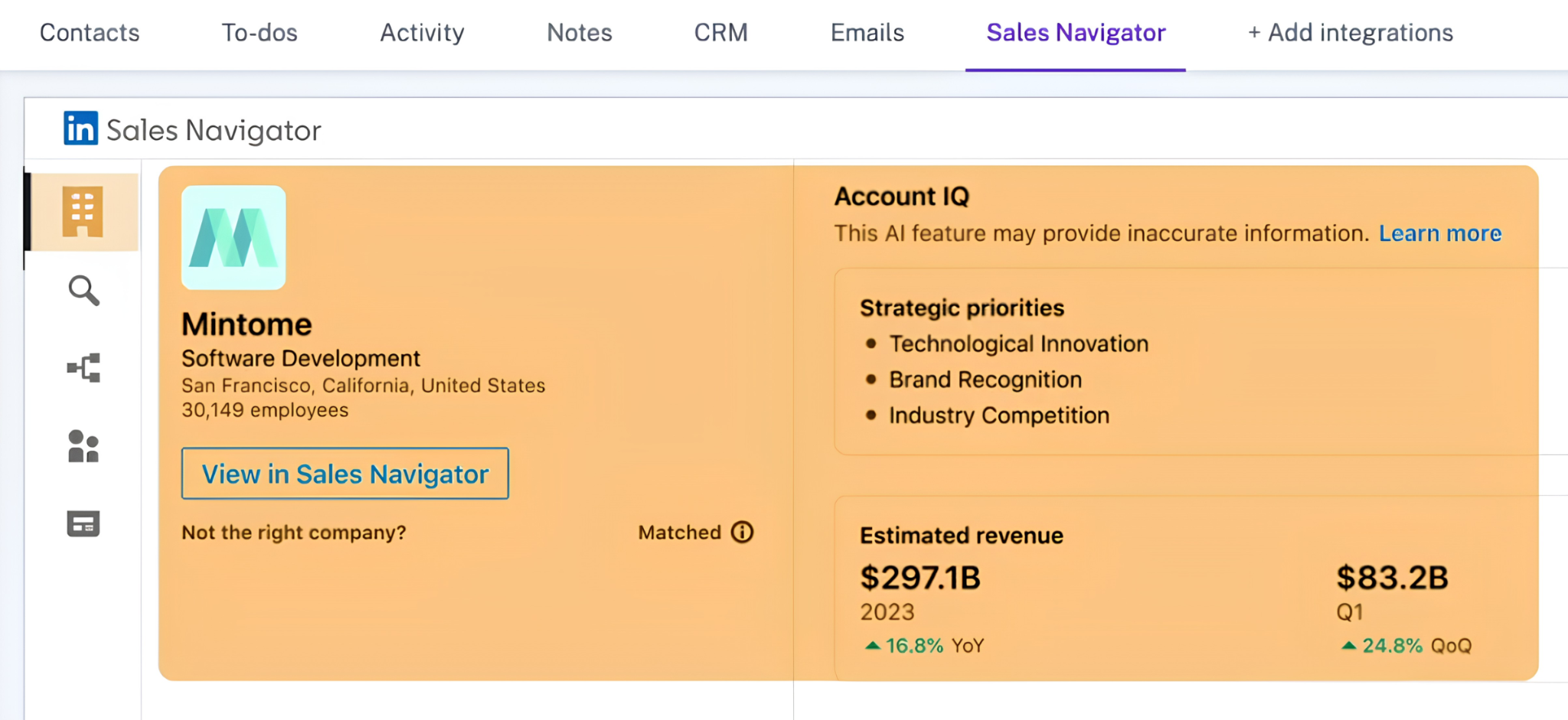
Embedded Sales Navigator experiences inside Salesforce bring Account IQ summaries, Relationship Maps, and lead recommendations into the CRM, so reps can research and engage without switching tabs.
LinkedIn offers a native Salesforce integration on the Advanced Plus plan, available through the Salesforce AppExchange. For teams on lower tiers, limited integration is possible through the SNAP partner ecosystem and custom development, though LinkedIn's closed API program constrains what third-party tools can do. Each method differs in setup complexity, data coverage, sync direction, and cost.
One problem no connection method solves: the sync moves records and activity between systems, but it does not verify, complete, or enrich the underlying contact data.
And that is where ZoomInfo comes in. ZoomInfo integrates natively with Salesforce and offers API and MCP access that feeds verified, enriched contact and company data into any CRM workflow, so the records behind every Sales Navigator interaction are accurate and complete before outreach begins.
This article covers the LinkedIn Sales Navigator and Salesforce integration: which methods are available, what data each one handles, how to set them up, the use cases that justify connecting both platforms, and the limitations to plan for. It also covers how ZoomInfo fits in as a data enrichment layer that strengthens the records flowing between Sales Navigator and Salesforce.
Let's start with an overview of the integration.
Integration Overview
Source: Salesforce
Does a native integration exist?
Yes. LinkedIn offers a native Salesforce integration available through the Salesforce AppExchange. The integration provides CRM Sync (bidirectional data sync), Embedded Experiences (Sales Navigator intelligence inside Salesforce), and Activity Writeback (logging Sales Navigator activity to CRM records). It requires the Advanced Plus plan, a minimum of 10 seats, and custom pricing.
What data can sync?
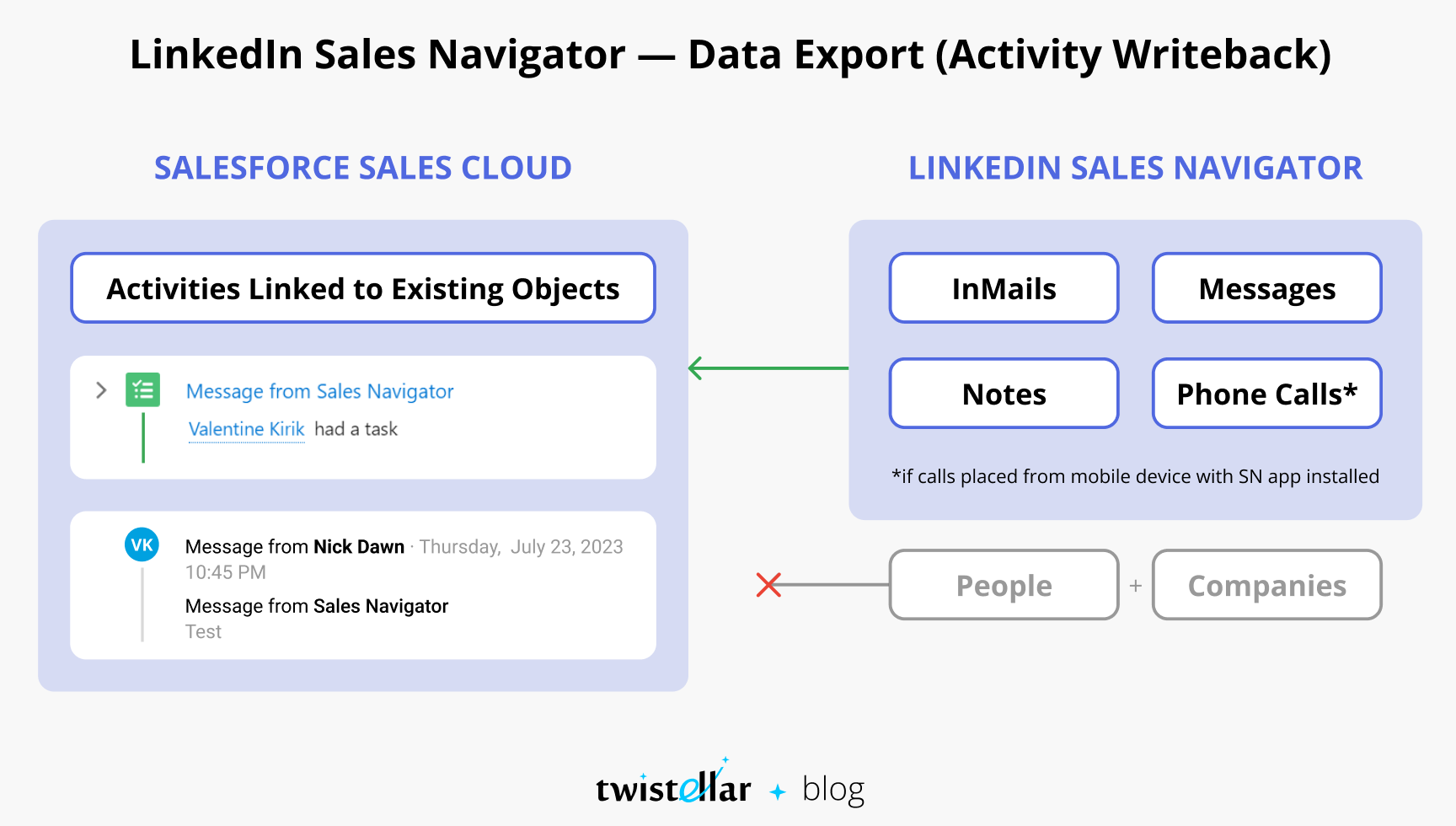
CRM accounts, contacts, and leads sync inbound to Sales Navigator. Outbound, Sales Navigator writes back InMails, messages, call logs, connection requests, notes, and Smart Link views to Salesforce.
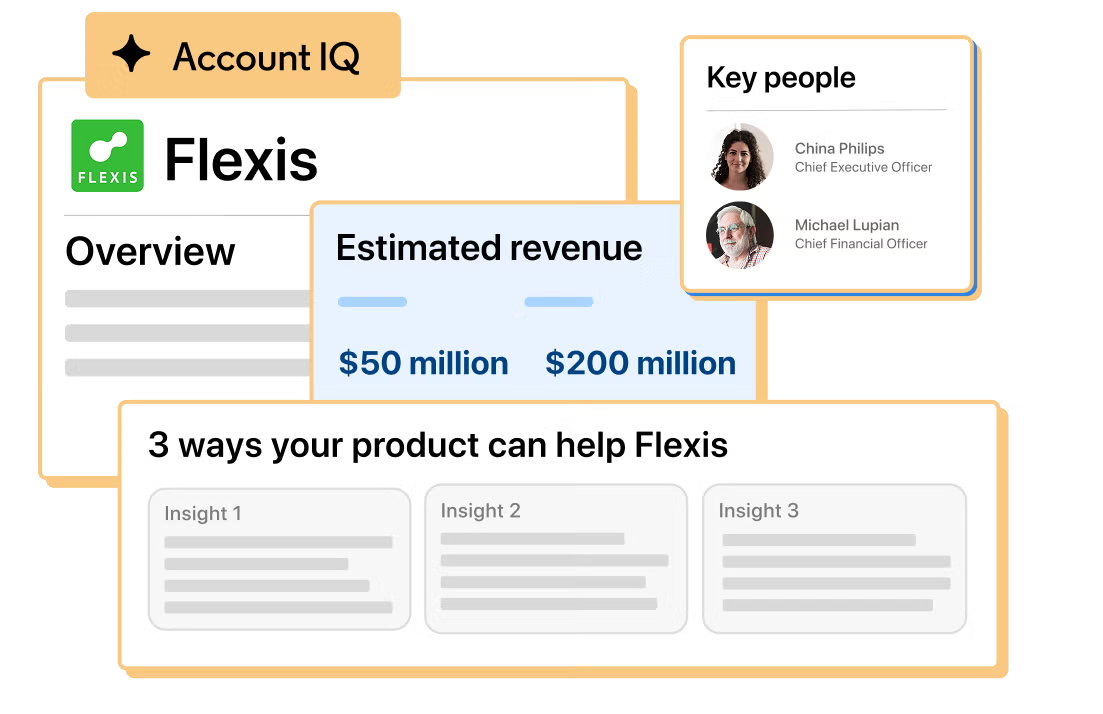
Embedded Experiences surface Account IQ, Find Key People, and Relationship Map within Salesforce records. Data Validation flags CRM contacts who have left their company and surfaces title or location discrepancies.
Is the sync bidirectional?
Yes, on the Advanced Plus plan. CRM Sync runs daily: Salesforce accounts, contacts, and leads import into Sales Navigator automatically, and Sales Navigator activity writes back to Salesforce records. Lower-tier plans (Core, Advanced) do not support CRM Sync.
Is it real-time or batch?
The native CRM Sync runs on a daily batch schedule. Activity Writeback logs events as they occur, in near real-time. Embedded Experiences surface live Sales Navigator data inside Salesforce on demand.
What are the available methods?
Native integration (Advanced Plus only), SNAP partner integrations (Outreach, Salesloft, Gong), and custom development using the Salesforce API alongside Sales Navigator's limited developer surface.
Method | Setup Difficulty | Data Flow | Real-time? | Cost |
|---|---|---|---|---|
Native (Advanced Plus) | Low | Bidirectional | Daily batch sync + near real-time activity writeback | Included with Advanced Plus (custom pricing, 10+ seats) |
SNAP Partner Tools | Medium | Varies by partner | Varies | Requires both platform subscriptions + partner tool cost |
Custom Development | High | Custom | Depends on implementation | Developer time + hosting |
One distinction worth settling upfront: the native integration handles ongoing, bidirectional sync as part of daily sales operations.
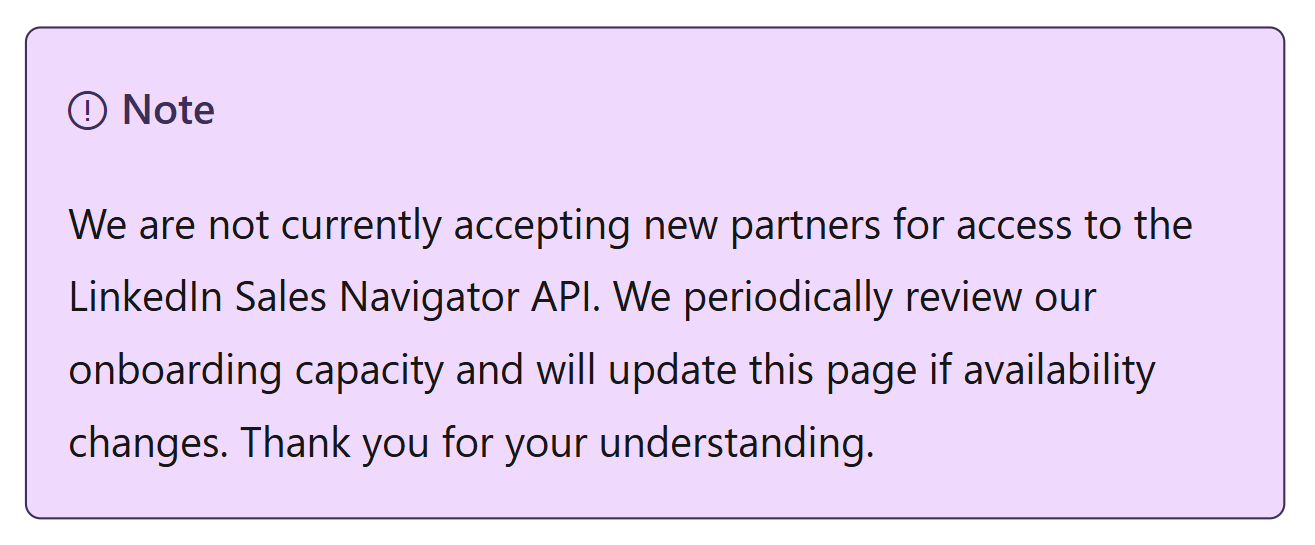
SNAP partner integrations (Outreach, Salesloft) extend Sales Navigator data into sales engagement workflows but do not replicate the CRM Sync or Embedded Experiences. Custom development faces a hard constraint: LinkedIn is not currently accepting new partners for Sales Navigator API access, and no public REST API exists.
Integration Methods
Native LinkedIn Sales Navigator Integration (Advanced Plus Plan)
How it works: LinkedIn's native Salesforce integration, available through the Salesforce AppExchange, connects the two platforms via the Sales Navigator Application Platform (SNAP).
The integration has three layers: CRM Sync (bidirectional data pipeline), Embedded Experiences (Sales Navigator UI inside Salesforce), and Activity Writeback (logging Sales Navigator activity to CRM records). On the Salesforce side, the integration uses Salesforce's REST API and object model; on the LinkedIn side, it uses the closed SNAP framework.
Source: LinkedIn Sales Navigator
What it syncs: Inbound to Sales Navigator: CRM accounts, contacts, and leads for each seat holder are auto-imported into Sales Navigator lists. Outbound to Salesforce: InMails, messages, call logs, connection requests, notes, and Smart Link views write back as logged activities on the corresponding Salesforce records.
Data Validation flags CRM contacts who have left their company and surfaces title or location changes. Champions List identifies past customers from closed-won deals who moved to new companies. Opportunities at Risk alerts when key contacts leave open deals.
Fits: ongoing bidirectional sync of CRM records and Sales Navigator activity; not a migration tool.
Setup process:
Confirm your Sales Navigator contract is on the Advanced Plus plan with a minimum of 10 seats. CRM Sync and Embedded Experiences are not available on Core or Advanced.
Install the LinkedIn Sales Navigator app from the Salesforce AppExchange into your Salesforce org. System Administrator access in Salesforce is required.
In Sales Navigator Admin Settings, navigate to CRM Settings and authenticate with Salesforce using OAuth, granting Sales Navigator permission to read accounts, contacts, and leads and write activity data.
Configure CRM Sync scope: choose which Salesforce records to import (by ownership, territory, or custom rules) and which Sales Navigator activities to write back (InMails, messages, notes, connection requests, Smart Link views).
Enable Embedded Experiences in Salesforce by adding the Sales Navigator Lightning components to Account, Contact, Lead, and Opportunity page layouts. This surfaces Account IQ, Find Key People, and Relationship Map inside Salesforce.
Test with a subset of users. Verify that a Salesforce contact appears in Sales Navigator, send an InMail from Sales Navigator, and confirm the activity writes back to the Salesforce contact record.
Strengths: First-party integration maintained by LinkedIn and distributed through the Salesforce AppExchange. CRM Sync eliminates manual data entry between systems, saving an estimated 65 hours per year per user (15 minutes per day). Embedded Experiences bring Account IQ, Relationship Map, and Find Key People into Salesforce, eliminating tab-switching. Data Validation flags stale contacts.
Source: LinkedIn Sales Navigator
Limitations: Available only on the Advanced Plus plan, which requires custom pricing, an annual contract, and a minimum of 10 seats. CRM Sync runs on a daily batch schedule, not real-time.
Sales Navigator does not create new CRM records from LinkedIn data automatically (it imports existing CRM records into Sales Navigator, not the reverse, with the exception of Lead/Contact Creation, which lets users manually push individual records from Sales Navigator into Salesforce).
LinkedIn member data (profile details, company information) does not export to Salesforce fields; what writes back is activity metadata, not contact data enrichment.
Best for: Enterprise sales teams (10+ seats) committed to both platforms long-term, where Sales Navigator is a core prospecting tool and Salesforce is the system of record. Teams that need sales activity logged automatically across both systems and want Sales Navigator intelligence embedded in their CRM.
SNAP Partner Integrations (Outreach, Salesloft, Gong)
How it works: LinkedIn's Sales Navigator Application Platform (SNAP) lets certified partners embed Sales Navigator profile views, insights, and messaging inside their applications. Partners like Outreach, Salesloft, and Gong use SNAP's Display Services to surface LinkedIn data within their platforms.
Source: LinkedIn Sales Navigator
These integrations supplement (not replace) the native Salesforce integration by extending Sales Navigator into sales engagement and conversation intelligence workflows that feed data into Salesforce.
What it syncs: SNAP Display Services embed Sales Navigator profiles, activity feeds, and messaging inside the partner application. The partner's own Salesforce integration then ensures that engagement data (emails, calls, sequences) logged through the partner tool reaches Salesforce.
Sales Navigator data (LinkedIn profiles, account intelligence) appears in the partner UI but does not transfer as raw data to either the partner or Salesforce through this path.
Fits: ongoing workflow extension; supplements but does not replace the native CRM Sync.
Setup process:
Ensure your Sales Navigator plan is Advanced or Advanced Plus. SNAP partner integrations require at least the Advanced tier for access to TeamLink and Buyer Intent data that partners surface.
Install the partner integration from the partner's marketplace (e.g., Outreach Marketplace, Salesloft Marketplace).
Authenticate your Sales Navigator account within the partner application using OAuth.
Configure which Sales Navigator components appear in the partner UI (profile widgets, activity feeds, messaging).
Ensure the partner application's own Salesforce integration is active so that engagement data logged through the partner reaches your CRM.
Test by viewing a contact in the partner tool and confirming that Sales Navigator data appears alongside CRM data, and that any outreach logged through the partner writes back to Salesforce.
Strengths: Puts Sales Navigator intelligence into the workflow where reps already spend their time (sequencing, call preparation, deal review). Sales engagement platforms like Outreach and Salesloft handle the Salesforce activity sync, so engagement data reaches the CRM automatically. No engineering effort beyond enabling the partner integration.
Limitations: SNAP partner access is a closed, certification-required program. LinkedIn is not currently accepting new SNAP partners, so the available partner integrations are fixed. These integrations display Sales Navigator data in the partner UI but do not export LinkedIn member data to the partner's database or to Salesforce. The depth of Sales Navigator features available varies by partner.
Best for: Teams already using a sales engagement platform (Outreach, Salesloft) or conversation intelligence tool (Gong) alongside Sales Navigator and Salesforce, who want Sales Navigator data visible in their workflow tool without replacing the native CRM integration.
Custom Development
How it works: Salesforce provides REST, SOAP, and Bulk APIs that support reading and writing any standard or custom object, plus Platform Events and Change Data Capture for event-driven sync.
LinkedIn Sales Navigator's developer surface is far more constrained: API access is exclusive to the closed SNAP partner program, and LinkedIn is not currently accepting new partners. There is no public REST API for Sales Navigator, and no data export to CSV/XLS. A custom integration therefore works primarily on the Salesforce side, using Salesforce's API to structure and route data, while relying on the native SNAP integration (or manual processes) for the LinkedIn side.
Source: LinkedIn Sales Navigator
What it syncs: On the Salesforce side, anything the APIs expose. On the Sales Navigator side, only what the native SNAP integration delivers (CRM Sync inbound, Activity Writeback outbound, Embedded Experiences).
Custom development can add logic on top of the data that arrives in Salesforce (routing, scoring, deduplication, transformation) but cannot pull additional data from Sales Navigator beyond what the SNAP integration provides.
Fits: extending the native integration with Salesforce-side automation; not a standalone alternative to the native connector.
Setup process:
Ensure the native Sales Navigator integration is active (Advanced Plus plan required for CRM Sync and Activity Writeback, which provide the data that custom logic processes).
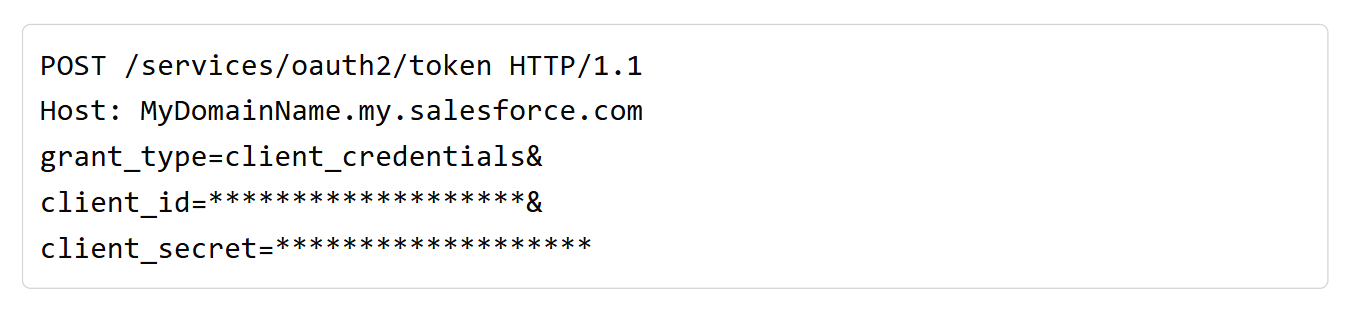
Create a Salesforce Connected App with OAuth 2.0 credentials for API access. The Client Credentials Flow is recommended for server-to-server integrations.
Build server-side logic that monitors Salesforce for Sales Navigator activity records (InMails, messages, Smart Link views) and applies business rules: routing leads based on engagement patterns, scoring contacts by LinkedIn interaction frequency, or triggering alerts when Data Validation flags a departed contact.
Use Salesforce Platform Events or Change Data Capture to subscribe to record changes in near real-time, enabling event-driven workflows rather than polling.
Deploy, monitor, and maintain. Salesforce versions its API with each seasonal release (the current version is Summer '26, API version 67.0), requiring periodic review.
Source: Salesforce
Strengths: Full control over how Sales Navigator activity data in Salesforce is routed, scored, and acted on. Can enforce business rules the native integration does not support (e.g., auto-escalating leads who view a Smart Link three times within a week). Salesforce's API surface covers any CRM object.
Limitations: Cannot pull data from Sales Navigator beyond what the native SNAP integration provides. LinkedIn's closed API program means no direct programmatic access to Sales Navigator data. The custom work adds logic on the Salesforce side, not a bridge to new LinkedIn data. Requires development resources to build and maintain.
Best for: Enterprise teams that already have the native Advanced Plus integration active and need Salesforce-side automation on top of the data it delivers: custom routing rules, engagement scoring based on Sales Navigator activity patterns, or workflow triggers that the native integration does not support.
Key Use Cases
1. Prospect Research Without Leaving Salesforce
An account executive preparing for a call opens the Salesforce Account record and sees the Sales Navigator Account IQ summary in the CRM: strategic priorities, recent leadership changes, and financial context.
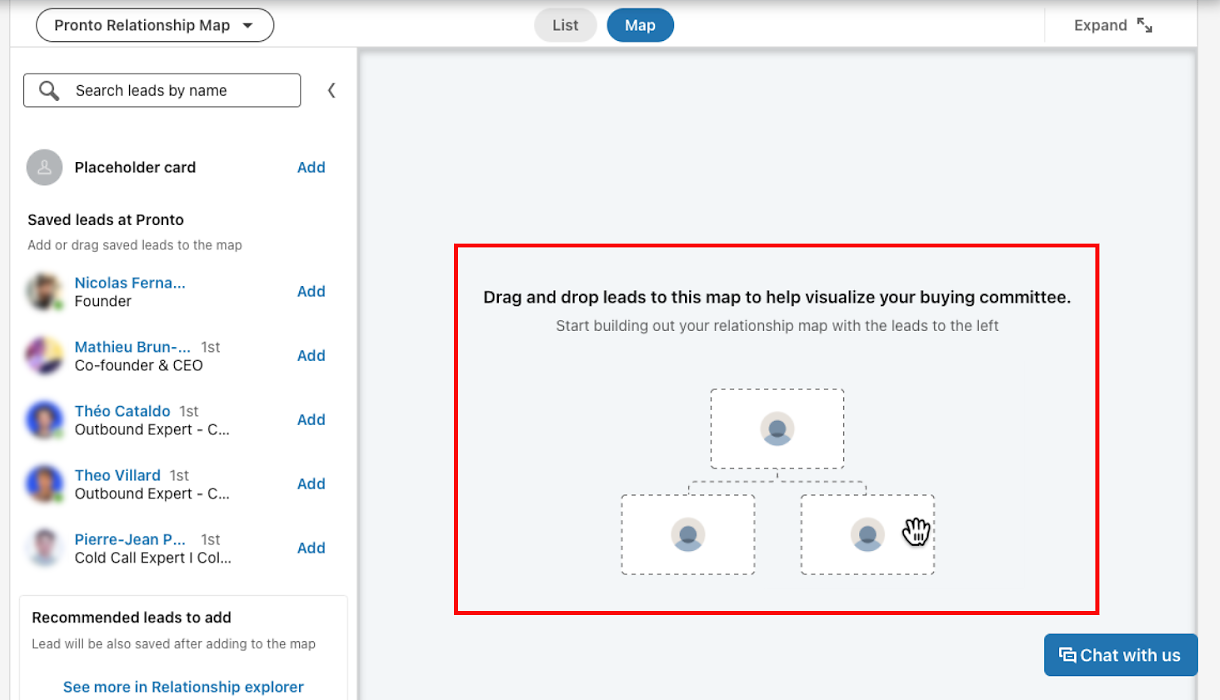
Relationship Map shows the buying committee with role assignments. Find Key People surfaces stakeholders the rep has not yet engaged. The rep researches, drafts talking points, and enters the call without switching applications.
Source: LinkedIn Sales Navigator
Best integration method: Native integration (Advanced Plus), specifically Embedded Experiences.
2. Activity Logging for Complete Pipeline Visibility
SDRs run outbound prospecting through Sales Navigator InMail and connection requests. The native integration's Activity Writeback logs every InMail, message, and connection request to the corresponding Salesforce Lead or Contact record. Sales managers see the full outreach picture (emails, calls, LinkedIn touches) in Salesforce reports and dashboards without reps manually logging Sales Navigator activity.
Best integration method: Native integration (Advanced Plus), specifically CRM Sync with Activity Writeback.
3. Champion Tracking Across Job Changes
A closed-won deal's primary champion leaves the company. The native integration's Champions List detects the move using LinkedIn profile data and surfaces the champion's new company as a potential account. At the same time, Opportunities at Risk alerts the account team that a key contact has left an active deal, prompting them to re-engage the account and find a new internal sponsor.
Best integration method: Native integration (Advanced Plus), specifically Champions List and Opportunities at Risk.
4. Multi-Threaded Account Engagement
An AE targeting a large enterprise account uses the Relationship Map embedded in the Salesforce Account record to identify gaps in the buying committee. Where only two contacts are tracked in Salesforce, the Relationship Map reveals five additional stakeholders with influence over the decision.
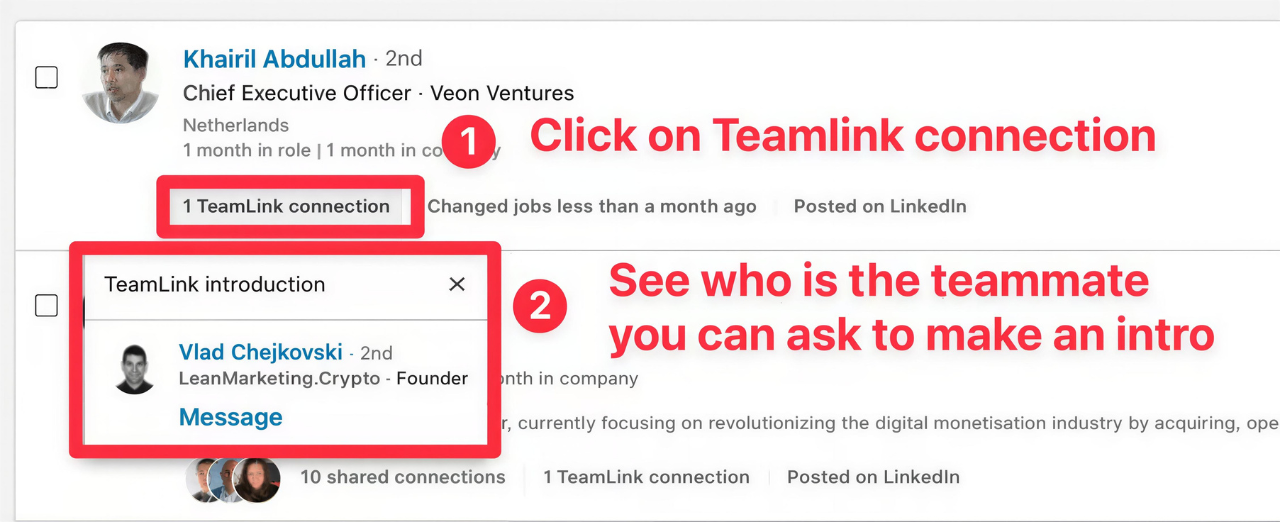
The AE uses TeamLink to find warm introduction paths through colleagues' networks and sends personalized InMails to expand the thread, with all activity writing back to the Salesforce opportunity.
Source: LinkedIn Sales Navigator
Best integration method: Native integration (Advanced Plus), specifically Embedded Experiences and TeamLink.
5. CRM Data Hygiene via LinkedIn Validation
RevOps runs a quarterly data quality review. Sales Navigator's Data Validation has already flagged 200 Salesforce contacts whose LinkedIn profiles show they have left their companies. It surfaces title and location discrepancies for another 150 records.
The RevOps team uses these flags to prioritize which records need updating, archiving departed contacts and correcting stale titles without manually checking each profile.
Best integration method: Native integration (Advanced Plus), specifically Data Validation.
Limitations and Considerations
Plan Gating on Advanced Plus
The most valuable integration capabilities (CRM Sync, Activity Writeback, Embedded Experiences, Data Validation, Champions List, Opportunities at Risk) require Sales Navigator's Advanced Plus plan. Advanced Plus requires custom pricing, an annual contract, and a minimum of 10 seats.
Teams on Core ($119.99/month per seat) or Advanced ($159.99/month per seat) cannot access the native Salesforce integration's core features. This creates a real cost barrier for smaller teams.
Daily Batch Sync, Not Real-Time
CRM Sync operates on a daily batch schedule. A contact added to Salesforce in the morning does not appear in Sales Navigator until the next sync cycle.
For teams that need records available right after creation, this lag creates a window where reps may be working in Sales Navigator without seeing their newest CRM data. Activity Writeback operates in near real-time, but the inbound CRM-to-Sales Navigator sync does not.
LinkedIn Data Does Not Enrich Salesforce Records
A common misconception: the native integration does not push LinkedIn profile data (job titles, company details, contact information) into Salesforce fields. LinkedIn member data stays inside Sales Navigator and the Embedded Experiences layer.
What writes back to Salesforce is activity metadata (InMail sent, message received, Smart Link viewed), not verified contact details. Reps can see LinkedIn data through Embedded Experiences in Salesforce, but the data does not populate CRM fields for reporting, routing, or automation.
No Public API for Sales Navigator
LinkedIn is not currently accepting new partners for Sales Navigator API access. The SNAP program is closed to new entrants, and no public REST API exists. Data export to CSV/XLS is not available.
Third-party automation tools like Zapier and Make cannot build Sales Navigator connectors, and custom integrations cannot access Sales Navigator data programmatically. The native integration is the only direct path between the two platforms.
Permissions and Access
Setting up the native integration requires admin rights on both sides. In Salesforce, System Administrator access is required to install the AppExchange package and configure API-enabled profiles.
In Sales Navigator, Admin-level access is needed to configure CRM Settings and authorize the Salesforce connection. Salesforce orgs using field-level security or sharing rules must ensure the integration user's profile has access to every object and field where activity data will be stored.
Maintenance
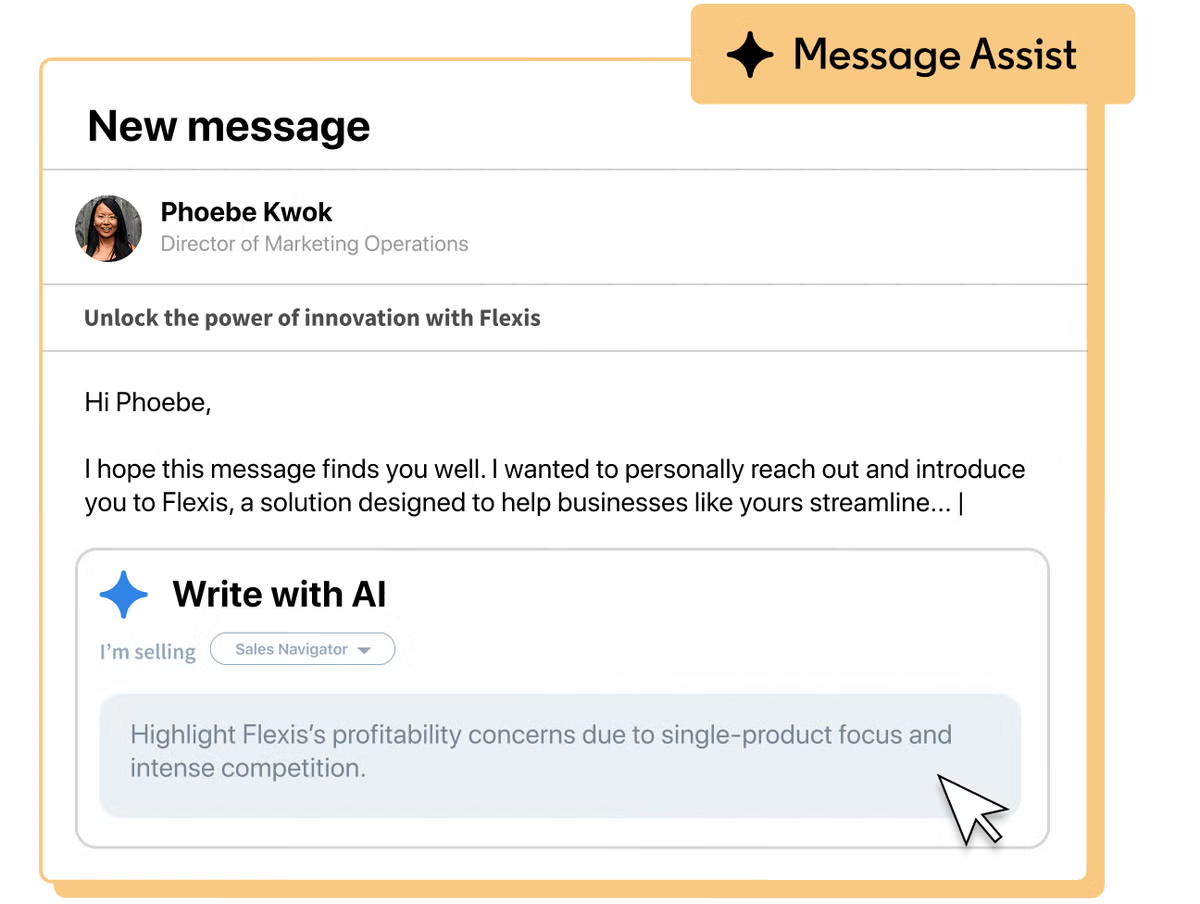
Both platforms evolve independently. LinkedIn updates Sales Navigator features on a rolling basis (the October 2024 AI capabilities launch and the Sales Assistant beta are recent examples).
Source: LinkedIn Sales Navigator
Salesforce versions its API with each seasonal release. Changes on either side can affect how Embedded Experiences render, which activity types write back, or how CRM Sync handles new object types. Review the integration's health periodically, especially after major product updates on either platform.
What No Method Fixes: The Data Itself
Every method above moves records and activity between Sales Navigator and Salesforce. None of them checks whether the underlying contact data is accurate, complete, or current.
A Salesforce contact with a dead phone number syncs into Sales Navigator as a lead with a dead phone number. A contact record missing company data, direct dial, or verified email travels just as reliably as a clean one. The integration keeps both systems aligned; it does not make them right.
Where ZoomInfo Fits In
Every method in this guide moves data between LinkedIn Sales Navigator and Salesforce. None of them improves the data being moved. When the integration is live but pipeline data is still incomplete (outdated direct dials, missing verified emails, stale company details, incomplete company context), the bottleneck is no longer the connector. That is the gap ZoomInfo closes.
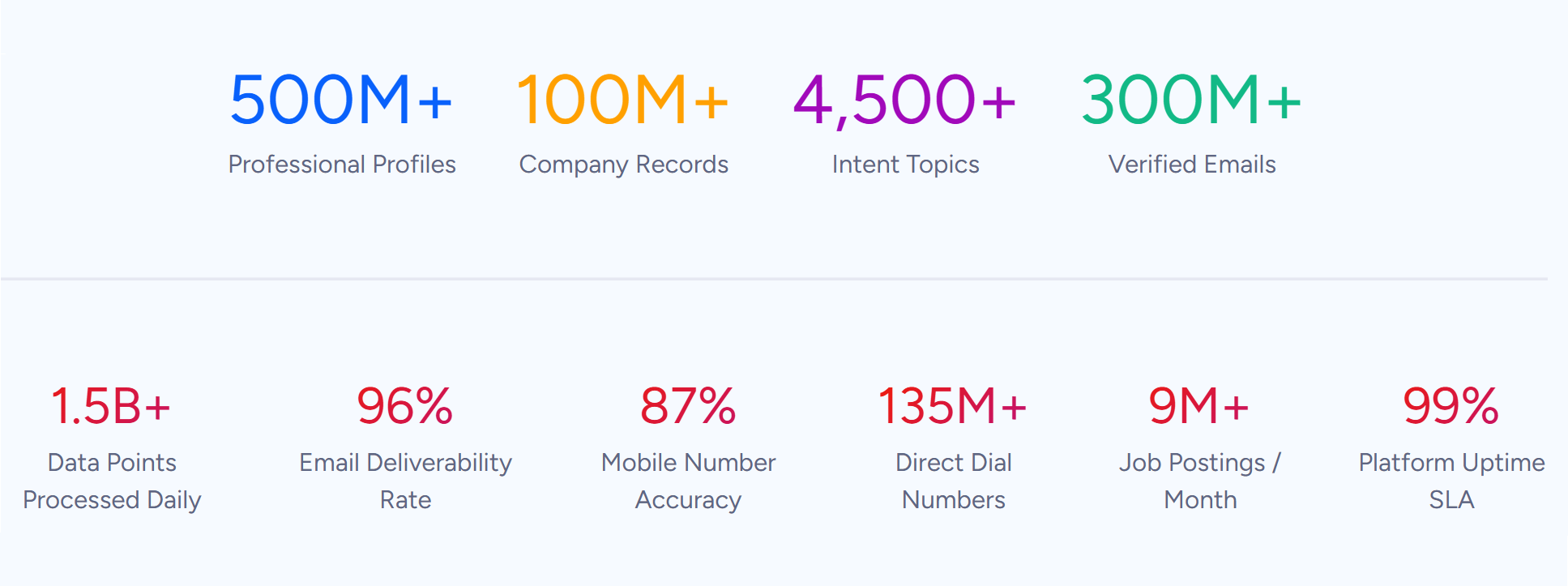
ZoomInfo is a B2B data and go-to-market platform covering 500M contacts, 100M companies, 135M+ verified phone numbers, and 200M+ verified business emails.
Source: ZoomInfo
That data is verified through a multi-source pipeline backed by 300+ human researchers, reaching up to 95% accuracy on first-party data. For teams running a Sales Navigator and Salesforce integration, ZoomInfo addresses the data quality layer that no connector handles.
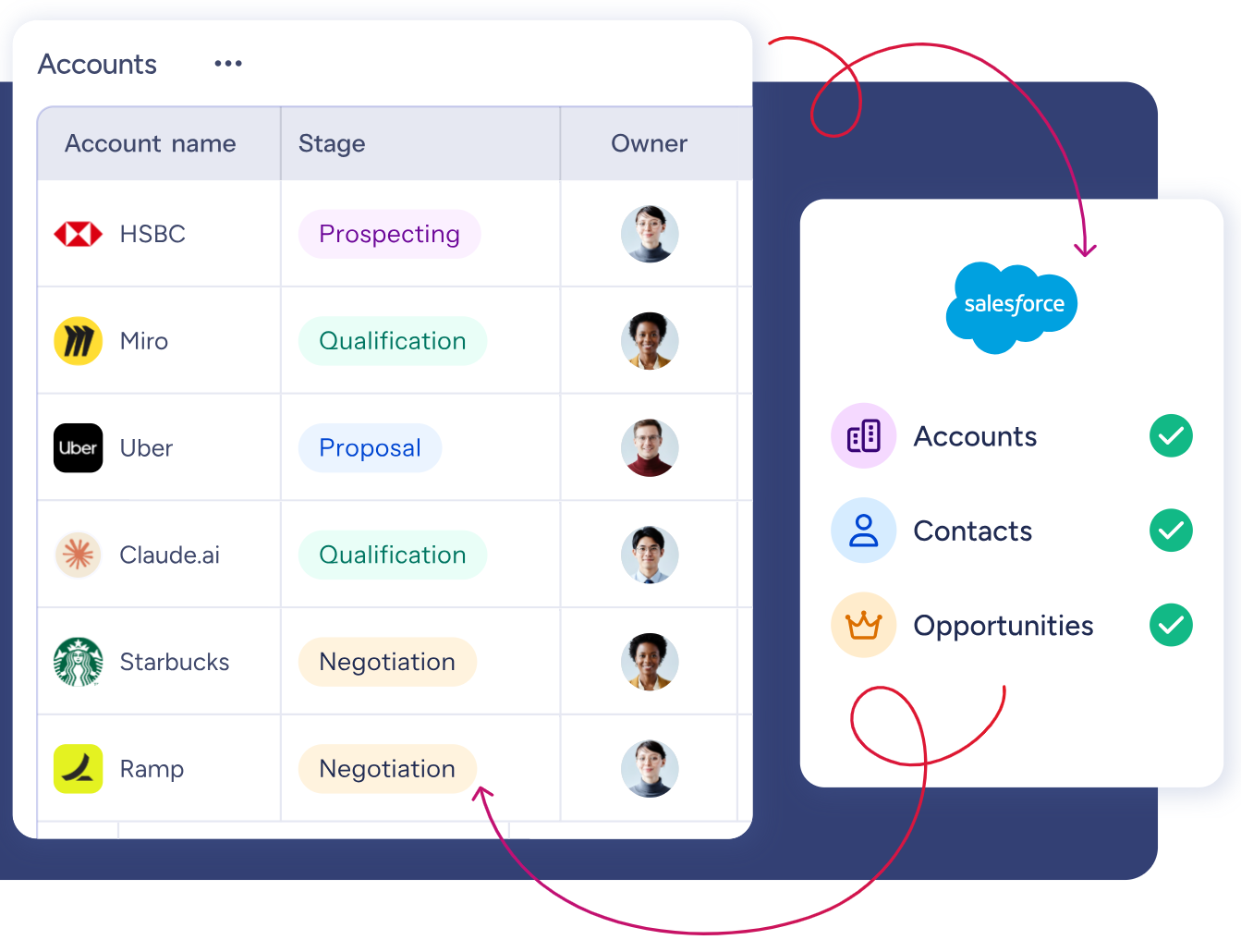
ZoomInfo integrates natively with Salesforce through its marketplace, providing CRM enrichment, lead routing, and real-time data updates inside Salesforce records.
Source: ZoomInfo
Before a rep opens the Sales Navigator Embedded Experience on a Salesforce account, ZoomInfo ensures the underlying CRM record has verified business emails (so outreach reaches real inboxes), accurate direct-dial phone numbers (so calls connect), current titles and org chart data (so messaging targets the right stakeholder), and complete company profiles (so territory assignment and routing rules work correctly).
The same data feeds ZoomInfo's GTM Context Graph, which processes 1.5B + data points daily and unifies third-party intelligence with CRM records, conversation transcripts, and behavioral signals to surface not just what happened in a deal, but why.
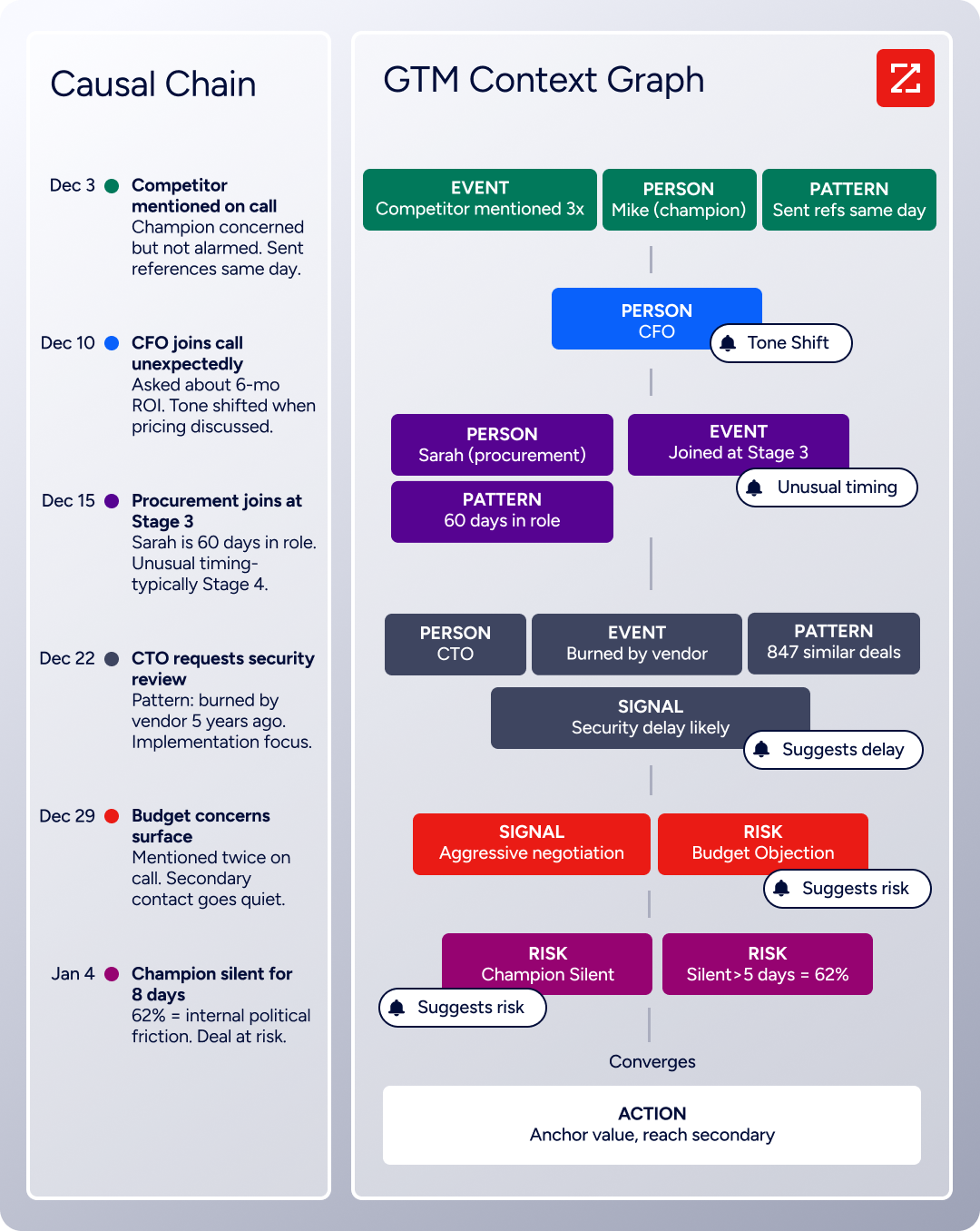
Source: ZoomInfo
In practice, a team running both Sales Navigator and Salesforce can use ZoomInfo to enrich Salesforce records continuously, then let the native Sales Navigator integration sync those enriched records into Sales Navigator.
The result: Sales Navigator's prospecting filters and Buyer Intent signals operate on verified, complete records, and the activity data that writes back to Salesforce attaches to contacts with accurate information.
Buyer Intent data from ZoomInfo, tracking signals from 210 million IP-to-Organization pairings, complements Sales Navigator's own 180+ intent signals by adding off-LinkedIn research activity that Sales Navigator's platform-native signals do not capture.
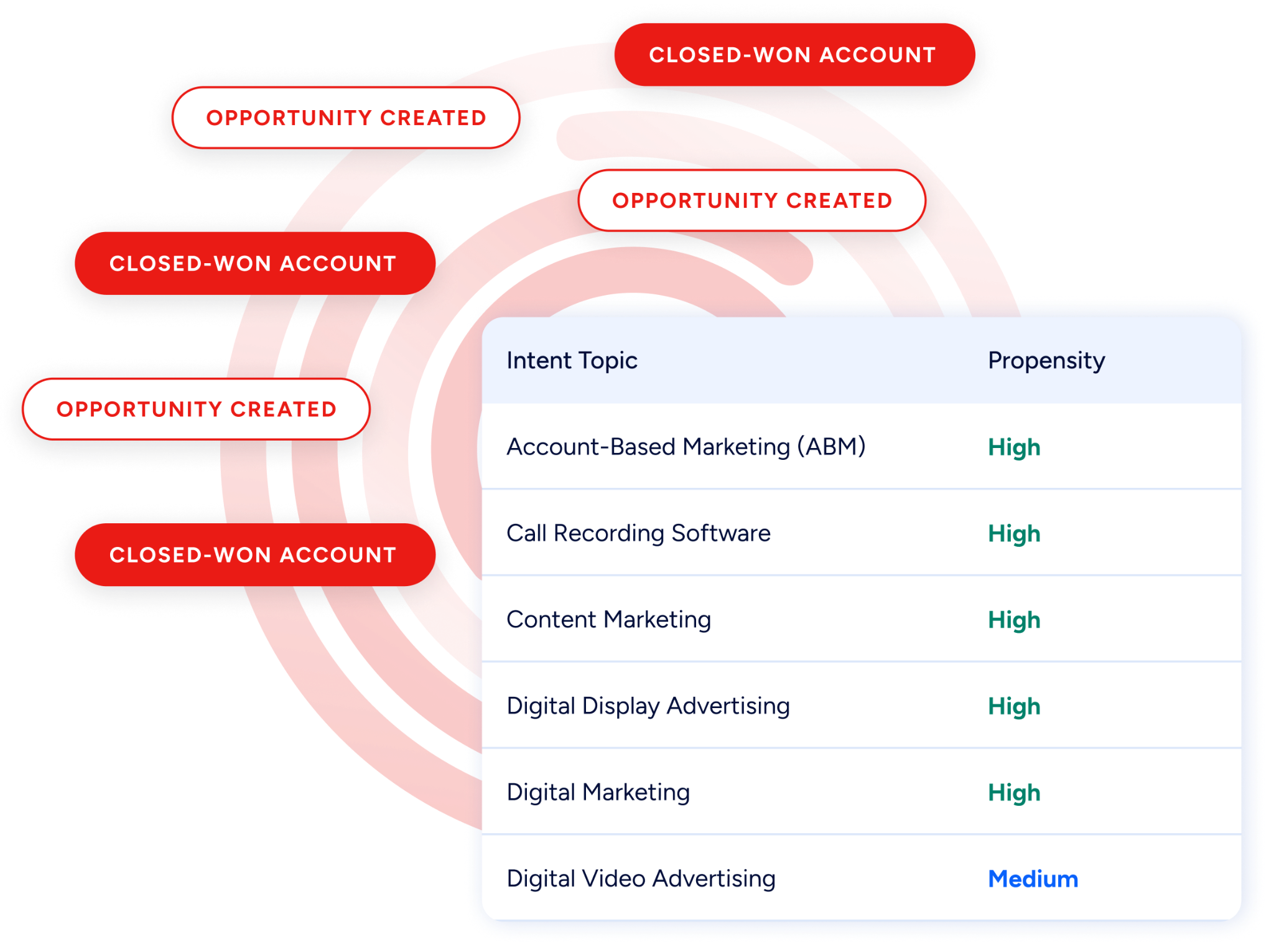
Source: ZoomInfo
Enriched records also make the Sales Navigator integration more valuable. Data Validation flags become more actionable when the CRM records being validated were accurate to begin with. Champions List and Opportunities at Risk alerts attach to contacts with verified direct dials and emails, so the rep can act immediately instead of researching how to reach the person.
And for teams using ZoomInfo's API or MCP access, the same verified data can feed any custom workflow or AI agent, extending intelligence beyond what either Sales Navigator or Salesforce offers natively.
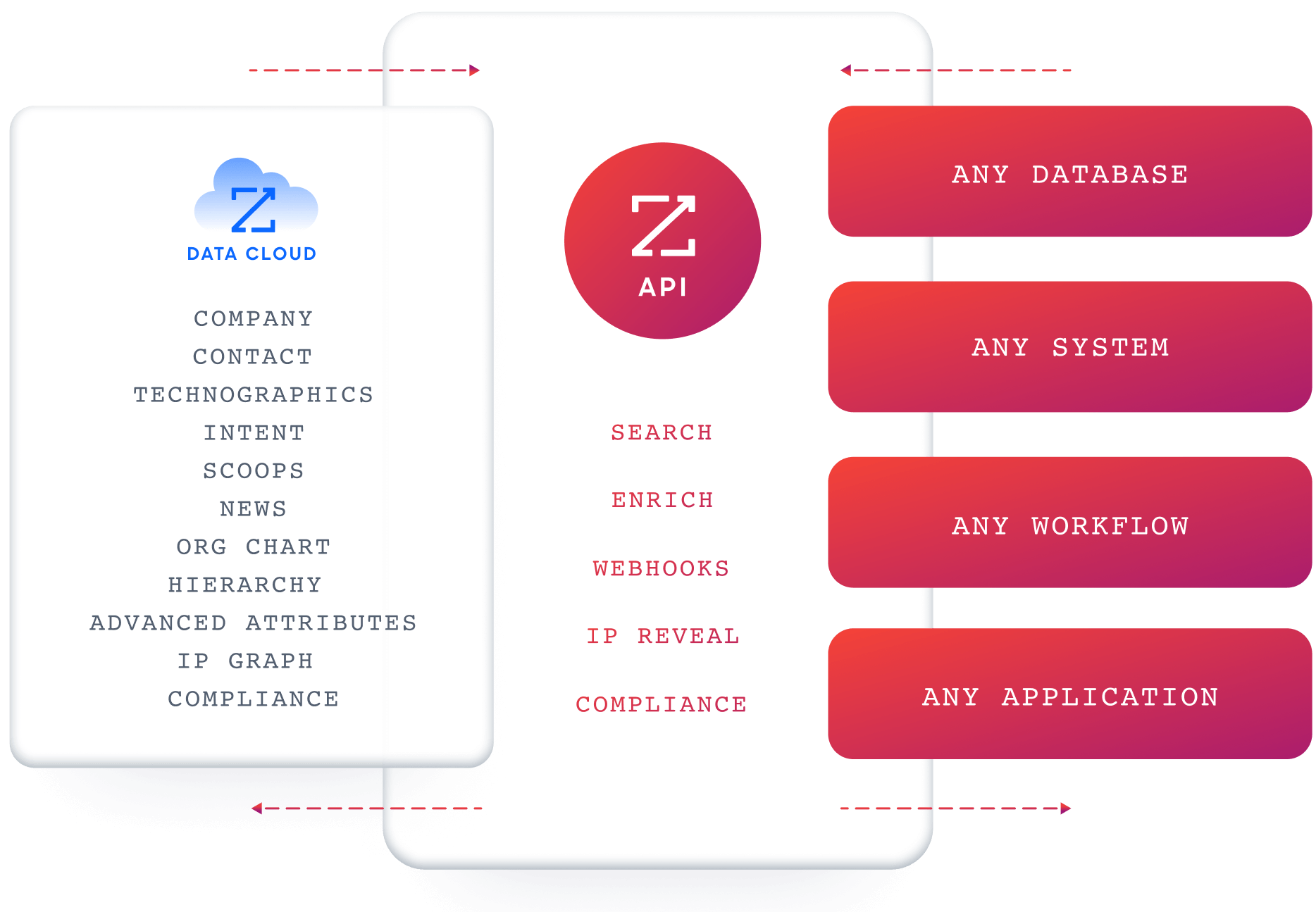
Source: ZoomInfo
Seismic's sales team attributed 39% of active pipeline to opportunities identified or influenced by ZoomInfo signals, while boosting productivity by 54% and saving 11.5 hours per week. (Seismic)
For a direct comparison of LinkedIn Sales Navigator and ZoomInfo as prospecting platforms, see our LinkedIn Sales Navigator vs. ZoomInfo breakdown.
Final Verdict
A native integration between LinkedIn Sales Navigator and Salesforce exists, but it is gated behind Sales Navigator's Advanced Plus plan (10+ seats, custom pricing, annual contract).
Teams on lower tiers have limited options: SNAP partner tools extend Sales Navigator into engagement platforms, and custom development can add logic on the Salesforce side, but neither replicates the CRM Sync, Embedded Experiences, or Activity Writeback that the native integration provides. For most teams, the right choice depends on plan tier and how central Sales Navigator is to daily sales workflow.
Sales teams on Advanced Plus that use Sales Navigator as a core prospecting tool should activate the native Salesforce integration. It is the only method that delivers bidirectional CRM Sync, Activity Writeback, Embedded Experiences, Data Validation, and Champion Tracking, and it requires no third-party tool or engineering resources.
Teams on Advanced plans that use a sales engagement platform (Outreach, Salesloft) should enable the SNAP partner integration for their engagement tool. This brings Sales Navigator data into the workflow where reps sequence and call, with the engagement platform handling the Salesforce sync.
Organizations that need custom routing, scoring, or automation based on Sales Navigator activity data should build on the Salesforce API side, using the native integration as the data pipeline and adding business logic on top. This path requires development resources and does not expand the data available from Sales Navigator.
Before investing in the integration, clarify what role Sales Navigator plays in the sales process.
If Sales Navigator is a prospecting tool used by a subset of the team, the cost of Advanced Plus (10+ seats at custom enterprise pricing) may not justify the integration for every seat. If Sales Navigator is embedded in the daily workflow of the entire sales org, the native integration pays back quickly in reduced context-switching and complete activity visibility.
Either way, the quality of the contact data in Salesforce determines whether the integration delivers value or just syncs incomplete records faster.
ZoomInfo, with its native Salesforce integration and API and MCP access, is the data enrichment layer that ensures both systems carry verified, complete records while the connector keeps them aligned.
FAQ
Does LinkedIn Sales Navigator integrate natively with Salesforce?
Yes, but only on the Advanced Plus plan. The native integration, available through the Salesforce AppExchange, provides CRM Sync (daily bidirectional data sync), Activity Writeback (InMails, messages, notes, Smart Link views logged to Salesforce records), and Embedded Experiences (Account IQ, Relationship Map, Find Key People inside Salesforce).
Advanced Plus requires a minimum of 10 seats and custom pricing through LinkedIn's sales team. Teams on Core or Advanced plans cannot access CRM Sync or Embedded Experiences.
Can I connect Sales Navigator and Salesforce without an Advanced Plus plan?
Not with the same depth. Core and Advanced plans do not support CRM Sync, Activity Writeback, or Embedded Experiences.
Teams on these plans can use Sales Navigator's browser-based interface alongside Salesforce, and they can enable SNAP partner integrations (Outreach, Salesloft, Gong) that surface Sales Navigator data in workflow tools. But the direct Sales Navigator-to-Salesforce data pipeline requires Advanced Plus.
Does the integration push LinkedIn contact data into Salesforce fields?
No. The native integration does not populate Salesforce fields with LinkedIn profile data (job titles, company names, contact information). What writes back to Salesforce is activity metadata: InMails sent, messages received, connection requests, Smart Link views.
LinkedIn member data is visible through Embedded Experiences inside Salesforce, but it does not transfer into CRM fields for use in reports, routing rules, or automation.
What Salesforce permissions are needed to set up the integration?
System Administrator access in Salesforce is required to install the Sales Navigator app from the AppExchange and configure the OAuth connection.
If your Salesforce org uses field-level security or sharing rules, the integration user's profile must have write access to every object and field where Sales Navigator activity data will be stored. On the Sales Navigator side, Admin-level access is needed to configure CRM Settings.
Can I use Zapier or Make to connect Sales Navigator with Salesforce?
No. LinkedIn Sales Navigator does not have connectors available through Zapier, Make, or other general-purpose automation platforms. The SNAP partner program (which enables third-party integrations) is a closed, certification-required platform, and LinkedIn is not currently accepting new partners.
The available integration paths are the native Advanced Plus integration, existing SNAP partner tools, and custom development on the Salesforce side.
How does ZoomInfo improve a Sales Navigator-Salesforce integration?
ZoomInfo solves the data quality problem that no connector addresses. The Sales Navigator integration syncs records between the two platforms, but it does not verify, complete, or enrich the underlying contact data.
ZoomInfo's native Salesforce integration enriches CRM records with verified business emails, direct-dial phone numbers, company data, technographic profiles, and intent signals. Those enriched records then sync into Sales Navigator via the native integration, so reps prospect and engage against verified data rather than stale or incomplete records.
Does Sales Navigator offer a public API for custom integrations?
No. Sales Navigator API access is exclusive to the closed SNAP partner program, and LinkedIn is not currently accepting new partners. There is no public REST API, no data export to CSV/XLS (data portability is only through CRM Sync on Advanced Plus), and no webhook capability documented in public sources.
Custom development for this integration operates primarily on the Salesforce API side, adding logic on top of data delivered by the native SNAP integration.
Is the Sales Navigator-Salesforce sync real-time?
Not entirely. CRM Sync (importing Salesforce records into Sales Navigator) runs on a daily batch schedule. Activity Writeback (logging Sales Navigator activity to Salesforce) operates in near real-time. Embedded Experiences display live Sales Navigator data inside Salesforce on demand. Teams that need immediate record availability in Sales Navigator after CRM creation should plan for up to a 24-hour delay.
Build out your Salesforce stack:
