

Teams that run HubSpot as their CRM and Snowflake as their data warehouse usually hit the same problems within a quarter:
contact and deal records accumulate in HubSpot while the analytics team works from a separate copy in Snowflake, and neither version stays current,
marketing attribution models in Snowflake rely on CRM data that was already stale when it arrived,
and someone on the revenue team is building a dashboard from yesterday's pipeline snapshot while reps close deals in real time.
However the two platforms ended up coexisting (a data team that adopted Snowflake for analytics, a marketing org that standardized on HubSpot, or both growing independently until someone asked "why don't these numbers match?"), the longer they run without a connection, the wider the gap between operational CRM data and analytical truth.
Connecting HubSpot and Snowflake eliminates that gap.
CRM records (contacts, companies, deals, tickets, activities) flow into Snowflake so data teams can build attribution models, health scores, and revenue forecasts on live pipeline data rather than stale exports. Segments and propensity scores built in Snowflake can flow back into HubSpot so marketing and sales teams act on warehouse-level intelligence without leaving the CRM.
HubSpot offers a native Snowflake Data Share connector that uses Snowflake's Secure Data Sharing to grant read-only access to HubSpot data without copying it between accounts. For teams that need bidirectional sync or finer control, third-party ETL/ELT tools, iPaaS platforms like Zapier and Make, and custom API development offer alternatives. Each method differs in setup complexity, sync direction, data coverage, and cost.
One problem no connection method solves: the sync moves CRM records into the warehouse, but it does not verify whether those records are accurate, complete, or current before they arrive.
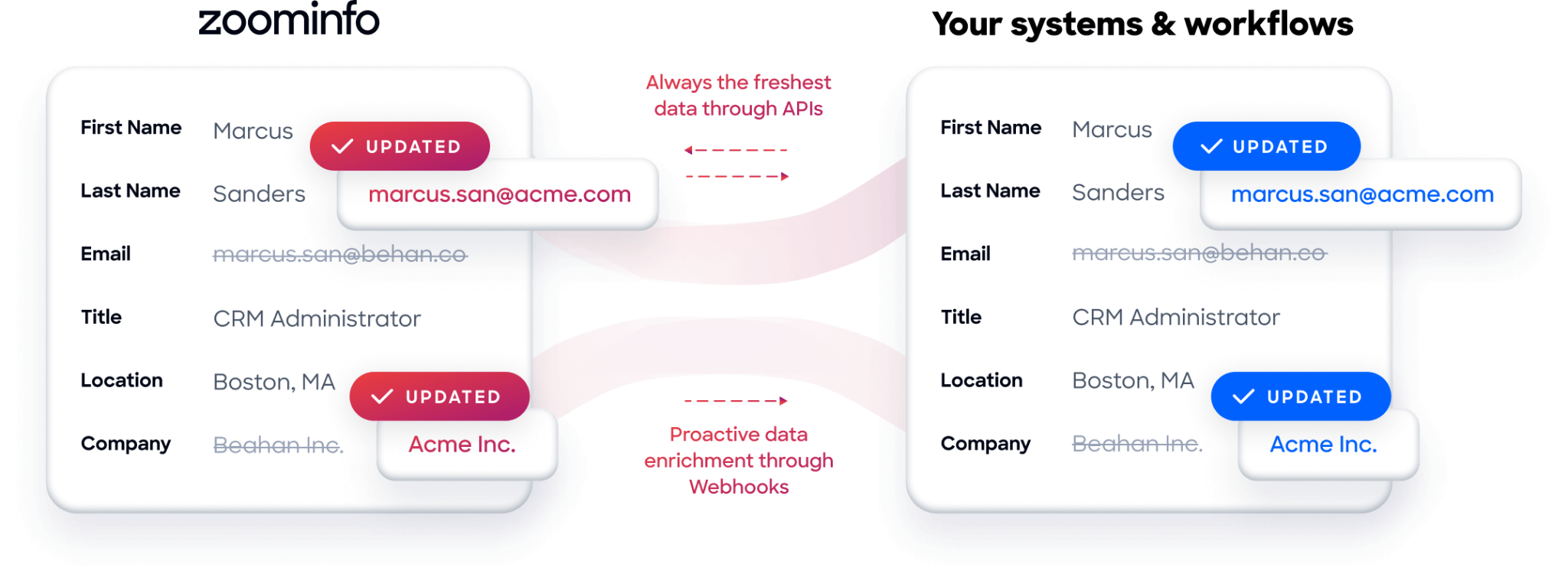
And that is where ZoomInfo comes in. ZoomInfo integrates natively with both HubSpot and Snowflake, and offers API and MCP access that can feed verified, enriched B2B data into either platform, so the records flowing between HubSpot and Snowflake are accurate and complete before they reach the warehouse or the CRM.
This article covers the full landscape of the HubSpot-Snowflake integration: which methods are available, what data each one handles, how to set them up, the use cases that justify connecting both platforms, and the limitations to plan for. It also covers how ZoomInfo fits in as a data enrichment layer for both platforms.
Let's start with an overview of the integration.
Integration Overview
Source: HubSpot
Does a native integration exist?
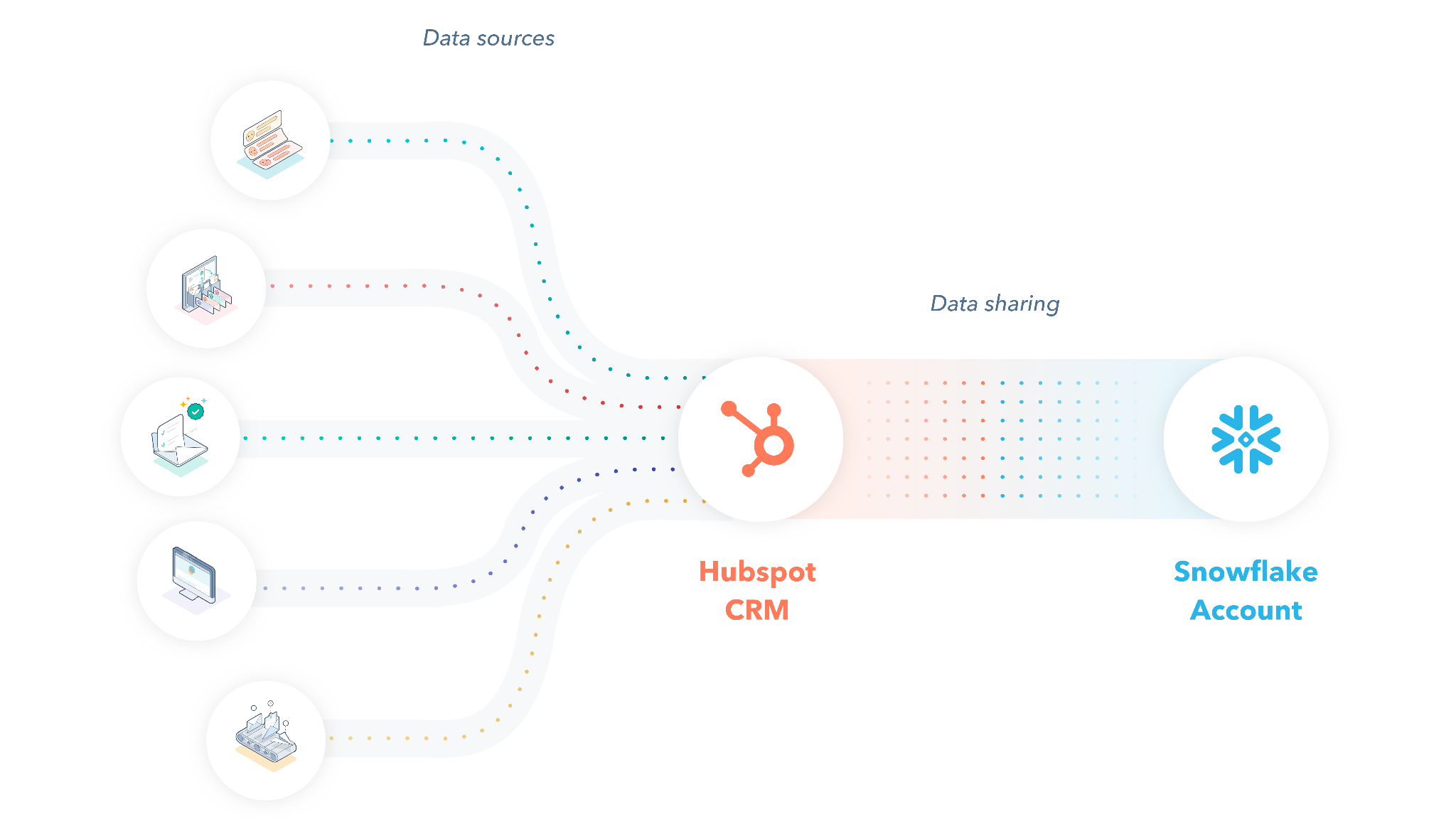
Yes. HubSpot offers a native Snowflake Data Share integration that uses Snowflake's Secure Data Sharing. It grants read-only access to HubSpot CRM data inside a customer's Snowflake account, without copying or moving data between systems. The integration is available through the HubSpot Marketplace and requires HubSpot Operations Hub Enterprise or Data Hub Enterprise.
What data can sync?
Through the native Data Share, HubSpot exposes CRM objects including contacts, companies, deals, tickets, and associated activities. Third-party ETL/ELT tools can sync a broader range of HubSpot objects (marketing emails, workflows, form submissions, custom objects) into Snowflake and, in some configurations, push Snowflake query results back into HubSpot. Custom API integrations can access anything both platforms expose.
Is the sync bidirectional?
The native Data Share is one-directional: HubSpot to Snowflake (read-only). To push data from Snowflake back into HubSpot (enriched segments, propensity scores, warehouse-computed fields), teams need a third-party tool or custom API integration.
Is it real-time or batch?
The native Data Share provides near real-time access to HubSpot data as it exists in the shared dataset. HubSpot refreshes the shared data on a regular cadence. Third-party ETL/ELT tools sync on configurable schedules (every 5 minutes to daily). Custom API integrations can approach real-time through HubSpot webhooks combined with Snowflake's Snowpipe for continuous ingestion.
What are the available methods?
Native HubSpot Data Share (via Snowflake Secure Data Sharing), third-party ETL/ELT tools (Fivetran, Airbyte, Estuary, Hevo), iPaaS automation (Zapier, Make), and custom API development using HubSpot's REST API and Snowflake's SQL API or Snowpipe.
Method | Setup Difficulty | Data Flow | Real-time? | Cost |
|---|---|---|---|---|
Native Data Share | Low | HubSpot to Snowflake (read-only) | Near real-time | Included with HubSpot Data Hub/Ops Hub Enterprise |
ETL/ELT (Fivetran, Airbyte) | Medium | Configurable per pipeline | Scheduled (5 min+) | From ~$0 (open source) to $1,500+/mo |
iPaaS (Zapier, Make) | Medium | One-way per workflow | Near real-time (1-15 min) | From $10.59/mo |
Custom API | High | Fully customizable | Real-time via webhooks + Snowpipe | Developer time + hosting |
One distinction worth settling upfront: the native Data Share gives ongoing, zero-ETL access to HubSpot data inside Snowflake, making it the simplest path for analytics and reporting. ETL/ELT tools handle both initial historical loads and ongoing sync with transformation capabilities. iPaaS platforms handle event-triggered workflows with narrower data coverage. Custom API integrations are the only method with no ceiling on direction or complexity.
Integration Methods
Native HubSpot Data Share (Snowflake Secure Data Sharing)
How it works: HubSpot's native Snowflake integration uses Snowflake's Secure Data Sharing to expose HubSpot CRM data as a shared database inside a customer's Snowflake account. No data is copied or moved; Snowflake grants the customer's account read-only access to HubSpot's data where it resides. This eliminates ETL pipelines, storage duplication, and the lag that comes with batch extraction.
Source: HubSpot
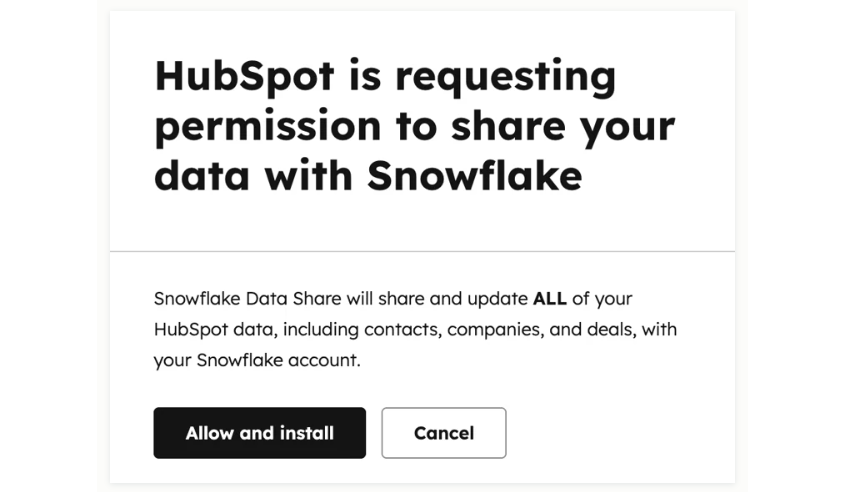
What it syncs: Core CRM objects including contacts, companies, deals, tickets, and associated engagement data. The shared dataset mirrors HubSpot's CRM data model, so standard and custom properties on these objects are accessible via SQL queries in Snowflake. HubSpot manages the refresh cadence.
Source: HubSpot
Fits: ongoing read-only analytics, reporting, and data science workloads on live HubSpot CRM data; not a migration tool, and not bidirectional.
Setup process:
Confirm your HubSpot account is on Operations Hub Enterprise or Data Hub Enterprise. The Snowflake Data Share is not available on lower tiers.
In HubSpot, navigate to Settings > Integrations > Connected Apps and search for Snowflake. Initiate the Data Share connection.
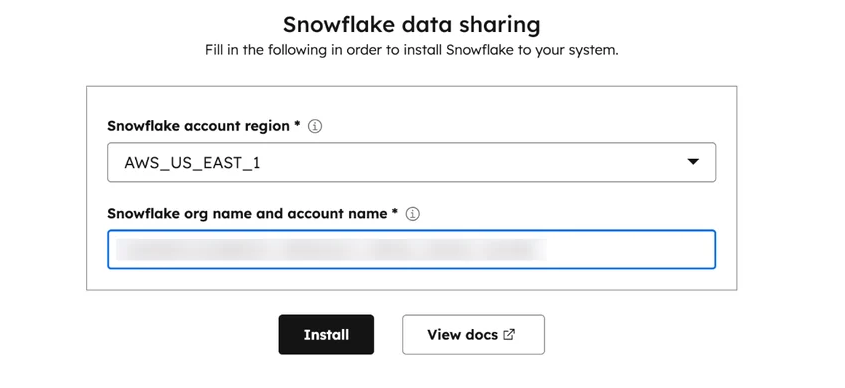
Provide your Snowflake account identifier (the account locator and region, e.g., xy12345.us-east-1) so HubSpot can configure the share for your account.
In Snowflake, accept the incoming share using the CREATE DATABASE ... FROM SHARE command or through the Snowsight UI under Data > Shared Data. This creates a read-only database in your Snowflake account.
Grant roles and privileges in Snowflake so your analytics team can query the shared database (e.g., GRANT USAGE ON DATABASE hubspot_share TO ROLE analyst_role).
Run a sample query against the shared data to verify objects and properties are accessible as expected.
Strengths: Zero ETL overhead. No data copying, no pipeline to maintain, no storage duplication. HubSpot manages data freshness without customer intervention. Uses Snowflake's native Secure Data Sharing, so the data is always live and consistent. No third-party tool to configure or pay for.
Limitations: Read-only. Data flows one direction only (HubSpot to Snowflake); you cannot write data back to HubSpot through the share. Requires HubSpot's Enterprise tier (Operations Hub Enterprise or Data Hub Enterprise), which is a significant cost commitment. The data model exposed through the share may not cover every HubSpot object or property available through the API. Custom objects and newer HubSpot features may have limited coverage in the shared dataset.
Best for: Data teams and analysts who need to query HubSpot CRM data alongside other sources in Snowflake for reporting, attribution modeling, and business intelligence, without building or maintaining an ETL pipeline.
ETL/ELT Tools (Fivetran, Airbyte, Estuary, Hevo)
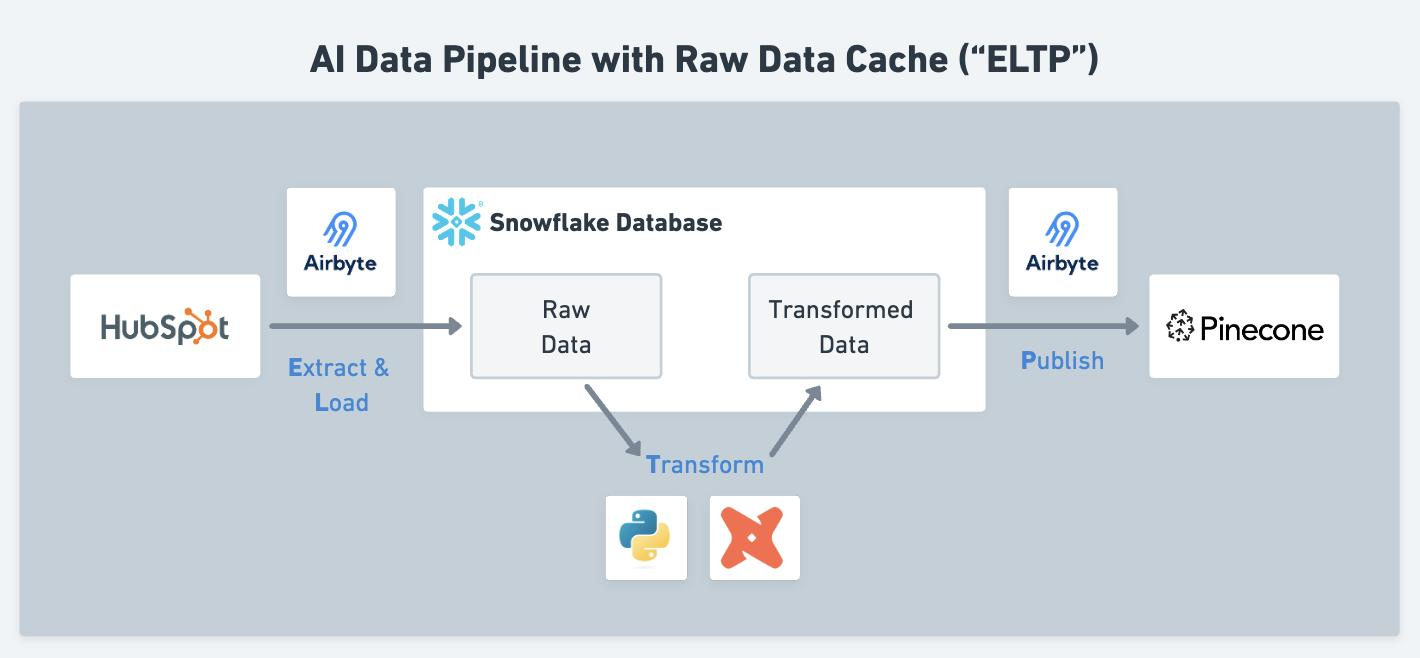
How it works: Data integration platforms extract data from HubSpot using its REST API, load it into Snowflake, and optionally transform it during or after the load. These tools maintain pre-built HubSpot connectors that handle API authentication, pagination, rate limiting, schema mapping, and incremental sync logic. Some (like Airbyte) are open source with self-hosted options; others (like Fivetran) are fully managed SaaS.
Source: Airbyte
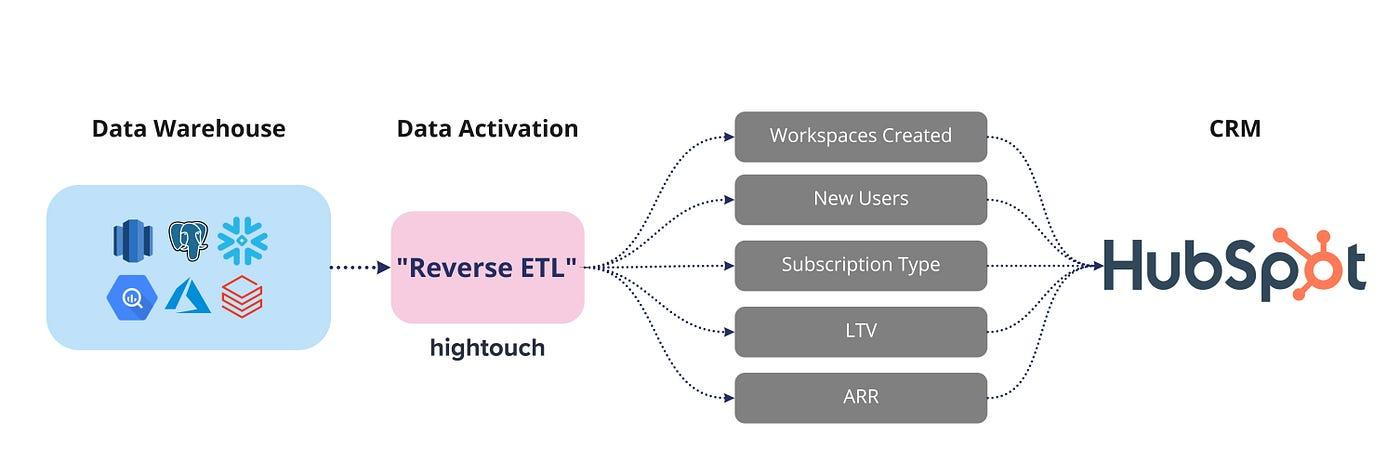
What it syncs: The broadest coverage of any method. Pre-built HubSpot connectors typically support contacts, companies, deals, tickets, engagements (emails, calls, meetings, notes, tasks), marketing emails, workflows, forms, form submissions, campaigns, line items, products, feedback submissions, and custom objects. Coverage varies by tool. Some tools also support reverse ETL (pushing Snowflake query results back into HubSpot as property updates or list memberships).
Source: Medium
Fits: both initial historical load (full sync of all HubSpot data into Snowflake) and ongoing incremental sync; the most complete method for building a full HubSpot replica in Snowflake.
Setup process:
Create an account on your chosen ETL/ELT platform and set up a Snowflake destination by providing your Snowflake account URL, warehouse, database, schema, and authentication credentials.
Add HubSpot as a data source. Most tools authenticate via OAuth, redirecting you to HubSpot to authorize the connection. The connector requests read access to the CRM objects it supports.
Select which HubSpot objects and properties to sync. Most tools auto-discover the available schema and let you include or exclude specific tables.
Configure the sync schedule (every 5 minutes, hourly, daily) and sync mode (full refresh or incremental, where only new or changed records transfer).
Run the initial sync. Depending on your HubSpot data volume, this may take minutes to hours. The tool handles API rate limiting and pagination automatically.
Verify the data in Snowflake by querying the destination tables. Set up monitoring or alerting for sync failures.
Strengths: Broadest data coverage of any method. Handles API rate limiting, pagination, and schema changes automatically. Supports historical backfill alongside ongoing sync. Many tools offer transformation capabilities (dbt integration, SQL-based transforms) to reshape HubSpot data for analytics. Some offer reverse ETL to push Snowflake data back into HubSpot. Mature error handling and monitoring.
Limitations: Adds a third-party tool to the stack with its own costs, which scale with data volume and sync frequency. Introduces latency compared to the native Data Share (data passes through the ETL tool's infrastructure). Requires ongoing maintenance as HubSpot's API evolves (though the vendor typically handles connector updates). Self-hosted open-source options (Airbyte) reduce cost but increase operational burden.
Best for: Teams that need a complete, queryable replica of HubSpot data in Snowflake with transformation capabilities, historical backfill, and the broadest object coverage. Organizations that also need reverse ETL to push warehouse-computed insights back into HubSpot.
iPaaS Automation (Zapier, Make)
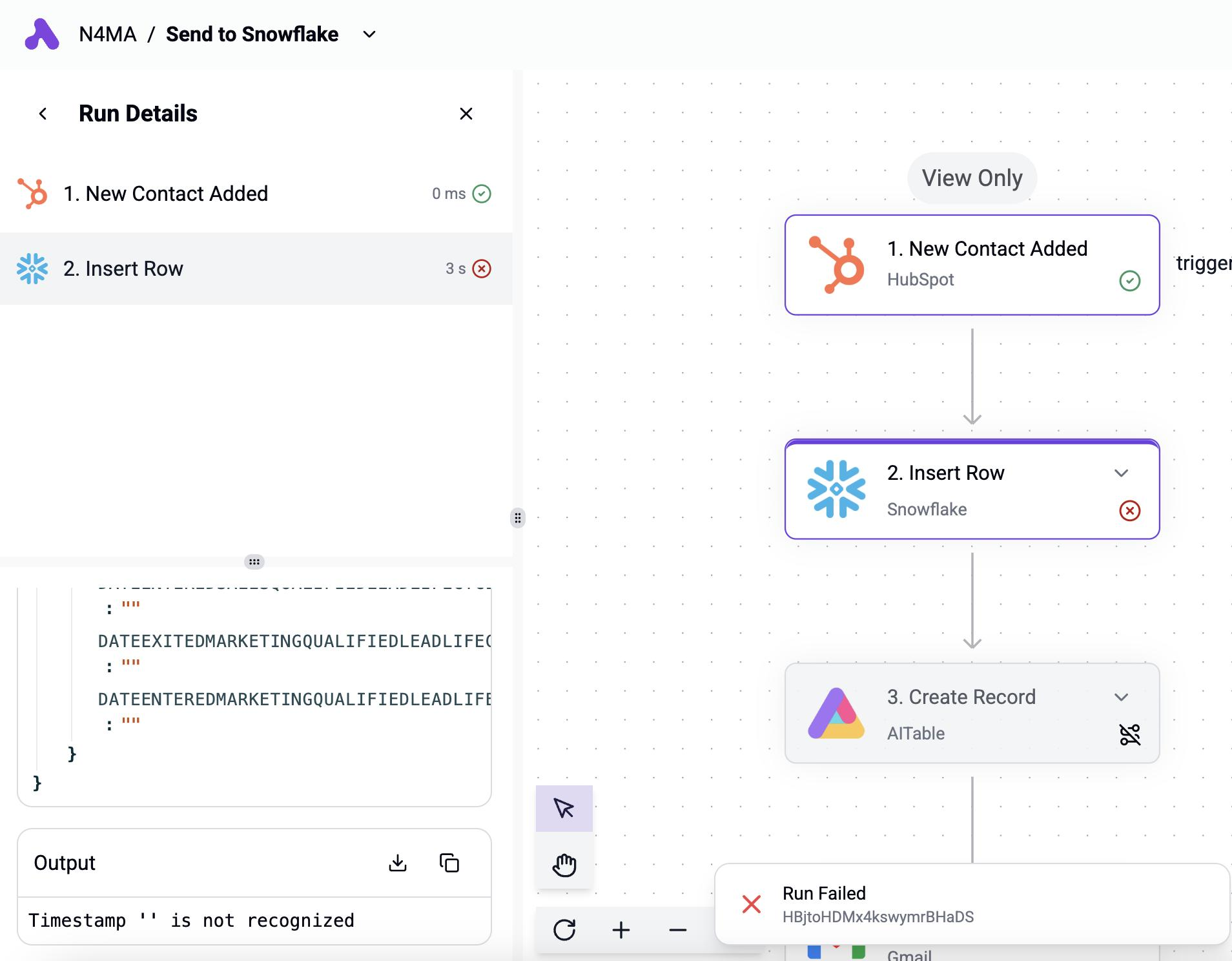
How it works: iPaaS platforms connect HubSpot and Snowflake through event-driven automations. Each workflow pairs a trigger in one platform with an action in the other. Zapier and Make both offer HubSpot connectors with common trigger events (new contact, deal stage change, form submission) and can write data to Snowflake via SQL insert statements or Snowflake's API connector.
Source: Activepieces
What it syncs: Individual records triggered by specific events. Each workflow handles one trigger-action pair (e.g., "when a deal closes in HubSpot, insert a row into a Snowflake table"). Field mapping is manual and configurable per workflow. These tools handle individual record events well but are not built for bulk data movement or schema replication.
Fits: ongoing event-driven sync of specific record types; not a migration tool or a full data replication solution.
Setup process:
Create an account on Zapier or Make and connect both your HubSpot and Snowflake accounts using OAuth.
Choose HubSpot as the trigger app and select the trigger event (e.g., "New Deal" or "Updated Contact Property").
Choose Snowflake as the action app and select the action (e.g., "Insert Row" or "Execute Query").
Map the HubSpot trigger fields to the corresponding Snowflake table columns. You may need to create the destination table in Snowflake first.
Test the workflow with a sample record to verify the data flows correctly into the target Snowflake table.
Activate the workflow. For bidirectional sync, create a second workflow with Snowflake as the trigger (if supported) or use a scheduled query that checks for changes.
Strengths: Fast to set up for simple, event-driven use cases. No engineering resources required. Visual workflow builders make logic easy to follow. Good for lightweight, targeted integrations (e.g., syncing closed-won deals to a Snowflake reporting table). Zapier's and Make's filter and formatting steps add conditional logic without code.
Limitations: Not built for bulk data movement or full schema replication. Each workflow handles one trigger-action pair, so syncing multiple object types requires multiple workflows. No built-in schema management or incremental sync logic. Historical data created before the workflow was activated does not sync. Zapier charges by task count, and high-volume HubSpot activity can accumulate costs quickly. Snowflake connector support may be more limited than for major CRMs.
Best for: Small teams that need a quick, targeted connection between specific HubSpot events and Snowflake tables. Teams already using Zapier or Make for other automations who want to extend their existing workflows to include Snowflake.
Custom API Integration
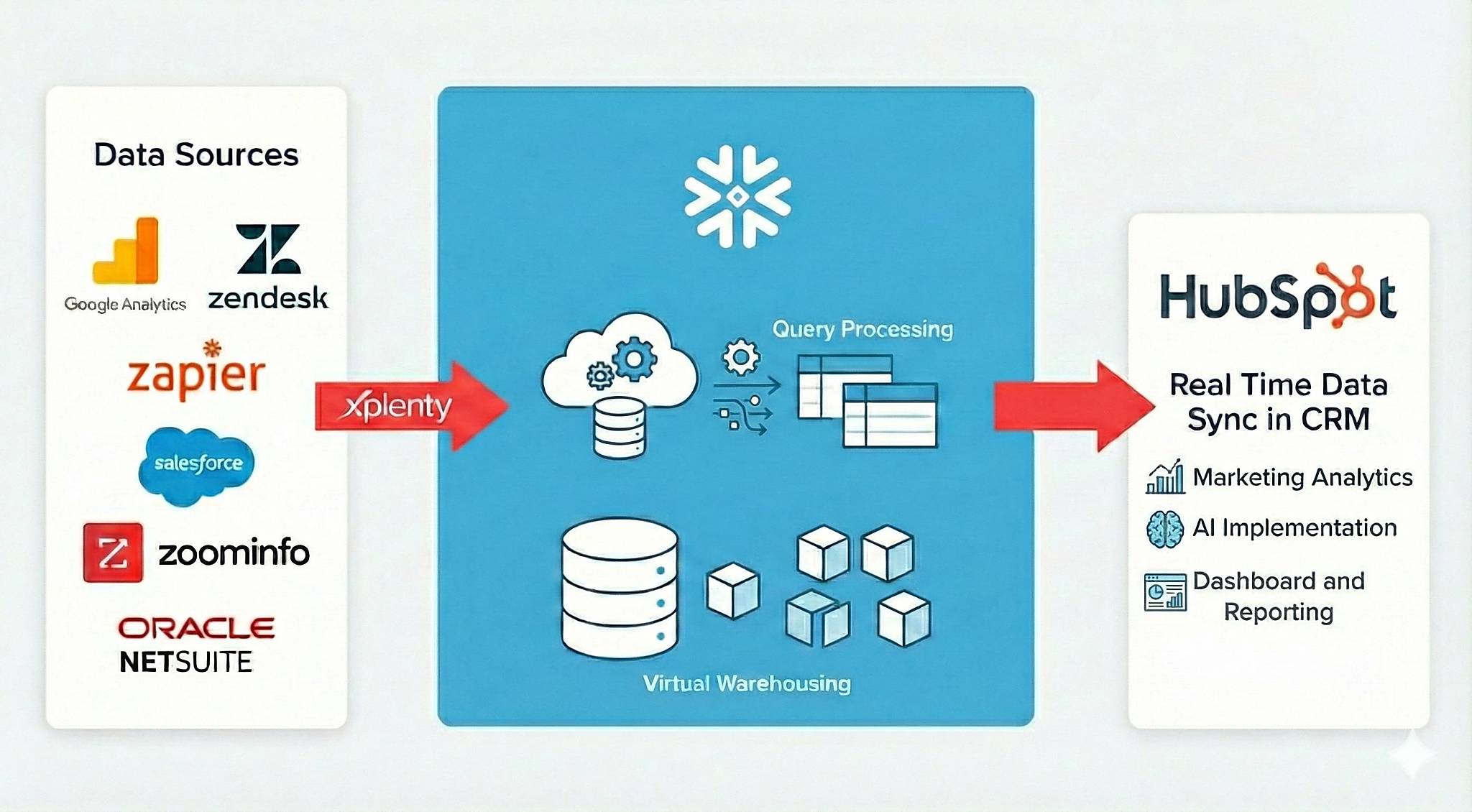
How it works: HubSpot provides a REST API covering all standard and custom CRM objects, with webhook support for real-time event notifications. Snowflake provides a SQL REST API for submitting queries and managing data, plus Snowpipe for automated continuous ingestion from cloud storage. A custom integration connects these APIs directly, with your own middleware handling authentication, data extraction, transformation, loading, conflict resolution, and error recovery.
Source: PerceptiveAnalytics
What it syncs: Anything both APIs expose. HubSpot's API covers 30+ object types including contacts, companies, deals, tickets, custom objects, engagements, marketing events, and more. Snowflake's API can read and write any table or view. This is the only method that supports complex sync scenarios, custom business logic during transformation, and full bidirectional flow.
Fits: either one-time migration or ongoing sync; the only method with no ceiling on direction, data coverage, or transformation complexity.
Setup process:
Register API credentials in both platforms. In HubSpot, create a private app or OAuth app and configure the required scopes for the CRM objects you need to access. In Snowflake, set up key-pair authentication or OAuth for the SQL API.
Design the data model mapping between HubSpot objects and Snowflake tables, including field-level transformations and a cross-reference table for matching record IDs across systems.
Build the extraction layer: a service that reads from HubSpot's API (using search, list, or webhook-triggered endpoints) and stages the data for loading into Snowflake.
Build the loading layer: use Snowflake's SQL API for direct inserts or stage files in cloud storage (S3, GCS, Azure Blob) and configure Snowpipe for automated continuous ingestion.
For bidirectional sync, build a reverse flow that queries Snowflake for computed values (scores, segments, enriched fields) and writes them back to HubSpot contact or company properties via the CRM API.
Add logging, error handling, and retry logic. HubSpot's API enforces rate limits that scale by plan and app type (100-190 requests per 10 seconds for private apps). Snowflake's compute costs scale with warehouse size and query volume.
Strengths: Full control over what syncs, when, and how. Real-time sync via HubSpot webhooks and Snowpipe. Can implement complex business logic, custom transformations, and conditional routing. No per-record or per-operation fees from a third-party connector. Full bidirectional capability.
Limitations: Requires development resources to build and maintain. You own the infrastructure, monitoring, and error recovery. HubSpot's API evolves with date-based versioning (new versions every March and September); Snowflake updates weekly. The initial build takes weeks, not hours. Rate limit management, pagination handling, and schema drift all require ongoing attention.
Best for: Organizations with in-house data engineering teams that need full bidirectional sync, complex transformation logic, or integration scenarios that no off-the-shelf tool supports. Teams building a production-grade data pipeline that must handle high volumes with custom business rules.
Key Use Cases
1. Centralized Revenue Reporting in Snowflake
Marketing, sales, and finance teams often need a single reporting layer that combines CRM pipeline data with financial, product, and advertising data. The native Data Share or an ETL tool syncs HubSpot deals, contacts, and engagement data into Snowflake, where it joins with billing data, ad spend, and product usage metrics to create unified dashboards and attribution models.
Best integration method: Native Data Share for read-only reporting; ETL/ELT tools if transformation or broader object coverage is needed.
2. Marketing Attribution and Funnel Analysis
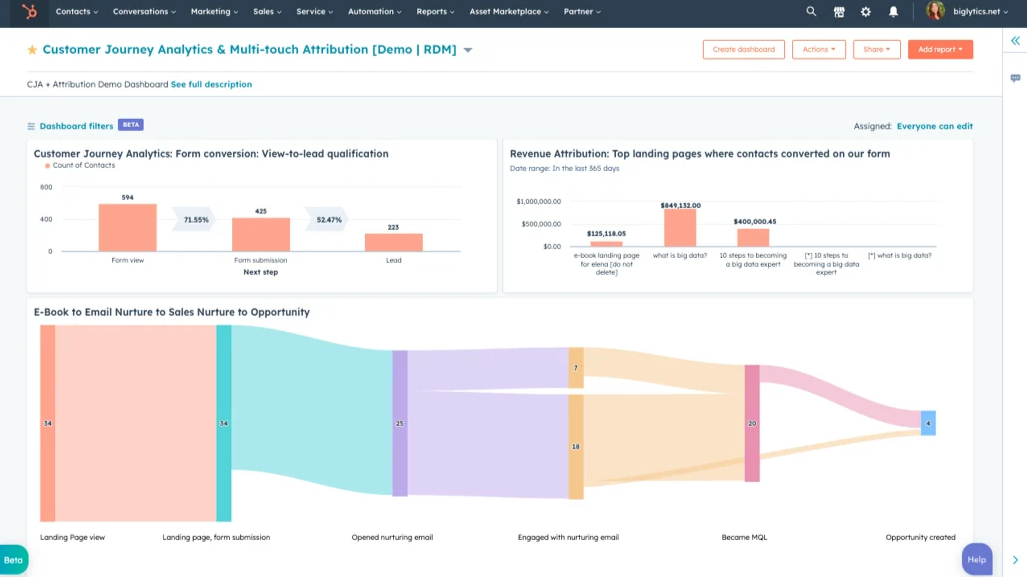
Data teams build multi-touch attribution models that trace a customer from first website visit through closed deal. This requires HubSpot marketing data (form submissions, email engagement, campaign associations) combined with deal outcomes, all queryable in Snowflake. The breadth of objects needed (contacts, deals, marketing emails, campaigns, engagements) typically exceeds what the native Data Share covers.
Source: LinkedIn
Best integration method: ETL/ELT tools (Fivetran, Airbyte) for broad object coverage and transformation capabilities.
3. Reverse ETL for Warehouse-Computed Segments
A data science team builds a propensity-to-buy model in Snowflake that scores every contact. Those scores need to flow back into HubSpot so sales reps can prioritize outreach and marketing can build targeted email campaigns. A reverse ETL tool or custom API integration pushes Snowflake-computed properties into HubSpot contact records.
Best integration method: Reverse ETL tool (Census, Hightouch) or custom API integration (bidirectional).
4. Customer Health Scoring for Success Teams
Customer success teams need a health score that combines CRM data (ticket volume, deal renewal dates, engagement recency from HubSpot) with product usage and billing data stored in Snowflake. An ETL pipeline pulls HubSpot data into Snowflake for the scoring model, and reverse ETL pushes the computed health score back to HubSpot so CSMs see it on the contact or company record.
Best integration method: ETL/ELT for HubSpot-to-Snowflake; reverse ETL or custom API for the return path.
5. Real-Time Deal Alerting Based on Warehouse Intelligence
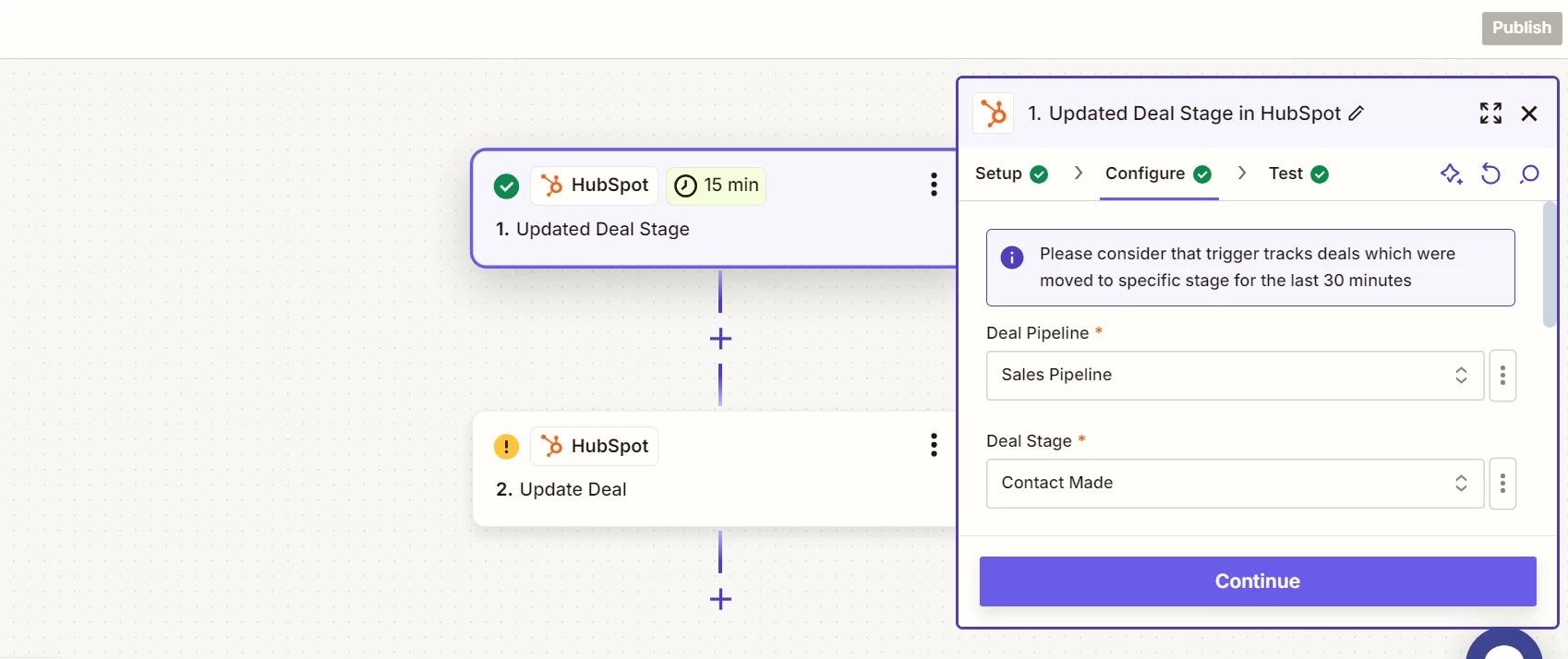
When a deal in HubSpot moves to a late stage, a custom integration triggers a Snowflake query that checks the account's product usage, payment history, and firmographic profile, then pushes a risk or opportunity score back to the HubSpot deal record. A Zapier or Make workflow triggered by the deal stage change can invoke a Snowflake query and write the result back to HubSpot.
Source: Zapier
Best integration method: iPaaS (Zapier, Make) for simple event-triggered queries; custom API for complex scoring logic.
Limitations and Considerations
Native Data Share Restrictions
The simplest integration method (HubSpot's native Snowflake Data Share) is locked behind HubSpot's Enterprise tier, specifically Operations Hub Enterprise or Data Hub Enterprise. HubSpot's Data Hub Enterprise costs $2,000/month, and Operations Hub Enterprise pricing is comparable. For teams on Professional or lower plans, the native Data Share is not available; every integration method requires a third-party tool or custom development.
One-Directional Native Sync
The native Data Share flows data one direction: HubSpot to Snowflake. Snowflake data, computed fields, model outputs, and enriched segments cannot be written back to HubSpot through the share. Teams that need bidirectional data flow must layer a second tool (reverse ETL, iPaaS, or custom API) on top of the native share.
Data Model Differences
HubSpot's CRM organizes data around objects (contacts, companies, deals, tickets) with properties and associations. Snowflake stores data in relational tables. Mapping between these models requires decisions about how to handle HubSpot's association system (many-to-many relationships between objects), multi-select properties, and nested engagement data. Third-party ETL tools handle this automatically, but custom builds and iPaaS workflows require manual schema design.
API Rate Limits on Both Sides
HubSpot's API enforces rate limits that scale by plan and app type: 100 requests per 10 seconds for Free and Starter plans, 190 for Professional and Enterprise, with daily caps from 250,000 to 1,000,000 calls. High-volume sync scenarios (full historical backfill, frequent incremental updates across many object types) can exhaust these limits and require throttling. Snowflake's compute costs scale with warehouse size and query volume, adding a cost dimension to write-heavy integrations.
Pricing Implications
The native Data Share requires HubSpot's Enterprise tier. ETL/ELT tools carry their own subscription costs that scale with data volume and sync frequency. iPaaS platforms charge by task or operation count. Custom API integrations require developer time and hosting. On the Snowflake side, all query and ingestion activity consumes compute credits. For teams syncing large HubSpot datasets with frequent refresh intervals, costs compound across both platforms and the middleware layer.
Maintenance
Both platforms evolve independently. HubSpot introduced date-based API versioning in March 2026, with new versions every six months and an 18-month support window per version. Snowflake updates weekly. Custom fields and objects added to HubSpot after the initial integration setup will not sync unless the integration configuration is updated. Third-party tools may change pricing, deprecate connectors, or alter authentication methods. Plan for periodic reviews of the integration's health and accuracy.
What No Method Fixes: The Data Itself
Every method above moves records between HubSpot and Snowflake. None of them checks whether those records are accurate, complete, or current. A contact with an outdated job title in HubSpot arrives in Snowflake with the same outdated title. A company record missing firmographic data lands in the warehouse just as incomplete. Attribution models, propensity scores, and health metrics built on stale or incomplete data inherit every gap. The integration ensures both systems agree; it does not ensure they are right.
Where ZoomInfo Fits In
Every method in this guide moves data between HubSpot and Snowflake. None of them improves the data being moved. When the integration is live but analytics models rest on incomplete records (missing company data, wrong job titles, dead phone numbers, stale company details), the bottleneck is no longer the connector. That is the gap ZoomInfo closes.
ZoomInfo is an all-in-one AI GTM platform built on 500M contacts, 100M companies, 135M+ verified phone numbers, and 200M+ verified business emails. That data is verified through a multi-source pipeline backed by 300+ human researchers and reaching up to 95% accuracy on first-party data. For teams running a HubSpot-Snowflake integration, ZoomInfo addresses the data quality layer that no connector handles.
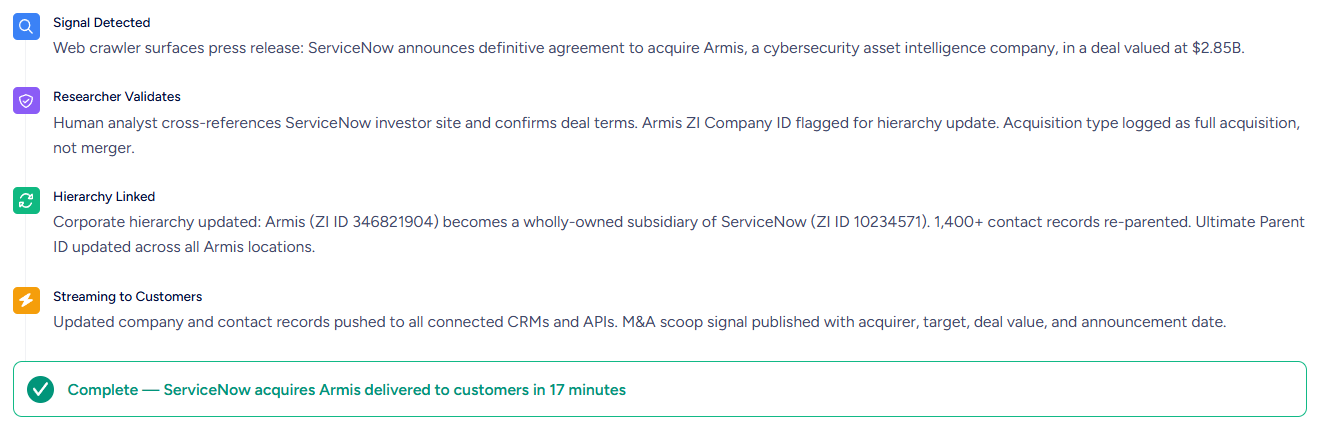
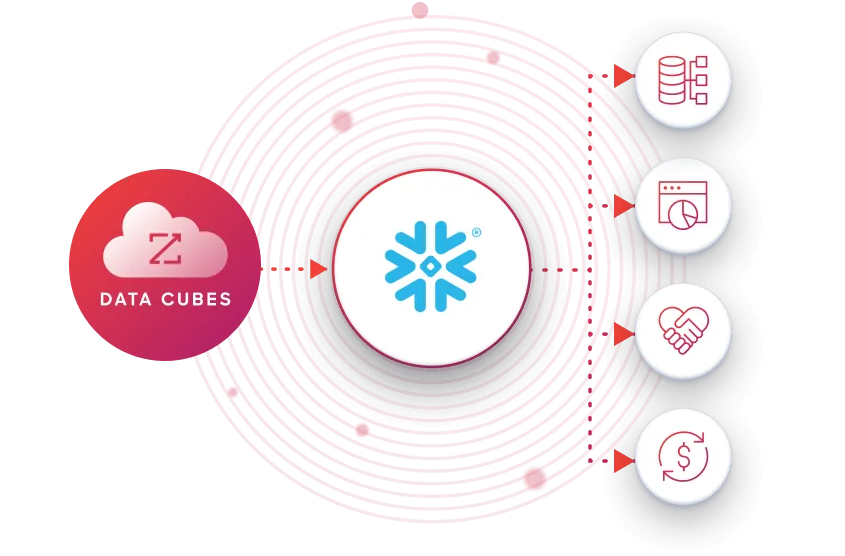
ZoomInfo integrates natively with both platforms. The HubSpot integration provides bidirectional data sync, automated contact and company enrichment, and direct enrichment inside HubSpot records. The Snowflake integration delivers ZoomInfo's company and contact data (300+ attributes) into a customer's Snowflake account via the Snowflake Data Marketplace, without additional ETL.
The same data feeds ZoomInfo's GTM Context Graph, which processes 1.5B+ data points daily and combines third-party intelligence with CRM records, conversation transcripts, and behavioral signals to surface not just what happened in a deal, but why.
In practice, a team running both platforms can use ZoomInfo to enrich records upstream in HubSpot before they reach Snowflake. Verified emails mean marketing campaigns target real inboxes. Accurate titles and org charts mean attribution models assign credit to the right stakeholders. Complete company context (revenue, employee count, industry, technology stack) means segmentation in the warehouse reflects reality rather than guesswork.
Buyer Intent data from ZoomInfo, tracking signals from 210 million IP-to-Organization pairings, can flow into Snowflake alongside CRM data to power propensity models that account for active buying behavior. And for teams that consume ZoomInfo data directly in Snowflake through the Cloud Partners program, the same verified data is available as a first-class Snowflake dataset, joinable with HubSpot data without an intermediary.
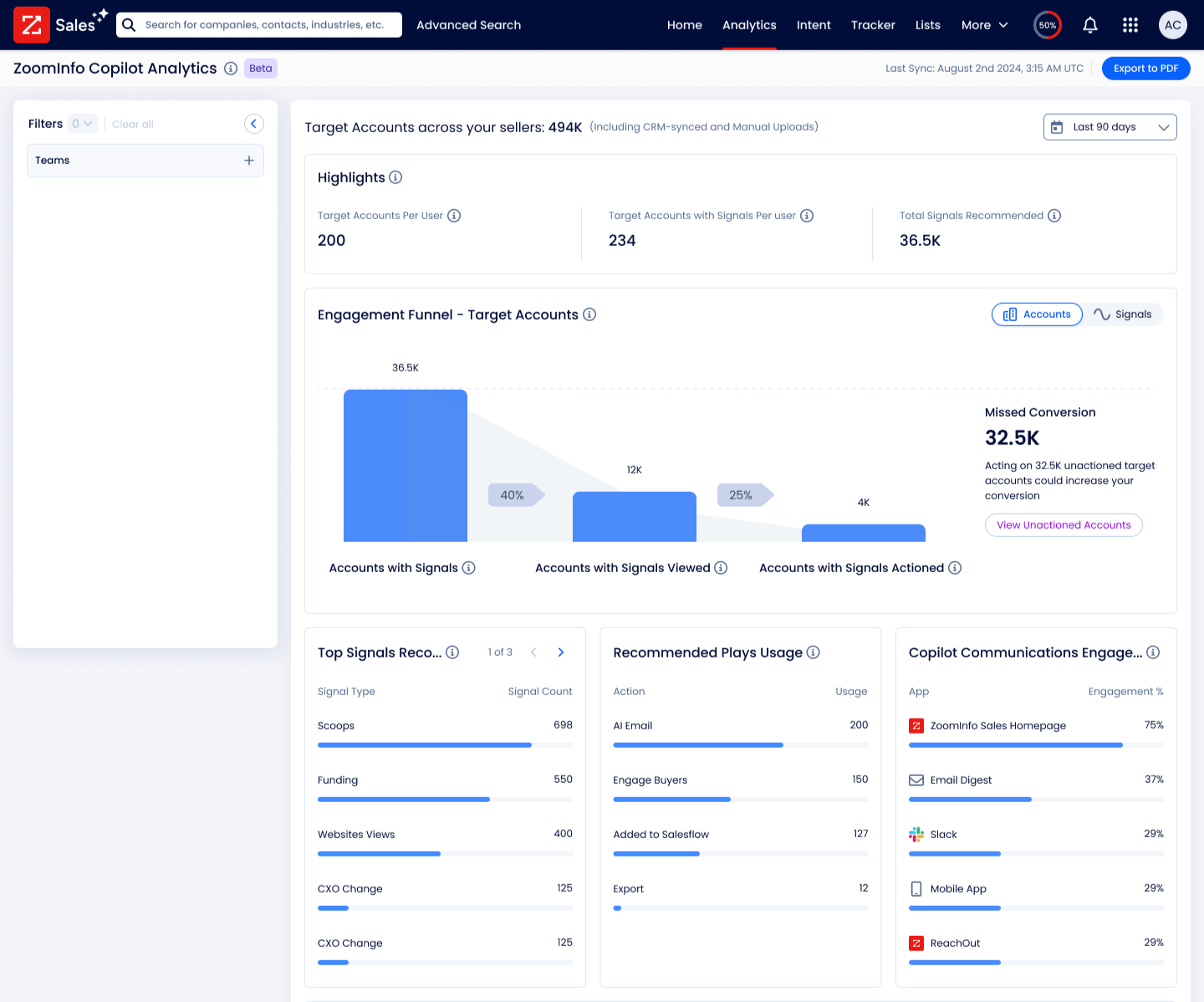
Enriched records also make the integration itself more reliable. Fewer blank fields mean fewer mismatches when deduplicating records across systems. Consistent formatting reduces false positives that create duplicates. Intent signals help teams decide which records need to flow between systems, rather than syncing everything indiscriminately.
For teams using ZoomInfo's Enterprise API or MCP access, the same verified data can feed any custom pipeline or AI agent, not just the native HubSpot and Snowflake connectors.
Snowflake uses ZoomInfo for at least one-third of the most critical data features in their Account Propensity Scoring model, feeding over 70 firmographic and technographic data fields. Accounts monitored using ZoomInfo-powered scores showed 90% higher opportunity open rates and 2x higher customer conversion rates. (Snowflake)
Final Verdict
A native integration between HubSpot and Snowflake exists, but it is gated behind HubSpot's Enterprise tier and flows data in one direction only. Teams on lower plans or those needing bidirectional sync choose between ETL/ELT tools, iPaaS automation, and custom API development. For most teams, the right choice depends on scale and complexity.
Small teams that need specific HubSpot events reflected in Snowflake should start with Zapier or Make. Both are fast to set up, affordable at low volumes, and require no engineering resources.
Data teams that need a complete, queryable replica of HubSpot in Snowflake should evaluate the native Data Share first (if on an Enterprise plan) or an ETL/ELT tool like Fivetran or Airbyte for broader coverage, historical backfill, and transformation capabilities.
Teams that need bidirectional sync (pushing Snowflake-computed scores, segments, or enriched fields back into HubSpot) should add a reverse ETL tool or build a custom API integration.
Organizations with complex data models, custom objects, or business logic that must be enforced during sync should build a custom API integration.
Before committing to a method, clarify what the integration needs to accomplish.
If the goal is read-only analytics on HubSpot data inside Snowflake, the native Data Share is the simplest path. If the goal is a complete data warehouse with HubSpot as one of many sources, an ETL/ELT tool provides the breadth and transformation layer. If the goal is bidirectional intelligence (warehouse insights driving CRM actions), the integration needs a return path that the native share does not provide.
Either way, the quality of the records in HubSpot determines whether the data arriving in Snowflake is worth analyzing. ZoomInfo, with its native HubSpot integration, direct Snowflake data delivery, and API and MCP access, is the data enrichment layer that keeps both systems accurate while the connector keeps them aligned.
FAQ
Does HubSpot integrate natively with Snowflake?
Yes. HubSpot offers a native Snowflake Data Share integration that uses Snowflake's Secure Data Sharing. It grants read-only access to HubSpot CRM data (contacts, companies, deals, tickets) inside a customer's Snowflake account, without copying data between systems. The integration requires HubSpot Operations Hub Enterprise or Data Hub Enterprise, HubSpot's highest-tier plans.
Can I sync data from Snowflake back into HubSpot?
Not through the native Data Share, which is one-directional (HubSpot to Snowflake, read-only). To push Snowflake data back into HubSpot, use a reverse ETL tool (Census, Hightouch), an iPaaS platform (Zapier, Make), or a custom API integration that reads from Snowflake and writes to HubSpot's CRM API. This is commonly used to push warehouse-computed scores, segments, or enriched fields back into CRM records.
What HubSpot plan do I need for the Snowflake integration?
The native Snowflake Data Share requires Operations Hub Enterprise or Data Hub Enterprise. HubSpot's Data Hub Enterprise starts at $2,000/month. Teams on Starter, Professional, or non-Enterprise plans cannot use the native Data Share and must rely on third-party ETL/ELT tools, iPaaS platforms, or custom API integrations to connect HubSpot and Snowflake.
Can I sync historical HubSpot data into Snowflake?
The native Data Share provides access to current HubSpot data, not a point-in-time historical export. ETL/ELT tools like Fivetran and Airbyte support full historical backfill on the initial sync, loading all existing HubSpot records into Snowflake before switching to incremental updates. iPaaS tools like Zapier and Make only process events that occur after the workflow is activated and do not sync historical data.
How do I avoid creating duplicate records when syncing?
Use a shared unique identifier (such as HubSpot record ID or email address) as a matching key. ETL/ELT tools typically handle deduplication as part of their standard sync logic. For custom API integrations, use upsert logic (update if exists, create if not) with HubSpot's native upsert capabilities and Snowflake's MERGE statement. The native Data Share avoids this issue entirely because it does not create copies of the data.
What does a HubSpot-Snowflake integration cost?
Costs depend on the method. The native Data Share is included with HubSpot Enterprise tiers (starting at ~$2,000/month for Data Hub Enterprise), but you pay for Snowflake compute credits when querying the shared data. ETL/ELT tools range from free (Airbyte open source, self-hosted) to $1,500+/month for managed services like Fivetran. Zapier starts at $19.99/month; Make starts at $10.59/month. Custom API integrations have no platform fees but require developer time and hosting costs. All methods are subject to Snowflake's consumption-based compute pricing.
How does ZoomInfo improve a HubSpot-Snowflake integration?
ZoomInfo solves the data quality problem that no sync tool addresses. Contact and company records in CRMs decay over time as people change jobs, phone numbers go inactive, and company details shift. ZoomInfo enriches HubSpot records with verified contact data, company attributes, technographics, and intent signals through its native HubSpot integration. The same data is available in Snowflake through ZoomInfo's Cloud Partners program, where it can be joined with HubSpot data for richer analytics. The result: the data flowing between both systems is accurate and complete, improving the quality of every downstream model, report, and decision built on it.
Is the native Data Share affected by HubSpot API rate limits?
No. The native Data Share uses Snowflake's Secure Data Sharing infrastructure, not HubSpot's REST API. No API calls are involved in querying the shared data. Queries run on the customer's own Snowflake virtual warehouse and consume Snowflake compute credits, not HubSpot API quota. However, third-party ETL tools and custom integrations that pull data via HubSpot's API are subject to HubSpot's rate limits.
Connect HubSpot elsewhere:
