
Maximizer CRM has earned its reputation over 35+ years, especially among Canadian financial advisors and sales leaders in the Microsoft 365 ecosystem. It offers a vertically focused CRM with AI-powered meeting prep via IQ Boost, KYC compliance tracking, and tight Outlook integration, backed by responsive support and fast implementation.
But as your team grows or your requirements shift, Maximizer's configuration ceiling, dated interface, limited mobile capabilities, and clunky reporting tools create friction that compounds over time.
Whether you're a US-based financial advisor who needs FINRA-compliant infrastructure, a scaling enterprise that requires deeper customization and a broader integration ecosystem, or a small team that wants a modern CRM at a lower price, there are alternatives worth evaluating.
That's where this guide comes in. We'll explore CRM solutions for teams looking to:
Enrich their go-to-market strategy with B2B data and AI-powered intelligence
Scale into enterprise customization with a broad integration ecosystem
Get started with a free CRM that includes native marketing automation
Manage pipelines visually with a lightweight, mobile-first CRM
Access enterprise workflow automation and omnichannel communication at SMB pricing
Run a US-based financial advisory practice with compliance and custodian integrations built in
Build a flexible, AI-native CRM tailored to how their business actually works
This isn't about finding a "better" CRM. It's about finding the right fit for your needs as your business evolves. Some of these tools might complement your existing Maximizer setup, while others could replace it entirely.
The Best Maximizer CRM Alternatives |
|---|
Best Alternative for AI-Powered Go-to-Market Intelligence and B2B Data We chose ZoomInfo because it combines a large B2B data platform (500M contacts, 100M companies) with a GTM Context Graph that turns raw data into usable intelligence for prospecting, pipeline management, and revenue growth. |
Best Alternative for Enterprise Sales Organizations Needing Deep Customization We chose Salesforce Sales Cloud because it removes the configuration and integration ceiling that mid-market CRMs hit as headcount and process complexity grow, with 7,000+ AppExchange apps and production-ready AI agents. |
Best Alternative for Teams That Want a Free CRM With Native Marketing Automation We chose HubSpot CRM because it offers a permanently free tier with contact management, deal pipelines, and email integration, plus native marketing automation that eliminates the need for a separate email marketing subscription. |
Best Alternative for Small Sales Teams That Want Clean Pipeline Management We chose Pipedrive because its kanban-first visual pipeline, fully functional mobile app with offline mode, and transparent pricing starting at $14/user/month make it the most accessible CRM for small teams leaving configuration-heavy platforms. |
Best Alternative for Enterprise Workflow Depth at SMB Pricing We chose Zoho CRM because its Blueprint workflow automation, Zia AI assistant, and omnichannel communication deliver Salesforce-class features at $23-$40/user/month, addressing Maximizer's workflow and reporting gaps at roughly half the per-seat cost. |
Best Alternative for US Financial Advisors Needing Compliance and Custodian Integrations We chose Redtail CRM because it holds 45% of the US financial advisor CRM market, with SEC/FINRA compliance infrastructure and 191 native integrations spanning US custodians and financial planning tools. |
Best Alternative for Tech-Forward GTM Teams That Want an AI-Native, Flexible Data Model We chose Attio because its custom object model, AI Attributes embedded in the data layer, and modern Notion-style interface make it the most architecturally novel CRM for go-to-market teams building non-traditional sales motions. |
What is Maximizer CRM?
Maximizer CRM is a CRM platform founded in 1987 in Vancouver, Canada, making it one of the oldest companies in the CRM category. It serves two markets: a sales intelligence platform for B2B organizations, and a compliance-ready financial services CRM for Canadian wealth managers, financial advisors, and insurance advisors.
Its key features include:
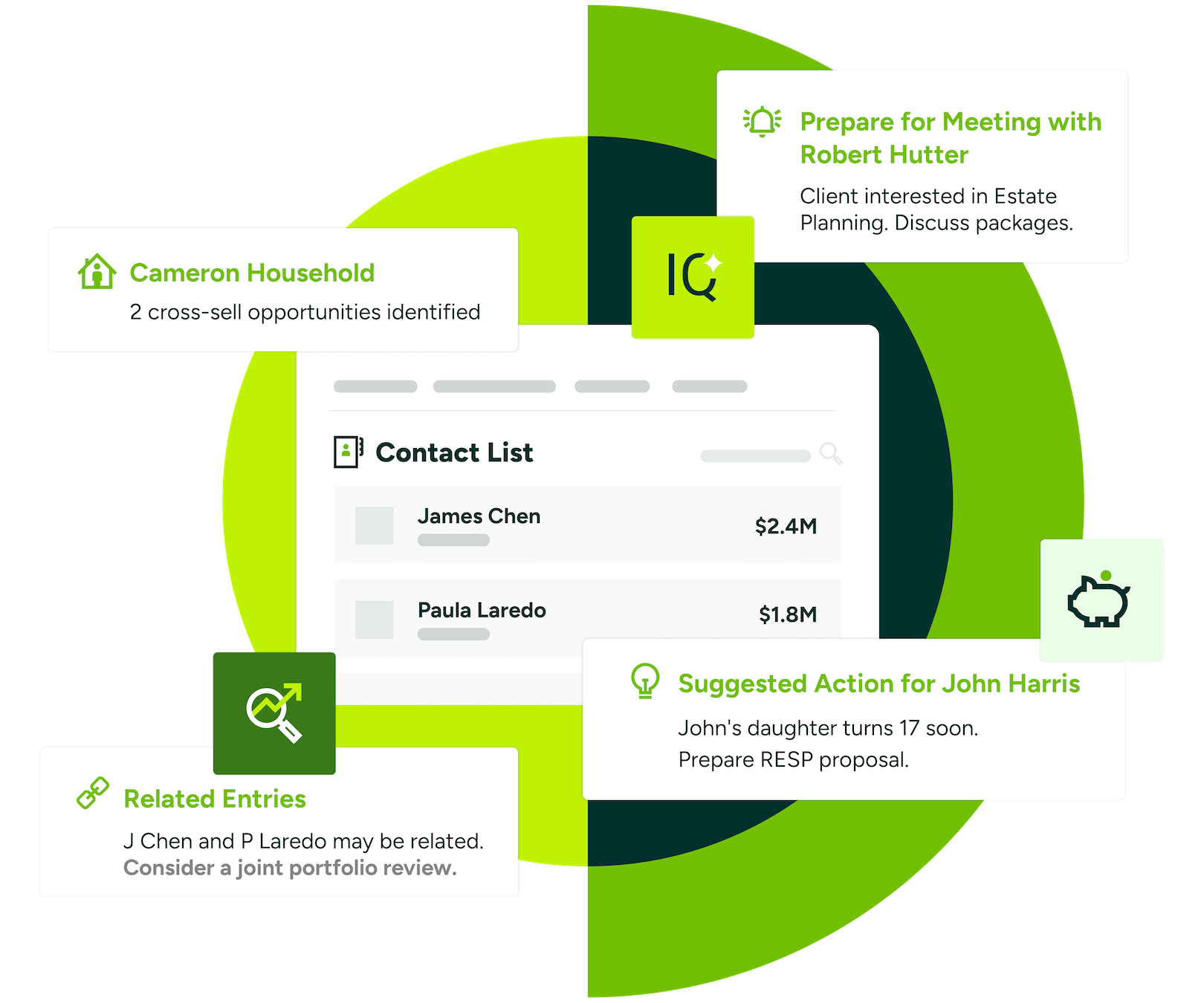
AI-Powered Insights (IQ Boost) for client summaries, KYC compliance surfacing, and meeting prep
Microsoft 365 integration embedding CRM functionality into Outlook, Teams, and Power Automate
Financial Services Edition with pre-configured dashboards for wealth management, AUM tracking, and insurance data from 11+ Canadian carriers
Customizable pipeline management with Kanban boards, funnel visualization, and AI-driven coaching
On-premise deployment for organizations with data sovereignty requirements
No-code customization through an Administrator module for field additions and formula-based user-defined fields without developer resources
Source: Maximizer
Maximizer's vertical editions, Canadian data residency, and fast implementation (earning the G2 Fastest Implementation badge in 2025) make it a strong fit for Canadian financial advisory practices and Microsoft-first SMB sales teams.
However, as teams scale or requirements evolve, Maximizer's dated visual design, weak mobile experience (users report they cannot save contacts or log emails from mobile), cumbersome reporting, and pricing starting at $65/user/month may push teams toward more specialized alternatives.
Looking for B2B intelligence to power your go-to-market strategy? ZoomInfo combines a large data platform with AI-powered insights to help you find, win, and grow customers. Learn more about ZoomInfo.
How We Curated Our List of Maximizer CRM Alternatives
After testing Maximizer CRM and researching the CRM market, we focused on tools that address specific gaps teams encounter as they outgrow Maximizer. While Maximizer suits Canadian financial advisors and Microsoft-first sales teams, businesses often need more power for:
Enriching their pipeline with verified B2B data and AI-driven go-to-market intelligence
Scaling into enterprise customization with broad integrations and multi-team pipeline architectures
Getting started with a free CRM that includes built-in marketing automation
Managing deals visually with a lightweight, mobile-first CRM that reps actually adopt
Enforcing standardized sales processes with native workflow automation and omnichannel communication
Running a US-based financial advisory practice with FINRA-compliant recordkeeping and custodian data sync
Building a flexible, AI-native CRM that matches non-traditional GTM motions
Each tool on this list leads in one of these areas. You might use them alongside Maximizer or replace it entirely; it depends on what your growing business needs most.
DISCLAIMER: We aren't covering every CRM on the market. Our focus is on the best alternatives that address Maximizer CRM's limitations for specific use cases. |
|---|
1. ZoomInfo - Best Alternative for AI-Powered Go-to-Market Intelligence and B2B Data
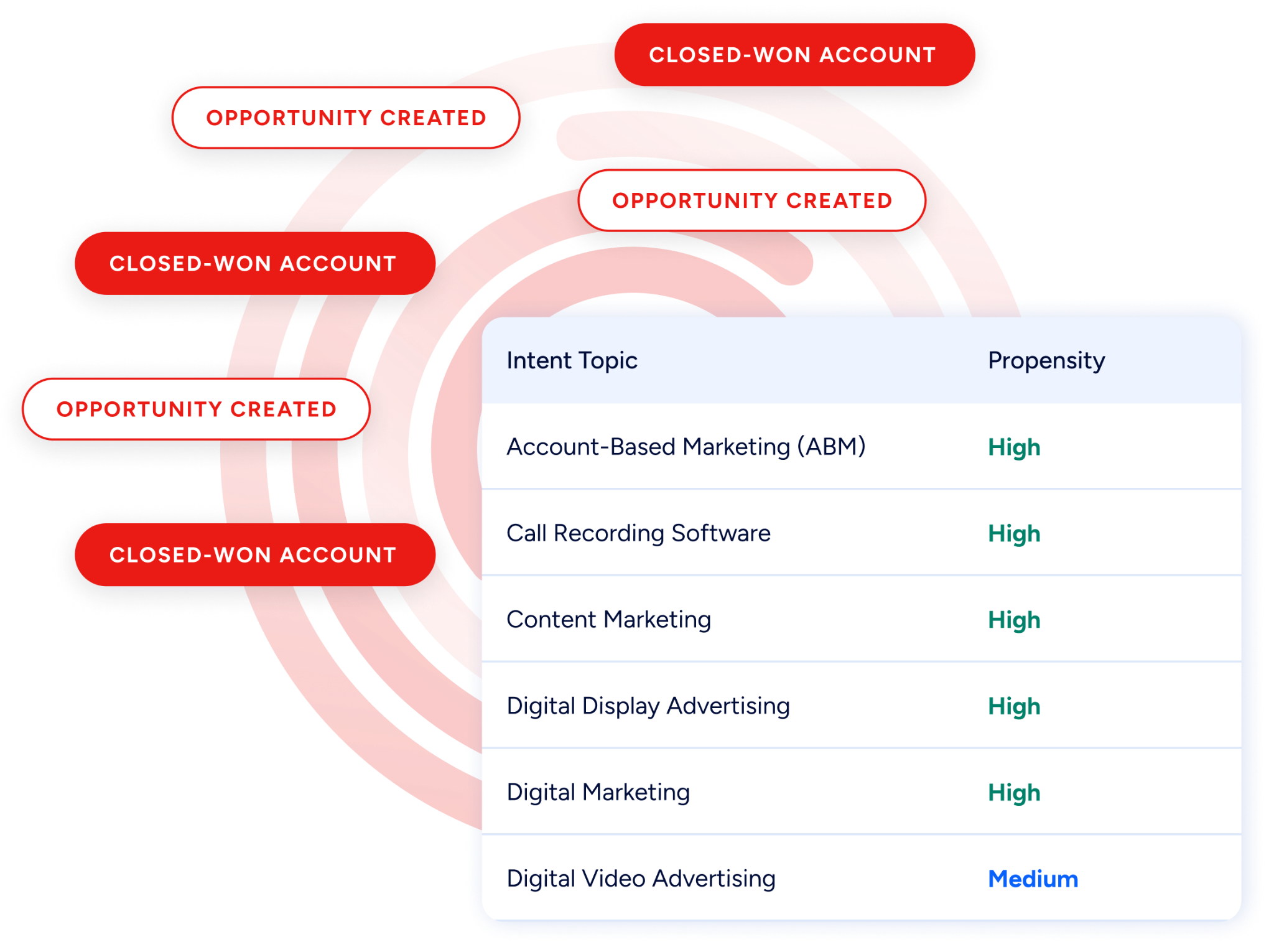
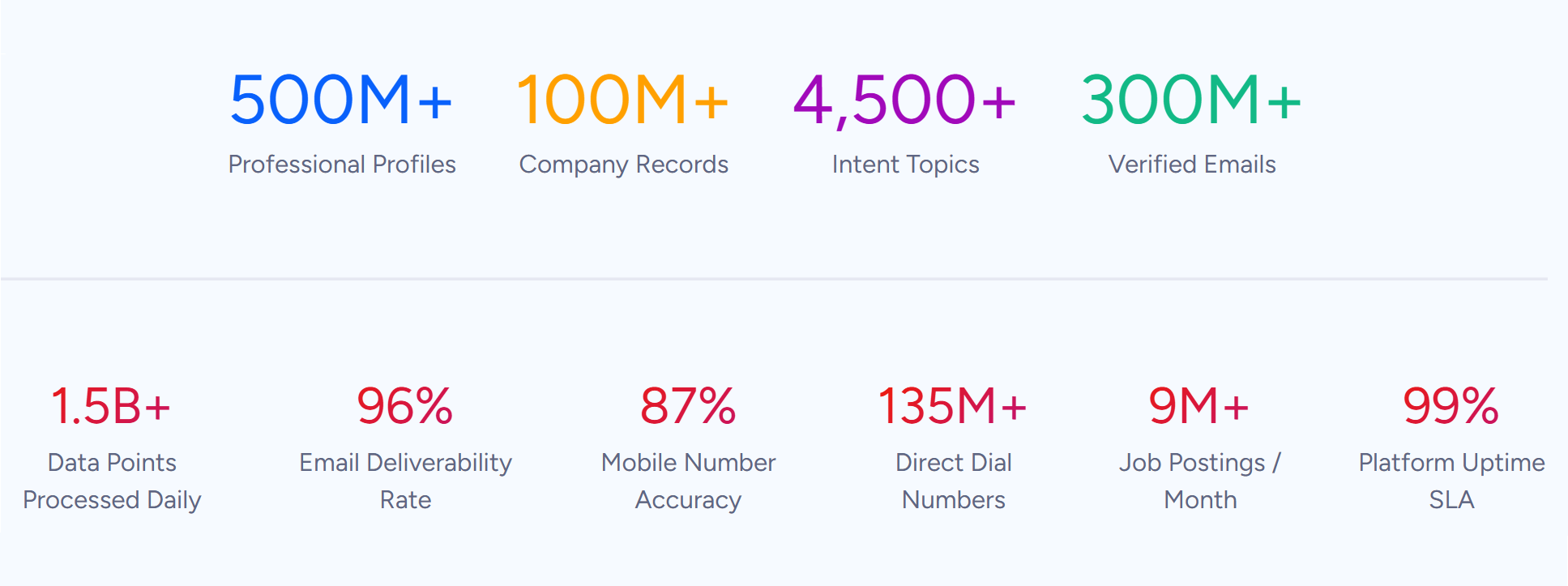
ZoomInfo is an AI-powered GTM platform built on a large B2B data foundation: 500M contacts, 100M companies, 135M+ verified phone numbers, and 200M+ verified business email addresses. Its GTM Context Graph processes 1.5B + data points daily, unifying this data with your CRM records, conversation transcripts, and behavioral signals to reveal the full context of your accounts.
That intelligence reaches teams through three channels: GTM Workspace for sellers, GTM Studio for marketers and RevOps, or APIs and MCP in any third-party tool or AI agent. Its key features include:
B2B data: 500M contacts, 100M companies, 135M+ verified phone numbers, 120M direct-dial phone numbers, and 200M+ verified business emails, verified by 300+ human researchers and achieving up to 95% accuracy on first-party data
GTM Context Graph: Processes 1.5B+ data points daily, fusing ZoomInfo's B2B data with your CRM records, conversation transcripts, and behavioral signals to reveal why deals move or stall
Buyer Intent Data: ZoomInfo Intent tracks signals from 210 million IP-to-Organization pairings and 6 trillion+ new keyword-to-device pairings sourced monthly, plus exclusive Guided Intent that identifies topics historically correlated with deal success
Universal access: Intelligence delivered through GTM Workspace for sellers, GTM Studio for marketers and RevOps, or APIs and MCP in any third-party tool or AI agent
Source: ZoomInfo
Where Maximizer CRM focuses on managing existing client relationships within a vertically scoped CRM, ZoomInfo operates as the intelligence layer that powers go-to-market execution. For B2B sales teams that need verified prospect data, buyer intent signals, and AI-driven outreach at scale, ZoomInfo addresses a different set of needs than a traditional CRM.
Why Choose ZoomInfo Over Maximizer CRM for Go-to-Market Intelligence
Maximizer CRM helps you manage existing contacts and opportunities. ZoomInfo helps you find, prioritize, and engage the right buyers before they enter your pipeline. Here's where ZoomInfo adds capabilities Maximizer doesn't offer.
Comprehensive B2B Data: Find the Right Buyers With Verified Contact Information
Maximizer CRM is a database for contacts you already know. It stores client profiles, tracks interactions, and manages pipeline stages. But it doesn't help you discover new prospects, verify their contact information, or identify which companies are actively in-market for your solution.
ZoomInfo's data platform spans three dimensions at once: identity data (who buyers are and how to reach them), company context (100M companies with attributes, org charts, and technographics), and dynamic signals that reveal when accounts are researching solutions like yours.
Source: ZoomInfo
That data is verified through multiple sources: automated ML scanning of 28 million site domains daily, third-party partner data covering 95 million businesses, a community of 200,000+ ZoomInfo Lite users who share data back, and an in-house Data Training Lab of 300+ human researchers.
The data advantage isn't self-reported. In a Fortune 500 competitive RFP analyzing 25 million contacts across vendors, the independent consultant concluded that "no other competitor came even close."
ZoomInfo in Action: Your sales team needs to identify all VP-level and above decision-makers at mid-market SaaS companies in North America that are currently evaluating CRM solutions. In Maximizer, you'd be limited to the contacts already in your database.
With ZoomInfo, you search across 300+ company attributes, filter by intent signals showing active CRM research, and export a verified list with direct-dial phone numbers and business emails into your CRM or sales engagement platform. Your reps reach the right buyers before your competitors do.
Vensure scaled its prospecting with high-quality B2B data. As William Kenimer, Vice President of Revenue Operations, put it: "ZoomInfo gives us the information we need to execute. We don't have to go through and spend our time digging. It's already there, so we can be three steps ahead." (Vensure)
The GTM Context Graph: AI That Understands Why Deals Move
Maximizer's IQ Boost generates meeting prep summaries from existing CRM data and surfaces KYC compliance details for financial advisors. It's a useful overlay for data already inside Maximizer. But it doesn't capture context from outside the CRM, doesn't correlate signals across thousands of deals, and doesn't surface why a deal accelerated or stalled.
The GTM Context Graph works differently. It unifies your CRM records, conversation transcripts from calls and meetings, email interactions, and behavioral signals with ZoomInfo's third-party intelligence into a single graph that captures not just what happened in a deal, but why it happened.
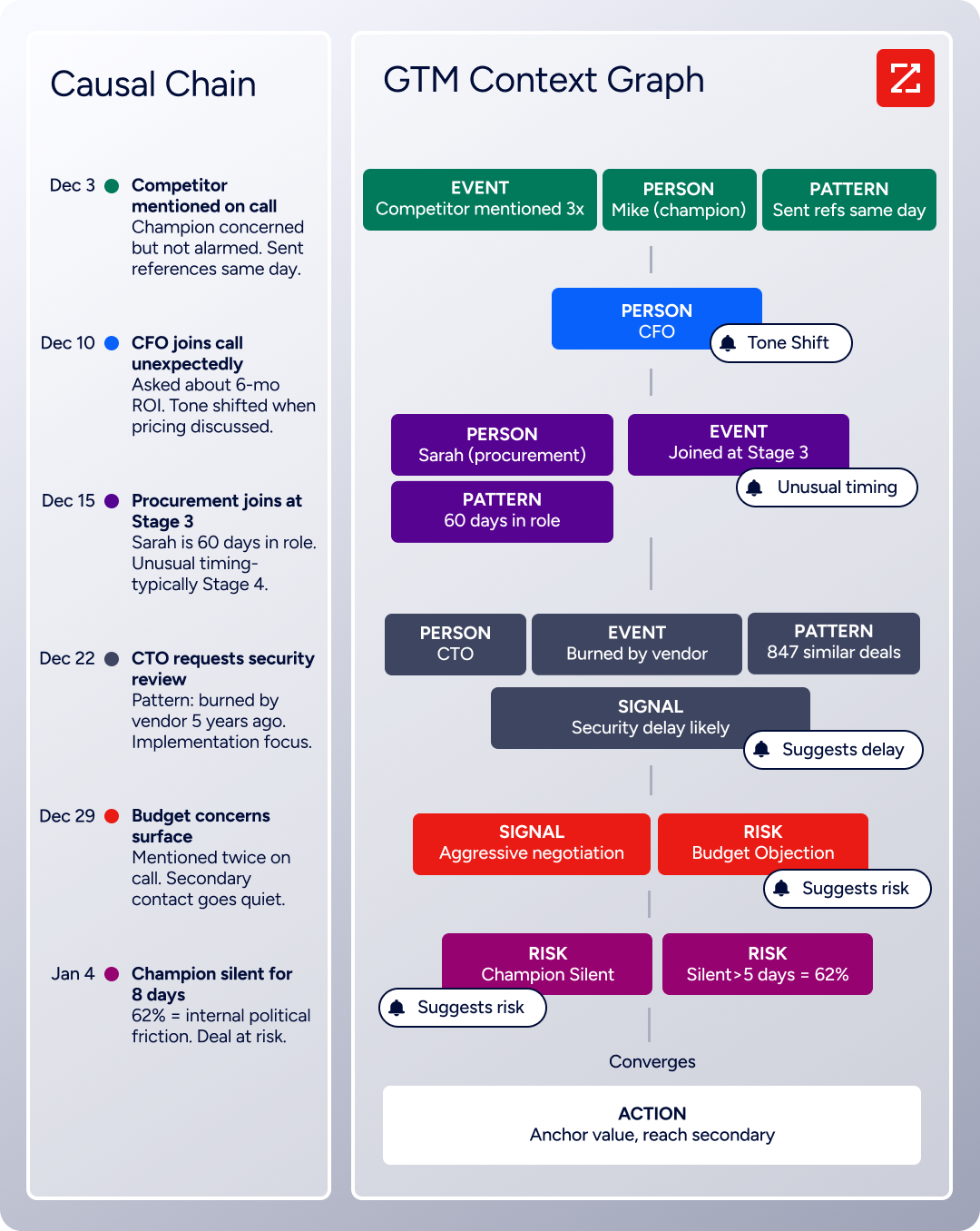
Source: ZoomInfo
As ZoomInfo's Chief Product Officer Dominik Facher writes: "The CRM recorded the state change. It has no record of why it happened." The GTM Context Graph fills that gap by capturing the connections between people, actions, patterns, and outcomes across all your deal interactions.
ZoomInfo in Action: Your pipeline shows a deal moved from Stage 3 to Stage 4 and the close date was pushed two weeks. In Maximizer, you see the stage change. With ZoomInfo, the GTM Context Graph identifies that executive sponsorship entering at this stage, combined with ROI-focused questions from the CFO on the last call, matches the pattern behind closed-won deals in your segment.
It connects that to third-party signals showing the company is hiring new VPs and researching your competitor. The follow-up email your rep sends addresses the specific concern the CFO raised, because the system understands why it matters now.
Seismic's sales team attributed 39% of active pipeline to opportunities identified or influenced by ZoomInfo signals and became 54% more productive. (Seismic)
Universal Access: Use the Intelligence Anywhere, Not Just Inside One CRM
Maximizer's intelligence lives inside Maximizer. If your team works across multiple tools, the insights stay locked in one interface. ZoomInfo takes the opposite approach, delivering intelligence through three channels:
GTM Workspace gives sellers a single place where prioritized accounts, AI-drafted outreach, and deal execution converge without toggling between tools
GTM Studio gives marketers and RevOps a builder environment where audience definition and campaign orchestration happen in natural language
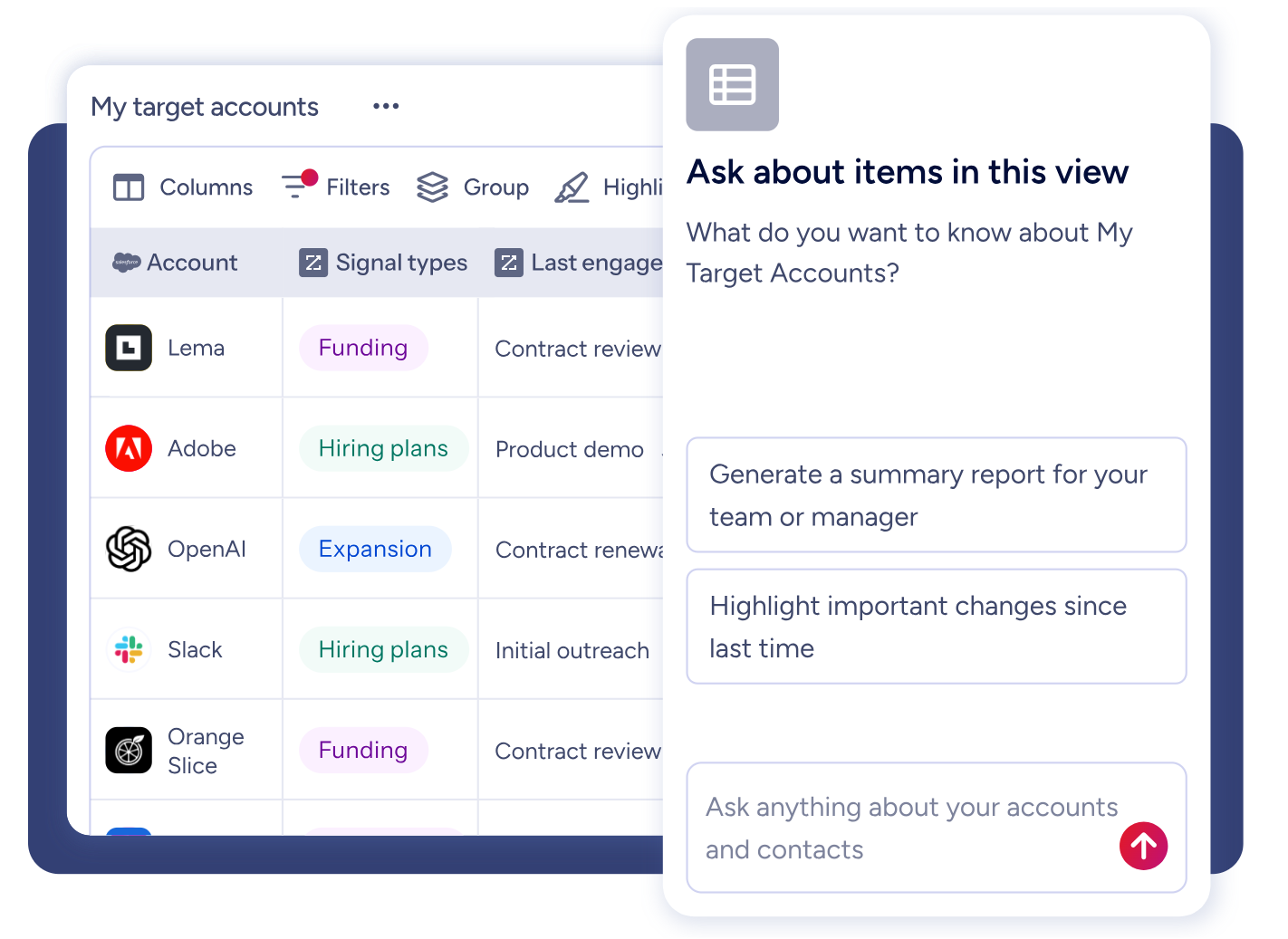
Source: ZoomInfo
All three draw from one GTM Context Graph: the same data, the same intelligence, the same continuously learning model. The choice of where to work never limits the quality of intelligence available.
BDO Canada activated high-quality data within its internal systems using ZoomInfo's API, achieving an 87% reduction in time spent on data dashboard updates. As Jerry Wilson, Senior Marketing Intelligence Analyst, noted: "The plug-and-play aspect of the API means I can integrate it very easily into any process and get information at a moment's notice." (BDO Canada)
NOTE: We looked at other B2B data and intelligence platforms and found Apollo.io frequently mentioned. Apollo.io offers a strong combination of prospecting and outreach at an accessible price point for smaller teams. However, ZoomInfo's data scale (500M contacts vs. Apollo's smaller database), its exclusive Guided Intent feature, and the GTM Context Graph make it the stronger platform for mid-market and enterprise go-to-market teams that need both the data depth and the intelligence layer.
ZoomInfo Pricing
ZoomInfo uses a consumption-based pricing model with no publicly listed prices. Pricing scales around enterprise license agreements, data access, API consumption, and AI activity.
The underlying mechanics are seat-and-credit-based (seats determine user access, credits determine export volume), but costs depend on usage patterns, number of users, monthly credit volume, features, company size, and contract length.
ZoomInfo's pricing page is organized into three product lines:
Sales plans (Professional, Advanced, Enterprise) ranging from core contact and company data through AI-driven account prioritization and real-time buyer intent signals
Marketing plans (Marketing Demand, ABM Lite, ABM Enterprise) spanning audience targeting through enterprise ABM with AI-powered insights
Standalone products including Chorus (conversation intelligence) and Chat (data-powered website chat)
ZoomInfo also offers ZoomInfo Lite, a permanent free tier (not a trial) that provides access to ZoomInfo's B2B database with 10 monthly export credits, individual and company searches, the ReachOut Chrome Extension, and HubSpot integration. A separate 7-day free trial is also available with no credit card required.
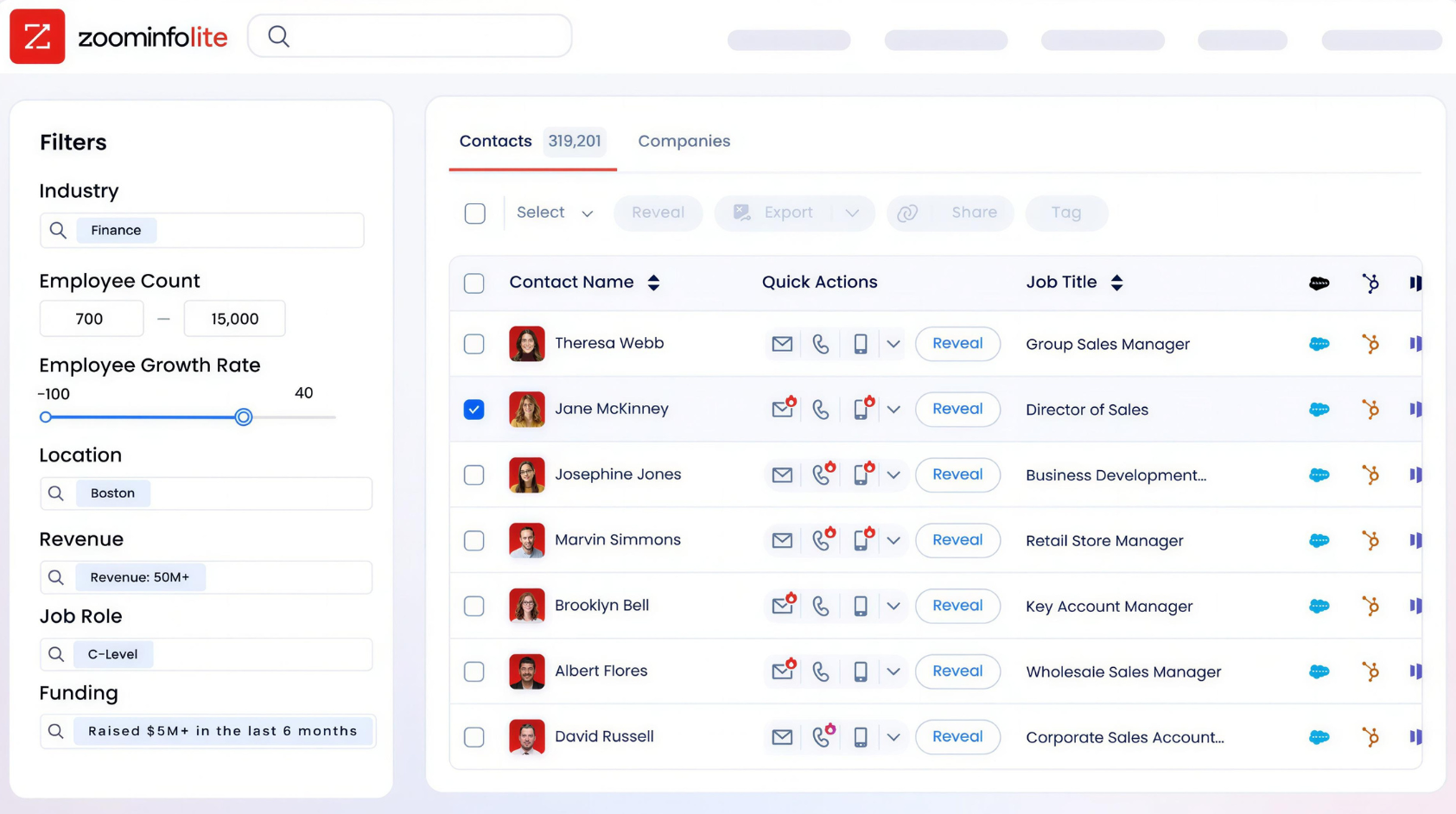
Source: ZoomInfo
Who Should Use ZoomInfo?
Choose ZoomInfo if:
Your sales team needs verified B2B contact data, direct-dial phone numbers, and business emails to fill the top of the funnel with qualified prospects, rather than relying on inbound leads or manually researched contacts already stored in your CRM.
You want AI that goes beyond summarizing existing CRM data and need an intelligence layer that correlates intent signals, conversation insights, and deal patterns across your pipeline to surface why deals move and what to do next.
Your go-to-market motion spans multiple tools and teams, and you need intelligence that flows into your CRM, sales engagement platform, marketing automation, or custom-built AI agents via API and MCP, rather than living inside a single CRM interface.
Want to see which accounts are in-market and why? Start your free ZoomInfo trial and access ZoomInfo's B2B data platform.
2. Salesforce Sales Cloud - Best Alternative for Enterprise Sales Organizations Needing Deep Customization
Salesforce Sales Cloud (now branded as Agentforce Sales) is the dominant enterprise CRM platform, ranked #1 in CRM by IDC continuously since 2012 and named a Gartner MQ Leader for Sales Force Automation for the 19th consecutive year. Its key capabilities include:
Configurable automation via Flow Builder with conditional branching, multi-object process chains, and external API callouts, all without code
AppExchange marketplace with 7,000+ installable apps spanning CPQ, revenue intelligence, and industry-specific vertical solutions
Agentforce AI agents for autonomous prospecting, lead engagement, CRM updates, and quote generation
Pipeline Inspection and Revenue Intelligence with deal-health signals, week-over-week pipeline change tracking, and native Tableau Next connectivity
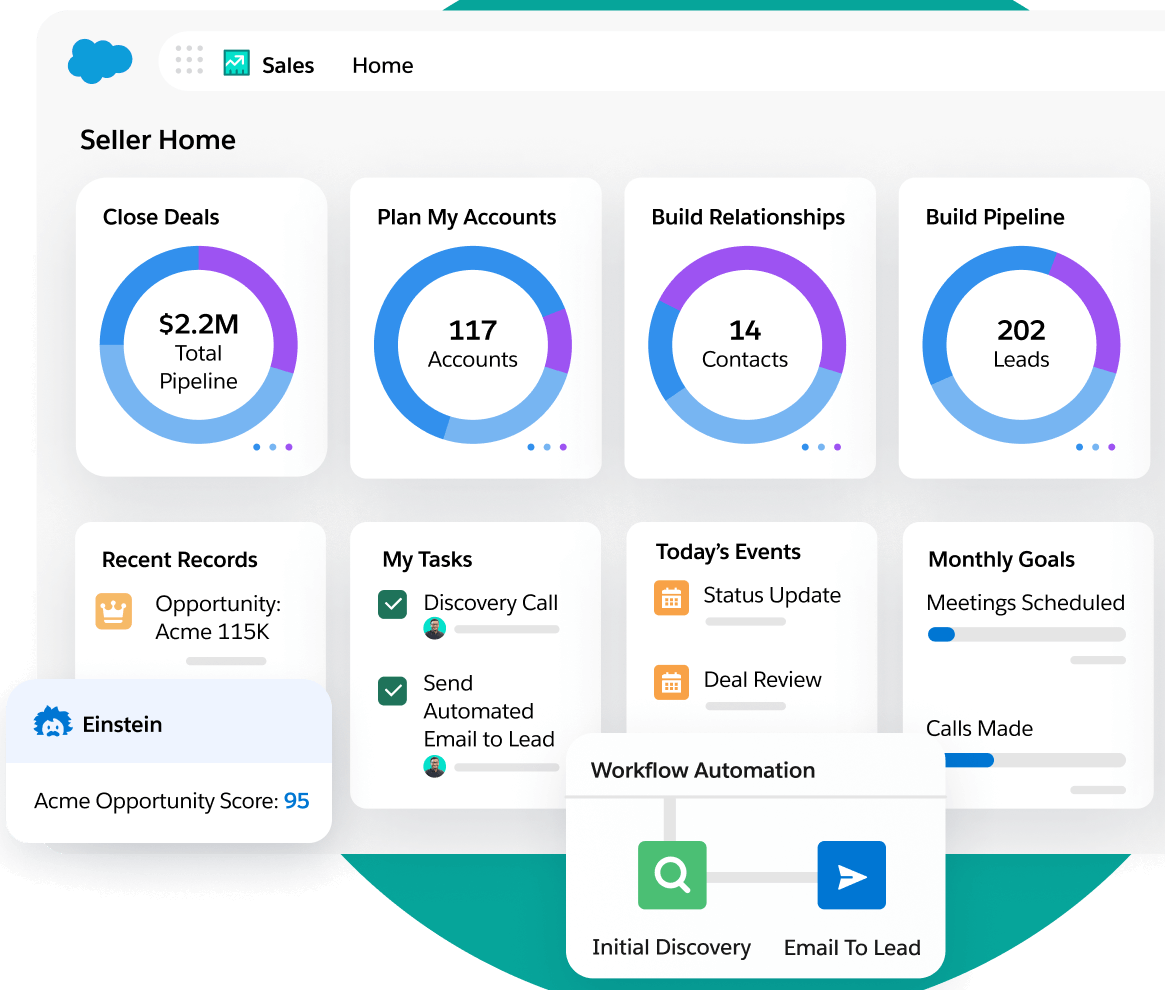
Source: Salesforce Sales Cloud
For sales organizations that have outgrown Maximizer's fixed-edition structure, Salesforce removes the configuration and integration ceiling that mid-market CRMs reach as headcount and process complexity grow.
Why Choose Salesforce Sales Cloud Over Maximizer CRM for Enterprise Sales
Salesforce Sales Cloud stands out in the following areas:
Configuration depth that scales with complexity.
Maximizer's no-code customization covers custom fields and formula user-defined fields, but the structural ceiling is fixed by the edition model.
Salesforce's Flow Builder supports conditional branching, scheduled triggers, and external API callouts without development. A team running 15 reps today and 300 reps across five product lines in three years configures deeper within the same system rather than migrating platforms.
An integration ecosystem that removes the ceiling.
Maximizer's integrations directory lists 50+ tools with a Microsoft-first orientation. Salesforce's AppExchange lists 7,000+ certified apps covering every GTM category. AppExchange apps run on the same CRM infrastructure, sharing records, security models, and reporting layers, rather than operating as external systems requiring data synchronization.
AI embedded across the full sales cycle.
Maximizer's IQ Boost focuses on meeting preparation. Salesforce ships six production-ready Agentforce AI agents that autonomously rank accounts, draft outreach, qualify inbound leads, update CRM fields from call transcripts, and generate compliant quotes.
Einstein Opportunity Scoring assigns win-likelihood scores to every open deal, while Pipeline Inspection surfaces deal-health signals from velocity, support cases, and competitive mentions.
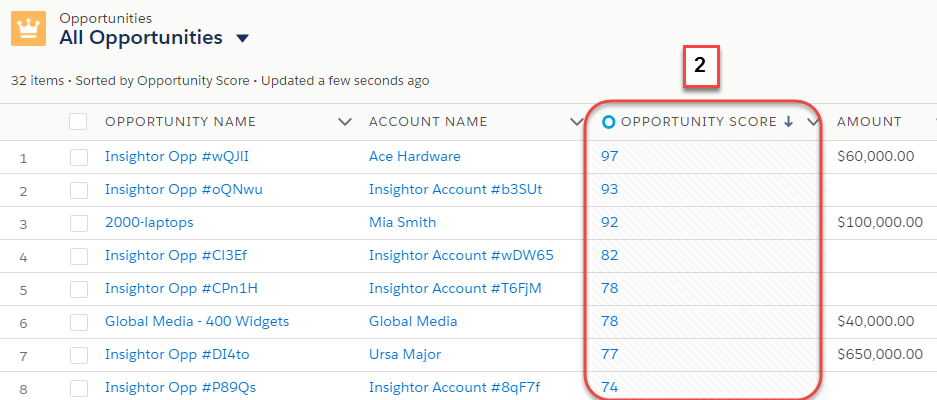
Source: Salesforce Sales Cloud
Enterprise reporting that addresses Maximizer's most documented weakness.
Capterra reviewers describe Maximizer's report-building as non-intuitive with limited multi-condition filtering. Salesforce's analytics stack includes Pipeline Inspection with week-over-week deal changes, Revenue Intelligence dashboards for Gap-to-Quota and rep leaderboards, and native Tableau Next integration for statistical forecasting.
NOTE: We also evaluated Microsoft Dynamics 365 Sales, a strong contender for organizations embedded in the Microsoft 365 stack. Dynamics 365 shares native infrastructure with Teams, SharePoint, Outlook, and Power Platform, giving it a genuine architectural advantage for Microsoft-first buyers. However, Salesforce Sales Cloud offers the broader certified partner ecosystem (AppExchange vs. Microsoft AppSource for CRM-specific extensions), a more mature AI agent framework (Agentforce vs. Dynamics 365 Copilot), and 19 consecutive Gartner MQ Leader designations.
For a deeper look at how Salesforce and Maximizer CRM compare head-to-head, see our Maximizer CRM vs Salesforce comparison.
Salesforce Sales Cloud Pricing
Salesforce Sales Cloud uses a per-user, per-month seat model billed annually, with tiers published on the official pricing page:
Starter Suite: $25/user/month (the only tier with monthly billing flexibility). Core CRM objects, Slack included.
Pro Suite: $100/user/month. Adds Sales Quoting and Forecasting.
Enterprise: $175/user/month. Web API included natively; Pipeline Inspection, Deal Insights, and Conversation Intelligence included. Agentforce available as a $125/user/month add-on.
Unlimited: $350/user/month. Predictive AI, Sales Engagement, and Premier Success Plan bundled.
Agentforce 1 Sales: $550/user/month. Most complete bundle: unmetered Agentforce, Salesforce Spiff, Sales Planning, Tableau Next, and Slack Enterprise+.
Salesforce's per-seat cost is higher than Maximizer at every comparable tier. The value argument rests on revenue-per-rep productivity and total cost of ownership (replacing multiple point solutions), not per-seat price.
Who Should Use Salesforce Sales Cloud?
Choose Salesforce Sales Cloud if:
Your sales organization has outgrown a single-pipeline structure and needs multiple distinct sales processes across different product lines, business units, or geographies in one platform.
Your integration ecosystem has hit a ceiling and the tools your GTM teams need (CPQ, revenue intelligence, industry-vertical applications) aren't available in your current CRM's marketplace.
You need AI that takes autonomous action across the full sales cycle, not just a meeting-prep summary tool for individual reps.
3. HubSpot CRM - Best Alternative for Teams That Want a Free CRM With Native Marketing Automation
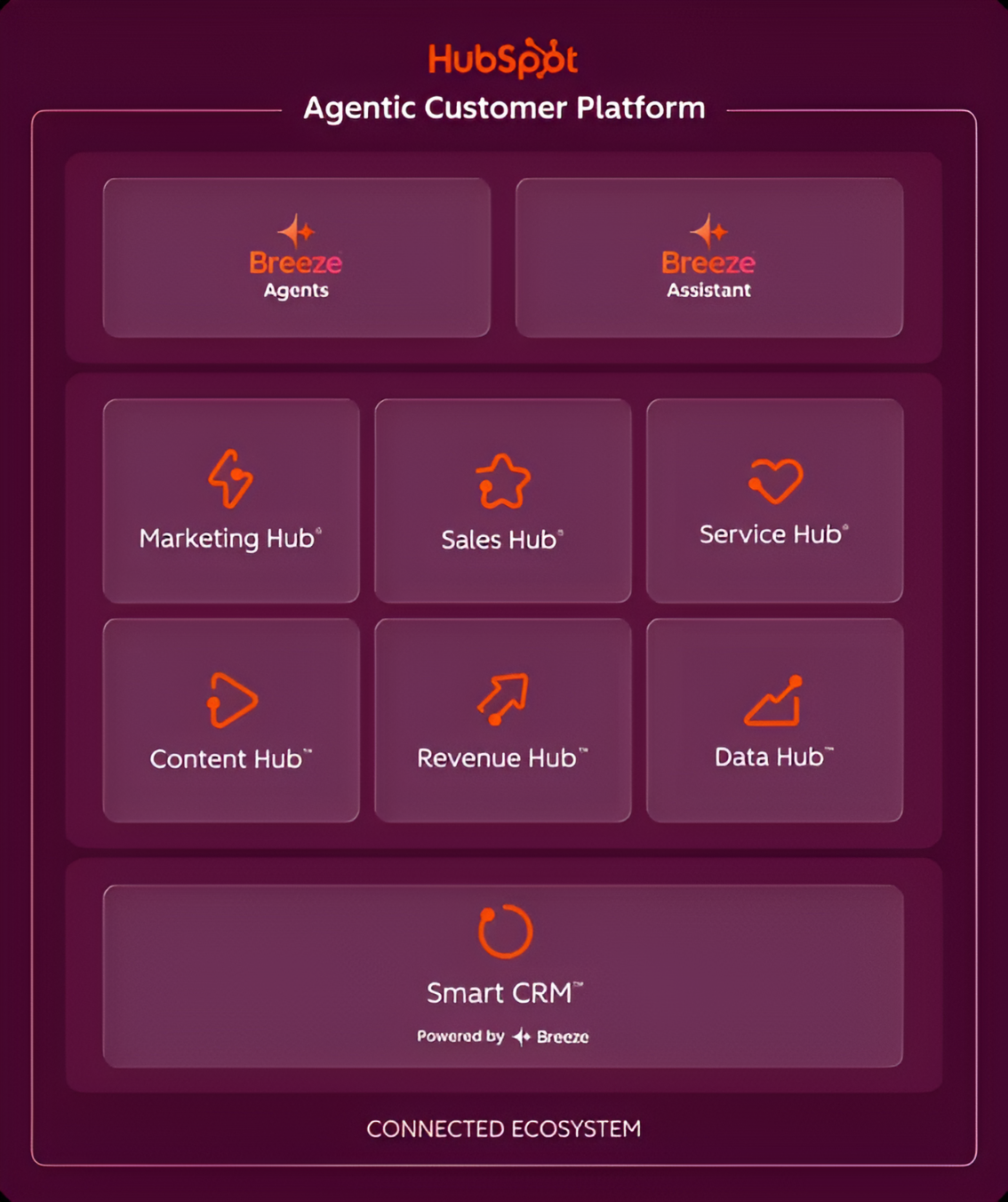
HubSpot CRM is a free, AI-powered Smart CRM that covers the full customer lifecycle, from first marketing touchpoint through pipeline management and post-sale service. Its key capabilities include:
Permanently free CRM tier with contact management, deal pipelines, email integration, meeting scheduling, and reporting, with no time limit and no per-seat charge
Built-in marketing automation including email campaigns, landing pages, forms, and workflow triggers running inside the same platform as the CRM
Modern mobile apps for iOS and Android with full CRM functionality, including contact creation, deal updates, call logging, and push notifications
Unified customer timeline across Marketing Hub, Sales Hub, and Service Hub
Breeze AI layer embedded natively across all hubs, powering deal scoring, meeting prep, and AI-generated reports
Source: HubSpot CRM
For teams that currently juggle Maximizer alongside a separate email marketing tool (a common complaint in Capterra reviews), HubSpot collapses that into a single subscription.
Why Choose HubSpot CRM Over Maximizer CRM for Free CRM With Native Marketing
HubSpot CRM stands out in the following areas:
Free entry point versus a $65/user/month floor.
Maximizer's pricing starts at $65/user/month for the Core plan. For a five-person team, that's $325/month before pipeline visualization or AI features. There's no published free tier and no self-serve trial.
HubSpot's permanent free plan includes contact management, deal pipelines, activity logging, email tracking, and meeting scheduling with no expiry. The Starter tier at $15/seat/month is still less than a quarter of Maximizer's entry price.
Native marketing automation versus third-party dependency.
Maximizer treats email marketing as an external dependency, routing to integrations like Mailchimp and ActiveCampaign rather than offering native capability.
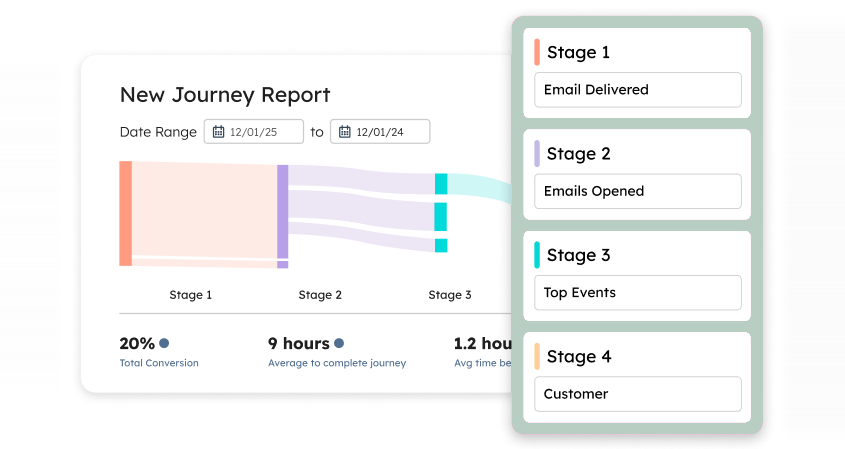
HubSpot's Marketing Hub email campaigns, landing pages, forms, and workflow automation are built on the same database as Sales Hub. A marketing-qualified lead from a HubSpot form appears instantly on the CRM timeline with every subsequent email open and page visit logged on the same record.
Source: HubSpot CRM
Modern mobile CRM versus documented mobile weakness.
Capterra reviewers specifically flag the inability to save contacts or email communications from Maximizer's mobile app. HubSpot's mobile apps for iOS and Android provide full CRM functionality: creating contacts, logging calls, updating deal stages, accessing pipelines, and running sequences, all with real-time push notifications.
NOTE: We also evaluated Zoho CRM's free tier, which caps at 3 users. HubSpot CRM offers the most complete free experience for growing teams because its free tier supports up to 2 users with no expiry, the Starter tier at $15/seat scales affordably, and native marketing automation is available from day one without a separate subscription.
For a side-by-side look at how HubSpot and Maximizer CRM compare, see our HubSpot vs Maximizer CRM comparison.
HubSpot CRM Pricing
HubSpot Smart CRM uses a per-seat, tiered model from HubSpot's pricing page:
Free: $0, no credit card, no time limit. Up to 2 users and 1,000 contacts. Includes contact management, deal pipelines, email integration, meeting scheduling, and Breeze Assistant.
Starter: $15/seat/month (annual). Adds required fields, permission sets, multiple currencies. 500 HubSpot Credits/month.
Professional: $45/seat/month (annual). Up to 15 deal pipelines, custom reporting, calculated properties, Salesforce integration, duplicate management. 3,000 Credits/month. Requires $1,500 one-time onboarding.
Enterprise: $75/seat/month. Custom objects, sandbox, SSO, field-level permissions. 5,000 Credits/month. Requires $3,500 one-time onboarding.
Who Should Use HubSpot CRM?
Choose HubSpot CRM if:
Your team is starting from zero or transitioning from spreadsheets and wants a full CRM at no cost, with no vendor calls required before sign-up.
You currently run separate tools for CRM and email marketing and want to consolidate them into one subscription where form captures, nurture workflows, and campaign tracking all live on the same contact record.
Your reps are frequently away from their desks and need a mobile app where creating contacts, logging calls, and updating deals are first-class features.
Your team has grown beyond Maximizer's pricing justification: five users on Maximizer's Business+ tier at $89/user/month is $5,340/year; the same team on HubSpot Professional at $45/seat/month is $2,700/year with richer reporting and native marketing included.
4. Pipedrive - Best Alternative for Small Sales Teams That Want Clean Pipeline Management
Pipedrive is a sales CRM built for SMBs that prioritizes the salesperson's daily experience over managerial monitoring dashboards. Founded in 2010 by frustrated salespeople, Pipedrive's insight was that most CRMs were designed for managers to track reps, not for reps to close deals. Its key capabilities include:
Visual drag-and-drop kanban pipeline with deal rotting alerts and color-coded stage health
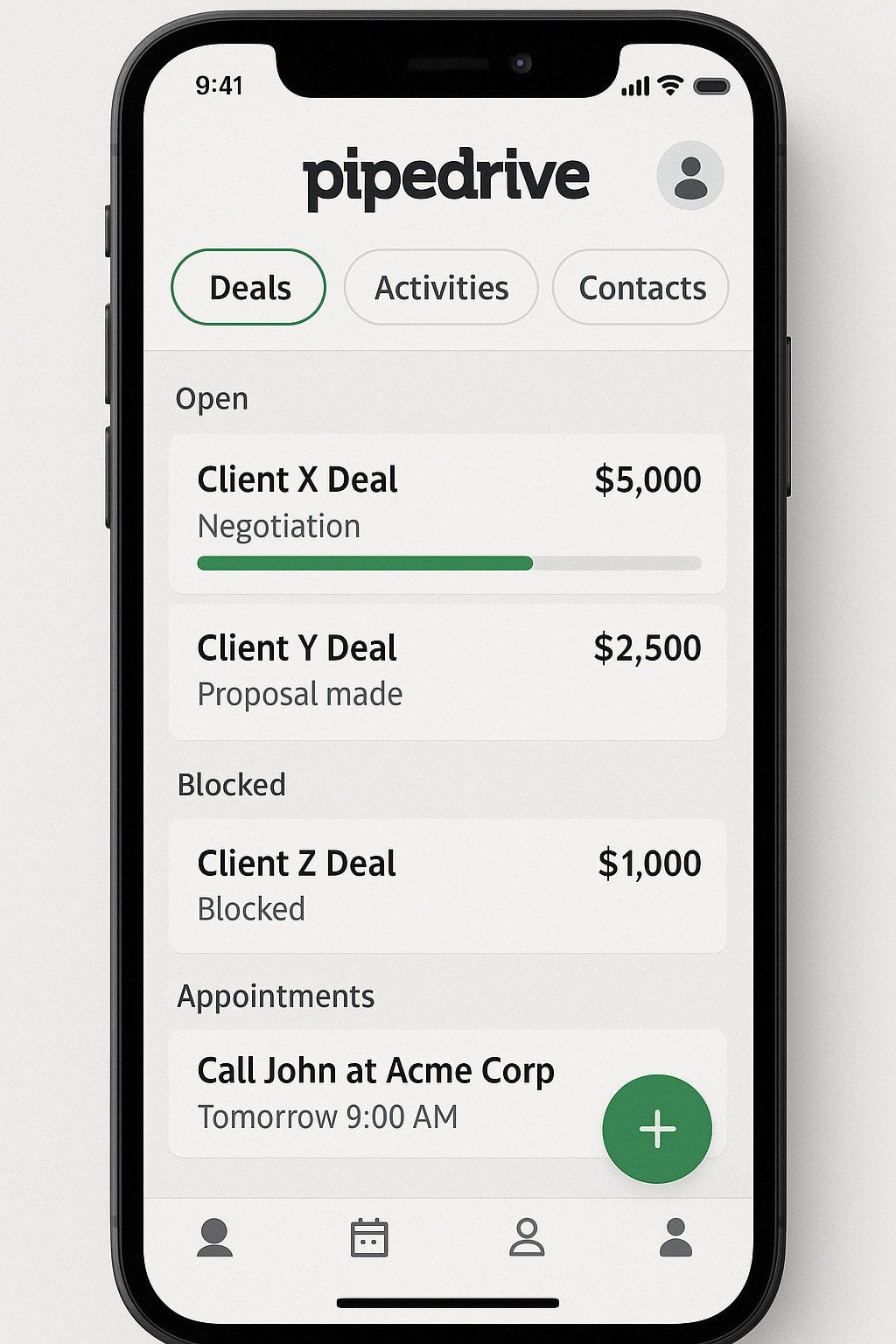
Fully functional mobile apps for iOS and Android with offline mode, in-app calling, automatic call logging, and a "Nearby" field selling feature
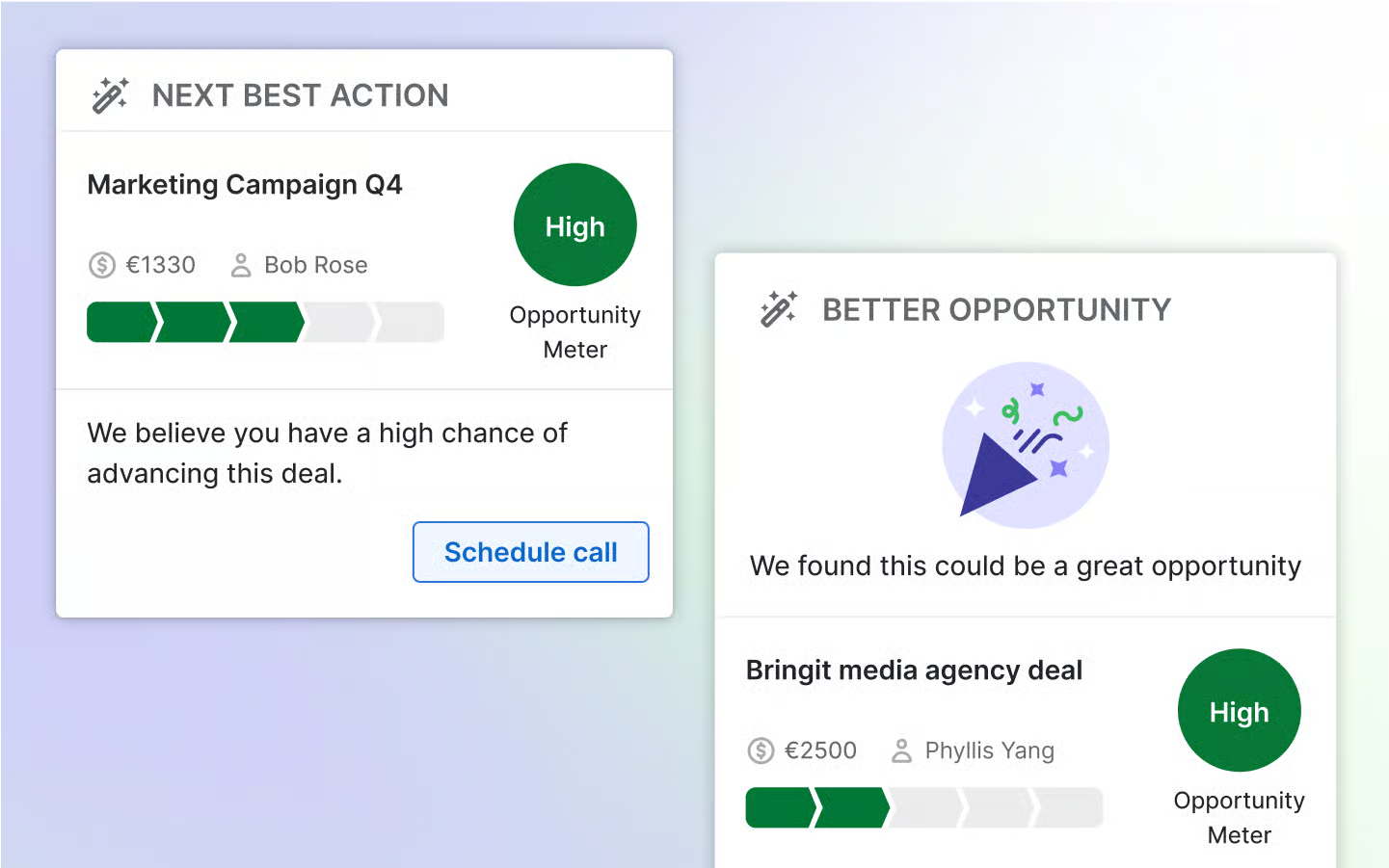
AI Sales Assistant with next-action recommendations and win probability predictions
Lead Inbox that separates unqualified prospects from active pipeline
500+ Marketplace integrations plus a free open API available on all plans
Source: Pipedrive
Pipedrive is the right Maximizer alternative for compact B2B sales teams (2 to 50 reps) that want a system their salespeople will actually use from day one without a dedicated CRM administrator.
Why Choose Pipedrive Over Maximizer CRM for Clean Pipeline Management
Pipedrive stands out in the following areas:
Interface built for reps, not administrators.
Maximizer's interface has accumulated 35+ years of feature additions, and Capterra reviewers consistently flag it as dated and overwhelming. Pipedrive pioneered the kanban-style pipeline view in CRM.
Deals appear as cards on a board; colored "deal rotting" alerts flag idle deals; dragging a card advances a deal.
A mobile app that works for field and remote reps.
Where Maximizer's mobile app can't save contacts or log emails, Pipedrive's mobile apps support offline activity scheduling, in-app calling with automatic logging, two-way email sync, a business card scanner, voice-to-text notes, and a "Nearby" feature that surfaces geographically close clients on a map.
Source: Pipedrive
Transparent pricing without hidden add-ons.
Maximizer's $65/user/month is the starting point, with four additional items marked "Additional purchase required" at undisclosed prices. Pipedrive starts at $14/user/month with a 14-day free trial requiring no credit card. A 10-person team pays $1,680/year on Lite versus $7,800/year on Maximizer's Core plan.
NOTE: We also evaluated Freshsales and Copper CRM. While Freshsales offers strong built-in marketing automation at SMB pricing and Copper CRM is embedded in Google Workspace, Pipedrive offers the most refined pipeline UX, the strongest mobile experience at this price tier, and the longest track record for small B2B sales teams that want to focus on selling rather than configuring.
Pipedrive Pricing
Pipedrive offers four plans billed per seat per month:
Lite: Starts at $14/user/month (annual). Customizable pipelines, deal rotting, leads inbox, products catalog, custom fields, API access, 500+ integrations, full mobile apps. 2,500 leads+deals per seat.
Growth: Adds email sync, email templates, open/click tracking, automations with if/else branching, meeting scheduler, forecast view. 5,000 leads+deals per seat.
Premium: Includes Smart Docs, Projects, LeadBooster as built-in features, formula fields, automatic lead assignment, AI email creation, phone support. 15,000 leads+deals per seat.
Ultimate: Contact data enrichment, security alerts, highest limits across all categories. 500 custom fields, 500 reports.
All plans include a 14-day free trial with no credit card required. Annual billing offers up to 42% savings.
Who Should Use Pipedrive?
Choose Pipedrive if:
Your sales team is between 2 and 50 reps and wants a CRM they can self-configure without IT involvement or paid implementation services.
Your reps frequently work away from a desk and need a mobile CRM that logs calls automatically, works offline, and surfaces nearby clients.
You're moving away from Maximizer specifically because the interface felt dense or the reporting was difficult to navigate.
You need predictable, transparent pricing with no mandatory professional services purchases.
5. Zoho CRM - Best Alternative for Enterprise Workflow Depth at SMB Pricing
Zoho CRM delivers enterprise-grade workflow automation, AI-powered sales intelligence, and omnichannel communication at a price point built for SMBs and growing mid-market teams. Its key capabilities include:
Zia AI assistant for lead and deal scoring, next-best-action recommendations, email sentiment analysis, and anomaly detection, included in the Enterprise license
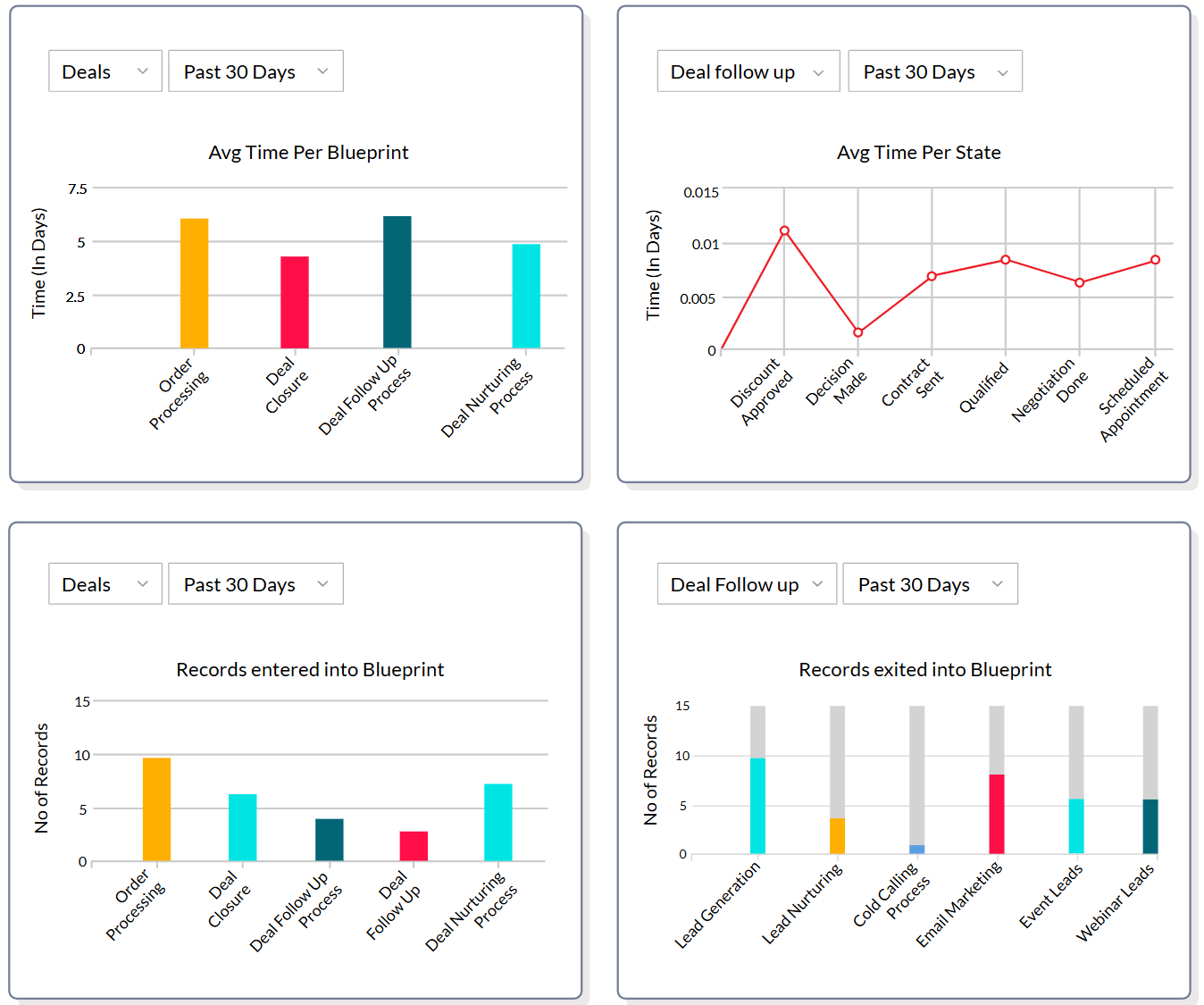
Blueprint visual workflow builder for enforcing multi-step sales processes with mandatory fields and approval gates
Omnichannel communication spanning email, phone, live chat, SMS, WhatsApp Business, and social media, all logged natively to a single contact record
Multi-dimensional reporting with drill-down from aggregate metrics to individual records
Zoho One ecosystem bundling 50+ business applications at a flat per-employee rate
Source: Zoho CRM
For growing teams that need Salesforce-class automation and AI at $40/user/month, Zoho CRM directly addresses the workflow and reporting gaps that Maximizer reviewers consistently flag.
Why Choose Zoho CRM Over Maximizer CRM for Workflow Depth at SMB Pricing
Zoho CRM stands out in the following areas:
Blueprint process automation vs. Maximizer's Power Automate dependency.
Maximizer's workflow automation depends on external Microsoft Power Automate integration. Zoho's Blueprint is a native enforcement layer built into the Professional tier ($23/user/month). If a rep tries to advance a deal without completing required steps, Blueprint blocks the transition and surfaces exactly what's missing. Stagnant records automatically trigger escalation alerts.
Source: Zoho CRM
Zia AI across the full workflow vs. meeting prep summaries.
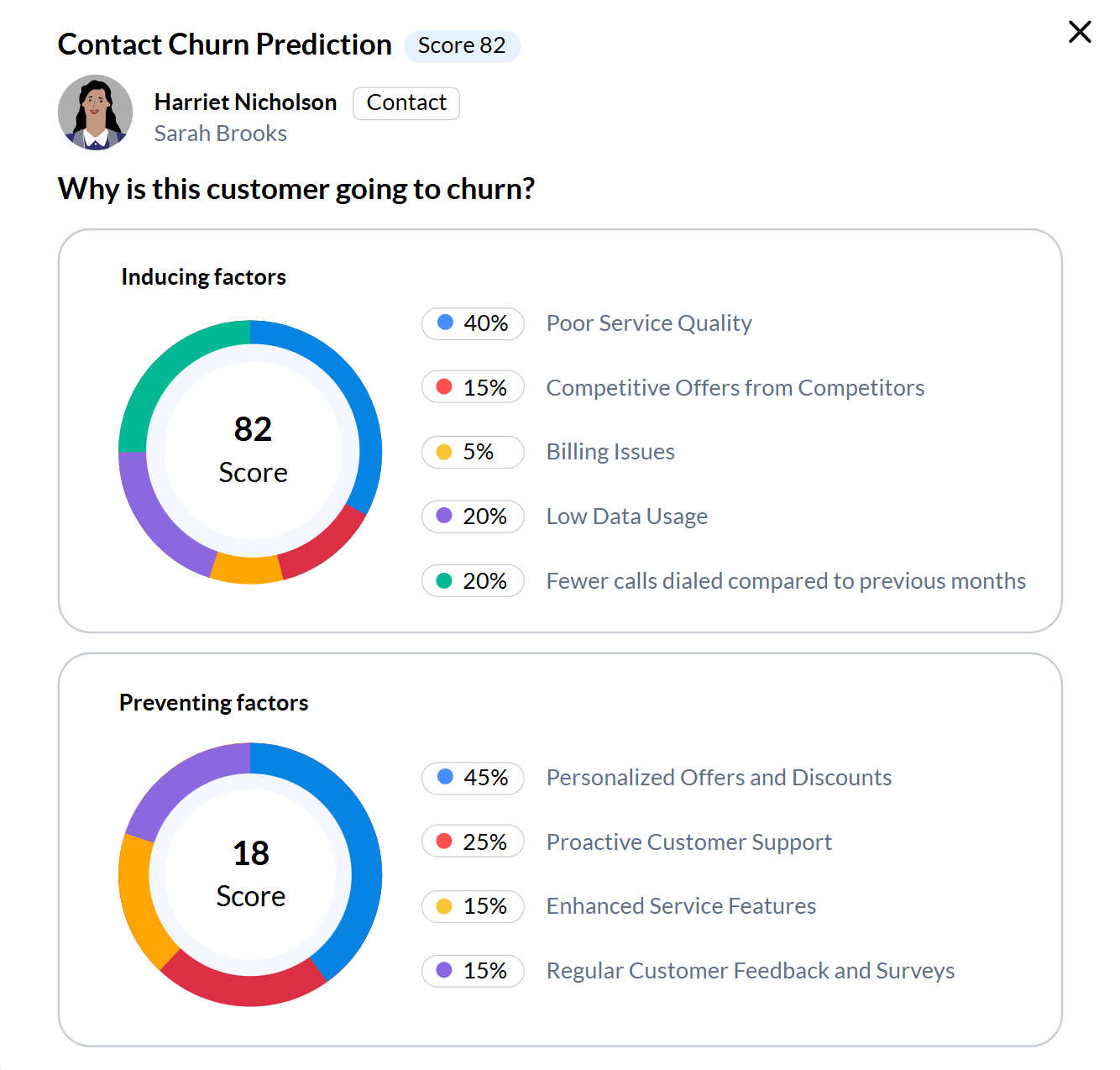
Maximizer's IQ Boost generates meeting prep and surfaces KYC details for financial advisors. Zia is embedded across the full sales workflow: predictive scoring that updates continuously, churn prediction identifying at-risk accounts, email sentiment analysis across eight emotion categories, and anomaly detection that monitors deal progression in real time.
On Enterprise ($40/user/month), Zia generates entire CRM modules and workflow rules from plain language.
Omnichannel communication beyond Outlook and Teams.
Maximizer's communication layer is designed for Outlook and Teams. Zoho CRM's omnichannel layer covers email, click-to-dial phone with transcription, WhatsApp Business, SMS, live chat, and social media, all logged natively. SalesSignals fires real-time notifications when prospects engage across any channel.
Reporting that replaces manual work.
Where Capterra reviewers describe Maximizer's report-building as non-intuitive, Zoho's analytics layer enables multi-dimensional reporting with drill-down to individual records, nine chart types, and forecasting that splits pipeline into Committed, Best Case, and Open Deals simultaneously.
NOTE: We also evaluated Monday CRM and ActiveCampaign. While Monday CRM suits teams that want to blend CRM and project coordination, and ActiveCampaign offers deeper email marketing automation, Zoho CRM provides the broadest feature set in the $20-$52/user/month range with the Zia AI layer included and a clear ecosystem expansion path via Zoho One.
For a side-by-side breakdown of Monday.com and Zoho CRM, see our Monday.com vs Zoho CRM comparison.
Zoho CRM Pricing
Zoho CRM offers standalone plans with annual billing:
Free: $0, up to 3 users. Leads, contacts, accounts, deals, mobile access, 5,000 records.
Standard: $14/user/month. Custom reports, sales forecasting, Cadences, AI agent deployment.
Professional: $23/user/month. CPQ with price rules, Blueprint automation, email intelligence, inventory management.
Enterprise: $40/user/month. Zia AI (scoring, anomaly detection, churn prediction), territory management, journey orchestration, sandbox.
Ultimate: $52/user/month. Custom ML model building, data preparation, enhanced limits.
Zoho One bundles 50+ apps (CRM, accounting, support, marketing, HR) at approximately $37/employee/month. For teams that also need marketing automation, finance tools, or customer support, Zoho One often costs less than what teams pay for a single marketing tool alone.
Who Should Use Zoho CRM?
Choose Zoho CRM if:
Your team needs process standardization enforced inside the CRM, with a mechanism that prevents reps from advancing deals without completing required steps.
You're paying $65-$89/user/month for Maximizer and want equivalent or deeper features (embedded AI, omnichannel communication, Blueprint automation) at $23-$40/user/month.
Your prospect communication extends beyond Outlook and Teams, and you need WhatsApp, live chat, social media, or SMS interactions logged natively to the CRM record.
You are considering Zoho One as a consolidation path for your full business application stack, replacing multiple vendor subscriptions with a single ecosystem.
6. Redtail CRM - Best Alternative for US Financial Advisors Needing Compliance and Custodian Integrations
Redtail CRM is a financial advisor-focused CRM platform and the #1 CRM for financial advisors per the T3/Inside Information Advisor Software Survey 2026, holding 45% of the US advisor CRM market. Its key capabilities include:
Pre-built advisory workflow templates covering new client onboarding, annual reviews, beneficiary updates, KYC compliance reviews, and seminar planning
Automatic interaction logging for SEC and FINRA compliance, with every call, email, and meeting note timestamped and written to an audit-ready record
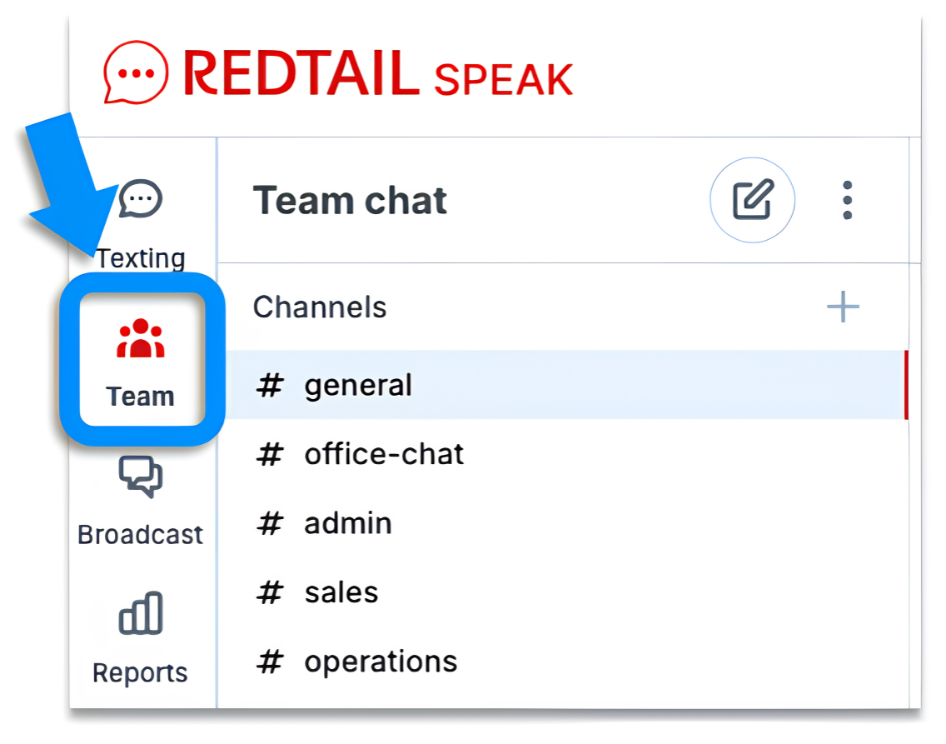
Redtail Speak: a compliant text messaging product with fully archived, CRM-integrated SMS meeting FINRA recordkeeping requirements
191+ native integrations spanning US custodians (Charles Schwab, Fidelity, Pershing), financial planning tools (eMoney Advisor, MoneyGuidePro, RightCapital), and portfolio management platforms (Orion, Black Diamond, Tamarac)
Growth plan with unlimited users at $59/user/month (annual), plus bundled Redtail Imaging and Redtail Speak
Source: Redtail CRM
This is the specialist choice for US-domiciled RIAs and broker-dealers for whom SEC/FINRA recordkeeping and custodian data sync are non-negotiable requirements.
Why Choose Redtail CRM Over Maximizer CRM for US Financial Advisory
Redtail CRM stands out in the following areas:
US regulatory compliance built into every layer.
Maximizer's compliance architecture is calibrated to Canadian regulatory requirements: Canadian data residency, CASL compliance, and insurance data from 11 Canadian carriers. For US-based advisors under SEC Rules 17a-3 and 17a-4 or FINRA recordkeeping mandates, Maximizer's infrastructure wasn't designed for their regulatory environment.
Redtail's SOC 2 Type II certification covers all five trust service criteria. Redtail Speak provides FINRA-compliant SMS archiving with nightly backups, supervisor review queues, flagged keyword monitoring, and documented Smarsh integration for SEC, FINRA, and MiFID II surveillance.
Custodian integration depth for the US advisory tech stack.
Maximizer connects to Canadian carriers and platforms like Croesus and Univeris. US advisors custody assets at Schwab, Fidelity, and Pershing.
Redtail's 191+ integrations bring account data, position information, and beneficiary details directly from US custodians into the client record. Planning tools (eMoney Advisor, MoneyGuidePro, RightCapital) and portfolio platforms (Orion, Black Diamond, Tamarac) synchronize natively.
Source: Redtail
Market-leading adoption creates a self-reinforcing ecosystem.
Redtail's 45% market share (more than three times runner-up Wealthbox at 14%) means custodians, portfolio platforms, and compliance archiving vendors build and maintain Redtail integrations because the installed base demands it. That network effect creates long-term tech stack stability for advisory practices.
NOTE: We also evaluated Wealthbox CRM and Salesforce Financial Services Cloud. While Wealthbox excels at simplicity for solo independent advisors, and Salesforce Financial Services Cloud offers enterprise customization for wirehouse divisions, Redtail offers the deepest combination of US custodian integrations, FINRA-calibrated compliance infrastructure, and market-validated workflow depth for independent RIAs without a six-figure implementation budget.
Redtail CRM Pricing
Launch: $39/user/month (annual) or $45/month (monthly). Maximum 5 users. Core CRM: contact management, notes archiving, activity templates, calendar, reports, pipeline tracker, mobile app, data migration.
Growth: $59/user/month (annual) or $65/month (monthly). Unlimited users. Everything in Launch plus Automated Workflows, Suite Sync (Office 365, Google Calendar), Bulk Emails. Bundled: Redtail Imaging (200 GB compliant document management) and Redtail Speak (compliant SMS with AI assistant).
Enterprise: Custom pricing for larger firms through Premiere Partnership Pricing. Centralized oversight dashboards, advanced compliance tools, multi-office access.
Redtail Email (add-on): $10/user/month. Compliant email archiving satisfying SEC Rules 17a-3 and 17a-4.
All plans include a 30-day free trial with no credit card required.
Who Should Use Redtail CRM?
Choose Redtail CRM if:
You are a US-based RIA, independent broker-dealer, or wealth management firm operating under SEC and FINRA requirements, and you need compliance infrastructure designed for your regulatory environment rather than configured onto a general sales CRM.
Your tech stack runs through US custodians (Schwab, Fidelity, Pershing) and financial planning platforms (eMoney, MoneyGuidePro), and you want account and position data flowing into client records without manual re-entry.
You want compliant client SMS messaging with full FINRA archiving included in your CRM subscription, rather than requiring a separate vendor contract.
7. Attio - Best Alternative for Tech-Forward GTM Teams That Want an AI-Native, Flexible Data Model
Attio is an AI-native CRM built for go-to-market teams at B2B SaaS companies and technology startups that need a CRM which adapts to how their business is actually structured. Its key capabilities include:
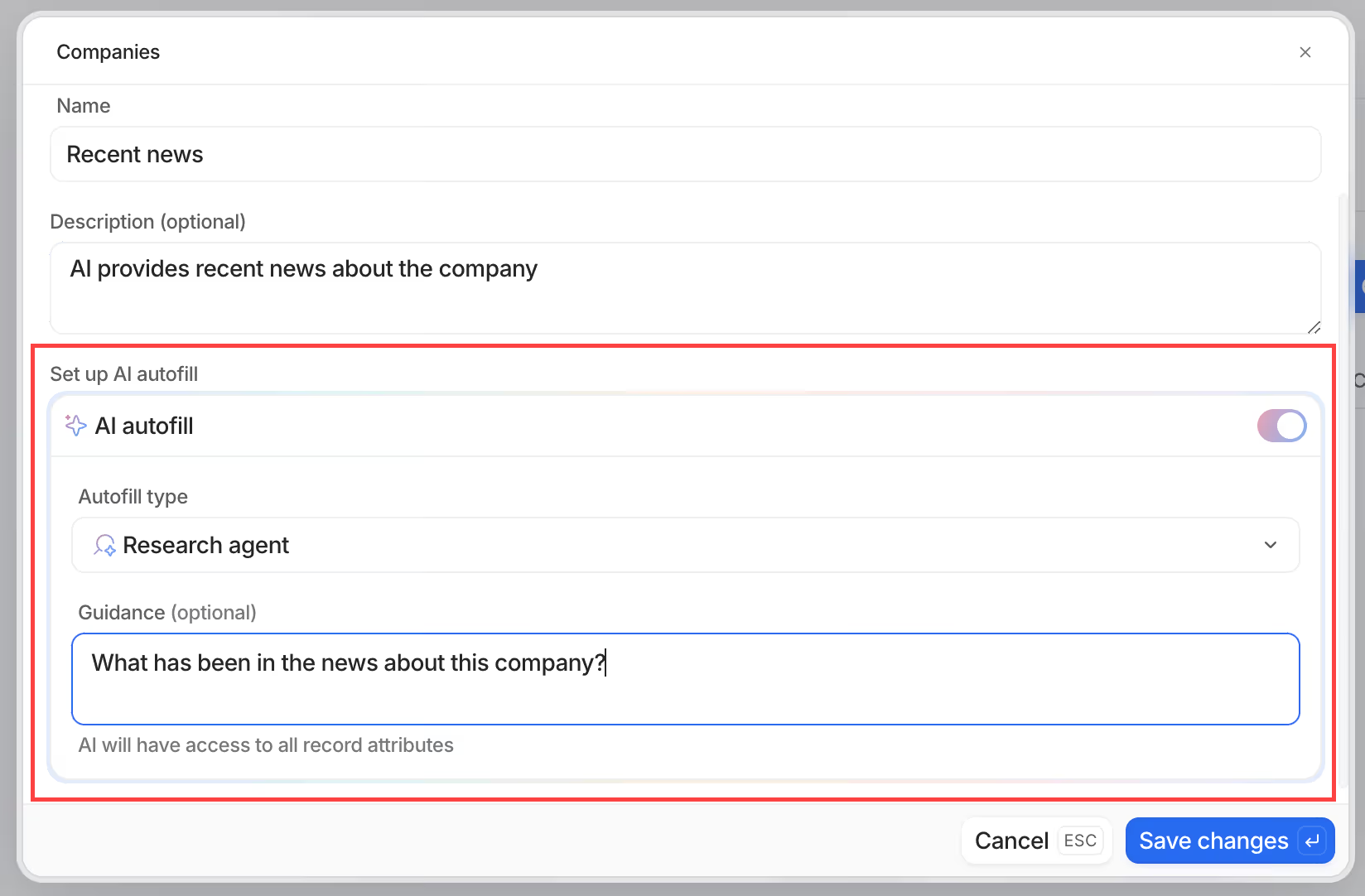
AI Attributes that auto-populate custom fields on any object using AI, embedding intelligence directly into the data model
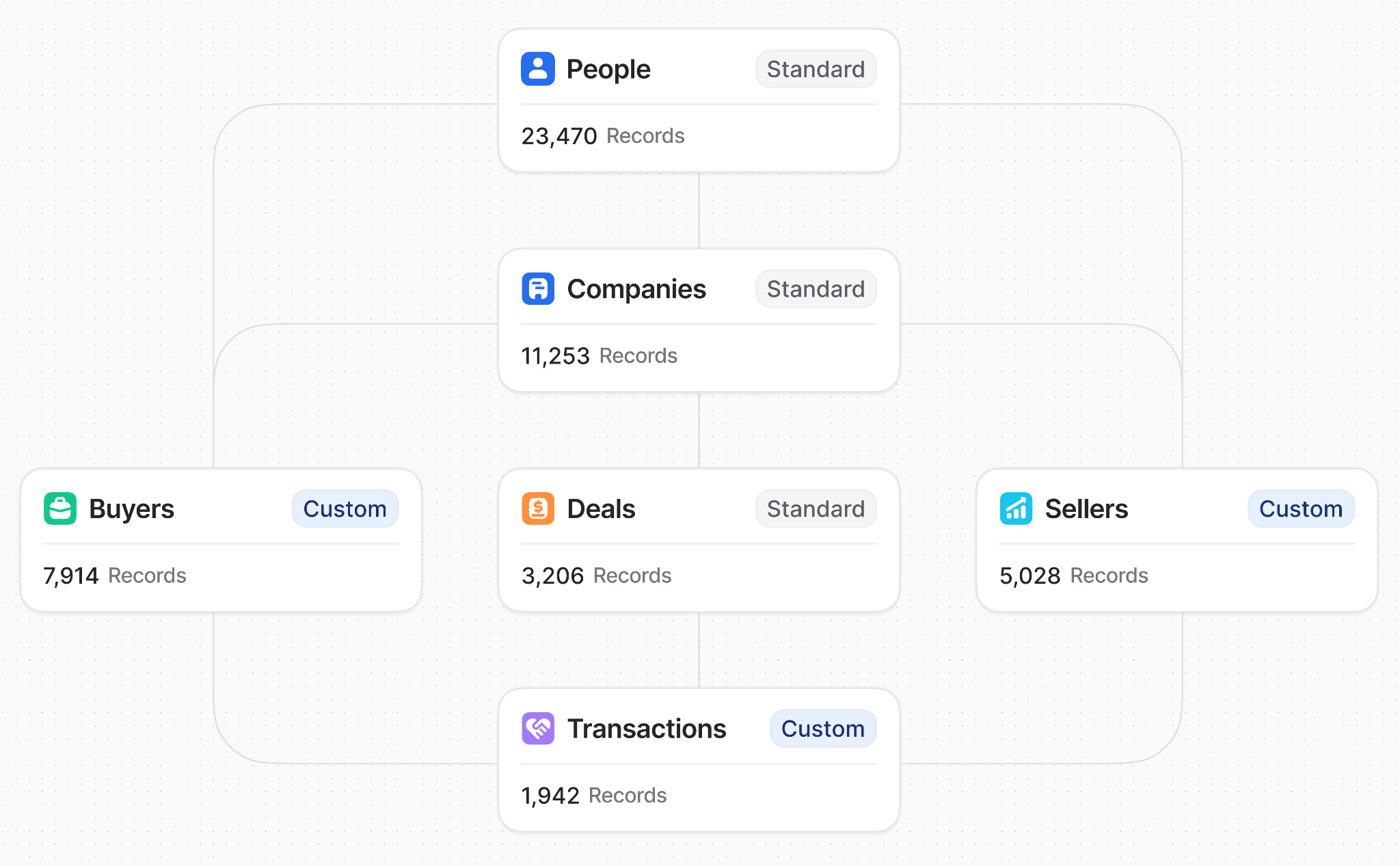
Flexible custom objects allowing teams to define record types beyond contacts, companies, and deals (partnerships, subscriptions, workspace accounts)
Automatic enrichment at record creation, pulling logos, social profiles, ARR estimates, and funding data from public sources
Modern multi-view interface with list, board, table, and kanban views in a Notion-style UI built for speed
Native call intelligence that records, transcribes, and analyzes meetings directly inside the CRM
Visual workflow automation with AI-powered classification and research agent blocks on all plans
Source: Attio
Attio is built for seed-to-Series-B technology companies, particularly product-led growth teams and engineering-driven organizations that expect to configure their own systems.
Why Choose Attio Over Maximizer CRM for AI-Native, Flexible CRM
Attio stands out in the following areas:
AI that lives inside the data model, not on top of it.
Maximizer's IQ Boost operates as a separate panel layered on a data model designed before AI existed. Attio's AI Attributes let teams add AI-generated fields directly to any object in the data model itself. A "Company Summary" attribute pulls from linked records and transcripts.
An "ICP Tier" attribute classifies incoming companies by tech stack signals. These AI outputs become first-class data: filterable, sortable, and triggerable in workflow automation.
A data model that matches how your business actually works.
Maximizer's data model is organized around fixed entity types: Address Book entries, Opportunities, Leads, Cases. Attio's custom object model lets teams define new record types with their own attributes and relationships, up to 5 custom objects on Plus, 12 on Pro, and unlimited on Enterprise.
For PLG startups, B2B marketplaces, or partner-led sales motions, the standard CRM schema creates accumulating friction.
Source: Attio
A modern interface that teams actually adopt.
Where Capterra reviewers describe Maximizer's screens as overwhelming, Attio was designed from scratch in 2019: fast keyboard navigation, inline editing, multiple view modes, and a clean hierarchy.
NOTE: We also evaluated Folk CRM and Affinity CRM. While Folk excels at relationship-led sales with a clean UI for individual contributors, and Affinity is built for relationship intelligence in venture capital, Attio offers the most novel CRM architecture for GTM teams needing a configurable data model with AI embedded into the record structure.
For a closer look at how Attio and Folk CRM compare, see our Attio vs Folk comparison.
Attio Pricing
Attio uses a per-seat model with a 20% discount on annual billing. Credits govern AI feature usage.
Free: $0. Up to 3 seats, 50,000 records, 3 custom objects. 100 seat credits/user/month. Basic email and calendar sync. No Call Intelligence or AI agents.
Plus: $29/user/month (annual) or $36/month (monthly). No seat limits; 250,000 records; 5 custom objects. Full email visibility, Ask Attio, AI agents, Call Intelligence. 500 seat credits/user/month.
Pro: $69/user/month (annual) or $86/month (monthly). 1M records; 12 custom objects. Sequences and email outreach. 1,000 seat credits/user/month. Priority support.
Enterprise: Custom pricing. Unlimited objects and teams. SSO (SAML 2.0), migration service, invoice billing. 2,500 seat credits/user/month.
Attio also runs a startup program offering 80% off the annual Pro plan for year one, plus 30% off in year two, for companies affiliated with a venture firm or Attio partner.
Who Should Use Attio?
Choose Attio if:
Your GTM motion is product-led, partner-led, or otherwise doesn't map to a traditional contact-and-opportunity pipeline, and you need a CRM where you can define your own object types and relationships.
You're at a seed-to-Series-B technology company where CRM adoption has been inconsistent, and you need an interface newer team members will use without training.
Your team includes engineers or RevOps practitioners who want to build integrations via a REST API or MCP server, and use AI Attributes and workflow automation for automated lead scoring and ICP classification.
The Final Verdict
Maximizer CRM excels as a vertically focused platform for Canadian financial advisors and Microsoft-first sales teams. But growing businesses and teams with different requirements often need specialized tools with deeper capabilities in their domain. Based on our research, here are the best alternatives:
ZoomInfo for AI-powered go-to-market intelligence, B2B data, and buyer intent signals that power prospecting and pipeline generation
Salesforce Sales Cloud for enterprise-scale customization, a broad integration ecosystem, and production-ready AI agents across the full sales cycle
HubSpot CRM for a permanently free CRM with native marketing automation, eliminating the need for separate email marketing subscriptions
Pipedrive for clean, visual pipeline management with a lightweight interface and fully functional mobile app at transparent pricing
Zoho CRM for enterprise workflow automation, omnichannel communication, and the Zia AI assistant at SMB pricing
Redtail CRM for US-based financial advisors needing FINRA/SEC compliance infrastructure and custodian integrations
Attio for tech-forward GTM teams building on a flexible, AI-native data model that adapts to non-traditional sales motions
You don't have to choose between Maximizer and these alternatives exclusively. Many businesses use Maximizer alongside other tools, particularly when a complementary platform like ZoomInfo can enrich your existing CRM data with verified B2B intelligence and buyer intent signals. Consider your needs and growth trajectory when deciding which combination works best.
Ready to power your go-to-market with verified B2B data? Start your free ZoomInfo trial and see how verified contacts, buyer intent signals, and AI-powered intelligence can improve your pipeline.
Maximizer CRM Alternatives FAQ
Why do businesses look for Maximizer CRM alternatives?
Maximizer CRM's most common limitations include a dated visual design that can overwhelm non-technical users, a mobile app that cannot save contacts or log emails, non-intuitive report building with limited multi-condition filtering, and pricing starting at $65 per user per month. Teams also outgrow its fixed-edition configuration model as their sales processes become more complex.
What is the best overall Maximizer CRM alternative?
There is no single best alternative because Maximizer serves different segments. ZoomInfo is the top choice for teams needing B2B data and go-to-market intelligence. HubSpot CRM leads for teams wanting a free CRM with native marketing automation.
For US-based financial advisors specifically, Redtail CRM offers compliance and custodian integrations that Maximizer's Canadian-focused Financial Services Edition does not address.
Is there a free alternative to Maximizer CRM?
Yes. HubSpot CRM offers a permanently free tier with contact management, deal pipelines, email integration, and meeting scheduling for up to 2 users. Zoho CRM's free plan supports up to 3 users. Attio's free plan supports up to 3 seats with 50,000 records. Pipedrive and Redtail CRM both offer free trials (14-day and 30-day respectively) but not permanent free plans.
Which Maximizer CRM alternative is best for financial advisors?
For US-based financial advisors, Redtail CRM is the clear choice. It holds 45% of the US financial advisor CRM market, with SEC/FINRA compliance infrastructure, custodian integrations (Schwab, Fidelity, Pershing), and compliant text messaging via Redtail Speak.
Maximizer's Financial Services Edition remains strong for Canadian advisors needing Canadian data residency and provincial regulatory alignment.
How does Maximizer CRM pricing compare to the alternatives?
Maximizer starts at $65 per user per month with no free plan or self-serve trial. By comparison, HubSpot CRM starts free, Pipedrive starts at $14 per user per month, Zoho CRM starts at $14 per user per month (with a free tier for up to 3 users), Attio starts free for up to 3 seats, and Redtail CRM starts at $39 per user per month.
Only Salesforce Sales Cloud ($25 per user per month and up) and ZoomInfo (custom pricing) operate in a comparable or higher price tier.
Which alternative is best for small sales teams on a budget?
Pipedrive at $14 per user per month offers the most refined pipeline experience for small teams, with a visual kanban board, fully functional mobile app with offline mode, and transparent pricing. Zoho CRM Standard at $14 per user per month provides more features (custom reports, sales forecasting, AI agent deployment) but requires more initial configuration to get full value.
Can I use ZoomInfo alongside Maximizer CRM instead of replacing it?
Yes. ZoomInfo is not a direct CRM replacement for Maximizer but a complementary intelligence layer.
ZoomInfo's data, intent signals, and GTM Context Graph can feed verified contacts and buyer intelligence into your existing Maximizer pipeline through API integration, enriching the records you already manage. Many organizations use a data intelligence platform alongside their CRM rather than choosing one over the other.
Is it difficult to migrate from Maximizer CRM to one of these alternatives?
Migration complexity depends on what you use Maximizer for. Moving to HubSpot or Pipedrive for general sales pipeline management is straightforward, as both offer data import tools and onboarding support.
Migrating from the Financial Services Edition to Redtail CRM requires mapping compliance workflows and custodian integrations specific to your advisory practice. Salesforce and Zoho CRM migrations for complex multi-team setups may require more planning but both platforms provide documented migration paths and professional services.
Looking beyond Maximizer CRM? Compare the strongest alternatives side by side:
