
Choosing between Pipedrive and Pipeline CRM often comes down to five questions:
Is your sales team mostly at desks or mostly in the field?
Do you need a globally available CRM with 22 languages, or an English-only tool built for specific industries?
How important is it that your team actually uses the CRM daily, not just the sales manager?
Do you need just deal tracking, or do you also need to know who to call and when they're ready to buy?
Are you willing to stitch together multiple tools for prospecting and data, or do you want intelligence built into the platform?
In short, here's what we recommend:
Pipedrive is a pipeline-first CRM built for small and medium-sized sales teams who want to start fast. Its visual kanban pipeline, deal rotting alerts, and activity-based selling philosophy keep reps focused on their next action. With 500+ marketplace integrations, 22-language support, an AI Sales Assistant, and an email writer, Pipedrive handles most SMB sales needs. Its prospecting data is limited to the LeadBooster add-on, it lacks native customer service features, and its marketing automation stays basic compared to full-suite platforms.
Pipeline CRM is built for 5-50 person field sales teams in construction, manufacturing, logistics, and professional services. Its standout features are Map Views with route planning for reps on the road, a Project Management module that connects sales to delivery, and support that earns a 9.2/10 G2 Quality of Support score. G2 named it "Highest User Adoption" for good reason: teams actually use it. The tradeoffs are a smaller integration library, English-only availability, and less developed AI and marketing automation than Pipedrive.
Both CRMs solve the same core problem: tracking deals from first contact to close. But neither tells you who to put in the pipeline, when a prospect is researching solutions, or what's happening inside target accounts. That gap is where most sales teams lose deals before they know the deals exist.
ZoomInfo is an AI GTM platform that gives your sales reps the context to walk into every call knowing why the deal is moving, who's championing it, and what's likely to happen next. Marketers can describe audiences in plain language and launch plays against accounts that match proven win patterns. Leaders can see deal risk before it shows up in CRM stage fields. That depth comes from the GTM Context Graph, an intelligence layer built on a B2B dataset of 500M contacts, 100M companies, 135M+ verified phone numbers, and 200M+ verified business email addresses, combined with your CRM records, conversation transcripts, and behavioral signals. Your team accesses it through GTM Workspace for sellers, GTM Studio for marketers and RevOps, or APIs and MCP in any front-end.
If building your pipeline on verified data and real-time buying signals sounds like the missing piece, see how ZoomInfo works.
Pipedrive vs. Pipeline CRM vs. ZoomInfo at a glance
Pipedrive | Pipeline CRM | ZoomInfo | |
|---|---|---|---|
Core function | Sales CRM with visual pipeline | Sales CRM for field teams | AI GTM platform with B2B data and intelligence |
Pipeline management | Kanban, list, and forecast views | Kanban, list, and timeline views with Deal Intelligence Fields | GTM Workspace with AI-prioritized accounts and signals |
Prospecting data | LeadBooster add-on (400M+ profiles) | Data Enrichment add-on (third-party) | 500M contacts, 135M+ verified phone numbers, 200M+ verified business email addresses |
Buyer intent signals | Not available | Not available | Native intent data from 210M IP-to-Organization pairings |
AI capabilities | AI Sales Assistant, email writer, report generation | AI Email Assistant (OpenAI-powered) | GTM Context Graph, AI agents, AI-drafted outreach, account summaries |
Automation | If/else workflows, email sequences, Slack/Teams triggers | Trigger-action automations, time-based rules, Todo Templates | GTM plays, signal-triggered workflows, multi-channel orchestration |
Languages | 22 languages | English only | Global platform |
Starting price | $14/seat/month | $25/user/month (annual) | Custom pricing (free tier available) |
Best for | SMB sales teams across industries | 5-50 person field sales teams in construction, manufacturing, services | Revenue teams that need data, signals, and automated execution |
Two CRMs built for different sales realities
Pipedrive and Pipeline CRM both track deals through a visual pipeline. The resemblance ends there.
Pipedrive was founded in 2010 in Estonia by five salespeople who wanted a CRM designed for the rep, not the manager. That origin still defines the product.
Source: Pipedrive
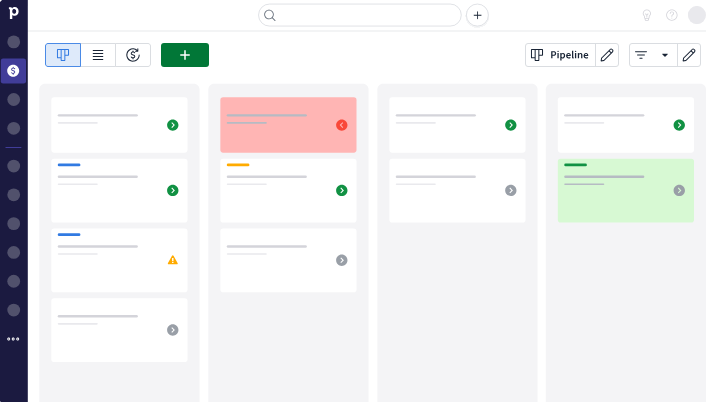
The interface is clean and fast: open Pipedrive and you see your deals on a kanban board with colored cues flagging deals going cold. Drag a card to move it forward. Log an activity. Move to the next deal. Pipedrive serves 100,000+ companies in 179 countries across industries from real estate to SaaS to nonprofit.
Pipeline CRM was founded in 2006 in Seattle (originally as PipelineDeals) for a narrower audience: SMBs in industrial, logistics, and professional services where sales happen face-to-face. Acquired by saas.group in 2022, the platform has sharpened its focus on construction, manufacturing, and field sales.
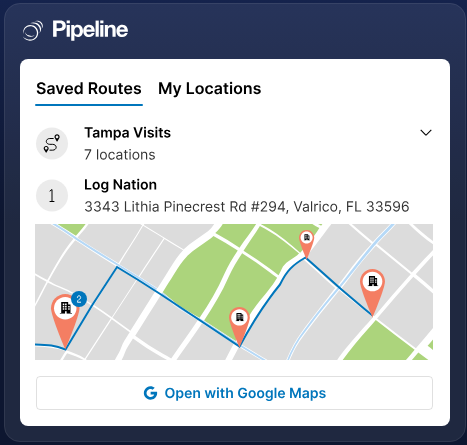
Its Map Views and route planning tell you who this product is for: reps who visit job sites, not reps who live in their inbox.
Source: Pipeline CRM
The practical difference shows in a typical sales day. A Pipedrive user opens their pipeline, sees which deals need attention through deal rotting indicators, sends a tracked email using email sync and templates, and schedules a meeting through the integrated scheduler. A Pipeline CRM user opens the mobile app, checks their route plan for the day, uses the Nearby feature to see which clients are close, logs a visit with voice-to-text notes, and updates the deal record before driving to the next stop.
Both approaches work. The question is which one matches how your team sells.
Pipeline management: same concept, different execution
Deal tracking is where both CRMs earn their keep, and both do it well.
Pipedrive offers three pipeline views: kanban, list, and forecast. You can create unlimited custom pipelines on every plan, each with custom stages and owners.
The forecast view projects expected revenue by close date, and the AI Sales Assistant predicts win probability and flags at-risk deals.

Source: Pipedrive
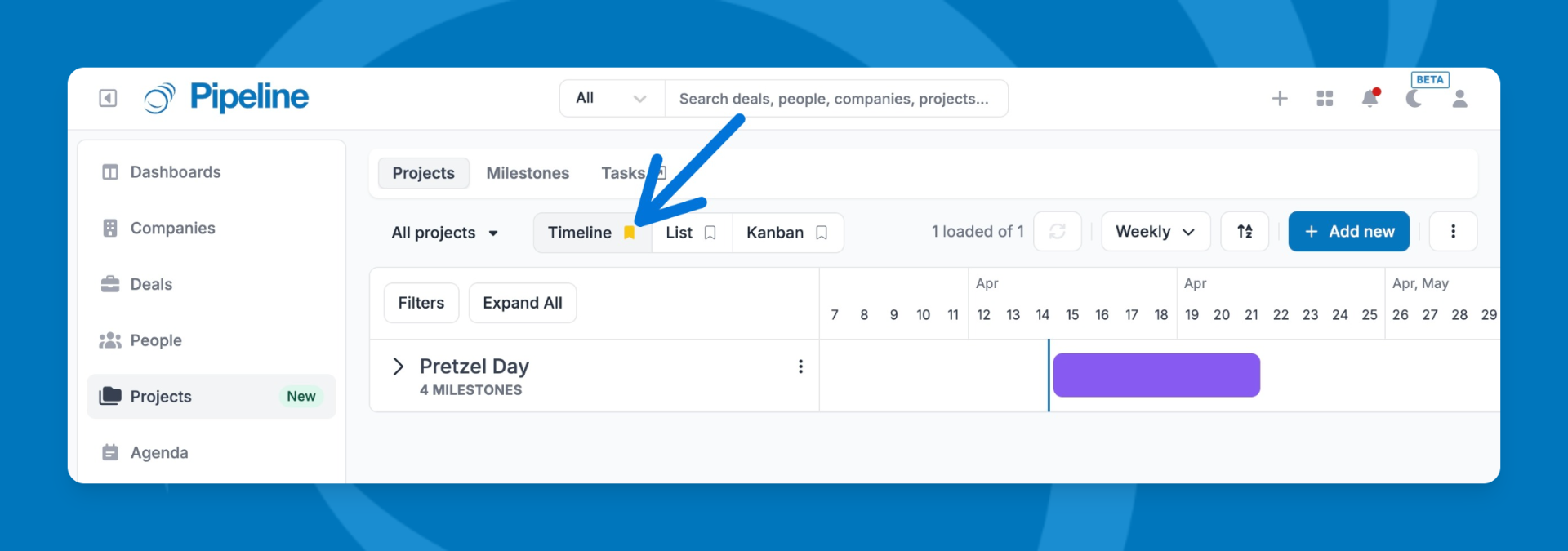
Pipeline CRM matches the kanban and list views but adds a timeline/Gantt view and several features Pipedrive lacks.
Source: Pipeline CRM
Deal Intelligence Fields show velocity metrics (Hours to First Activity, Days in Stage, Days Since Last Activity) in the list view without a separate report.
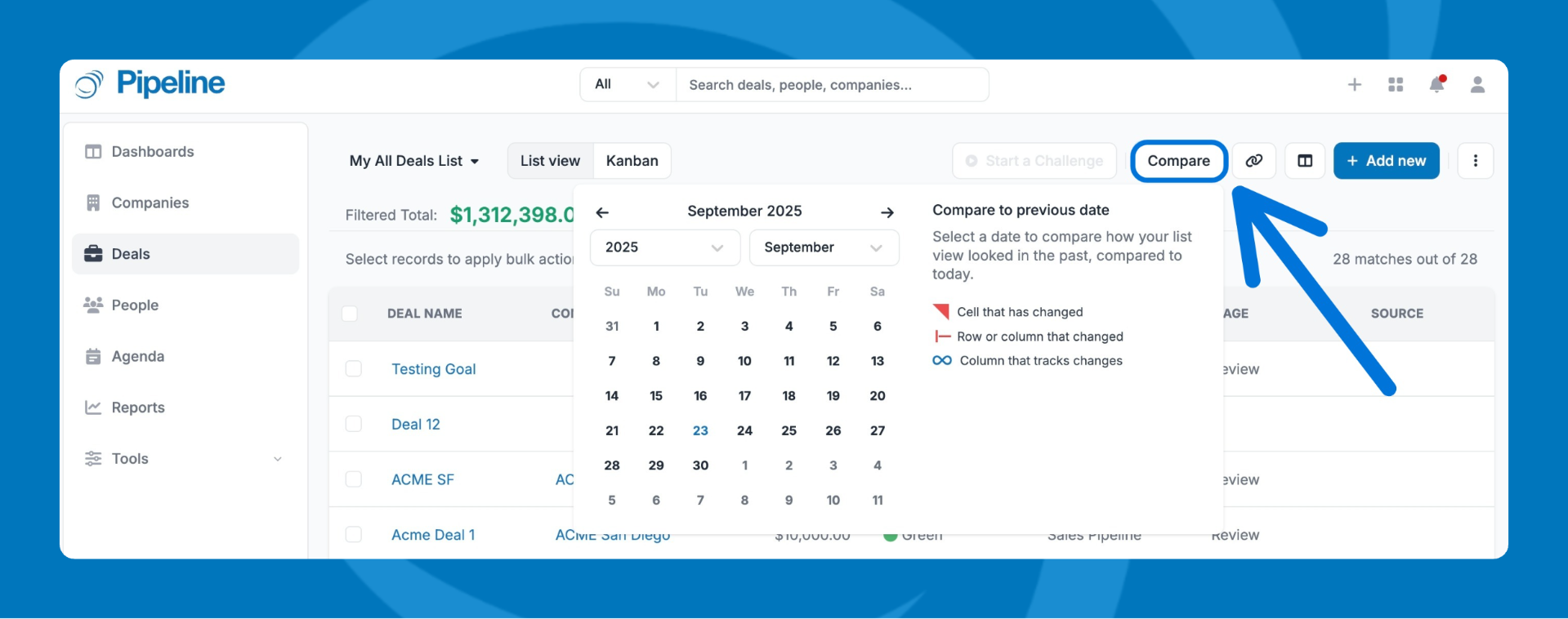
Hindsight lets you compare your pipeline to any point in the last six months with color-coded change indicators, answering "what did my pipeline look like 60 days ago?" without exporting a CSV. And you can make Won/Loss reason tracking mandatory, so every closed deal gets a recorded explanation.
Source: Pipeline CRM
Both CRMs share one limitation: neither tells you which deals you should be creating. Both track what's already in the pipeline. Neither identifies the accounts you're missing.
Prospecting reveals where CRMs hit their ceiling
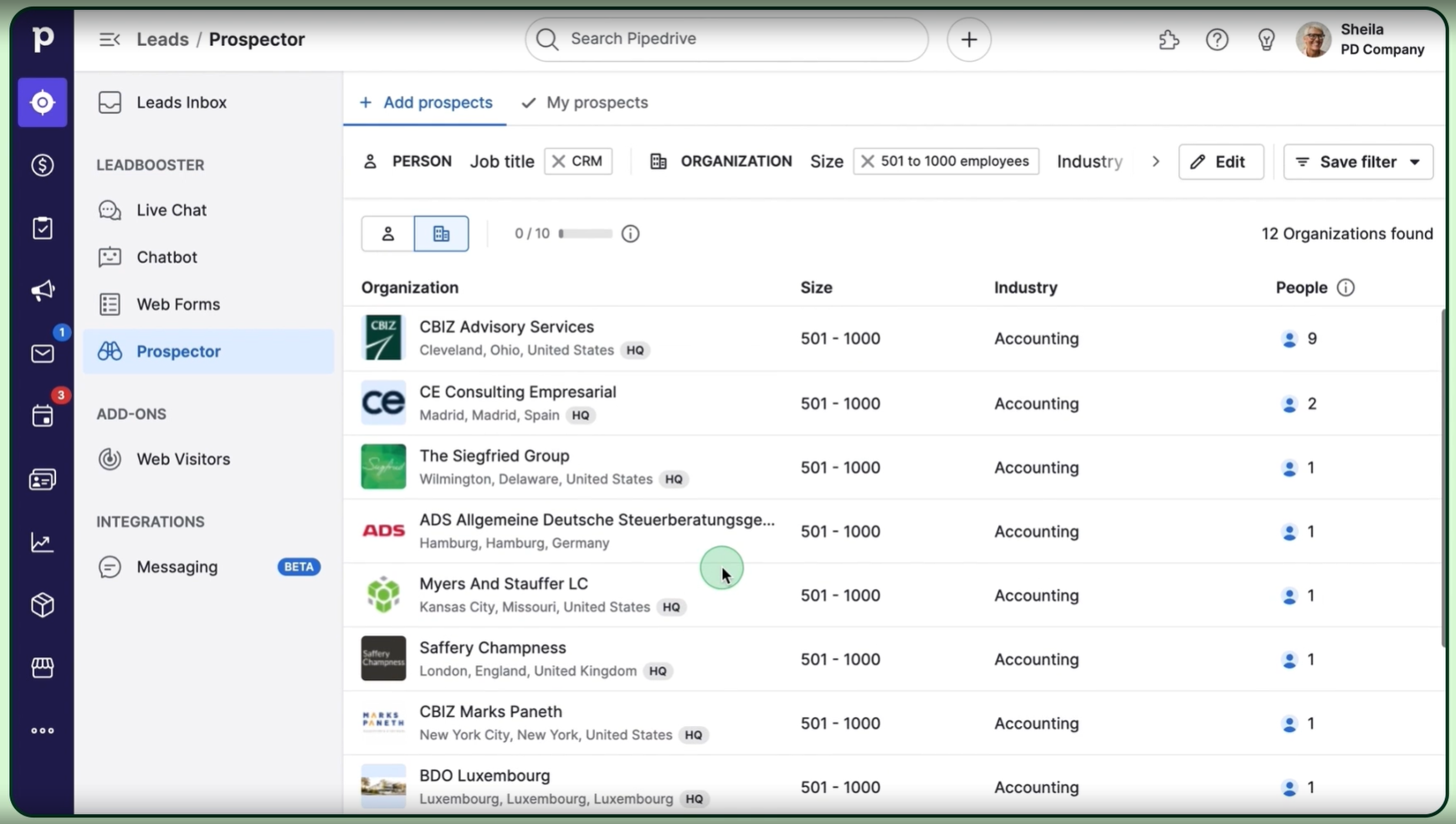
Pipedrive has invested more in prospecting than Pipeline CRM. The LeadBooster add-on ($32.50/company/month) bundles a chatbot, live chat, web forms, and a Prospector tool with access to 400 million profiles and 10 million companies.
Source: Pipedrive
The newer Pulse toolkit adds data enrichment, lead scoring, and automated follow-up sequences.

Source: Pipedrive
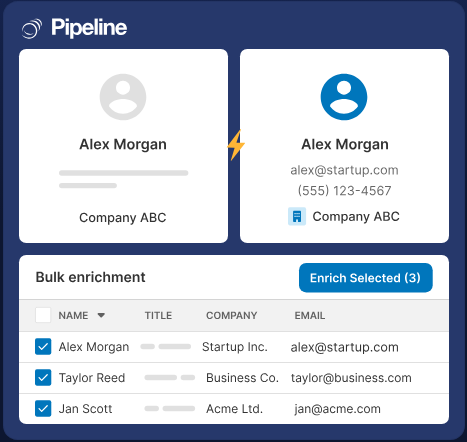
Pipeline CRM takes a simpler approach. Its Data Enrichment add-on ($19-69/month depending on credit volume) enriches contact and company records on demand, and Lead Forms capture inbound leads with automatic round-robin routing. For outbound prospecting, Pipeline CRM relies on integrations with tools like ZoomInfo, Apollo, and UpLead.
Source: Pipeline CRM
Both approaches solve a narrow slice of the prospecting problem: finding contact information. Neither answers the harder questions. Which accounts are researching solutions like yours right now? Who on the buying committee has the authority to sign? What technology does the prospect use, and when is their contract up for renewal?
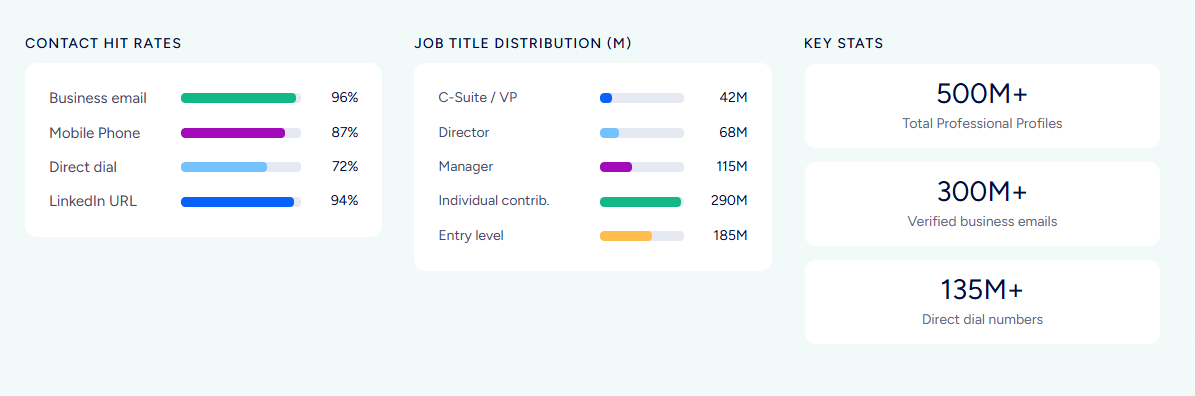
ZoomInfo answers those questions. Its data spans 500M contacts with 135M+ verified phone numbers and 200M+ verified business email addresses, verified through a multi-source pipeline that includes automated ML scanning of 28 million site domains daily and 300+ human researchers.
But the data is the starting point. Buyer Intent tracks signals from 210 million IP-to-Organization pairings to show which companies are in-market. Technographics profile the tech stacks of 30+ million companies across 30,000+ technologies.
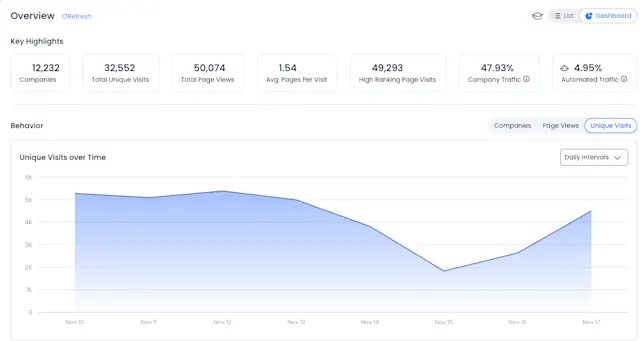
And WebSights resolves anonymous website visitors to actual companies and buying teams.
The gap isn't incremental. In a Fortune 500 competitive RFP analyzing 25 million contacts across vendors, the independent consultant concluded that "no other competitor came even close."
"ZoomInfo gives us the information we need to execute. We don't have to go through and spend our time digging. It's already there, so we can be three steps ahead." (Vensure)
Data quality determines everything downstream
A CRM is only as good as the data inside it. Both Pipedrive and Pipeline CRM depend on their users (or third-party integrations) to keep contact records accurate. Neither maintains its own verified contact database at scale.
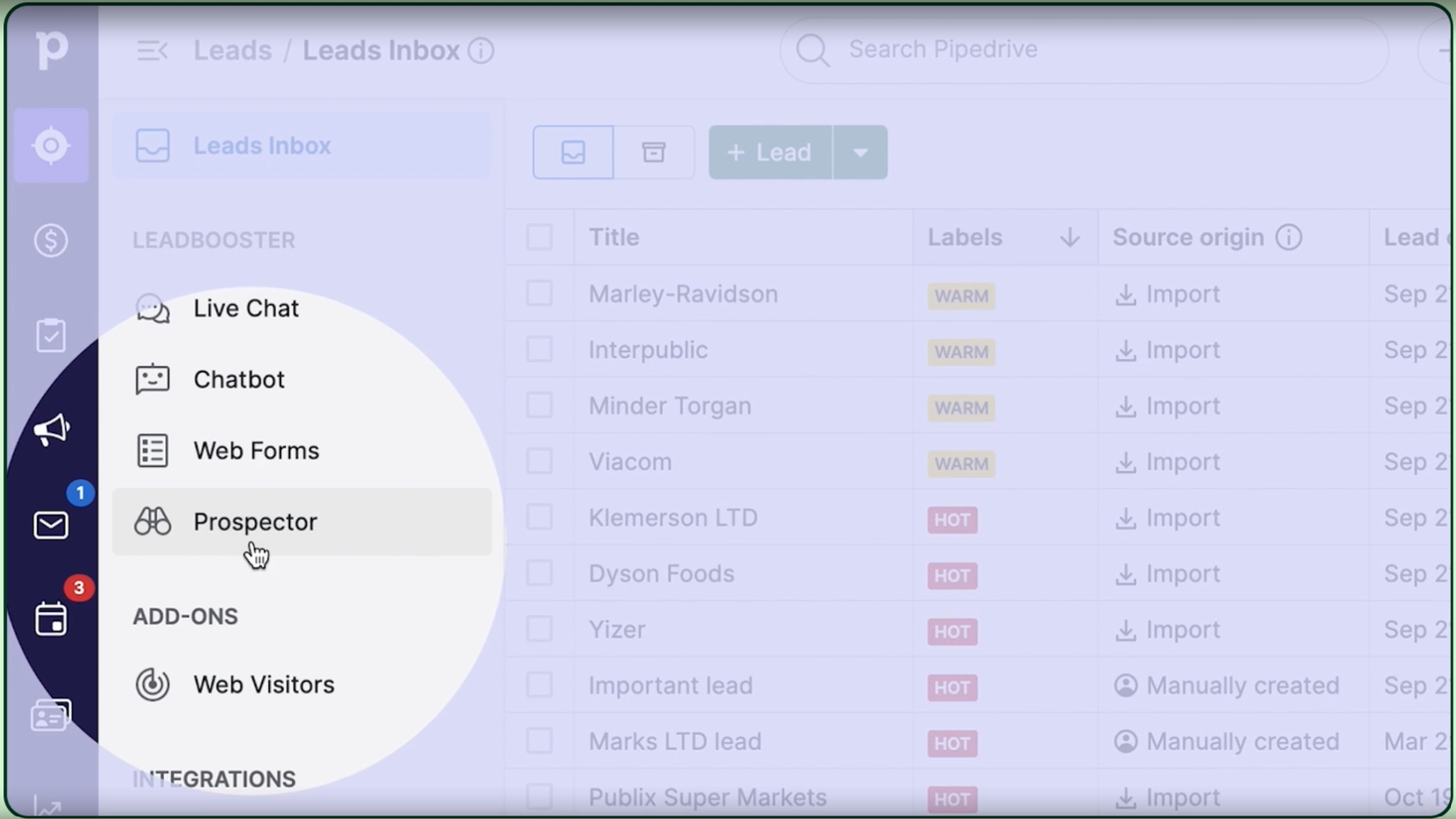
Pipedrive's Prospector offers a growing data layer with an AI engine that verifies and updates up to 800,000 profiles daily.
Source: Pipedrive
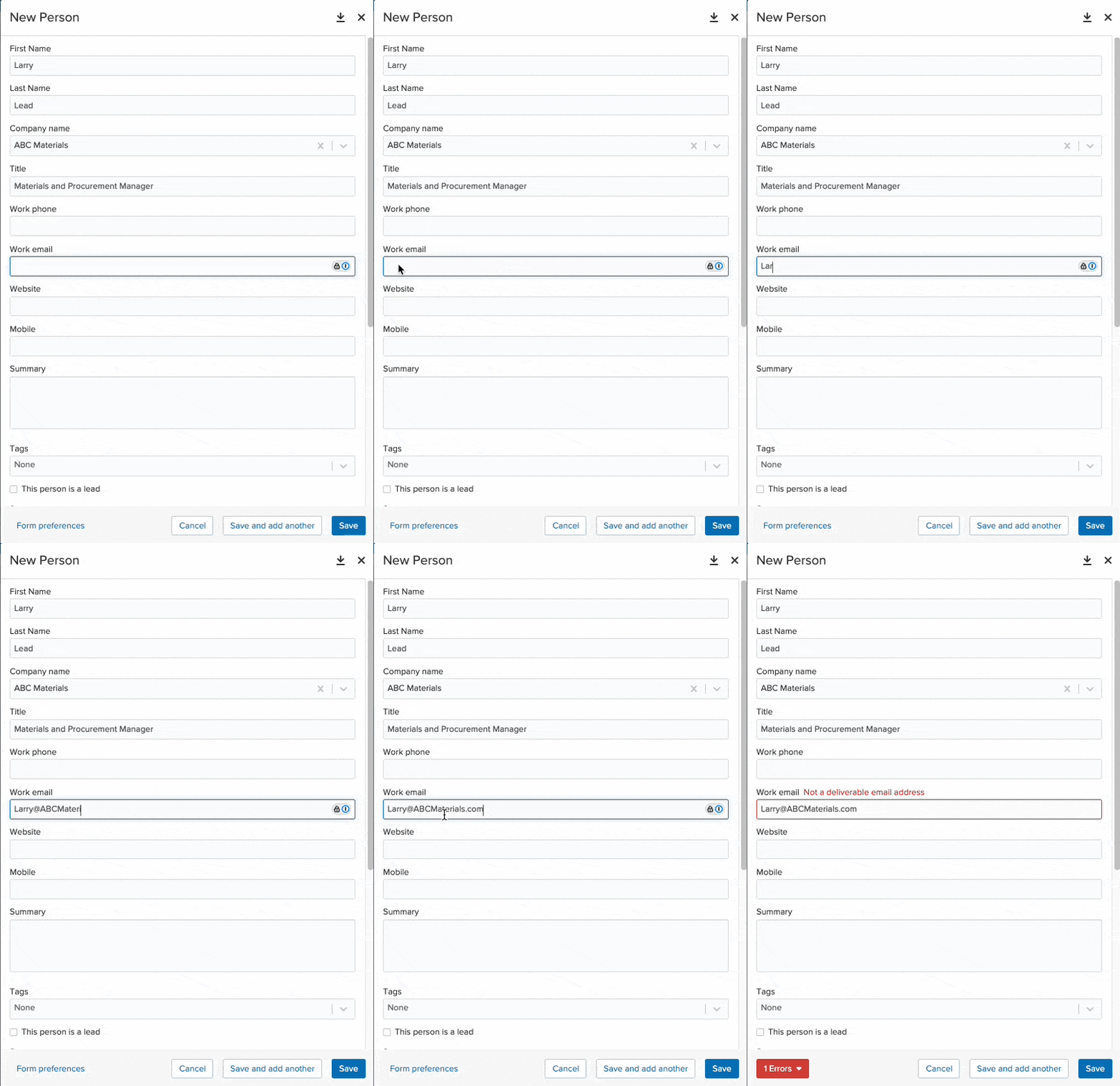
Pipeline CRM's Email Validation add-on ($25/month for 5,000 validations) validates addresses at entry, preventing bad data from reaching the system.
Source: Pipeline CRM
ZoomInfo treats data quality as the core problem of go-to-market. The platform processes 1.5B+ data points daily through a verification pipeline that achieves up to 95% accuracy on first-party data.
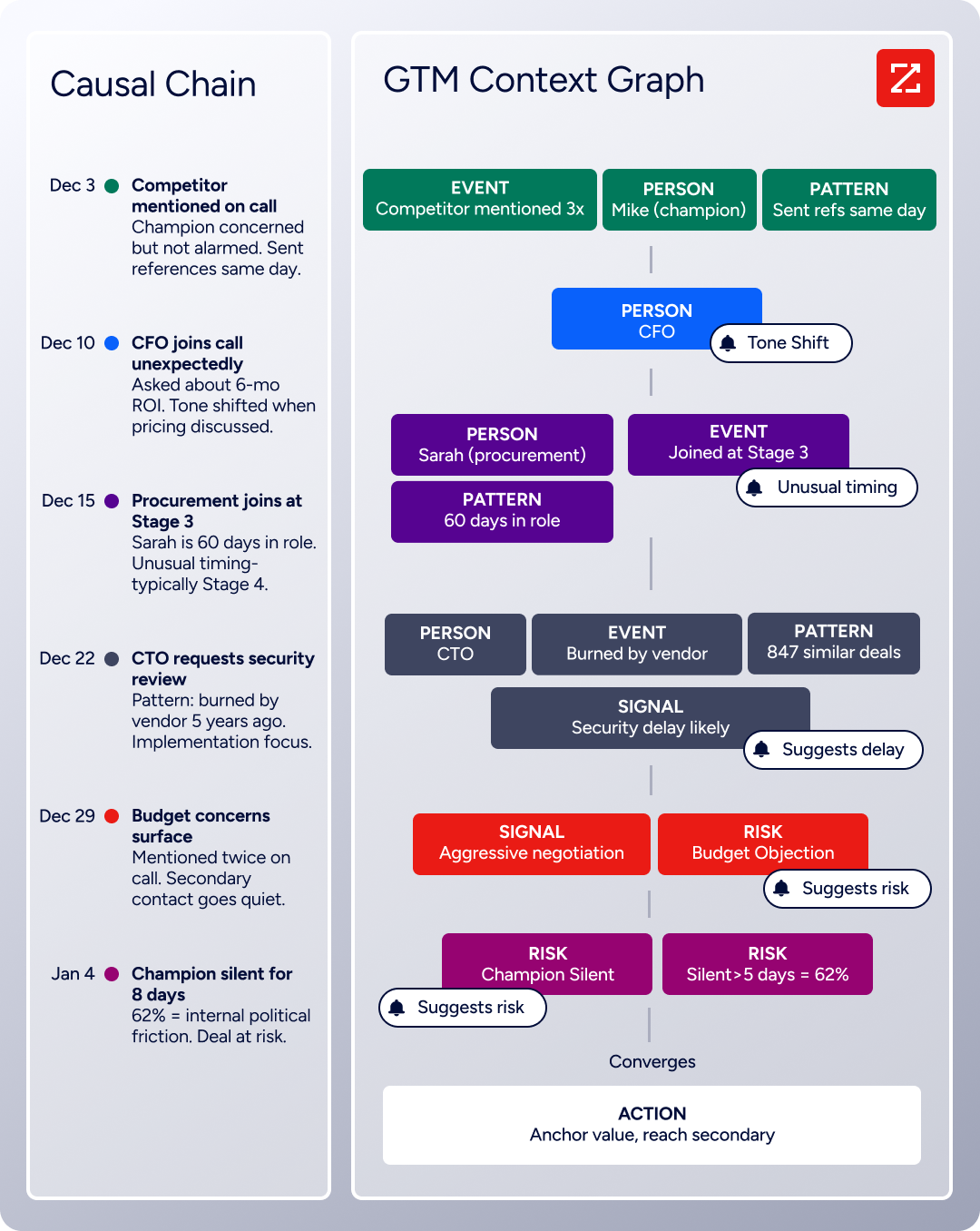
What sets this data apart is the GTM Context Graph: a layer that fuses ZoomInfo's third-party data with a customer's CRM records, conversation intelligence, and behavioral signals to capture not just what happened, but why.
CRMs record that a deal moved from Stage 3 to Stage 4. They don't record why. The GTM Context Graph surfaces the dynamics: call transcripts showing executive sponsorship entering at a critical moment, email threads revealing a champion going quiet over budget friction, a competitive evaluation shifting the deal's trajectory. That intelligence feeds every downstream action, from AI-drafted outreach to forecast accuracy.
"That combination of our internal CRM data, external signals, and AI that's given all that context has helped us craft very specific account- and persona-based messages. And people have responded to them right away." (Seismic)
Automation and email take different approaches
All three platforms automate sales workflows at different levels.
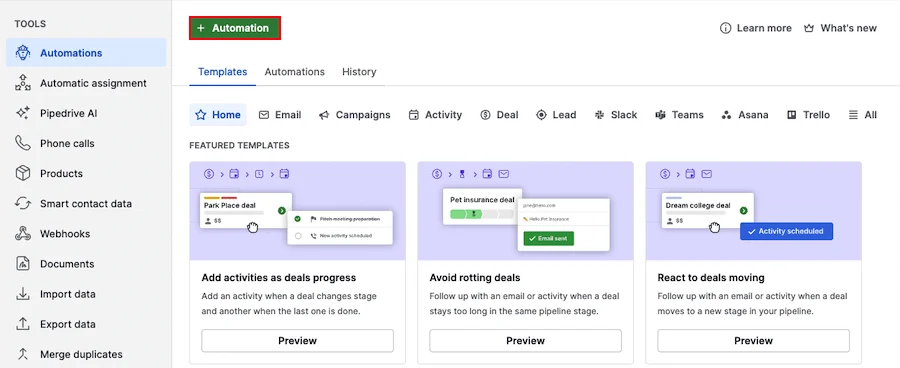
Pipedrive has the stronger automation of the two CRMs. Its workflow engine supports if/else branching, delay steps, and "wait until event" conditions with triggers across deals, persons, activities, leads, and organizations.
Source: Pipedrive
Slack and Teams notifications, Asana and Trello connections, and webhook triggers reduce the need for third-party automation tools. Email capabilities include two-way sync with Gmail and Outlook, open and click tracking, AI email creation, and a meeting scheduler that works with Zoom, Teams, and Google Meet.
The Campaigns add-on adds email marketing with CRM-powered segmentation.

Source: Pipedrive
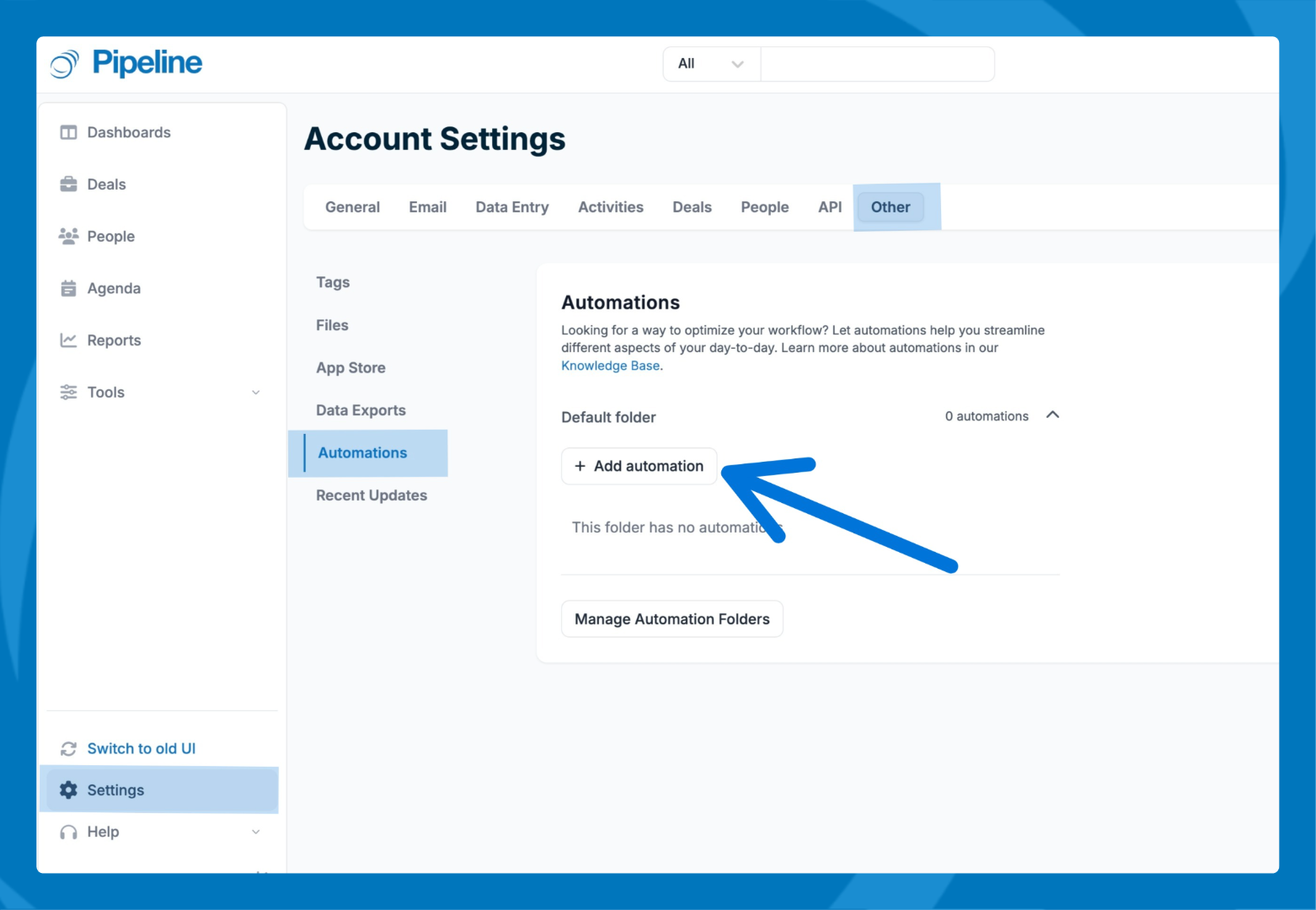
Pipeline CRM uses a simpler trigger-condition-action model with both data-based and time-based triggers. Time-based automations (fire X days before or after a date field) work well for contract renewals and follow-up deadlines.
Source: Pipeline CRM
The standout is Todo Templates: pre-built task sequences triggered at once, standardizing processes like new contact onboarding without a multi-step workflow builder. Email includes native Gmail and Outlook sync, open and click tracking, and automated drip campaigns on the Grow plan.
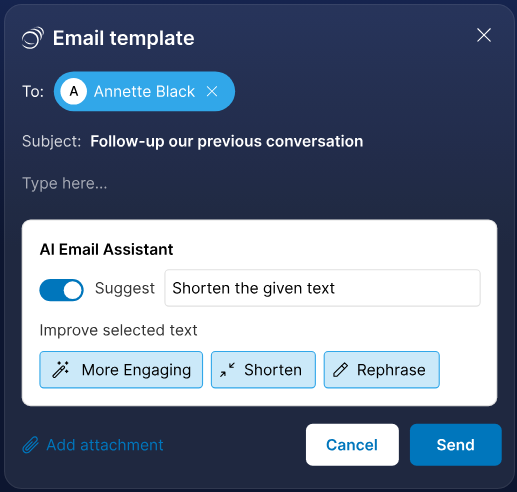
The AI Email Assistant runs on OpenAI, and users can connect their own API key for unrestricted usage.
Source: Pipeline CRM
Both CRMs cap automations. Pipedrive allows 50 automations on Growth, 150 on Premium. Pipeline CRM allows 20 on Grow, 100 on Enterprise. For most SMB teams, these limits are enough. For teams running signal-driven workflows across large account lists, they're a ceiling.
ZoomInfo works at a different scale. GTM Studio lets marketers and RevOps build multi-channel plays (email, calls, ads, direct mail) triggered by buyer behavior, with expansion plays that used to take three weeks now launching in 30 minutes.
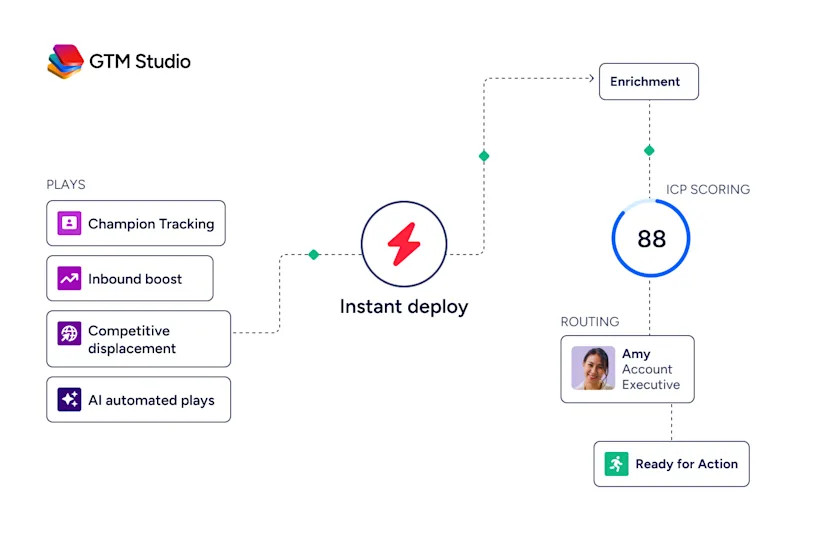
GTM Workspace gives sellers an Action Feed of in-market buyers matched to target criteria, with pre-drafted actions on every signal. The automation goes beyond deal-stage changes: it fires on intent signals, funding events, executive hires, competitive evaluations, and technology changes detected across ZoomInfo's data.
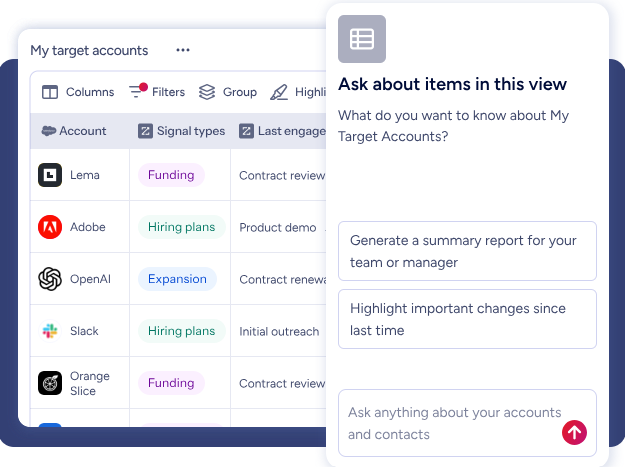
"ZoomInfo's not just a contact data company anymore. They've built a full system of execution that works the list, writes the outreach, triggers the play, and helps drive predictable growth." (Levanta)
Pricing models serve different markets
Each platform's pricing reveals its target buyer.
Pipedrive charges per seat, per month across four tiers: Lite, Growth, Premium, and Ultimate. Entry starts at $14/seat/month, with up to 42% off for annual billing. Most teams land on the Growth plan, which adds email sync, automations, and the meeting scheduler. Premium bundles Smart Docs, Projects, and LeadBooster as included features instead of add-ons. A 14-day free trial requires no credit card. No permanent free plan.
Pipeline CRM also charges per seat across three tiers: Start ($25/user/month annual), Develop ($33), and Grow ($49). Grow is the first tier with email drip campaigns and unlimited active deals. Every plan includes US-based live chat support, free read-only user seats, and free data migration with a typical three-business-day turnaround. A 14-day free trial at the Grow level requires no credit card. No permanent free plan.
ZoomInfo uses consumption-based pricing across Sales, Marketing, and Operations product lines, each with Professional, Advanced, and Enterprise tiers. No prices are published. ZoomInfo offers two free entry points: ZoomInfo Lite, a permanent free tier with access to the B2B database, 10 monthly export credits, and a ReachOut Chrome Extension; and a 7-day free trial with broader feature access.
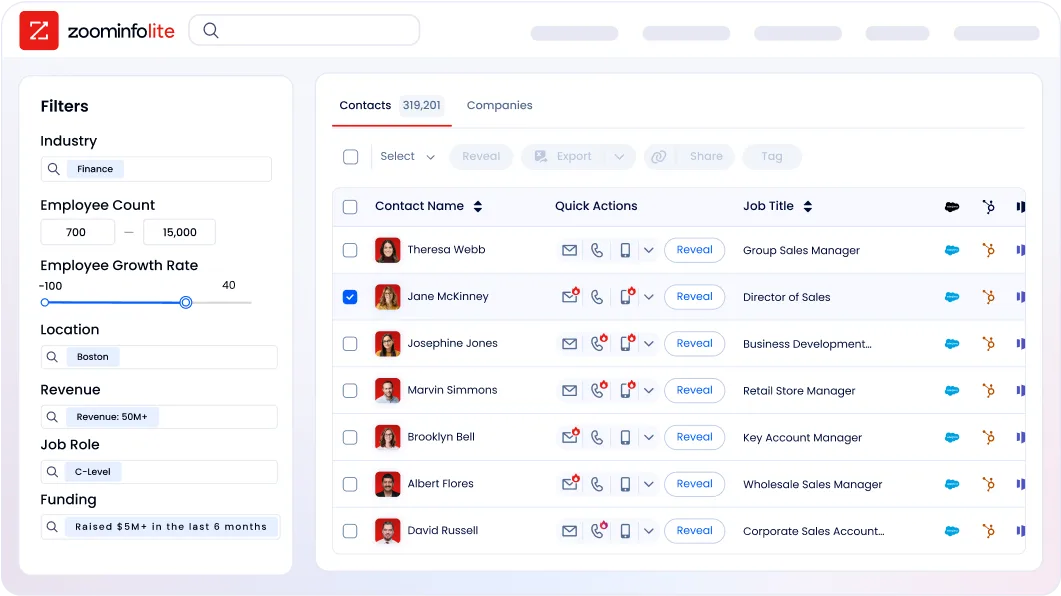
The pricing comparison needs context. Pipedrive and Pipeline CRM are CRMs; ZoomInfo is a data intelligence and GTM execution platform. A fairer comparison is the total cost of a CRM plus the separate data, prospecting, and intent tools a team needs to feed it. Many teams using Pipedrive or Pipeline CRM already pay separately for data enrichment, prospecting databases, and outreach tools. ZoomInfo consolidates those into one platform.
Support and adoption matter more than feature lists
A CRM your team won't use is worse than a spreadsheet. Both Pipedrive and Pipeline CRM understand this, though they solve it differently.
Pipedrive tiers its support. All users get a Knowledge Base, Academy courses, and an in-app chatbot. Live chat starts on Growth; phone support is reserved for Premium and Ultimate. Customers spending over $1,000/month get a dedicated Customer Success Manager. The Knowledge Base covers 23 languages. The larger user base (100,000+ companies) means more tutorials, community discussions, and third-party resources.
Pipeline CRM leads on adoption. G2 named it "Highest User Adoption" for both enterprise and SMB segments.
Support is available via live chat, phone, and email on every plan, with published benchmarks of sub-1-minute chat response and 45-minute first email response.
The company reports a 97.6% customer satisfaction rate. Industry-specific onboarding paths for construction, manufacturing, and logistics cut setup guesswork. Most implementations finish within a month, some in two weeks.
ZoomInfo invests in onboarding. The company redesigned its program from 30 to 90 days, producing a 25% improvement in customer satisfaction scores and a Golden Comet award for Best Customer Onboarding Team.

ZoomInfo University provides role-specific learning paths, certifications, and live webinars. The platform is complex (spanning data, intelligence, and multiple product surfaces), but the payoff matches: teams that invest in adoption report 54% productivity gains and 11.5 hours saved per week.
Pipedrive vs. Pipeline CRM vs. ZoomInfo: Which should you choose?
The right choice depends on what your sales team needs most.
Choose Pipedrive if:
Your team sells from their desks, not in the field
You need a CRM that works across industries and geographies
Email sync, scheduling, and marketing automation matter to your workflow
You want a large marketplace of integrations (500+) to build your stack
You value AI features for email drafting, reports, and deal prioritization
Choose Pipeline CRM if:
Your team is 5-50 people selling in construction, manufacturing, or field services
Map views, route planning, and mobile CRM are daily requirements
You need a CRM your reps will actually adopt, backed by support on every plan
Post-sale project delivery should live in the same tool as your pipeline
You value fast setup (48 hours to go-live) and free data migration
Choose ZoomInfo if:
Your biggest challenge isn't tracking deals but finding the right ones to create
You need verified contact data, direct dials, and business emails at scale
Buyer intent signals and account intelligence would change how your team prioritizes
You want AI that understands why deals move, not just that they moved
You need a platform that works inside your CRM, as a standalone workspace, or through APIs and MCP in any tool
Explore ZoomInfo's free tier or request a demo.
Pipedrive and Pipeline CRM both do their job well: they organize your sales process and keep deals moving. The question is whether your team's growth is limited by pipeline management or by pipeline creation. If you're losing deals because reps forget to follow up, either CRM will help. If you're losing deals because you didn't know the account existed, didn't have the right contact, or didn't reach out while the buyer was researching, that's a different problem, and it requires a different kind of platform.
"Without ZoomInfo, it would be extremely difficult, if not impossible, to achieve our business objectives. Without it, we wouldn't be able to understand the market, have the right contact data, and make meaningful connections." (Smartsheet)
Pipedrive vs. Pipeline CRM vs. ZoomInfo FAQ
What is the main difference between Pipedrive, Pipeline CRM, and ZoomInfo?
Pipedrive is a visual, pipeline-first sales CRM designed for small and medium-sized businesses across industries. Pipeline CRM is a sales CRM built for field sales teams in construction, manufacturing, and professional services, with features like map views and route planning. ZoomInfo is an AI-powered go-to-market platform that provides B2B data intelligence (500M contacts, 100M companies, buyer intent signals) and execution tools rather than traditional deal tracking.
Which platform is cheapest for a small sales team?
Pipedrive starts at $14/seat/month, making it the lowest entry point. Pipeline CRM starts at $25/user/month on annual billing. ZoomInfo uses custom pricing for paid plans but offers ZoomInfo Lite as a permanent free tier with 10 monthly export credits and access to the B2B database. For CRM functionality alone, Pipedrive is cheapest. The total cost comparison changes when you factor in the separate data, prospecting, and enrichment tools that CRM users often need alongside their pipeline software.
Which CRM has better pipeline management features?
Both are strong. Pipedrive offers unlimited custom pipelines on all plans, deal rotting alerts, and an AI Sales Assistant that predicts win probability. Pipeline CRM adds Deal Intelligence Fields (Hours to First Activity, Days in Stage) in the list view, a Hindsight feature for point-in-time pipeline comparison, and mandatory Won/Loss reason tracking. Pipedrive has a slight edge on automation depth, while Pipeline CRM surfaces sales velocity data that typically requires a separate analytics tool.
Which platform is best for field sales teams?
Pipeline CRM is built for field sales. Its mobile app includes Map Views for visualizing where accounts cluster geographically, route planning with up to 10 stops, a Nearby feature for finding clients near your current location, and voice-to-text activity logging. Pipedrive's mobile app is capable (with offline mode, in-app calling, and a business card scanner) but lacks the map-based territory management tools that field teams need daily.
Can ZoomInfo replace a CRM like Pipedrive or Pipeline CRM?
ZoomInfo's GTM Workspace is a workspace where sellers can research accounts, draft outreach, monitor signals, and update CRM fields. It integrates natively with Salesforce, HubSpot, and Microsoft Dynamics. For teams focused on prospecting and deal execution, GTM Workspace can reduce CRM dependency. ZoomInfo is not a traditional CRM; it does not offer the granular deal-stage tracking, project management, or activity logging that Pipedrive and Pipeline CRM provide. Most teams use ZoomInfo alongside their CRM for the best results.
How do the platforms compare on AI capabilities?
Pipedrive's AI layer includes an AI Sales Assistant for deal prioritization, an AI email writer, AI email summarization (still in beta), and AI-generated reports via natural language. Pipeline CRM offers an OpenAI-powered AI Email Assistant with the option to connect your own API key for unrestricted use. ZoomInfo's AI operates at a different scale: its GTM Context Graph processes 1.5B+ data points daily to power account summaries, AI-drafted outreach, signal-triggered plays, and buying group intelligence, all built on its B2B dataset rather than generic training data.
Which platform has the best customer support?
Pipeline CRM leads on support accessibility, with US-based live chat, phone, and email on every plan and a G2 Quality of Support score of 9.2/10. Pipedrive reserves phone support for Premium and Ultimate plans, with live chat starting on Growth. ZoomInfo provides structured onboarding with dedicated managers on higher tiers and an award-winning 90-day onboarding program. For SMBs without a dedicated CRM admin, Pipeline CRM's all-plans support model is the safest bet.
Do any of these platforms offer a permanent free plan?
Pipedrive and Pipeline CRM both offer 14-day free trials but no permanent free plans. ZoomInfo offers ZoomInfo Lite, a permanent free tier with access to the B2B database, 10 monthly export credits, a Chrome extension, and HubSpot integration, along with a separate 7-day free trial for broader platform access.
See how Pipedrive compares across other platforms:
