

Choosing between Pipedrive and Pulse CRM for your sales process usually comes down to five questions:
Do you need a dedicated sales CRM with strong pipeline management, or an all-in-one system that bundles marketing, quoting, and project management alongside it?
Is your team technical enough to configure a CRM themselves, or do you want someone to build the system for you?
Are you a growing sales team that needs scalability, or a small operation that needs simplicity above all?
Do you manage a single business, or a franchise or agency network with multiple locations?
Most importantly: does your CRM help you find the right people to sell to, or does it just organize the contacts you already have?
In short, here's what we recommend:
Pipedrive is the CRM for salespeople who want to sell, not configure software. Its visual, kanban-style pipeline gives teams a clear view of every deal, and features like deal rotting alerts, activity-based selling, and an AI Sales Assistant keep reps focused on what moves deals forward. With 100,000+ companies using the platform across 179 countries, Pipedrive has earned its place as the leading SMB sales CRM. The trade-off: it's a pre-sale tool by design. There's no native customer service, no built-in quoting, and marketing automation is a paid add-on.
Pulse CRM takes the opposite approach. Instead of specializing in sales, it bundles CRM, email marketing, text marketing, sales pipelines, quoting, project boards, and automation into a single subscription starting at $49/month. Its promise is done-for-you implementation: the team builds your system with automations and pipelines fitted to your workflow. For small businesses and franchise systems that want everything under one roof without hiring a consultant, Pulse delivers. But with 2-10 employees behind the platform, buyers who need enterprise data, AI features, or a broad integration ecosystem may outgrow it.
Both platforms handle what happens after a lead enters your pipeline. Neither answers the question that determines your pipeline's quality: who should be in it?
ZoomInfo is an AI-powered go-to-market platform that solves the problem upstream. Built on 500M contacts, 100M companies, 135M+ verified phone numbers, and 200M+ verified business emails, ZoomInfo doesn't just store your contacts. Its GTM Context Graph (the layer that combines this data with your CRM records, conversation transcripts, and behavioral signals, processing 1.5B+ data points daily) shows not just what's happening in your deals but why. Sellers reach this intelligence through GTM Workspace, marketers and RevOps through GTM Studio, and any other tool through APIs and MCP. For teams that need their CRM filled with the right prospects, ZoomInfo provides the intelligence that Pipedrive and Pulse lack.
If building pipeline with verified contacts and AI signals sounds like the missing piece, see how ZoomInfo works.
Pipedrive vs. Pulse CRM vs. ZoomInfo at a glance
Pipedrive | Pulse CRM | ZoomInfo | |
|---|---|---|---|
Primary function | Sales CRM / Pipeline management | All-in-one CRM + marketing + quoting | AI-powered GTM platform |
Best for | Sales teams focused on closing deals | Small businesses and franchise systems | Revenue teams that need pipeline intelligence |
Starting price | $49/month (1 user, 500 contacts) | Custom-quoted; free Lite tier available | |
Users | 100,000+ companies | Not publicly disclosed | |
B2B contact database | 400M+ profiles via Prospector add-on | No native database | 500M contacts, 200M+ verified emails |
Pipeline management | Advanced kanban with deal rotting | Customizable with lead/deal/client stages | AI-prioritized account feed via GTM Workspace |
Marketing automation | Paid Campaigns add-on | Included on all plans (unlimited emails) | Multi-channel orchestration via GTM Studio |
AI capabilities | AI Sales Assistant, AI email writer | No AI features documented | GTM Context Graph, AI agents (via GTM Workspace) |
Integrations | Zapier, Make, and API | 120+ native integrations + API + MCP | |
Free trial | Free trial (credit card required) | 7-day trial + permanent Lite tier |
Pipeline management: depth vs. breadth
This is where the two CRMs show their different design philosophies.
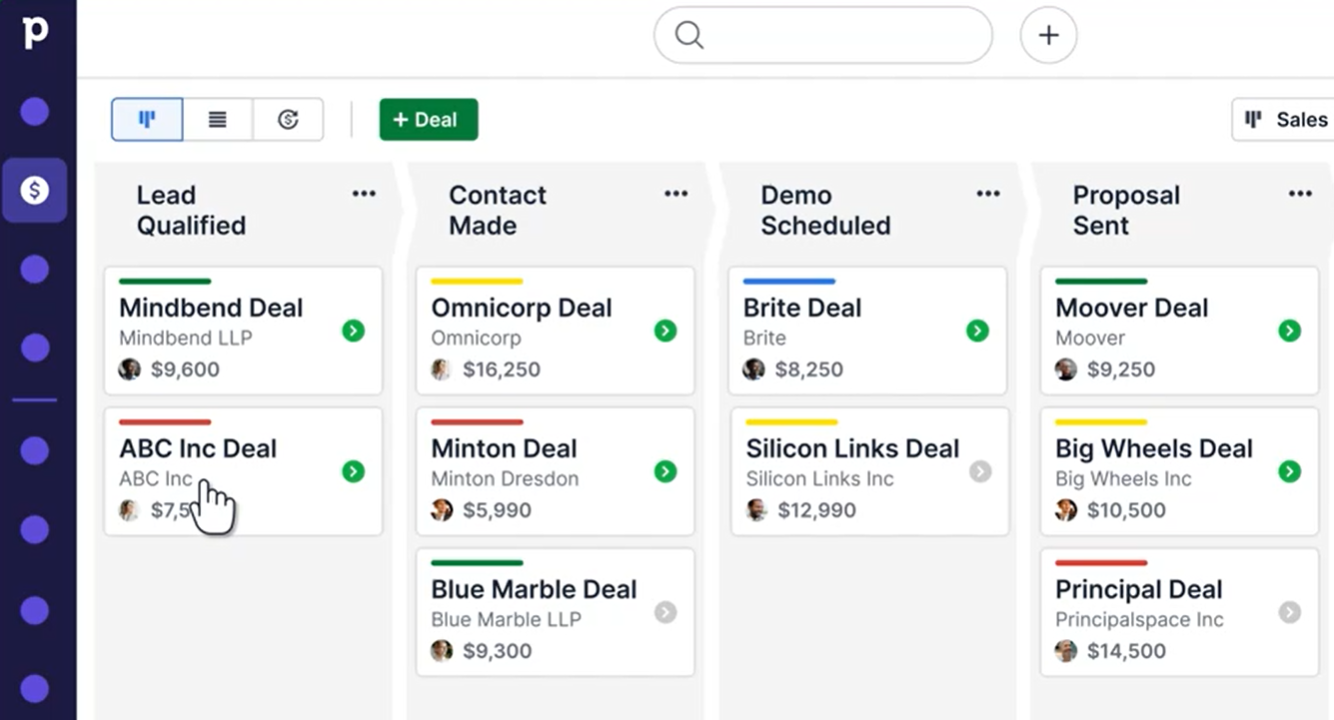
Pipedrive built its product around the pipeline. The company claims to have pioneered the kanban-style pipeline view in CRM software, and the feature still defines the product. Deals sit on a visual board, organized by custom stages.
Source: Pipedrive
Colored cues flag deals going cold before reps notice. Three pipeline views (kanban, list, and forecast) let teams see deals from different angles. Every activity (call, email, or meeting) attaches to a deal, person, or organization and appears in the built-in calendar.
It goes further: unlimited custom pipelines, custom fields across deals, contacts, and organizations, multi-currency support, and recurring revenue tracking.
Pulse CRM takes a wider view. Rather than one pipeline for sales, Pulse offers three pipeline types: Lead Pipelines for pre-qualification, Sales Pipelines for active deals, and Client Pipelines for post-sale project tracking. Each stage can trigger automation, so winning a deal can kick off a customer onboarding workflow without manual intervention.

Source: Pulse CRM
Pulse's Deal Records hold all contact interactions, tasks, and notes for each opportunity. A built-in Sales Forecasting engine analyzes open deals with stage-weighted probability. Won and Lost Reason tracking surfaces patterns over time.
Both CRMs give you visibility into deal flow. Pipedrive's pipeline is more refined, with features like deal rotting, forecast views, and more customization options. Pulse covers more of the customer lifecycle, extending pipeline management past the sale. Neither tells you which deals deserve to be in the pipeline in the first place.
The intelligence gap both CRMs leave open
A CRM organizes the contacts you already have. It doesn't tell you who's missing.
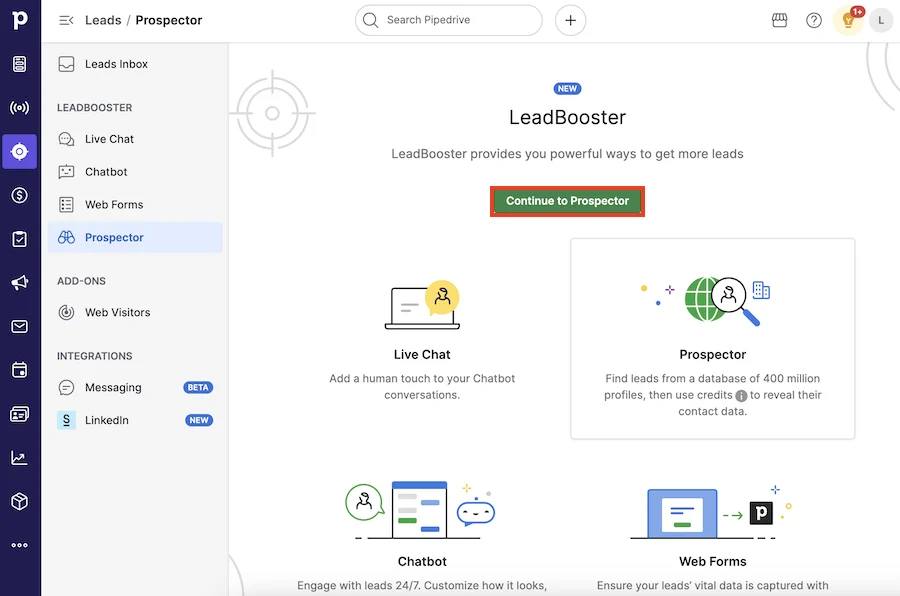
Pipedrive has started closing this gap. Its Prospector tool, part of the LeadBooster add-on, gives access to a database of over 400 million profiles and 10 million companies, with an AI engine that verifies and updates up to 800,000 profiles daily.
Source: Pipedrive
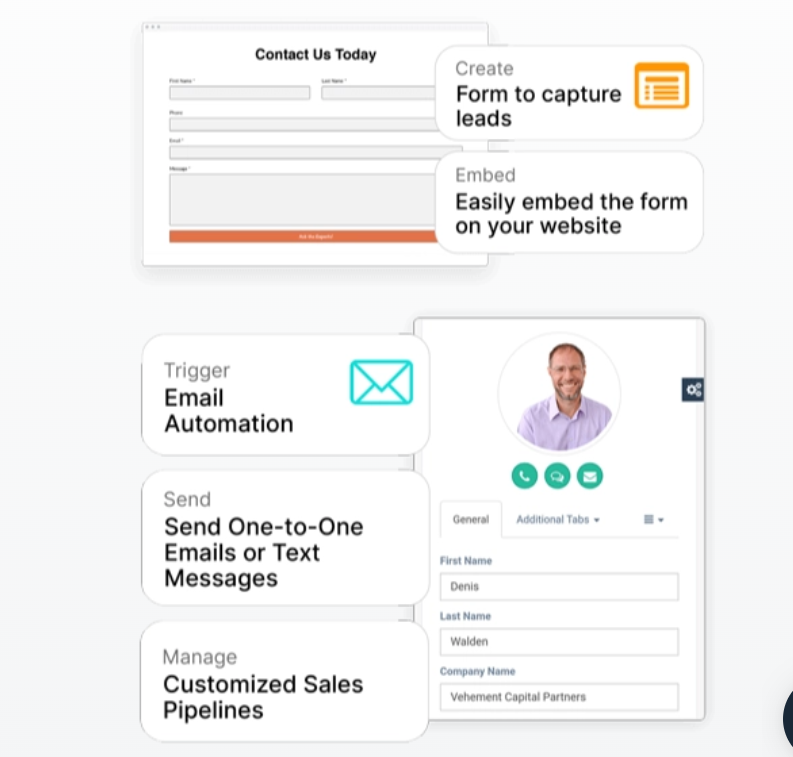
Pulse CRM has a form builder and Lead Creation via Email parsing, but no prospecting database. Both tools assume leads will find you, or that you'll find them somewhere else.
Source: Pulse CRM
ZoomInfo exists to fill this gap. The platform provides 500M contacts, 135M+ verified phone numbers, 120M direct-dial phone numbers, and 200M+ verified business emails, verified by 300+ human researchers with up to 95% accuracy on first-party data.
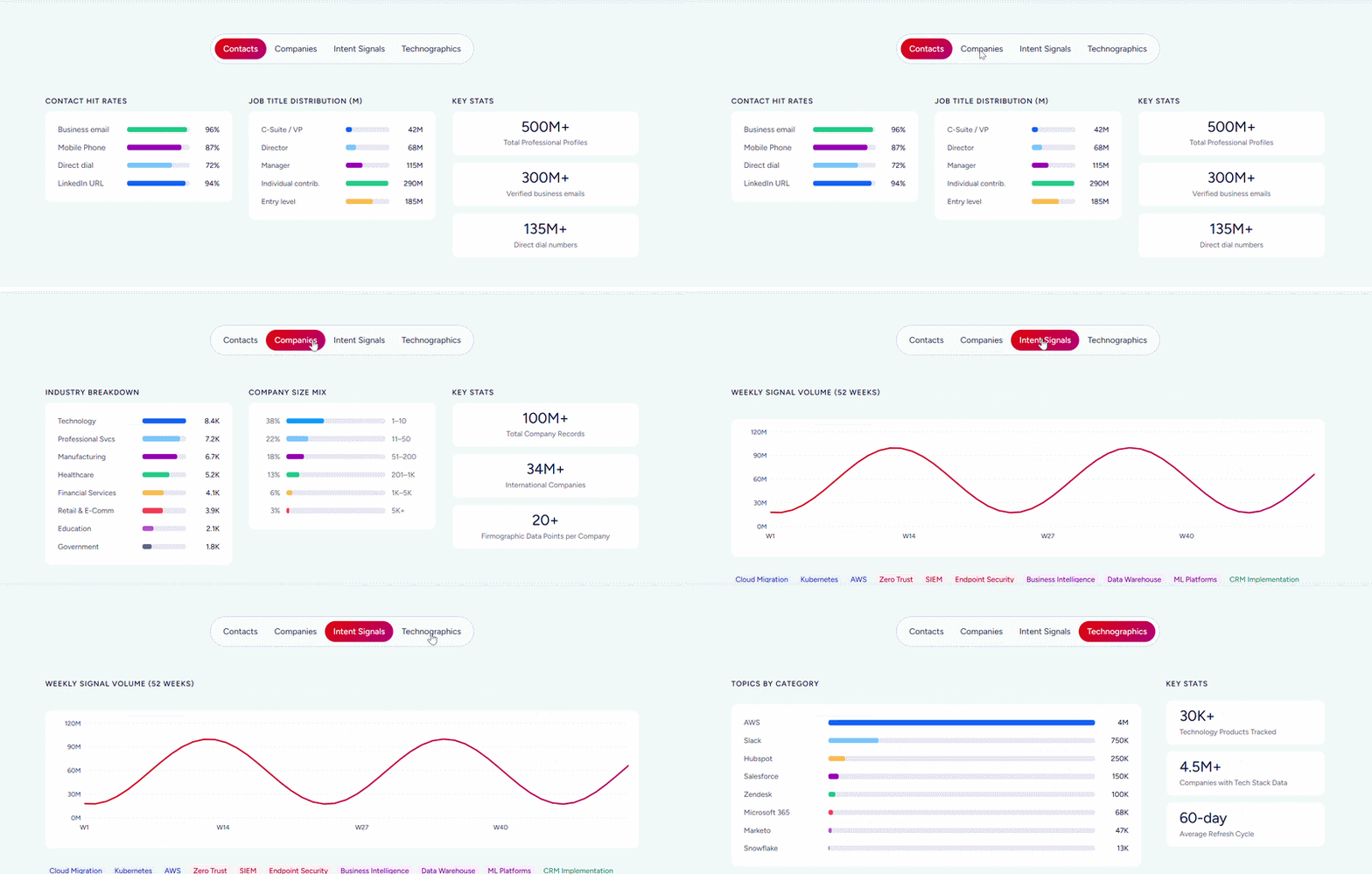
In a Fortune 500 competitive RFP analyzing 25 million contacts across vendors, an independent consultant concluded that "no other competitor came even close."
But data alone isn't the full picture. ZoomInfo's Buyer Intent tracks signals from 210 million IP-to-Organization pairings and 6 trillion+ new keyword-to-device pairings sourced monthly, showing when companies are actively researching solutions in your category.
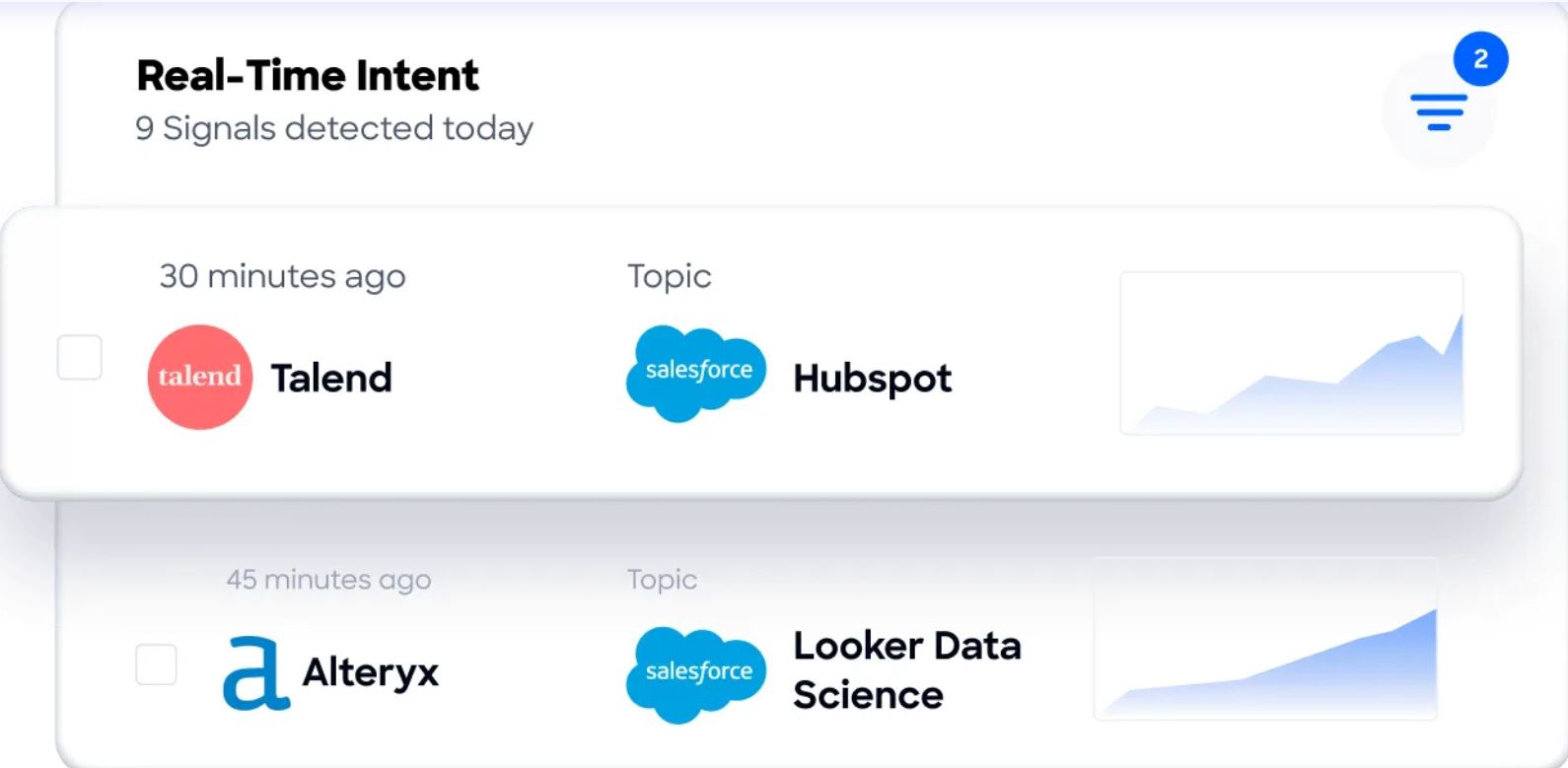
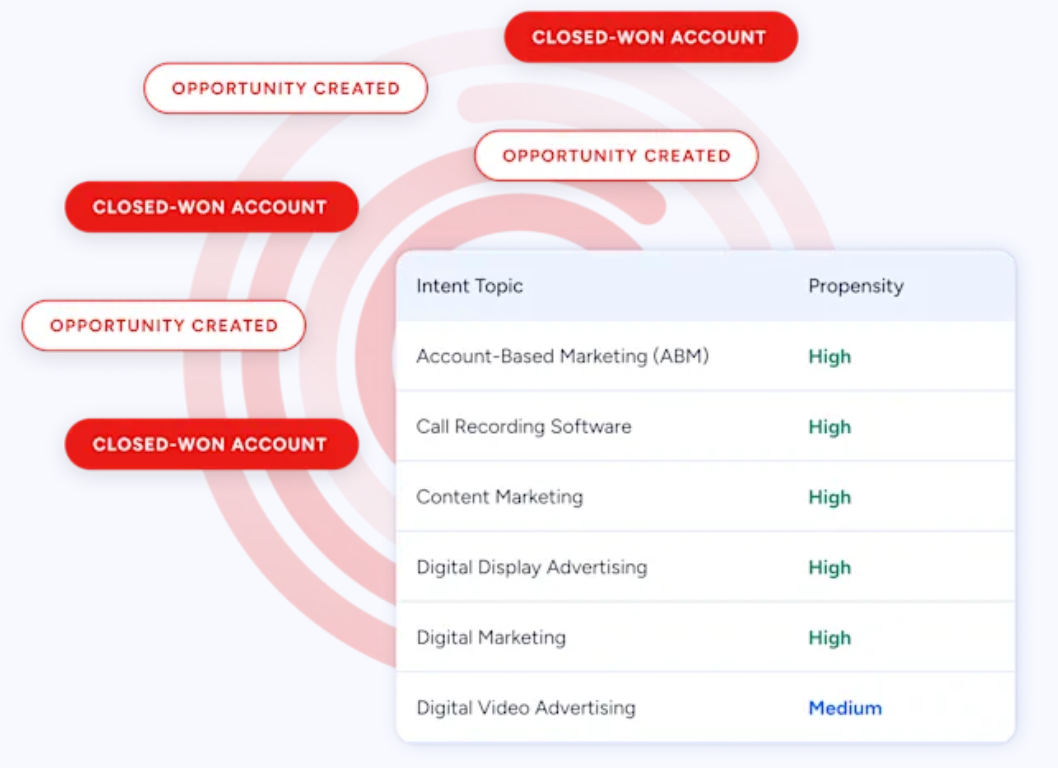
Guided Intent, exclusive to ZoomInfo, identifies the topics historically correlated with your deal success rather than requiring manual topic selection.
The GTM Context Graph (ZoomInfo's intelligence layer) ties it together. It combines ZoomInfo's data with your CRM records, conversation transcripts, and behavioral signals to show why deals move or stall.
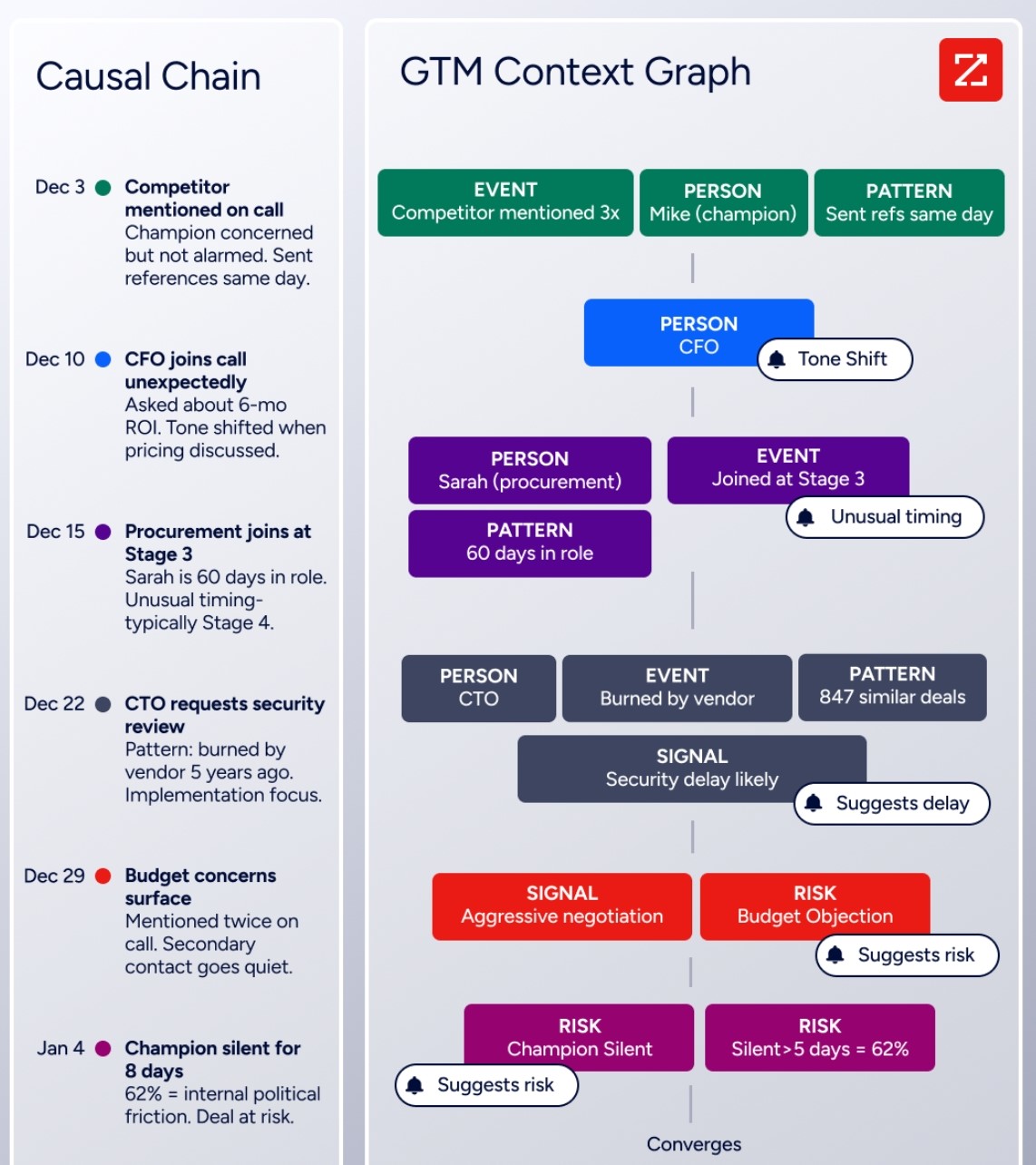
As ZoomInfo's CPO Dominik Facher writes: "The CRM recorded the state change. It has no record of why it happened."
Seismic's sales team attributed 39% of active pipeline to opportunities identified or influenced by ZoomInfo signals, boosted productivity by 54%, and saved 11.5 hours per week. (Seismic case study)
Automation capabilities compared
Both CRMs try to save sales teams from repetitive work, but they take different approaches.
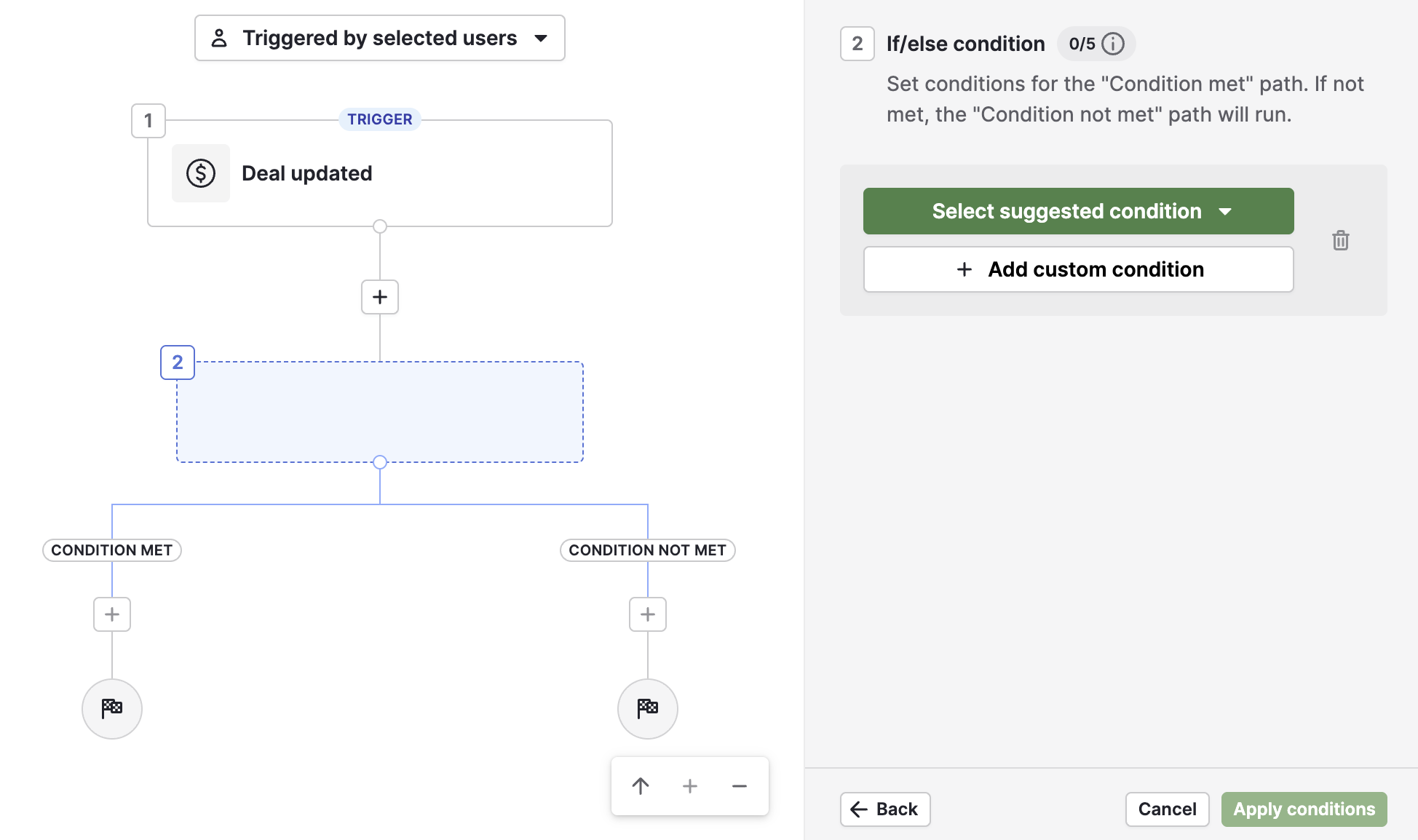
Pipedrive offers workflow automation starting on the Growth plan. Every automation follows a trigger-action model: an event (deal created, stage changed, activity completed) fires one or more actions (send email, create activity, update record, notify via Slack or Teams).
Source: Pipedrive
The addition of if/else branching and "wait until event" conditions gives Pipedrive logic that previously required third-party tools. Date-based triggers handle time-sensitive workflows like contract renewals or trial expirations.
The automation ceiling depends on your plan. Growth allows 50 automations; Premium goes to 150; Ultimate to 250. Teams needing more can buy top-ups starting from the Growth tier.
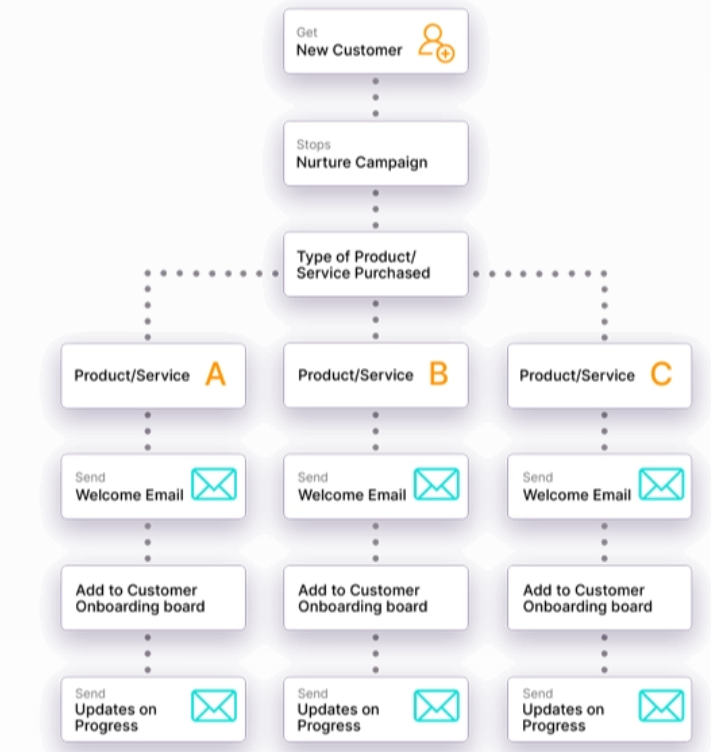
Pulse CRM includes automation on every plan starting at $49/month, with no feature gating between tiers. Automations trigger from pipeline status changes, quote approvals, and customer actions. The system covers both email and SMS natively. A notable feature is milestone-based automation: when a project milestone is completed, updates fire automatically to keep customers informed.
Source: Pulse CRM
Where Pulse stands apart is post-sale automation. A quote approval can trigger an onboarding workflow that creates a project board, sends welcome emails, and schedules follow-up tasks, all without manual steps. This suits service businesses with structured delivery processes.
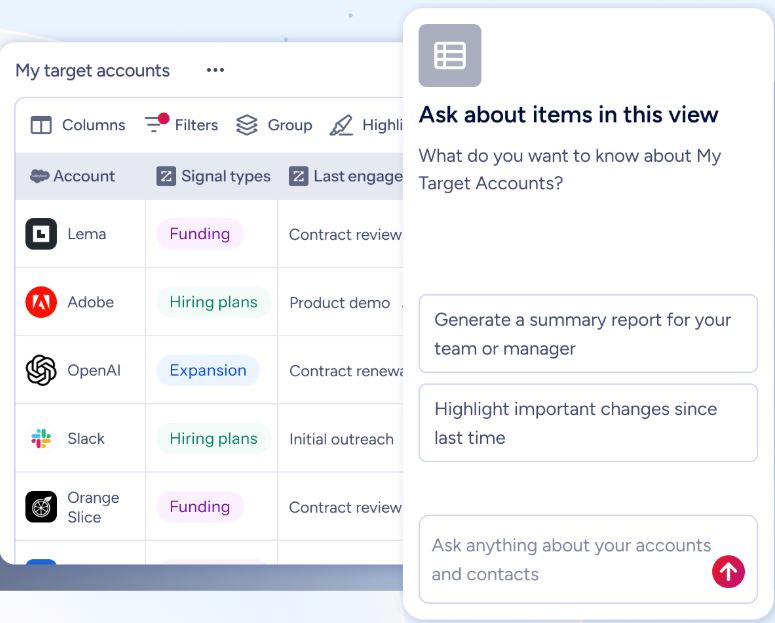
ZoomInfo takes a different approach. Rather than automating actions you define manually, ZoomInfo's AI agents in GTM Workspace research accounts, generate follow-ups, monitor signals, draft outreach, and update CRM fields automatically.
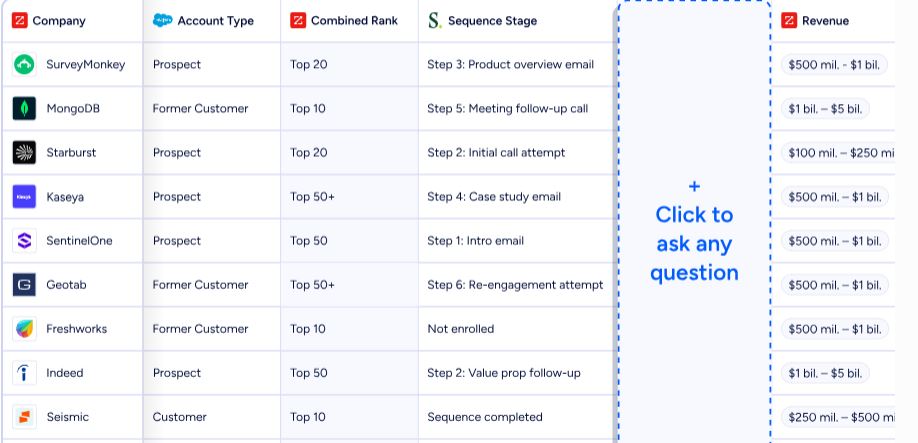
In GTM Studio, marketers launch pre-built plays across email, calls, ads, and direct mail, triggered by buyer behavior. Plays that used to take 3 weeks now launch in 30 minutes.
Impartner saw a 45% increase in website engagement and saved 15 hours using ZoomInfo's automation. (Impartner case study)
Who each platform is built for
The target audience tells you more about a platform than its feature list.
Pipedrive targets small and medium-sized businesses with active sales processes. It serves verticals from real estate to SaaS to manufacturing, but the common thread is companies where individual salespeople manage discrete deals.
At 800+ employees across eight countries and backed by Vista Equity Partners, Pipedrive has the stability to keep investing in its product. The platform supports 22 languages and has offices from New York to Tallinn to Lisbon.
Pipedrive is not for companies needing customer service workflows, native marketing automation, or enterprise compliance configurations. It's a sales tool, and it doesn't pretend otherwise.
Pulse CRM targets small business owners and franchise systems. The pricing structure confirms this: 1 user and 500 contacts at the entry tier, scaling to 5 users and 10,000 contacts at Pro. Founded in 2019 by Jason Case, who spent over 15 years in CRM consulting before building Pulse, the platform reflects the frustrations of a practitioner who watched small businesses fail to implement the tools they bought.
Pulse has a clear niche in franchise management, offering corporate-level lead distribution by geography, pre-built automation templates pushed to franchisees, and consolidated cross-location reporting. The Multi-Account Agency CRM serves a similar function for agencies managing multiple client accounts. These are features most SMB CRMs don't offer.
ZoomInfo serves 35,000+ companies concentrated in enterprise and upper mid-market. Named customers include Adobe, Snowflake, PayPal, Deloitte, and JPMorgan. With $1.25 billion in annual revenue, ZoomInfo has the scale to build infrastructure smaller platforms cannot. Many of the top 50 AI-native, fastest-growing companies are ZoomInfo customers.
Pricing: what you actually pay
The pricing models reveal what each company values.
Pipedrive charges per seat, per month. Four tiers replaced the former five-tier system in 2025:
Lite: Entry tier. Customizable pipelines, Leads Inbox, Pulse feed, API access, AI report creation, mobile apps. No email sync or automations.
Growth: Adds email sync, automations with if/else branching, sequences, meeting scheduler, and forecast view. Usage limits: 5,000 leads+deals per seat, 50 automations, 5 sequences.
Premium: Adds Smart Docs, Projects, and LeadBooster included (not add-ons), AI email creation, phone support, and automatic assignment. 15,000 leads+deals per seat, 150 automations, 25 sequences.
Ultimate: Highest limits, contact data enrichment, security alerts. 20,000 leads+deals per seat, 250 automations, 50 sequences.
Entry price starts at $14/month per seat, with up to 42% discount on annual billing. Add-ons like Campaigns (email marketing) and Web Visitors are billed per company, not per seat. LeadBooster costs $32.50/company/month on Lite and Growth plans. The 14-day free trial requires no credit card.
Pulse CRM uses all-inclusive pricing where every plan includes every feature. Tiers differ only by user count, contact allotment, and scarcity timer views:
Plan | Monthly | Users | Contacts |
|---|---|---|---|
Starter | 1 | 500 | |
Growth | 3 | 1,000 | |
Pro | 5 | 10,000 |
Annual billing saves 25%. Unlimited email sends come with all plans. Additional contacts cost $50/month per 5,000; additional users cost $15/month each. The free trial requires a credit card and auto-charges at trial end if not cancelled. Franchise pricing isn't published and requires contacting sales.
Cancellation requires 7 days' notice before the next invoice, and a minimum $200 re-setup fee applies if you cancel and later reinstate.
ZoomInfo uses custom-quoted, consumption-based pricing with no published dollar amounts. Costs scale around data access, API consumption, AI activity, and credit volume. ZoomInfo Lite provides a permanent free tier with access to the B2B database, 10 monthly export credits, and WebSights Lite (10 website visitor reveals per day).
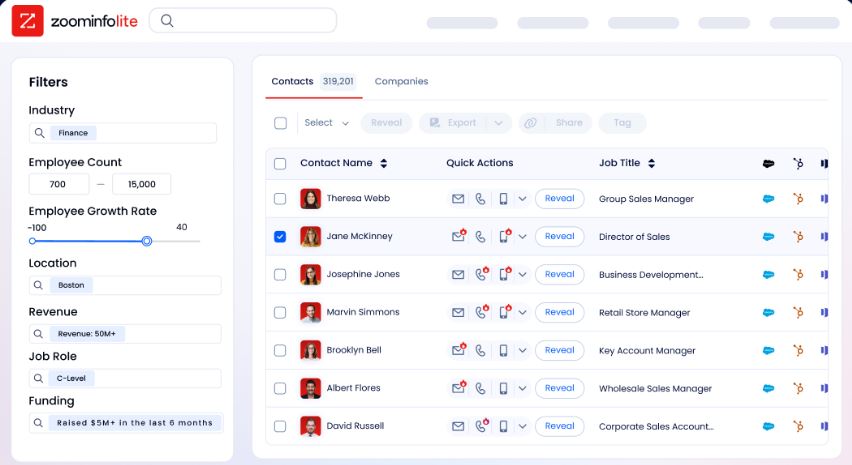
A 7-day free trial of the full platform requires no credit card.
ZoomInfo is the most expensive option, but its pricing reflects a different value proposition. Pipedrive and Pulse charge for CRM seats. ZoomInfo charges for access to verified B2B intelligence at scale.
AI features: where the gap widens
AI is changing how sales teams work, and the three platforms sit at different points on this spectrum.
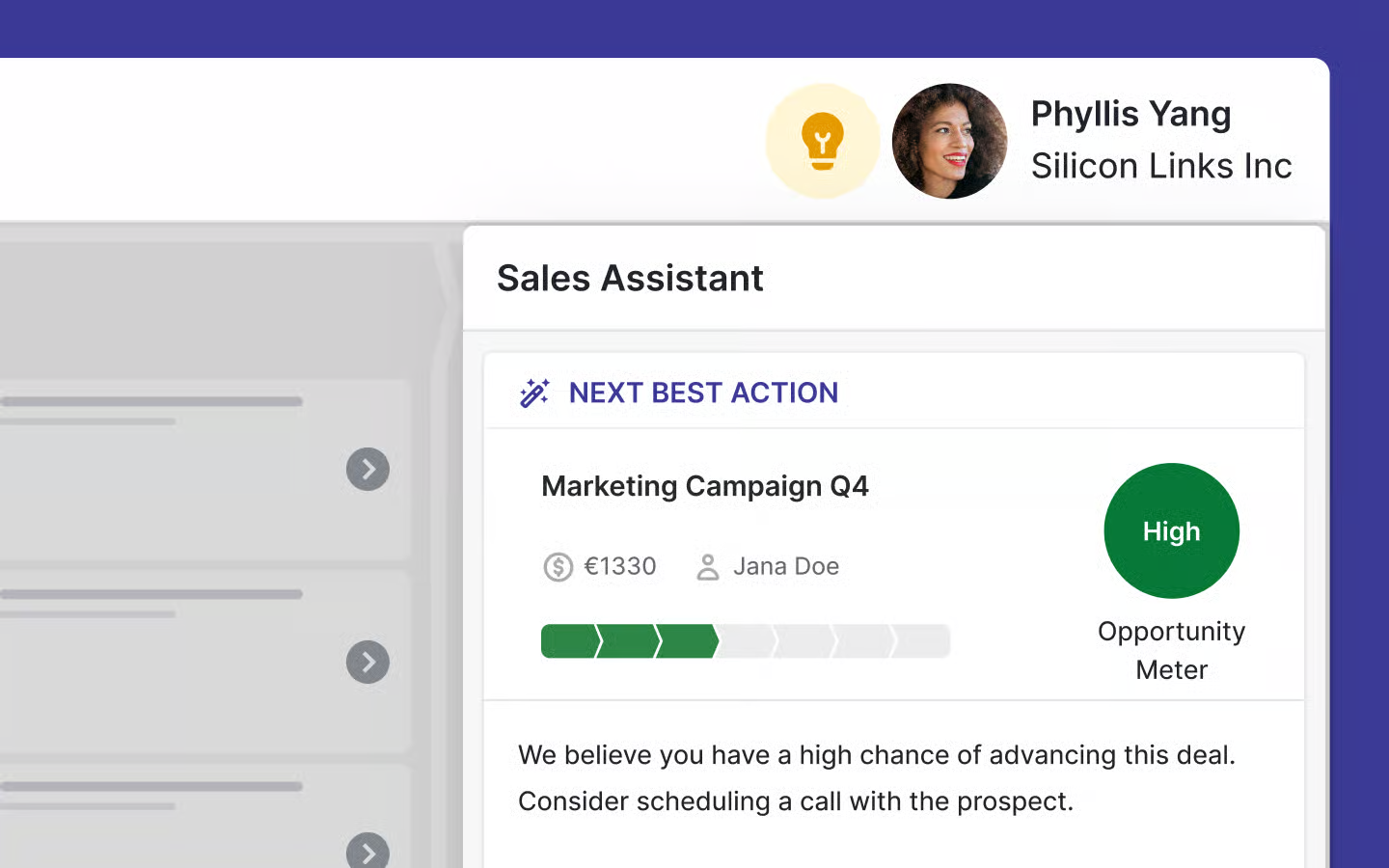
Pipedrive has committed to becoming an "AI-native CRM" under CEO Paulo Cunha's "Pipedrive 3.0" vision. Current AI features include an AI Sales Assistant that surfaces win probability predictions, deal activity reminders, and recommended actions.
Source: Pipedrive
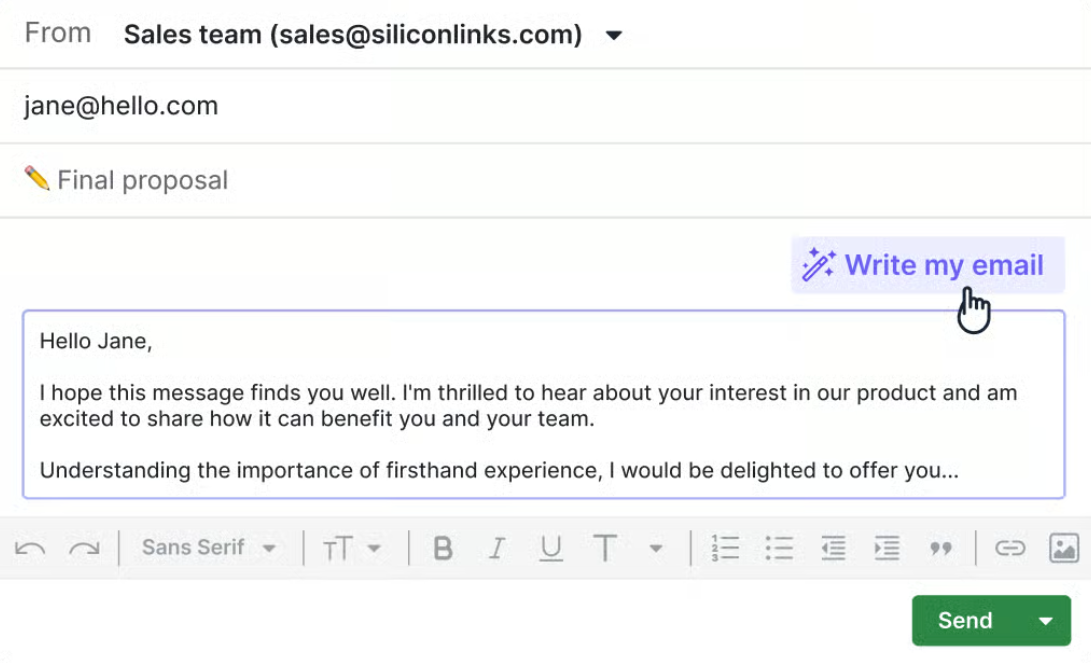
An AI email writer generates drafts from prompts with configurable tone and length.
Source: Pipedrive
An AI report generator builds pipeline analyses from natural-language requests. AI email summarization is still in beta.

Source: Pipedrive
A ChatGPT integration launched in December 2025, though it's unavailable for EU data residency accounts.

Source: Pipedrive
Pulse CRM has no documented AI features. No AI-generated email content, no predictive lead scoring, no AI-powered reporting. For a platform built around automation simplicity, this is a growing gap as competitors add AI.
ZoomInfo treats AI as infrastructure. The GTM Context Graph (ZoomInfo's intelligence layer) doesn't just detect anomalies; it connects signals across your data to explain why a deal accelerated (executive sponsorship secured), why a champion went quiet (internal political friction), and what a competitive mention predicts about deal risk.
Built on Anthropic's Claude, the AI agents in GTM Workspace answer three questions for every rep: who to contact, when to engage, and what to say.
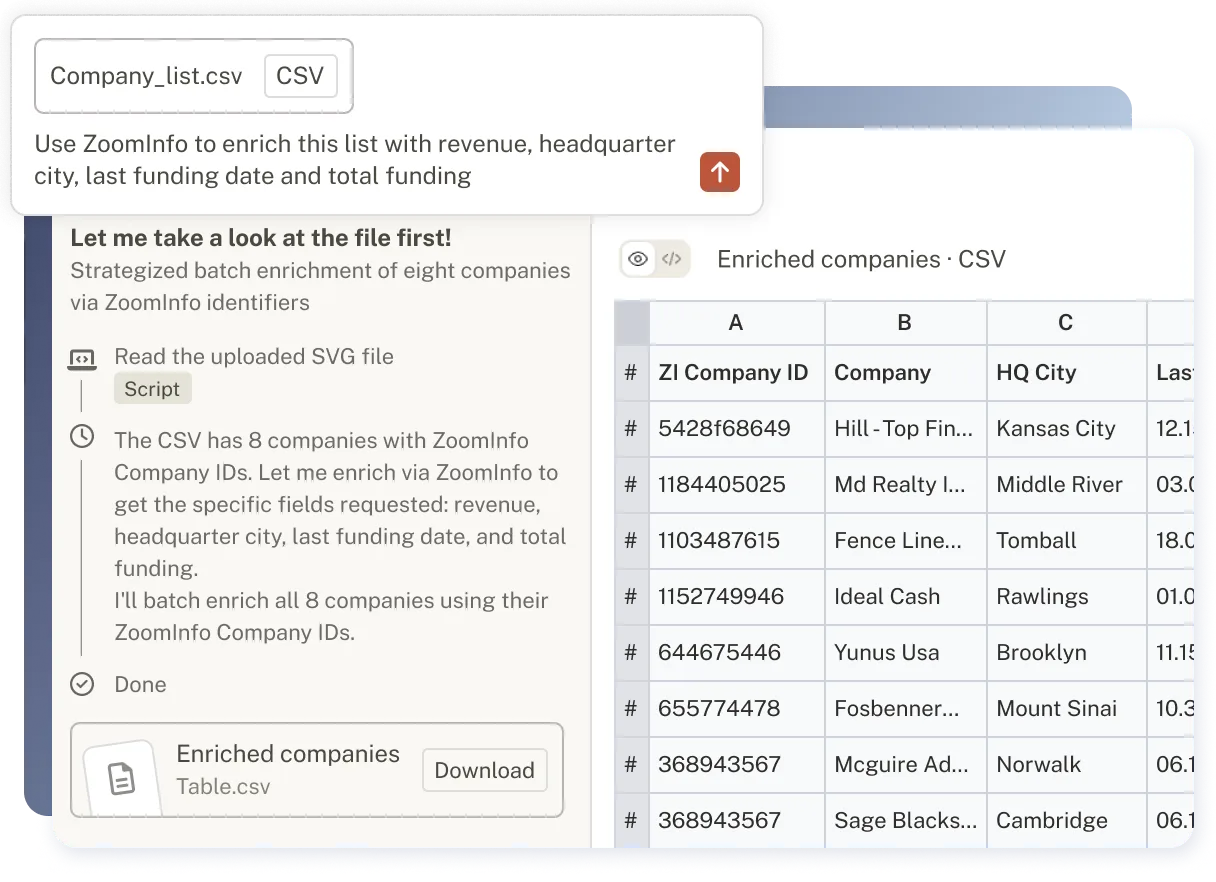
The results back this up. GTM Workspace users report boosting pipelines by 23%, booking nearly 60% more meetings per week, and reaching an account first in over half of cases.
Levanta's CEO called ZoomInfo "a full system of execution" where "GTM Intelligence works the list, writes the outreach, triggers the play, and helps drive predictable growth." (Levanta case study)
Integration ecosystems and technical access
How each platform connects to the rest of your tech stack matters more than most buyers realize upfront.
Pipedrive offers the most integrations of the two CRMs. The Marketplace lists 500+ integrations spanning Zapier, Make, Google Meet, Microsoft Teams, Mailchimp, PandaDoc, DocuSign, QuickBooks, Xero, Slack, and more. A free open API is available on all plans, with API v2 and Webhooks v2 for real-time event notifications.
The Developer Hub provides interactive testing, tutorials, a sandbox account, and official clients for Node.js and PHP. App extensions let developers embed custom UI directly inside Pipedrive.
Pulse CRM relies on Zapier, Make, and API access for third-party connections. This gives access to thousands of apps indirectly, but native integrations are limited.
Pulse positions itself as a replacement for tools like Mailchimp and Constant Contact rather than a platform that connects to them. For small businesses with a simple tech stack, this works. For teams with established tooling, the reliance on middleware adds friction.
ZoomInfo operates at a different level. The App Marketplace lists 120+ partner integrations including Salesforce, HubSpot, Microsoft Dynamics 365, Snowflake, and Outreach. Cloud Partners enables direct data ingestion into AWS, Google Cloud, Snowflake, and Databricks.
The Enterprise API provides programmatic access to search, enrich, and AI intelligence endpoints, with API access included in all relevant plans.
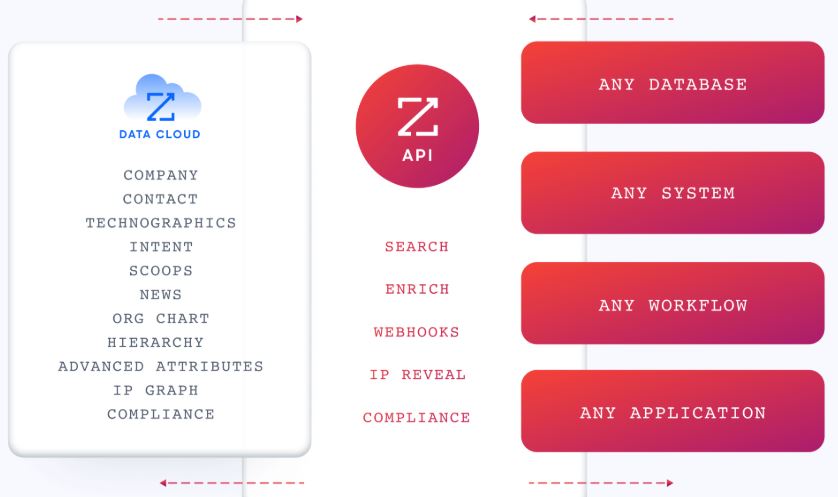
The MCP server connects AI models to ZoomInfo's data without custom coding, currently supporting Claude and ChatGPT.
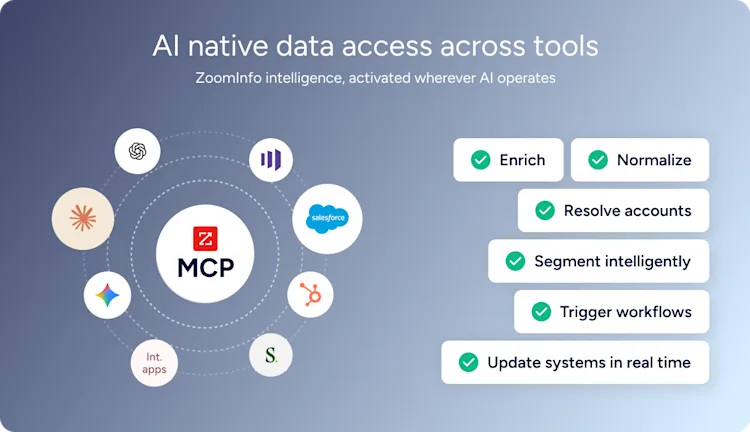
BDO Canada reduced time on internal data dashboard updates by 87% using ZoomInfo's API: "The plug-and-play aspect of the API means I can integrate it easily into any process and get information at a moment's notice." (BDO Canada case study)
Security and compliance
For regulated industries or privacy-conscious buyers, the security posture of each platform matters.
Pipedrive holds the strongest security credentials of the two CRMs: ISO/IEC 27001:2022, ISO/IEC 27701:2019, SOC 2 Type 2, and SOC 3 compliance. The platform is GDPR compliant, certified under the EU-US Data Privacy Framework, and carries a SecurityScorecard grade A.
Data is hosted on AWS with separate databases per customer, daily backups going back three months, and encryption in transit and at rest. The company states it does not let third parties use client data to train AI models.
Pulse CRM offers basic security disclosures through its Privacy Policy, noting "commercially acceptable means" of protecting personal data. Admin-level permission controls restrict user access to sensitive information and templates. No formal compliance certifications (SOC 2, ISO 27001, HIPAA, or GDPR) appear on any public page.
For Pulse's primary audience of small businesses and franchise operations, this may be enough. Buyers in regulated industries should evaluate this gap carefully.
ZoomInfo maintains a certification stack renewed annually: ISO 27001, ISO 27701, SOC 2 Type II, TRUSTe GDPR and CCPA certifications. The company is a registered data broker in California and Vermont, with a dedicated Trust Center. For enterprise buyers in financial services, healthcare, or other regulated sectors, ZoomInfo's compliance infrastructure matches the scrutiny.
Pipedrive vs. Pulse CRM vs. ZoomInfo: Which should you choose?
The right platform depends on the problem you're solving.
Choose Pipedrive if:
You need a dedicated sales CRM with strong pipeline management for SMBs
Your team values a visual, intuitive interface salespeople will actually use
You want a mature platform with 500+ integrations and strong security credentials
You have separate tools for marketing and post-sale operations
You need 22-language support for international teams
Choose Pulse CRM if:
You want CRM, email marketing, quoting, project management, and automation in one subscription
You prefer done-for-you implementation over self-service setup
You run a franchise system or agency needing multi-account management
Your budget favors all-inclusive pricing with no per-module charges
Your team is small and non-technical
Choose ZoomInfo if:
You need verified B2B intelligence to fill your pipeline with the right prospects
Buyer intent signals and account prioritization would change how your team sells
You want AI that reasons about your deals, not just organizes them
You're building a revenue engine, not just managing contacts
See ZoomInfo in action with a free trial or explore ZoomInfo Lite at no cost.
Pipedrive and Pulse CRM both manage your sales process once it's in motion. But the quality of your pipeline determines the quality of your results. ZoomInfo answers the question neither CRM was built to answer: who should you sell to right now, and why? For revenue teams ready to move from managing deals to generating them with intelligence, that's the difference that compounds.
Pipedrive vs. Pulse CRM vs. ZoomInfo FAQ
What is the core difference between Pipedrive, Pulse CRM, and ZoomInfo?
Pipedrive is a sales CRM focused on visual pipeline management for small and mid-sized businesses. Pulse CRM bundles CRM, email marketing, quoting, project boards, and automation for small businesses and franchise systems. ZoomInfo is an AI-powered GTM platform that provides verified B2B contact data, buyer intent signals, and intelligence to help revenue teams identify and engage the right prospects.
Which platform is cheapest for a small sales team?
Pipedrive starts at $14/month per seat with its Lite plan, making it the most affordable entry point for pure CRM. Pulse CRM starts at $49/month for 1 user but includes features (email marketing, quoting, project management) that Pipedrive charges extra for.
ZoomInfo uses custom-quoted, consumption-based pricing for paid plans but offers a permanent free Lite tier with 10 monthly export credits and access to its B2B database.
Can I use ZoomInfo with Pipedrive or Pulse CRM?
ZoomInfo integrates natively with Salesforce, HubSpot, and Microsoft Dynamics 365. No direct native integration exists with Pipedrive or Pulse CRM, but ZoomInfo's API and MCP access let data flow into virtually any tool. Pipedrive's open API and Zapier connection provide additional pathways. Pulse CRM connects through Zapier and its own API.
Which platform is best for franchise businesses?
Pulse CRM has the most specialized franchise features: corporate-to-franchisee lead distribution by geography (census tracts and zip codes), pre-built automation templates pushed from a corporate account, and consolidated cross-location reporting. Pipedrive and ZoomInfo do not offer franchise-specific management tools.
Does Pulse CRM have AI features like Pipedrive and ZoomInfo?
No. Pulse CRM does not document any AI features on its site. Pipedrive offers an AI Sales Assistant, AI email writer, AI report generation, and a ChatGPT integration. ZoomInfo's AI capabilities are the most advanced of the three, with a GTM Context Graph that connects signals across CRM data, conversation intelligence, and buying signals to explain deal dynamics and prioritize accounts.
How do the platforms compare on data and contact intelligence?
ZoomInfo leads by a wide margin with 500 million contacts, 135 million verified phone numbers, and 200 million verified business emails, verified by 300+ human researchers. Pipedrive's Prospector add-on provides access to over 400 million profiles, though it requires the LeadBooster add-on or Premium plan. Pulse CRM has no native contact database or prospecting tools.
Which platform has the best mobile experience?
Pipedrive offers native iOS and Android apps with pipeline views, in-app calling, offline mode, a business card scanner, and a "Nearby" feature for field selling. ZoomInfo provides a mobile app with prospecting capabilities. Pulse CRM's mobile access appears to be browser-based, and reviewers have noted inconsistencies between the iOS and Android experiences.
How do the free trials compare?
Pipedrive offers a 14-day free trial with full access and no credit card required. ZoomInfo offers a 7-day free trial (no credit card) plus a permanent free Lite tier with limited features. Pulse CRM offers a free trial but requires a credit card, and the card is automatically charged at trial end if you don't cancel.
Keep comparing Pipedrive:
