

Choosing between Pipedrive vs. Streak for your CRM often comes down to five questions:
Do you live in Gmail all day, or do you prefer a dedicated sales workspace?
Is your team managing deals through email threads, or through a structured pipeline?
Do you need a CRM that works across email clients, or is your entire organization on Google Workspace?
How important is it that your CRM data stays current without manual entry?
Are you comparing CRMs because you need better deal management, or because your team can't find the right prospects to put into the pipeline in the first place?
That last question matters more than most buyers realize. The best deal management tool in the world can't fix a pipeline that's empty or full of the wrong prospects. Both Pipedrive and Streak solve the "manage what you have" problem well. Neither solves the "find who to sell to" problem.
In short, here's what we recommend:
Pipedrive is the CRM for salespeople who want a dedicated workspace to manage their pipeline. Its visual kanban boards, deal rotting alerts, and activity-based selling methodology keep reps focused on the next action that moves a deal forward. With 500+ marketplace integrations, 22-language support, and pricing starting at $14/month per seat, Pipedrive delivers a full CRM without the bloat of enterprise platforms. The trade-off: it requires your team to work in a separate application from their inbox, and it offers limited help with finding prospects.
Streak is the CRM for teams that refuse to leave Gmail. It runs entirely inside the Gmail interface as a browser extension, turning the inbox into a pipeline manager with no context-switching. AI Autofill scans email threads to populate CRM fields automatically, and email tracking, mail merge, and snippets come included on every plan. For Gmail-native teams, adoption is nearly automatic because the CRM is already where they work. The trade-off: Streak only works in Gmail, the mobile app lags the desktop experience, and at $49–$129/user/month on annual billing, it costs more per seat than you might expect.
Both platforms handle deal management well. But managing deals is only half the challenge. Before you can move a deal through your pipeline, you need to know who to target, whether they're actually in-market, and what matters to them right now. That's a different problem, and it's where the CRM conversation needs to expand.
ZoomInfo is a GTM platform that provides the data and intelligence layer neither Pipedrive nor Streak offers. Built on 500M contacts, 100M companies, 135M+ verified phone numbers, and 200M+ verified business emails, ZoomInfo's GTM Context Graph combines this data with your CRM records, conversation transcripts, and behavioral signals to reveal not just who your buyers are, but why they're ready to buy. Sales teams access this intelligence through GTM Workspace (a seller interface), while marketers and RevOps use GTM Studio to run plays across channels. For teams already committed to Pipedrive or Streak, ZoomInfo's APIs and MCP deliver the same intelligence into any tool.
If turning your CRM from a record-keeper into an intelligence-driven sales engine sounds like the real upgrade, see how ZoomInfo works.
Pipedrive vs. Streak vs. ZoomInfo at a glance
Pipedrive | Streak | ZoomInfo | |
|---|---|---|---|
Core approach | Dedicated pipeline CRM | Gmail-native CRM | GTM platform with data, intelligence, and execution |
Where it lives | Standalone web app + mobile | Inside Gmail (browser extension) | GTM Workspace, GTM Studio, APIs/MCP, or any tool |
Pipeline view | Visual kanban with deal rotting | Spreadsheet-style grid inside Gmail | AI-prioritized account feed with buying signals |
Contact data | Stores what you add | Auto-captures from Gmail threads | 500M contacts, 200M+ verified emails, 135M+ verified phone numbers |
Prospecting | LeadBooster add-on (400M+ profiles) | LinkedIn integration with email enrichment | Native B2B database with intent signals, org charts, and technographics |
AI capabilities | AI email writer, AI Sales Assistant, AI reports | AI Autofill, AI Summaries, Deal Q&A | GTM Context Graph with AI agents for research, outreach, and CRM updates |
Email integration | Two-way sync (Gmail, Outlook, IMAP) | Native Gmail (it IS Gmail) | Integrated through GTM Workspace and Chrome extension |
Buyer intent signals | None native | None native | 210M IP-to-Organization pairings, 6T+ keyword-to-device pairings monthly |
Starting price | $14/seat/month | $49/user/month (annual) | Custom-quoted; free plan available (ZoomInfo Lite) |
Free plan | 14-day trial only | Free email tools (no CRM) | ZoomInfo Lite (permanent, with 10 monthly export credits) |
Best for | SMB sales teams wanting a dedicated CRM workspace | Gmail-native teams wanting zero context-switching | Teams that need to find, prioritize, and engage the right buyers at scale |
Dedicated CRM vs. inbox-native CRM: two philosophies
Pipedrive and Streak represent opposite answers to the same question: where should your CRM live?
Pipedrive's answer is a dedicated workspace. You open Pipedrive, and everything is there: your pipeline as a kanban board, your activities calendar, your deal forecasts, your reports. The interface was designed from the salesperson's point of view, not the manager's, and the pipeline view shows the health of every deal at a glance. When a deal sits idle too long, colored "deal rotting" cues flag it before it goes cold. The trade-off is that every time you read an email and want to update a deal, you switch to another tab.
Streak's answer is your inbox. The entire CRM lives inside Gmail as a browser extension. Pipelines render as spreadsheet-style grids in Gmail's navigation. Deal records open alongside email threads. When you read a message from a prospect, the sidebar shows their deal stage, notes from your team, and AI-generated summaries without navigating anywhere. Pipeline tags appear in the inbox to label which deal each email belongs to. The trade-off: if you're not on Gmail, Streak doesn't work at all.
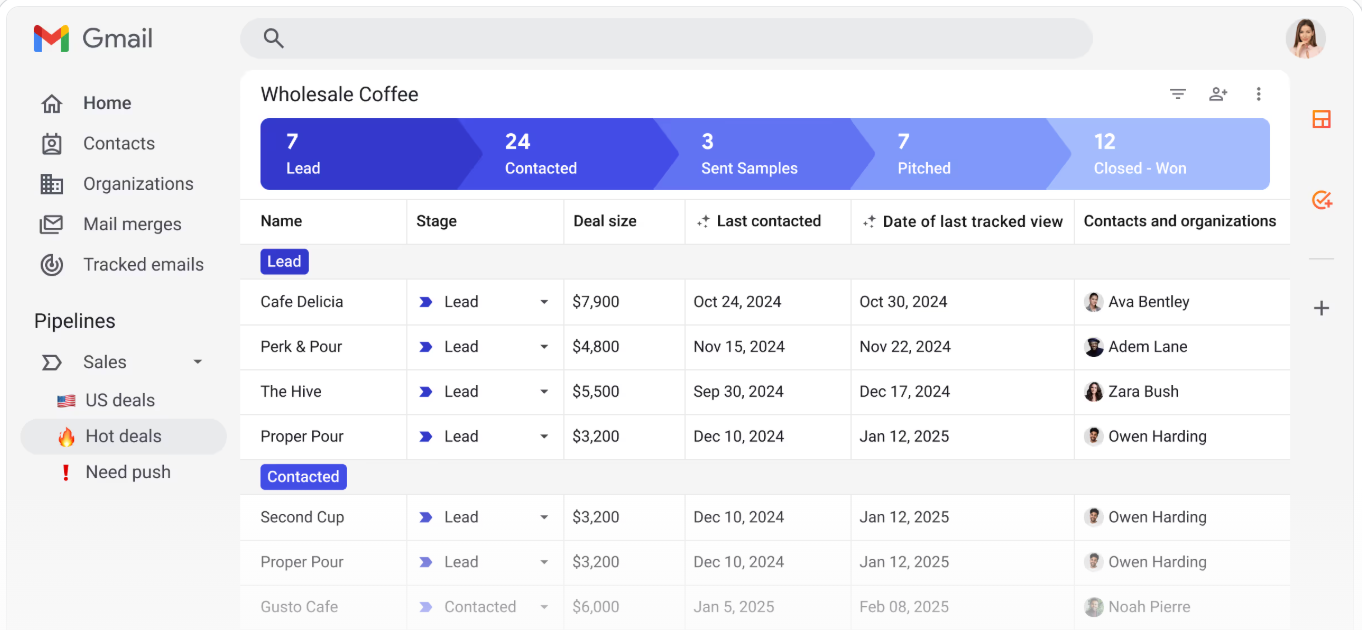
Source: Streak
Both approaches have merit. Pipedrive's dedicated workspace provides richer visualization and reporting. Streak's inbox-native design drives higher adoption because there's no separate tool to forget. The question is which trade-off matters more to your team.
Email handling exposes the architectural difference
How each CRM handles email reveals the practical impact of their design choices.
Pipedrive connects to Gmail, Outlook, Office 365, Microsoft Exchange, or any IMAP-compatible account and syncs emails into its Sales Inbox. Emails link automatically to deals, leads, or projects. You get open and click tracking, templates, scheduling, and group email (up to 100 contacts at once). The AI email writer generates drafts from prompts with configurable tone and length. It works across email providers, which matters if your team isn't all on Gmail.
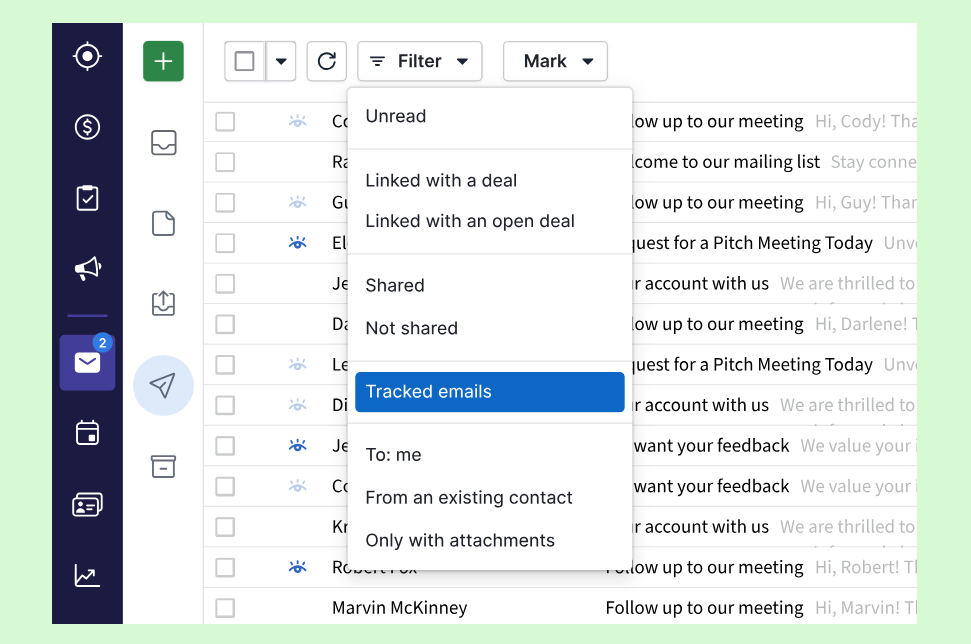
Source: Pipedrive
Streak doesn't sync emails because it doesn't need to. Since it runs inside Gmail, every email thread is already there. The CRM associates threads with the right deal record automatically based on contacts and pipeline context. Email tracking runs natively in the compose window. Mail merge sends personalized messages to hundreds of recipients with automatic follow-up sequences that pause when someone replies. Snippets provide canned responses with keyboard shortcuts. Even the Thread Splitter, which separates Gmail conversations that got incorrectly bundled, is a small feature that solves a real annoyance.
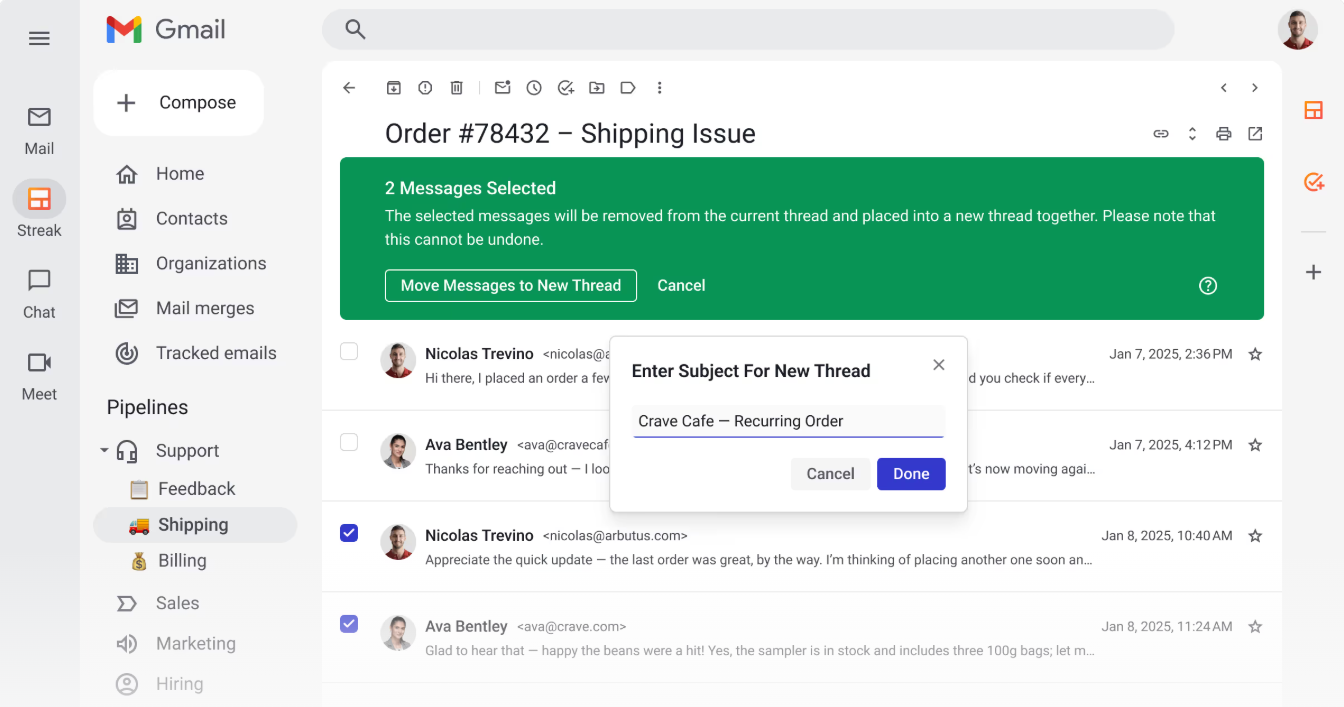
Source: Streak
The practical difference: Pipedrive gives you a centralized email hub that works regardless of your email provider. Streak gives you CRM intelligence surfaced where you read and write emails, but only if that place is Gmail.
Pipeline management: visual boards vs. spreadsheet grids
Pipedrive's pipeline is a kanban board. Deals appear as cards in columns representing stages. Drag a card to advance it. Color coding flags stalled deals. Three views are available: kanban, list, and forecast. The forecast view shows which deals are due to close in a given period and their aggregate value. You can create multiple custom pipelines with their own stages, and features like recurring revenue tracking and multi-currency support are available on all plans.
Streak's pipeline is a spreadsheet-style grid inside Gmail. Each row is a "Box" (deal), each column is a data field. This design feels familiar to anyone who has managed projects in Google Sheets, and it's efficient for scanning large volumes of deals. Stages are customizable, and Magic Columns auto-populate with activity data (last email sent, days in stage, email thread count) without manual entry. Saved views let you filter, sort, and group by any column.
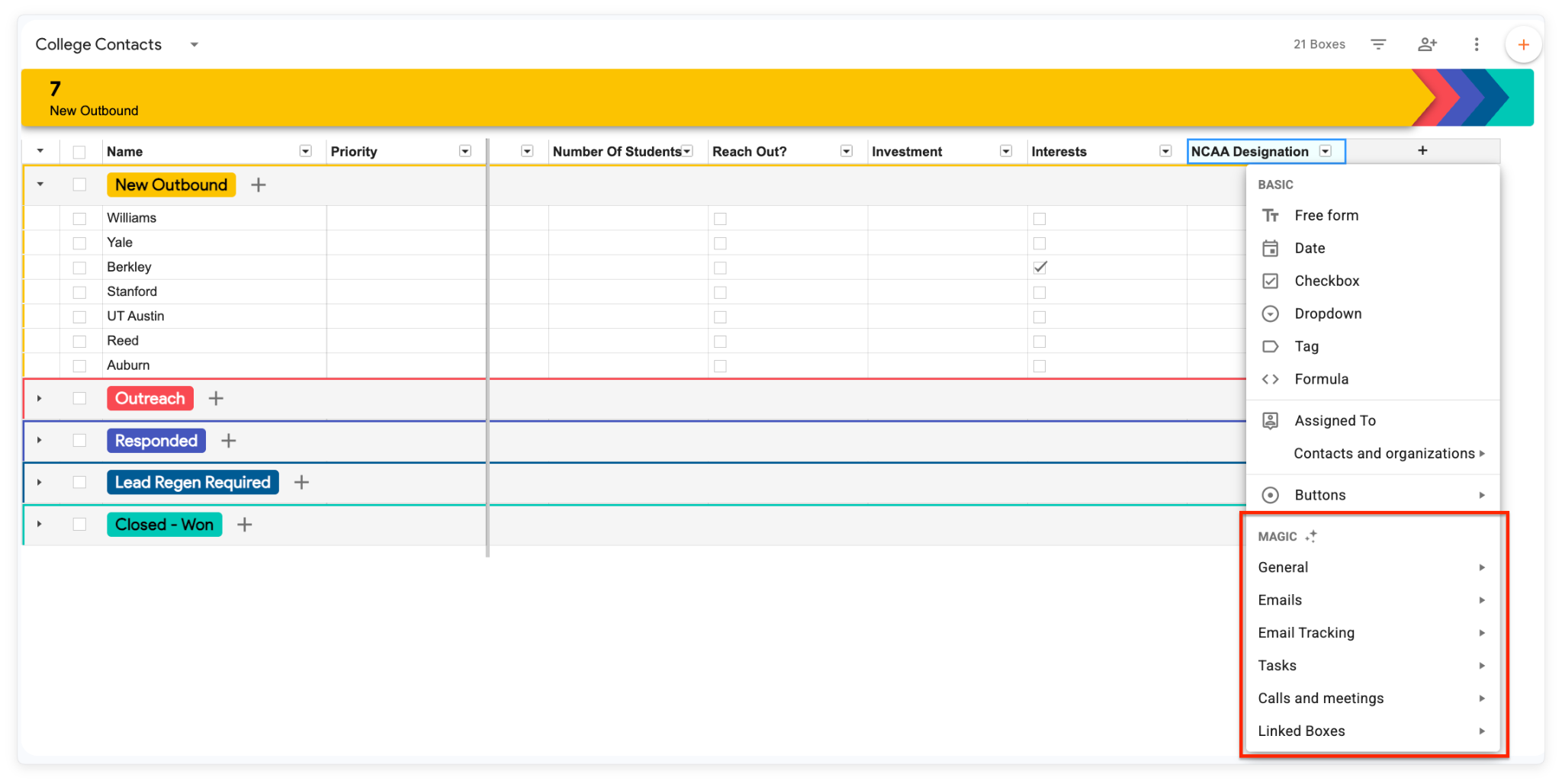
Source: Streak
Pipedrive's kanban is more visual. You see deal health at a glance. Streak's grid is more data-dense. You see more records and more detail per record. The better format depends on how your team thinks about their pipeline.
AI features: different problems, different approaches
Both platforms have invested in AI, but they solve different parts of the CRM problem.
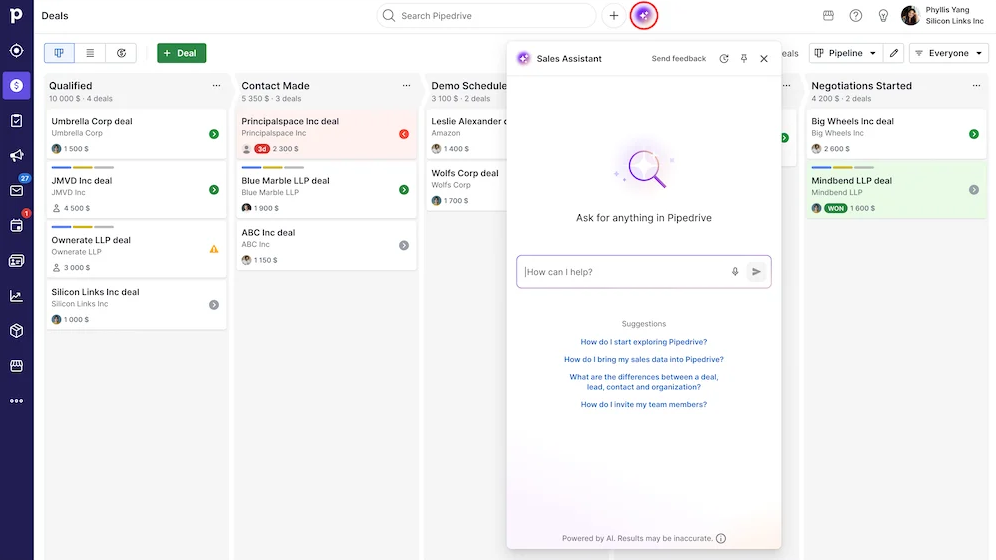
Pipedrive's AI centers on the AI Sales Assistant, which surfaces win probability predictions, deal activity reminders, and recommended actions. The AI email writer generates drafts from prompts. An AI report generator creates pipeline analyses from natural language queries, available on all plans. AI email summarization, which condenses threads with sentiment and readiness-to-buy scores, is still in beta.
Source: Pipedrive
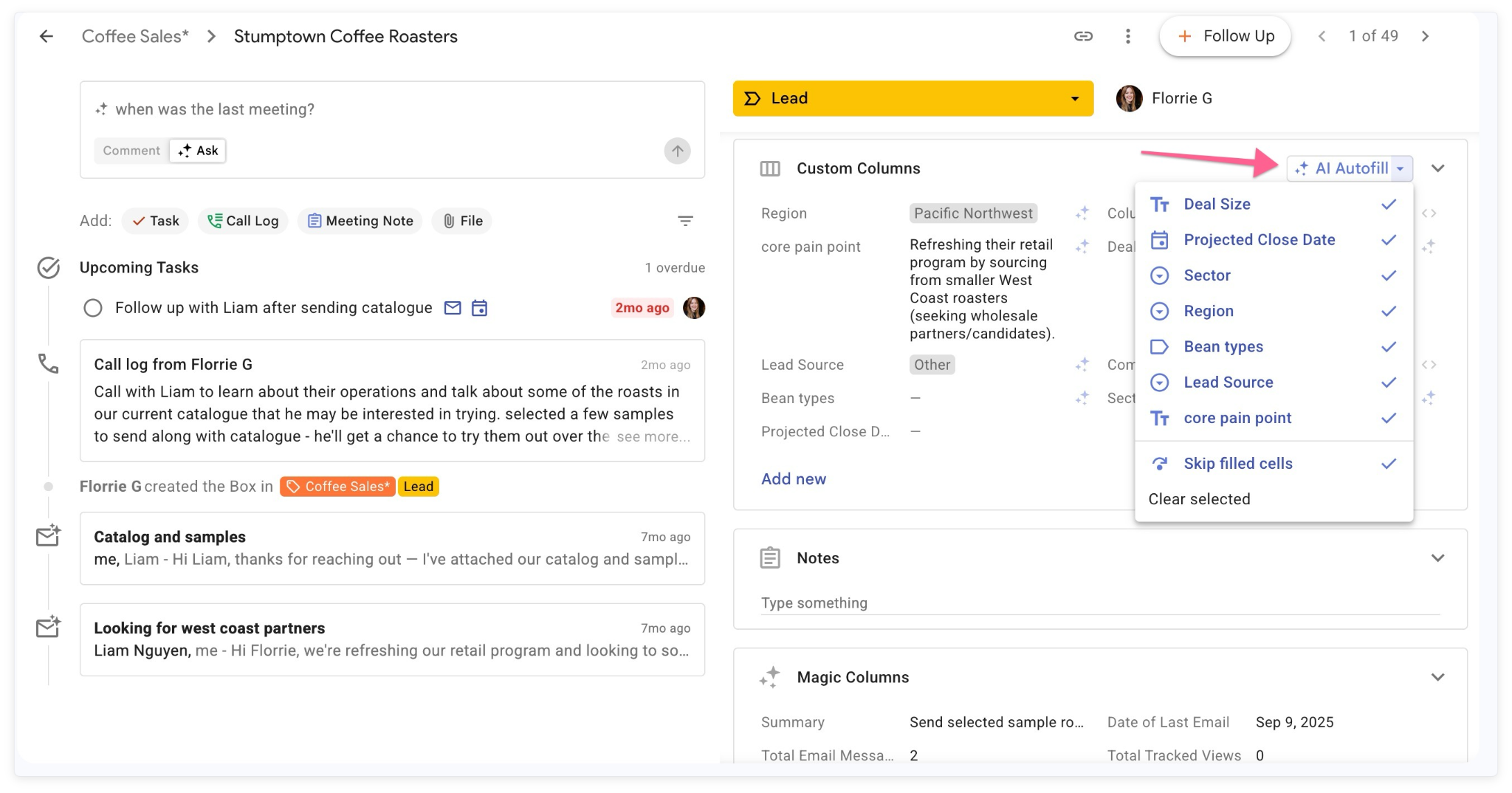
Streak's AI is built for its Gmail-native environment. AI Autofill scans email threads and call logs to populate CRM fields automatically (close dates mentioned in emails, budgets discussed on calls). AI Summaries produce one-click deal history recaps pinned at the top of each deal record. Deal Q&A lets you ask natural-language questions and get cited answers drawn from the full interaction history. The AI Pipeline Creator generates a complete pipeline structure from a text description in minutes.
Streak's AI has one notable advantage: because it runs inside Gmail, it reads actual email threads rather than synced copies. This gives its Autofill and Q&A features direct access to the raw conversation data. Pipedrive's AI works with synced email data and CRM records, which is less direct but not email-provider-dependent.
What neither platform's AI can do: tell you which companies are actively researching solutions like yours right now, or surface buying signals from outside your existing conversations.
The missing layer: prospecting and buyer intelligence
Both Pipedrive and Streak help you manage deals once they exist. But how do the right deals get into the pipeline?
Pipedrive offers the LeadBooster add-on ($32.50/company/month) with a chatbot, live chat, web forms, and Prospector, which draws from a database of 400 million profiles and 10 million companies. The newer Pulse toolkit adds data enrichment, custom lead scoring, and automated sequences. These are useful tools, but they're add-ons layered on top of a CRM. They don't provide buyer intent signals, technographic data, or org chart intelligence.
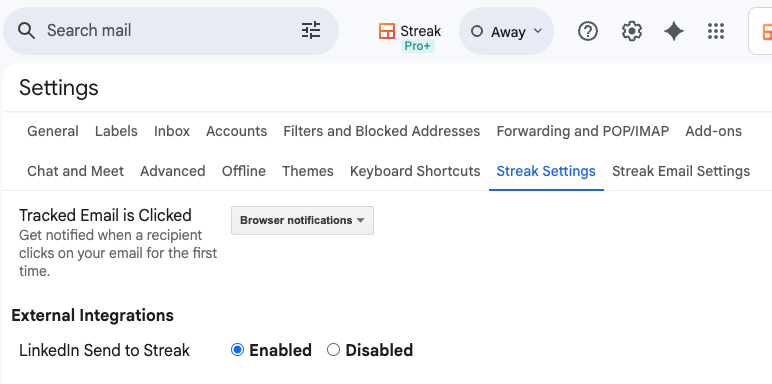
Streak offers a LinkedIn integration that creates enriched CRM records from LinkedIn profiles with one click, including a verified email address. Contact enrichment auto-populates titles, phone numbers, and social profiles. These features smooth the prospecting workflow but don't tell you whether a company is actually in-market.
Source: Streak
ZoomInfo approaches this from the opposite direction. Instead of starting with deal management and adding prospecting, it starts with the largest B2B data platform in the industry and builds intelligence on top. The GTM Context Graph processes 1.5B+ data points daily, combining ZoomInfo's third-party data with your CRM records, conversation transcripts, and behavioral signals. The result: an intelligence layer that captures not just what happened in a deal, but why it happened.
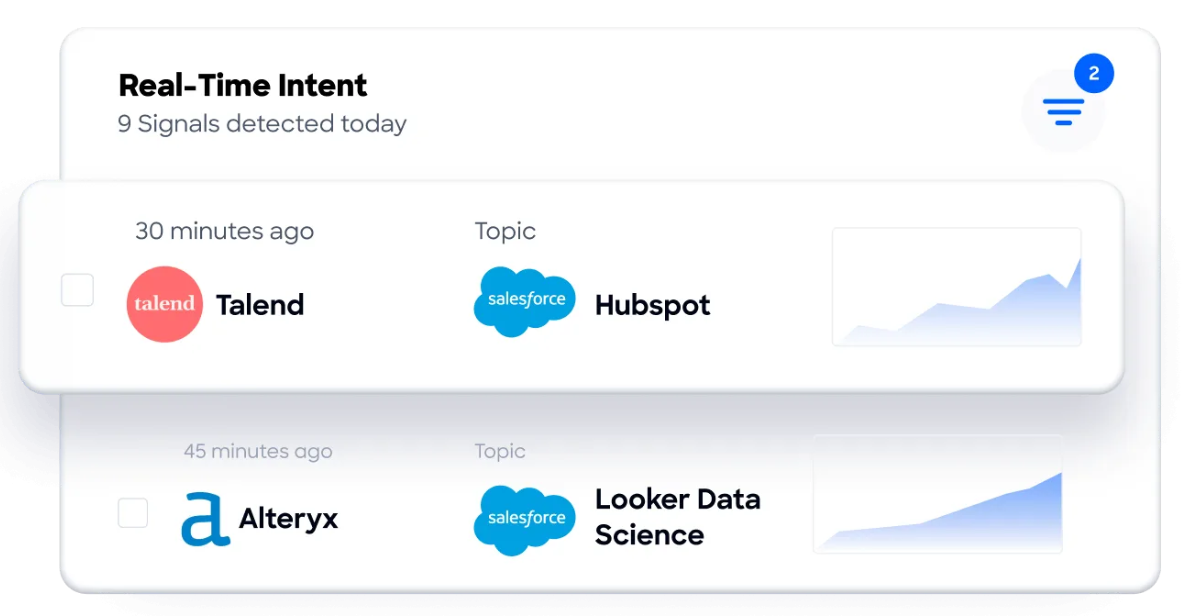
Buyer Intent data tracks signals from 210 million IP-to-Organization pairings to show which companies are actively researching your category. Guided Intent, exclusive to ZoomInfo, identifies topics historically correlated with deal success rather than requiring manual topic selection. WebSights resolves anonymous website traffic to companies and their buying teams.
Source: ZoomInfo
For a sales team on Pipedrive or Streak, this means the difference between cold-calling a list and reaching out to a company that visited your pricing page yesterday while three of their executives are researching your category.
"ZoomInfo gives us the information we need to execute. We don't have to go through and spend our time digging. It's already there, so we can be three steps ahead." (Vensure)
Data quality determines everything downstream
A CRM is only as good as the data inside it. This is where the three platforms diverge most sharply.
Pipedrive stores what your team enters. Contacts come from manual entry, imports, web forms, or the Prospector database. Data quality depends on your team's discipline. Pipedrive's data enrichment is limited to the Pulse toolkit on Premium plans and above, with 100 enrichment credits per month on Premium.
Streak reduces manual entry through AI Autofill and Magic Columns, and enriches contacts automatically with titles, phone numbers, and social profiles. The LinkedIn integration adds contacts with verified emails. But the enrichment is limited to publicly available data and doesn't cover company context, technographics, or intent signals.
Source: Streak
ZoomInfo treats data quality as its core advantage. A multi-source verification pipeline backed by 300+ human researchers achieves up to 95% accuracy on first-party data. In a Fortune 500 competitive RFP analyzing 25 million contacts across vendors, the independent consultant concluded that "no other competitor came even close." Beyond accuracy, ZoomInfo provides depth that CRM-native data can't match: technographics covering 30,000+ technologies across 30M+ companies, department org charts with decision-makers' direct dials, and company hierarchy data for multi-threaded selling.
This data doesn't sit only in ZoomInfo's platform. Through APIs and MCP, it flows into whatever CRM you choose. Your Pipedrive pipeline or Streak boxes stay enriched with verified contacts, company context, and buying signals without your team researching each account by hand.
"ZoomInfo is our single source of truth for account data, and even more so for contact data. There's no other provider in the market that provides you with that level of detail." (Smartsheet)
Automation and workflow comparison
Pipedrive's automations are available on Growth plans and above. Every automation has a trigger event and one or more actions. Triggers fire on deal creation, stage changes, or date-based conditions. Actions include sending emails, creating activities, updating records, and firing native Slack and Teams notifications. If/else branching and "wait until event" conditions provide conditional logic without third-party tools. Pre-built templates cover common use cases.
Streak's automations are available on Pro+ and above. The trigger-action model covers pipeline events (box created, stage changed, inactivity) and email engagement events (mail merge viewed, clicked, replied). AI action steps set Streak's automation apart: four AI-powered actions let automations autofill fields, ask AI about a deal, generate summaries, and parse raw emails before they've been added to a box. Native integrations with Calendly, Typeform, and Google Forms auto-create boxes from form submissions without Zapier.
ZoomInfo's automation operates at a different scale. GTM Studio lets marketers and RevOps teams define audiences in natural language, set triggers based on buying signals, and launch multi-channel plays (email, calls, ads, direct mail) that activate when a signal fires. GTM Workspace surfaces AI-recommended next actions in the seller's workflow. Pre-built GTM plays for inbound acceleration, champion tracking, competitive displacement, and ICP targeting launch in one click. Expansion plays that used to take three weeks now launch in 30 minutes.
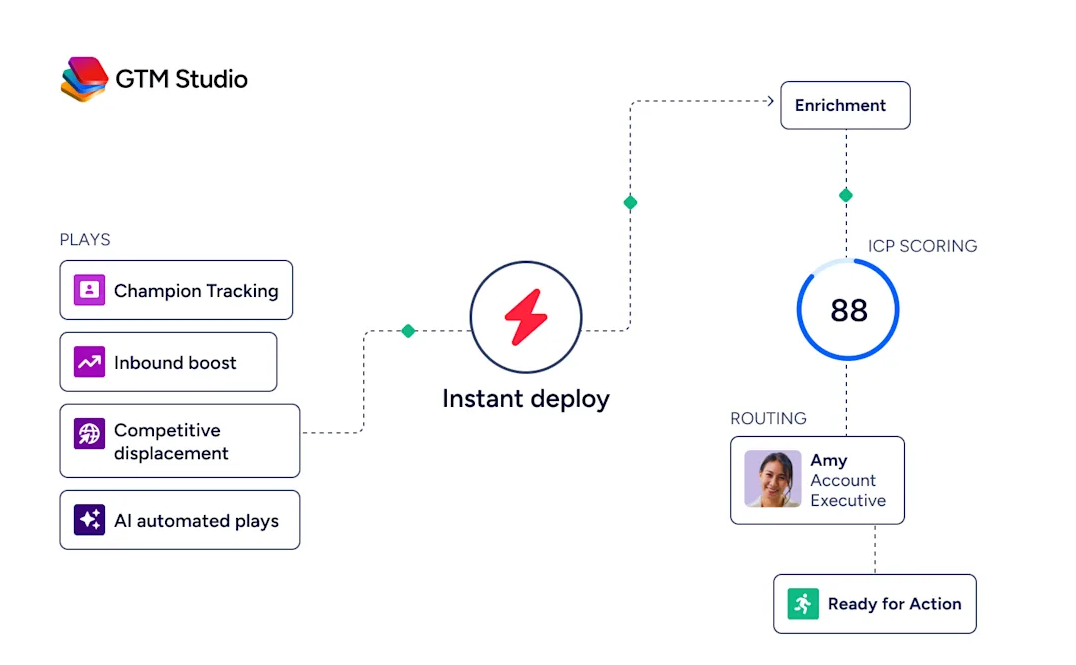
Source: ZoomInfo
The difference: Pipedrive and Streak automate CRM tasks. ZoomInfo automates the go-to-market motion itself, from signal detection through outreach execution.
"That combination of our internal CRM data, external signals, and AI that's given all that context has helped us craft very specific account- and persona-based messages. And people have responded to them right away." (Seismic)
Pricing comparison
The pricing structures reflect what each platform is trying to be.
Pipedrive uses per-seat, per-month pricing across four plans: Lite, Growth, Premium, and Ultimate. Entry starts at $14/seat/month. Features like unlimited pipelines, product catalogs, and customizable reports are available on all plans. Email sync and automations require Growth or above. LeadBooster, Smart Docs, and Projects are included on Premium and above (paid add-ons on lower plans). Annual billing saves up to 42%. A 14-day free trial with full access requires no credit card.
Streak uses per-seat pricing with three paid plans: Pro ($49/user/month annual), Pro+ ($69/user/month annual), and Enterprise ($129/user/month annual, minimum 10 users). The permanently free plan covers only email tools (tracking, mail merge at 50/day, snippets) with no CRM pipelines. Integrations and automations require Pro+. Advanced reports require Pro+. AI credits are bundled per user (20 on Pro, 150 on Pro+, 500 on Enterprise) and pooled across the team. Additional credit packs run from $100/month for 1,000 credits to $1,000/month for 25,000.
ZoomInfo uses custom-quoted, consumption-based pricing with no published prices. Three product lines (Sales, Marketing, and standalone products like Chorus and Chat) each have their own plan structures. ZoomInfo Lite offers permanent free access with 10 monthly export credits, and a 7-day free trial provides broader access. ZoomInfo is premium-priced, aimed at teams where data quality and buyer intelligence directly affect revenue. Customers evaluate it on documented outcomes: Seismic attributed 39% of active pipeline to ZoomInfo signals, and Snowflake achieved 200% higher conversion rates on top-scoring accounts.
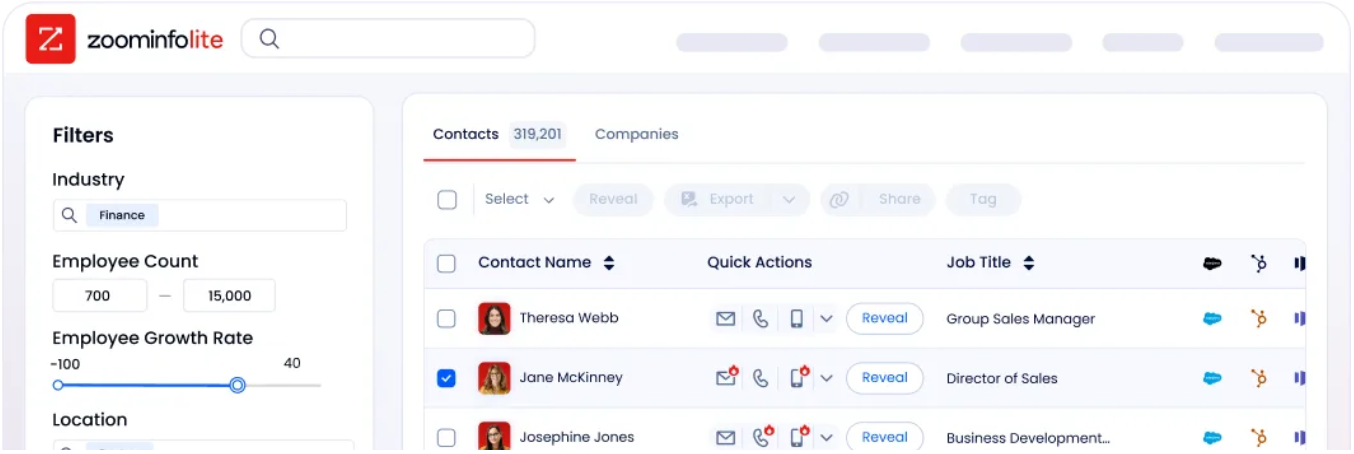
Source: ZoomInfo
For a 10-person sales team, Pipedrive at Growth plan runs roughly $240–$340/month depending on billing cycle. Streak at Pro runs $490/month on annual billing. ZoomInfo's cost depends on the package but represents a different category of investment, one measured against pipeline generated rather than seats filled.
Reporting and analytics
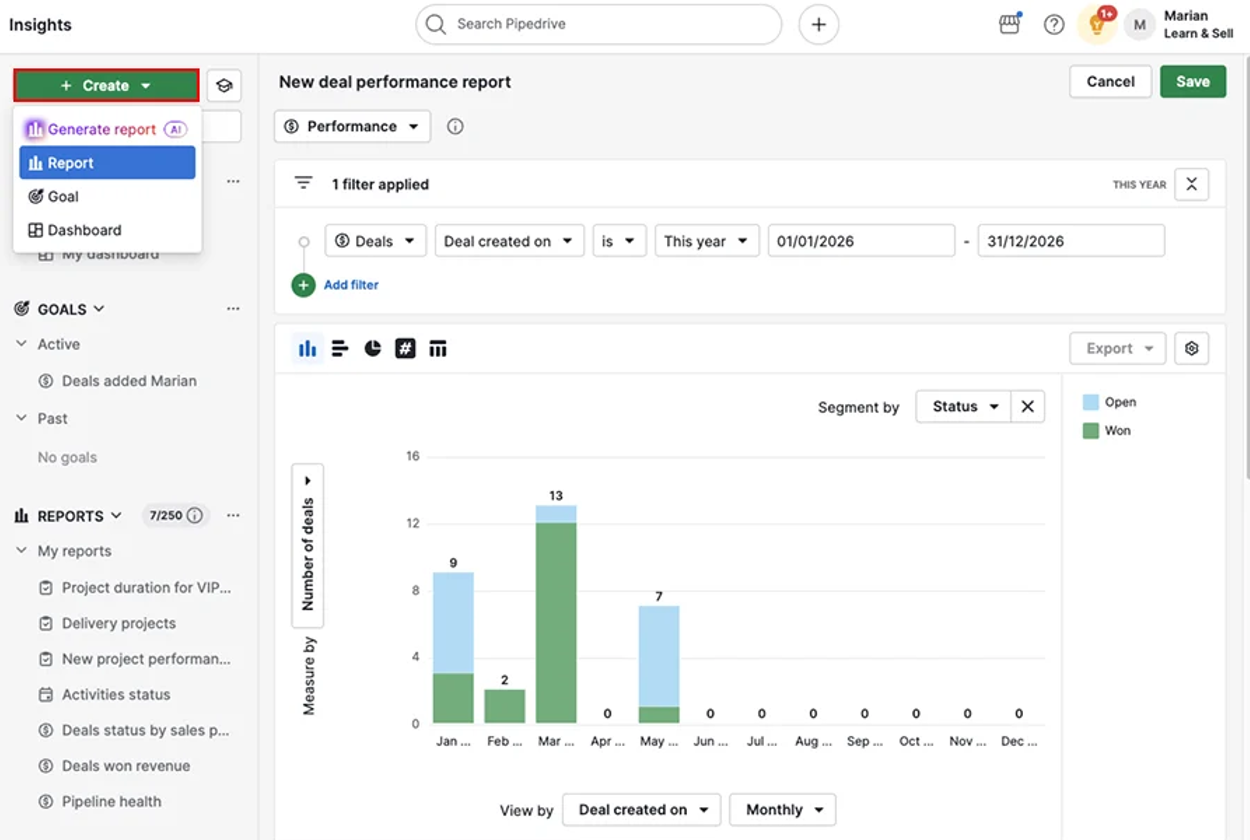
Source: Pipedrive
Pipedrive provides customizable reports, dashboards, and goal tracking. Report types cover revenue forecasts, conversion rates, deal velocity, and team performance. Dashboards are shareable with anyone via link, even non-Pipedrive users. The AI report generator creates reports from natural-language requests on all plans.
Streak organizes reports into Pipeline Reports and Sales Reports, both accessible from within the pipeline view in Gmail. Standard dashboards are available on Pro; advanced dashboards with comparison charts (side-by-side cohort analysis using saved views as data sources) require Pro+. Funnel reports show drop-off rates between pipeline stages. Scheduled exports to Google Sheets push data on a recurring basis for custom analysis.
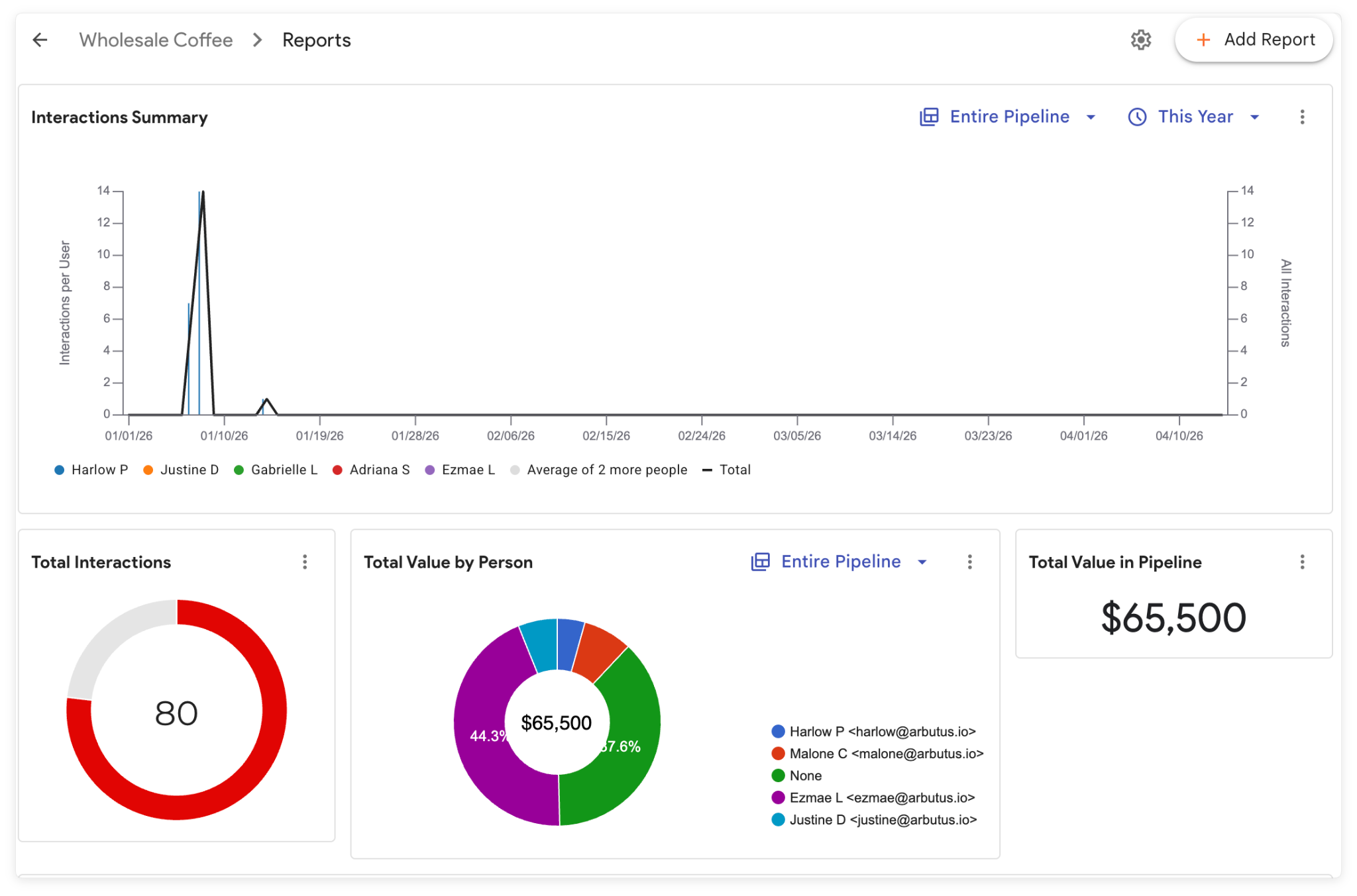
Source: Streak
ZoomInfo reporting spans the full go-to-market motion. GTM Studio's analytics track engagement, funnel progression, and top-performing segments with AI-powered dashboards. GTM Workspace surfaces account-level intelligence and deal health. Chorus provides conversation analytics including talk ratios, sentiment, objection detection, and competitive mentions. The reporting doesn't just measure CRM activity; it connects outcomes to the signals and actions that drove them.
Pipedrive offers the most polished standalone CRM reporting. Streak's reporting is competent but limited at lower plans. ZoomInfo's reporting ties sales activity to broader market intelligence, a different category of insight.
Mobile experience
Pipedrive's mobile apps for iOS and Android provide pipeline views, deal editing, calendar management, in-app calling with automatic logging, two-way email sync, offline mode, a "Nearby" feature for field selling, and a business card scanner on iOS. The mobile experience closely mirrors the desktop.
Streak's mobile apps exist for iOS, iPad, and Android, with pipeline access, deal views, and AI Q&A on mobile as of May 2026. However, G2 reviewers consistently flag the mobile app as limited compared to the desktop experience. Many actions that take two clicks on desktop are cumbersome or unavailable on mobile.
For field sales teams who need full CRM access from their phone, Pipedrive has the stronger mobile story. Streak's mobile gap is a known limitation.
Security and compliance
Pipedrive holds ISO/IEC 27001:2022, ISO/IEC 27701:2019, SOC 2 Type 2, and SOC 3 certifications. Data is hosted on AWS with separate databases per customer, with options for European or US data centers. The platform is GDPR compliant and certified under the EU-US Data Privacy Framework. SSO via SAML 2.0 is available on all plans.
Streak authenticates via Google Apps OAuth, inheriting Google's identity security. Email content is fetched via the Gmail API only on demand, with only metadata temporarily stored. Data is stored on Google Cloud Platform in the United States. Streak holds Google Premier Partner status and undergoes Google's annual OAuth API review. However, no public SOC 2, ISO 27001, or GDPR certification documentation was verified on available sources.
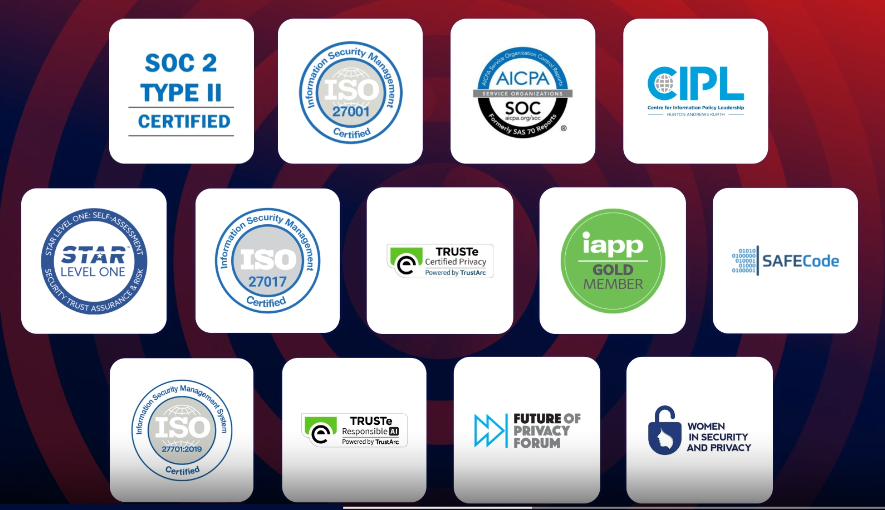
ZoomInfo maintains ISO 27001, ISO 27701, SOC 2 Type II, TRUSTe GDPR and CCPA certifications, all renewed annually. It is a registered data broker in California and Vermont. A dedicated Trust Center provides full transparency.
Source: ZoomInfo
For regulated industries or enterprise procurement processes requiring formal compliance documentation, Pipedrive and ZoomInfo provide the most comprehensive certification stacks. Streak relies on Google's infrastructure security but has fewer independently verified certifications.
Pipedrive vs. Streak vs. ZoomInfo: Which should you choose?
The right choice depends on where your sales process actually breaks down.
Choose Pipedrive if:
You want a dedicated, visual CRM workspace separate from your inbox
Your team uses a mix of email providers (not just Gmail)
Mobile CRM access with full functionality is important for field selling
You need affordable per-seat pricing starting at $14/month
Pipeline visualization and deal rotting alerts are central to how your team works
Choose Streak if:
Your entire team is on Google Workspace and lives in Gmail
CRM adoption has been a problem because your team won't use a separate app
You want AI that reads your actual email threads and populates CRM fields automatically
Your workflow spans multiple use cases (sales, hiring, fundraising, partnerships) in one tool
Email power tools (tracking, mail merge, snippets) are part of your daily workflow
Choose ZoomInfo if:
Your biggest problem isn't managing deals but finding and prioritizing the right buyers
You need verified contact data, direct dials, and business emails at scale
Buyer intent signals and in-market indicators would change how your team prospects
You want AI that understands why deals move, not just that they moved
You need an intelligence platform that works inside your existing CRM or as its own workspace
Start with ZoomInfo Lite for free, or request a demo to see the full platform.
Pipedrive and Streak are both good CRMs. They solve the deal management problem from different angles. But the gap between a good CRM and an effective sales operation isn't about where your pipeline lives. It's about whether your team has the data, signals, and intelligence to fill that pipeline with the right opportunities. ZoomInfo provides that layer, whether you use it alongside Pipedrive, alongside Streak, or through its own GTM Workspace.
The strongest sales teams don't choose between managing deals and finding them. They do both.
Pipedrive vs. Streak vs. ZoomInfo FAQ
What is the core difference between Pipedrive, Streak, and ZoomInfo?
Pipedrive is a dedicated CRM with visual pipeline management, built for SMB sales teams who want a standalone workspace to track deals. Streak is a Gmail-native CRM that runs entirely inside the Gmail interface, eliminating context-switching for Google Workspace teams. ZoomInfo is a GTM platform that provides the data and intelligence layer (500M contacts, buyer intent signals, and AI-powered account insights) that makes any CRM more effective. Pipedrive and Streak manage deals; ZoomInfo helps you find and prioritize the right deals to manage.
Which platform is cheapest?
Pipedrive is the most affordable CRM option, starting at $14/seat/month on the Lite plan. Streak starts at $49/user/month on annual billing for its Pro plan (the free plan covers email tools only, not CRM pipelines). ZoomInfo uses custom-quoted, consumption-based pricing with no published prices, though ZoomInfo Lite provides free permanent access with 10 monthly export credits for individual users and small teams.
Can I use ZoomInfo with Pipedrive or Streak?
Yes. ZoomInfo's APIs and MCP deliver its data and intelligence into any tool. While ZoomInfo has native integrations with Salesforce, HubSpot, and Microsoft Dynamics, its Enterprise API and MCP server can connect to any CRM, including Pipedrive (which has 500+ marketplace integrations and an open API) and Streak (which has REST API and MCP server support). ZoomInfo also offers its own seller workspace (GTM Workspace) for teams that want a single experience.
Which platform is best if my team refuses to leave Gmail?
Streak is built for this scenario. It lives entirely inside Gmail as a browser extension, so there is no separate application to log into. Pipeline views, deal records, email tracking, and AI features all surface within the Gmail interface. Pipedrive requires switching to a separate web application, though it syncs emails from Gmail. ZoomInfo's GTM Workspace is its own interface, but its Chrome extension and integrations can surface data alongside Gmail.
Does Streak work outside of Gmail?
No. Streak requires Gmail (Google Workspace) and runs as a browser extension for Chrome, Safari, or Edge. There is no standalone web app, no Outlook version, and no way to access the full CRM outside the Gmail interface. The mobile apps for iOS and Android provide pipeline access but with limited functionality compared to the desktop experience. Organizations not on Google Workspace cannot use Streak at all.
Which platform has the best AI capabilities?
Each platform's AI solves different problems. Pipedrive's AI Sales Assistant provides win probability predictions and deal recommendations. Streak's AI Autofill reads email threads to populate CRM fields automatically, and Deal Q&A answers natural-language questions from deal history. ZoomInfo's GTM Context Graph operates at a different level: it combines 500M contacts, buyer intent signals, conversation intelligence, and CRM data to reveal why deals move or stall, then powers AI agents that handle account research, outreach drafting, and CRM updates.
Which platform provides buyer intent data?
Only ZoomInfo provides native buyer intent signals. ZoomInfo Intent tracks signals from 210 million IP-to-Organization pairings and 6 trillion+ keyword-to-device pairings sourced monthly. Guided Intent, exclusive to ZoomInfo, identifies topics historically correlated with deal success. Neither Pipedrive nor Streak includes buyer intent data as a native feature.
Which platform is best for a team that needs both deal management and prospecting?
ZoomInfo covers both. Its B2B database provides prospecting with 500M contacts, verified phone numbers, and business emails, while GTM Workspace provides deal execution with AI-generated outreach and account intelligence. For teams that prefer a lighter CRM, pairing Pipedrive (for deal management) with ZoomInfo (for data and intelligence) combines the strengths of both. Pipedrive also offers its own prospecting tools through LeadBooster and Pulse, though without buyer intent signals or the data depth ZoomInfo provides.
More Pipedrive comparisons:
