


As sales and marketing tech stacks grow more complex and data proliferates within them, the infrastructure is beginning to show some digital cracks.
These failure points might seem innocuous. But they can cause lead routing problems, inconsistencies within a customer relationship management (CRM) system, and most importantly, missed deals.
The good news is that new tools can shore up these cracks and prevent hidden problems from gaining a foothold in the tech stack.
What Is a Sales Tech Stack?
A sales tech stack is the collection of software tools revenue teams use to find prospects, run outreach, and close deals. Core components include CRM systems, sales engagement platforms, data intelligence tools, and conversation tracking software. When these tools connect properly, they create a unified workflow from first touch to closed deal.
Problem 1: Data Silos Create Blind Spots Across Teams
Disconnected systems prevent sales, marketing, and RevOps from sharing a unified view of accounts. When tools do not sync, reps work from incomplete information and handoffs break down.
Data silos cause routing failures. The same warm lead might go to two different reps. Or inaccurate revenue data sends an enterprise prospect to the SMB team.
Data silos create three critical failure points:
Duplicate outreach: Multiple reps contact the same account without knowing
Broken handoffs: Marketing-qualified leads stall because sales lacks context
Inaccurate reporting: Pipeline forecasts diverge from reality when data lives in separate tools
How Disconnected Data Leads to Missed Handoffs
If a marketing automation platform's data doesn't sync with sales tech data, a qualified lead who's contacted by a rep might not receive the correct marketing messages.
The inverse is equally damaging. When sales activity is invisible to marketing, campaigns continue targeting accounts already in active conversations. The result: conflicting messages, confused prospects, and stalled deals.
Problem 2: Dirty CRM Data Corrupts Every Downstream Decision
Dirty data compounds over time. What starts as a few unstandardized fields spreads across the CRM, corrupting lead scoring, routing, and forecasts. Missing fields leave reps without the context they need to have informed conversations.
Bad data does not just sit there. It corrupts lead scoring, routing rules, personalization, and forecasting. Consider this diagnostic example:
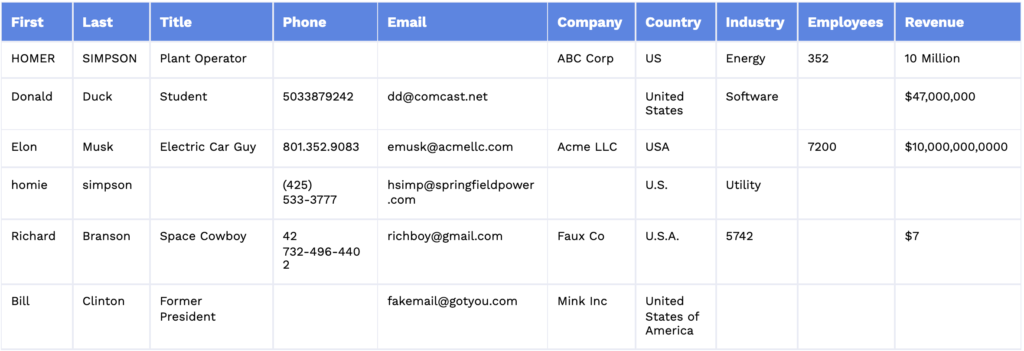
The highlighted cells show twelve common data quality problems:
Different spellings for the same country
Duplicate records
Fake email addresses
Holes in firmographic data
Inaccurate revenue figures
Incompatible industry descriptions
Inconsistent phone number formats
Inconsistent revenue formats
Missing information in the fields
Names in all caps or all lowercase
No standard job functions or levels
Personal email instead of business email addresses
Some of these are obvious potholes when it comes to marketing and selling, such as not knowing an industry or getting a fake email address. But even seemingly small problems, such as names in all caps, can lead to record duplication or confusion if the software isn't sophisticated enough to recognize similarities.
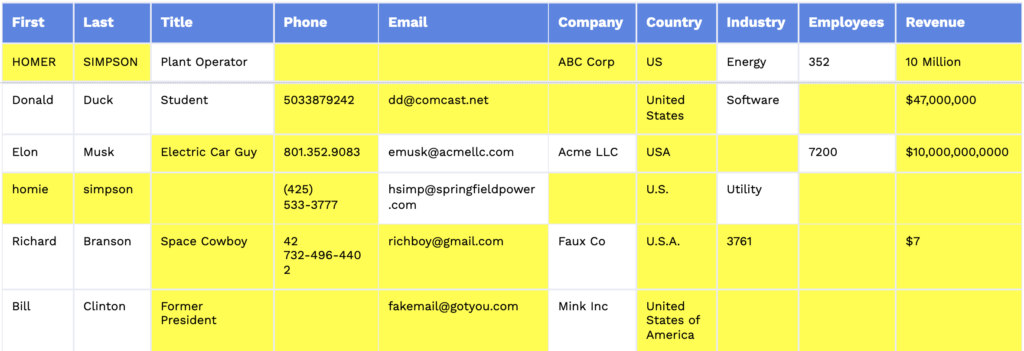
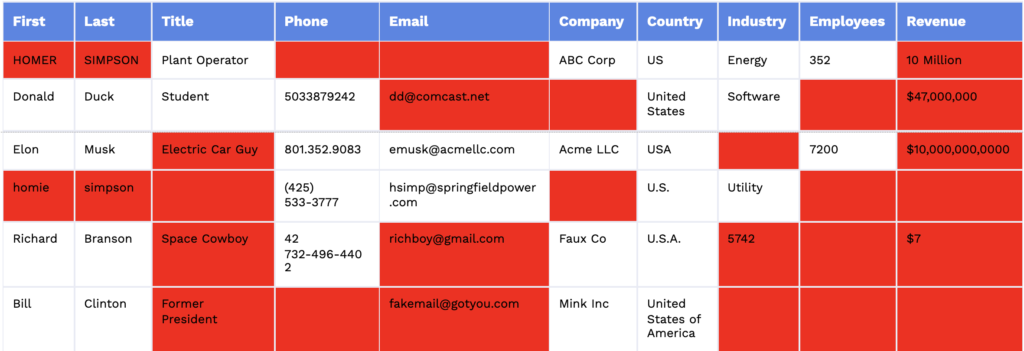
Many of the highlighted problems affect a company's ability to properly qualify a lead, send that lead to the right rep, and provide the rep with basic information to have a meaningful conversation.
Why Data Decay Accelerates Without Enrichment
B2B data degrades continuously as people change jobs, companies restructure, and contact information becomes outdated. Without ongoing enrichment, the CRM becomes a liability rather than an asset.
Stale records compound over time, making the problem worse the longer it goes unaddressed. What starts as a few outdated contacts spreads across the database, corrupting segmentation, scoring models, and territory assignments.
Problem 3: Tool Sprawl Drains Productivity
Revenue teams accumulate overlapping tools that create redundancy and force context switching. Reps toggle between platforms for basic tasks, losing selling time. This happens organically as teams add point solutions without evaluating overlap, creating fragmented workflows where no system holds complete account context.
Three symptoms signal tool sprawl:
Redundant functionality: Multiple tools doing similar jobs with different data
License waste: Paying for features that duplicate what other tools already provide
Training burden: Reps must learn and maintain proficiency across too many platforms
The Hidden Cost of Context Switching
Every time a rep switches between tools, they lose focus and momentum. The cognitive load of navigating multiple interfaces, logging into different systems, and reconciling conflicting data reduces time available for actual selling.
Context switching does not just waste time. It slows deal velocity. When reps spend minutes hunting for information across platforms, prospects wait. Deals stall.
Problem 4: Low Adoption Means Wasted Investment
Even well-intentioned tech investments fail when reps do not use the tools. Low adoption often signals poor workflow fit, inadequate training, or tools that add friction rather than removing it.
Underutilized platforms waste more than license fees. They represent unsolved problems and lost productivity. If reps avoid a tool, the tool is the problem.
Low adoption typically stems from three causes:
Poor workflow fit: Tool requires extra steps instead of fitting into existing processes
Insufficient training: Reps never learned how to use the tool effectively
No visible value: Tool does not clearly help reps hit quota
Spreadsheets and Shadow IT Signal Broken Workflows
When reps create their own spreadsheets or adopt unauthorized tools, it indicates the official stack is not meeting their needs. Shadow IT is not a discipline problem. It is a symptom of workflow gaps.
These workarounds create data leakage, compliance risks, and further fragmentation. Treat them as diagnostic signals, not behaviors to punish.
Problem 5: Slow Lead Response Leaks Pipeline
When prospects request demos or ask questions outside business hours, response gaps cost deals. Without automated chat and intelligent routing, high-intent buyers wait, lose interest, or contact competitors. Every hour of delay increases the chance they move on.
Why Every Minute Matters for Conversion
Lead interest decays rapidly after initial engagement. The longer a prospect waits, the more likely they research alternatives or lose urgency.
This is not about working harder. It is about having systems that ensure immediate response regardless of when the request comes in. Automated chat and intelligent routing solve the timing problem without requiring 24/7 staffing.
Problem 6: AI Without Guardrails Creates New Risks
Revenue teams are adopting AI tools without governance, creating compliance and quality risks. When AI accesses customer data without permissions, generates content without review, or operates outside sanctioned workflows, it introduces exposure. AI delivers value only when deployed with clear use cases, data access controls, and workflow integration.
Four governance questions must be answered before AI deployment:
Data access: What customer and prospect data can the AI tool access?
Use case clarity: What specific problems is the AI solving, and what is out of scope?
Human oversight: Where do humans review AI outputs before they reach customers?
Compliance alignment: Does the tool meet enterprise security and privacy requirements?
Governance, Data Access, and Workflow Fit
Governance means establishing policies before tools are deployed. Data access means understanding exactly what information AI tools can see and use. Workflow fit means ensuring AI augments existing processes rather than creating parallel workflows.
ZoomInfo Copilot is an example of AI embedded into seller workflows with appropriate guardrails, surfacing insights and automating tasks within the context of existing systems.
What a Modern GTM Tech Stack Looks Like
A modern stack connects systems of record (CRM) with systems of engagement (sales engagement, conversation intelligence) through a unified data layer. The goal is not more tools but better integration and data flow.
Stack Layer | Function | Example Tools |
|---|---|---|
System of Record | Stores customer and account data | Salesforce, HubSpot CRM |
Data Intelligence | Enriches and verifies contact information | ZoomInfo, data enrichment platforms |
Sales Engagement | Manages outreach sequences and cadences | Outreach, Salesloft |
Conversation Intelligence | Records and analyzes sales calls | Gong, Chorus |
When you evaluate your technology stack, audit for overlap, assess data flow between systems, and prioritize tools that share a common data foundation.
Assess stack health using three criteria:
Data flow: Can information move between systems without manual intervention?
Single source of truth: Is there one authoritative record for each account and contact?
Workflow integration: Do tools fit into how reps actually work, or require workarounds?
Tools are now available that can append records, automate sales routing, and initiate prospect engagement, all while interacting with your database and CRM systems.
Chat platforms have come a long way. For example, ZoomInfo Chat goes beyond traditional chatbots by identifying visitors when they come to your site and constructing personalized responses based on data about the customer or company involved. ZoomInfo Chat also provides an online scheduler that lets visitors schedule meetings with a sales team directly through the chat window.
In tandem with ZoomInfo Enrich, RingLead is an example of routing software that can ensure the appropriate sales rep gets the correct leads. Together, they can determine if a record fits into a sales territory and then automatically route the lead to the right rep. Routing rules are easily adjusted with drag-and-drop features.
Connecting Systems of Record and Engagement
The CRM (system of record) must stay synchronized with sales engagement platforms and conversation intelligence tools (systems of engagement). When these systems disconnect, reps lose context and managers lose visibility.
A connected stack ensures that every interaction is logged, every insight is accessible, and every workflow draws from the same data. ZoomInfo integrates with CRM systems to maintain this synchronization without creating additional work for reps.
Using Intent and Buying Signals to Prioritize
A modern stack surfaces intent data and buying signals so reps focus on accounts showing active interest rather than working lists blindly. When the stack identifies which accounts are researching relevant topics, visiting pricing pages, or expanding headcount, reps can prioritize accordingly.
This reduces wasted effort on low-propensity accounts and accelerates pipeline velocity. Reps spend time where it matters most.
Tech stack problems cost pipeline, but they are fixable. ZoomInfo connects your systems, cleans your data, and automates routing to eliminate the gaps that slow deals. Talk to our team to identify and fix the cracks in your revenue tech stack.