

Whatfix has earned its reputation as a leading Digital Adoption Platform for good reason. It overlays enterprise applications with in-app walkthroughs, contextual tooltips, self-help widgets, and AI-powered content creation, all without touching the underlying application's source code.
But as enterprise technology stacks grow more complex, organizations discover that a horizontal DAP cannot solve every adoption, enablement, and intelligence challenge. You might need analytics bundled into the adoption layer itself, a platform built for your SAP environment, a tool that enforces compliance at the data-entry level rather than guiding users past it, or a go-to-market intelligence foundation that makes your CRM data worth adopting in the first place.
That's where this guide comes in. Whether you're looking to:
Power your go-to-market teams with B2B data intelligence and AI-driven execution
Deploy a DAP with native SAP integration and FedRAMP authorization
Bundle product analytics and in-app guidance in a single SaaS subscription
Launch no-code onboarding flows across web and mobile without a multi-week implementation
Enforce workflow compliance and data quality at the field level in regulated environments
Surface just-in-time sales knowledge inside CRM and conversation intelligence tools
Get started with a full-featured DAP on transparent, published pricing
We'll explore solutions that excel in each of these areas.
Some teams might use these tools alongside Whatfix to address specific gaps, while others might replace Whatfix entirely with a more specialized solution. This isn't about finding a "better" platform; it's about finding the right fit for your team's needs as your software environment evolves.
Let's look at the Whatfix alternatives and see which ones fit your enterprise toolkit.
The Best Whatfix Alternatives | |
|---|---|
Best Alternative for Go-to-Market Data Intelligence & Pipeline Execution We chose ZoomInfo because it provides the B2B data foundation and execution layer that makes your CRM and sales tools worth adopting. For GTM teams, the gap often isn't software navigation; it's the quality of intelligence powering the tools. | |
Best Alternative for SAP-Centric Enterprise Deployments We chose WalkMe because its SAP acquisition gives it source-code-level integration with SAP applications, DeepUI maintenance resilience, and FedRAMP Ready authorization that no independent DAP can match for SAP environments. | |
Best Alternative for Analytics-First Digital Adoption in SaaS We chose Pendo because it bundles behavioral analytics, session replay, and NPS into a single subscription alongside in-app guidance, making it the most complete option for SaaS product teams that need adoption measurement and user guidance without separate add-ons. | |
Best Alternative for No-Code, Self-Serve Product Adoption We chose Appcues because it lets non-technical product, marketing, and customer success teams build and deploy in-app onboarding flows across web and mobile from a single no-code environment, without a multi-week implementation. | |
Best Alternative for AI-Native Workflow Compliance We chose Apty because it enforces data quality at the field level with real-time validations, going beyond guidance to prevent compliance errors before they propagate into ERP, CRM, and HCM systems. | |
Best Alternative for Sales Teams Needing Just-in-Time CRM Knowledge We chose Spekit because it embeds knowledge, coaching, and content directly inside the tools revenue teams live in (Salesforce, Gong, Gmail), surfacing deal-specific intelligence at the moment a rep needs it. | |
Best Alternative for Budget-Constrained Teams Needing Same-Day Deployment We chose UserGuiding because it offers a permanent free tier with functional features, transparent self-serve pricing starting at $174/month, and a 15-minute setup process that gets teams from evaluation to live guides in a single day. |
What is Whatfix?
Source: Whatfix
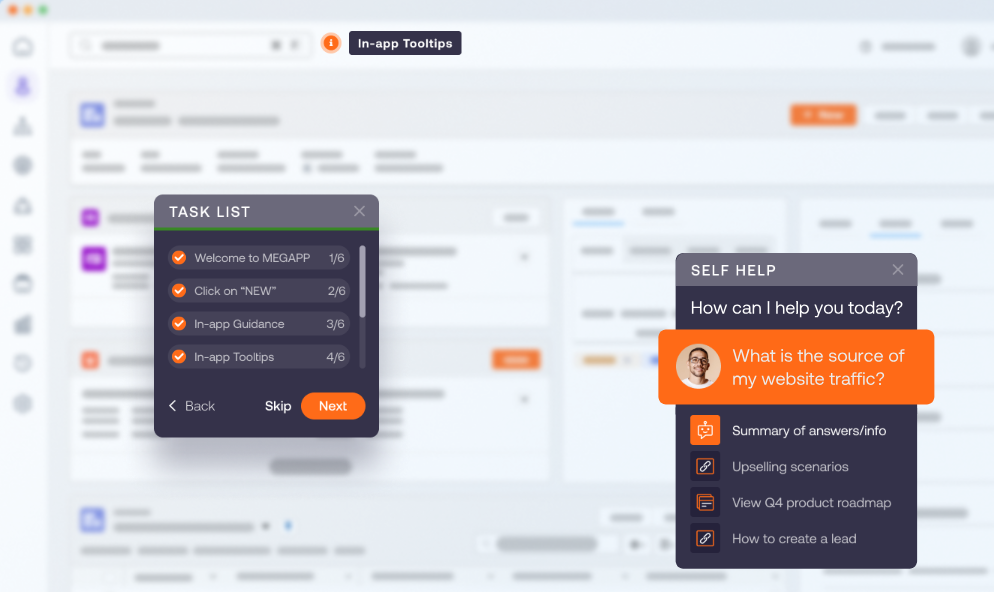
Whatfix is an AI-powered Digital Adoption Platform (DAP) that sits on top of enterprise applications to drive software adoption, reduce change-management risk, and increase ROI on technology investments. Unlike traditional training that pulls employees out of their workflow, Whatfix embeds guidance directly inside the applications they use every day.
Its key features include:
In-app guided flows, smart tips, and self-help widgets that surface contextual guidance at the moment of need across web, desktop, mobile, and VDI/Citrix environments
ScreenSense AI technology with three AI Agents (Authoring, Guidance, and Insights) that understand application context and trigger guidance automatically
Product Analytics for tracking user behavior, identifying friction points, and measuring adoption across enterprise applications
Mirror simulation software that creates risk-free replicas of live applications for hands-on training and AI-powered roleplay
No-code content authoring with multi-format export (videos, slides, PDFs, articles) from a single creation session
Multilingual support with auto-translation for global deployments
Enterprise security compliance including SOC 2, ISO 27001, and VPAT certifications
Whatfix's strength is its breadth: it covers more application environments than most DAPs (web, desktop, mobile, and VDI), provides a three-product suite (DAP, Product Analytics, Mirror) spanning pre-production training through post-deployment measurement, and backs it with a 99.5% CSAT score across 700+ customers in 30+ countries.
The platform is a Leader in the Forrester Wave Q4 2024 and a Gartner Customers' Choice for DAP three consecutive years, earning its position as the default independent enterprise DAP for non-SAP stacks.
However, as your enterprise grows, you might find that specific teams need more specialized tools: bundled analytics, sales-specific intelligence, compliance enforcement rather than guidance, or a go-to-market data foundation that makes your CRM worth adopting in the first place.
That's why this article focuses on platforms designed for specific enterprise needs where Whatfix's horizontal approach may fall short.
Looking for B2B data intelligence to power your go-to-market execution? ZoomInfo combines B2B data with AI-powered tools that help sales, marketing, and RevOps teams find, win, and grow customers.
How We Curated Our List of Whatfix Alternatives
After evaluating Whatfix and researching the enterprise software adoption market, we found that organizations look for tools that address specific functional gaps. While Whatfix excels as a horizontal DAP across enterprise applications, some teams need more specialized solutions for:
Powering go-to-market teams with B2B data and AI-driven sales execution
Deploying digital adoption within SAP-centric technology stacks with native integration
Bundling product analytics with in-app guidance in a single SaaS subscription
Launching no-code onboarding flows without enterprise-scale implementation timelines
Enforcing workflow compliance and data quality at the field level in regulated environments
Surfacing just-in-time sales knowledge triggered by conversation intelligence and deal context
Getting started with a full digital adoption toolkit on a transparent, published budget
Each tool on this list leads in one of these areas. You might use them alongside Whatfix to fill specific gaps, or replace Whatfix with a more focused solution depending on your team's primary use case.
DISCLAIMER: We aren't covering every tool in the market! Our focus is on highlighting the best alternatives that address specific limitations of Whatfix's horizontal approach for various enterprise use cases. The goal is to provide insights into tools that serve specific team needs. |
|---|
1. ZoomInfo: Best Alternative for Go-to-Market Data Intelligence & Pipeline Execution
ZoomInfo is an all-in-one AI GTM platform built on a B2B data foundation of 500M contacts, 100M companies, 135M+ verified phone numbers, and 200M+ verified business email addresses. Its key features include:
B2B data: Identity data, company context, and buying signals verified by 300+ human researchers with up to 95% accuracy on first-party data
GTM Context Graph: An intelligence layer processing 1.5B+ data points daily, fusing ZoomInfo's B2B data with CRM records, conversation transcripts, and behavioral signals to capture not just what happened in a deal, but why
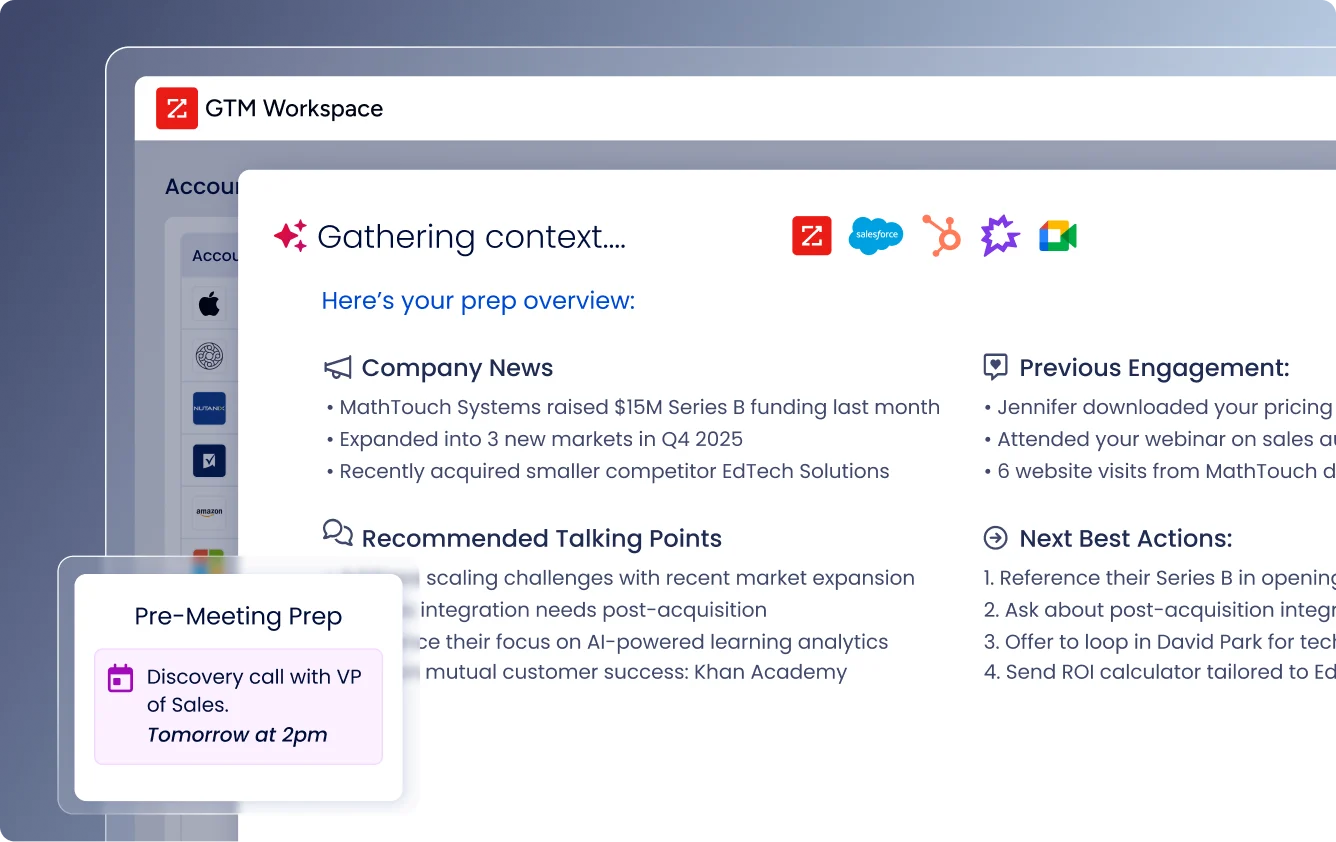
GTM Workspace: An AI-powered workspace for sellers that consolidates account research, AI-drafted outreach, CRM updates, and deal intelligence in one place
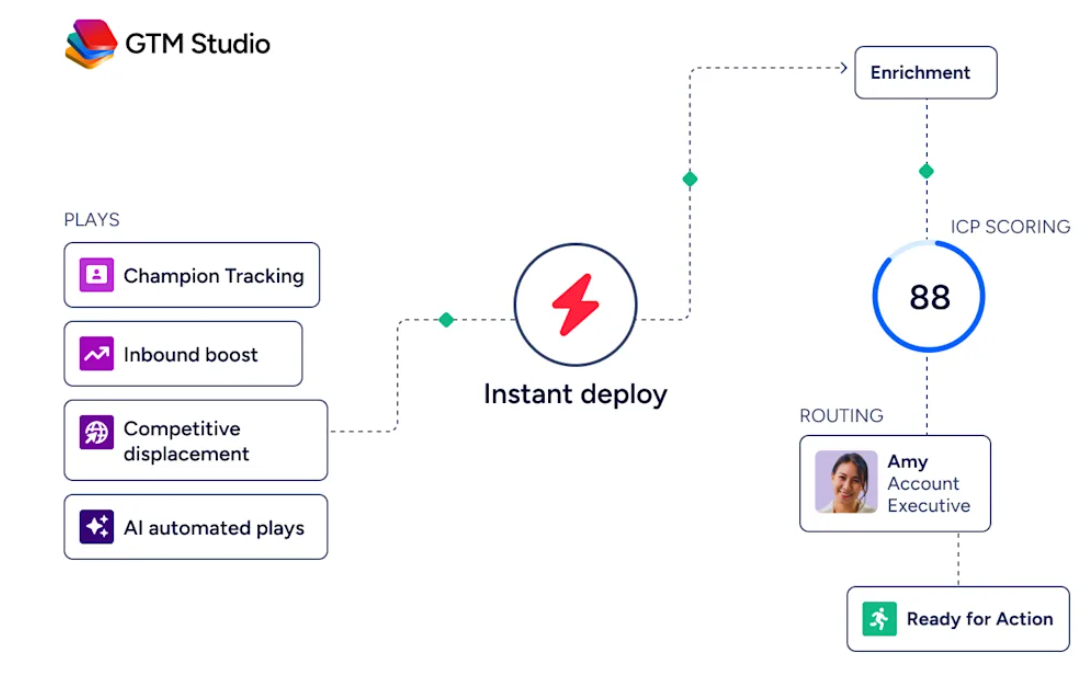
GTM Studio: An AI orchestration canvas for marketers, RevOps, and GTM engineers to design, enrich, and activate plays in natural language
APIs and MCP: Infrastructure-grade access that delivers ZoomInfo's intelligence into any AI agent, custom tool, or third-party platform
For enterprise go-to-market teams evaluating their technology stack alongside a digital adoption investment, ZoomInfo addresses a different layer of the problem: while Whatfix helps employees navigate software, ZoomInfo ensures the data powering that software is verified and actionable.
For sales, marketing, and RevOps teams, the quality of intelligence inside your CRM matters as much as how well your team navigates the CRM itself.
Why ZoomInfo Matters for Teams Evaluating Their Enterprise Tech Stack
ZoomInfo occupies a unique position on this list. It is not a Digital Adoption Platform; it is the data intelligence layer that makes your go-to-market tools worth adopting. Here is where ZoomInfo creates value that no DAP can replicate:
The Data Foundation That Makes CRM Adoption Meaningful
Enterprise teams invest heavily in CRM platforms like Salesforce, HubSpot, and Microsoft Dynamics, then layer adoption tools on top to ensure employees use them correctly. But if the data inside those systems is incomplete, stale, or inaccurate, guiding employees through workflows doesn't solve the core problem: the information they're working with isn't reliable.
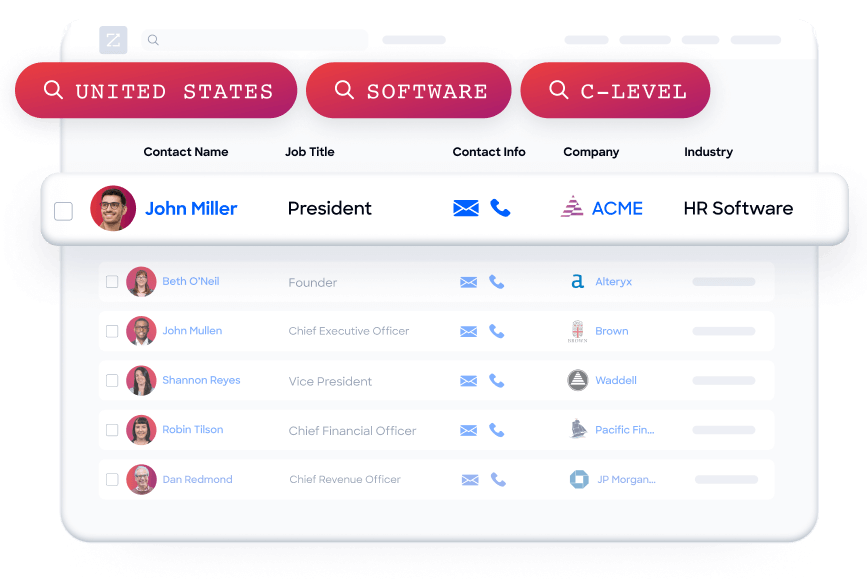
ZoomInfo addresses this at the foundation. Contact & Company Search provides access to 300+ company attributes, department org charts with direct dials and verified emails, and job-change alerts that keep records current.
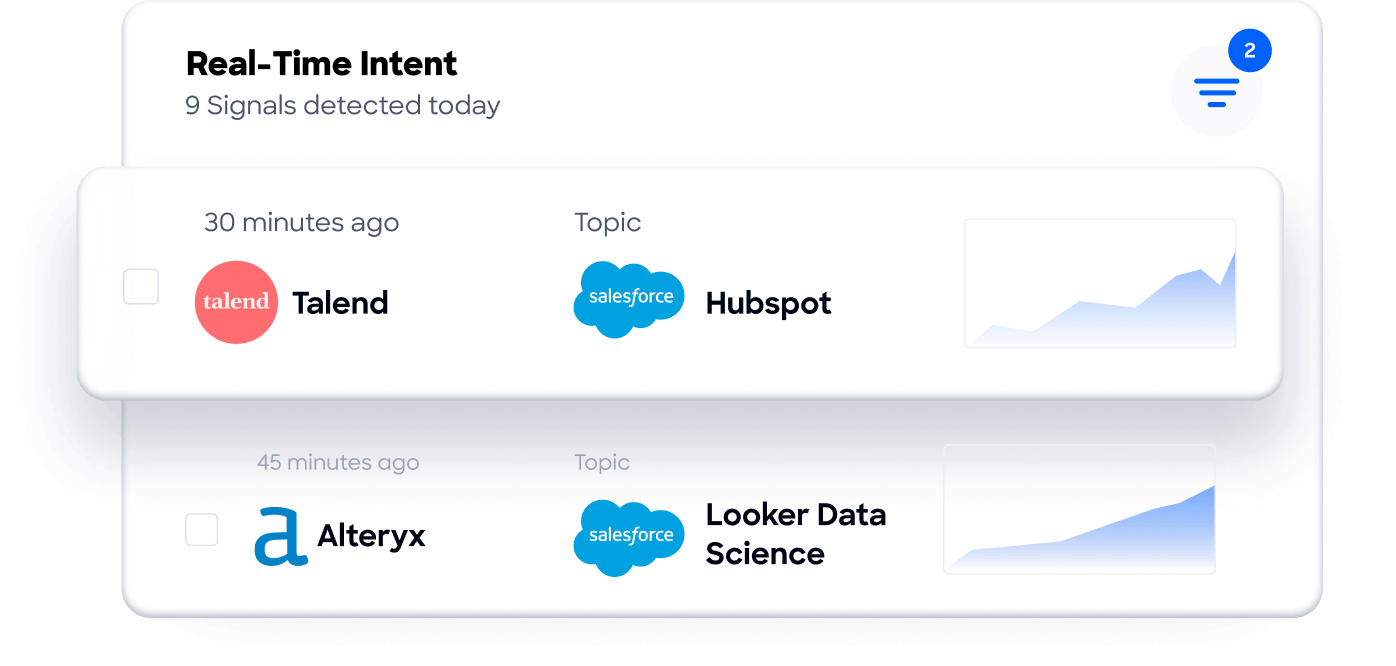
Buyer Intent Data tracks signals from 210 million IP-to-Organization pairings to reveal when accounts are actively in-market.
Technographics profiles the tech stack of 30+ million companies across 30,000+ technologies.
This data powers the GTM Context Graph, an intelligence layer that processes 1.5B+ data points daily by fusing B2B data with your CRM records, conversation transcripts, and behavioral signals.
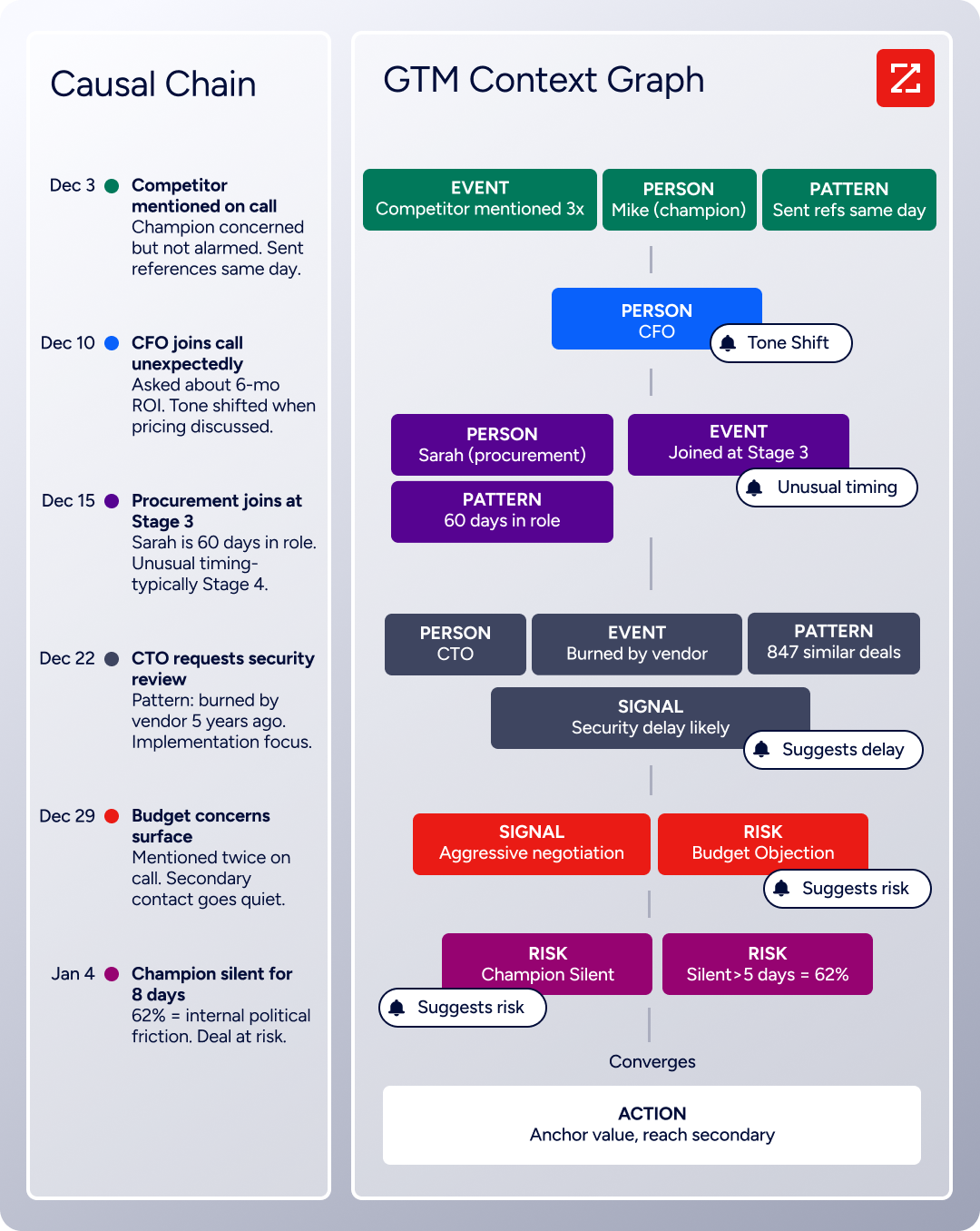
The result: your AI doesn't just know who to contact. It understands why deals move or stall, which accounts match your proven win patterns, and what actions to prioritize next.
This data advantage is externally validated. In a Fortune 500 competitive RFP analyzing 25 million contacts across vendors, the independent consultant concluded that "no other competitor came even close." ZoomInfo is Ranked #1 in 142 G2 Reports and was named a Leader in the Forrester Wave for Intent Data Providers B2B Q1 2025.
ZoomInfo in Action: Instead of training a seller to manually research prospects across LinkedIn, company websites, and industry databases, ZoomInfo surfaces verified contact details, company intelligence, buying intent signals, and org charts directly inside the seller's workflow.
The rep doesn't need a guided walkthrough to find the right prospect; the platform has already identified them, verified their contact information, and flagged their in-market activity.
"ZoomInfo gives us the information we need to execute. We don't have to go through and spend our time digging. It's already there, so we can be three steps ahead." (Vensure)
AI-Powered Execution That Reduces the Need for Separate Enablement Tools
GTM Workspace was built to solve a specific problem: the average enterprise runs 23 GTM technologies, forcing sellers to context-switch constantly. Rather than adding another overlay on top of fragmented tools, GTM Workspace consolidates account research, AI-drafted outreach, signal monitoring, CRM updates, and deal intelligence into one place.
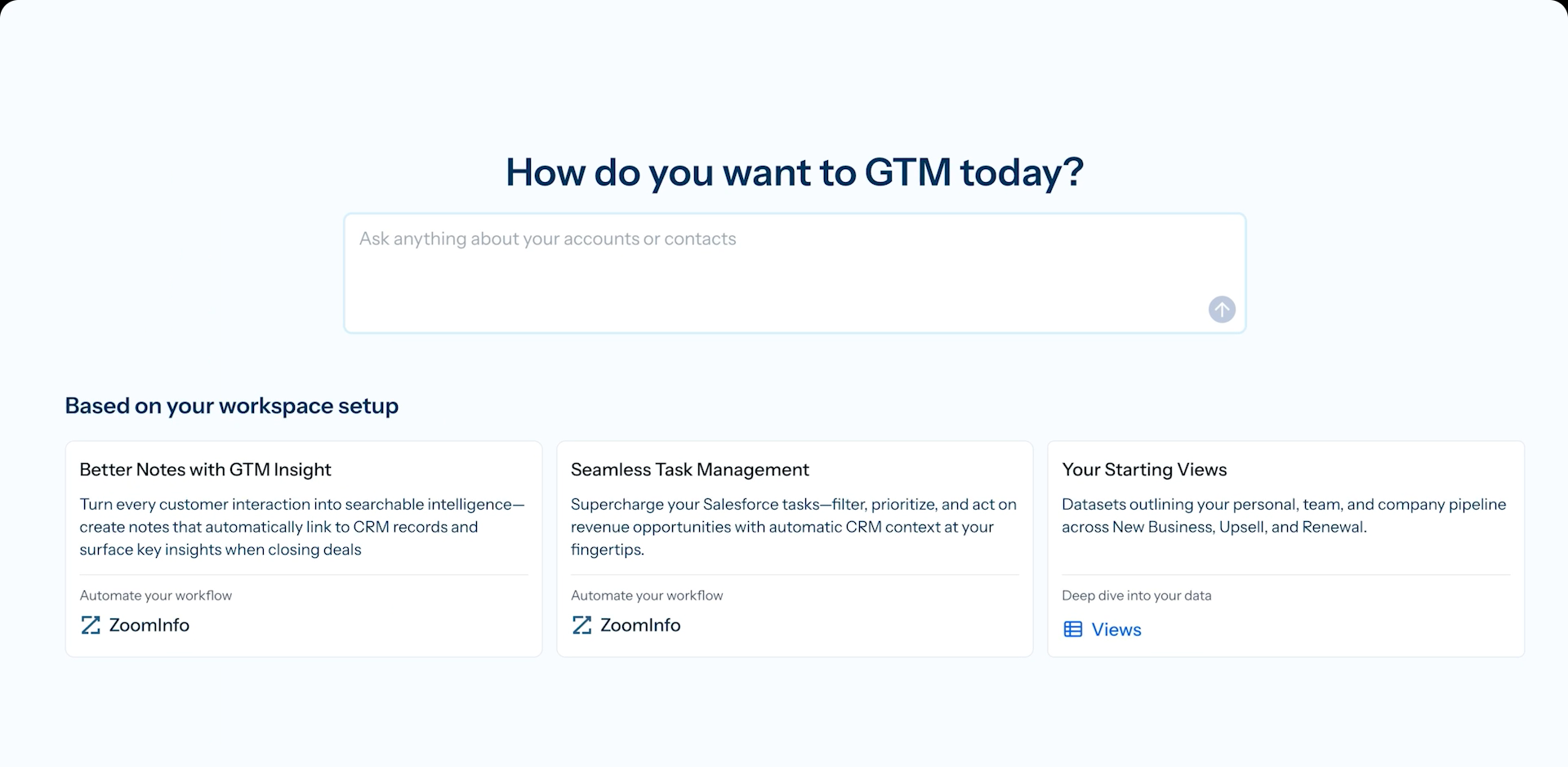
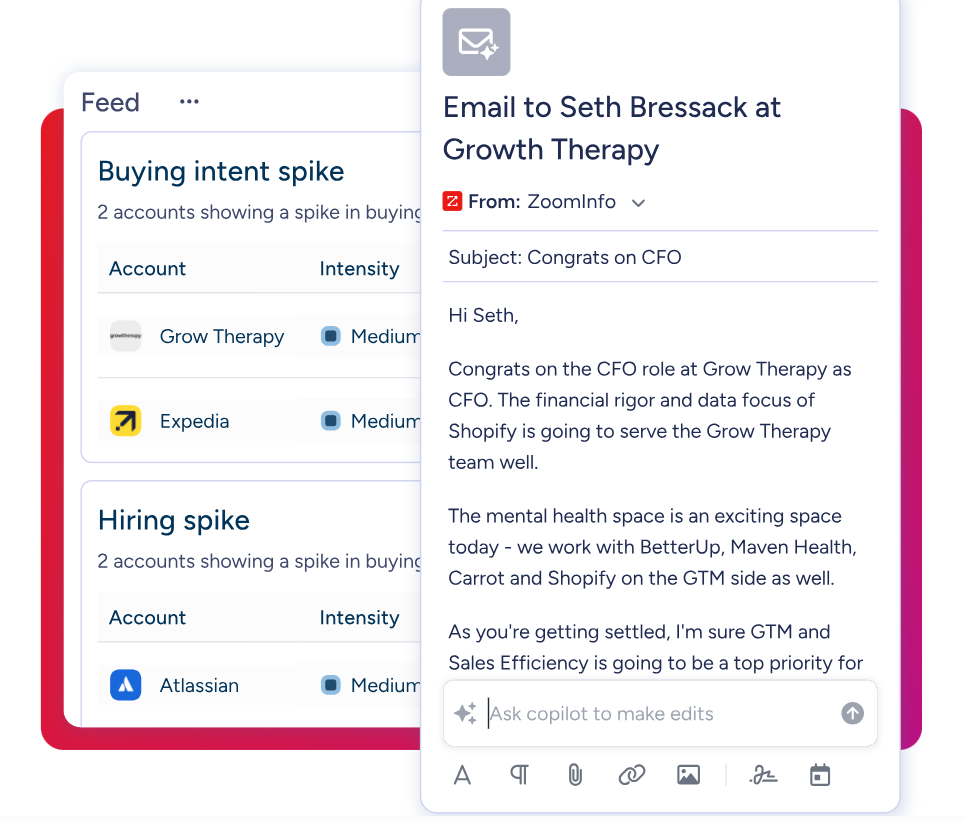
The AI agents inside Workspace answer three questions for every rep: who to contact, when to engage, and what to say. The Action Feed delivers a live stream of in-market buyers with pre-drafted actions.
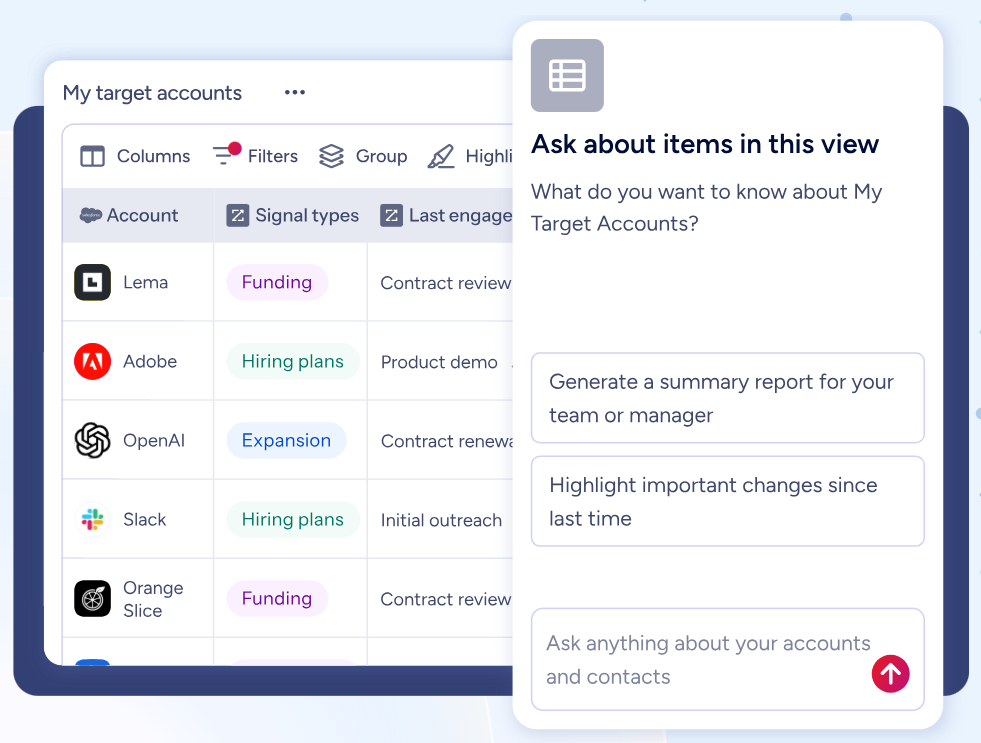
The AI Assistant generates 10-second account briefs pulling CRM history, company news, and stakeholder context.
Views combine CRM data with real-time buying signals for dynamic, filterable account intelligence.
For marketers and RevOps, GTM Studio provides a similar consolidation: describe an audience in natural language, launch multi-channel plays, and measure pipeline impact without engineering tickets. Expansion plays that used to take 3 weeks now launch in 30 minutes.
ZoomInfo in Action: A seller opens GTM Workspace and finds an account flagged for high intent. The AI has already drafted personalized outreach addressing the specific concern surfaced in the last call. The rep reviews, adjusts, and sends, then updates the CRM without leaving the workspace. No separate training tool, no guided walkthrough, no tool-switching.
"That combination of our internal CRM data, external signals, and AI that's given all that context has helped us craft very specific account- and persona-based messages. And people have responded to them right away." (Seismic)
Universal Access: Use Intelligence in Any Tool, Any Workflow
For teams that build their own tools or prefer third-party platforms, ZoomInfo's APIs and MCP server expose the same intelligence to any custom agent, internal tool, or partner platform. Organizations aren't locked into a single UI; the intelligence layer works wherever teams work, from Claude to ChatGPT to proprietary systems.
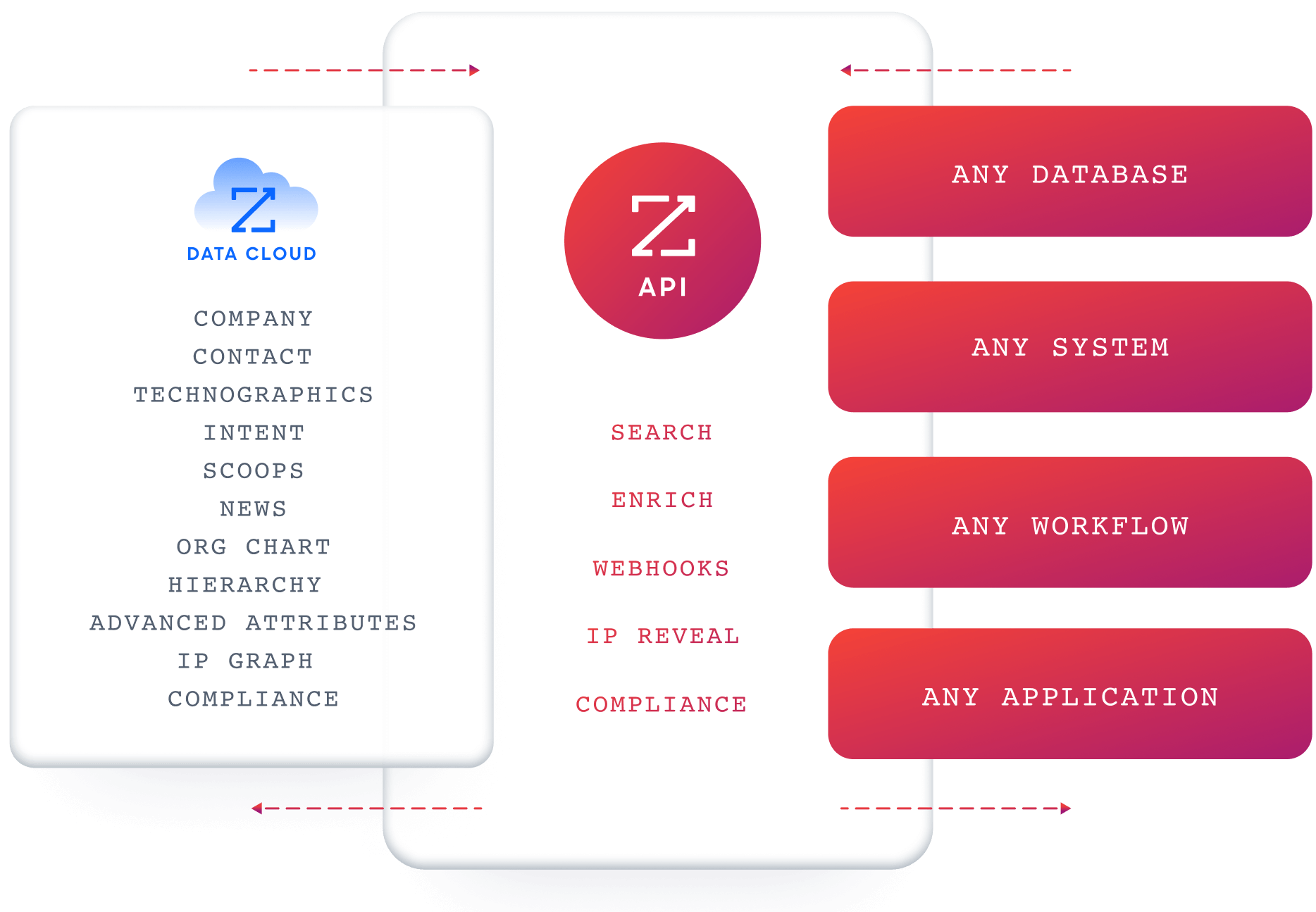
API access is included in all relevant plans, and the ZoomInfo Marketplace lists 172+ integration partners spanning CRM, marketing automation, sales engagement, data warehouses, and AI/LLM platforms.
"The plug-and-play aspect of the API means I can integrate it very easily into any process and get information at a moment's notice." (BDO Canada)
ZoomInfo Pricing
ZoomInfo uses a consumption-based pricing model with custom quotes scaled to usage patterns, user count, and feature requirements. The platform is organized into Sales, Marketing, and add-on product lines, each with tiered plans (Professional, Advanced, Enterprise).
ZoomInfo offers two free entry points:
ZoomInfo Lite: A permanent free tier (no credit card, no time limit) with access to 100M+ verified profiles, 10 monthly export credits, the ReachOut Chrome Extension, WebSights Lite, HubSpot integration, and built-in email sending.
7-day free trial: Access to core platform features including contact and company search, sales intelligence, intent signals, and email outreach.
Credits work on a 1 credit = 1 export model; searching and viewing data does not consume credits. Paid plans are custom-quoted based on seats, credit volume, features, and contract length. Chorus (conversation intelligence) and Chat (data-powered website chat) are available as standalone add-ons.
Who Should Use ZoomInfo?
Choose ZoomInfo if:
Your go-to-market teams need verified B2B data, buyer intent signals, and AI-powered execution tools, not just guidance on how to click through your CRM. ZoomInfo provides the intelligence that makes CRM data actionable.
Your sellers spend more time researching accounts and drafting outreach than engaging prospects. GTM Workspace consolidates these tasks into a single AI-powered workspace that reduces tool-switching and surfaces insights automatically.
Your marketing and RevOps teams need to build audiences, launch multi-channel plays, and measure pipeline impact without waiting on engineering. GTM Studio puts that orchestration in their hands directly, and Agent Teams can run the full play end to end, with specialist agents sharing account context and acting within the approvals and limits you set, available in GTM Studio and headless through GTM.AI.
You want the flexibility to use B2B intelligence inside any tool. ZoomInfo's APIs and MCP server let your team access the same data inside Salesforce, custom AI agents, or any third-party platform.
Ready to see how B2B data intelligence can improve your go-to-market execution? Start with ZoomInfo Lite for free or request a demo to experience the full platform.
2. WalkMe: Best Alternative for SAP-Centric Enterprise Deployments
Source: WalkMe
WalkMe is a Digital Adoption Platform that became a wholly-owned SAP subsidiary in September 2024 when SAP acquired it for approximately $1.5 billion. This structural shift makes it categorically different from every other DAP on this list for organizations running any part of the SAP product suite. Its key capabilities include:
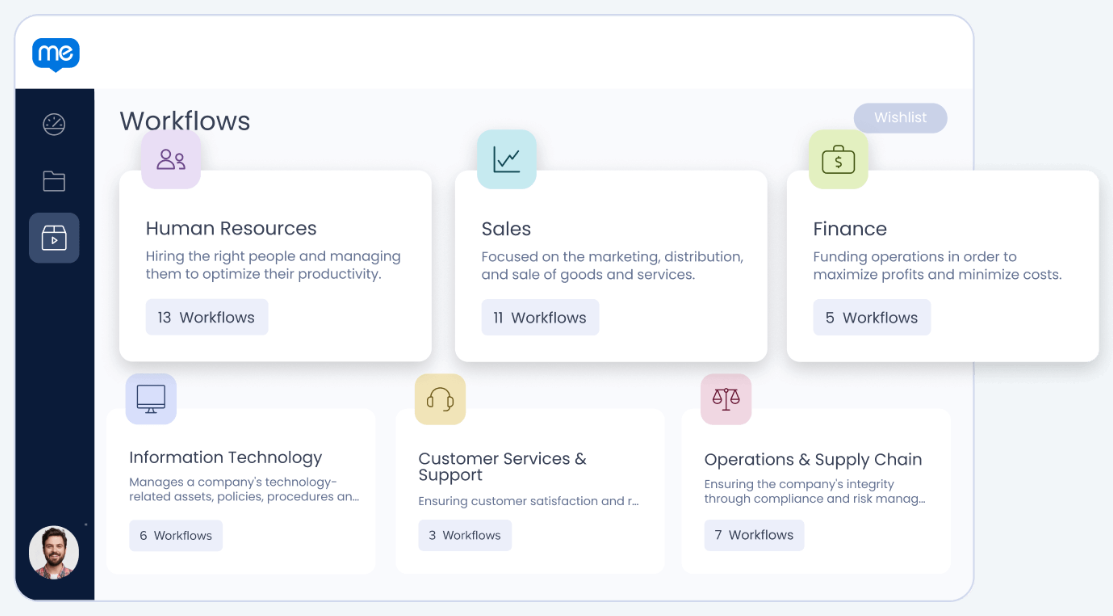
Native overlay guidance across SAP S/4HANA, SAP SuccessFactors, SAP Ariba, and SAP Concur with source-code-level UI understanding
DeepUI technology that reads and adapts to application UIs by semantic meaning rather than brittle DOM paths, automatically repairing guidance when applications update
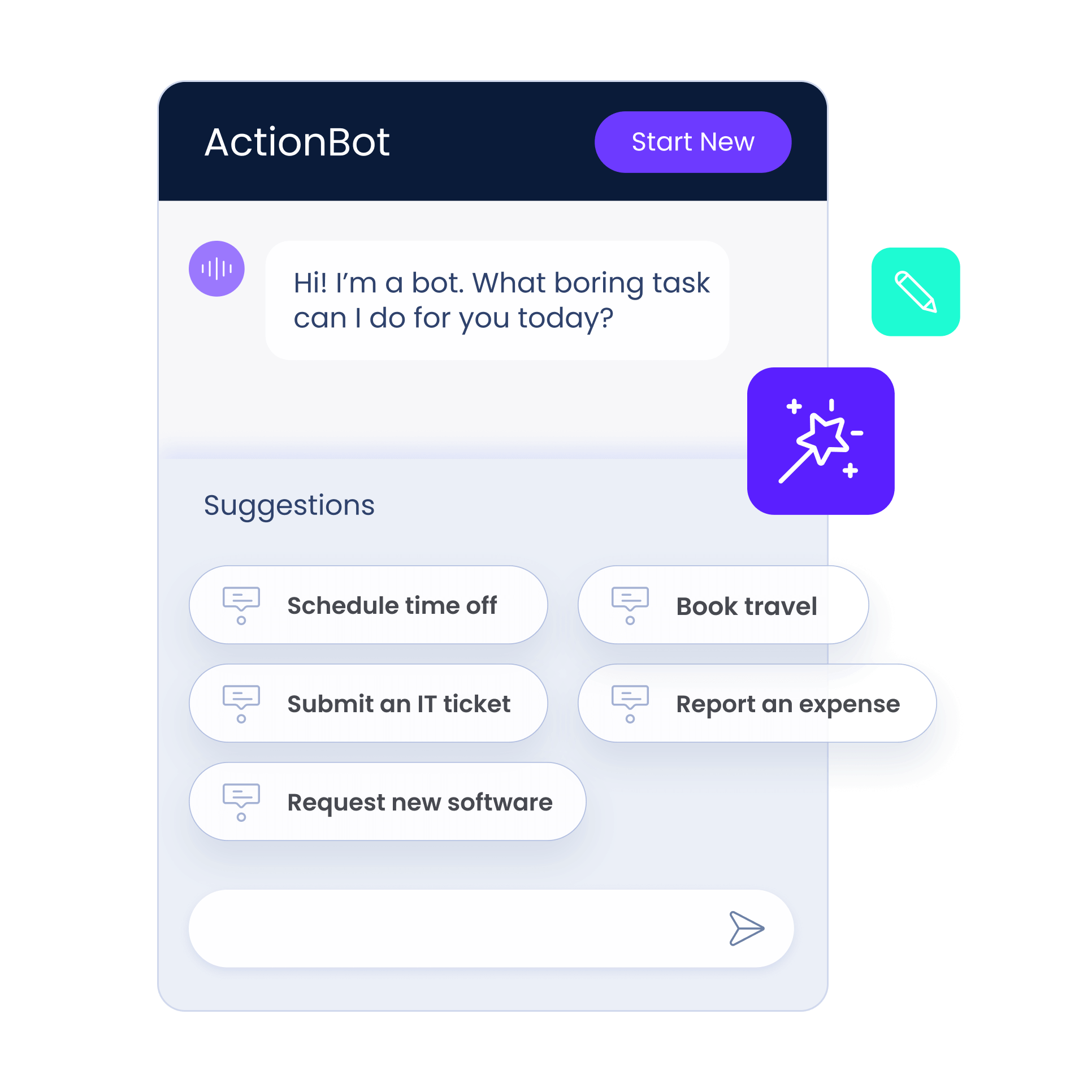
Workflow Automation that executes multi-step workflows on the user's behalf via a conversational interface
FedRAMP Ready status for US federal agency deployments and regulated-industry procurement
WalkMe Learning Arc, the designated successor to SAP Enable Now (reaching end of maintenance November 30, 2030)
Why Choose WalkMe Over Whatfix for SAP-Centric Deployments
WalkMe stands out in the following areas:
SAP-Native Integration That No Independent DAP Can Match
When SAP completed its acquisition of WalkMe, it gained source-code-level access to SAP's UI layers. WalkMe now embeds natively into SAP applications with a WalkMe Standard tier built into SAP subscriptions and a WalkMe Premium tier for customization. For organizations running SAP S/4HANA, SAP SuccessFactors, SAP Ariba, or SAP Concur, WalkMe operates with architectural depth that independent DAPs (including Whatfix) must approximate from the outside. WalkMe Learning Arc also gives SAP Enable Now customers a direct migration pathway, something Whatfix cannot offer.
DeepUI Maintenance Resilience
Whatfix reviewers on G2 and SoftwareReviews (InfoTech) consistently flag that UI element changes can break existing guided Flows, disrupting onboarding mid-deployment. WalkMe's DeepUI technology identifies UI elements by semantic meaning and visual context rather than DOM paths, automatically adapting published guidance when applications update without any manual repair cycle. For enterprises managing large content libraries across frequently-updated applications, this maintenance advantage compounds over multi-year deployments.
FedRAMP Authorization for Federal and Regulated-Industry Deployments
WalkMe achieved FedRAMP Ready status, and Forrester's Q4 2024 Wave cited WalkMe's "first-to-market FedRAMP certifications" as a direct reason for its Leader positioning. Whatfix holds SOC 2, ISO 27001, and VPAT certifications, but its available documentation does not confirm FedRAMP authorization. For organizations where government-grade certification is a hard procurement requirement, WalkMe clears a barrier Whatfix currently cannot.
Workflow Automation That Executes Tasks, Not Just Guides Through Them
Whatfix's guidance model directs users through processes step by step. WalkMe's Workflow Automation goes further: it executes workflows on the user's behalf, clicking buttons, selecting menus, and autofilling fields within any web-based enterprise application. The platform processes over 7 billion human-software interactions annually, giving its AI context about what users are trying to accomplish.
Source: WalkMe
NOTE: We also evaluated SAP Companion and Userlane. SAP Companion is built for SAP's own portfolio but has no cross-application reach. Userlane is a strong enterprise DAP but lacks WalkMe's SAP-native ownership and FedRAMP authorization. WalkMe offers the best adoption experience for teams whose primary transformation workload runs through any part of the SAP suite.
WalkMe Pricing
WalkMe does not publish pricing on its pricing page. All commercial terms are negotiated individually. The underlying structure is a subscription license model based on contracted user volumes and target applications.
WalkMe Standard is included in existing SAP subscriptions at no additional license cost for SAP customers, covering core in-app guidance across SAP applications.
WalkMe Premium is available for customization, advanced analytics, and broader application coverage, with pricing negotiated directly.
Enterprise contracts are non-cancelable for the full commitment term. No free trial or self-serve access is available.
Who Should Use WalkMe?
Choose WalkMe if:
Your organization runs SAP S/4HANA, SAP SuccessFactors, SAP Ariba, or SAP Concur as a core part of your stack. The SAP-native integration, bundled Standard tier, and Learning Arc migration pathway give WalkMe structural advantages no independent DAP can replicate.
You operate in the US federal sector or a regulated industry where FedRAMP authorization is a hard procurement requirement.
You need DAP capabilities that go beyond guided walkthroughs to execute high-volume, repetitive enterprise workflows on the user's behalf.
Your enterprise manages large-scale deployments across frequently-updated applications where DeepUI's maintenance resilience reduces ongoing operational burden.
3. Pendo: Best Alternative for Analytics-First Digital Adoption in SaaS
Source: Pendo
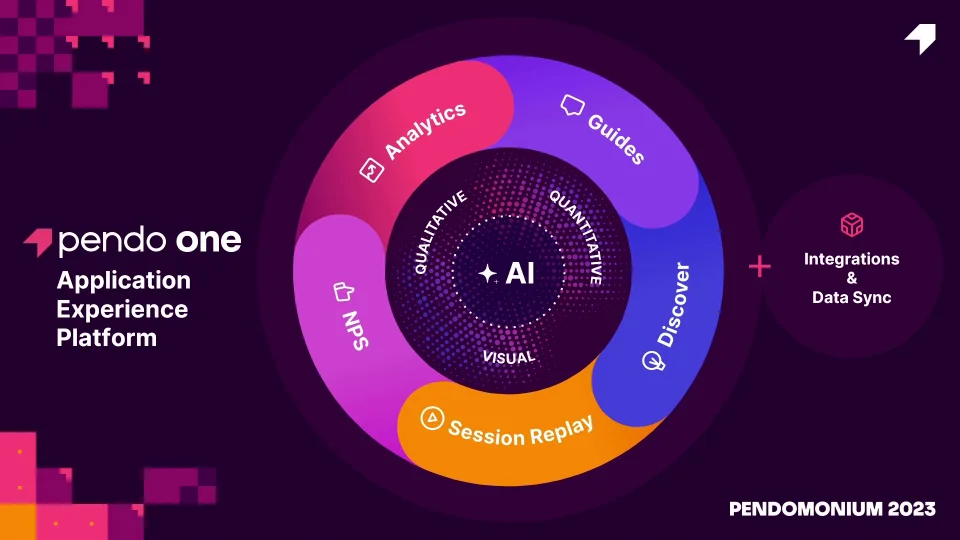
Pendo is a product analytics and digital adoption platform that bundles behavioral analytics, in-app guidance, session replay, NPS surveys, and AI-powered predictive intelligence into a single subscription. It is the most complete alternative to Whatfix for SaaS companies that need adoption measurement and user guidance without assembling a multi-product stack. Its key capabilities include:
Product analytics with retroactive data capture from the date of snippet installation (no upfront per-feature instrumentation)
No-code in-app guide builder for walkthroughs, tooltips, lightboxes, and banners
Session replay across web, iOS, and Android with client-side privacy filtering
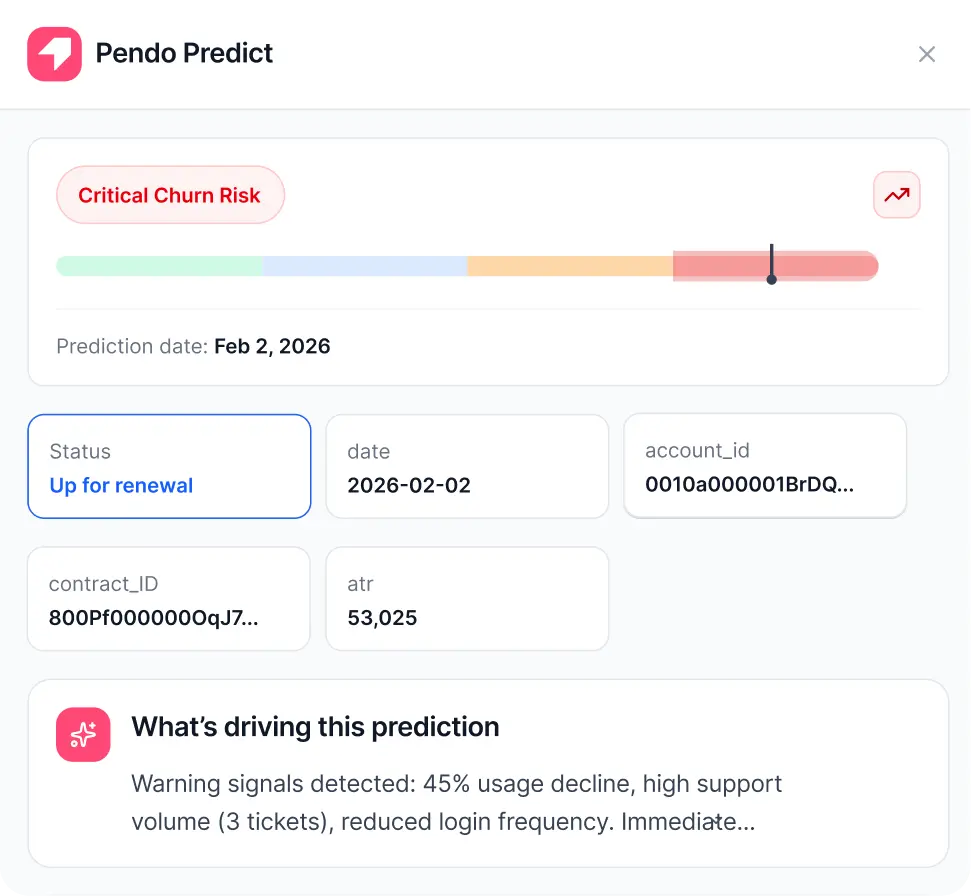
Pendo Predict: AI churn risk scoring and expansion signal detection pushed into Salesforce and Slack
Agent Analytics: measurement of AI copilot and assistant adoption
MAU-based pricing with a permanent self-serve free tier at 500 MAUs
Why Choose Pendo Over Whatfix for Analytics-First Digital Adoption
Pendo stands out in the following areas:
Product Analytics Is Bundled, Not Sold Separately
One of the most consistent friction points in Whatfix evaluations is that Product Analytics is a separate paid product, not included in the DAP subscription by default. The Standard analytics plan bundles free with any DAP plan, but the Premium and Enterprise tiers carry additional costs. Pendo builds product analytics, session replay, and NPS into the platform from the start. The retroactive analytics capability means behavioral data is available from the date of Pendo snippet installation, not from the moment individual features are tagged.
Churn Prediction Turns Adoption Data Into Revenue Intelligence
Whatfix Product Analytics tells you that 62% of employees completed Step 3 of an onboarding flow. Pendo Predict tells you which accounts are 60 days from churning and why. Built on technology acquired from Forwrd.ai, Predict ingests CRM data alongside behavioral data to train self-maintaining churn prediction models, delivering working models in days rather than months. It pushes predictions directly into Salesforce and Slack with data-backed explanations. Predict also accepts data from non-Pendo analytics systems (Snowflake, Redshift, BigQuery, Amplitude, Mixpanel).
Source: Pendo
Agent Analytics for AI Copilot Adoption
Pendo launched Agent Analytics in 2025 and earned a Fast Company Most Innovative Companies 2026 placement. It tracks 10 KPIs including conversation volume, visitor growth, prompt success rates, and workflow speed comparisons between agentic and traditional UIs. This addresses a measurement problem (understanding AI agent adoption) that Whatfix has not yet addressed with a dedicated module.
MAU-Based Pricing Is More Predictable for Growing SaaS Companies
Whatfix's pricing combines flat fees plus per-user licenses, differentiated by product, plan tier, and platform. Pendo prices on one variable: Monthly Active Users. No per-seat admin fees, no separate analytics line items, no per-platform add-ons.
For a deeper look at how Pendo's platform holds up in practice, read our Pendo review.
NOTE: We also evaluated Userpilot and Chameleon. Userpilot has strong analytics at mid-market pricing but less mature AI capabilities. Chameleon is capable but lacks the bundled analytics that makes Pendo compelling for SaaS companies needing behavioral data and guidance in one subscription. Pendo offers the most complete analytics-plus-guidance bundle for scaling SaaS companies.
Pendo Pricing
Pendo's pricing scales on Monthly Active Users (MAUs) with no per-seat admin charges.
Free: $0, no credit card required. Up to 500 MAUs. Includes Product Analytics, In-app Guides, NPS (Pendo-branded), Retroactive Analytics, and Agent Mode.
Base: Custom pricing. Removes Pendo branding. Includes Product Analytics and In-app Guides.
Core: Custom pricing. Adds Session Replay across web, iOS, and Android.
Ultimate: Custom pricing (listed as most popular). Full platform including Sentiment (NPS, CSAT, PMF), Orchestrate, Listen, and Data Sync.
AI Add-ons (custom pricing): Pendo Predict and Agent Analytics available with any paid plan.
For a complete walkthrough of Pendo's plans and what each tier includes, see our Pendo pricing breakdown.
Who Should Use Pendo?
Choose Pendo if:
Your product team needs behavioral analytics, in-app guidance, NPS, and session replay in a single subscription without purchasing analytics as a separate product.
Your customer success or revenue team needs churn risk signals generated from product usage data, not just CRM activity.
Your product is deploying AI copilots and you need to measure whether users are actually adopting them and whether agentic workflows deliver faster task completion.
Your primary use case is external customer-facing SaaS products or web-based internal applications. If you need guidance across desktop apps, VDI, or large multi-application enterprise environments, Whatfix's environmental breadth is stronger.
4. Appcues: Best Alternative for No-Code, Self-Serve Product Adoption
Source: Appcues
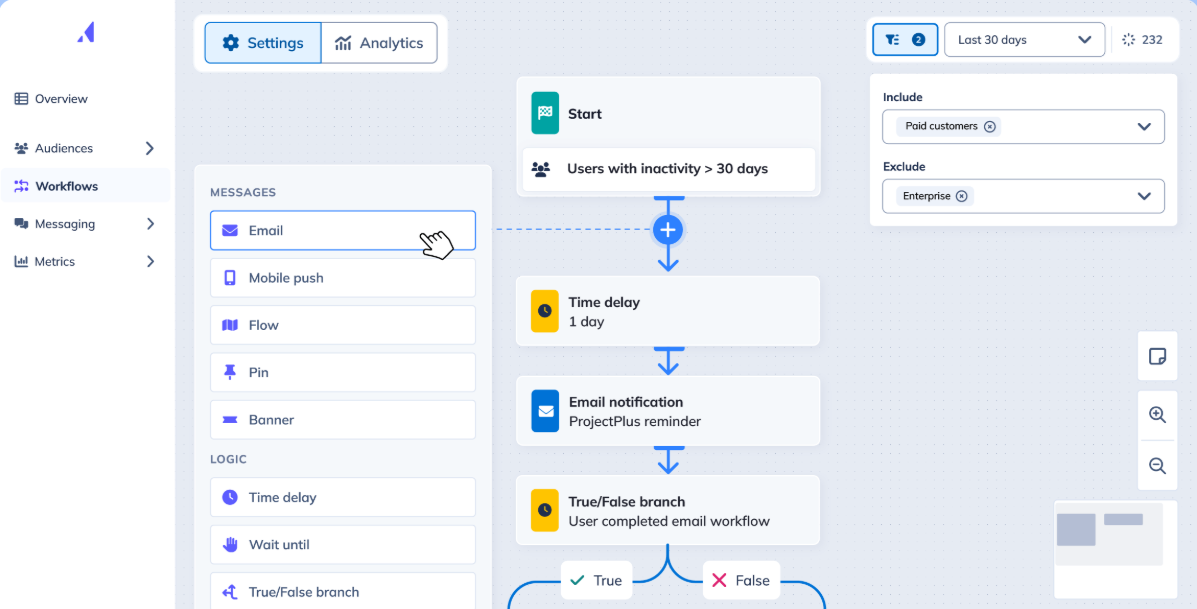
Appcues is a customer engagement and product adoption platform that lets non-technical product, marketing, and customer success teams build and deploy in-app onboarding flows, behavioral email, and push notifications from a single no-code environment. Its key capabilities include:
Chrome Extension-based visual builder that authors experiences directly overlaid on the live product interface
Multi-channel workflow orchestration combining in-app flows, behavioral email, and push notifications on a single canvas
MAU-based subscription pricing across Start, Grow, and Enterprise tiers with no per-seat fees
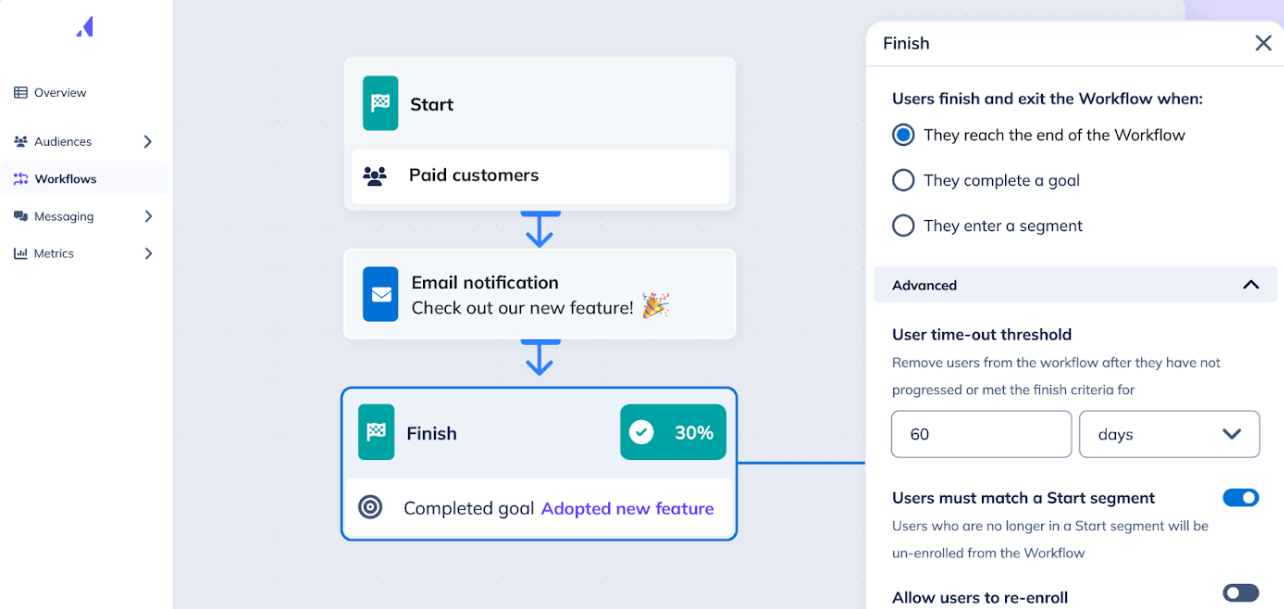
Built-in Goals tracking that ties onboarding flows to downstream activation and retention metrics
Native mobile SDK support for iOS, Android, React Native, Flutter, and Ionic
SOC 2 compliance, GDPR support, and EU data residency (early preview, January 2026)
Why Choose Appcues Over Whatfix for No-Code, Self-Serve Deployment
Appcues stands out in the following areas:
Same-Day Deployment Without IT Involvement
Whatfix reviewers consistently flag a steep learning curve and an initial configuration stage that requires significant planning effort. SoftwareReviews (InfoTech) scores ease of setup at 8.2 vs. category leaders. Appcues takes the opposite approach: the entire authoring workflow runs through the Appcues Builder Chrome Extension, which overlays directly on the live product. A developer installs the SDK once (supporting React, Angular, Vue, Ember, SPAs, and common JavaScript frameworks), and from that point, non-technical team members create and publish flows independently.
MAU-Based Pricing with Full Feature Access at Every Tier
Whatfix operates on a quote-only model with no publicly disclosed figures, and Product Analytics and Mirror carry separate costs. Appcues publishes its pricing structure with every plan including all experience types, all integrations, the full AI suite, mobile support, compliance tools, and a dedicated CSM from day one. Tiers differ by MAU ceiling, published experience limits, and reporting history, not by feature gating.
Native Multi-Channel Orchestration
Appcues' February 2025 expansion from in-app-only to multi-channel added native behavioral email and push notifications to the same Workflows canvas. A single Workflow can branch between in-app messages, emails, and push notifications based on user behavior, letting product teams coordinate onboarding across multiple surfaces without separate tools or data pipelines.
Source: Appcues
NOTE: We also evaluated UserGuiding and Chameleon. UserGuiding offers a strong free tier and lower entry cost but weaker built-in analytics. Chameleon adds complexity for smaller teams without a dedicated implementation resource. Appcues offers the best combination of self-serve entry, full-featured tooling, and native multi-channel orchestration for teams without dedicated implementation support.
Appcues Pricing
Appcues uses a MAU-based subscription model with no per-seat fees. All plans include the complete feature set from day one.
Start: Up to 3,000 MAUs. 10 published experiences, 1,000 emails/month, 12 months reporting history.
Grow: Up to 50,000 MAUs. 25 published experiences, 5,000 emails/month, 24 months reporting history.
Enterprise: Custom MAU volume. 100 published experiences, custom email volume, 36+ months reporting history, SSO included.
All tiers include all experience types, integrations, Appcues AI, mobile support, SOC 2 and GDPR compliance, and a dedicated CSM. Pricing requires a sales conversation for specific dollar figures.
Who Should Use Appcues?
Choose Appcues if:
Your product and customer success teams need to build and publish in-app flows without routing changes through engineering.
You need a transparent cost structure with all features available from day one, preventing add-on cost accumulation.
You need to coordinate onboarding across in-app messages, behavioral email, and mobile push from a single platform.
Your user base spans web and mobile and you want a single workspace for both surfaces.
5. Apty: Best Alternative for AI-Native Workflow Compliance
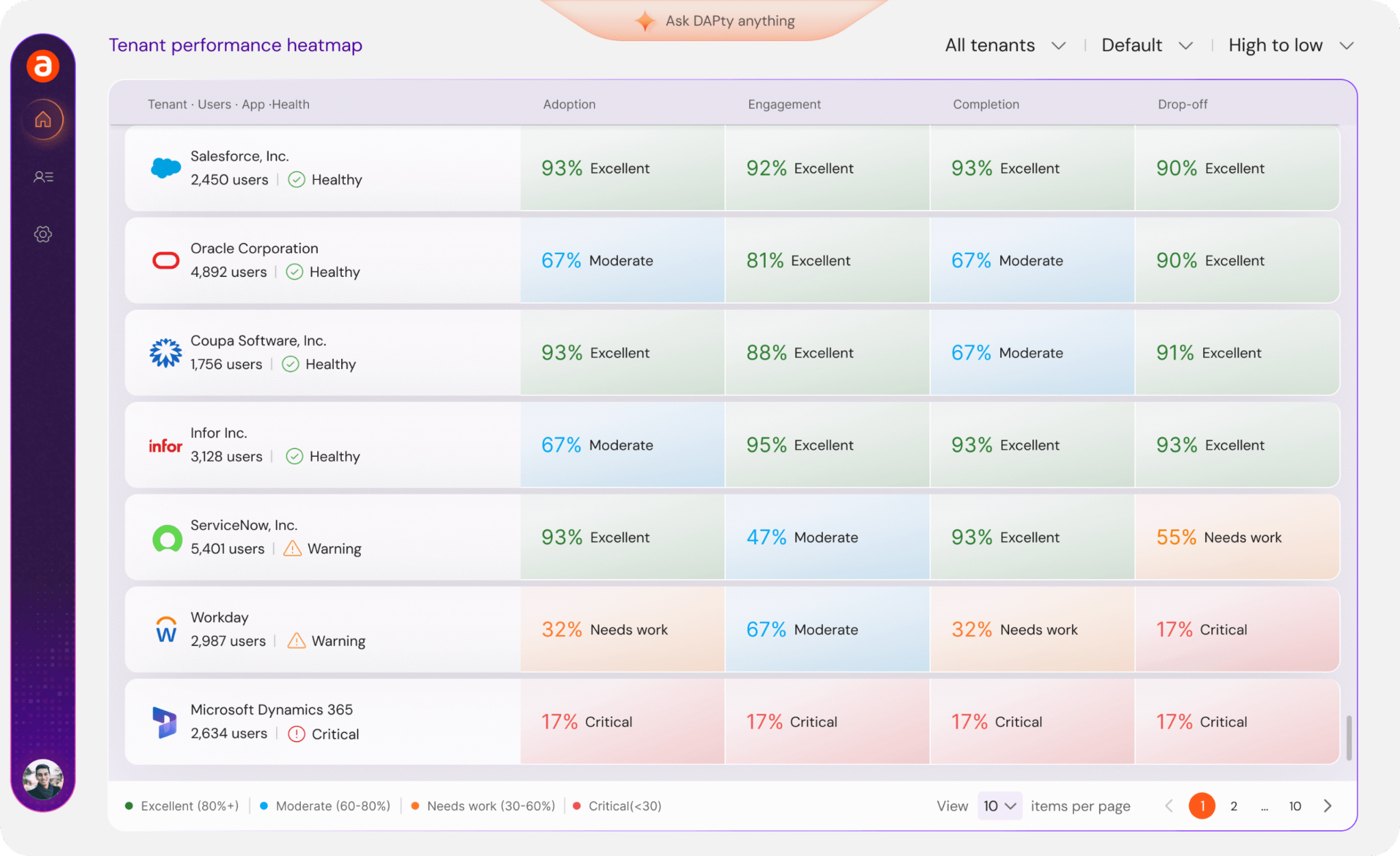
Source: Apty
Apty is an enterprise digital adoption platform that positions itself as "the only DAP leading to software utilization ROI", moving away from engagement metrics toward quantifiable business outcomes like process accuracy, support cost reduction, and software license utilization. Its key capabilities include:
Apty AI with contextual walkthroughs, in-app guidance, and Smart Rule Engine for conditional, role-based content delivery
Apty PULSE: cross-application behavioral analytics delivering initial insights within 2 days of installation
Real-time field validations that block non-compliant data entry before it propagates into ERP, CRM, or HCM systems
Cross-application workflow guidance spanning multiple enterprise systems (Salesforce, Workday, ServiceNow, Microsoft Dynamics) in a single continuous session
Apty OneX GenAI assistant capable of real-time guidance and autonomous task execution
1-2 day deployment with a G2 "Fastest Implementation" badge and a 2x ROI guarantee in year one
Why Choose Apty Over Whatfix for Workflow Compliance
Apty stands out in the following areas:
Process Compliance Enforcement at the Field Level
Whatfix's approach to process adherence is guidance-based: it surfaces walkthroughs and tooltips to show users the correct path, but does not block incorrect data entry. A user can ignore a tooltip and submit inaccurate data into Salesforce or an ERP field. Apty's real-time field validations check data accuracy as users type, flagging errors before forms can be submitted and enforcing data quality as a hard control. For enterprises in healthcare, financial services, or defense where workflow deviation carries audit consequences, Apty's enforcement model is a functionally different product category.
Agentic AI That Executes Tasks, Not Just Guides Users
Apty OneX is a live GenAI assistant that delivers contextual guidance and can execute tasks on users' behalf within enterprise software workflows. While Whatfix has taken a first step in this direction with its October 2025 Seek capability, Apty's agentic automation layer is more mature for production environments. For high-volume transactional environments (procurement approvals, employee record updates, case creation), the distinction between showing someone how to do something and doing it for them translates directly into reduced per-transaction effort.
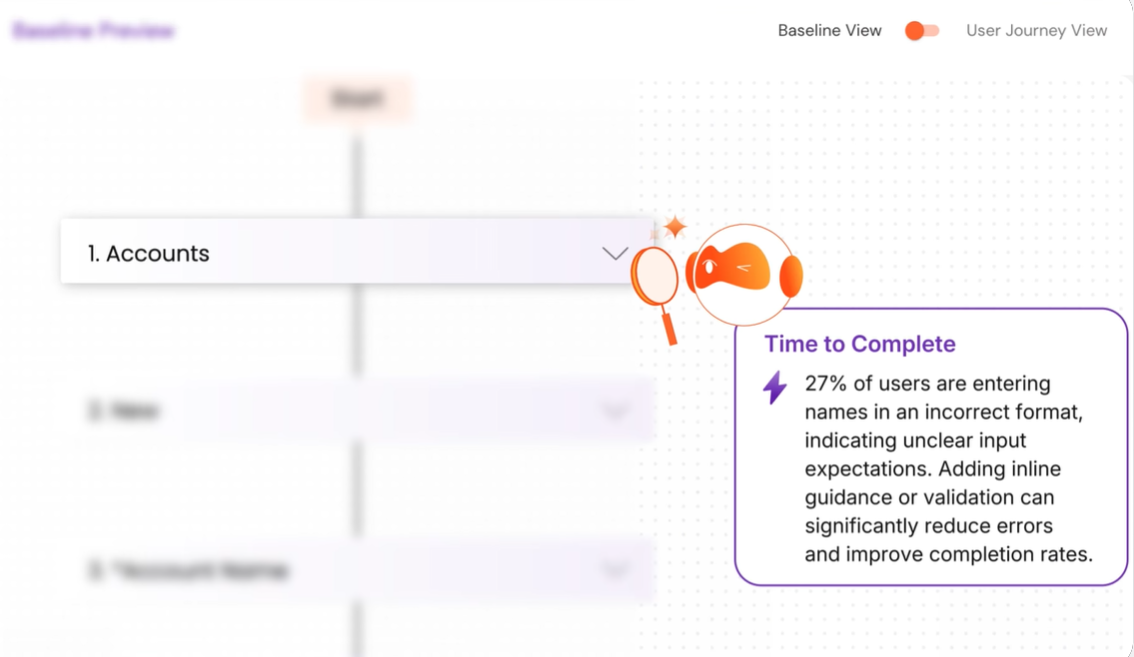
Source: Apty
Published Pricing Floor and Contractual ROI Guarantee
Apty counters Whatfix's quote-only model with a published starting price of $9,500 per application per year that includes the full feature set from day one. Apty also offers a 2x ROI guarantee in year one or the investment is returned, a commercial commitment no other DAP in this category has made publicly. On deployment speed, Apty's 1-2 day installation is validated by G2's "Fastest Implementation" badge, while Whatfix's setup is consistently cited as requiring significant planning effort.
NOTE: We also evaluated Tandem AI and Lemon Learning. Tandem AI is building AI-native adoption capabilities but skews toward customer-facing product activation rather than internal enterprise workflows. Lemon Learning brings solid European credentials but a more limited AI roadmap. Apty offers the most differentiated architecture for teams prioritizing compliance enforcement and autonomous task execution.
Apty Pricing
Apty uses a per-application flat-fee model billed annually.
Base plan: Starts at $9,500 per application per year. Includes the full feature set: no-code walkthroughs, real-time validations, task automation, AI recommendations, cross-application guidance, role-based targeting, 30+ language support, process and usage analytics, SSO, RBAC, and enterprise integrations.
Final quote depends on employee count, implementation complexity, industry compliance requirements, and integration scope.
2x ROI guarantee in year one or the investment is returned.
Optional add-ons: On-premise authoring, white-label branding, professional services.
Who Should Use Apty?
Choose Apty if:
You operate in a regulated industry where incorrect data entry creates audit exposure or compliance risk, and you need field-level enforcement rather than advisory tooltips.
Your enterprise runs a complex, multi-application tech stack and needs continuous workflow guidance across application handoffs.
You want a published pricing floor and a contractual ROI guarantee before committing to an enterprise software purchase.
You need fast deployment and early diagnostic insight: Apty PULSE delivers behavioral insights within 2 days of installation without requiring any guided content to be built first.
6. Spekit: Best Alternative for Sales Teams Needing Just-in-Time CRM Knowledge
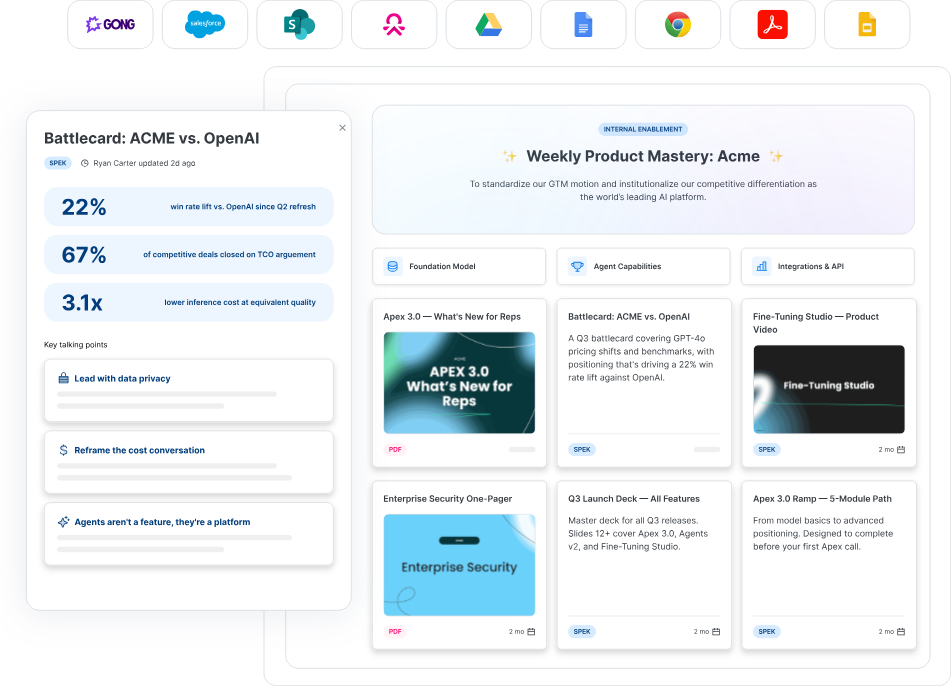
Source: Spekit
Spekit is an AI revenue enablement platform that takes the opposite approach to traditional DAPs: rather than sitting on top of software to guide employees through navigation steps, Spekit embeds itself inside the tools revenue teams already use (Salesforce, Gong, Gmail, Slack) and surfaces knowledge, coaching, and content at the moment a rep needs it to advance a deal. Its key capabilities include:
AI Sidekick: A browser-native layer that monitors active deal context and surfaces battlecards, objection responses, and process guides
Agentic Coaching & Actions: Automated drafting of follow-up emails, executive summaries from Gong transcripts, and Deal Rooms preloaded with stage-specific content
GTM Knowledge Engine: AI-governed content management with a Governance Dashboard that flags outdated material and propagates updates across all rep-facing surfaces simultaneously
Native Salesforce embedding: A no-code, one-click, two-way Salesforce sync described as "the only enablement platform that automatically updates as Salesforce changes"
Gong integration: Content recommendations surface inside Gong and Gmail based on what was discussed on calls
Why Choose Spekit Over Whatfix for Sales-Specific Enablement
Spekit stands out in the following areas:
Built for Revenue Outcomes, Not Software Adoption Metrics
Whatfix was built to solve a software adoption problem: helping employees navigate complex enterprise applications. Spekit is built around revenue outcomes: win rates, pipeline velocity, rep ramp time. The AI Sidekick doesn't guide a rep through clicking the right fields; it reads the active opportunity and surfaces the competitive positioning needed to win the deal. For a sales leader evaluating a Whatfix alternative for their revenue team, Spekit answers the questions that matter: what happens to quota attainment, ramp time, and the volume of internal questions during active deals?
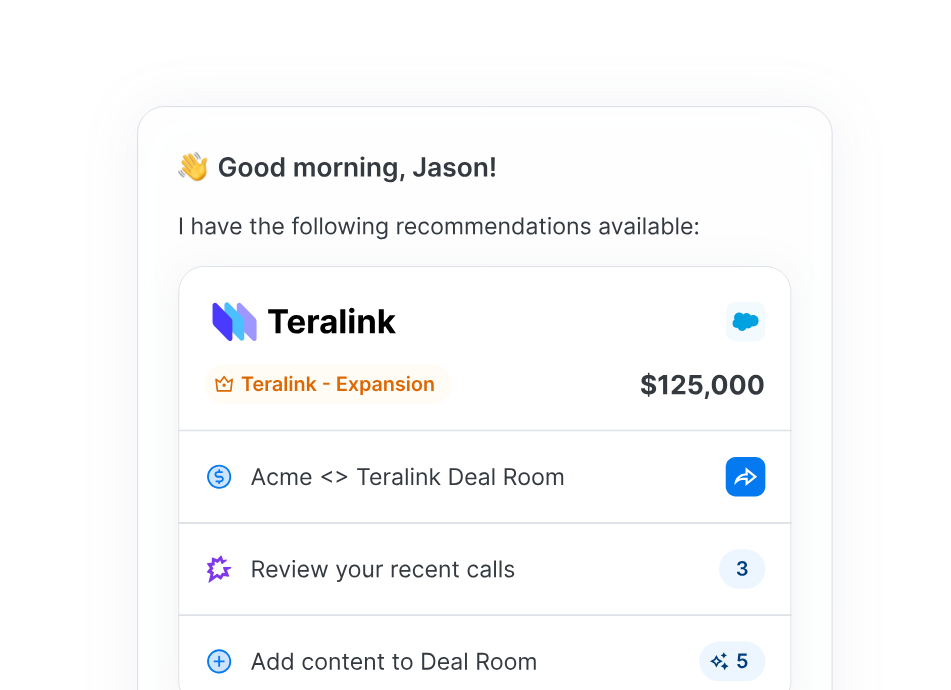
Source: Spekit
Conversation Intelligence as a Native Coaching Trigger
Whatfix's guidance triggers on application context (what screen a user is on) but has no native mechanism to read what was said on a sales call. Spekit joined the Gong Collective in November 2025, and the integration is substantive. After every call, Sidekick reviews Gong transcripts to identify key moments and recommends relevant knowledge based on what was discussed. During live calls, content recommendations appear inside the Gong platform in real time. A Whatfix deployment helps a rep navigate Salesforce correctly; a Spekit deployment reads their call and tells them what to send next.
In-Workflow Delivery That Drives Measurable Adoption
Spekit's own research reports 55% of respondents cited low rep adoption as the key reason for switching platforms. Spekit addresses this by coming to the rep, not the other way around. The platform surfaces inside Gmail when composing a follow-up, inside Gong when reviewing a call, and inside Salesforce when updating a deal. Whatfix addresses adoption by embedding guidance into the software itself, which works for enterprise onboarding but requires authors to anticipate every friction point in advance. Spekit's AI surfaces relevant content based on live deal context without pre-built Flow triggers.
NOTE: We also evaluated Guru and Highspot. Guru offers broader knowledge management with a wiki-like structure but lacks the CRM-embedded deal context and Gong integration depth. Highspot is a full sales enablement suite but its platform complexity makes it a heavier lift for teams whose primary need is just-in-time knowledge retrieval. Spekit offers the most focused execution for revenue teams needing CRM-embedded, conversation-triggered knowledge surfacing. For teams looking to extend adoption and enablement into full GTM execution, ZoomInfo Agent Teams run complete plays end to end, with specialist agents sharing account context and acting within the approvals and limits you set.
Spekit Pricing
Spekit does not publish pricing publicly. The pricing page displays only a demo request form. All pricing is negotiated through a sales engagement, with contracts governed by individually signed Order Forms. Pricing follows a per-seat or seat-banded model, with professional services scoped separately.
Who Should Use Spekit?
Choose Spekit if:
Your primary sales stack is Salesforce and Gong, and your enablement problem is knowledge retrieval in the flow of deals, not software navigation training.
You want ramp time and adoption metrics oriented around revenue outcomes rather than IT ticket deflection or training completion rates.
Your team is 50-500+ reps in a dedicated B2B sales motion where frequent product releases and competitive landscape shifts demand real-time content governance at scale.
You are willing to trade multi-language depth and analytics maturity for implementation speed and in-workflow adoption.
7. UserGuiding: Best Alternative for Budget-Constrained Teams Needing Same-Day Deployment
Source: UserGuiding
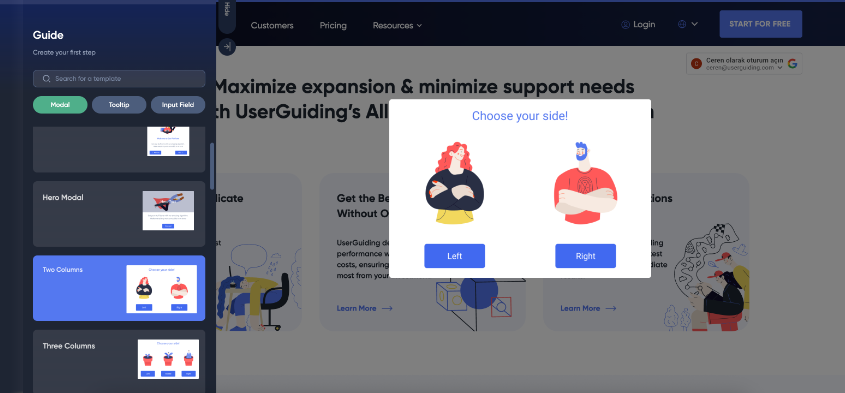
UserGuiding is a product adoption platform built for B2B SaaS product teams that need a complete digital adoption toolkit (guided tours, checklists, hotspots, resource centers, in-app surveys, an AI assistant, and a knowledge base) without Whatfix's quote-only pricing, enterprise-tier complexity, or multi-week procurement timeline. Its key capabilities include:
Product tours, hotspots, tooltips, onboarding checklists, and announcement modals built through a no-code Chrome Extension
A permanently free Support Essentials plan including a Knowledge Base, Product Updates changelog, Resource Center, and AI Assistant with 50 monthly resolutions
Transparent self-serve pricing starting at $174/month (annual billing) with all plan features published publicly
Session Replay for watching real user sessions alongside guide completion data
In-app surveys with conditional logic branching, NPS surveys, and AI-powered response summarization
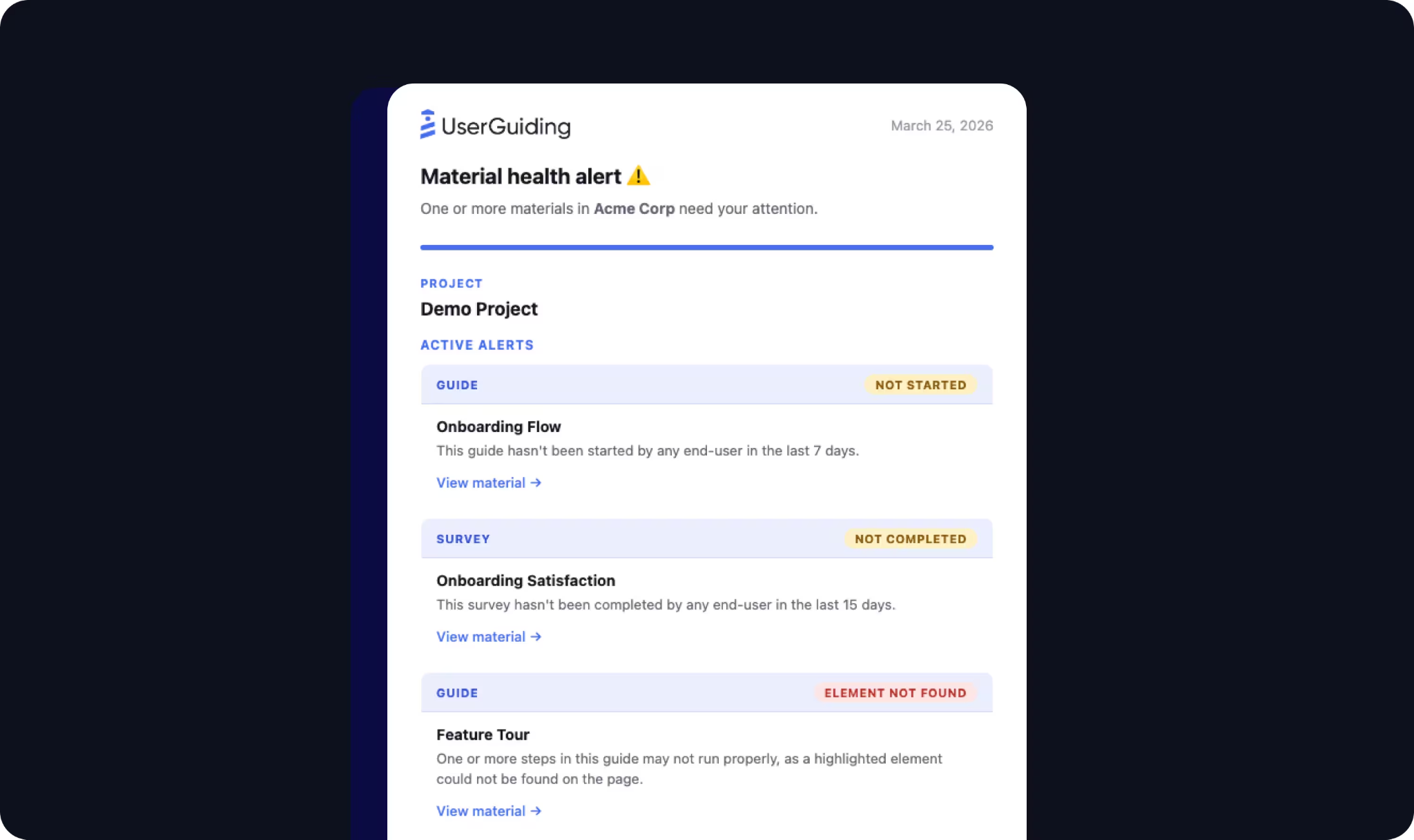
Custom Alerts that send Slack or email notifications when a guide breaks or stops being completed, before users encounter the issue
Why Choose UserGuiding Over Whatfix for Budget-Constrained Teams
UserGuiding stands out in the following areas:
Permanent Free Tier and Full Pricing Transparency
Whatfix does not publish a single price figure on its website; every plan requires a demo request and custom quote. UserGuiding's pricing page shows the dollar amount for every plan, a MAU slider, the full feature list per tier, and available add-ons, all without a login. The Support Essentials plan is free forever and includes a Knowledge Base, Product Updates page, AI Assistant with 50 monthly resolution credits, and one active Resource Center widget. A team can evaluate, sign up, and begin embedding code in a single afternoon. For product managers at early-stage and mid-market SaaS companies who often own their own tooling budget, a tool that requires a multi-week sales cycle simply cannot compete for their time.
Fastest Time-to-Value in the Category
SoftwareReviews (InfoTech) scores Whatfix's ease of setup at 8.2 vs. category leaders averaging 9.0. UserGuiding's homepage leads with a "15-min one-time setup" claim, supported by a single JavaScript snippet installation via Google Tag Manager, WordPress plugin, or direct embed. No application-side code changes are required, and the no-code Chrome Extension lets product managers build guided tours directly on the live product UI.
Proactive Guide Health Monitoring
Most DAPs require authors to discover manually when UI changes break existing guides. UserGuiding's Custom Alerts send Slack or email notifications when a guide stops being started, is being abandoned, or when a UI change breaks a step's DOM target, before users hit the broken experience. This closes a silent-failure gap that most DAPs leave unaddressed.
Source: UserGuiding
NOTE: We also evaluated Pendo's free tier and Appcues. Pendo's free tier gates most useful analytics behind paid plans. Appcues offers no permanent free plan. UserGuiding is the only major DAP with a permanent free tier that includes functional capabilities (Knowledge Base, AI Assistant, Resource Center), making it the realistic starting point for teams with a constrained budget or those testing a DAP for the first time.
UserGuiding Pricing
UserGuiding uses a MAU-based pricing model where MAUs are unique user IDs that signed in during the previous 30 days. UserGuiding does not charge overage fees: if usage exceeds the quota, content stops displaying until the plan is upgraded. No surprise invoices.
Support Essentials (Free forever): $0, no credit card. Knowledge Base, Product Updates, AI Assistant (50 resolutions/month), 1 Resource Center, 1 seat.
Starter ($174/month, annual billing): Full product adoption toolkit. 25 active Guides, 20 Hotspots, 2 Checklists, 5 Surveys, audience segmentation, 5 seats.
Growth ($349/month, annual billing): Everything in Starter plus A/B Testing, Goal Tracking, Custom CSS, Localization, NPS Surveys, Session Replay (3,000 recordings), Salesforce and HubSpot integrations, branding removal, dedicated CSM, 15 seats.
Enterprise (Custom pricing): SOC 2 Type II, GDPR, HIPAA documentation; SAML SSO; unlimited limits; migration support; unlimited seats.
Who Should Use UserGuiding?
Choose UserGuiding if:
Your team is at an early-stage or mid-market SaaS company that needs a complete DAP toolkit without a multi-week procurement cycle or six-figure implementation engagement.
You want to start on a functional free tier and upgrade only when usage justifies the cost, knowing exactly what each tier costs before you commit.
Your adoption layer needs to be live within days of a decision, not months, and your product managers need to ship onboarding improvements without waiting on engineering capacity.
Your product is a web application serving geographies that need multilingual content; UserGuiding holds G2 Regional Leader recognition in both Europe and Latin America.
The Final Verdict
Whatfix excels as a horizontal Digital Adoption Platform for enterprise software, but different teams have requirements that benefit from more specialized solutions. Here are the best alternatives:
ZoomInfo for go-to-market teams that need B2B data intelligence and AI-powered pipeline execution, not just guidance on how to navigate their CRM; its Agent Teams run full GTM plays end to end, with specialist agents sharing account context and acting within the approvals you set
WalkMe for SAP-centric enterprises that need source-code-level integration, DeepUI maintenance resilience, and FedRAMP-authorized deployment
Pendo for SaaS product teams that need analytics, in-app guidance, session replay, and churn prediction bundled in a single subscription
Appcues for product and customer success teams that need same-day no-code deployment with native multi-channel orchestration across in-app, email, and push
Apty for regulated enterprises that need field-level compliance enforcement, agentic task automation, and a published ROI guarantee
Spekit for revenue teams that need just-in-time knowledge and coaching triggered by live deal context inside Salesforce and Gong
UserGuiding for budget-constrained teams that need a complete DAP toolkit with transparent pricing and a functional free tier
You don't have to choose between Whatfix and these alternatives exclusively. Many enterprises run Whatfix alongside specialized tools to build the right technology stack for their needs. Consider your team requirements, application environment, and growth plans when deciding which solution fits.
Ready to power your go-to-market execution with B2B data? Start with ZoomInfo Lite for free or request a demo to see how AI-powered intelligence can change how your team finds, wins, and grows customers.
Whatfix Alternatives FAQ
Why do enterprises look for Whatfix alternatives?
Whatfix is a strong horizontal DAP, but enterprises often need more specialized solutions for specific teams or use cases. Common reasons include needing bundled product analytics rather than a separate add-on, requiring SAP-native integration, wanting compliance enforcement at the field level rather than guidance-based suggestions, needing sales-specific enablement triggered by conversation intelligence, or seeking transparent published pricing without a multi-week procurement cycle.
What is the best overall Whatfix alternative?
There is no single best alternative because Whatfix covers a broad range of digital adoption functions. WalkMe is the top choice for SAP-centric environments, Pendo leads for SaaS product teams needing bundled analytics, and Apty is the strongest option for regulated enterprises requiring workflow compliance enforcement. The right choice depends on your primary use case and team requirements.
Is there a free alternative to Whatfix?
Yes. UserGuiding offers a permanent free Support Essentials plan that includes a Knowledge Base, Product Updates changelog, AI Assistant, and Resource Center widget. Pendo offers a permanent free tier for up to 500 MAUs that includes product analytics, in-app guides, and NPS. ZoomInfo Lite provides permanent free access to B2B data with 10 monthly export credits, the Chrome extension, and website visitor tracking.
Which Whatfix alternative is best for sales teams?
Spekit is built for revenue teams, embedding AI-powered knowledge and coaching directly inside Salesforce, Gong, and Gmail. It surfaces deal-specific content triggered by conversation intelligence rather than generic software navigation guidance. ZoomInfo complements this with the B2B data intelligence and execution layer that powers the sales workflow upstream.
How does WalkMe compare to Whatfix after the SAP acquisition?
SAP's acquisition of WalkMe in September 2024 gave it source-code-level integration with SAP applications, a bundled Standard tier in SAP subscriptions, and a migration pathway from SAP Enable Now via WalkMe Learning Arc.
For SAP-centric enterprises, this creates structural advantages no independent DAP can match. For non-SAP stacks, WalkMe and Whatfix are closer in capability, and the choice depends on specific application coverage needs.
Which Whatfix alternative has the most transparent pricing?
UserGuiding publishes all plan pricing and feature limits on its website, starting at $174/month (annual billing) for the Starter plan. Apty publishes a starting price of $9,500 per application per year with the full feature set included. Whatfix, WalkMe, Pendo (paid tiers), Spekit, and ZoomInfo all require sales conversations for pricing.
Can I use Whatfix alongside these alternatives?
Yes. Many of these tools address different layers of the enterprise software challenge. You could run Whatfix for broad enterprise software adoption (ERP, HCM, CRM onboarding) while using ZoomInfo for go-to-market intelligence, Spekit for sales enablement, or Pendo for customer-facing product analytics. The decision to replace or complement depends on whether your primary need is horizontal software adoption or a more specialized function.
Which alternative is best for regulated industries?
Apty leads for organizations where workflow compliance is a hard requirement, offering real-time field validations that prevent non-compliant data entry. WalkMe holds FedRAMP Ready status for US federal deployments. Both platforms provide enterprise-grade security and compliance infrastructure suitable for healthcare, financial services, and government environments.
See how Whatfix compares to other platforms:
