
Zoho CRM serves 300,000+ businesses worldwide with a feature set that rivals enterprise incumbents at a fraction of the cost. Its Smart CRM connects sales, marketing, service, and analytics teams on a single data layer, with Zia AI embedded across every workflow for lead scoring, forecasting, sentiment analysis, and autonomous sales agents.
But a CRM only sees the data that lives inside it.
Zoho CRM tracks deal stages, email opens, form submissions, and call logs. On its own, it cannot verify whether a prospect's phone number still connects, detect which target accounts are researching your category this week, close the loop between ad spend and closed revenue, or keep your project management and accounting systems synchronized without manual exports.
The right integrations close those gaps. They feed your CRM verified data it cannot generate on its own, capture activity happening outside the platform, automate workflows across disconnected tools, and connect marketing spend to pipeline so your team operates from a complete picture instead of fragments.
This guide covers the strongest integration for each of the jobs Zoho CRM users most commonly need done:
Enrich and verify B2B contact data, and surface accounts that are actively in-market
Synchronize email marketing audiences and campaign engagement with your CRM
Surface deal updates and pipeline alerts in real time where your team already works
Connect the rest of your stack without writing code
Trace marketing channels to closed revenue for attribution reporting
Automate post-sale project handoffs from CRM to delivery teams
Sync invoicing and payment data between your CRM and accounting system
Each section walks through how the integration connects with Zoho CRM, what data flows between the platforms, pricing, and who benefits most.
Best Zoho CRM Integrations at a Glance | |
|---|---|
Best Zoho CRM Integration for B2B Data Enrichment and Go-to-Market Intelligence Enriches Zoho CRM records with verified contact data, buyer intent signals, and company intelligence from ZoomInfo's B2B database, giving your team accurate data to prospect with and signals to prioritize accounts that are actively in-market. | |
Best Zoho CRM Integration for Bidirectional Email Marketing Sync Synchronizes contacts bidirectionally between Zoho CRM and Mailchimp audiences while feeding campaign engagement data back into contact records, so sales reps see a prospect's full email history without leaving the CRM. | |
Best Zoho CRM Integration for Real-Time Pipeline Alerts and Team Communication Routes deal stage changes, lead alerts, and pipeline updates into Slack channels via workflow-triggered notifications, keeping revenue teams informed the moment CRM events occur. | |
Best Zoho CRM Integration for Connecting Your Stack Without Code Extends Zoho CRM's reach to 8,000+ apps with no-code automation, supporting bidirectional data sync, multi-step workflows, and conditional routing between your CRM and tools that lack native Zoho connectors. | |
Best Zoho CRM Integration for Marketing Attribution and Revenue Traceability Connects UTM attribution data from website traffic sources to Zoho CRM lead records, enabling closed-loop revenue reporting that traces which campaigns and channels produce pipeline and closed deals. | |
Best Zoho CRM Integration for Automating Post-Sale Project Handoffs Triggers Asana project creation from Zoho CRM deal closures, with customer context embedded and delivery milestones synced back to the CRM, eliminating the manual handoff between sales and delivery teams. | |
Best Zoho CRM Integration for Automated Invoicing and Financial Record Sync Syncs customer records, products, and payment status between Zoho CRM and QuickBooks while automating invoice creation on deal closure, giving sales and finance teams a shared view of every account. |
What Is Zoho CRM?
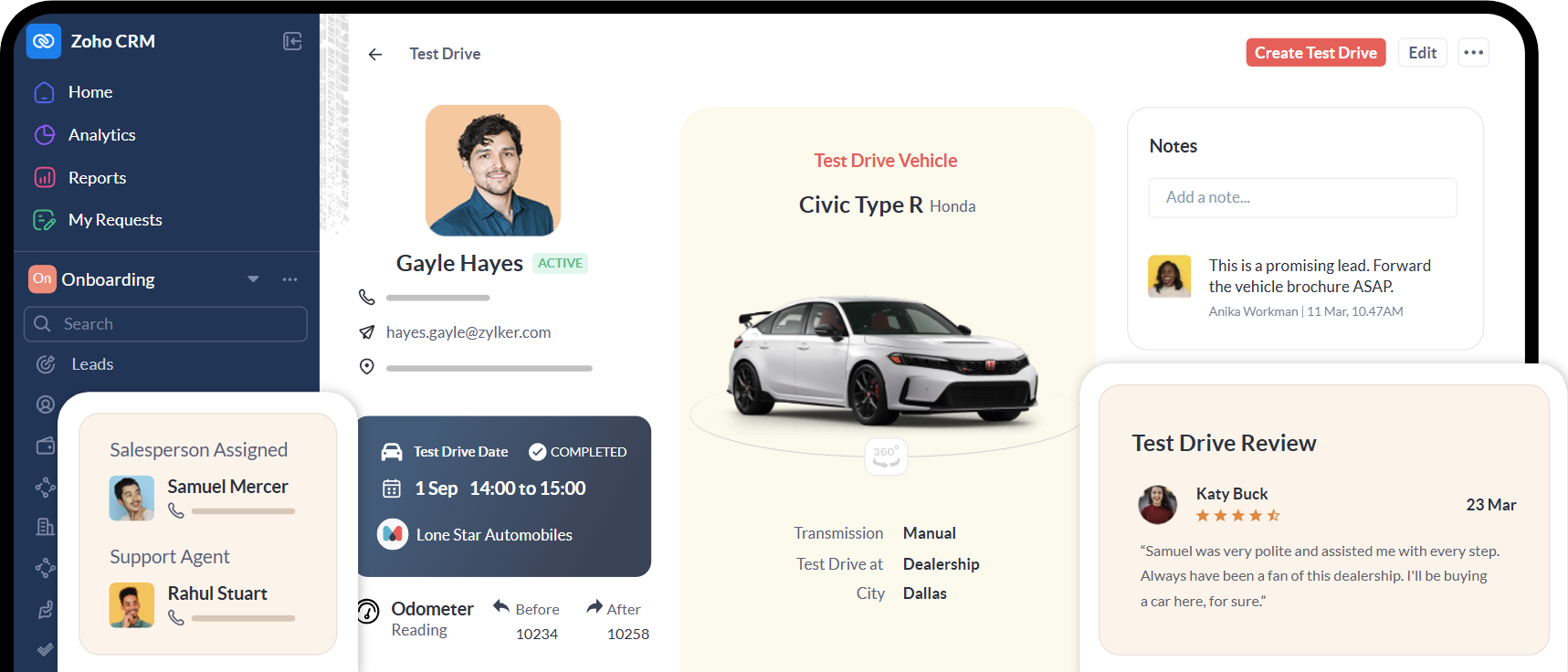
Zoho CRM is a cloud-based customer relationship management platform that unifies sales, marketing, service, and analytics teams on a single data layer, serving 300,000+ businesses worldwide.
Source: Zoho CRM
The company positions it as "the easiest AI CRM for growth", built on the idea that enterprise-grade CRM capabilities should be accessible without enterprise pricing. Zoho CRM belongs to a broader ecosystem of 50+ Zoho applications spanning finance, HR, project management, and analytics, all running from what the company calls "the operating system for business".
Zoho CRM's integration ecosystem is a defining strength of the platform.
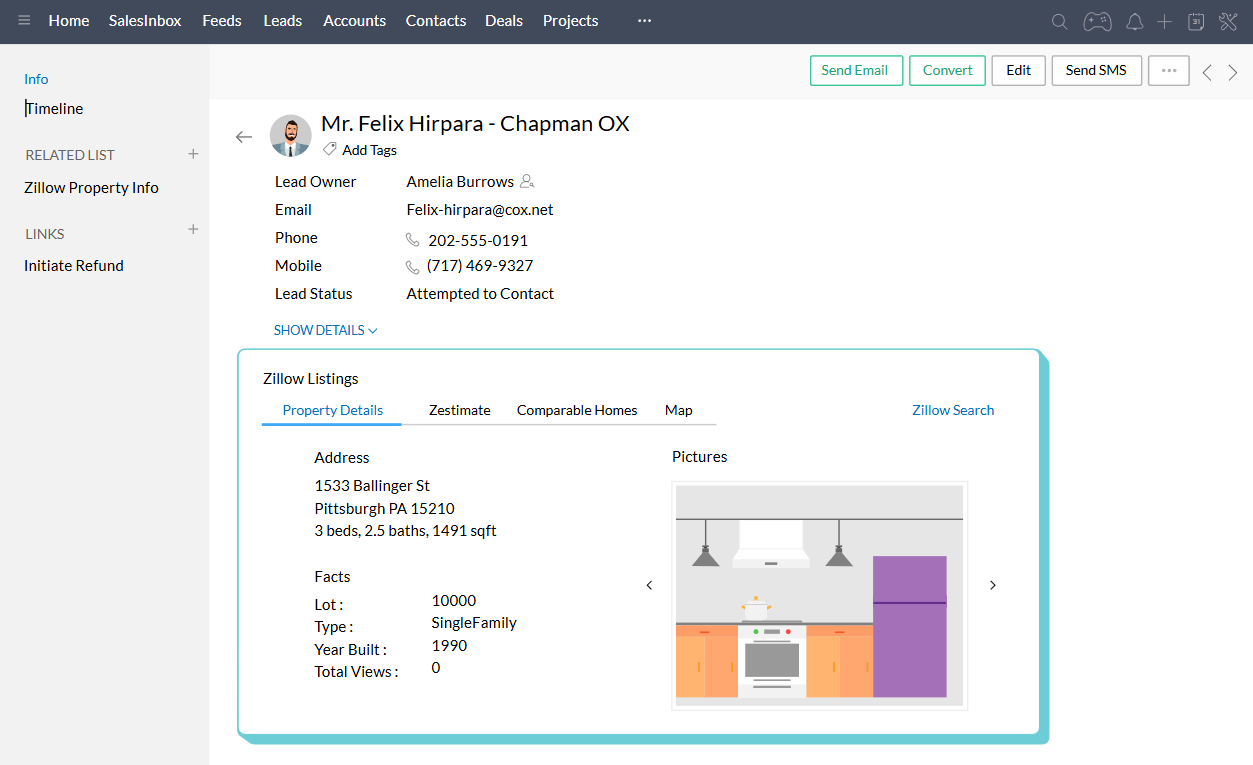
The Zoho Marketplace offers 1,100+ ready-to-use app integrations spanning marketing, sales, finance, telephony, communications, and document management, all configurable through point-and-click setup without code. On the technical side, Zoho CRM exposes a REST API (currently V8) covering the full CRM data model, a GraphQL API for selective field querying, webhooks and serverless Deluge functions for event-driven automation, and a Widget SDK for embedding custom UI components. Zoho Flow adds a first-party multi-app workflow orchestration layer, and MCP Server support enables AI agents to perform tasks across 950+ Zoho and third-party services.
Source: Zoho CRM
The integration categories available to Zoho CRM users include:
CRM and sales data enrichment: contact intelligence, company attributes, buyer intent signals
Email marketing: Mailchimp, Zoho Campaigns, ActiveCampaign
Team communication: Slack, Microsoft Teams, real-time CRM notifications
Workflow automation: Zapier, Make, Zoho Flow, custom webhooks
Web analytics and attribution: Google Analytics, Google Ads
Project management: Asana, Monday.com, Zoho Projects
Accounting and finance: QuickBooks, Zoho Books, Xero
With that ecosystem as context, here are the seven integrations we selected as the best options for extending Zoho CRM across the categories that matter most to sales-driven teams.
1. ZoomInfo: Best Zoho CRM Integration for B2B Data Enrichment and Go-to-Market Intelligence
ZoomInfo is a B2B data and go-to-market platform built on 500M contacts, 100M companies, 135M+ verified phone numbers, and 200M+ verified business email addresses. It integrates with Zoho CRM through a native connector in ZoomInfo's marketplace, enriching your CRM records with verified contact data, company intelligence, buyer intent signals, and technographic insights.
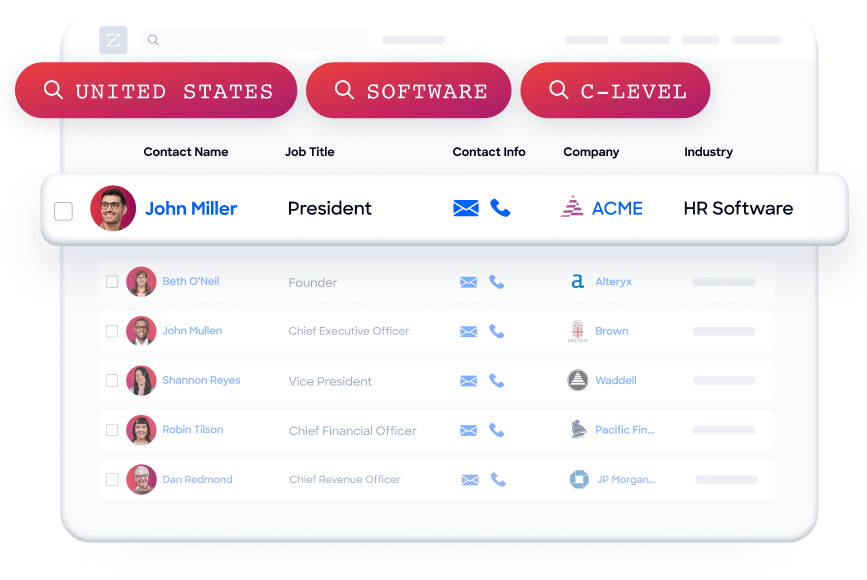
Connecting the two platforms unlocks:
A CRM that stays accurate on its own, with verified emails, direct dials, and company attributes appended and refreshed automatically
Prioritization by real buying signals, so reps work the accounts that are in-market this week instead of a static list
Pipeline from traffic you already have, by resolving anonymous website visitors into companies and buying teams
Smarter routing and scoring, with ZoomInfo attributes powering Zoho CRM workflow logic and Zia's lead scoring models
How ZoomInfo Integrates with Zoho CRM
ZoomInfo connects to Zoho CRM through a native connector available in the ZoomInfo App Marketplace, with additional integration options via no-code platforms like Tray.io and Stacksync, plus Zapier automation for teams that prefer middleware.
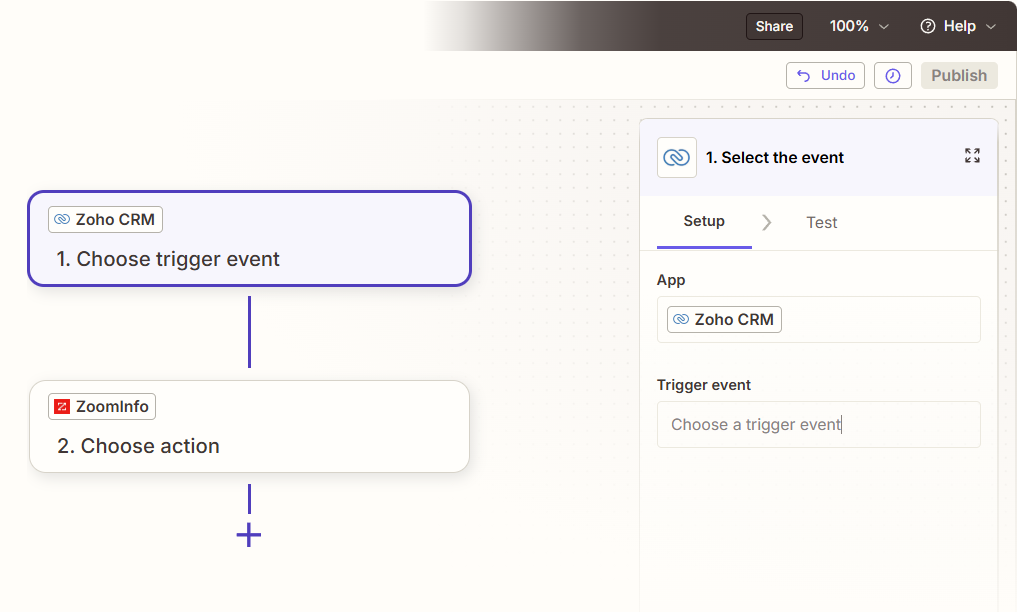
Source: Zapier
Because ZoomInfo builds and maintains the connector, it stays current with platform updates on both sides. ZoomInfo's GTM Workspace (the AI-powered workspace for sellers) includes the same Zoho CRM connection alongside native integrations with other major CRMs.
Contact and Company Data Enrichment: Fill the Gaps Your CRM Cannot Fill on Its Own
Zoho CRM captures interaction data: emails sent, forms submitted, pages visited, calls logged.
What it cannot do on its own is verify whether a phone number still works, catch a job change, or reveal a company's technology stack. When a new contact enters Zoho CRM, ZoomInfo automatically appends the verified business email, direct dial, title, department, and seniority, plus company-level firmographics and technographic data covering 30,000+ technologies.
The enrichment runs continuously through a verification pipeline backed by 300+ human researchers, reaching up to 95% accuracy on first-party data.
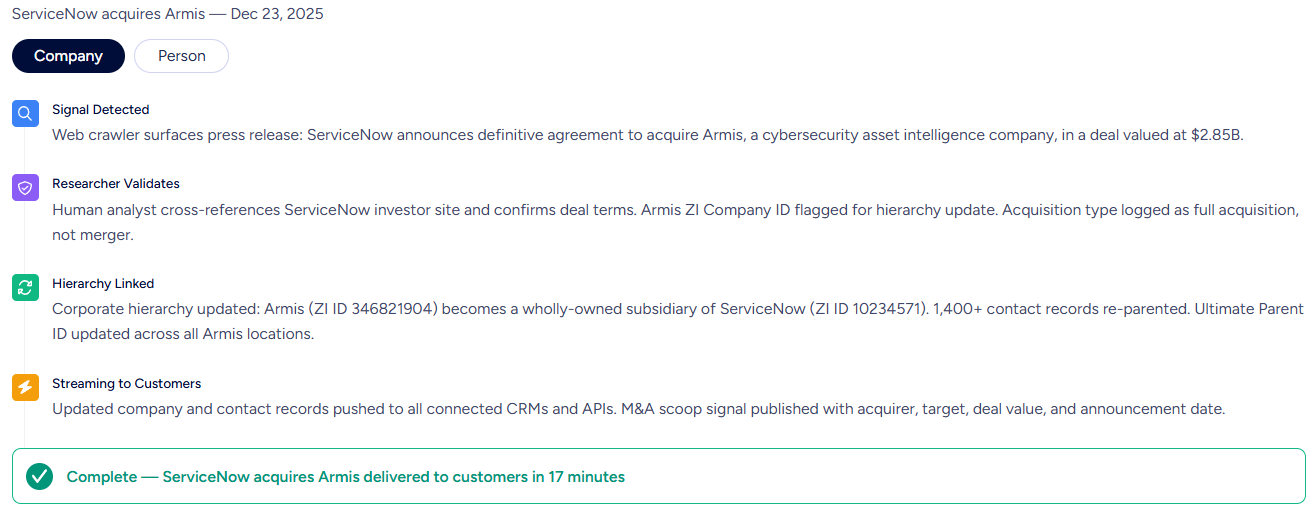
ZoomInfo in action: A prospect submits a Zoho CRM web form with only a name and work email. ZoomInfo appends their direct dial, current title, company profile (a 400-person fintech running Salesforce and Marketo), and three other decision-makers in their department. Your SDR multi-threads the account before the first call instead of spending 20 minutes researching it.
Buyer Intent Data: Identify Accounts That Are Actively In-Market
ZoomInfo's Buyer Intent tracks signals from 210 million IP-to-Organization pairings and 6 trillion+ new keyword-to-device pairings monthly, revealing which companies are researching topics relevant to your product.
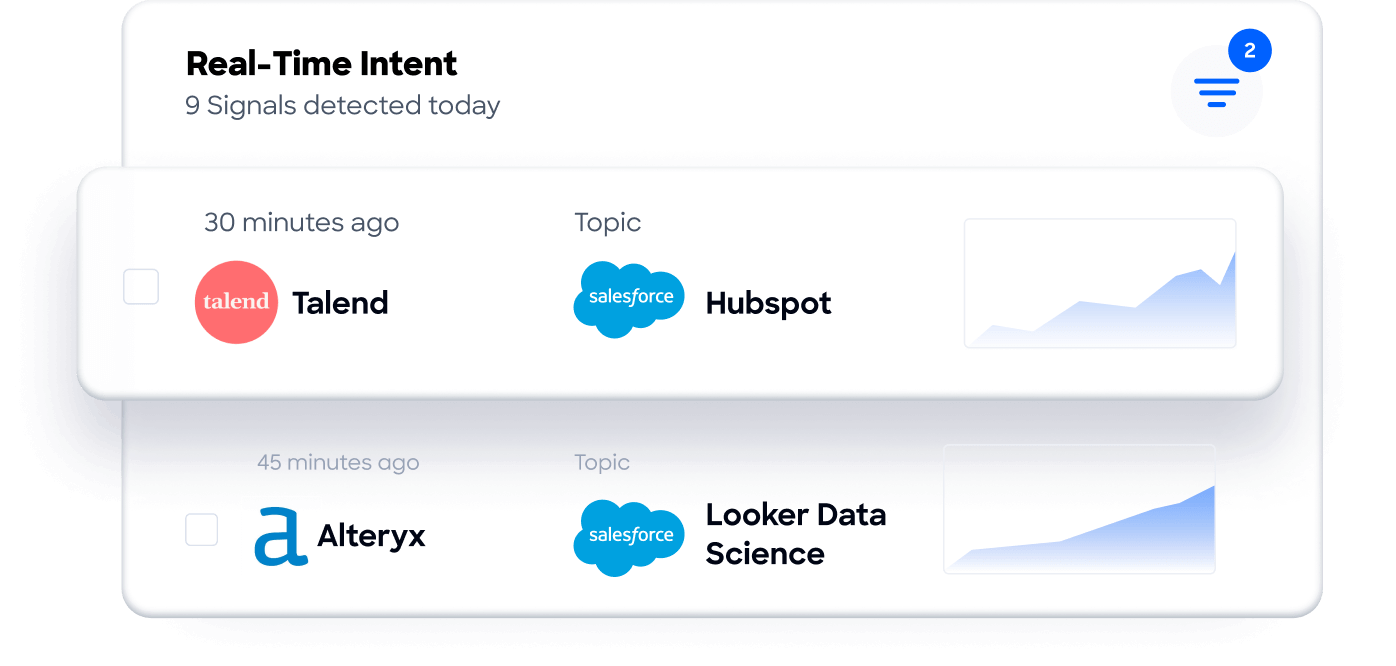
Those signals flow into Zoho CRM records, where they can trigger workflow rules, update Zia's lead scores, and surface priority accounts. Guided Intent, exclusive to ZoomInfo, identifies the research topics historically correlated with deal success in your business, so the signals calibrate to your actual win patterns rather than generic keyword thresholds.
ZoomInfo in action: ZoomInfo detects a target account researching "CRM data migration" for two weeks. The signal syncs to Zoho CRM, raises the account's score, notifies the assigned rep via SalesSignals, and enrolls the primary contact in a switching-focused Cadence, all while the buyer is still evaluating.
Website Visitor Identification: Convert Anonymous Traffic into Pipeline
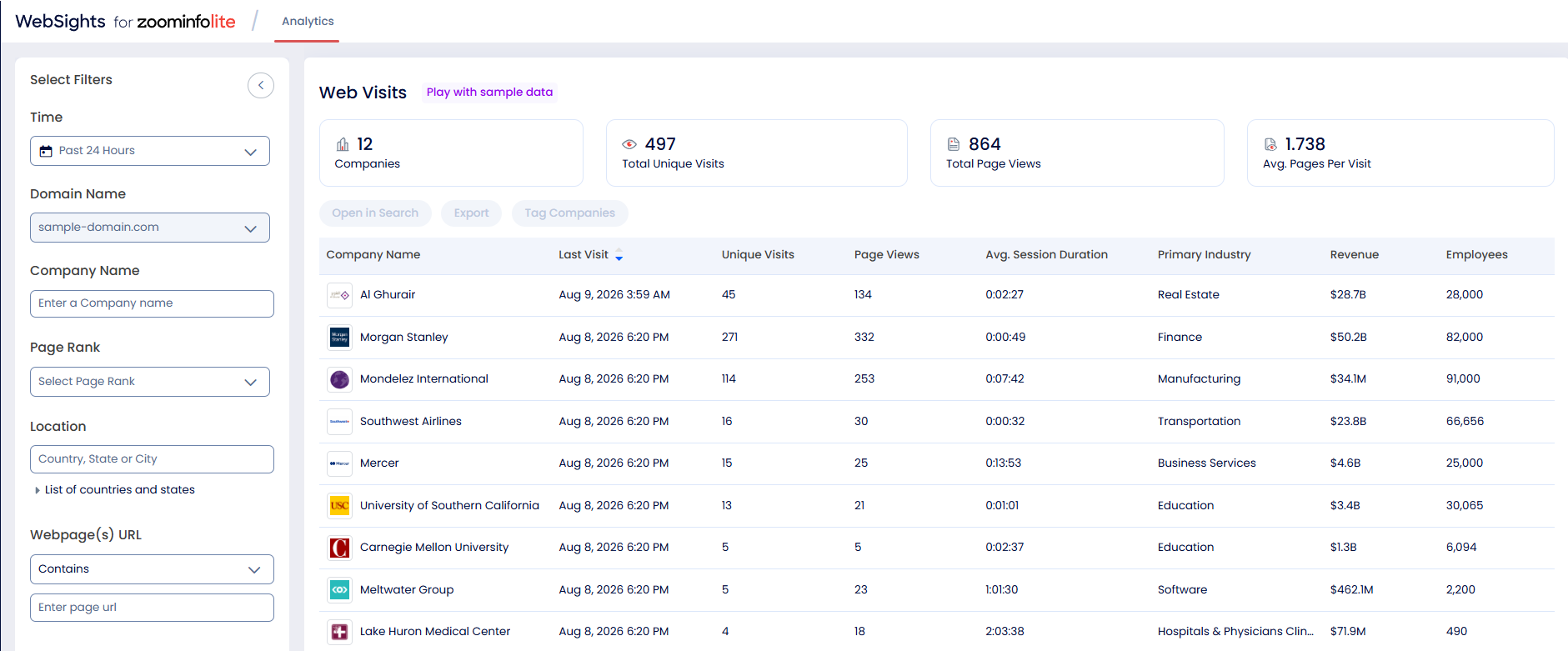
ZoomInfo WebSights resolves anonymous website traffic to companies (including buying-team identification and contact information), with Automatic Traffic Filtering separating genuine company visits from bots. Connected to Zoho CRM, the companies visiting your site and the pages they viewed surface alongside your CRM data, so high-value visitors route to sales while the interest is live.
Workflow Automation and Lead Routing
ZoomInfo attributes (company size, industry, technology stack, intent score) power Zoho CRM workflow logic for routing, scoring, and segmentation.
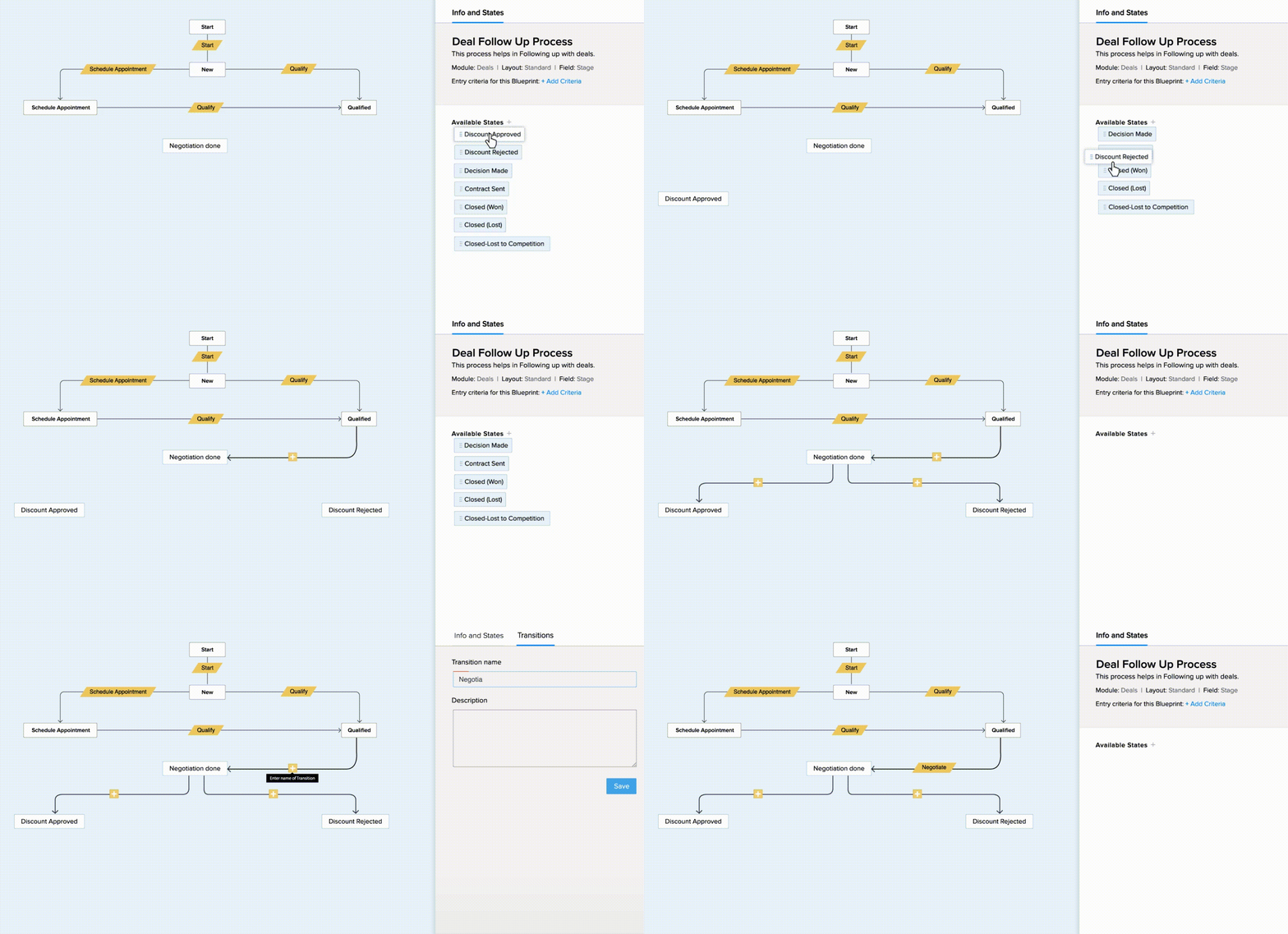
A new contact enriched by ZoomInfo routes automatically to the enterprise team at 1,000+ employees or to SMB below 100, with no manual triage. Zia's scoring models gain company-level context alongside Zoho CRM's behavioral signals, and Blueprint processes can enforce enrichment-based stage transitions.
Source: Zoho CRM
Beyond the connector itself, the enrichment feeding your Zoho CRM instance is part of a wider intelligence layer: the GTM Context Graph processes 1.5B+ data points daily and fuses ZoomInfo's B2B data with CRM records, conversations, and behavioral signals, while GTM Studio, APIs, and MCP expose the same intelligence to any tool or AI agent.
Seismic's sales team attributed 39% of active pipeline to opportunities identified or influenced by ZoomInfo signals, reporting 54% productivity gains and saving 11.5 hours per week per seller. (Seismic Case Study)
ZoomInfo Pricing
ZoomInfo uses a consumption-based pricing model with custom quotes based on usage, users, credit volume, and features.
It is organized into Sales, Marketing, and standalone product lines, each in Professional, Advanced, and Enterprise tiers; the native Zoho CRM integration is available through the ZoomInfo marketplace connector, with Advanced adding intent signals and website visitor tracking.
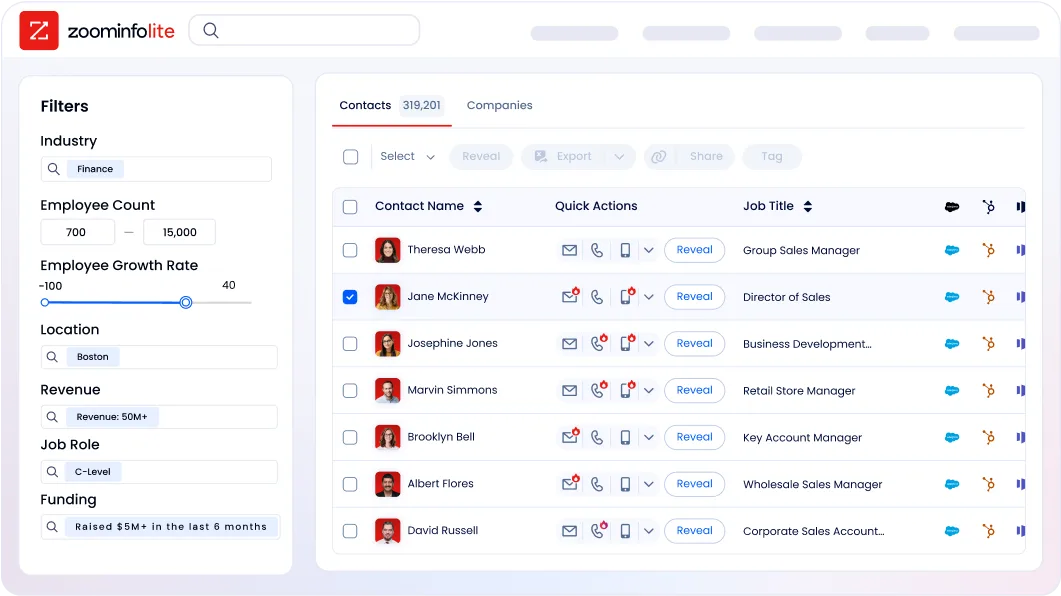
ZoomInfo Lite is a permanent free tier (no credit card, no time limit) with 10 monthly export credits, searches, the Chrome extension, and CRM integrations, making it a practical way to evaluate data quality before committing. A separate 7-day free trial covers paid features.
Who Should Use the ZoomInfo Integration?
B2B sales teams whose pipeline depends on accurate contact data: enrichment is the difference between verified direct dials and a 30% bounce rate that damages sender reputation
Revenue operations teams that need firmographic, technographic, and intent data powering Zoho CRM's Zia lead scoring, workflow routing, and segmentation instead of behavioral signals alone
Marketing teams running account-based campaigns that need dynamic lists of accounts showing buying signals right now, not static firmographic lists
2. Mailchimp: Best Zoho CRM Integration for Bidirectional Email Marketing Sync
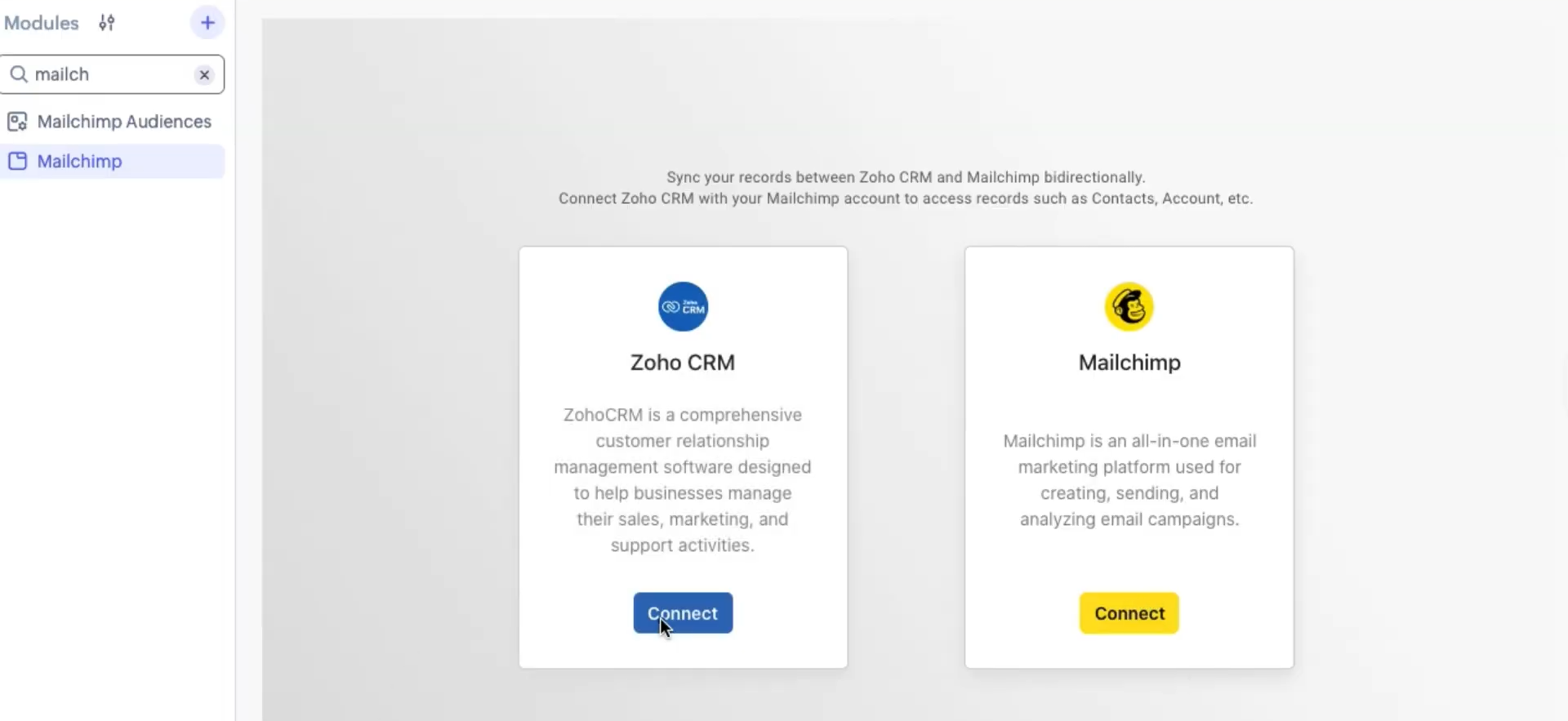
Mailchimp is an email and SMS marketing platform that integrates with Zoho CRM through a native extension on the Zoho Marketplace, synchronizing contact data bidirectionally between your CRM and email marketing audiences while feeding campaign engagement data back into contact records. Mailchimp maintains the integration as a native marketplace app.
Source: Zoho CRM
Key integration capabilities include:
Bidirectional contact sync pushing Zoho CRM contacts into Mailchimp audiences and flowing new Mailchimp subscribers back into Zoho CRM's Leads or Contacts module
Campaign engagement data (opens, clicks, unsubscribes) written back to Zoho CRM contact records, giving reps visibility into email activity before outreach
SalesSignals notifications firing in real time whenever a Mailchimp subscriber is added, removed, or updated
Conflict resolution controls letting administrators set "CRM always wins" or "Mailchimp always wins" rules to prevent data quality degradation
How Mailchimp Integrates with Zoho CRM
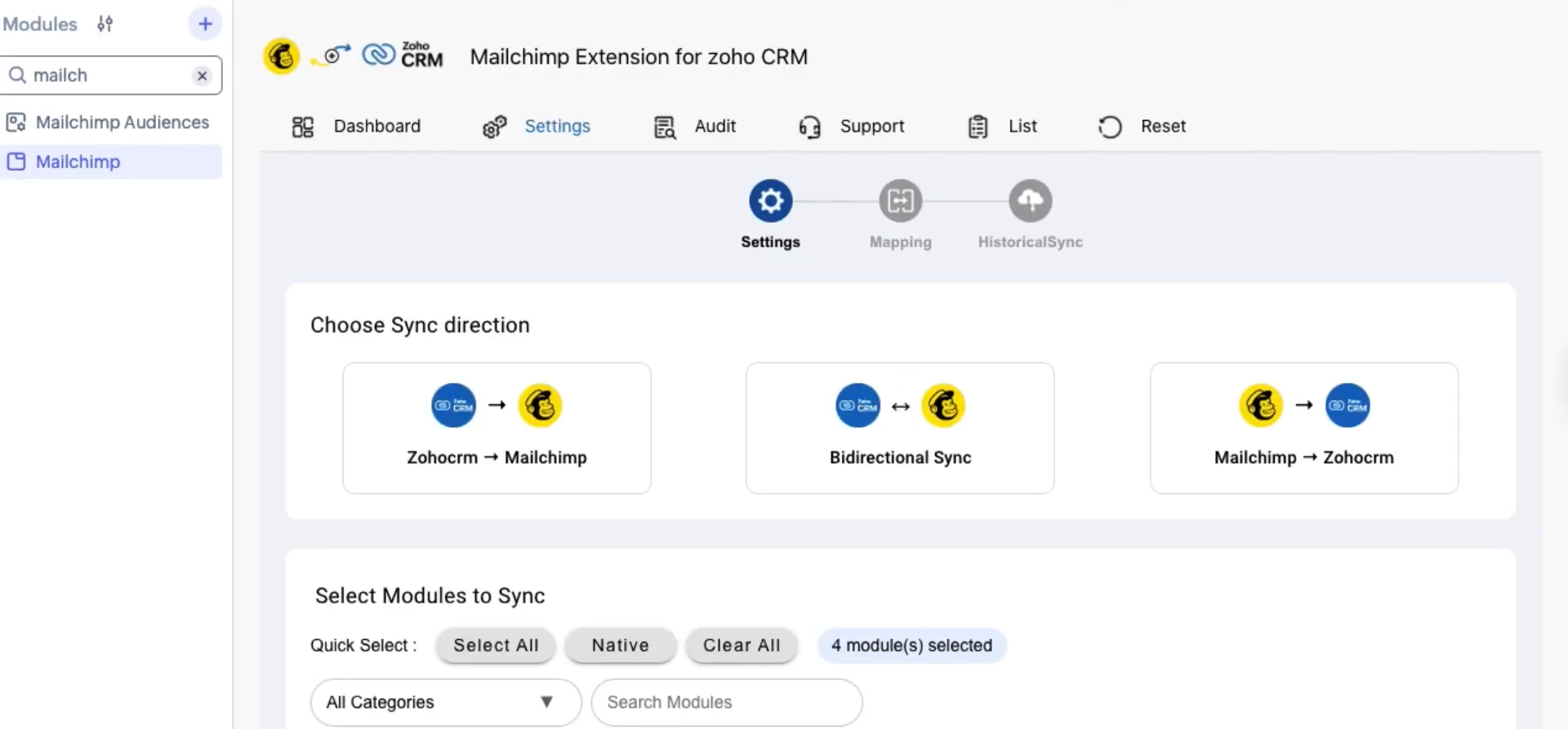
The primary integration path is the native Mailchimp Extension for Zoho CRM, installable directly from the Zoho Marketplace using OAuth-based authentication. No API keys, middleware, or developer involvement required. The integration needs at minimum a paid Mailchimp plan (Essentials and above) and any paid Zoho CRM tier from Standard upward.
Source: Zoho CRM
1. Bidirectional Contact Sync with Field Mapping.
When a new lead or contact is created in Zoho CRM, the integration pushes that record into the designated Mailchimp audience. Field mapping rules determine which Zoho CRM fields correspond to Mailchimp merge fields: first name, last name, email, job title, and company are the baseline, with custom field mapping available. The reverse flow handles new Mailchimp subscribers and creates corresponding records in Zoho CRM, eliminating the workflow where marketing collects email sign-ups and periodically bulk-exports CSVs for sales to import. Administrators designate a source of truth for conflict resolution, preventing a subscriber who updates their email in a Mailchimp preference center from overwriting a verified CRM record.
2. Campaign Engagement Data on Contact Records.
After each Mailchimp campaign send, open events, click events (with the specific link clicked), and unsubscribe actions write back to the corresponding Zoho CRM contact record. Without this integration, a rep has no visibility into whether a prospect opened the last three newsletters before a cold call, clicked through to a pricing page, or unsubscribed after a specific sequence. With the integration active, that engagement history appears on the contact's activity timeline alongside call logs, email threads, and deal stage changes.
3. Real-Time SalesSignals Notifications.
Zoho CRM's SalesSignals stream integrates with Mailchimp to surface subscriber-level events directly in the rep's workflow. When a subscriber is added, removed, or updated in the connected audience, SalesSignals fires a notification inside Zoho CRM. A rep who sees that a high-value prospect just subscribed to the company newsletter has a timely reason to reach out that same day.
4. Segmentation Alignment Between Platforms.
Zoho CRM segments and views can drive which contacts sync to which Mailchimp audiences, ensuring that marketing campaigns target the right CRM segments without manual list management. Changes to Zoho CRM contact properties (lifecycle stage, deal value, industry) can trigger audience membership updates in Mailchimp, keeping campaigns aligned with current CRM data.
Mailchimp Pricing
Mailchimp uses a contact-count-based subscription model where the base price scales with the number of contacts:
Free: $0/month (250 contacts, 500 emails/month; not sufficient for the bidirectional Zoho CRM integration)
Essentials: from $13/month at 500 contacts (10x monthly email send multiplier, A/B testing, 4-step automations; minimum plan for the Zoho CRM integration)
Standard: from $20/month at 500 contacts (advanced segmentation, behavioral targeting, up to 200 automation flows)
Premium: from $350/month at 500 contacts (unlimited contacts, unlimited seats, phone and priority support)
Pricing scales steeply by contact count. A Standard plan at 10,000 contacts runs approximately $100/month; at 50,000 contacts it approaches $270/month. Mailchimp bills based on peak contact count reached during a billing period, not the end-of-month total.
Who Should Use the Mailchimp Integration?
Teams where marketing runs email campaigns in Mailchimp and sales works leads in Zoho CRM, and the two systems currently have no automated handoff between email capture and the CRM pipeline
Sales reps who want prospect email engagement history (opens, clicks, unsubscribes) visible on the contact record before outreach, without logging into Mailchimp or requesting campaign reports from marketing
Organizations with an existing Mailchimp subscriber base that want to surface high-engagement subscribers into Zoho CRM as qualified leads without re-platforming their email marketing
3. Slack: Best Zoho CRM Integration for Real-Time Pipeline Alerts and Team Communication
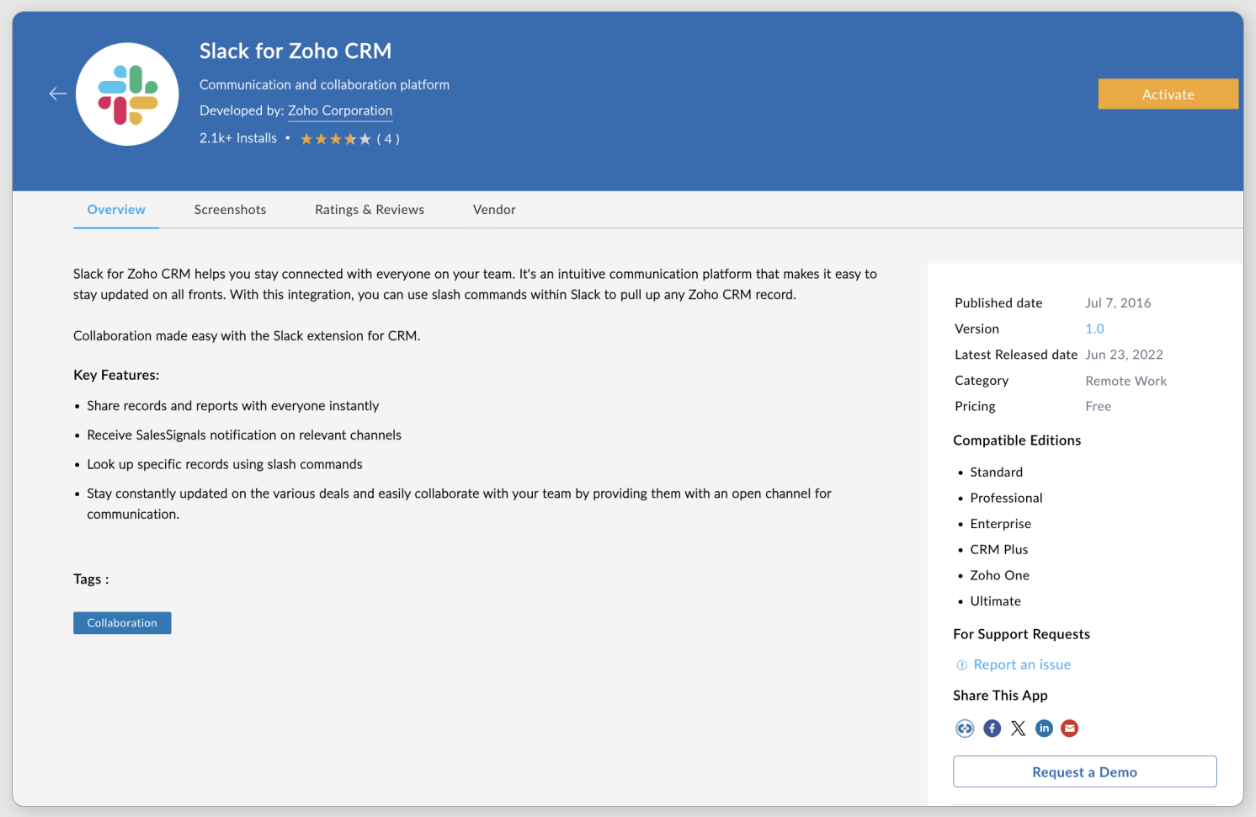
Slack is a channel-based communication platform that integrates with Zoho CRM through a native integration available on both the Slack Marketplace and Zoho Marketplace, routing deal activity, lead alerts, and pipeline updates directly into team channels. Instead of monitoring Zoho CRM dashboards throughout the day, your team gets critical events pushed to them in real time. The integration is a native first-party connector.
Source: Zoho CRM
Key integration capabilities include:
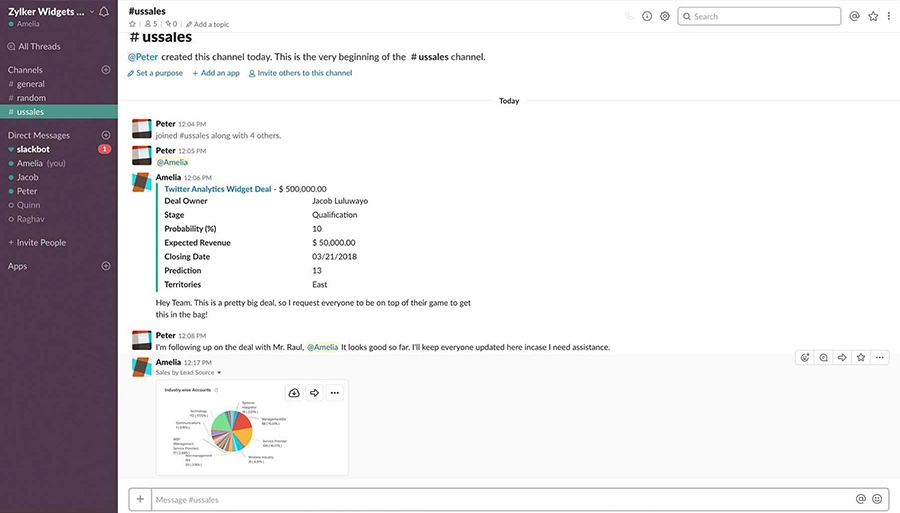
Workflow-triggered deal and lead notifications posting deal stage changes, new high-value leads, and overdue tasks into designated Slack channels with CRM context and record links
Slash commands to fetch Zoho CRM records directly inside Slack without opening the CRM
CRM reports and pipeline snapshots surfaced in Slack channels at configured intervals for recurring pipeline visibility
Deep links from Slack messages back to specific Zoho CRM records for one-click navigation
How Slack Integrates with Zoho CRM
The Zoho CRM Slack integration connects through OAuth and enables direct alert configuration from within Zoho CRM's workflow module. Both the native Zoho Marketplace extension and Zoho CRM's built-in webhook functionality support near-real-time notification delivery. Neither path requires developer code.
Source: Zoho CRM
1. Workflow-Triggered Deal and Lead Notifications.
Zoho CRM's workflow rules engine fires automated Slack messages whenever a deal advances to a defined stage, a new high-value lead is created, or a task becomes overdue. The notification names the deal, the rep, the deal value, and the new stage, with a direct link back to the Zoho CRM record. Distributed teams see pipeline changes as they happen instead of discovering them during weekly reviews. Zoho CRM's workflow insight reports let admins monitor notification rule execution and surface failures.
2. CRM Reports and Pipeline Data Surfaced on Schedule.
Zoho CRM's reporting layer produces views across nine visualization types, and the integration posts pipeline summaries to Slack channels on a configured schedule. A Monday morning post to #sales-leadership with the week's Committed, Best Case, and Open Deals breakdown from the forecasting module gives managers visibility without a separate CRM login.
3. Slash Commands for Instant CRM Lookups.
The native Slack integration supports slash commands that let reps query Zoho CRM records directly inside Slack. A rep can pull up a contact's deal history, account details, or recent activity without switching tabs, keeping the conversation context in Slack while accessing CRM data on demand.
4. Deep Links from Slack Back to CRM Records.
Each automated notification includes a direct URL to the specific Zoho CRM record that triggered the alert. For deal room use cases where a dedicated Slack channel exists per account, deep links keep the channel anchored to the CRM record: Slack captures the human discussion, while Zoho CRM holds the structured data. Teams using CRM for Everyone / Teamspaces can use these deep links to route stakeholders from legal, finance, or customer success directly into the relevant deal record.
Slack Pricing
Slack uses per-seat pricing with a Fair Billing Policy that credits inactive users:
Free: $0 (90-day message history, 10-app limit; incoming webhooks supported)
Pro: $7.25/user/month (annual) (unlimited history, unlimited apps, full Workflow Builder)
Business+: $15/user/month (annual) (SAML SSO, AI channel recaps, thread summaries, priority support)
Enterprise+: custom pricing (multi-workspace management, DLP, HIPAA compliance)
For most Zoho CRM integration use cases, the Pro plan is sufficient. Teams wanting AI-powered channel summaries of pipeline discussions need Business+.
Who Should Use the Slack Integration?
Revenue teams that already live in Slack and want CRM activity surfaced where they spend their day, rather than checking Zoho CRM for deal status changes
Teams running coordinated deals involving multiple stakeholders (legal, finance, solution engineers) who need real-time visibility into deal movement but don't hold full Zoho CRM licenses
SDR teams handling time-sensitive inbound leads that need new high-value leads surfaced within seconds of CRM record creation, not on a polling delay
4. Zapier: Best Zoho CRM Integration for Connecting Your Stack Without Code
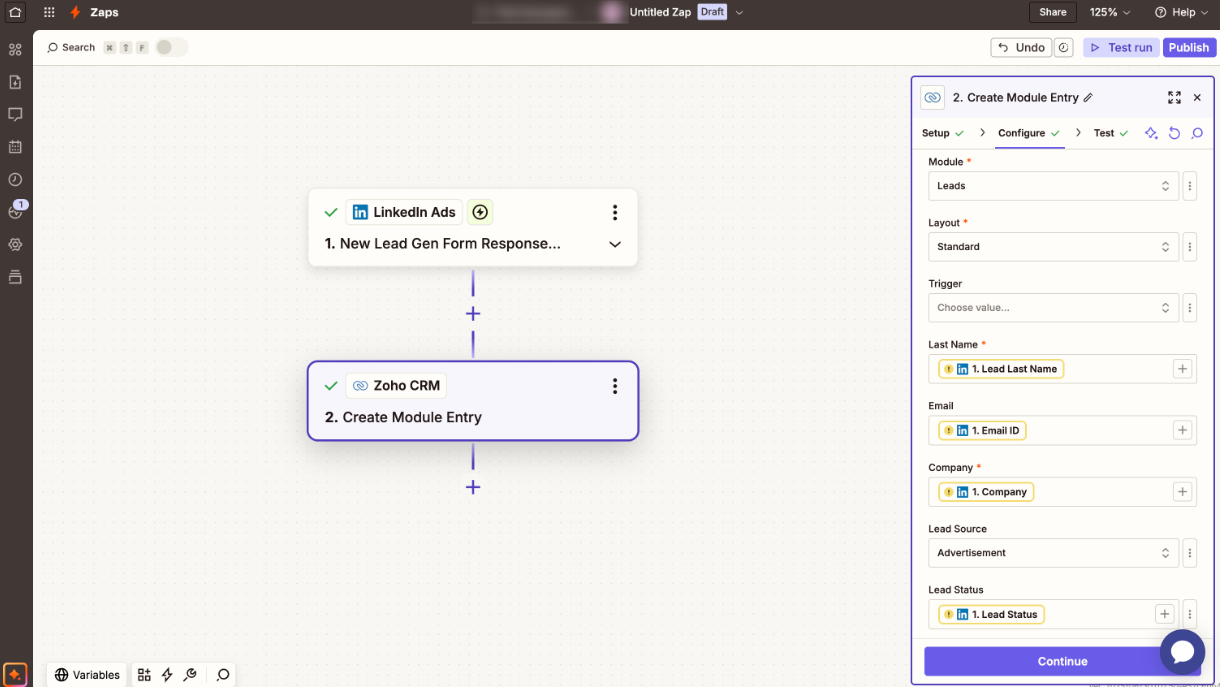
Zapier is a no-code automation platform that integrates with Zoho CRM through a native connector to extend your CRM's reach across 8,000+ applications that either lack native Zoho CRM connectors or whose native integrations don't support the specific data flow you need. It is also listed on the Zoho Marketplace.
Source: Zoho Marketplace
Key integration capabilities include:
Trigger-based automation where events in any connected app (Typeform, Stripe, Calendly) create or update Zoho CRM records
Zoho CRM triggers pushing data out to tools like Google Sheets, Asana, QuickBooks, or Mailchimp
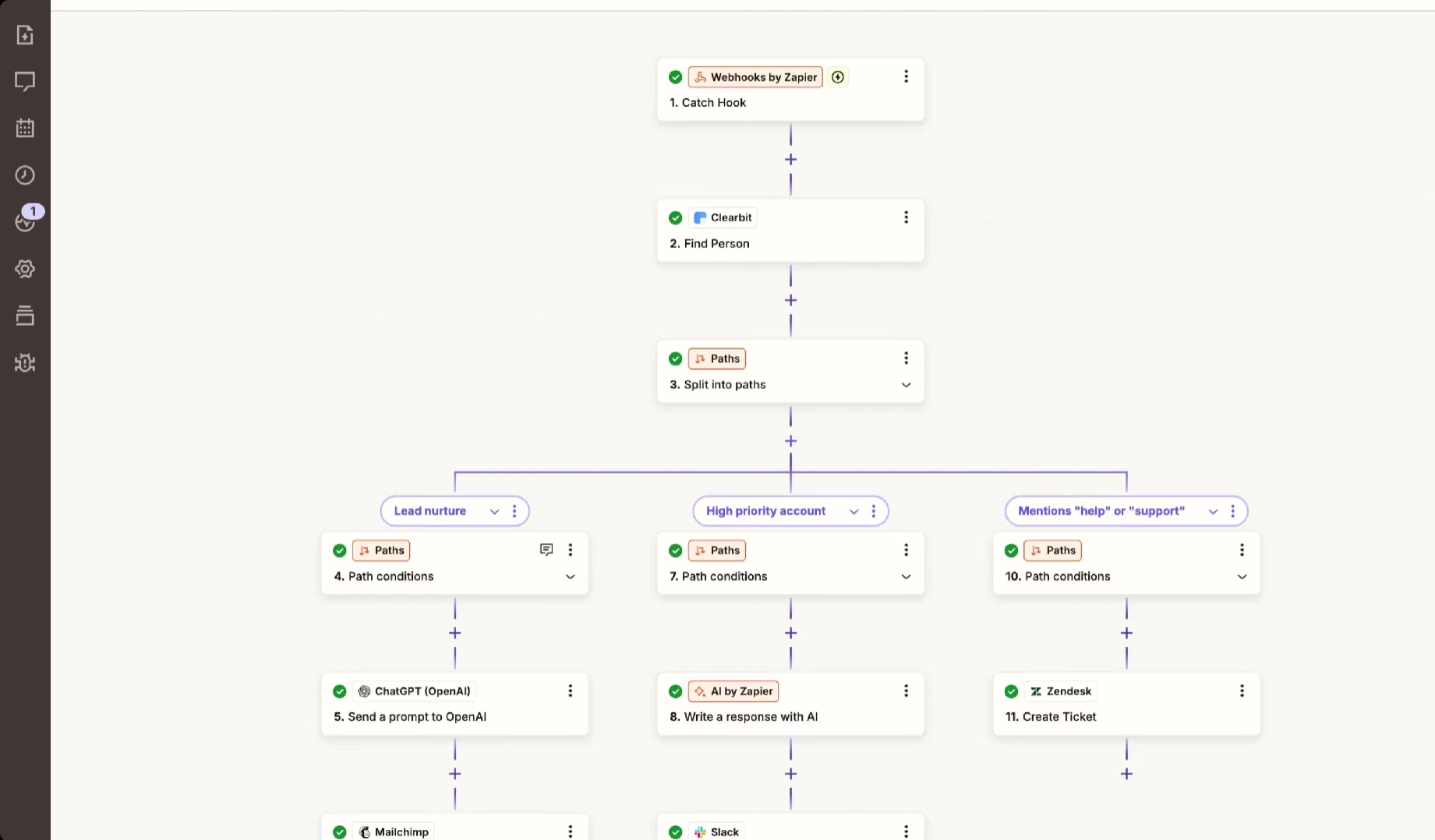
Multi-step Zaps chaining several apps with conditional logic and data transformation
Real-time trigger support on paid Zoho CRM plans, with instant webhook-based execution rather than polling delays
How Zapier Integrates with Zoho CRM
Zapier connects to Zoho CRM through OAuth authentication. Once authorized, any Zap can read from or write to Zoho CRM's Lead, Contact, Account, and Deal records, with both polling and instant webhook triggers. Instant triggers require a paid Zoho CRM subscription; free-tier accounts are limited to polling intervals.
Source: Zapier
1. Cross-Platform Event Automation.
A deal closing in Zoho CRM triggers a Zap that creates an Asana project, notifies Slack, logs to Google Sheets, and generates a QuickBooks invoice. In the reverse direction, a Calendly booking or Typeform submission creates the Zoho CRM contact and enrolls it in a Cadence. Zoho CRM stays the system of record for activity happening across the whole stack.
2. Automated Lead Ingestion from External Sources.
Zaps route new form submissions from Typeform, Facebook Lead Ads, Google Forms, and similar tools directly into Zoho CRM as leads or contacts. Zapier's Formatter step standardizes field values in transit: splitting full names, normalizing phone formats, converting dates. A Filter step gates the workflow, dropping submissions missing email addresses or flagging free email domains. Filter steps do not consume tasks, so filtering noise at volume has no cost penalty.
3. Multi-Step Workflows with Conditional Logic.
Paths route records by Zoho CRM properties (enterprise leads to high-touch workflows, SMB leads to automated nurture). Webhooks by Zapier reaches systems with no pre-built integration, and the Formatter tool fixes date, phone, and currency mismatches between systems without code.
4. Data Integrity Through Inline Transformation.
CRMs receiving input from multiple sources accumulate inconsistently formatted data over time. Zapier's Formatter step handles field splitting, text case normalization, date conversion, and phone number standardization in transit, before the Zoho CRM record is created. Zia's scoring and assignment rules work more reliably when incoming data is consistently structured.
Zapier Pricing
Zapier uses task-based pricing where each action step counts as one task:
Free: 100 tasks/month with 2-step Zaps (not practical for production Zoho CRM integrations)
Professional: starts at $19.99/month (annual) for 750 tasks, multi-step Zaps, instant triggers, and conditional logic
Team: starts at $69/month (annual) for 2,000 tasks and shared workspaces
Enterprise: custom pricing
Project your task consumption first: a 3-step Zap firing on 10,000 contact updates a month burns 30,000 tasks. Zapier allows overages at 1.25x the plan's per-task cost.
Who Should Use the Zapier Integration?
Teams using niche or legacy tools without native Zoho CRM connectors that still need them synchronized with the CRM
Non-technical marketing or operations teams that need to build and modify automations without engineering tickets
Organizations where a deal closure must cascade through project management, billing, and communication tools automatically
5. Google Analytics: Best Zoho CRM Integration for Marketing Attribution and Revenue Traceability
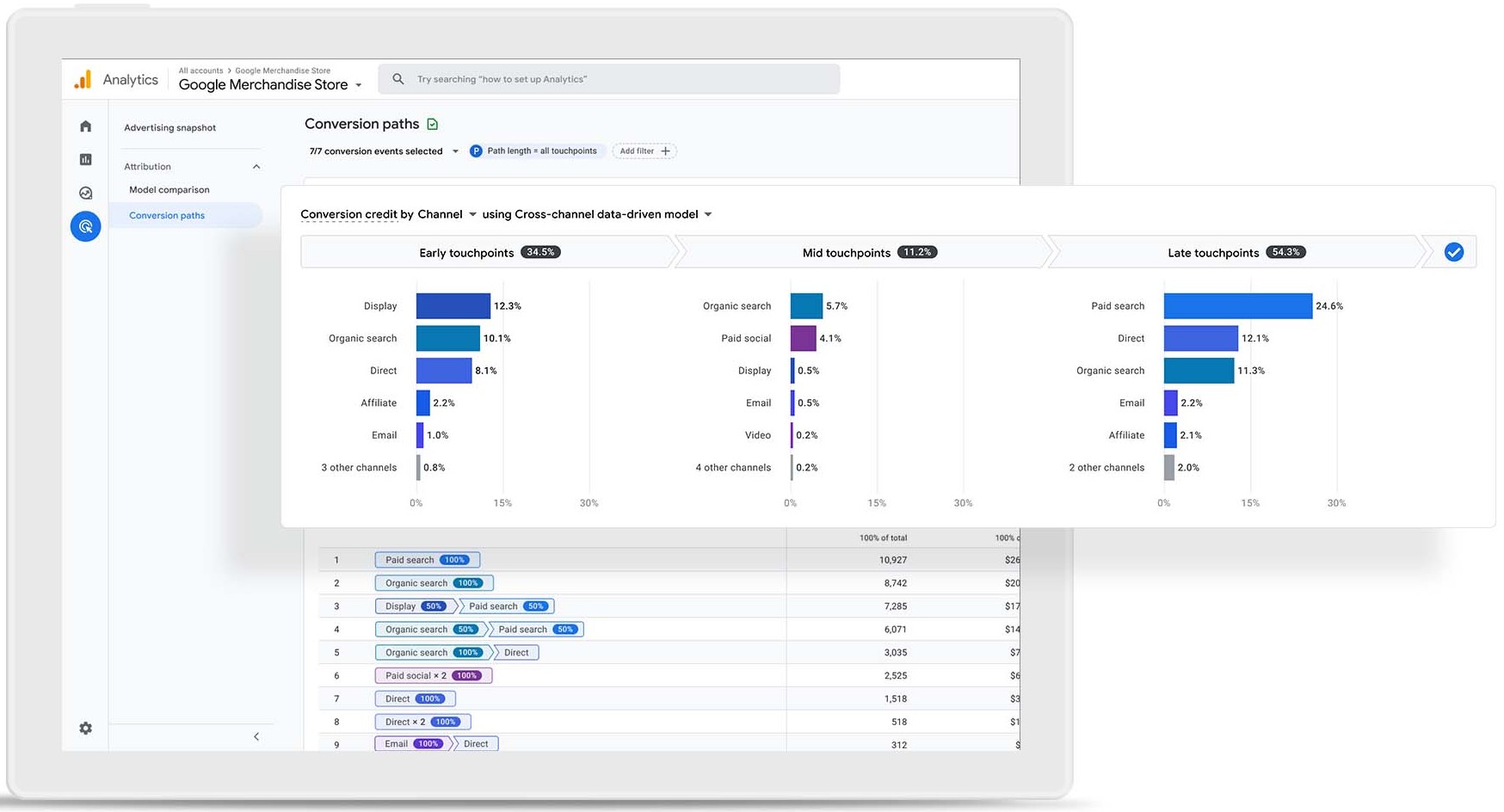
Google Analytics (GA4) is Google's web and app analytics platform that integrates with Zoho CRM to close the attribution loop between website traffic sources and closed revenue. A Google Analytics Connector is available in the Zoho Marketplace for Enterprise editions and above, with additional integration paths through Google Tag Manager UTM capture and Zapier automation.
Source: Google Analytics
Key integration capabilities include:
UTM attribution data (channel, campaign, keyword, medium) written directly to Zoho CRM lead records at form submission
Closed-loop revenue attribution inside Zoho CRM, showing which traffic sources produce the most leads, opportunities, and closed-won deals
Returning visitor session data appended to existing Zoho CRM contact records, building a cumulative engagement history
Near-zero additional cost for most teams, since the standard GA4 tier is permanently free
How Google Analytics Integrates with Zoho CRM
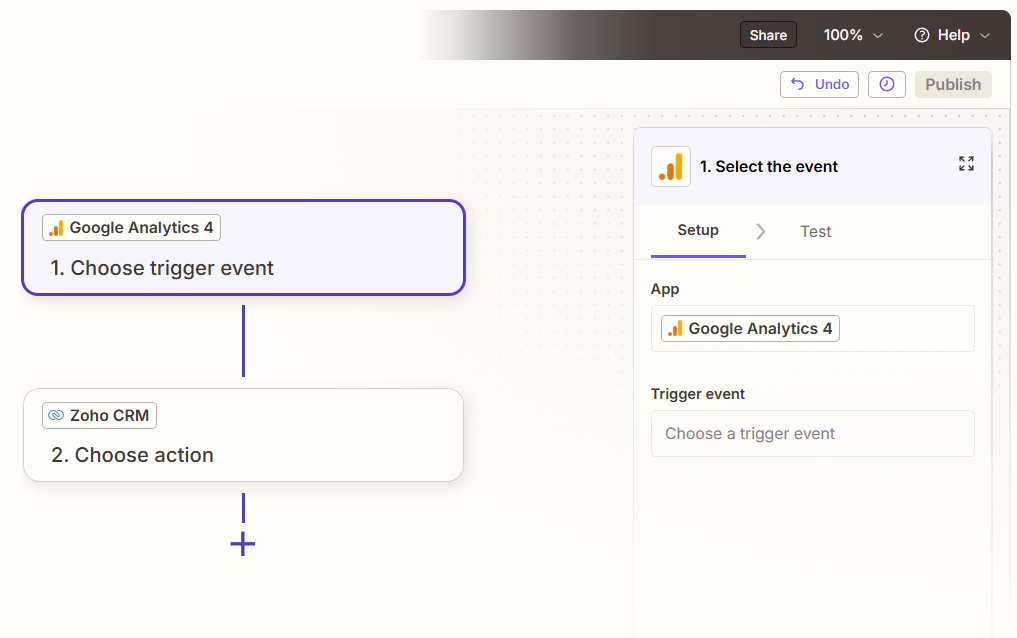
The most common integration method uses hidden form field UTM capture via Google Tag Manager. When a visitor arrives via a tracked URL, GTM reads the UTM parameters and injects them into hidden fields on your lead capture form. On submission, those values map directly to custom fields on the Zoho CRM lead record. The Zoho Marketplace connector provides a more structured approach for Enterprise editions. Zoho Flow and Zapier offer additional middleware paths for teams that prefer a no-code connector layer.
Source: Zapier
1. UTM Attribution Written to Lead Records.
Every lead arriving in Zoho CRM from a website conversion carries its original marketing source: the specific channel (paid search, email, organic social), campaign name, and keyword. A visitor arriving via a Google Ads campaign targeting "zoho crm alternatives" and submitting a contact form has their lead record show utm_source: google, utm_medium: cpc, utm_campaign: zoho-alternatives-q3. Sales reps see the originating channel before the first call, and marketing has attribution data that persists into the CRM for downstream reporting.
2. Closed-Loop Revenue Reporting Inside Zoho CRM.
With UTM source data stored as custom fields on Zoho CRM records, Zoho CRM's native reporting produces revenue attribution reports without exporting to a spreadsheet. A custom report grouping deals by utm_source or utm_campaign shows which channels produce the most pipeline and revenue, not just clicks or leads. A closed-won deal worth $24,000 originating from an organic blog post appears in the same report as a deal worth $8,000 from a paid campaign.
3. Returning Visitor Session Data on CRM Records.
When a contact in Zoho CRM returns to the website and triggers a new GA4 event, their CRM record can update with the new session source. A contact who originally came via Google Ads and returns six weeks later via organic search has that second-visit source appended. Over multiple return visits, this creates a behavioral engagement timeline inside the CRM, useful for longer sales cycles where prospects engage at multiple buyer journey stages.
4. Event-Based CRM Record Creation.
Beyond form submissions, the integration can create or update Zoho CRM records based on GA4 events: a chat initiation, a call-tracking button click, or a pricing page visit followed by a whitepaper download. When no matching CRM record exists, the integration creates a new lead with session source data. When a match is found (by email or phone), it appends new session data to the existing record rather than creating a duplicate.
Google Analytics Pricing
Google Analytics operates on a permanently free standard tier with no user limits, no time limit, and no credit card required:
Standard (GA4): free, with full UTM tracking, event-based data model, and conversion reporting
Analytics 360 (Enterprise): contact Google Sales for pricing (removes data sampling, extends data retention to 50 months)
For virtually every Zoho CRM implementation, the free GA4 standard tier supports the UTM attribution and closed-loop reporting use case.
Who Should Use the Google Analytics Integration?
Marketing teams running campaigns across multiple channels that currently have no way to see which channels produce closed revenue inside Zoho CRM
Organizations generating leads through web forms that want every lead record pre-populated with its originating UTM source, campaign, and keyword
Teams needing closed-loop revenue attribution without purchasing a dedicated attribution platform, using GA4's free tier combined with Zoho CRM custom fields
6. Asana: Best Zoho CRM Integration for Automating Post-Sale Project Handoffs
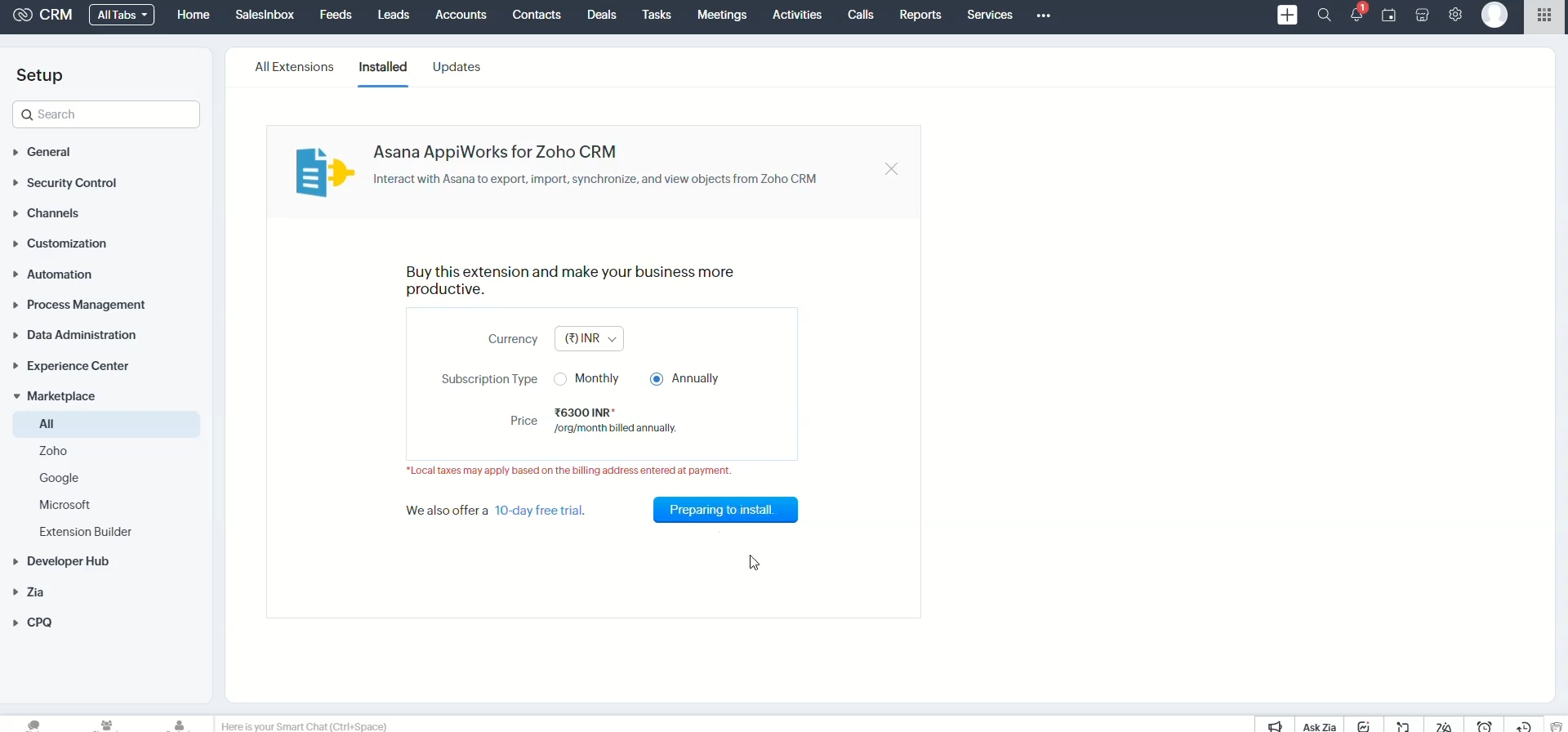
Asana is a work management platform that integrates with Zoho CRM through a marketplace app on the Zoho Marketplace, with additional connectivity via Zapier and Zoho Flow. The integration eliminates the manual friction between a closed deal and a live delivery project.
Source: Zoho Marketplace
Key integration capabilities include:
Automatic Asana project creation triggered by Zoho CRM deal closure, using a predefined task template with team assignments and deadlines already configured
Customer context from CRM records (contact names, deal size, account notes) pushed directly into the Asana project at creation time
Asana task completions synced back to Zoho CRM as activity log entries, giving account managers post-sale visibility without a separate Asana login
Milestone events triggering CRM field updates, so delivery status and account health are visible inside the CRM pipeline view
How Asana Integrates with Zoho CRM
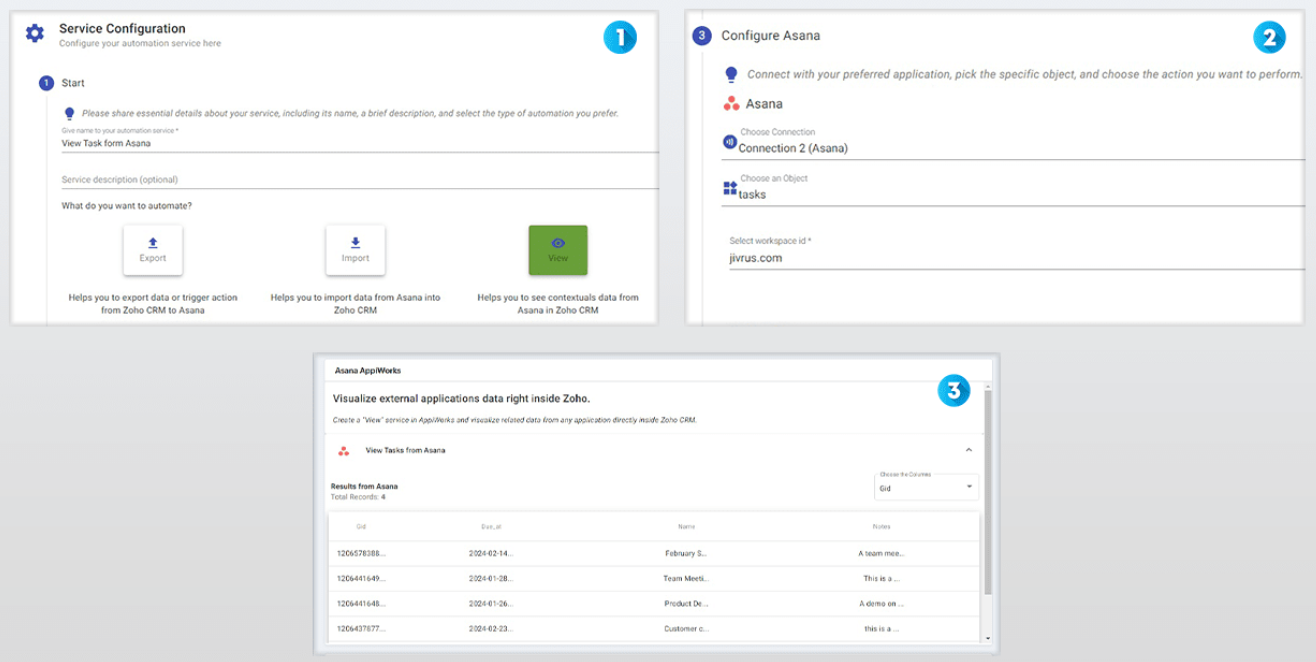
Three practical integration paths exist. The Asana AppiWorks extension on the Zoho Marketplace provides bidirectional data sync with point-and-click configuration. Zoho Flow offers deeper control over field mapping and conditional logic. Zapier provides a third-party fallback for teams already using it.
Source: Zoho Marketplace
1. Automatic Project Creation on Deal Closure.
When Zoho CRM fires an event on deal stage change, the connected Asana workflow clones a predefined project template. The template carries complete task structures: onboarding checklists, kickoff call tasks, deliverable milestones, and approval dependencies. Team assignments and deadline offsets (kickoff call seven days after project creation date) come preconfigured, so the project is immediately actionable. Asana's template system supports assigning tasks to roles rather than named individuals, so the template stays generic while specific team members are assigned at creation time.
2. Customer Context Embedded at Project Creation.
The integration writes Zoho CRM field values (account name, deal size, contact email, contract type, assigned account manager) into the Asana project description and custom fields. Delivery team members see full CRM context directly inside Asana without needing Zoho CRM access. For organizations where delivery staff don't hold CRM licenses, this context pass-through is the difference between delivery teams starting informed and starting blind.
3. Task Completions Synced Back to Zoho CRM.
When Asana webhooks fire on task or milestone completion events, a connected Zoho Flow action creates corresponding activity log entries in Zoho CRM against the relevant contact, account, or deal. An account manager sees, directly inside Zoho CRM, when the customer's onboarding project passed kickoff, when a deliverable was marked complete, or when an approval was signed off.
4. Milestone Events Triggering CRM Field Updates.
Major Asana project milestones (like "Go-Live Complete" or "Kickoff Meeting Done") drive specific field value changes in Zoho CRM: setting delivery status to "Active," advancing an onboarding stage field, or updating a health score custom field. Delivery data flows directly into Zoho CRM's reporting layer, making account health visible at the deal record level.
Asana Pricing
Asana uses a per-seat subscription model billed monthly or annually:
Starter: $10.99/user/month (annual) with unlimited tasks, projects, automations, and custom fields
Advanced: $24.99/user/month (annual) with Goals, portfolios, workload management, structured Approvals, and advanced integrations
For the core Zoho CRM integration use case (project creation on deal closure, CRM context embedding, task completion syncing), the Starter plan is sufficient for most delivery teams. Advanced becomes relevant for portfolio-level visibility across multiple customer projects or formal client sign-off workflows.
Who Should Use the Asana Integration?
Organizations where closing a deal immediately triggers a delivery, onboarding, or implementation cycle managed by a separate project team, and the handoff is currently manual or slow
Delivery teams that don't have Zoho CRM access but need customer context (deal size, account notes, key contacts) to start work the moment a deal closes
Account managers who need live visibility into post-sale project progress inside Zoho CRM without holding an Asana license or scheduling status calls with the delivery team
7. QuickBooks: Best Zoho CRM Integration for Automated Invoicing and Financial Record Sync
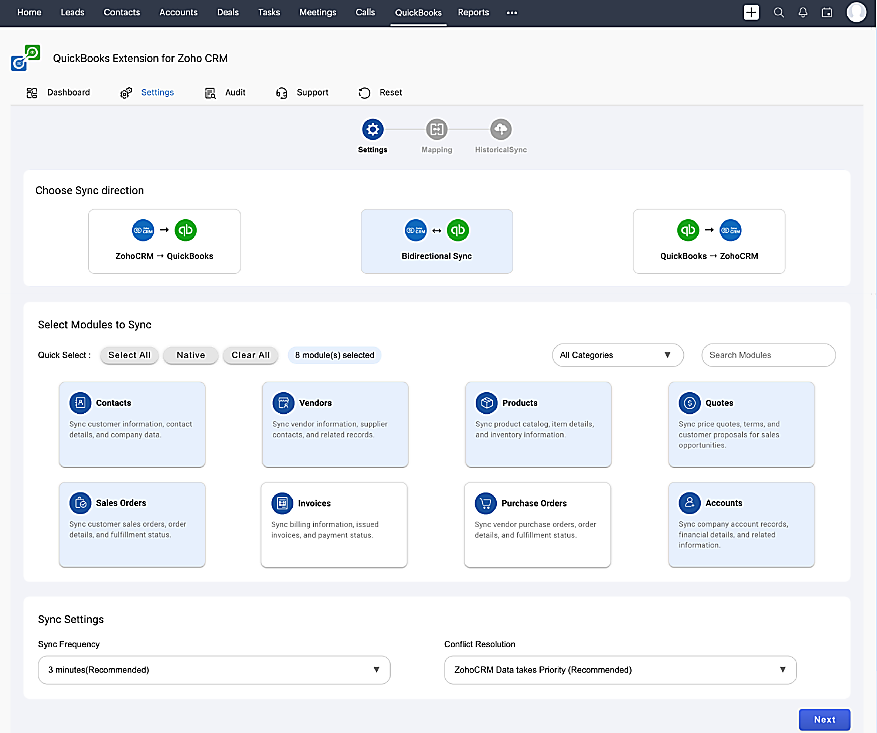
QuickBooks is Intuit's cloud-based accounting platform that integrates with Zoho CRM through an official extension in the Zoho Marketplace, available for Enterprise editions and above. The integration closes the gap between winning a deal in your CRM and generating the invoice that gets you paid. It is a native marketplace extension.
Source: Zoho Marketplace
Key integration capabilities include:
Automatic invoice creation in QuickBooks when a deal is marked won in Zoho CRM, with customer, product, and amount data pre-populated
Bidirectional customer sync so records created in either platform propagate to the other automatically
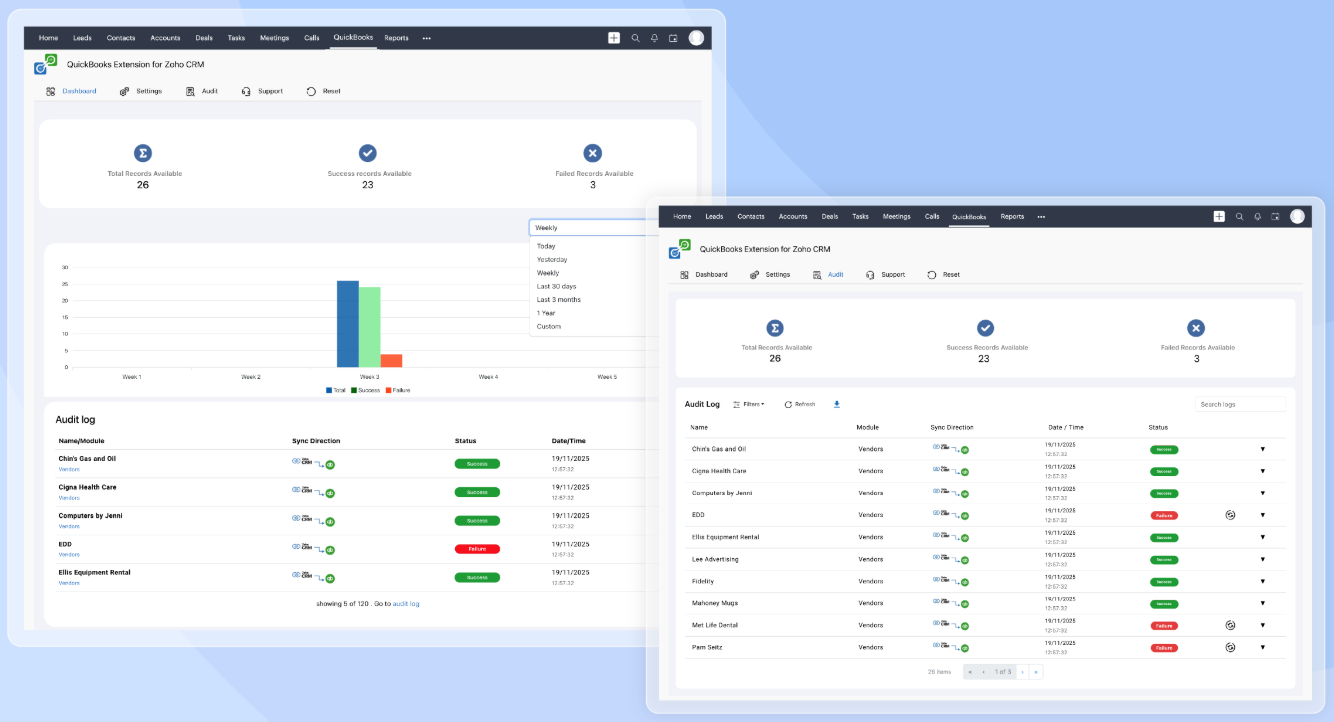
Payment status (outstanding invoices, received payments, overdue balances) visible inside Zoho CRM account records
Product, sales order, and purchase order sync between both platforms
How QuickBooks Integrates with Zoho CRM
The QuickBooks Extension for Zoho CRM connects through QuickBooks Online's OAuth 2.0 authorization flow with point-and-click configuration. Administrators map fields between Zoho CRM modules (Contacts, Accounts, Deals, Products) and QuickBooks counterparts (Customers, Invoices, Items), configure which deal stage triggers invoice creation, and set the sync schedule down to every three minutes. For users on editions below Enterprise, Zapier and Zoho Flow provide alternative connector paths.
Source: Zoho Marketplace
1. Deal-to-Invoice Automation.
When a deal reaches "Closed Won" in Zoho CRM, a configured workflow triggers invoice creation in QuickBooks with customer, product, and amount data pre-populated from the CRM record. The deal's associated contact maps to the QuickBooks customer; the products map to QuickBooks items; and the deal value maps to the invoice total. Finance receives a structurally correct invoice that needs only review, not manual population. This compresses a multi-step handoff into an automated event.
2. Bidirectional Customer Sync.
A new Zoho CRM contact who converts to a customer after a deal is won gets created in QuickBooks without additional data entry. A customer added directly in QuickBooks appears in Zoho CRM so reps can follow up on upsell opportunities. The sync covers core contact fields: name, company, email, phone, and billing address. Sales and finance stop operating off divergent customer lists.
3. Payment Status in Zoho CRM.
Outstanding invoice balances, received payments, and overdue amounts from QuickBooks appear within the associated Zoho CRM account record. Account managers see financial context directly from the CRM before renewal conversations and expansion proposals, without logging into QuickBooks or asking finance for account balances. Proposing an upsell to an account with three overdue invoices is a different conversation than proposing one to an account with a clean payment record.
4. Product and Order Sync.
The integration synchronizes product catalog entries, sales orders, and purchase orders between Zoho CRM and QuickBooks. Product names, pricing, and order details referenced in CRM quoting and accounting invoicing stay aligned, eliminating the catalog discrepancies that accumulate when sales and finance maintain separate product lists.
QuickBooks Pricing
QuickBooks Online operates on a flat-fee subscription model with users bundled into each tier. A 50% promotional discount applies to the first three months, and all plans include a 30-day free trial:
Simple Start: $38/month (1 user + 2 accountants; automated bookkeeping, unlimited invoicing)
Essentials: $75/month (3 users + 2 accountants; A/R and A/P reporting, time tracking)
Plus: $115/month (5 users + 2 accountants; inventory tracking, purchase orders, project profitability)
Advanced: $275/month (25 users + 3 accountants; custom reporting, batch invoicing, Finance AI agent)
For most SMBs using the Zoho CRM integration, the Plus plan is the minimum tier that makes full use of the product and purchase order sync. Simple Start and Essentials users can still access deal-to-invoice automation and contact sync but lack inventory tracking on the QuickBooks side.
Who Should Use the QuickBooks Integration?
SMBs where sales closes deals in Zoho CRM and finance generates invoices in QuickBooks, and the manual re-entry step between systems introduces errors and delays
Account managers who need financial context (payment history, outstanding balances) before renewal or expansion conversations, available inside Zoho CRM without requiring QuickBooks access
Product-based businesses where quoting in Zoho CRM and invoicing in QuickBooks reference the same catalog, and discrepancies are causing downstream errors
Final Verdict
The best Zoho CRM integrations close gaps your CRM cannot fill on its own:
ZoomInfo: verified B2B data, buyer intent, and go-to-market intelligence enriching every record; the highest-impact integration on this list if your pipeline depends on data quality
Mailchimp: bidirectional email marketing sync with campaign engagement data flowing back to contact records
Slack: pipeline alerts and team coordination surfaced where your team already works
Zapier: no-code reach into 8,000+ apps where native connectors stop
Google Analytics: closed-loop attribution connecting marketing channels to closed revenue
Asana: post-sale project handoffs triggered automatically from deal closure
QuickBooks: deal-to-invoice automation with bidirectional financial record sync
These integrations also compound: you might run ZoomInfo for enrichment and intent, Mailchimp for email marketing sync, Slack for notifications, and QuickBooks for invoicing on the same Zoho CRM instance, each adding a layer of intelligence or automation that makes the others more valuable.
If you connect just one, make it the data layer everything else depends on. ZoomInfo's native Zoho CRM connector enriches your CRM records with verified contact data and live intent signals, and ZoomInfo Lite is a permanent free tier so you can see what verified data does for your pipeline before spending anything.
Frequently Asked Questions
How many integrations does Zoho CRM support?
Zoho CRM's Marketplace offers over 1,100 ready-to-use app integrations spanning marketing, sales, finance, telephony, communications, and document management. Beyond the marketplace, Zoho CRM's REST API (V8), GraphQL API, webhooks, and Zoho Flow support custom integrations with virtually any platform that has an API. The Zoho ecosystem itself includes 55+ natively integrated applications covering the full business stack.
Do Zoho CRM integrations work on the free plan?
Zoho CRM's free plan (up to 3 users) includes basic API access with 5,000 API credits per day, which supports some third-party integrations. However, many marketplace extensions and advanced integration features (SalesSignals, webhooks, workflow-triggered notifications) require paid plans starting at Standard ($14/user/month annual). The QuickBooks native extension requires Enterprise ($40/user/month) or above. Check each integration's documentation for tier-specific requirements.
How does Zoho CRM's API rate limiting work?
Zoho CRM uses a credit-based system with a rolling 24-hour window. Most API operations cost 1 credit. Daily credit allowances scale by edition: Free gets 5,000 credits/day, Standard gets 50,000 base plus 250 per user (up to 100,000), and Enterprise gets 50,000 base plus 1,000 per user (up to 5,000,000). Concurrency limits also apply: Free allows 5 simultaneous calls, Enterprise allows 20. Teams running high-volume integrations should monitor usage through Zoho CRM's built-in API dashboard.
Can I connect Zoho CRM to tools that are not in the Marketplace?
Yes. Zoho CRM's REST API covers the full CRM data model and supports custom integrations with any system that can make HTTP requests. For no-code solutions, Zapier connects Zoho CRM to 8,000+ apps, and Zoho Flow provides first-party workflow automation across connected applications. Zoho CRM's webhook functionality also enables event-driven connections to any system with a webhook endpoint.
Does connecting multiple integrations cause performance issues in Zoho CRM?
Each integration operates independently through its own API connection and sync schedule, so running several simultaneously does not create conflicts. High-volume integrations consume API credits from the shared daily pool, so teams running large-scale operations should monitor total credit usage across all connected integrations. Enterprise and Ultimate plans provide the highest credit allowances and concurrency limits for organizations running multiple integrations at once.
Is Zoho CRM secure enough for regulated industries?
Zoho CRM holds ISO 27001, ISO 27701, SOC 2 Type 2, and HIPAA certifications, and supports GDPR compliance with a published Data Processing Addendum. The platform operates its own data centers globally with biometric access, AES-256 encryption at rest, and field-level encryption available on Enterprise and above. Enterprise features include SSO, MFA via Zoho OneAuth, IP allowlisting, audit logs, and role-based permissions. Zoho operates a no-advertising-revenue model and does not sell customer data.
What is the best way to enrich Zoho CRM contact data for B2B teams?
Integrating a dedicated B2B data platform provides the most thorough enrichment. ZoomInfo's native Zoho CRM connector automatically appends verified emails, direct-dial phone numbers, firmographic data, technographic profiles, and buyer intent signals to your CRM records. The enrichment runs continuously through a verification pipeline backed by 300+ human researchers, covering 500 million contacts and 100 million companies. Zoho CRM's Zia AI includes enrichment from emails and web data, but for teams where pipeline depends on data accuracy, connecting ZoomInfo closes the gap between what Zoho CRM captures natively and what your reps need to act on.
Keep exploring:
