
Salesforce is the world's #1 CRM by IDC revenue share, serving over 150,000 companies across sales, service, marketing, commerce, and data intelligence. Its CRM captures every deal stage change, form submission, service interaction, and campaign touchpoint across your go-to-market operation.
But a CRM only knows what happens inside it.
Salesforce tracks the pipeline your reps build and the cases your agents resolve. On its own, it cannot verify whether a prospect's phone number still connects, detect which accounts are researching your category this week, turn CRM segments into email campaigns, or trace a closed deal back through the financial records your accounting team keeps.
The right integrations close those gaps. They feed your CRM verified data it cannot generate on its own, activate outreach from live segments, automate workflows across disconnected tools, and give every team visibility into the full revenue cycle.
This guide covers the strongest integration for each job Salesforce users most commonly need done:
Enrich and verify B2B contact data, and surface accounts that are actively in-market
Turn CRM records into live team collaboration spaces with real-time deal visibility
Sync CRM segments into targeted email and SMS campaigns
Visualize pipeline data alongside business metrics in interactive dashboards
Connect the rest of your stack without writing code
Execute agreements and manage contracts without leaving the CRM
Sync closed deals into accounting records and surface payment status on CRM records
Each section walks through how the integration connects with Salesforce, what data flows between the platforms, pricing, and who benefits most.
Best Salesforce Integrations at a Glance |
|---|
Best Salesforce Integration for B2B Data Enrichment and Go-to-Market Intelligence. Enriches Salesforce records with verified contact data, buyer intent signals, technographic intelligence, and company attributes from ZoomInfo's B2B database, giving your team accurate data to prospect with and signals to prioritize accounts that are actively in-market. |
Best Salesforce Integration for Real-Time Team Collaboration and CRM Visibility. Turns static CRM records into live collaboration spaces with bidirectional field editing, real-time change alerts, and AI-generated summaries, so your team coordinates on deals and cases without leaving their workspace. |
Best Salesforce Integration for Email Marketing and Campaign Execution. Syncs contacts, leads, and campaign membership bidirectionally and writes engagement metrics back to CRM records, enabling targeted email campaigns built from live Salesforce segments without manual list exports. |
Best Salesforce Integration for Business Intelligence and Pipeline Analytics. Pulls the full Salesforce data model into interactive dashboards with no row cap, enabling pipeline coverage ratios, stage velocity metrics, and cross-system reporting that Salesforce's native report builder cannot produce. |
Best Salesforce Integration for No-Code Workflow Automation. Extends Salesforce's reach to 8,000+ applications with no-code automation, supporting bidirectional data sync, multi-step workflows, and conditional routing between your CRM and tools that lack native Salesforce connectors. |
Best Salesforce Integration for Agreement Execution and Contract Lifecycle Management. Embeds the full agreement workflow inside Salesforce records, from document generation and signature collection through contract lifecycle management, eliminating the tab-switching that slows deal cycles. |
Best Salesforce Integration for Accounting and Finance Data Sync. Syncs customers, invoices, products, and payments between CRM and accounting, converting closed deals into billing records automatically and surfacing payment status on Salesforce records so reps never have to ask finance whether a customer has paid. |
What Is Salesforce?
Salesforce is a customer platform that unifies sales, service, marketing, commerce, and data teams on a single CRM.
The company calls itself "the #1 AI CRM" and the operating system for the "Agentic Enterprise."
Salesforce generated $41.5 billion in revenue in FY26, has held the #1 CRM market share position by IDC revenue data for over a decade, and has been named a Gartner Magic Quadrant Leader for Sales Force Automation 19 years running.
Its Customer 360 suite covers Sales Cloud, Service Cloud, Marketing Cloud, Commerce Cloud, Data Cloud, and the Agentforce AI platform, all sharing unified customer data.
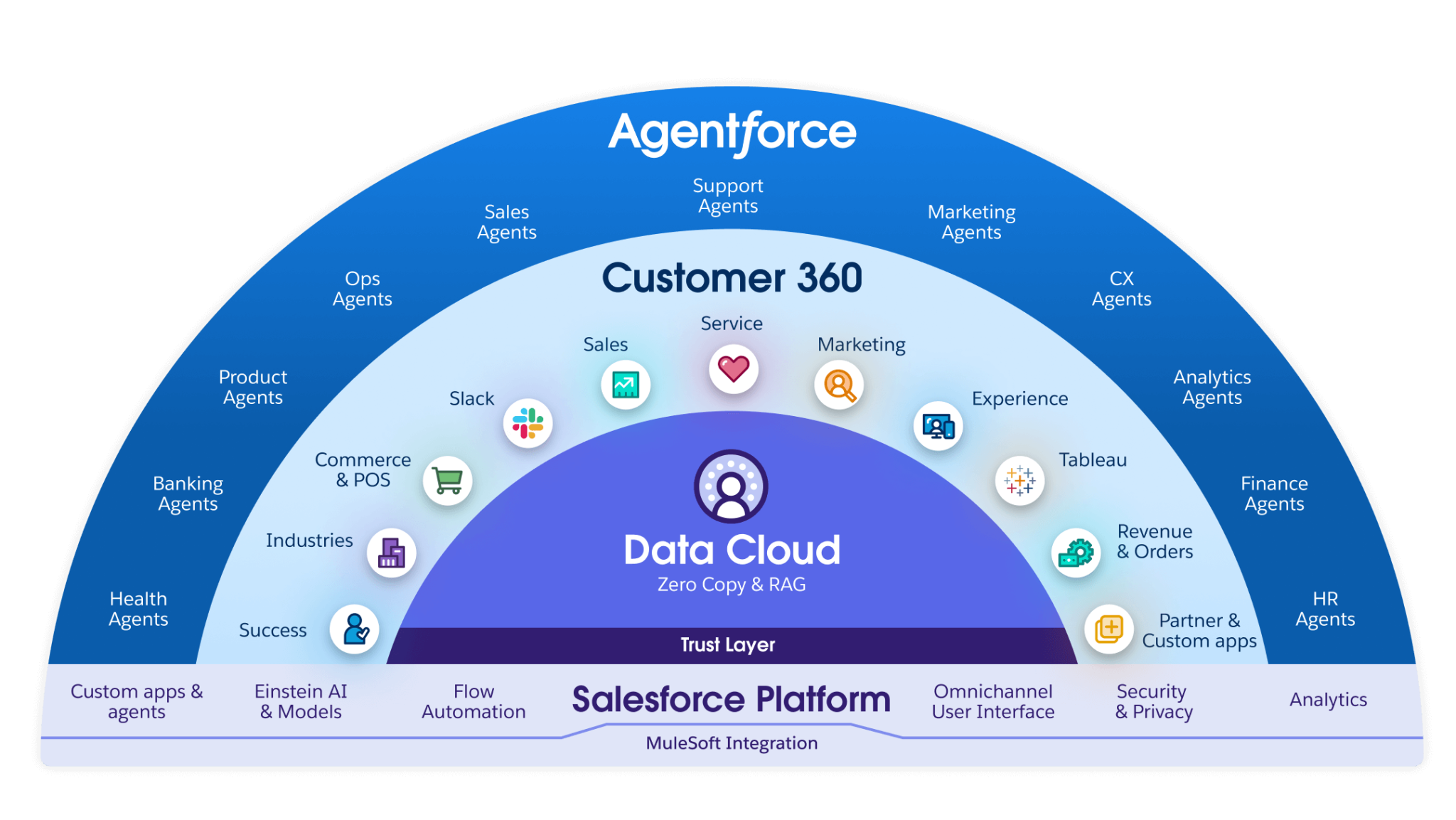
Source: Attention CRM Consulting
Salesforce's integration ecosystem is a defining strength.
AppExchange hosts 9,000+ partner apps with 14+ million installs, and 91% of customers use at least one AppExchange app. On the technical side, Salesforce offers an API portfolio spanning REST API, SOAP API, Bulk API 2.0, GraphQL API, Pub/Sub API, and Metadata API.
It supports OAuth 2.0 authentication and provides event-driven architecture through Platform Events and Change Data Capture.
MuleSoft, Salesforce's own integration platform, adds hundreds of pre-built connectors for enterprise integrations and supports the Model Context Protocol (MCP) for AI agent connectivity. Slack, acquired for $27.7 billion, serves as the conversational layer with bidirectional CRM integration.
The integration categories available to Salesforce users include:
B2B data enrichment: contact intelligence, company attributes, buyer intent signals, technographics
Team communication: Slack, Microsoft Teams, real-time CRM notifications and deal collaboration
Email and SMS marketing: Mailchimp, Salesforce Marketing Cloud, campaign automation
Business intelligence: Power BI, Tableau, CRM Analytics, pipeline dashboards
Workflow automation: Zapier, Make, MuleSoft, custom webhooks
Agreement management: DocuSign, PandaDoc, contract lifecycle workflows
Accounting and finance: QuickBooks, Xero, NetSuite, invoice and payment sync
With that ecosystem as context, here are the seven integrations we selected as the best options for extending Salesforce across the categories that matter most to revenue teams.
1. ZoomInfo: Best Salesforce Integration for B2B Data Enrichment and Go-to-Market Intelligence
ZoomInfo is a B2B data and go-to-market platform built on 500M contacts, 100M companies, 135M+ verified phone numbers, and 200M+ verified business email addresses.
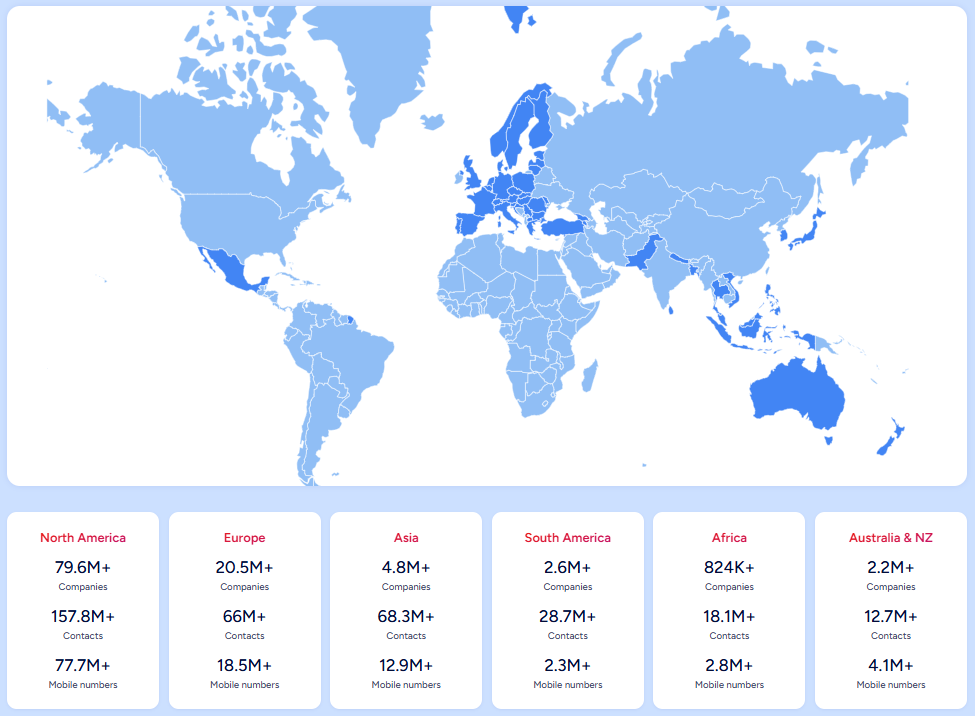
Source: ZoomInfo
It integrates natively with Salesforce through a dedicated AppExchange application to enrich your CRM with verified contact data, company intelligence, buyer intent signals, and technographic insights.
Connecting the two platforms unlocks:
A CRM that stays accurate on its own, with verified emails, direct dials, and company attributes appended and refreshed automatically
Prioritization by buying signals, so reps work the accounts that are in-market this week instead of a static list
Pipeline from traffic you already have, by resolving anonymous website visitors into companies and buying teams
Smarter routing and scoring, with ZoomInfo attributes powering Salesforce workflow logic
How ZoomInfo Integrates with Salesforce
ZoomInfo connects to Salesforce through a native AppExchange application with the Salesforce Sync feature, configured via OAuth with bidirectional data flow.
The integration is included in ZoomInfo Sales Professional and above.
Because ZoomInfo builds and maintains it as a first-party connector, it requires no middleware and stays current with platform updates on both sides. ZoomInfo's GTM Workspace (the execution workspace for sellers) includes the same native Salesforce connection, and the ReachOut Chrome Extension exports verified data directly into Salesforce records from any web page.
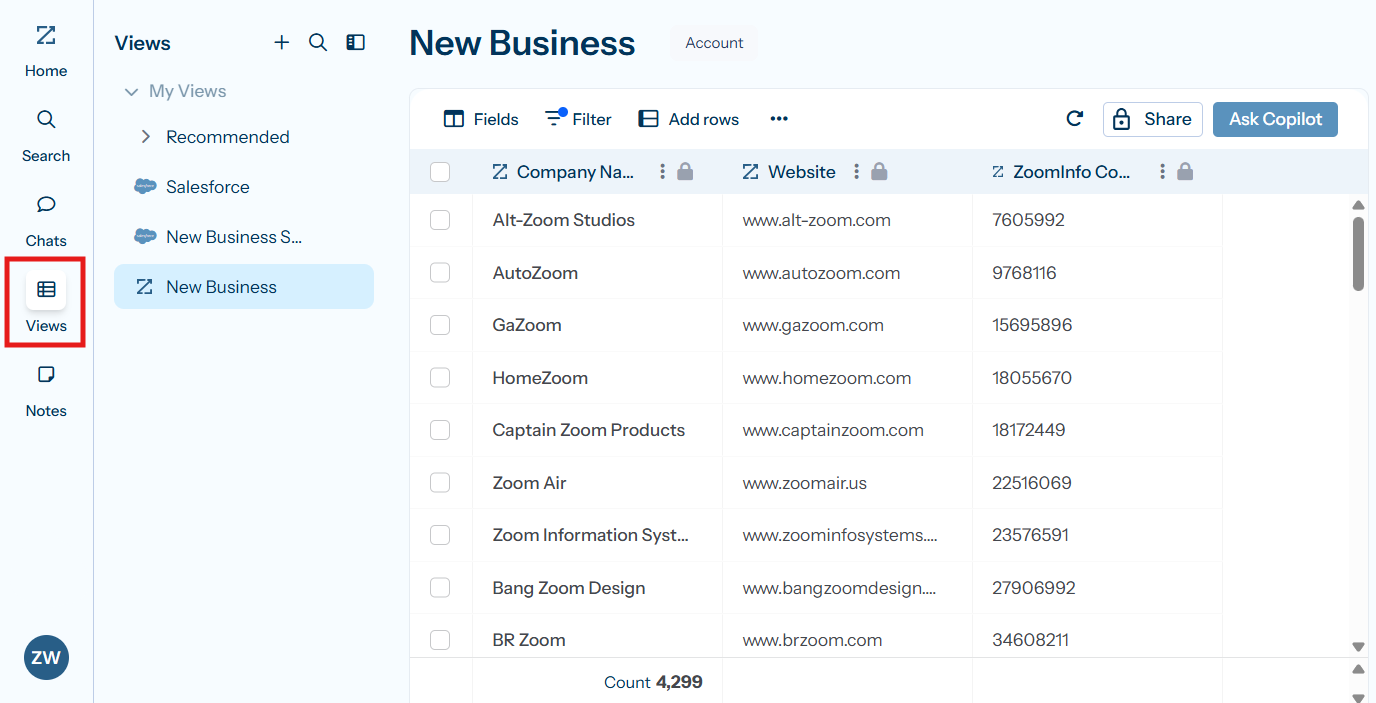
Source: ZoomInfo
Contact and Company Data Enrichment: Fill the Gaps Your CRM Cannot Fill Independently
Salesforce captures interaction data: emails sent, forms submitted, deals moved through pipeline stages.
What it cannot do on its own is verify whether a phone number still works, catch a job change, or reveal a company's technology stack.
When a new contact enters Salesforce, ZoomInfo automatically appends the verified business email, direct dial, title, department, and seniority, plus company-level firmographics and technographic data covering 30,000+ technologies.
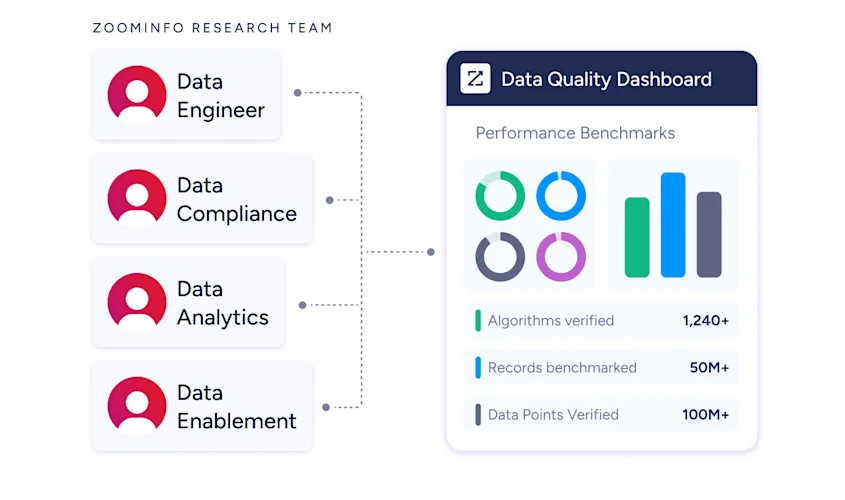
The enrichment runs continuously through a verification pipeline backed by 300+ human researchers, reaching up to 95% accuracy on first-party data.
ZoomInfo in action: A prospect fills out a Salesforce web-to-lead form with only a name and work email. ZoomInfo appends their direct dial, current title, company profile (a 400-person fintech running HubSpot and Marketo), and three other decision-makers in their department. Your SDR multi-threads the account before the first call instead of spending 20 minutes researching it.
Buyer Intent Data: Identify Accounts That Are Actively In-Market
ZoomInfo's Buyer Intent tracks signals from 210 million IP-to-Organization pairings and 6 trillion+ new keyword-to-device pairings monthly, revealing which companies are researching topics relevant to your product.
Source: ZoomInfo
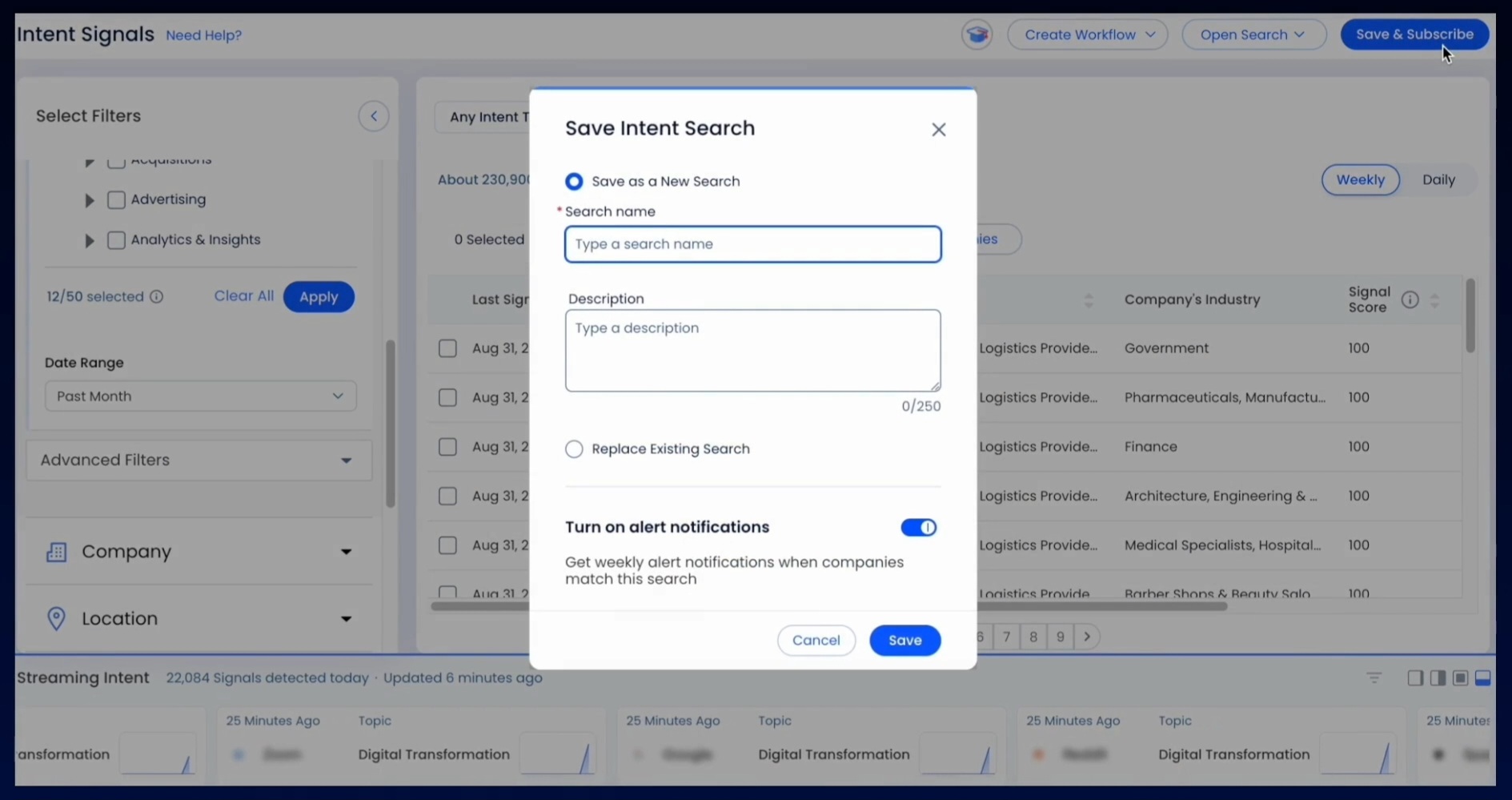
Those signals flow into Salesforce records, where they trigger workflows, update lead scores, and surface priority accounts. Guided Intent, exclusive to ZoomInfo, identifies the research topics historically correlated with deal success in your business, so the signals reflect your actual win patterns rather than generic keyword thresholds.
ZoomInfo in action: ZoomInfo detects a target account researching "CRM data migration" for two weeks. The signal syncs to Salesforce, raises the account's score, notifies the assigned rep, and enrolls the primary contact in a switching-focused nurture sequence, all while the buyer is still evaluating.
Website Visitor Identification: Convert Anonymous Traffic into Pipeline
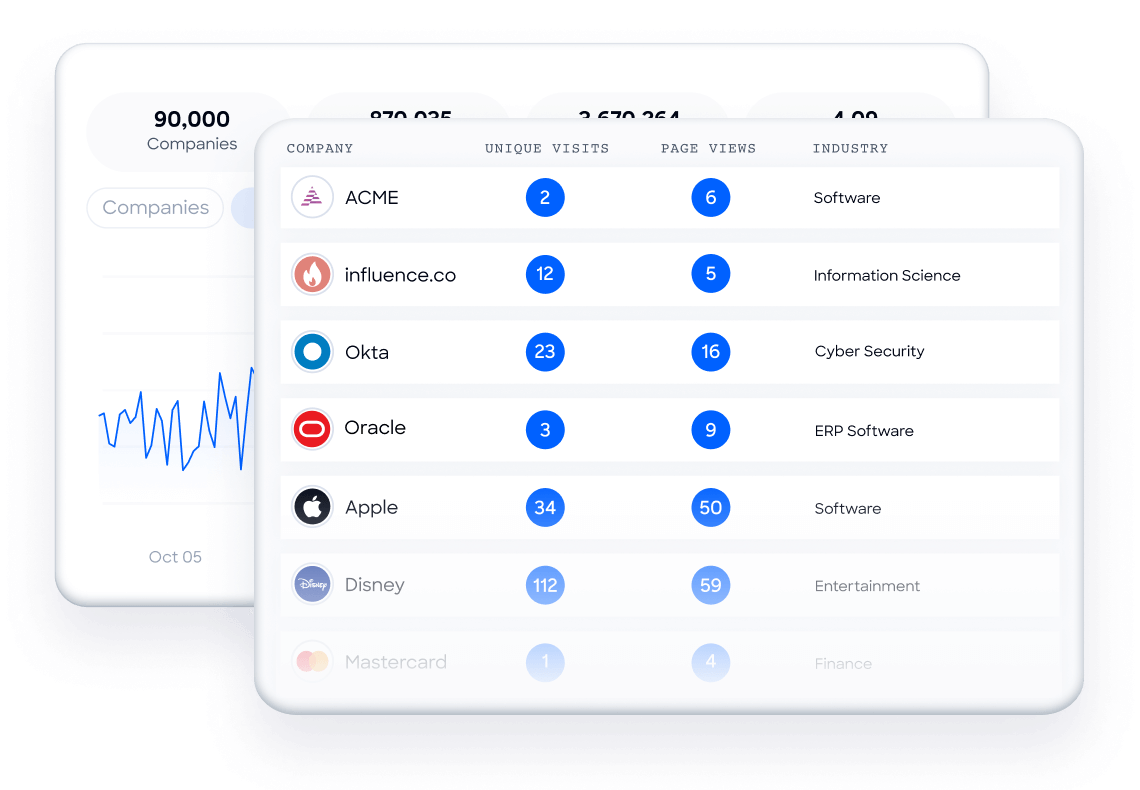
ZoomInfo WebSights resolves anonymous website traffic to companies (including buying-team identification and contact information), with Automatic Traffic Filtering separating genuine company visits from bots.
Source: ZoomInfo
Connected to Salesforce, the companies visiting your site and the pages they viewed surface alongside your CRM data, so high-value visitors route to sales while the interest is live.
Workflow Automation and Lead Routing
ZoomInfo attributes (company size, industry, technology stack, intent score) power Salesforce workflow logic for routing, scoring, and segmentation.
A new contact enriched by ZoomInfo routes automatically to the enterprise team at 1,000+ employees or to SMB below 100, with no manual triage. Scoring models gain company-level context alongside Salesforce's behavioral signals.
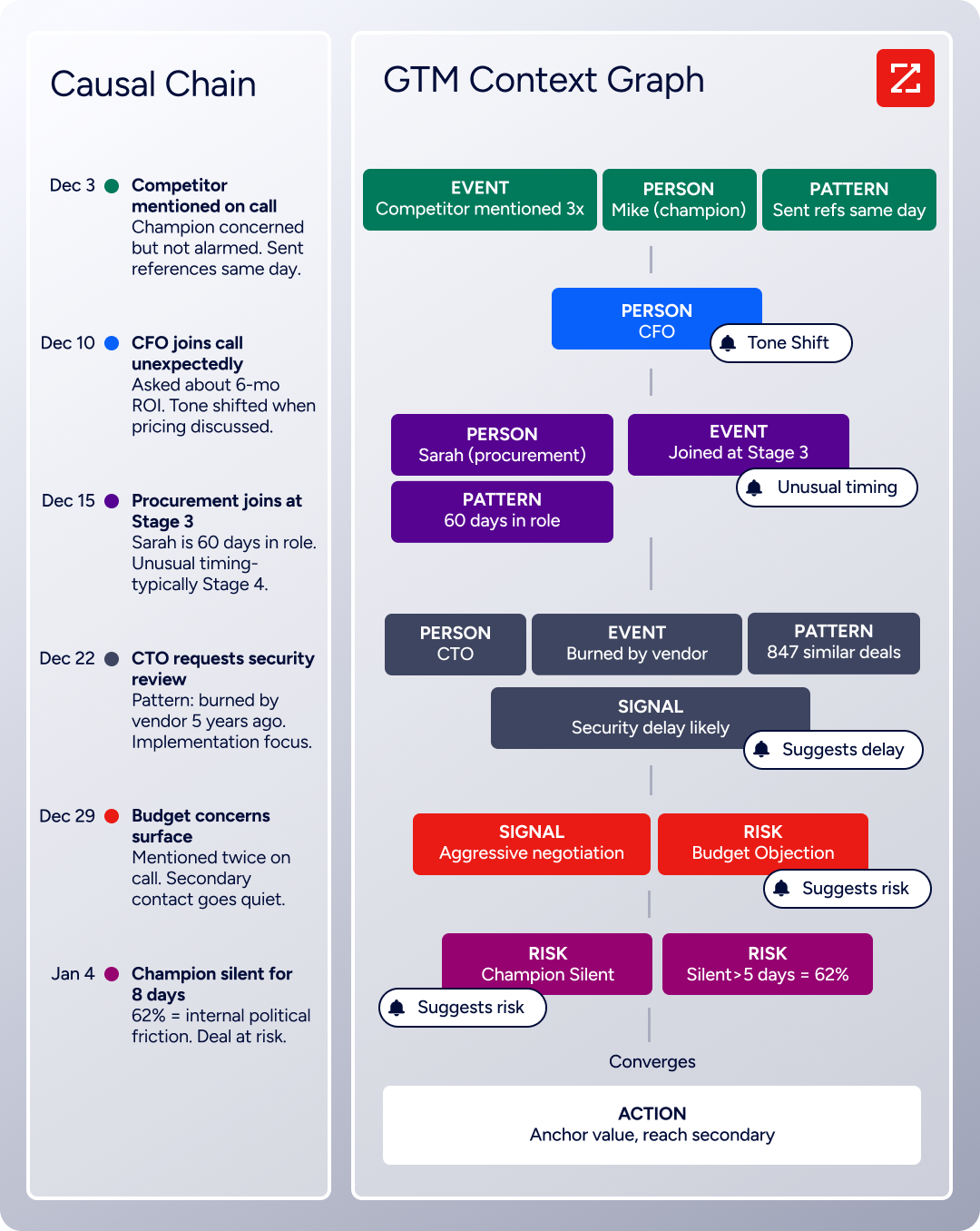
Beyond the connector itself, the enrichment feeding your Salesforce instance is part of a broader intelligence system: the GTM Context Graph processes 1.5B+ data points daily and fuses ZoomInfo's B2B data with CRM records, conversations, and behavioral signals, while GTM Studio, APIs, and MCP expose the same intelligence to any tool or AI agent.
Seismic's sales team attributed 39% of active pipeline to opportunities identified or influenced by ZoomInfo signals, reporting 54% productivity gains and saving 11.5 hours per week per seller. (Seismic Case Study)
ZoomInfo Pricing
ZoomInfo uses a consumption-based pricing model with custom quotes based on usage, users, credit volume, and features.
It is organized into Sales, Marketing, and standalone product lines, each in Professional, Advanced, and Enterprise tiers. The native Salesforce integration is included from Sales Professional up, with Advanced adding intent signals and website visitor tracking.
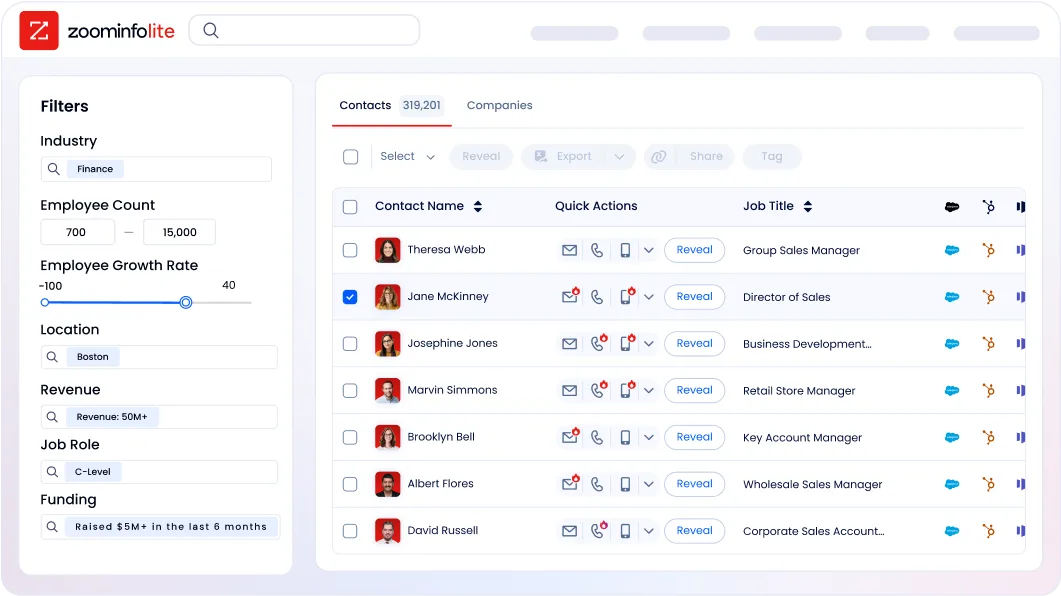
ZoomInfo Lite is a permanent free tier (no credit card, no time limit) with 10 monthly export credits, searches, the Chrome extension, and CRM integrations, making it a practical way to evaluate data quality before committing. A separate 7-day free trial covers paid features.
Who Should Use the ZoomInfo Integration?
B2B sales teams whose pipeline depends on accurate contact data: enrichment is the difference between verified direct dials and a 30% bounce rate that damages sender reputation
Revenue operations teams that need firmographic, technographic, and intent data powering Salesforce lead scoring, routing, and segmentation instead of behavioral signals alone
Marketing teams running account-based campaigns that need dynamic lists of accounts showing buying signals now, not static firmographic lists
2. Slack: Best Salesforce Integration for Real-Time Team Collaboration and CRM Visibility
Slack is a work platform and enterprise messaging tool that integrates with Salesforce to turn static CRM records into live collaboration spaces where sales teams, service agents, and cross-functional stakeholders discuss deals, update fields, and coordinate actions without leaving their conversation workspace.
Source: Slack
Salesforce builds and maintains the integration following its $27.7 billion acquisition of Slack, with 40+ connectors across the Customer 360 platform.
Key integration capabilities include:
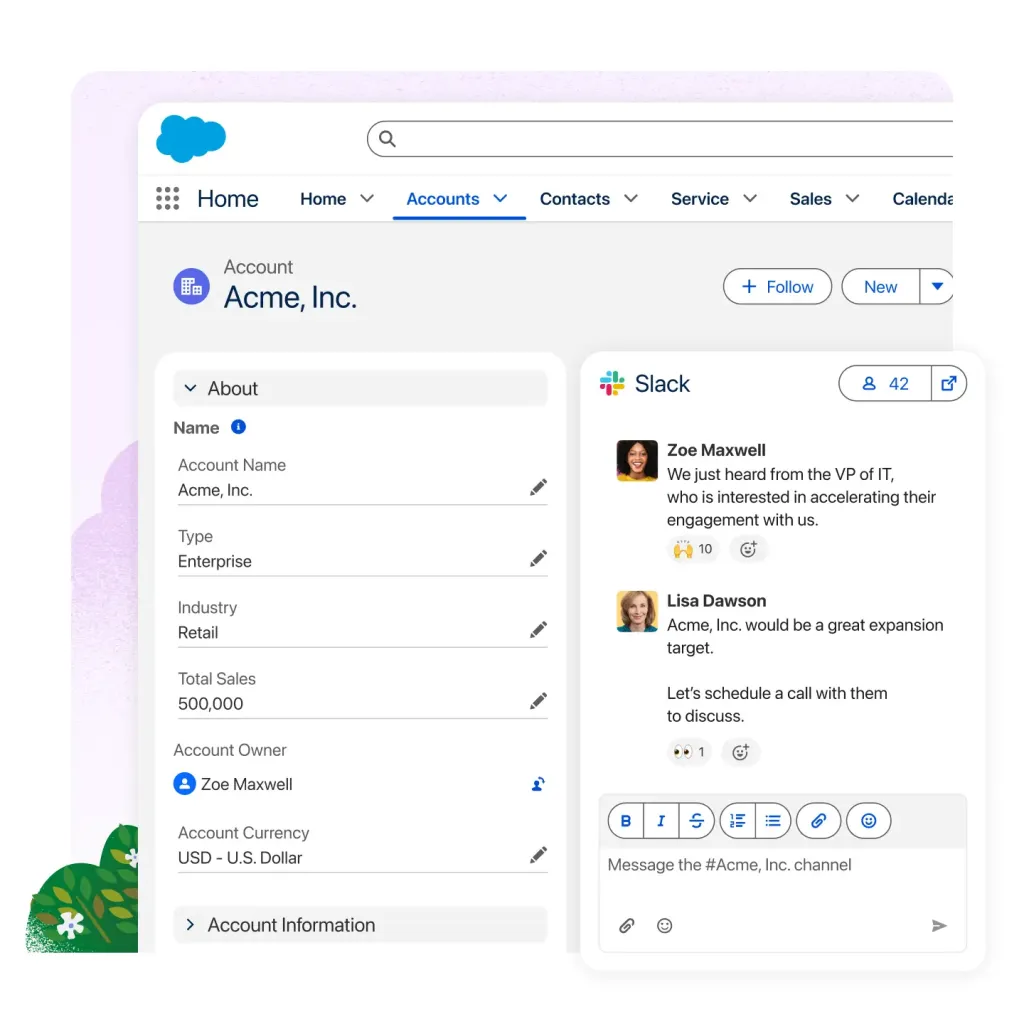
Salesforce Channels that map a dedicated Slack channel to a specific Salesforce record (opportunity, account, or case) with live Record Details, Messages, and AI-generated summaries
Record change alerts sent as My Alerts, Channel Alerts, or Bulk Alerts when CRM records change, so the right people hear about pipeline movement the moment it happens
Add to Salesforce shortcut that attaches any Slack message thread to the corresponding Salesforce record, preserving the full context of decisions and objections alongside CRM data
Bidirectional CRM editing that lets permitted users update opportunity stages, case statuses, and account fields directly from Slack's Record Details tab
How Slack Integrates with Salesforce
The Slack-Salesforce integration is a native, first-party connection that receives ongoing investment as a core Salesforce product.
A Salesforce administrator installs the Slack app from AppExchange, authorizes the connection via OAuth, and configures which users can create Salesforce Channels, receive alerts, and update records from Slack. The integration works with Slack workspaces on Pro, Business+, and Enterprise+ plans.
1. Salesforce Channels: Persistent Deal Rooms with Bidirectional Record Updates.
Salesforce Channels ties a Slack channel permanently to a specific CRM record, most commonly an Opportunity, Account, or Case. The channel gains three tabs: Messages (standard conversation), Record Details (live Salesforce fields editable in-place), and Summary (AI-generated recap of channel activity and record changes).
When a user changes a field value in the Record Details tab, that update writes back to Salesforce immediately, triggering the same validation rules and field history tracking as a direct CRM update. This eliminates the "update Slack, then update Salesforce" double-entry problem.
Source: Salesforce
2. Salesforce Notifications: Real-Time Alerts Delivered to the Right People.
Three alert types replace email-based CRM notifications. My Alerts send personal notifications to a user's Slackbot DM when records they own change. Channel Alerts post team-level notifications when specific records or record types meeting certain criteria change.
Bulk Alerts fire when any record of a specified type changes across the org, useful for operations and compliance monitoring. All alert types support dynamic field tokens and include a "View in Salesforce" link.
3. Salesforce Actions: Query and Create Records from Slack.
The /salesforce search command returns matching records directly in Slack. The Add to Salesforce message action links any Slack conversation thread to a CRM record's Related Slack Messages component, so future readers can reconstruct the full story behind a deal without asking "what was discussed?"
Users can also create new Salesforce records via the /salesforce create command, making Slack a viable front-end for lightweight CRM data entry.
4. AI-Powered Channel Summaries.
On Business+ and above, the AI Summary tab generates natural-language recaps of channel activity and Salesforce record changes over a chosen time window. A manager overseeing multiple deal rooms can see where each deal stands without reading through hundreds of messages.
Slack Pricing
Slack uses per-seat pricing:
Pro at $7.25/user/month (annual): Salesforce Channels, Notifications, and Actions all supported
Business+ at $15/user/month (annual): adds the full AI suite including Salesforce Channel AI summaries, SAML SSO, and custom retention policies
Enterprise+ at custom pricing: multi-workspace management, native DLP, legal holds, HIPAA compliance
The Salesforce integration costs nothing beyond the Slack subscription tier. Slack's Fair Billing Policy credits inactive seats automatically.
Who Should Use the Slack Integration?
Sales and service teams that already live in Slack and want CRM context where they spend their day, with the ability to update records in-place
Teams running complex, multi-stakeholder deals that need one channel for cross-functional deal coordination with live CRM data embedded in the conversation
Organizations whose biggest CRM adoption challenge is reps not updating Salesforce: the Record Details tab lets them update stages and close dates from within the Slack window they already use
3. Mailchimp: Best Salesforce Integration for Email Marketing and Campaign Execution
Mailchimp is an email and SMS marketing platform serving over 11 million businesses that integrates with Salesforce to sync customer data bidirectionally, write campaign engagement metrics back to CRM records, and build targeted email audiences directly from Salesforce segments and list views.
The integration connects through a native managed package on AppExchange with OAuth authentication.
Key integration capabilities include:
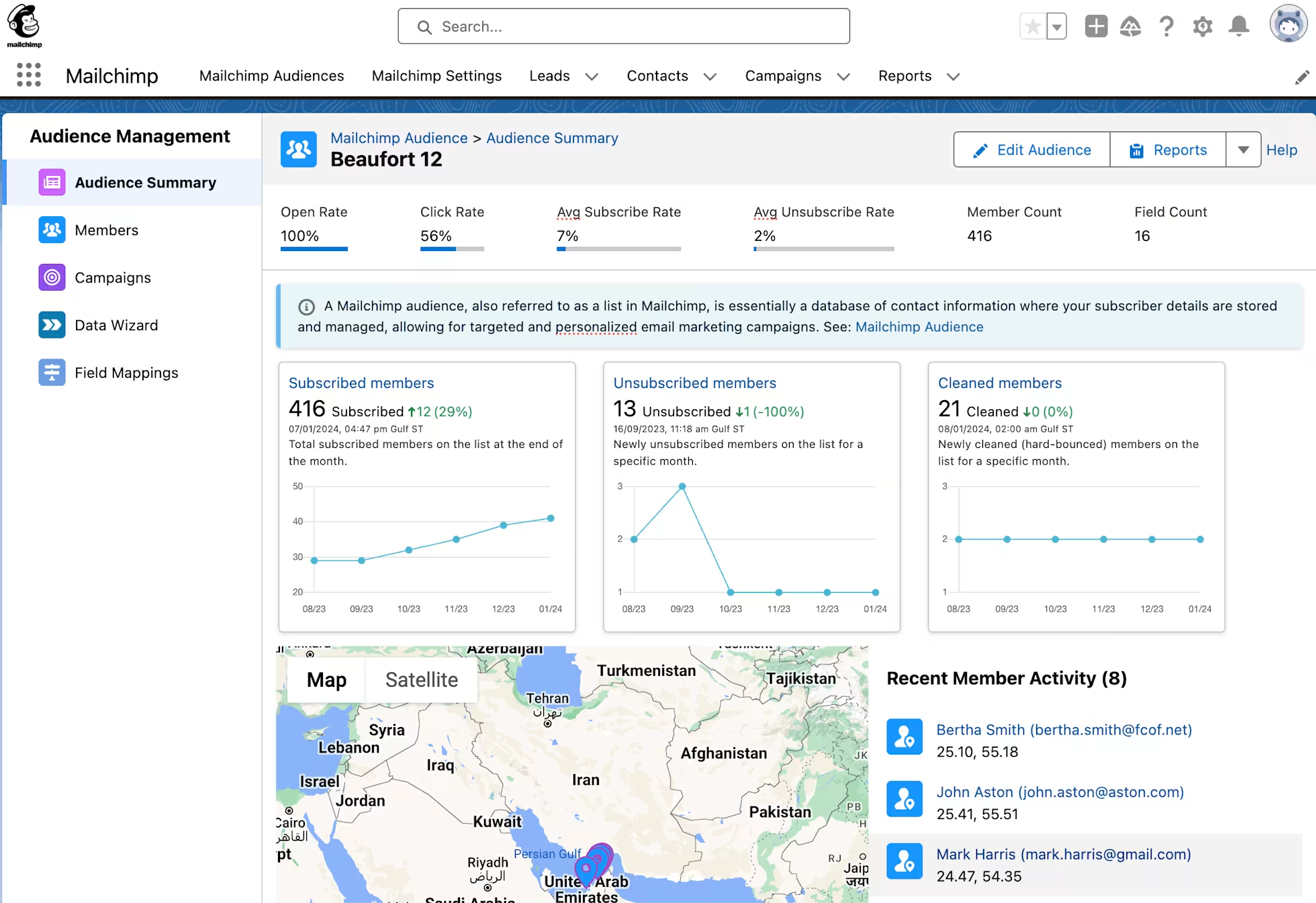
Bidirectional contact, lead, and account sync keeping subscriber data aligned between both systems on a recurring schedule
Campaign metric writeback recording sends, opens, clicks, bounces, and unsubscribes on the Salesforce Activity Timeline
Audience segmentation from CRM data using the Salesforce Query Builder to build Mailchimp audiences from campaigns, list views, and reports
Subscriber management inside Salesforce displaying campaign activity and subscription status on the record
How Mailchimp Integrates with Salesforce
The Mailchimp for Salesforce integration installs as a managed package directly in the Salesforce org.
Setup requires administrator permissions on both platforms, OAuth authentication, and field mapping configuration. The integration supports both Salesforce Classic and Lightning Experience and works across Mailchimp's Essentials, Standard, and Premium tiers. Once configured, syncs run automatically on a configurable schedule (hourly to daily).
Source: Mailchimp
1. Bidirectional Contact Sync with Query Builder Targeting.
Salesforce Contacts, Leads, and Accounts flow into Mailchimp as audience members, while Mailchimp writes email engagement status back to custom fields on the Salesforce record. The Salesforce Query Builder lets marketers construct targeted queries (e.g., "all Contacts where LeadSource = 'Webinar' AND Industry = 'Healthcare'") and sync matching records into dedicated Mailchimp audience segments.
Recurring syncs keep audiences updated as Salesforce data changes. When a contact unsubscribes from a Mailchimp campaign, the integration writes the opt-out status directly to the CRM.
2. Campaign Engagement Writeback to Salesforce Activity Timeline.
Every email Mailchimp sends to a synced contact generates Activity records in Salesforce: Sent, Opened, Clicked (including the specific URL clicked), Bounced, Unsubscribed, Complained, and Forwarded.
These events appear on the standard Activity Timeline, so a sales rep reviewing a contact before a call can see not only that the contact opened the product announcement email but that they clicked through to the pricing page.
The integration also supports Campaign Influence tracking when Mailchimp campaigns are mapped to Salesforce Campaigns, closing the attribution loop from email send to closed-won revenue.
3. Dynamic Audience Building from Salesforce Campaigns and List Views.
Rather than exporting static contact lists, marketers subscribe entire Salesforce Campaigns, List Views, or Reports as dynamic Mailchimp audiences. A Salesforce List View of "Contacts from Enterprise Accounts in Renewal Stage" syncs to Mailchimp as a recurring segment that updates as contacts enter or exit the renewal stage.
This eliminates the data drift that occurs when a marketer exports a list on Monday and sends Wednesday, by which time contacts have unsubscribed, changed companies, or moved to Closed-Won.
4. Multichannel Coordination with SMS.
Mailchimp's email and SMS capabilities integrate with Salesforce through the same sync infrastructure, enabling coordinated outreach across both channels grounded in CRM data. Customers using both email and SMS report 97% higher click rates versus email alone.
Mailchimp Pricing
Mailchimp uses contact-count-based pricing. The Salesforce integration is available on Essentials and above:
Essentials: starts at $13/month (500 contacts), 10x monthly email send multiplier, A/B testing, up to 4-step automations
Standard: starts at $20/month (500 contacts), 12x send multiplier, adds advanced segmentation, dynamic content, send time optimization, multivariate testing, and generative AI features
Premium: starts at $350/month (500 contacts), 15x send multiplier, unlimited seats and audiences, phone and priority support
SMS marketing is a paid add-on billed via monthly credit purchase. Contact overages are charged based on peak contact count reached during the billing period.
Who Should Use the Mailchimp Integration?
Teams committed to Salesforce as their customer data foundation that need email marketing depth (AI content generation, automation flows, multivariate testing) without adopting a full CRM-replacement platform
Sales reps who need to see email engagement on contact records before calls: the integration writes campaign opens, clicks, and specific link activity to the Salesforce Activity Timeline
Marketing teams that want to build email audiences from live Salesforce campaigns and pipeline stages without manual list exports, ensuring sends reflect current CRM state
4. Power BI: Best Salesforce Integration for Business Intelligence and Pipeline Analytics
Power BI is Microsoft's business intelligence platform that integrates with Salesforce to pull CRM data into interactive dashboards that go beyond what Salesforce's native reporting layer offers.
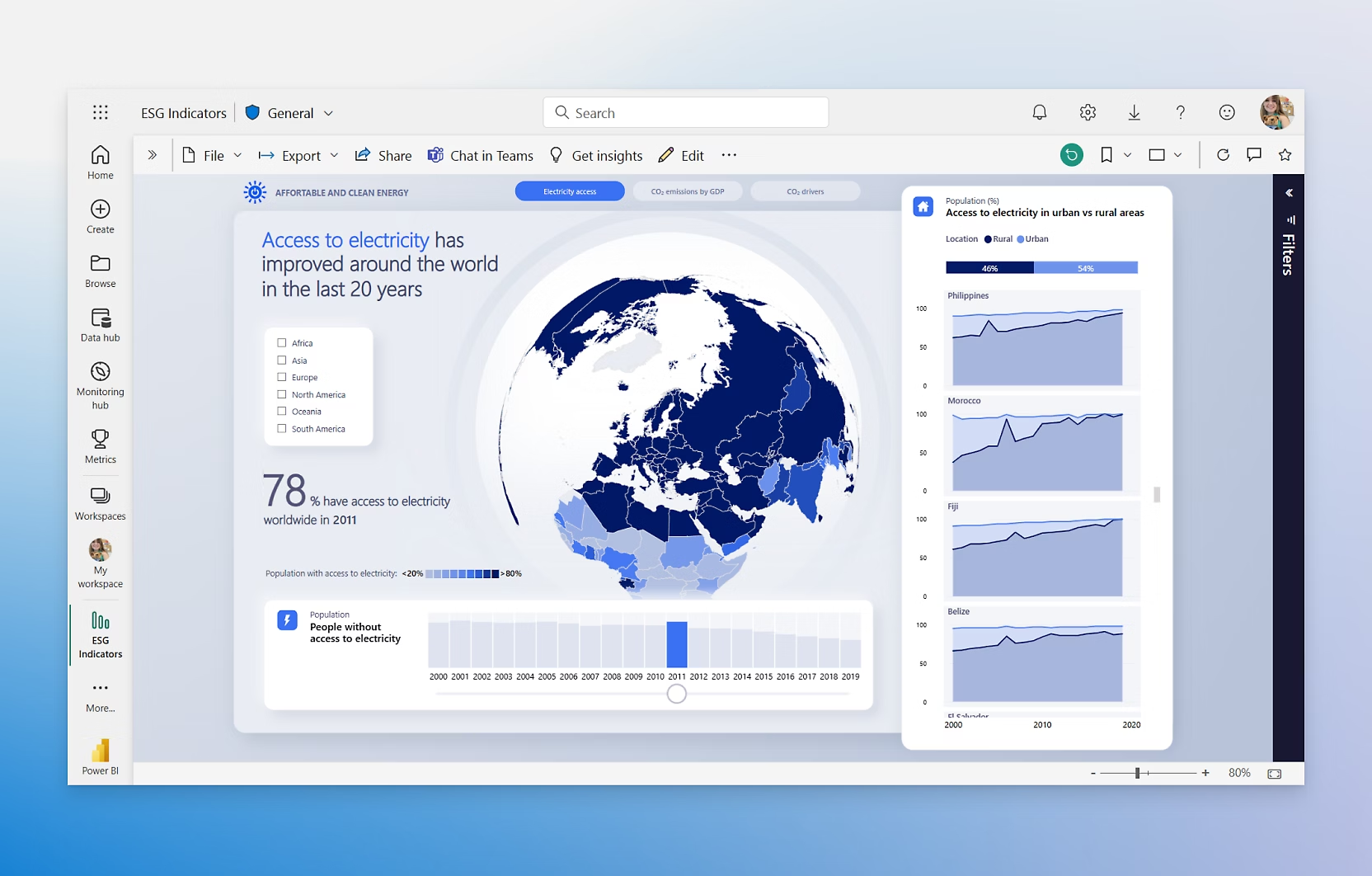
Source: Microsoft
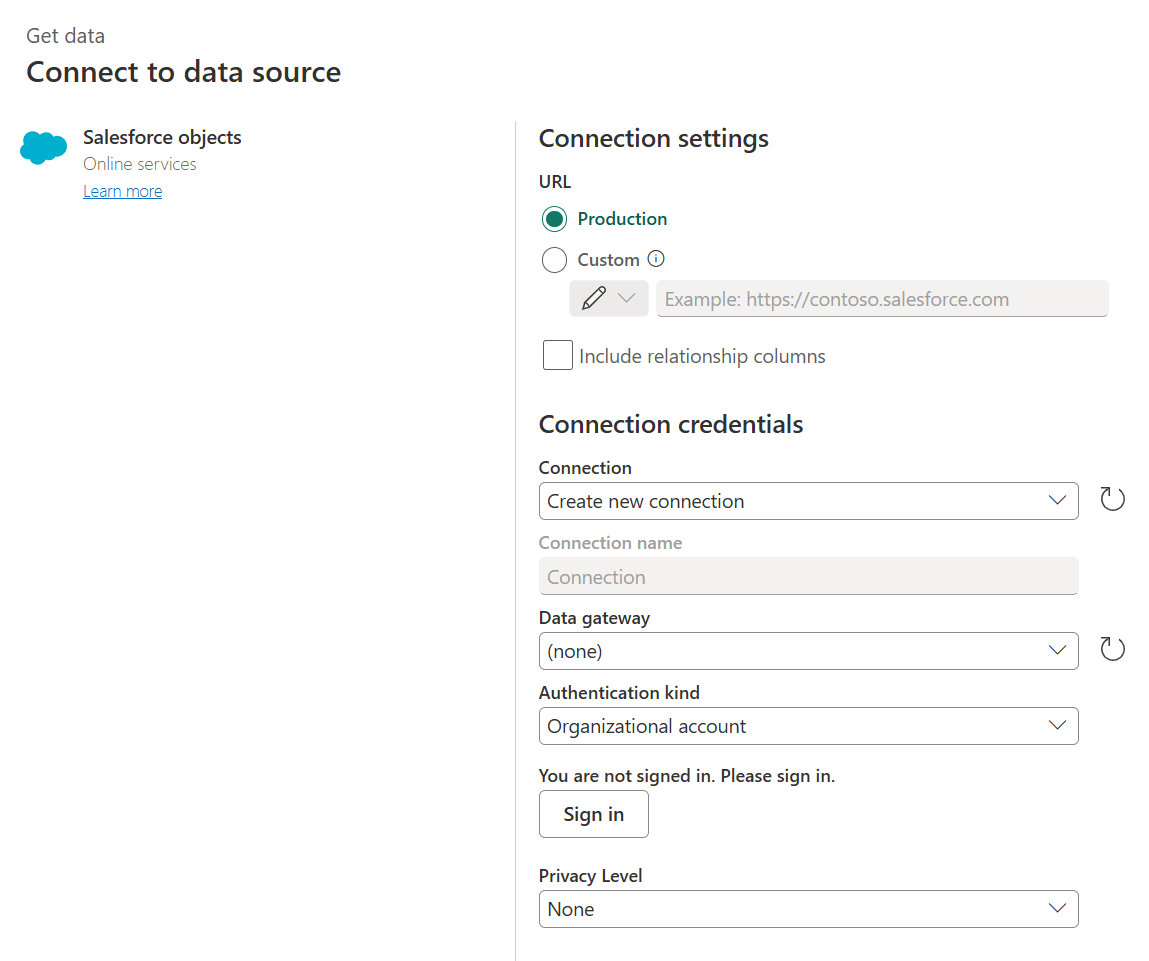
The integration connects through two built-in connectors in Power BI Desktop: the Salesforce Objects connector and the Salesforce Reports connector, both authenticating via OAuth with no API keys or manual token management. 97% of Fortune 500 companies use Power BI.
Key integration capabilities include:
Salesforce Objects connector pulling standard and custom objects with no row cap, giving analysts the full CRM data model
Salesforce Reports connector importing existing saved Salesforce reports with filters and groupings applied (2,000-row limit)
Prebuilt template apps on Microsoft AppSource delivering ready-made Salesforce pipeline dashboards
Embedded dashboards in Salesforce surfacing Power BI reports inside CRM records via an AppExchange component
How Power BI Integrates with Salesforce
Both connectors are native to Power BI Desktop, accessible from the Get Data menu with OAuth authentication.
Any analyst with a Salesforce login and Power BI Desktop (which is free) can set up the connection in minutes. For scheduled refresh, the workspace requires at least a Power BI Pro license, with refresh running up to 8 times per day on Pro or 48 times per day on Premium/Fabric capacity.
1. Salesforce Objects Connector: Full Data Model, No Row Cap.
The Objects connector exposes Salesforce's complete object model: every standard object (Accounts, Contacts, Leads, Opportunities, Cases, Campaigns) and every custom object. Analysts select the objects and fields to pull, and Power BI ingests the entire dataset.
Once the data lands in Power BI's in-memory model, analysts join objects across relationships and apply DAX calculations (rolling win rates, stage velocity, pipeline coverage ratios, quarter-over-quarter comparisons) that Salesforce's native report builder cannot produce without custom report types.
Source: Microsoft
2. Salesforce Reports Connector: Fast Path for Aggregated Views.
For teams that want immediate visualization without building a data model from scratch, the Reports connector imports an existing saved Salesforce report with its fields, filters, and groupings already applied. The trade-off is a hard 2,000-row limit: any report with more rows gets silently truncated.
This connector works best for summary-level reports (pipeline by stage, revenue by region) and should be avoided for transactional-level analysis.
3. Prebuilt Template Apps: Pipeline Dashboards Out of the Box.
Salesforce template apps on Microsoft AppSource ship with preconfigured data connections and report pages covering sales pipeline by stage, top accounts by revenue, lead conversion funnels, and quota attainment.
Installing a template app is self-service: authenticate against the Salesforce org and the app populates with real data. Teams can extend the prebuilt visuals by adding pages, modifying measures, or connecting additional data sources.
4. Embedded Dashboards in Salesforce via AppExchange.
The Power BI Embedded component available through Salesforce AppExchange surfaces published Power BI dashboards directly within Salesforce records and Lightning pages. A sales rep viewing an Account record can see a Power BI dashboard scoped to that account (pipeline history, deal velocity, win/loss trends) without navigating away from Salesforce.
Power BI Pricing
Power BI uses a hybrid per-user and capacity-based pricing model:
Power BI Free (Fabric Free) at $0/user: includes Power BI Desktop for personal report creation; cannot publish, share, or schedule refreshes
Power BI Pro at $14/user/month (annual): publish, share, and schedule automatic Salesforce data refreshes up to 8x/day; included at no additional cost in Microsoft 365 E5 subscriptions
Power BI Premium Per User (PPU) at $24/user/month (annual): larger dataset limits, up to 48 scheduled refreshes per day, advanced AI features
Microsoft Fabric Capacity (F SKUs): variable metered pricing; F64+ allows free-license users to view content without Pro seats
For organizations already running Microsoft 365, Pro licenses may be bundled in existing E5 agreements, making the Salesforce integration free to activate.
Who Should Use the Power BI Integration?
Microsoft-stack organizations that already run M365 or Azure and want to add Salesforce pipeline analytics without adopting a separate BI tool
Sales and revenue leaders who need pipeline dashboards joining Salesforce opportunity data with financial, headcount, or operational metrics from other systems
Teams whose current reporting workflow involves exporting Salesforce reports to Excel: Power BI's scheduled refresh eliminates that manual cycle entirely
5. Zapier: Best Salesforce Integration for No-Code Workflow Automation
Zapier is a no-code automation platform that integrates with Salesforce to connect your CRM to over 8,000 applications through automated workflows called Zaps.
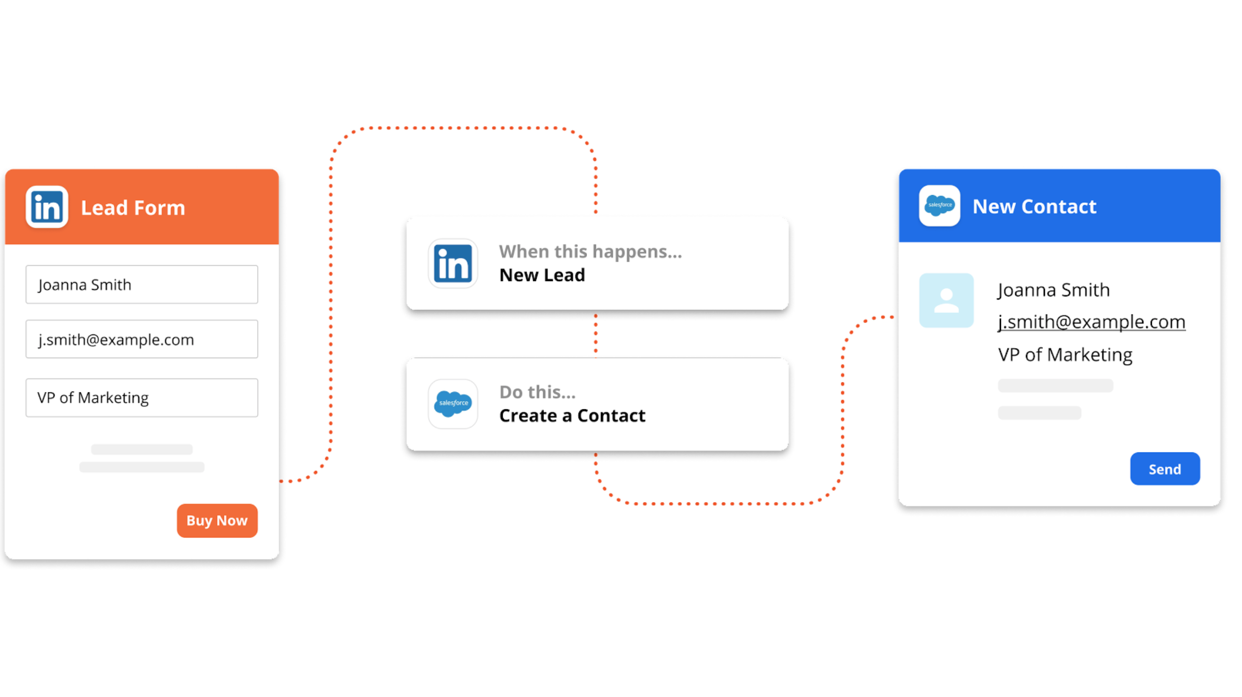
It works in both directions: Salesforce events trigger actions in external tools, and activity in connected apps creates or updates Salesforce records. The integration is listed on AppExchange and connects via OAuth.
Key integration capabilities include:
Salesforce record triggers that start a Zap when any standard or custom Salesforce object is created or updated
Salesforce record actions that create and update records, add attachments and notes, and invoke Salesforce Flows from Zap steps
Multi-step Zaps across 8,000+ apps chaining Salesforce into long automated workflows with conditional logic
Data formatting and webhooks reshaping and routing data between steps with no code
How Zapier Integrates with Salesforce
Zapier connects through standard OAuth 2.0 authorization.
Salesforce API access is required, which is included in Enterprise Edition and above; Professional Edition users need the API add-on. The integration supports both polling triggers and Salesforce Flow-based actions.
1. Salesforce Triggers: Listening for CRM Events.
Zapier watches for events in your Salesforce org (new records, updated records, outbound messages) and fires a Zap each time one occurs. Triggers poll every 2 minutes on Professional, every 1 minute on Team and Enterprise. Zapier deduplicates automatically by tracking each record's unique ID.
2. Salesforce Actions: Writing Data Back into the CRM.
Zapier can create new records in any Salesforce object, update existing records, upsert records (create if not found, update if found), add notes and attachments, and invoke Salesforce Flows directly from a Zap step. The Flow invocation lets Zapier trigger complex business logic that already lives in Salesforce without rebuilding it inside the automation tool.
Source: Salesforce AppExchange
3. Multi-Step Workflows with Conditional Logic.
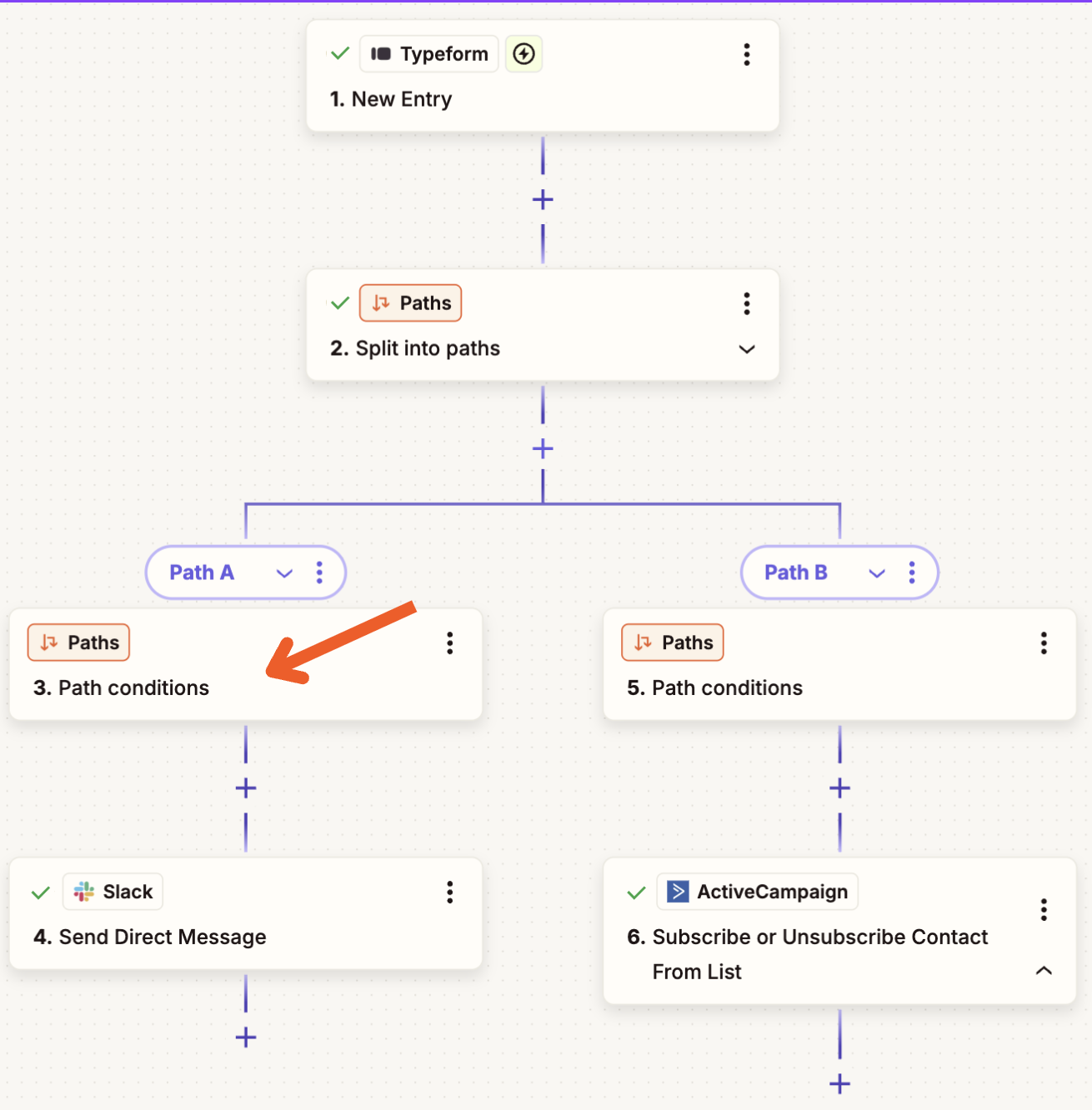
Zapier supports up to 100 steps per Zap. A typical multi-step workflow might trigger on a new Salesforce Lead, look up the company in a project management tool, create a task if not found, send a Slack notification, and add a note to the Salesforce Lead confirming downstream steps completed.
Paths route records by field values (enterprise leads to one workflow chain, SMB leads to another), and Filters stop execution on records that do not meet criteria. Filter and Path steps do not count as tasks.
Source: Zapier
4. Data Formatting and Webhooks.
The native Formatter tool handles date parsing, phone number cleanup, name splitting, and number formatting inline within the Zap. The Webhooks step extends the integration to any system with an HTTP endpoint, connecting Salesforce to internal tools, legacy systems, or custom applications without building a dedicated connector.
Zapier Pricing
Zapier uses task-based pricing where each action step counts as one task:
Free: 100 tasks/month, 2-step Zaps only, 15-minute polling
Professional: starts at $19.99/month (annual) for 750 tasks, multi-step Zaps, 2-minute polling
Team: starts at $69/month (annual) for 2,000 tasks, up to 25 users, 1-minute polling
Enterprise: custom pricing, unlimited users, SCIM provisioning, advanced admin controls
Project task consumption before choosing a plan: a 5-step Zap processing 1,000 new Salesforce Leads per month consumes 4,000 tasks. Zapier's pay-per-task overage billing is available at 1.25x the plan's per-task rate.
Who Should Use the Zapier Integration?
Teams using niche or legacy tools without native Salesforce connectors that still need them synchronized with the CRM
Non-technical RevOps or marketing ops teams that need to build and modify automations without engineering tickets
Organizations where a deal closure must cascade through project management, billing, and communication tools automatically
6. DocuSign: Best Salesforce Integration for Agreement Execution and Contract Lifecycle Management
DocuSign is an electronic signature and agreement management platform that integrates with Salesforce to handle the entire agreement lifecycle: generating documents from CRM data, collecting signatures, writing results back to records, and managing contracts after the deal closes.
The integration is available as a native AppExchange app and through the newer IAM for Sales product, which went generally available in May 2026. DocuSign won the Salesforce 2025 Partner Innovation Award in High Technology.
Key integration capabilities include:
Send, track, and store agreements directly from Salesforce records with real-time status tracking and automatic document attachment on completion
Document generation with field writeback pulling CRM data into agreement templates and writing signed values back to Salesforce fields
Contract lifecycle workflows triggered by Salesforce opportunity stages, with internal approval routing, clause libraries, and AI-assisted review
Cross-cloud coverage spanning Sales Cloud, Service Cloud, Revenue Cloud, and Salesforce CPQ
How DocuSign Integrates with Salesforce
The integration installs through AppExchange with OAuth authentication and embeds DocuSign's sending and tracking interface directly inside Salesforce records on opportunities, contacts, accounts, and leads.
The native Salesforce integration requires the Enhanced plan or an IAM plan; the standard eSignature plans (Personal, Standard, Business Pro) do not include Salesforce connectivity.
1. Send, Track, and Store: Agreement Workflows on Salesforce Records.
From an opportunity, a rep sends an NDA, MSA, SOW, or order form for signature without opening a new browser tab. The DocuSign panel shows envelope status (Sent, Viewed, Signed, Declined) in real time, and completed documents attach to the originating Salesforce record automatically.
This replaces the workflow of downloading a template, filling in terms manually, sending via a separate tool, monitoring email, downloading the signed PDF, and uploading it back to the CRM.
2. Document Generation and Field Writeback.
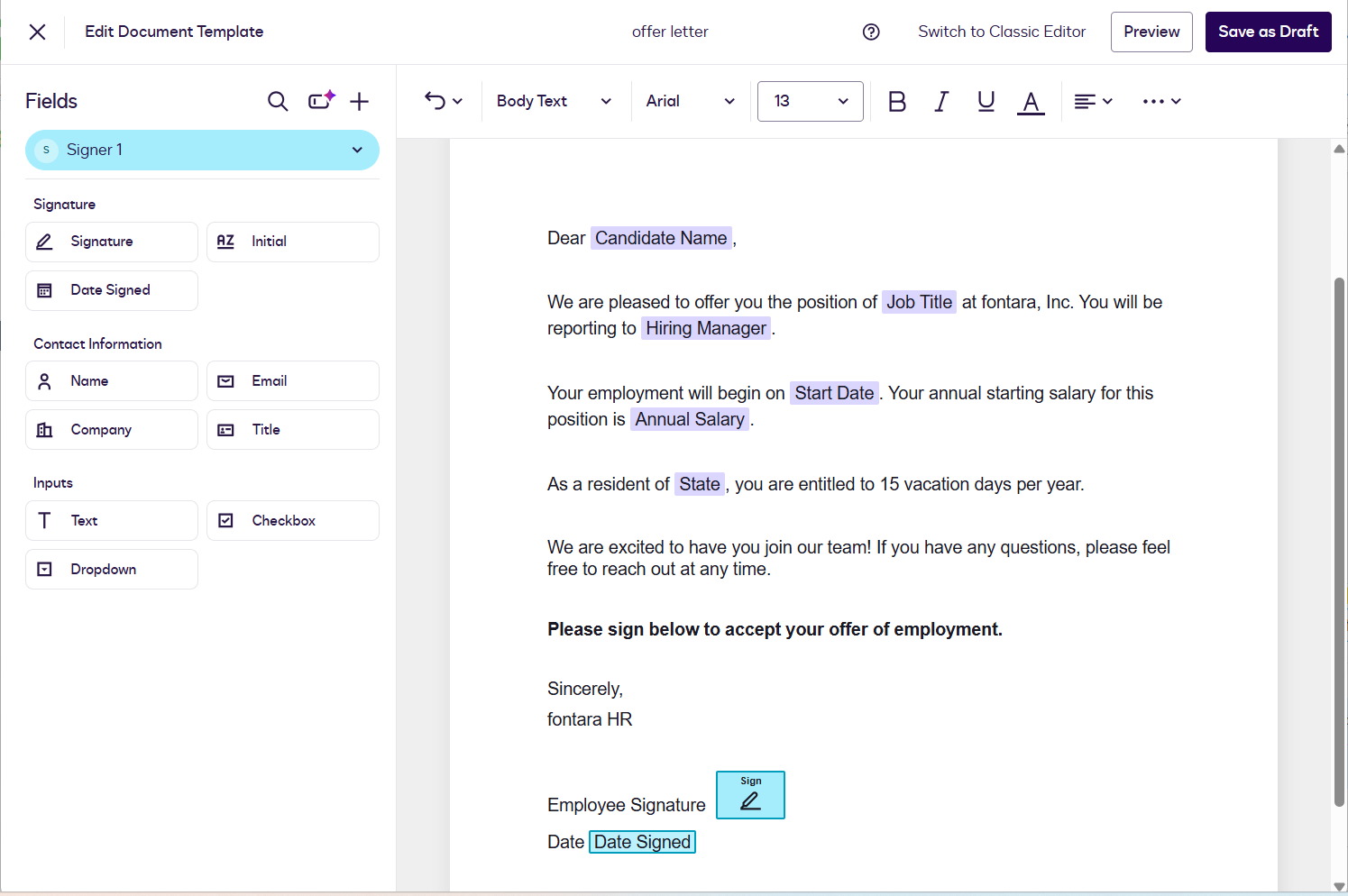
DocuSign's Document Generation feature pulls field values directly from the Salesforce record (contact name, account, deal amount, product lines, discount terms) and auto-populates agreement templates. On completion, signed field values (revised payment terms, start dates, delivery schedules) write back to mapped Salesforce fields automatically.
Source: DocuSign
This matters most for Revenue Cloud and CPQ users, where accurate post-signature data affects billing schedules and revenue recognition.
3. Contract Lifecycle Workflows from Opportunity Stage.
Through DocuSign CLM, opportunity stage changes trigger contract workflows: pulling the appropriate template, generating the agreement from CRM data, routing it internally for approval, sending it for signature, and storing the executed contract.
The CLM adds a drag-and-drop workflow editor with 100+ pre-configured steps, a clause library with conditional logic, and AI-assisted review that flags non-standard terms against a legal playbook. A Forrester TEI study found 449% ROI for CLM customers, with a 90% reduction in time spent generating sales contracts and 85% reduction in errors.
4. Revenue Cloud and CPQ Coverage.
For organizations running Salesforce CPQ, DocuSign connects to the quoting layer so an approved quote flows directly into a generated agreement. The pricing, quantities, and terms on the signed contract match the approved CPQ quote by construction, not by manual transcription.
DocuSign Pricing
The Salesforce integration requires the Enhanced plan or an IAM plan:
eSignature Enhanced (contact sales): custom pricing, minimum 50+ users; includes native Salesforce integration, SSO, HIPAA, FedRAMP, and 24/7 live support
IAM Standard: $50/user/month (minimum 3 users), unlimited envelopes, Iris AI, Agreement Manager, Workflow Builder
IAM Professional: $80/user/month (minimum 3 users), adds Business Pro eSignature features, 10 workflows
IAM Enterprise: contact sales, adds AI-assisted review, multi-brand email/web, 24/7 live support
The standard eSignature plans (Personal at $10/month, Standard at $25/user/month, Business Pro at $40/user/month) do not include Salesforce integration.
Who Should Use the DocuSign Integration?
Sales teams losing time switching between Salesforce and a separate document tool to send, track, and file agreements: DocuSign eliminates that switch by embedding the workflow inside CRM records
Organizations with multi-party approval routing (legal review, finance sign-off, executive approval) that want those steps tracked inside Salesforce pipeline stages rather than managed over email
Teams running Salesforce CPQ or Revenue Cloud that need signed contract terms to match the approved quote by construction, not by manual re-entry
7. QuickBooks: Best Salesforce Integration for Accounting and Finance Data Sync
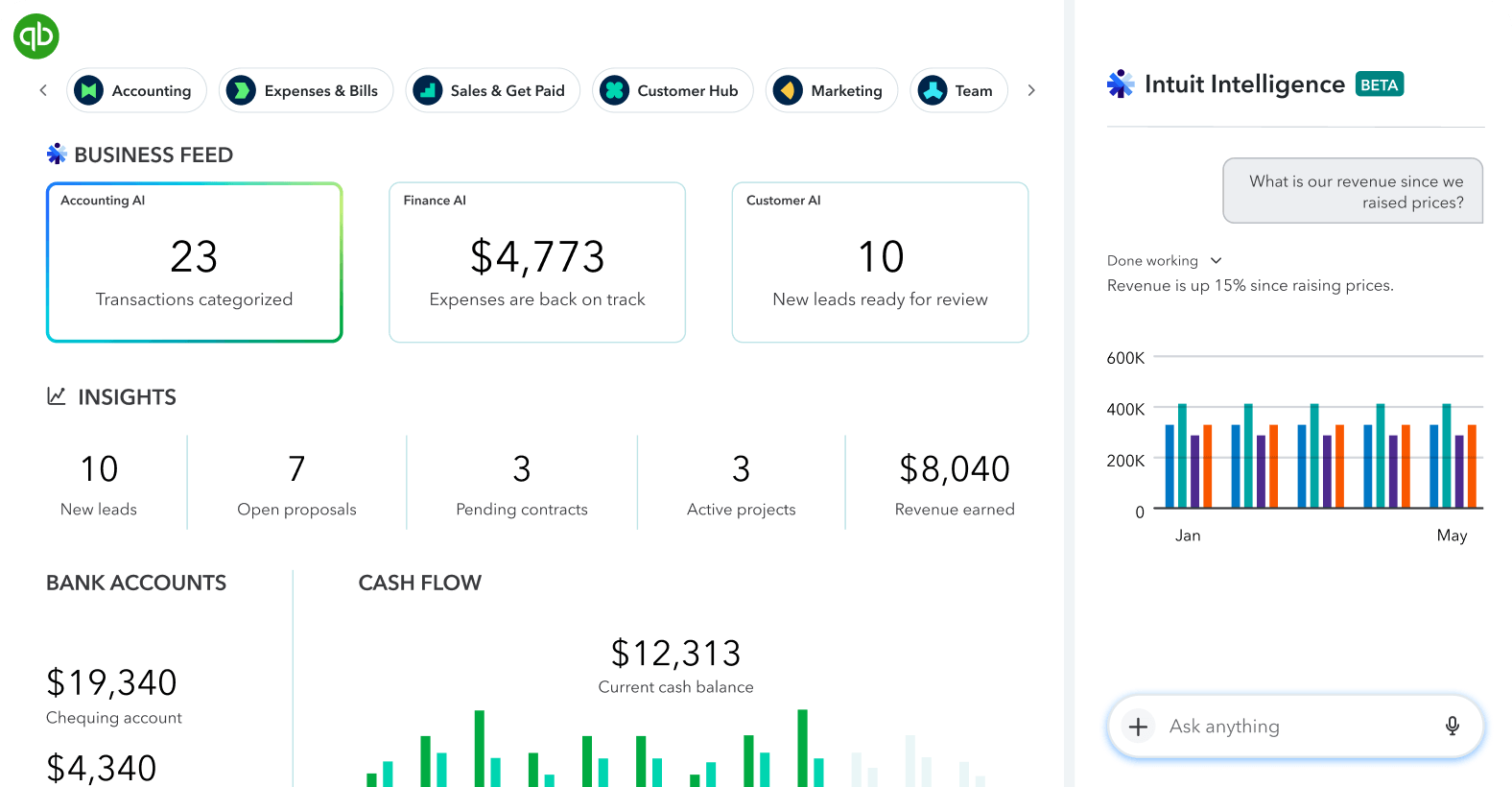
QuickBooks is Intuit's cloud-based accounting platform that integrates with Salesforce to close the gap between the revenue your sales team closes and the financial records your accounting team maintains.
Source: QuickBooks
The integration runs through dedicated AppExchange connectors (Breadwinner, DBSync, and others) that authenticate via OAuth to both systems, mapping Salesforce fields to their QuickBooks Online Accounting API equivalents.
Key integration capabilities include:
Bidirectional sync of customers, invoices, products, and payments between QuickBooks and Salesforce
Invoice and estimate generation directly from Salesforce opportunities, converting closed deals into billing records without re-entering data
Real-time payment status on Salesforce account and opportunity records, giving reps visibility into whether a customer has paid without contacting finance
Product and price book synchronization keeping items, SKUs, and pricing consistent across CRM and accounting
How QuickBooks Integrates with Salesforce
QuickBooks connects to Salesforce through AppExchange-listed connectors using OAuth 2.0 for both systems.
These connectors expose configuration interfaces where admins map fields, define sync direction, set trigger conditions, and schedule sync frequency (typically every 15-60 minutes). Setup requires Salesforce admin permissions to install and authorize the connected app and QuickBooks admin access for the OAuth connection.
1. Bidirectional Financial Sync.
The core of the integration keeps customer records, invoices, payments, and products consistent between both systems without parallel manual records. When a new Account is created in Salesforce, the connector creates a matching Customer in QuickBooks with company name, billing address, primary contact, and email.
Product and price book sync keeps the Salesforce product catalog aligned with QuickBooks' Items list, so the line items a rep selects during quoting draw from the same catalog that finance uses for invoices.
2. Invoice and Estimate Generation from Salesforce.
When a rep closes a deal and moves an Opportunity to Closed Won, the integration creates a corresponding invoice in QuickBooks, pulling the opportunity name, line items, amounts, billing contact, and payment terms directly from the Salesforce record.
The same mechanism works for estimates in earlier deal stages. The finance team's QuickBooks queue has the invoice waiting, pre-populated with the correct products and pricing, without a re-entry step.
3. Payment Visibility on the Salesforce Record.
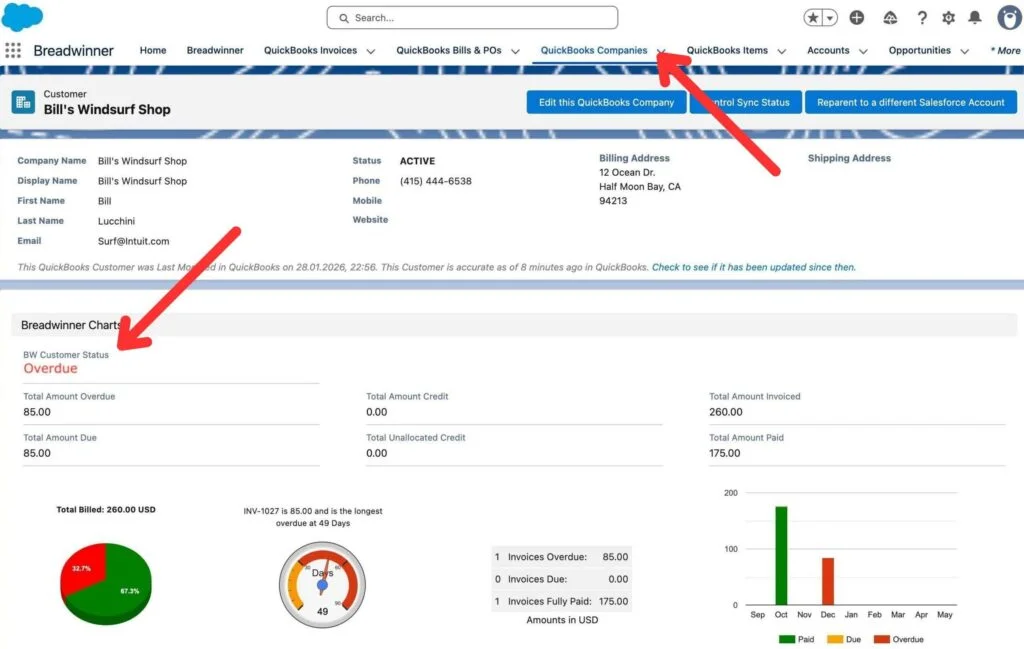
Through custom fields populated by the connector, reps see directly on the Salesforce Account page whether the customer has an outstanding invoice, how many days overdue it is, the total balance owed, and whether the most recent payment was received. An account executive reviewing their pipeline before a QBR can filter out accounts with overdue balances.
Customer success managers can use payment history as context for health scoring. This payment data flows from QuickBooks into Salesforce (read-only on the CRM side), preventing CRM users from accidentally modifying financial records.
Source: Salesforce Apps
QuickBooks Pricing
QuickBooks Online operates on a flat-fee monthly subscription:
Simple Start: $38/month (1 user + 2 accountants), automated bookkeeping, unlimited invoicing
Essentials: $75/month (3 users + 2 accountants), accounts receivable and payable reports
Plus: $115/month (5 users + 2 accountants), inventory tracking, purchase orders, project profitability; recommended minimum for product catalog sync and full invoice lifecycle
Advanced: $275/month (25 users + 3 accountants), batch invoicing, custom permissions, Spreadsheet Sync, Finance AI
The AppExchange connectors carry their own subscription costs on top of the QuickBooks plan, typically $49-$199/month depending on the connector and sync volume tier. On the Salesforce side, the integration works with Professional Edition and above.
Who Should Use the QuickBooks Integration?
Small to mid-market B2B companies where sales and finance maintain separate customer records and reconcile them manually at month-end
Teams where reps close deals and hand off invoice details via email or Slack rather than having that data flow automatically from CRM to accounting
Account executives and customer success managers who need to see whether a customer has paid their most recent invoice before starting a renewal or upsell conversation
Final Verdict
The best Salesforce integrations close gaps your CRM cannot fill on its own:
ZoomInfo: verified B2B data, buyer intent, and go-to-market intelligence enriching every record; the highest-impact integration on this list if your pipeline depends on data quality
Slack: CRM records turned into live collaboration spaces with bidirectional field editing and real-time alerts
Mailchimp: email and SMS campaigns built from live Salesforce segments with engagement metrics written back to the contact timeline
Power BI: pipeline analytics and cross-system dashboards that Salesforce's native reporting cannot produce
Zapier: no-code reach into 8,000+ apps where native Salesforce connectors stop
DocuSign: the full agreement lifecycle embedded inside CRM records, from generation through signature and contract management
QuickBooks: closed deals flowing into accounting records with payment status visible on Salesforce records
These integrations also compound: you might run ZoomInfo for enrichment and intent, Slack for deal coordination, Mailchimp for campaign execution, and Power BI for pipeline analytics on the same Salesforce instance, each adding a layer of automation that makes the others more valuable.
If you connect just one, make it the data layer everything else depends on. ZoomInfo's native Salesforce integration enriches your CRM with verified contact data, buyer intent signals, and company intelligence. ZoomInfo Lite is a permanent free tier that includes Salesforce connectivity, so you can see what verified data and live intent signals do for your pipeline before spending anything.
Frequently Asked Questions
How many integrations does Salesforce support?
Salesforce's AppExchange marketplace hosts over 9,000 partner apps with more than 14 million installs, spanning CRM, marketing automation, analytics, communication, agreement management, accounting, and data enrichment.
Beyond AppExchange, Salesforce's REST API, Bulk API, GraphQL API, Pub/Sub API, and MuleSoft platform support custom integrations with virtually any system that has an API. The Developer Edition provides 15,000 free API calls per 24-hour period for building and testing integrations.
Do Salesforce integrations work on all plan tiers?
Many AppExchange apps work across all paid Salesforce editions, but API access (which most integrations require) is included by default only on Enterprise Edition and above. Professional Edition users may need the API add-on. Free and Starter Suite tiers have limited API capabilities.
Advanced features like workflow automation, custom objects, and Agentforce AI require higher tiers. Check each integration's documentation for edition-specific requirements.
How does Salesforce's API rate limiting affect integrations?
Salesforce enforces daily API request limits based on edition and license count. Enterprise Edition starts at 100,000 calls per rolling 24-hour period, with per-license allocations stacking on top. Concurrent request limits cap at 25 for production orgs. High-volume integrations (bulk data enrichment, frequent
Zapier automations) should monitor usage through Salesforce's API dashboard. Teams approaching limits can use Bulk API 2.0 for large data operations or evaluate whether event-driven approaches (Platform Events, Change Data Capture) reduce polling overhead.
Can I connect Salesforce to tools that are not on AppExchange?
Yes. Salesforce's public REST API covers the full CRM data model and supports custom integrations with any system that can make HTTP requests.
For no-code solutions, Zapier connects Salesforce to 8,000+ apps, and Make provides visual multi-step automation with 3,000+ connectors. MuleSoft's Anypoint Platform offers hundreds of pre-built enterprise connectors for complex integrations.
Salesforce's Headless 360 initiative is also exposing every platform capability as an MCP tool, enabling AI agents from external systems to invoke Salesforce business logic directly.
How do I measure whether a Salesforce integration is delivering value?
Salesforce's reporting tools support multi-touch attribution that tracks the impact of integrated tools across the customer journey. For data enrichment integrations, track data completeness scores, lead-to-MQL conversion rates, and sales cycle length before and after activation.
For marketing integrations like Mailchimp, measure campaign-influenced pipeline and engagement-to-opportunity conversion. For workflow automation, measure time saved on manual tasks and the volume of automated actions processed monthly.
Are Salesforce integrations secure?
Salesforce uses OAuth 2.0 for third-party app authentication, meaning integrations never require you to share your Salesforce password.
The platform holds ISO 27001/27017/27018, SOC 1/2/3, and FedRAMP certifications. Salesforce Shield (a premium add-on) provides event monitoring, platform encryption with BYOK, and field audit trails. Each AppExchange app undergoes a security review. Enterprise environments can use SSO, two-factor authentication, IP allowlisting, and centralized audit logs.
What is the best way to enrich Salesforce contact data for B2B teams?
Integrating a dedicated B2B data platform provides the most accurate enrichment. ZoomInfo's native Salesforce AppExchange integration automatically appends verified emails, direct-dial phone numbers, firmographic data, technographic profiles, and buyer intent signals to your CRM records.
The enrichment runs continuously through a verification pipeline backed by 300+ human researchers, covering 500 million contacts and 100 million companies.
Salesforce's Data Cloud includes its own enrichment capabilities, but for teams whose pipeline depends on data accuracy and buying signal detection, connecting a platform built for B2B intelligence closes the gap between what Salesforce captures and what your reps need to act on.
