
Choosing between Zoho CRM and Keap comes down to five questions:
Are you a small service business needing simple automation, or a growing company needing customization and scalability?
Do you want one platform from a single vendor, or are you comfortable stitching tools together?
Is your team technical enough to configure a CRM, or do you need guided setup and pre-built workflows?
How much are you willing to spend per month, and how many users need access?
Does your business depend on finding new B2B prospects, or on managing existing leads and clients?
In short, here's what we recommend:
Zoho CRM is the configurable CRM for growing businesses that want enterprise features without enterprise pricing. With a free plan for up to 3 users and paid tiers starting at $14/user/month, Zoho CRM offers customization through no-code tools like Canvas Design Studio and Blueprint, AI via Zia, and native integration with 50+ Zoho applications. It serves 300,000+ businesses worldwide and has appeared in the Gartner Magic Quadrant for Sales Force Automation 15 years running. The trade-off: Zoho's breadth requires real setup investment before it delivers value, and support quality on lower tiers draws criticism.
Keap is the automation platform built for small service businesses that need CRM, email, text marketing, appointment scheduling, invoicing, and payments under one roof. Its Lifecycle Automation framework gives non-technical owners a structured growth model, not a toolbox. Keap has served over 200,000 small businesses for 20+ years and earned G2 Leader recognition across 4 categories. However, its single plan starts at $299/month, making it one of the most expensive options in its class, and the learning curve is steeper than the marketing suggests.
Both platforms handle the "manage and automate" side of sales well. But neither solves a more basic problem: finding the right accounts and contacts to put into your pipeline, and knowing which ones are ready to buy. That's the intelligence layer, and it's where a different kind of platform becomes essential.
ZoomInfo is a GTM platform built on the largest B2B data set available: 500M contacts, 100M companies, 135M+ verified phone numbers, and 200M+ verified business email addresses. Its GTM Context Graph (an intelligence layer that processes 1.5B+ data points daily) combines this data with your CRM records, conversation transcripts, and behavioral signals to show who to contact and why they're ready to buy now. Teams access this intelligence through the GTM Workspace for sellers, GTM Studio for marketers and RevOps, or APIs and MCP in any front-end.
If building a data-driven sales engine sounds like what your team needs, start a free trial.
Zoho CRM vs. Keap vs. ZoomInfo at a glance
Zoho CRM | Keap | ZoomInfo | |
|---|---|---|---|
Primary function | Configurable CRM & business platform | Small business CRM & marketing automation | B2B data intelligence & GTM platform |
AI capabilities | Zia: predictive, generative, and agentic AI | AI Content Assistant, SmartSend AI | GTM Context Graph, AI agents, intent signals |
Integrations | 1,100+ via Zoho Marketplace | ~87 marketplace apps + Zapier | 172+ marketplace partners + API/MCP |
Automation depth | Workflow rules, Blueprint, Cadences, CommandCenter | Easy Automations + Advanced Automations | GTM plays, signal-triggered workflows |
Built-in payments | No (via Zoho Books integration) | Yes (Keap Pay, Stripe, PayPal) | No |
Appointment scheduling | Via Zoho Bookings integration | Yes, built-in | No |
Global coverage | 28 languages, 18 data centers | Primarily US, UK, CA, AU | 34M+ company profiles outside NA |
Free plan | Yes (up to 3 users) | No (free trial only) | Yes (ZoomInfo Lite, permanent) |
Starting price | $14/user/month | $299/month (all features, 2 users) | Custom-quoted |
Best for | SMBs to mid-market needing scale and flexibility | Small service businesses (1–25 employees) | B2B teams needing prospecting data and buyer signals |
Two CRMs, one intelligence platform: understanding what each does
The most important thing to understand here is that Zoho CRM and Keap solve a different problem than ZoomInfo.
Zoho CRM and Keap are relationship management and automation platforms. They store your contacts, track your pipeline, automate follow-up sequences, and help you close deals with leads already in your system. The question between them is which one manages those relationships better for your business size and needs.
ZoomInfo is a data intelligence platform. It answers the questions that come before the CRM: Which companies should you target? Who are the decision-makers? Are they researching solutions like yours? What's happening in their business that creates an opening? ZoomInfo feeds this intelligence into your CRM so your automation runs against verified, qualified contacts rather than stale lists and guesswork.
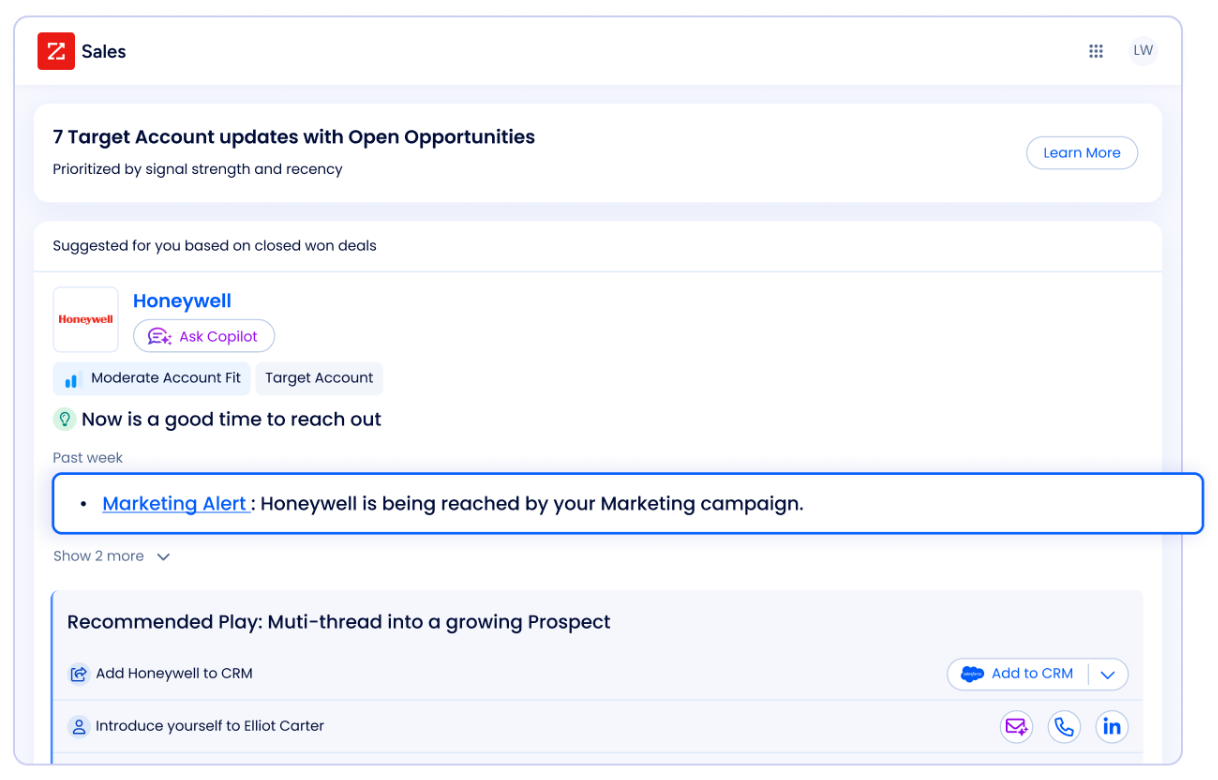
For B2B companies, a CRM plus ZoomInfo creates a stronger sales motion than either alone. Your CRM manages the relationship. ZoomInfo ensures you're building relationships with the right people at the right time.
Zoho CRM delivers depth and value, Keap delivers simplicity and structure
Zoho CRM and Keap took opposite paths to the same destination.
Zoho CRM started as an affordable Salesforce alternative and grew into a full business platform. Today it offers multiple sales pipelines, territory management, CPQ (Configure-Price-Quote), and a five-layer automation stack spanning workflow rules, Blueprint process enforcement, Cadences, Kiosk Studio, and CommandCenter journey orchestration. The Enterprise tier at $40/user/month includes features that Salesforce charges $165/user/month for. But that depth comes with setup complexity. As SoftwareReviews notes: "Success requires investing time in setup and configuration rather than expecting immediate out-of-box functionality."
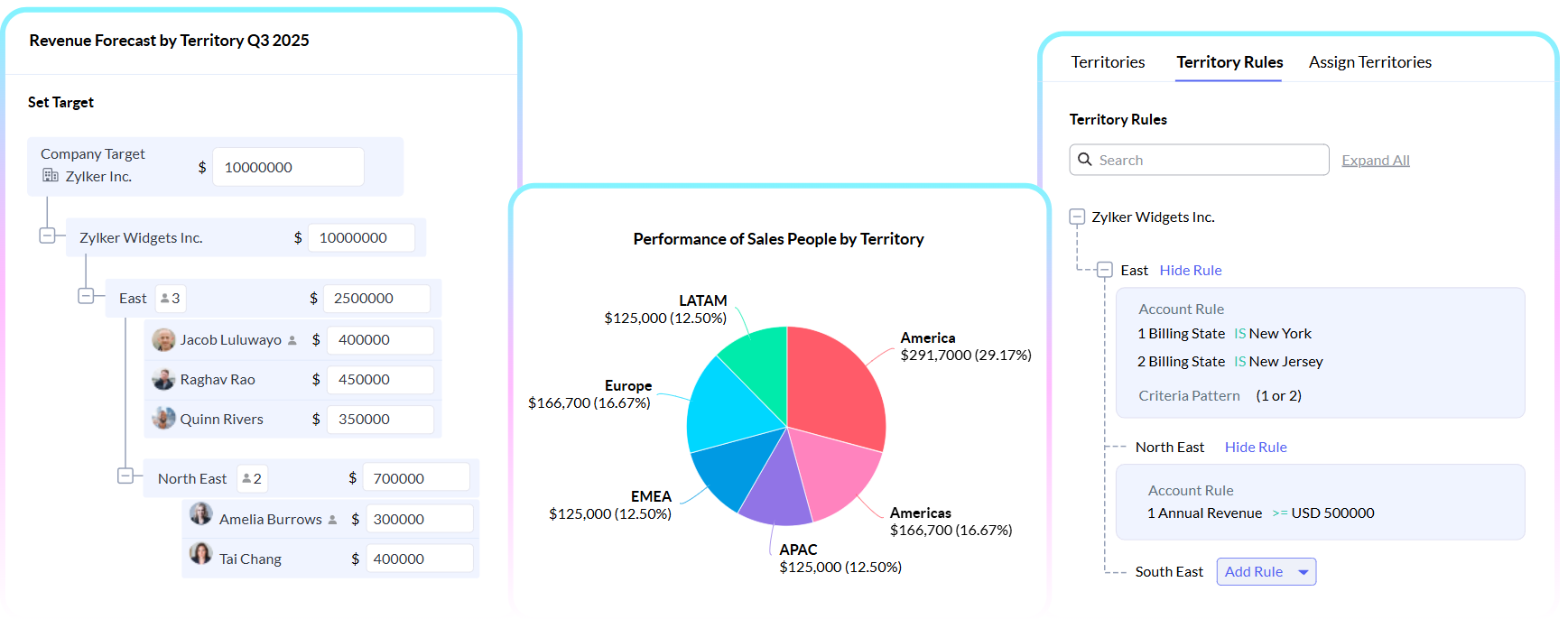
Source: Zoho CRM
Keap took the opposite approach. It started as Infusionsoft (a notoriously complex automation platform), then rebranded in 2019 to become more accessible. The result is a single-plan platform where CRM, email marketing, text marketing, appointment scheduling, invoicing, and payments all live in one interface. Keap's Lifecycle Automation framework maps the customer journey into three phases (Collect Leads, Convert Clients, Create Fans) and provides pre-built automation templates for each. It's structured where Zoho is flexible.
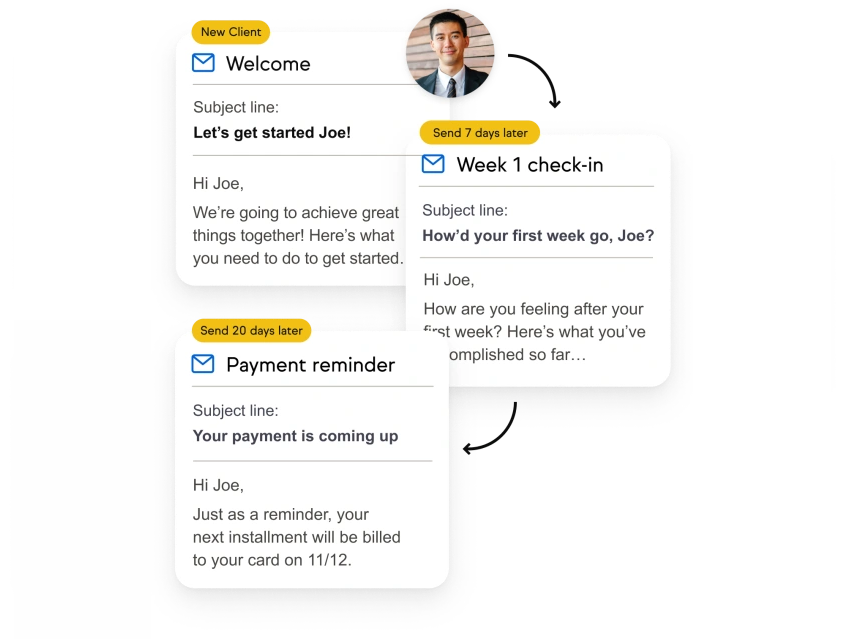
Source: Keap
The practical difference shows up on day one. A Zoho CRM admin can build virtually anything but needs to decide how to build it. A Keap user follows a prescribed path, which is faster to implement but harder to deviate from when the business outgrows the template.
Automation philosophy: flexibility vs. prescription
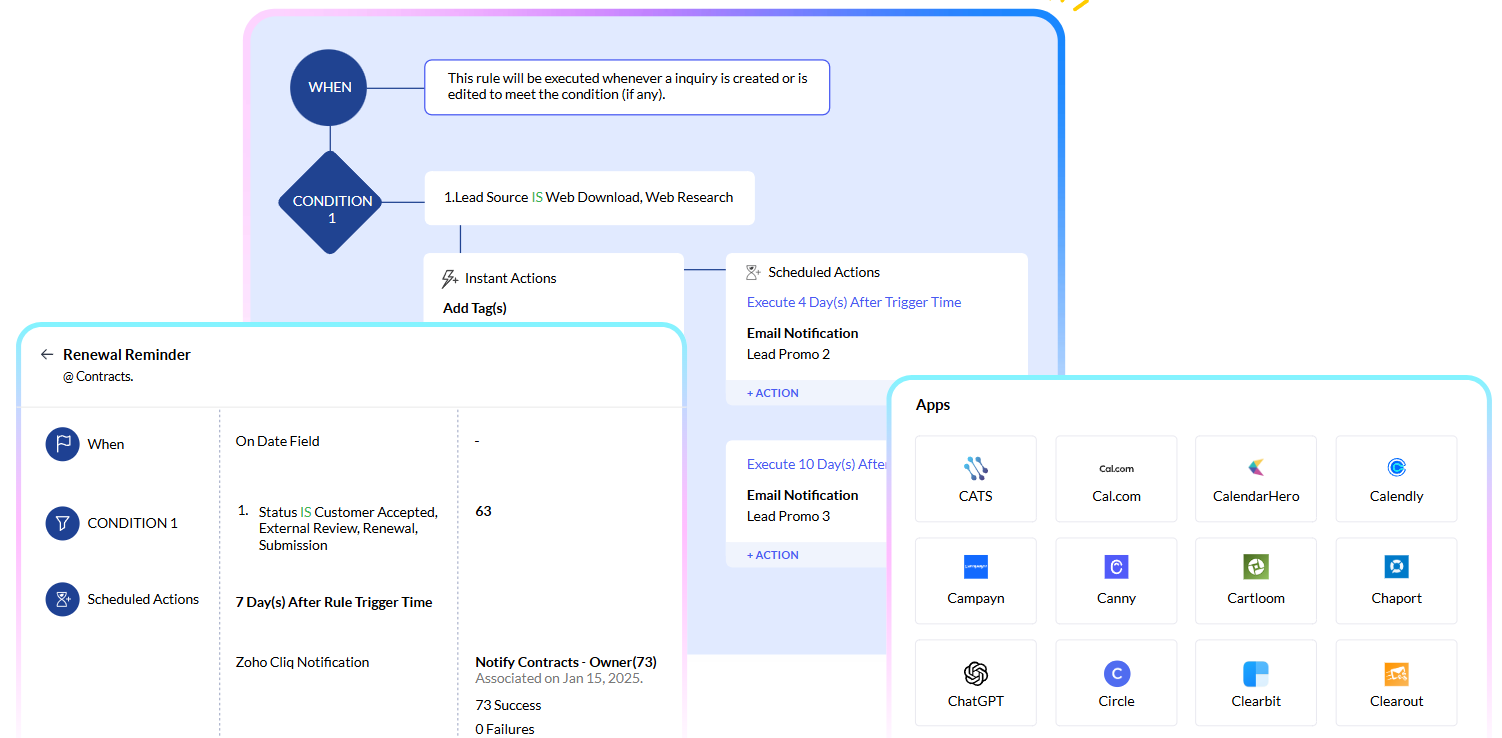
Zoho CRM's automation is layered. Workflow rules handle basic trigger-action logic. Blueprint enforces sales processes by requiring reps to complete specific actions before advancing a deal. Cadences coordinate multichannel follow-up sequences that branch based on prospect behavior. Kiosk Studio lets admins build guided interactive flows without code. And CommandCenter orchestrates end-to-end customer journeys across departments and channels. Each layer addresses a different level of complexity, and all five live within the same platform.
Source: Zoho
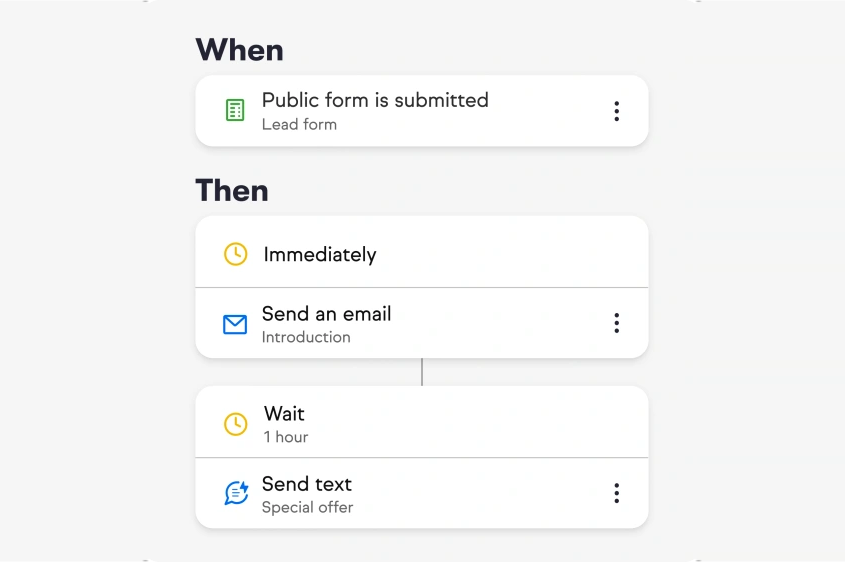
Keap divides automation into two tiers: Easy Automations (preset, one-click templates for common workflows) and Advanced Automations (a builder for custom multi-step campaigns). The builder runs on when-then-stop logic: choose a trigger, define the response, set a stop condition. Keap's pre-built templates cover the most common small business automation needs: new lead follow-up, appointment reminders, invoice nudges, and review requests.
Source: Keap
Zoho's automation rewards technical users who invest in configuration. Keap's rewards users who follow its prescribed patterns. G2 reviewers praise Keap's automation for small business use cases, calling it "set it and forget it," but also note that automations are "sometimes buggy and don't trigger when they are supposed to for no apparent reason."
ZoomInfo approaches automation from the intelligence side. Rather than automating actions on contacts already in your system, ZoomInfo's GTM Studio automates finding the right contacts, detecting buying signals, and triggering plays across channels. When a target account shows intent signals, ZoomInfo can route that account to the right rep, draft personalized outreach, and push the contact into your CRM. The automation starts before the lead enters your pipeline.
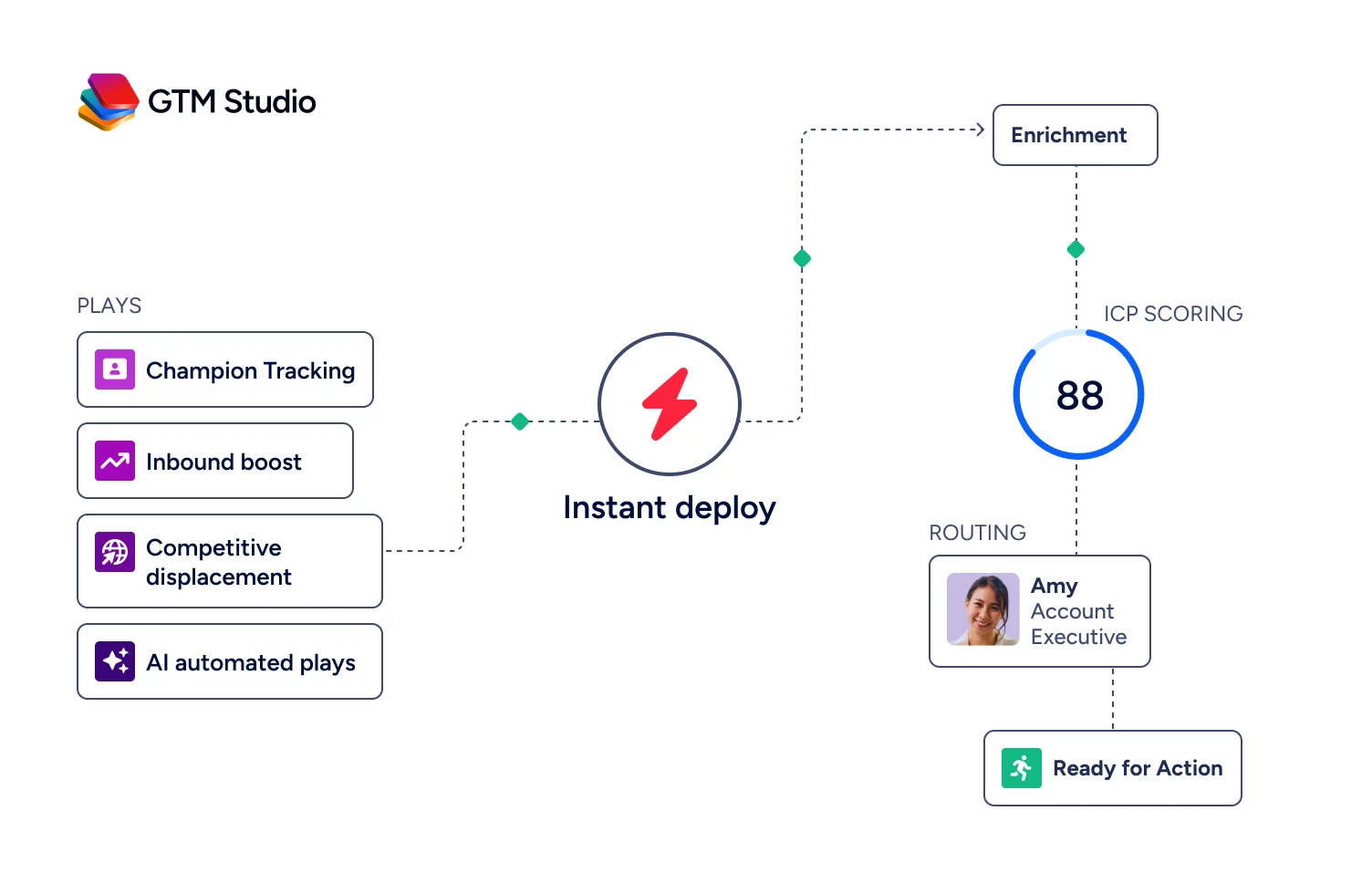
"It's bringing data together faster than anyone could. It's both a time saving and a quality improvement," said Toby Carrington, Chief Business Officer at Seismic, whose sales team attributed 39% of pipeline to ZoomInfo signals. (Seismic case study)
AI capabilities are at different stages of maturity
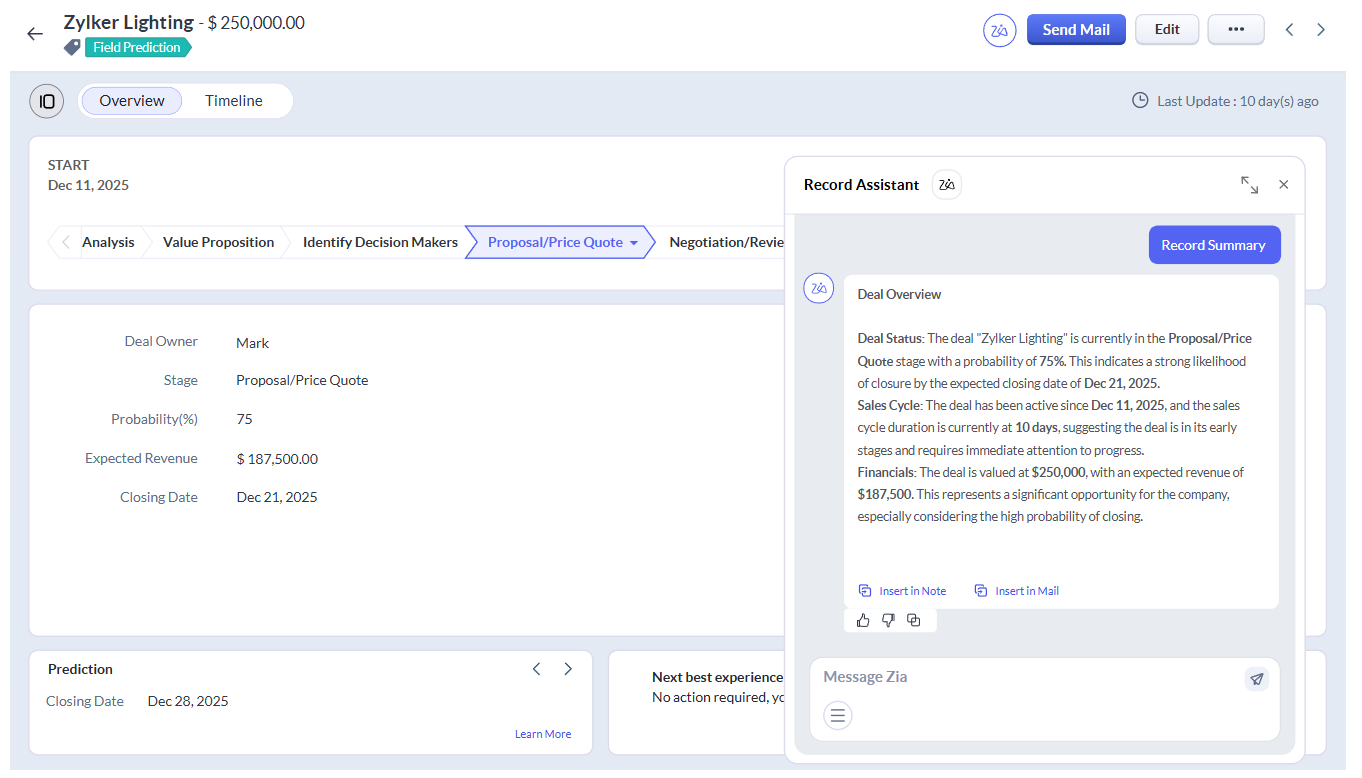
Zoho CRM's Zia AI covers three tiers. Predictive AI handles lead scoring, churn prediction, and sales forecasting. Generative AI creates CRM modules, workflow rules, and reports from natural language prompts. And Zia Agents deploy autonomous agents that handle multi-step sales tasks like follow-up scheduling and email drafting. Zia also analyzes email sentiment, intent, and emotion, transcribes calls, and surfaces competitor mentions in prospect communications. For organizations needing custom models, QuickML allows no-code ML model building on CRM data. This breadth of AI at Zoho's price point is unusual.
Source: Zoho
Keap's AI capabilities are newer and narrower. The AI Content Assistant generates email and SMS copy from prompts. SmartSend AI optimizes send times per contact based on historical engagement. An Automation Assistant is in development to suggest triggers and sequences. Smart Lead Scoring and Contact Engagement Insights are planned. These additions address Keap's biggest adoption barrier (setup complexity), but they're early compared to Zoho's multi-year AI investment.
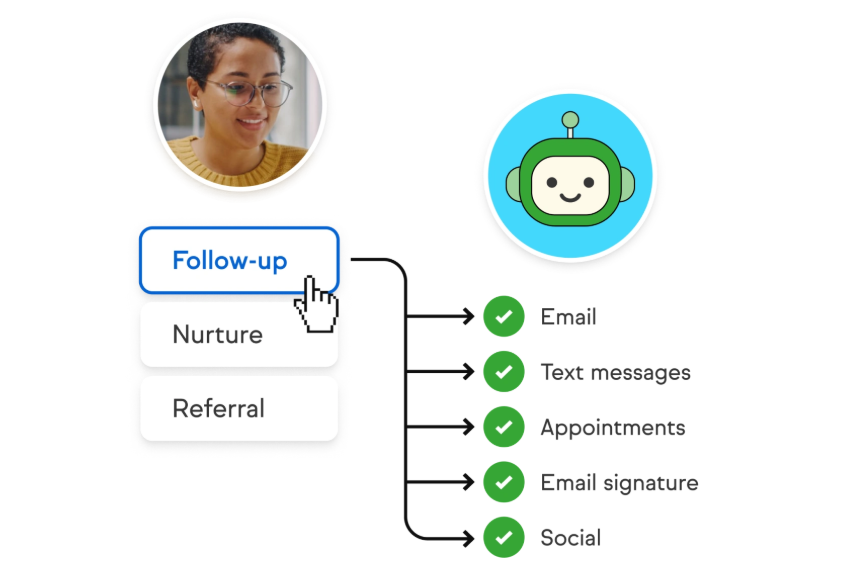
Source: Keap
ZoomInfo's AI operates at a different level, built on the GTM Context Graph (an intelligence layer that processes 1.5B+ data points daily). Where CRM AI analyzes data already in your system, ZoomInfo's AI reasons across your CRM records, conversation transcripts, intent signals, and the largest B2B dataset available to reveal why deals move or stall. The GTM Workspace uses specialized AI agents (built on Anthropic's Claude) that handle account research, outreach generation, signal monitoring, and CRM updates. This isn't CRM AI. It's intelligence-layer AI that makes CRM AI more effective.
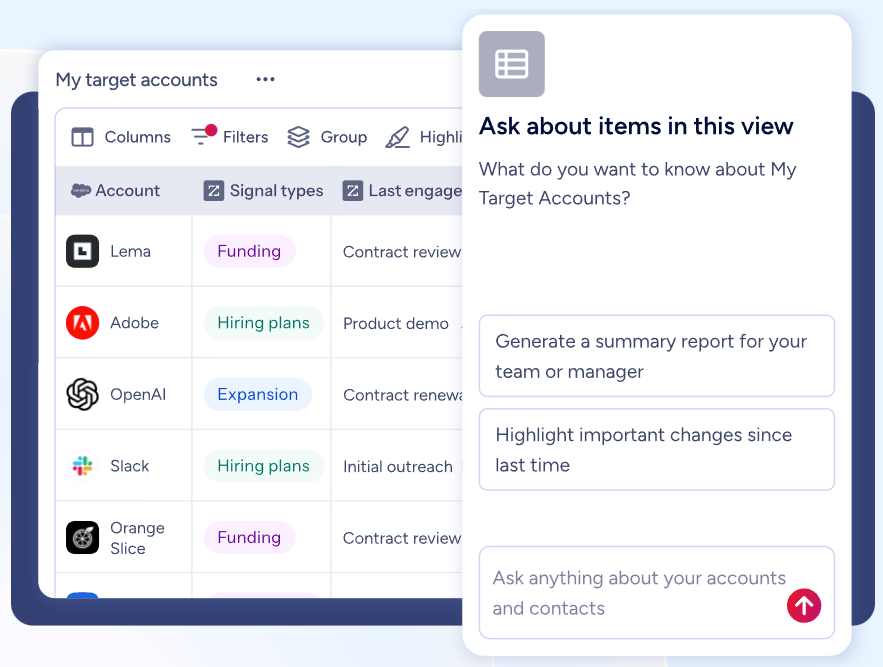
Contact management and data quality: the hidden gap
Both Zoho CRM and Keap provide strong contact management. Zoho CRM stores contacts with full-record views covering all activities, emails, calls, and transactions. Its Module360 infrastructure processes over 1 billion events per day. Keap's contact record consolidates messages, tasks, documents, quotes, purchases, and interaction history in a single profile, with a tagging system that triggers automation based on contact behavior.
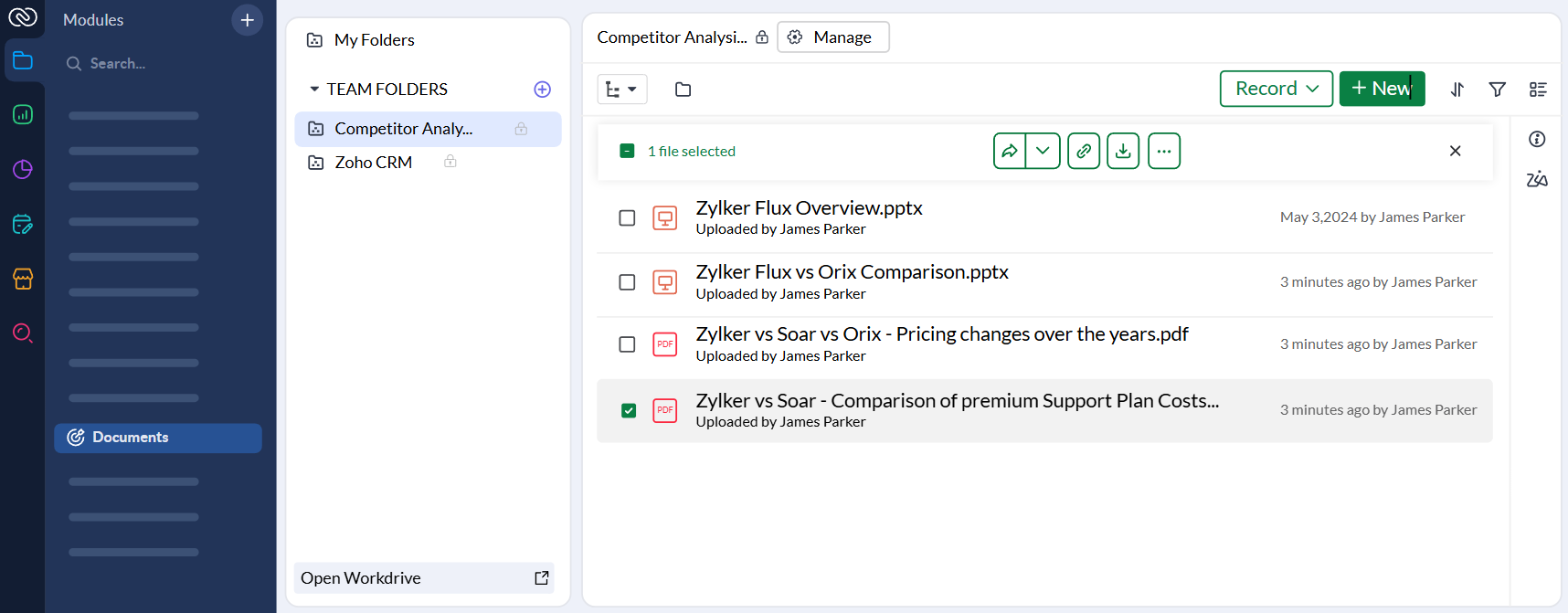
Source: Zoho
But both platforms share a limitation: they manage the data you put into them. They don't tell you whether that data is accurate, complete, or worth pursuing.
ZoomInfo addresses this directly. Its data runs through a multi-source verification pipeline backed by 300+ human researchers, achieving up to 95% accuracy on first-party data. When a Fortune 500 company ran a competitive RFP analyzing 25 million contacts across vendors, the independent consultant concluded that "no other competitor came even close." ZoomInfo's Operations product continuously enriches, deduplicates, and verifies CRM data, keeping your contact database clean regardless of which CRM you use.
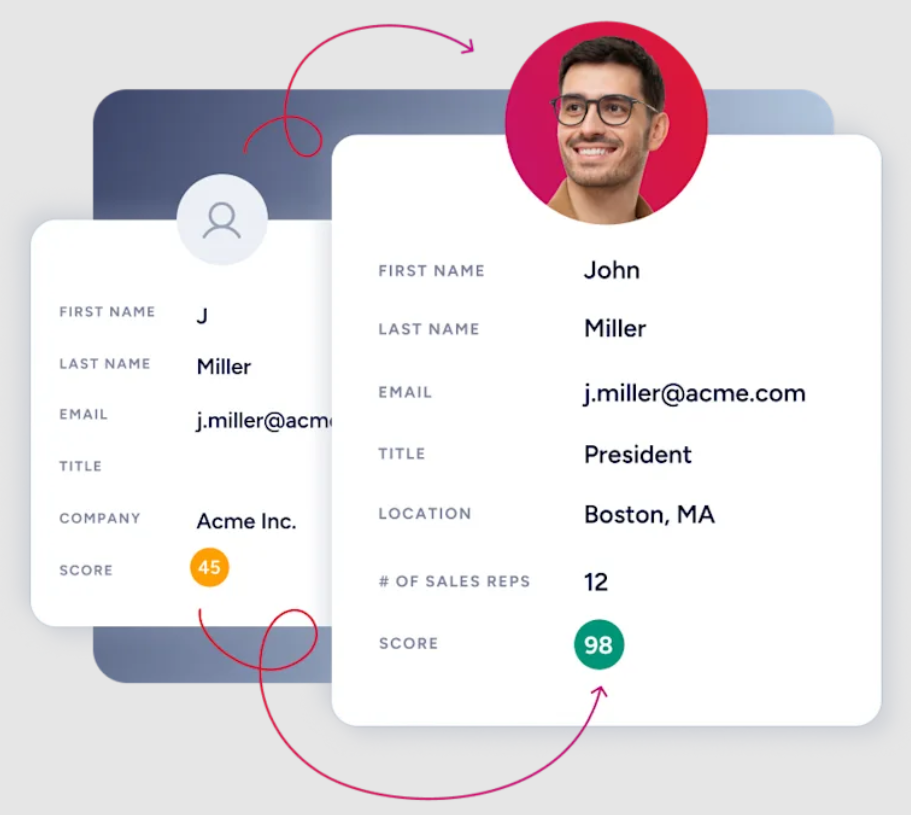
"ZoomInfo gives us the information we need to execute. We don't have to go through and spend our time digging. It's already there, so we can be three steps ahead," said William Kenimer, Vice President of Revenue Operations at Vensure. (Vensure case study)
For B2B teams, this distinction matters. A CRM full of unverified contacts, stale phone numbers, and generic email addresses produces low conversion rates no matter how good the automation is. ZoomInfo solves the data quality problem that both Zoho CRM and Keap leave to the user.
Integrations and ecosystem breadth
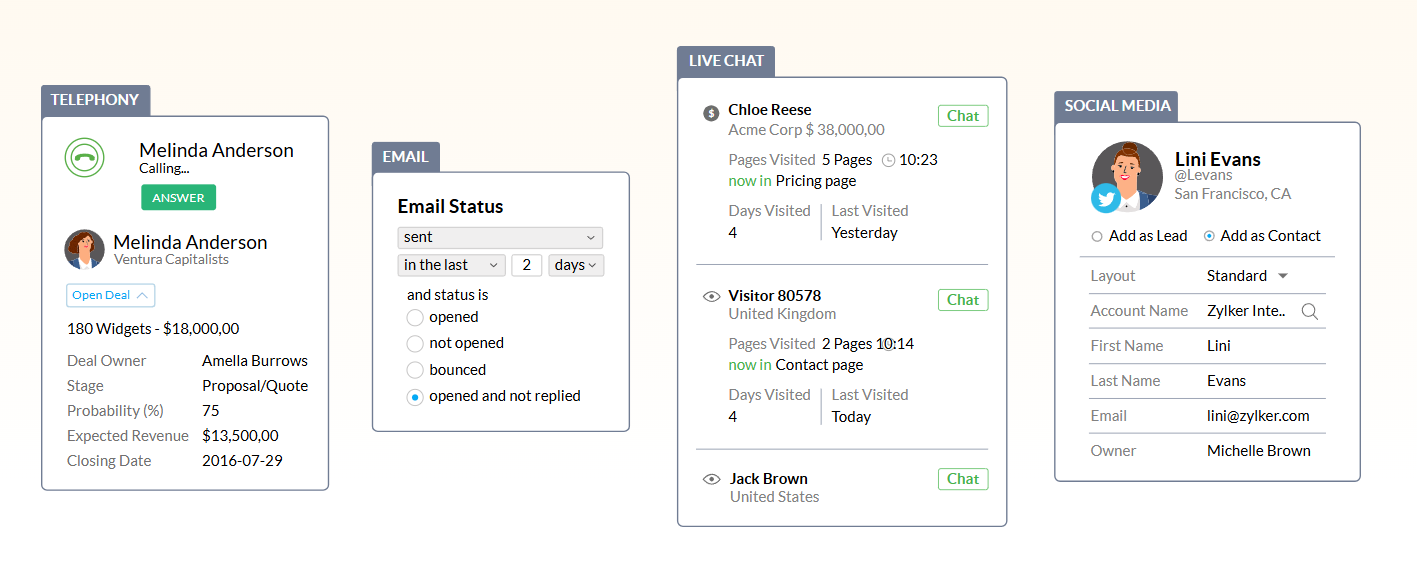
Zoho CRM has the largest first-party ecosystem of any CRM vendor at its price point. The CRM integrates natively with 50+ Zoho applications spanning finance (Zoho Books), support (Zoho Desk), marketing (Zoho Campaigns), e-signatures (Zoho Sign), analytics (Zoho Analytics), and project management (Zoho Projects).
The Zoho Marketplace adds 1,100+ third-party integrations. For development teams, Zoho provides REST APIs, GraphQL APIs, serverless Deluge functions, a Widget SDK, and MCP server support. The breadth is real, though Salesforce AppExchange still lists 7,000+ apps by comparison.
Source: Zoho
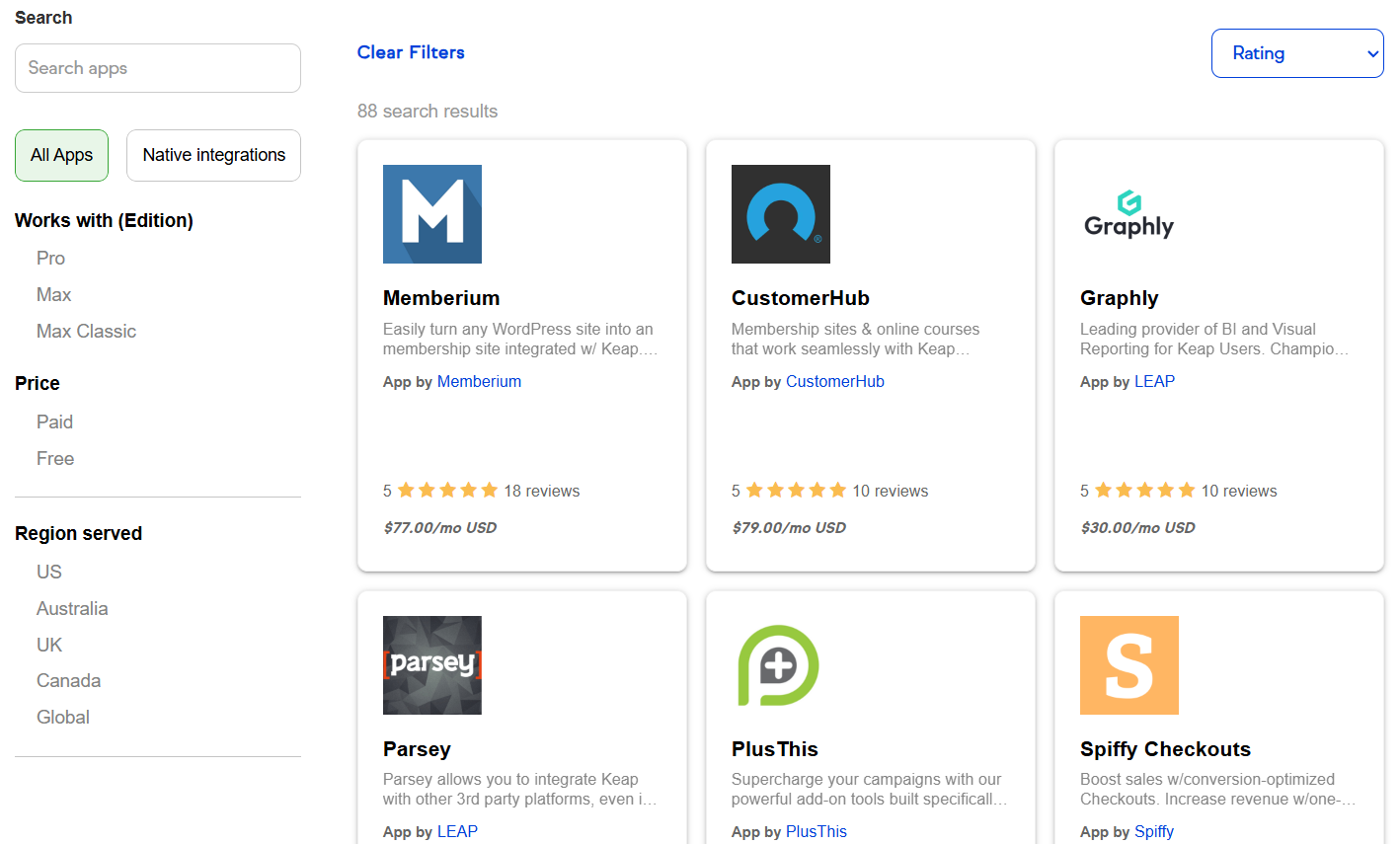
Keap's integration ecosystem is thinner. The marketplace lists about 87 apps covering membership sites (Memberium), reporting (Graphly), checkout optimization (Spiffy Checkouts), and campaign add-ons (PlusThis). Zapier extends connectivity to 5,000+ apps, but Zapier connections are less reliable and less thorough than native integrations. Reviewers note that "connectivity to other programs is difficult to achieve." Keap offers three generations of REST APIs and a developer portal, but the ecosystem is far smaller than Zoho's.
Source: Keap
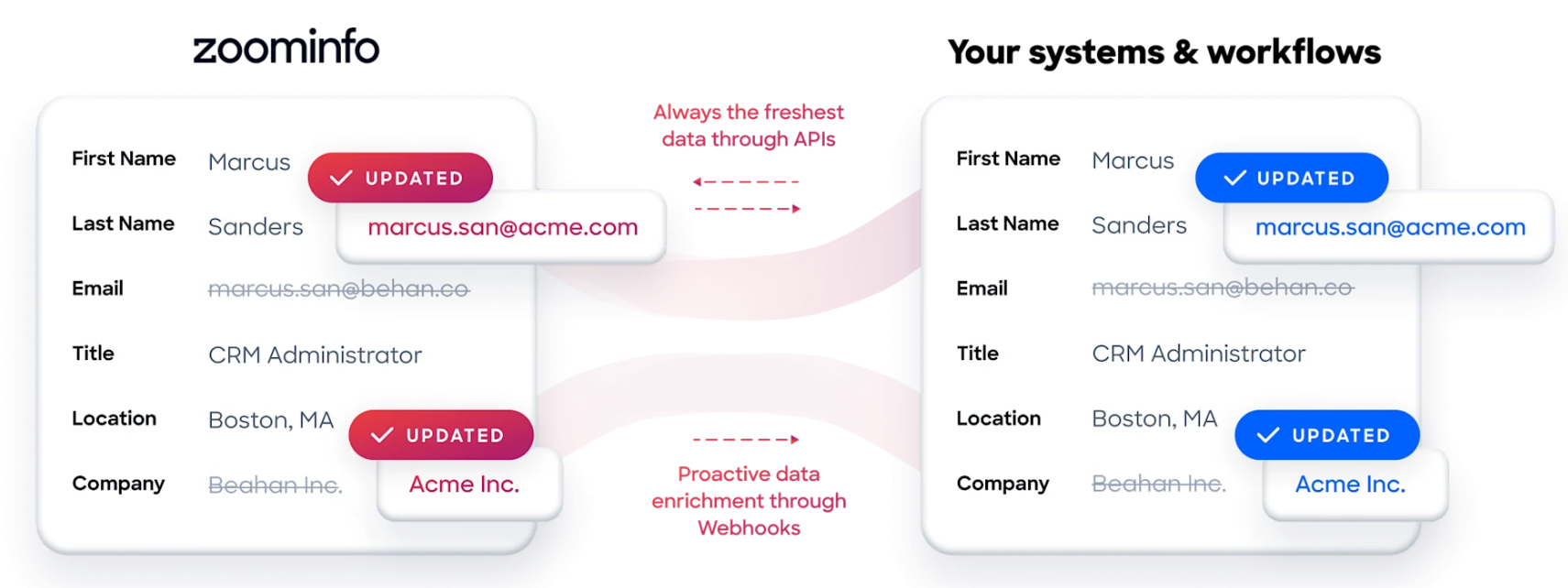
ZoomInfo takes an open-platform approach. The Marketplace lists 172+ integration partners across CRM, marketing automation, sales engagement, data warehouses, and AI platforms. Native integrations with Salesforce, HubSpot, and Microsoft Dynamics are bidirectional. Cloud Partners deliver ZoomInfo data into AWS, Google Cloud, Snowflake, and Databricks. The Enterprise API and MCP server expose ZoomInfo's intelligence to any custom application or AI agent. API access is included in all plans, so the intelligence works wherever your team works.
"The plug-and-play aspect of the API means I can integrate it very easily into any process and get information at a moment's notice," said Jerry Wilson, Senior Marketing Intelligence Analyst at BDO Canada, reporting an 87% reduction in time spent on internal data dashboard updates. (BDO Canada case study)
Built-in revenue collection sets Keap apart
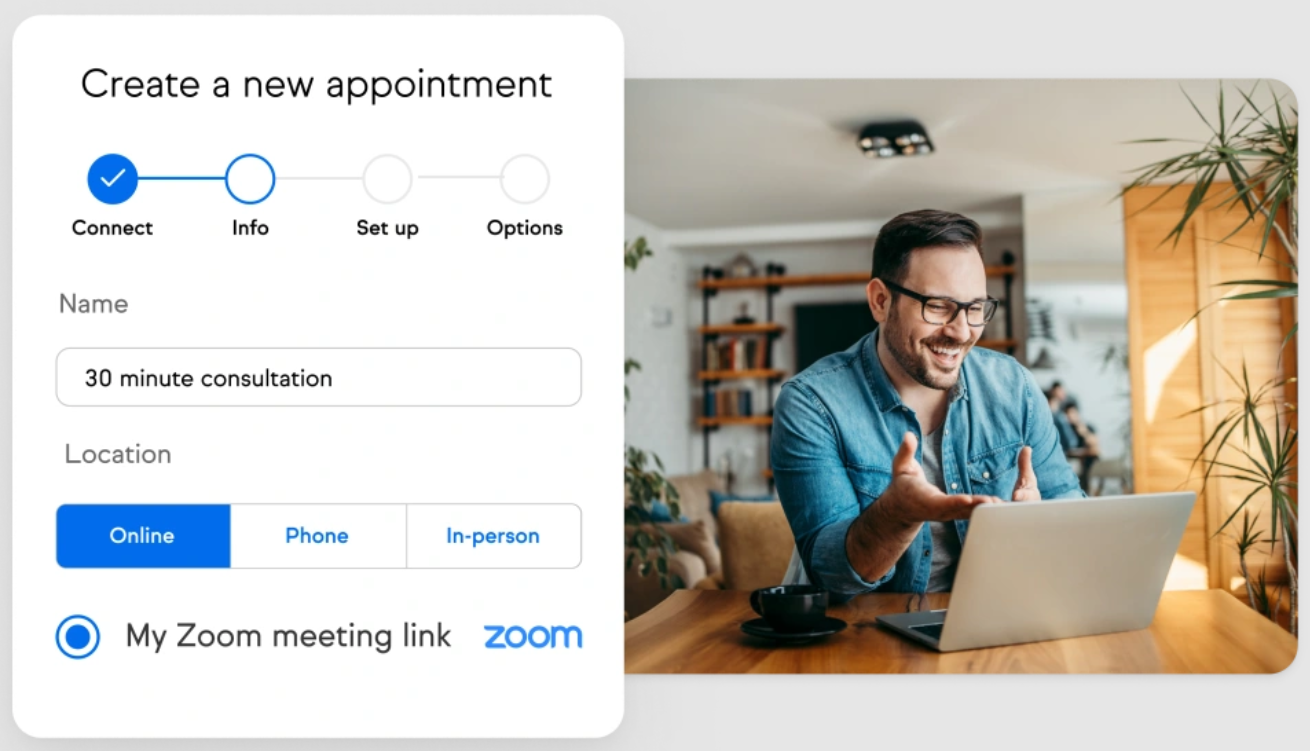
One area where Keap leads is built-in commerce. The platform includes invoicing and payments, recurring billing, checkout forms with one-click upsells, and payment processing through Keap Pay, Stripe, PayPal, and eWay. When a recurring charge fails, Keap makes up to three auto-retry attempts two days apart before marking it failed. Appointment scheduling is also native, with Google Calendar and Outlook sync, Zoom integration, and automated pre- and post-meeting follow-ups.
Source: Keap
Zoho CRM handles payments and scheduling through its ecosystem rather than natively. Zoho Books covers invoicing and accounting. Zoho Bookings handles appointment scheduling. These integrate well through the Zoho platform, but they're separate products you must configure and may need to pay for independently.
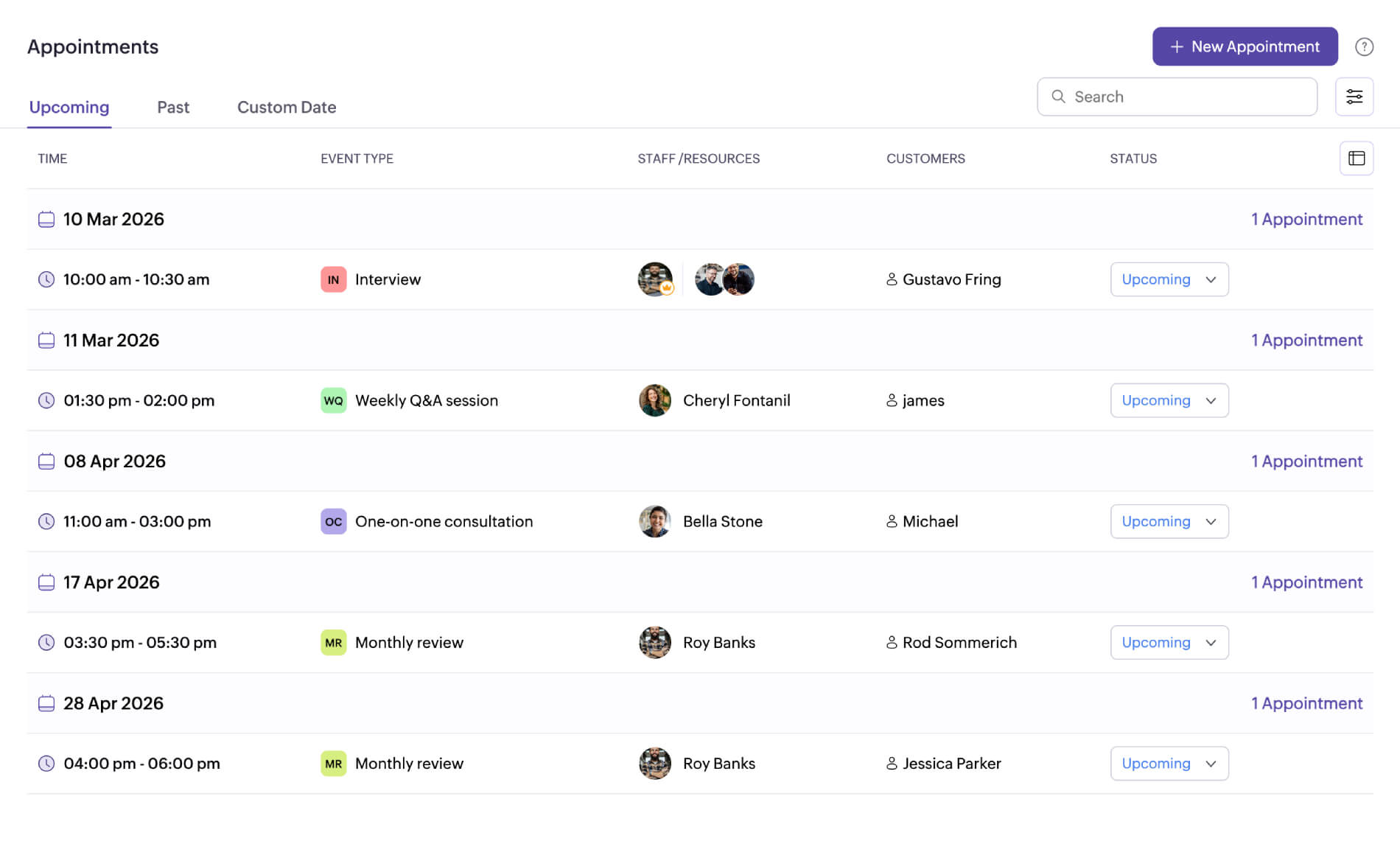
Source: Zoho
For small service businesses where invoicing and scheduling are daily operations, Keap's bundled approach saves time. For larger organizations that already have finance and scheduling tools, the bundle adds no value and the $299/month minimum feels inflated.
Scalability and the growth ceiling
This is where the two CRMs diverge most sharply.
Zoho CRM scales from a 3-person startup to a multi-thousand-seat enterprise. The Module360 architecture supports up to 1.5 billion records and 50,000+ users in a single org. Territory management, multiple pipelines, Blueprint process enforcement, and vertical-specific solutions for industries from automotive to life sciences give growing companies room to expand without re-platforming. The Zoho One bundle at ~$37/employee/month provides the full 50+ app suite for organizations that want a single vendor.
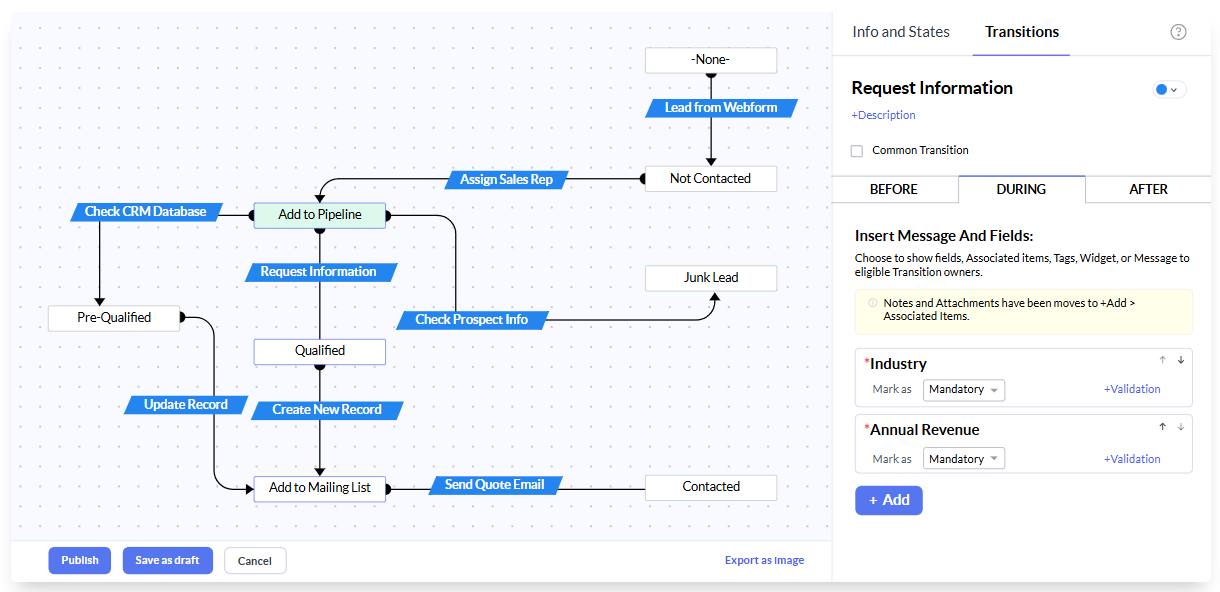
Source: Zoho
Keap hits its ceiling earlier. The platform targets businesses with 1–25 employees. Companies approaching 50 employees run into customization limits on field types, object relationships, and workflow logic. Reporting is basic by reviewers' assessment, lacking customizable dashboards, attribution reporting, and multi-touch pipeline analytics. The mobile app provides access only to contacts and tasks, not campaigns or email. These aren't bugs; they're design choices for a platform serving owner-operators, not scaling sales organizations.
ZoomInfo scales independently of your CRM choice. Whether you're on Zoho CRM's free plan or Enterprise tier, ZoomInfo's data and intelligence layer works the same way. As your team grows, the GTM Workspace provides AI-powered execution for sellers, while GTM Studio gives marketers and RevOps teams a canvas for designing, enriching, and activating GTM plays. The intelligence compounds as your team grows because the GTM Context Graph learns from every deal interaction across the organization.
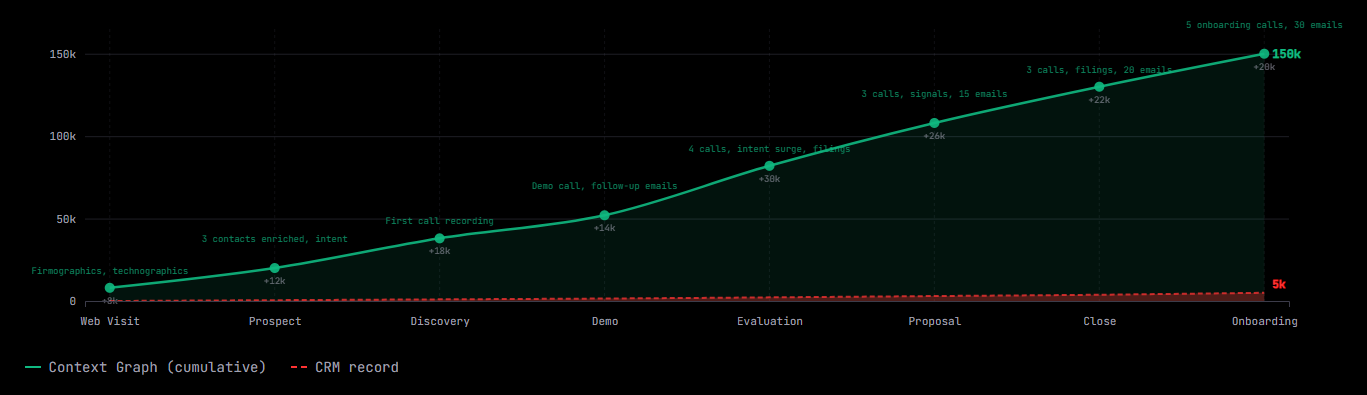
Pricing creates a stark divide
The pricing models reveal who each platform is built for.
Zoho CRM uses per-user pricing with five tiers. The free plan supports up to 3 users with basic CRM features. Standard starts at $14/user/month, Professional at $23, Enterprise at $40, and Ultimate at $52 (all billed annually). A 10-person team on the Enterprise plan costs $400/month. Month-to-month billing is available with no lock-in contracts. Zoho explicitly positions against "predatory business practices and aggressive, multi-year contracts."
Keap uses a single-plan, contact-based model starting at $299/month billed annually. That includes 2 user seats, with additional users at $39/month each. The price scales with contact volume. There's no free plan, and cancellation must happen verbally with a representative (Keap does not accept email cancellation requests). Cancelling an annual contract early incurs a $299 early termination fee.
The math is clear. A 5-person team on Zoho CRM Enterprise pays roughly $200/month. The same team on Keap pays at least $416/month ($299 base + 3 additional users at $39 each), before contact volume increases or SMS add-ons. Zoho's Enterprise tier also includes territory management, journey orchestration, and Zia AI, features Keap doesn't offer at any price.
Keap's pricing makes sense only if you value having CRM, email, text, appointments, invoicing, and payments bundled together and you'd otherwise pay for 4–5 separate tools. For businesses that already have payment processing and scheduling solutions, the premium is hard to justify.
ZoomInfo uses consumption-based pricing that scales around data access, API consumption, and seats. No prices are published. For teams that need the prospecting intelligence layer, ZoomInfo sits on a separate budget line from the CRM, but the ROI is measurable: teams using ZoomInfo's intent signals and data platform have reported double-digit pipeline attribution and productivity gains.
Security and compliance posture
Zoho CRM holds ISO/SOC 2/HIPAA certifications, with AES-256 encryption on backups, field-level encryption on Enterprise+, and data centers across 18 global locations including new facilities in the UAE. Zoho runs its own data centers rather than hosting on AWS or Azure, and does not sell data or run advertising-based revenue.
Keap offers a HIPAA Business Associate Agreement for healthcare-adjacent customers and uses DKIM authentication and PGP encryption for data transfers. However, Keap does not advertise SOC 2, ISO 27001, or specific encryption standards on public pages. Following the October 2024 Thryv acquisition, data handling falls under Thryv's privacy framework. Buyers who require SOC 2 or ISO documentation should request these directly.
ZoomInfo maintains ISO/SOC 2/TRUSTe certifications (ISO 27001, ISO 27701, SOC 2 Type II, TRUSTe GDPR, TRUSTe CCPA), all renewed annually. ZoomInfo is a registered data broker in California and Vermont and operates a dedicated Trust Center. For enterprises in regulated industries, compliance is built into the data layer itself.
Zoho CRM vs. Keap vs. ZoomInfo: Which should you choose?
The right choice depends on what problem you're trying to solve.
Choose Zoho CRM if:
You need a CRM that scales from startup to enterprise
Customization matters more than pre-built simplicity
Your team can invest time in configuration and setup
You want a single-vendor ecosystem (Zoho One) for your entire business
Price-to-feature ratio is a primary buying criterion
You're migrating from Salesforce and need comparable features at a fraction of the cost
Choose Keap if:
You run a small service business with 1–25 employees
You need CRM, email, text, scheduling, invoicing, and payments in one place
You prefer guided, pre-built workflows over a blank configuration canvas
Your sales cycle involves multi-touch follow-up you're currently doing manually
You're willing to pay a premium for operational simplicity
Add ZoomInfo if:
Your business depends on finding and reaching new B2B prospects
You need verified contact data, direct dials, and business emails that work
You want to know which accounts are researching solutions like yours
You're tired of your CRM being only as good as the data you manually put into it
You want AI that understands your deals, not just your CRM fields
Start a free trial to see how ZoomInfo's data intelligence changes your prospecting.
The bottom line: Zoho CRM and Keap are both strong CRMs for their respective markets. But a CRM manages relationships with people you already know. ZoomInfo reveals the people you should know. For B2B teams, the most effective stack combines a CRM that fits your operational needs with an intelligence layer that ensures you're building the right pipeline. The CRM handles the how. ZoomInfo handles the who and the when.
"ZoomInfo is our one source of truth for account data, and even more so for contact data. There's no other provider in the market that provides you with that level of detail," said Thor Sanderson, Senior Manager of Sales Technology Enablement at Smartsheet. (Smartsheet case study)
Zoho CRM vs. Keap vs. ZoomInfo FAQ
What is the core difference between Zoho CRM, Keap, and ZoomInfo?
Zoho CRM is a configurable CRM platform that scales from startups to enterprises, offering customization, AI via Zia, and native integration with 55+ Zoho applications. Keap is a CRM and automation platform built for small service businesses, bundling email, text, appointments, invoicing, and payments in a single tool. ZoomInfo is a GTM platform that provides prospecting data, buyer intent signals, and account insights that feed into your CRM, solving the "who to sell to" problem that neither CRM addresses.
Which platform is most affordable for a small team?
Zoho CRM costs far less. Its free plan supports up to 3 users, and the Enterprise tier costs $40/user/month. A 5-person team on Zoho CRM Enterprise pays about $200/month. Keap starts at $299/month for 2 users, with additional seats at $39/month each, putting the same 5-person team at $416/month minimum. ZoomInfo uses consumption-based pricing for paid plans, though ZoomInfo Lite offers permanent free access with 10 monthly export credits.
Can ZoomInfo replace a CRM like Zoho CRM or Keap?
No. ZoomInfo is not a CRM. It does not manage ongoing customer relationships, automate email sequences to your existing contacts, handle invoicing, or track deal stages. ZoomInfo provides the intelligence layer that feeds your CRM with verified contacts, company data, and buying signals. It works best paired with a CRM, not as a replacement for one.
Which platform has better automation for marketing and sales?
Zoho CRM has the most automation tools: workflow rules, Blueprint process enforcement, Cadences, Kiosk Studio, and CommandCenter journey orchestration. Keap's automation is narrower but more accessible for non-technical users, with pre-built templates covering common small business workflows. ZoomInfo automates the prospecting and signal-detection layer rather than the CRM workflow layer, triggering plays and outreach when buying signals appear.
Which platform handles payments and invoicing?
Only Keap includes built-in invoicing, recurring billing, and payment processing through Keap Pay, Stripe, PayPal, and eWay. Zoho CRM handles payments through Zoho Books, a separate application in the Zoho ecosystem. ZoomInfo does not include payment or invoicing features.
How do the AI capabilities compare?
Zoho CRM's Zia AI covers predictive scoring, generative CRM setup, email sentiment analysis, call transcription, and autonomous AI agents, all built on a proprietary AI stack. Keap's AI is newer, focused on content generation and send-time optimization, with lead scoring and automation suggestions in development. ZoomInfo's AI operates on a different layer, using its GTM Context Graph (processing 1.5B+ daily data points) to reveal why deals move or stall, powering AI agents that handle account research, outreach, and signal monitoring.
Is Zoho CRM or Keap better for businesses planning to scale?
Zoho CRM is the stronger choice. Its architecture supports up to 1.5 billion records and 50,000 users per org, with territory management, multiple pipelines, and vertical-specific solutions. Keap targets businesses with 1–25 employees, and reviewers report hitting customization and reporting limits as teams grow past that range.
Do any of these platforms integrate with each other?
ZoomInfo integrates with major CRMs (Salesforce, HubSpot, Microsoft Dynamics) through native connectors and can connect with other platforms via its API and MCP server. Zoho CRM connects to 1,100+ apps through the Zoho Marketplace. Keap integrates with about 87 marketplace apps and 5,000+ apps through Zapier. A B2B team could use ZoomInfo for prospecting intelligence alongside either Zoho CRM or Keap for relationship management.
More Zoho CRM comparisons:
