
The ChatGPT Sales plugin inside ChatGPT Work brings ZoomInfo's own interactive views into the conversation, so sellers can build target lists, see which accounts are in the market, prepare for meetings and enrich files without learning filters or field names.
The plugin is a ZoomInfo app that runs on the MCP server, so it reaches ChatGPT through the same GTM.AI headless layer that’s powered by the GTM Context Graph.
What is the ZoomInfo plugin for ChatGPT?
The ZoomInfo plugin for ChatGPT is an app that puts ZoomInfo workflows inside a ChatGPT conversation.
Previously, a seller who asked ChatGPT "who should I go after?" received a text table, and changing the list meant writing a new prompt. Now the list builder opens with the seller's filters already applied, and the seller can adjust them with clicks.
See how small teams use the ChatGPT connector day to day.
How does it work?
The plugin covers seven workflows:
Daily brief. Today's meetings, plus scoops, intent surges and past contacts who changed companies on the seller's accounts. Suggested next steps can be sent straight back to ChatGPT and the ZoomInfo UI.
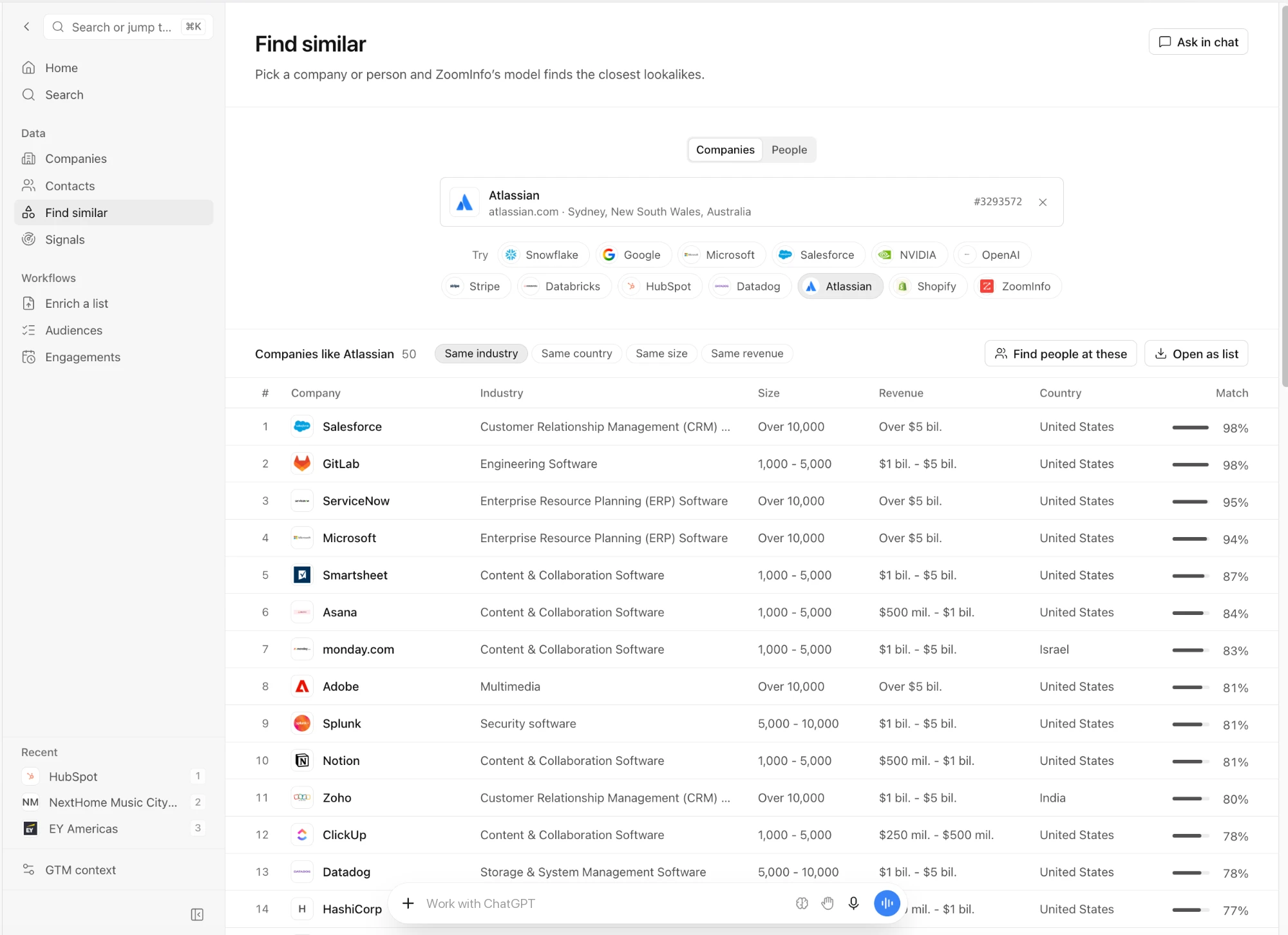
List building. An interactive builder that starts from the team's own ideal customer profiles (ICPs) and personas. It includes find-similar, reach details (email, phone and LinkedIn with accuracy), CSV export and saving to an audience.
Signals. Inside scoops and intent surges in one feed, filtered by ICP, intent topic or technology used.
Account and contact profiles. Live cards with firmographics, signals, a People tab that lists the contacts the team already works with first, an engagement timeline and one-click AI research briefs.
Meeting prep and follow-up. Upcoming meetings with attendees, transcripts and summaries. Prep returns to the ChatGPT thread, and follow-ups are drafted inside the existing email thread for the seller to review and send.
Enrich a file. Upload a CSV, match it to ZoomInfo records, see the cost up front and download the enriched file.
Audiences and GTM Context Graph. Open, rename and analyze saved audiences, and update the team's ICPs, personas, offerings and competitors so every answer reflects them.
What sits underneath the plugin?
GTM.AI is a headless layer that connects to ZoomInfo's GTM Context Graph. It means agentic orchestration is connected through an API, MCP, or CLI so any tool, agent or platform can plug in. ZoomInfo's own product is one consumer. Partner platforms and customer-built agents are others.
The GTM Context Graph is an identity-resolved graph that unifies entities, relationships and signals across first- and third-party data, and it is continuously updated and queryable. This means agent teams run over that graph for enrichment, research, outreach and execution.
GTM.AI also applies governance, access control, permissioning, data lineage, AI policy and audit logging across every surface that consumes it. For enterprise sales teams, the controls that protect data inside ZoomInfo apply inside ChatGPT as well.
The ChatGPT plugin is one of many ways customers reach GTM.AI. The same headless layer connects to Salesforce, HubSpot, and many more, as well as custom-built agents on Claude and other MCP compatible assistants.
How do sellers get started?
Plans and accounts. Anyone can start building in GTM.AI for free with consumption-based credits.
Admin enablement. An admin enables the integration for the intended users and approves the account connection.
Seller connection. Each seller signs in with their ZoomInfo account and runs a first workflow, such as building a list from an existing ICP.
Frequently asked questions
Do sellers need a ZoomInfo account to use the plugin?
Yes. Sellers sign in with their ZoomInfo account and connect to ChatGPT to use the plugin via GTM.AI.
Does the plugin require setup or code?
Sellers can work in the plugin with no setup or code. An admin enables the integration first.
Which workflows does the ZoomInfo ChatGPT plugin support?
Daily briefs, list building, buying signals, account and contact profiles, meeting prep and follow-up, file enrichment, and saved audiences.
How does ZoomInfo govern data used in ChatGPT?
Access runs through GTM.AI, which applies access control, permissioning, data lineage, AI policy and audit logging across every surface that uses it.
Is the plugin available now?
Yes. The plugin launched on November 17, 2026.
Can the same workflows run outside ChatGPT?
Each view runs on the same ZoomInfo MCP tools, so the underlying workflows can also be reached from other MCP-compatible assistants and agents.