
Salesforce announced MCP support in June 2025. A year later, the Model Context Protocol is the default way AI agents talk to Salesforce orgs. SDR teams, RevOps, and sales engineering are running AI workflows against their CRM, and the setup conversations have moved from "should we" to "what does good look like."
This guide breaks down how Salesforce MCP works and what AI agents can do once connected. It also covers where the limits show up and how a verified-data layer keeps the answers worth trusting.
What Is Salesforce MCP?
Salesforce MCP is Salesforce's implementation of the Model Context Protocol, an open standard that lets AI agents securely interact with external systems through pre-built connections. Anthropic introduced MCP in 2024. By 2026, Salesforce had built native MCP support across Agentforce, launched Hosted MCP Servers as a managed product, and opened AgentExchange as a marketplace for verified MCP servers.
For the AI agent on one side and the Salesforce org on the other, MCP standardizes the handshake. Instead of writing custom integration code for each AI tool, you configure one MCP server inside Salesforce. Any MCP-compatible client (Claude, ChatGPT, Cursor, Copilot, a custom agent) connects through OAuth and acts on behalf of the authorized user.
Three things to know:
MCP is open, not Salesforce-owned. Salesforce supports it, but the protocol works across any MCP server and any MCP client.
Salesforce Hosted MCP Servers are the managed implementation. AgentExchange is the directory of verified third-party MCP servers.
Salesforce DX MCP Server is a developer-focused implementation on GitHub for working with Salesforce orgs from CLI environments and IDEs.
How Salesforce MCP Works
Salesforce MCP follows the standard MCP client/server architecture. The AI agent is the client. The Salesforce org (or third-party tool) is the server. The protocol defines how they talk.
A typical session runs in four steps:
Discovery. The AI client connects to the Salesforce MCP server and asks what tools and data are available.
Authentication. OAuth-based handshake. The user authorizes the AI client to act on their behalf within scoped permissions.
Tool calling. The agent calls specific tools exposed by the server (query records, update fields, run flows). Each call is logged and traceable.
Response. The server returns structured data or executes the requested action.
The MCP standard exposes three primitives, and Salesforce's implementation surfaces them like this:
Primitive | What it does | Salesforce example |
Tools | Functions the agent can execute | Query an Opportunity, update a Contact, trigger a Flow |
Resources | Read-only data the agent can fetch | Account records, custom object data, dashboards |
Prompts | Reusable templates | Pre-built account briefing prompt |
Capability-based security sits underneath. The agent can only see and do what the user has explicitly authorized. Permissions match the user's Salesforce profile.
What You Can Build With Salesforce MCP
With a Salesforce MCP server connected to an AI client, you replace UI-driven workflows with conversational ones. Common patterns:
Conversational CRM querying. Ask "How many demos did the team book this week?" and get an answer without opening a dashboard.
Account research at the speed of chat. Pull the next ten accounts in your pipeline, summarize their open opportunities, and surface risk factors in a single response.
Bulk updates via prompt. "Mark all closed-won opportunities from Q3 as 'expansion candidate'" runs as a Flow without manual list-building.
Cross-org synthesis. AI agents can pull from multiple connected MCP servers in parallel: Salesforce records plus Slack threads plus Notion docs plus marketing automation, blended into one answer.
Embedded agent workflows. Build a multi-step process (qualify a lead, enrich it, route it, send first-touch outreach) by calling Salesforce MCP tools in sequence as an autonomous agent run.
The pattern across all of these: the agent does the work that used to take a rep clicking through five tabs. The output reflects what's in the org.
How ZoomInfo MCP Works With Salesforce
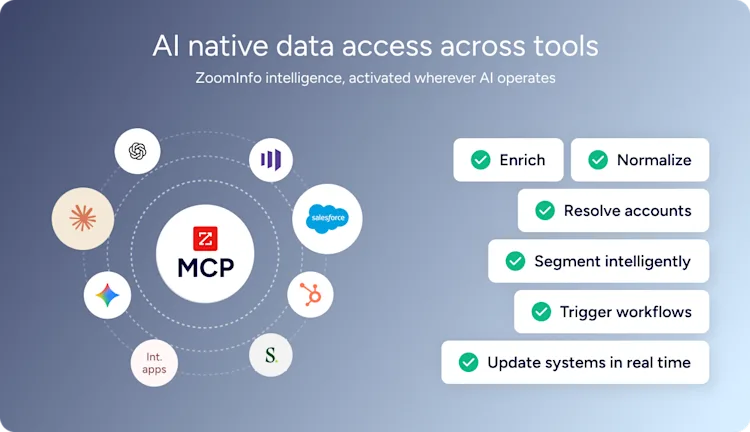
ZoomInfo MCP is part of GTM AI, ZoomInfo's platform for agent-native GTM. The server delivers 500M+ verified contacts, 100M+ companies, intent signals, technographics, and the GTM Context Graph to any AI client connected to your Salesforce org.
ZoomInfo CEO Henry Schuck recently demonstrated the speed gain in practice, enriching a full company list (headcount, revenue, HQ location, last funding date, total funding raised) in 45 seconds through Claude connected to ZoomInfo's MCP server.
Two deployment patterns cover most setups:
External AI client, two servers. Claude, ChatGPT, Cursor, or any AI client connects to both Salesforce MCP and ZoomInfo MCP, then blends both in a single response.
Agentforce, external MCP server. Salesforce's Agentforce plugs ZoomInfo MCP in directly through AgentExchange. Salesforce stays the orchestration layer, with ZoomInfo feeding verified third-party data alongside the CRM records Agentforce already has.
The data split is the same in both:
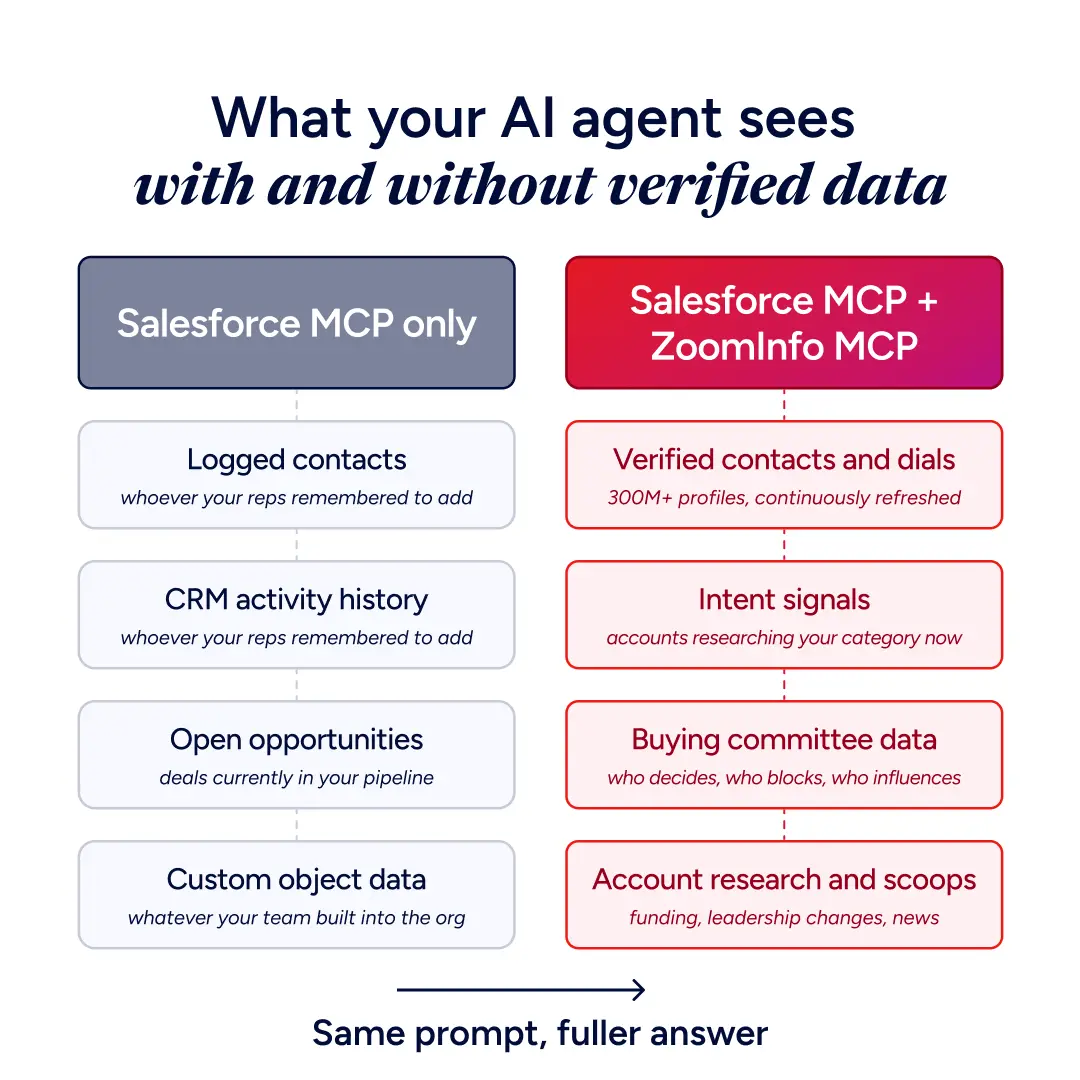
Salesforce holds your first-party data. Opportunities, accounts, contacts, custom objects, activity history.
ZoomInfo holds verified third-party intelligence. Verified phones and emails, firmographics, intent signals, buying committee data, technographics.
Salesforce MCP alone gives the agent whatever your reps logged. ZoomInfo MCP adds the verified contacts, intent signals, buying committee data, and account research that closes the gap between what's in the org and what's actually happening in the market.
Five Workflows to Try in Claude
In a recent LinkedIn post, ZoomInfo's COO of GTM Andrew Riesenfeld walked through five workflows customers are running today, with Henry Schuck demonstrating each one inside Claude:
Instant account enrichment. Upload a company list, ask for headcount, revenue, funding stage, and HQ. Get a structured output ready for your CRM in seconds.
Build a prospect list from scratch. Search by industry, location, company size, and tech stack in plain language. No filter UI, just a description of who you want.
Find lookalike accounts. Give the agent one reference company and surface up to 100 similar accounts that match your ICP.
Get contact recommendations. Ask who to reach at a target account. The agent ranks contacts by relevance using buying signals and your connected CRM data.
One-call account briefings. Before any meeting, ask for a full briefing — company intel, key contacts, intent signals, CRM history — synthesized in one response.
Each workflow breaks if the underlying data layer is thin. With ZoomInfo MCP active, the agent stops guessing on top of a half-empty database.
Setting Up Salesforce MCP
Setup runs through Agentforce. The high-level flow:
1. Enable Hosted MCP Servers in your Salesforce org. Salesforce's developer documentation covers the org-level configuration and security policies.
2. Configure OAuth scopes. Decide which Salesforce data and actions the AI client can access on a user's behalf. Capability-based security means the agent inherits the user's profile permissions.
3. Connect your AI client. Open the connectors menu in Claude, ChatGPT, or another MCP-compatible client. Find Salesforce, authenticate with OAuth, and the connection is live.
4. Add ZoomInfo MCP alongside it. Open the same connectors menu, find ZoomInfo, authenticate. Now the AI client has both your CRM and your verified B2B intelligence available in one prompt. ZoomInfo's developer documentation covers the server configuration in detail, and the Claude-specific connector guide walks through that integration end-to-end.
If you're building inside Agentforce instead, install ZoomInfo MCP directly from AgentExchange. Salesforce handles the OAuth handshake, and the connection becomes available to any agent built in Agentforce Builder.
What MCP Means for Your Security Model
Both Salesforce MCP and ZoomInfo MCP run on OAuth and capability-based security, so AI agents can only see and do what the authorizing user can. That answers the "can the AI bypass our permissions" question. The remaining concerns are operational.
What enterprise teams typically lock down:
OAuth scopes. Limit the agent's read/write surface to the objects and fields it actually needs. Avoid granting blanket access.
Audit logging. Every MCP tool call is loggable. Route logs to your existing security monitoring stack.
Connector approvals. Maintain an allowlist of approved MCP servers per team. AgentExchange flags verified servers, and ZoomInfo MCP is among them.
Sandbox testing. Run new MCP integrations in a dev or sandbox org before production access.
The fundamentals are familiar. OAuth, scopes, logging, sandboxing. MCP doesn't introduce new security primitives. It standardizes how AI agents use the existing ones.
Make Your Salesforce MCP Setup Worth Trusting
The Salesforce side is solved. AgentExchange ships verified MCP servers, Agentforce 3 handles the runtime, and OAuth handles permissions. The remaining variable is whether the data sitting on the other side of those tool calls actually reflects reality.
ZoomInfo MCP is the external data layer that fixes that. It works with the same AI clients already connected to your org and gives the agent verified contacts, intent signals, and account intelligence to act on.
See it for yourself. Get 100 AI and data credits free to try ZoomInfo MCP with Claude or ChatGPT.
Frequently Asked Questions
What Is Salesforce MCP in Simple Terms?
Salesforce MCP is a standard way for AI agents to securely connect to your Salesforce org and act on data inside it. Instead of building custom integrations for each AI tool, you configure one MCP server in Salesforce that any MCP-compatible client (Claude, ChatGPT, Cursor, Copilot) can connect to.
Is Salesforce MCP an Open Standard?
Yes. The Model Context Protocol is open source, originally developed by Anthropic and now adopted across the AI industry. Salesforce's Hosted MCP Servers are Salesforce's managed implementation of that open standard, but the protocol itself is not proprietary to Salesforce.
Does Salesforce MCP Replace API Integrations?
For AI agent use cases, yes. For programmatic ETL pipelines and high-volume batch transfers, traditional APIs are still the right tool. MCP is purpose-built for AI clients calling tools and fetching data at runtime.
Why Add ZoomInfo MCP If You Already Have Salesforce MCP?
Salesforce MCP exposes what your team has already logged. ZoomInfo MCP adds verified third-party intelligence: 500M+ contacts, 100M+ companies, intent signals, technographics, and continuously refreshed firmographics. AI agents that read from both servers get full context instead of partial CRM context.
How Long Does Setup Take?
Connecting an AI client to ZoomInfo MCP takes three steps: open the connectors menu, enable ZoomInfo, authenticate with OAuth. Salesforce MCP setup depends on org configuration and OAuth scoping, but for most production orgs it's a same-day exercise.
Which AI Clients Work With Salesforce MCP?
Any MCP-compatible client. Claude, ChatGPT, Cursor, Copilot, and custom agents built on agent frameworks (LangChain, Mastra AI, Vercel AI SDK, OpenAI Agents SDK) all support the protocol. The Salesforce MCP server doesn't care which client connects, as long as it speaks MCP.
