
HubSpot recently launched its MCP server, giving AI assistants like Claude and Cursor a direct line into your HubSpot CRM.
For go-to-market teams, this turns CRM work into conversation. Pulling pipeline reports, updating deals, and prepping for meetings all happen from a chat window instead of the HubSpot UI.
This guide breaks down what HubSpot MCP is, how the two server options differ, and what data you can access. It also covers how to set it up and what to evaluate before rolling it out.
What is HubSpot MCP?
HubSpot MCP is HubSpot's implementation of the Model Context Protocol, an open standard created by Anthropic. MCP defines how AI models connect to external data sources and tools, acting as a shared interface between an AI assistant and the systems it needs to work with.
Before MCP, connecting an AI tool to your CRM meant custom API integrations, bespoke middleware, or third-party connectors. Each integration had its own authentication flow, data format, and error-handling logic. MCP replaces that fragmentation with a single, standardized protocol.
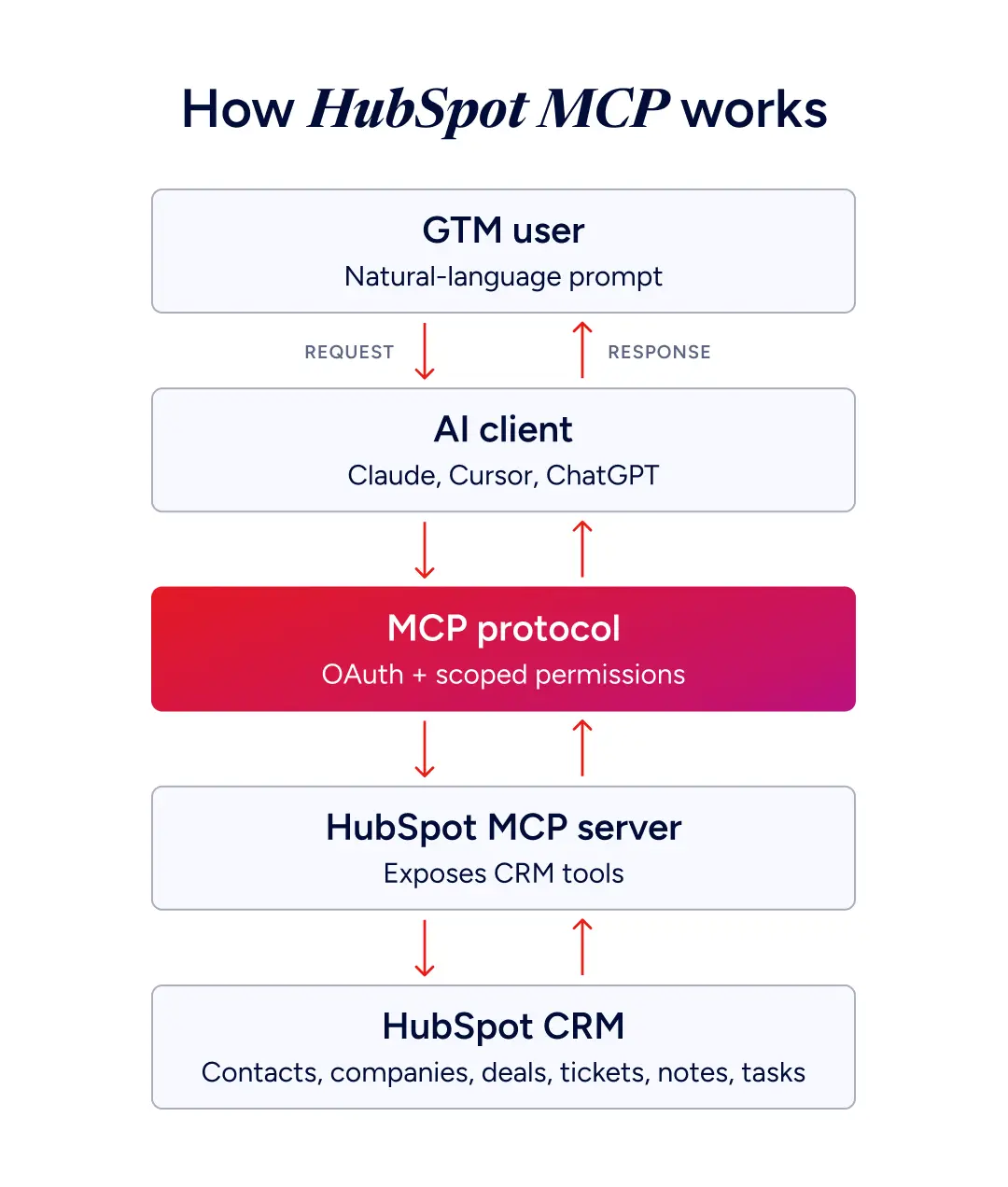
When you connect an AI assistant to HubSpot's MCP server, the AI gets structured access to your CRM. You interact through natural language, the AI translates your request into the right tool call, retrieves or updates the relevant records, and returns a response you can act on. HubSpot's MCP server currently supports Claude and Cursor, with more integrations expected as MCP adoption grows. The same shift is happening across the CRM landscape, with Salesforce MCP running on similar principles.
MCP vs the traditional HubSpot API
Here's how the two approaches stack up side by side.
| Traditional API integration | HubSpot MCP |
Setup | Custom code per integration | One-time server configuration |
Maintenance | Ongoing developer effort for version changes | Protocol handles versioning |
User interaction | Dashboards, scripts, third-party tools | Natural language through AI assistant |
Authentication | Custom OAuth or API key per app | Standardized OAuth through MCP auth app |
Data format | Varies by endpoint | Structured, consistent schema |
Who can use it | Developers or users with pre-built tools | Anyone with a connected AI assistant |
APIs require you to know what to ask for and how to ask for it. MCP lets the AI figure that out based on your plain-language input.
How HubSpot MCP works
MCP runs on a client-server model. HubSpot hosts the MCP server, which exposes a set of tools the AI can call. Your AI assistant acts as the client, sending requests on your behalf.
The LLM decides when to use a tool based on the prompt, executes the call, and brings the result back into the conversation. Authentication happens through OAuth with scoped permissions that define what the AI can see and do.
HubSpot actually offers two MCP servers, built for different users.
Remote MCP server
The Remote server is what most GTM teams will use. It runs on HubSpot's infrastructure and connects through streamable HTTP transport. Nothing to install, nothing to host.
You create an auth app in HubSpot, add the server URL to your AI client, and the connection is live. HubSpot handles hosting, scaling, and protocol updates on your behalf.
Developer MCP server
The Developer server is built for engineers creating custom AI agents or workflows on top of HubSpot data. It runs locally using Node.js and the stdio transport, giving developers full control over server operations. Same MCP tools, more flexibility on how the server processes requests.
Choose this option if you're building an internal tool, a custom agent pipeline, or you need to modify how requests are handled before they reach HubSpot.
What CRM data can you access?
HubSpot MCP provides access to core CRM objects with defined read and write permissions.
Read and write:
Contacts (create, read, update, search)
Companies (create, read, update, search)
Deals (create, read, update, search)
Tickets (create, read, update, search)
Notes (create, read)
Tasks (create, read, update)
Communications (create, read)
Read only:
Owners (read, search)
Pipelines and pipeline stages
Association types and labels
Additional capabilities:
Associations between objects (create, read)
Property definitions across any object
Search across objects using filters and query parameters
The MCP server respects your HubSpot account's existing permissions. If a user can't see an object or property in HubSpot, that restriction carries through to MCP.
HubSpot's MCP server is still in beta. Custom objects, marketing emails, workflows, and some engagement types are not yet supported. HubSpot has indicated more coverage is coming, so confirm the objects your team needs before committing to a workflow.
Six ways GTM teams use HubSpot MCP
Most HubSpot MCP workflows fall into a handful of patterns. These are the ones doing real work for sales, marketing, and RevOps teams today.
Pull records into an AI conversation
Ask your assistant for a contact, a company, or a deal and it returns the record in context. From there you can analyze, compare, or use it as input for the next step. Pre-call research that took 10 minutes of manual navigation becomes a single prompt.
Update deals and properties from natural language
Move a deal to a new stage, update a close date, change an owner, or edit custom properties through a prompt rather than a UI. For reps managing dozens of opportunities, this collapses CRM hygiene into a few sentences of conversation.
Summarize pipeline activity and forecast health
Ask for a rollup of your pipeline by stage, region, or rep. Surface deals that have stalled, identify accounts with no recent activity, or pressure-test a forecast by pulling underlying records. The AI can synthesize across hundreds of deals faster than a manual report.
Draft and log outreach
Generate emails, internal notes, or follow-up tasks grounded in the specific context of a contact or deal, then log them back to HubSpot so the activity history stays complete. Personalization gets easier when the AI can read the record it's writing about.
Answer ad-hoc questions about your data
Skip building a custom report for a one-off question. Ask the assistant directly:
Which accounts in the Northeast have open deals over $50k?
How many contacts have an MQL lifecycle stage but no associated company record?
What's the average deal size by industry for closed-won this quarter?
The AI runs the query against HubSpot and returns the answer in conversation. That speed matters when leadership asks for a number in the middle of a meeting.
Trigger workflows and handoffs
Kick off enrollment in a sequence, assign a task, or hand off a record to another team. MCP turns the AI into an operator inside HubSpot, not just a reader.
Setting up HubSpot MCP
For the Remote server, setup takes under 10 minutes and requires no custom code.
1. Create an MCP auth app in HubSpot
In your HubSpot account, go to Settings, then Integrations, then MCP Auth Apps. Click Create MCP Auth App and name it after the AI tool you're connecting. Select the scopes the app needs, starting with read access to contacts, companies, and deals. Add write access only if your use case requires it. Save the app. HubSpot generates the server URL and authentication configuration you'll need next.
2. Connect your AI client
In Claude, add the server through your desktop config file and restart. In Cursor or other MCP-compatible tools, add a new server in the MCP settings using the URL and auth from HubSpot.
3. Test the connection
Ask a simple query like "list my recent deals" to confirm the AI is reading from HubSpot correctly.
Before rolling this out broadly, plan for a few practical considerations:
Scope the auth app narrowly. The AI inherits the access of the user who authenticated, so a super admin's connection will have far more reach than a single rep's. Start with read-only and expand as your team gets comfortable.
Set a review cadence for AI activity. Actions taken through MCP show up in HubSpot's activity logs, but reviewing AI-driven changes is a different experience from reviewing human ones.
Decide who connects on shared portals. One person's auth app determines what the AI can do on everyone else's behalf.
For the Developer server, you'll need Node.js 18+ and a HubSpot developer account with the right scopes. HubSpot's developer documentation has the current install steps.
Where HubSpot MCP hits its limits
The connection itself is solid. The problem is what's on the other end of it. MCP inherits whatever quality your CRM has underneath, and three issues show up consistently.
Staleness. 70% of B2B contact data decays every year. A CRM built from form fills two years ago hands the AI outdated records, and the assistant has no way to know what's still accurate.
Missing firmographics. 91% of CRM data is incomplete to begin with. Industry, employee count, revenue, tech stack, parent-child hierarchy, and the other attributes that drive segmentation often arrive thin or not at all. AI working on thin records produces thin output.
No signal layer. HubSpot tracks what contacts do inside your funnel. It doesn't track what they do outside of it. Intent surges, hiring patterns, funding events, leadership changes happen in the world, not in your CRM, and an AI agent can't reason over signals it can't see.
As Henry Schuck puts it, reasoning without verified data is fluent guesswork. The AI sounds confident either way. The difference is whether the answer is true.
How ZoomInfo turns HubSpot MCP into trustworthy AI workflows
ZoomInfo's role is to make the foundation underneath your AI workflows accurate, complete, and current. There are two ways the integration works in practice.
Enrich HubSpot directly with ZoomInfo
ZoomInfo's native HubSpot integration keeps your CRM records continuously enriched against the most comprehensive B2B data foundation in the market:
500M+ verified contacts and 100M+ companies
200M+ verified business emails, 135M+ verified phone numbers
Firmographics, technographics across 30,000+ tracked technologies, org charts
Up to 95% accuracy on first-party data, refreshed against 1.5B+ data points processed daily
When the AI pulls a HubSpot contact through MCP, the record it gets is one ZoomInfo has already verified, not one captured on a form three years ago.
Add a second layer with ZoomInfo MCP
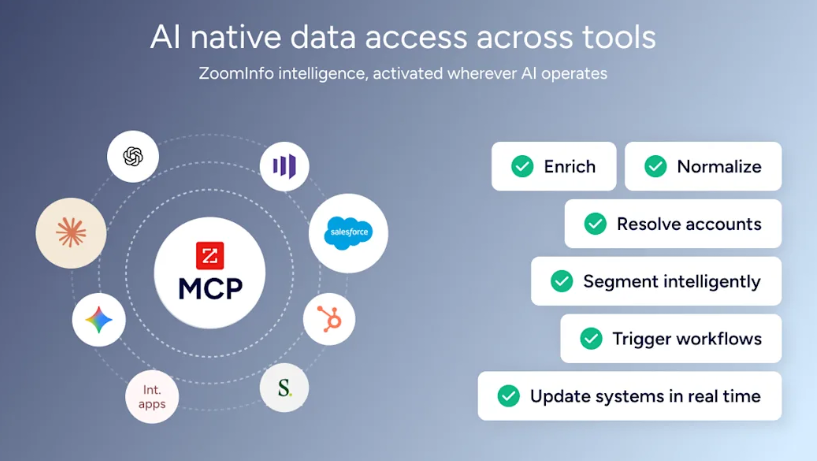
ZoomInfo also has its own MCP server, which means the same AI assistant connected to HubSpot can call ZoomInfo directly in the same conversation.
Consider a practical example. A seller asks their AI assistant to find VP-level contacts at mid-market SaaS companies expanding their sales teams. Through HubSpot MCP alone, the AI can only search contacts already in the CRM. Through ZoomInfo MCP, the AI queries ZoomInfo's full database and returns verified contacts with direct dials, confirmed emails, and full account context including technographics, funding data, and intent signals.
That second layer unlocks workflows like:
Pull a deal from HubSpot, then call ZoomInfo to enrich the buying committee with verified contacts and direct dials
Read account activity from HubSpot, then call ZoomInfo for intent signals on what that account is researching right now
Find lookalikes of your best HubSpot customers using ZoomInfo's Find Similar Companies tool
Generate account research that combines HubSpot history with ZoomInfo's external signals in a single brief
HubSpot tells the AI what's happened inside your funnel. ZoomInfo tells it what's happening at the account and in the market. The AI reasons over both.
This is the architecture behind GTM.AI, ZoomInfo's distribution layer for the agentic era. The same verified data foundation that powers GTM Workspace and GTM Studio is accessible to any MCP-compatible AI, with no lock-in to a single application.
Pair HubSpot MCP with verified data
The protocol is the easy part. The data foundation is the work.
That's where ZoomInfo comes in. The same AI assistant you're already connecting to HubSpot can also call ZoomInfo's verified data foundation directly. 500M contacts, 100M companies, 1B+ buying signals, accessible in Claude, ChatGPT, and any MCP-compatible client. No new license required for existing ZoomInfo customers.
Connect ZoomInfo MCP and start querying verified data from your AI assistant.
HubSpot MCP FAQ
Is HubSpot MCP free to use?
The MCP server is included with HubSpot accounts that have API access. Costs depend on your HubSpot plan and the rate limits tied to your subscription tier. The AI client you connect may have its own pricing.
Which AI assistants work with HubSpot MCP?
Any MCP-compatible client. Claude and Cursor are confirmed compatible with the Remote server, and the list expands as MCP adoption spreads.
Do I need a developer to set up HubSpot MCP?
Not for the Remote server. Non-technical users can complete the auth app and AI client setup themselves. The Developer server is the path that requires engineering involvement.
Is HubSpot MCP secure?
HubSpot MCP uses OAuth 2.0 authentication through dedicated auth apps. Each app has defined scopes controlling which CRM objects and operations the AI can access, all enforced through HubSpot's existing permission model.
Can HubSpot MCP write to my CRM, or only read?
Both. With the right scopes, the AI can create, update, and delete records as well as read them. This is what makes MCP genuinely useful for workflows rather than just queries.
How does ZoomInfo MCP work alongside HubSpot MCP?
They're complementary. HubSpot MCP gives the AI access to your CRM. ZoomInfo MCP gives the AI access to verified external B2B data and signals. Connected together in the same AI client, the assistant can read HubSpot context and enrich it with ZoomInfo intelligence in a single conversation.
