ZoomInfo Enrich and HubSpot: Make the Most of Your Data

Account-Based MarketingData as a ServiceData Quality & PrivacyMarketing StrategySales & Marketing AlignmentZoomInfo Operations

How the ZoomInfo HubSpot integration works

CRM data decays faster than any RevOps team can manually correct it. Forbes estimates 91% of CRM data is incomplete, meaning every scoring model, routing rule, and segmentation workflow you build on top of that foundation starts with a compromised baseline. The ZoomInfo Inbound Enrich integration with HubSpot is built to fix that at the infrastructure level, not with a one-time CSV import.

ZoomInfo is an all-in-one AI GTM Platform. The HubSpot ZoomInfo integration connects ZoomInfo's verified B2B data directly to your HubSpot CRM, enriching inbound contacts in real time, refreshing your existing database on a scheduled cadence, and powering the lead scoring and routing workflows your demand generation and sales teams depend on. The same enrichment and routing automation that helped Momentive cut speed-to-lead from 20 minutes to 60 seconds is available natively inside HubSpot, no custom middleware required.

Image

ZoomInfo offers three enrichment modes for HubSpot users. Each addresses a different operational need, and they can be combined depending on how your team captures and manages contacts.

Instant Enrich

Instant Enrich fires in real time the moment a new contact is created in HubSpot. It automatically enriches inbound contacts with verified firmographic and contact data, filters non-prospects, and feeds fresh data into your existing lead scoring and routing workflows. For inbound-heavy teams where speed-to-lead is a competitive factor, this is the mode that compresses the gap between form submit and rep notification.

Scheduled Enrich

Think of Scheduled Enrich as a routine tune-up of your HubSpot database. Every two weeks, month, quarter, or other timeframe of your choice, you can schedule a recurring enrichment of all contacts and companies in HubSpot CRM. You can also target a specific HubSpot list and configure the mapping of ZoomInfo data to HubSpot properties, keeping your clean data foundation current without manual intervention. For most databases, a monthly cadence is sufficient; high-velocity inbound teams often benefit from weekly runs to keep routing rules firing on accurate data.

Use Instant Enrich for inbound lead routing where speed-to-lead matters. Use Scheduled Enrich for ongoing database hygiene and keeping territory models current.

Multi-Vendor Enrich

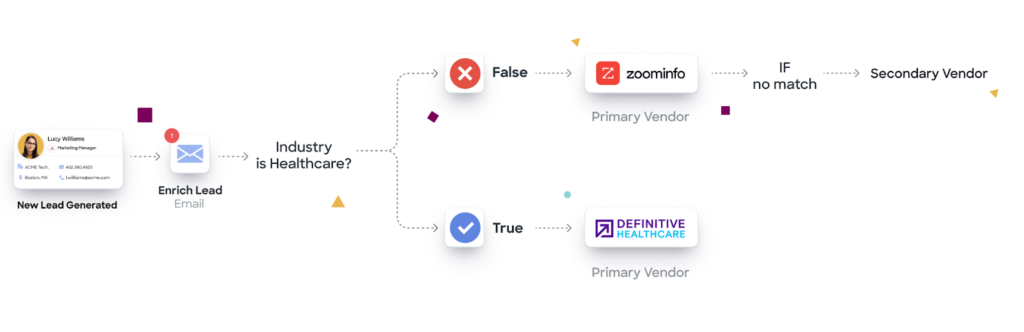
Revenue teams can further enhance their enrichment strategy by building workflows that operationalize multiple data sources. This is especially useful for go-to-market strategies that require industry-specific data from niche data partners. ZoomInfo's waterfall enrichment in GTM Studio evaluates 25+ alternative sources automatically, returning the highest-confidence result at no additional cost.

Image

Setting up the ZoomInfo HubSpot integration: what to do before you connect

The difference between a clean ZoomInfo HubSpot integration deployment and a compounding data quality problem almost always comes down to what you do before you connect.

  1. Deduplicate existing HubSpot contact and company records before enrichment runs. ZoomInfo's automatic de-duplication works best on a clean baseline. Running enrichment on a database with thousands of duplicate records means those duplicates get enriched, not resolved.

  2. Audit existing field values for non-standard formats. Job title variations, inconsistent industry classifications, and address format mismatches cause enrichment matching to fail silently. A field audit before launch catches the most common failure modes.

  3. Define field-mapping rules in advance. Map ZoomInfo data properties to the correct HubSpot contact and company object fields before you go live. Enrichment data landing in the wrong fields, or overwriting critical manually curated records, is harder to unwind than it is to prevent.

  4. Set enrichment overwrite rules. Decide which fields ZoomInfo can overwrite versus append-only. Protecting manually curated records from automatic overwrite is a configuration decision, not a default behavior.

  5. Choose your enrichment trigger logic. Real-time on form submit for inbound routing, or scheduled bulk for database refresh. Mixing both is valid, but the trigger logic needs to be defined before launch, not discovered after misrouted leads surface.

These five steps take under an hour and prevent days of remediation later. Get those decisions locked before you connect, and each team's operational gains are available from the first enrichment run.

What each team gets from the ZoomInfo HubSpot integration

The operational payoff looks different depending on which team you're on.

For sales teams

Sales teams benefit most from the speed and completeness improvements that come from enriching inbound contacts at the moment of capture. With ZoomInfo Instant Enrich firing on every new HubSpot contact, leads arrive at the rep's queue with verified firmographics, direct-dial phone numbers, and accurate job titles already populated, eliminating the manual research step that typically delays first contact.

Faster lead routing also means reps reach prospects while intent is still active. Momentive compressed speed-to-lead from 20 minutes to 60 seconds using ZoomInfo enrichment and routing automation, the kind of improvement that changes connect rates, not just process efficiency.

For marketing teams

Marketing teams use enriched HubSpot data to build more precise audience segments and score leads more accurately. With technographic and firmographic data appended at the contact and company level, segmentation moves beyond basic demographic filters to the 30,000+ technology and firmographic dimensions that actually predict conversion.

The downstream impact on pipeline metrics is measurable. Smartsheet's 84% MQL increase followed from enrichment-powered lead scoring that separated high-fit accounts from noise. On the firmographic scoring side, Snowflake's 90% higher opportunity rates came from building scoring models on ZoomInfo-enriched data across 70+ firmographic and technographic fields, the same data available through the HubSpot integration.

For RevOps and operations teams

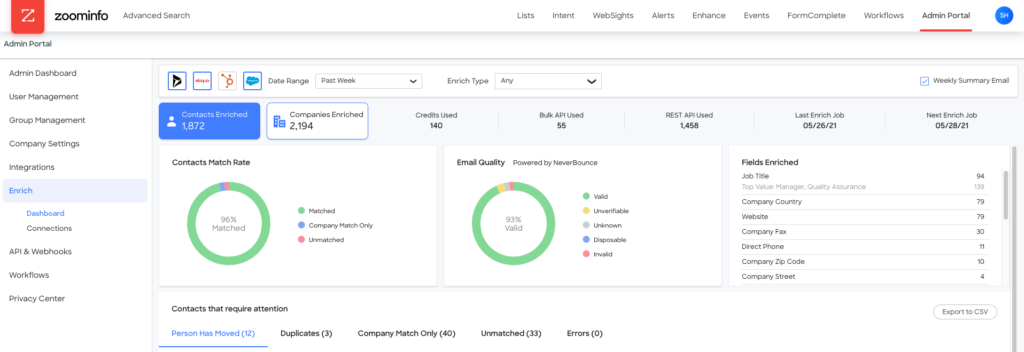
RevOps teams own the infrastructure that makes all of this work: database health monitoring, field standardization across platforms, deduplication, and routing logic. The ZoomInfo Enrich reporting dashboard gives a single place to monitor enrichment coverage, identify field-level gaps, and track match rates over time, without pulling reports from multiple systems.

Standardizing data across platforms is the foundation for reliable lead scoring, routing, and segmentation. When job titles, company names, and industry classifications are inconsistent between HubSpot and your other systems, every data-dependent workflow inherits that inconsistency. ZoomInfo's automatic de-duplication keeps large volumes of CRM contact records lean and reduces the territory conflicts that duplicate entries create.

For RevOps teams that have spent cycles managing brittle multi-vendor enrichment pipelines, the engineering-bottleneck problem is real: every field mapping change, routing rule update, or new data source requires a ticket and a wait. GTM Studio's codeless interface lets RevOps teams configure enrichment field mappings, set routing rules, and launch audience segments without waiting on development resources, addressing that two-week change-management cycle directly.

ZoomInfo's data foundation and what it means for HubSpot users

Reliable enrichment starts with the data underneath it. ZoomInfo's verified B2B database, the intelligence layer that contextualizes it, and the multi-vendor consolidation architecture that operationalizes it are the three elements that determine whether HubSpot enrichment delivers on its promise or compounds existing data problems.

The data foundation is what makes HubSpot enrichment reliable rather than aspirational. ZoomInfo covers 500M contacts and 100M companies, with 200M+ verified business emails and 135M+ verified phone numbers. Multi-source verification backed by 300+ human researchers delivers up to 95% accuracy on first-party data, which means the firmographic and contact data landing in your HubSpot records is continuously verified, not a static snapshot from a one-time data pull.

The GTM Context Graph is the intelligence layer that sits on top of that data foundation. It fuses HubSpot CRM records with third-party signals to surface not just what your data says, but why accounts behave the way they do. Where enrichment appends fields, the GTM Context Graph reasons across layers, connecting CRM activity, conversation intelligence, behavioral signals, and third-party intent into a unified view that explains account behavior rather than just describing it.

GTM Studio is where that intelligence becomes an auditable, consolidated enrichment architecture. Rather than maintaining separate vendor connections for each data source, GTM Studio's waterfall enrichment evaluates 25+ providers in a defined priority sequence, returning the highest-confidence result and logging the source for every field. RevOps teams can configure the full multi-vendor pipeline, adjust vendor priority, and add new sources through a point-and-click interface that keeps the enrichment stack under their direct control.

For enterprise buyers, the compliance posture matters as much as the data quality. ZoomInfo holds ISO 27001, ISO 27701, SOC 2 Type II, and TRUSTe GDPR/CCPA certifications, the table stakes for enterprise data pipeline decisions and a direct answer to GDPR and CCPA compliance requirements for North American and European go-to-market teams.

Ready to see how ZoomInfo enriches your HubSpot CRM? Request a demo.

Workflow templates: putting the ZoomInfo HubSpot integration to work

With the data foundation in place, the next step is putting it into motion. Three named workflow templates show how to put ZoomInfo enrich HubSpot capabilities into practice. Each follows a trigger, action, and outcome structure that maps directly to how RevOps teams configure automation in HubSpot.

  1. Enrich on form submit, then route by territory

    • Trigger: new HubSpot form submission

    • Action: ZoomInfo Instant Enrich fires, appends firmographic and contact data, lead scoring model re-evaluates with enriched fields

    • Outcome: lead routes to the correct territory rep within 60 seconds of form submit, not 15-20 minutes

  2. Monthly scheduled enrich to refresh database health

    • Trigger: scheduled monthly run on all HubSpot contacts

    • Action: ZoomInfo Scheduled Enrich updates job titles, company data, and email verification status across the full database

    • Outcome: stale records flagged for review, routing rules fire on fresh data, territory models stay current between annual planning cycles

  3. Intent signal received, enroll in targeted sequence

    • Trigger: ZoomInfo intent signal detected for a target account

    • Action: HubSpot workflow enrolls the account's contacts in a targeted outreach sequence

    • Outcome: sales rep notified with enriched contact data and intent context before first touch, so the outreach is relevant from the first interaction

All three workflows can be configured in GTM Studio's point-and-click interface, with no handoff to engineering required.

Frequently asked questions

Can ZoomInfo integrate with HubSpot?

Yes. ZoomInfo integrates natively with HubSpot via the ZoomInfo Inbound Enrich integration, available on the HubSpot Marketplace. The integration enables real-time contact enrichment, scheduled database refresh, lead scoring, and routing directly within HubSpot CRM. No custom middleware is required.

What is the difference between Instant Enrich and Scheduled Enrich in HubSpot?

Instant Enrich fires in real time when a new contact is created, the right choice for inbound lead routing where speed-to-lead is a factor. ZoomInfo Scheduled Enrich runs on a recurring cadence (weekly, monthly, or quarterly) to refresh your entire HubSpot database. Use Instant for inbound routing; use Scheduled for ongoing database hygiene and keeping territory models accurate.

Why isn't ZoomInfo enriching my HubSpot contacts?

Common causes include: field mapping not configured before enrichment ran (ZoomInfo needs HubSpot fields mapped to ZoomInfo properties to know where to write data); enrichment overwrite rules blocking updates on fields with existing values; an expired authentication token (re-authenticate in the ZoomInfo app settings); or a contact submitting a personal email address (ZoomInfo matches on business email or company domain, so personal emails may not resolve). Check the enrichment reporting dashboard to identify which contacts are not matching and why.

What CRMs does ZoomInfo integrate with?

ZoomInfo integrates with major CRMs including HubSpot, Salesforce, Microsoft Dynamics, and Pipedrive. The HubSpot integration is particularly strong for inbound enrichment and real-time routing workflows. For teams running Salesforce as their primary CRM, ZoomInfo's enrichment and routing capabilities are available through the same platform.

Is ZoomInfo GDPR and CCPA compliant for HubSpot enrichment?

Yes. ZoomInfo holds ISO 27001, ISO 27701, SOC 2 Type II, and TRUSTe GDPR/CCPA certifications. Data sourced through the HubSpot integration is subject to ZoomInfo's data processing agreements and privacy framework. Enterprise buyers should request ZoomInfo's DPA (Data Processing Agreement) as part of procurement due diligence. ZoomInfo's compliance posture is designed to support both North American and European go-to-market teams.