
Analyze your CRM: what the data tells you before you purge
It's common for a CRM (Customer Relationship Management system) to have multiple entries for the same company, each with slightly different ways of conveying the name, ZoomInfo, ZoomInfo Technologies Inc., ZoomInfo LLC, and so on. Each record might also contain unique contact and sales data.
These records need to be combined, cleansed, and merged into one. By applying Duplicate Survivorship Rules, which are defined in the first phase of a CRM cleanup, data teams can easily decide which records remain after the merge is completed.
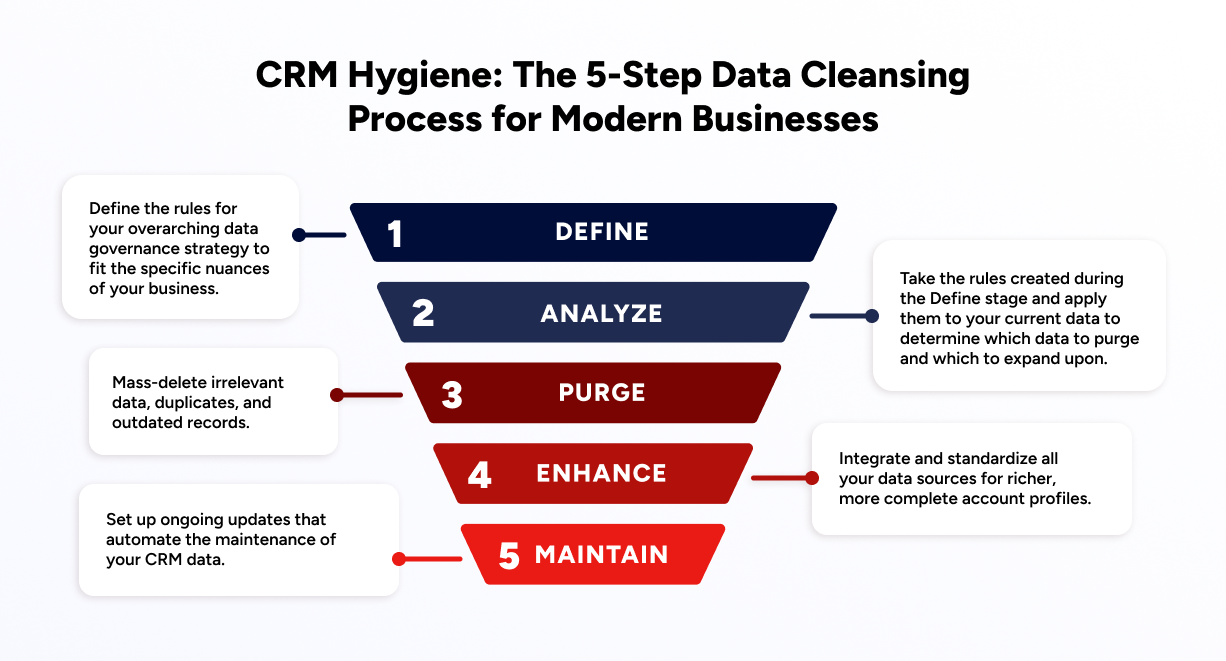
CRM data degrades faster than most teams realize, and when that decay goes unaddressed, bad data propagates through every downstream workflow before anyone notices the damage. Analyze is the second step in a comprehensive five-step CRM hygiene process, and it's where you determine which data to purge and which to keep and expand upon.
The CRM Hygiene Series
This blog is part of a comprehensive series of guides that dive deeper into each of the five steps in the CRM data hygiene process. Navigate to each step to learn more about each step, including how to apply them, why they're necessary, and the technical aspects of it all below.
What CRM hygiene actually means (and how it differs from data cleansing)
Calling CRM hygiene "cleanup" is a category error. Hygiene is not a project you schedule once a quarter and close out, it is a continuous operational discipline that runs at every stage of the data lifecycle. Understanding how it differs from two adjacent concepts clarifies why that distinction shapes how you resource and govern it.
Term | One-sentence definition | When you use it |
|---|---|---|
CRM hygiene | The ongoing operational discipline of keeping your CRM accurate, complete, and consistent through continuous deduplication, validation, enrichment, and standardization. | Always, it is the umbrella process that governs data quality across the full lifecycle. |
Data cleansing | A reactive, one-time (or periodic) fix that corrects known errors in an existing dataset. | When you inherit a dirty CRM, after a system migration, or as a one-time remediation project. |
Data enrichment | An additive layer that appends missing fields (firmographics, contact details, intent signals) to existing records from external sources. | When records are structurally sound but incomplete, enrichment fills gaps, it does not fix structural problems. |
Hygiene is the umbrella discipline that governs when and how cleansing and enrichment get applied. Treating it as a synonym for either one leads to reactive, project-based thinking, and a CRM that degrades between projects.
Why bad CRM data is a revenue problem, not just an ops headache
The operational cost of bad CRM data quality is well-documented:
31% of CRM admins say bad data costs their organization at least 20% of annual revenue (Validity 2024 State of CRM Data Management)
$12.9 million per year is the average cost of poor data quality to an organization (Gartner)
30% annual decay rate for CRM data, meaning roughly one in three records becomes inaccurate within a year (Salesforce State of Sales)
The AI amplification problem makes this worse, not better. When bad data feeds AI-powered personalization, routing, and forecasting, the result is bad decisions at machine speed rather than human speed. The failure modes are specific: AI-generated outreach goes out with wrong job titles because the contact record was never updated after a promotion; automated routing sends leads to the wrong rep because the account's employee count field is blank and the routing rule can't fire correctly; forecasting models trained on duplicate pipeline entries overstate coverage and produce sandbagged numbers that mislead leadership.
Data decay is not a sign of poor CRM management. It is an inevitable consequence of a dynamic market. People change jobs, companies get acquired, email addresses go dark, and phone numbers change. Industry benchmarks put B2B contact data decay at 20-30% annually. The only sustainable response is continuous enrichment built into the workflow, not periodic batch cleanup that addresses last quarter's problem with last quarter's data.
A key challenge: maintaining accuracy and consistency at scale
It's all too common for data teams to lack an automated way of analyzing the vast amounts of data on hand, making consistent accuracy at scale that much harder.
This becomes a major challenge in the Analyze phase because it requires that teams meticulously verify the quality and uniformity of vast amounts of data. The consequence is that every downstream workflow, scoring models, routing logic, territory assignments, inherits whatever structural gaps the CRM carries into the analysis. Most RevOps teams discover the severity of those gaps only when they start running the four analyses below.
To complete the analyze CRM hygiene phase, consider applying the following four analyses.
Four analyses to run in the CRM hygiene Analyze phase
1. Rate of duplication
What it is: This analysis uses the duplicate definitions outlined during the Define stage to run an algorithm against the current CRM data.
Why it matters: High duplication rates compound downstream. Salesforce's State of Sales report estimates CRM data decays at 30% annually, meaning deduplication is not a one-time cleanup but a continuous infrastructure requirement. Duplicate records cause territory conflicts, broken routing, and inflated pipeline numbers that corrupt forecasting models.
How to detect this: Run your CRM's native deduplication report or a third-party tool against the duplicate definitions from your Define phase, flag any entity where match confidence exceeds your survivorship threshold.
How to analyze: Use your CRM's deduplication tools or third-party data cleansing software to identify and quantify duplicate records. Analyzing duplication rates involves comparing the number of duplicate entries against the total number of records, giving insight into the efficiency of your data management processes and how often you need to clean your records.
2. Completeness ratio against TAM
What it is: This is the analysis of first-party data against the total addressable market data as determined in the Define phase.
Why it matters: Assessing completeness against TAM is foundational to territory design. ZoomInfo's data layer covers 500M contacts and 100M companies, giving RevOps teams a verified external census to benchmark first-party coverage against rather than relying on internal estimates alone.
How to detect this: Pull a record count from your CRM segmented by the ICP firmographic criteria you defined in the Define phase, then compare that count against your TAM estimate from the same criteria. The gap is your coverage deficit.
How to analyze: Compare the number of complete, actionable records in your CRM with the estimated TAM for your products or services. This analysis helps you see how much of your potential market is currently represented within your CRM.
3. Completeness level of existing records
What it is: Completeness level of existing records measures how fully populated your CRM records are, accounting for missing information in critical fields such as contact details, company information, and interaction history.
Why it matters: Forbes estimates 91% of CRM data is incomplete, meaning the average RevOps team is building scoring models, territory assignments, and routing logic on a foundation where fewer than one in ten records is fully populated.
How to detect this: Run a field-completion report across your key firmographic and contact fields. Sort by completion rate to identify which fields have the highest percentage of empty values, those are your enrichment priorities.
How to analyze: Assess the completeness of records by identifying the number of key fields with missing data. This analysis helps prioritize and outline data enrichment efforts and lets teams know which data they want to focus on collecting.
4. Validity rate of existing records
What it is: The validity rate measures the accuracy and correctness of the data in your CRM, ensuring the information conforms to predefined formats and is logically correct. For example, it determines which email addresses are in a valid format.
Why it matters: As a benchmark for what's achievable, ZoomInfo's 300+ human researchers and multi-source verification pipeline maintain up to 95% accuracy on first-party data, which sets the standard for validity rates with continuous enrichment rather than batch append.
How to detect this: Apply data validation rules within your CRM to flag records that fail format checks (malformed emails, invalid phone number patterns, blank required fields) and review the flagged count as a percentage of total records.
How to analyze: Apply data validation rules within your CRM to automatically flag records that do not meet specific criteria. Regularly review these flags to correct invalid data and maintain the integrity of your database.
Common CRM hygiene problems and how to recognize them
Duplicate records
Duplicate records are rarely caused by a single point of failure. They accumulate structurally: multiple web forms writing to the same CRM object, partner data feeds that don't deduplicate on import, manual uploads from spreadsheets, and reps who can't find the existing account and create a new one. As one RevOps practitioner described it: "Reps could not find the correct existing account so they just created a new one, causing internal territory conflicts." The downstream effect is broken routing, inflated pipeline, and territory disputes that consume ops cycles to resolve.
How to detect this: Run a deduplication report using your CRM's native tool or a third-party matcher. Sort by match confidence score and flag records above your survivorship threshold.
Missing required fields
Scoring models and routing logic built on records with empty firmographic fields inherit the gap directly. A lead routing rule that fires on employee count can't route correctly if 40% of account records have no employee count value. The problem compounds when enrichment is scheduled after routing rather than before it.
How to detect this: Run a field-completion report on the specific fields your routing rules and scoring models reference. Any field with more than 10-15% empty values is a routing risk.
Stale or outdated contact information
People change jobs, companies get acquired, email addresses go dark, and phone numbers change. B2B contact data decays at roughly 20-30% annually. A contact record that was accurate when created two years ago has a meaningful probability of being wrong today, and batch cleanup addresses last quarter's problem, not today's.
How to detect this: Filter contacts by last enrichment date. Any contact not enriched in the past 90 days should be flagged for re-validation against an external source.
Inconsistent formatting and standardization
Job title formats, industry classifications, and address data vary wildly across records, especially when data enters the CRM from multiple sources. "VP of Sales," "Vice President, Sales," and "VP Sales" are the same role but three different values, and enrichment matching treats them differently. This causes enrichment matching to fail and lead routing rules to misfire on picklist-based conditions.
How to detect this: Pull a frequency distribution of your key picklist fields (Job Title, Industry, Country). A long tail of low-frequency values signals inconsistent formatting that needs normalization.
Orphaned records
Contacts with no associated account, or accounts with no owner assignment, are invisible to most routing and scoring logic. They accumulate quietly and inflate record counts without contributing to pipeline. Accounts without an owner can't receive routing assignments; contacts without an account can't be matched to the correct territory.
How to detect this: Run a report filtered on "Account is null" for contacts, and "Owner is null" for accounts. Both should return zero results in a well-governed CRM.
Free-mail and personal email submissions
Prospects submit personal email addresses (Gmail, Yahoo, Hotmail) on web forms. This causes leads to be bucketed into generic accounts rather than matched to the correct company account, even when the prospect provided a company name in the form. The lead arrives in the CRM with no account association and no routing path.
How to detect this: Filter inbound leads by email domain. Any lead with a free-mail domain (gmail.com, yahoo.com, hotmail.com, outlook.com) that also has a company name field populated should be flagged for manual review before routing.
Building a CRM hygiene governance model that sticks
The most common failure mode in CRM data quality programs is not technical, it is ownership. When hygiene is everyone's responsibility, it is no one's responsibility. Tasks that lack a named primary owner default to the most available person, which in practice means they default to the RevOps engineer who gets pulled in as the cleanup crew after something breaks downstream.
A role-assignment framework prevents this. The table below maps each recurring hygiene task to a primary owner, a supporting role, and a cadence. Adapt it to your org structure, but resist the temptation to list a committee as the owner, one named role per task.
Task | Primary Owner | Supporting Role | Cadence |
|---|---|---|---|
Data entry standards enforcement | CRM Admin | Sales Managers | Ongoing |
Deduplication review | RevOps Lead | CRM Admin | Weekly |
Enrichment scheduling | RevOps Lead | Marketing Ops | Monthly |
Validity rate audit | CRM Admin | RevOps Lead | Quarterly |
TAM completeness review | RevOps Director | Sales Leadership | Quarterly |
Routing logic testing | RevOps Engineer | Sales Ops | After each rule change |
Field mapping updates | RevOps Engineer | CRM Admin | As needed |
Governance policy review | RevOps Director | Legal/Compliance | Annually |
Data entry standards are the upstream control that determines how much cleanup work happens downstream. Standardized field formats, required field enforcement, and picklist constraints at the point of entry prevent the inconsistent formatting and missing-field problems that make enrichment matching fail. The investment in enforcing standards on the way in is almost always cheaper than the enrichment and normalization work required to fix records after the fact.
When data quality issues are detected, a spike in deduplication match rate, a drop in enrichment coverage, a routing logic test that fails, the escalation path should be defined before the issue occurs. The CRM Admin flags the issue, the RevOps Lead assesses severity and scope, and the RevOps Director decides whether the issue requires a governance policy update or a one-time remediation. Issues that require engineering work get scoped and ticketed by the RevOps Engineer. Without a defined escalation path, every data quality issue becomes an ad hoc conversation that consumes more time than the fix itself.
How to automate the CRM hygiene Analyze phase
A governance model tells you who owns each task; automation determines whether those owners can execute at the volume your CRM actually demands. Manual analysis fails at scale. A CRM with 40,000+ accounts cannot be manually validated without automated tooling, as one RevOps practitioner put it, "if we build a scoring model on top of that, we are building on sand." The Analyze phase is where automation pays the most immediate dividend, because the four analyses described above are repeatable, rule-based, and schedulable.
The hygiene tasks that are best suited to automation are:
Deduplication matching against survivorship rules
Enrichment scheduling on a defined cadence (real-time for inbound, batch for existing records)
Field validation rules that flag records failing format checks
Routing logic testing after each rule change
Automation tool categories to evaluate:
Native CRM automation (Salesforce flows, HubSpot workflows) for field validation and routing logic
Enrichment platforms with scheduled enrichment and deduplication matching built in
Dedicated data quality tools that sit alongside your CRM and run continuous hygiene checks
When evaluating tools to improve CRM hygiene automation, prioritize these five criteria:
Enrichment source coverage: how many verified sources does the platform draw from, and how is source sequencing handled when primary sources return no match?
Deduplication accuracy: does the tool provide match confidence scoring, or does it apply binary match/no-match logic that generates false positives?
Native CRM integration depth: can the tool write back to field-level CRM objects without custom middleware, or does it require an intermediary ETL layer?
Automation scheduling flexibility: does the platform support both real-time enrichment (for inbound leads) and batch enrichment (for existing records), or only one mode?
Compliance support: does the platform carry SOC 2 Type II, GDPR/CCPA, and ISO 27001 certifications that satisfy enterprise data governance requirements?
ZoomInfo Operations handles CRM data quality and routing plumbing, deduplication, enrichment scheduling, field validation, and routing logic, as the foundational data operations layer. GTM Studio is the next-generation codeless interface that lets RevOps teams automate enrichment, deduplication, and routing workflows without engineering tickets. The practical impact is measurable: see how Momentive cut speed-to-lead from 20 minutes to 60 seconds after cleaning their routing data foundation with ZoomInfo. That result comes from a continuously refreshed data foundation flowing into automated routing logic, not from automation alone.
How ZoomInfo automates CRM hygiene for RevOps teams
ZoomInfo is an all-in-one AI GTM Platform built on the most comprehensive B2B data platform in the industry.
For RevOps teams running completeness ratio and validity rate analyses, the data foundation is the starting point. ZoomInfo's data layer covers 500M contacts and 100M companies, verified by 300+ human researchers with up to 95% accuracy on first-party data. At that scale, the coverage is not an internal estimate of your own CRM's records, it is a continuously refreshed, externally verified market-wide reference that gives RevOps teams a benchmark to measure first-party coverage against. When your completeness ratio analysis shows a gap, you can quantify it against a verified external census rather than guessing at the size of the problem.
The GTM Context Graph is the intelligence layer that reasons across CRM records, enrichment signals, and behavioral data to surface which records to purge, keep, and expand. It processes 1.5B+ data points daily, fusing ZoomInfo's B2B data with customer CRM data, conversation intelligence, and behavioral signals into a unified reasoning layer. For CRM hygiene specifically, this means the platform is not just appending missing fields, it is reasoning across layers to identify which records are structurally sound, which are stale, and which are duplicates with different surface representations. That is a different capability than enrichment.
GTM Studio's codeless interface lets RevOps teams automate the Analyze phase workflows, enrichment scheduling, deduplication matching, field validation, routing logic, without engineering tickets. The same data and intelligence is accessible via APIs and MCP for teams building custom hygiene pipelines in their own tooling. Whether your team operates through GTM Studio's interface or builds directly against the API layer, the underlying data and reasoning layer is the same.
Ready to automate your CRM hygiene Analyze phase? Request a demo to see how ZoomInfo Operations and GTM Studio work together.
CRM hygiene checklist: daily, weekly, and monthly cadences
Daily
Validate new inbound records against required field rules (CRM Admin)
Flag free-mail submissions for manual review before routing (RevOps Engineer)
Check routing queue for misrouted leads (Sales Ops)
Weekly
Run deduplication matching report against survivorship rules (CRM Admin)
Review enrichment match rate from previous week's batch (RevOps Lead)
Audit records with missing required firmographic fields (CRM Admin)
Spot-check validity rate on a sample of new records (RevOps Lead)
Monthly and quarterly
Run completeness ratio against TAM benchmark (RevOps Director)
Review and update duplicate survivorship rules (RevOps Lead)
Audit field mapping configurations for enrichment sources (RevOps Engineer)
Review governance policy and role assignments (RevOps Director)
Benchmark validity rate against prior quarter (CRM Admin)
This cadence is a starting point. Organizations with larger CRMs or higher inbound volume may need to run deduplication and enrichment validation daily rather than weekly, particularly if inbound volume exceeds a few hundred records per day or if the CRM is fed by multiple partner data sources that write records asynchronously.
Next step in the CRM hygiene process: purge redundant, outdated data
The Analyze phase is pivotal in the CRM data hygiene process because it uses clear rules to sift through existing data, pointing out which data needs purging and which data needs to be expanded.
Completing the Analyze phase means the Purge phase operates on validated criteria, not guesswork, so mass-deletion decisions are defensible and reversible if survivorship rules need adjustment.
By the end of this step, the foundation for the Purge phase has been set. Now, it's time to mass-delete records that don't serve your broader business goals.
Frequently asked questions
What is CRM hygiene?
CRM hygiene is the ongoing process of keeping your CRM database accurate, complete, and consistent, covering deduplication, field validation, enrichment, and standardization. Unlike data cleansing (a reactive one-time fix) or data enrichment (an additive layer), hygiene is a continuous operational discipline that runs at every stage of the data lifecycle. The goal is a CRM that downstream workflows, scoring, routing, forecasting, can trust without manual intervention between cycles.
How often should you run a CRM deduplication analysis?
For most B2B organizations, a weekly deduplication matching report is the minimum cadence, daily for high-inbound-volume teams. The key is running deduplication against the survivorship rules defined in your Define phase, not ad hoc. Manual deduplication in a spreadsheet is not scalable beyond a few hundred records; ZoomInfo Operations handles automated deduplication matching at enterprise scale without requiring engineering tickets.
What causes CRM data to decay?
CRM data decays because the market is dynamic: people change jobs, companies get acquired, email addresses go dark, and phone numbers change. Industry estimates put B2B contact data decay at 20-30% annually. This is not a sign of poor CRM management, it is an inevitable consequence of a living market, and the only sustainable response is continuous enrichment built into the workflow rather than periodic batch cleanup.
What is a duplicate survivorship rule in CRM hygiene?
A duplicate survivorship rule defines which record wins when two or more CRM records are identified as duplicates and merged. Rules typically specify which field values to retain (most recently updated, most complete, from a specific source) and which to discard. Survivorship rules are defined in the Define phase of CRM hygiene and applied during the Analyze and Purge phases.
What tools automate CRM data analysis and deduplication?
CRM hygiene automation tools fall into three categories: native CRM automation (Salesforce flows, HubSpot workflows), enrichment platforms with scheduled enrichment and deduplication matching, and dedicated data quality tools. When evaluating tools, prioritize enrichment source coverage, deduplication match confidence scoring, native CRM integration depth, and compliance support (SOC 2, GDPR/CCPA). ZoomInfo Operations and GTM Studio handle enrichment scheduling, deduplication, and routing automation without engineering tickets, see how Momentive cut speed-to-lead from 20 minutes to 60 seconds after cleaning their routing data foundation.
How does CRM data quality affect sales and marketing ROI?
Poor CRM data quality has direct revenue impact: Validity's 2024 State of CRM Data Management report found that 31% of CRM admins say bad data costs their organization at least 20% of annual revenue, and Gartner estimates poor data quality costs organizations an average of $12.9 million per year. Beyond direct cost, dirty data corrupts AI-powered personalization, routing, and forecasting at machine speed, amplifying errors across every automated workflow that touches the CRM.