
Teams that run Adobe Experience Cloud and Salesforce side by side usually discover the same problems within a quarter:
marketing campaigns target audience segments built in Adobe Experience Platform, but the leads and contacts behind those segments live in Salesforce, so the two systems drift apart within days of any list pull,
campaign engagement data stays locked in Adobe's analytics layer while sales reps track pipeline in Salesforce, so neither team sees the full picture,
and someone is always reconciling records by hand because a lead's status changed in one system but never reached the other.
However the two platforms ended up coexisting (an enterprise marketing team standardizing on Adobe while sales runs on Salesforce, a post-acquisition stack overlap, or separate departments choosing different tools), the longer they operate independently, the wider the data gap grows and the harder it becomes to run a coordinated go-to-market effort.
Connecting Adobe Experience Cloud and Salesforce closes that gap.
Audience segments built in Adobe's Real-Time CDP flow into Salesforce so sales reps can act on marketing-qualified signals without waiting for a manual handoff.
Lead and contact data from Salesforce feeds back into Adobe Experience Platform so journey orchestration and personalization reflect the latest CRM state. Campaign attribution connects across both platforms so marketing can tie Adobe Journey Optimizer touchpoints to Salesforce pipeline and revenue.
Adobe Experience Platform provides native source and destination connectors for Salesforce, enabling bidirectional data flow through the AEP UI or APIs. Marketo Engage, Adobe's B2B marketing automation platform, offers its own native bidirectional sync with Salesforce Sales Cloud.
Beyond these native paths, third-party automation tools and custom API development offer additional methods that differ in setup complexity, sync direction, data coverage, and cost.
There is also one problem no connection method solves: the integration moves records between systems, but it does not verify whether those records are accurate, complete, or current.
And that is where ZoomInfo comes in. ZoomInfo integrates natively with both Salesforce and Adobe Marketo Engage, and offers API and MCP access that can feed verified, enriched data into any system in the stack, so both platforms sync records that are accurate and complete before a single campaign or deal advances.
This article covers the full landscape of the Adobe Experience Cloud and Salesforce integration: which methods are available, what data each one handles, how to set them up, the use cases that justify connecting both platforms, and the limitations to plan for.
It also covers how ZoomInfo fits in as a data enrichment layer for both platforms.
Let's start with an overview of the integration.
Integration Overview
Does a native integration exist?
Yes, through multiple paths. Adobe Experience Platform provides native source and destination connectors for Salesforce Marketing Cloud, handling data ingestion into AEP and audience activation back to Salesforce.
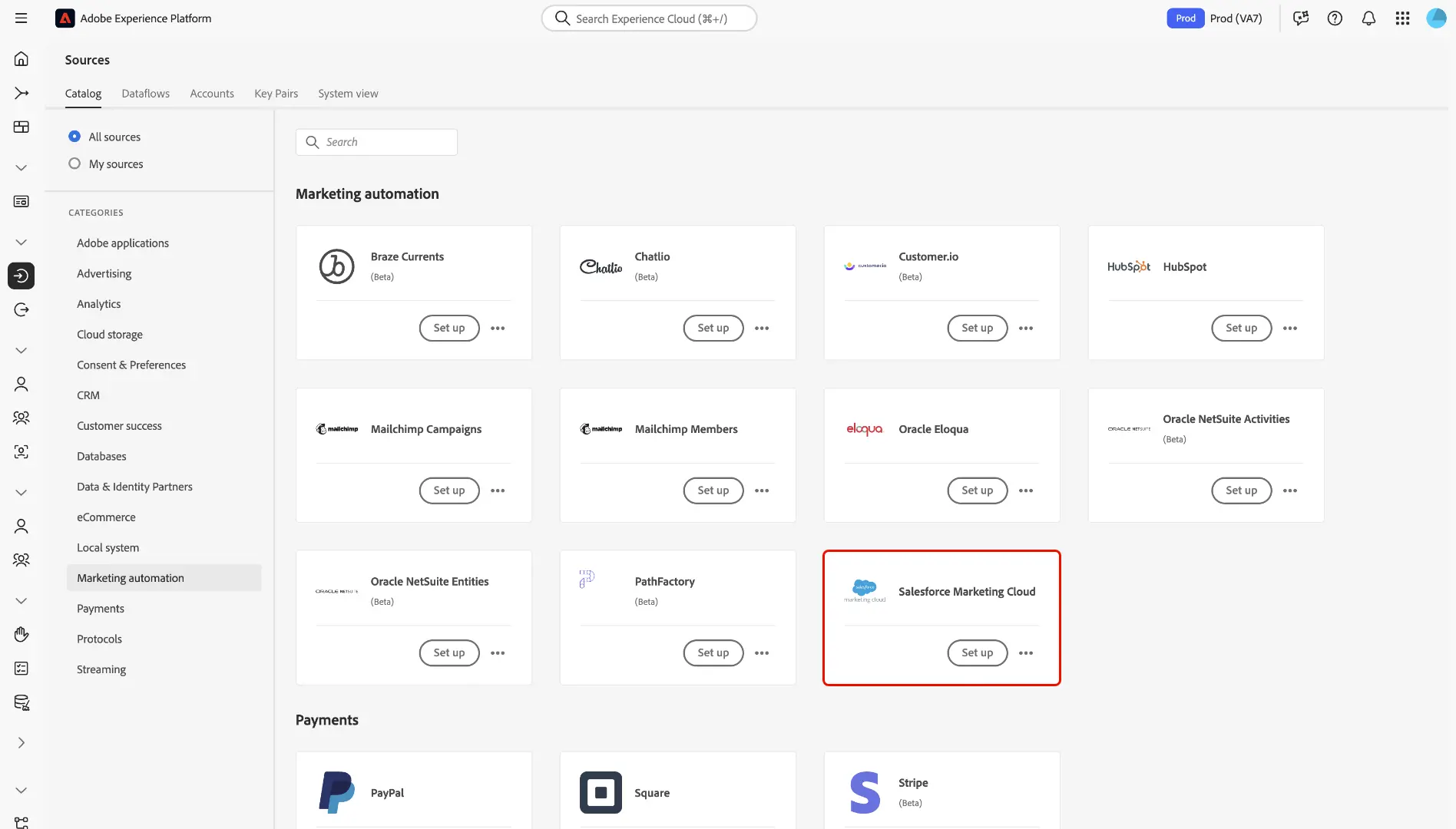
Source: Adobe
Marketo Engage includes a native bidirectional CRM sync with Salesforce Sales Cloud that covers leads, contacts, accounts, opportunities, and custom objects. Adobe's Flow Service API also supports direct Salesforce CRM data ingestion into AEP for profile unification.
What data can sync?
Contacts, leads, accounts, opportunities, campaign members, activities, and custom fields. Through AEP connectors, behavioral events and audience segment memberships also flow between the platforms.
Marketo Engage syncs lead/contact records, account data, opportunity data, campaign membership, and custom objects bidirectionally with Salesforce.
Is the sync bidirectional?
Yes, through native paths. Marketo Engage maintains continuous bidirectional sync with Salesforce Sales Cloud (changes in either system propagate to the other within minutes). AEP supports bidirectional flow through separate source (Salesforce to AEP) and destination (AEP to Salesforce) connectors.
Third-party tools default to one-way flows per automation, though bidirectional configurations are possible.
Is it real-time or batch?
Marketo Engage syncs with Salesforce in near real-time (polling every five minutes by default). AEP source connectors support both streaming and scheduled batch ingestion. AEP destination connectors activate audiences on configurable schedules. Third-party tools like Zapier trigger within 1 to 15 minutes depending on plan tier.
What are the available methods?
Native AEP connectors (source and destination), Marketo Engage native CRM sync, Workfront Fusion (Adobe's low-code automation platform), third-party automation (Zapier, Make), MuleSoft Anypoint (Salesforce's iPaaS), and custom API development.
Method | Setup Difficulty | Data Flow | Real-time? | Cost |
|---|---|---|---|---|
Marketo Engage Native Sync | Low | Bidirectional | Near real-time (5-min polling) | Included with Marketo Engage + Salesforce |
AEP Source/Destination Connectors | Medium | Bidirectional (separate connectors) | Streaming or scheduled batch | Included with AEP license |
Workfront Fusion | Medium | Configurable per scenario | Scheduled or trigger-based | Included with Workfront license |
MuleSoft Anypoint | Medium-High | Configurable | Real-time or scheduled | Separate MuleSoft license |
Zapier | Low | One-way per Zap | Near real-time (1-15 min) | From $19.99/mo |
Custom API | High | Fully customizable | Real-time via Platform Events | Developer time + hosting |
One distinction worth settling upfront: Marketo Engage's native sync handles ongoing, continuous bidirectional CRM data alignment and is the most common path for B2B marketing teams. AEP connectors serve a different job: unifying Salesforce data into the Real-Time Customer Profile for cross-channel journey orchestration and audience activation.
Teams running both Marketo Engage and AEP alongside Salesforce may use both native paths simultaneously, each handling a different data layer.
Integration Methods
Marketo Engage Native Salesforce Sync
How it works: Marketo Engage includes a native Salesforce CRM connector that maintains continuous bidirectional sync between the two platforms. Once configured, Marketo polls Salesforce every five minutes for changes to leads, contacts, accounts, opportunities, and campaigns. Changes in either system propagate to the other automatically.
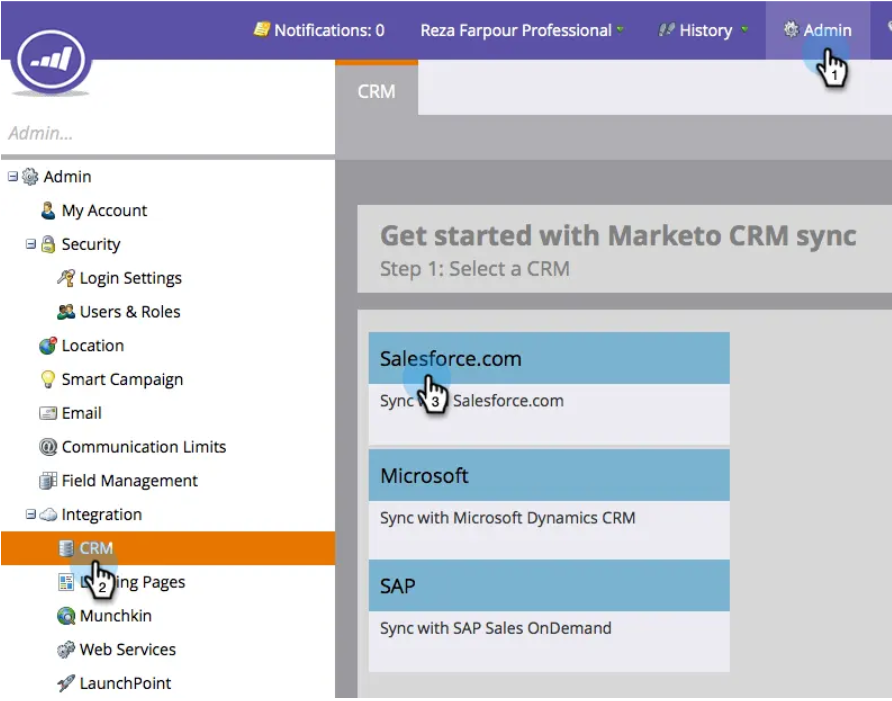
Source: Adobe
Marketo Sales Insight, available as a Salesforce AppExchange package, surfaces lead engagement data (email opens, web visits, interesting moments, lead scores) inside Salesforce records for sales reps.
What it syncs: Leads, contacts, accounts, opportunities, campaign members, tasks, events, and custom objects. Lead scores and engagement history from Marketo appear in Salesforce through the Sales Insight panel. Salesforce field updates (stage changes, ownership reassignment, custom field modifications) sync back to Marketo to trigger Smart Campaign flows.
Fits: ongoing bidirectional sync for B2B marketing-to-sales alignment; the primary integration path for organizations using Marketo Engage as their marketing automation platform.
Setup process:
In Salesforce, create a dedicated Marketo Sync User with a Salesforce license, System Administrator profile (or a custom profile with the required object and field permissions), and API access enabled.
In Marketo, navigate to Admin > CRM > Salesforce. Enter your Salesforce credentials (username, password, and security token for the sync user).
Map Marketo fields to Salesforce fields. Marketo auto-maps standard fields (First Name, Last Name, Email, Company) and lets you manually map custom fields.
Configure sync rules: choose whether Marketo leads that do not exist in Salesforce should be created automatically, and set the lead assignment rules for new records flowing from Marketo to Salesforce.
Install the Marketo Sales Insight package in Salesforce to surface lead engagement data, scores, and interesting moments inside Salesforce Lead, Contact, Account, and Opportunity records.
Validate by updating a test lead in Salesforce and confirming the change appears in Marketo within five minutes (and vice versa).
Strengths: Adobe maintains it as a first-party integration. Bidirectional sync runs automatically after initial configuration. Sales Insight gives reps behavioral context (email engagement, web visits, lead score) inside Salesforce without switching tools.
Smart Campaigns in Marketo can trigger on Salesforce field changes, letting marketing respond to sales activity in real time.
Limitations: Requires a Marketo Engage license, which is enterprise-priced with no public list prices. The five-minute polling interval means changes are near real-time but not instantaneous. Sync volume is subject to Salesforce API rate limits (Marketo Engage's daily API consumption can be significant for large databases).
Custom object sync requires careful schema alignment between the two platforms. Conflict resolution defaults to "most recently updated wins," which may not suit every field.
Best for: B2B marketing and sales teams where Marketo Engage is the marketing automation platform and Salesforce is the CRM. Organizations running demand generation, lead nurturing, lead scoring, and revenue attribution workflows that span both systems.
AEP Source and Destination Connectors
How it works: Adobe Experience Platform provides native connectors that treat Salesforce as both a data source (ingesting CRM data into AEP for profile unification) and a destination (activating AEP audience segments back to Salesforce for campaign execution or sales follow-up).
Source connectors pull Salesforce records into AEP and map them to the Experience Data Model (XDM) schema. Destination connectors push AEP audience memberships and profile attributes into Salesforce objects.
What it syncs: Source connectors can ingest any Salesforce standard or custom object into AEP datasets: leads, contacts, accounts, opportunities, campaign members, and custom objects. Once in AEP, this data merges into the Real-Time Customer Profile via the Identity Graph.
Destination connectors activate AEP audience segments as Salesforce campaign members, custom object records, or field updates on existing records.
Fits: ongoing data unification and audience activation; built for enterprise teams using AEP as their central customer data platform alongside Salesforce CRM.
Setup process:
In AEP, navigate to Sources and search for the Salesforce connector. Authenticate using a Salesforce Connected App with OAuth 2.0 credentials (Client ID, Client Secret, and the org's instance URL).
Select the Salesforce objects you want to ingest (e.g., Contact, Lead, Opportunity). AEP's Data Prep mapper lets you map Salesforce fields to XDM schema fields using a drag-and-drop interface.
Configure the ingestion schedule: choose streaming ingestion (for near real-time updates) or scheduled batch ingestion (hourly, daily, or custom intervals).
For the destination connector, navigate to Destinations and search for the Salesforce destination. Authenticate with a second Connected App or reuse the same credentials.
Map AEP audience segments to Salesforce actions (e.g., add qualifying profiles to a Salesforce Campaign, update a custom field on the Contact record, or create a Task).
Test by ingesting a small dataset from Salesforce, building a test audience in AEP's Audience Builder, and verifying the segment membership appears in Salesforce.
Strengths: Native to AEP, so no third-party tool is required. Supports both streaming and batch ingestion from Salesforce. Salesforce data joins all other AEP sources (web analytics, mobile, commerce, offline) in the Real-Time Customer Profile, enabling cross-channel journey orchestration informed by CRM data.
AEP's DULE governance framework enforces data usage policies automatically, which matters in regulated industries.
Limitations: Requires an Adobe Experience Platform license, which is enterprise-only with no public pricing. Setup demands familiarity with XDM schema design and AEP's data modeling concepts (a real learning curve for teams new to the platform). Source and destination are separate connectors, so bidirectional flow requires configuring both.
AEP streaming ingestion supports 1,500 requests per second to Real-Time Profile, which can constrain large initial loads.
Best for: Enterprise marketing teams using Adobe Experience Platform as their central CDP alongside Salesforce CRM. Organizations that need Salesforce CRM data unified with web, mobile, and commerce behavioral data for cross-channel personalization and journey orchestration.
Workfront Fusion
How it works: Workfront Fusion is Adobe's low-code automation platform, included with Workfront licenses. It uses a visual scenario builder where modules represent app actions (triggers, searches, creates, updates) connected in a flowchart.

Source: Adobe
Fusion includes pre-built connectors for both Adobe Experience Cloud products and Salesforce, letting teams build custom workflows that bridge the two ecosystems without code.
What it syncs: Any data exposed by the Salesforce REST API and the Adobe product APIs connected through Fusion. Common flows include syncing Salesforce opportunity stage changes to trigger Marketo campaigns, pushing AEM content metadata to Salesforce custom objects, or updating Salesforce records when Workfront project milestones complete.
Fits: ongoing automation for specific cross-platform workflows; particularly useful when the integration need extends beyond marketing data (e.g., connecting Workfront project management to Salesforce deals).
Setup process:
In Workfront Fusion, create a new scenario. Add a Salesforce module as the trigger (e.g., "Watch Records" on the Opportunity object).
Authenticate the Salesforce connection using OAuth 2.0.
Add an Adobe product module (Marketo, AEM, or another Experience Cloud product) as the action.
Map fields between the Salesforce trigger output and the Adobe action input. Fusion provides inline functions for data transformation (type conversion, date formatting, conditional logic).
Add error-handling routes to catch failures (e.g., log to a Google Sheet, send a Slack notification, or retry).
Set the scenario to run on every trigger event or on a scheduled interval. Test with a sample record before activating.
Strengths: Native to Adobe's ecosystem, so it connects to Experience Cloud products without third-party dependency. The visual builder is accessible to non-developers. Supports 1,000+ connectors beyond Adobe and Salesforce, enabling workflows that span the broader tech stack. Error handling and retry logic are built in.
Limitations: Requires a Workfront license (Fusion is bundled with Workfront, not sold standalone). Not designed for high-volume, bidirectional CRM sync (Marketo's native sync handles that better). Scenario complexity can grow quickly when handling multiple object types and conditional paths.
Best for: Teams already using Adobe Workfront for marketing operations that need to automate specific workflows between Experience Cloud products and Salesforce beyond what the native Marketo or AEP connectors handle.
MuleSoft Anypoint
How it works: MuleSoft Anypoint Platform is Salesforce's iPaaS, providing pre-built connectors, API management, and data transformation capabilities. MuleSoft includes connectors for both Salesforce CRM objects and Adobe Experience Platform APIs, giving teams full control over data mapping, transformation, error handling, and monitoring.
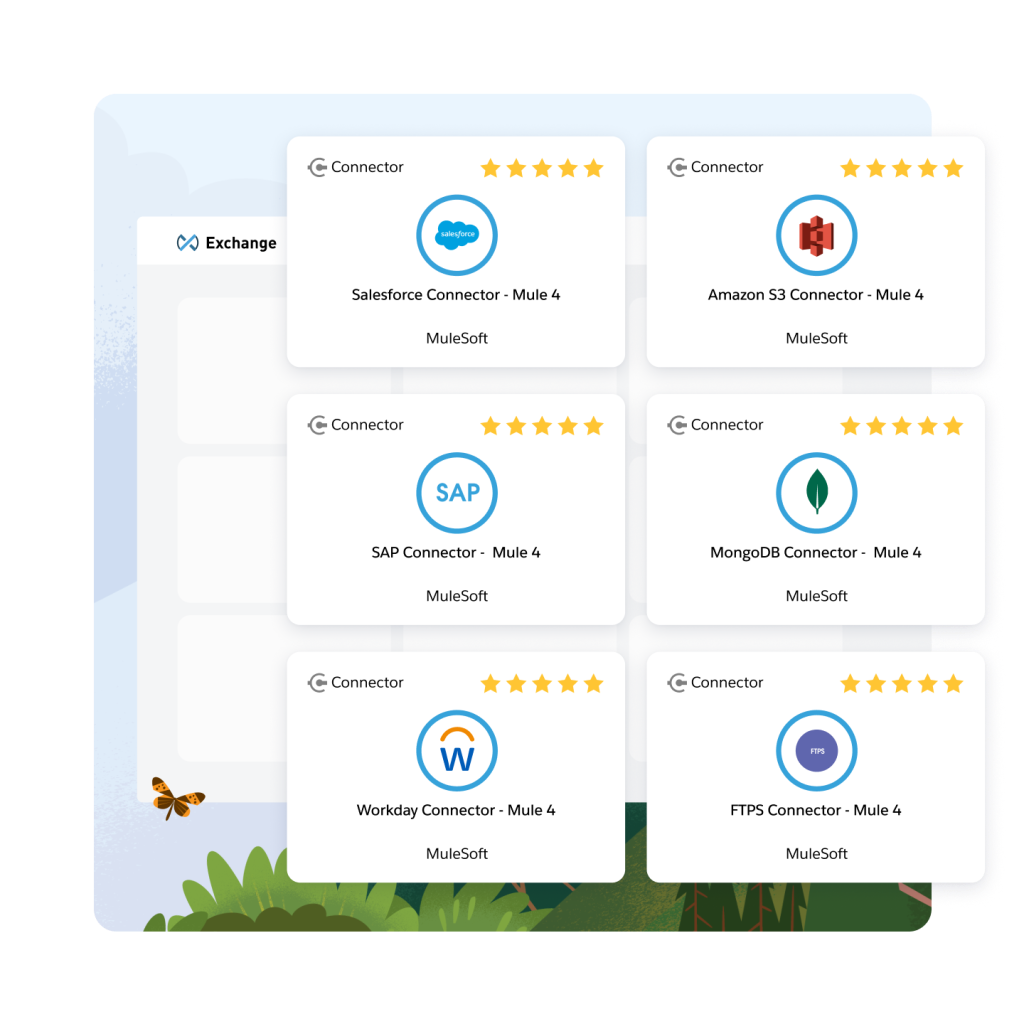
Source: Salesforce
What it syncs: Any data accessible through Salesforce and Adobe APIs. MuleSoft's connector library covers Salesforce standard and custom objects, Marketo Engage (leads, activities, campaigns), AEP (profile ingestion, audience activation), and AEM (asset metadata, content fragments).
The platform supports batch, streaming, and event-driven patterns.
Fits: both one-time migration and ongoing sync at scale; the recommended path for organizations with complex data models spanning both ecosystems.
Setup process:
In Anypoint Platform, create a new Mule application. Add the Salesforce Connector and configure authentication (OAuth 2.0 with a Connected App).
Add the Adobe connector (Marketo, AEP, or a generic HTTP connector for Adobe APIs). Configure authentication (OAuth 2.0 Server-to-Server for AEP, or Marketo REST API credentials).
Design the integration flow: define the source (e.g., Salesforce Change Data Capture events), transformation logic (DataWeave mapping expressions), and target (e.g., AEP Streaming Ingestion API).
Add error handling, logging, and retry policies. MuleSoft's runtime manages connection pooling and circuit-breaking automatically.
Deploy the application to CloudHub (MuleSoft's managed runtime) or an on-premises Mule runtime.
Monitor the integration through Anypoint Monitoring dashboards, which track message volume, error rates, and latency.
Strengths: Built-in monitoring, alerting, and governance. Handles complex transformation logic through DataWeave (MuleSoft's data transformation language). Pre-built connectors reduce development time compared to custom API builds. Salesforce owns MuleSoft, so the Salesforce connector is well maintained.
Limitations: Requires a separate MuleSoft license (not included with Salesforce CRM subscriptions). Steeper learning curve than Zapier or Fusion. Built for enterprise teams with dedicated integration engineers or an SI partner. Pricing is not publicly listed.
Best for: Enterprise organizations with complex, high-volume integration requirements between Adobe Experience Cloud and Salesforce. Teams that need event-driven, real-time sync with data transformation and governance capabilities.
Zapier
How it works: Zapier connects Adobe and Salesforce products through event-driven automations called Zaps. Each Zap pairs a trigger in one app with one or more actions in the other. Zapier supports Salesforce as both a trigger and action app, and offers connectors for several Adobe products.

Source: Adobe
What it syncs: Contacts, leads, opportunities, and campaign data between Salesforce and supported Adobe products. Each object type requires its own Zap. Custom fields can be mapped manually in the setup flow.
Fits: ongoing sync for specific, simple workflows; not a replacement for the native Marketo or AEP connectors.
Setup process:
Create a Zapier account and connect both your Salesforce and Adobe product accounts using OAuth.
Choose the trigger app (e.g., Salesforce) and event (e.g., "New Lead").
Choose the action app and event (e.g., create a record in the target system).
Map fields between the trigger and action. Zapier displays available fields from both sides.
Test the Zap with a sample record.
Turn on the Zap. For bidirectional sync, create a second Zap with trigger and action reversed, and add a filter to prevent infinite loops.
Strengths: Fastest setup with no technical knowledge required. Low cost for simple, low-volume workflows. Available without enterprise licenses on either platform.
Limitations: One trigger-action pair per Zap, so syncing multiple object types requires multiple Zaps. No built-in deduplication or conflict resolution. Historical records created before the Zap was activated do not sync. Engagement-level data (email opens, web visits, lead scores) from Adobe products is not available through Zapier with the same depth as native connectors.
Best for: Small teams or pilot projects that need a quick, lightweight connection between Salesforce and an Adobe product without committing to enterprise integration infrastructure.
Custom API Integration
How it works: Both ecosystems expose comprehensive APIs.
Adobe Experience Platform provides 20+ REST API namespaces covering ingestion, profile access, segmentation, governance, and activation, all authenticated via OAuth 2.0 Server-to-Server.
Salesforce provides REST, SOAP, Bulk, and GraphQL APIs covering all standard and custom objects, plus Platform Events and Change Data Capture for event-driven sync.
A custom integration connects these APIs directly, with custom middleware handling authentication, field mapping, transformation, conflict resolution, and error recovery.
What it syncs: Anything both API surfaces expose. This is the only method that supports arbitrarily complex scenarios: syncing custom objects between Marketo and Salesforce that the native sync doesn't cover, triggering AEP audience rebuilds from Salesforce Platform Events, or routing AJO journey outcomes back to Salesforce Opportunity records.
Fits: either one-time migration or ongoing sync; the only method with no ceiling on complexity or data coverage.
Setup process:
Register API credentials in both ecosystems: an Adobe Developer Console project with OAuth 2.0 Server-to-Server credentials, and a Salesforce Connected App with OAuth 2.0.
Design the data model mapping between Adobe XDM schemas and Salesforce objects, including field-level transformations and a cross-reference table for matching record IDs.
Build the sync service: a server-side application that listens for events from both platforms (AEP streaming events, Salesforce Platform Events or Change Data Capture) and writes changes to the other side.
Implement conflict resolution logic for bidirectional sync (timestamp-based, source-priority, or field-level rules).
Add logging, error handling, and retry logic. Both platforms enforce rate limits (AEP: 1,500 req/sec to Real-Time Profile; Salesforce: 100,000+ daily API requests depending on edition).
Deploy, monitor, and maintain the integration. Both platforms version their APIs with regular releases, so upkeep is ongoing.
Strengths: Complete control over what syncs, when, and how. Real-time sync via event-driven APIs on both sides. Can implement arbitrarily complex business logic. No per-record or per-operation fees from a third-party connector.
Limitations: Requires dedicated development resources to build and maintain. You own the infrastructure, monitoring, and error recovery. API changes on either side (AEP's schema evolution, Salesforce's seasonal API versioning) demand ongoing upkeep. The initial build takes weeks or months, not hours.
Best for: Enterprise teams with integration requirements that no off-the-shelf connector satisfies. Organizations with in-house development teams and a long-term commitment to running both ecosystems. Companies with complex data models, custom XDM schemas, or business logic that must be enforced during sync.
Key Use Cases
1. Lead Scoring and Handoff from Marketo to Salesforce
Marketing nurtures leads through Marketo Engage campaigns (email sequences, webinars, content downloads). Marketo's lead scoring model assigns behavioral and demographic scores.
When a lead crosses the sales-ready threshold, the native Salesforce sync creates or updates the lead in Salesforce with the full engagement history, and Sales Insight surfaces the score, interesting moments, and recent activity on the Salesforce record.
The sales rep sees which content the lead engaged with and how recently, enabling a timely, informed follow-up.
Best integration method: Marketo Engage native Salesforce sync with Sales Insight.
2. Unifying CRM Data in AEP for Cross-Channel Personalization
Enterprise marketing teams running Adobe Journey Optimizer need Salesforce CRM data (deal stage, account tier, renewal date, product ownership) to personalize journeys across email, push, SMS, and web.
The AEP Salesforce source connector ingests CRM records into the Real-Time Customer Profile, where they merge with web analytics, commerce events, and mobile behavioral data.
Journey conditions can then reference Salesforce attributes in real time (e.g., trigger a renewal journey 90 days before contract expiration based on the Salesforce Opportunity close date).
Best integration method: AEP source connector (streaming or scheduled batch).
3. Activating AEP Audiences in Salesforce for Sales Follow-Up
Marketing builds high-intent audience segments in AEP's Real-Time CDP using behavioral signals (website visits, content consumption, product page views) combined with CRM attributes.
The AEP Salesforce destination connector pushes segment membership back to Salesforce as campaign member records or custom field updates. Sales reps in Salesforce can then filter their pipeline by AEP segment membership to prioritize outreach to accounts showing active buying signals.
Best integration method: AEP destination connector.
4. Closed-Loop Revenue Attribution
Marketing needs to attribute pipeline and revenue back to specific campaigns and touchpoints. Marketo Engage tracks marketing touches (email clicks, event attendance, ad engagement) while Salesforce tracks opportunity stages and closed-won revenue.
With the native bidirectional sync, Marketo Measure (formerly Bizible) can trace every Buyer Attribution Touchpoint from first marketing touch through closed-won deal, providing multitouch revenue attribution across both systems.
Best integration method: Marketo Engage native sync with Marketo Measure.
5. Account-Based Marketing with Shared Account Intelligence
Marketing runs account-based campaigns in Marketo Engage or Adobe Journey Optimizer targeting specific accounts by industry, size, or buying stage. Salesforce provides the account hierarchy, opportunity data, and relationship context.
The native sync ensures both systems share the same account structure, so marketing targets the right accounts and sales sees the marketing engagement at the account level. AJO B2B Edition extends this to buying committee-level journey orchestration.
Best integration method: Marketo Engage native sync for account data; AEP connectors for buying committee journey orchestration.
Limitations and Considerations
Data Model Differences
Adobe Experience Platform uses the Experience Data Model (XDM) with standardized schemas, field groups, and identity namespaces. Salesforce uses its own object model with leads, contacts, accounts, opportunities, and custom objects.
Mapping between the two requires deliberate schema design decisions that are expensive to change after data collection begins. Marketo Engage adds a third layer: its own lead database with custom fields, smart lists, and program membership structures.
Aligning fields, picklist values, and relationship hierarchies across all three systems requires careful planning.
For a broader look at how Adobe Experience Platform and Salesforce differ as platforms, see our Adobe Experience Platform vs. Salesforce comparison.
Sync Conflicts in Bidirectional Flows
Marketo Engage's native Salesforce sync defaults to "most recently updated wins" for conflict resolution. When a marketer updates a lead's job title in Marketo at the same time a sales rep updates the same field in Salesforce, one change overwrites the other based on timestamp.
For fields that both teams routinely edit (lead status, contact information, qualification criteria), define explicit ownership rules before activating bidirectional sync.
For a deeper look at how Marketo and Salesforce differ in their approach to the lead lifecycle and data ownership, see our Marketo vs. Salesforce comparison.
Pricing and Licensing Complexity
Both ecosystems are enterprise-priced with no public list prices. Adobe Experience Platform, Journey Optimizer, and Marketo Engage each require separate licenses priced by profile volume, messages sent, or contact database size. Salesforce CRM licenses scale by edition and seat count. MuleSoft requires an additional license.
The total cost of a full Adobe-Salesforce integration stack (AEP + Marketo + AJO + Salesforce Enterprise + MuleSoft) can be substantial, and consumption metering on both sides makes annual costs difficult to model during procurement.
API Rate Limits
Both platforms enforce rate limits that affect integration performance. AEP supports 1,500 requests per second to Real-Time Profile for streaming ingestion and 20 GB/hour for batch ingestion via API. Salesforce's daily API request allocation starts at 100,000 requests for Professional and Enterprise editions.
Marketo Engage's Salesforce sync consumes Salesforce API calls with each polling cycle, and large databases with frequent changes can approach daily limits.
Permissions and Access
Setting up native connectors requires admin access on both sides. In Adobe, AEP connector configuration requires an Adobe Admin Console role with data ingestion and source management permissions. In Salesforce, System Administrator access is required to create Connected Apps, configure API-enabled profiles, and install AppExchange packages.
Marketo Engage sync requires a dedicated Salesforce user with a full Salesforce license (not a platform-only license) and field-level access to every object and field included in the sync.
Maintenance
Both ecosystems release frequent updates. Adobe's AEP, AJO, and Marketo Engage receive continuous updates through their cloud service models. Salesforce versions its API with each seasonal release (current: Summer '26, API version 67.0). Custom fields added after the initial sync configuration will not sync unless you update the integration.
Schema changes in AEP (new XDM field groups, identity namespace modifications) may require re-mapping source connectors. Plan for periodic reviews of the integration's health and accuracy.
What No Method Fixes: The Data Itself
Every method above moves records between Adobe Experience Cloud and Salesforce. None of them checks whether those records are accurate, complete, or current. A lead with a dead email address in Salesforce syncs as a lead with a dead email address in Marketo, where it enters a nurture sequence that bounces and damages sender reputation.
A contact with an outdated job title flows into AEP's Real-Time Customer Profile, where it informs a personalized journey that addresses someone by a role they left six months ago. The integration ensures both systems agree; it does not ensure they are right.
Where ZoomInfo Fits In
Every method in this guide moves data between Adobe Experience Cloud and Salesforce. None of them improves the data being moved. When the integration is live but pipeline data is still incomplete (wrong titles, outdated direct dials, missing company attributes, stale company details), the bottleneck is no longer the connector.
That is the gap ZoomInfo closes.
ZoomInfo is a B2B data and go-to-market platform built on 500M contacts, 100M companies, 135M+ verified phone numbers, and 200M+ verified business emails. That data is verified through a multi-source pipeline backed by 300+ human researchers and reaching up to 95% accuracy on first-party data.
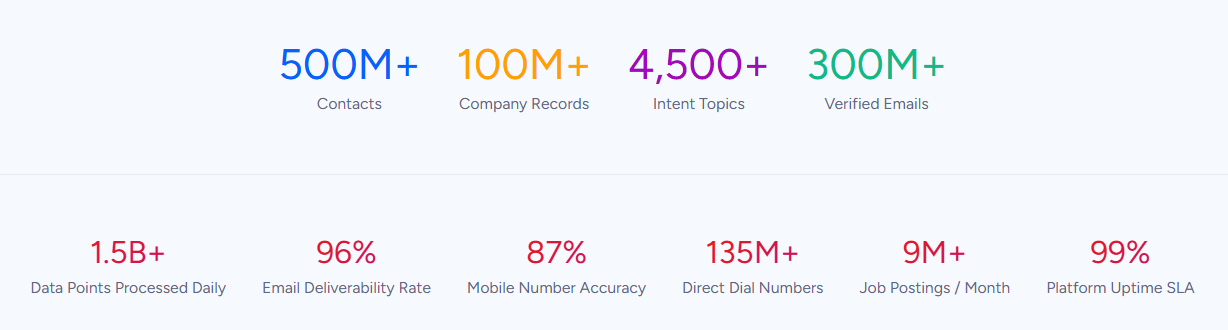
For teams running an Adobe-Salesforce integration, ZoomInfo addresses the data quality layer that no connector handles.
ZoomInfo integrates natively with Salesforce through its marketplace, providing CRM enrichment, lead routing, and real-time data updates inside Salesforce records.
It also integrates with Adobe Marketo Engage through a marketplace app and REST API, enriching Marketo lead records with verified contact data, company attributes, and technographics.
The same data feeds ZoomInfo's GTM Context Graph, which processes 1.5B+ data points daily and unifies third-party intelligence with CRM records, conversation transcripts, and behavioral signals to surface not just what happened in a deal, but why.
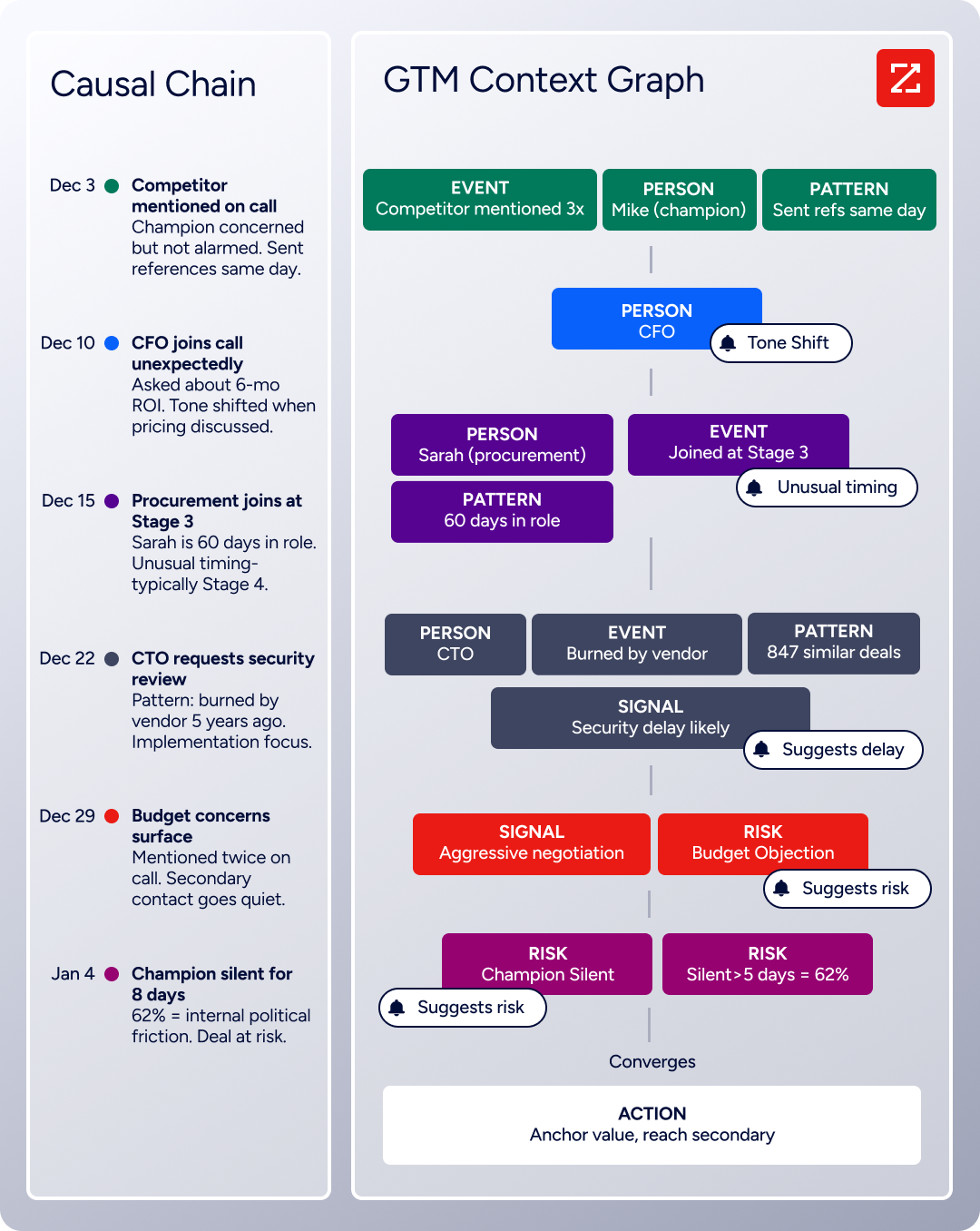
In practice, a team running both ecosystems can use ZoomInfo to enrich records in Salesforce (where the native integration handles it automatically) and in Marketo Engage (through the Marketo connector), then let the existing Adobe-Salesforce sync propagate those enriched records across both platforms.
A lead enriched with a verified business email, current job title, and company attributes in Salesforce arrives in Marketo with that data intact, ready for accurate segmentation and personalization. The same enriched record flows into AEP's Real-Time Customer Profile with correct attributes, so journey orchestration decisions in Adobe Journey Optimizer reflect current, verified data.
Buyer Intent data from ZoomInfo, tracking signals from 210 million IP-to-Organization pairings, can be routed into either platform to prioritize accounts that are actively researching relevant solutions.
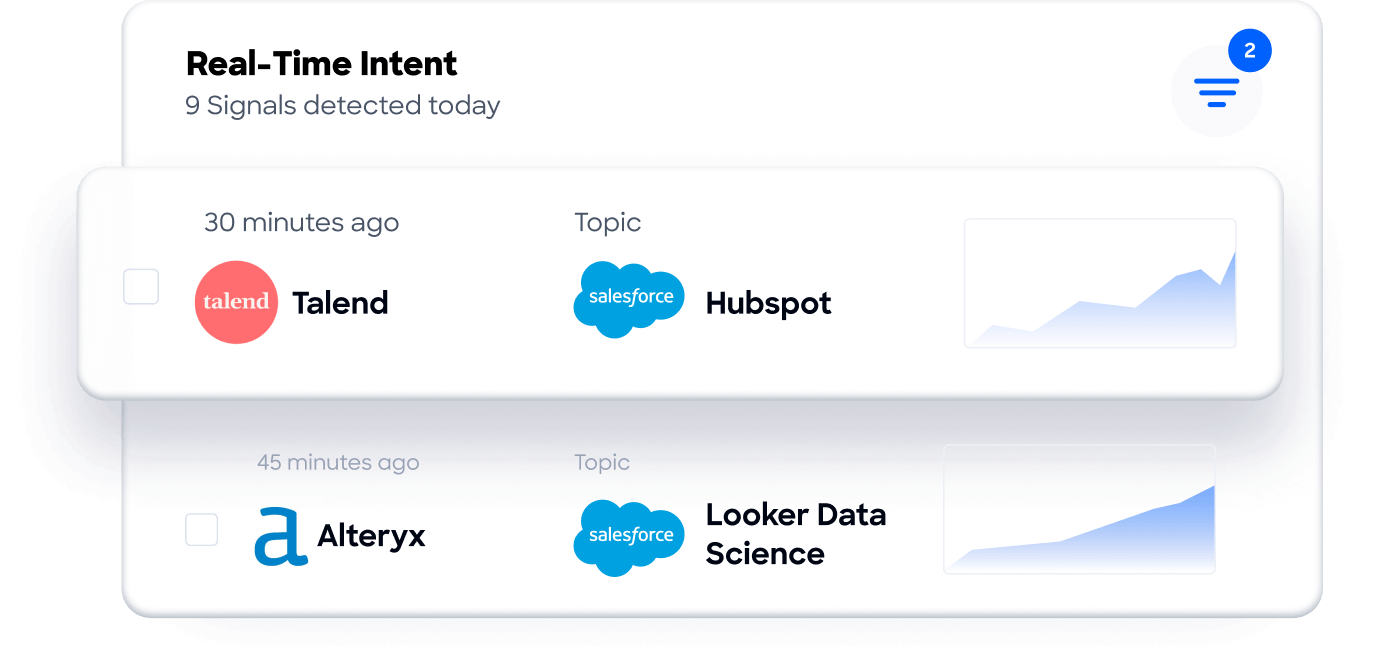
For teams building beyond ZoomInfo's native connectors, API and MCP access delivers the same intelligence to any custom workflow, AI agent, or third-party tool in the stack.
Enriched records also make the integration itself more reliable. Fewer blank fields mean fewer mismatches during identity resolution in AEP.
Consistent formatting across records reduces false positives that create duplicates when Marketo syncs with Salesforce. And verified emails mean nurture campaigns built in Marketo or AJO reach inboxes instead of bouncing.
Seismic's sales team attributed 39% of active pipeline to opportunities identified or influenced by ZoomInfo signals, while boosting productivity by 54% and saving 11.5 hours per week. (Seismic)
Final Verdict
Multiple native integration paths exist between Adobe Experience Cloud and Salesforce, reflecting the depth of both ecosystems.
Marketo Engage's bidirectional CRM sync is the most established and widely used path for B2B marketing-to-sales alignment.
AEP's source and destination connectors handle the broader data unification and audience activation layer.
For most teams, the right choice depends on which Adobe products are in the stack and what the integration needs to accomplish.
B2B marketing teams using Marketo Engage should activate the native Salesforce sync immediately. It is the fastest path to bidirectional lead and contact alignment, and Sales Insight gives reps visibility into marketing engagement without leaving the CRM.
Enterprise teams using Adobe Experience Platform as their central CDP should configure AEP's Salesforce source and destination connectors to unify CRM data with behavioral signals for cross-channel journey orchestration.
Organizations with complex, multi-product Adobe deployments (AEP, Marketo, AJO, AEM, Workfront) alongside Salesforce should evaluate MuleSoft Anypoint or Workfront Fusion for workflows that span more than one integration point.
Teams with simple automation needs and no existing enterprise integration infrastructure can start with Zapier for lightweight workflows while evaluating native options.
Before committing to a method, clarify what the integration needs to accomplish.
If the goal is marketing-to-sales lead handoff and pipeline attribution, Marketo Engage's native Salesforce sync is the starting point.
If the goal is unifying Salesforce CRM data with web, mobile, and commerce behavioral data for real-time personalization, AEP's connectors are the right path.
If both goals exist simultaneously, the two native paths can run in parallel, each handling its own data layer. Regardless of method, the quality of the data in both systems determines whether the integration delivers value or just synchronizes problems across two expensive platforms.
ZoomInfo, with native integrations for both Salesforce and Marketo Engage, plus API and MCP access for any system in the stack, is the data enrichment layer that keeps both ecosystems accurate while the connectors keep them aligned.
FAQ
Does Adobe Experience Cloud integrate natively with Salesforce?
Yes, through multiple paths. Marketo Engage (Adobe's B2B marketing automation platform) includes a native bidirectional sync with Salesforce Sales Cloud that covers leads, contacts, accounts, opportunities, and custom objects.
Adobe Experience Platform provides source connectors for ingesting Salesforce CRM data into the Real-Time Customer Profile, and destination connectors for activating AEP audience segments back into Salesforce.
These are separate integration paths serving different purposes: Marketo handles marketing automation and lead management sync, while AEP handles data unification and audience activation.
Can I use Marketo Engage's Salesforce sync and AEP connectors at the same time?
Yes. The two paths handle different data layers and can run simultaneously. Marketo's native sync manages the operational lead/contact database alignment between marketing automation and CRM.
AEP's connectors unify Salesforce CRM data with behavioral signals from other sources (web, mobile, commerce) in the Real-Time Customer Profile for journey orchestration.
Running both is common in enterprise deployments where Marketo handles demand generation while AEP powers cross-channel personalization.
What Salesforce edition do I need for the Adobe integration?
Marketo Engage's native Salesforce sync requires a Salesforce edition with API access enabled (Professional Edition with API add-on, Enterprise, Unlimited, or Performance).
The dedicated sync user needs a full Salesforce license with System Administrator-level permissions or a custom profile granting access to all synced objects and fields. AEP connectors require a Salesforce edition with API access and a Connected App configured with OAuth 2.0.
How often does data sync between Marketo Engage and Salesforce?
Marketo Engage polls Salesforce for changes every five minutes by default. Changes in either system (new records, field updates, deletions) propagate to the other within that polling interval. This is near real-time but not instantaneous. For time-sensitive workflows (e.g., a sales rep updates a lead status and expects an immediate marketing response), factor the five-minute window into workflow design.
What happens when the same record is updated in both Adobe and Salesforce simultaneously?
Marketo Engage's default conflict resolution is "most recently updated wins" based on timestamp. If a marketer updates a lead's job title in Marketo and a sales rep updates the same field in Salesforce within the same sync cycle, whichever change occurred last overwrites the other.
For fields that both teams routinely edit, best practice is to designate one system as the authoritative source for specific fields (e.g., Salesforce owns lead status, Marketo owns lead score) and configure field-level sync rules accordingly.
Is the integration affected by API rate limits?
Yes. Marketo Engage's Salesforce sync consumes Salesforce API calls with each polling cycle. Large databases with frequent changes can approach Salesforce's daily API limits, particularly on Professional and Enterprise editions. AEP streaming ingestion supports 1,500 requests per second to Real-Time Profile.
Custom API integrations using both platforms' APIs must account for rate limits on both sides. Monitoring API consumption is an ongoing maintenance requirement for all integration methods.
How does ZoomInfo improve an Adobe-Salesforce integration?
ZoomInfo solves the data quality problem that no sync tool addresses. Contact records in CRMs and marketing automation platforms decay over time as people change jobs, phone numbers go inactive, and company details shift.
ZoomInfo enriches records with verified contact data, company attributes, technographics, and intent signals. Its native Salesforce integration handles enrichment automatically on the CRM side, and its Marketo Engage connector enriches the marketing database directly.
The result: data flowing between both ecosystems is accurate and complete, which reduces sync errors from blank fields, inconsistent formatting, and duplicate records. Buyer Intent data from ZoomInfo can also be routed into either platform to prioritize accounts showing active research signals.
What does an Adobe Experience Cloud and Salesforce integration cost?
Costs depend on the method and the licenses already in place. Marketo Engage's native Salesforce sync is included with the Marketo license (no additional integration cost), but Marketo itself is enterprise-priced with no public list prices.
AEP connectors are included with the AEP license. MuleSoft requires a separate license (pricing not publicly listed).
Zapier starts at $19.99/month for 750 tasks. Custom API integrations have no platform fees but require developer time and hosting.
On both sides, API rate limits tied to edition and license count may require higher-tier plans at large sync volumes. Implementation costs for enterprise deployments typically involve systems integrator fees in addition to license costs.
Other tools that connect to Salesforce:
