
Choosing between Close CRM and Pipeline CRM comes down to a question most comparisons skip: what does your sales team actually do all day?
These are not interchangeable tools. Close is built for reps who sell by phone, email, and text from a desk. Pipeline CRM is built for reps who drive to job sites, meet clients face-to-face, and manage deals that stretch across months. Pick the wrong one and you'll fight your CRM instead of using it.
The real questions to ask before choosing:
Is your team doing high-volume outbound calling, or managing fewer high-value relationships?
Do you need a built-in dialer and SMS, or map-based route planning and document generation?
Are you an inside sales operation, or does your team spend most of their time in the field?
Do you want AI that qualifies inbound leads by phone, or project management that carries deals through post-sale delivery?
Are your reps spending time researching contacts before they can sell, and could better data change that?
In short, here's what we recommend:
Close is the CRM for inside sales teams that live on the phone. It puts calling, email, SMS, and WhatsApp in one platform without third-party integrations for any core communication channel.
The Power Dialer and Predictive Dialer let small teams work through large lead lists efficiently, and Chloe, their AI sales agent (currently in beta), calls and qualifies inbound leads before a human rep even sees the record.
Close is built for B2B SaaS, financial services, insurance, and coaching businesses with teams under 100 reps.
If your team makes hundreds of calls a day, Close removes the friction between a rep and their next conversation. If your sales motion is field-based or your deals require project delivery after close, it's not the right fit.
Pipeline CRM is the CRM for field sales teams in construction, manufacturing, professional services, and logistics. It turns relationship-driven deals into a visual, trackable process with Kanban boards, map-based route planning, and a project management module that bridges the gap between closing a deal and delivering on it.
Named "Highest User Adoption" by G2 for both enterprise and SMB segments, Pipeline CRM is built for 5-50 person sales teams that need a CRM their reps will actually use.
If your team needs a power dialer or does high-volume phone outbound, Pipeline CRM will leave you reaching for third-party tools.
Both platforms manage deals well once those deals exist. But neither solves the problem that comes before pipeline management: knowing which companies to target, having verified contact data for the right decision-makers, and understanding when those companies are actively in-market. That intelligence is what separates productive prospecting from wasted activity.
ZoomInfo is a GTM platform built on a B2B database of 500M contacts, 100M companies, 135M+ verified phone numbers, and 200M+ verified business email addresses.
Its GTM Context Graph processes 1.5B+ data points daily, combining this data with your CRM records, conversation transcripts, and behavioral signals to show the full context of your accounts (not just what happened, but why, and what to do next).
Whether you run Close or Pipeline CRM, your team reaches that intelligence through GTM Workspace for sellers, GTM Studio for marketers and RevOps, or APIs and MCP that deliver ZoomInfo's data directly into your CRM.
If building your pipeline on verified data and buying signals sounds like the missing layer, see how ZoomInfo works with your sales stack.
Close vs. Pipeline CRM vs. ZoomInfo at a glance
Close | Pipeline CRM | ZoomInfo | |
|---|---|---|---|
Primary function | Inside sales CRM with native calling | Field sales CRM with project management | AI-powered GTM platform |
Built-in calling | Power Dialer + Predictive Dialer + AI agent | No (third-party integrations required) | Not a CRM; integrates with CRMs |
Pipeline management | Smart Views, Pipeline Guidance | Kanban boards, Deal Intelligence Fields | GTM Workspace for account prioritization |
Automation | Multi-channel workflows (email, SMS, call tasks) | Data and time-based triggers (up to 20 on Grow) | Signal-triggered GTM plays and AI outreach |
Field sales tools | Mobile app (basic) | Map views, route planning, GPS nearby | N/A |
B2B contact database | No native data sourcing | Data enrichment add-on ($19+/month) | 500M contacts, 135M+ verified phone numbers |
Buying intent signals | No | No | Intent data, website visitor tracking, signal stacking |
Post-sale tools | Limited | Project management, eSign, customer health | Customer health monitoring, renewal signals |
Starting price | $9/seat/month (Solo, annual) | $25/user/month (Start, annual) | Free (ZoomInfo Lite); paid plans custom-quoted |
Best for | Phone-first outbound teams, under 100 reps | Relationship-driven field teams, 5-50 reps | Any sales team needing verified contacts and buying signals |
Two CRMs built for two different sales motions
Close and Pipeline CRM are both sales CRMs for small and mid-size teams. That is where the similarity ends.
Close was born from an outsourced sales operation. The founders ran ElasticSales, a sales-as-a-service company serving over 200 venture-backed startups, making calls and sending emails 8-10 hours a day.
The internal CRM they built to manage that volume became Close. That origin explains everything about the product: it is designed for reps who spend their entire workday in the CRM, moving from call to email to SMS without switching tabs.
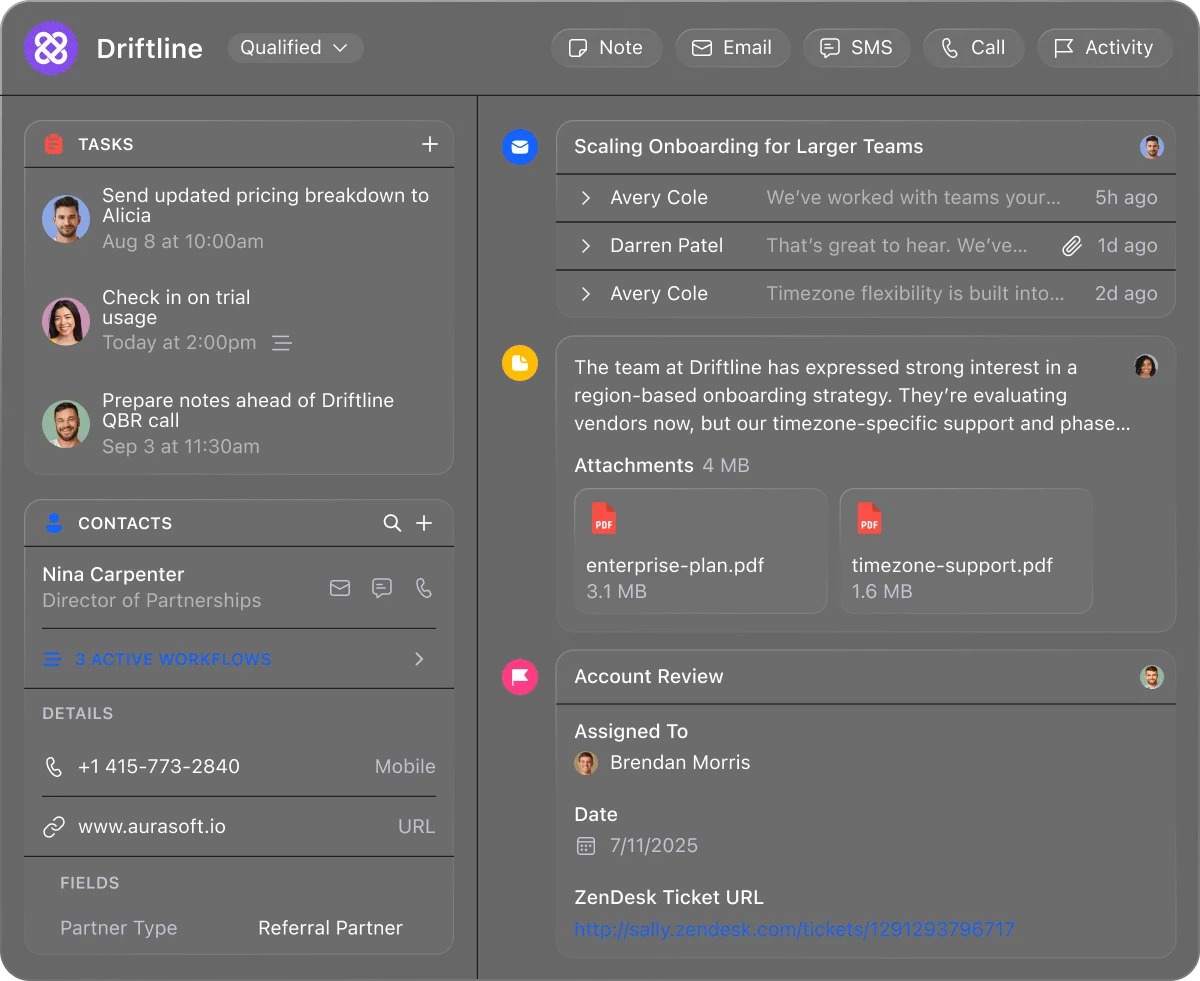
Close positions explicitly for teams under 100 people in B2B SaaS, financial services, insurance, and coaching. The typical Close customer is an SDR team doing outbound prospecting, a founder handling their own sales, or an inside sales group qualifying inbound leads at speed.
Close acknowledges it is not built for field sales routing, complex enterprise deals, or post-sale client management.
Pipeline CRM was founded in 2006 in Seattle as PipelineDeals, targeting SMB companies in industrial, logistics, and professional services sectors that found Salesforce too complex and too expensive.
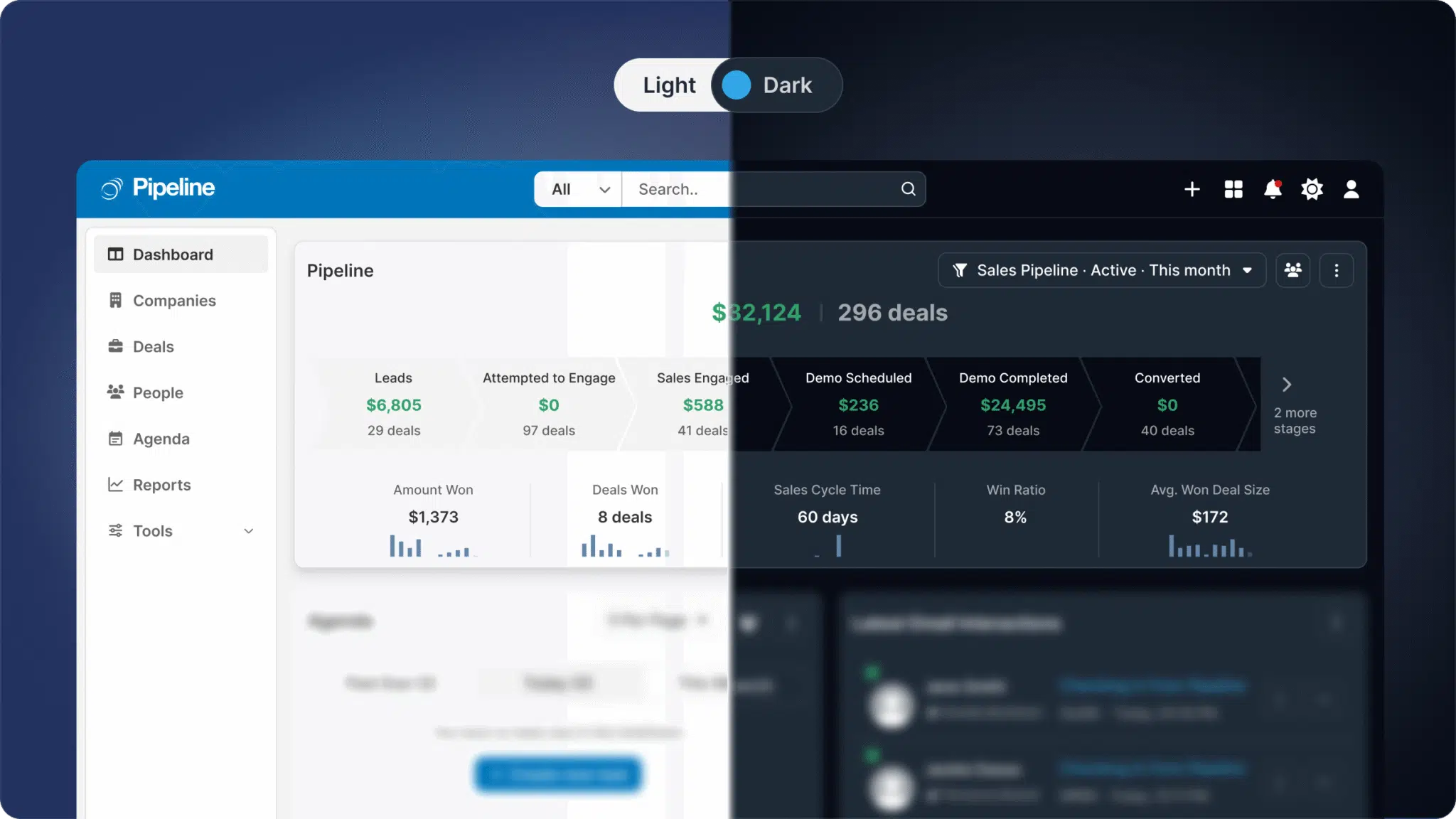
Acquired by saas.group in April 2022, the product has sharpened its focus on verticals where field sales relationships drive revenue: construction, manufacturing, professional services, real estate, and financial services.
Pipeline CRM customers are general contractors tracking bids, manufacturers managing multi-stakeholder sales cycles, and consulting firms bridging the gap between winning and delivering work. The common thread is long sales cycles, repeat relationships, and a need for CRM data that travels to the job site.
These are not competing tools serving the same buyer. They are specialized tools for different sales operations.
Close owns the phone. Pipeline CRM owns the field.
The clearest product difference is in how each platform handles communication and mobility.
Close puts calling, email, SMS, and WhatsApp inside the CRM without any third-party integration. The Power Dialer queues the next lead automatically when a call ends, pulling from Smart View lead lists and deduplicating so multiple reps don't call the same lead.
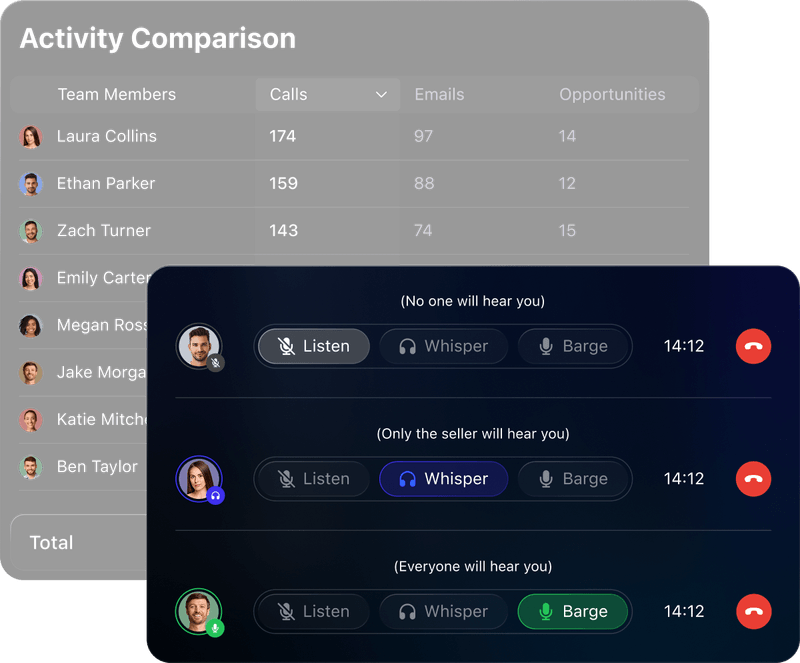
The Predictive Dialer dials multiple numbers at once and routes live answers to available reps, adjusting the dial rate in real time based on rep availability and call patterns. Managers can listen silently, whisper guidance only the rep hears, or barge into a call without leaving the CRM.
Source: Close
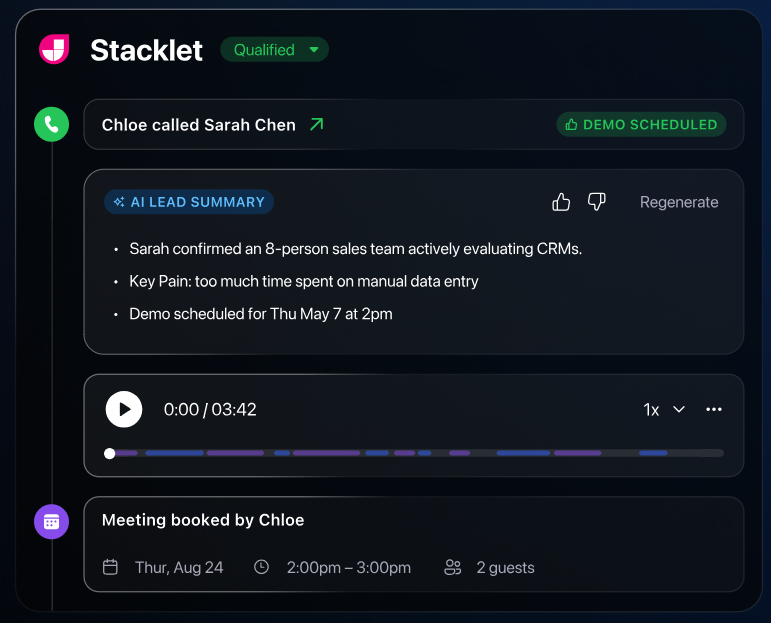
Then there is Chloe, Close's AI sales agent (currently in limited beta). Chloe calls inbound leads, qualifies them through real voice conversations, and books meetings on the calendar.
Source: Close
She discloses at the start of every call that she is a virtual AI assistant and that the call is being recorded, and this disclosure cannot be overridden.
For teams that need fast response on inbound, Chloe handles the first touch before a human rep knows the lead exists.
Close's mobile app exists, but it is an extension of the desktop experience, not a field tool. There is no route planning, no GPS-based nearby feature, no map view.
Pipeline CRM takes the opposite approach. Native calling is not built in. Teams doing phone-based selling need to integrate third-party tools like JustCall, Aircall, RingCentral, or Kixie. SMS campaigns are slated for Q2 2026 but are not yet available.
Where Pipeline CRM stands out is in the field. The mobile app syncs in real time with the browser version, includes voice-to-text activity logging for notes between meetings, and has a business card scanner for creating contacts on the spot.
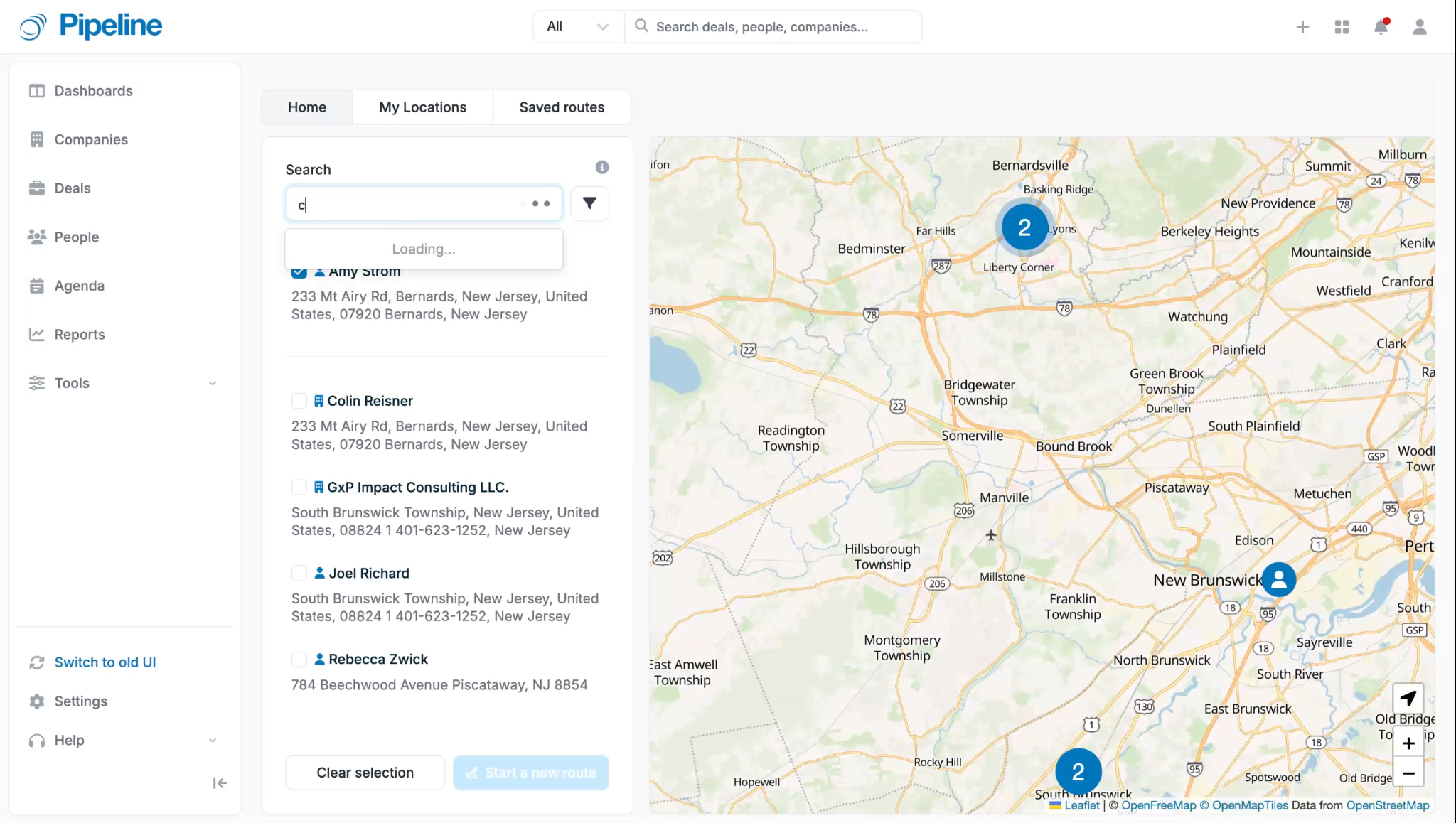
The Map Views feature renders contacts, companies, and deals on an interactive map with distinct icons for each record type.
Source: Pipeline CRM
Route planning supports up to 10 stops per route, powered by Google Maps. The Nearby feature uses device GPS to surface accounts near the rep's current location.
For a construction sales rep driving between job sites, Pipeline CRM puts account data, route planning, and activity logging at their fingertips. For an SDR working through 200 outbound calls from a desk, Close puts the dialer, email, and CRM in one window.
Deal management: Smart Views vs. Kanban boards
Both platforms manage deals, but they surface pipeline data differently.
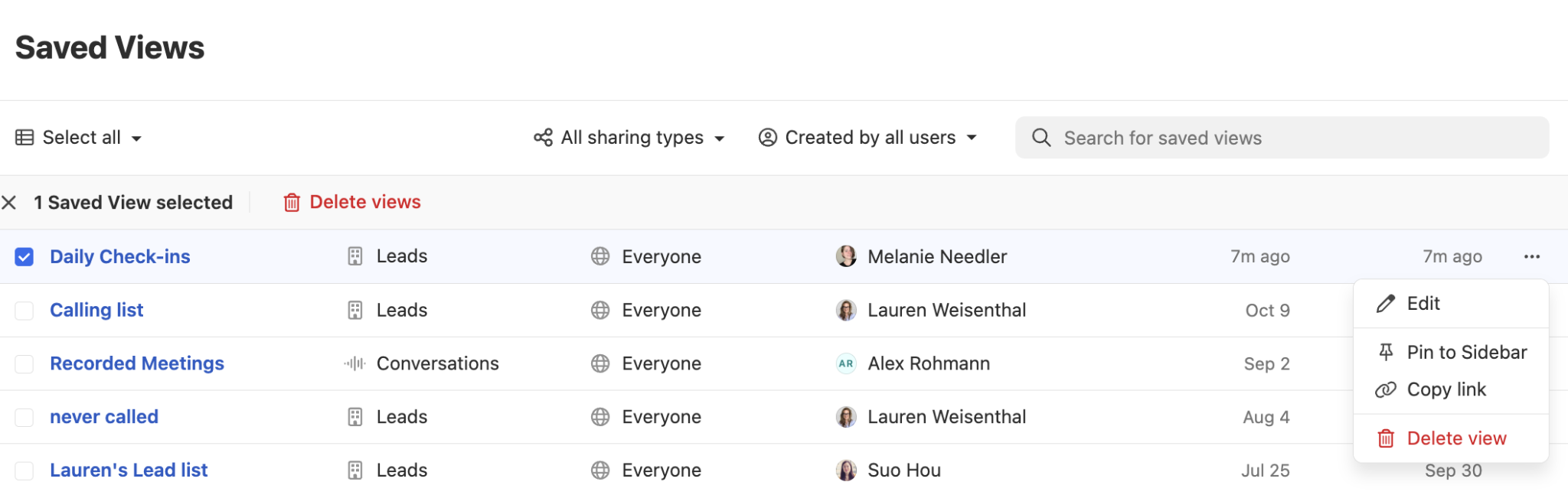
Close organizes everything around Leads. A Lead is the central record where calls, emails, SMS, tasks, notes, and opportunities all live on a single timeline. Reps manage their work through Smart Views: saved, dynamic filters that update in real time as leads meet or stop meeting defined criteria.
Source: Close
Instead of maintaining static task lists, reps build views like "new leads with no activity in the past 7 days" and work through them as a daily queue.
Pipeline Guidance (available on Growth plans and above) flags opportunities with passed close dates, stalled stages, or unanswered prospect messages. These flagged deals surface in the rep's inbox as daily reminders paired with suggested actions: launch the dialer, draft an email, or mark the deal lost with one click.
Source: Close
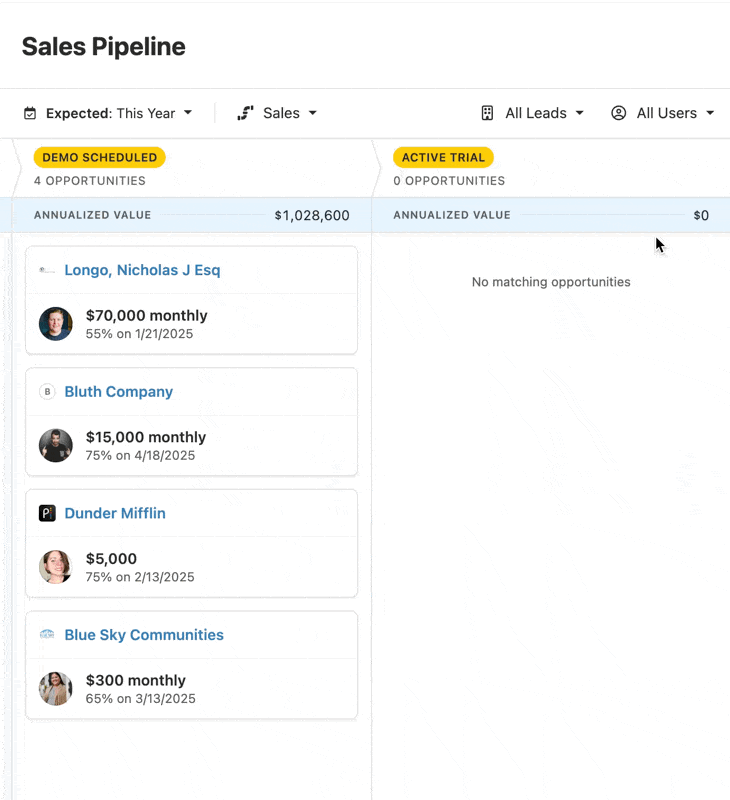
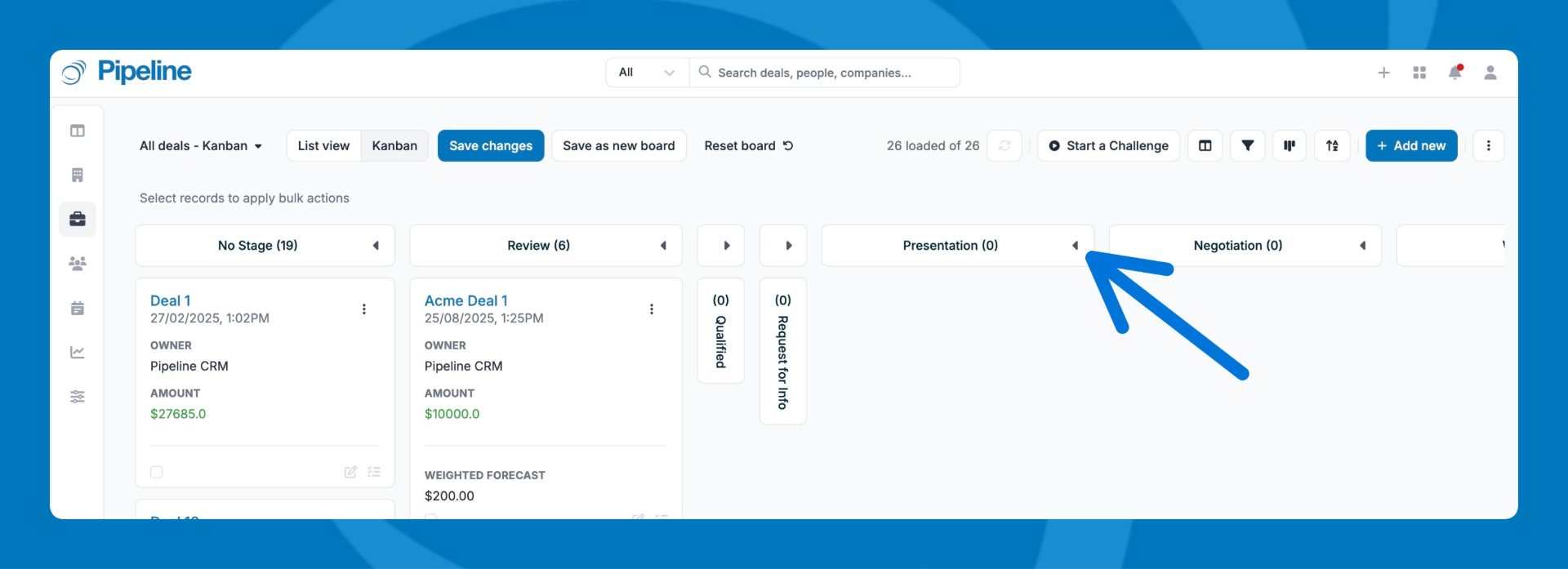
Pipeline CRM leads with a visual Kanban board where deals sit as cards in stage columns. Reps drag and drop deals between stages, and can edit details inline or open the full deal profile by clicking the title.
Source: Pipeline CRM
Each deal profile shows a stage progression bar with time-in-stage data visible on hover, displaying the number of days spent and activities created during each stage.
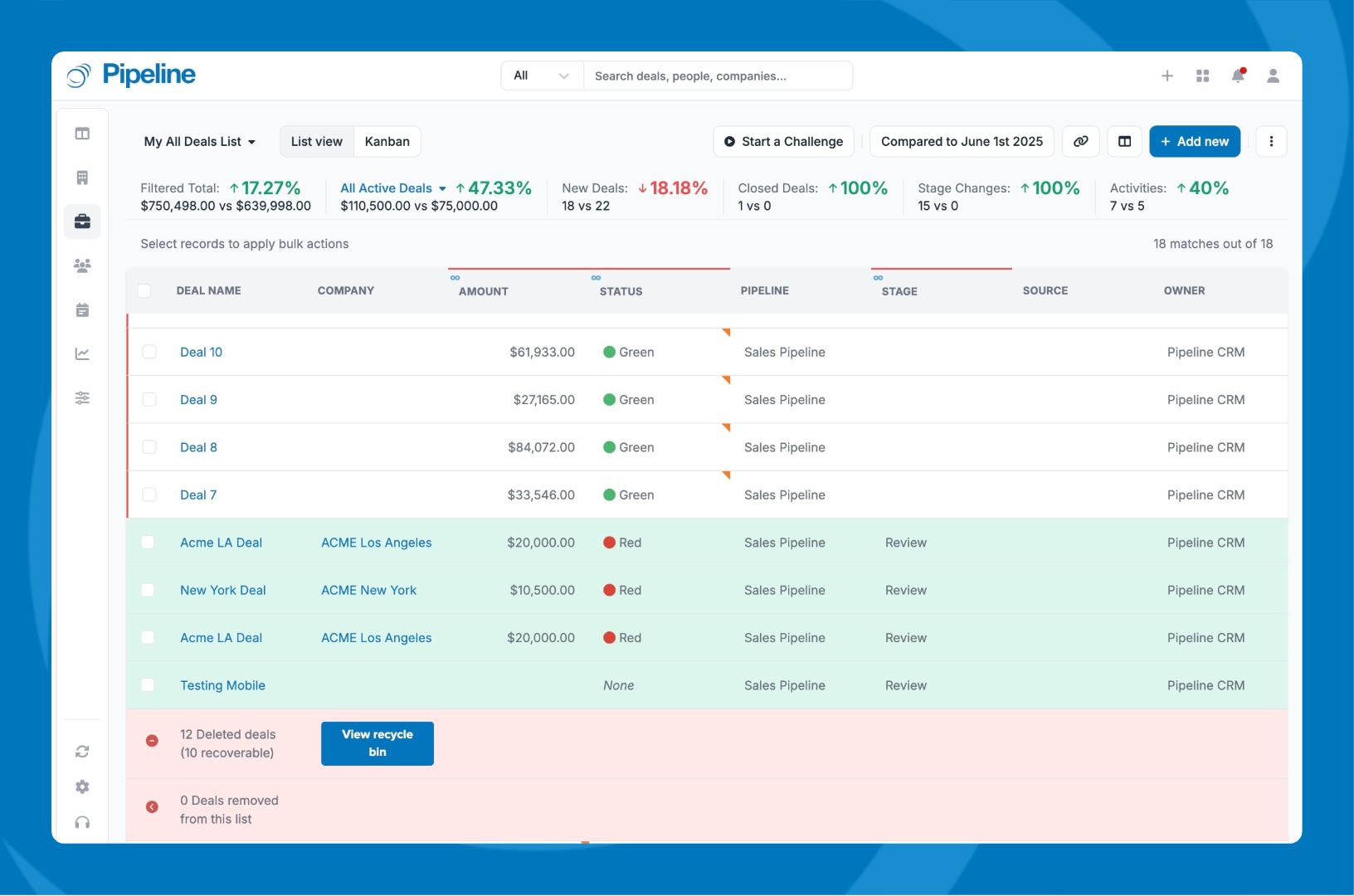
Pipeline CRM adds several deal intelligence features not found in Close. The Deal Intelligence Fields (available on Grow) surface velocity data like Hours to First Activity and Days in Stage directly in the list view, without requiring a separate analytics tool.
Hindsight lets managers select any date in the past six months and see which deal fields changed since that date, with color-coded indicators at the field level.
Source: Pipeline CRM
The Weighted Forecast is auto-calculated on every deal (Amount x Probability) and stays current without any rep input beyond keeping the stage updated.
Pipeline CRM also handles something Close does not: mandatory Win/Loss reason tracking. Admins can require reps to enter a loss reason before a deal can be saved as closed, making win/loss analysis systematic rather than voluntary.
Close's reporting has been flagged by users as a recurring limitation. The most consistent complaint across G2 reviews is that reporting is "extremely limited" for teams needing advanced analytics. Pipeline CRM's Performance Pulse (segmented revenue tracking with custom lanes and goals), customizable dashboards, and Hindsight provide more analytical depth for a lower per-seat price.
Your pipeline is only as good as the data feeding it
Here is the gap that neither CRM addresses on its own.
Close gives you the fastest path from lead record to live phone conversation. Pipeline CRM gives you the clearest view of deal progression and field sales activity. Both manage the sales process well once it starts.
Neither generates the contact data, company intelligence, or buying signals that tell you who belongs in that pipeline in the first place.
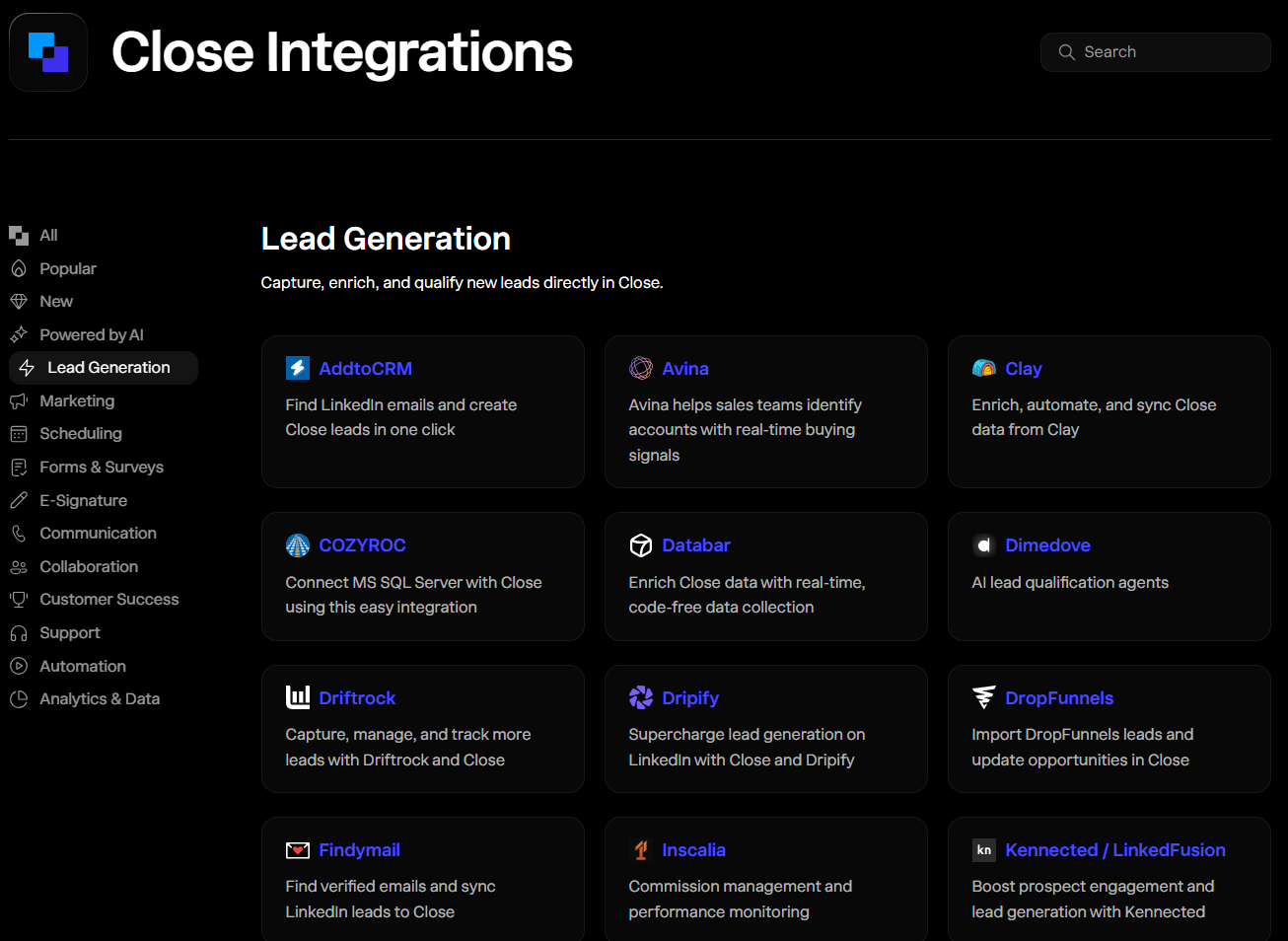
Close has 100+ integrations including lead enrichment tools like Clay.
Source: Close
Pipeline CRM lists ZoomInfo, Apollo, UpLead, Clearbit, and FullContact as data enrichment partners, and offers its own data enrichment add-on starting at $19/month for basic record completion.
Source: Pipeline CRM
But point-solution enrichment fills in missing fields on records you already have. It does not tell you which of the 100 million companies in your addressable market are evaluating solutions in your category right now, which decision-makers at those companies have verified direct-dial phone numbers, or how the org chart of your target account has changed in the last 90 days.
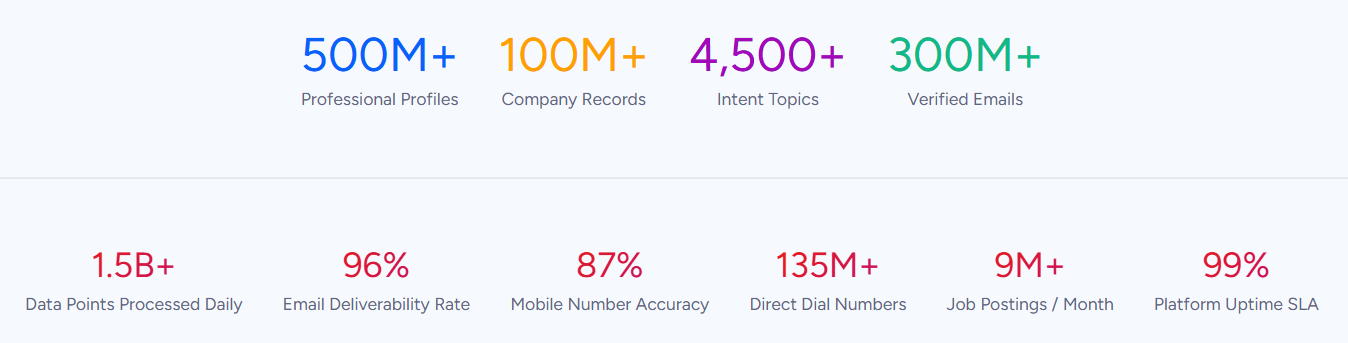
ZoomInfo solves this at a different scale. Its B2B data platform covers 500M contacts, 100M companies, 135M+ verified phone numbers, and 200M+ verified business email addresses, verified through a multi-source pipeline backed by 300+ human researchers and achieving up to 95% accuracy on first-party data.
Source: ZoomInfo
When an independent consultant analyzed 25 million contacts across vendors in a Fortune 500 competitive RFP, the conclusion was that "no other competitor came even close."
For a Close user, this means the phone numbers loaded into the Power Dialer actually ring and the email addresses in your sequences actually land.
For a Pipeline CRM user, it means the contact records your field reps reference before a meeting are accurate and complete, and the accounts in your pipeline are companies worth the drive.
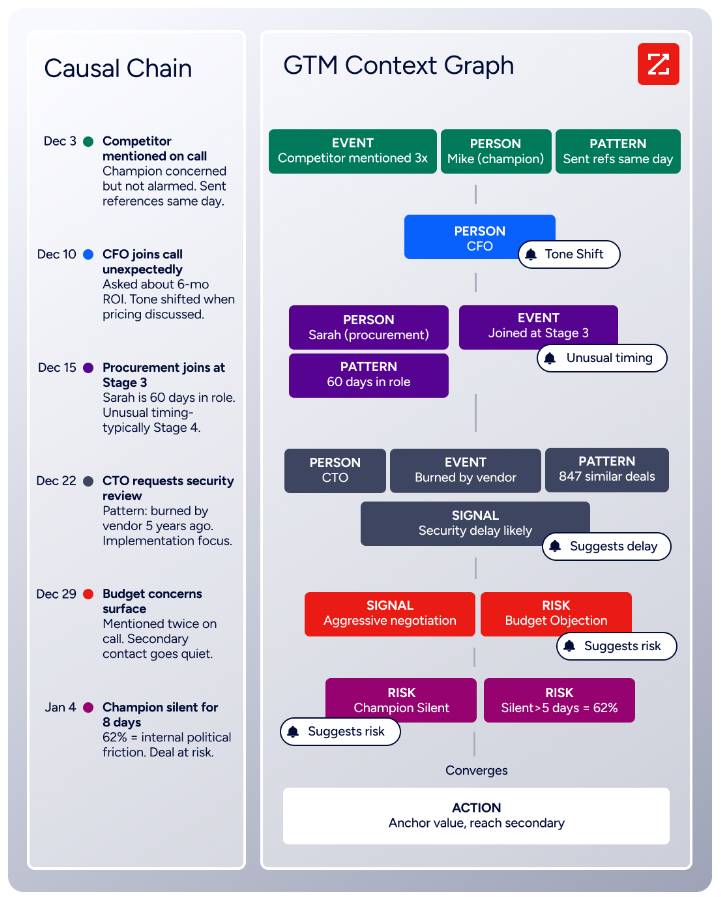
But data is just the foundation. ZoomInfo's GTM Context Graph processes 1.5B+ data points daily, combining its B2B data with your CRM records, conversation transcripts, and behavioral signals into a single intelligence layer.
Source: ZoomInfo
Instead of just knowing that a company exists, you know they are researching solutions in your category, that their VP of Operations was recently promoted, and that their tech stack changed in ways that create an opening for your product.
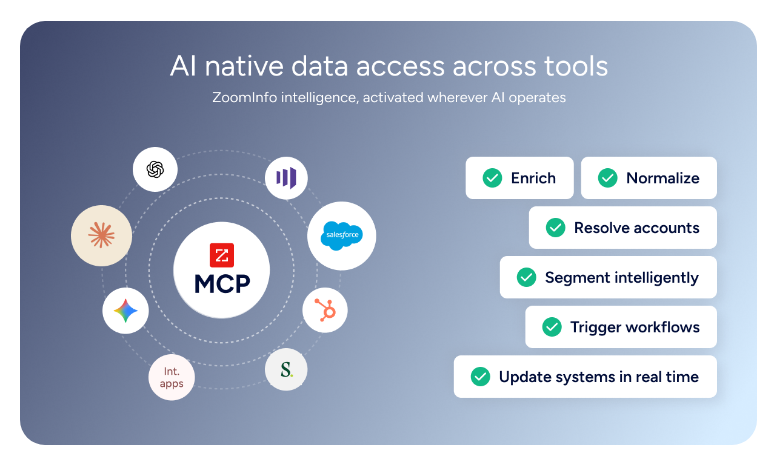
That intelligence reaches your team through GTM Workspace for sellers, GTM Studio for marketers and RevOps, or APIs and MCP that deliver ZoomInfo's data into any tool, including your CRM.
Source: ZoomInfo
Seismic's sales team attributed 39% of active pipeline to opportunities identified or influenced by ZoomInfo signals, boosted productivity by 54%, and saved 11.5 hours per week per seller. (Seismic Case Study)
Automation takes different forms
All three platforms automate sales work, but each automates a different part of the process.
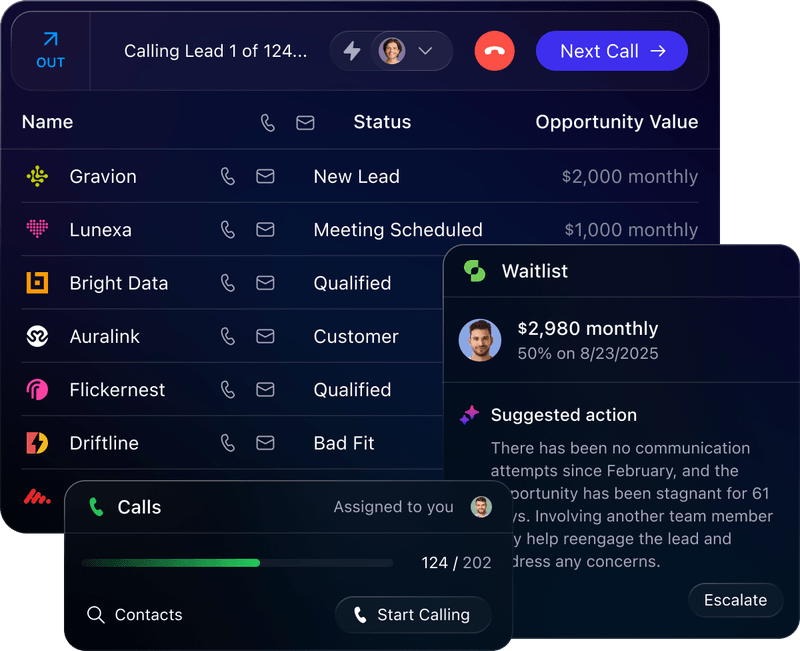
Close's Workflows (available on Growth and Scale plans) are multi-channel sequences that mix email, SMS, call tasks, and CRM updates in a single automated flow. A new inbound lead can trigger an email, followed by a call task two days later, followed by an SMS if neither produces a response.
Source: Close
Communication windows stagger sends to the recipient's local timezone to mimic human behavior, and Workflow Goals stop a sequence automatically when the desired outcome occurs (reply received, meeting booked, or call connected).
Close's automation strength is in the outbound cadence: getting the right message to the right lead at the right time across multiple channels, then stopping the moment the lead engages.
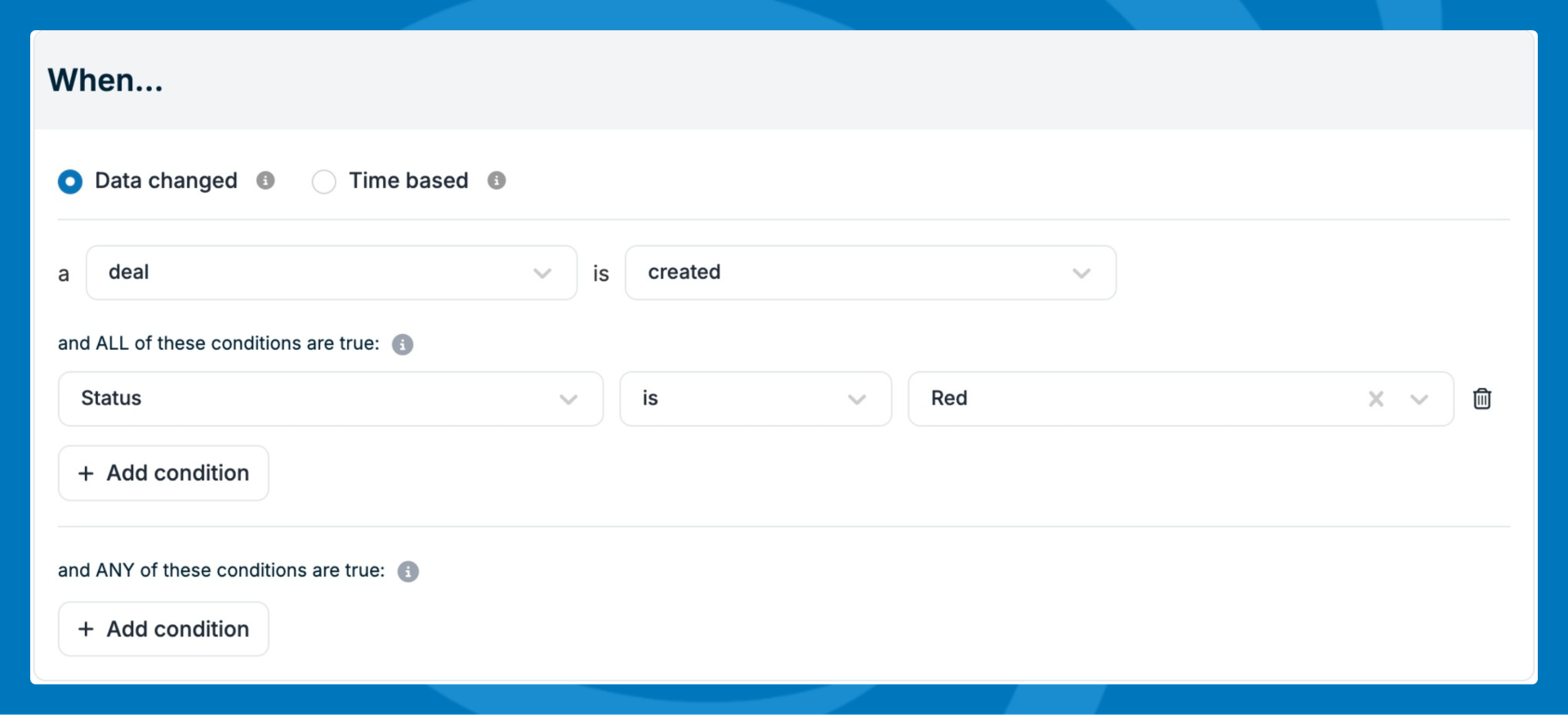
Pipeline CRM's automations use a trigger-condition-action model with two trigger types. Data-based automations fire when a record is created, updated, or deleted.
Source: Pipeline CRM
Time-based automations fire relative to a date field, such as a set number of days after a deal's expected close date or after a period of no logged activity.
Actions include creating tasks, sending notifications, applying Todo Templates (a pre-built sequence of tasks applied at once), and updating fields or record ownership.
Pipeline CRM's automation strength is in deal management hygiene: ensuring follow-ups happen, stalled deals get flagged, and process steps are not skipped. The ceiling is 20 automations on the Grow plan, which may limit teams with complex multi-branch needs.
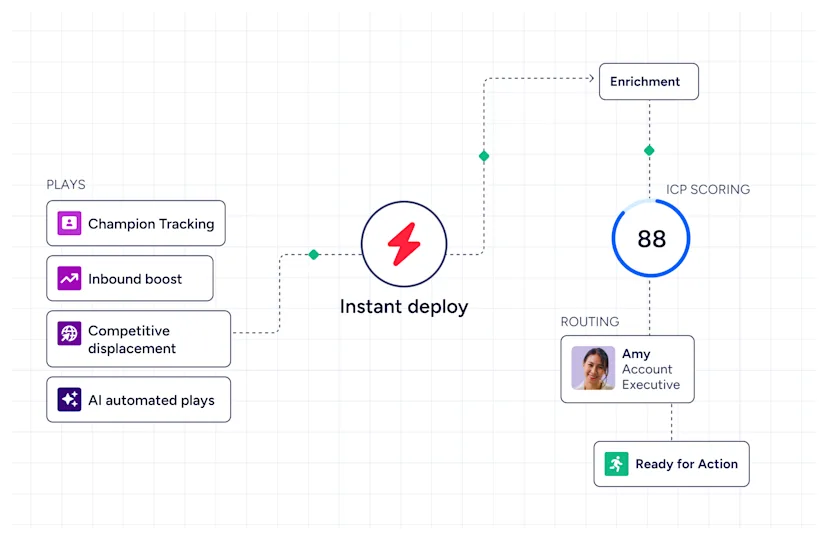
ZoomInfo automates a layer that neither CRM reaches: signal-driven prospecting. Through GTM Studio, marketers and RevOps teams build plays that fire when buying signals appear.
Source: ZoomInfo
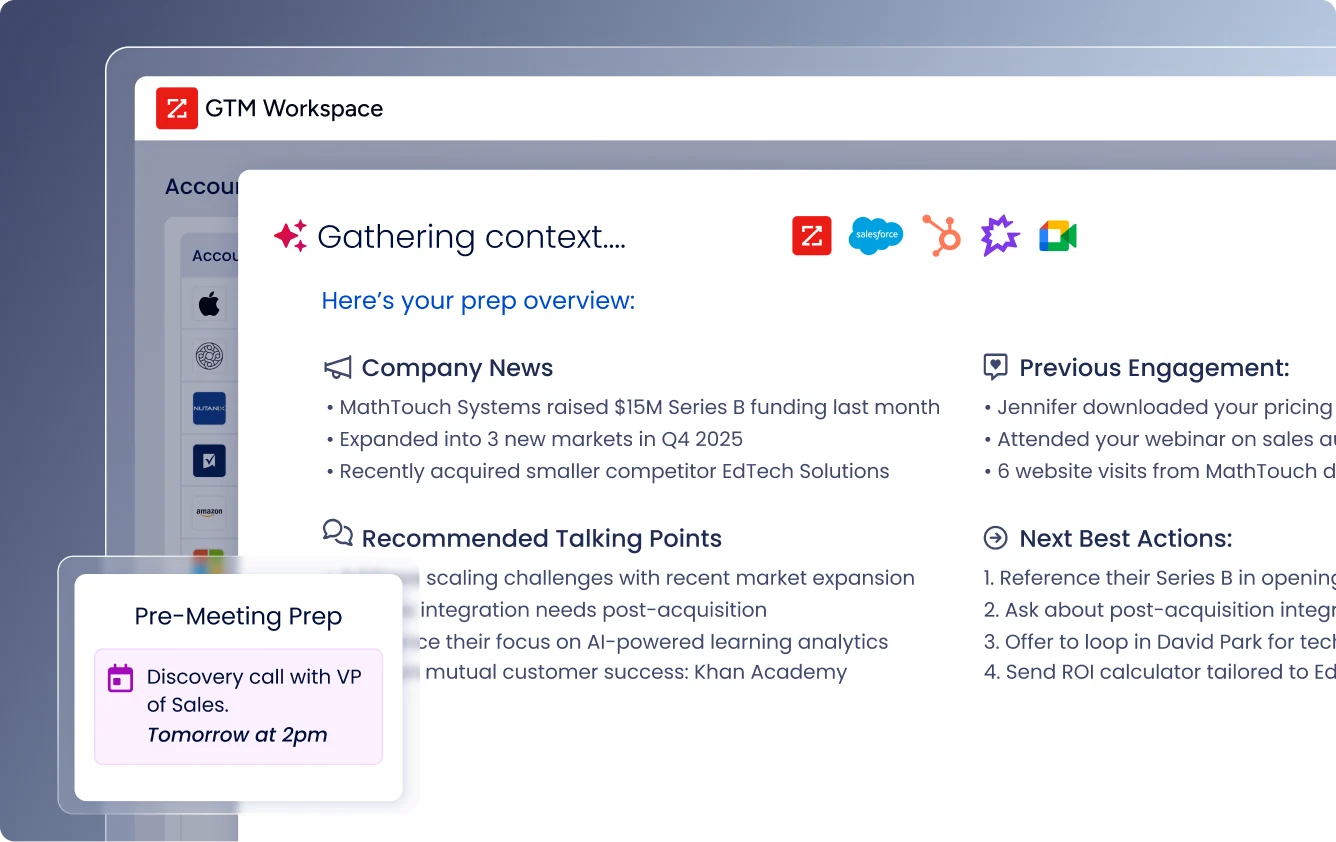
When a target account starts researching your product category, visits your pricing page, or hires a new VP in your target department, ZoomInfo can trigger outreach, route the account to a rep, and surface it in GTM Workspace with a pre-drafted message addressing what the signal reveals about the account's needs.
Source: ZoomInfo
Expansion plays that used to take three weeks now launch in 30 minutes through GTM Studio, without engineering support.
"ZoomInfo's not just a contact data company anymore. They've built a full system of execution (GTM Intelligence works the list, writes the outreach, triggers the play, and helps drive predictable growth)." — Ian Brodie, CEO & Co-Founder, Levanta (Levanta Case Study)
Post-sale is where Pipeline CRM pulls ahead
Close is designed to win deals and hand off. As one Capterra reviewer noted, "Features are clearly targeting the SaaS sales segment. There isn't much functionality for maintaining or retaining clients after the sales aspect."
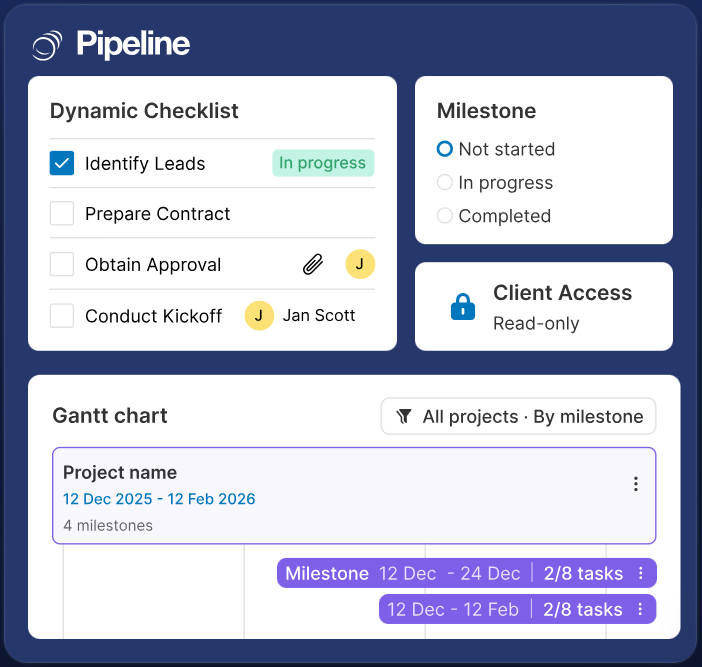
Pipeline CRM takes a different approach. The Project Management module keeps post-sale delivery inside the same system as the deal that created the work.
Source: Pipeline CRM
Projects follow a three-level hierarchy (Project, Milestones, Tasks), with 10 industry-specific templates covering construction, manufacturing, SaaS, finance, consulting, healthcare, real estate, and wholesale.
External stakeholders (clients, subcontractors, vendors) get read-only access at no additional seat cost, which matters when your projects involve partners who need visibility without a full CRM license.
The Instant Docs feature generates proposals, contracts, and other documents directly from CRM records using field-mapped Word templates.
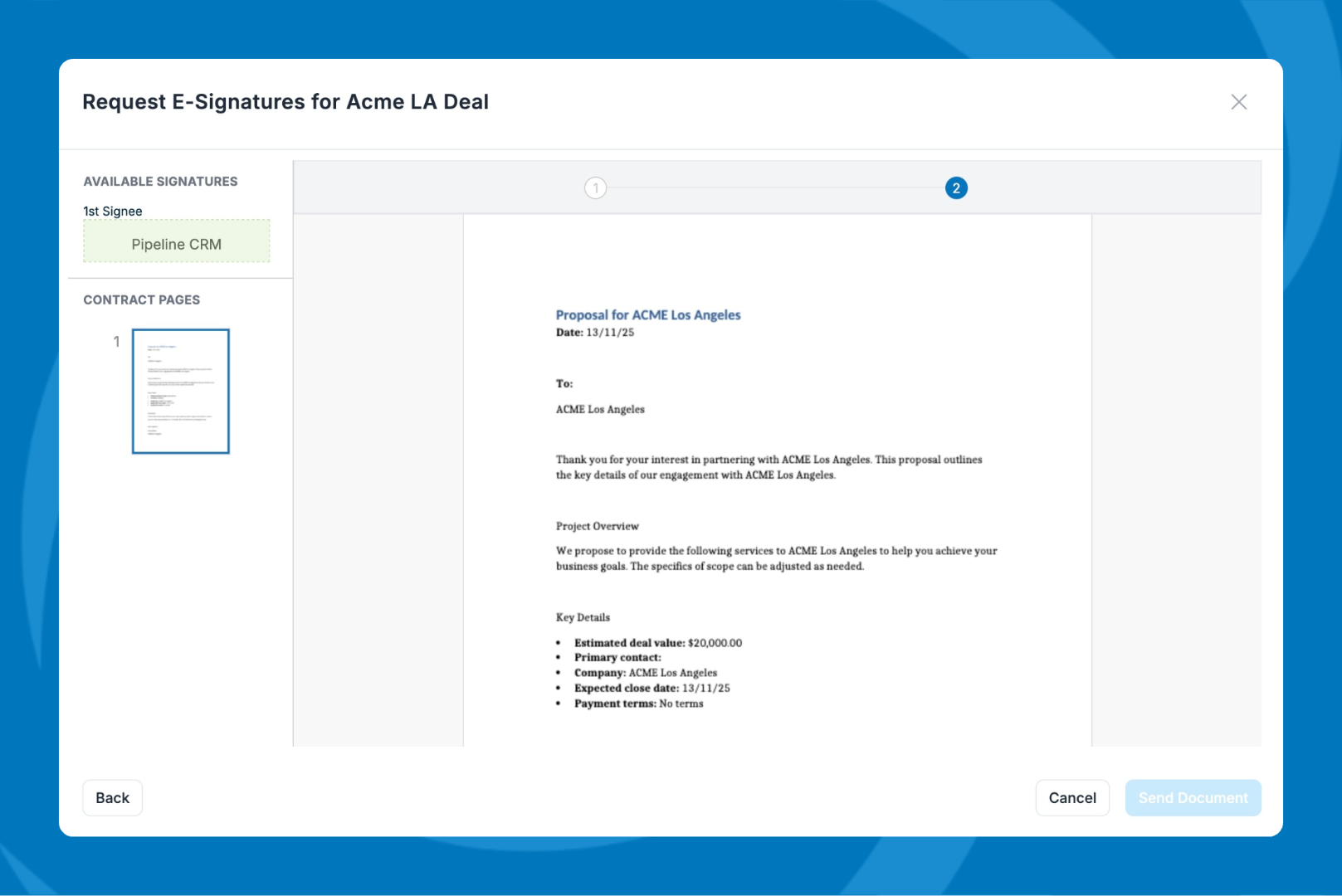
The built-in eSign capability (available on Grow) lets reps send documents for legally binding signature without leaving Pipeline CRM, with sequential signing that notifies the next signer when the previous one completes.
Source: Pipeline CRM
For construction companies, manufacturers, and professional services firms, this means the CRM handles the full deal lifecycle: from first contact, through the bid process, to a signed contract, and into project delivery. A deal in Pipeline CRM does not end when it closes. It transitions into the work it represents.
Close acknowledges this gap: "Not the best-suited for organizations needing built-in proposal generators, product/inventory management, or marketing features." That honesty makes the choice clearer. If post-sale delivery is part of your CRM requirement, Pipeline CRM is the only option here.
Pricing reflects two different markets
Close uses per-seat pricing across four tiers:
Solo: $9/month (annual), limited to 1 seat and 10,000 leads
Essentials: $35/seat/month (annual), unlimited leads and contacts, built-in calling and email, no automated workflows
Growth: $99/seat/month (annual), adds Workflows, Power Dialer, Chloe AI agent (free during beta), AI Email Assistant, and Pipeline Guidance
Scale: $139/seat/month (annual), adds role-based access, Predictive Dialer, and unlimited call recording
Telephony is billed separately at Twilio's pay-as-you-go rates, varying by country and number type. The AI Call Assistant costs an additional $50/month plus $0.02/minute of transcribed calls.
The jump from Essentials ($35) to Growth ($99) is steep but significant: Workflows, Power Dialer, and Chloe are all locked behind that threshold. Teams that need automation pay $99/seat/month minimum.
Close offers a 14-day free trial with no credit card required. No permanent free plan.
Pipeline CRM uses per-user pricing across three self-serve tiers:
Start: $25/user/month (annual), 1 pipeline, 250 active deals, 1 automation
Develop: $33/user/month (annual), 2 pipelines, 2,500 active deals, 10 automations
Grow: $49/user/month (annual), 5 pipelines, unlimited deals, 20 automations, email drip campaigns, Hindsight, customizable dashboards
Premium add-ons are available: Data Enrichment from $19/month (250 credits) and Email Validation at $25/month (5,000 checks). Free data migration is included for new customers, with optional paid onboarding packages ($750+ standard, $1,500+ premium).
Pipeline CRM offers a 14-day free trial at the Grow-plan feature level with no credit card required. No permanent free plan.
ZoomInfo uses consumption-based pricing with no published dollar amounts. Pricing depends on usage patterns, number of users, credit volume, and features selected.
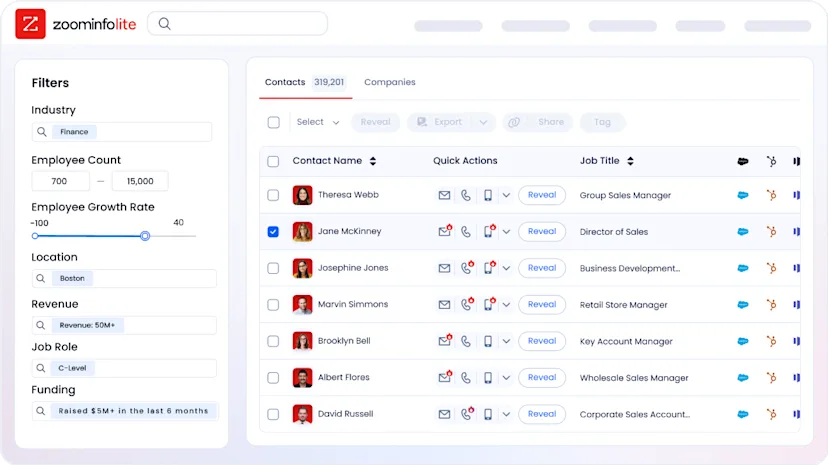
ZoomInfo Lite is a permanent free tier (not a trial) that includes access to ZoomInfo's B2B database, 10 monthly export credits, the Chrome extension, and WebSights Lite for up to 10 website visitor reveals per day. A 7-day free trial of the full platform is also available.
Source: ZoomInfo
The comparison is not apples-to-apples because ZoomInfo is not a CRM. It is the intelligence layer that feeds your CRM. The more useful calculation is what ZoomInfo saves in wasted prospecting time and missed opportunities.
"ZoomInfo gives us the information we need to execute. It's already there, so we can be three steps ahead." — William Kenimer, VP of Revenue Operations, Vensure (Vensure Case Study)
Close vs. Pipeline CRM vs. ZoomInfo: Which should you choose?
These platforms solve different problems. The right choice depends on how your team sells and where the biggest gap sits in your current stack.
Choose Close if:
Your team sells by phone and email from a desk, not in the field
You need a built-in Power Dialer and Predictive Dialer without third-party integrations
Fast response on inbound is critical to your conversion rate
You want calling, email, SMS, and WhatsApp in one platform
You are a B2B SaaS, financial services, or coaching business with under 100 reps
Choose Pipeline CRM if:
Your sales team operates in the field with face-to-face meetings and job site visits
You need map-based route planning and a mobile-first CRM
Your deals require post-sale project management and document generation with eSign
You work in construction, manufacturing, professional services, or logistics
You want the CRM with the highest user adoption ratings for 5-50 person teams
Add ZoomInfo to either CRM if:
Your reps spend time researching contacts before they can sell
You need verified direct-dial phone numbers and business emails, not stale records
You want to know which target accounts are in-market before you reach out
You are tired of building pipeline on cold lists and incomplete data
You want AI that prioritizes accounts based on buying signals, not CRM field updates
Start with ZoomInfo Lite for free, or request a demo of the full platform.
The choice between Close and Pipeline CRM is a choice between two sales motions. Both are good at what they do. But neither can tell you which companies to target, whether the phone number in your CRM is verified, or if the account you're about to call just started evaluating your competitor. That intelligence is a different problem, and it is the problem ZoomInfo was built to solve.
A CRM manages your pipeline. ZoomInfo fills it with the right opportunities.
Close CRM vs. Pipeline CRM vs. ZoomInfo FAQ
What is the fundamental difference between Close and Pipeline CRM?
Close is an inside sales CRM with built-in calling, email, SMS, and an AI sales agent, designed for phone-first outbound teams under 100 reps.
Pipeline CRM is a field sales CRM with map-based route planning, project management, and document generation, designed for 5-50 person teams in construction, manufacturing, and professional services. They serve different sales motions and are not direct competitors.
Which CRM has better built-in calling?
Close wins on calling. It includes a Power Dialer, Predictive Dialer, Listen/Whisper/Barge coaching, and Chloe (an AI agent that makes and qualifies calls on its own), all native to the CRM with no third-party integration required.
Pipeline CRM does not include native calling and requires integrations with tools like JustCall, Aircall, or RingCentral for phone-based selling.
Which CRM is better for field sales teams?
Pipeline CRM is built for field sales. It includes map views that render contacts and deals on an interactive map, route planning for up to 10 stops powered by Google Maps, a GPS-based Nearby feature that surfaces accounts near your current location, a mobile app with voice-to-text activity logging, and a business card scanner.
Close's mobile app provides basic CRM access but lacks field-specific tools.
How do the pricing structures compare?
Close ranges from $9/seat/month (Solo) to $139/seat/month (Scale) on annual billing, with telephony charged separately at per-minute rates.
Pipeline CRM ranges from $25/user/month (Start) to $49/user/month (Grow) on annual billing, with optional add-ons for data enrichment and email validation.
Pipeline CRM is generally less expensive at equivalent team sizes, though Close's Growth plan ($99/seat/month) includes communication tools that Pipeline CRM requires third-party subscriptions to replicate.
Does either CRM include B2B contact data for prospecting?
Neither CRM includes a native B2B contact database. Close integrates with lead enrichment tools like Clay.
Pipeline CRM integrates with ZoomInfo, Apollo, UpLead, and others, and offers its own enrichment add-on starting at $19/month.
For verified B2B data at scale, ZoomInfo covers 500M contacts, 135M+ verified phone numbers, and up to 95% accuracy on first-party data, and works alongside either CRM.
Can ZoomInfo integrate with both Close and Pipeline CRM?
Pipeline CRM lists ZoomInfo as a native data enrichment integration. Close connects to external tools through its REST API, webhooks, and Zapier, and both Close and ZoomInfo offer MCP servers for AI-powered workflows.
ZoomInfo's API and MCP access are included in all relevant plans, so teams using either CRM can feed ZoomInfo's verified data and buying signals into their sales workflow.
Which CRM handles post-sale project delivery?
Pipeline CRM includes a project management module with milestones, tasks, Gantt timeline views, and 10 industry-specific templates, plus Instant Docs and built-in eSign for contract generation and signature. External stakeholders get read-only access at no extra seat cost.
Close focuses entirely on the sales process and does not include project management, proposal generation, or document signing features.
Which platform is easiest to get started with?
Pipeline CRM promotes a go-live time of 48 hours with zero engineering required and offers free data migration with a typical 3-business-day turnaround.
Close claims the fastest onboarding and adoption ratings in CRM based on G2 data, with Underground Ecom reporting full adoption in two weeks. Both offer 14-day free trials with no credit card required.
ZoomInfo Lite provides permanent free access to its B2B database with no credit card or time limit.
More CRM comparisons:
