
Dialpad is an AI-powered communications platform serving over 30,000 customers worldwide. It combines voice, video, messaging, and contact center operations in one cloud platform. Its DialpadGPT model, trained on over seven billion minutes of business conversations, delivers real-time transcription, AI coaching, sentiment analysis, and post-call recaps.
But a communications platform only captures the conversations that happen through it.
Dialpad records every call, transcribes every meeting, and detects every sentiment shift. What it cannot do on its own is verify whether the prospect you are calling still works at that company, sync call outcomes to your CRM without manual entry, route support conversations into your ticketing system as documented tickets, or connect call events to the hundreds of tools your team uses daily.
The right integrations close those gaps. They feed verified data into Dialpad before the call starts, push call intelligence into the systems where your team acts on it, and automate the work that otherwise depends on someone copying, pasting, and remembering to log everything.
This guide covers the strongest integration for each of the jobs Dialpad users most commonly need done:
Enrich Dialpad conversations with verified B2B contact data, buyer intent signals, and company intelligence
Log every call, transcript, and AI recap automatically to your Salesforce CRM records
Sync call activity, AI summaries, and predicted CSAT scores to HubSpot contact timelines
Embed AI-powered calling inside your Zendesk ticketing system with automatic ticket creation
Synchronize contacts, provisioning, and calling across your Google-first productivity stack
Connect call events to 8,000+ apps through no-code workflow automation
Route Dialpad's AI-powered telephony into Microsoft Teams for enterprise-wide PSTN access
Each section walks through how the integration connects with Dialpad, what data flows between the platforms, pricing, and who benefits most.
Best Dialpad Integrations at a Glance |
|---|
Best Dialpad Integration for B2B Data Enrichment and Go-to-Market Intelligence Connects ZoomInfo's verified contact data, buyer intent signals, and company intelligence to Dialpad, giving sales and support teams prospect context before every call and signals to prioritize accounts that are in-market. |
Best Dialpad Integration for Automatic CRM Activity Logging and Call Intelligence Sync Embeds a CTI dialer inside Salesforce, logs every call, voicemail, and SMS as a CRM activity, and syncs Dialpad's AI transcripts and post-call recaps to Lead, Contact, and Opportunity records. |
Best Dialpad Integration for CRM-Native Call Logging and AI Conversation Sync Logs all Dialpad call activity to HubSpot contact timelines with AI-generated summaries, full transcripts, predicted CSAT scores, and missed-call ticket creation, keeping revenue teams working from one system of record. |
Best Dialpad Integration for Embedding AI-Powered Calling Inside Your Support Ticketing System Surfaces a CTI dialer inside Zendesk via Talk Partner Edition, creates support tickets for every inbound call with live transcripts, and extends Dialpad's Agentic AI to manage Zendesk records autonomously. |
Best Dialpad Integration for Complete Google-First Productivity Sync Synchronizes contacts bidirectionally, automates user provisioning through Google Directory, embeds Dialpad calling inside Gmail, and surfaces Calendar context inside Dialpad interactions for teams standardized on Google. |
Best Dialpad Integration for Connecting Call Events to 8,000+ Apps Without Code Turns Dialpad call lifecycle events into automated triggers that fire actions across more than 8,000 connected applications, extending Dialpad's reach to tools outside the native marketplace without custom development. |
Best Dialpad Integration for Enterprise Teams Already Standardized on Microsoft 365 Routes external PSTN calls through Dialpad's telephony infrastructure inside the Teams interface via Direct Routing, delivering Dialpad's Voice Intelligence on every call without requiring a separate dialer or Microsoft Teams Phone license. |
What Is Dialpad?
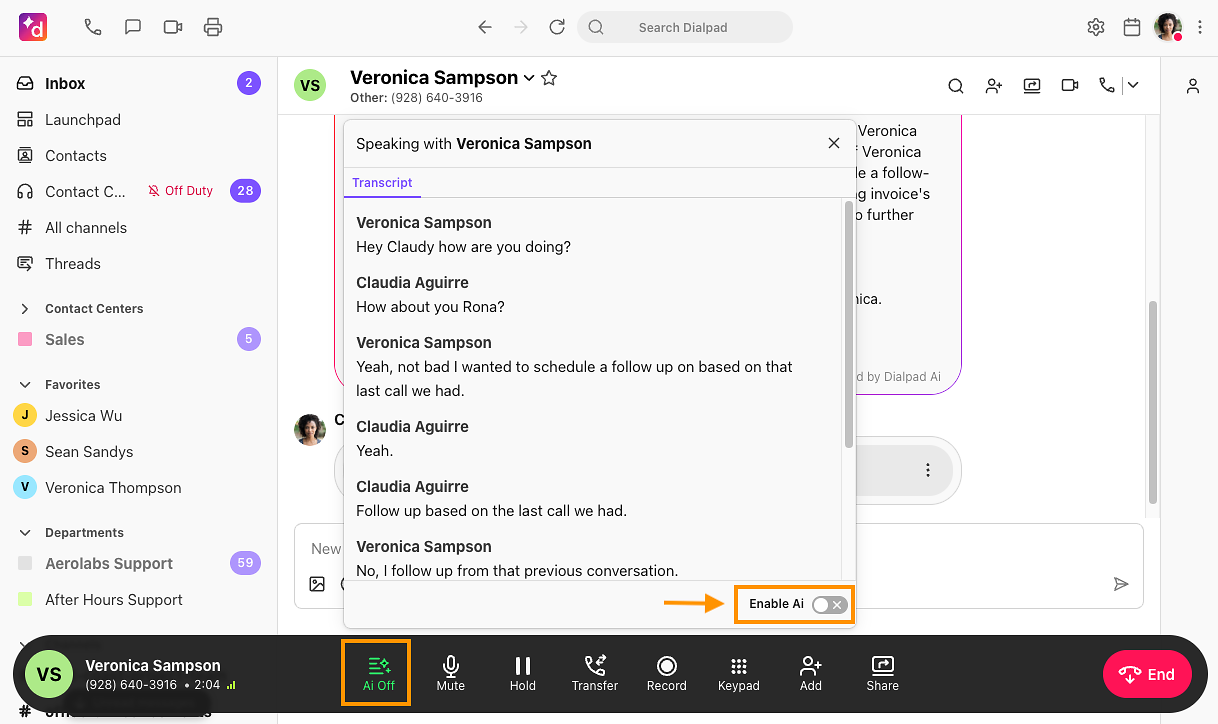
Dialpad is an AI-powered business communications platform that combines voice calling, video conferencing, messaging, and contact center operations in one cloud application.
Source: Dialpad
The company positions itself as "First in AI. Best in Agentic" and was one of the first platforms to provide real-time AI coaching to service agents, starting in 2018.
Its DialpadGPT large language model, built on over five billion minutes of conversational data, powers real-time transcription, sentiment analysis, AI coaching, and post-call recaps across every product: Dialpad Connect (business communications), Dialpad Support (contact center), Dialpad Sell (sales), and AI Agent (autonomous conversational AI).
Dialpad's integration ecosystem extends the platform across the tools teams already use.
The Dialpad App Marketplace offers native integrations spanning CRM, help desk, productivity, collaboration, identity management, and workflow automation.
On the technical side, Dialpad provides a REST API covering voice, SMS, user management, analytics, and contact center operations, with webhooks for real-time event subscriptions, OAuth-based authentication, and a sandbox environment for testing. The platform also supports SSO and SCIM provisioning through Okta, Google Workspace, and Microsoft Entra.
The integration categories available to Dialpad users include:
CRM and sales: Salesforce, HubSpot, Zoho CRM, Copper, with automatic call logging and AI transcript sync
Customer support and help desk: Zendesk, ServiceNow, Intercom, with embedded CTI dialers and ticket creation
Productivity and collaboration: Google Workspace, Microsoft 365, Microsoft Teams, with contact sync and SSO
Workflow automation: Zapier, with call event triggers connected to 8,000+ apps
B2B data and intelligence: ZoomInfo, with contact enrichment and buyer intent signals
Sales engagement: Outreach, with dialer embedding and activity sync
Identity management: Okta, OneLogin, with SSO and automated provisioning
Here are the seven integrations we selected as the best options for extending Dialpad across the categories that matter most to communications-driven teams.
1. ZoomInfo: Best Dialpad Integration for B2B Data Enrichment and Go-to-Market Intelligence
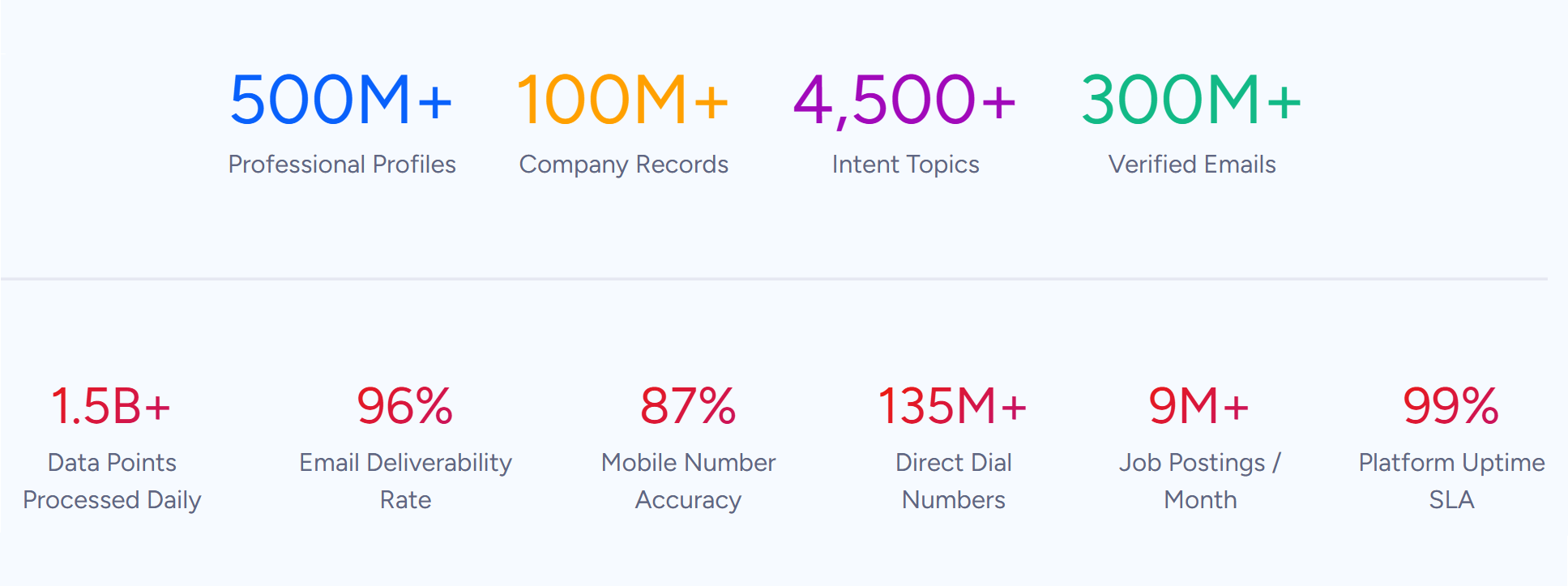
ZoomInfo is a B2B data and intelligence platform built on 500M contacts, 100M companies, 135M+ verified phone numbers, and 200M+ verified business email addresses. It integrates with Dialpad as a native marketplace app, connecting ZoomInfo's B2B intelligence, contact data, and buyer intent signals to Dialpad through an active Technology partnership.
Source: ZoomInfo
Connecting the two platforms unlocks:
Verified direct dials and business emails flowing into Dialpad so reps dial numbers that connect and reach prospects at current positions
Buyer intent signals identifying which accounts are researching your category this week, so outbound calling prioritizes in-market accounts
Company intelligence (technographic profiles, org charts, company attributes) enriching caller context before the conversation starts
A combined view where Dialpad captures what was said and ZoomInfo provides who to call and why they matter now
How ZoomInfo Integrates with Dialpad
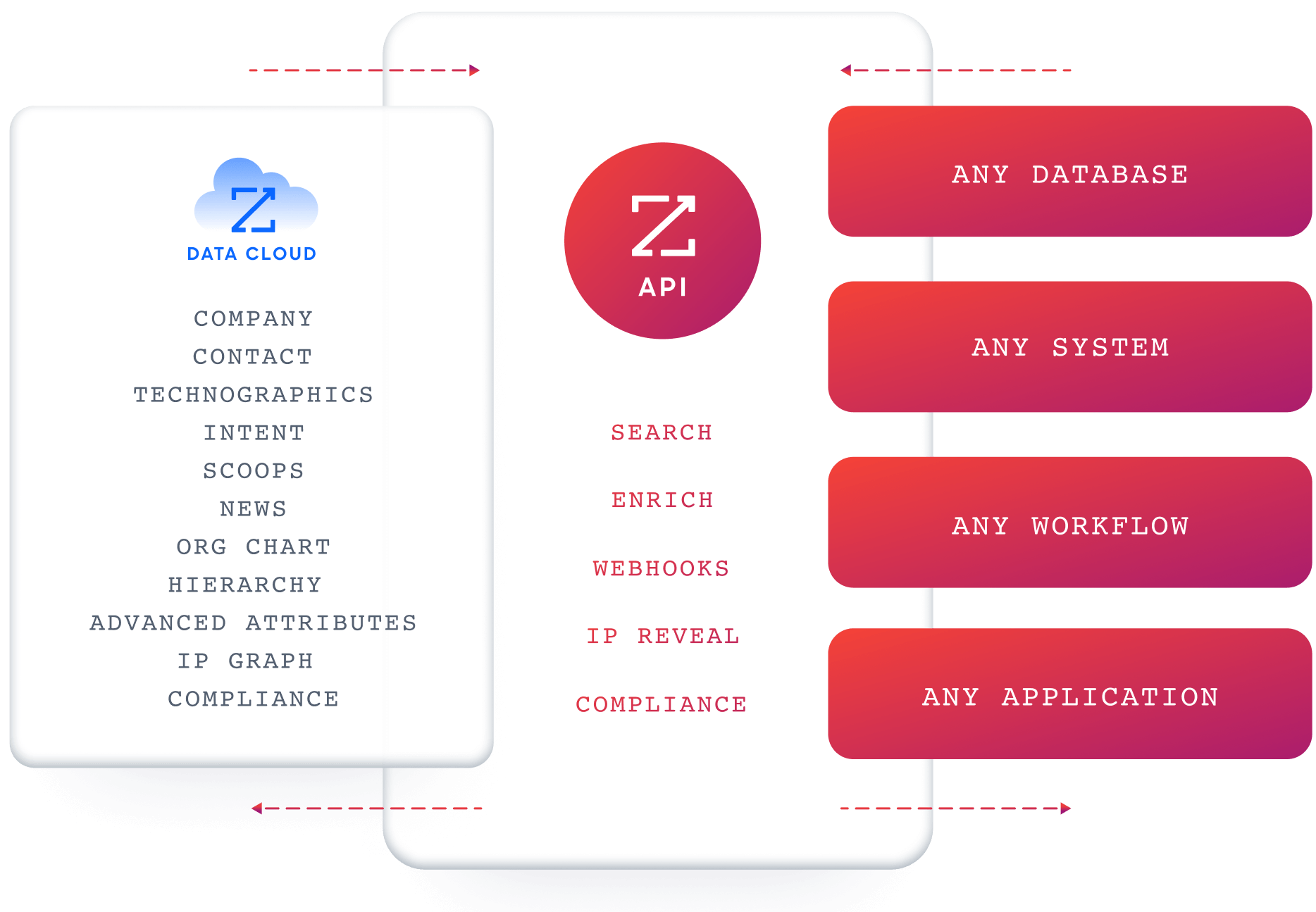
ZoomInfo connects to Dialpad as a native app in the ZoomInfo Marketplace, supported by API and MCP integrations. The partnership is a formal Technology integration, so it stays current with platform updates on both sides without requiring middleware or custom API work.
Because ZoomInfo's data is accessible through APIs, MCP, and native integrations, the intelligence powering a rep's Dialpad calling session can also flow into the CRM, the sales engagement platform, and any AI agent in the workflow.
Source: ZoomInfo
Contact and Company Data Enrichment: Know Who You Are Calling Before You Dial
Dialpad captures what happens during a conversation. It cannot verify whether the number you are about to call still rings at that person's desk, confirm their current title, or show the company's technology stack and org structure.
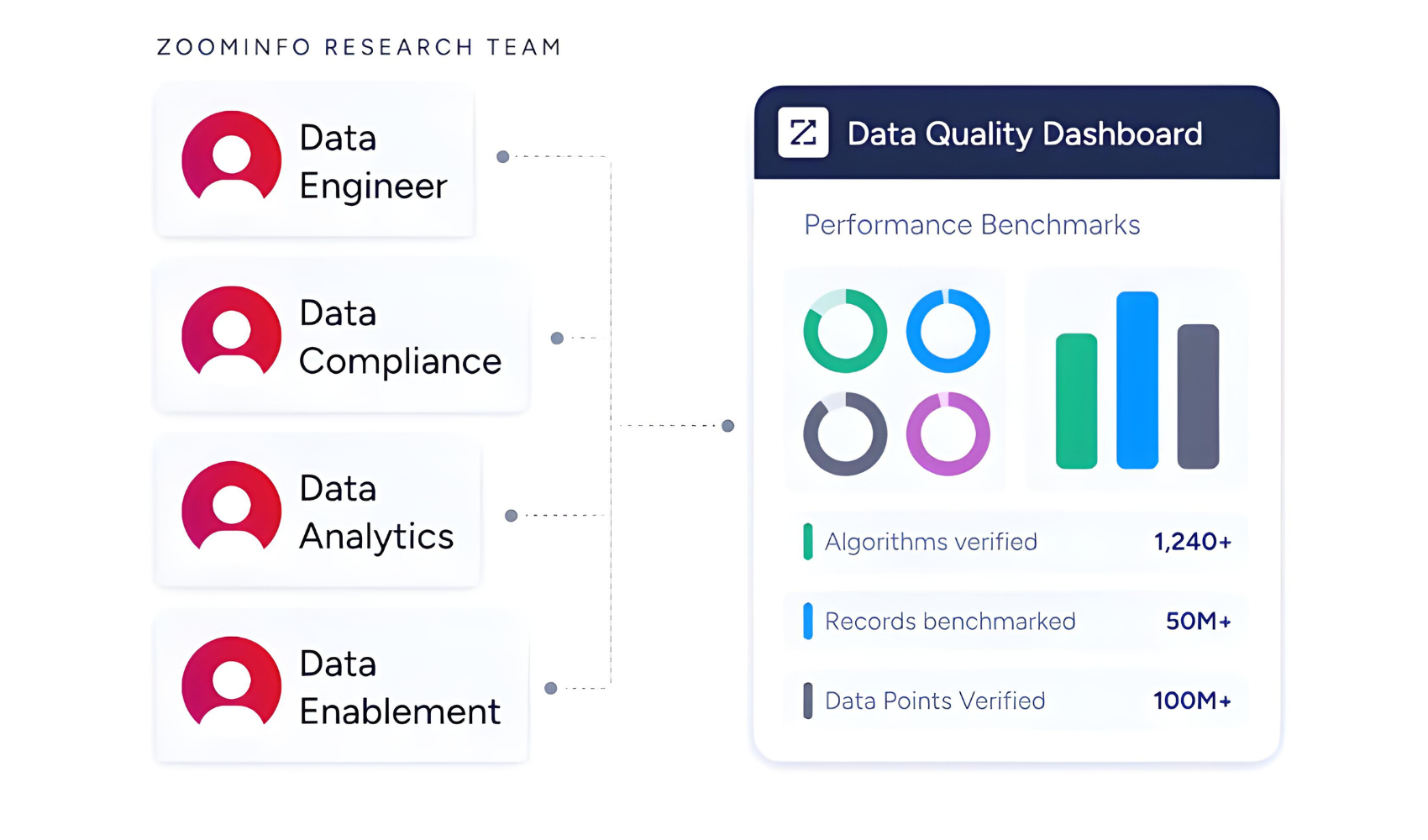
ZoomInfo fills those gaps with verified business emails, direct dials, job titles, seniority levels, and department information for 500M contacts, plus company data spanning 100M companies with revenue, employee count, industry, headquarters, and parent-child corporate hierarchy. The data runs through a verification pipeline backed by 300+ human researchers, reaching up to 95% accuracy on first-party data.
Source: ZoomInfo
In a Fortune 500 competitive RFP analyzing 25 million contacts across vendors, the independent consultant concluded that "no other competitor came even close."
ZoomInfo in action: A sales team using Dialpad Sell for outbound calling pulls a target account list from their CRM. ZoomInfo enriches each account with verified direct dials, current titles, and company intelligence.
The SDR opens Dialpad knowing the VP of Operations they are calling runs a 2,000-person logistics company on SAP and Oracle, and dials a verified number that connects, instead of spending 15 minutes researching and then hitting a dead line.
Buyer Intent Data: Prioritize Which Accounts to Call Right Now
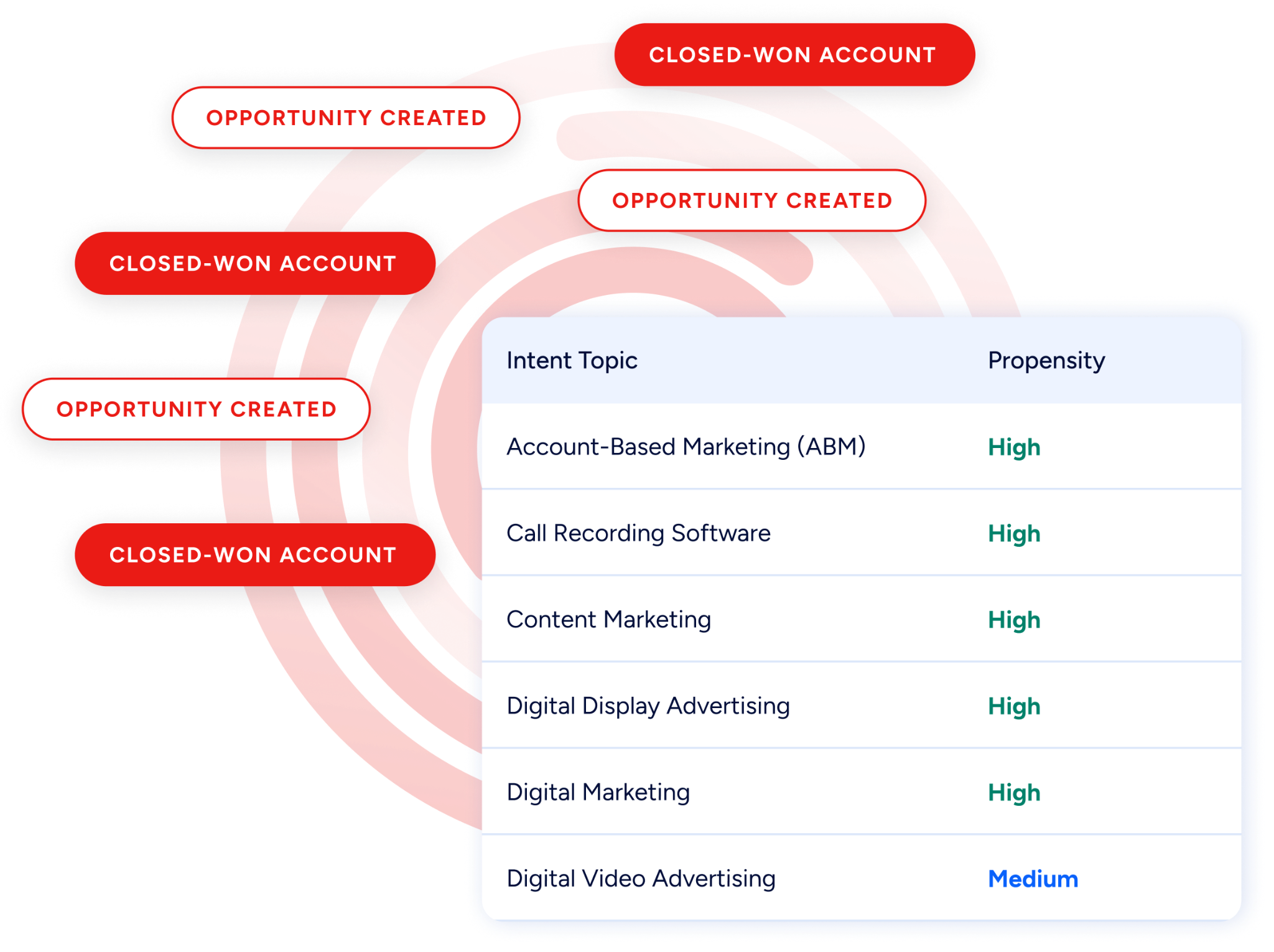
ZoomInfo's Buyer Intent tracks signals from 210 million IP-to-Organization pairings and 6 trillion+ new keyword-to-device pairings monthly, revealing which companies are researching topics relevant to your product.
Source: ZoomInfo
Those signals shape calling strategy: instead of working a static dial list, reps prioritize accounts showing buying behavior this week. Guided Intent, exclusive to ZoomInfo, identifies the research topics historically correlated with deal success in your business, so signals are calibrated to your actual win patterns rather than generic keyword thresholds.
ZoomInfo in action: ZoomInfo detects a target account researching "cloud contact center migration" for two consecutive weeks. The signal surfaces the account as high priority, the rep pulls verified contacts from the decision-making team, and Dialpad Sell's power dialer connects them before a competitor does.
The rep opens with context ("I noticed your team is evaluating contact center options") because the intent signal told them why this call matters now.
Technographic Intelligence: Filter Prospects by Technology Stack
ZoomInfo profiles the tech stack of 30+ million companies, tracking 30,000+ technologies across 200+ categories. For Dialpad sales teams, this means building call lists filtered by what tools prospects already run.
A sales team selling integrations that work alongside specific CRM or help desk platforms can identify companies running those tools, then dial verified decision-makers through Dialpad with context about their tech environment. This data updates continuously, with nearly 90% of active pairings refreshed within three months.
GTM Context Graph: Intelligence That Follows the Conversation
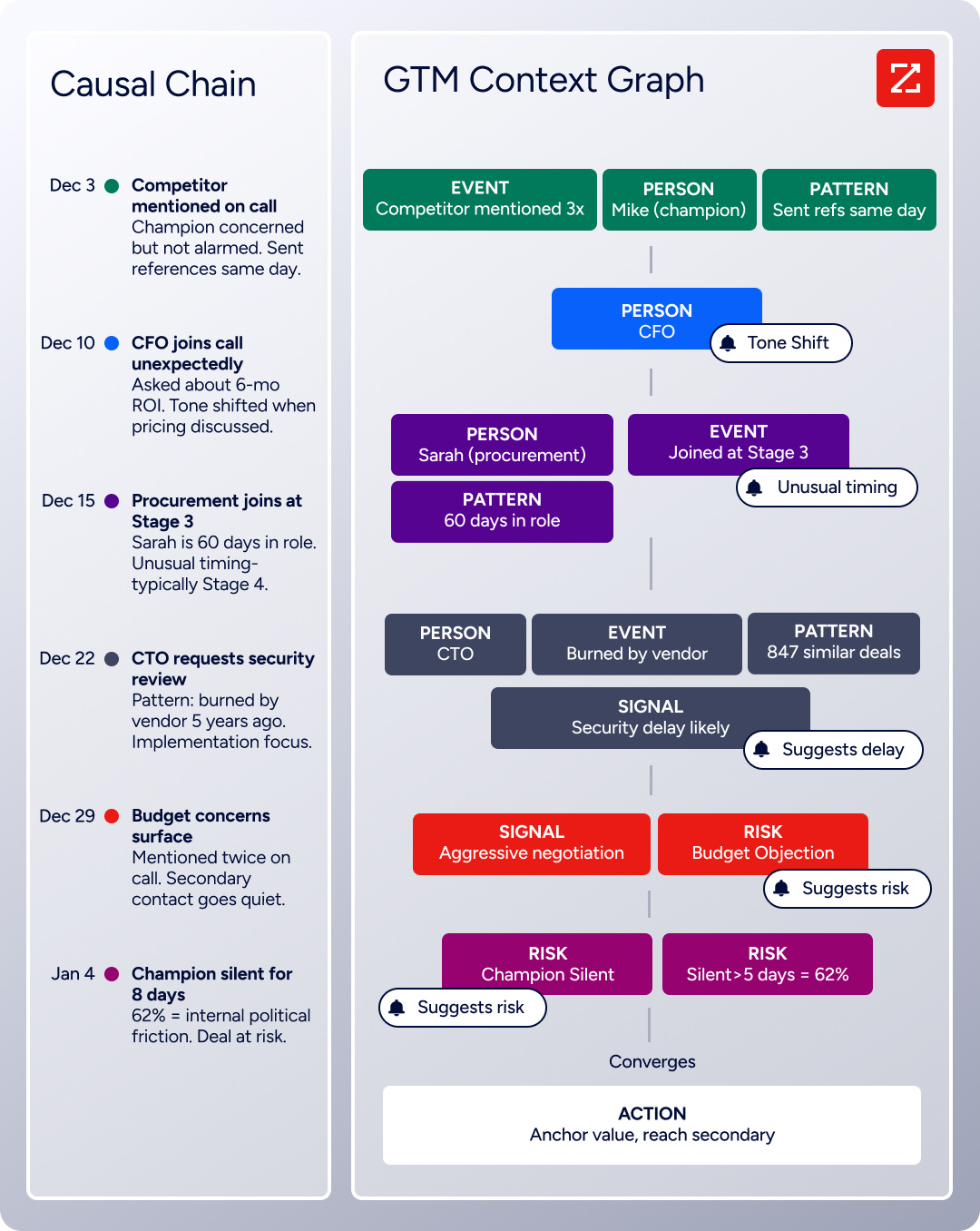
Beyond the data itself, ZoomInfo's GTM Context Graph processes 1.5B + data points daily, combining ZoomInfo's B2B data with CRM records, conversation transcripts, and behavioral signals into a single intelligence layer. The same intelligence powering the Dialpad integration is accessible through GTM Workspace for sellers, GTM Studio for marketers and RevOps, and APIs and MCP in any third-party tool.
Source: ZoomInfo
Seismic's sales team attributed 39% of active pipeline to opportunities identified or influenced by ZoomInfo signals, reporting 54% productivity gains and saving 11.5 hours per week per seller. (Seismic Case Study)
ZoomInfo Pricing
ZoomInfo uses a consumption-based pricing model with custom quotes based on usage, users, credit volume, and features.
It is organized into Sales, Marketing, and standalone product lines, each in Professional, Advanced, and Enterprise tiers. The Dialpad integration is accessible through ZoomInfo's API and MCP infrastructure, with API access included in all relevant plans.
Professional: Contact and company data, CRM integrations, Chrome extension, AI-powered email generation
Advanced: Adds buyer intent signals, website visitor tracking, champion tracking, and automated outreach workflows
Enterprise: Real-time intent signals, custom integrations, advanced workflows, AI-generated account summaries
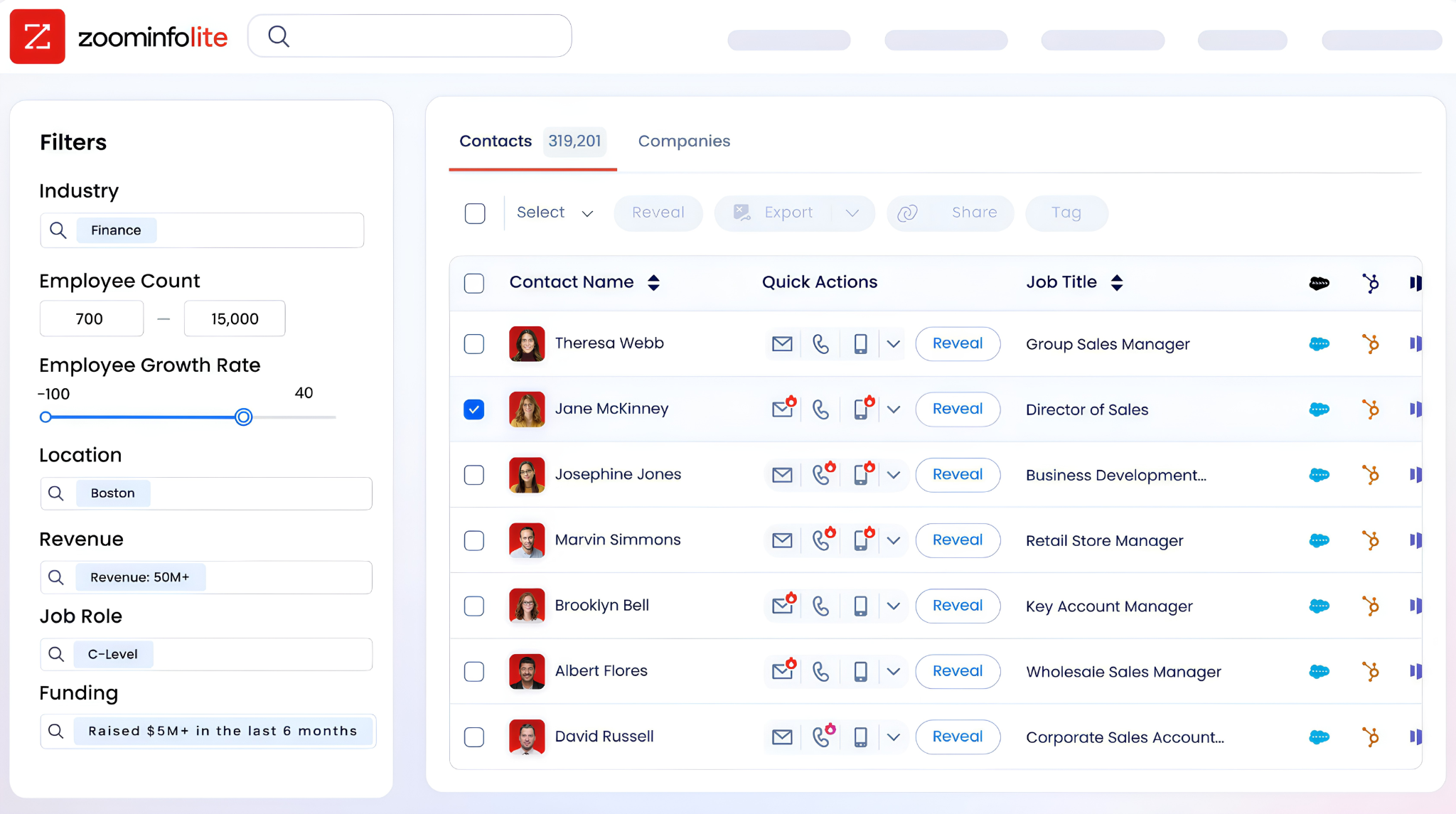
ZoomInfo Lite is a permanent free tier (no credit card, no time limit) with 10 monthly export credits, searches, the Chrome extension, and CRM integrations. A separate 7-day free trial covers paid features including intent data and AI capabilities.
Source: ZoomInfo
Who Should Use the ZoomInfo Integration?
Sales teams using Dialpad Sell for outbound calling whose pipeline depends on reaching the right person at the right number: ZoomInfo's 135M+ verified phone numbers and 200M+ verified emails mean reps dial numbers that connect instead of burning through dead lines
Revenue operations teams that need company, technographic, and intent data to decide which accounts to prioritize for Dialpad outbound campaigns, instead of working static lists that ignore buying signals
Contact center teams using Dialpad Support that want caller context enriched with company intelligence before the agent picks up, so every inbound conversation starts with the agent knowing the account's size, industry, and relationship history
2. Salesforce: Best Dialpad Integration for Automatic CRM Activity Logging and Call Intelligence Sync
Salesforce is the world's #1 CRM by IDC revenue market share. It integrates with Dialpad to eliminate manual call logging. Every call, voicemail, SMS, AI-generated transcript, and post-call recap flows into the matching Salesforce record when the conversation ends. The integration is a native connection listed on both the Salesforce AppExchange and Dialpad's App Marketplace.
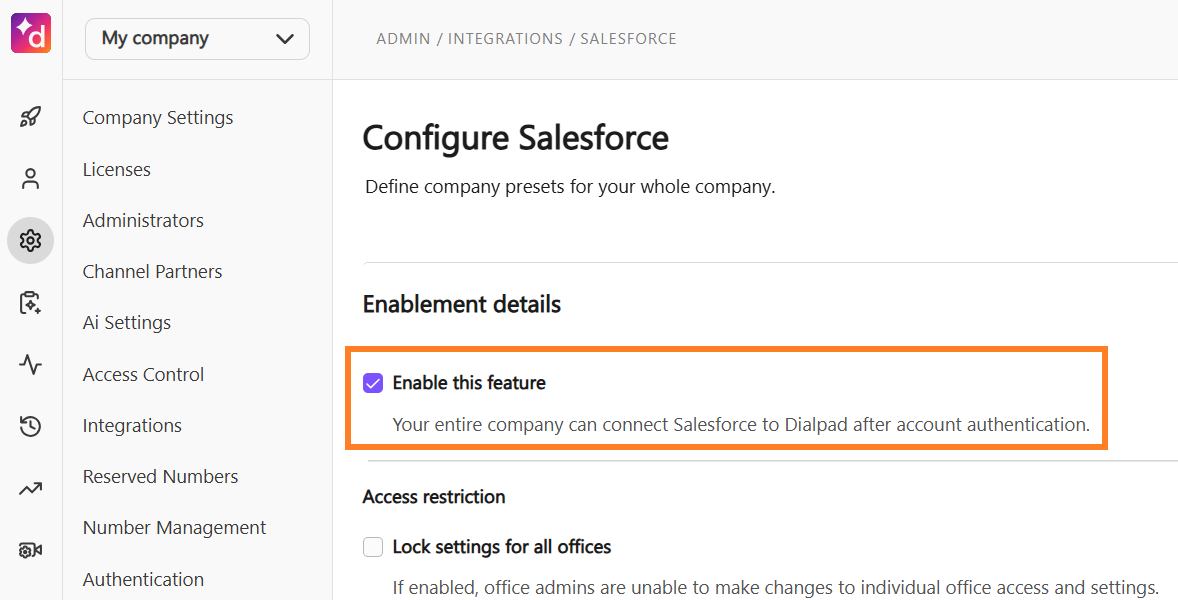
Source: Salesforce
Key integration capabilities include:
Embedded CTI dialer inside Salesforce with click-to-dial from any Lead, Contact, or Opportunity record
Automatic activity logging for every Dialpad call, voicemail, and SMS tied to matching CRM records
AI transcript and recap sync, bringing Dialpad's post-call summaries and action items into Salesforce activity records
Pre-answer caller context surfacing the full Salesforce record before the rep picks up
Workflow automation triggered by Dialpad call outcomes for lead status updates, task creation, and stage advancement
How Salesforce Integrates with Dialpad
The integration connects through Dialpad's CTI framework via OAuth. No middleware is required. Dialpad pulls Salesforce record data to surface caller context on inbound calls, and Salesforce receives structured call data after each interaction.
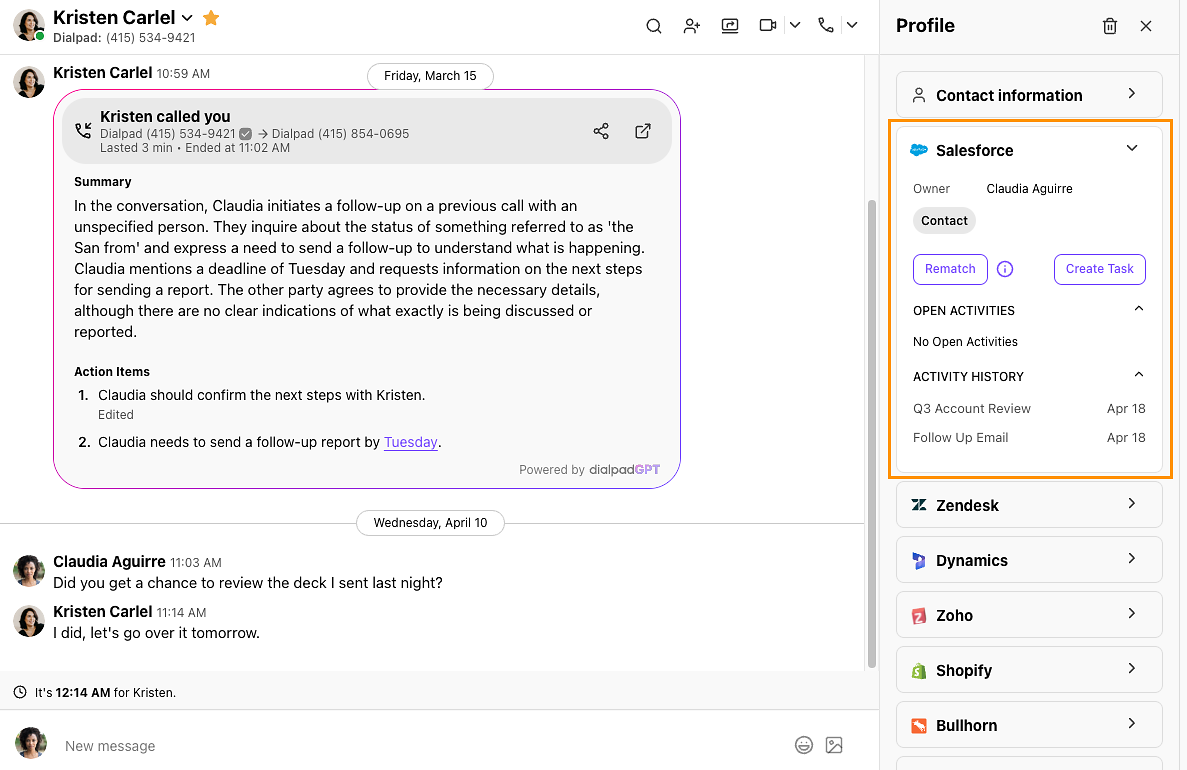
Source: Salesforce
The integration supports Salesforce Classic and Lightning editions across Sales Cloud and Service Cloud. CRM integrations require Dialpad Pro ($25/user/month billed annually) or above.
1. Embedded CTI Dialer and Click-to-Call Inside Salesforce.
The integration embeds a CTI dialer inside the Salesforce Lightning interface. From any Lead, Contact, or Opportunity record, reps start an outbound Dialpad call with a single click.
The call connects through Dialpad's cloud telephony while the rep stays in Salesforce, with deal stage, contact history, and open tasks visible on the same screen. On inbound calls, the system pops the matching Salesforce record before the rep answers.
2. Automatic Activity Logging for Every Interaction.
Every Dialpad call (inbound or outbound, answered or missed) logs as a Salesforce activity tied to the matching record. The log captures call direction, duration, and outcome. Voicemails and SMS messages log as activities too, giving Salesforce a complete communication timeline without depending on rep discipline. Missed calls can be converted into Salesforce opportunities through the integration.
3. AI Transcript and Recap Sync to CRM Records.
Dialpad's AI platform transcribes every call in real time using DialpadGPT. After the call, the AI generates a structured recap with a conversation summary, action items, and key moments. This recap and the full searchable transcript sync to the Salesforce activity record. Any Salesforce user can open a call activity and read a plain-language summary without listening to a recording or logging into Dialpad.
4. Pre-Answer Caller Context from Salesforce.
When a call comes in, Dialpad matches the caller's phone number against Salesforce records and surfaces the associated Lead, Contact, or Account data before the call connects. Reps see the contact's name, title, associated opportunity, and the date and outcome of the last interaction, all before saying hello.
5. Workflow Automation Triggered by Call Outcomes.
The integration supplies structured call outcome data that Salesforce's workflow engine uses as triggers. A missed call from a high-priority Lead can create a follow-up task. A connected outbound call can advance an opportunity stage. A voicemail after a demo can trigger an email sequence. This capability is available on Dialpad Pro and Enterprise plans.
Salesforce Pricing
Salesforce uses per-user, per-month pricing with annual contracts:
Starter Suite: $25/user/month (basic CRM; limited customization)
Pro Suite: $100/user/month (customization, quoting, forecasting, AppExchange access)
Enterprise: $175/user/month (AI features, pipeline insights, full workflow automation)
Unlimited: $350/user/month (full AI suite, conversation intelligence, Premier Success)
On the Dialpad side, CRM integrations require the Pro plan ($25/user/month, annual) or above. The Standard plan does not include Salesforce connectivity.
Who Should Use the Salesforce Integration?
Sales or support reps who currently log calls manually in Salesforce and deal with incomplete, inconsistent CRM data: automatic logging means every Dialpad interaction becomes a structured, searchable CRM event
Teams that want Dialpad's AI-generated transcripts and recaps inside Salesforce so managers, CS reps, and anyone reviewing a deal can read what happened without switching to a separate tool
RevOps teams that need to trigger Salesforce automations (task creation, stage advancement, lead status updates) based on Dialpad call outcomes rather than manual rep input
3. HubSpot: Best Dialpad Integration for CRM-Native Call Logging and AI Conversation Sync
HubSpot is a CRM and marketing automation platform that integrates with Dialpad to bring call activity, AI-generated summaries, full transcripts, and predicted customer satisfaction scores into the HubSpot contact timeline. The integration is native on both sides, requiring no third-party connector.
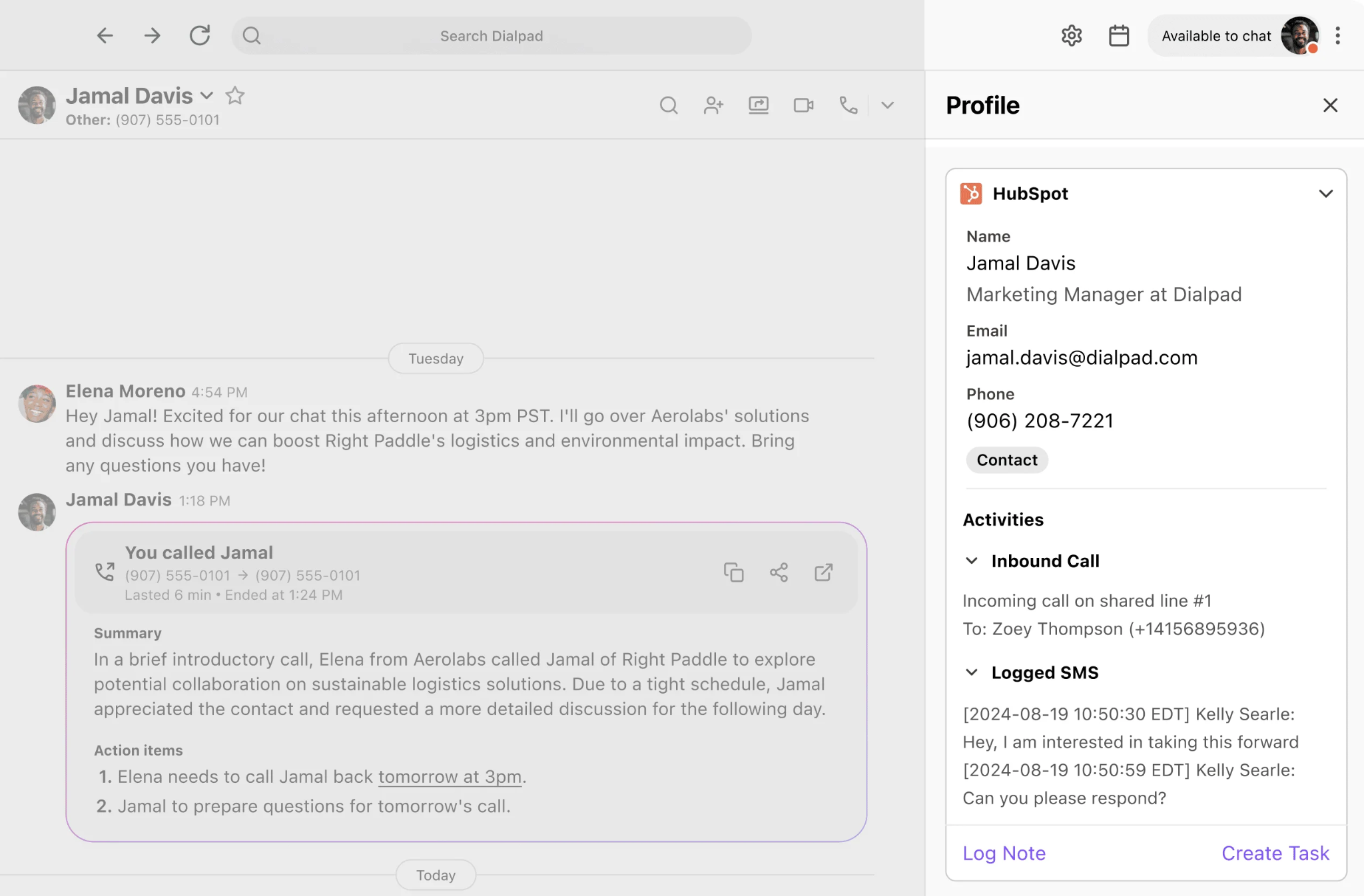
Source: HubSpot
Key integration capabilities include:
Embedded calling from HubSpot contact, company, and deal records using a Dialpad dialer built into the HubSpot interface
Automatic logging of all inbound and outbound calls, SMS messages, and voicemails to matching HubSpot contact timelines
Post-call sync of Dialpad's AI summary, full transcript, action items, and predicted CSAT score to HubSpot's contact activity feed
Missed-call ticket creation on shared and personal Dialpad lines that routes follow-ups to HubSpot natively
Real-time transcription visibility within the HubSpot interface during active calls
How HubSpot Integrates with Dialpad
The connection uses OAuth-based authorization through HubSpot's App Marketplace or Dialpad's App Marketplace. The integration works across Dialpad Connect and Dialpad Sell. HubSpot's free CRM tier can receive call logs, but missed-call ticket creation and workflow automation require HubSpot Sales Hub Professional or Enterprise. Dialpad maintains this as a native first-party integration.
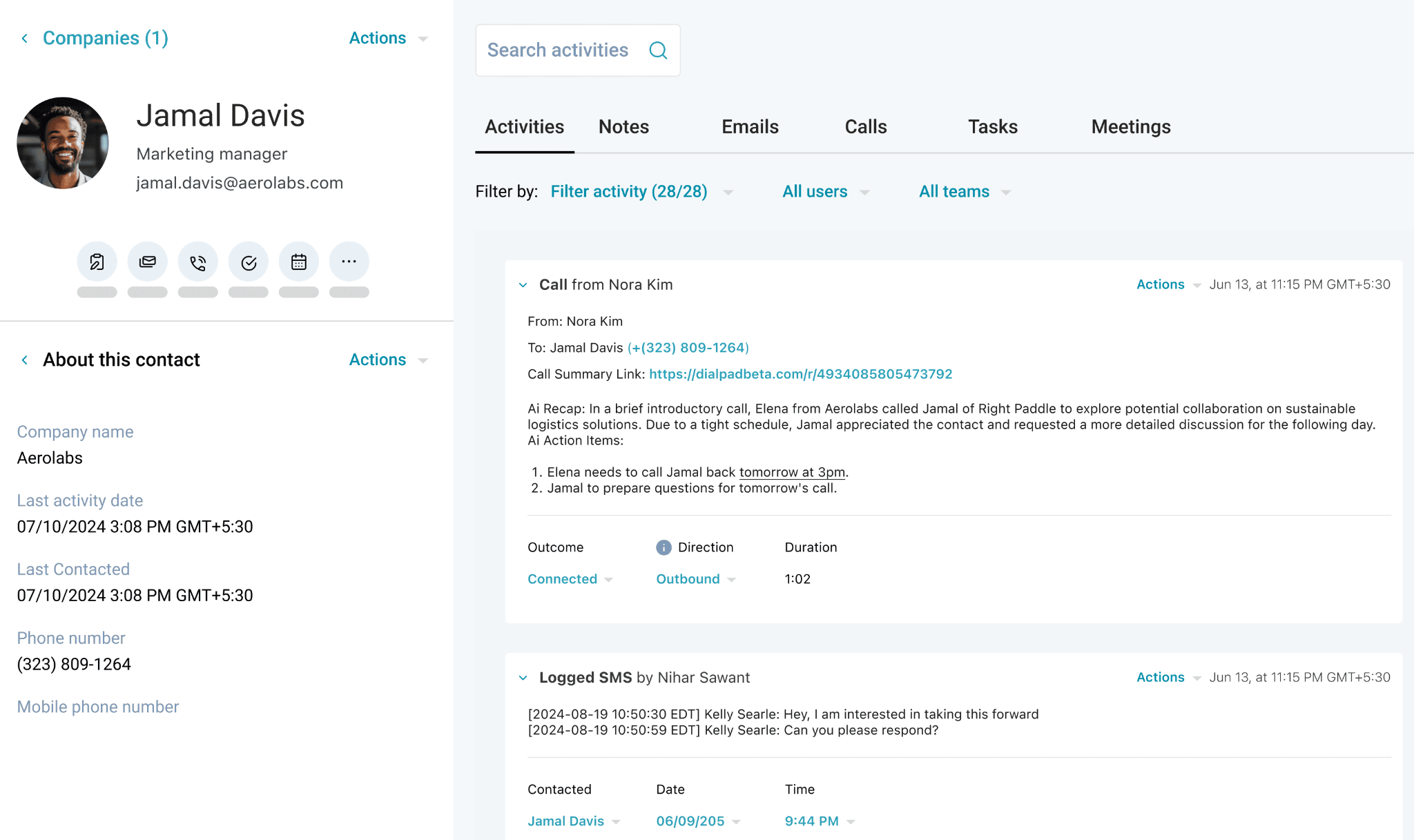
Source: HubSpot
1. Embedded Calling from HubSpot Records.
Reps start calls from HubSpot using a Dialpad dialer embedded in the CRM. Click-to-call works from contact, company, and deal records. While the call is live, the Dialpad sidebar surfaces recent HubSpot activity and contact history alongside the active call.
2. Automatic Call, SMS, and Voicemail Logging.
Every Dialpad interaction matching a HubSpot contact logs to that contact's activity timeline. Inbound and outbound calls, SMS messages, and voicemails all appear as timestamped activity records. The matching runs against the contact's phone number, so the log lands on the correct record without rep intervention.
3. AI Summary, Transcript, and CSAT Sync.
After each call, Dialpad's AI generates a call summary, full transcript, action items, and a predicted customer satisfaction score. All post to the matching HubSpot contact's activity feed. Dialpad's AI CSAT model achieves 87% accuracy and scores 100% of conversations, compared to the typical 5% survey response rate.
For HubSpot teams using Service Hub for customer health tracking or Marketing Hub for lifecycle-based workflows, having sentiment data land in the CRM opens automation triggered by call satisfaction signals.
4. Missed-Call Ticket Creation.
On Pro and Enterprise Dialpad plans, missed calls on shared or personal lines generate HubSpot tickets automatically. This is native behavior, requiring no Zapier automation or webhook configuration. Missed calls that would otherwise fall through the cracks become trackable HubSpot work items routed through existing ticket assignment rules.
HubSpot Pricing
HubSpot's pricing is hub-based and per-seat. The Dialpad integration is compatible across tiers, but workflow automation and missed-call ticket routing require Sales Hub Professional or higher:
Sales Hub Free: $0 (up to 2 users; basic CRM and call logging)
Sales Hub Starter: starts at $9/seat/month (annual) or $20/seat/month (monthly)
Sales Hub Professional: starts at $90/seat/month (annual), mandatory $1,500 onboarding fee; full workflow automation
Sales Hub Enterprise: starts at $150/seat/month (annual only), mandatory $3,500 onboarding fee; custom objects, predictive scoring
Note: if a team subscribes to multiple Hubs at different tiers, all Core Seats are billed at the highest tier rate, which can make blended deployments more expensive than single-hub pricing suggests.
Who Should Use the HubSpot Integration?
Revenue teams that live inside HubSpot as their primary CRM and need Dialpad's AI-generated call summaries, transcripts, and CSAT scores on contact timelines so managers and marketers can see full conversation context without leaving HubSpot
Inbound sales or support teams on shared Dialpad lines that need missed calls automatically converted into HubSpot tickets for follow-up routing, without custom automation development
Teams using HubSpot Marketing Hub alongside Sales Hub that want Dialpad call activity and sentiment data to feed into contact lifecycle stages, enrollment triggers, or re-engagement workflows
4. Zendesk: Best Dialpad Integration for Embedding AI-Powered Calling Inside Your Support Ticketing System
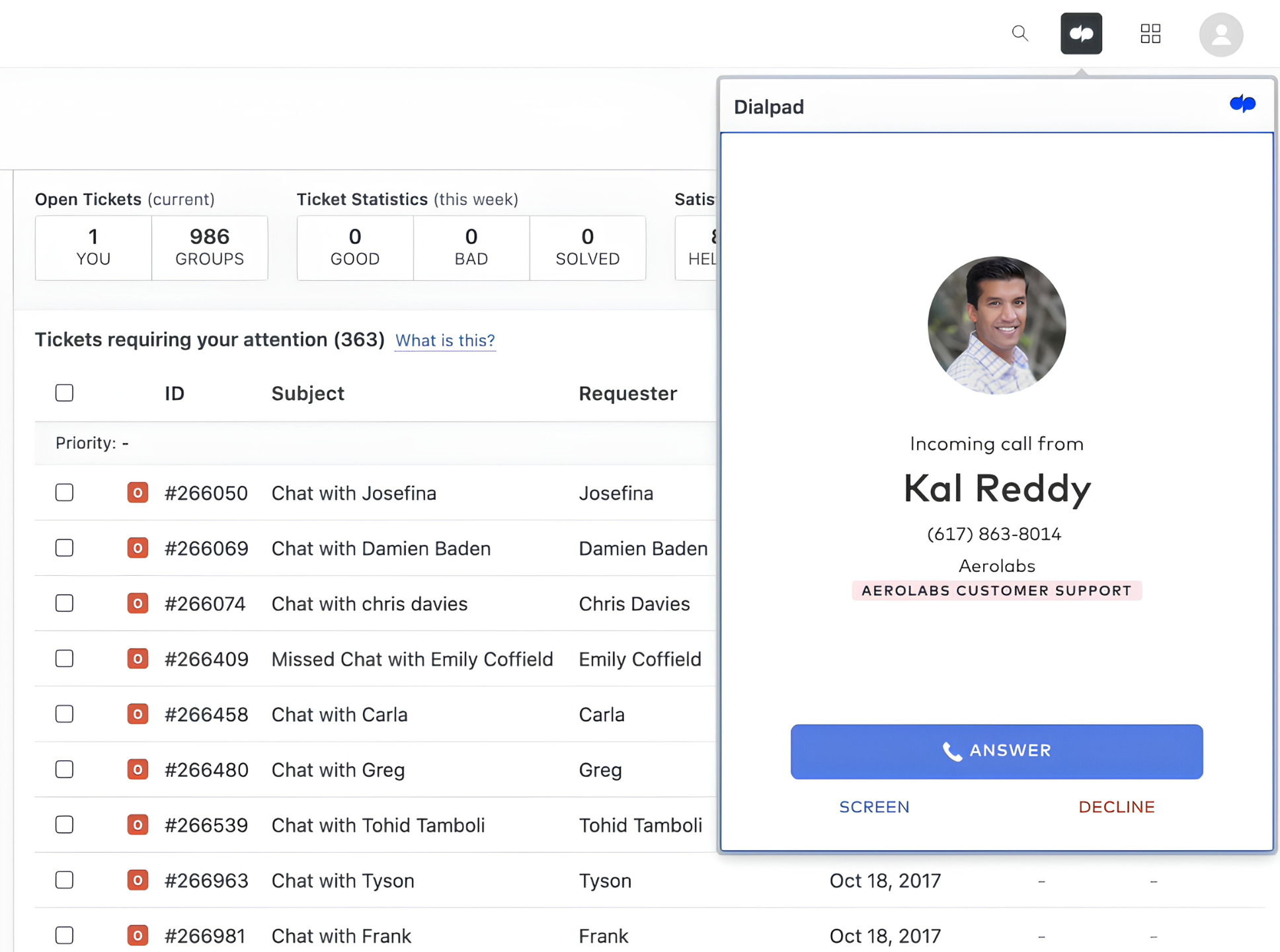
Zendesk is a customer service platform that integrates with Dialpad to embed a CTI dialer inside Zendesk Support, create tickets for every inbound call, surface caller history before agents answer, and extend Dialpad's Agentic AI to manage Zendesk records autonomously. The integration operates through Zendesk's Talk Partner Edition framework, a native CTI channel for third-party telephony providers.
Source: Zendesk
Key integration capabilities include:
A CTI dialer embedded inside Zendesk Support so agents place and receive Dialpad calls without leaving the ticketing interface
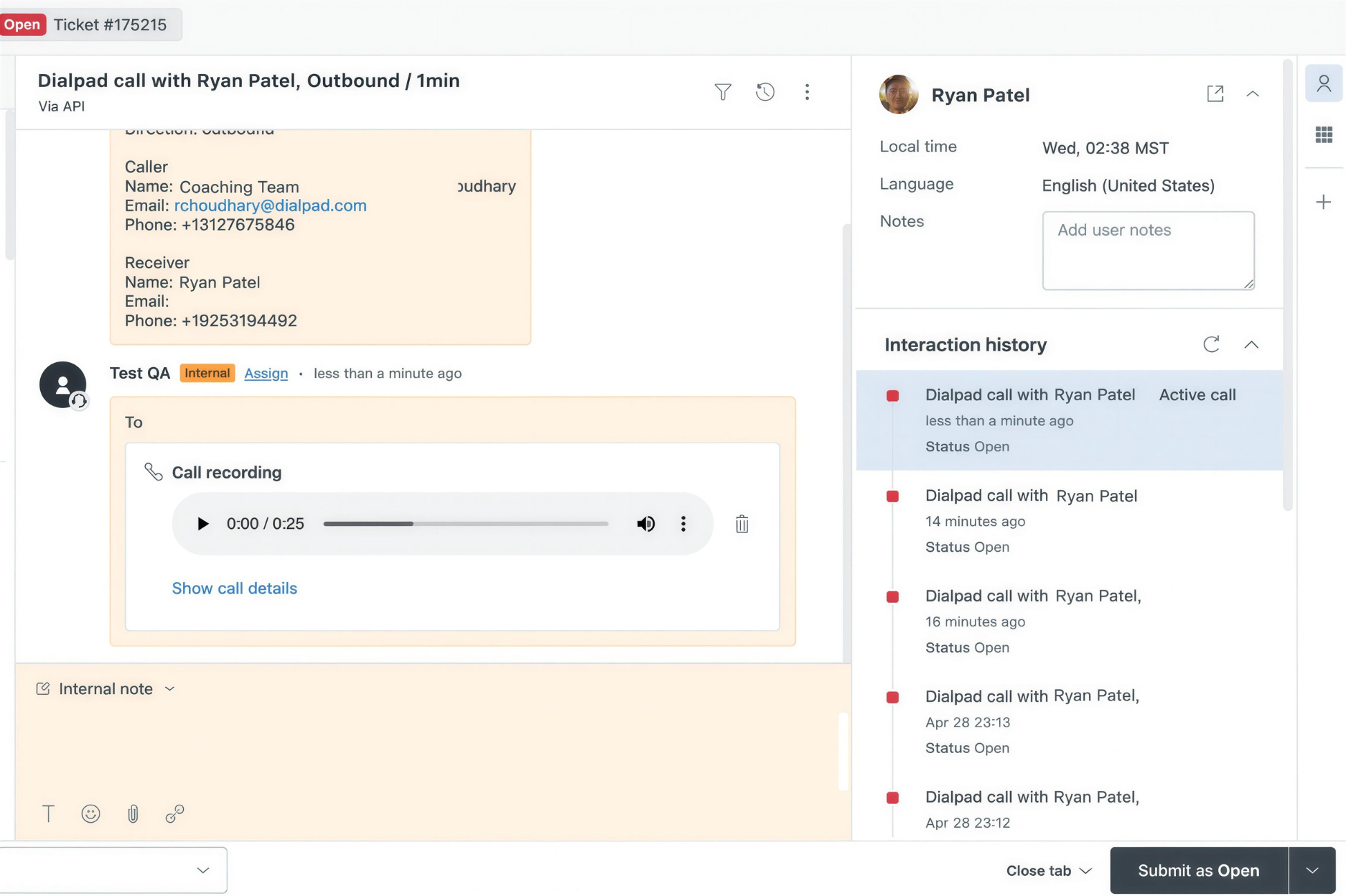
Automatic ticket creation for every inbound call, pre-populated with caller identity and Dialpad's real-time AI transcript
Pre-answer caller history lookup that surfaces the complete ticket history before agents answer
Agentic AI that can autonomously create, update, and retrieve Zendesk records during AI Agent interactions
How Zendesk Integrates with Dialpad
The integration is a native connection in Dialpad's App Marketplace. It operates through Zendesk's Talk Partner Edition framework, so the dialer lives inside the Zendesk interface as a native UI element. It requires Dialpad Pro or Enterprise plans. The integration is also available on the Zendesk Marketplace.
Source: Zendesk
1. Embedded CTI Dialer via Zendesk Talk Partner Edition.
Agents place outbound calls, receive inbound calls, transfer, and mute from within the Zendesk workspace where they manage tickets. The call and the ticket exist in the same visual context, eliminating the tab-switching that causes agents to miss transcript notes or skip logging calls.
2. Automatic Ticket Creation and Real-Time Transcript Population.
Every inbound call triggers ticket creation in Zendesk the moment it connects. The ticket fills in real time with caller identity and Dialpad's live AI transcript, which appears while the conversation is still happening. By the time the call ends, the ticket contains a complete interaction record. Post-call work becomes adding resolution notes, not rebuilding the record.
3. Pre-Answer Caller History Lookup.
Before an agent answers, the integration searches the caller's phone number and email against existing Zendesk contacts and surfaces their ticket history. The agent sees who is calling, how many prior tickets exist, and what those tickets covered, all before the conversation begins.
An agent who can open with "I see you had a billing issue last week" operates at a different level than one who opens with a verification script.
4. Agentic AI for Autonomous Ticket Operations.
For teams running Dialpad AI Agent, the Zendesk integration extends to automated ticket management. Dialpad's Agentic AI can create, update, and retrieve Zendesk records in real time during AI-handled interactions.
When an AI agent handles a customer call end-to-end, it generates and updates Zendesk records with the same accuracy as human-handled interactions, ensuring AI-resolved volume is captured for compliance, reporting, and downstream workflows.
Zendesk Pricing
Zendesk uses seat-based pricing with per-agent monthly fees. The Dialpad CTI integration requires Zendesk Talk Partner Edition, available on Suite plans:
Suite Team: starts at $55/agent/month (billed annually; ticketing, messaging, voice, Talk Partner Edition access)
Suite Professional: starts at $115/agent/month (custom reports, SLA management, IVR phone tree)
Suite Enterprise + Copilot: custom pricing (AI Intelligent Triage, AI Auto Assist, sandbox environment)
Additional costs include Workforce Management ($50/agent/month add-on), Quality Assurance ($50/agent/month add-on), and pay-as-you-go voice usage beyond included minutes. A 14-day free trial is available.
On the Dialpad side, the Zendesk integration requires Dialpad Pro ($25/user/month billed annually) or Enterprise.
Who Should Use the Zendesk Integration?
Support teams that use Zendesk as their primary ticketing system and currently handle Dialpad calls from a separate app, creating documentation lag or missed records
Contact centers that need every inbound call turned into a Zendesk ticket with a live transcript, without any agent action during or after the call
Teams deploying Dialpad AI Agent for tier-1 handling that need AI-resolved interactions documented in Zendesk with the same accuracy as human-handled ones, for compliance and downstream workflow triggers
5. Google Workspace: Best Dialpad Integration for Complete Google-First Productivity Sync
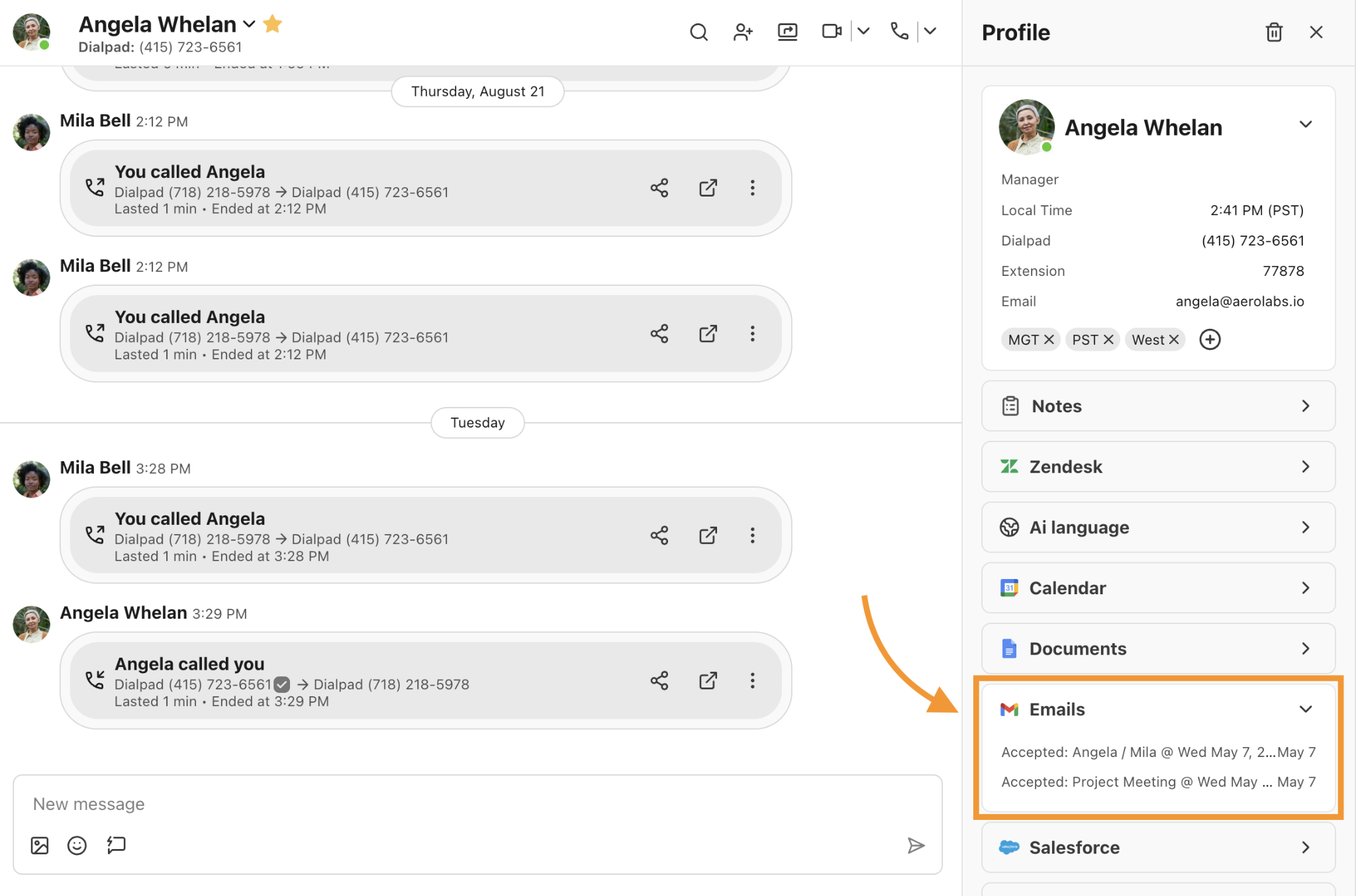
Google Workspace is a cloud productivity suite (Gmail, Google Drive, Google Calendar, Google Meet, Google Chat) that integrates with Dialpad to synchronize contacts bidirectionally, automate user provisioning through Google Directory, embed Dialpad calling inside Gmail, and surface calendar context inside Dialpad interactions.
Source: Google Workspace
The integration is a native connection via Dialpad's App Marketplace and is marked "Recommended for Google Workspace" by Google with over 615,000 installations.
Key integration capabilities include:
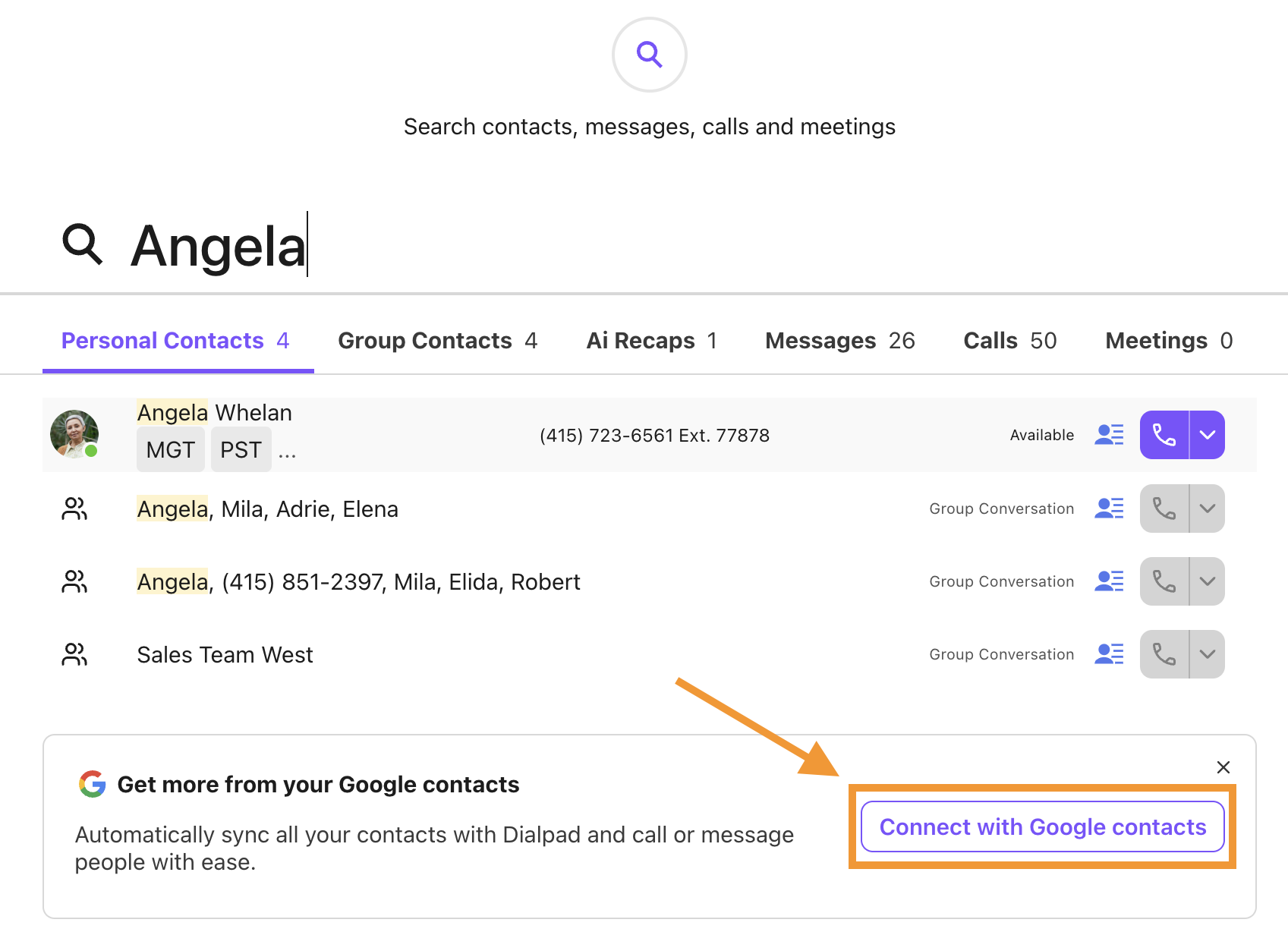
Bidirectional Google Contacts sync keeping both directories consistent without manual exports
Google Workspace SSO with users signing in to Dialpad using existing Google credentials
Google Directory user provisioning (SCIM) for automated onboarding and offboarding
Gmail add-on for in-email calling with auto-detected phone numbers and one-click dialing
Google Calendar meeting context surfaced inside Dialpad contact sidebars
How Google Workspace Integrates with Dialpad
The connection uses OAuth authorization between a Dialpad admin account and a Google Workspace super admin account. Dialpad reads from and writes to the Google Workspace Directory API, Google Contacts API, and Google Calendar API.
Source: Google Workspace
The Gmail add-on installs through the Google Workspace Marketplace. This is a native integration available at Dialpad's Standard plan ($15/user/month annually), so no Dialpad upgrade is required.
1. Bidirectional Contact Sync with Google Contacts.
Contacts created or modified in either Dialpad or Google Contacts propagate to the other directory automatically. The result is a shared, current address book consistent across every surface where the team communicates. Contacts added during Dialpad calls appear in Gmail's autocomplete and Google Chat suggestions without manual export.
2. SSO and Automated User Provisioning via Google Directory.
Google Workspace SSO lets Dialpad users authenticate with existing Google credentials. Dialpad inherits the MFA requirements, session controls, and conditional access rules already enforced on Google Workspace.
More importantly, Google Directory provisioning via SCIM means new employees added in the Google Workspace Admin Console automatically receive Dialpad accounts, and departed employees lose Dialpad access when their Google account is suspended. Automatic user provisioning with Google Workspace works natively without middleware.
3. Gmail Add-on for In-Email Calling.
The Gmail add-on surfaces a calling and messaging panel inside the Gmail interface. It detects phone numbers in email text automatically, enabling one-click dialing without copying numbers into a separate application. Calls placed through the Gmail add-on route through Dialpad's core platform, so Dialpad's AI transcription, AI Recaps, and sentiment analysis run on those calls identically.
4. Google Calendar Integration for Meeting Context.
Google Calendar events appear inside Dialpad contact sidebars, so before a rep dials, they can see upcoming or recent meetings with that person without switching tabs. Dialpad meeting links can be inserted into Calendar invites automatically, reducing post-call meeting scheduling to a single step.
Google Workspace Pricing
Google Workspace uses per-seat, per-month pricing with all core apps bundled. The Dialpad integration is available across all paid plans:
Business Starter: $7/user/month (annual); 30 GB storage, meetings up to 100 participants
Business Standard: $14/user/month (annual); 2 TB storage, Meet recording, appointment booking
Business Plus: $22/user/month (annual); 5 TB storage, enhanced security with Vault and eDiscovery
Enterprise: custom pricing; data loss prevention, client-side encryption, no user cap
The Dialpad integration is available at Dialpad's Standard plan ($15/user/month annually), which lists Google Workspace as an included integration.
Who Should Use the Google Workspace Integration?
Organizations running Google Workspace as their primary productivity suite that want Dialpad to inherit their existing identity infrastructure (SSO, lifecycle management, directory) without maintaining a parallel provisioning process
Sales reps or support agents who spend most of their day in Gmail and need to start calls without switching applications, while still capturing those calls inside Dialpad's AI conversation layer
Teams onboarding and offboarding employees regularly that need Dialpad accounts to stay synchronized with Google Workspace Admin Console changes automatically
6. Zapier: Best Dialpad Integration for Connecting Call Events to 8,000+ Apps Without Code
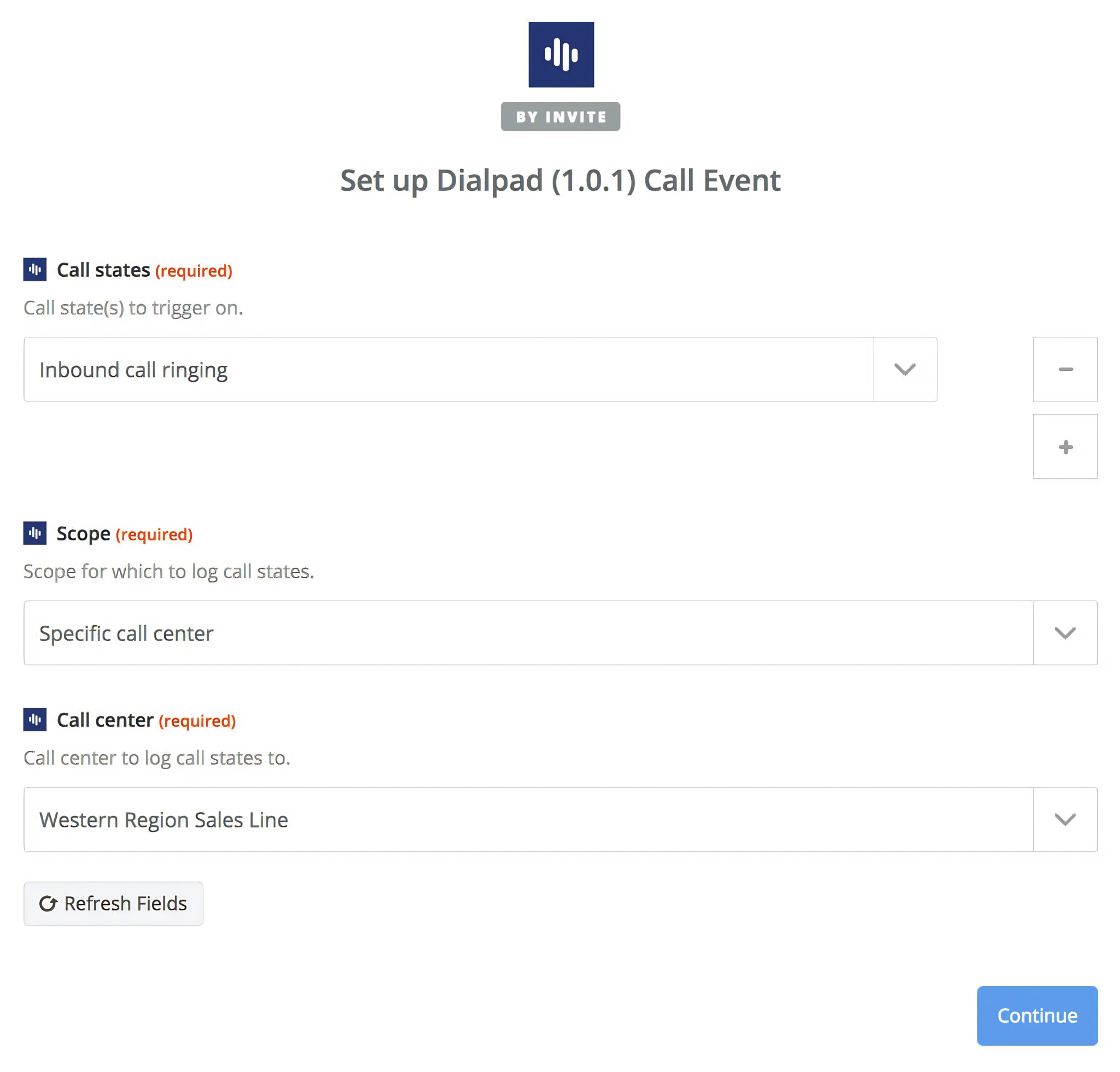
Zapier is a no-code workflow automation platform that integrates with Dialpad to turn call lifecycle events into automated triggers across more than 9,000+ connected applications. Dialpad maintains a native Zapier listing in its App Marketplace, making this an officially supported connection. The integration is available on Dialpad's Pro and Enterprise plans for Connect, and on Sell and Support plans.
Source: Zapier
Key integration capabilities include:
Native Dialpad call event triggers (call received, call placed, voicemail received, call state changed) that fire Zaps in real time
Routing of Dialpad call data to tools outside the native marketplace
Multi-step Zap chains executing downstream actions from a single Dialpad trigger
Conditional logic and data transformation for routing call events based on attributes
How Zapier Integrates with Dialpad
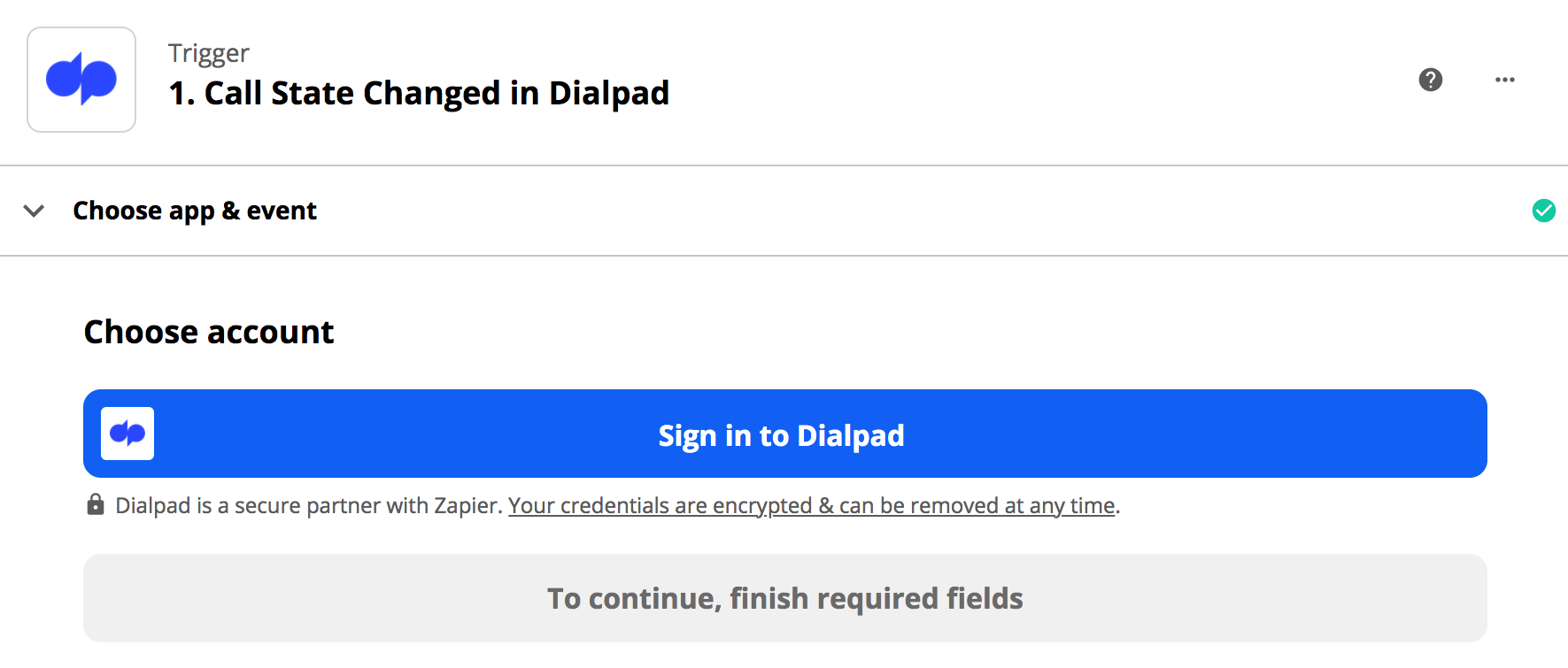
Setup uses Zapier's standard OAuth flow: authenticate your Dialpad account in the Zap editor, select a trigger event, and chain downstream action steps across any app Zapier supports. The integration is a native marketplace connector.
Source: Zapier
1. Native Call Event Triggers.
Dialpad exposes its call lifecycle as Zapier-native triggers. The supported events cover the full call lifecycle: call received, call placed, voicemail received, and call state changed. Every time a defined event fires in Dialpad, the Zap activates. A missed call going to voicemail can trigger a Zendesk ticket, a Slack notification, and a Google Sheet entry, all from one trigger.
2. Push Dialpad Data to Tools Outside the Native Marketplace.
Dialpad's own marketplace covers major CRMs and help desks, but hundreds of tools fall outside that ecosystem. Zapier fills the gap by exposing Dialpad events to 9,000+ apps. Zaps can create rows in Google Sheets for every completed call, generate tasks in Asana or Monday.com based on call outcomes, or push data into Airtable, ClickUp, Notion, or whatever platform the team uses.
3. Multi-Step Workflow Chains.
A single Dialpad trigger can branch into multiple downstream actions within one Zap. Zapier's Paths feature routes the same trigger to different actions depending on call attributes. The Formatter step handles data transformation between Dialpad's output format and a destination app's input requirements without code.
Zapier Pricing
Zapier uses task-based pricing where each action step counts as one task:
Free: $0 (100 tasks/month, two-step Zaps only, 15-minute polling)
Professional: starts at $19.99/month (annual) for 750 tasks; multi-step Zaps, conditional logic, custom polling
Team: starts at $69/month (annual) for 2,000 tasks; shared workspaces, up to 25 users, SAML SSO
Enterprise: custom pricing (unlimited users, advanced admin, custom retention)
Project task consumption before committing: a three-action chain triggered by 1,000 Dialpad calls per month consumes 3,000 tasks. Zapier charges overages at 1.25x the plan's per-task rate.
Who Should Use the Zapier Integration?
Teams using tools that don't appear in Dialpad's native App Marketplace (niche CRMs, vertical platforms, internal databases) that need Dialpad call data flowing into those systems automatically
Non-technical operations teams that own call workflow automation and do not have engineering resources to build custom webhook handlers or API integrations
Organizations where Dialpad call events need to trigger actions across multiple apps simultaneously with conditional logic, without maintaining separate point-to-point integrations
7. Microsoft Teams: Best Dialpad Integration for Enterprise Teams Already Standardized on Microsoft 365
Microsoft Teams is a communications platform with 320+ million monthly active users that integrates with Dialpad via Direct Routing to route external PSTN calls through Dialpad's telephony infrastructure inside the Teams interface.
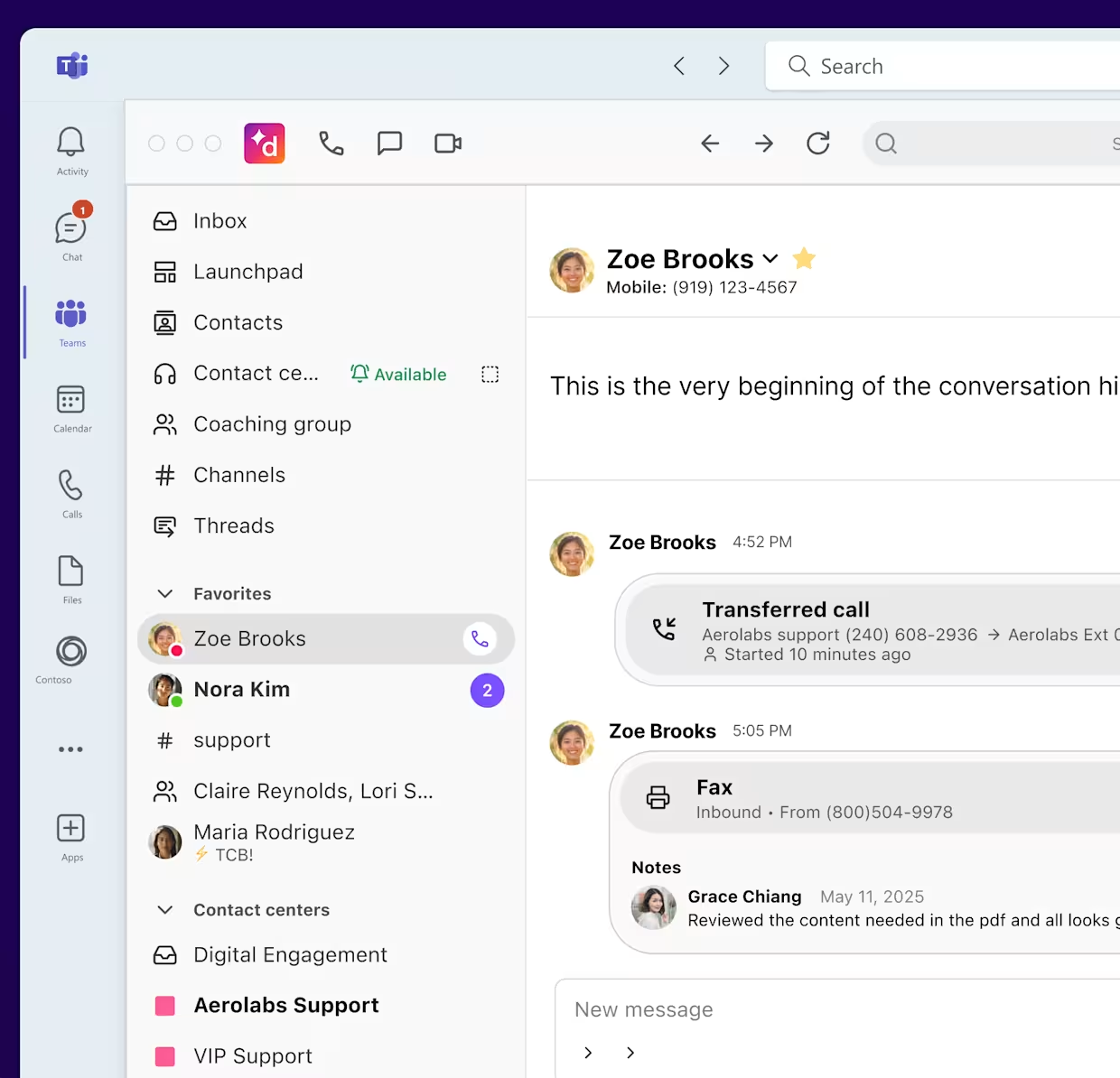
The integration also includes a Dialpad App for Teams available in the Teams marketplace. Users can make and receive calls to 70+ countries, send SMS/MMS, access AI transcripts, and manage voicemail within Teams.
Source: Microsoft Teams
Key integration capabilities include:
PSTN calling to 70+ countries routed through Dialpad's telephony network, accessed from the Teams dialer
Dialpad's Voice Intelligence running live on Teams calls with real-time transcription, sentiment analysis, and post-call AI recaps
SMS and MMS messaging from Dialpad business phone numbers within Microsoft Teams
Admin-configured setup requiring no end-user software installation or behavior change
How Microsoft Teams Integrates with Dialpad
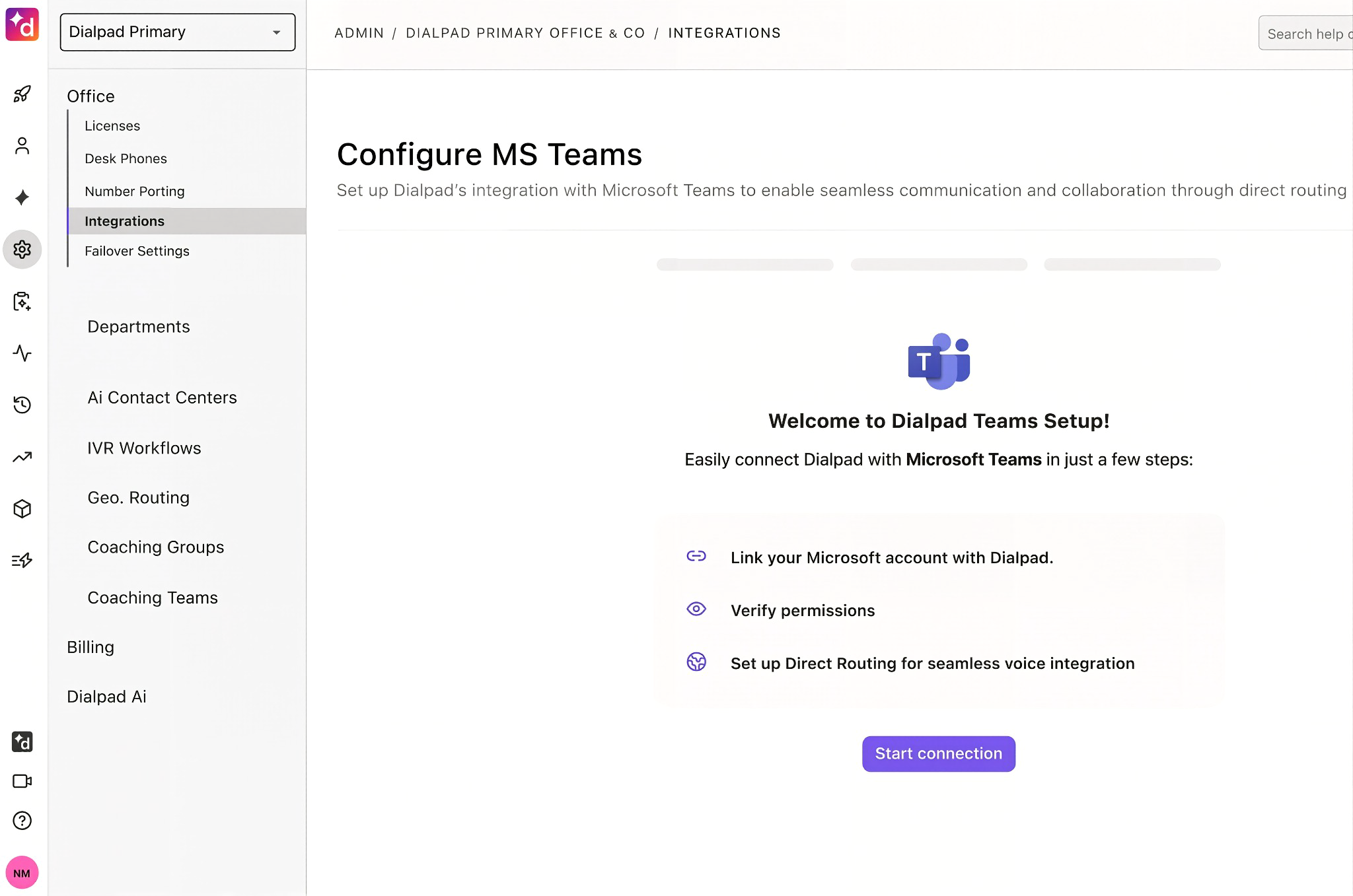
The integration uses Microsoft's Direct Routing framework. Dialpad handles PSTN connectivity, call routing, number management, and AI processing; Teams serves as the user-facing interface. The integration is available through both Dialpad's marketplace and the Microsoft Teams app store.
Source: Microsoft Teams
1. Direct Routing: PSTN Calling to 70+ Countries Inside Teams.
With Direct Routing configured, the Teams dialer becomes the front-end for Dialpad's telephony network. Employees use the Teams calling interface they already know. External calls route through Dialpad's dual-cloud telephony architecture, which runs on a private telephony network across 12 data centers globally. Dialpad handles number porting (typically 3-5 days) and call routing configuration on its side.
2. Dialpad Voice Intelligence on Every Teams Call.
When a Dialpad-connected Teams user makes or receives an external call, Dialpad's Voice Intelligence processes the call in real time. Live transcription, sentiment analysis, and AI Recaps appear within the Teams environment.
Dialpad AI has processed over 10 billion AI-enabled conversations and generated over 750 million AI Recaps. Teams users get the same intelligence as dedicated Dialpad app users without opening a separate application.
3. Business SMS and MMS Within Teams.
Users can send and receive text messages from their Dialpad business phone numbers inside Microsoft Teams. Dialpad logs SMS conversations alongside call records, keeping the data trail intact regardless of whether the employee used the Dialpad app or the Teams interface.
Microsoft Teams Pricing
Microsoft Teams is included in all Microsoft 365 commercial plans. The key pricing consideration for this integration is what it displaces:
Microsoft Teams Phone Add-On: approximately $8/user/month (required to enable telephony in Teams)
Microsoft Calling Plans: approximately $12/user/month on top of Teams Phone for PSTN connectivity
Organizations using Dialpad's Direct Routing avoid the Microsoft Calling Plan cost since Dialpad provides PSTN connectivity.
On the Dialpad side, the integration requires Dialpad Connect:
Standard: $15/user/month (annual); unlimited call recording, real-time analytics, AI transcription
Pro: $25/user/month (annual); adds CRM integrations, phone support, multi-office
Enterprise: custom pricing; 99.9% uptime SLA, named CSM, priority support
Who Should Use the Microsoft Teams Integration?
Organizations already standardized on Microsoft 365 that need to extend enterprise telephony to Teams users without adding Microsoft Calling Plan costs per seat
Sales or customer-facing teams that live inside Teams and cannot realistically be asked to operate a separate dialer, but need Dialpad's AI transcription, sentiment analysis, and post-call recaps
IT teams that need a single telephony platform with consistent call recording, routing policies, and AI logging across the organization, managed centrally through Dialpad while the call endpoint is the Teams interface
Final Verdict
The best Dialpad integrations feed intelligence into your conversations, push call data into the systems where your team acts on it, and automate work that otherwise depends on manual effort:
ZoomInfo: verified B2B contact data, buyer intent signals, and company intelligence enriching every Dialpad conversation; the highest-impact integration on this list if your outbound calling depends on reaching the right person at the right time
Salesforce: complete call activity logging with AI transcripts and recaps synced to CRM records, eliminating manual data entry
HubSpot: call logging, AI summaries, CSAT predictions, and missed-call tickets landing natively on HubSpot contact timelines
Zendesk: embedded calling inside support tickets with automatic ticket creation, pre-answer context, and AI-powered autonomous ticket management
Google Workspace: bidirectional contact sync, SSO, automated provisioning, and Gmail-embedded calling for Google-first organizations
Zapier: no-code reach into 8,000+ apps where Dialpad's native marketplace stops
Microsoft Teams: Dialpad's full AI telephony stack delivered through the Teams interface for Microsoft 365 enterprises
These integrations compound: you can run ZoomInfo for contact intelligence, Salesforce for CRM logging, Zapier for workflow automation, and Microsoft Teams for enterprise-wide calling on the same Dialpad instance. Each adds a layer of intelligence or connectivity that makes the others more useful.
If you connect just one, start with the data layer that determines whether your calls connect in the first place. ZoomInfo's free Lite tier includes its B2B database with verified contacts and company intelligence, so you can test what accurate data does for your Dialpad-powered outreach before committing to a subscription.
Frequently Asked Questions
How many integrations does Dialpad support?
Dialpad's App Marketplace offers native integrations across CRM, help desk, productivity, collaboration, identity management, workflow automation, sales engagement, and B2B intelligence. Major integrations include Salesforce, HubSpot, Zendesk, Google Workspace, Microsoft Teams, Zapier, ZoomInfo, and Outreach.
Beyond the marketplace, Dialpad provides a REST API covering voice, SMS, user management, analytics, and contact center operations, with webhooks for real-time event subscriptions, enabling custom integrations with any platform that has an API.
Do Dialpad integrations work on the Standard plan?
Some integrations work on Dialpad's Standard plan ($15/user/month annual), including Google Workspace (contact sync, SSO, Gmail add-on). However, CRM integrations (Salesforce, HubSpot), the Zendesk CTI dialer, and Zapier require the Pro plan ($25/user/month annual) or above.
Microsoft Teams Direct Routing works across all Dialpad Connect tiers. Check each integration's documentation for tier-specific availability.
How does Dialpad's AI work with integrated platforms?
Dialpad's AI layer, powered by DialpadGPT, processes every call with real-time transcription, sentiment analysis, and post-call recap generation. When integrated with CRM or help desk platforms, these AI outputs sync to the matching record automatically.
Salesforce and HubSpot receive full transcripts, AI summaries, action items, and predicted CSAT scores on contact timelines. Zendesk tickets fill with live transcripts as the call happens. The AI processing runs on Dialpad's side regardless of which interface the call is placed from, including Microsoft Teams and Gmail.
Can I connect Dialpad to tools that are not in the App Marketplace?
Yes. Dialpad's REST API supports programmatic integration with any system that can make HTTP requests. For no-code solutions, Zapier connects Dialpad call events to 8,000+ apps without custom development.
Dialpad's API covers phone operations, SMS, user management, contact center operations, and analytics. Webhooks enable real-time event-driven connections for call events, SMS events, contact events, and agent status changes.
Does Dialpad support SSO and automated user provisioning?
Dialpad supports SAML-based SSO through Google Workspace, Okta, OneLogin, and Microsoft Entra (Azure AD).
Automated user provisioning via SCIM is available through Google Directory and supported identity providers, so new employees added in Google Workspace or your identity provider automatically receive Dialpad accounts, and departed employees lose access without manual intervention. Enterprise plans include additional access controls and role-based permissions.
How does Dialpad handle call recording compliance across integrations?
Dialpad holds SOC 2 Type II, HIPAA readiness (with one-click BAA), ISO 27001, ISO 27017, ISO 27018, GDPR, and CSA STAR certifications. Call recordings are encrypted at rest using AES-256 on Google Cloud Platform and in transit using TLS and WebRTC Secure Real-Time Transport Protocol.
PII redaction is available for call transcripts. Enterprise customers can set custom retention policies. When calls are logged to integrated platforms like Salesforce or Zendesk, call recording and transcript data follows Dialpad's security standards during sync.
What is the best way to enrich Dialpad conversations with verified B2B data?
A dedicated B2B intelligence platform gives Dialpad users verified contact and company data before every call. ZoomInfo's integration connects 500M contacts, 100M companies, 135M+ verified phone numbers, and 200M+ verified business email addresses to Dialpad through a native Technology partnership.
The data runs through a verification pipeline backed by 300+ human researchers, so the direct dials your team loads into Dialpad Sell's power dialer connect.
Adding ZoomInfo's buyer intent data tells your team which accounts to call this week based on active research behavior, turning a static dial list into a prioritized pipeline. ZoomInfo Lite is a permanent free tier with 10 monthly export credits, so you can evaluate the data quality before committing.
More from the blog:
