

Intercom is one of the strongest customer service platforms on the market, combining a full helpdesk with Fin, its integrated AI agent that averages a 76% resolution rate across more than 7,000 customers.
With 25,000+ paying customers including Anthropic, Clay, and Lightspeed, Intercom gives support teams a single system where AI and human agents share the same customer record, conversation history, and feedback loops.
But even the best helpdesk only sees what happens inside it.
Intercom tracks conversations, ticket status, help center engagement, and CSAT scores. On its own, it cannot verify whether a prospect's phone number still rings, keep your CRM records synchronized without manual exports, surface billing context during a live refund request, or route engineering escalations to the team that can actually fix the problem.
The right integrations close those gaps. They feed Intercom verified data it cannot generate on its own, connect support activity to the tools where your sales, marketing, engineering, and billing teams already work, and give Fin the context it needs to resolve conversations accurately on the first try.
This guide covers the strongest integration for each of the jobs Intercom users most commonly need done:
Enrich Intercom contact records with verified B2B data, buyer intent signals, and company intelligence
Keep your enterprise CRM synchronized with every support conversation and contact update
Align marketing automation and CRM lifecycle data with your support workflows
Surface support alerts and enable team coordination in your primary messaging workspace
Escalate customer-reported bugs to engineering with bidirectional ticket sync
Give agents live billing context and in-conversation payment actions
Pipe a cross-platform behavioral event stream into Intercom's AI and automation systems
Each section walks through how the integration connects with Intercom, what data flows between the platforms, pricing, and who benefits most.
Best Intercom Integrations at a Glance |
|---|
Best Intercom Integration for B2B Data Enrichment and Go-to-Market Intelligence Enriches Intercom contact records with verified B2B data (500M contacts, 135M+ verified phone numbers, 200M+ verified emails), buyer intent signals, and company intelligence through automation platforms like Zapier and Workato, giving your support and sales teams accurate context on every conversation. |
Best Intercom Integration for Enterprise CRM Synchronization Keeps support conversations and CRM records in continuous bidirectional sync, with five-minute contact refresh, automatic conversation logging to Salesforce timelines, and live CRM data surfaced in the Intercom inbox sidebar. |
Best Intercom Integration for Marketing Automation and CRM Lifecycle Alignment Bridges inbound marketing engagement and customer support by syncing HubSpot lifecycle stages, deal data, and campaign interactions into Intercom, while logging every support conversation to HubSpot contact timelines. |
Best Intercom Integration for Real-Time Support Team Coordination Surfaces filtered conversation alerts into Slack channels with direct reply capability, letting support teams, engineers, and account managers collaborate on customer issues without leaving Slack. |
Best Intercom Integration for Engineering Escalation and Bidirectional Ticket Sync Creates linked Jira Cloud issues from Intercom tickets automatically, with bidirectional status and comment sync that keeps support agents informed of engineering progress and notifies customers when fixes ship. |
Best Intercom Integration for Live Billing Context and In-Conversation Payment Actions Surfaces active subscriptions, recent charges, and plan details in the Intercom conversation sidebar, with the ability to issue refunds without leaving the inbox and billing lifecycle events that trigger Workflow automation. |
Best Intercom Integration for Cross-Platform Behavioral Profiling Pipes every behavioral event tracked across your product stack into Intercom in real time, while sending Intercom conversation events back to your data warehouse, giving Fin and human agents a full picture of each customer's product activity. |
What Is Intercom?
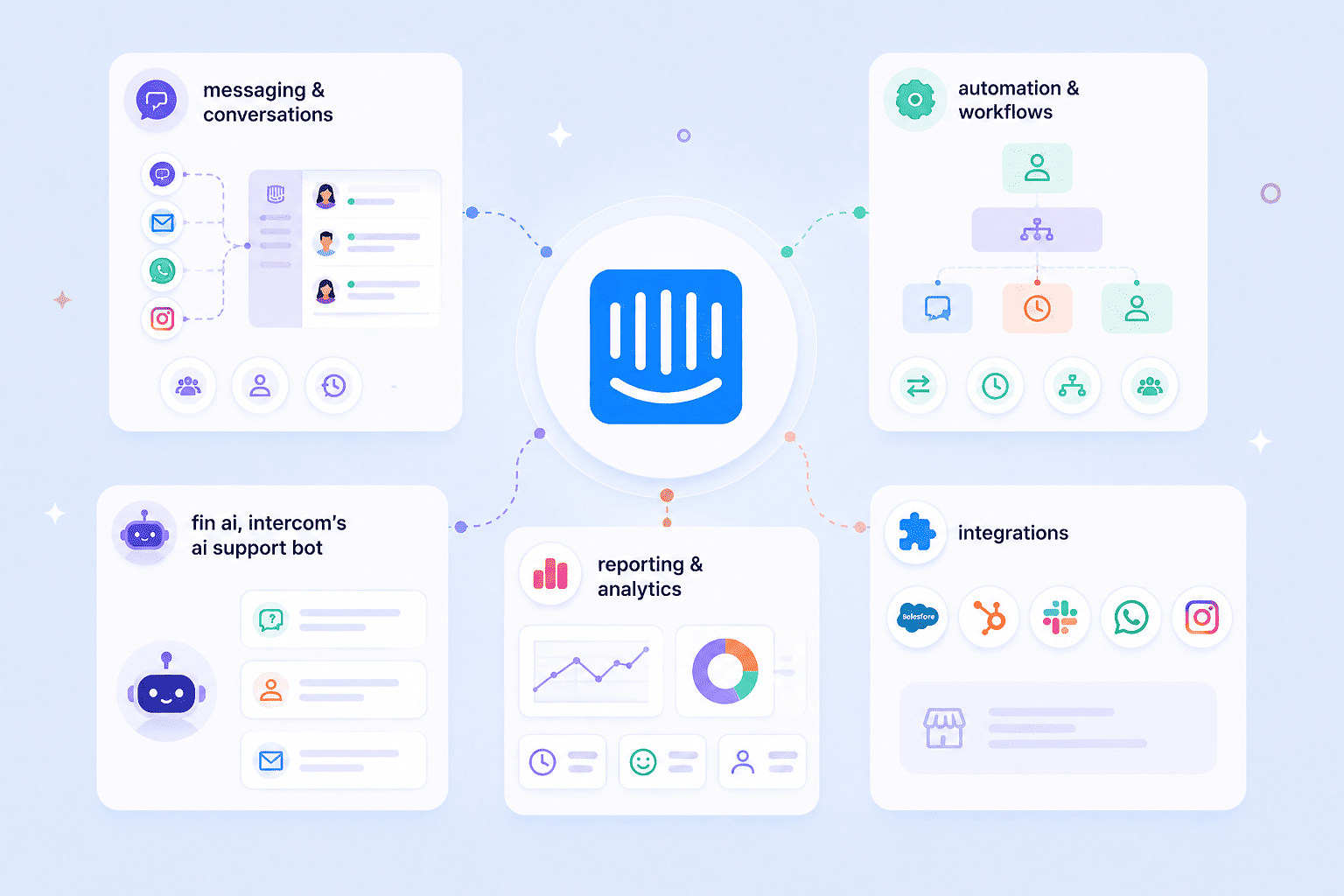
Intercom is an AI-powered customer service platform that combines a helpdesk, an autonomous AI agent (Fin), and proactive messaging tools in a single system built for support teams at B2B SaaS and technology companies.
Source: Intercom
The company positions itself as "the only helpdesk designed for the AI Agent era", built so that AI and human agents share the same customer record, conversation history, and feedback loops rather than operating as separate systems. Fin AI Agent averages a 76% resolution rate across more than 7,000 customers and resolves close to 2 million customer queries every week.
The Intercom App Store houses 350+ integrations spanning CRM, analytics, billing, communication, engineering, and data infrastructure tools.
On the technical side, Intercom offers a versioned REST API (v2.16) with official SDKs in PHP, Node.js, Ruby, Go, Java, and .NET, topic-based webhooks for event-driven automation, and a Canvas Kit framework for building custom Messenger and Inbox apps. Rate limits sit at 10,000 API calls per minute per app and 25,000 per workspace.
The integration categories available to Intercom users include:
CRM and sales: Salesforce, HubSpot, Pipedrive for contact sync and pipeline visibility
Team communication: Slack for real-time alerts, escalation routing, and in-channel replies
Engineering and project management: Jira, GitHub, Trello for bug tracking and feature request escalation
Billing and payments: Stripe, Chargebee for subscription context and in-conversation payment actions
Data infrastructure and analytics: Segment, Mixpanel, Google Analytics for behavioral profiling and event routing
Knowledge and content: Notion, Guru, Confluence for Help Center content sourcing
Messaging channels: WhatsApp, Facebook, Instagram, SMS for omnichannel customer communication
B2B data enrichment: ZoomInfo, Clearbit for contact intelligence and company data
With that ecosystem as context, here are the seven integrations we selected as the best options for extending Intercom across the categories that matter most to support and go-to-market teams.
1. ZoomInfo: Best Intercom Integration for B2B Data Enrichment and Go-to-Market Intelligence
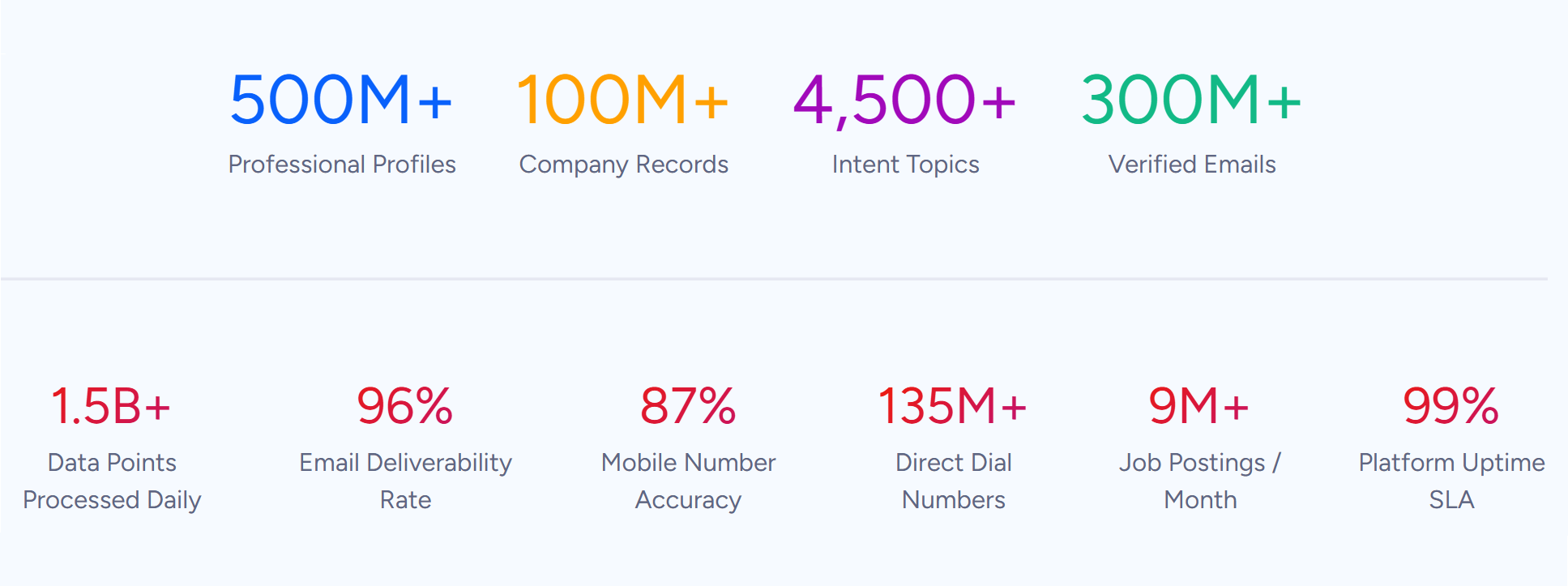
ZoomInfo is a B2B data and go-to-market platform built on 500M contacts, 100M companies, 135M+ verified phone numbers, and 200M+ verified business email addresses. It integrates with Intercom through automation platforms like Zapier, Workato, and Tray, enriching your Intercom contact records with verified B2B data, company intelligence, buyer intent signals, and technographic insights.
Source: ZoomInfo
Connecting the two platforms unlocks:
Contact records in Intercom that carry verified emails, direct dials, job titles, and seniority levels from ZoomInfo's database, so agents and Fin operate on accurate profiles rather than whatever the customer self-reported
Company-level firmographics (revenue, employee count, industry, corporate hierarchy) and technographic data covering 30,000+ technologies attached to Intercom company records, enabling smarter routing and segmentation
Buyer intent signals flowing into your customer data layer, so support and sales teams can identify when existing customers or prospects are actively researching relevant topics
Workflow triggers based on ZoomInfo enrichment events: when a new lead enters Intercom, an automation enriches it with ZoomInfo data and routes it based on company-level fit
How ZoomInfo Integrates with Intercom
ZoomInfo connects to Intercom through third-party automation platforms: Zapier, Workato, and Tray. These platforms sit between ZoomInfo's data APIs and Intercom's REST API, enabling automated workflows without custom development.
The integration is flexible. Because both ZoomInfo and Intercom expose full APIs, the automation layer can trigger on any event either platform supports. Zapier offers the simplest setup for teams without engineering resources; Workato and Tray provide orchestration with conditional logic, error handling, and higher-volume throughput for teams processing thousands of records.
Contact and Company Data Enrichment: Fill the Gaps Your Helpdesk Cannot Fill on Its Own
Intercom captures conversation data: messages exchanged, tickets filed, help center articles viewed. What it cannot do on its own is verify whether a phone number still works, detect a job change, or reveal what technology stack a company runs.
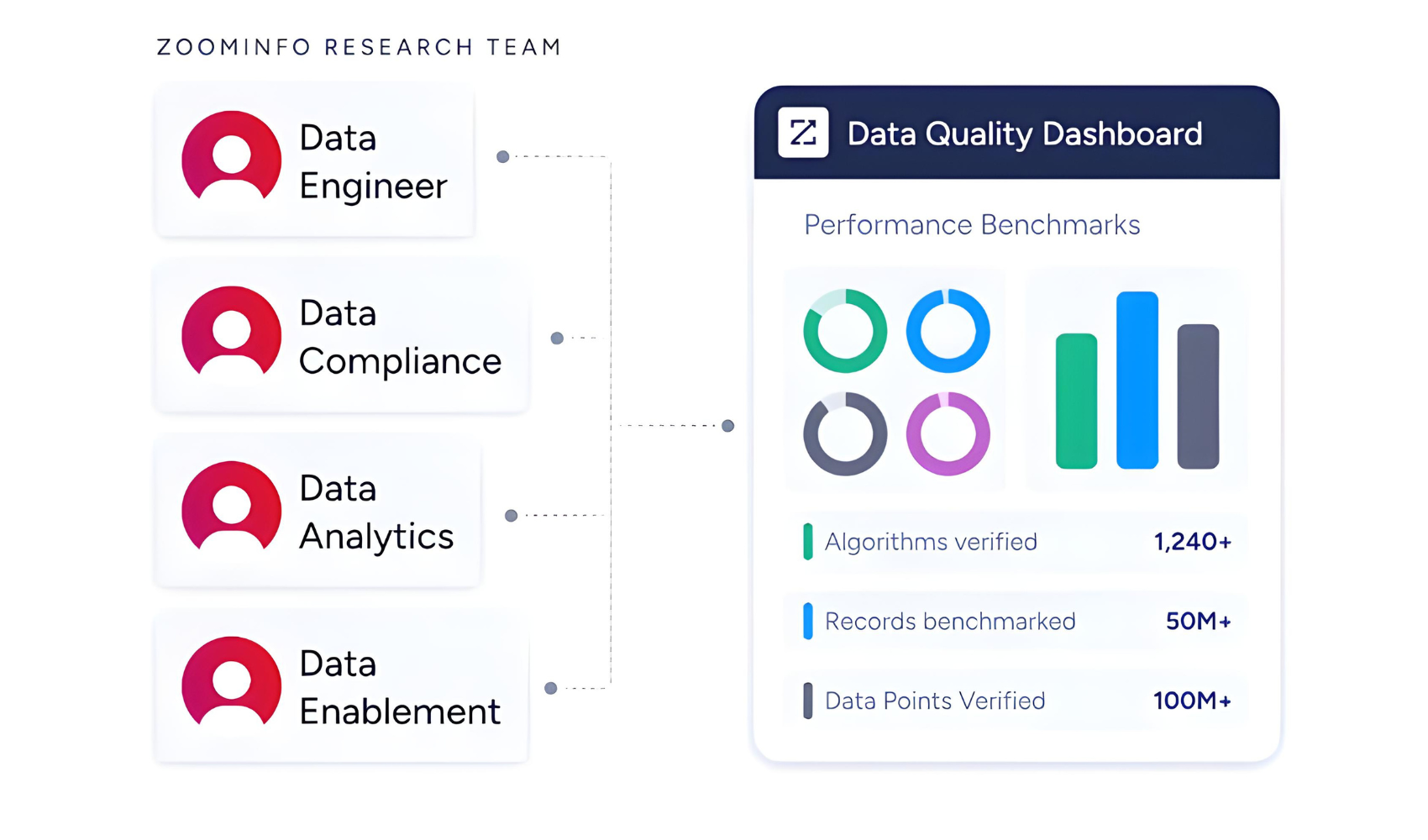
When a new contact enters Intercom, an automation workflow can trigger ZoomInfo to append the verified business email, direct dial, title, department, and seniority, plus company-level firmographics and technographic data covering 30,000+ technologies. The enrichment flows through a verification pipeline backed by 300+ human researchers, reaching up to 95% accuracy on first-party data.
Source: ZoomInfo
ZoomInfo in action: A prospect opens a conversation in Intercom with only an email address. The automation triggers ZoomInfo enrichment, appending their direct dial, current title (VP of Customer Success), company profile (a 600-person healthcare SaaS running Salesforce and Zendesk), and three other decision-makers in their department.
Your support agent sees the full account picture before typing the first reply, and the enriched data feeds Intercom's Workflow routing logic to assign the conversation to the enterprise support queue.
Buyer Intent Data: Identify Accounts That Are Actively In-Market
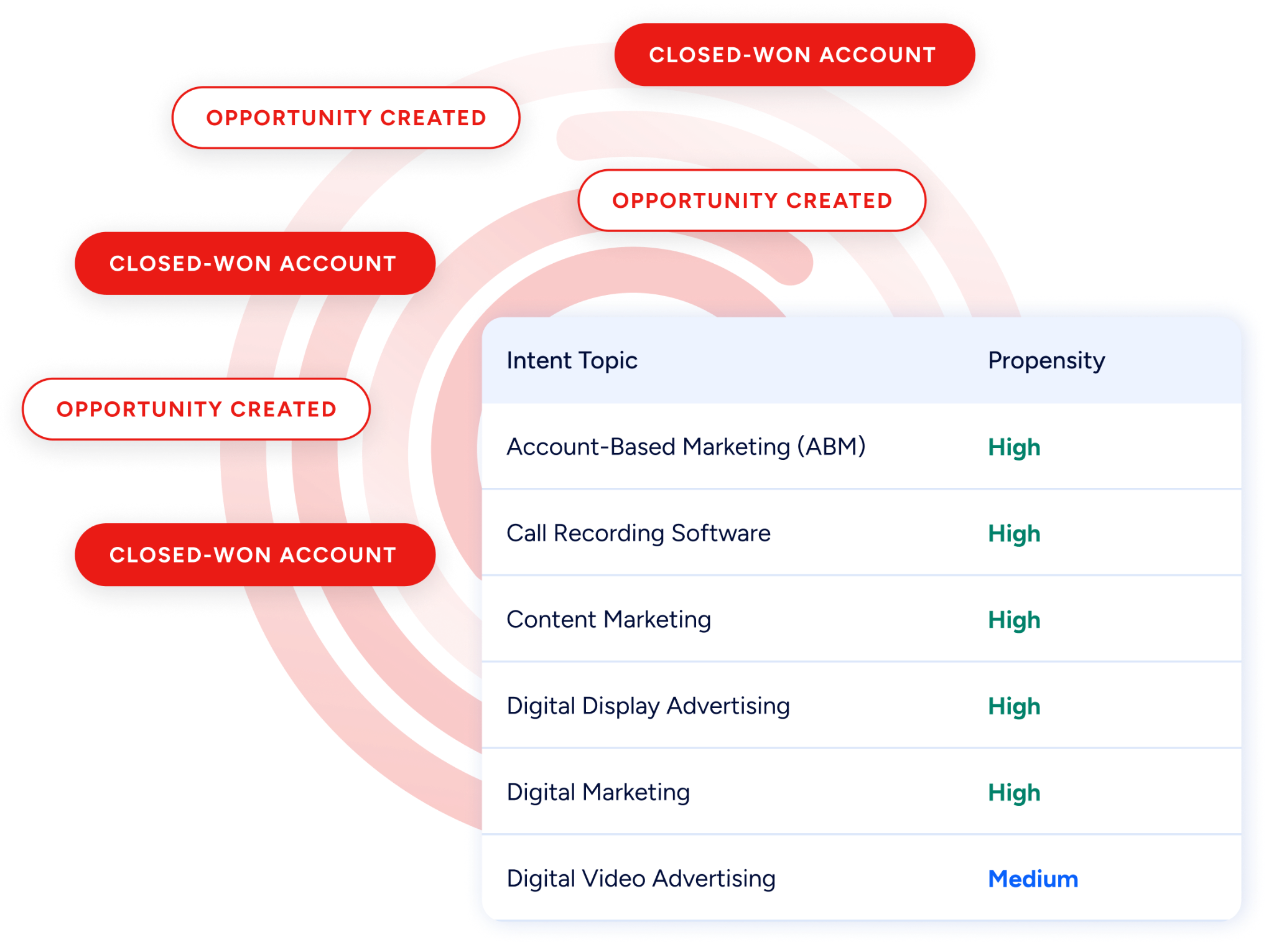
ZoomInfo's Buyer Intent tracks signals from 210 million IP-to-Organization pairings and 6 trillion+ new keyword-to-device pairings monthly, revealing which companies are actively researching topics relevant to your product.
Source: ZoomInfo
Through the automation layer, intent signals can flow into Intercom as custom user attributes or events. When a customer account shows high intent activity for "customer service platform migration," that signal becomes visible to the support agent handling their next conversation and can trigger a Workflow that routes the conversation to a retention specialist.
Guided Intent (exclusive to ZoomInfo) identifies research topics historically correlated with deal success in your business, so the signals are calibrated to your actual win patterns rather than generic keyword thresholds.
ZoomInfo in action: ZoomInfo detects that a current customer account has been researching "helpdesk alternatives" for two weeks. The intent signal syncs to Intercom as a custom attribute, triggering a Workflow that flags the next support conversation from that account for priority handling and notifies the CSM in Slack, all while the customer is still evaluating.
Technographic Intelligence and Company Profiling
ZoomInfo profiles the tech stack of 30+ million companies, tracking 30,000+ technologies across 200+ categories.
When this data flows into Intercom company records through the automation pipeline, it powers routing and segmentation decisions: enterprise accounts running Salesforce route to agents trained on that CRM's integration, companies using a competitor's support tool get flagged for specialized handling, and Fin can reference the company's technology context when constructing responses.
Beyond the enrichment feeding your Intercom instance, ZoomInfo's intelligence sits within a wider platform: the GTM Context Graph processes 1.5B + data points daily, and APIs and MCP expose the same intelligence to any tool or AI agent in your stack.
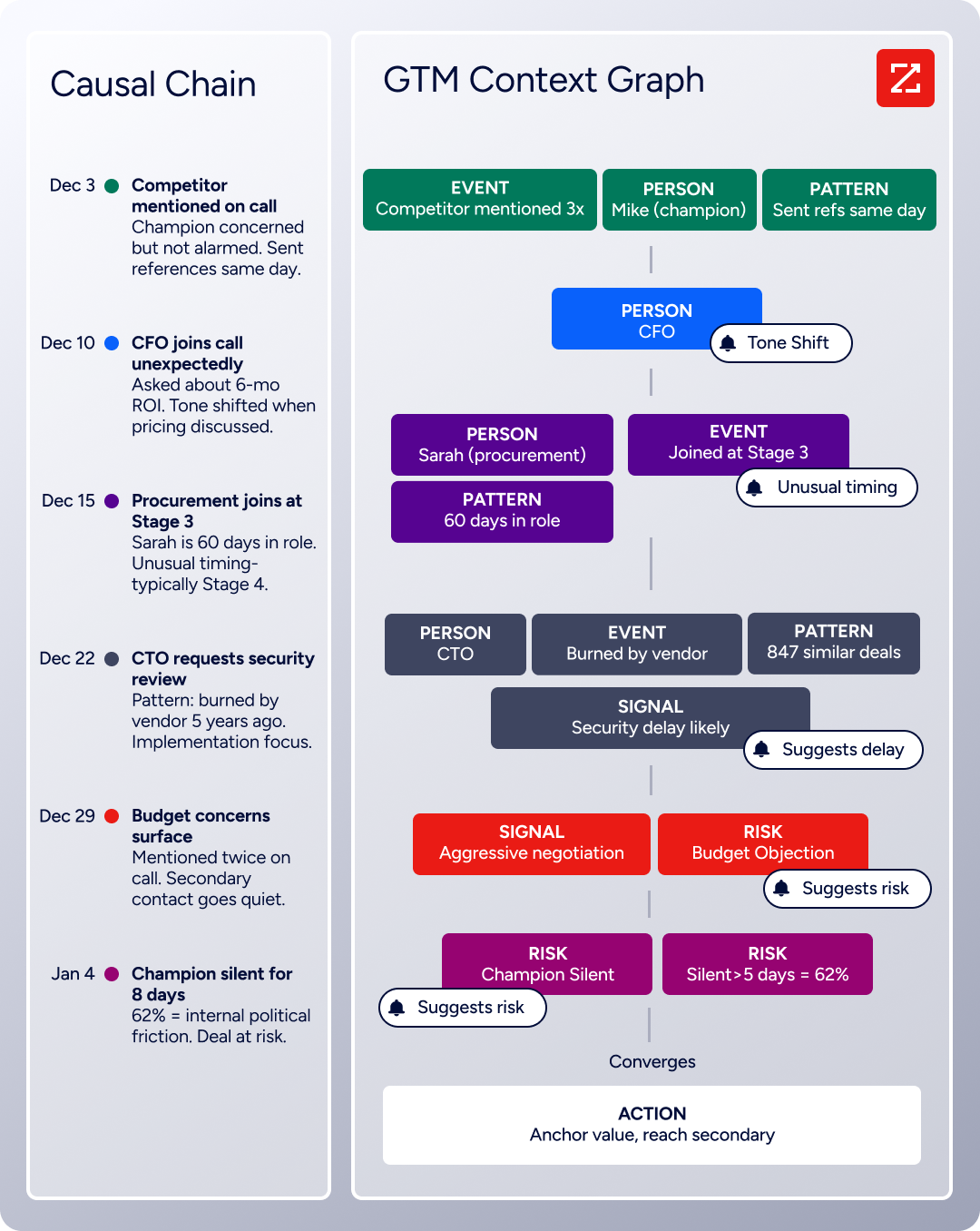
Source: ZoomInfo
Seismic's sales team attributed 39% of active pipeline to opportunities identified or influenced by ZoomInfo signals, reporting 54% productivity gains and saving 11.5 hours per week per seller. (Seismic Case Study)
ZoomInfo Pricing
ZoomInfo uses a consumption-based pricing model with custom quotes based on usage, users, credit volume, and features.
It is organized into Sales, Marketing, and standalone product lines, each in Professional, Advanced, and Enterprise tiers. API access (which powers the automation-based Intercom integration) is included in all relevant plans.
ZoomInfo Lite is a permanent free tier (no credit card, no time limit) with 10 monthly export credits, searches, and the Chrome extension, making it a practical way to evaluate the data quality before committing. A separate 7-day free trial covers paid features including advanced intent data and AI capabilities.
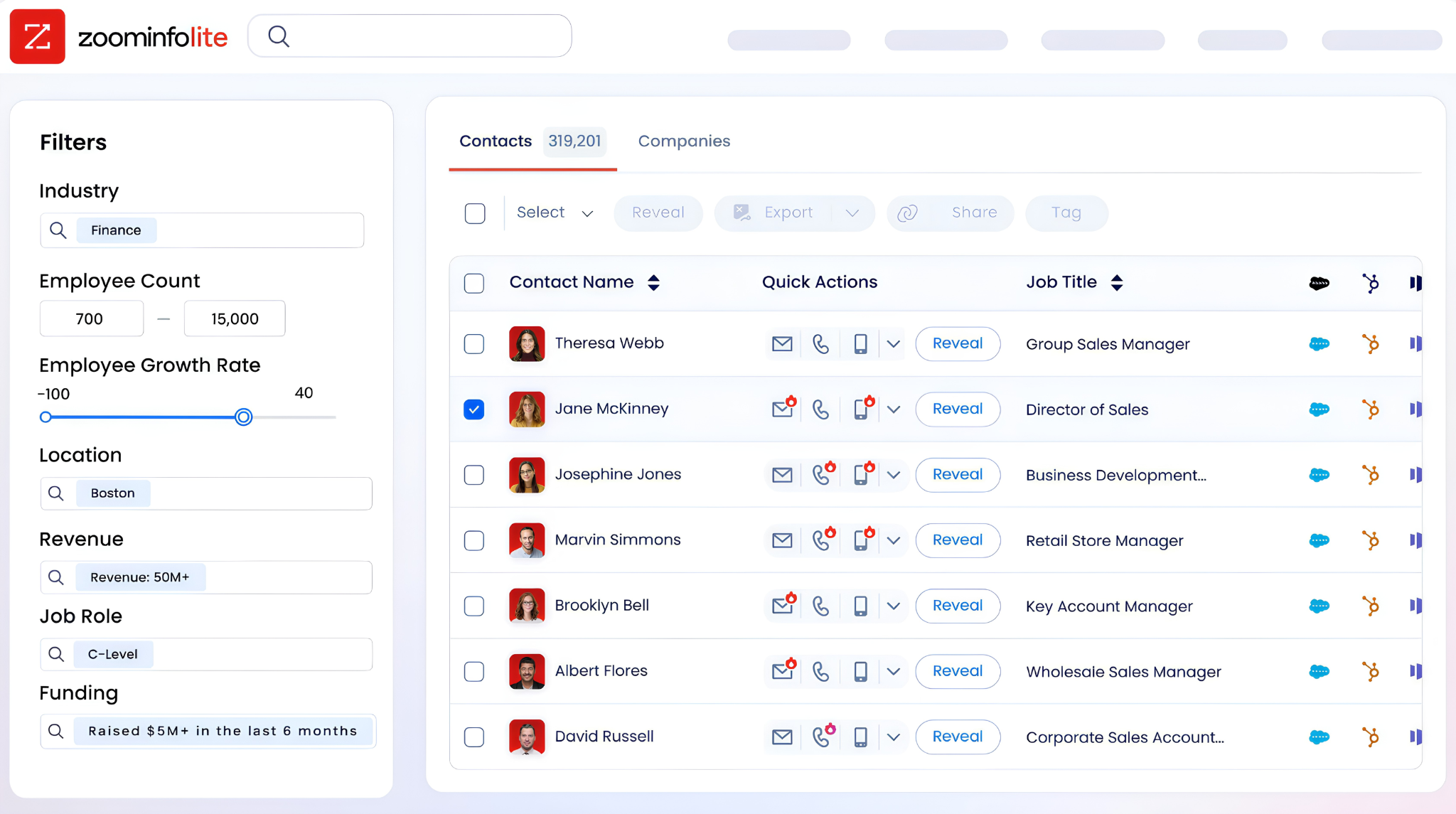
Source: ZoomInfo
On the automation side, Zapier's Professional plan starts at $19.99/month for multi-step workflows, and Workato and Tray offer enterprise pricing for higher-volume orchestration.
Who Should Use the ZoomInfo Integration?
B2B support teams whose conversation routing depends on accurate company and contact data: enrichment gives Intercom Workflows the firmographic, technographic, and seniority attributes needed to route conversations to the right queue without manual triage
Revenue operations teams that need Intercom contact records enriched with verified direct dials, job titles, and company intelligence so that support-identified expansion signals carry enough context for sales follow-up
Customer success teams running retention plays that need intent data surfaced in Intercom to detect at-risk accounts showing research activity around competitor products before those accounts contact support
2. Salesforce: Best Intercom Integration for Enterprise CRM Synchronization
Salesforce is the world's #1 CRM by IDC revenue market share. It integrates with Intercom to keep support conversations and sales records in continuous bidirectional sync. The integration is a first-party app built by Intercom, available through the Intercom App Store, and requires no third-party middleware.
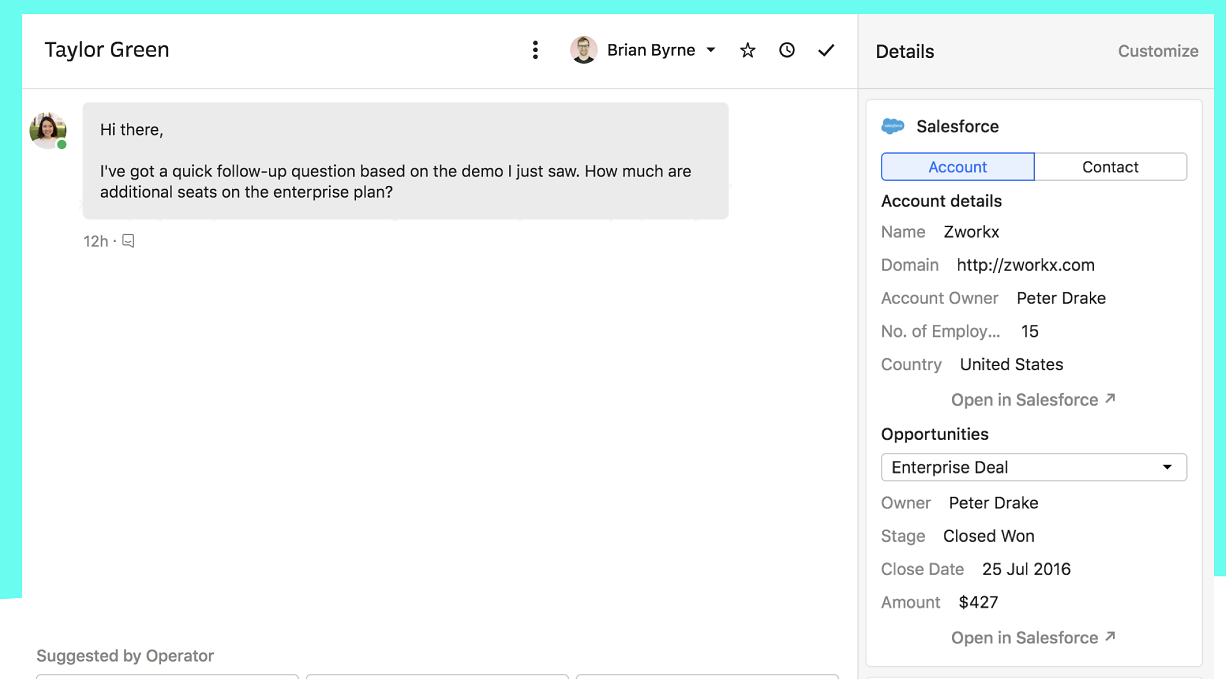
Source: Salesforce
Key integration capabilities include:
Bidirectional contact and lead sync on a five-minute refresh cycle, automatically creating Salesforce records from Intercom conversations
Every Intercom conversation logged as a Salesforce activity against the relevant Contact or Account record
Salesforce CRM data (open opportunities, account tier, recent activity) surfaced in the Intercom inbox sidebar
New Salesforce opportunity creation from within the Intercom conversation interface
How Salesforce Integrates with Intercom
The integration connects through OAuth with bidirectional data flow. It is a native first-party connector built and maintained by Intercom, requiring Intercom Advanced or Expert plan plus Salesforce Enterprise or Unlimited edition with API access enabled.
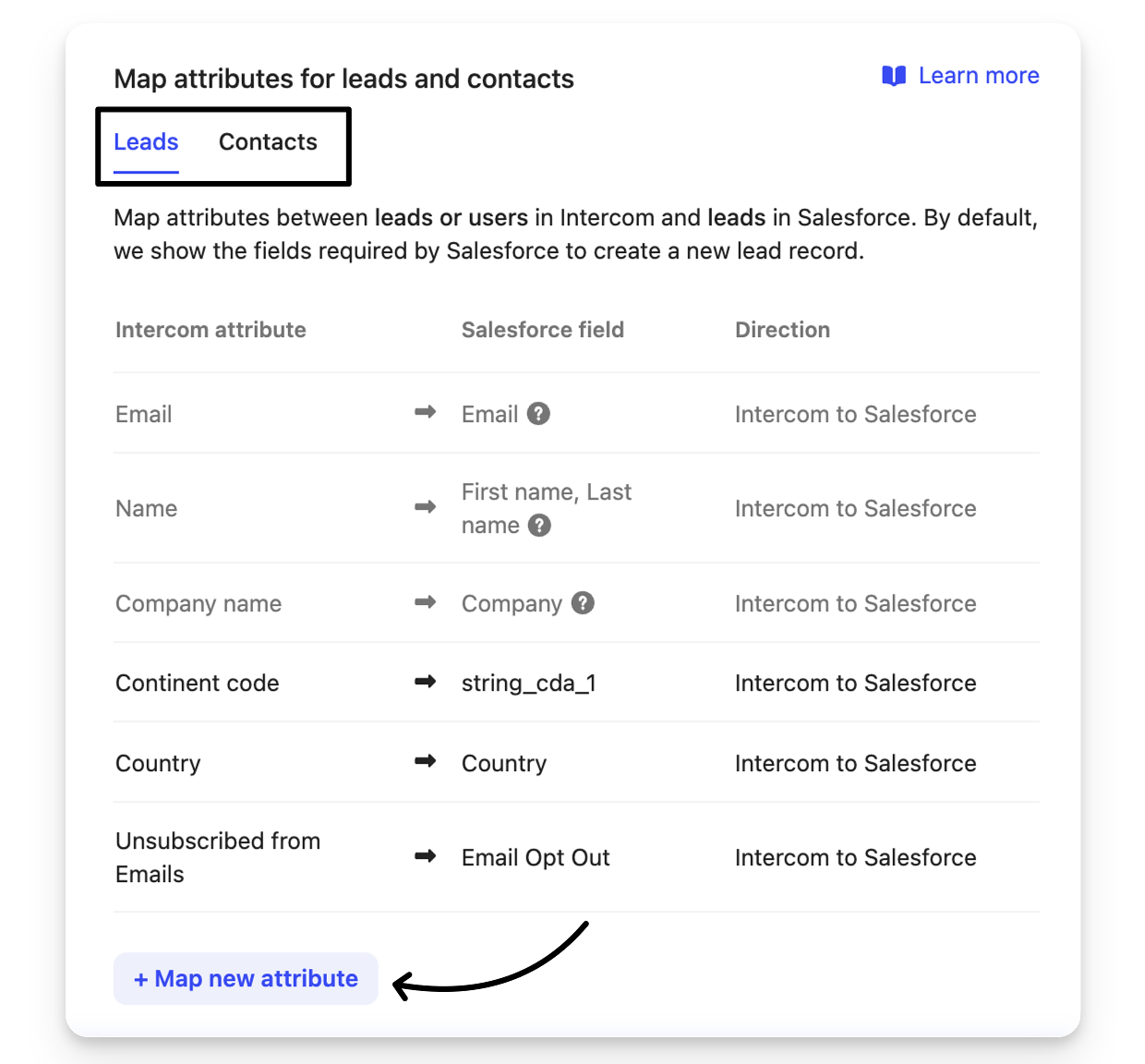
Source: Salesforce
1. Bidirectional Contact and Lead Sync.
When Intercom captures a new contact in a conversation, the integration automatically creates the corresponding Salesforce Lead or Contact record. Changes sales reps make inside Salesforce (account ownership, lifecycle stage, deal status) propagate back into Intercom within the five-minute window. Support agents never operate on stale account context.
2. Intercom Conversations Logged as Salesforce Activities.
Every support conversation automatically logs to the relevant Salesforce Contact or Account as an activity record. Sales reps see the full support interaction history alongside their own activities without opening Intercom. An account manager preparing for a quarterly business review can see that the primary contact filed three support tickets last month, directly inside Salesforce.
3. CRM Data Surfaced in the Intercom Inbox Sidebar.
When a support agent handles a live conversation, the right-hand sidebar displays the Salesforce Contact record, associated open Opportunities with stage and value, account tier, and recent activity history. Agents see immediately whether they are talking to a contact at a high-tier account with open renewal opportunities or a small trial account, and calibrate their response accordingly.
4. Opportunity Creation from Within Intercom.
When a support conversation reveals an upsell signal, the agent can create a new Salesforce Opportunity directly from the conversation interface. The record automatically associates with the correct Account and Contact, giving the assigned sales rep a structured handoff without relying on Slack messages or emails that may never get followed up.
Salesforce Pricing
The Intercom integration requires Salesforce Enterprise edition or above for API access:
Enterprise: $175/user/month (billed annually), includes API access required for the integration
Unlimited: $350/user/month (billed annually), full AI suite and Premier Success Plan included
Agentforce 1: $550/user/month (billed annually), unmetered Agentforce usage
On the Intercom side, the integration requires the Advanced plan ($85/seat/month) or Expert plan ($132/seat/month).
Who Should Use the Salesforce Integration?
B2B support teams handling named accounts tracked in Salesforce that need account context (open opportunities, tier, owner) visible in the inbox sidebar during live conversations
Organizations with structured expansion revenue goals where support agents identify and route upsell signals through opportunity creation directly from Intercom
Enterprise teams where sales and support need a shared view of every customer interaction, with conversation logs appearing on the Salesforce timeline alongside sales activities
3. HubSpot: Best Intercom Integration for Marketing Automation and CRM Lifecycle Alignment
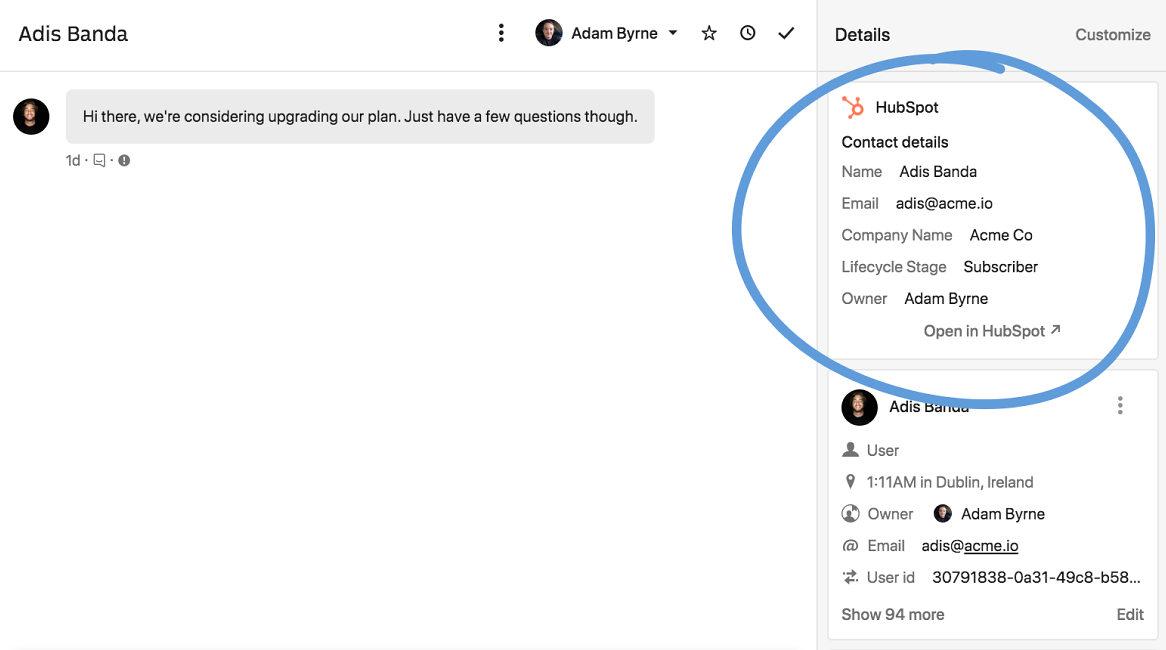
HubSpot is a CRM and marketing automation platform that integrates with Intercom to bridge inbound marketing engagement and customer support conversations. The integration is a first-party app available in the Intercom App Store, connecting through OAuth without engineering involvement.
Source: HubSpot
Key integration capabilities include:
Every Intercom conversation synced to the matching HubSpot contact's activity timeline as a formatted note with transcript summary and a direct link back to the full thread
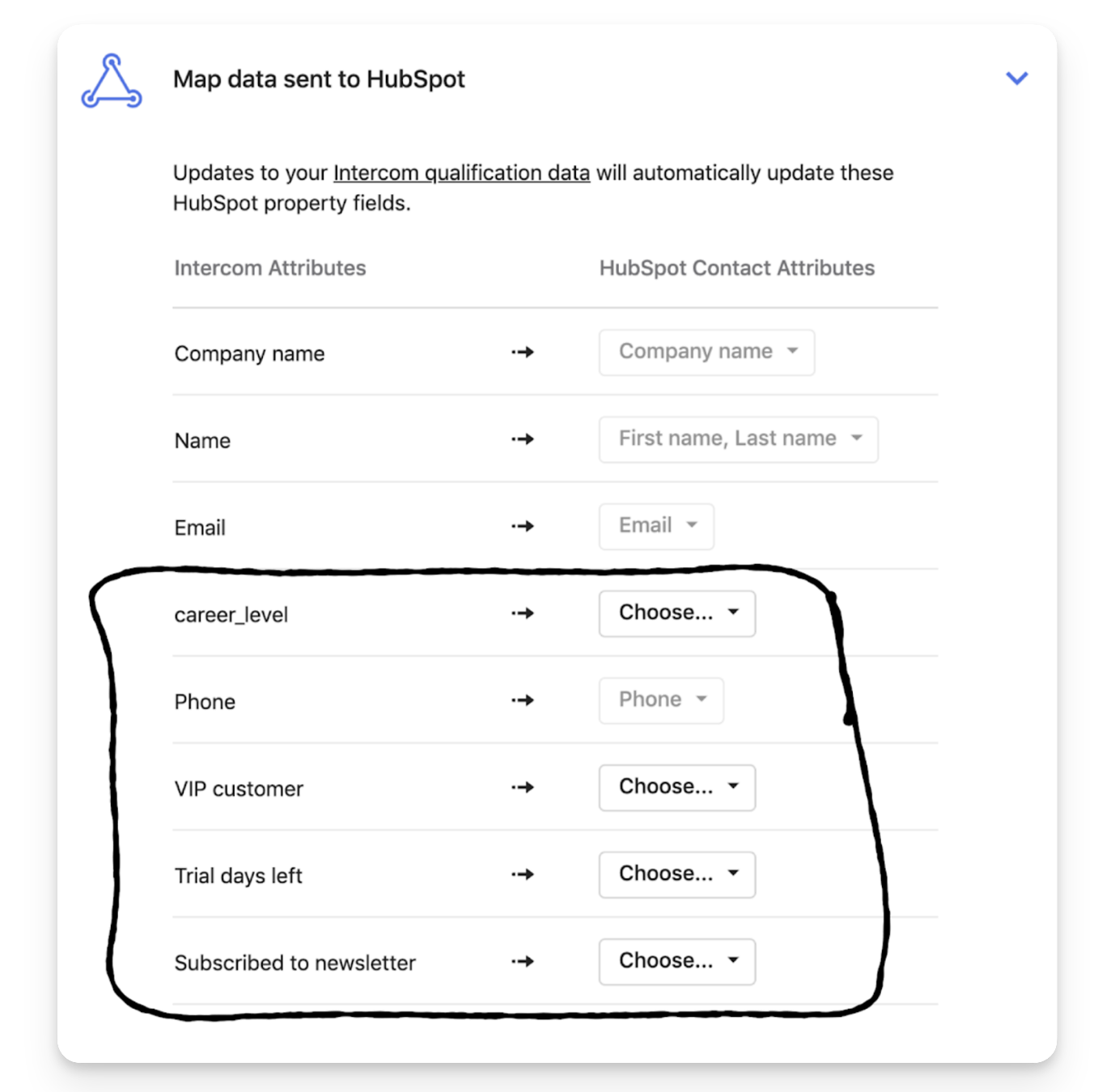
Bidirectional contact attribute sync flowing HubSpot lifecycle stage, list membership, and deal data into Intercom as user attributes
Linked HubSpot Service Hub tickets from Intercom tickets, with bidirectional status and priority sync
HubSpot behavioral data (email opens, form submissions, campaign interactions) flowing into Intercom as user events
How HubSpot Integrates with Intercom
Setup runs through OAuth from Intercom's integration settings. The native App Store integration handles the core CRM sync and conversation logging without an intermediary. The integration supports HubSpot's standard CRM objects (Contacts, Companies, Deals) and syncs into Intercom's contact and company records as custom attributes.
Source: HubSpot
1. Intercom Conversations Logged to HubSpot Contact Timelines.
When a customer opens an Intercom conversation, it syncs to the corresponding HubSpot contact record as a formatted activity note with timestamps, agent name, and a direct link back to the full thread. A marketing manager working inside HubSpot can see that a trial user who opened three campaign emails also had two support conversations about a setup error, without needing an Intercom seat.
2. Bidirectional Contact Attribute Sync.
HubSpot contact properties (lifecycle stage, marketing list membership, active deal stage, custom fields) flow into Intercom as user attributes.
Intercom Workflows can route high-value contacts to specific agents, trigger different Fin responses, or apply different SLAs based on where the contact sits in the HubSpot pipeline. Attribute updates from Intercom sync back to HubSpot, keeping the CRM current with support-gathered intelligence.
3. HubSpot Service Hub Ticket Linkage.
For teams using Intercom for front-line support and HubSpot Service Hub for back-office tracking, the integration links tickets across both platforms with bidirectional status, priority, and owner sync. When a HubSpot ticket is resolved internally, the linked Intercom ticket updates automatically.
4. Marketing Engagement Data Powering Support Personalization.
HubSpot email opens, form submissions, and campaign participation flow into Intercom as user events and attributes. Fin and Workflows can personalize responses based on lifecycle context: a Workflow triggers a different Fin procedure for contacts in an "active trial" segment versus long-term customers, and proactive support messages can target audiences defined by HubSpot lifecycle stage.
HubSpot Pricing
HubSpot uses a hybrid model combining per-seat charges with flat-fee tier charges for marketing-focused hubs:
Free CRM: $0 (limited to 2 users), supports basic contact sync with Intercom
Starter Customer Platform: starts at $9/seat/month (annual), basic email marketing and form capture
Marketing Hub Professional: starts at $800/month (annual, includes 3 Core Seats), unlocks the marketing automation Workflows builder needed for audience-targeted messaging
Sales/Service Hub Professional: starts at $90/seat/month (annual), unlocks deal pipeline data and Help Desk SLA management for ticket linkage
Teams mixing tiers across Hubs should note that all Core Seats are billed at the rate of the highest-tier Hub, which can significantly inflate costs.
Who Should Use the HubSpot Integration?
Inbound-focused B2B teams that run marketing campaigns in HubSpot and want support agents to see each contact's marketing engagement history directly inside Intercom
Mid-market SaaS companies where marketing, sales, and support touch the same contacts at different lifecycle stages and need a synchronized view across both platforms
Teams using Intercom Workflows and Fin that need conversation routing and AI behavior to adapt based on HubSpot deal stage, lifecycle position, or campaign participation
4. Slack: Best Intercom Integration for Real-Time Support Team Coordination
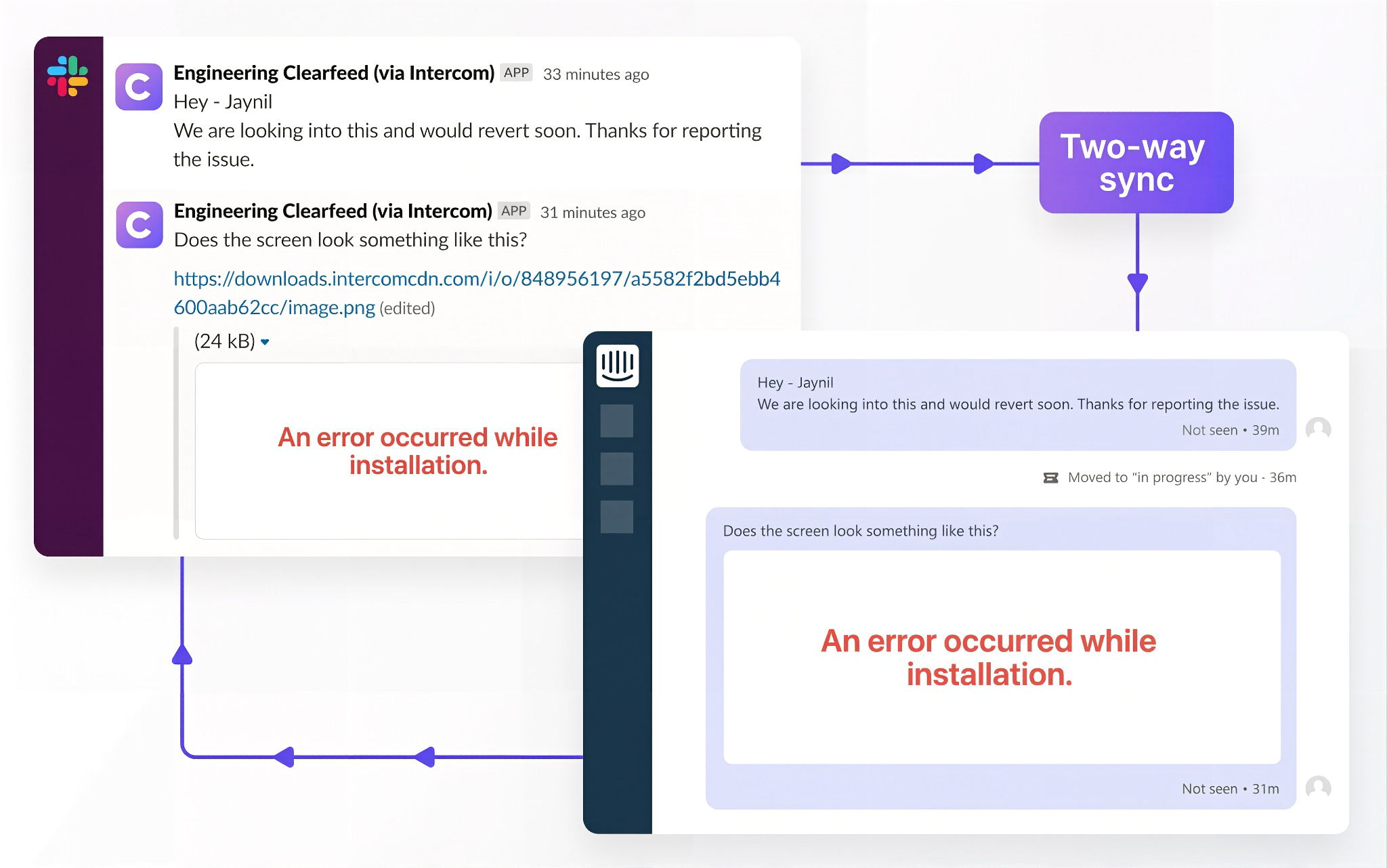
Slack is a team communication platform that integrates with Intercom to surface live conversation alerts and enable bidirectional replies directly from Slack channels. The integration is a native first-party app built and maintained by Intercom, available through the Intercom App Store.
Source: Slack
Key integration capabilities include:
Real-time conversation alerts routed to designated Slack channels, filterable by VIP status, sentiment, keyword triggers, or after-hours timing
Direct replies to Intercom conversations from within Slack, with responses appearing in the customer's thread in real time
Cross-team escalation routing that pushes Intercom conversation context to engineering, billing, or product channels
No third-party connector required for the core notification-and-reply flow
How Slack Integrates with Intercom
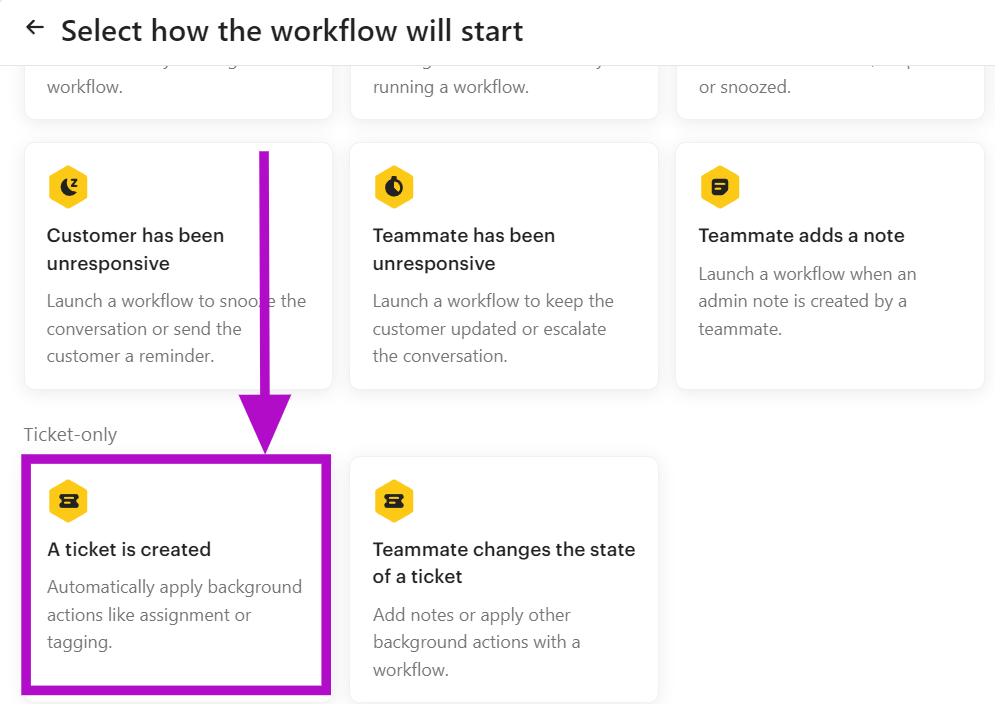
The connection runs through OAuth: a workspace admin authorizes Intercom's access to the target Slack workspace, and Intercom posts to and receives replies from designated channels. Basic notifications are available on the Essential plan; filtered routing using Intercom's Workflows builder requires the Advanced plan ($85/seat/month).
Source: Slack
1. Filtered Real-Time Conversation Alerts.
Rather than broadcasting every new conversation as a Slack alert, the integration supports configurable filtering. VIP account alerts fire for high-value contacts. Sentiment-based alerts trigger when Intercom detects negative emotion. Keyword triggers catch conversations containing terms like "cancel," "outage," or "refund."
After-hours triggers route conversations opened outside business hours to an on-call channel. Each notification includes the customer name, company, opening message, and a direct link to the Intercom conversation.
2. Replying to Intercom Conversations Directly from Slack.
Team members who receive a conversation alert can reply directly from Slack, and the response appears in the customer's active Intercom conversation. The customer sees a normal agent response with no indication it came from Slack. This is especially valuable for engineers, account managers, and billing specialists who need to participate in customer conversations without holding Intercom seats.
3. Escalation and Cross-Team Collaboration.
The integration enables structured escalation paths where conversation context pushes automatically from Intercom to designated Slack channels (engineering triage, billing escalation, CSM channels).
Internal team members discuss the issue in a thread, and their responses feed back into the Intercom conversation as internal notes, keeping the customer-facing record complete while coordination happens in Slack.
Slack Pricing
Slack uses per-seat pricing with a Fair Billing Policy that credits inactive users:
Pro: $7.25/user/month (annual), unlimited message history and app integrations; sufficient for the full Intercom integration
Business+: $15/user/month (annual), adds SAML SSO, custom retention policies, and AI features (thread summaries, channel recaps)
Enterprise+: custom pricing, multi-workspace management and DLP
The core Intercom integration (alerts, replies, escalations) works fully on the Pro plan. Business+ is only needed for Slack's AI summarization features or SSO-based provisioning.
Who Should Use the Slack Integration?
Support teams that coordinate internally on Slack and need filtered alerts for high-priority Intercom conversations without keeping the inbox open continuously
Organizations where engineers, account managers, or billing specialists need to participate in customer resolutions from Slack without holding full Intercom seats
Teams whose escalation process currently requires manual copy-paste between Intercom and Slack, which the integration replaces with a structured bidirectional flow
5. Jira: Best Intercom Integration for Engineering Escalation and Bidirectional Ticket Sync
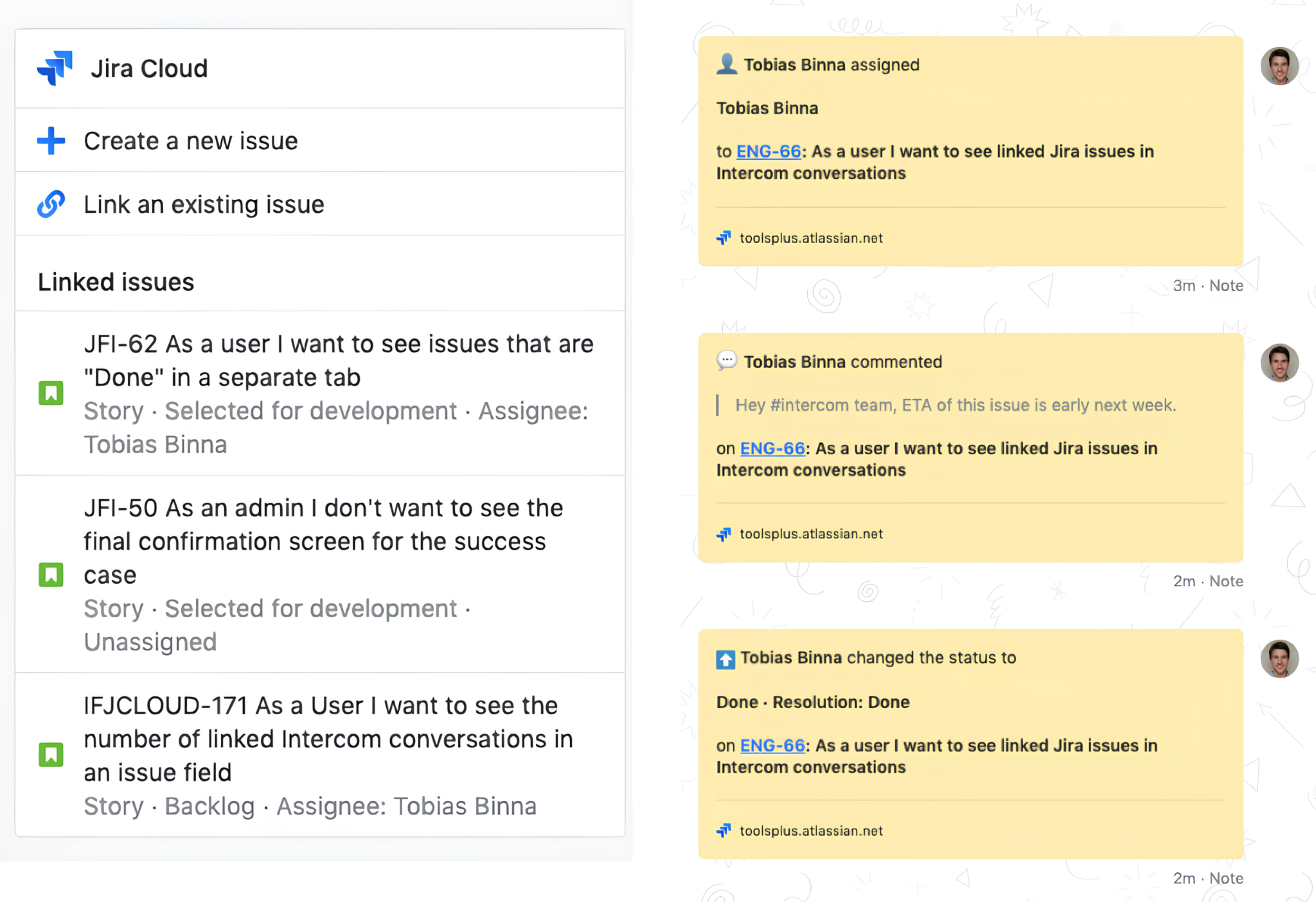
Jira is Atlassian's project management and issue tracking platform. It integrates with Intercom to automatically escalate customer-reported bugs and feature requests into engineering workflows. The integration is a native first-party app built by Intercom, available through the Intercom App Store, and supports Jira Cloud only.
Source: Jira
Key integration capabilities include:
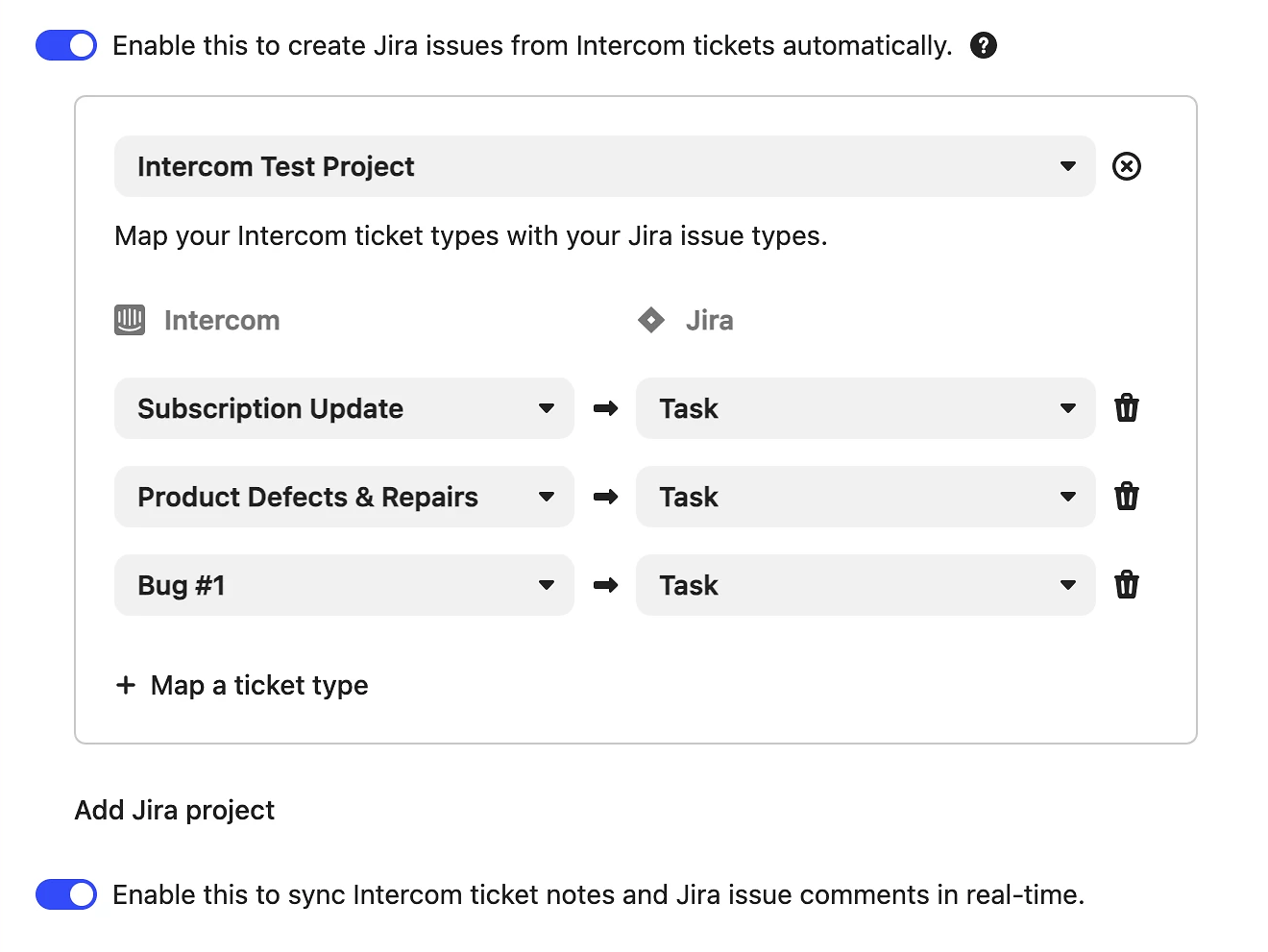
Automatic Jira issue creation from Intercom tickets when a configured ticket type is matched
Bidirectional status synchronization that updates the Intercom ticket when a Jira issue changes status
Comment and note sync in both directions, keeping engineering and support context aligned
Customer-facing notifications sent via Messenger or email when the linked Jira issue progresses
How Jira Integrates with Intercom
The Jira for Tickets integration is configured through Intercom's Workflows builder using native templates. The integration requires Intercom's Advanced plan ($85/seat/month) or Expert plan ($132/seat/month).
Source: Jira
1. Automatic Jira Issue Creation from Intercom Ticket Types.
When a support ticket matches a configured ticket type ("Bug Report," "Feature Request"), the integration automatically creates a linked Jira Cloud issue in the designated project.
The Jira issue carries over the ticket summary, description, and conversation context from Intercom, eliminating manual copy-paste between systems. The mapping between Intercom ticket types and Jira projects is controlled inside the Workflows builder.
2. Bidirectional Status Synchronization with Customer Notifications.
When a Jira issue transitions between statuses (from "To Do" to "In Progress," from "In Progress" to "Done"), the linked Intercom ticket updates automatically. Support agents see engineering progress without opening Jira. When the issue reaches "Done," Intercom can notify the customer via Messenger or email, closing the loop without manual follow-up.
3. Comment and Note Sync Across Both Platforms.
Notes entered on a Jira issue appear in the linked Intercom ticket thread, and notes added in Intercom surface in the Jira issue. An engineer investigating a bug can leave technical context on the Jira issue, and the support agent sees it in Intercom without checking a separate system. This bidirectional note flow lets both teams work from a shared context.
Jira Pricing
Jira Cloud is available on four tiers at atlassian.com/software/jira/pricing:
Free: $0 (up to 10 users), core issue tracking with 100 automation rule runs/month
Standard: $7.91/user/month (annual), adds user roles, Rovo AI, 1,700 automation runs/month; the entry tier for teams using the Intercom integration
Premium: $14.54/user/month (annual), cross-team planning, 24/7 support, 99.9% uptime SLA
Enterprise: custom pricing, Atlassian Analytics and Data Lake, 99.95% uptime SLA
Support agents do not need Jira seats to benefit from the bidirectional sync, since updates from Jira flow back into Intercom automatically.
Who Should Use the Jira Integration?
Support teams that regularly escalate bugs and feature requests to engineering and lose time manually copying ticket details between Intercom and Jira
Engineering teams using Jira Cloud that need customer context flowing into their issue tracker without requiring support agents to file Jira issues directly
Organizations where support agents check Jira manually to track engineering progress before replying to waiting customers, which the bidirectional status sync eliminates
6. Stripe: Best Intercom Integration for Live Billing Context and In-Conversation Payment Actions
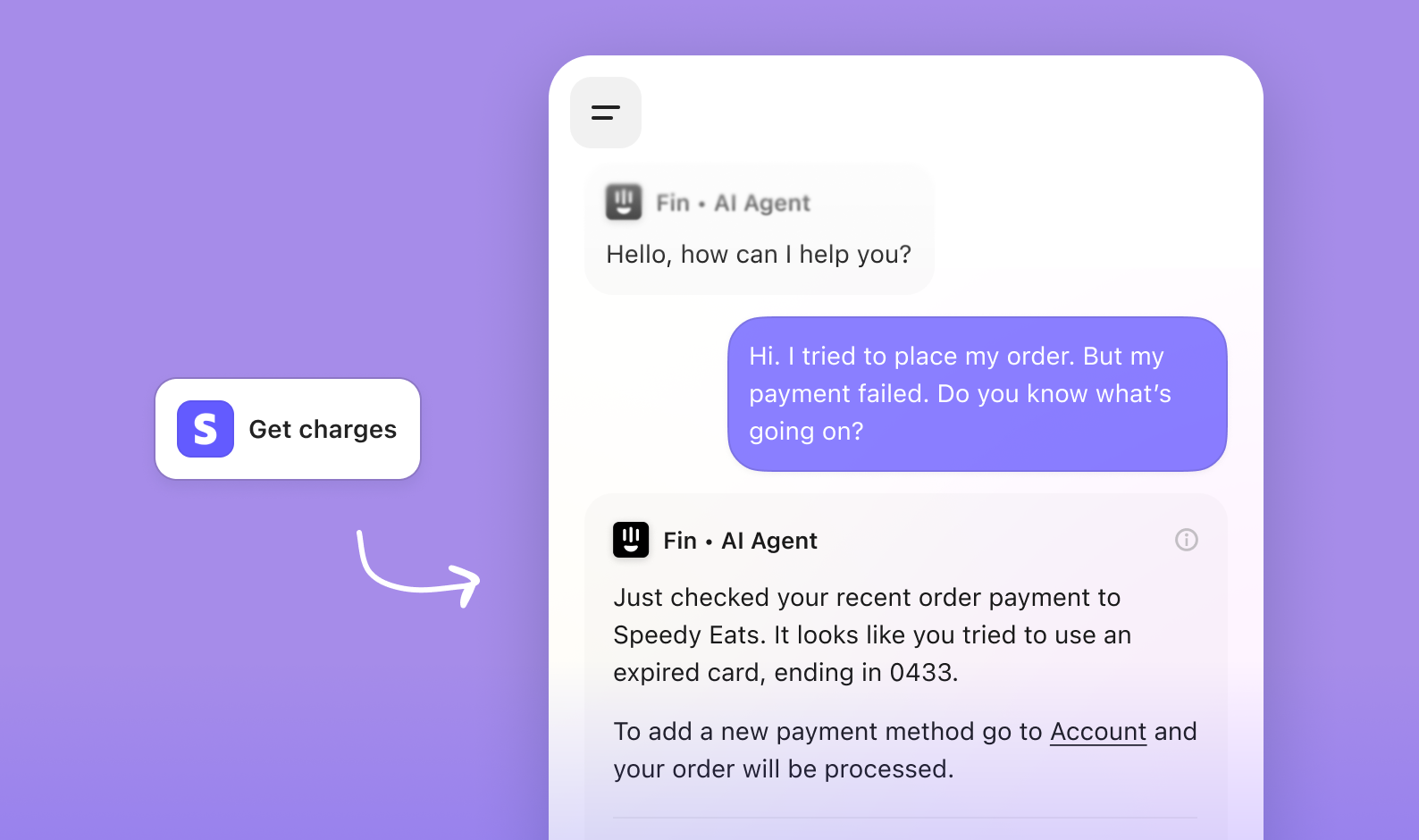
Stripe is a payment processing and financial infrastructure platform that integrates with Intercom to give support agents live billing context and the ability to take payment actions directly from the conversation sidebar. The integration is a first-party app in the Intercom App Store, built by Stripe.
Source: Stripe
Key integration capabilities include:
Active subscriptions, current plan tier, billing period, and three most recent charges displayed in the conversation sidebar
Refund and charge cancellation actions available from within Intercom for agents with appropriate Stripe permissions
Stripe billing lifecycle events (payment failed, trial ending, subscription cancelled) pushed into Intercom as user events for Workflow automation
Subscription status and plan data available as conditions in Intercom Workflow routing and Fin Procedure logic
How Stripe Integrates with Intercom
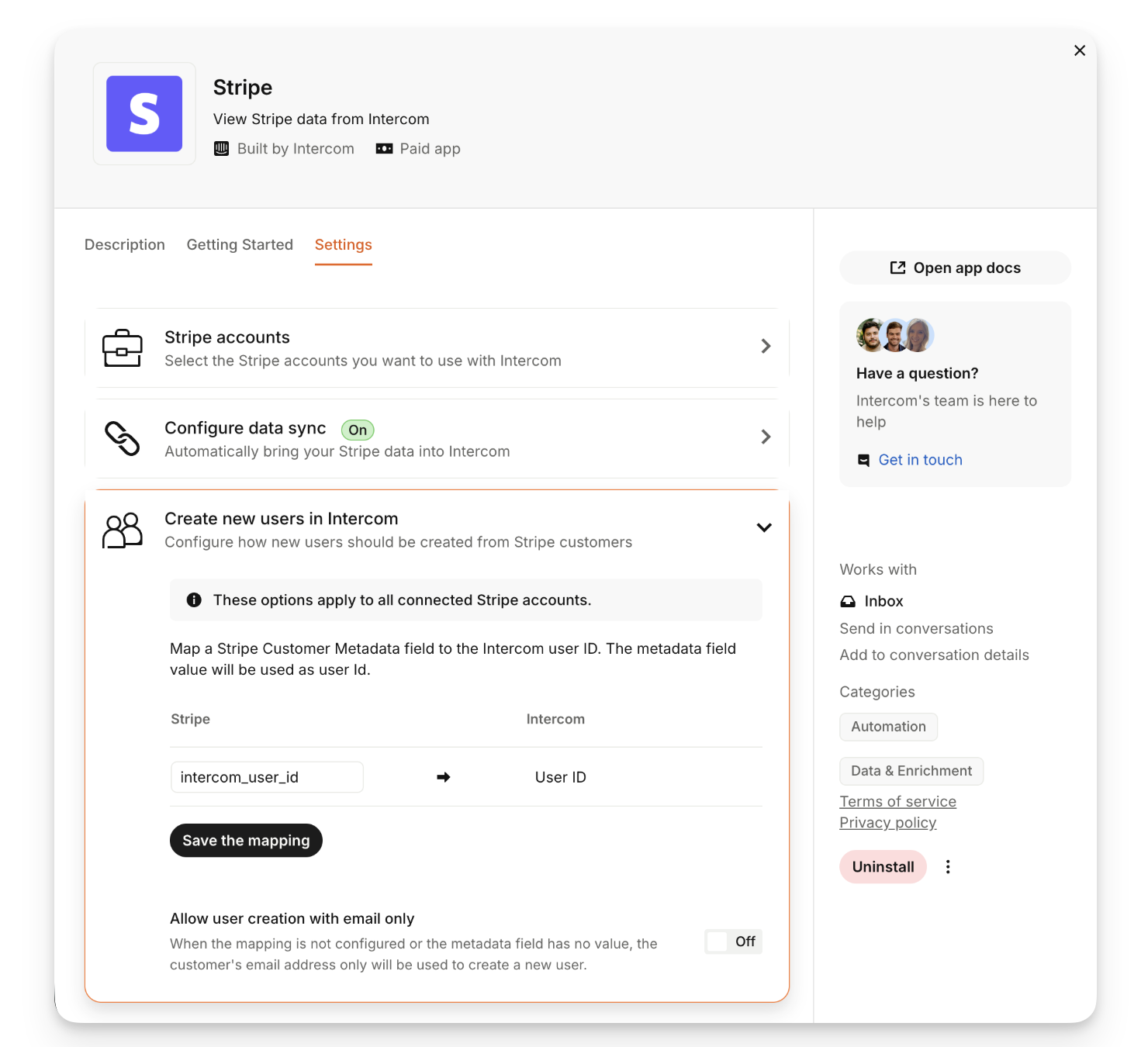
Installation runs through the Intercom App Store and requires authenticating a Stripe account. Once connected, Stripe data appears in the Intercom sidebar for any conversation with a contact whose email matches a Stripe customer record.
Source: Stripe
1. Live Billing Data in the Conversation Sidebar.
When an agent opens a conversation, the sidebar displays the customer's active subscription plan, billing period, and recent charges from Stripe. An agent handling a complaint about an unexpected charge can see the charge amount, date, and status instantly without opening the Stripe dashboard.
The data reflects live Stripe state, so a subscription cancelled moments before the customer contacts support appears immediately.
2. Refund and Charge Management Without Leaving Intercom.
Agents with appropriate Stripe permissions can issue refunds or cancel charges directly from the sidebar. A support agent can verify the charge, confirm eligibility, and process the refund in the same conversation flow. The permission model lives on the Stripe side: teams control which agents have write access through Stripe account permissions, not through Intercom.
3. Billing Lifecycle Events as Workflow Triggers.
Stripe events (payment failed, trial ending, subscription created, subscription cancelled) push into Intercom as user events. A payment.failed event can trigger an automated Intercom message walking the customer through updating their payment method. A trial ending event can trigger a targeted in-app conversion prompt three days before expiry.
4. Billing Status as Routing Logic and Fin Input.
Because Stripe subscription status and plan tier sync into Intercom as user attributes, Workflows can route enterprise plan customers to dedicated agents while routing free-plan users to a Fin-first flow. Fin Procedures can apply different refund eligibility thresholds based on whether the account has an active subscription or has churned.
Stripe Pricing
Stripe uses a pay-as-you-go model with no monthly seat fees:
Standard: no monthly fee; domestic card transactions at 2.9% + $0.30 per successful charge; international cards add 1.5%
Custom: volume-based pricing for large businesses, with interchange-plus rates and dedicated support
The Stripe integration adds no per-use fees. On the Intercom side, Workflow-based automation using Stripe events requires the Advanced plan ($85/seat/month); Fin Procedures pulling Stripe data require an active Fin configuration at $0.99 per resolved outcome.
Who Should Use the Stripe Integration?
SaaS and subscription businesses whose support teams regularly handle billing questions and refund requests, and currently toggle between Intercom and the Stripe dashboard to verify charge details
Teams wanting agents to resolve routine refunds without escalating to a separate billing team, provided Stripe permissions are configured per agent role
Organizations deploying Fin that want the AI agent to have live billing context when handling subscription questions, refund eligibility checks, and plan comparison conversations
7. Segment: Best Intercom Integration for Cross-Platform Behavioral Profiling
Twilio Segment is a Customer Data Platform (CDP) that integrates with Intercom to pipe a real-time behavioral event stream from across your product stack into Intercom's customer records and AI systems. The integration is native on both sides: Intercom appears in Segment's Destinations Catalog and Segment is listed in Intercom's App Store.
Source: Twilio Segment
Key integration capabilities include:
Every behavioral event tracked through Segment (page visits, feature usage, onboarding milestones, API call volumes) flowing into Intercom in real time as user events
Segment's identify and group calls pushing user trait updates and company attribute changes into Intercom continuously
Intercom sending conversation events back to Segment for downstream analytics, warehouse pipelines, and reporting tools
Bidirectional data flow that gives Fin and Workflows the same behavioral picture used for product analytics
How Segment Integrates with Intercom
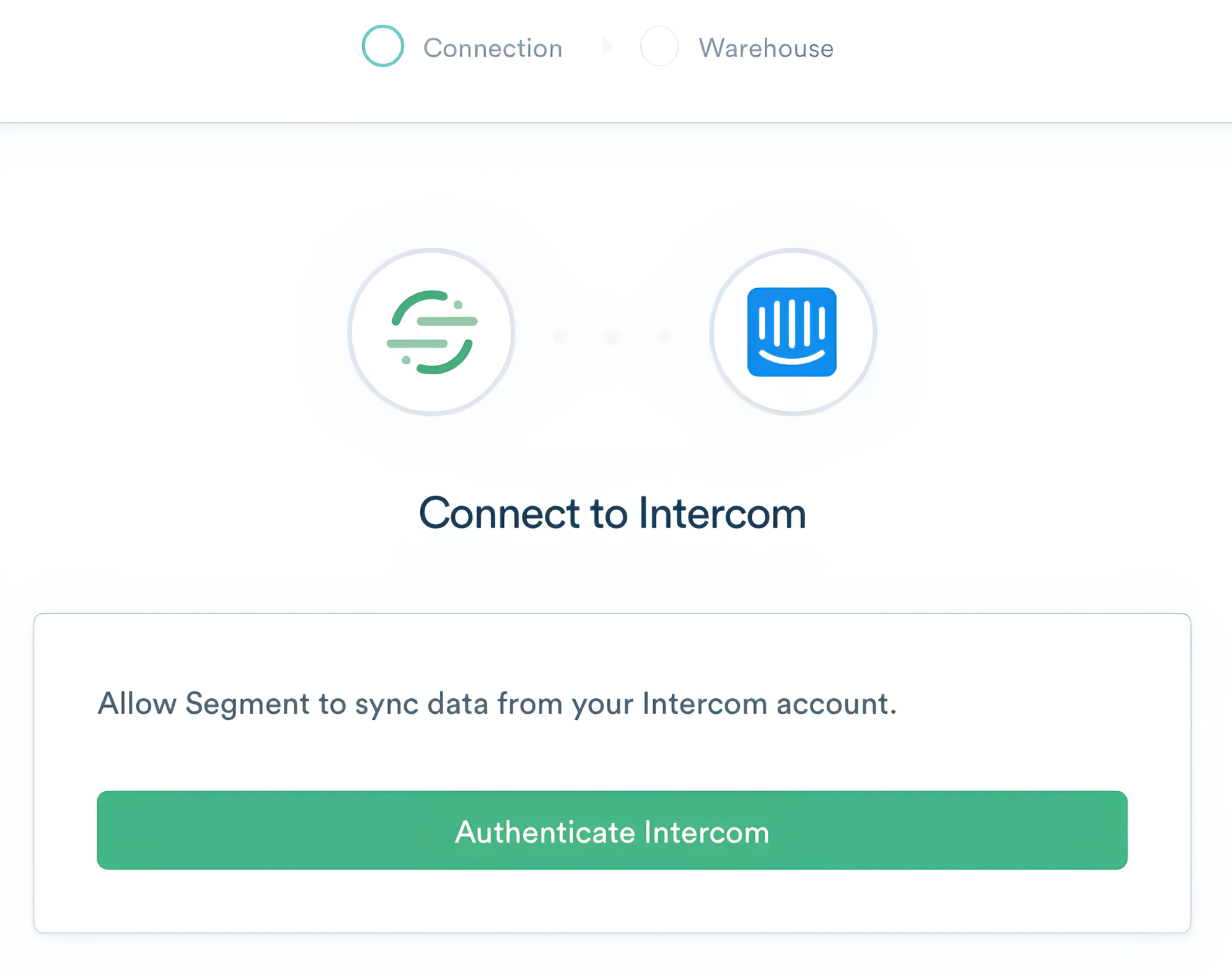
Setup uses Segment's Connections infrastructure: add Intercom as a destination inside your Segment workspace and authenticate via Intercom API key. For the reverse direction, add Intercom as a cloud source to pull conversation events into the Segment pipeline.
Source: Twilio Segment
1. Full Behavioral Event Stream into Intercom.
Every event tracked through Segment's pipeline (JavaScript SDK, mobile SDKs, server-side libraries) flows into Intercom as user events attached to the contact record. When an agent opens a conversation or Fin evaluates an inbound query, the customer's full product activity is already present: pages visited before writing in, onboarding completion status, feature usage frequency, and API call volumes.
This differs from what Intercom's own Messenger snippet captures, because Segment tracks server-side events and native mobile actions that the browser-based snippet cannot reach.
2. Identity and Trait Sync.
Segment's identify calls push user attribute updates into Intercom's contact records each time a trait changes: plan tier, onboarding status, API usage volumes. Group calls propagate company-level attributes. Intercom Workflows can branch on these continuously refreshed attributes rather than relying on stale one-time imports.
3. Intercom as a Segment Source for Downstream Analytics.
The reverse direction pulls Intercom conversation events (new conversations, messages sent, CSAT scores, Fin resolution events) into Segment for routing to data warehouses, BI tools, and analytics platforms. Support interactions become part of the same data layer used for product analytics, enabling cross-dataset analyses that connect product behavior to support outcomes.
Segment Pricing
Segment's pricing is usage-based, billed against Monthly Tracked Users (MTUs):
Free: $0/month, 1,000 MTUs, 2 Sources, access to the Intercom destination
Team: starts at $120/month (10,000 MTUs), unlimited Sources, annual billing saves up to 20%
Business: custom pricing, includes Protocols data governance, HIPAA eligibility, regional data residency
Full CDP: custom pricing, adds Unify (identity resolution) and Engage (audience activation)
Full cross-device identity resolution (stitching anonymous pre-session events to known users before profiles reach Intercom) requires Unify, available on the Business tier or as part of the Full CDP plan.
Who Should Use the Segment Integration?
Product and data teams already instrumenting Segment that want support agents and Fin to operate on the same behavioral data without duplicating event instrumentation
Teams needing Intercom Workflows to branch on server-side behavioral attributes (API call volumes, backend processing events) that Intercom's own Messenger snippet cannot capture
Data teams using Segment as the central pipeline feeding a warehouse, that want Intercom conversation events (including Fin resolution data) flowing into the same infrastructure for cross-dataset analysis
Final Verdict
The best Intercom integrations feed your support platform the data and connectivity it cannot generate on its own:
ZoomInfo: verified B2B data, buyer intent, and company intelligence enriching every contact record; the highest-impact integration on this list if your support and sales workflows depend on data quality
Salesforce: bidirectional CRM sync with conversation logging, sidebar context, and in-conversation opportunity creation
HubSpot: marketing automation and lifecycle data flowing into Intercom for CRM-aware routing and personalized support
Slack: real-time alerts with direct reply capability and cross-team escalation in the workspace your team already uses
Jira: automated bug escalation to engineering with bidirectional status sync and customer notifications
Stripe: live billing context in the sidebar with refund actions and Workflow triggers on payment lifecycle events
Segment: a behavioral event stream powering Fin and Workflows with the same product data your analytics team uses
These integrations compound: you might run ZoomInfo for contact enrichment, Salesforce for CRM sync, Slack for team coordination, and Stripe for billing context on the same Intercom workspace, each adding a layer of automation that makes the others more valuable.
If you want to start with the data layer everything else depends on, ZoomInfo's integration with Intercom through automation platforms like Zapier gives your support team access to 500M contacts, 135M+ verified phone numbers, and buyer intent signals calibrated to your win patterns. ZoomInfo Lite is a permanent free tier, so you can evaluate the data quality before committing to a subscription.
Frequently Asked Questions
How many integrations does Intercom support?
Intercom's App Store houses over 350 integrations spanning CRM, analytics, billing, engineering, communication, and data infrastructure categories. Beyond the App Store, Intercom's REST API (v2.15) with SDKs in six languages, topic-based webhooks, and the Canvas Kit framework support custom integrations with any platform that has an API. Rate limits sit at 10,000 API calls per minute per app.
Do Intercom integrations work on the Essential plan?
Many integrations work on Intercom's Essential plan ($29/seat/month), including basic versions of the Slack, Stripe, and HubSpot integrations.
However, the Salesforce integration requires Advanced or Expert, the Jira for Tickets integration requires Advanced or Expert, and conditional routing using Intercom's Workflows builder (which makes most integrations significantly more useful) requires the Advanced plan ($85/seat/month) or above. Check each integration's documentation for plan-specific feature availability.
Can Fin AI Agent use data from integrations?
Yes. Data synced into Intercom from integrations reaches Fin through two paths.
First, user attributes and company attributes from connected platforms (Salesforce deal stage, HubSpot lifecycle stage, Stripe subscription tier, Segment behavioral events) serve as context when Fin formulates responses.
Second, Fin Procedures can reference these attributes in conditional logic, applying different response strategies based on a customer's CRM status, billing state, or product usage. Data Connectors and MCP integrations also let Fin query external systems directly during a conversation.
How does Intercom handle data sync conflicts between integrated platforms?
Intercom's integrations typically designate one platform as the source of truth per field. For CRM integrations like Salesforce and HubSpot, sync direction (one-way or bidirectional) and field-level mapping are configurable during setup. Most native integrations use email address as the primary deduplication key for matching contact records across platforms.
Sync frequencies vary by integration: the Salesforce integration runs on a five-minute refresh cycle, while Segment operates in real time via event streaming.
Can I connect Intercom to tools that are not in the App Store?
Yes. Intercom's public REST API covers the full platform (contacts, companies, conversations, tickets, articles, events, and more) and supports custom integrations with any system that can make HTTP requests.
For no-code solutions, automation platforms like Zapier, Workato, and Tray extend Intercom's connectivity to thousands of additional apps. Intercom also supports MCP-based integration and a Canvas Kit framework for building custom Messenger and Inbox apps.
Are Intercom integrations secure?
Intercom uses OAuth 2.0 for third-party app authentication, so integrations never require sharing your Intercom password. The platform maintains SOC 2 Type II, ISO 27001, ISO 27701, and ISO 42001 certifications, with GDPR, CCPA, and HIPAA (Expert plan) compliance.
Data is encrypted at rest (AES-256) and in transit (TLS 1.2), with EU and Australian data residency options available. Every App Store integration undergoes a review process before listing.
What is the best way to enrich Intercom contact records with B2B data?
Integrating a dedicated B2B data platform through an automation layer gives you the most thorough and verified enrichment. ZoomInfo connects to Intercom through platforms like Zapier and Workato, automatically appending verified emails, direct-dial phone numbers, firmographic data, technographic profiles, and buyer intent signals to your Intercom contact records.
The enrichment flows through a verification pipeline backed by 300+ human researchers, covering 500 million contacts and 100 million companies. For teams where support routing and AI response quality depend on accurate contact data, a platform built for B2B intelligence closes the gap between what Intercom captures and what your team needs to act on.
Related reads:
