

Teams that use Formstack for data collection and Salesforce as their CRM usually discover the same friction within a quarter:
form submissions pile up in Formstack while someone re-enters the same data into Salesforce by hand, doubling the work and introducing typos,
lead response times stretch because no automatic handoff connects a completed form to a CRM workflow or sales cadence,
and reporting splits across two systems, so no single dashboard shows the full path from form submission to closed deal.
However, Formstack and Salesforce ended up running in parallel (a department chose Formstack for its no-code form builder, the org inherited a tech stack that predates the current team, or the two tools were adopted independently for different jobs), the longer form data stays disconnected from CRM records, the more manual work compounds.
Connecting Formstack and Salesforce eliminates that gap.
Form submissions flow directly into Salesforce as Leads, Contacts, or custom objects, so every rep works from live data the moment a prospect hits submit. Salesforce record data prefills forms so returning contacts never re-enter information the CRM already holds. Documents generated by Formstack Documents pull field values straight from Salesforce records, and signatures captured through Formstack Sign attach to the originating record, completing the cycle from data collection to signed agreement in a single thread.
Formstack offers a native Salesforce integration built on the Salesforce platform, available as a managed package on the Salesforce AppExchange. The standalone Formstack product also connects to Salesforce through a built-in API integration. Third-party automation tools like Zapier and custom API development provide additional options. Each method differs in setup complexity, data flow, feature depth, and cost.
One problem no connection method solves: the integration moves form data into the CRM, but it does not verify or enrich the records that data creates.
That is where ZoomInfo comes in. ZoomInfo integrates natively with Salesforce and offers API and MCP access that feeds verified, enriched contact and company data into any CRM workflow, so the records behind every form submission are accurate and complete before they enter a sales pipeline.
This article covers the Formstack-Salesforce integration: which methods are available, what data each one handles, how to set them up, the use cases that justify connecting both platforms, and the limitations to plan for. It also covers how ZoomInfo fits in as a data enrichment layer that strengthens the records flowing between Formstack and Salesforce.
Let's start with an overview of the integration.
Integration Overview
Does a native integration exist?
Yes. Formstack offers Forms for Salesforce, a native Salesforce form builder installed as a managed package from the Salesforce AppExchange. It reads from and writes to Salesforce objects directly, with no external dashboard or API connection required. Formstack also offers a standard Salesforce integration for its standalone product, connecting to Salesforce via API.
What data can sync?
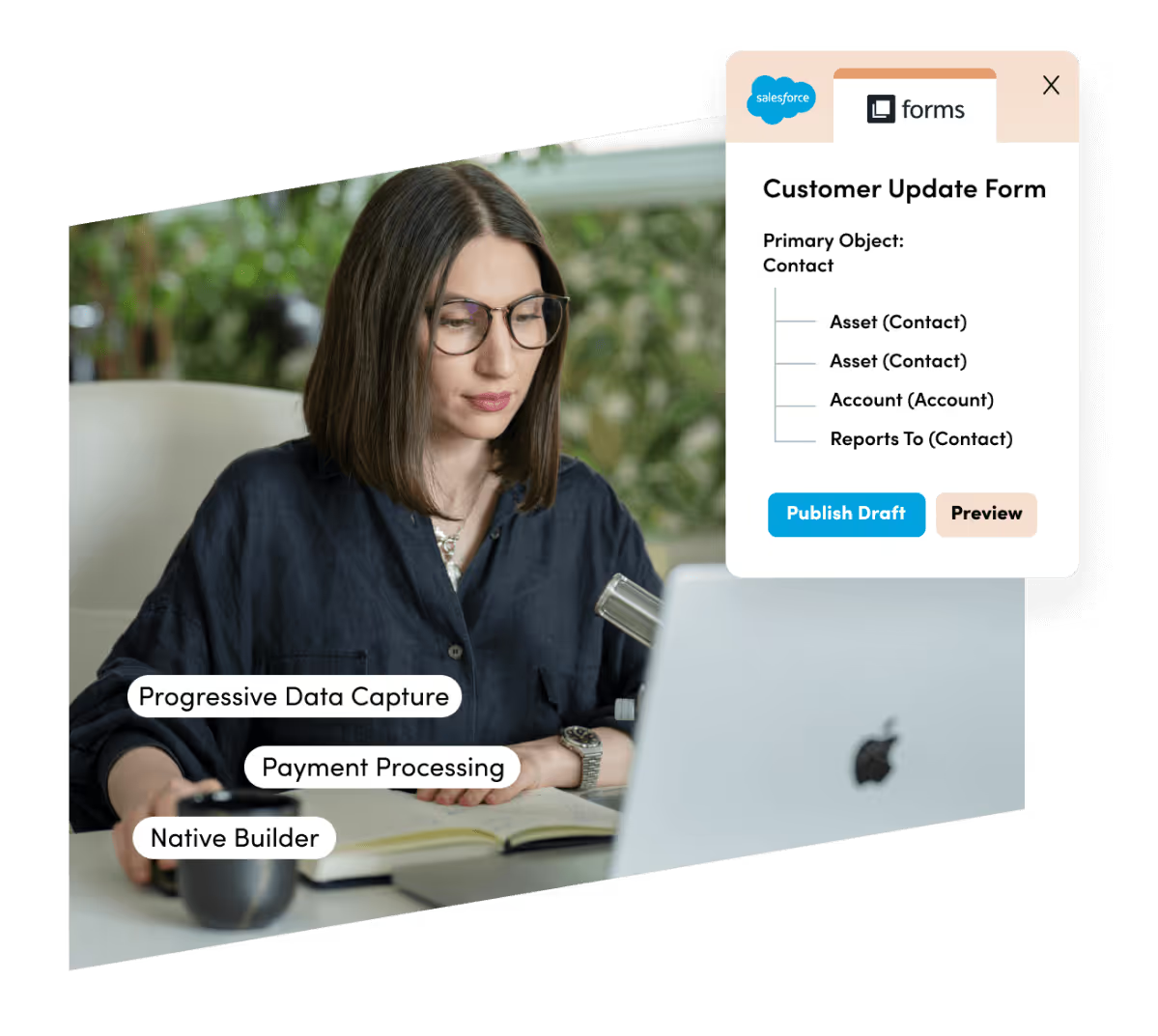
Form submissions can create or update Leads, Contacts, Accounts, Cases, Opportunities, and custom objects in Salesforce. Standard fields (name, email, phone, company) and custom fields are all mappable. The native product also supports dynamic prefill from Salesforce records and progressive data capture that builds on existing CRM data across sessions. Documents for Salesforce adds document generation from any Salesforce object's field data.
Is the sync bidirectional?
Partially. Form submissions push data into Salesforce. The native product also reads from Salesforce (prefilling forms with existing record data), but Salesforce records do not sync back into Formstack's submission database. The flow is submission-driven, not a real-time two-way sync.
Is it real-time or batch?
Real-time on submission. When a respondent completes a form, the data writes to Salesforce immediately. Neither the native nor the standard integration batches or delays submissions.
What are the available methods?
Formstack for Salesforce (native managed package), standard Formstack-Salesforce API integration, third-party automation (Zapier), and custom API development.
Method | Setup Difficulty | Data Flow | Real-time? | Cost |
|---|---|---|---|---|
Formstack for Salesforce (Native) | Low | Salesforce-native (read and write) | Yes | Custom pricing (contact sales) |
Standard Formstack Integration | Low-Medium | Formstack to Salesforce | Yes (on submission) | Included with Formstack plans (from $83/mo) |
Zapier | Medium | One-way per Zap | Near real-time (1-15 min) | From $19.99/mo |
Custom API | High | Fully customizable | Depends on implementation | Dev time + hosting |
One distinction worth settling upfront: the native Formstack for Salesforce product and the standard integration both handle ongoing, submission-triggered data flow as part of daily workflows. They are not migration tools and will not backfill historical form data into Salesforce.
Zapier works the same way, processing only new events after activation. A custom API integration is the only method that handles both historical migration and ongoing sync.
Integration Methods
Formstack for Salesforce (Native Managed Package)
How it works: Formstack for Salesforce is a managed package installed from the Salesforce AppExchange. It runs entirely inside the Salesforce org. Admins build forms using a no-code, drag-and-drop builder that reads from and writes to Salesforce objects without any external API connection or field mapping to a third-party system.
What it syncs: Form submissions write directly to any standard or custom Salesforce object (Leads, Contacts, Accounts, Cases, Opportunities, and more). Dynamic prefill reads existing record data into form fields so returning contacts never re-enter known information. Partial submissions are stored natively in the Salesforce org.
The companion product, Documents for Salesforce, generates documents from any Salesforce record's field data, either with a one-click button or through automated triggers via Salesforce Flow or Process Builder.
Source: Formstack
Fits: ongoing data collection into Salesforce as part of active workflows; not a migration or historical backfill tool.
Setup process:
Install the Formstack for Salesforce managed package from the Salesforce AppExchange. You need System Administrator access in Salesforce.
Configure user permissions and assign Formstack package licenses to the admins and users who will build and manage forms within the org.
Open the Formstack form builder inside Salesforce and create a new form. Select the target Salesforce object (Lead, Contact, Case, or custom object) the form will write to.
Add form fields and map them to Salesforce fields. Standard fields auto-map; configure custom fields in the builder. Enable dynamic prefill for fields that should pull existing record data.
Configure post-submission behavior: confirmation messages, notification emails, and any Salesforce Flow or Process Builder automations that should fire on new submissions.
Publish the form via direct URL, embed it on a website, or deploy it within a Salesforce Experience Cloud site. Test with a sample submission to verify the record appears correctly in Salesforce.
Strengths: No external login, no API connection, and no field mapping to a third-party system. All form data stays in the Salesforce org (never leaves it). The product inherits Salesforce's security model, matching whatever compliance standards the org already holds (HIPAA, GDPR, PCI) without additional configuration. The Native Professional Plan supports Salesforce Shield compatibility, including field-level encryption. You can test in a Salesforce sandbox and migrate to production. Documents for Salesforce extends the same native architecture to document generation and eSignature workflows.
Limitations: Requires custom pricing through Formstack's sales team, putting it out of reach for teams on tight budgets. Available only inside Salesforce, so organizations that also need forms on non-Salesforce websites must use the standalone product or a separate tool. Salesforce-imposed constraints apply: a 5MB ceiling on file uploads through the API, and potential API call limit errors (REQUEST_LIMIT_EXCEEDED) under heavy usage on lower Salesforce editions.
Best for: Salesforce-centric organizations in regulated industries (healthcare, financial services, higher education) where data residency, compliance inheritance, and zero external transfer are requirements. Salesforce admins and RevOps teams who want to build and manage forms entirely within the platform without adding an external dependency.
Standard Formstack-Salesforce Integration
How it works: The standalone Formstack product connects to Salesforce through a built-in integration in the Formstack integration panel.
Unlike the native product, the standard integration runs on Formstack's infrastructure: it collects and stores form data in Formstack first, then pushes it to Salesforce via API on submission. This requires an OAuth connection between the two platforms and manual field mapping for each form.

Source: Formstack
What it syncs: Form submissions create or update Salesforce Leads, Contacts, Accounts, Cases, Opportunities, and custom objects. Each form field maps to a Salesforce field in the integration configuration. Conditional logic in the form can route submissions to different Salesforce objects based on respondent answers. File uploads and payment data (via Stripe or PayPal integrations) can flow alongside form data.
Fits: ongoing data collection with Salesforce as the downstream record system; not a migration tool.
Setup process:
In your Formstack account, navigate to the form you want to connect and open Settings, then Integrations.
Search for Salesforce and select the Salesforce integration from the integration panel.
Authenticate with Salesforce using OAuth, granting Formstack permission to create and update records in your org.
Select the target Salesforce object and map each form field to the corresponding Salesforce field. Formstack displays available Salesforce fields and lets you pull form data into each one.
Configure any conditional routing (e.g., create a Lead when the "Role" field equals "Individual Contributor," create a Contact when it equals "VP or above").
Test by submitting the form and verifying the record appears in Salesforce with correct field values. Check that conditional routing, if configured, sends data to the correct object.
Strengths: Available on all Formstack plans, including the Forms plan at $83/month. No engineering resources required. The standalone product offers capabilities the native version lacks, including the Conversion Kit (partial submission capture, form analytics, drop-off identification), 300+ third-party integrations beyond Salesforce, and the full suite of Formstack Documents and Formstack Sign on the Suite plan. Forms can be deployed on any website, not just inside Salesforce.
Limitations: Form data passes through Formstack's infrastructure before reaching Salesforce, which creates a compliance consideration for regulated industries. You must manually map fields in Formstack's web interface and update those mappings whenever you add new custom fields in Salesforce. Dynamic prefill from Salesforce records is more limited than the native product's direct object access. The Forms plan caps at 1 builder user, 25 forms, and 1,000 submissions per form; HIPAA compliance is an additional paid add-on on both Forms and Suite tiers.
Best for: Teams that need forms on websites, landing pages, and channels outside of Salesforce. Organizations already using standalone Formstack for other workflows (document generation, eSignature) that want to add Salesforce as a data destination without purchasing the native product separately.
Zapier
How it works: Zapier connects Formstack and Salesforce through event-driven automations called Zaps.
Each Zap pairs a trigger (a Formstack form submission) with one or more actions (creating or updating a Salesforce record). Formstack has a built-in Zapier connector, and Salesforce is among Zapier's most popular action apps, so the available trigger-action combinations cover the standard CRM objects.
What it syncs: Form submission data from Formstack, mapped to Salesforce Leads, Contacts, Accounts, Opportunities, Cases, or custom objects. Each Zap handles one trigger-action pair. Custom fields can be mapped manually in the setup flow. Multi-step Zaps can add intermediate formatting, lookups, or conditional paths before writing to Salesforce.
Fits: ongoing event-triggered sync of new submissions; not a migration tool.
Setup process:
Create a Zapier account and connect both your Formstack and Salesforce accounts using OAuth.
Choose Formstack as the trigger app and select the trigger event ("New Form Submission").
Select the specific Formstack form to monitor for new submissions.
Choose Salesforce as the action app and select the action (e.g., "Create Lead," "Create/Update Record," or "Find Record" followed by "Update Record").
Map Formstack form fields to Salesforce fields. Add a Zapier "Find Record" step before the create step if you want to update existing records instead of creating duplicates.
Test the Zap with a sample submission, verify the Salesforce record, and turn it on.
Strengths: Works independently of Formstack's built-in Salesforce integration, providing an alternative path into Zapier's broader automation ecosystem. Multi-step Zaps can chain form submissions with other actions (e.g., submit form, create Salesforce Lead, then add the lead to a Campaign or send a Slack notification). No engineering resources required.
Limitations: Each Zap handles one trigger-action pair. Zapier charges by task count (each form submission that fires a Zap counts as a task), and costs accumulate at volume. Submissions created before the Zap was activated do not sync. Near real-time, not instant: Zapier processes triggers within 1 to 15 minutes depending on plan tier. Duplicates can occur without a "Find Record" step to check for existing records before creating new ones.
Best for: Teams that want to combine Formstack-to-Salesforce data flow with multi-step automations involving other tools (Slack notifications, email sequences, spreadsheet logging). Organizations already using Zapier as their central automation hub.
Custom API Integration
How it works: Both Formstack and Salesforce expose APIs. Formstack's v2025 REST API covers forms, fields, submissions, and webhooks, with webhook support that fires on form submission. Salesforce's REST API covers all standard and custom objects, with Platform Events and Change Data Capture for event-driven workflows.
A custom integration connects these APIs through middleware that handles authentication, field mapping, transformation, and error recovery.
What it syncs: Anything both APIs expose. Formstack's API provides full CRUD access to forms, fields, and submissions, plus webhook payloads on submission. Salesforce's API covers every standard and custom object. This is the only method that supports conditional object routing based on business rules, multi-object creation from a single form submission (e.g., creating an Account, a Contact, and an Opportunity at once), or backfilling historical Formstack submissions into Salesforce.
Fits: both historical migration and ongoing sync; the only method with no ceiling on either.
Setup process:
Generate API credentials in both platforms: a Formstack Personal Access Token from admin.formstack.com, and a Salesforce Connected App with OAuth 2.0 credentials.
Configure Formstack webhooks on each form to fire on submission, sending form data to your middleware endpoint. Choose JSON format and enable HMAC authentication for payload security.
Build server-side middleware that receives webhook payloads, transforms field values according to your mapping rules, and writes records to Salesforce via the REST API. Use upsert logic with a matching key (email address) to prevent duplicates.
Add error handling and retry logic. Formstack webhook payloads can include a Shared Secret for verification. Salesforce API rate limits (100,000+ requests per 24 hours on Professional and Enterprise editions) require throttling at scale.
For historical migration, use the Formstack API to retrieve paginated submission data across all forms, transform it, and load it into Salesforce using the Bulk API 2.0.
Deploy, monitor, and maintain. Both platforms update their APIs (Formstack released API v2025; Salesforce versions its API with each seasonal release), and webhook configurations must be updated when forms change.
Strengths: Full control over what data syncs, how it transforms, and which business rules apply. The only method that supports multi-object creation from a single form, historical data migration, and complex routing logic. No per-operation fees from a third-party connector.
Limitations: Requires development resources to build and maintain. You own the infrastructure, monitoring, and error recovery. Formstack's webhook retry behavior is not publicly documented, so your middleware must handle missed payloads on its own. The initial build takes weeks, not hours.
Best for: Enterprise teams with data flows that no off-the-shelf integration can satisfy. Organizations that need to migrate historical form data into Salesforce alongside ongoing submission sync. Companies with in-house development teams and business logic requirements that go beyond field mapping.
Key Use Cases
1. Lead Capture Forms That Create Salesforce Leads
Marketing runs landing pages with Formstack forms for gated content, webinar registrations, or demo requests. Each submission creates a Salesforce Lead with the contact's name, email, company, and role, triggering an assignment rule that routes the lead to the right rep. Lead response time drops from hours (or days, with manual data entry) to seconds.
Best integration method: Formstack for Salesforce (native) or standard Formstack integration (both handle this on submission).
2. Patient Intake in Healthcare Organizations
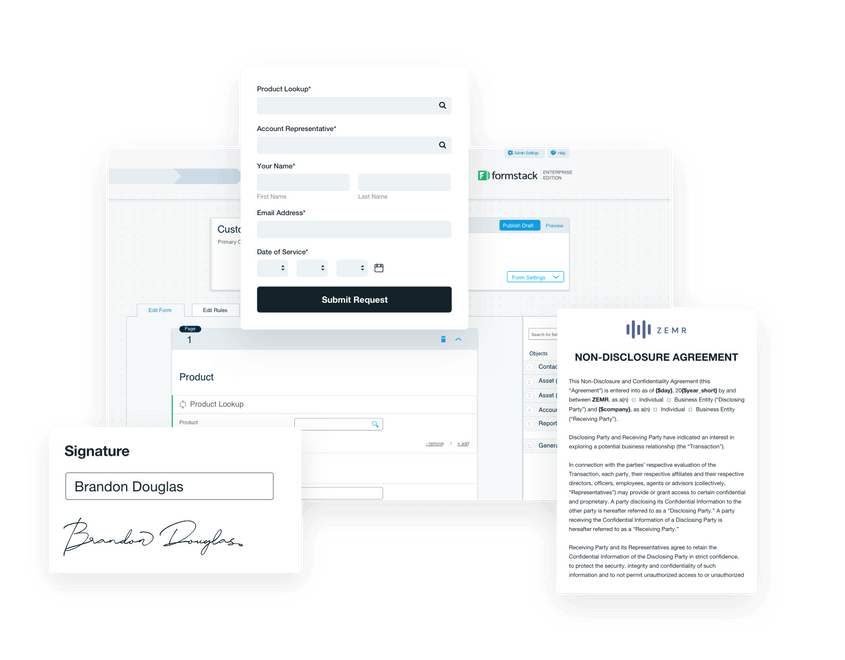
Healthcare providers use Formstack forms for patient intake, referral processing, and consent capture. The native Formstack for Salesforce product includes HIPAA-supporting features and inherits the Salesforce org's compliance posture, so patient data collected through the form writes directly to Salesforce Health Cloud records without passing through an external system. Formstack Sign captures consent signatures and attaches them to the patient record.
Source: Formstack
Best integration method: Formstack for Salesforce (native), where data residency and HIPAA compliance are requirements.
3. Automated Proposal and Contract Generation
Sales teams use Documents for Salesforce to generate proposals, quotes, or contracts from Salesforce Opportunity records. A rep clicks a button on the Opportunity, the document template populates with account name, pricing, and terms from Salesforce fields, and the finished document routes to Formstack Sign for the customer's signature. The signed document attaches back to the Salesforce record.

Source: Formstack
Best integration method: Formstack for Salesforce (native), with Documents for Salesforce and Sign.
4. Event Registration Feeding Salesforce Campaigns
Marketing creates event registration forms in standalone Formstack and connects them to Salesforce via the standard integration or Zapier. Each registration creates a Salesforce Contact (or updates an existing one) and adds the registrant as a Campaign Member on the event's Salesforce Campaign. Post-event follow-up sequences trigger based on campaign membership.
Best integration method: Standard Formstack integration or Zapier (for adding Campaign Member associations via a multi-step Zap).
5. Financial Services Application Processing
Banks and financial institutions use Formstack forms for loan applications, account openings, or claims submissions. The native Salesforce product supports PCI-compliant payment collection and FINRA-compliant document generation, routing application data into Salesforce Financial Services Cloud objects.
Best integration method: Formstack for Salesforce (native), where compliance and data residency requirements apply.
Limitations and Considerations
Two Products, Two Architectures
Formstack for Salesforce and the standard Formstack product are separate products with different architectures, pricing, and capabilities.
The native product lives entirely inside Salesforce but requires custom pricing through Formstack's sales team. The standalone product starts at $83/month for Forms and includes Salesforce as one of 300+ integrations, but form data passes through Formstack's external infrastructure before reaching Salesforce.
Teams evaluating the integration need to decide which architecture fits their compliance, budget, and deployment requirements before choosing a method.
Pricing Implications
The standalone Formstack Forms plan caps at 1 builder user, 25 forms, and 1,000 submissions per form. The Suite plan ($250/month annually) raises these limits to 3 builder users, 100 forms, and 5,000 submissions per form, and adds document generation and unlimited eSignatures. HIPAA compliance is an add-on at additional cost on both tiers.
On the Salesforce side, API rate limits (100,000+ requests per 24 hours on Professional and Enterprise editions) constrain high-volume integrations. Organizations on lower Salesforce editions may hit limits if multiple integrations share the same API allocation.
Third-party tools carry their own costs. Zapier plans start at $19.99/month, and each form submission that triggers a Zap counts as a task against the plan's allocation.
Data and Attachment Limits
Salesforce imposes a 5MB ceiling on file uploads through its API. Forms that collect large file attachments (medical records, architectural drawings, video files) will fail or require a workaround, such as storing the file in an external repository and linking to it from the Salesforce record. Formstack's standalone product supports larger uploads, but the data must fit within Salesforce's constraints when it crosses the integration.
Permissions and Access
The native Formstack for Salesforce product requires Salesforce System Administrator access to install the managed package and configure user permissions. If the org uses field-level security or sharing rules, the integration user's profile must have write access to every object and field that forms will populate.
The standard integration requires admin access on both sides: a Formstack account with integration configuration rights and a Salesforce user with sufficient API permissions to create and update records on the target objects.
Maintenance
Both platforms evolve independently. Formstack rebranded to Intellistack in June 2025 and is developing the Intellistack Streamline platform alongside the existing Formstack products.
Salesforce versions its API with each seasonal release (the current version is Summer '26, API version 67.0). Custom fields added to Salesforce after the initial setup will not appear on existing forms unless you update the form configuration. Review field mappings and submission accuracy periodically regardless of method.
What No Method Fixes: The Data Itself
Every method above moves form submission data into Salesforce. None checks whether the information a respondent entered is accurate, complete, or current.
A lead who types a personal email instead of a business address, misspells their company name, or submits an outdated phone number creates a Salesforce record with exactly those errors. The integration delivers what the form collected, not what the CRM needs.
Where ZoomInfo Fits In
Every method in this guide moves data from Formstack into Salesforce. None improves the data being moved. When the integration is live but lead records arrive with missing company details, personal email addresses instead of business ones, or phone numbers that reach voicemail, the bottleneck is no longer the connector.
That is the gap ZoomInfo closes.
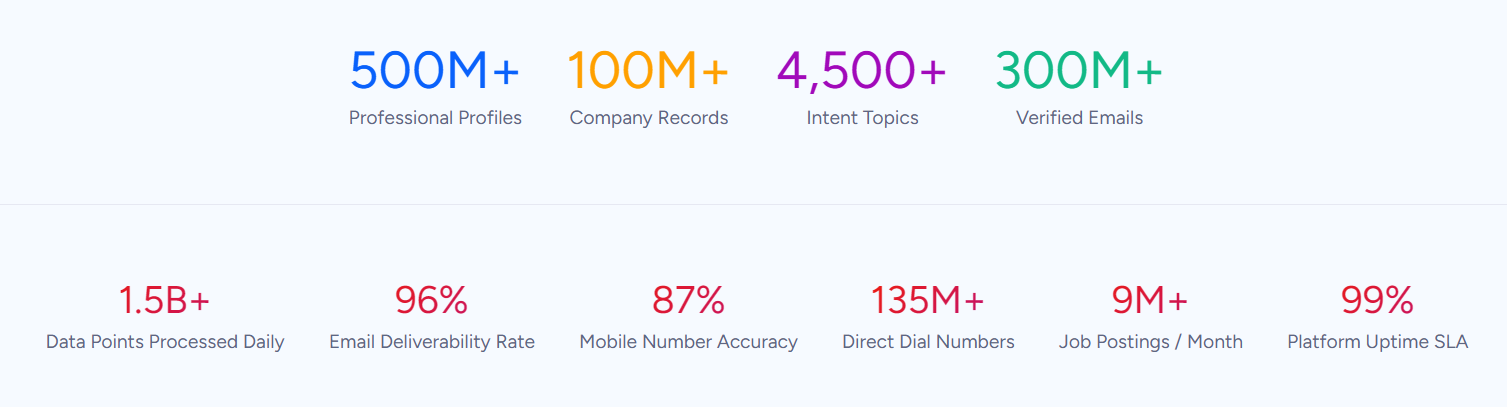
ZoomInfo is a B2B data and go-to-market platform built on 500M contacts, 100M companies, 135M+ verified phone numbers, and 200M+ verified business emails. That data is verified through a multi-source pipeline backed by 300+ human researchers, reaching up to 95% accuracy on first-party data. For teams running a Formstack-Salesforce integration, ZoomInfo addresses the data quality layer that no form-to-CRM connector handles.
Source: ZoomInfo
ZoomInfo integrates natively with Salesforce through its marketplace, providing CRM enrichment, lead routing, and real-time data updates inside Salesforce records. When a form submission creates a new Lead in Salesforce, ZoomInfo can enrich that record with verified business email, direct-dial phone number, job title, department, company attributes, and technographic data. The result is a lead record that a rep can act on, not a half-filled stub that requires manual research.
The same data feeds ZoomInfo's GTM Context Graph, an intelligence layer that processes 1.5B+ data points daily by combining ZoomInfo's B2B data with CRM records, conversation transcripts, and behavioral signals.
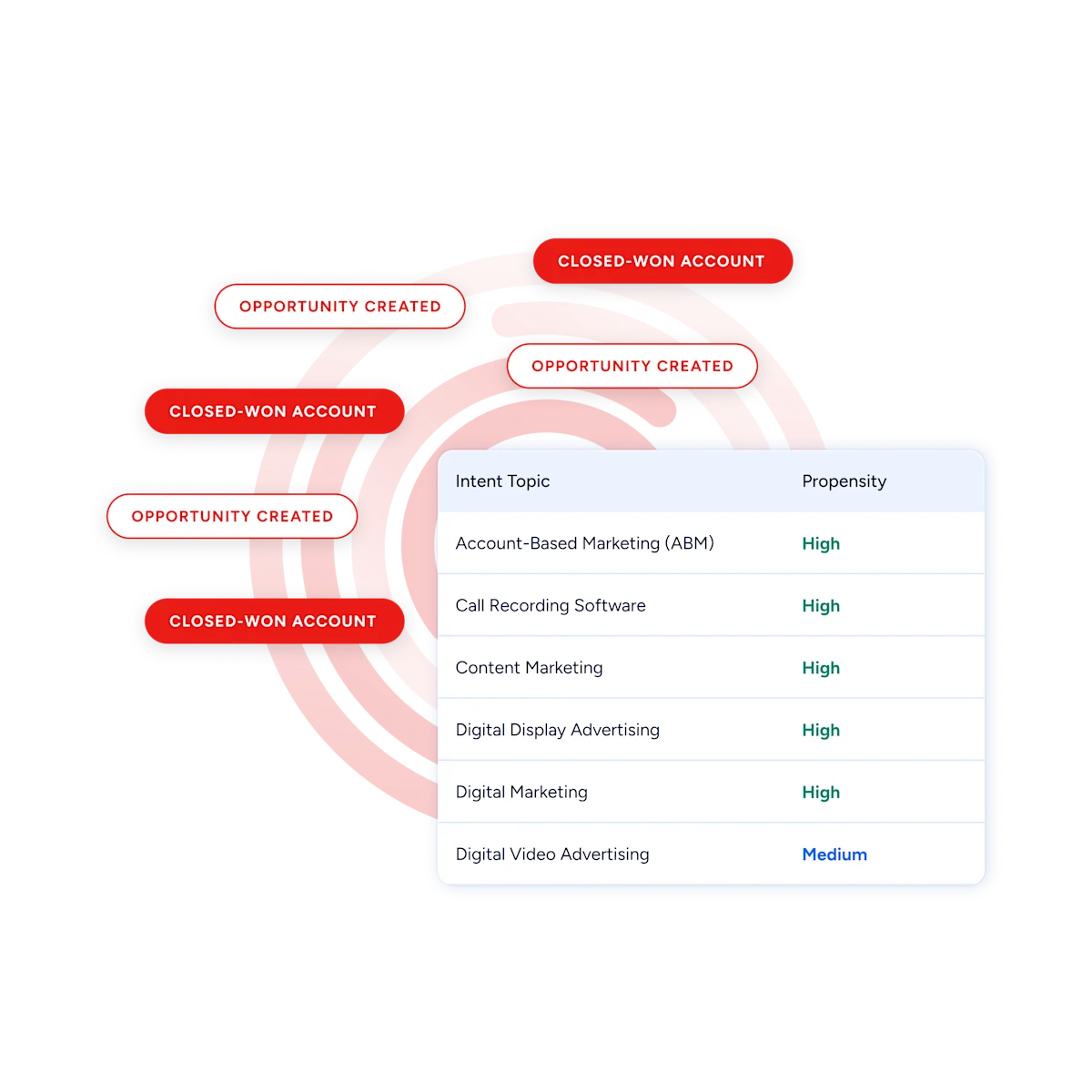
For teams collecting leads through Formstack forms and managing them in Salesforce, ZoomInfo's Buyer Intent data (tracking signals from 210 million IP-to-Organization pairings) can prioritize which form-generated leads deserve immediate follow-up based on active research signals, rather than treating every submission equally.
Source: ZoomInfo
Enriched records also make the integration itself more reliable. Fewer blank fields mean cleaner deduplication when the same person submits multiple forms. Standardized company names reduce the false matches that create duplicate Accounts. And verified contact details ensure that the sales workflows triggered by form submissions (assignment rules, nurture sequences, follow-up cadences) reach real people at real companies.
Seismic's sales team attributed 39% of active pipeline to opportunities identified or influenced by ZoomInfo signals while becoming 54% more productive. (Seismic)
Final Verdict
Formstack and Salesforce integrate through multiple methods. The right one depends on where the organization's priorities sit.
For most teams, the choice comes down to compliance requirements, budget, and how central Salesforce is to the business.
Organizations in regulated industries (healthcare, financial services, government) where data residency and compliance inheritance are non-negotiable should use Formstack for Salesforce. It keeps all data inside the Salesforce org, inherits the org's security posture, and eliminates the external data transfer that other methods require.
Teams that need forms on websites, landing pages, and channels beyond Salesforce should use the standard Formstack integration. It ships on all Formstack plans, requires no engineering, and covers the most common use case: pushing form submissions into Salesforce as CRM records.
Organizations already using Zapier as their central automation platform, or teams that want multi-step workflows combining Formstack submissions with actions in other tools, should add a Zap on top of (or instead of) the built-in integration.
Enterprise teams with complex data flows, historical migration needs, or business logic that no off-the-shelf connector can satisfy should invest in a custom API integration using Formstack's v2025 API and Salesforce's REST API.
Before choosing a method, clarify what role each platform plays in the workflow.
If Formstack is the primary data collection layer and Salesforce is the system of record, the integration's job is simple: get form data into the CRM quickly and accurately. If the workflow extends to document generation and eSignature (the full Formstack suite), the native Salesforce products handle the entire lifecycle inside the org. Either way, the quality of the data entering Salesforce through those forms determines whether the integration creates actionable leads or just adds volume.
ZoomInfo, with its native Salesforce integration and API and MCP access, is the data enrichment layer that turns form submissions into complete, verified records the moment they hit the CRM.
FAQ
Does Formstack integrate natively with Salesforce?
Yes. Formstack offers a native Salesforce integration through Forms for Salesforce and Documents for Salesforce, both installed as managed packages from the Salesforce AppExchange. These products run entirely inside the Salesforce org with no external API connection or data transfer. The standalone Formstack product also connects to Salesforce through a built-in API integration available on all paid plans.
What is the difference between Formstack for Salesforce and the standard Formstack-Salesforce integration?
Formstack for Salesforce is a separate product built on the Salesforce platform. It lives inside the org, reads from and writes to Salesforce objects without an external connection, and inherits the org's security and compliance posture.
The standard integration connects the standalone Formstack product (hosted on Formstack's infrastructure) to Salesforce via API, meaning form data passes through an external system before reaching the CRM. The native product requires custom pricing; the standard integration is available on all Formstack plans starting at $83/month.
Can Formstack forms update existing Salesforce records, or only create new ones?
Both the native and standard integrations can update existing records. The native product's dynamic prefill reads current field values from a Salesforce record into the form, and the submission writes updated values back. The standard integration supports update operations through its field mapping configuration.
With Zapier, adding a "Find Record" step before the create step enables update-or-create logic. Custom API integrations can use Salesforce's upsert capability with a matching key to handle both scenarios.
Does Formstack support HIPAA compliance when integrated with Salesforce?
Yes, through two paths. Formstack for Salesforce inherits the Salesforce org's compliance posture automatically, including HIPAA, without additional configuration. The standalone Formstack product offers HIPAA-supporting features (data encryption, audit logging, Business Associate Agreements) as a paid add-on to the Forms and Suite plans.
In both cases, confirm that your Salesforce org's own HIPAA configuration covers the objects and fields Formstack writes to.
What Salesforce permissions are needed to set up the integration?
System Administrator access is required to install the Formstack for Salesforce managed package from the AppExchange and configure user permissions. For the standard integration, the Salesforce user authorizing the OAuth connection must have an API-enabled profile and write access to every object and field the form will populate. If the org uses field-level security or sharing rules, those restrictions apply to the integration user's profile as well.
Can I use Formstack Documents to generate documents from Salesforce data?
Yes. Documents for Salesforce maps Salesforce fields to merge fields inside document templates (DOCX, PPTX, PDF, or CSV). You can generate documents with a one-click button on any Salesforce record or trigger them automatically via Salesforce Flow or Process Builder. Generated documents can route to Formstack Sign for eSignature collection.
The standalone Formstack Documents product also integrates with Salesforce through its API, though the native version offers tighter integration with no external data transfer.
How does ZoomInfo improve a Formstack-Salesforce workflow?
ZoomInfo solves the data quality problem that no form-to-CRM connector addresses.
Form submissions capture what respondents enter, which is often incomplete (personal emails instead of business ones, missing phone numbers, vague job titles). ZoomInfo's native Salesforce integration enriches those records with verified business emails, direct-dial phone numbers, accurate titles, company attributes, and technographic data.
The result: leads created by Formstack form submissions are complete and actionable, reducing the manual research reps would otherwise need before making the first call.
Is there a free way to connect Formstack and Salesforce?
Formstack does not offer a free plan, only a 14-day free trial of the Forms product. The standard Salesforce integration is included on all paid Formstack plans (starting at $83/month), so there is no additional cost for the connection itself beyond the Formstack subscription. Zapier offers a limited free tier, but it caps the number of tasks and the trigger check frequency. There is no free path to a production-grade Formstack-Salesforce integration.
Build out your Salesforce stack:
