

Teams that run Gravity Forms on their WordPress site and HubSpot as their CRM usually discover the same problems within a quarter:
form submissions pile up in the WordPress database while the CRM has no record of them, forcing someone to copy leads over manually,
contact properties collected through forms (job title, company size, budget range) never reach HubSpot, so marketing automation runs on incomplete data,
and lead response times stretch because reps don't see new submissions until someone exports a spreadsheet or remembers to check.
However, the two platforms ended up coexisting (a marketing team that picked WordPress and Gravity Forms for flexibility while sales adopted HubSpot for pipeline management, or an agency building client sites on WordPress while the client's revenue team lives in HubSpot), the longer both systems run independently, the wider the gap between what the forms capture and what the CRM knows.
Connecting Gravity Forms and HubSpot eliminates that gap.
Form submissions flow into HubSpot as contact records, so every lead captured on the website appears in the CRM within minutes. Custom field values collected through conditional forms (industry, use case, product interest) map to HubSpot contact properties, so workflows, lead scoring, and nurture sequences trigger on real data rather than blank fields. When a returning visitor fills out a second form, the integration updates the existing HubSpot contact rather than creating a duplicate, keeping the record history intact.
Gravity Forms offers a native HubSpot add-on included with all license tiers, from Basic ($59/year) through Elite ($259/year). For teams that need more complex workflows (syncing HubSpot deal data back into WordPress, triggering multi-step automations across other tools, or pushing form data into HubSpot objects beyond contacts), third-party automation platforms like Zapier and Make extend what the native add-on covers. Custom API development is also an option, though it requires development resources on both sides. Each method differs in setup complexity, data coverage, sync direction, and cost.
There is also one problem no connection method solves: the integration delivers form submissions into HubSpot, but it does not improve the data those submissions contain or the records they create.
That is where ZoomInfo comes in. ZoomInfo integrates with HubSpot through the marketplace and offers API and MCP access that feeds verified contact and company data into any system, so the records created by form submissions carry verified emails, direct dials, company attributes, and technographic profiles from the moment they enter the CRM.
This article covers the Gravity Forms-HubSpot integration: which methods are available, what data each one handles, how to set them up, the use cases that justify connecting both platforms, and the limitations to plan for. It also covers how ZoomInfo fits in as a data enrichment layer that strengthens the records flowing from Gravity Forms into HubSpot.
Let's start with an overview of the integration.
Integration Overview
Does a native integration exist?
Yes. Gravity Forms offers an official HubSpot add-on that sends form submission data into HubSpot's CRM. The add-on is included with all Gravity Forms license tiers (Basic, Pro, Elite, and Nonprofit) at no extra cost. On the HubSpot side, Gravity Forms is listed in the HubSpot Marketplace.
What data can sync?
Form field values map to HubSpot contact properties: name, email, phone, company, job title, and any custom properties you create in HubSpot. The native add-on pushes form submissions into HubSpot as contact records. Custom fields collected through Gravity Forms (dropdown selections, multi-step form responses, calculated values) map to corresponding HubSpot contact properties.
Is the sync bidirectional?
No. The native add-on flows one direction: Gravity Forms to HubSpot. Form submissions push into HubSpot, but HubSpot data does not flow back into Gravity Forms or WordPress. Bidirectional data movement requires third-party automation tools or custom API development.
Is it real-time or batch?
The native add-on pushes data on each form submission in real-time. When a visitor submits a Gravity Form, the data appears in HubSpot within seconds. Third-party automation tools like Zapier trigger within 1 to 15 minutes depending on plan tier.
What are the available methods?
Native Gravity Forms HubSpot add-on, third-party automation (Zapier, Make), and custom API development.
Method | Setup Difficulty | Data Flow | Real-time? | Cost |
|---|---|---|---|---|
Native Add-On | Low | Gravity Forms to HubSpot | Yes (on submission) | Included with all Gravity Forms tiers ($59+/yr) |
Zapier | Medium | One-way per Zap | Near real-time (1-15 min) | From $19.99/mo |
Make (Integromat) | Medium | Configurable per scenario | Near real-time or scheduled | From $10.59/mo |
Custom API | High | Fully customizable | Depends on implementation | Developer time + hosting |
One distinction worth settling upfront: the native add-on syncs every new form submission into HubSpot automatically as it happens. Zapier and Make add conditional logic and multi-app workflows on top of that core flow. Custom API development is the only route for pulling HubSpot data back into WordPress or syncing objects beyond contacts (deals, tickets, custom objects).
Integration Methods
Native Gravity Forms HubSpot Add-On
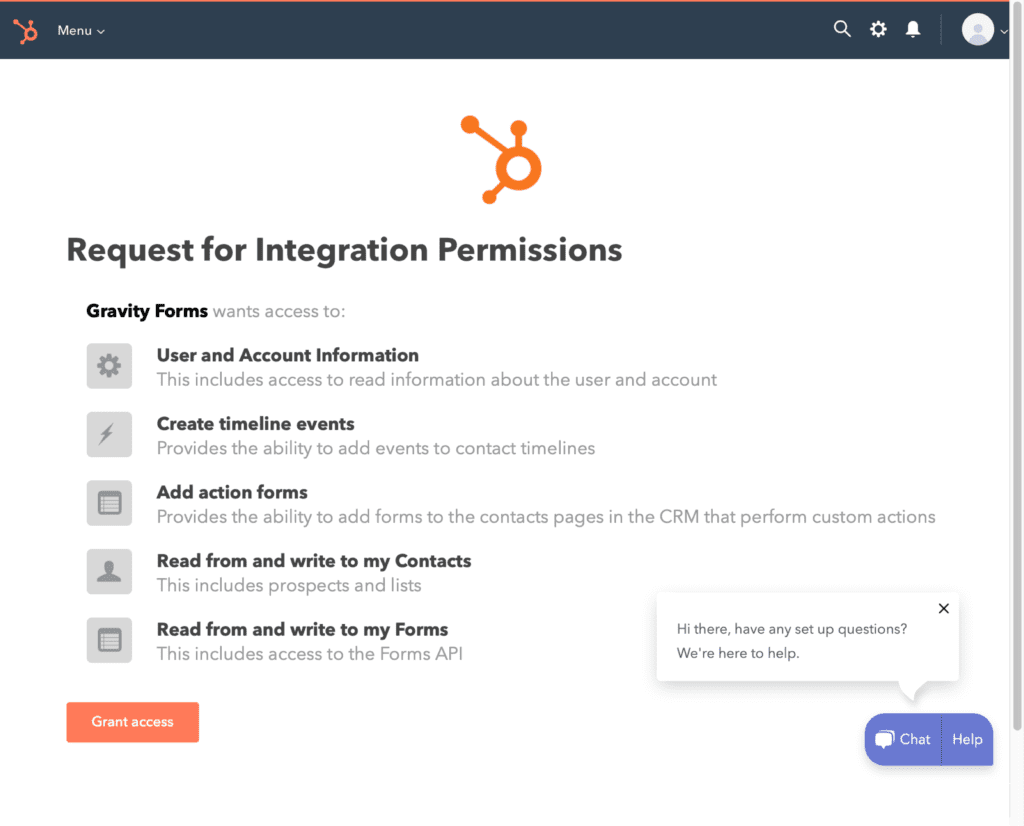
How it works: The Gravity Forms HubSpot add-on connects to HubSpot's CRM through OAuth authentication.
When a visitor submits a form on the WordPress site, the add-on maps form field values to HubSpot contact properties and creates or updates a contact record. The add-on uses a feed-based architecture: you configure one or more HubSpot feeds per form, each defining which fields map to which HubSpot properties and under what conditions the feed fires.
Source: Gravity Forms
What it syncs: Form field values to HubSpot contact properties. Standard mappings include name, email, phone, company name, job title, website, address, and lifecycle stage. Custom Gravity Forms fields (dropdowns, checkboxes, text areas, calculated values) map to custom HubSpot contact properties. The HubSpot Add-On 3.0.0 release introduced improved field mapping and conditional logic support.
Fits: ongoing sync of new form submissions into HubSpot; not a migration tool for historical entries.
Setup process:
In the WordPress admin, navigate to Forms > Add-Ons and install the HubSpot add-on (available on all Gravity Forms license tiers). Activate the add-on.
Go to Forms > Settings > HubSpot and authenticate your HubSpot account using OAuth. HubSpot redirects you to grant Gravity Forms permission to create and update contacts in your portal.
Open any Gravity Form and navigate to Settings > HubSpot. Click "Add New" to create a HubSpot feed for that form.
Map your form fields to HubSpot contact properties. The add-on displays available HubSpot properties and lets you assign each one to a corresponding form field. Create any custom HubSpot properties in advance if you need to capture data that standard properties do not cover.
Optionally, configure conditional logic on the feed so data only sends to HubSpot when specific conditions are met (for example, only when the "Request Type" dropdown equals "Sales Inquiry").
Test by submitting the form on the front end and verifying the contact record appears in HubSpot with the correct property values.
Strengths: Included with every Gravity Forms license tier at no additional cost. No third-party tool to configure or pay for. Real-time sync on each submission. Conditional logic on feeds lets a single form route data to HubSpot selectively. Supports mapping to both standard and custom HubSpot contact properties.
Limitations: One-directional only (Gravity Forms to HubSpot). Creates or updates HubSpot contact records only; it does not create deals, tickets, companies, or custom objects. Historical form entries submitted before the feed was configured do not sync retroactively. The add-on relies on Gravity Forms' feed system, so if a feed fails (network timeout, HubSpot API error), WordPress still saves the form submission but the HubSpot record may not appear until the issue is resolved.
Best for: WordPress teams that need a straightforward, no-cost connection between Gravity Forms and HubSpot for lead capture and contact creation. Marketing teams running landing pages, newsletter signups, event registrations, or contact forms on WordPress that need every submission to appear in HubSpot automatically.
Zapier
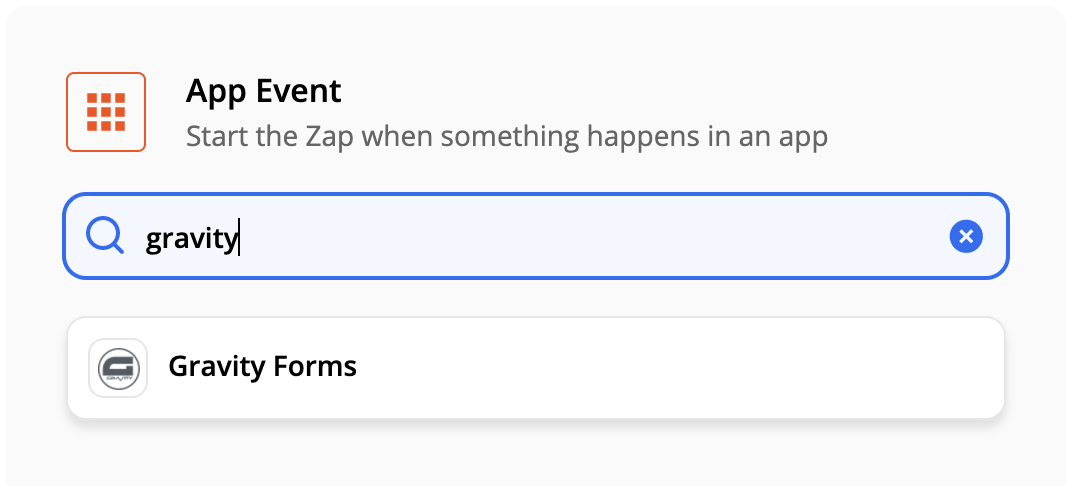
How it works: Zapier connects Gravity Forms and HubSpot through event-driven automations called Zaps.
Each Zap pairs a trigger (an event in one app) with one or more actions (what happens in the other). Gravity Forms has an official Zapier add-on available on the Pro tier ($159/year) and above. HubSpot is one of Zapier's most popular connectors, with extensive trigger and action options.
Source: Gravity Forms
What it syncs: Any data that Gravity Forms exposes as a trigger and HubSpot accepts as an action. Beyond contacts, Zapier can create HubSpot deals, tickets, companies, tasks, and engagement events from form submissions. It can also chain multiple actions: create a contact, then create a deal tied to that contact, then send a Slack notification. Custom field mapping is manual and configurable in the Zap setup flow.
Fits: ongoing sync with multi-step workflow capabilities; not a migration tool for historical entries.
Setup process:
Install the Gravity Forms Zapier add-on (requires Pro license or higher) via Forms > Add-Ons in WordPress. Generate a Zapier feed on the form you want to connect.
Create a Zapier account and start a new Zap. Choose Gravity Forms as the trigger app and select "Form Submission" as the trigger event.
Connect your Gravity Forms account to Zapier using the webhook URL and API key the Zapier add-on provides.
Choose HubSpot as the action app. Select the action type: "Create Contact," "Create or Update Contact," "Create Deal," "Create Ticket," or another available action.
Map the form fields from the Gravity Forms trigger step to the corresponding HubSpot fields in the action step. Test the mapping with a sample submission.
Turn the Zap on. For workflows that need to update HubSpot and another tool at the same time, add action steps to the same Zap.
Strengths: Can create HubSpot objects beyond contacts (deals, tickets, companies, tasks), which the native add-on cannot. Multi-step Zaps chain actions across multiple apps in a single workflow. Zapier's filter and formatting steps add conditional logic and data transformation between the trigger and action. Large template library covers common Gravity Forms-HubSpot workflows.
Limitations: Requires Gravity Forms Pro tier ($159/year) or higher for the Zapier add-on. Zapier itself costs from $19.99/month, with pricing scaling by task volume. Each synced submission counts as a Zapier task. Near real-time rather than instant (1 to 15 minutes depending on plan tier). Historical form entries submitted before the Zap was activated do not sync.
Best for: Teams that need form submissions to create HubSpot objects beyond contacts (deals, tickets, or companies), or that want to chain form submissions into multi-app workflows (form submission creates a HubSpot contact, assigns a deal, and notifies the team in Slack).
Make (Formerly Integromat)
How it works: Make uses a visual scenario builder where modules (app actions) connect in a flowchart.
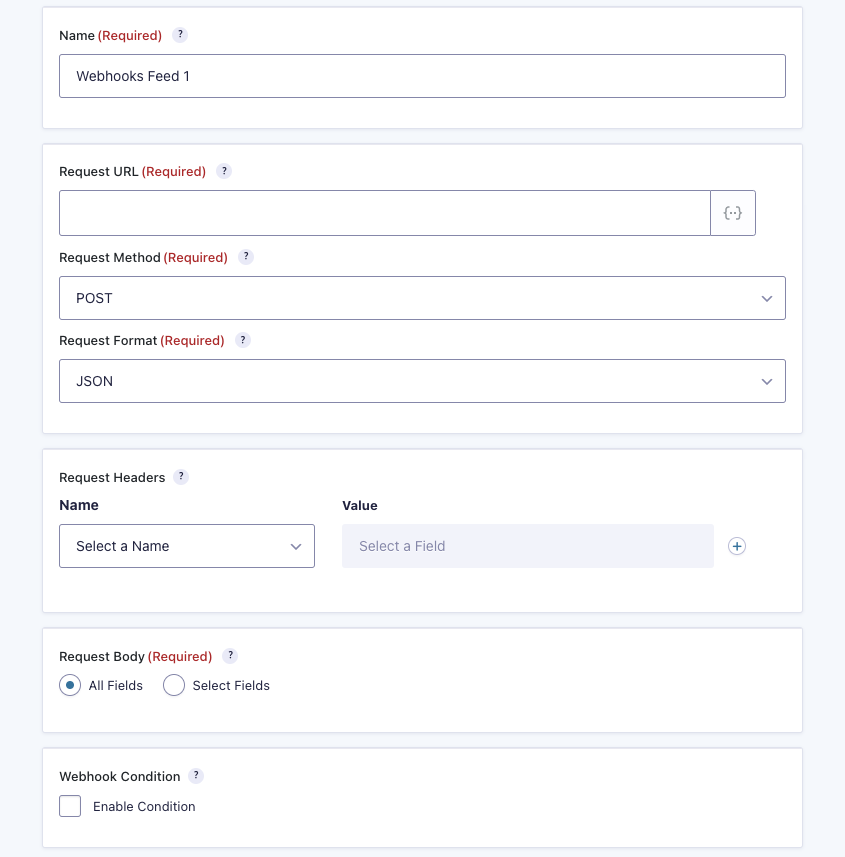
Each module represents a step: watch for a Gravity Forms submission, transform data, create or update a HubSpot record. Scenarios can branch, filter, loop, and handle errors, giving more control than Zapier's linear structure. Gravity Forms connects to Make through its Webhooks add-on (Elite tier, $259/year) or through Make's HTTP module receiving webhook payloads.
Source: Gravity Forms
What it syncs: The same HubSpot objects as Zapier (contacts, companies, deals, tickets, tasks), with more flexibility in data transformation. Make supports iterators for batch processing, routers for conditional paths, and aggregators for combining records before writing. This makes it better suited for complex transformations, such as parsing multi-select form fields into separate HubSpot property values.
Fits: ongoing sync with conditional logic and data transformation; not a migration tool.
Setup process:
Configure a Gravity Forms webhook feed (Elite tier, Webhooks add-on) or use Make's HTTP webhook module to receive form submission payloads from Gravity Forms.
Create a Make account and build a new scenario. Add the webhook trigger module and configure it to listen for incoming Gravity Forms submissions.
Add a HubSpot module and select an action (for example, "Create or Update a Contact," "Create a Deal," or "Create a Ticket").
Connect the two modules and map fields. Make provides functions for transforming data between platforms (for example, converting a Gravity Forms multi-select value into a HubSpot semicolon-delimited property format).
Add error-handling modules to catch failures (for example, log to a spreadsheet or send an email notification).
Set the scenario to run on every trigger event or on a time-based schedule.
Strengths: Granular control over data transformation and conditional routing. The visual builder makes complex workflows easier to follow than code. Batch operations and error handling are built in. Per-operation pricing is lower than Zapier at higher volumes. Can route different form submissions to different HubSpot objects based on field values.
Limitations: Requires Gravity Forms Elite tier ($259/year) for the Webhooks add-on, unless you use Make's generic HTTP webhook (which requires more manual configuration). Steeper learning curve than both the native add-on and Zapier. One-directional unless you build a separate scenario to pull data from HubSpot.
Best for: Teams with conditional routing requirements (for example, creating a HubSpot deal when a form submission includes a budget above a certain threshold, or routing submissions to different HubSpot pipelines based on a dropdown selection). Mid-size teams whose sync volumes make Zapier's per-task pricing expensive.
Custom API Integration
How it works: Both Gravity Forms and HubSpot expose APIs for reading and writing data.
Gravity Forms provides a REST API (v2, built on the WordPress REST API) covering forms and entries, plus a Webhooks add-on (Elite tier) for outbound HTTP requests on form submission. HubSpot's REST API covers all standard and custom CRM objects, with webhooks for event-driven notifications. A custom integration connects these APIs directly, with your own middleware handling authentication, field mapping, transformation, and error recovery.
What it syncs: Anything both APIs expose. This is the only method that supports bidirectional sync (pulling HubSpot deal stages or lifecycle stage changes back into WordPress), creating HubSpot custom objects from form data, or enforcing complex business rules that go beyond field mapping.
Fits: both one-time migration of historical form entries and ongoing sync; the only method with no ceiling on either.
Setup process:
On the Gravity Forms side, enable the REST API in WordPress settings and generate authentication credentials (HMAC-based API keys for external access or WordPress cookie auth for internal use). For real-time triggers, configure the Webhooks add-on (Elite tier) to send HTTP POST requests on form submission.
On the HubSpot side, create a private app in your HubSpot account to generate an access token with the required scopes (contacts, deals, tickets, or custom objects). HubSpot's private apps support scope-based access control and token rotation.
Build a server-side application or serverless function that receives webhook payloads from Gravity Forms, transforms the data according to your field mapping, and writes records to HubSpot via its API.
Implement deduplication logic using email address as the matching key and HubSpot's upsert capabilities to avoid creating duplicate contacts.
Add logging, error handling, and retry logic. HubSpot imposes rate limits (100 to 190 requests per 10 seconds depending on plan) that affect high-volume sync scenarios.
Deploy, monitor, and maintain the integration over time.
Strengths: Full control over what syncs, when, and how. The only method that supports bidirectional sync. Can create any HubSpot object type, including custom objects. Can migrate historical Gravity Forms entries into HubSpot. No per-record or per-operation fees from a third-party connector.
Limitations: Requires developers to build and maintain. You own the infrastructure, monitoring, and error recovery. API changes on either side (HubSpot moved to date-based API versioning in March 2026; Gravity Forms maintains both v1 and v2 APIs) require ongoing maintenance. The Gravity Forms REST API does not support file uploads, so form attachments need separate handling. The initial build takes weeks, not hours.
Best for: Organizations that need form submissions to create HubSpot custom objects, require bidirectional data flow between WordPress and HubSpot, or have complex data models and business logic that must be enforced during sync.
Key Use Cases
1. Lead Capture from WordPress Landing Pages into HubSpot Nurture Sequences
Marketing teams build campaign-specific landing pages on WordPress using Gravity Forms for lead capture (gated content downloads, webinar registrations, demo requests). Each form submission creates a HubSpot contact with the captured properties (email, job title, company, interest area), immediately enrolling the lead into a HubSpot workflow that sends a nurture sequence based on the content they downloaded.
Best integration method: Native Gravity Forms HubSpot add-on (real-time, included with all license tiers).
2. Multi-Step Application Forms Routing to HubSpot Deals
Organizations using Gravity Forms' multi-page forms for detailed applications (partner applications, vendor onboarding, service requests) need the submitted data to create both a HubSpot contact and an associated deal. A single form submission creates the contact record and a deal in the appropriate pipeline, with deal properties populated from form fields like budget, timeline, and project scope.
Best integration method: Zapier (multi-step Zap creating a contact and then a deal in a single workflow).
3. Event Registration with Conditional CRM Routing
Nonprofits or educational institutions use Gravity Forms for event registrations with conditional logic (different registration paths for students, alumni, and donors, each collecting different field sets).
Based on the registrant type, the form submission routes to different HubSpot lifecycle stages, list memberships, or contact owner assignments. Conditional feeds on the native add-on handle simple routing; for more complex scenarios, Make provides visual branching logic.
Best integration method: Native add-on with conditional feeds for simple routing; Make for complex multi-branch scenarios.
4. Payment Form Submissions Triggering HubSpot Deal Updates
WordPress sites using Gravity Forms' Stripe or PayPal payment add-ons need successful payment events to update HubSpot deal stages. When a customer completes a payment form, the integration creates or updates a HubSpot deal with the payment amount, moves it to "Closed Won," and logs the transaction details as a note on the contact record.
Best integration method: Zapier or Make (multi-step workflow creating a contact and updating a deal based on payment status).
5. Survey and Quiz Responses Feeding HubSpot Lead Scoring
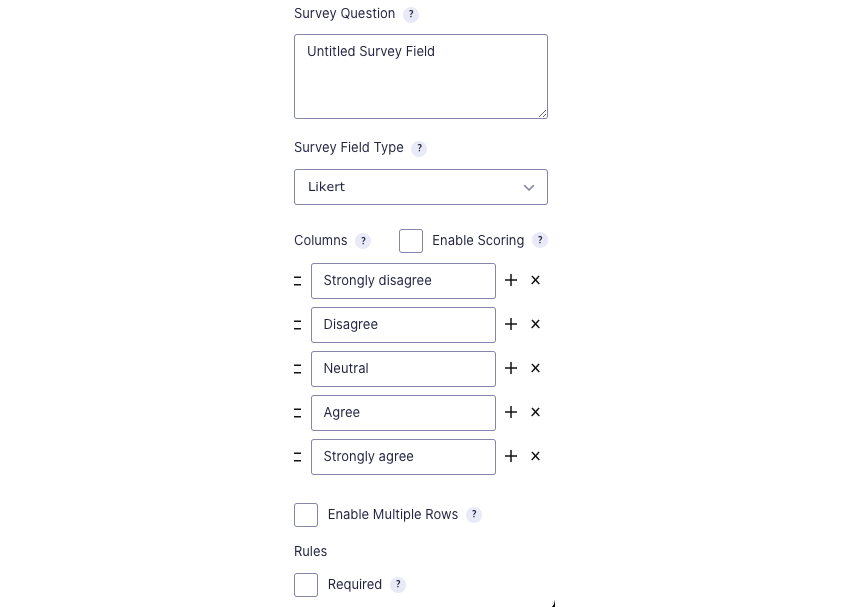
Marketing teams use Gravity Forms' Quiz and Survey add-ons (Elite tier) to collect responses that inform lead qualification. Quiz scores and survey answers map to HubSpot contact properties that feed lead scoring, so a prospect who scores high on a product-knowledge quiz or indicates high purchase intent on a survey rises in priority for the sales team automatically.
Source: Gravity Forms
Best integration method: Native add-on (maps quiz score and survey responses to custom HubSpot properties on submission).
Limitations and Considerations
Data That Doesn't Sync
The native add-on creates and updates HubSpot contact records only. It does not create deals, companies, tickets, or custom objects.
If a form collects data that should populate multiple HubSpot object types (a contact and an associated deal), the native add-on cannot handle both in a single feed. File uploads submitted through Gravity Forms do not transfer to HubSpot through any automated method; the files stay on the WordPress server, and at most a URL reference can be mapped to a HubSpot text property.
Entries submitted before the HubSpot feed was configured do not sync retroactively. If you have months of historical form data in WordPress that needs to exist in HubSpot, you need a custom script or middleware tool to migrate those records.
Sync Conflicts and Deduplication
The native add-on uses email address as the matching key to decide whether to create a new HubSpot contact or update an existing one.
If a visitor submits a form with an email that already exists in HubSpot, the add-on updates the existing contact's properties with the new form values. This means a returning lead's previous data (job title, company) may be overwritten by the latest submission if those fields are mapped. There is no built-in way to preserve previous values or choose which source wins per field.
For teams using Zapier or Make, deduplication requires explicit configuration. Zapier offers a "Create or Update Contact" action that checks for an existing record before creating a new one. Without this step, duplicate contacts accumulate.
Pricing Implications
The native Gravity Forms HubSpot add-on is included with all license tiers, starting at $59/year (Basic). The Zapier add-on requires the Pro tier at $159/year, and the Webhooks add-on (needed for Make or custom integrations sending outbound HTTP requests) requires the Elite tier at $259/year.
On the HubSpot side, the free CRM tier supports the native add-on without restrictions. Marketing automation workflows that act on imported contacts (lead scoring, nurture sequences, advanced segmentation) require Marketing Hub Professional ($800/month annual) or higher. Teams on HubSpot's free or Starter tiers can receive contacts from Gravity Forms but have limited automation capabilities.
Third-party tools carry their own costs. Zapier starts at $19.99/month for 750 tasks. Make starts at $10.59/month for 10,000 operations. At high form submission volumes, these costs compound.
Permissions and Access
Setting up the native add-on requires WordPress admin access with the Gravity Forms plugin installed and a HubSpot account with permissions to create and modify contacts. If your HubSpot portal uses teams, partitioning, or field-level permissions, make sure the connected account can access all contact properties you intend to map.
For Zapier and Make, you need OAuth authorization on both platforms. For custom API integrations, you need a HubSpot private app with the appropriate scopes (contacts, deals, tickets) and Gravity Forms REST API credentials or webhook configuration access.
Maintenance
Both platforms update independently. Gravity Forms released HubSpot Add-On 3.0.0 with improved field mapping and authentication. HubSpot moved to date-based API versioning in March 2026, introducing a new /2026-03/ endpoint pattern while maintaining backward compatibility for 18 months per version.
Custom fields added to either platform after the initial setup will not sync unless you update the integration configuration. Periodic reviews of field mappings and feed health are necessary to catch configuration drift.
What No Method Fixes: The Data Itself
Every method above moves form submission data from Gravity Forms into HubSpot. None checks whether that data is accurate, complete, or actionable.
A lead who submits a form with a personal email, a vague job title, and no company name arrives in HubSpot exactly that way. A returning visitor whose role changed six months ago still carries the old title in the CRM if no one updated it. The integration ensures HubSpot receives what the form captured; it does not ensure the resulting records are enriched, verified, or sales-ready.
Where ZoomInfo Fits In
Every method in this guide moves form submission data from Gravity Forms into HubSpot. None improves the data being moved. When the integration is live but lead records arrive with personal email addresses, missing company names, and no way to tell whether a submission came from a decision-maker or an intern, the bottleneck is no longer the connector.
That is the gap ZoomInfo closes.
ZoomInfo is a B2B data and go-to-market platform with 500M contacts, 100M companies, 135M+ verified phone numbers, and 200M+ verified business emails. A team of 300+ human researchers verifies that data, reaching up to 95% accuracy on first-party records.

Source: ZoomInfo
ZoomInfo integrates with HubSpot through the marketplace, providing CRM enrichment, lead routing, and real-time data updates inside HubSpot records.
When a form submission creates a new contact in HubSpot, ZoomInfo can automatically enrich that record with a verified business email, direct-dial phone number, job title, department, seniority level, company attributes, technographic profile, and org chart position. A lead who submitted a form with just a name and email becomes a fully profiled contact that marketing can segment accurately and sales can reach directly.
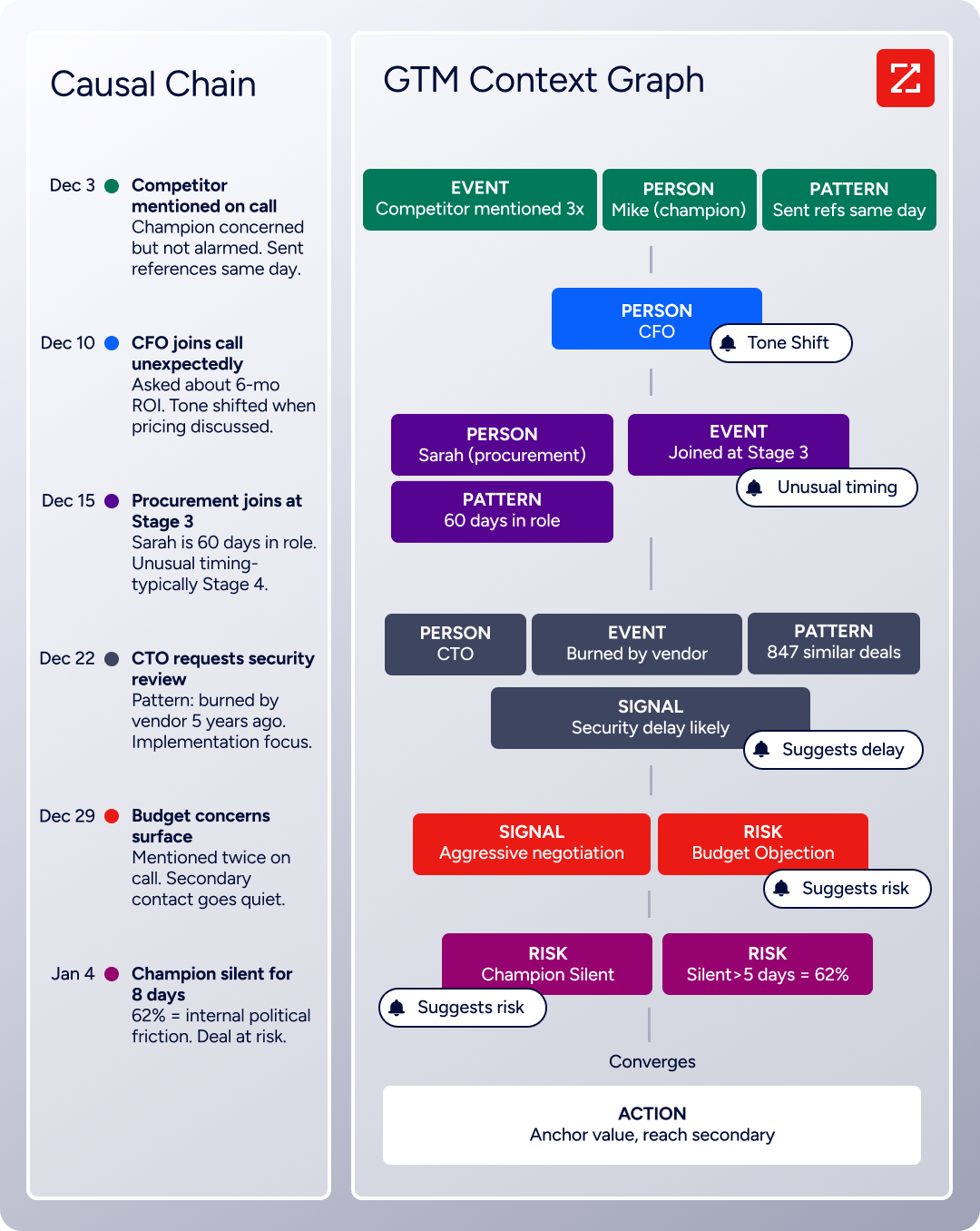
The same data feeds ZoomInfo's GTM Context Graph, which processes 1.5B+ data points daily by combining third-party intelligence with CRM records, conversation transcripts, and behavioral signals to show not just what happened in a deal, but why.
ZoomInfo Buyer Intent data tracks signals from 210 million IP-to-Organization pairings and adds intent signals to enriched contacts in HubSpot, so the sales team prioritizes leads actively researching relevant solutions. Sales acts on form submissions from in-market accounts first rather than working the queue in submission order.
Source: ZoomInfo
Enriched records also make the form-to-CRM pipeline more valuable downstream. Fewer blank fields mean HubSpot's lead scoring models have real data to score against. Accurate job titles mean nurture sequences address the right persona. Verified business emails mean outreach lands. And company attributes (industry, employee count, revenue range) let marketing automation segment by company profile, not just by what the lead typed into a form field.
Seismic's sales team attributed 39% of active pipeline to opportunities identified or influenced by ZoomInfo signals, while boosting productivity by 54% and saving 11.5 hours per week. (Seismic)
Final Verdict
A native integration between Gravity Forms and HubSpot exists and is included with every Gravity Forms license tier. For most teams, this is the starting point: real-time, no additional cost, and sufficient for the core use case of pushing form submissions into HubSpot as contact records. The right choice depends on scale and complexity.
Small marketing teams capturing leads through WordPress forms should start with the native Gravity Forms HubSpot add-on. It requires no third-party tool, no additional cost, and handles the most common workflow (form submission creates or updates a HubSpot contact) reliably.
Teams that need form submissions to create HubSpot objects beyond contacts (deals, tickets, or companies), or that want multi-app workflows triggered by form submissions, should add Zapier or Make on top of the native add-on.
Organizations with bidirectional sync requirements, custom HubSpot objects, or complex business logic that must be enforced during sync should invest in a custom API integration.
Before committing to a method, clarify what the integration needs to accomplish.
If the goal is getting form leads into HubSpot so the sales team can see them, the native add-on solves it today. If the goal is building automated workflows that act on form data across multiple systems, Zapier or Make adds that layer. Either way, the quality of contact data in HubSpot determines whether downstream workflows (lead scoring, nurture sequences, sales outreach) deliver value or run on incomplete information.
ZoomInfo, with its native HubSpot integration, API, and MCP access, is the data enrichment layer that turns form submissions into complete, verified, actionable CRM records.
FAQ
Does Gravity Forms integrate natively with HubSpot?
Yes. Gravity Forms offers an official HubSpot add-on that sends form submission data into HubSpot's CRM as contact records. The add-on is included with all Gravity Forms license tiers (Basic at $59/year through Elite at $259/year) at no additional cost. It supports mapping form fields to standard and custom HubSpot contact properties, with conditional logic to control when data sends.
Can I sync historical Gravity Forms entries to HubSpot?
Not through the native add-on, Zapier, or Make. All three only process form submissions that occur after the integration is activated. For historical entries, you need a custom script using the Gravity Forms REST API (to read existing entries) and the HubSpot API (to create contacts), or a data migration tool. HubSpot's import feature also accepts CSV files exported from Gravity Forms' entry management screen.
What HubSpot plan do I need for the Gravity Forms integration?
The native Gravity Forms HubSpot add-on works with HubSpot's free CRM tier. You can create and update contacts without a paid HubSpot subscription. To act on those contacts with marketing automation (workflows, lead scoring, nurture sequences, advanced segmentation), you need HubSpot Marketing Hub Professional ($800/month annual) or higher. HubSpot Starter ($15/seat/month) provides basic email and list capabilities but not full workflow automation.
Can I create HubSpot deals or tickets from Gravity Forms submissions?
Not through the native Gravity Forms HubSpot add-on, which only creates and updates contact records. To create deals, tickets, companies, or other HubSpot objects from form submissions, use Zapier (Pro tier Gravity Forms license required for the Zapier add-on) or Make (Elite tier required for the Webhooks add-on). Both support multi-step workflows that create a contact and then an associated deal or ticket in a single automation.
How do I avoid duplicate contacts when syncing forms to HubSpot?
The native Gravity Forms HubSpot add-on uses email address as the matching key. If a form submission contains an email that already exists in HubSpot, the add-on updates the existing contact rather than creating a duplicate. Zapier offers a "Create or Update Contact" action that performs the same check. For custom API integrations, use HubSpot's upsert endpoint, which checks for an existing record by email before creating a new one.
What happens if the integration fails during a form submission?
With the native add-on, WordPress still saves the form submission as a Gravity Forms entry regardless of whether the HubSpot sync succeeds. If the HubSpot API is temporarily unavailable or returns an error, the entry exists in WordPress but the HubSpot contact may not be created. Gravity Forms logs feed errors in the entry notes, which you can review in the WordPress admin. Re-processing failed entries requires manual intervention or a custom script.
Does the integration support Gravity Forms conditional logic?
Yes. The native HubSpot add-on supports conditional feed logic. You can configure the feed to send data to HubSpot only when specific conditions are met (for example, only when a dropdown field equals "Sales Inquiry" or when a checkbox is checked). This lets a single form serve multiple purposes while syncing only the relevant submissions to HubSpot.
How does ZoomInfo improve a Gravity Forms-HubSpot integration?
ZoomInfo solves the data quality problem that no form connector addresses.
Form submissions arrive in HubSpot with whatever the visitor chose to provide, which often means a personal email, a vague job title, and no company information. ZoomInfo's HubSpot integration automatically enriches those records with verified business emails, direct-dial phone numbers, accurate job titles, company attributes, and technographic profiles.
The result: leads captured through Gravity Forms become fully profiled, sales-ready contacts in HubSpot, and downstream workflows (lead scoring, nurture sequences, sales outreach) run on complete, verified data rather than partial form inputs.
Other tools that connect to HubSpot:
