

Teams that run QuotaPath for commission tracking and HubSpot as their CRM usually discover the same problems within a quarter:
deal data lives in HubSpot but commission calculations happen in QuotaPath, and the two drift apart whenever a rep updates a deal amount or close date in one system but not the other,
reps maintain shadow spreadsheets to estimate their own commissions because the numbers in QuotaPath lag behind what they see in HubSpot,
and finance spends the first two days of every month reconciling deal records across both platforms before anyone can run payroll.
However the two platforms ended up coexisting (a RevOps team choosing QuotaPath for comp management while the org standardized on HubSpot CRM, or a growing sales team adding commission automation to an existing HubSpot setup), the longer both run independently, the wider the gap between what reps close and what they get paid.
Connecting QuotaPath and HubSpot eliminates that gap.
Deal data created or updated in HubSpot flows into QuotaPath so commission calculations run against live CRM records rather than stale imports. Reps see current earnings on their QuotaPath dashboards that reflect the deals they just closed in HubSpot, so attainment tracking stays accurate without manual reconciliation. Commission data surfaces inside HubSpot through App Cards, so reps and managers can see earnings and quota attainment without leaving the CRM.
QuotaPath offers a native HubSpot integration available through the HubSpot App Marketplace. The integration supports two-way data visibility: deal data flows from HubSpot into QuotaPath for commission calculation, and commission attainment data surfaces back inside HubSpot via App Cards. For teams with more complex requirements, QuotaPath's REST API can push deal data from any source, including HubSpot via middleware tools. Each method differs in setup complexity, sync direction, data coverage, and cost.
There is also one problem no connection method solves: the sync moves deal data between systems, but it does not verify whether the contact and company records behind those deals are accurate, complete, or current.
That is where ZoomInfo comes in. ZoomInfo integrates with HubSpot through its Inbound Enrich connector and offers API and MCP access that can feed verified contact and company data into any CRM workflow, so the deal records that flow from HubSpot into QuotaPath carry accurate titles, verified emails, and current company details.
This article covers the QuotaPath-HubSpot integration: which methods are available, what data each one handles, how to set them up, the use cases that justify connecting both platforms, and the limitations to plan for. It also covers how ZoomInfo fits in as a data enrichment layer that strengthens the records powering both systems.
Let's start with an overview of the integration.
Integration Overview
Source: QuotaPath
Does a native integration exist?
Yes. QuotaPath offers a native HubSpot integration listed on the HubSpot App Marketplace. QuotaPath is the most installed commission app on the HubSpot Marketplace, and HubSpot Ventures made a strategic investment in QuotaPath in April 2021.
What data can sync?
Deal data flows from HubSpot into QuotaPath: deal amounts, close dates, pipeline stages, deal owners, and mapped custom fields. QuotaPath uses this data to calculate commissions against assigned compensation plans. Commission attainment data (earnings, quota progress) surfaces back inside HubSpot through App Cards on contact and deal records. The integration also supports Lead and Invoice objects as data sources from HubSpot.
Is the sync bidirectional?
Partially. Deal data flows one direction: HubSpot to QuotaPath. Commission and attainment data flows back into HubSpot as read-only App Card displays, not as writable CRM fields. QuotaPath does not write deal modifications back into HubSpot.
Is it real-time or batch?
The native integration runs on a scheduled sync. QuotaPath's Integrations 2.0 architecture supports sync schedules as frequent as every 2 hours, with on-demand manual syncs available at any time. Hourly CRM sync options were added in 2025.
What are the available methods?
Native QuotaPath-HubSpot integration, QuotaPath's Inbound Deal API (for custom data pipelines), and CSV bulk upload for teams not yet ready for a live integration.
Method | Setup Difficulty | Data Flow | Real-time? | Cost |
|---|---|---|---|---|
Native Integration | Low | HubSpot to QuotaPath (deals); QuotaPath to HubSpot (App Cards) | Scheduled (hourly to daily) | Included with QuotaPath subscription |
QuotaPath API | High | Any source to QuotaPath | Depends on implementation | Dev time; requires Premium tier |
CSV Upload | Low | Manual, one-way | No (batch) | Included with QuotaPath subscription |
One distinction worth settling upfront: the native integration handles ongoing, automated sync of deal data as part of daily commission operations. The API serves teams that need to combine HubSpot deal data with other sources (billing systems, accounting platforms) before feeding it into QuotaPath. CSV upload covers one-time migrations or teams evaluating QuotaPath before committing to a live CRM connection.
Integration Methods
Native QuotaPath-HubSpot Integration
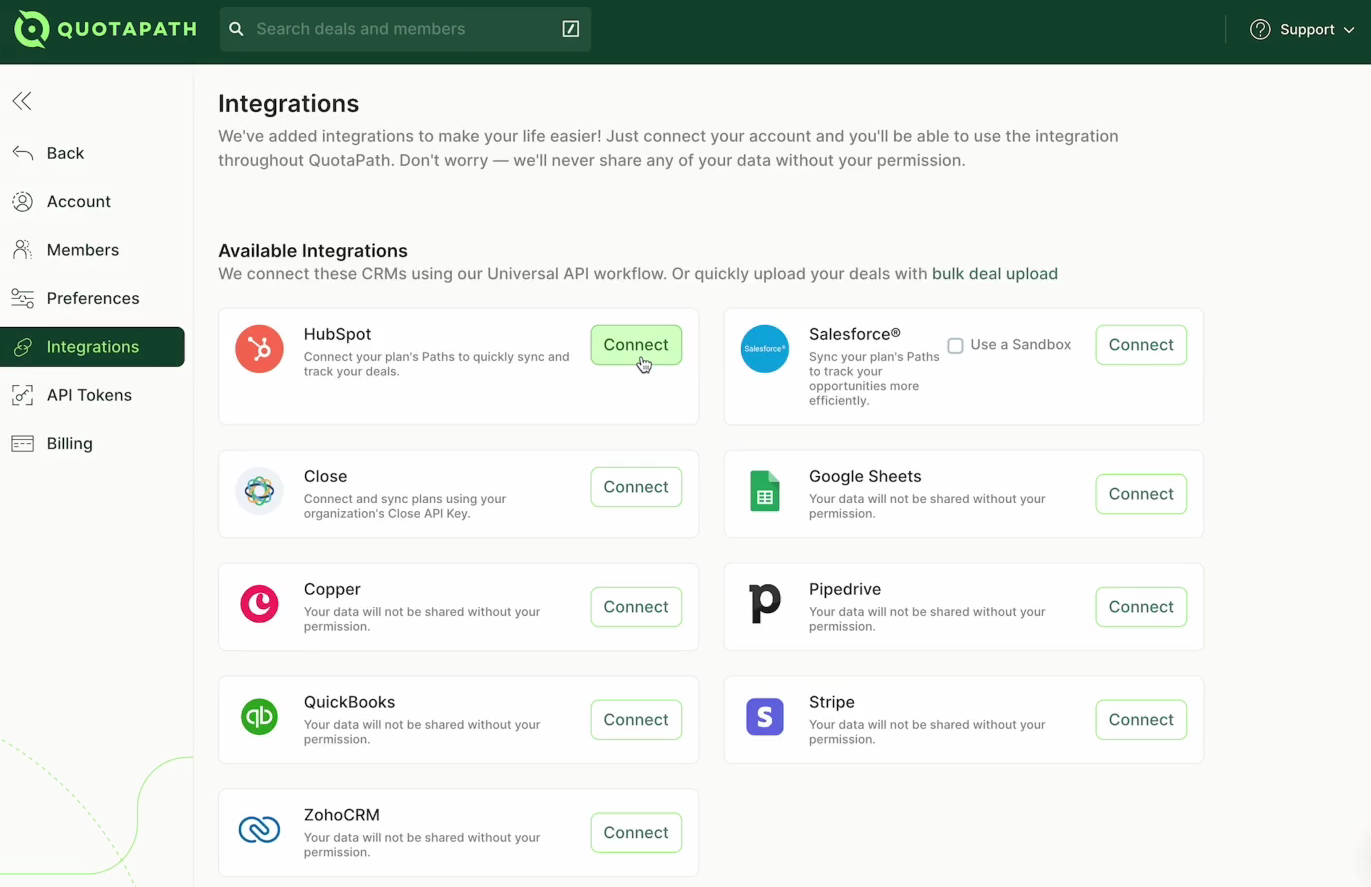
How it works: QuotaPath's native HubSpot integration connects the two platforms through a workspace-level integration built on QuotaPath's Integrations 2.0 architecture. The integration pulls deal records from HubSpot on a configurable schedule, maps HubSpot deal fields to QuotaPath deal properties, and calculates commissions against the compensation plans assigned to each rep. Commission and attainment data then surfaces inside HubSpot through App Cards, giving reps and managers visibility into earnings without leaving the CRM.
Source: QuotaPath
What it syncs: Deal records from HubSpot (amount, close date, pipeline stage, deal owner, and custom fields mapped during setup). QuotaPath also supports Lead and Invoice object syncing from HubSpot. On the return path, App Cards display commission earnings and quota attainment data inside HubSpot contact and deal records.
Fits: ongoing sync of deal data for automated commission calculations; also handles initial historical sync of existing deals.
Setup process:
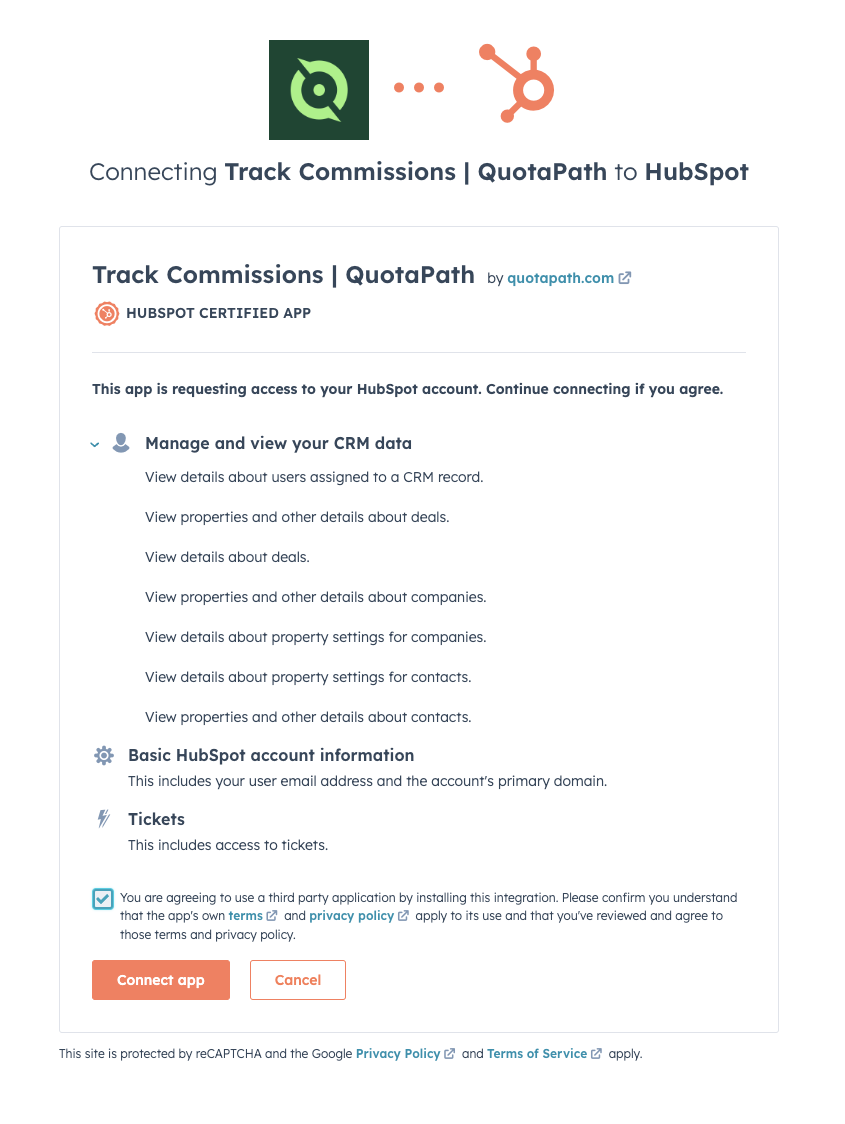
In QuotaPath, navigate to Settings, then Integrations, and select HubSpot from the available CRM connectors. Authenticate with your HubSpot account using OAuth, granting QuotaPath permission to read deal data from your HubSpot org.
Configure the data source by selecting which HubSpot deal properties to sync into QuotaPath. Map HubSpot fields (deal amount, close date, pipeline stage, owner) to the corresponding QuotaPath deal fields. The integration provides mapping templates for common configurations.
Set the sync schedule. Options range from every 2 hours to once daily, with on-demand manual syncs available at any time. Hourly sync is available for teams that need tighter data freshness.
In QuotaPath's compensation plans, assign the HubSpot data source to the relevant plan components, specifying which pipeline stages qualify as "closed" for commission purposes and which stages populate pipeline forecasting.
Install the QuotaPath App Card in HubSpot to display commission earnings and attainment data on deal and contact records. This step enables the return data flow from QuotaPath back into HubSpot's interface.
Run an initial sync to pull existing HubSpot deals into QuotaPath, then verify that commission calculations match expected values for a sample of closed deals.
Source: QuotaPath
Strengths: First-party integration maintained by QuotaPath and distributed through the HubSpot Marketplace. No third-party tool to configure or pay for separately. Workspace-level architecture (Integrations 2.0) reduces sync errors and API usage compared to older per-user integration patterns. Supports sync history, source data viewer, calculated fields, and sync alerts for data validation. App Cards bring commission visibility into HubSpot, so reps do not need to switch tools to check earnings.
Limitations: Sync is scheduled, not event-driven: a deal closed in HubSpot at 9 AM may not appear in QuotaPath until the next sync cycle runs. Deal data flows only from HubSpot to QuotaPath; commission adjustments or overrides made in QuotaPath do not write back into HubSpot deal fields. Complex custom field types in HubSpot may require manual mapping or formatting steps. QuotaPath admin rights and HubSpot account admin access are both required for setup.
Best for: Revenue operations and finance teams that use HubSpot as their primary CRM and need automated commission calculations without building custom pipelines. Teams already evaluating or using QuotaPath will find this the fastest path to a working integration.
QuotaPath Inbound Deal API
How it works: QuotaPath's REST API lets any external system push deal records into QuotaPath programmatically. For teams using HubSpot, this means building a middleware layer (using HubSpot's webhooks or API polling) that captures deal events in HubSpot and writes them into QuotaPath via API calls. This approach applies when the native integration's field mapping or sync schedule does not meet specific requirements, or when deal data needs to be combined with data from other sources (billing platforms, accounting systems) before entering QuotaPath.
What it syncs: Any deal data that can be structured into QuotaPath's API schema: deal state (closed, open, lost), deal values tied to specific compensation plan paths, user email for rep assignment, and metadata fields (two date fields and one number field). The API also supports bulk deal upload for batch operations.
Fits: ongoing sync with custom transformation logic, or one-time migration of historical data with business rules applied before import.
Setup process:
Ensure your QuotaPath workspace is on the Premium tier or above, which is required for API access.
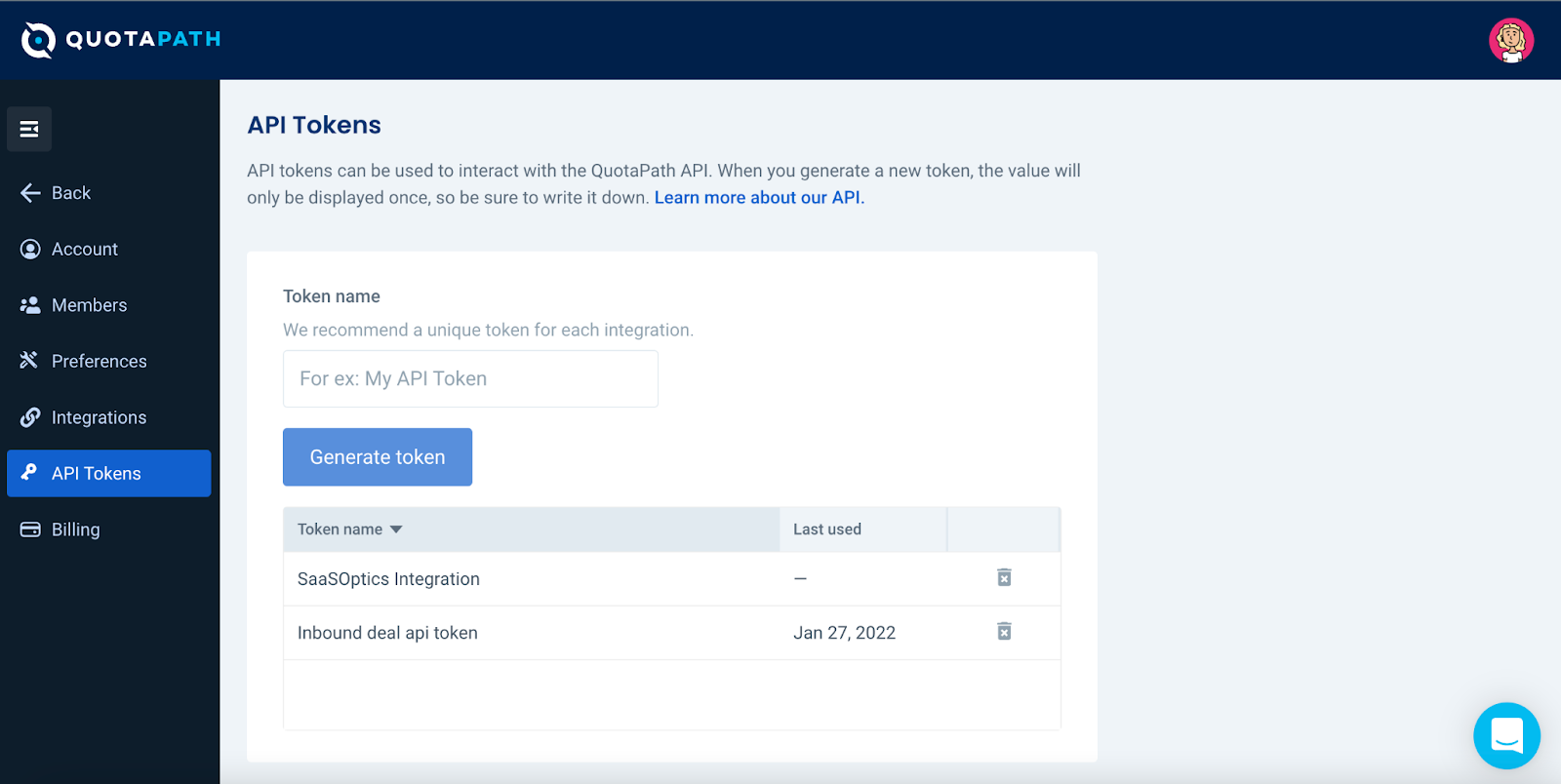
In QuotaPath, navigate to Settings, then API Tokens, and generate a new token. Copy the token immediately, as it is displayed only once.
Identify the Plan IDs and Path IDs in your QuotaPath workspace that deal data should route to. These must exist before API calls can reference them.
Build a middleware service that listens for deal changes in HubSpot (using HubSpot webhooks or scheduled API polling), transforms the deal data into QuotaPath's API schema, and writes records via POST /deal/ or POST /deal/bulk/.
Implement error handling and logging. Both HubSpot and QuotaPath impose API rate limits, and failed writes should be retried with backoff logic.
Deploy and monitor the middleware. Test with a sample of deals to verify commission calculations match expectations.
Source: QuotaPath
Strengths: Full control over which deals enter QuotaPath, when, and with what transformations applied. Can combine HubSpot deal data with data from billing systems (Stripe, Chargebee), accounting platforms (QuickBooks, NetSuite), or other CRMs before writing to QuotaPath. Supports bulk operations for initial data loads. No per-record fees from a third-party connector.
Limitations: Requires development resources to build and maintain. API access is gated to QuotaPath Premium ($50/user/month + $800/month platform fee). The API cannot create plans, approve deals, or generate payouts; those actions are reserved for the QuotaPath UI. No official SDKs or client libraries exist; developers write raw HTTP requests. Rate limits are not publicly documented, and the middleware must handle both HubSpot and QuotaPath API constraints.
Best for: Teams with complex commission structures that require deal data from multiple sources before commission calculation. Organizations with in-house development resources and requirements that the native integration's field mapping or sync schedule cannot satisfy.
CSV Bulk Upload
How it works: QuotaPath supports CSV bulk upload for teams that need to import deal data without a live CRM connection. You export deal records from HubSpot as a CSV file, format them to match QuotaPath's import template, and upload them into the QuotaPath workspace.

Source: QuotaPath
What it syncs: Any deal data that fits QuotaPath's CSV template: deal amounts, close dates, rep assignments, and custom fields. Historical data from any time period can be imported.
Fits: one-time migration of historical deals, evaluation periods before committing to a live integration, or supplementary data loads for deals not captured by the native integration.
Setup process:
Export deal data from HubSpot using HubSpot's built-in export function or the CRM API.
Format the CSV file to match QuotaPath's bulk upload template, mapping HubSpot columns to QuotaPath's required fields.
In QuotaPath, navigate to Deals and select the bulk upload option.
Upload the CSV file and review the import preview for field mapping accuracy.
Confirm the import. Uploaded deals can be locked so that only admins can edit them.
Strengths: No technical setup required. Works on any QuotaPath plan tier. Useful for evaluating QuotaPath with real data before investing in integration configuration.
Limitations: Entirely manual. No ongoing sync; every update requires a new export-import cycle. Not practical for teams with frequent deal changes or large deal volumes. Deals uploaded via CSV are disconnected from HubSpot, so changes in the CRM do not propagate.
Best for: Teams evaluating QuotaPath during a trial period, organizations importing historical data for backfill, or supplementary loads for deal types not covered by the native integration.
Key Use Cases
1. Automated Commission Calculation on Closed Deals
When a rep closes a deal in HubSpot, the deal record syncs into QuotaPath on the next scheduled cycle. QuotaPath applies the rep's compensation plan, calculates the commission based on deal amount and attainment tier, and updates the rep's earnings dashboard. Finance no longer needs to pull deal data from HubSpot and enter it into a spreadsheet or commission tool.
Best integration method: Native QuotaPath-HubSpot integration (scheduled sync).
2. Real-Time Rep Earnings Visibility in HubSpot
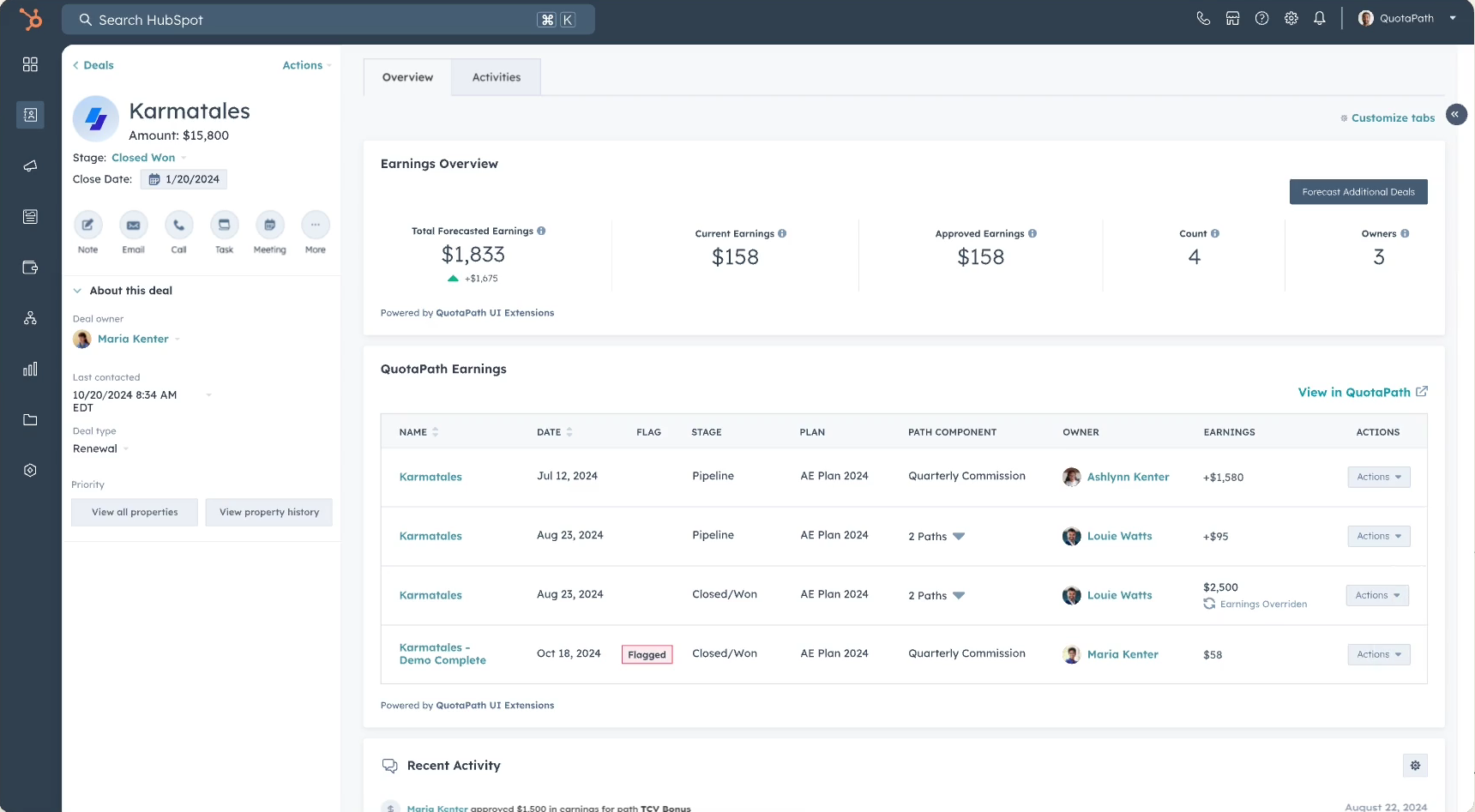
Sales reps working in HubSpot can see their commission earnings and quota attainment on deal and contact records through QuotaPath's App Cards. When a rep opens a deal record in HubSpot, the App Card shows how much they have earned on that deal and where they stand against quota, without switching to a separate application.
Best integration method: Native QuotaPath-HubSpot integration (App Cards).
3. Pipeline-Based Commission Forecasting
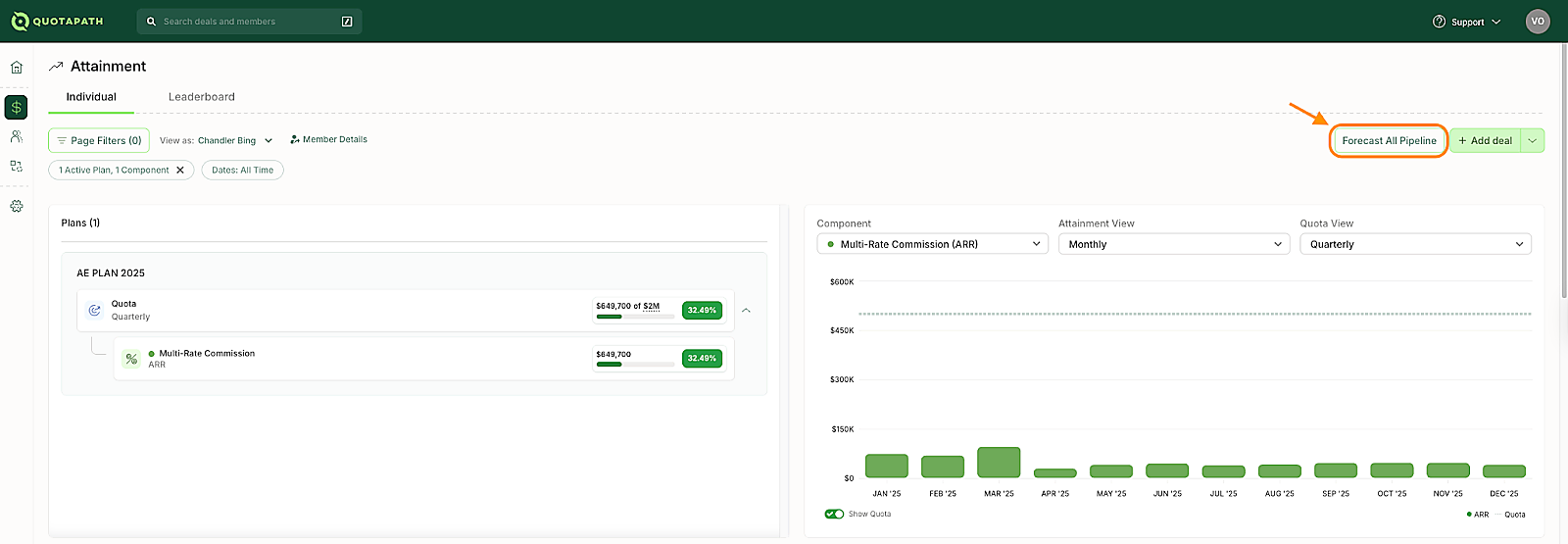
Reps and managers can forecast commission earnings on open pipeline deals. When pipeline stages are mapped in the native integration, QuotaPath pulls open deals from HubSpot and lets reps selectively forecast individual deals to model what closing specific opportunities would do to their earnings and quota attainment.
Best integration method: Native QuotaPath-HubSpot integration (pipeline stage mapping).
Source: QuotaPath
4. Multi-Source Commission Calculation
Organizations that track revenue across HubSpot (for CRM deals) and a billing platform like Stripe or Chargebee (for recurring revenue) need to combine both data streams before calculating commissions. A middleware service pulls deal events from HubSpot and payment events from the billing system, merges them, and writes unified records into QuotaPath via the API.
Best integration method: QuotaPath Inbound Deal API (custom middleware combining multiple sources).
5. New Rep Onboarding with Historical Commission Data
When onboarding a new sales team onto QuotaPath, finance teams need to backfill historical deal data from HubSpot so that year-to-date attainment and earnings records are accurate from day one. A CSV export from HubSpot covering the relevant fiscal period is uploaded into QuotaPath, followed by activating the native integration for ongoing sync.
Best integration method: CSV bulk upload (for historical data), then native integration (for ongoing sync).
Limitations and Considerations
Sync Latency
The native integration operates on a scheduled sync, not event-driven triggers. Even with hourly sync enabled, there is a window where a deal closed in HubSpot has not yet appeared in QuotaPath. For most commission use cases this delay does not matter (commissions are typically processed at period close, not in real time), but reps checking their dashboards mid-day may see stale figures.
Source: QuotaPath
One-Directional Deal Data Flow
Deal data flows from HubSpot into QuotaPath, but commission adjustments, overrides, or manual deal edits made in QuotaPath do not write back into HubSpot. If a finance admin overrides a commission amount in QuotaPath, the corresponding deal record in HubSpot will not reflect that change. Teams need to decide which system is the source of truth for each data type and communicate that clearly.
Field Mapping Complexity
HubSpot's deal model supports custom properties, calculated fields, and multi-currency deals. Mapping these into QuotaPath requires careful configuration during setup. Complex field types (multi-select dropdowns, calculated properties, currency conversions) may need intermediate formatting. The integration provides mapping templates for common setups, but non-standard configurations require manual mapping and testing.
Pricing Implications
The native integration is included with any QuotaPath subscription, but QuotaPath's pricing starts at $35/user/month plus a $525/month platform fee on the Growth tier. API access requires the Premium tier ($50/user/month plus $800/month platform fee). On the HubSpot side, the integration works with any paid tier, and HubSpot's API rate limits (100 to 190 requests per 10 seconds depending on plan) apply to any sync operations.
Permissions and Access
Setting up the native integration requires QuotaPath admin rights and HubSpot account admin access. In HubSpot, the connecting user must have permissions to authorize OAuth connections and grant read access to deal data. In QuotaPath, only workspace admins can configure integrations, manage field mappings, and set sync schedules.
Maintenance
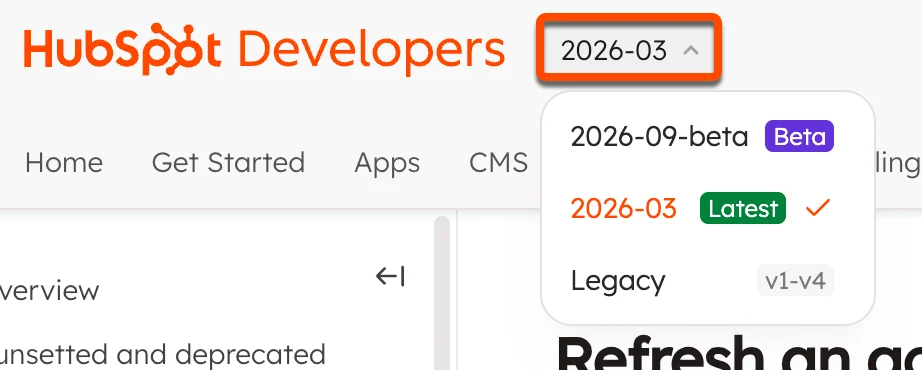
Both platforms update their integration surfaces independently. QuotaPath's Integrations 2.0 architecture was a major rewrite of the original integration layer. HubSpot introduced date-based API versioning in March 2026, with breaking changes possible twice per year. Custom fields added to HubSpot deals after initial setup will not sync until you update the field mapping in QuotaPath. Plan for periodic reviews of the integration's configuration, especially after major platform updates on either side.
Source: HubSpot
What No Method Fixes: The Data Itself
Every method above moves deal records from HubSpot into QuotaPath for commission calculation. None of them checks whether the contact and company data behind those deals is accurate. A deal attributed to the wrong account because the company record carries stale data, or a commission credited to a rep who inherited a lead with an outdated job title, flows through the integration just as faithfully as a clean record. The integration ensures both systems agree on what closed; it does not ensure the underlying records are right.
Where ZoomInfo Fits In
Every method in this guide moves deal data between HubSpot and QuotaPath. None of them improves the data behind the deals. When the integration is live but pipeline records are incomplete (contacts with outdated titles, companies with stale revenue figures, leads missing direct dials), the bottleneck is no longer the connector. That is the gap ZoomInfo closes.
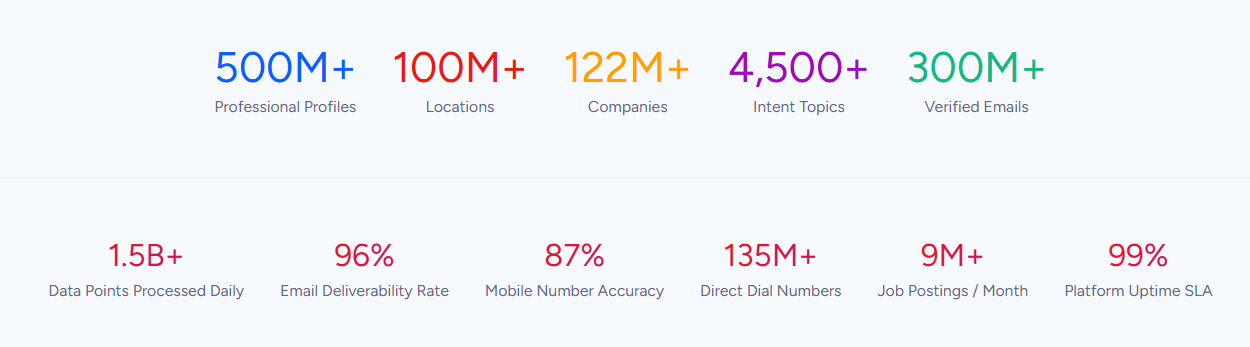
ZoomInfo is a B2B data and go-to-market platform built on 500M contacts, 100M companies, 135M+ verified phone numbers, and 200M+ verified business emails. That data is verified through a multi-source pipeline backed by 300+ human researchers and reaching up to 95% accuracy on first-party data. For teams running a QuotaPath-HubSpot integration, ZoomInfo addresses the data quality layer that no commission connector handles.
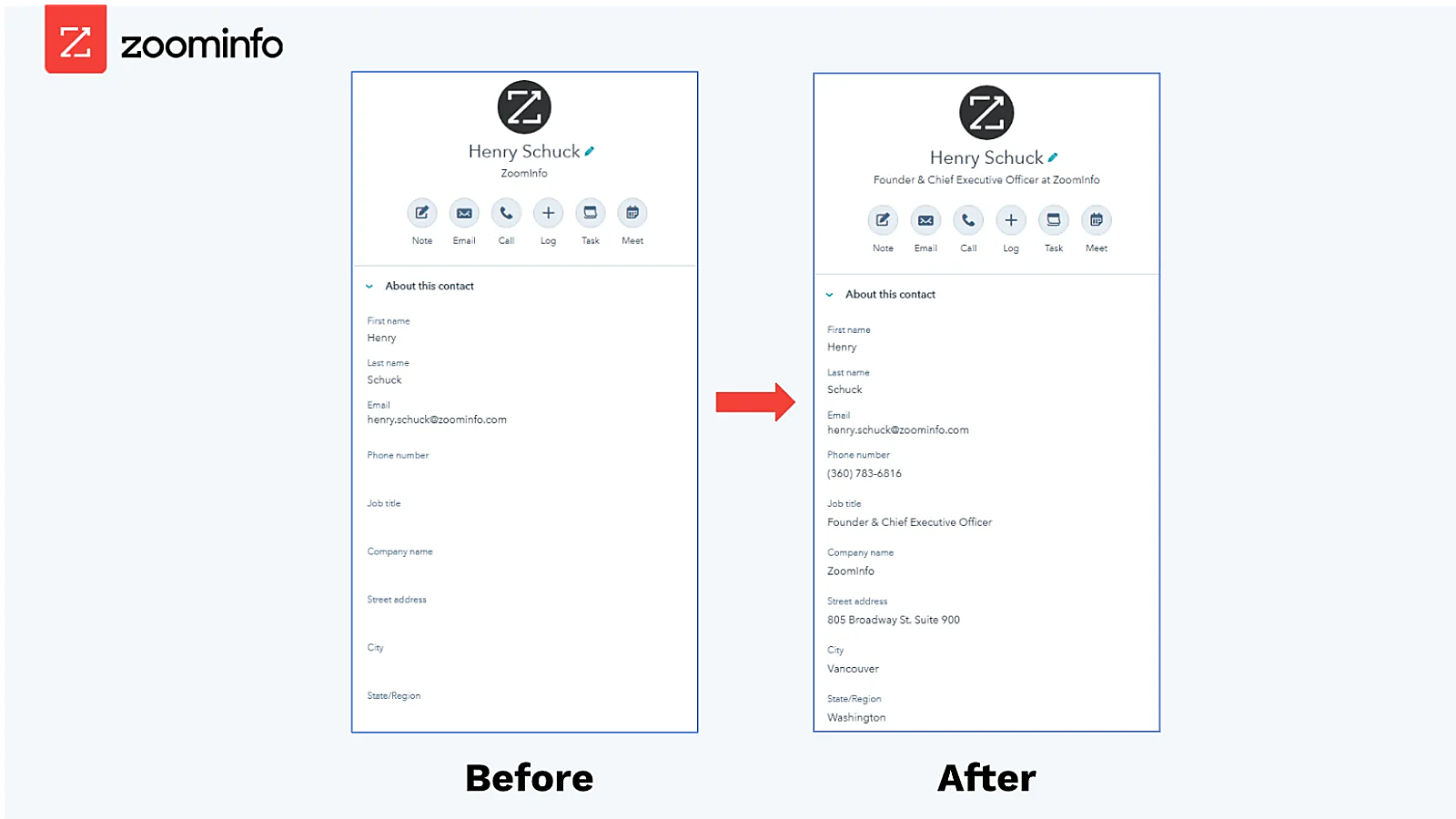
ZoomInfo integrates with HubSpot through its Inbound Enrich connector, providing CRM enrichment, contact verification, and real-time data updates inside HubSpot records. Before a deal reaches QuotaPath for commission calculation, ZoomInfo ensures the HubSpot records carry verified business emails, accurate job titles, current company attributes, and up-to-date org chart data.
The same data feeds ZoomInfo's GTM Context Graph, which processes 1.5B+ data points daily and unifies ZoomInfo's B2B data with your CRM records, conversation transcripts, and behavioral signals to surface not just what happened in a deal, but why.
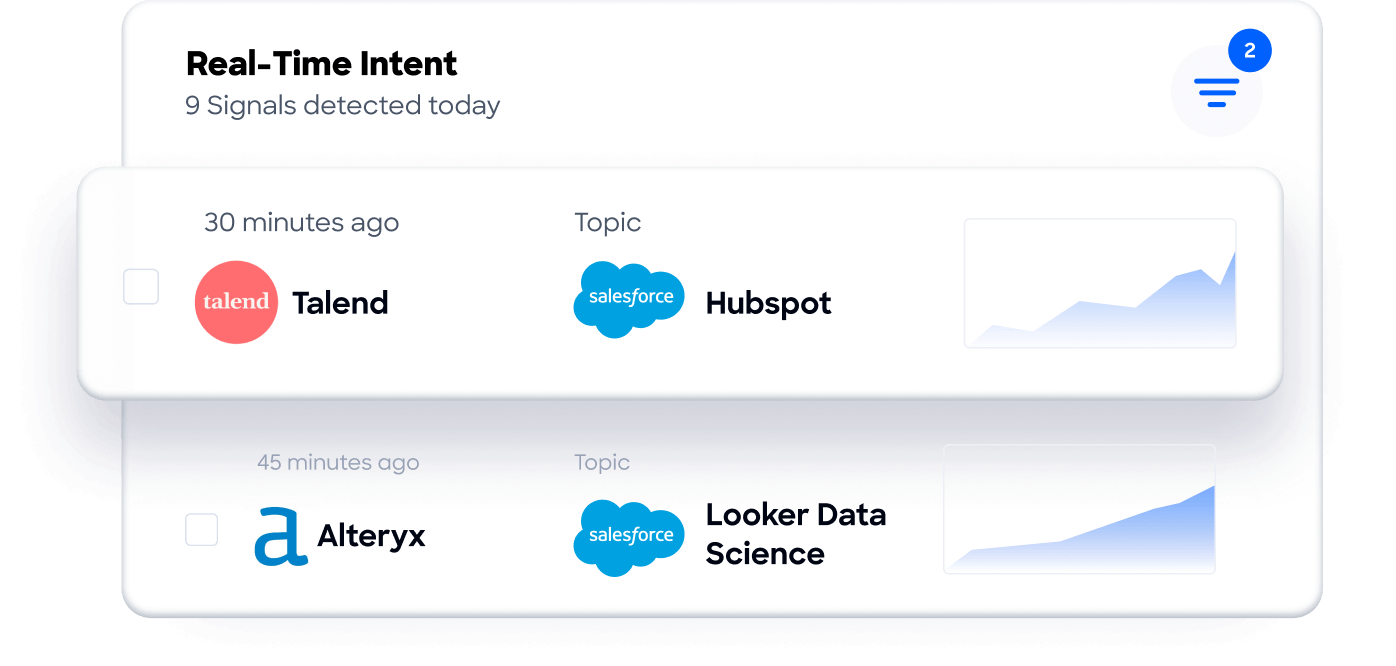
In practice, enriched HubSpot records make the downstream QuotaPath integration more reliable. Accurate company data means deals are attributed to the correct accounts, so commission splits and territory assignments calculate correctly. Verified contact records reduce the risk of commission disputes caused by misattributed deals or duplicate accounts. Buyer Intent data from ZoomInfo, tracking signals from 210 million IP-to-Organization pairings, can route into HubSpot to help reps prioritize the accounts most likely to close, improving the quality of the pipeline that drives commission calculations.
For teams that need programmatic access beyond the native HubSpot connector, ZoomInfo's Enterprise API and MCP server can feed verified data into any system or AI agent, so enrichment extends to custom workflows built around the QuotaPath API or middleware integrations.
Seismic's sales team attributed 39% of active pipeline to opportunities identified or influenced by ZoomInfo signals, while boosting productivity by 54% and saving 11.5 hours per week. (Seismic)
Final Verdict
A native QuotaPath-HubSpot integration exists and is the recommended starting point for most teams. QuotaPath is the most installed commission app on the HubSpot Marketplace, and the integration is included with any QuotaPath subscription. The right choice depends on commission complexity and data source requirements.
Small to mid-size sales teams with straightforward commission plans should start with the native integration. It covers the core use case (HubSpot deals driving QuotaPath commissions) with no engineering resources required, and App Cards bring earnings visibility back into HubSpot.
Teams that calculate commissions from multiple revenue sources (CRM deals plus billing platform payments, for example) should look at the QuotaPath Inbound Deal API, which lets them combine data from HubSpot and other systems before writing to QuotaPath.
Organizations evaluating QuotaPath or migrating historical data should use CSV bulk upload to backfill past deals, then activate the native integration for ongoing sync.
Before committing to a method, clarify what your commission process actually requires from the integration.
If the need is straightforward (HubSpot deals drive QuotaPath commissions, reps check earnings in either tool), the native integration handles it. If the need is more complex (multi-source revenue, custom transformation logic, event-driven sync), the API path requires development investment but removes the constraints of the native connector's sync schedule and field mapping.
Either way, the accuracy of the CRM data flowing into QuotaPath determines whether commission calculations are trustworthy or just fast. ZoomInfo, with its HubSpot integration, API, and MCP access, is the data enrichment layer that ensures the deal records behind every commission are accurate and complete.
FAQ
Does QuotaPath integrate natively with HubSpot?
Yes. QuotaPath offers a native HubSpot integration available through the HubSpot App Marketplace. The integration syncs deal data from HubSpot into QuotaPath for automated commission calculations, and displays commission earnings and attainment data back inside HubSpot through App Cards. It is included with any QuotaPath subscription and does not require a separate connector fee. QuotaPath is the most installed commission app on the HubSpot Marketplace, and HubSpot Ventures made a strategic investment in QuotaPath in 2021.
What HubSpot data syncs into QuotaPath?
The native integration pulls deal records from HubSpot, including deal amounts, close dates, pipeline stages, deal owners, and mapped custom fields. QuotaPath also supports Lead and Invoice objects from HubSpot as data sources. Commission and attainment data flows back into HubSpot as read-only App Card displays on contact and deal records.
How often does the QuotaPath-HubSpot integration sync?
The native integration runs on a configurable schedule. QuotaPath's Integrations 2.0 architecture supports sync frequencies as tight as every 2 hours, with hourly sync options added in 2025. On-demand manual syncs are available at any time. The sync is scheduled, not event-driven, so a deal closed in HubSpot will not appear in QuotaPath until the next sync cycle runs.
Can I use QuotaPath with HubSpot's free CRM?
The integration connects via OAuth and pulls deal data from HubSpot. HubSpot's free CRM includes basic deal management, so the technical connection is possible. However, HubSpot's API rate limits on the free tier (250,000 requests per day, 100 requests per 10 seconds) may constrain sync performance for teams with large deal volumes. QuotaPath itself requires a paid subscription starting at $35/user/month plus a $525/month platform fee.
Does commission data write back into HubSpot deal fields?
Not as writable CRM fields. Commission and attainment data surfaces inside HubSpot through QuotaPath's App Cards, which display earnings and quota progress on deal and contact records. These are read-only displays. Commission overrides, adjustments, or payout schedules managed in QuotaPath do not modify HubSpot deal properties.
What QuotaPath plan tier do I need for the HubSpot integration?
The native HubSpot integration is available on the Growth tier ($35/user/month + $525/month platform fee) and above. API access, which enables custom integration builds, requires the Premium tier ($50/user/month + $800/month platform fee). All plans are billed annually.
How does ZoomInfo improve a QuotaPath-HubSpot workflow?
ZoomInfo solves the data quality problem upstream of the commission calculation. Before deals flow from HubSpot into QuotaPath, ZoomInfo's native HubSpot integration enriches contact and company records with verified business emails, accurate job titles, current company attributes, and org chart data. Accurate records mean deals are attributed to the correct accounts and reps, reducing commission disputes caused by misattributed deals, duplicate contacts, or stale company data. ZoomInfo's Buyer Intent data can also prioritize accounts most likely to close, improving the quality of the pipeline that drives commission calculations.
Can I connect QuotaPath to other data sources alongside HubSpot?
Yes. QuotaPath supports nine CRM integrations (including Salesforce, Close, Pipedrive, and Zoho), seven accounting integrations on the Premium tier (QuickBooks, Stripe, Chargebee, NetSuite, and others), and spreadsheet connectors (Google Sheets, Excel, Smartsheet). The Inbound Deal API allows any external system to push deal data into QuotaPath. Teams can configure multiple data sources within a single QuotaPath workspace and combine them for payout eligibility rules.
Other tools that connect to HubSpot:
