
Teams that run Klenty for outbound sales and HubSpot as their CRM usually hit the same problems within a quarter:
contacts imported into Klenty lose sync with HubSpot records, so reps work from stale job titles and phone numbers,
cadence activity (emails sent, calls logged, replies received) stays trapped in Klenty while deal records live in HubSpot, leaving managers with an incomplete picture of pipeline activity,
and leads that enter HubSpot from marketing never reach Klenty cadences fast enough, so response times stretch from minutes to hours.
However the two platforms ended up coexisting (an SDR team choosing Klenty for its multi-channel sequencing while the broader org standardized on HubSpot, or a sales leader layering Klenty's dialer and cadence engine onto an existing HubSpot CRM), the longer they operate independently, the wider the gap between outreach activity and CRM truth.
Connecting Klenty and HubSpot closes that gap.
New HubSpot leads flow into Klenty cadences automatically so reps engage them within minutes instead of manually importing CSVs. Every email, call, and reply logged in Klenty syncs back to HubSpot contact records so managers see the full engagement history without leaving the CRM. Deal stages update in both directions, meaning a rep moving a prospect to "Meeting Booked" in Klenty triggers the corresponding HubSpot pipeline change without duplicate data entry.
Klenty offers a native two-way HubSpot integration available through the HubSpot App Marketplace, with 400+ installations. For teams needing workflows beyond what the native connector supports, Zapier can bridge additional triggers and actions between the two platforms. Custom API development is also possible, though the practical need for it is narrow given the native integration's coverage. Each method differs in setup complexity, sync direction, data coverage, and cost.
There is also one problem no connection method solves: the sync moves records between systems, but it does not verify or improve the data inside them.
And that is where ZoomInfo comes in. ZoomInfo integrates natively with HubSpot through its marketplace and offers API and MCP access that can feed verified, enriched contact data into any CRM or sales engagement workflow, so the records flowing between Klenty and HubSpot are accurate and complete before outreach begins.
This article covers the Klenty-HubSpot integration: which methods are available, what data each one handles, how to set them up, the use cases that justify connecting both platforms, and the limitations to plan for. At the end it also covers how ZoomInfo fits into the picture as a data enrichment layer for both platforms.
Let's start with an overview of the integration.
Integration Overview
Does a native integration exist?
Yes. Klenty offers a native two-way HubSpot integration, available through the HubSpot App Marketplace, with 400+ installations. The native integration is available on Klenty's Growth plan ($70/user/month) and above; Starter plan users do not get CRM integrations beyond API and Zapier.
What data can sync?
Contacts, companies, deals, activities (emails sent, calls logged, replies), cadence enrollment status, and custom fields. The native integration supports both importing HubSpot contacts into Klenty and exporting Klenty engagement data back to HubSpot records.
Is the sync bidirectional?
Yes. The native integration supports bidirectional sync: auto-importing leads from HubSpot into Klenty cadences, and auto-exporting all cadence activity (emails, calls, replies, outcomes) back to HubSpot contact records. Deal stage changes can trigger cadence actions in Klenty, and Klenty outcomes can update HubSpot deal properties.
Is it real-time or batch?
The native integration operates in near real-time. When a new lead enters HubSpot or a cadence event fires in Klenty, the sync triggers within minutes. Zapier-based connections trigger within 1 to 15 minutes depending on the Zapier plan tier.
What are the available methods?
Native Klenty-HubSpot integration (Growth plan and above), third-party automation (Zapier), and custom API development.
Method | Setup Difficulty | Data Flow | Real-time? | Cost |
|---|---|---|---|---|
Native (Klenty Growth+) | Low | Bidirectional | Near real-time | Included with Growth plan ($70/user/mo) |
Zapier | Medium | One-way per Zap | Near real-time (1-15 min) | From $19.99/mo + Klenty Starter or higher |
Custom API | High | Custom | Depends on implementation | Developer time + hosting |
One distinction worth settling upfront: the native integration handles both ongoing bidirectional sync and initial contact import, making it suitable for teams that want to connect the platforms once and let data flow continuously. Zapier works better for specific event-driven workflows the native connector does not cover (e.g., triggering a Slack notification when a Klenty prospect replies). Custom API development is rarely necessary given the native integration's coverage, but remains an option for teams with unique data transformation requirements.
Integration Methods
Native Klenty-HubSpot Integration (Growth Plan and Above)

Source: Klenty
How it works: Klenty's native HubSpot integration connects the two platforms through OAuth authentication. Once connected, the integration enables four core sync functions that Klenty groups under its "CRM Acceleration" label: Auto-Import, Auto-Export, Triggers and Actions, and CRM Plugin.
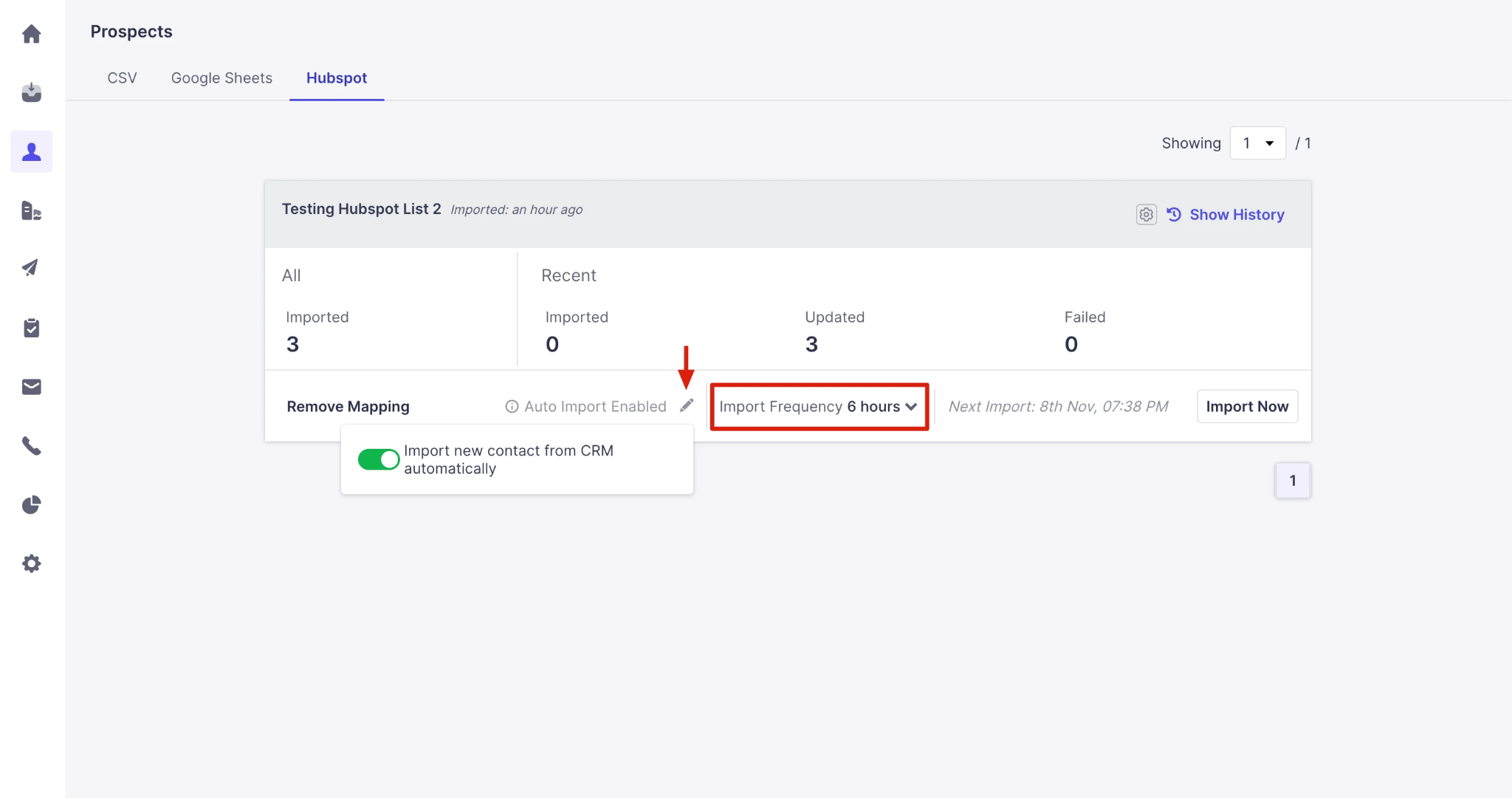
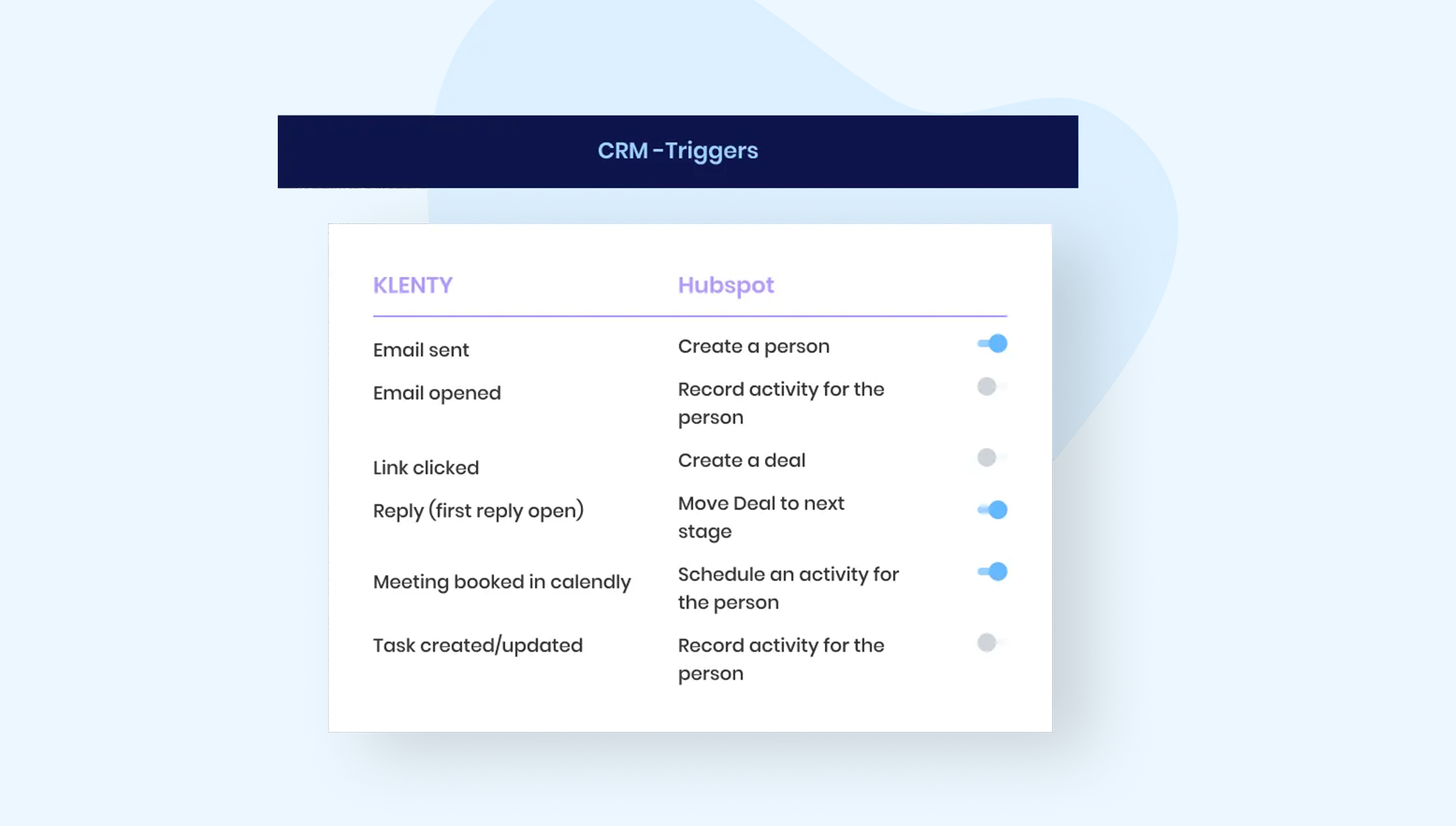
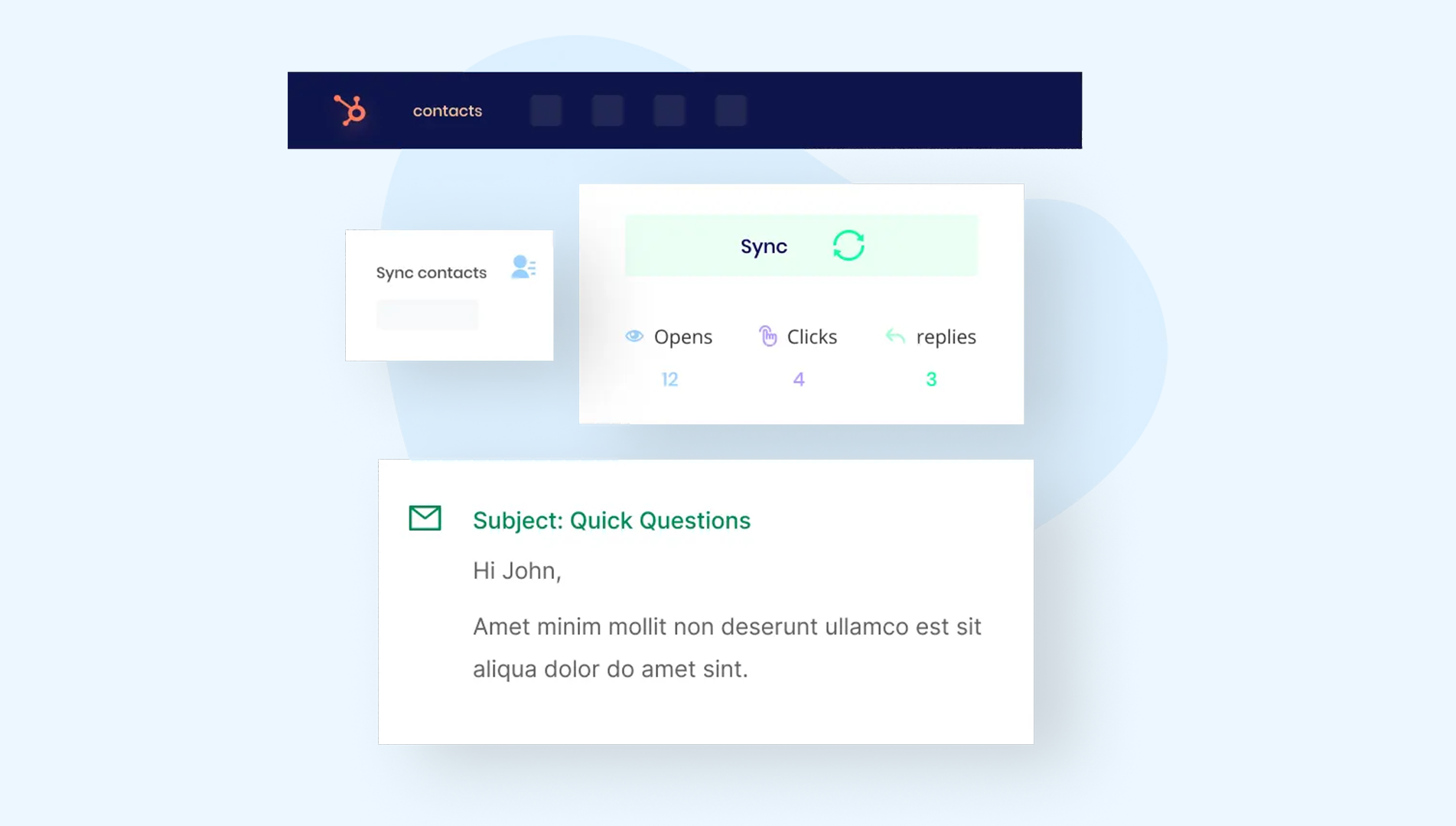
Auto-Import pulls HubSpot contacts into Klenty lists or cadences based on configurable filters. Auto-Export pushes all Klenty engagement data (emails, calls, replies, cadence status) back to HubSpot contact timelines. Triggers and Actions let HubSpot events (like a deal stage change) start or stop Klenty cadences automatically. The CRM Plugin surfaces HubSpot contact context inside Klenty's interface so reps see deal history without switching tabs.
What it syncs: Contacts (including custom fields), companies, deals, email activity (sent, opened, clicked, replied, bounced), call activity (logged calls with outcomes), cadence enrollment and completion status, and prospect outcomes. Custom field mappings are configurable during setup.
Fits: both ongoing bidirectional sync and initial contact import; the primary integration method for most teams.
Setup process:
Confirm your Klenty workspace is on the Growth plan ($70/user/month) or above. CRM integrations are not available on the Starter plan.
In Klenty, navigate to Settings > Integrations > HubSpot. Click "Connect" and authenticate with your HubSpot account using OAuth, granting Klenty permission to read and write contacts, companies, deals, and activity data.
Configure Auto-Import rules: select which HubSpot lists, views, or filters should feed contacts into Klenty. Choose whether imported contacts land in a specific Klenty list or enroll directly into a cadence.
Configure Auto-Export settings: select which Klenty activities (emails, calls, replies) should log back to HubSpot contact timelines as activities or notes. Map Klenty custom fields to HubSpot contact properties.
Set up Triggers and Actions: define which HubSpot deal stage changes or lifecycle stage transitions should start or stop specific Klenty cadences.
Test by creating a contact in HubSpot that matches your import filter, verify it appears in Klenty, then send a test email from Klenty and confirm the activity logs on the HubSpot contact record.
Strengths: First-party integration maintained by Klenty and listed in the HubSpot App Marketplace. Bidirectional sync covers the full contact-to-activity loop without a third-party tool. CRM Plugin gives reps HubSpot context inside Klenty without switching tabs. Triggers and Actions automate cadence enrollment based on CRM events, reducing lead response time. No per-record or per-sync fees beyond the Klenty subscription.
Limitations: Requires Klenty Growth plan or higher ($70/user/month minimum). The objects and fields available for sync depend on both platforms' plan tiers (HubSpot's free CRM supports basic contacts and deals, but custom properties and workflows require HubSpot Professional or Enterprise). Attachment and full email thread content do not sync; Klenty logs activity metadata (date, subject, outcome) rather than full message bodies. Reporting on synced data is limited to what each platform's native reporting can display.
Best for: SDR and sales teams using Klenty as their primary outreach tool and HubSpot as their CRM. Teams that need automatic lead routing from HubSpot into Klenty cadences and want all engagement data visible in HubSpot without manual entry.
Zapier
How it works: Zapier connects Klenty and HubSpot through event-driven automations called Zaps. Each Zap pairs a trigger (an event in one app) with one or more actions (what happens in the other). Both platforms have Zapier connectors, and Klenty's webhook infrastructure is closely tied to Zapier, with the webhook endpoint path reflecting this connection. Zapier is most useful for workflows that fall outside the native integration's scope, such as pushing Klenty events to non-CRM destinations or triggering actions in HubSpot's marketing tools based on Klenty engagement.
What it syncs: Depends on the Zap configuration. Klenty's Zapier triggers include new prospect creation, email reply received, email bounced, prospect unsubscribed, cadence completed, and call completion. HubSpot's Zapier triggers and actions cover contacts, deals, companies, tickets, and marketing events. Each Zap handles one trigger-action pair, so syncing multiple event types requires multiple Zaps.
Fits: event-driven workflows that supplement the native integration; not a replacement for full bidirectional sync.
Setup process:
Create a Zapier account and connect both your Klenty and HubSpot accounts using their respective OAuth flows.
Choose Klenty as the trigger app and select the trigger event (e.g., "New Reply" or "Call Completion").
Choose HubSpot as the action app and select the action (e.g., "Update Contact" or "Create Deal").
Map fields from the Klenty trigger to the corresponding HubSpot fields. Zapier displays available data from the trigger step and lets you place it into the action fields.
Test the Zap with a sample event to verify the data maps correctly.
Turn the Zap on. Each qualifying Klenty event will trigger the configured HubSpot action.
Strengths: Available on all paid Klenty plans (Zapier integration is included from Starter). Covers edge-case workflows the native integration does not handle, such as creating HubSpot tickets from Klenty bounce events or triggering HubSpot marketing workflows from Klenty cadence completions. No engineering resources required. Zapier's filter and formatting steps add conditional logic.
Limitations: Each Zap handles one trigger-action pair, so complex workflows require multiple Zaps (each counting against the Zapier plan's task allocation). No bidirectional sync in a single Zap; reverse flows need separate Zaps with loop-prevention logic. Historical events before Zap activation do not sync. Zapier charges by task count, and high-volume Klenty activity can accumulate costs. For teams on Klenty Growth or above, the native integration handles the core sync use cases more reliably.
Best for: Teams on Klenty Starter that need a lightweight HubSpot connection before upgrading to Growth. Teams on Growth or above that need specific event-driven workflows the native integration does not support (e.g., cross-platform notifications, marketing automation triggers, or multi-app chains involving tools beyond Klenty and HubSpot).
Custom API Integration
How it works: Both Klenty and HubSpot expose REST APIs for programmatic data access. HubSpot's REST API covers all CRM objects (contacts, companies, deals, tickets, custom objects) with webhook support for event-driven sync.
Klenty's REST API covers prospects, cadences, call records, and engagement data, with webhook events for 12 event types including email sent, reply, bounce, and call completion. A custom integration connects these APIs directly, with middleware handling authentication, field mapping, and sync logic.
What it syncs: Anything both APIs expose. Klenty's API supports prospect CRUD, cadence start/stop, engagement metrics, and call records. HubSpot's API covers the full CRM data model including custom objects and associations. This is the only method that supports scenarios like syncing custom Klenty engagement metrics into HubSpot calculated properties or building custom deduplication logic.
Fits: specific use cases where the native integration and Zapier cannot satisfy a data transformation or sync requirement; not a general-purpose replacement.
Setup process:
Generate API credentials in both platforms: a Klenty API key from Settings > Integrations > Klenty API Key, and a HubSpot private app access token or OAuth app from your HubSpot developer account.
Design the data model mapping between Klenty prospect fields and HubSpot contact/deal properties, including any transformation rules for fields that differ in format or structure.
Build the sync service: a server-side application that listens for Klenty webhooks (email sent, reply, bounce, call completion) and writes corresponding data to HubSpot via the CRM API, or that polls HubSpot for new contacts and creates them in Klenty via the prospect creation endpoint.
Implement conflict resolution logic if both systems can update the same fields (e.g., prospect status in Klenty vs. lifecycle stage in HubSpot).
Add logging, error handling, and retry logic. Klenty's API documentation does not publish explicit rate limits, but bulk prospect creation is capped at 100 records per request. HubSpot's API rate limits scale by plan tier (100-190 requests per 10 seconds for private apps).
Deploy, monitor, and maintain the integration. HubSpot introduced date-based API versioning in March 2026, releasing new versions twice a year (March and September), so the integration will require periodic updates.
Strengths: Full control over data flow, transformation, and conflict resolution. Can implement business logic that neither the native integration nor Zapier supports. No per-record fees from a third-party connector. Can access Klenty's full webhook event catalog (12 event types) and HubSpot's complete CRM object model.
Limitations: Requires development resources to build and maintain. Klenty does not publish official SDKs, so developers work directly with HTTP requests. Klenty's API documentation is limited to five help center articles without an OpenAPI specification or interactive explorer. HubSpot's API is far more mature, which creates an uneven development experience. The initial build takes days to weeks depending on complexity.
Best for: Teams with in-house development resources and sync requirements that neither the native integration nor Zapier can satisfy. Organizations with complex data transformation needs (e.g., aggregating Klenty engagement scores into HubSpot custom properties for lead scoring models).
Key Use Cases
1. Automatic Inbound Lead Routing from HubSpot to Klenty Cadences
Marketing generates leads through HubSpot forms, landing pages, and campaigns. The native integration's Auto-Import feature pulls qualifying leads into Klenty cadences the moment they enter HubSpot, cutting lead-to-first-touch time from hours to minutes. Filters can route leads into different cadences based on HubSpot properties (lifecycle stage, lead source, or custom fields), so inbound MQLs enter a warm follow-up sequence while event registrants enter a different nurture cadence.
Best integration method: Native Klenty-HubSpot integration (Auto-Import with filters).
Source: Klenty
2. Full Engagement History Visible in HubSpot CRM
SDRs run multi-channel outreach through Klenty (emails, calls, LinkedIn tasks, SMS), but sales leadership reviews pipeline in HubSpot. The native integration's Auto-Export syncs every Klenty touchpoint back to the HubSpot contact timeline, so managers see the full engagement picture (how many emails were sent, which ones were opened, whether the prospect replied, call outcomes) without asking reps to log activities manually.
Best integration method: Native Klenty-HubSpot integration (Auto-Export).
3. Deal Stage-Triggered Cadence Automation
When a HubSpot deal moves to a specific stage (e.g., "Demo Scheduled" or "Proposal Sent"), the native integration's Triggers and Actions feature can start a corresponding Klenty cadence for the associated contacts. A deal entering "Closed Lost" can stop all active cadences for that account and enroll the contacts into a long-term nurture sequence instead.
Best integration method: Native Klenty-HubSpot integration (Triggers and Actions).
Source: Klenty
4. Account-Based Outreach Coordinated Across Both Platforms
Teams using Klenty's Account-Based Selling module can map buying committee members from HubSpot company records into Klenty's Account Panel, then run multi-threaded outreach across the entire buying group. Engagement data flows back to HubSpot at the contact level, and deal stage progression in HubSpot triggers stage-specific Klenty playbooks for each account.
Best integration method: Native Klenty-HubSpot integration (bidirectional sync with account-level coordination).
Source: Klenty
5. Cross-Platform Workflow Automation for Edge Cases
A marketing team wants to trigger a HubSpot email workflow when a Klenty prospect completes a cadence without replying, or create a HubSpot support ticket when a Klenty email bounces. These event-driven workflows fall outside the native integration's scope but are straightforward Zapier configurations: Klenty trigger (cadence completed, email bounced) mapped to a HubSpot action (enroll in workflow, create ticket).
Best integration method: Zapier (event-driven, supplementary to the native integration).
Limitations and Considerations
Plan Gating on Klenty's Side
The native HubSpot integration requires Klenty's Growth plan at $70/user/month or higher. Teams on Klenty Starter ($50/user/month) get API and Zapier access but not the native CRM integration with Auto-Import, Auto-Export, Triggers and Actions, or the CRM Plugin. This creates a cost barrier for smaller teams that want full bidirectional CRM sync but are trying to stay on the entry-level plan.
Engagement Data Depth
The native integration logs cadence activity metadata (email sent date, subject, outcome, call duration, reply status) on HubSpot contact timelines. Full email body content, call recordings, and call transcripts do not transfer to HubSpot. If a manager wants to read the actual email a rep sent or listen to a call recording, they need to open Klenty. Klenty's Live Transcription and AI Call Coaching data stay inside Klenty's interface.
Custom Field Mapping Complexity
Both platforms support custom fields, but the data types and structures do not always align. HubSpot's property types (single-line text, number, date, dropdown, checkbox) may not map directly to Klenty's custom field types. Multi-select fields, calculated properties, and HubSpot's association labels require manual mapping or intermediate transformation. Teams with complex HubSpot data models should plan configuration time upfront.
API Maturity Gap
HubSpot's API is mature: date-based versioning, six official SDKs, an interactive API explorer, and thorough documentation. Klenty's API is functional but leaner: five help center articles, no OpenAPI specification, no official SDKs, and no published rate limits beyond batch size caps. Teams considering custom development should account for this gap in documentation and tooling.
Reporting Stays Platform-Specific
The integration syncs data between the two platforms but does not create a unified reporting layer. Cadence performance analytics (open rates, reply rates, A/B test results) live in Klenty's reporting. Pipeline and revenue reports live in HubSpot's dashboards. Teams that need a single view combining outreach metrics with pipeline progression will need to build custom HubSpot reports using the engagement data that syncs from Klenty, or export to a third-party BI tool.
Billing Practices Worth Noting
Multiple Capterra and G2 reviewers have flagged unexpected charges from Klenty following cancellation of auto-renewal, and forced mid-contract price increases. Teams evaluating Klenty should review the Terms of Service carefully, particularly the 30-day termination notice requirement and the non-refundable payment terms.
What No Method Fixes: The Data Itself
Every method above moves records between Klenty and HubSpot. None of them checks whether those records are accurate, complete, or current. A contact with an outdated job title in HubSpot imports into Klenty with the same outdated title. A prospect whose email address bounced three months ago sits in a cadence generating failed sends. The integration ensures both systems agree; it does not ensure they are right.
Where ZoomInfo Fits In
Every method in this guide moves data between Klenty and HubSpot. None of them improves the data being moved. When the integration is live but outreach underperforms because emails bounce, phone numbers are disconnected, or reps personalize messages with stale job titles, the bottleneck is no longer the connector. That is the gap ZoomInfo closes.
ZoomInfo is an all-in-one AI go-to-market platform built on 500M contacts, 100M companies, 135M+ verified phone numbers, and 200M+ verified business email addresses. That data is verified through a multi-source pipeline backed by 300+ human researchers, reaching up to 95% accuracy on first-party data. For teams running a Klenty-HubSpot integration, ZoomInfo addresses the data quality layer that no connector handles.
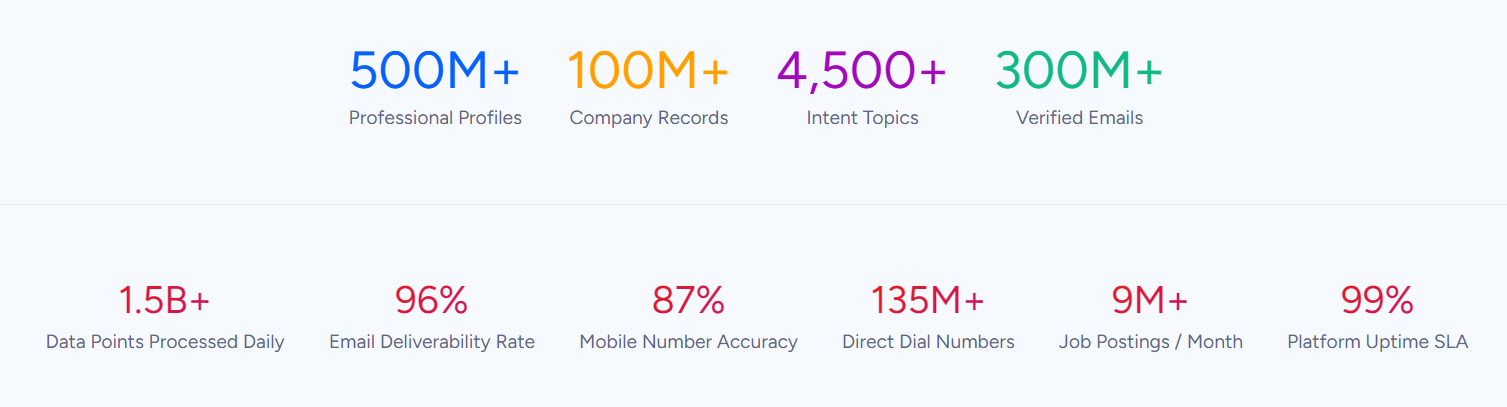
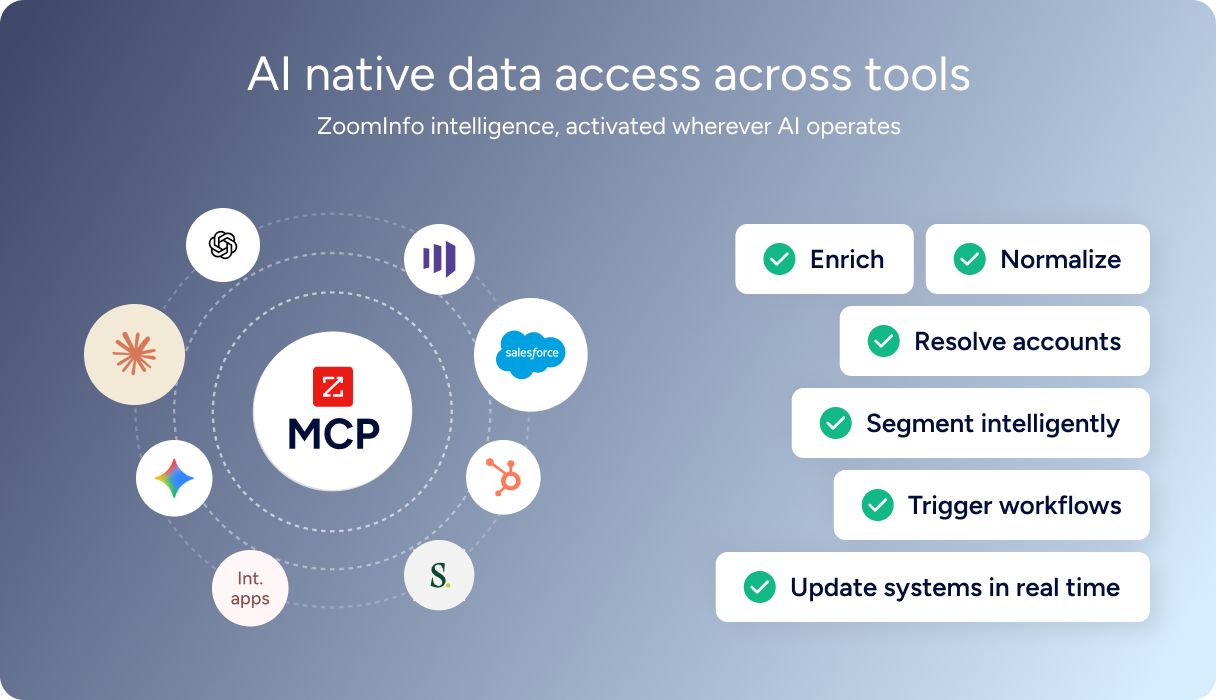
ZoomInfo integrates natively with HubSpot through the HubSpot App Marketplace, enriching CRM records with verified emails, direct dials, company attributes, and technographic profiles that update automatically. When those enriched records flow from HubSpot into Klenty via the native integration, reps start cadences with accurate titles, working phone numbers, and valid email addresses. ZoomInfo also connects with Klenty through Zapier, and its Enterprise API and MCP server can push enriched data into any system through custom workflows.
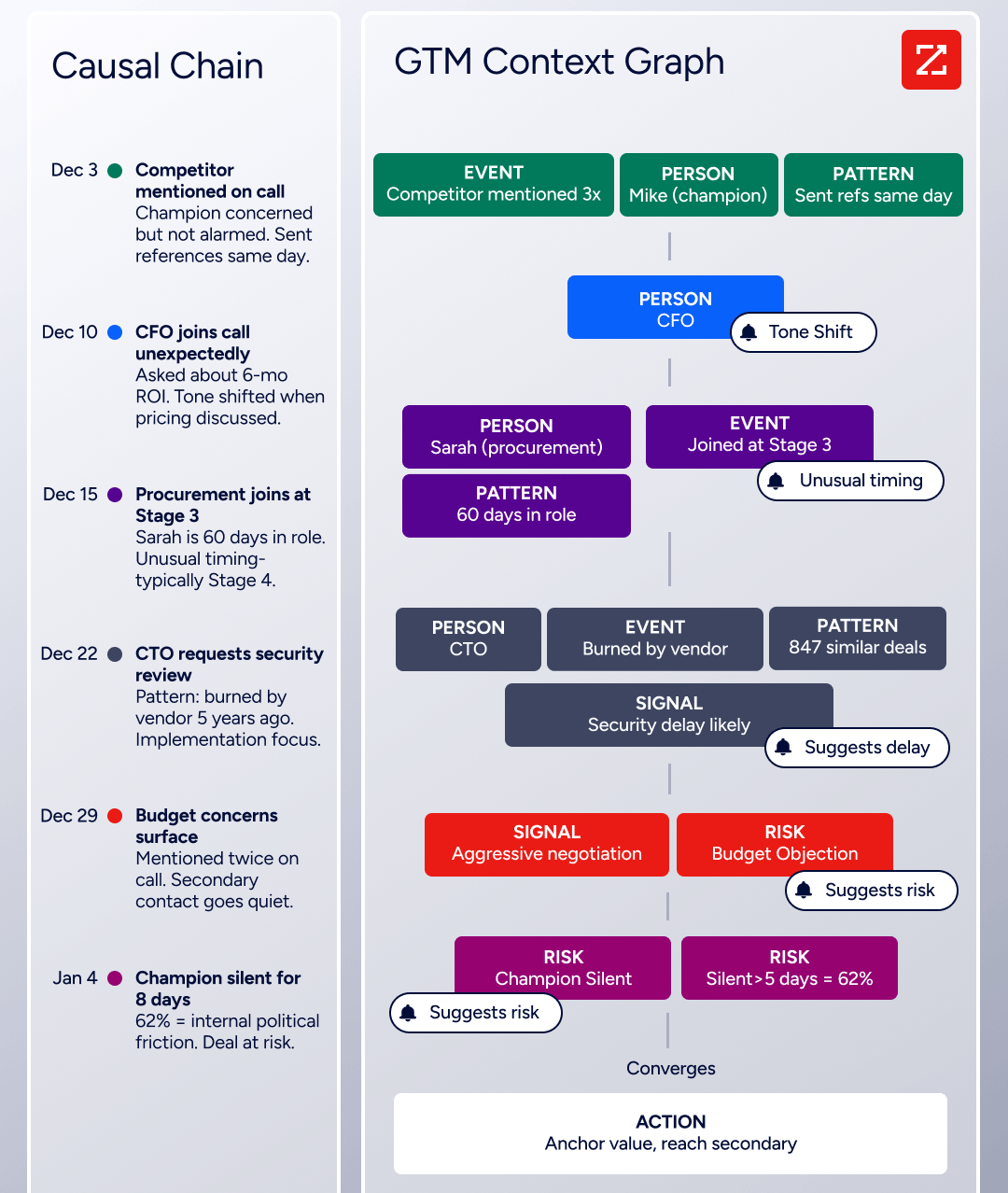
The same data feeds ZoomInfo's GTM Context Graph, an intelligence layer that processes 1.5B+ data points daily by combining third-party intelligence with CRM records, conversation transcripts, and behavioral signals. Buyer Intent data from ZoomInfo, tracking signals from 210 million IP-to-Organization pairings, can route into HubSpot to prioritize which accounts SDRs should target in their Klenty cadences, so outreach goes to prospects who are actively researching relevant solutions rather than a static list.
In practice, a team running both platforms can use ZoomInfo to enrich HubSpot records continuously (the native integration handles this automatically), then let the Klenty-HubSpot integration deliver those enriched records into cadences. Fewer bounces, accurate personalization, and verified direct dials mean higher connect rates on Klenty's Parallel Dialer. Enriched records also make the integration itself more reliable: fewer blank fields mean fewer mismatches during sync, consistent formatting reduces duplicates, and accurate contact data means cadence activity logs in HubSpot connect to the right records.
Seismic's sales team attributed 39% of active pipeline to opportunities identified or influenced by ZoomInfo signals, while boosting productivity by 54% and saving 11.5 hours per week. (Seismic)
Final Verdict
A native integration between Klenty and HubSpot exists, is bidirectional, and covers the core sync use cases most sales teams need. For most teams, the right choice depends on Klenty plan tier and workflow complexity.
Small teams on Klenty Starter that need a basic HubSpot connection should start with Zapier. It covers simple event-driven workflows without requiring a plan upgrade, though it lacks the depth of the native integration.
SDR teams on Klenty Growth or Plus should activate the native HubSpot integration immediately. It handles bidirectional contact sync, activity logging, and deal stage-triggered cadence automation without a third-party tool or engineering resources.
Organizations with data transformation requirements that exceed what the native connector and Zapier support should evaluate a custom API build, but should weigh the development and maintenance cost against the narrow set of use cases it addresses.
Before committing to a configuration, clarify what role each platform plays in your sales process.
If Klenty is the engagement layer and HubSpot is the CRM of record, the native integration's Auto-Import and Auto-Export cover the fundamental need: leads flow in, activity flows out. If both platforms serve overlapping functions (e.g., HubSpot Sequences competing with Klenty cadences for the same contacts), simplify the stack before investing in integration complexity. Either way, the quality of the contact data in both systems determines whether outreach reaches the right people.
ZoomInfo, with its native HubSpot integration, API, and MCP access, is the data enrichment layer that keeps both systems accurate while the connector keeps them aligned.
FAQ
Does Klenty integrate natively with HubSpot?
Yes. Klenty offers a native two-way integration with HubSpot, available through the HubSpot App Marketplace with 400+ installations. The integration supports Auto-Import (HubSpot contacts into Klenty cadences), Auto-Export (Klenty engagement data back to HubSpot timelines), Triggers and Actions (CRM events starting or stopping cadences), and a CRM Plugin (HubSpot context visible inside Klenty). The native integration requires Klenty's Growth plan ($70/user/month) or above.
Can I connect Klenty and HubSpot on Klenty's Starter plan?
Not with the native integration. CRM integrations (Auto-Import, Auto-Export, Triggers and Actions, CRM Plugin) are gated at the Growth tier and above. Starter plan users can connect the two platforms through Zapier or Klenty's REST API, but these methods offer narrower data coverage and require more manual configuration than the native connector.
What Klenty activity data syncs back to HubSpot?
The native integration logs email sends, opens, clicks, replies, bounces, call outcomes, and cadence status changes on HubSpot contact timelines. Activity appears as timeline events or notes on the contact record. Full email body content, call recordings, and AI-generated call coaching insights do not transfer to HubSpot.
Is the Klenty-HubSpot sync bidirectional?
Yes. The native integration supports two-way data flow. HubSpot contacts import into Klenty based on configurable filters, and Klenty engagement data exports back to HubSpot contact records. Deal stage changes in HubSpot can trigger Klenty cadence actions, and Klenty prospect outcomes can update HubSpot properties.
How quickly do changes sync between the two platforms?
The native integration operates in near real-time. New HubSpot contacts matching import criteria appear in Klenty within minutes. Klenty engagement events (email sent, reply received, call completed) log on HubSpot contact timelines shortly after they occur. Zapier-based connections trigger within 1 to 15 minutes depending on the Zapier plan tier.
What HubSpot plan do I need for the integration?
The native Klenty integration works with HubSpot's free CRM for basic contact and deal sync. However, features like custom properties, workflow automation triggered by Klenty data, and pipeline customization require HubSpot Sales Hub Professional or Enterprise. The HubSpot plan determines which objects and properties are available for field mapping, not whether the connection itself works.
How does ZoomInfo improve a Klenty-HubSpot integration?
ZoomInfo solves the data quality problem that no sync tool addresses. Contact records in CRMs decay as people change jobs, phone numbers go inactive, and email addresses bounce. ZoomInfo enriches HubSpot records with verified contact data, company attributes, technographics, and intent signals through its native HubSpot integration. When those enriched records flow into Klenty via the native connector, reps start cadences with accurate emails (fewer bounces), working phone numbers (higher connect rates on the Parallel Dialer), and current job titles (better personalization). The same data is accessible via ZoomInfo's API and MCP server for teams building custom workflows.
Can I use Klenty's Parallel Dialer with HubSpot contacts?
Yes. Contacts imported from HubSpot into Klenty through the native integration are available for all Klenty features, including the Parallel Dialer (available as a $45/user/month add-on to Sales Engagement plans, or included in the Sales Dialer Advanced plan at $99/user/month). Call outcomes and activity from dialing sessions sync back to HubSpot contact records through the native integration's Auto-Export.
See what else plugs into HubSpot:
