
Teams that run Loom and Salesforce side by side usually discover the same problems within a quarter:
sales reps record personalized video messages for prospects but have no visibility into which leads actually watched them,
video engagement data lives in Loom while deal records live in Salesforce, so pipeline activity is always incomplete in at least one system,
and no one can tell whether a prospect who watched a demo walkthrough three times is getting the follow-up they deserve.
However the two platforms ended up coexisting (a sales team that adopted Loom for video prospecting, an org that standardized on Salesforce for pipeline management, or a customer success team using async video for onboarding walkthroughs), the longer both run independently, the wider the gap between what reps send and what the CRM knows about it.
Connecting Loom and Salesforce closes that gap.
Video engagement tracked in Loom (who viewed, how long they watched, which calls-to-action they clicked) flows into Salesforce as activity data on Leads, Contacts, and Opportunities, so reps see buyer interest directly inside their pipeline view. When a prospect watches a Loom three times and clicks the embedded link, that engagement appears on the Salesforce record automatically, so the next outreach is informed by behavior rather than guesswork.
A native integration exists between Loom and Salesforce, though it is restricted to Loom's Enterprise plan. Beyond the native connector, third-party automation tools (Zapier, Make) and custom workflows offer different levels of control over what data moves, in which direction, and at what cost. The right method depends on Loom plan tier, data volume, and how far video analytics need to reach inside the CRM.
There is also one problem no connection method solves: the integration tracks who watches videos, but it does not tell you whether you are sending those videos to the right people in the first place.
And that is where ZoomInfo comes in. ZoomInfo is an AI GTM platform with native Salesforce integration that enriches Leads, Contacts, and Accounts with verified B2B data from a database spanning 500M contacts and 100M companies. Before a rep records a single Loom, ZoomInfo's Enterprise API and MCP access can feed verified emails, direct dials, company attributes, and intent signals into Salesforce, so the contacts receiving those personalized videos are accurate, current, and worth the effort.
This article covers the Loom-Salesforce integration landscape: which methods are available, what data each one handles, how to set them up, the use cases that justify connecting both platforms, and the limitations to plan for. At the end it also covers how ZoomInfo fits as a data enrichment layer for Salesforce.
Let's start with an overview of the integration.
Integration Overview
Does a native integration exist?
Yes. Loom offers a native Salesforce integration available through the Salesforce AppExchange. It is restricted to Loom's Enterprise plan.
What data can sync?
Video engagement data flows from Loom into Salesforce. The integration creates related objects and Tasks in Salesforce that track video views, viewer interactions, and engagement metrics at the Lead, Contact, and Opportunity levels. Viewer identification works through email matching and Salesforce tracking.
Is the sync bidirectional?
No. Data flows one way: from Loom to Salesforce. Video engagement events (views, watch time, CTA clicks) are pushed into Salesforce as activity records. Salesforce data does not flow back into Loom.
Is it real-time or batch?
The native integration tracks engagement events as they occur and syncs them to Salesforce in near real-time. When a contact views a Loom video, the corresponding Salesforce record updates within minutes.
What are the available methods?
Native Loom integration (Enterprise only), third-party automation (Zapier, Make), and custom workflows using Salesforce's API alongside Loom's embed and sharing infrastructure.
Method | Setup Difficulty | Data Flow | Real-time? | Cost |
|---|---|---|---|---|
Native Loom Integration | Low | One-way (Loom to Salesforce) | Near real-time | Included with Loom Enterprise (custom pricing) |
Zapier | Medium | One-way per Zap | Near real-time (1-15 min) | From $19.99/mo |
Make | Medium | One-way per scenario | Near real-time | From paid plans |
Custom Workflow | High | Configurable | Depends on implementation | Dev time + hosting |
One distinction worth settling upfront: the native integration tracks engagement going forward from activation, not historical video data. Zapier and Make handle event-driven automation (triggering a Salesforce update when a Loom event fires) but also do not backfill past activity.
Teams that need historical video engagement loaded into Salesforce will need a custom data migration.
Integration Methods
Native Loom Salesforce Integration (Enterprise Only)
Source: Loom
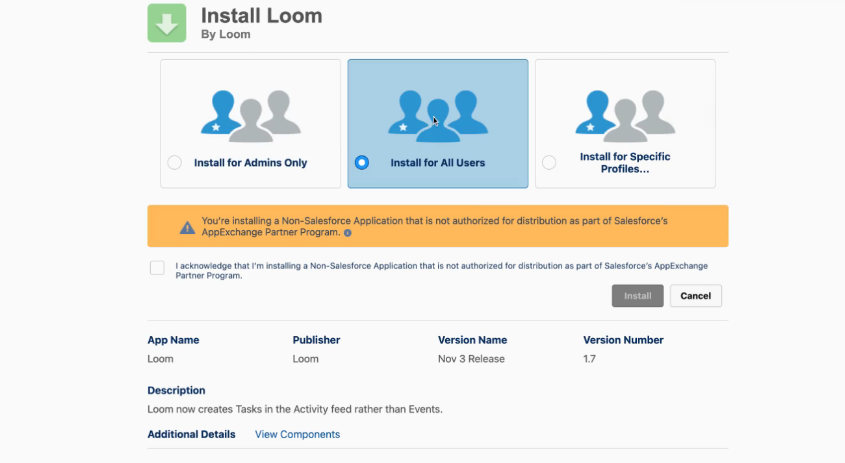
How it works: Loom's native Salesforce integration is installed from the Salesforce AppExchange and connects Loom's video engagement tracking directly into the Salesforce data model.
When a contact or lead views a Loom video, the integration matches the viewer's email address against Salesforce records and logs the engagement as a related object and Task. This creates a timeline of video interactions at the Lead, Contact, and Opportunity levels inside Salesforce.
What it syncs: Video view events (who watched, when, and engagement signals), CTA interactions, and viewer identification data. The integration creates Loom-specific objects in Salesforce that attach to existing Lead, Contact, and Opportunity records. It does not sync video content, transcripts, or the videos themselves into Salesforce.
Fits: ongoing engagement tracking for sales teams using Loom video in prospecting and deal management; not a migration tool.
Setup process:
Confirm your Loom workspace is on the Enterprise plan. The Salesforce integration is not available on Starter, Business, or Business + AI plans.
In Salesforce, navigate to AppExchange and search for the Loom app. Install the package into your Salesforce org.
In your Loom workspace admin settings, navigate to Integrations and connect your Salesforce org by authenticating with your Salesforce admin credentials.
Configure viewer identification: enable email matching so that when a viewer's email matches a Lead or Contact in Salesforce, the engagement is automatically attributed to that record.
Enable Salesforce tracking on outgoing Loom links to ensure view events are captured and routed to the correct records.
Test by sending a Loom video to a known Contact in Salesforce, verifying that the view event appears as a Task and related object on the Contact record.
Strengths: No third-party tool required. Video engagement data appears on Salesforce records without manual logging. Email matching automates the attribution reps would otherwise do by hand. Activity data on Leads, Contacts, and Opportunities gives managers visibility into which prospects are engaging with video content.
Limitations: Restricted to Loom's Enterprise tier, which requires custom pricing and a sales conversation with Atlassian. The sync is one-way only (Loom to Salesforce). Video content and transcripts do not transfer. Viewer identification depends on email matching, so anonymous viewers or viewers using personal email addresses may not match to Salesforce records. Historical engagement from before activation does not backfill.
Best for: Sales teams on Loom Enterprise that use personalized video prospecting at scale and need engagement signals visible in Salesforce without leaving the CRM. Organizations where sales leadership wants pipeline reporting that includes video touchpoints alongside calls, emails, and meetings.
Zapier
How it works: Zapier connects Loom and Salesforce through event-driven automations called Zaps. Loom's native Zapier connector has limited trigger support (Loom does not expose a full event API), but Zapier can act on Loom video sharing events and route data into Salesforce as new Tasks, custom object records, or field updates. Each Zap pairs a trigger in one app with an action in the other.
What it syncs: The scope depends on what Loom exposes through Zapier's connector.
Typical workflows push notifications about new Loom recordings or shares into Salesforce as Tasks or Chatter posts on relevant records. Field mapping is manual within the Zap configuration. Detailed engagement analytics (view duration, CTA clicks) may not be available through Zapier's connector depending on Loom's trigger support.
Fits: lightweight, event-driven automation for teams that need a basic Loom-to-Salesforce connection without Enterprise pricing.
Setup process:
Create a Zapier account and connect both your Loom and Salesforce accounts using their respective authentication flows.
Create a new Zap and select Loom as the trigger app. Choose the available trigger event (new video shared or completed recording, depending on connector support).
Select Salesforce as the action app. Choose the action type: create a Task, update a record, or post to Chatter on a specific Lead or Contact.
Map fields between Loom's trigger data and Salesforce's action fields. Include the video URL, title, and any available metadata.
Test the Zap with a sample Loom recording to confirm the Salesforce record updates correctly.
Turn on the Zap. For different data flows (new recordings vs. video shares), create separate Zaps.
Strengths: Available on any Loom plan, not just Enterprise. Fast to set up with no engineering resources. Flexible enough to route Loom data to any Salesforce object (Tasks, custom objects, Chatter). Lower cost entry point than Loom Enterprise for teams that need a basic connection.
Limitations: Loom does not publish a full event API, so Zapier's trigger options may be limited compared to the native integration's engagement tracking. Each data flow requires a separate Zap, each counting against Zapier's task allocation. No built-in viewer identification or email matching. Engagement analytics (watch time, completion rate, CTA clicks) may not be available through the Zapier connector. Historical data does not sync.
Best for: Small sales teams on Loom's Business or Business + AI plans that want basic visibility into video activity inside Salesforce without upgrading to Enterprise. Teams evaluating whether deeper Loom-Salesforce integration justifies the Enterprise investment.
Make (Formerly Integromat)
How it works: Make uses a visual scenario builder where modules connect in a flowchart, offering more control over data transformation than Zapier's linear structure. Each module represents a step: watch for a Loom trigger, transform data, create or update a Salesforce record. Scenarios can branch, filter, loop, and handle errors.
What it syncs: Similar to Zapier, the scope depends on Loom's available triggers in Make's module library. Make's data transformation capabilities (iterators, routers, text parsing) allow more sophisticated processing between the trigger and the Salesforce action, such as extracting recipient email addresses from Loom share events and matching them against Salesforce Contacts before creating the Task.
Fits: ongoing automation with conditional logic and data transformation for teams that need more control than Zapier provides.
Setup process:
Create a Make account and add Loom and Salesforce as connections. Salesforce connects via OAuth. Loom connects through its available Make integration method.
Build a new scenario. Add the Loom module and select a trigger event.
Add transformation modules if needed (e.g., a text parser to extract email addresses from share recipients, or a router to handle different video types).
Add the Salesforce module and select an action (e.g., "Create a Record" targeting Tasks or a custom object).
Map fields between the Loom trigger data and Salesforce record fields. Add error-handling modules to catch failures.
Set the scenario schedule and activate it.
Strengths: The visual scenario builder makes complex conditional logic easier to follow than code. Per-operation pricing is lower than Zapier at higher volumes. Multi-step scenarios can transform Loom data before writing to Salesforce (e.g., parsing video titles to determine which Opportunity to attach the Task to). Supports branching logic for different video types or recipient categories.
Limitations: Same trigger limitations as Zapier, since both depend on what Loom exposes through its integration layer. Steeper learning curve than Zapier. Salesforce API rate limits (100-190 requests per 10 seconds depending on tier) apply to high-volume scenarios.
Best for: Teams with conditional sync requirements (e.g., only log video engagement to Salesforce when the video title contains a deal name, or route different video types to different Salesforce objects). Mid-size teams whose automation volumes make Zapier's per-task pricing expensive.
Custom Workflow
How it works: Salesforce's REST API supports creating Tasks, updating records, and writing custom objects programmatically. Loom's shareable links and embed SDK provide video metadata (URL, title, duration, thumbnail) that can be captured and pushed into Salesforce.
A custom workflow combines Salesforce's API with Loom's sharing infrastructure (GIF thumbnails, embed URLs, shareable links) to build tailored integrations. Since Loom does not offer a public REST API for event subscriptions, the custom workflow typically captures Loom video URLs at the point of sharing (e.g., within a sales engagement platform or email tool) and writes the associated metadata to Salesforce via API.
What it syncs: Whatever you build it to handle. Video metadata (URL, title, duration), sharing events, and any viewer data captured through your own tracking infrastructure can be written to any Salesforce object. This is the only method that supports custom business logic like auto-associating videos with Opportunities based on recipient email domain matching.
Fits: teams with specific integration requirements that no off-the-shelf tool supports; the only method with no ceiling on customization.
Setup process:
Register API credentials in Salesforce by creating an External Client App with the required OAuth scopes for Task creation and record updates.
Design the data model: define which Salesforce objects will store Loom video data (Tasks, a custom "Video Engagement" object, or Activity records) and map the fields.
Build the integration layer: a server-side application or Salesforce Flow that captures Loom video URLs from your outreach tools, associates them with the correct Salesforce records, and writes the data via API.
If tracking viewer engagement, implement a tracking mechanism at the Loom link level (URL parameters, redirect tracking) that feeds view data back to your integration layer.
Add logging, error handling, and retry logic. Salesforce's API rate limits (100,000+ calls per day depending on edition) apply.
Deploy, monitor, and maintain the integration.
Strengths: Full control over what data moves, when, and how. Can implement business logic that no connector supports (auto-linking videos to Opportunities, enriching Salesforce records based on viewer behavior). No dependency on Loom's Enterprise plan. No per-task or per-operation fees from a third-party connector.
Limitations: Requires development resources to build and maintain. Loom does not publish a general-purpose REST API or server-side webhooks, so the integration must capture video data at the sharing layer rather than subscribing to Loom events directly. API changes on either platform require ongoing maintenance. The initial build takes weeks, not hours.
Best for: Organizations with specific video-CRM integration requirements that no off-the-shelf tool satisfies. Teams with in-house development resources and a need for custom business logic around video engagement tracking.
Key Use Cases
1. Personalized Video Prospecting with CRM Attribution
Sales reps record personalized Loom videos for outbound prospects (demo walkthroughs, feature highlights, proposal summaries) and need engagement data visible in Salesforce.
When a prospect watches the video, the view event appears on their Lead or Contact record, so the rep knows to follow up while interest is warm. Reps can prioritize callbacks based on who actually watched versus who ignored the outreach.
Best integration method: Native Loom integration (Enterprise) for automatic email-matched attribution, or Zapier for basic visibility on lower-tier plans.
2. Deal Acceleration Through Video Engagement Signals
Account executives send Loom videos to buying committees during active deals (technical deep-dives, pricing walkthroughs, implementation overviews).
When multiple stakeholders at the same account view the video, the engagement pattern appears on the Opportunity record in Salesforce. Managers use this data to identify deals with strong buyer engagement versus deals where videos go unwatched.
Best integration method: Native Loom integration (Enterprise) for engagement tracking at the Opportunity level with automatic viewer identification.
3. Customer Onboarding and Success Monitoring
Customer success teams create Loom walkthroughs for new customers (product setup guides, feature tutorials, workflow recommendations). Tracking which customers watch onboarding videos and which skip them helps CS managers identify accounts at risk of low adoption. Video view data on the Account record in Salesforce feeds into health scoring and renewal forecasting.
Best integration method: Native Loom integration (Enterprise) or Zapier for logging onboarding video delivery and tracking views at the Account level.
4. Sales Training and Coaching Documentation
Sales enablement teams record Loom videos of winning demo techniques, objection handling, and product updates. When these videos are shared through Salesforce-integrated channels, completion data helps enablement leaders see which reps are consuming training content and which need reminders. Managers can correlate training video completion with deal outcomes.
Best integration method: Zapier or Make for logging training video shares and completions into Salesforce custom objects or Tasks.
5. Async Meeting Recaps Linked to Opportunities
After a sales call or customer meeting, the rep records a quick Loom recap summarizing key decisions, next steps, and action items. The Loom link is logged against the Opportunity in Salesforce as a Task, creating a searchable record of deal context that the entire account team can reference. This replaces scattered meeting notes with a video record tied to the deal.
Best integration method: Zapier or Make for creating Salesforce Tasks with Loom video links, or a custom workflow for automatic Opportunity association.
Limitations and Considerations
Data That Doesn't Sync
The native Loom-Salesforce integration focuses on video engagement data (views, viewer identity, CTA interactions). It does not sync video content, transcripts, AI-generated summaries, or chapter data into Salesforce. Loom's AI features (auto-titles, auto-summaries, filler word removal) process content within Loom's platform; the outputs stay there.
If a team needs Loom transcript text searchable inside Salesforce, that requires a custom build.
Activity data beyond video viewing (emoji reactions, timestamped comments, video replies) does not travel through the native integration. These collaborative features exist within Loom's share page and are not mapped to Salesforce objects.
Enterprise Plan Requirement
The native integration is locked behind Loom's Enterprise plan, which requires custom pricing through Atlassian's sales team. Teams on Starter ($0), Business ($18/user/month), or Business + AI ($24/user/month) cannot use the native Salesforce connector. This is a real cost barrier for small and mid-size sales teams that want CRM-level visibility into video engagement.
Third-party tools (Zapier, Make) provide a workaround, but with reduced data depth. The trade-off is clear: Enterprise unlocks automatic email-matched engagement tracking at the record level; everything else offers basic event logging without native viewer identification.
One-Way Sync Only
All available methods push data from Loom to Salesforce. Salesforce data does not flow back into Loom.
This means Loom cannot use Salesforce deal stage, lead score, or account tier to influence video behavior (e.g., adjusting video CTAs based on deal stage, or surfacing engagement data to Loom users based on Salesforce pipeline priority). Loom operates as a standalone recording and sharing tool; Salesforce is the system of record that receives the engagement signals.
Viewer Identification Depends on Email Matching
The native integration identifies viewers by matching email addresses against Salesforce records.
This works well when the recipient opens the Loom link while authenticated or when Loom can identify the viewer's email. It breaks down when prospects share the Loom link internally (a champion forwarding the video to their CFO), when viewers use personal email addresses not in Salesforce, or when the video is embedded on a public page where viewers are anonymous. Unmatched views still register as engagement but cannot be attributed to a specific Lead or Contact.
Pricing Implications
Loom's Salesforce integration is bundled with the Enterprise plan at no additional per-feature cost, but Enterprise itself is a significant commitment (custom pricing, annual contract, sales-team engagement).
On the Salesforce side, creating Tasks and custom objects through the integration consumes standard API calls, which are subject to Salesforce's edition-based rate limits. High-volume video outreach teams (hundreds of personalized Looms per day) should verify that their Salesforce edition's daily API allocation covers the integration traffic alongside other connected tools.
Maintenance
Loom is actively migrating its infrastructure under Atlassian's ownership. Workspace migrations, account consolidation, and feature changes are ongoing.
The integration's setup steps, admin interface, and available triggers may shift as Atlassian continues embedding Loom into its platform. Salesforce's seasonal release cadence (three major releases per year) can also affect installed AppExchange packages. Plan for periodic reviews of the integration's health and configuration after platform updates on either side.
What No Method Fixes: The Data Itself
Every method above tracks what happens after a video is sent. None of them addresses whether the video went to the right person.
A personalized Loom recorded for a prospect who changed jobs three months ago generates zero engagement, and the integration faithfully records that silence. A video sent to an outdated email address bounces before anyone watches it. The integration connects Loom's output to Salesforce's records, but if those records are stale, incomplete, or pointed at the wrong contacts, the connection just makes the gap visible faster.
Where ZoomInfo Fits In
Every method in this guide moves video engagement data from Loom into Salesforce. None of them improves the contact data that determines whether those videos reach the right people.
When a rep records a personalized Loom for a prospect who left the company two months ago, or sends it to a generic info@ address because no direct email exists in the CRM, the integration logs zero engagement. The problem is not the connector. That is the gap ZoomInfo closes.
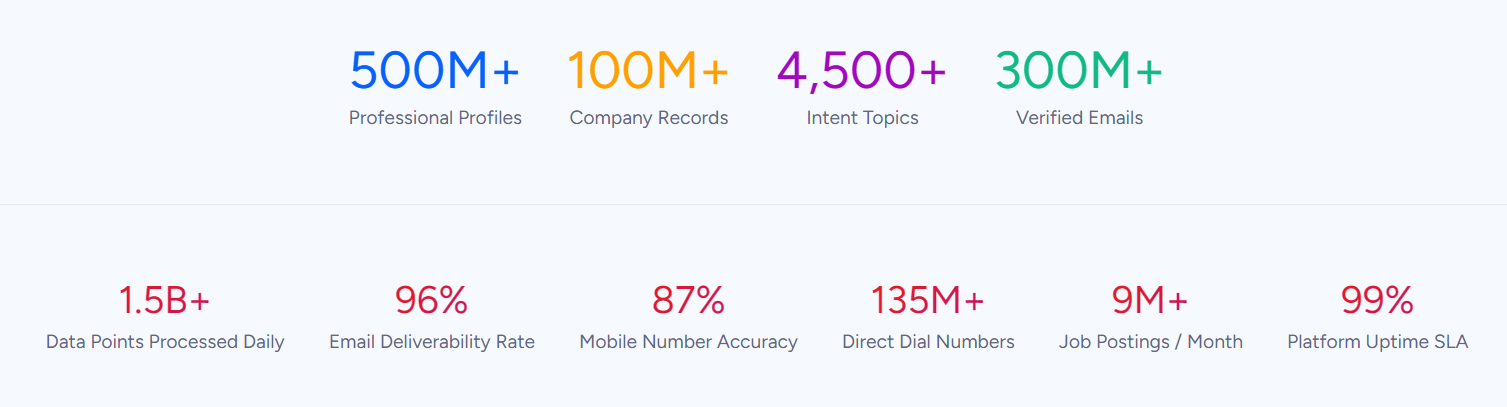
ZoomInfo is an AI GTM platform built on a B2B database of 500M contacts, 100M companies, 135M+ verified phone numbers, and 200M+ verified business emails.
That data is verified through a multi-source pipeline backed by 300+ human researchers, reaching up to 95% accuracy on first-party data. For teams using Loom for video prospecting through Salesforce, ZoomInfo addresses the contact quality layer that no engagement tracker handles.
Source: ZoomInfo
ZoomInfo integrates natively with Salesforce through the ZoomInfo Salesforce Native Application, which provides real-time bidirectional sync of Accounts, Contacts, and Leads, automatic enrichment of records with verified emails, direct dials, firmographics, and technographics, and Sales access within the Salesforce interface. The same intelligence is accessible through ZoomInfo's Enterprise API and MCP for custom workflows and AI agents.
In practice, a sales team using Loom and Salesforce together benefits from ZoomInfo at two points.
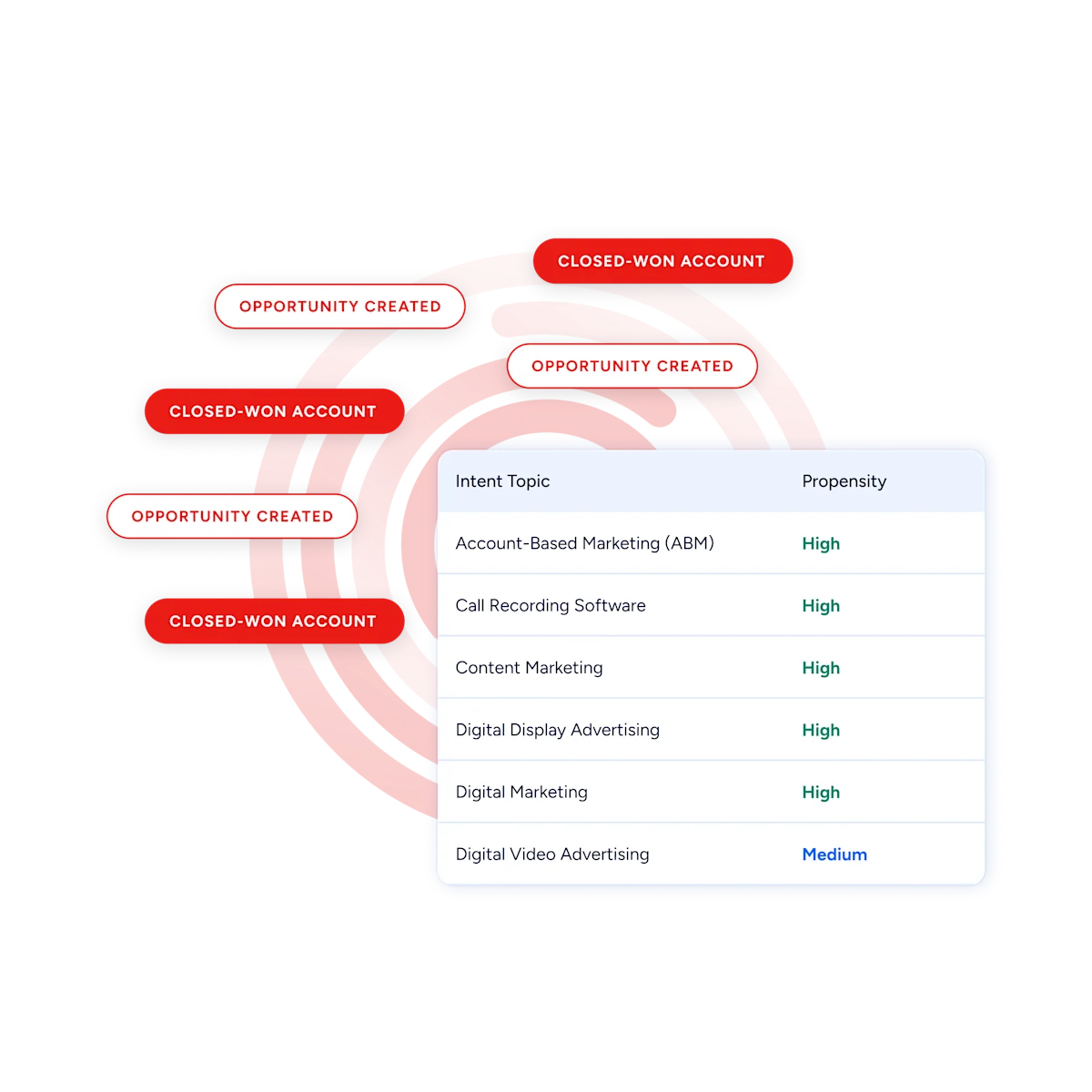
Before recording: ZoomInfo enriches the Salesforce Contact record so the rep knows the prospect's current title, company, and verified email, which means the personalized Loom goes to someone who actually holds the role. Buyer Intent data, tracking signals from 210 million IP-to-Organization pairings, can prioritize which accounts are actively researching relevant solutions, so reps invest recording time in prospects who are in-market rather than cold.
Source: ZoomInfo
After sending: because the Salesforce Contact record carries a verified, current email address, Loom's email-matched viewer identification works reliably, and engagement data attributes correctly to the right record.
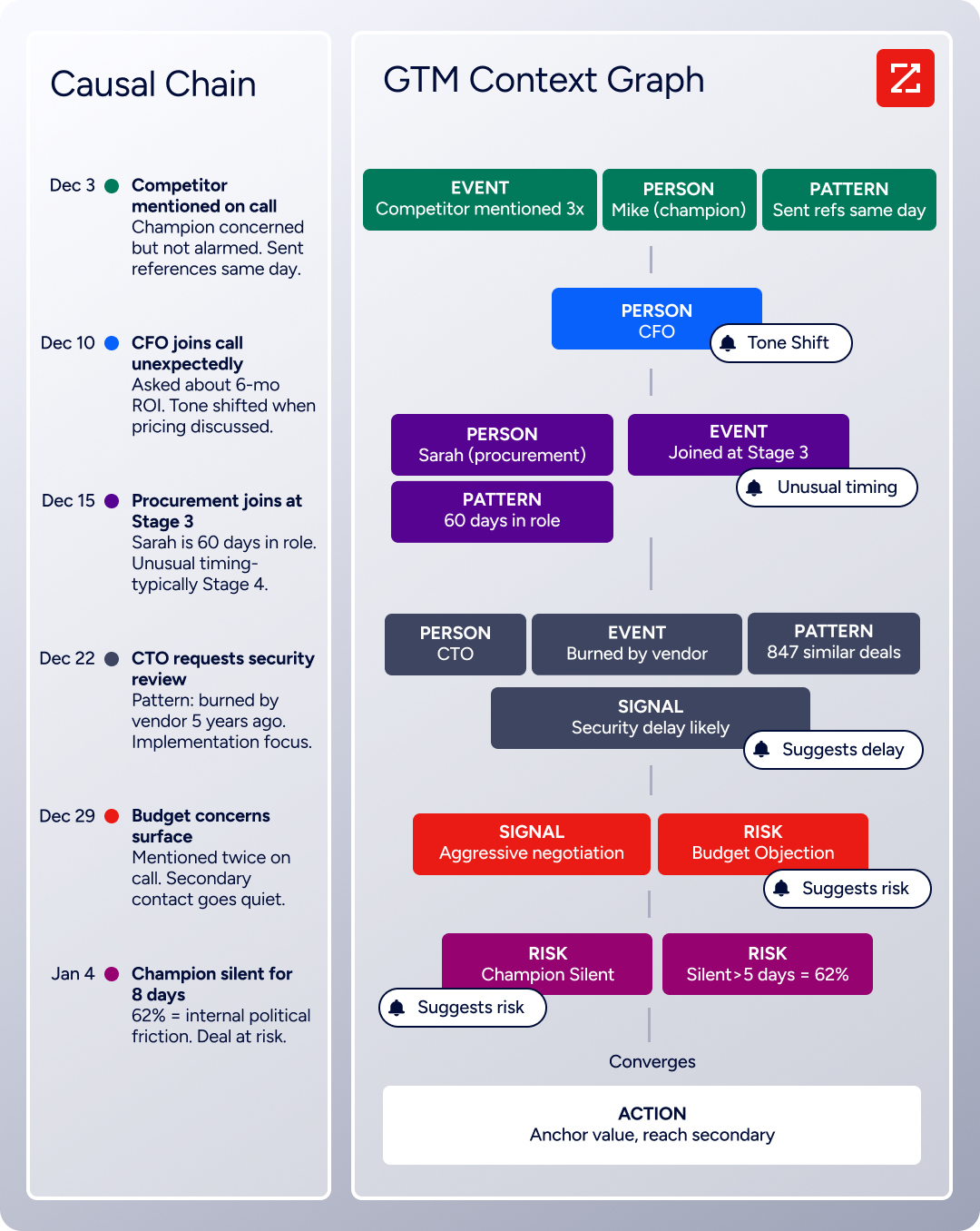
ZoomInfo's GTM Context Graph, which processes 1.5B+ data points daily, fuses CRM records, conversation transcripts, and behavioral signals to surface not just who to contact, but why a specific account is worth a personalized video right now. That context turns video prospecting from a volume play into a precision play.
Source: ZoomInfo
Seismic's sales team attributed 39% of active pipeline to opportunities identified or influenced by ZoomInfo signals, while boosting productivity by 54% and saving 11.5 hours per week. (Seismic)
Final Verdict
A native integration exists between Loom and Salesforce, but it is gated behind Loom's Enterprise plan.
Every other route runs through third-party automation tools or custom development. For most teams, the right choice depends on plan tier, data depth requirements, and how central video prospecting is to the sales motion.
Small teams using Loom's Business or Business + AI plans should start with Zapier or Make. Both provide basic video event logging in Salesforce without the Enterprise commitment, and they are fast to set up.
Sales organizations that have standardized on Loom for video prospecting and need engagement signals tied to individual Leads, Contacts, and Opportunities should invest in Loom Enterprise for the native Salesforce integration. Automatic email-matched attribution is the core value that no third-party tool replicates.
Teams with complex requirements (auto-associating videos with Opportunities by domain, custom engagement scoring, multi-platform routing) should build a custom workflow using Salesforce's API and Loom's sharing infrastructure.
Before committing to a method, clarify what the integration needs to accomplish.
If the goal is basic visibility (logging that a Loom was sent and whether it was viewed), Zapier handles that at minimal cost. If the goal is pipeline intelligence (knowing which stakeholders in an active deal are engaging with video content, and using that to inform follow-up timing and messaging), the native integration is worth the Enterprise investment.
Either way, the value of tracking video engagement depends on the quality of the contact data underneath it. ZoomInfo, with its native Salesforce integration and API/MCP access, ensures the contacts receiving those personalized Looms are accurate and current before the first video is recorded.
FAQ
Does a native integration exist between Loom and Salesforce?
Yes, but it is restricted to Loom's Enterprise plan.
The integration is installed from the Salesforce AppExchange and creates related objects and Tasks in Salesforce that track video engagement (views, viewer interactions) at the Lead, Contact, and Opportunity levels. Viewer identification works through email matching. Loom's Starter, Business, and Business + AI plans do not include Salesforce integration.
Can I connect Loom to Salesforce without the Enterprise plan?
Yes, through third-party automation tools like Zapier or Make.
These tools can log Loom video events (new recordings, shares) as Salesforce Tasks or custom object records. The trade-off is reduced data depth: third-party tools handle basic event logging but do not provide the native integration's automatic email-matched viewer identification or engagement tracking at the Opportunity level.
What Loom data appears in Salesforce after the integration is set up?
The native integration syncs video engagement data: who viewed a video, when they viewed it, and CTA interaction signals.
This data appears as related objects and Tasks on Lead, Contact, and Opportunity records. Video content (the recording itself), transcripts, AI-generated summaries, and collaborative features (comments, emoji reactions) remain in Loom and do not transfer to Salesforce.
Is the Loom-Salesforce sync bidirectional?
No. All available methods push data from Loom to Salesforce. Salesforce records, deal stages, lead scores, and account data do not flow back into Loom. Loom operates as a standalone video platform; Salesforce is the system of record that receives the engagement signals.
How does Loom identify which Salesforce record a viewer belongs to?
Through email matching. When a viewer watches a Loom video, the integration attempts to match the viewer's email address against Lead and Contact records in Salesforce. Matches create engagement records on the corresponding Salesforce record. Viewers who use personal email addresses, access the video through forwarded links, or watch anonymously may not match to any Salesforce record.
What permissions are needed to set up the integration?
On the Loom side, workspace admin access on the Enterprise plan is required. On the Salesforce side, admin access is needed to install the AppExchange package, configure connected apps, and grant the integration permission to create Tasks and related objects. Both platforms require the integration user to have access to every object and field being written.
How does ZoomInfo improve a Loom-Salesforce workflow?
ZoomInfo solves the data quality problem that no video engagement tracker addresses.
Contact records in Salesforce decay as people change jobs and email addresses go stale. ZoomInfo enriches Salesforce records with verified contact data, firmographics, technographics, and intent signals through its native Salesforce integration. Enriched records ensure that personalized Loom videos reach current, valid contacts, and that Loom's email-matched viewer identification attributes engagement to the correct records.
The result: reps record videos for the right people, and the engagement data that flows back to Salesforce is accurate and actionable.
More Salesforce integrations:
