

mailfloss occupies a clear niche in email verification: connect it to your email service provider, and it cleans your list automatically, every day, without you lifting a finger. For email marketers tired of manual CSV uploads and one-off verification runs, that promise is worth paying attention to.
To write this mailfloss review, we analyzed the platform in detail. We believe it's the right choice if:
You want automated, daily email list cleaning with no ongoing manual effort
You already use one of the 40+ supported ESPs (HubSpot, Klaviyo, ActiveCampaign, Mailchimp, and others)
You need typo correction that recovers lost leads automatically
You prefer a simple, no-code setup over complex technical configuration
Your primary concern is protecting sender reputation and inbox placement
However, mailfloss might not be the best choice if:
You need email verification as part of a broader B2B data and sales intelligence strategy
You require verified contact discovery, not just validation of existing lists
You want intent signals, company data, and enrichment alongside email quality
You need a platform that spans prospecting, outreach, and pipeline management
Your data quality challenges extend beyond email hygiene to CRM-wide accuracy
In this case, consider ZoomInfo: a B2B data and intelligence platform built on 500M contacts, 100M companies, and 200M+ verified business email addresses.
Where mailfloss verifies the emails you already have, ZoomInfo provides verified contact data from the start, enriches your CRM with company data, and adds buyer intent signals to inform your sales and marketing. Its Operations product automates data enrichment and quality management across your CRM, not just email addresses.
We've included a look at ZoomInfo later in this review as the broader alternative for teams whose data quality needs go beyond email list hygiene. If you're ready to explore that approach, you can start with ZoomInfo's free trial here.
What is mailfloss?
mailfloss is an automated email list hygiene service founded in 2018 and headquartered in Niagara Falls, Ontario, Canada.
The founder built it to solve his own deliverability problem: existing verification tools required too much ongoing manual work, even when they claimed to integrate with ESPs. So the team built what they wanted to use themselves.
The core idea is simple. Connect mailfloss to your email service provider, configure your preferences once, and the platform scans your lists every day, removing invalid addresses, flagging risky contacts, and fixing common typos. No developers needed, no spreadsheets, no recurring exports. mailfloss calls this the "set and forget" approach to email hygiene.
Today, the platform supports 40+ native ESP integrations including HubSpot, Klaviyo, ActiveCampaign, Mailchimp, Keap, GoHighLevel, Braze, and beehiiv. It serves solo email marketers and enterprise organizations alike, and holds a 4.9/5.0 rating on Capterra across 39 verified reviews.
mailfloss Pros & Cons
Pros | Cons |
|---|---|
Automated daily list cleaning after one-time setup | No live chat support (email and AI chatbot only) |
40+ native ESP integrations with two-way sync | Free trial requires credit card and a supported ESP |
Automatic typo correction recovers lost leads | Auto typo fixer limited to Business and Pro plans |
Deep Clean Engine verifies hard-to-check domains (Yahoo, AOL) | Dashboard takes initial adjustment for new users |
Real-time API and JavaScript widget for point-of-entry validation | Can feel expensive at higher volumes |
Configurable actions (delete, unsubscribe, tag, custom field update) | Limited to email verification (no broader data enrichment) |
High user satisfaction (4.9/5.0 on Capterra) | Smaller presence on G2 than some competitors |
mailfloss Review: How It Works & Key Features
Automatic Daily Cleanup: mailfloss scans your ESP every day and removes invalid addresses without any manual effort.
This is mailfloss's defining feature.
Called Autofloss, it connects to your ESP and runs a daily incremental scan, processing only the contacts added since the previous run. When it finds invalid addresses, the configured action fires automatically: auto-delete, auto-unsubscribe, update custom fields or tags, or queue for manual review.
The value is what you don't have to do. No CSV exports, no spreadsheet filtering, no remembering to run verification before a campaign. As mailfloss puts it: "Other services, even those that integrate with Infusionsoft, Mailchimp, or other email service providers, still require you to remember to use them, go through the results, decide what to do." Autofloss removes that recurring task entirely.
The feature also includes Decay Protection, which exists because 2.1% of email addresses in a typical database go bad every month due to job changes, domain abandonment, and abandoned accounts. Decay Protection runs separately from the daily new-contact scan to catch addresses that have gone stale.
Source: mailfloss
Users can configure verification aggressiveness (how strictly mailfloss treats borderline categories), and Business and Pro plans offer action category exclusions to exempt specific flagged categories from automated removal. Whitelist and blacklist controls are available on all plans.
Email Verification Engine: A multi-layer detection system with proprietary Deep Clean technology for hard-to-verify domains.
mailfloss runs each address through a sequence of checks without sending test emails.
The Deep Clean Engine uses "proprietary technology for running tests, syntax validation, domain and mail server verification, and more."
The full detection suite, as listed on the pricing page, includes:
Syntax Validation for formatting and structure
SMTP Validation with direct server-level handshake to confirm mailbox existence
Disposable and Temporary Address Detection for throwaway email providers
Role-Based Detection for addresses like info@, support@, admin@
Spam and Complainers Detection for addresses tied to spam complaints
Accept-All Detection for domains configured to accept all incoming mail
Hard Bounce Removal for known hard bounces
Free Deduplication at no extra charge
Advanced Yahoo, Gmail, Hotmail, AOL Detection using provider-specific logic
That last point matters. Many verification tools default to marking Yahoo and AOL addresses as "accept-all" because individual mailbox verification is difficult for those providers. mailfloss claims its Deep Clean Engine performs genuine individual-mailbox verification for these domains rather than giving up with a generic classification.
Source: mailfloss
mailfloss targets post-verification bounce rates below 5%, ideally below 3%. The company avoids publishing a blanket accuracy percentage, calling such figures "a marketing ploy that competitors use without data to back it up."
Auto Typo Fixer: Corrects misspelled email domains and syncs the fix back to your ESP, recovering leads other tools would simply discard.
When someone enters "gmial.com" instead of "gmail.com" in a signup form, most verification tools flag the address as invalid and move on. The lead is lost.
mailfloss's Auto Typo Fixer detects these common misspellings of Gmail, Yahoo, AOL, and Hotmail domains, corrects them, and writes the corrected address back to the connected ESP.

Source: mailfloss
This is one of mailfloss's distinctive capabilities. The company claims it is "the only email verifier that automatically fixes commonly misspelled email addresses from popular providers" and syncs corrections back to the ESP. For businesses with high cost-per-lead, recovering even a handful of typo leads per month can cover the subscription cost.
The Auto Typo Fixer is available on Business and Pro plans. It works retroactively on existing lists and in real time for new signups through the Instafloss feature.
Real-Time Verification and Developer API: Point-of-entry validation and a full REST API for teams that need programmatic access.
Beyond daily batch cleaning, mailfloss offers two tools for catching bad data at the source.
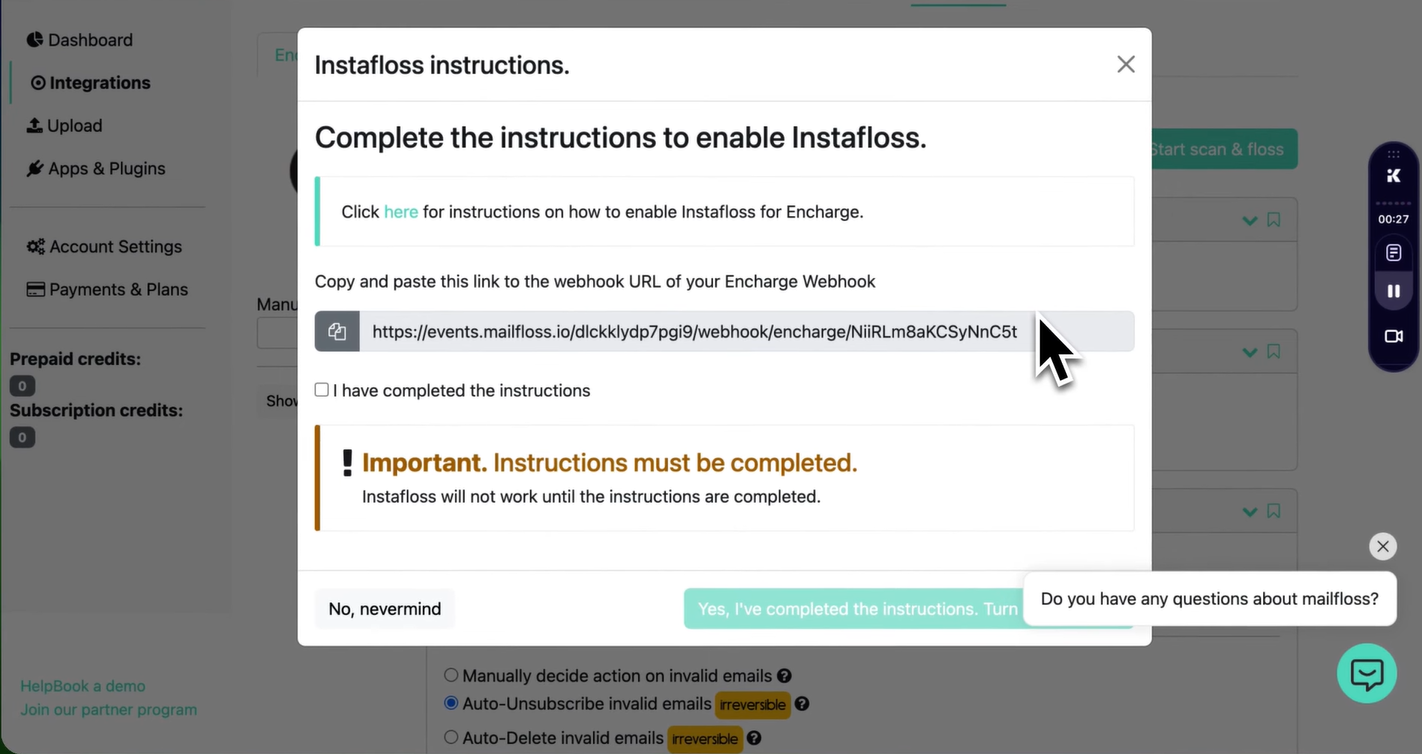
Instafloss validates email addresses the moment they enter your ESP. When enabled, any new contact added through signup forms, imports, or API calls is verified immediately. Invalid addresses can be automatically tagged, unsubscribed, or deleted before they receive a campaign.
Source: mailfloss
For developers, the REST API provides single-email verification via GET request, batch verification via POST, and webhook delivery of results. The API runs the same checks as the automated scans: syntax, MX records, SMTP mailbox existence, catch-all detection, role-based identification, disposable domain detection, and typo detection. Rate limits sit at 10,000 requests per minute per API key.
A JavaScript Widget provides client-side form validation without requiring server-side code changes. The API itself must be called server-side only to protect credentials.
Additional developer tools include a Data Privacy API for GDPR data subject requests and an Integration Settings API for programmatic account management.
ESP Integrations: 40+ native connections covering the major email marketing and CRM platforms.
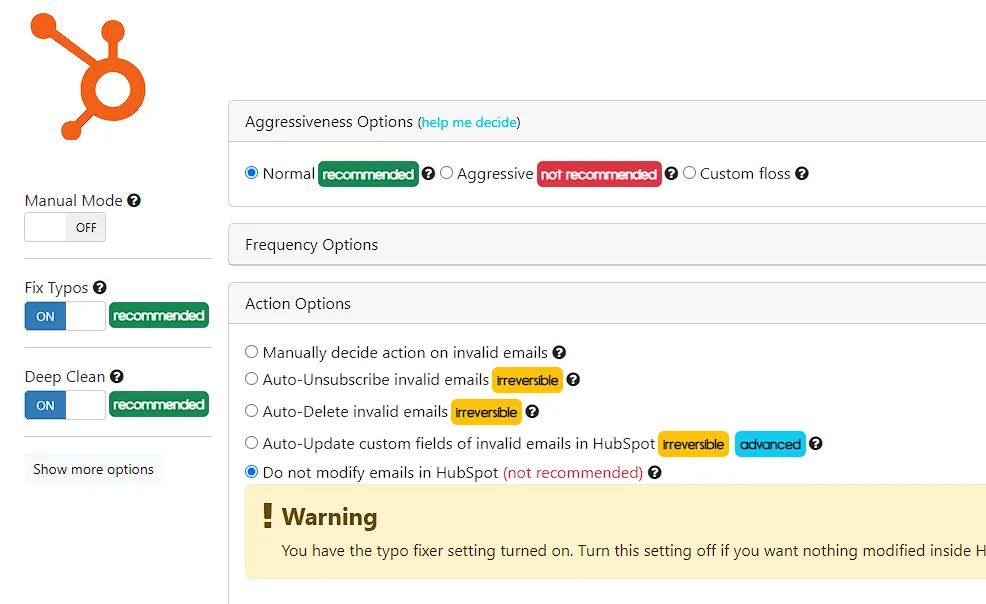
mailfloss connects natively to 40+ email service providers via OAuth, with no API keys to manage manually.
All connections are two-way: removals, tags, and typo fixes write back to the connected platform automatically.
The integration catalog spans marketing platforms (Mailchimp, Klaviyo, Kit, beehiiv, AWeber, Drip, MailerLite, Campaign Monitor, GetResponse, Brevo, Constant Contact), CRM and marketing automation systems (HubSpot, ActiveCampaign, GoHighLevel, Braze, Keap, Intercom, Customer.io, Iterable), and newer platforms in the creator economy (Ghost, beehiiv, Encharge).
Source: mailfloss
Simultaneous connections depend on plan tier: 1 ESP on Lite, up to 10 on Business, and unlimited on Pro. Each connection can be configured independently, so you might auto-delete invalids on Mailchimp while tagging them on HubSpot.
For users without a supported ESP, mailfloss supports CSV/Excel uploads as well as Google Sheets and Airtable extensions. Zapier integration is available on all plans.
Pricing: Credit-based monthly plans starting at $29/month with a 7-day free trial.
mailfloss uses a credit-based subscription model with three plans:
Lite: Starts at $29/month and includes 10,000 credits/month, support for 1 connected email platform, daily list cleaning, real-time API access, Zapier integration, and automatic removal of invalid and decaying email addresses.
Business: Starts at $59/month and includes 25,000 credits/month, support for up to 10 email platforms, webhooks, bounce prevention, automatic typo correction, custom keep/remove rules, and priority human support.
Pro: Starts at $209/month and includes 125,000 credits/month, unlimited email platform connections, Single Sign-On (SSO), subscriber auto-tagging after verification, and all Business features.
All plans include Zapier access, whitelist/blacklist controls, and free deduplication. Overage charges are opt-in by default, so there are no surprise bills.
There is no free plan. mailfloss offers a 7-day free trial on all tiers, but it requires a credit card and a supported ESP connection. A 30-day money-back guarantee applies if you see no improvement in email deliverability. Prepaid credits are available as a one-time purchase for users without a supported ESP. No long-term contracts or annual commitments are required.
Where mailfloss Falls Short
mailfloss does one thing well: automated email list hygiene. But that narrow focus creates gaps for teams whose data quality challenges extend beyond verifying existing addresses.
Email-Only Scope: mailfloss verifies email addresses. It does not verify phone numbers, enrich company data, provide org charts, track buyer intent, or help you find new contacts. If your CRM has data quality issues beyond email, you still need separate tools for everything else. For teams managing a go-to-market data stack, mailfloss solves one slice of a larger problem.
No Contact Discovery: mailfloss cleans the contacts you already have. It cannot help you find new contacts, identify decision-makers at target accounts, or build prospecting lists. If your pipeline depends on sourcing new leads alongside keeping existing data clean, you need a separate platform for discovery.
No Live Chat Support: The most common friction point in user reviews. A Capterra reviewer noted: "They have an AI chatbot which is pretty good, but otherwise you have to email their support team." For urgent deliverability issues, waiting for an email response may not be fast enough.
Typo Fixer Gated to Higher Plans: The Auto Typo Fixer, one of mailfloss's distinctive features, is only available on Business ($59/month) and Pro ($209/month) plans. Lite plan users miss out on what many consider the platform's most valuable capability.
Credit Card Required for Trial: The 7-day free trial requires a credit card upfront and a supported ESP connection. You cannot evaluate the core product without financial commitment, and users without a supported ESP cannot trial the automated cleaning at all.
Limited Reporting Depth: mailfloss provides a dashboard with verification stats and CSV exports. But enterprise buyers and agencies managing multiple clients may want more: trend analysis over time, client-facing reports, or drill-downs into list health patterns.
These limitations reflect mailfloss's choice to stay focused on verification. But for teams that need email hygiene as part of a broader data quality and intelligence strategy, those boundaries matter.
Top mailfloss Alternative for Broader Data Quality: ZoomInfo
ZoomInfo fills mailfloss's gaps with a B2B data and intelligence platform where email quality is one part of a larger system.
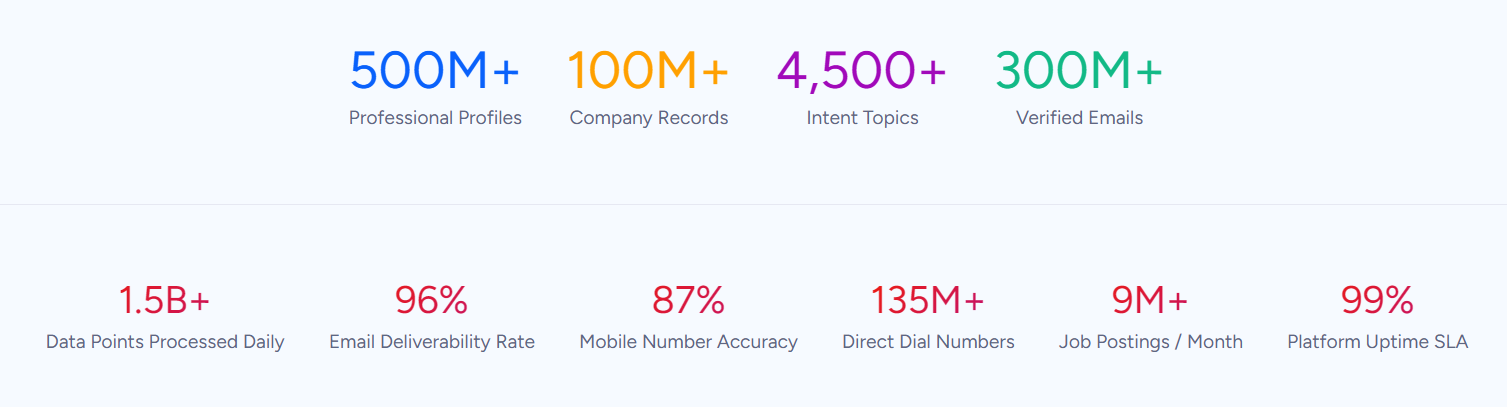
Instead of verifying the emails you already have, ZoomInfo starts with 200M+ verified business email addresses, then adds company data, buyer intent signals, and execution tools for sales and marketing.
Comprehensive Verified Data: ZoomInfo provides accurate contact data from the start, reducing the need for after-the-fact verification.
The fundamental difference between mailfloss and ZoomInfo is when data quality happens. mailfloss cleans contacts after they enter your system. ZoomInfo provides verified contacts before they enter your system.
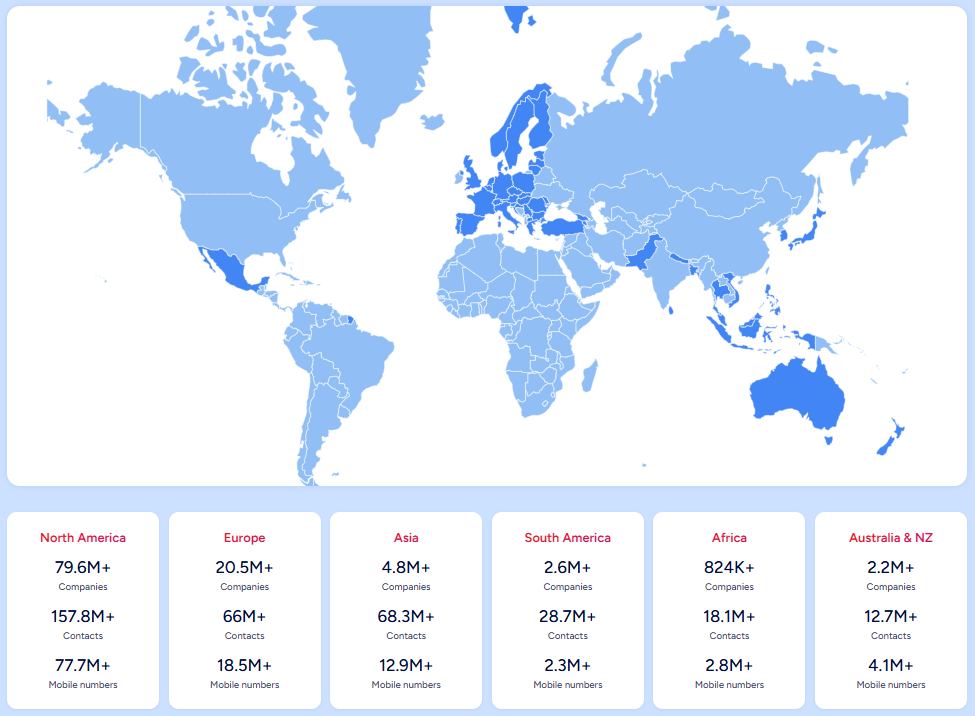
ZoomInfo's database covers 500M contacts, 100M companies, 135M+ verified phone numbers, 120M direct dials, and 200M+ verified business email addresses. 300+ human researchers back a multi-source verification pipeline that achieves up to 95% accuracy on first-party data.
Source: ZoomInfo
Verification is not a single check. ZoomInfo aggregates from automated ML scanning of 28 million site domains daily, third-party partner data covering 95 million businesses, and a community of 200,000+ ZoomInfo Lite users who share data back. ZoomInfo monitors and updates this data continuously as changes surface.
In a Fortune 500 competitive RFP analyzing 25 million contacts across vendors, the independent consultant concluded that "no other competitor came even close." For teams building prospecting lists, enriching CRM records, or running outbound campaigns, starting with verified data eliminates much of the cleanup work that tools like mailfloss exist to handle.
Vensure's VP of Revenue Operations noted: "ZoomInfo gives us the information we need to execute. We don't have to go through and spend our time digging. It's already there, so we can be three steps ahead." (Vensure)
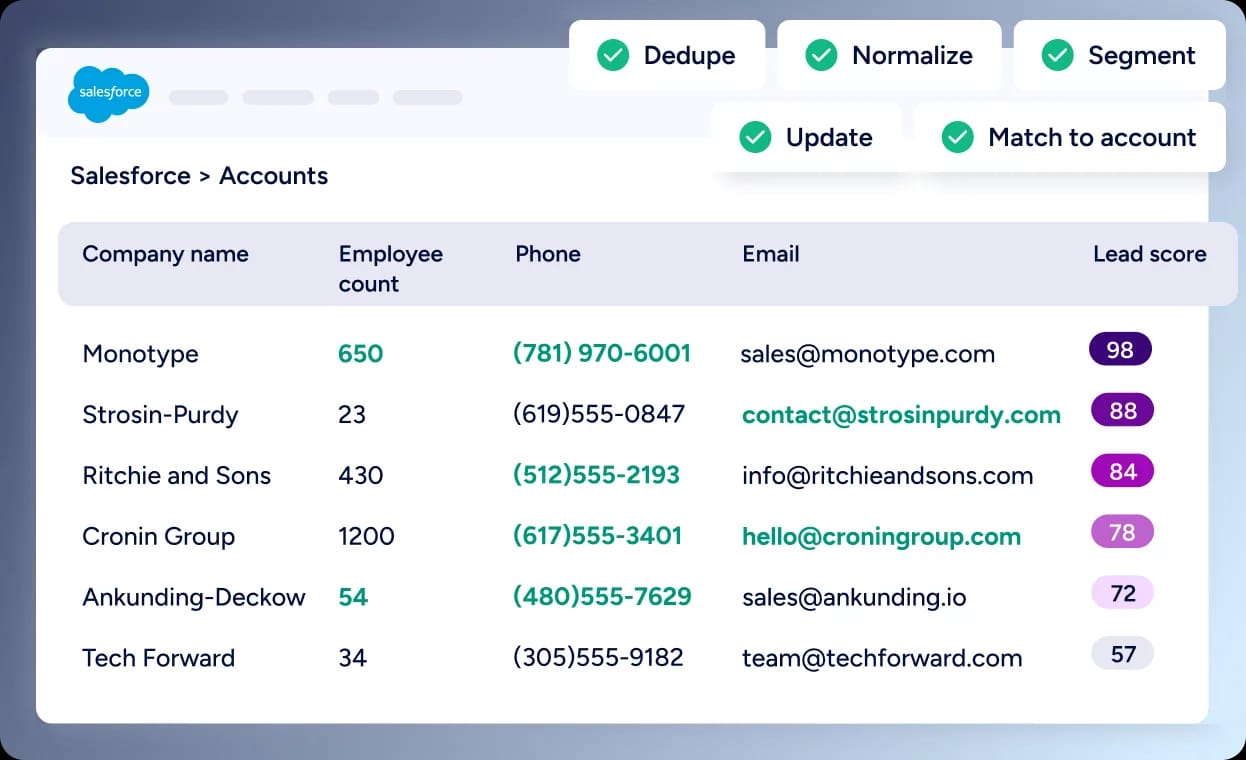
CRM Data Quality and Enrichment: ZoomInfo Operations automates data hygiene across your entire CRM, not just email addresses.
Where mailfloss focuses on email verification within ESPs, ZoomInfo Operations automates data quality across the full CRM.
The product handles deduplication, verification, and multi-vendor enrichment, blocking bad data at entry.
Enrichment draws from roughly 60 vendors through a no-code interface, not just ZoomInfo's own data. This waterfall approach checks multiple sources and returns the highest-confidence result for each data point.
Source: ZoomInfo
For organizations where email addresses are just one part of a larger data quality challenge (stale company records, missing phone numbers, outdated job titles), Operations handles all of it in one platform.
Lead routing, territory management, and predictive scoring are built in. Momentive reduced their speed-to-lead from 20 minutes to 60 seconds using ZoomInfo Operations. The platform also includes GDPR/CCPA compliance management backed by ISO 27001, ISO 27701, and SOC 2 Type II certifications.
SpringDB saw 2x to 3x increases in campaign conversions across channels, a 300% increase in database usability, and 30 to 50% uplift in average deal size after enriching their data with ZoomInfo. (SpringDB)
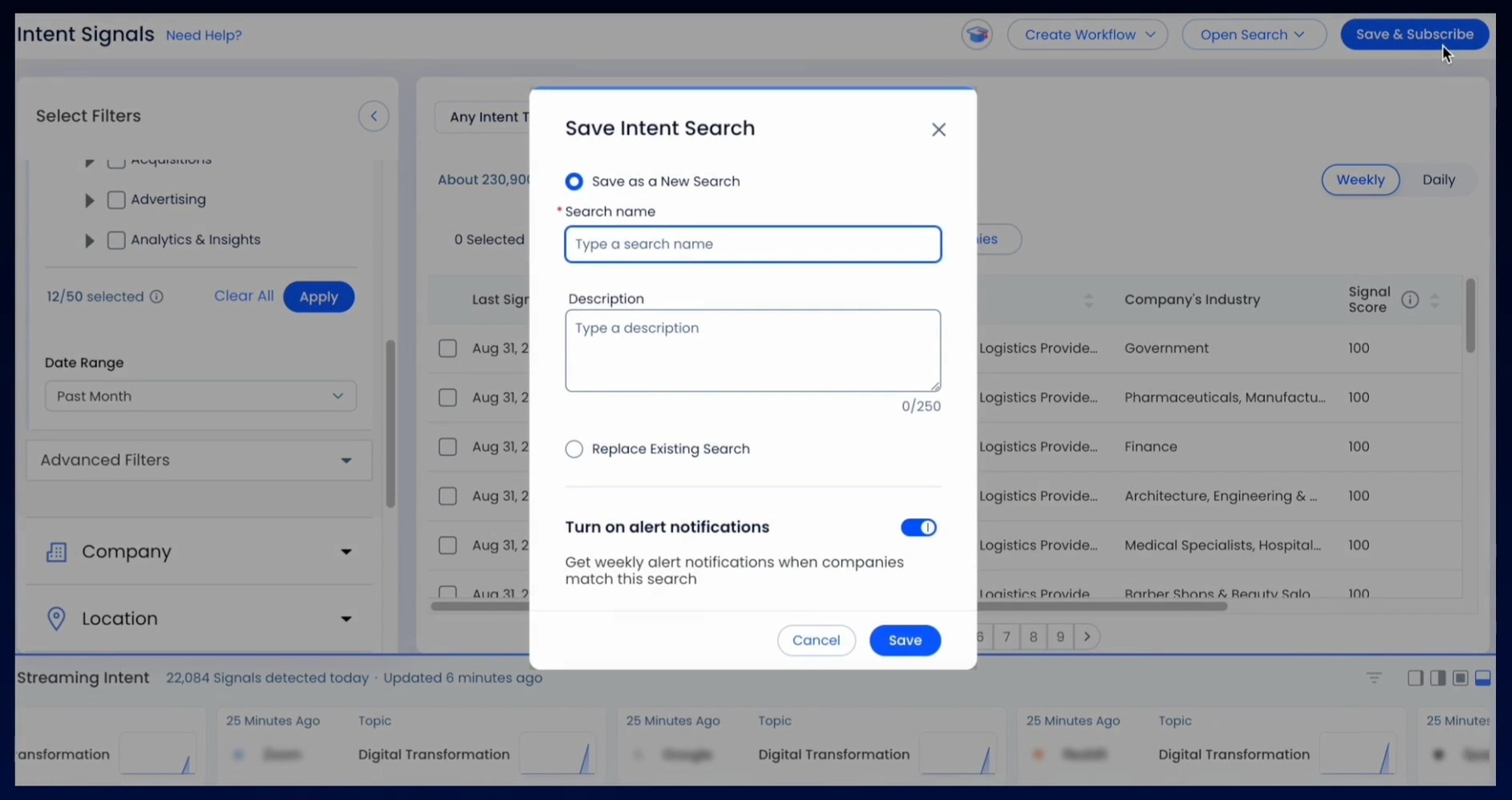
Buyer Intent and GTM Intelligence: ZoomInfo identifies who to contact and when, not just whether their email address is valid.
mailfloss tells you whether an email address works. ZoomInfo tells you whether the person behind that address is actively researching solutions like yours.
ZoomInfo Intent tracks signals from 210 million IP-to-Organization pairings and 6 trillion+ new keyword-to-device pairings sourced monthly. Guided Intent (exclusive to ZoomInfo) identifies topics historically correlated with deal success rather than requiring manual topic selection.
Source: ZoomInfo
This intelligence feeds into ZoomInfo's GTM Context Graph, which processes 1.5B+ data points daily by combining ZoomInfo's B2B data with a customer's CRM records, conversation transcripts, and behavioral signals. The result is a system that captures not just what happened in a deal, but why.
Sellers get AI-powered account prioritization and outreach through GTM Workspace. Marketers and RevOps teams use GTM Studio to design and launch GTM plays with AI. Teams building custom workflows can access the same intelligence through APIs and MCP.
Seismic attributed 39% of active pipeline to opportunities identified or influenced by ZoomInfo signals, with their sales team reporting 54% productivity gains and saving 11.5 hours per week per seller. (Seismic)
Pricing and Access: Custom-quoted plans with a permanent free tier and 7-day trial.
ZoomInfo uses a consumption-based pricing model with no publicly listed prices. Costs scale with usage patterns, number of users, credit volume, and features selected.
ZoomInfo offers two free entry points. ZoomInfo Lite is a permanent free tier (no credit card, no time limit) with access to ZoomInfo's B2B database, 10 monthly export credits, individual and company searches, the ReachOut Chrome Extension, and WebSights Lite for up to 10 website visitor reveals per day. A separate 7-day free trial provides access to core platform features with usage limits.
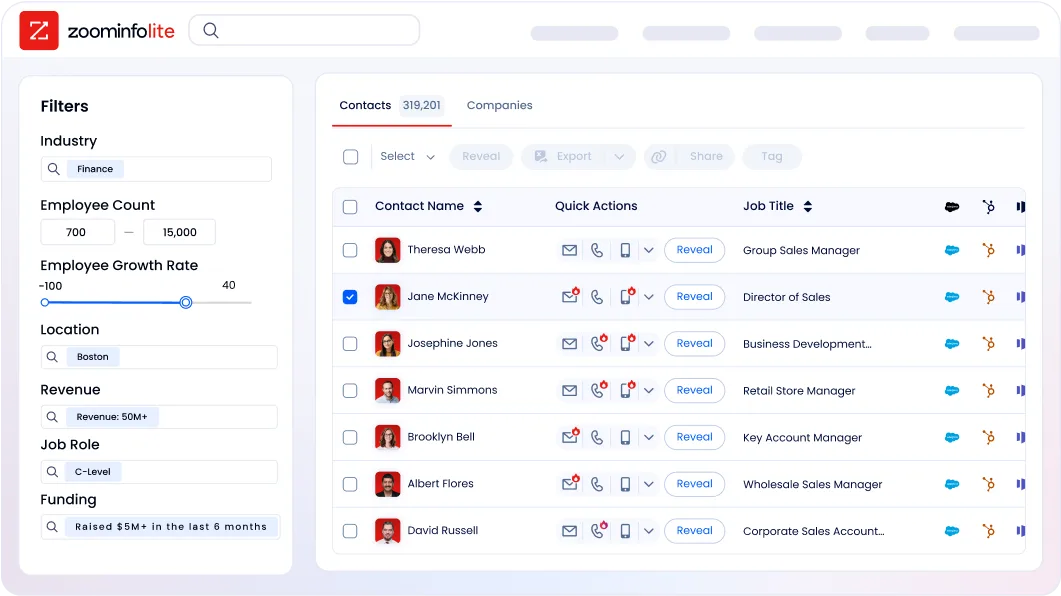
Paid plans fall into three product lines (Sales, Marketing, and Operations), each with tiered options (Professional, Advanced, Enterprise for Sales; Marketing Demand, ABM Lite, ABM Enterprise for Marketing). API access is included in all relevant plans.
mailfloss or ZoomInfo: Comparison Summary
Aspect | mailfloss | ZoomInfo |
|---|---|---|
Primary focus | Automated email list hygiene | B2B data and intelligence platform |
Data approach | Verifies existing contacts | Provides verified contacts + enrichment |
Email data | Validates addresses you already have | 200M+ verified business emails in its database |
Phone numbers | Not applicable | 135M+ verified, 120M direct dials |
Company data | Not applicable | 100M companies with attributes, technographics, org charts |
Buyer intent | Not applicable | Intent signals from 210M IP-to-Org pairings |
CRM enrichment | Email hygiene within ESPs | Multi-vendor enrichment across full CRM |
Automation | Daily automated ESP cleaning | AI-powered prospecting, outreach, and data quality |
ESP integrations | 40+ native connections | 120+ Marketplace integrations + APIs/MCP |
Free plan | No (7-day trial, credit card required) | ZoomInfo Lite (permanent, no credit card) |
Pricing | $29 to $209/month (published) | Custom-quoted (consumption-based) |
Best for | Email marketers focused on list hygiene | B2B teams needing data, intelligence, and execution |
Final Verdict
The choice between mailfloss and ZoomInfo depends on the scope of your data quality challenge.
Choose mailfloss if your primary need is keeping existing email lists clean and your sender reputation protected. It does one job well: automated, daily email hygiene with minimal effort.
If you run email campaigns through a supported ESP, care about inbox placement, and want a tool that works in the background after a 60-second setup, mailfloss delivers that. The Auto Typo Fixer alone can recover enough lost leads to justify the subscription for high-volume senders.
Choose ZoomInfo if your data quality needs extend beyond email verification into contact discovery, CRM enrichment, buyer intent, and go-to-market execution.
ZoomInfo solves the email quality problem at the source by providing verified data from the start, then adds intelligence that tells you who to contact, when to reach out, and what to say. For B2B teams where email hygiene is one piece of a larger data and pipeline challenge, ZoomInfo is the platform to handle all of it.
Get started with ZoomInfo here.
The difference is scope. mailfloss is focused and does its job well. ZoomInfo treats email data quality as one layer of a larger system. Your choice depends on whether you need a specialist tool for email hygiene or a platform that makes email hygiene part of a broader go-to-market strategy.
mailfloss FAQ
What does mailfloss do?
mailfloss is an automated email list hygiene service that connects to your email service provider and removes invalid email addresses daily.
After a one-time setup that takes about 60 seconds, it runs in the background, scanning for invalid addresses, fixing typos, and taking configured actions (delete, unsubscribe, or tag) without manual effort. It supports 40+ ESPs including HubSpot, Klaviyo, ActiveCampaign, and Mailchimp.
How much does mailfloss cost?
mailfloss offers three monthly plans: Lite at $29/month (10,000 credits, 1 ESP), Business at $59/month (25,000 credits, up to 10 ESPs), and Pro at $209/month (125,000 credits, unlimited ESPs). No long-term contracts are required. Overage charges are opt-in, and prepaid credits are available as a one-time purchase for users without a supported ESP.
Does mailfloss have a free plan?
No. mailfloss offers a 7-day free trial on all subscription plans, but it requires a credit card at signup and a supported ESP connection. There is no permanent free tier. A 30-day money-back guarantee applies if you see no improvement in deliverability.
ZoomInfo, by contrast, offers ZoomInfo Lite as a permanent free tier with access to its B2B database and 10 monthly export credits, no credit card required.
How does the Auto Typo Fixer work?
The Auto Typo Fixer detects common misspellings of email domains from providers like Gmail, Yahoo, AOL, and Hotmail. When it finds a typo (such as "gmial.com" instead of "gmail.com"), it corrects the address and syncs the fix back to your connected ESP automatically. This recovers leads that would otherwise be lost. The feature is available on Business and Pro plans only.
What email checks does mailfloss perform?
mailfloss runs each address through multiple verification layers including syntax validation, domain and MX record checks, SMTP-level mailbox verification, disposable and temporary address detection, role-based address identification, spam trap detection, complainers detection, accept-all server analysis, and hard bounce removal.
Its proprietary Deep Clean Engine handles hard-to-verify domains like Yahoo and AOL that many competitors default to marking as accept-all.
Does mailfloss offer an API?
Yes. mailfloss provides a REST API with single-email verification (GET request), batch verification (POST request with webhook delivery), and supporting endpoints for usage tracking and data privacy requests. Rate limits are 10,000 requests per minute.
A JavaScript widget is also available for client-side form validation. The API is available on all subscription plans, while webhooks are limited to Business and Pro plans.
How does mailfloss compare to ZoomInfo for email data quality?
mailfloss and ZoomInfo address email data quality from opposite directions. mailfloss verifies and cleans email addresses you already have in your ESP. ZoomInfo provides verified email addresses (200M+ in its database) along with phone numbers, company data, buyer intent signals, and prospecting tools.
fFor teams focused on ESP list hygiene, mailfloss is the more targeted solution. For teams that need verified contact discovery, CRM-wide enrichment, and go-to-market intelligence alongside data quality, ZoomInfo offers a broader platform.
Which ESPs does mailfloss support?
mailfloss integrates natively with 40+ ESPs, including Mailchimp, HubSpot, ActiveCampaign, Klaviyo, Constant Contact, AWeber, Keap, Kit, Drip, Brevo, MailerLite, GetResponse, Intercom, Customer.io, Iterable, Braze, GoHighLevel, beehiiv, Ghost, and Campaign Monitor, among others. Users without a supported ESP can upload lists via CSV/Excel or use the Google Sheets and Airtable extensions.
Related breakdowns to help you choose:
