
Adobe Marketo Engage is one of the leading B2B marketing automation platforms, trusted by enterprise and mid-market organizations running multi-touch demand generation programs across long sales cycles.
Named a Leader in the 2025 Gartner Magic Quadrant for B2B Marketing Automation Platforms, Marketo gives marketing teams a central hub for email campaigns, lead scoring, nurture programs, account-based marketing, and revenue attribution.
But Marketo only captures what happens inside its own walls.
It tracks form submissions, email engagement, and web visits on pages running the Munchkin tracking code.
On its own, it cannot verify whether a prospect's phone number still connects, detect which target accounts are researching your product category this week, close the loop between ad spend and pipeline revenue, or surface a hot lead to the right sales rep the moment they cross a scoring threshold. The data Marketo generates is rich, but it stops at the channels it controls.
The right integrations close those gaps. They feed Marketo verified data it cannot generate on its own, capture activity happening outside the platform, connect marketing automation to sales execution, and push engagement signals into the tools your team already monitors.
This guide covers the strongest integration for each of the jobs Marketo users most commonly need done:
Enrich Marketo leads with verified B2B contact data, buyer intent signals, and company intelligence
Sync the full marketing-to-sales data lifecycle between Marketo and your CRM with continuous bidirectional flow
Target the same accounts and personas with paid B2B advertising that your Marketo programs are already nurturing
Route qualifying lead signals to the Slack channels where your sales and marketing teams coordinate in real time
Connect Marketo to the long tail of apps outside the LaunchPoint marketplace without writing code
Attribute pre-conversion web behavior and campaign source data to every Marketo lead record
Push per-attendee webinar engagement data into Marketo for tiered follow-up
Each section walks through how the integration connects with Marketo, what data flows between the platforms, pricing, and who benefits most.
Best Marketo Integrations at a Glance |
|---|
Best Marketo Integration for B2B Data Enrichment and Go-to-Market Intelligence Enriches Marketo leads with verified contact data, buyer intent signals, and company intelligence from ZoomInfo's B2B database, giving your team accurate data to prospect with and signals to prioritize accounts that are actively in-market. |
Best Marketo Integration for Bidirectional CRM Sync and Closed-Loop Revenue Attribution Connects Marketo to Salesforce's sales pipeline with continuous bidirectional sync across Leads, Contacts, Accounts, Opportunities, and Campaigns, with an embedded Sales Insight panel giving reps real-time visibility into prospect engagement. |
Best Marketo Integration for B2B Paid Media and Account-Based Advertising Pushes any Marketo smart list or static list directly to LinkedIn Campaign Manager as a Matched Audience, so the same accounts and personas receiving Marketo email nurtures also see targeted LinkedIn ads. |
Best Marketo Integration for Real-Time Lead Alert Routing Routes qualifying lead signals from Marketo into dedicated Slack channels via webhook, surfacing score milestones, form fills, and lifecycle stage changes the moment they happen so sales reps act on behavioral signals without leaving Slack. |
Best Marketo Integration for Connecting Apps Outside the LaunchPoint Marketplace Extends Marketo's reach to 8,000+ applications that lack native LaunchPoint connectors, enabling no-code lead workflows between Marketo and scheduling tools, payment processors, event platforms, and niche vertical software. |
Best Marketo Integration for Pre-Conversion Web Behavior Attribution Bridges anonymous GA4 session data with named Marketo lead records by capturing UTM parameters at form submission, so channel attribution persists as a lead property through scoring, nurturing, and CRM handoff. |
Best Marketo Integration for Enterprise Virtual Event Engagement Data Syncs over 70 per-attendee behavioral signals from webinars and virtual events into Marketo Custom Objects at 15-minute intervals, letting Smart Campaigns differentiate post-event follow-up by engagement depth rather than treating all attendees the same. |
What Is Marketo?
Adobe Marketo Engage is a B2B marketing automation platform that helps marketing teams scale personalized buyer engagement across email, web, events, ads, and chat while managing the full lead lifecycle from first touch through sales handoff and revenue attribution.
Source: Marketo
Adobe positions Marketo as "a complete AI-powered marketing automation platform" for mid-market and enterprise B2B organizations managing multi-touch buying journeys. A Forrester Total Economic Impact study found that Marketo Engage customers averaged 267% ROI and recouped their investment in under three months.
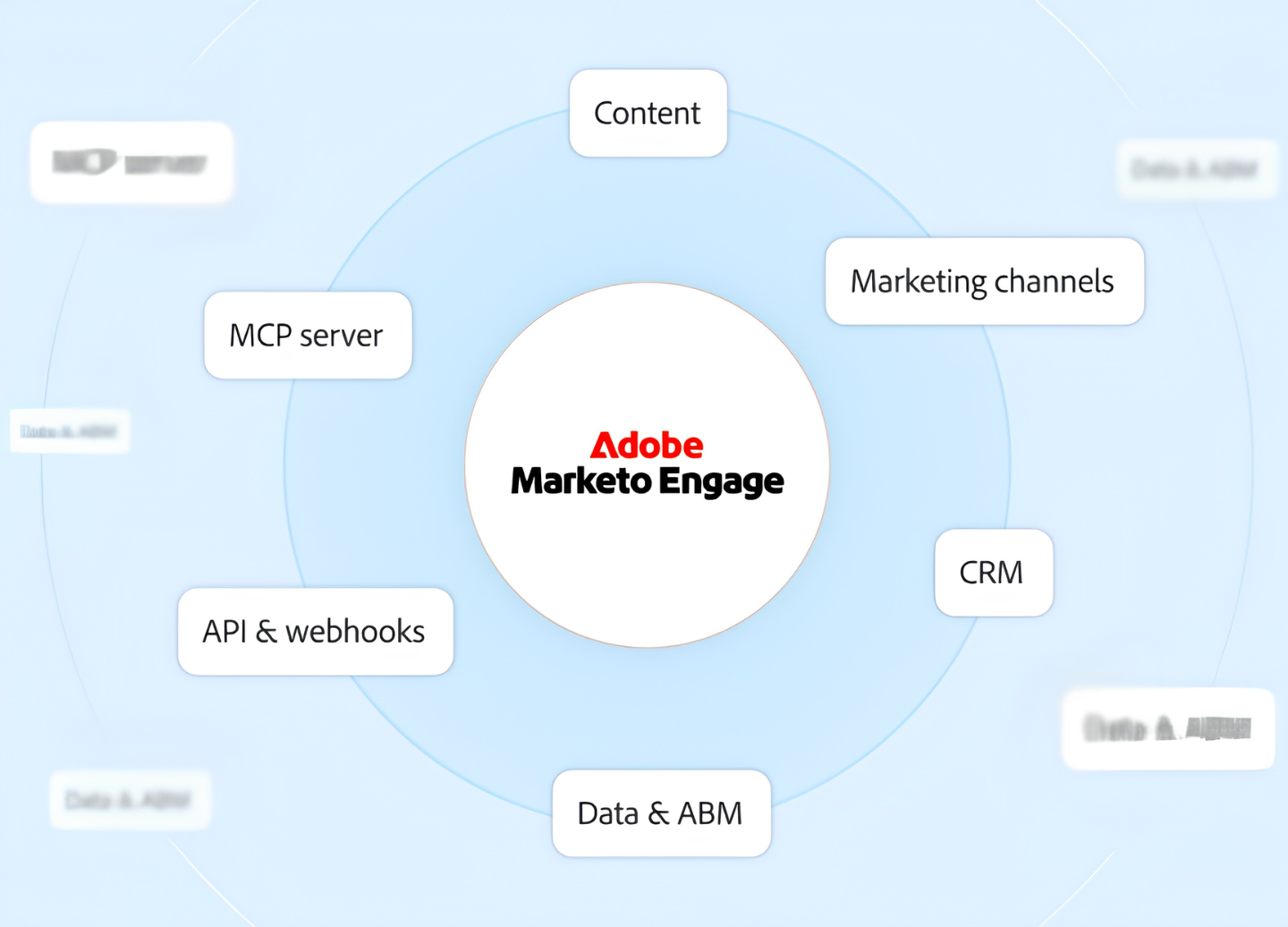
Marketo's integration ecosystem is a defining strength.
The LaunchPoint marketplace provides pre-built connectors across CRM, advertising, events, data enrichment, sales engagement, and analytics. On the CRM side, Marketo offers native bidirectional sync with Salesforce, Microsoft Dynamics, and Veeva CRM.
The REST API covers the full platform data model (leads, companies, opportunities, activities, programs, custom objects), supports OAuth 2.0 authentication, and includes webhooks for outbound event-driven automation. Adobe also recently launched a Marketo Engage MCP Server that lets AI tools read, write, and act on Marketo data directly.
The integration categories available to Marketo users include:
CRM and sales alignment: Salesforce, Microsoft Dynamics, Veeva CRM, with native bidirectional sync and embedded sales intelligence panels
B2B data enrichment: ZoomInfo, Clearbit, and third-party enrichment providers feeding verified contact and company data into lead records
Advertising and ABM: LinkedIn, Google Ads, Meta, and Adobe's native DSP for account-based and audience-based paid media
Webinars and events: ON24, Zoom, native Interactive Webinars (powered by Adobe Connect), Cvent
Team communication: Slack, Microsoft Teams via webhook-based alerting
Workflow automation: Zapier, Workato, Informatica for connecting non-LaunchPoint applications
Analytics and attribution: Google Analytics, Adobe Analytics, Marketo Measure for multi-touch revenue attribution
With that ecosystem as context, here are the seven integrations we selected as the best options for extending Marketo across the categories that matter most to B2B marketing teams.
1. ZoomInfo: Best Marketo Integration for B2B Data Enrichment and Go-to-Market Intelligence
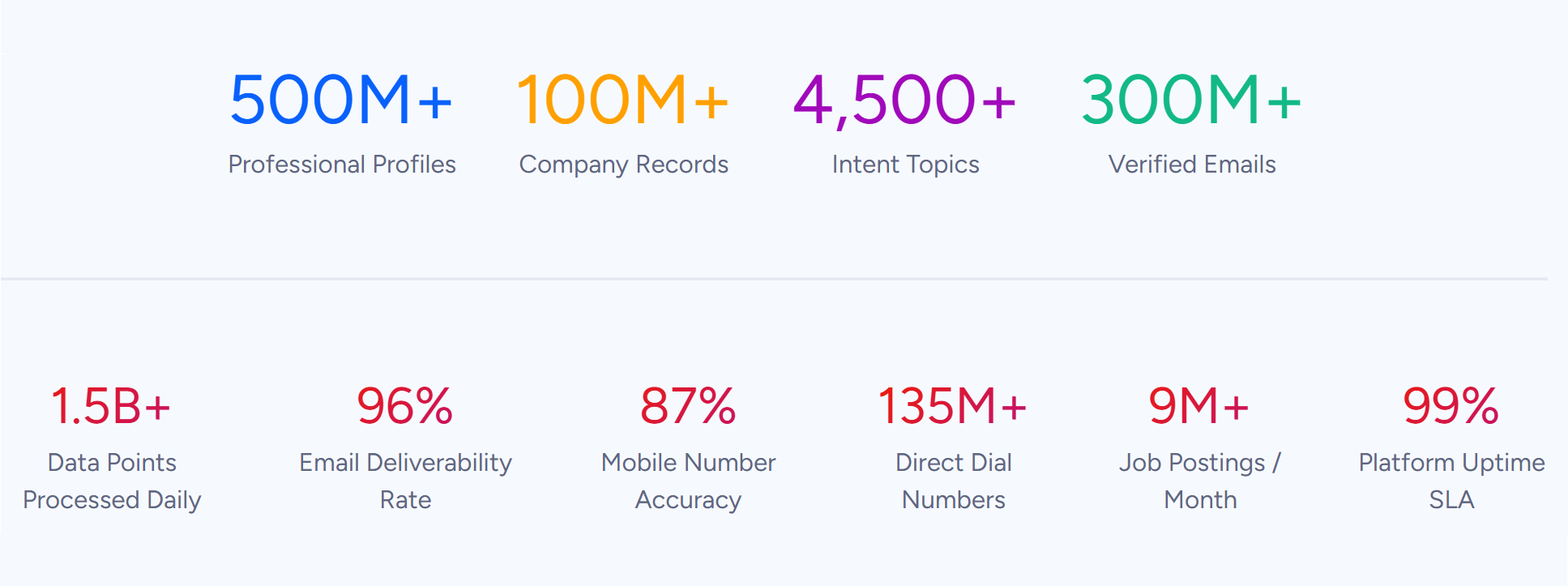
ZoomInfo is a go-to-market platform built on one of the largest B2B data foundations available: 500M contacts, 100M companies, 135M+ verified phone numbers, and 200M+ verified business email addresses. It integrates with Marketo through a native LaunchPoint service, enriching lead records with verified contact data, company intelligence, buyer intent signals, and technographic insights.
Source: ZoomInfo
Connecting the two platforms unlocks:
A Marketo database that stays accurate on its own, with verified emails, direct dials, and firmographics appended and refreshed automatically as new leads enter
Prioritization by buying signals, so marketing sequences target the accounts researching your category this week instead of a static list
Smarter lead scoring and routing, with ZoomInfo attributes powering Marketo Smart Campaign logic for segmentation, scoring, and sales handoff
Pipeline from traffic you already have, by resolving anonymous website visitors into companies and buying teams that feed directly into Marketo workflows
How ZoomInfo Integrates with Marketo
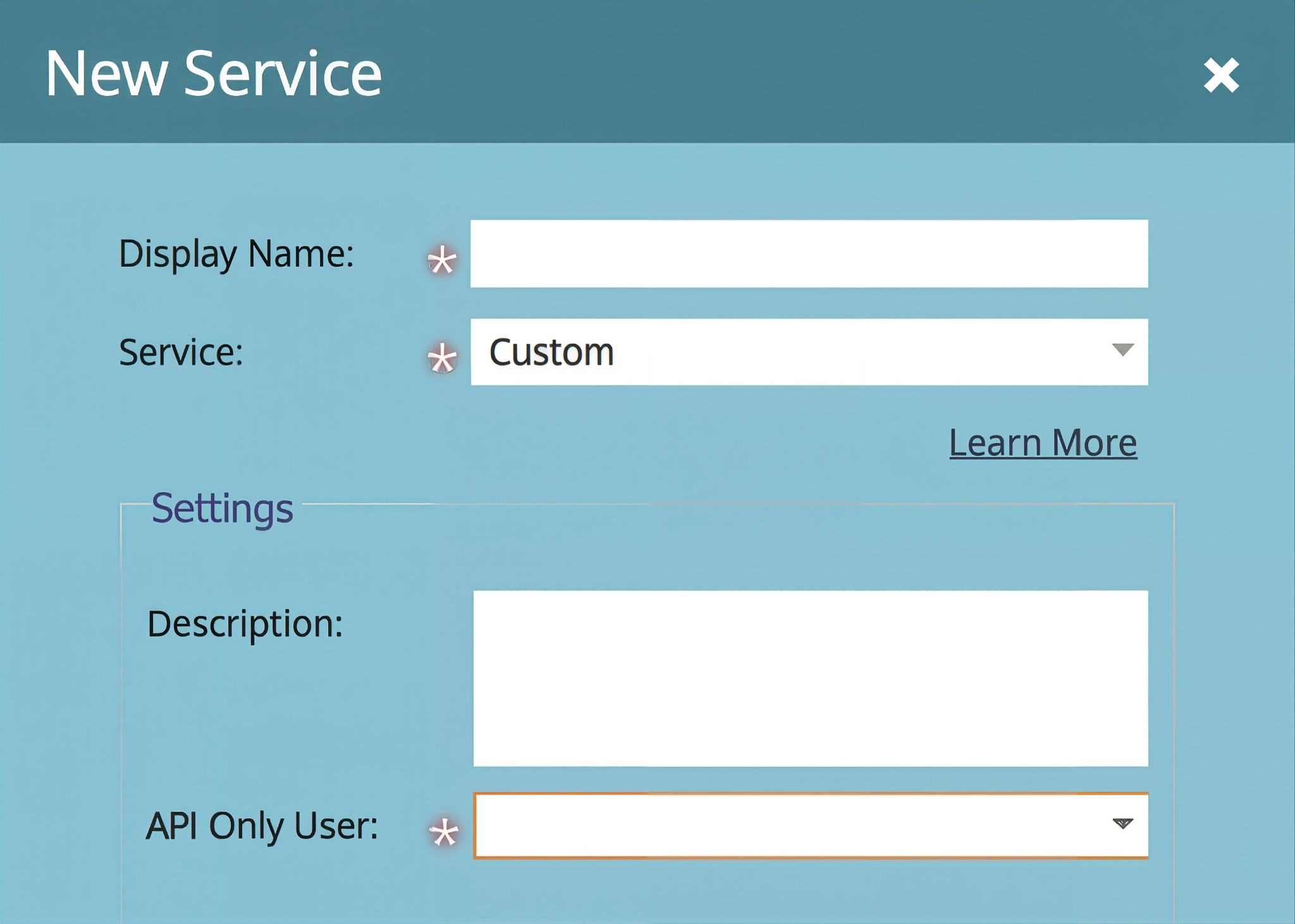
ZoomInfo connects to Marketo through a native LaunchPoint integration in Marketo's admin panel, using REST API authentication for real-time data sync. Alternative connections are available via Zapier and other iPaaS platforms for teams that prefer middleware-based workflows.
Source: ZoomInfo
Because ZoomInfo builds and maintains the primary integration, it requires no third-party middleware for core enrichment workflows and stays current with API updates on both sides.
Contact and Company Data Enrichment: Fill the Gaps Marketo Cannot Fill on Its Own
Marketo captures interaction data: emails opened, forms submitted, pages visited. What it cannot do on its own is verify whether a phone number still works, detect a job change, or reveal a company's technology stack.
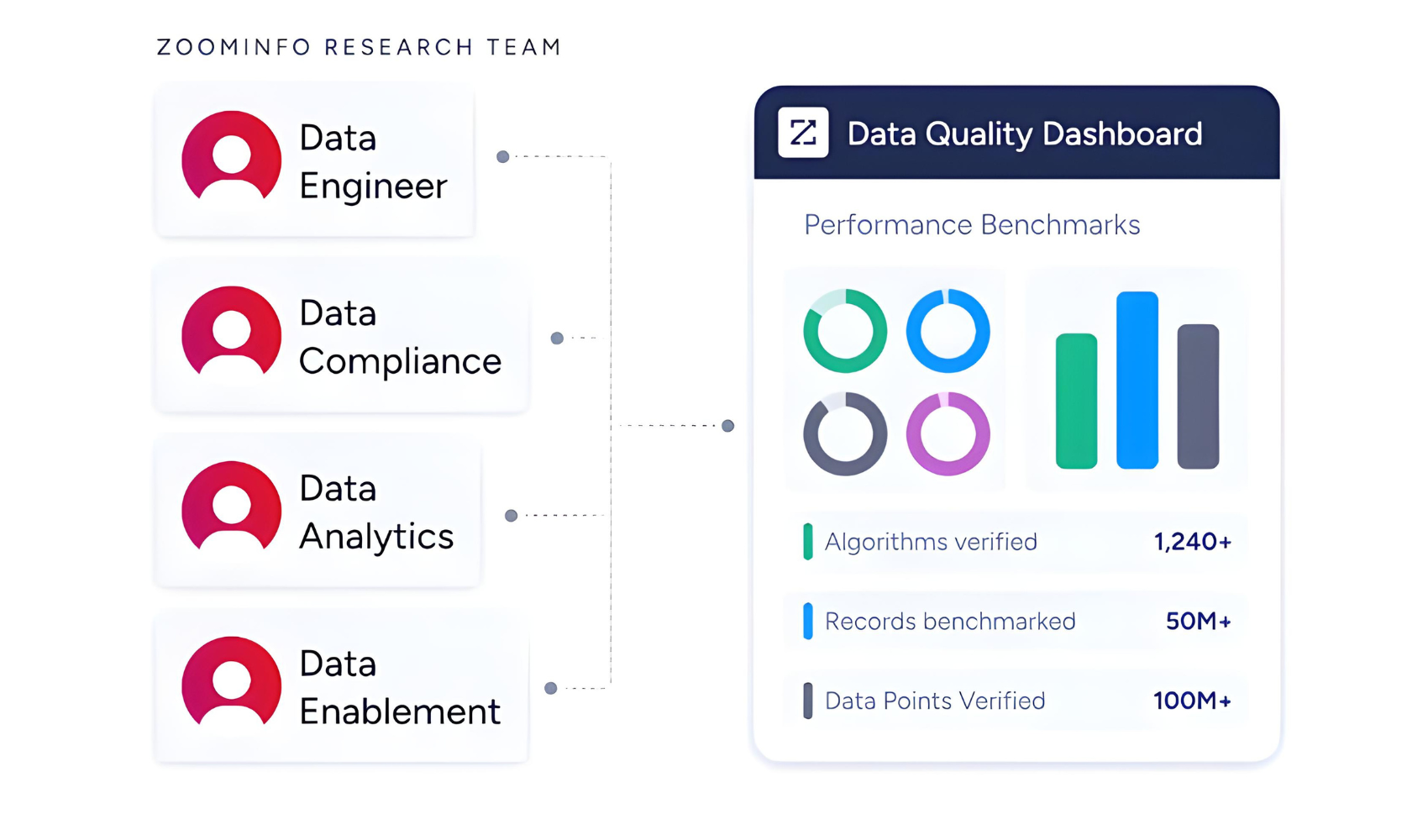
When a new lead enters Marketo, ZoomInfo automatically appends the verified business email, direct dial, title, department, and seniority, plus company-level firmographics and technographic data covering 30,000+ technologies. The enrichment runs continuously through a verification pipeline backed by 300+ human researchers, reaching up to 95% accuracy on first-party data.
Source: ZoomInfo
ZoomInfo's FormComplete feature goes further: when a prospect begins filling out a Marketo form, FormComplete auto-populates the remaining fields with verified ZoomInfo data, reducing form abandonment while enriching the lead record from the moment of capture.
ZoomInfo in action: A prospect submits a Marketo landing page form with only a name and work email. ZoomInfo appends their direct dial, current title, company profile (a 400-person fintech running Salesforce and HubSpot), and three other decision-makers in their department. The marketing team multi-threads the account with persona-specific nurture tracks before the first sales outreach.
Buyer Intent Data: Identify Accounts That Are Actively In-Market
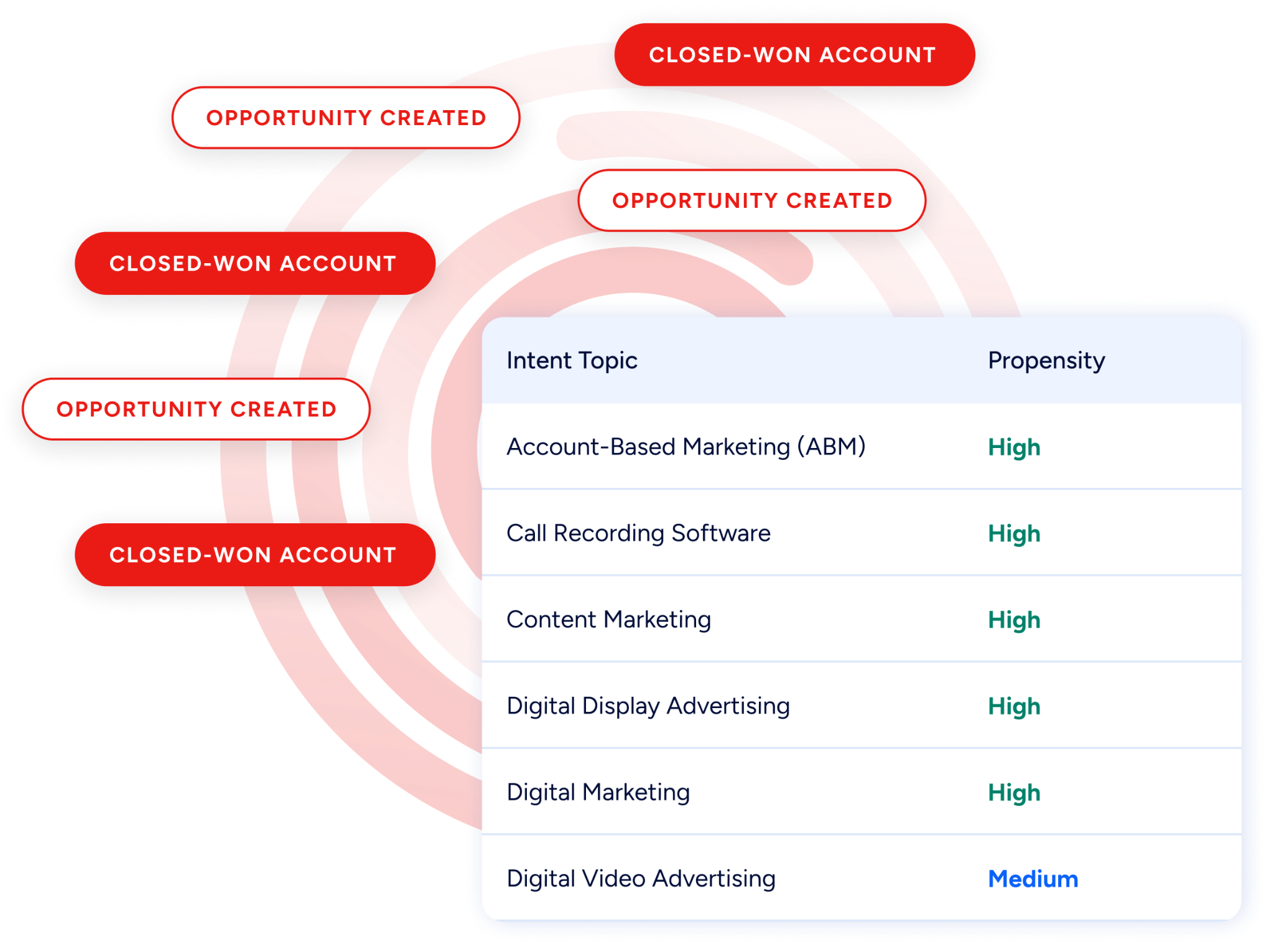
ZoomInfo's Buyer Intent tracks signals from 210 million IP-to-Organization pairings and 6 trillion+ new keyword-to-device pairings monthly, revealing which companies are researching topics relevant to your product.
Source: ZoomInfo
Those signals flow into Marketo lead records, where they power Smart Campaign logic: high-intent accounts route to accelerated nurture sequences, update lead scores, and surface priority accounts for sales handoff.
Guided Intent, exclusive to ZoomInfo, identifies the research topics historically correlated with deal success in your business, so signals calibrate to your actual win patterns rather than generic keyword thresholds.
ZoomInfo in action: ZoomInfo detects a target account researching "marketing automation migration" for two weeks. The intent signal syncs to the corresponding Marketo leads, raises their scores past the MQL threshold, enrolls the primary contact in a switching-focused nurture sequence, and fires a Salesforce task for the assigned rep, all while the buyer is still evaluating.
Website Visitor Identification: Convert Anonymous Traffic into Pipeline
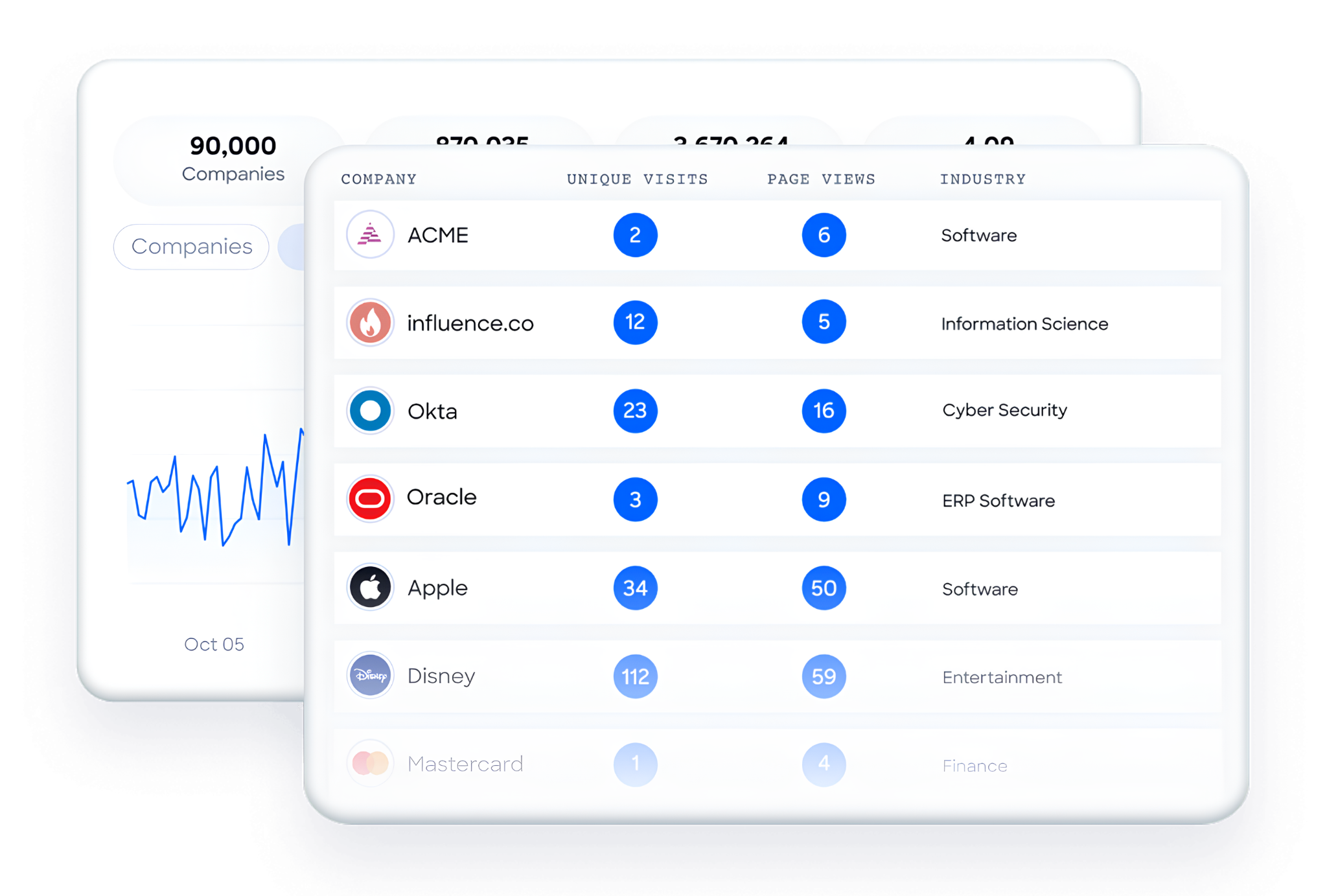
ZoomInfo WebSights resolves anonymous website traffic to companies, including buying-team identification and contact information, with Automatic Traffic Filtering that separates genuine company visits from bots.
Source: ZoomInfo
Connected to Marketo, the companies visiting your site and the pages they viewed surface alongside your marketing automation data, so high-value visitors route to sales while the interest is live.
Workflow Automation and Lead Scoring
ZoomInfo attributes (company size, industry, technology stack, intent score) power Marketo Smart Campaign logic for routing, scoring, and segmentation.
A new lead enriched by ZoomInfo routes automatically to the enterprise nurture track at 1,000+ employees or to SMB below 100, with no manual triage.
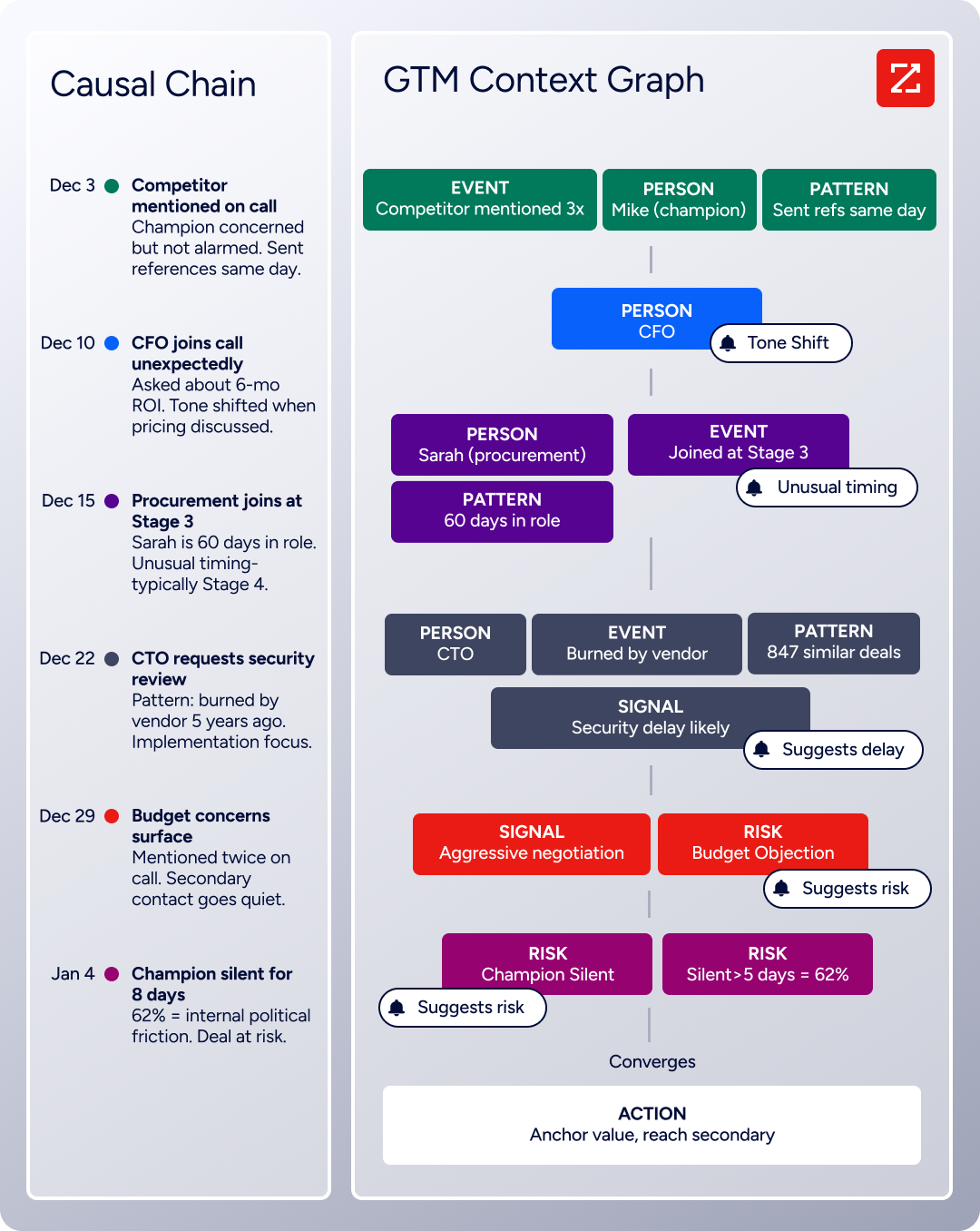
Scoring models gain company-level context alongside Marketo's behavioral signals, and the enrichment feeding your Marketo instance draws from a broader intelligence system: the GTM Context Graph processes 1.5B+ data points daily and combines ZoomInfo's B2B data with CRM records, conversations, and behavioral signals.
Source: ZoomInfo
Seismic's sales team attributed 39% of active pipeline to opportunities identified or influenced by ZoomInfo signals, reporting 54% productivity gains and saving 11.5 hours per week per seller. (Seismic Case Study)
ZoomInfo Pricing
ZoomInfo uses a consumption-based pricing model with custom quotes based on usage, users, credit volume, and features.
It is organized into Sales, Marketing, and standalone product lines, each in Professional, Advanced, and Enterprise tiers. The native Marketo integration is available through the Marketing plans, which include CRM and MAP integrations (Salesforce, HubSpot, Marketo, Eloqua, and more) starting from the Marketing Demand tier.
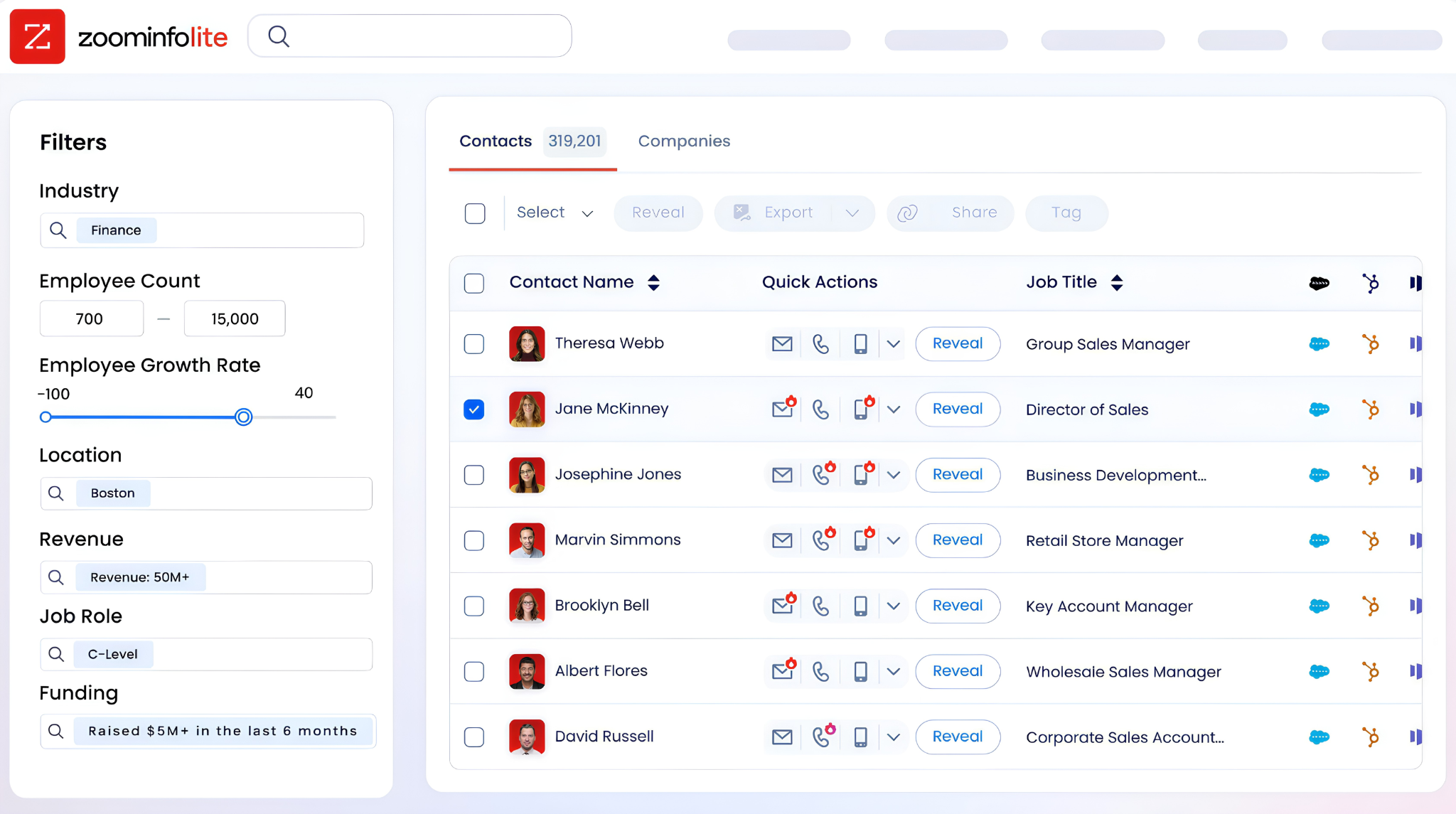
ZoomInfo Lite is a permanent free tier (no credit card, no time limit) with 10 monthly export credits, searches, the Chrome extension, and CRM integrations, making it a practical way to evaluate the data quality before committing. A separate 7-day free trial covers paid features including advanced intent data and AI capabilities.
Source: ZoomInfo
Who Should Use the ZoomInfo Integration?
B2B marketing teams whose lead scoring depends on data Marketo cannot generate: verified direct dials, firmographics, technographics, and intent signals filling the gap between behavioral engagement and actual account fit
Revenue operations teams that need enrichment powering Marketo Smart Campaign logic for routing, scoring, and segmentation rather than relying on behavioral signals alone
Marketing teams running account-based campaigns that need dynamic lists of accounts showing buying signals now, not static firmographic lists that go stale within weeks
2. Salesforce: Best Marketo Integration for Bidirectional CRM Sync and Closed-Loop Revenue Attribution
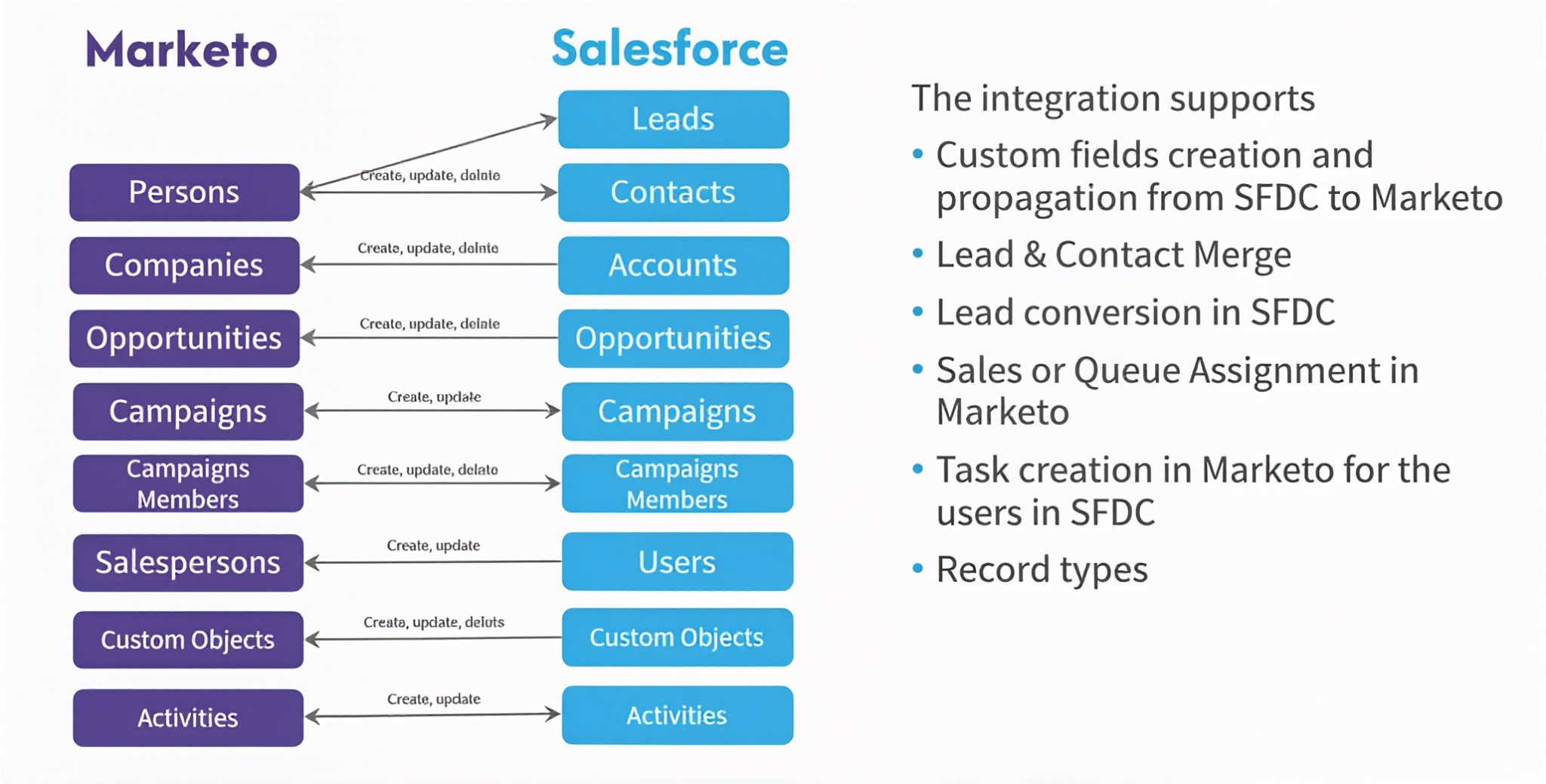
Salesforce is the world's #1 CRM by IDC revenue market share. It integrates with Marketo through a native, bidirectional sync covering every major object in both systems. Marketing actions in Marketo appear as CRM data in Salesforce within minutes, and sales actions in Salesforce trigger automated marketing responses in Marketo without manual exports or middleware.
Source: Salesforce
Key integration capabilities include:
Bidirectional five-minute sync across Leads, Contacts, Accounts, Opportunities, Salesforce Campaigns, and Custom Objects
Marketo Sales Insight panel embedded in Salesforce surfacing lead scores, interesting moments, and upcoming campaign enrollment directly on Lead and Contact records
Campaign Member attribution linking Marketo program success events to Salesforce Opportunities for closed-loop revenue reporting
Opportunity data flowing into Marketo enabling Smart Campaigns to act on pipeline status in real time
How Salesforce Integrates with Marketo
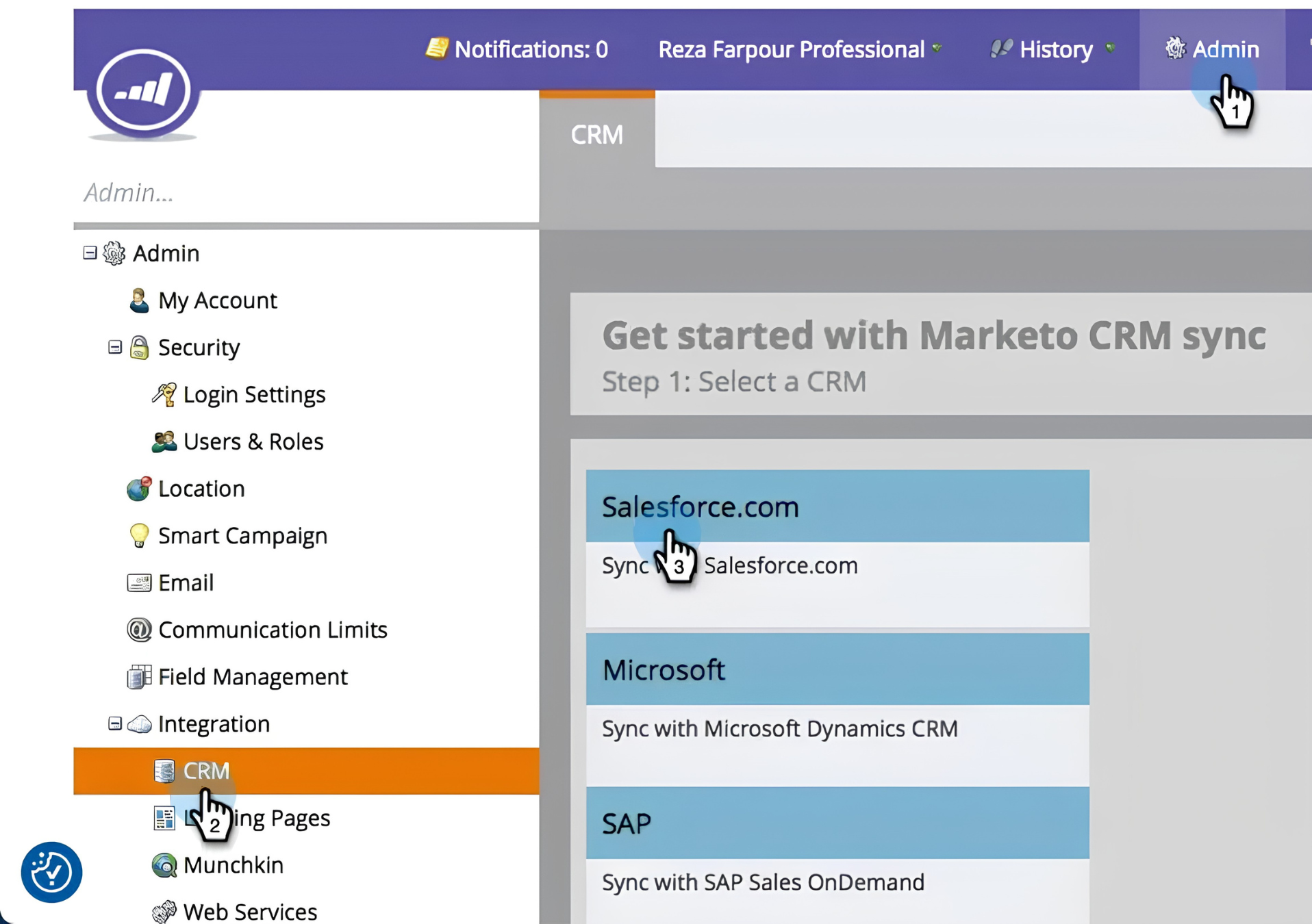
The Salesforce-Marketo integration is entirely native: no third-party connector, no iPaaS middleware required. The sync is configured inside the Marketo admin panel and establishes a bidirectional continuous sync running every five minutes after the initial full database sync completes. Throughput reaches up to 200,000 records per hour.
Source: Salesforce
1. Bidirectional Continuous Object Sync.
The sync covers Leads, Contacts, Accounts, Opportunities, Salesforce Campaigns, Custom Objects, and Activity records. Leads and Contacts sync bidirectionally: a field update in either system propagates to the other within the five-minute cycle.
Accounts and Opportunities sync from Salesforce into Marketo (Salesforce is the system of record for account data). Salesforce Campaign membership flows from Marketo into Salesforce: when a Marketo program records a success event, that activity creates or updates a Campaign Member record in Salesforce.
A lead score crossing the MQL threshold in Marketo updates the corresponding Salesforce Lead record within five minutes. A stage change from Prospect to SQL in Salesforce suppresses that contact from active Marketo nurture sequences within the same window.
2. Marketo Sales Insight Panel Inside Salesforce.
Marketo Sales Insight (MSI) installs as a native Visualforce panel inside Salesforce Lead, Contact, Account, and Opportunity records. The panel surfaces the lead's Marketo score displayed as Stars (score relative to other leads) and Flames (recency and velocity of engagement), plus Interesting Moments: real-time alerts when a lead takes a meaningful action tracked by Marketo.
The Insights Dashboard aggregates signals into an Engagement Velocity Grid, visualizing activity over the last 90 days. For ABM programs, account-level aggregation supports up to 800 contacts, giving account executives a view of collective buying group engagement rather than isolated individual signals.
3. Campaign Member Attribution and Revenue Reporting.
When a Marketo lead achieves program success, that engagement event syncs as a Campaign Member record on the corresponding Salesforce Campaign.
Because Campaign Member records connect to Leads, Contacts, and Opportunities through the Contact Role object, Salesforce's native Campaign Influence reporting can trace which Marketo programs touched a prospect at each stage of the sales cycle, answering the question: which marketing programs are actually generating pipeline and closed revenue?
4. Opportunity Data Driving Marketo Smart Campaign Logic.
Salesforce Opportunity data (deal stage, value, close date, probability) becomes available inside Marketo as filter and trigger criteria. Marketing can build Smart Campaigns that suppress active Opportunities from demand generation sequences, enroll open Opportunities into late-stage acceleration content, or fire internal alerts when high-value deals go silent.
5. Smart Campaign Automation of Salesforce Actions.
Marketo Smart Campaigns include flow steps that write back directly into Salesforce: Create Task (generating a sales follow-up), Change Owner (routing the lead to a specific rep or queue), and Update Salesforce Field (writing scoring tiers or routing categories). The MQL handoff logic between marketing and sales can be fully encoded in Marketo.
Salesforce Pricing
Salesforce uses per-user annual contracts. The Marketo sync works with all Salesforce editions from Professional upward:
Enterprise Edition: $175/user/month billed annually; unlocks full workflow automation, custom objects, and the API access required for Marketo sync with custom object mapping
Unlimited Edition: $350/user/month billed annually; adds the full AI suite, conversation intelligence, and Premier Success Plan
Marketo Sales Insight is sold as a separate add-on in 5-user packs (pricing requires a direct Adobe quote) and is not included in any base Marketo tier. Teams evaluating the Salesforce integration should budget for MSI if sales rep access to behavioral data is a core requirement.
Who Should Use the Salesforce Integration?
Marketing and sales teams that need closed-loop revenue attribution connecting specific Marketo programs to Salesforce Opportunities and closed-won revenue, using Campaign Member records as the attribution mechanism
RevOps teams automating MQL handoffs where lead routing, task creation, and field updates execute directly from Marketo Smart Campaigns without duplicating logic in Salesforce automation tools
Sales reps who need prospect engagement context inside Salesforce (scores, page visits, email opens, webinar attendance) without switching to Marketo or waiting for a report
3. LinkedIn Matched Audiences: Best Marketo Integration for B2B Paid Media and Account-Based Advertising
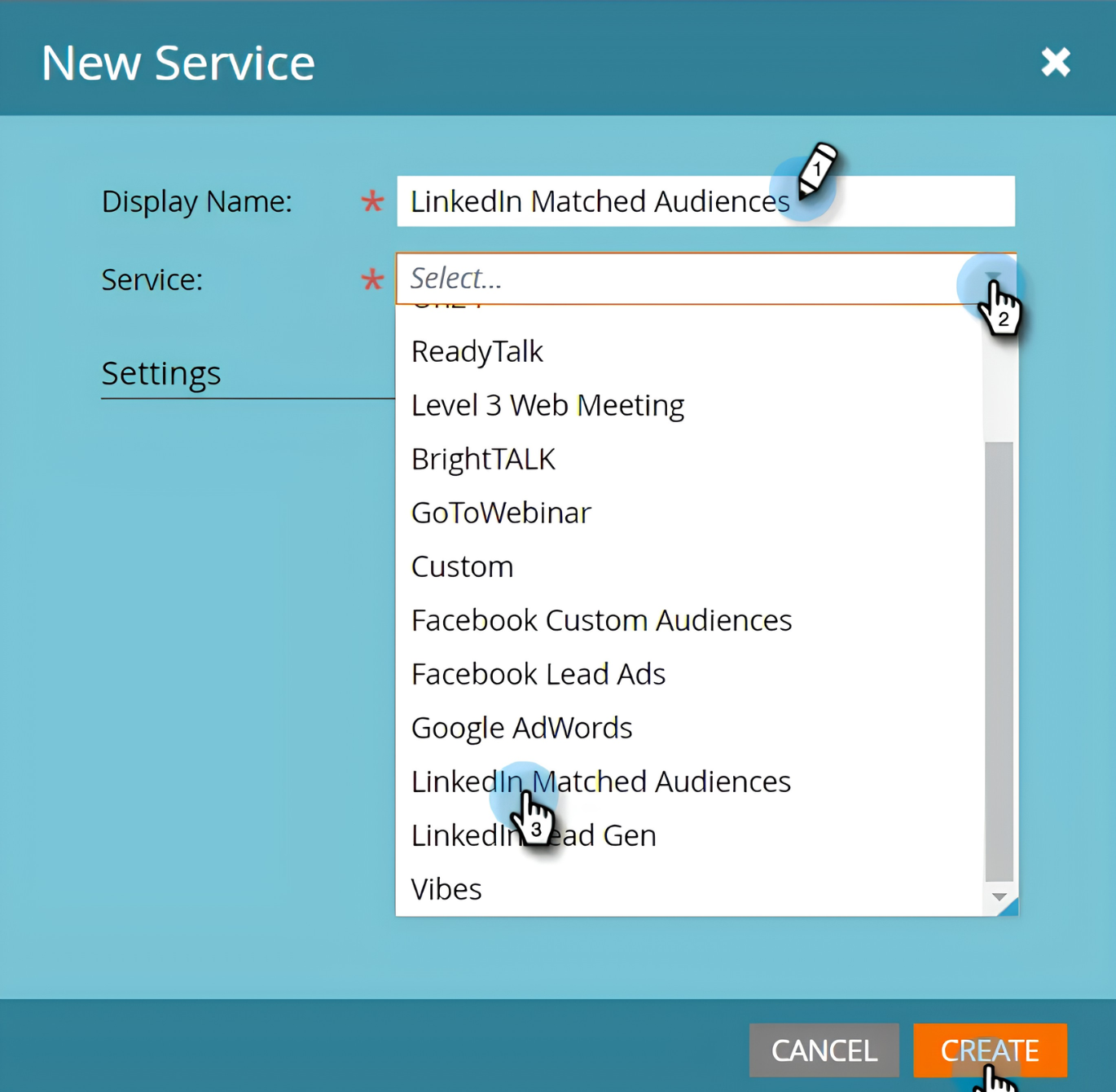
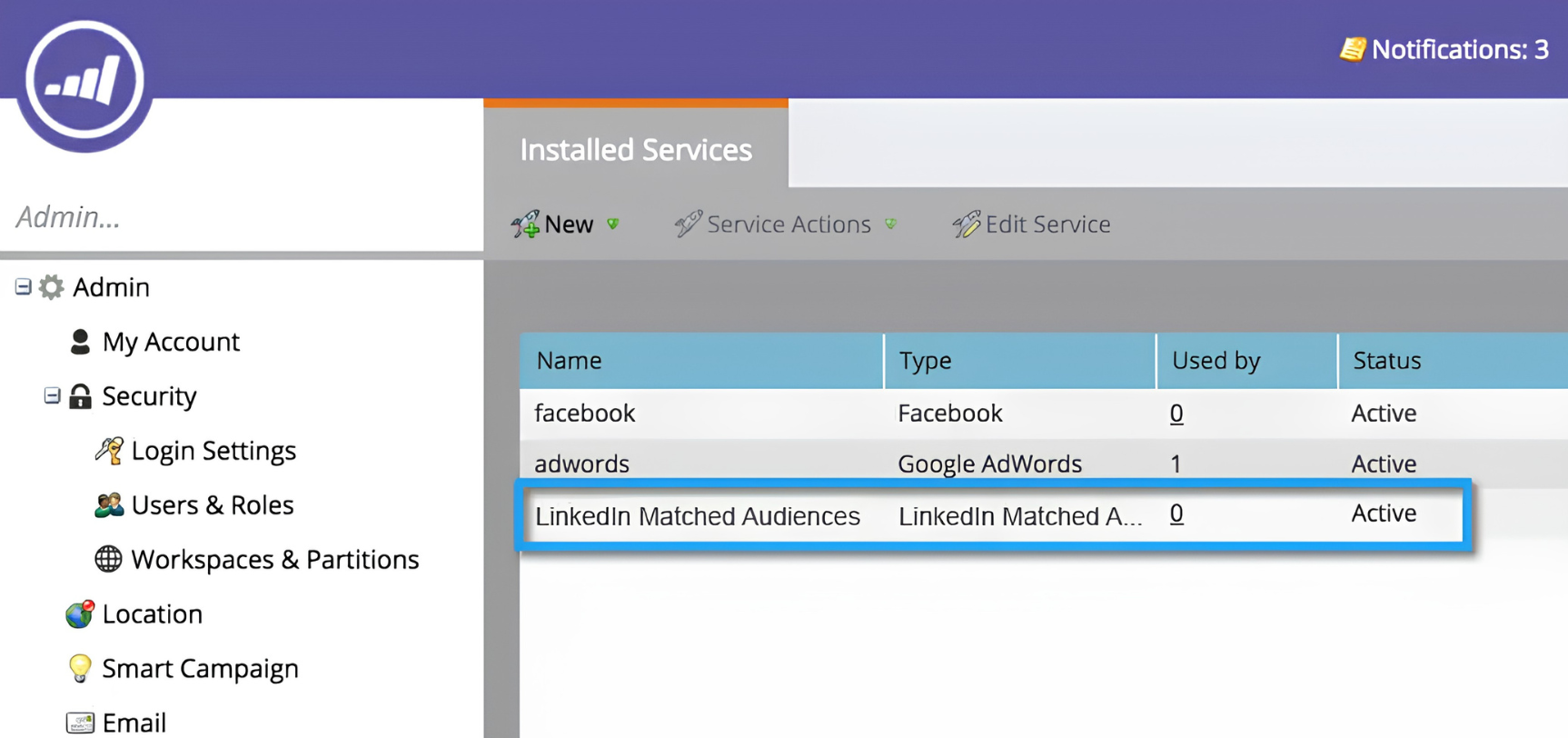
LinkedIn Matched Audiences is LinkedIn's custom audience targeting capability within Campaign Manager. It integrates with Marketo through a native LaunchPoint service, letting marketing teams push any Marketo static or smart list directly to LinkedIn as a Matched Audience for coordinated multi-channel coverage across email and paid advertising.
Source: LinkedIn Matched Audiences
Key integration capabilities include:
Marketo smart list to LinkedIn audience sync via the native LaunchPoint service, targeting the same segmented contacts with LinkedIn ads that Marketo nurtures through email
Automatic audience refresh as contacts enter or exit Marketo smart lists, keeping LinkedIn ad targeting aligned with current list membership
Account-level targeting for ABM serving ads to all decision-makers at named accounts, including contacts not yet in the Marketo database
LinkedIn Lead Gen Form submissions into Marketo creating new lead records and enrolling them in nurture workflows automatically
How LinkedIn Matched Audiences Integrates with Marketo
The integration is a native LaunchPoint connection: no middleware or third-party connector required. Marketo pushes list data directly to LinkedIn Campaign Manager via LinkedIn's DMP Segment APIs, handling both initial audience creation and ongoing membership updates. LinkedIn handles email hashing client-side before transmission, so raw contact data never leaves the platform unencrypted.
Source: LinkedIn Matched Audiences
1. Smart List to Matched Audience Sync.
Any Marketo static list or smart list (whether it defines an MQL segment, an event attendee cohort, or a target account list) can be pushed to LinkedIn as a Contact Targeting or Company Targeting audience. LinkedIn matches the data against its member database and builds the corresponding segment in Campaign Manager.
The audience requires a minimum of 300 matched members before it becomes usable. Once active, the same VP of Engineering receiving a Marketo nurture email on Tuesday can see a relevant LinkedIn Sponsored Content post that same week, without the ad team manually rebuilding a list from a CRM export.
2. Automatic Audience Refresh.
Because the connection is API-driven rather than a one-time export, LinkedIn Matched Audiences stay synchronized with Marketo list membership over time. When a contact enters or exits a Marketo smart list, LinkedIn adds or removes them from the corresponding audience automatically. Processing time for updates runs up to 24 hours after a membership change in Marketo.
3. Account-Level Targeting for ABM Programs.
Marketo's company data and target account lists can populate LinkedIn Company Targeting audiences. LinkedIn matches company names and domains against its database of 13 million+ LinkedIn Pages and makes the resulting audience available for campaign targeting.
The key ABM capability: when targeting at the company level, LinkedIn reaches all employees at those accounts visible on LinkedIn, including decision-makers who have never filled out a Marketo form. LinkedIn also supports layering professional demographic filters on top of the company list, narrowing delivery to the buying personas your Marketo nurture programs target.
4. LinkedIn Lead Gen Form Submissions as Marketo Leads.
When a LinkedIn ad drives a prospect to complete a Lead Gen Form (a native format that pre-fills contact data from the viewer's LinkedIn profile), the submitted information flows into Marketo as a new person record, immediately available for Smart Campaign logic: nurture enrollment, sales alerts, lead assignment, or CRM sync.
LinkedIn Matched Audiences Pricing
LinkedIn Matched Audiences is a targeting feature built into LinkedIn Campaign Manager at no extra cost. LinkedIn operates on an auction-based pricing model with no published rate cards; CPMs and CPCs depend on audience desirability, bid strategy, and ad relevance. No minimum spend or subscription is required to access Matched Audiences.
On the Marketo side, all four paid tiers (Grow, Select, Prime, Ultimate) include LaunchPoint integration access, so no additional Marketo upgrade is needed for the LinkedIn integration.
Who Should Use the LinkedIn Matched Audiences Integration?
ABM teams targeting named accounts with multiple stakeholders that want paid advertising to reach the same accounts and personas their Marketo email programs already nurture
Teams needing ad targeting synchronized with live Marketo list membership, particularly for scoring-based segments or event cohorts that change frequently
Marketers targeting enterprise buyer personas (VP-level and above, specific job functions) where LinkedIn's professional identity data provides targeting precision that general-purpose ad platforms cannot match
4. Slack: Best Marketo Integration for Real-Time Lead Alert Routing
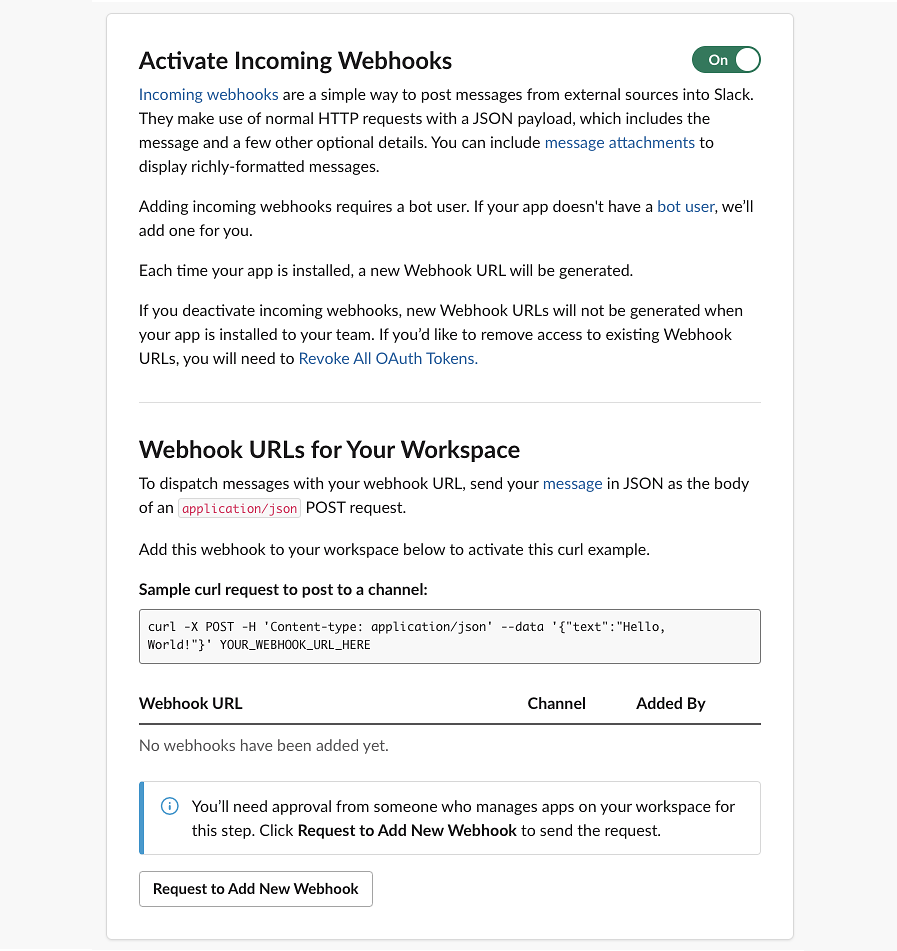
Slack is a team communication platform that integrates with Marketo through webhook-based alerting, routing qualifying lead signals (score milestones, form fills, lifecycle stage transitions) directly into the Slack channels where sales and marketing teams coordinate their work.
Source: Slack
Key integration capabilities include:
Real-time lead alert delivery via outbound Marketo webhook flow steps triggered the instant a lead meets a qualifying condition
Custom Slack message content built from Marketo token data, surfacing lead name, company, score, and recent activity inline
Multi-channel routing sending different Marketo event types to dedicated Slack channels simultaneously
Trigger-type segmentation so SDR channels, marketing ops channels, and admin channels each receive only the signals relevant to their workflow
How Slack Integrates with Marketo
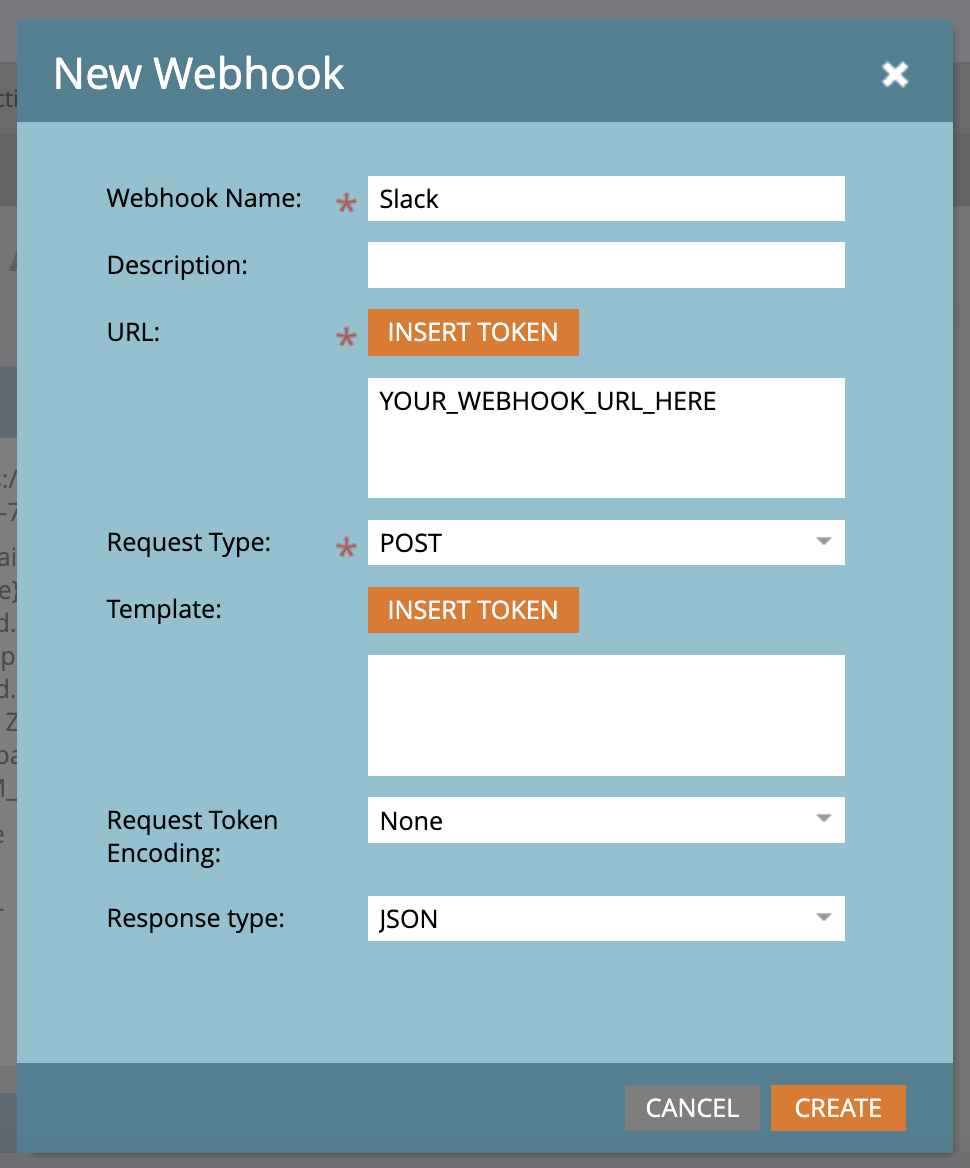
The integration is built on Marketo's outbound webhook capability and Slack's incoming webhook system. Setup involves generating an incoming webhook URL in the Slack app configuration (scoped to a specific channel) and configuring Marketo's webhook system to point to that URL with a JSON payload using Marketo token syntax. The webhook is invoked as a flow step inside any Trigger-based Smart Campaign.
Source: Slack
1. Real-Time Lead Alert Delivery via Webhook.
When a lead crosses a defined threshold (a score milestone, a high-intent form submission, a lifecycle stage change), a Trigger Smart Campaign fires a webhook that delivers the alert to the designated Slack channel within seconds.
Unlike batch email digests, each qualifying lead action fires its own notification independently. Slack rate-limits incoming webhook posting at one message per second per channel, a constraint unlikely to matter for lead alert use cases.
2. Custom Message Templates with Inline Lead Context.
Marketo's webhook payload supports full token interpolation, so each Slack alert carries complete context: lead name, company, job title, current score, the specific trigger event, the assigned rep, and a direct URL to the lead's Marketo or Salesforce record.
Slack's incoming webhook supports Block Kit formatting for structured layouts (headers, divider lines, multi-column sections), making alerts scannable at a glance without opening another application.
3. Multi-Channel Alert Routing by Trigger Type.
Multiple Smart Campaigns can each point to a different Slack webhook URL, routing different Marketo event types to different channels automatically. A hot lead hitting the MQL threshold posts to #sdr-alerts; a campaign milestone posts to #mktg-ops; a sync error posts to #marketo-admin. Scaling this routing means generating additional Slack webhook URLs and pairing each with a Marketo webhook configuration.
Slack Pricing
Slack uses per-seat pricing with a Fair Billing Policy that credits inactive users:
Free: $0/user/month (incoming webhooks supported, 90-day message history, 10-app limit)
Pro: $7.25/user/month (annual) (unlimited message history, unlimited app integrations)
Business+: $15/user/month (annual) (SAML SSO, custom retention policies, Workflow Builder)
Enterprise+: Custom pricing (multi-workspace management, DLP, Enterprise Key Management)
For most teams implementing the Marketo-to-Slack lead alert integration, the Pro plan is the practical entry point: it removes the 10-app limit and provides unlimited message history for alert auditing.
Who Should Use the Slack Integration?
SDR and inside sales teams that operate primarily in Slack and currently miss time-sensitive Marketo lead signals because the gap between a threshold trigger and rep notification is measured in hours, not seconds
Marketing ops teams that need campaign milestone alerts (registration goals, engagement thresholds, list growth targets) surfaced in the collaboration tool the broader team monitors continuously
Multi-team revenue operations where SDRs, AEs, and marketing ops need different Marketo signal types routed to dedicated channels without a shared inbox or middleware to maintain
5. Zapier: Best Marketo Integration for Connecting Apps Outside the LaunchPoint Marketplace
Zapier is a no-code workflow automation platform that integrates with Marketo to extend the platform's reach to over 9,000+ applications that either lack native LaunchPoint connectors or whose native integrations do not support the specific data flow needed. The integration is available through Marketo's LaunchPoint marketplace and works in both directions.
Source: Zapier
Key integration capabilities include:
Inbound lead creation from non-LaunchPoint apps (Calendly, Typeform, Stripe, Eventbrite) pushing data directly into Marketo via Zapier's visual workflow builder
Outbound webhook routing branching Marketo's native webhook flow step into multi-destination action sequences across connected apps
Multi-step Zaps with conditional logic and data transformation for routing based on lead field values
Bidirectional data exchange with niche vertical tools, regional platforms, and custom databases that will never build a direct LaunchPoint connector
How Zapier Integrates with Marketo
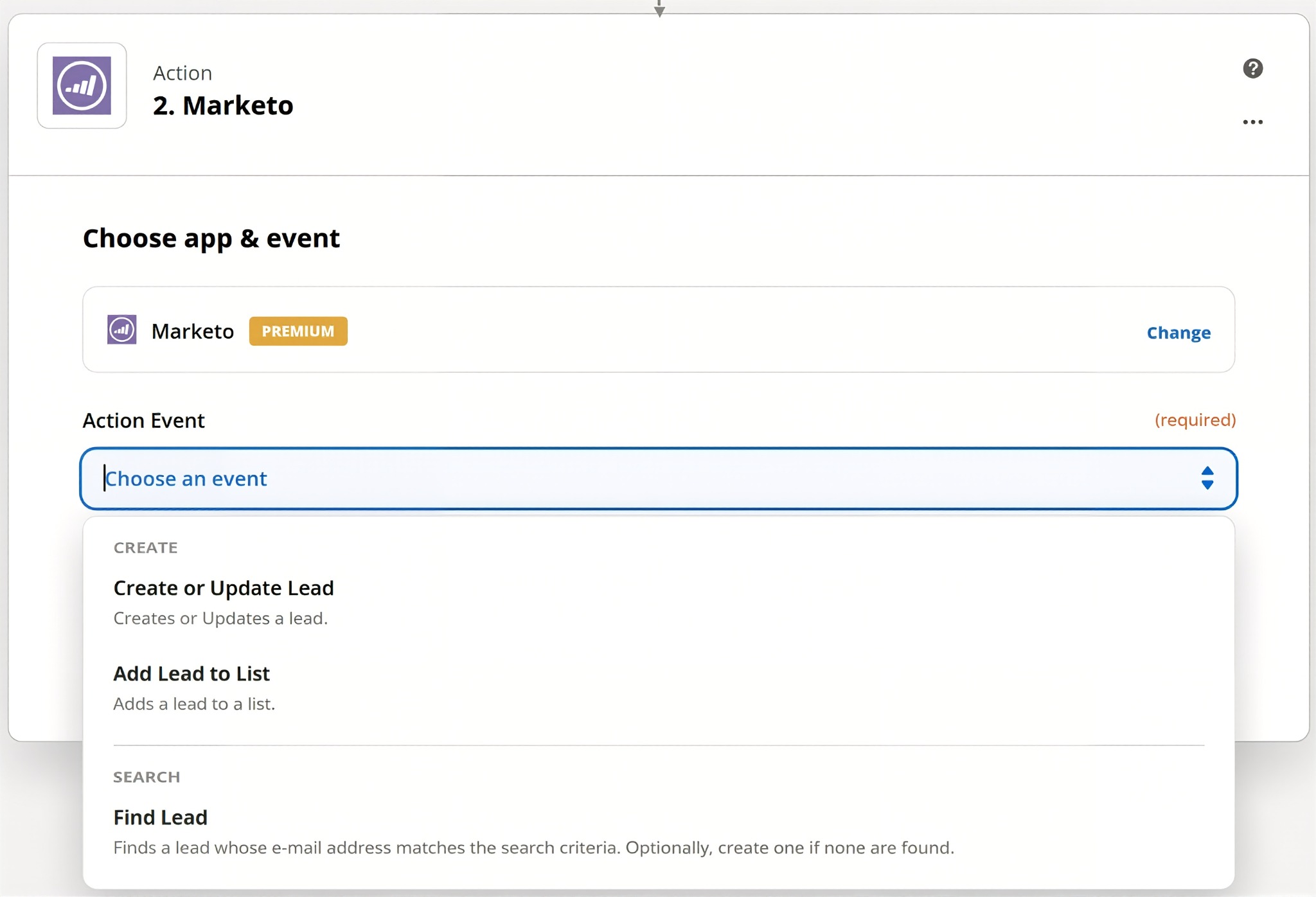
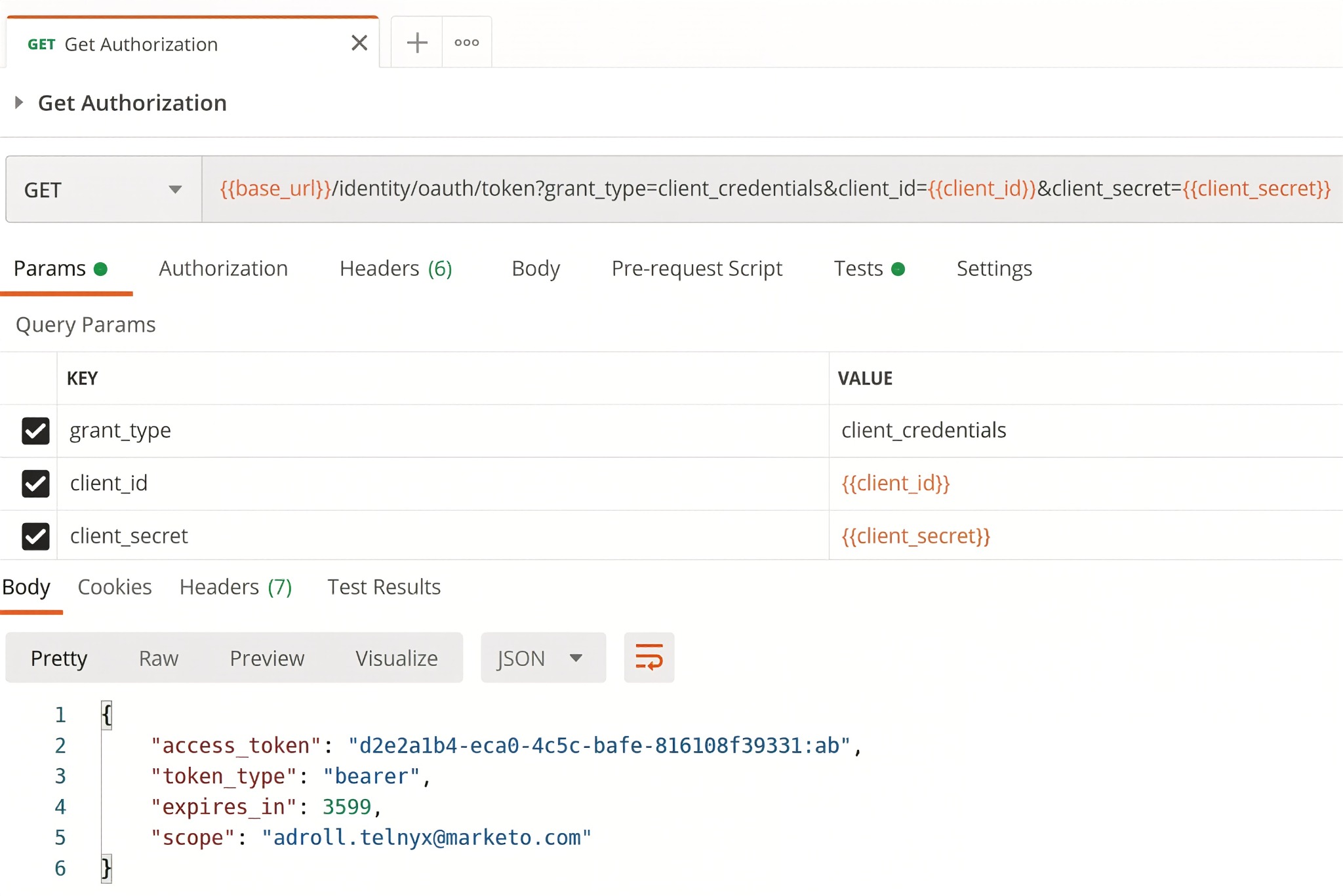
Zapier connects to Marketo through its native integration, authenticated via Marketo REST API credentials (Client ID and Client Secret from a LaunchPoint custom service).
Source: Zapier
1. Inbound Lead Creation from Non-LaunchPoint Applications.
When a prospect books a demo through Calendly, registers for an event through Eventbrite, or completes a survey via Typeform, Zapier creates or updates the corresponding Marketo lead record automatically.
Inside the Zap editor, the user selects the source application as the trigger and adds a Marketo action step, mapping fields from the source to Marketo lead fields. Additional steps can add the lead to a static list, trigger program membership, or notify a Slack channel within the same workflow.
2. Outbound Webhook Routing into Multi-Step Workflows.
Marketo's native webhook flow step fires an HTTP POST to a Zapier "Catch Hook" URL. Zapier receives the payload and branches it into any combination of downstream actions: create a task in Asana, append the record to a Google Sheet, send a Slack alert, and update a CRM record, all from a single Marketo webhook trigger.
Zapier Paths add conditional branching inside the Zap itself, routing different lead types to different systems based on field values.
3. Bidirectional Data Exchange with Vertical Tools.
Marketo's LaunchPoint marketplace covers major horizontal SaaS categories well, but industry-specific tools (specialty CRMs, regional ERPs, custom intake systems) often have no LaunchPoint connector.
As long as a tool exposes a Zapier trigger or action, Marketo can exchange data with it. Zapier manages authentication, field mapping, and workflow execution; the marketing operations team configures it in the visual Zap builder without writing code.
4. Automated Duplicate Lead Routing.
When Marketo identifies a potential duplicate and adds it to a static list, a Zap can trigger automatically off that list membership event to route the flagged record to a cleanup queue or create a task for the marketing ops analyst. The workflow runs without human intervention per-record.
Zapier Pricing
Zapier uses task-based pricing where each action step counts as one task:
Free: 100 tasks/month with 2-step Zaps (insufficient for Marketo integration; lacks webhook access)
Professional: starts at $19.99/month (annual) for 750 tasks; multi-step Zaps, Paths, Filters, and webhook access included; 2-minute polling interval
Team: starts at $69/month (annual) for 2,000 tasks; shared workspace with up to 25 users; 1-minute polling interval
Enterprise: custom pricing with unlimited users, SCIM provisioning, and SLA options
The Professional plan is the practical minimum for the Marketo integration: it includes webhook access (required for outbound Marketo-to-Zapier workflows) and multi-step Zaps. Pay-per-task overage billing is available at 1.25x the plan's per-task rate. Teams routing large event registration volumes through Zapier should model monthly task consumption before committing to a tier.
Who Should Use the Zapier Integration?
Teams whose marketing stack includes tools without certified LaunchPoint connectors (scheduling apps, payment processors, specialty vertical software) that need data flowing into Marketo without manual CSV imports
Marketing ops teams that need Marketo's webhook flow step to trigger multi-destination downstream actions (task creation, spreadsheet logging, CRM updates) simultaneously
Organizations where Marketo is the center of the marketing data model and needs to exchange data with niche, regional, or internal tools that will never build a LaunchPoint integration
6. Google Analytics: Best Marketo Integration for Pre-Conversion Web Behavior Attribution
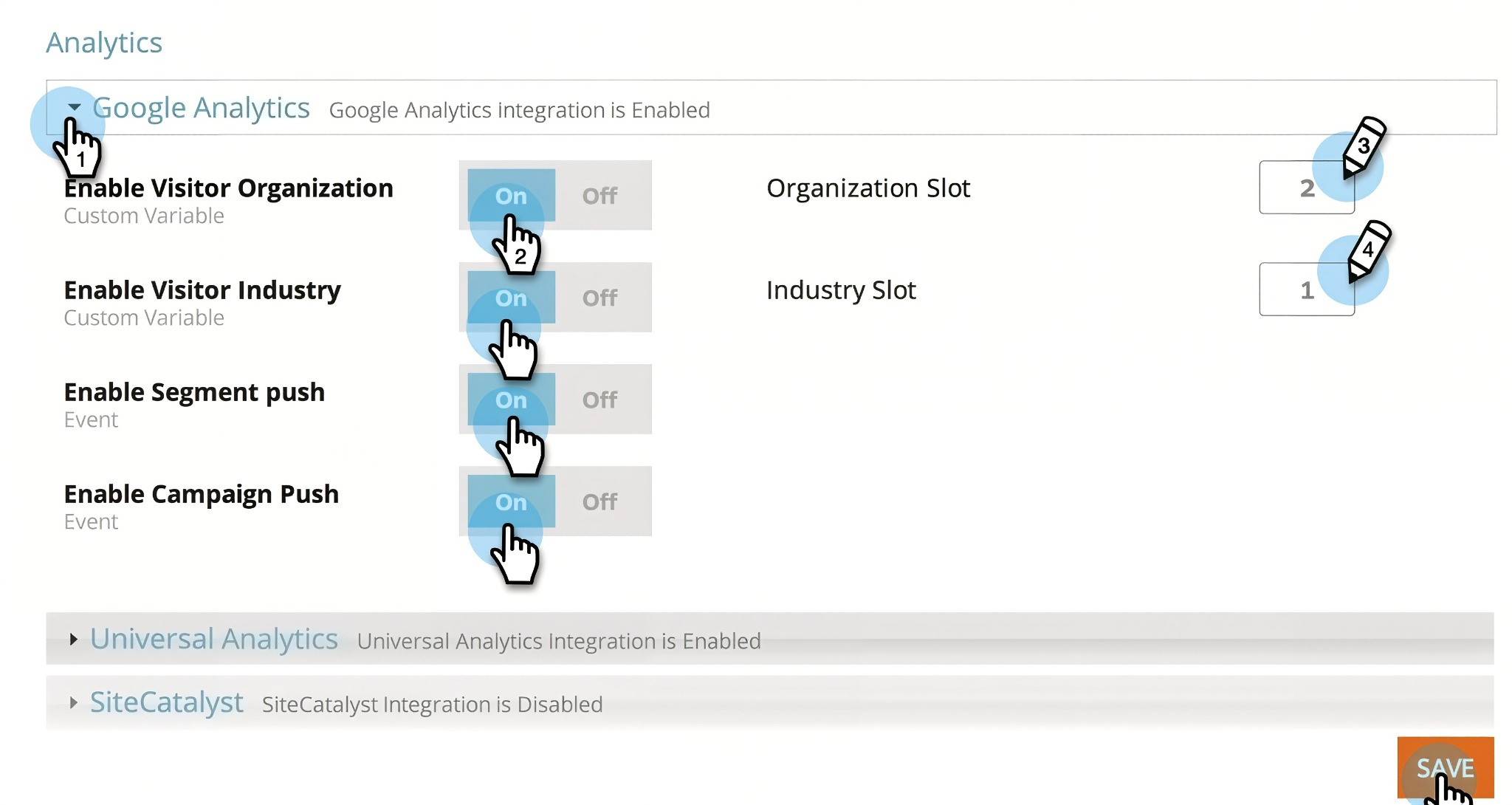
Google Analytics is a web analytics platform that integrates with Marketo to connect anonymous site sessions to named leads at the moment of conversion, letting marketing teams attribute campaign source, medium, and keyword data to every person record in the Marketo database.
Source: Google Analytics
Key integration capabilities include:
UTM parameter capture at the moment a visitor submits a Marketo form, writing channel attribution data directly to lead fields
Google Tag Manager event bridging linking Marketo form completions to anonymous GA4 sessions for closed-loop conversion tracking
Pre-conversion attribution data flowing through the Marketo lifecycle from lead creation through scoring, nurturing, and CRM handoff
GA4 traffic analysis alongside Marketo engagement data to identify where anonymous visitors drop off before reaching a Marketo touchpoint
How Google Analytics Integrates with Marketo
Google Analytics and Marketo do not have a native point-and-click bidirectional sync. The integration is built through UTM field capture via Marketo form hidden fields and event bridging via Google Tag Manager (GTM). While LaunchPoint lists Google Analytics as a supported integration, the practical implementation lives in Marketo form configuration and GTM, not in an automated data pipeline.
1. UTM Parameter Capture at Marketo Form Submission.
A Marketo admin creates custom lead fields (Campaign Source, Campaign Medium, Campaign Name, Campaign Content, Campaign Term) and adds hidden form fields mapped to those custom fields on every Marketo form. JavaScript on the landing page (deployed directly or via GTM) reads UTM parameters from the page URL, stores them in first-party cookies, and populates the hidden form fields at submission.
Every lead in the Marketo database then carries a Campaign Source field containing "google," "linkedin," "email," or "direct," available for Smart List filtering, lead scoring (add points if the source is a high-intent paid keyword), and program reporting (break down MQL rate by campaign source).
2. Google Tag Manager Event Bridging for Form Completions.
GTM fires custom GA4 events when Marketo form submissions occur, associating those events with the visitor's anonymous GA4 session. A user who clicked a LinkedIn sponsored post, browsed three pages, and then submitted a form has that entire session path attributed to a conversion event in GA4's Traffic Acquisition report.
This GA-side conversion signal can be imported into Google Ads as a conversion action, enabling Smart Bidding to optimize toward lead form completions across the full Marketo form inventory.
3. Pre-Conversion Behavior Attribution via UTM Capture.
UTM fields on Marketo lead records follow the lead through scoring, nurture enrollment, and CRM handoff. When the lead converts to an opportunity in Salesforce, the UTM fields come along, making it possible to build reports that break pipeline generation and closed-won revenue down by originating marketing channel: closing the attribution loop from anonymous web session all the way to revenue.
Google Analytics Pricing
Google Analytics operates on a two-tier model:
Google Analytics 4 (Standard): free of charge with no expiration; includes UTM parameter tracking, GA4 event collection, GTM compatibility, and standard acquisition and conversion reporting; data retention of 2 or 14 months
Analytics 360 (Enterprise): custom pricing (contact Google Sales); unsampled explorations, continuous intraday data freshness, extended retention up to 50 months, and enterprise SLAs
For the Marketo integration, the free GA4 tier is sufficient for UTM capture, GTM event bridging, and standard conversion reporting. Analytics 360 becomes relevant only for high-traffic properties or teams needing extended historical attribution data.
Who Should Use the Google Analytics Integration?
Marketing teams running multi-channel inbound programs (paid search, paid social, organic, email) that need channel attribution to persist on the Marketo lead record for scoring, segmentation, and CRM reporting
Teams running Google Ads campaigns that want to feed Marketo form completions back as conversion signals for Smart Bidding optimization
Revenue attribution workflows that require tracing pipeline and closed-won deals back to the originating marketing channel, not just the last Marketo program touch
7. ON24: Best Marketo Integration for Enterprise Virtual Event Engagement Data
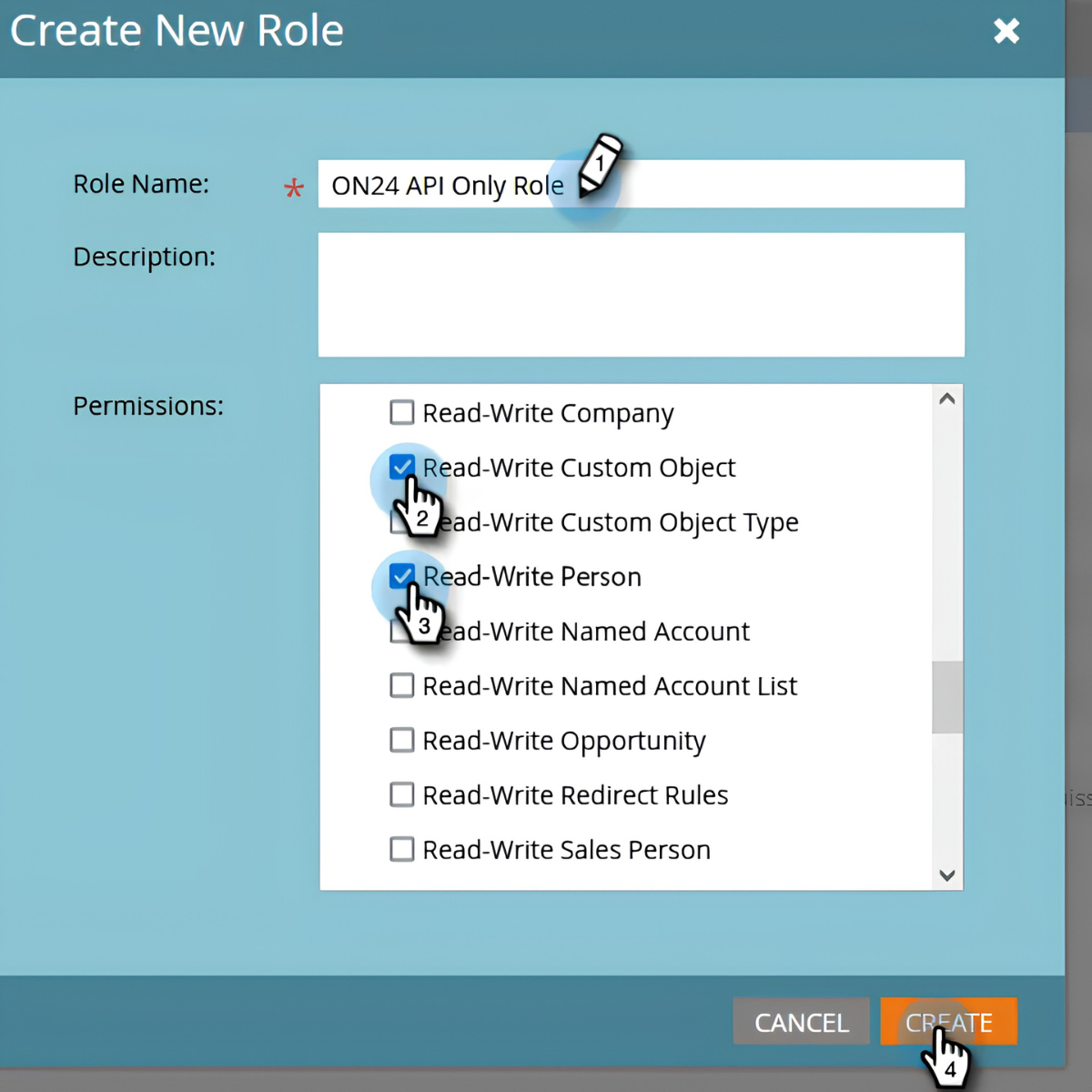
ON24 is a webinar and virtual event platform that integrates with Marketo through a native connector to push over 70 individual per-attendee behavioral signals from webinars into Marketo Custom Objects at 15-minute intervals, letting Smart Campaigns differentiate post-event follow-up by engagement depth.
Source: ON24
Key integration capabilities include:
Marketo-managed registration with ON24 event delivery, so every registrant is a Marketo person record from sign-up
70+ engagement data points synced every 15 minutes: attendance duration, Q&A submissions, poll responses, resource downloads, and CTA clicks, all captured at the individual attendee level
Engagement-tiered Smart Campaign triggers routing high-engagement attendees to fast-track sequences and no-shows to re-engagement nurtures automatically
Multi-format coverage where live, Simu-live, and on-demand replay sessions all generate the same engagement data sync
How ON24 Integrates with Marketo
The ON24-Marketo connection is a native integration available through ON24's Connect Integrations layer and listed in Marketo's LaunchPoint marketplace.
ON24 pushes registration data and attendee engagement records into Marketo at defined intervals, while Marketo handles the registration experience and post-event follow-up logic. Access to the integration requires ON24's Connect product, which must be included in the customer's contract.
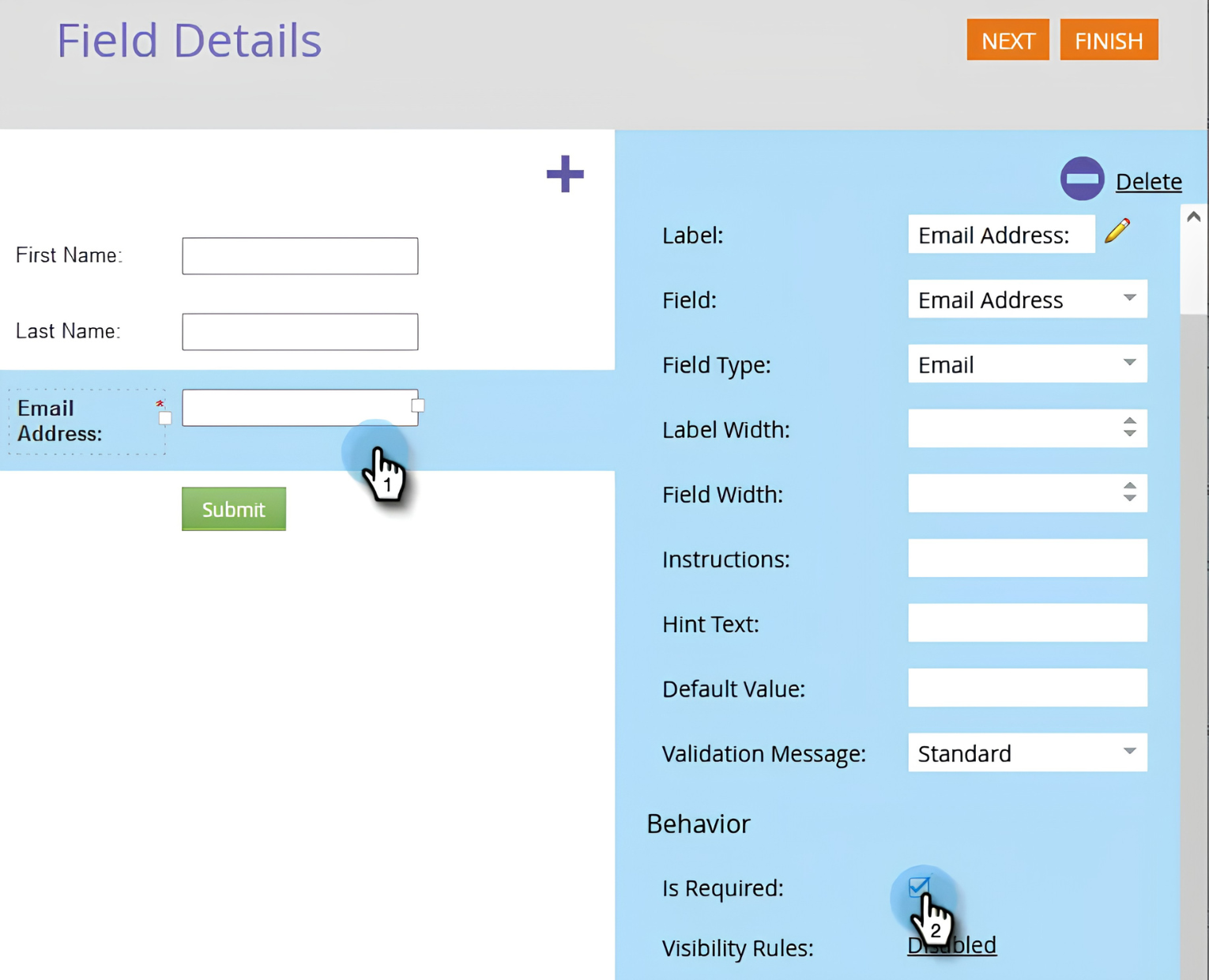
1. Marketo-Managed Registration.
Event registration happens on Marketo landing pages and forms, not inside ON24. Every registrant is a Marketo person record from the moment of sign-up, flowing through existing lead management workflows, scoring models, and CRM sync from day one. No post-event CSV export is required.
Source: Marketo
2. 70+ Engagement Data Points Synced Every 15 Minutes.
Where most webinar integrations push a binary attendance flag, ON24 pushes over 70 per-attendee engagement signals into Marketo Custom Objects: attendance duration in minutes, individual Q&A questions, poll responses, resource downloads, and CTA clicks.
A Marketo Smart Campaign that could previously only filter on "attended webinar: true" can now distinguish between an attendee who watched 80% of the session and clicked a demo CTA versus one who joined for four minutes and left.
3. Engagement-Tiered Smart Campaign Triggers.
Because ON24 data lands in Marketo Custom Objects, Smart Campaigns can segment post-event follow-up by engagement depth automatically: fast-track sequences for high-engagement attendees, standard nurture for low-interaction viewers, and re-engagement sequences for no-shows.
The team designs the segmentation logic once, and every subsequent webinar benefits from the same automated routing.
4. Webinar Engagement as a Lead Scoring Signal.
ON24 attendance and interaction data feeds Marketo's lead scoring models as a distinct behavioral layer alongside email and web activity. A contact who attended a full webinar, submitted multiple Q&A questions, and downloaded a resource has demonstrated different intent than a contact who only opened a follow-up email.
5. Multi-Format Event Coverage.
The integration handles live, Simu-live, Sim-2-Live, and on-demand replay formats, as well as Engagement Hub content, with the same engagement data sync to Marketo regardless of when or how the attendee consumed the event. Late viewers trigger the same Marketo follow-up workflows as live attendees.
ON24 Pricing
ON24 uses a custom-quoted pricing model with no public dollar amounts. All packages require contacting sales via ON24's pricing page:
Essentials: custom-quoted; includes live, Simu-live, and on-demand webinars, 20+ interactivity tools, branded registration, and integrations with 30+ MAPs, CRMs, and business systems
Standard: custom-quoted; adds segment personalization, AI video clips, automated nurture pages, and advanced real-time analytics
Advanced: custom-quoted; adds personalized content hubs and targeted landing pages for ABM experiences
ON24's Connect Integrations layer (which enables the Marketo data sync) must be included in the customer's contract. Teams should confirm during the sales conversation whether Connect is bundled into their package or priced separately.
Who Should Use the ON24 Integration?
Enterprise marketing teams running high-frequency webinar programs that need post-event follow-up to differentiate automatically by engagement depth rather than treating all attendees the same
Teams that want webinar interaction data feeding Marketo lead scoring models as a distinct behavioral signal alongside email and web engagement
Organizations running Simu-live or on-demand formats that need late viewers to trigger the same Marketo workflows as live attendees without manual data reconciliation
Final Verdict
The best Marketo integrations close the gaps your marketing automation platform cannot fill on its own:
ZoomInfo: verified B2B data, buyer intent, and go-to-market intelligence enriching every lead record; the highest-impact integration on this list if your programs depend on data quality
Salesforce: continuous bidirectional CRM sync with embedded sales intelligence and closed-loop revenue attribution
LinkedIn Matched Audiences: B2B ad targeting synchronized with Marketo segments for coordinated multi-channel ABM coverage
Slack: qualifying lead signals routed to the channels your team already monitors, closing the gap between threshold trigger and sales action
Zapier: no-code reach into 8,000+ apps where LaunchPoint connectors stop
Google Analytics: pre-conversion channel attribution data captured on every lead record for scoring, segmentation, and revenue reporting
ON24: per-attendee webinar engagement data powering differentiated post-event sequences and lead scoring
These integrations also compound: you might run ZoomInfo for data enrichment, Salesforce for CRM sync, LinkedIn for coordinated ABM advertising, and Slack for real-time alerts on the same Marketo instance, each adding a layer of intelligence or automation that makes the others more valuable.
If you connect just one, make it the data layer everything else depends on. ZoomInfo's native Marketo integration enriches your leads with verified contacts, buyer intent signals, and company intelligence. ZoomInfo Lite is a permanent free tier, so you can evaluate the data quality flowing into your Marketo programs before committing to a subscription.
Frequently Asked Questions
How many integrations does Marketo support?
Marketo's LaunchPoint marketplace provides pre-built connectors across CRM, advertising, events, data enrichment, sales engagement, analytics, and more. Beyond LaunchPoint, Marketo's REST API covers the full platform data model (leads, companies, opportunities, activities, programs, custom objects) and supports custom integrations with any system that can make HTTP requests.
Outbound webhooks enable real-time event-driven connections to external services. For no-code solutions, Zapier connects Marketo to 8,000+ apps, and platforms like Workato and Informatica provide enterprise iPaaS connectivity.
Do Marketo integrations work on all pricing tiers?
All four Marketo tiers (Grow, Select, Prime, Ultimate) include LaunchPoint integration access and REST API access, so core integrations like Salesforce sync, LinkedIn Matched Audiences, and Zapier work on every tier.
However, API call quotas differ: Grow allows 20,000 calls per day, while Select, Prime, and Ultimate allow 50,000. Some advanced features (like Marketo Measure for multi-touch attribution) are gated to Ultimate. Add-ons like Sales Insight are priced separately regardless of tier.
How does Marketo's Salesforce sync work?
Marketo's native Salesforce sync runs bidirectionally every five minutes after an initial full database sync. Leads and Contacts sync in both directions; Accounts and Opportunities flow from Salesforce into Marketo.
The sync handles deduplication by email address, supports custom object mapping, and processes up to 200,000 records per hour. Setup requires a dedicated Marketo sync user in Salesforce with appropriate field-level permissions.
Can I connect Marketo to tools not in the LaunchPoint marketplace?
Yes. Marketo's REST API supports programmatic access to nearly all platform capabilities, and outbound webhooks enable real-time event-driven connections. For no-code solutions, Zapier connects Marketo to 8,000+ apps through its visual workflow builder. Workato and Informatica provide enterprise middleware for multi-system orchestration. Any tool with a REST API can exchange data with Marketo.
How do I measure whether a Marketo integration is delivering value?
For data enrichment integrations like ZoomInfo, track lead-to-MQL conversion rates, data completeness scores, and email deliverability before and after activation. For CRM integrations, measure speed-to-lead (time from MQL threshold to sales follow-up) and closed-loop attribution accuracy.
For advertising integrations, compare cost-per-MQL and pipeline contribution of LinkedIn campaigns using synced Marketo audiences versus manually uploaded lists. For webinar integrations, measure whether engagement-tiered follow-up sequences produce higher conversion rates than uniform post-event nurtures.
Are Marketo integrations secure?
Marketo uses OAuth 2.0 for third-party API authentication, with access tokens that expire hourly. The platform holds SOC 2 Type II and ISO 27001:2022 certifications, supports GDPR and CCPA compliance, and encrypts data in transit with TLS v1.2. Enterprise SSO via SAML v2.0 is supported.
LinkedIn's Matched Audiences integration hashes email data client-side before transmission. Each LaunchPoint partner undergoes Adobe's review process.
What is the best way to enrich Marketo lead data for B2B teams?
Integrating a dedicated B2B data platform provides the most accurate enrichment. ZoomInfo's native Marketo integration automatically appends verified emails, direct-dial phone numbers, firmographic data, technographic profiles, and buyer intent signals to your lead records.
The enrichment runs continuously through a verification pipeline backed by 300+ human researchers, covering 500 million contacts and 100 million companies. ZoomInfo's FormComplete feature also auto-populates Marketo form fields with verified data at the point of capture, reducing form abandonment while enriching the record from the first interaction.
Keep exploring:
