
The hardest part of building a voice AI agent is not the language model. It is stitching together speech-to-text, LLM inference, and text-to-speech into a single pipeline fast enough to feel like a conversation, reliable enough for production call volume, and flexible enough to swap providers without rewriting the integration.
Vapi's API sits on top of that problem. It is a REST interface served from a single base URL (https://api.vapi.ai), backed by an OpenAPI spec, with official SDKs for web, mobile, and server-side environments. The platform has handled over 1 billion calls across 750K+ developers, and the API covers the full lifecycle: assistants, calls, phone numbers, tools, squads, campaigns, webhooks, and post-call analytics. For a platform founded in 2023, that is a mature surface.
But voice AI agents do not operate in isolation.
The Vapi API handles voice infrastructure: building agents, managing telephony, orchestrating real-time conversations, and analyzing call outcomes. What it does not cover is the intelligence layer upstream of the call: which contacts to dial, what company they work for, what their org chart looks like, whether the account is actively in-market, and what data to inject into the agent's context before the conversation starts. That scope boundary is deliberate, and it defines where a second API enters the pipeline.
This is where ZoomInfo enters the picture. ZoomInfo is a GTM platform whose Enterprise API is a REST suite covering search, enrichment, AI intelligence, and audience management across 500M contacts and 100M companies, with an MCP server for AI-agent workflows. Vapi tells the agent how to talk; ZoomInfo tells it who to talk to and why.
This review covers the Vapi API in full technical depth first (authentication, endpoints, webhooks, SDKs, rate limits, and pricing), then reviews ZoomInfo's API as the B2B intelligence layer that powers the data side of voice AI pipelines.
Vapi API at a Glance
Attribute | Detail |
|---|---|
API type | REST over HTTPS, JSON responses |
Authentication | API key passed in the Authorization header |
Base URL | https://api.vapi.ai |
Rate limits | Concurrency-based: 10 concurrent call slots by default; REST endpoint request-per-second limits not publicly documented |
Pricing / access | Usage-based: $0.05/min platform hosting for voice, plus AI provider costs at pass-through; $10 free credit on signup |
SDKs | Official client SDKs (Web/TypeScript, React Native, iOS, Python, Flutter, Vanilla JS) and server SDKs (TypeScript, Python) |
Webhooks | Yes, via Server URL system with lifecycle and conversation events |
CLI | Yes, Vapi CLI for local dev and webhook forwarding |
Documentation | docs.vapi.ai (open-source on GitHub) and api.vapi.ai/api (interactive OpenAPI reference) |
Vapi API: What Works Well & What to Plan Around
What works well | What to plan around |
|---|---|
Public OpenAPI spec and open-source docs repo | REST request-per-second rate limits are not publicly documented |
Official SDKs for six client platforms and two server languages | Voice-only scope: no contact data, enrichment, or B2B intelligence |
200+ model integrations with full BYOK (bring your own key) support | SOC 2, SSO, and RBAC require the annual Scale tier contract |
Server URL system handles both webhooks and bidirectional request/response | API key auth only; no OAuth 2.0 for delegated multi-tenant access |
$10 free credit on signup, no credit card required | 10 default concurrent call slots; additional lines cost $10/line/month |
Three webhook authentication methods (Bearer, OAuth 2.0, HMAC) for server verification | Call history retention is 14 days on the Build tier |
Vapi API: Authentication & Getting Started
API access starts with a free Vapi account. Every new account receives $10 in free credits at signup, no credit card required. At $0.05/minute platform cost, that covers roughly 200 minutes of voice calls before AI provider costs. There is no approval gate; you create an account and start calling the API immediately.
Vapi uses API key authentication for all REST calls. You pass the key in a standard HTTP Authorization header:
curl -X GET "https://api.vapi.ai/assistant" \
-H "Authorization: YOUR_API_KEY" \
-H "Content-Type: application/json"
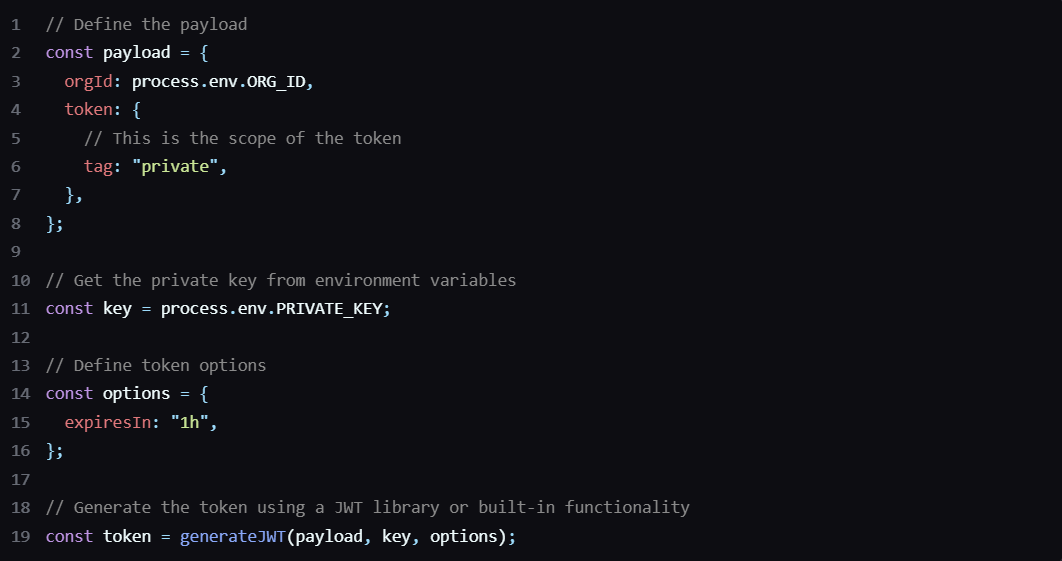
No OAuth flow, no token exchange, no rotating credentials. The simplicity is a tradeoff: key-based auth is easy to implement and easy to leak. For client-side applications (browser or mobile), Vapi supports JWT-based authentication to keep the raw API key out of frontend code.
Source: Vapi
The auth model adds more control on the webhook side. For server URL authentication (how Vapi authenticates its outgoing webhook requests to your server), three methods are available, each configurable per assistant, per phone number, or per tool:
Bearer token: the default method, with an optional Bearer prefix toggle and legacy X-Vapi-Secret header support
OAuth 2.0 (client credentials flow): Vapi requests tokens from a configured token URL, includes the access token in webhook requests, and handles automatic refresh
HMAC signature: Vapi signs each outgoing request using a shared secret, a configurable hash algorithm, and an optional timestamp header for replay-attack protection
Vapi stores credentials as reusable credentialId references rather than inline secrets. This separation between simple API-key auth for inbound requests and configurable verification for outbound webhooks treats the developer's server as the trust boundary, not the API key.
One thing to know: once the $10 trial credit runs out, you must add a payment method to continue. There is no ongoing free tier.
Vapi API: Core Endpoints & Capabilities
All endpoints live under https://api.vapi.ai. The API follows standard REST conventions with JSON request and response bodies, and the full specification is published in OpenAPI format. Resource groups cover the complete voice AI lifecycle.
Assistants
Endpoints: GET /assistant, POST /assistant, GET /assistant/{id}, PATCH /assistant/{id}, DELETE /assistant/{id}
Assistants are the core primitive. Each assistant is a configuration object combining a system prompt, a first message, model selection (STT, LLM, TTS providers), attached tools, and a knowledge base. The list endpoint supports cursor-style time filtering via createdAtGt, createdAtLt, and related operators, with a limit parameter (default: 100).
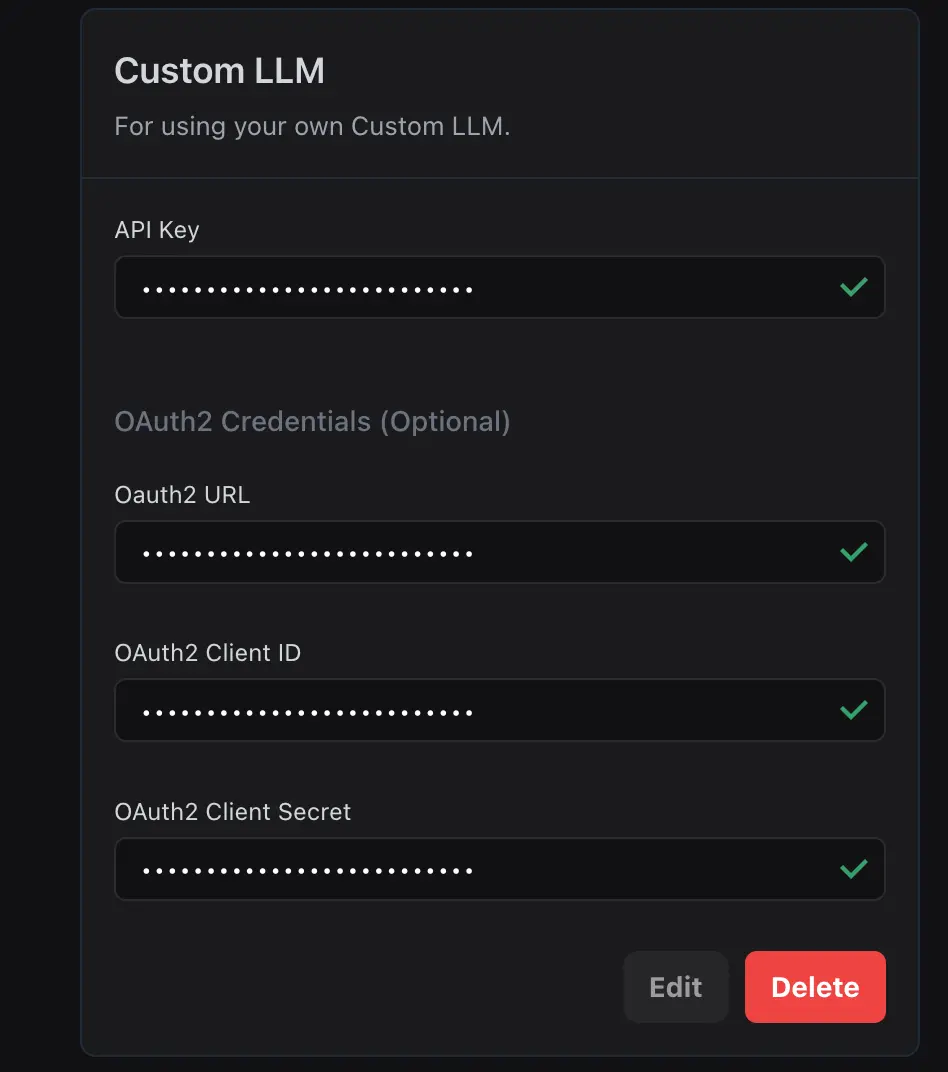
The assistant object's main advantage is provider flexibility. The configuration independently selects providers at each pipeline layer: Deepgram, Google, Gladia, or AssemblyAI for transcription; OpenAI, Anthropic, Gemini, Groq, or a custom LLM server for inference; ElevenLabs, PlayHT, Azure, or Vapi Voices for speech. Bring your own API keys and the provider cost to Vapi drops to $0.
Source: Vapi
What you would build with this: a set of specialized assistants, each tuned for a different conversation type (lead qualification, appointment scheduling, support resolution), deployable across phone numbers and campaigns without duplicating infrastructure.
Calls
Endpoints: GET /call, POST /call (outbound dial), GET /call/{id}, PATCH /call/{id}, DELETE /call/{id}
POST /call initiates an outbound call. Each call can reference a persistent assistant by ID or pass a temporary inline assistant configuration, which means you can inject unique system prompts, dynamic variables, or personas per call without creating a new assistant record. Call objects include a concurrencyBlocked boolean indicating whether the call failed to start due to capacity limits.
What you would build with this: a CRM-triggered outbound pipeline where each call receives a personalized prompt with the contact's name, account context, and conversation goals injected via Liquid template variables at dial time.
Phone Numbers
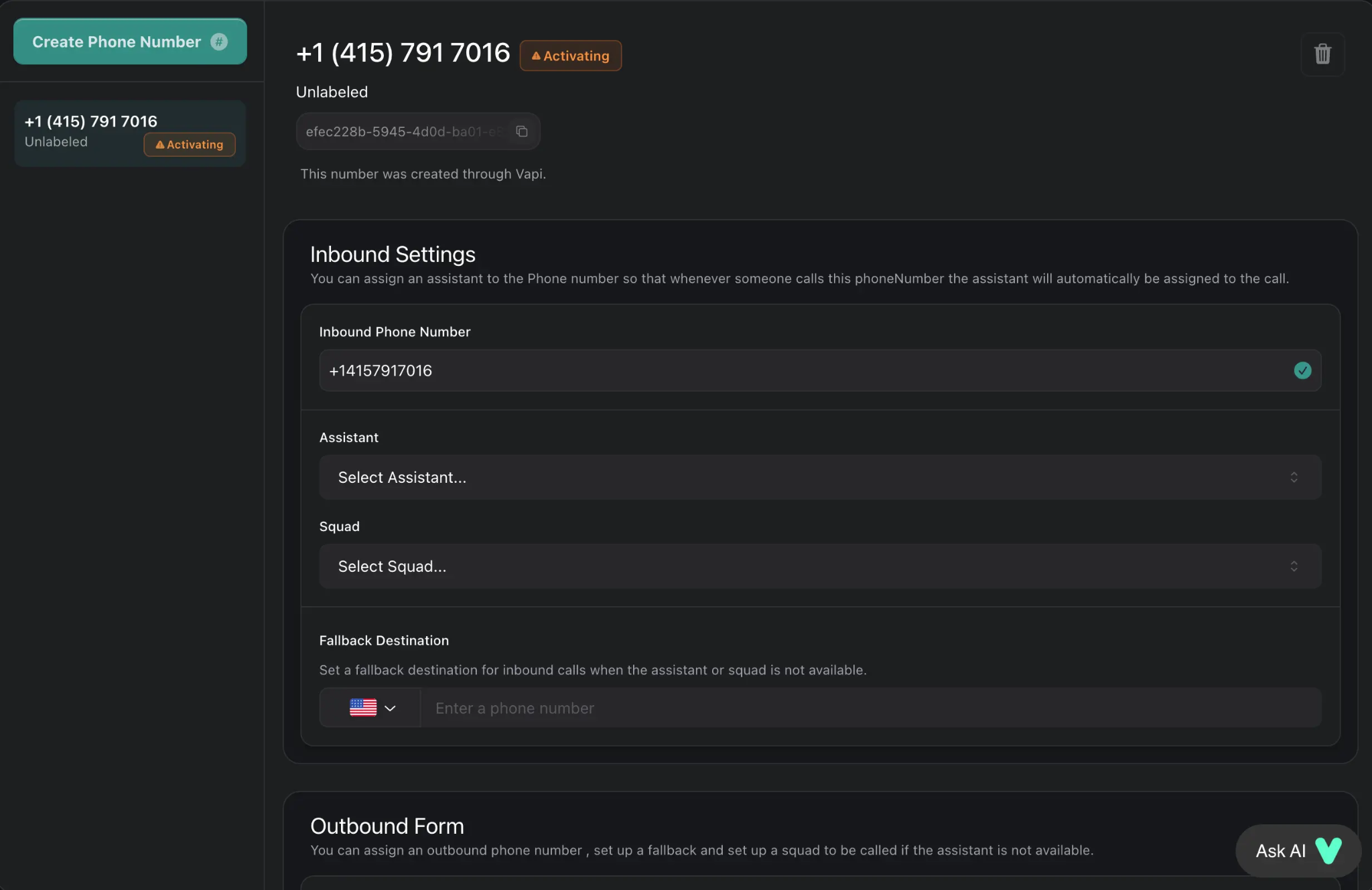
You create phone numbers via the dashboard or the /phone-numbers API endpoint. Free US numbers are available (up to 10 per account) for development. When you assign an assistant ID to a number, all incoming calls route to that assistant automatically.
Source: Vapi
For dynamic routing, leave assistantId blank and point the number at a server URL; Vapi sends an assistant-request event that your server answers with the appropriate assistant configuration per call.
Teams that already own Twilio numbers can import them via /phone-numbers/import.
Squads (Multi-Agent Orchestration)
Squads distribute work across multiple specialized assistants that coordinate during a live call. Rather than building one large assistant with a monolithic prompt (which increases hallucination risk and cost), a Squad defines a list of members where each assistant handles a narrow responsibility and hands off to the next. Three context-passing mechanisms control the handoffs:
Handoff Arguments: the model fills parameters inline during the tool call (zero added latency)
Variable Extraction: a dedicated LLM call processes the transcript post-handoff to populate a typed schema
Liquid Templating: sub-millisecond variable substitution from the shared variable bag (no LLM involvement)
A contextEngineeringPlan controls how much history passes between agents, from full transcript to last N messages to blank slate. Squad handoffs can also transfer callers into a separate Squad.
What you would build with this: a contact center where a greeting agent qualifies the caller, a scheduling agent books appointments, and a billing agent handles payment questions, each with a focused prompt and appropriate tool access, all within a single call.
Campaigns (Outbound Dialing)
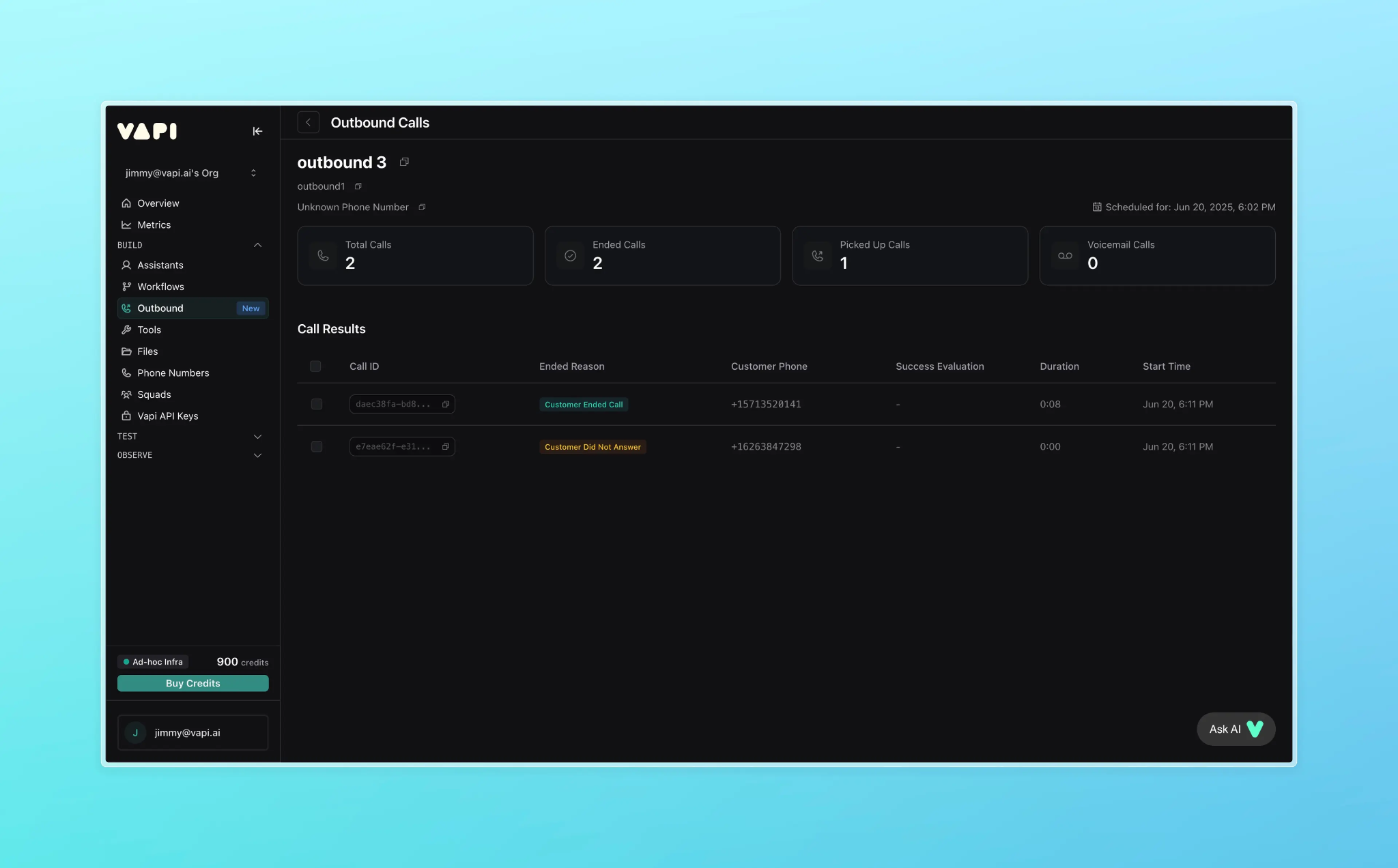
Campaigns provide structured high-volume outbound dialing. You select outbound numbers, upload a recipient CSV in E.164 format, assign an assistant, and launch immediately or schedule for later. CSV columns map to dynamic template variables ({{name}}, {{customer_issue}}) that Vapi injects into the assistant's prompt per call.
Source: Vapi
Tools (Mid-Call Function Calling)
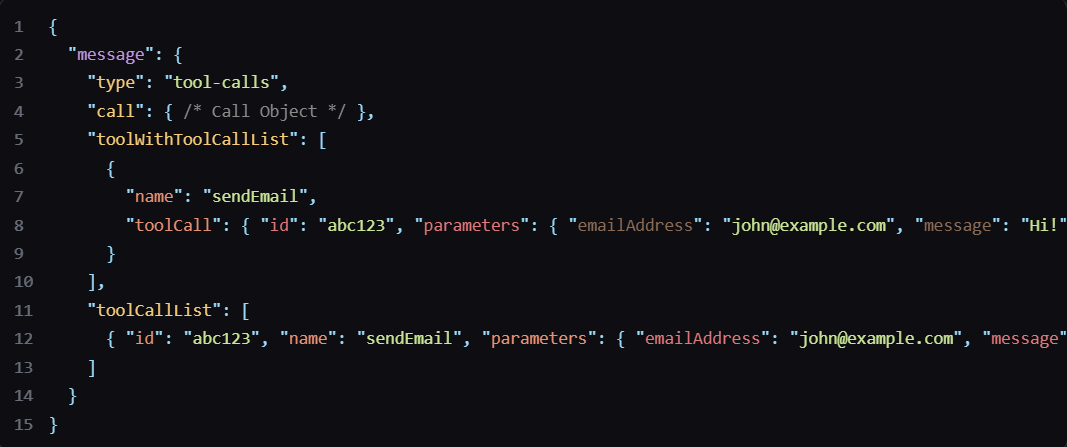
Vapi supports OpenAI-style function calling where assistants invoke server-side actions during live conversations. The server receives a tool-calls webhook event, executes the function (a CRM update, a database lookup, an appointment booking), and responds with results.
Source: Vapi
Vapi also supports MCP tool servers natively, connecting to Zapier MCP (7,000+ apps), Make MCP, and Composio MCP. Pre-built integrations exist for Google Calendar, Google Sheets, Slack, and GoHighLevel.
Supporting Resources
The API exposes CRUD operations for Files, Chats, Sessions, and Custom Tags.
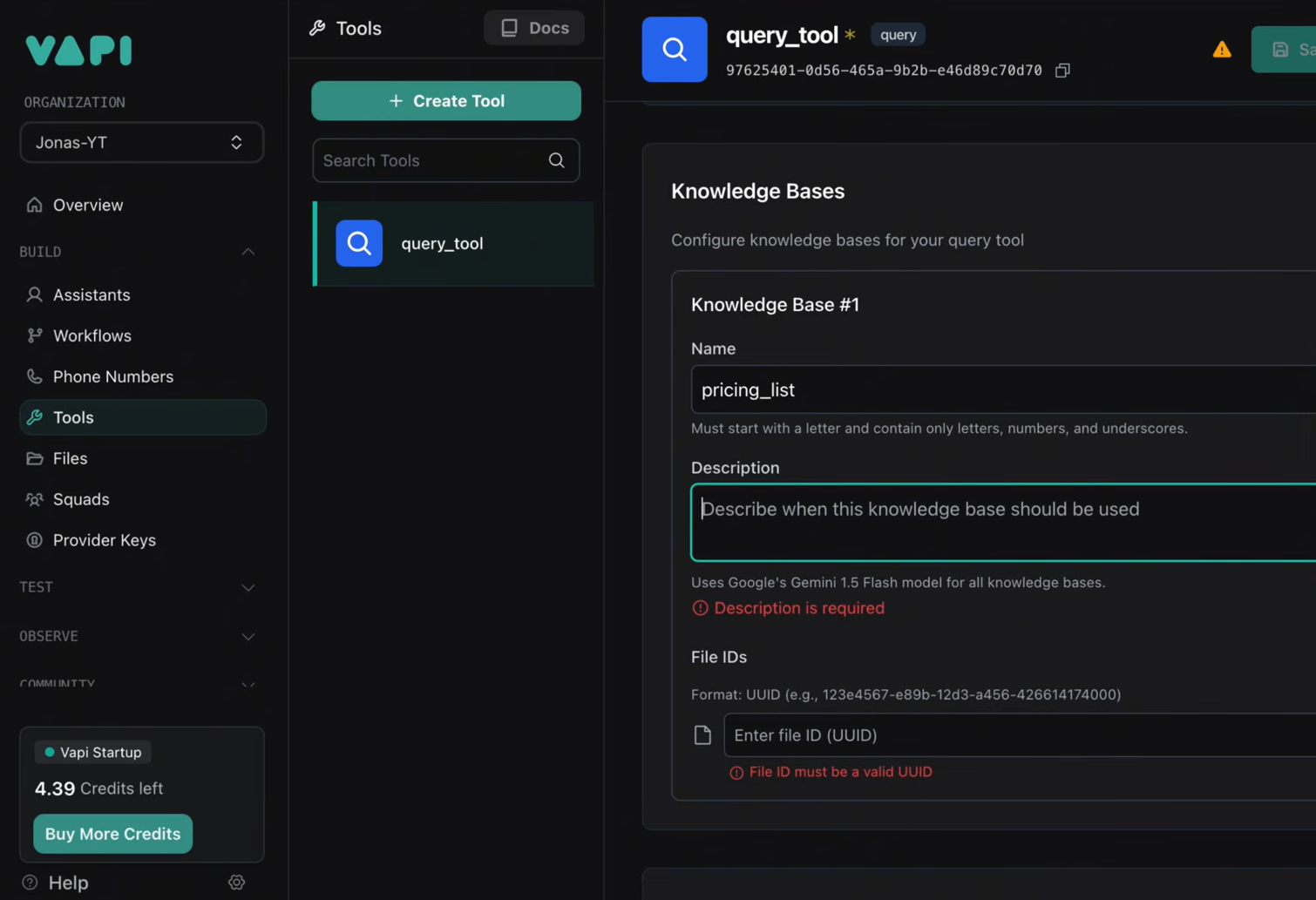
The Knowledge Base feature accepts custom files (.txt, .pdf, .docx, .csv, .json, .yaml) and creates a RAG query tool for grounded, domain-specific responses.
Source: Vapi
Post-call analysis runs automatically on every call using Claude Sonnet (with GPT-4o fallback), producing summaries, structured data extractions, and success evaluations.
Vapi API: Webhooks & Events
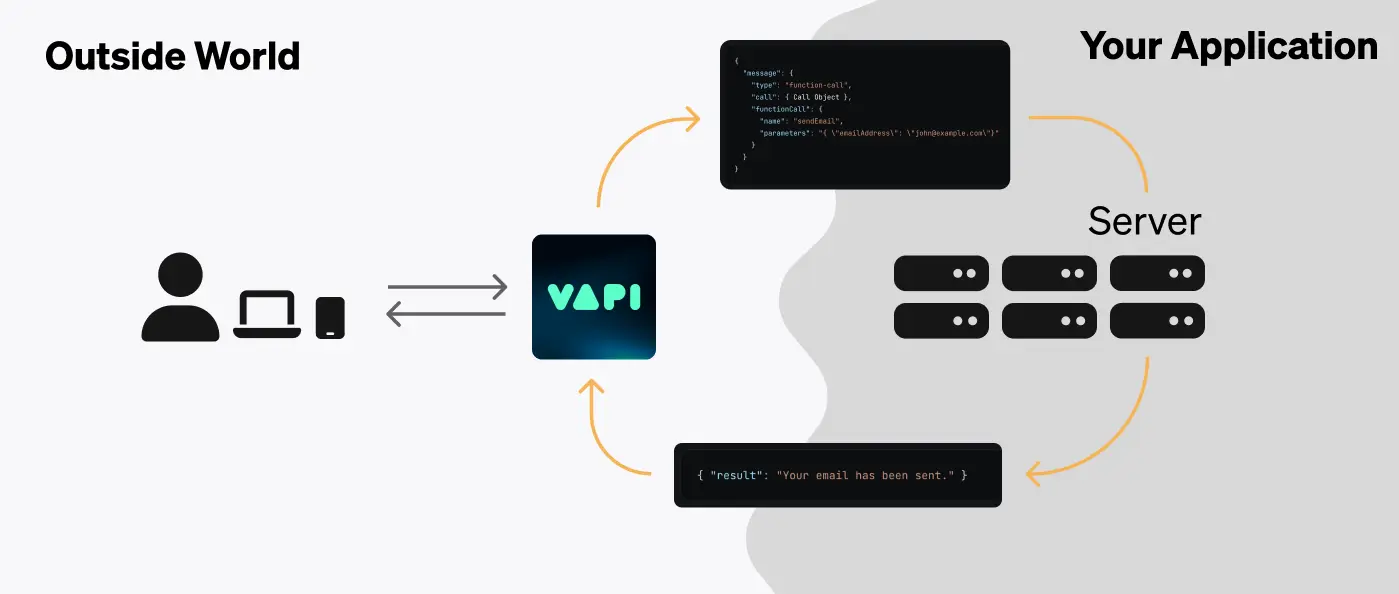
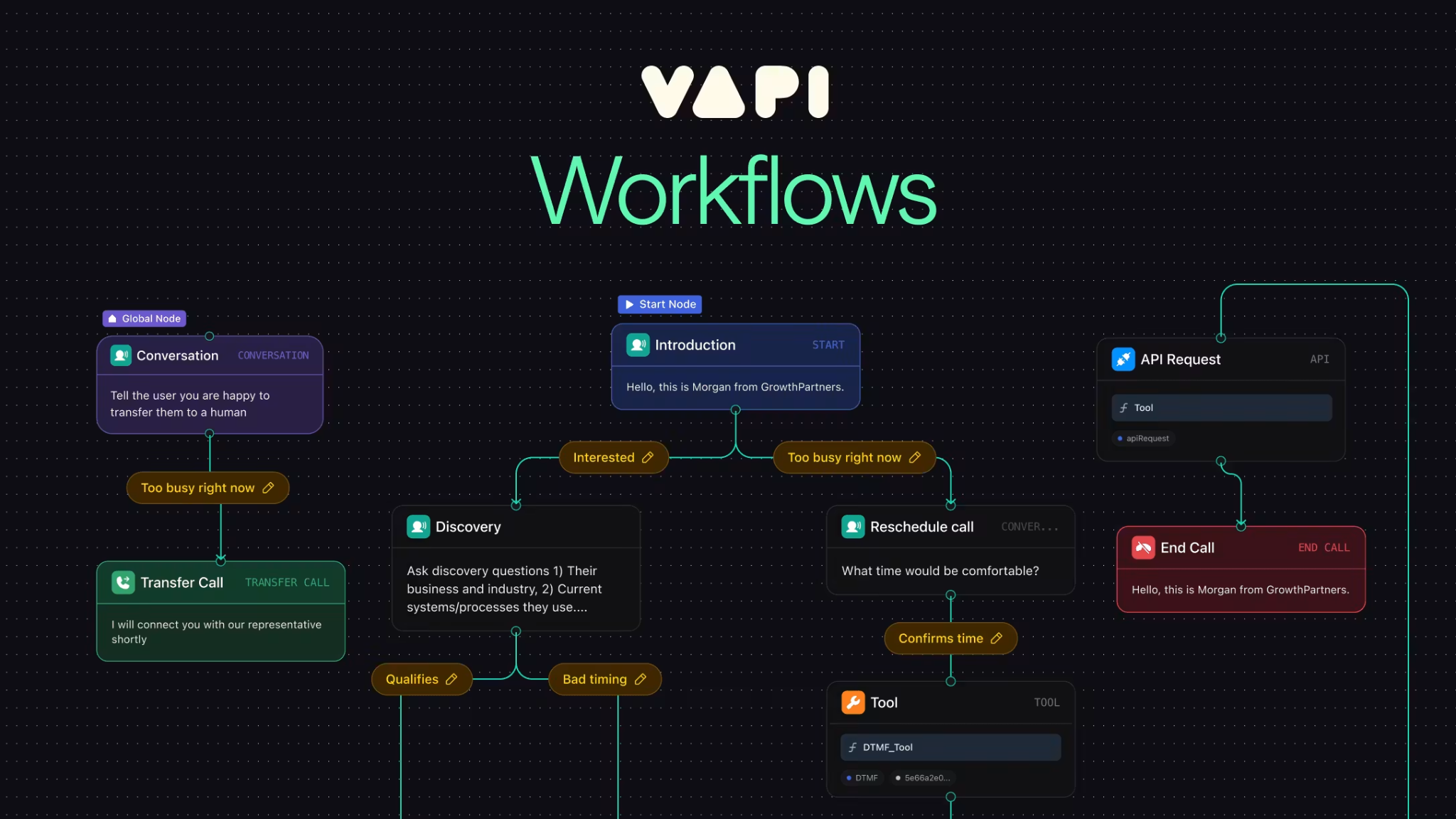
Vapi extends the traditional webhook model into what it calls a Server URL system. All events arrive as HTTP POST requests structured as { "message": { "type": "<event-type>", ... } } to a developer-configured HTTPS endpoint. The system handles both one-way notifications and bidirectional request/response interactions.
Source: Vapi
Events Requiring a Server Response
These events require your server to respond within 7.5 seconds:
Event type | When it fires | Required response |
|---|---|---|
assistant-request | Inbound call with no pre-assigned assistant | assistantId, transient assistant config, or transfer destination |
tool-calls | Assistant triggers a function call mid-conversation | Results array with toolCallId + result per call |
transfer-destination-request | Model requests a transfer with no destination specified | Transfer destination object |
knowledge-base-request | Custom knowledge base provider invoked | Relevant documents based on conversation context |
Informational Events (No Response Required)
Call lifecycle: status-update (states: scheduled, queued, ringing, in-progress, forwarding, ended), end-of-call-report (recording URL, full transcript, message artifacts), hang
Conversation: conversation-update, transcript (partial and final), speech-update, user-interrupted, language-change-detected, model-output
Transfer and control: transfer-update, phone-call-control (opt-in server-delegated hangup/forwarding)
Chat and session lifecycle: chat.created, chat.deleted, session.created, session.updated, session.deleted
Two specialized endpoints exist outside the main Server URL: voice-request (sent to a custom TTS server URL, expects raw PCM audio) and call.endpointing.request (sent to a smart endpointing plan URL, expects a timeout value).
The Vapi CLI supports local webhook development (vapi listen --forward-to localhost:3000/webhook), with documented hosting options for Vercel, AWS Lambda, Google Cloud Functions, Cloudflare Workers, Pipedream, and Make.
Source: Vapi
The Server URL system is one of the API's best features. The assistant-request event turns every inbound call into a programmable routing decision: your server inspects caller metadata and returns a different assistant configuration per call, enabling dynamic behavior that most voice platforms require dashboard configuration for.
Vapi API: SDKs, Docs & Rate Limits
SDKs & Libraries
Vapi publishes two SDK categories under the VapiAI GitHub organization:
Client SDKs (real-time voice session management from user-facing devices):
SDK | Repository |
|---|---|
Web (TypeScript) | |
React Native | |
iOS (Swift) | |
Python (client) | |
Flutter | |
Vanilla JS (script tag) |
Server SDKs (REST API wrapping for backend integrations):
SDK | Repository |
|---|---|
TypeScript | |
Python |
The GitHub org also provides server-side example projects in Node, Bun, Deno, Python Flask, PHP Laravel, Go (Gin), and Rust (Actix), plus client-side examples in Next.js and React. A community UI component library is available as well.
Eight official SDKs across client and server is wide coverage for a voice AI API. The split between client SDKs (handling real-time audio sessions) and server SDKs (wrapping REST endpoints) matches the two integration patterns most developers need: embedding voice in a user-facing app versus orchestrating calls from a backend.
Documentation & Developer Experience
Developer documentation lives at docs.vapi.ai and is open-source in the VapiAI/docs GitHub repository, accepting community contributions. The API reference is separately hosted at api.vapi.ai/api in interactive OpenAPI format.
Documentation covers:
Conceptual guides for the voice pipeline, server URL, authentication, concurrency, tools, MCP integration, squads, and workflows
Per-language starter repos for server-side (Node, Bun, Deno, Flask, Laravel, Go, Rust) and client-side (Next.js, React, Flutter, React Native)
CLI tool for local development, webhook forwarding, and debugging
What's New changelog (last updated June 2026)
Glossary of platform-specific terms
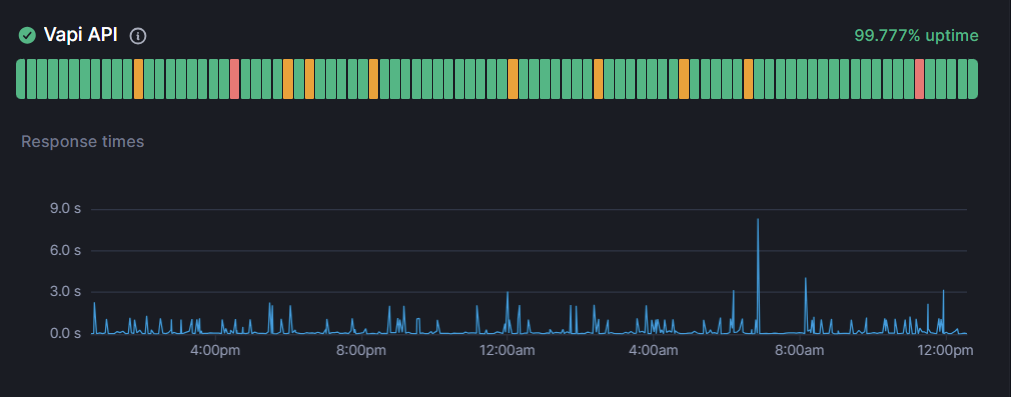
Appending .md to any docs page URL returns clean Markdown output, useful for AI-assisted development workflows. A public status page is available for uptime monitoring.
Source: Vapi
Build tier support comes through community Discord and email (support@vapi.ai). The Scale tier includes priority support, a named support engineer, an account manager, and a custom SLA. Vapi publishes no response-time guarantees for the Build tier.
Rate Limits & Constraints
Vapi documents concurrency-based limits rather than request-per-second rate limits on its REST endpoints:
Default concurrent call slots: every account includes 10 concurrent call slots. When all slots are occupied, new calls queue until capacity frees.
Add-on concurrency: additional slots cost $10/line/month, taking effect immediately via Settings.
Scale threshold: users who consistently exceed 50,000 minutes per month should contact Vapi for a custom plan with higher concurrency.
Concurrency visibility: call API responses include a concurrencyBlocked boolean indicating whether a call failed to start due to capacity exhaustion.
Vapi does not document request-per-second limits on REST endpoints. For most voice AI integrations, concurrent call capacity is the bottleneck, not API request throughput. But if you are building a high-frequency polling or orchestration layer on top of the API, the REST rate-limit envelope is a discovery exercise.
The webhook system enforces a 7.5-second timeout for assistant-request events. If your server does not respond within that window, the call falls through.
Vapi API Pricing & Access Costs
Vapi uses a usage-based pricing model with two tiers: a self-serve Build tier and a negotiated Scale tier.
Build tier (pay-as-you-go, no contract):
Voice calls: $0.05/minute for Vapi platform hosting
SMS/Chat: $0.005/message
AI provider costs (STT, LLM, TTS): passed through at cost with no Vapi markup. Supply your own API keys and this line item is $0 to Vapi.
Concurrency: 10 simultaneous call lines included; additional lines at $10/line/month
Call history retention: 14 days
Chat history retention: 30 days
Support: community Discord and email
Scale tier (annual contract):
Custom pricing with committed usage volume. Includes SOC 2, SSO/RBAC, data residency, custom retention, a named support engineer, and reserved capacity. Per-minute rates are negotiated and not published.
Compliance add-ons (available on both tiers):
HIPAA BAA: $2,000/month
Zero Data Retention: $1,000/month
Free credits: every new account receives $10 at signup, no credit card required. At $0.05/min, that covers roughly 200 minutes of platform hosting before provider costs.
For a developer sizing costs: Vapi's $0.05/min is the platform fee only. The larger cost driver for most deployments is AI provider spend (LLM inference, TTS, STT), which can easily exceed the platform fee. G2 reviewers estimate all-in conversation cost at roughly $0.15/min with standard provider rates. Bringing your own API keys reduces Vapi's variable cost but does not eliminate the underlying provider spend.
One contractual detail worth knowing: unless you manually configure traffic limits, Vapi does not cap incoming call volume. The account holder is responsible for all minutes consumed regardless of origin, per the Terms of Service. For inbound deployments, setting concurrency limits is a cost-control measure, not just a capacity decision.
Where the Vapi API Falls Short
These are scope decisions and practical constraints, not failures. Several reflect what Vapi is (voice AI infrastructure) and where its API deliberately stops.
No B2B contact data, enrichment, or intelligence. The API handles conversations, not contacts. There is no endpoint for looking up who to call, enriching a phone number with company data, checking buyer intent, or pulling org charts. If your pipeline needs to decide which accounts are worth dialing before the agent picks up the phone, you need a second data source.
REST rate limits are undocumented. Vapi publishes concurrency limits (10 default call slots) but does not document request-per-second or request-per-minute ceilings on REST endpoints. For developers building orchestration layers that poll call status or manage assistants at high frequency, the rate-limit envelope is a discovery exercise.
API-key-only auth for API consumers. Authentication is a static API key in the Authorization header. There is no OAuth 2.0 flow for multi-tenant integrations where each customer authenticates with their own Vapi workspace. The JWT option covers client-side use cases, but server-to-server delegated access is not supported.
Enterprise security controls are Scale-only. SOC 2, SSO, and RBAC require the annual Scale tier contract. There is no middle tier with security controls on a monthly basis. Organizations evaluating Vapi for even modest enterprise deployments hit a hard gate at the Build tier.
Latency variance under load. Vapi publishes a sub-500ms average latency benchmark, but G2 reviewers report latency ranging from 800ms to 4-5 seconds on production calls. The variance, not the average, is the concern for developers building latency-sensitive applications.
14-day call history retention on Build. Vapi retains call recordings, transcripts, and analytics for only 14 days on the self-serve tier. Developers building analytics or compliance workflows need to pull this data via webhooks or API and store it externally.
No campaign-level intelligence. The Campaigns endpoint handles outbound dialing logistics (CSV upload, scheduling, launch), but provides no layer for deciding who should be in the campaign, scoring contacts by fit or intent, or enriching the recipient list with company data before dialing.
ZoomInfo API: The B2B Intelligence Layer for Voice AI Pipelines
Vapi's API tells a voice agent how to conduct a conversation. ZoomInfo's API tells it who to have that conversation with, what company they work for, what their tech stack looks like, and whether they are actively researching your category.
The gap between "the agent can make a call" and "the agent is calling the right person at the right time with the right context" is where ZoomInfo's API fits.
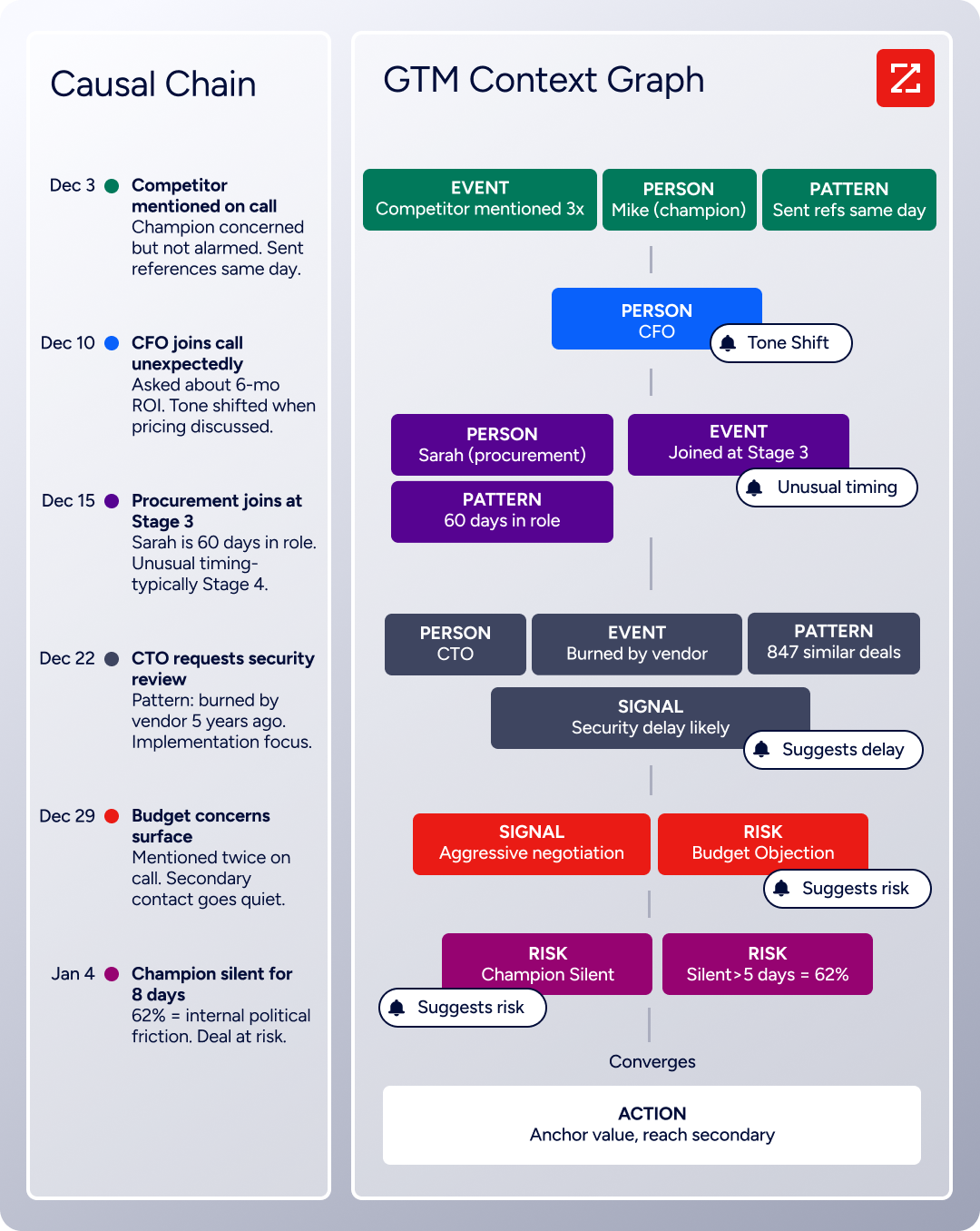
Behind the API sits ZoomInfo's GTM Context Graph, which processes 1.5B+ data points daily, combining ZoomInfo's B2B data with your first-party CRM and engagement signals to deliver not just records but buying context. For a developer building voice AI pipelines, that upstream intelligence determines whether the agent qualifies cold leads or engages warm, in-market buyers.
What the API Covers: Search, Enrichment, and AI Intelligence
ZoomInfo's Enterprise API is a REST suite served from https://api.zoominfo.com/gtm, organized into four groups documented in the interactive API reference:
Data API (Search & Enrich): Search endpoints cover Contacts, Companies, Intent, News, and Scoops, returning matched records without consuming credits. Enrich endpoints unlock the full payload: business emails, direct dials, employment history, corporate hierarchy, org charts, technographics, and hashtag signals, up to 25 records per call. The underlying dataset spans 500M contacts, 100M companies, 135M+ verified phone numbers, and 200M+ verified business email addresses.
Copilot API (AI Intelligence): Account Summary returns structured account intelligence with a free-form Q&A endpoint. Find Similar Companies performs lookalike expansion. Contact Recommendations returns AI-ranked buying-committee suggestions by motion (prospecting, deal acceleration, renewals).
Marketing API: CRUD endpoints for programmatic audience management.
Platform API (Engagements, Beta): Bidirectional engagement data via the Engagements API.
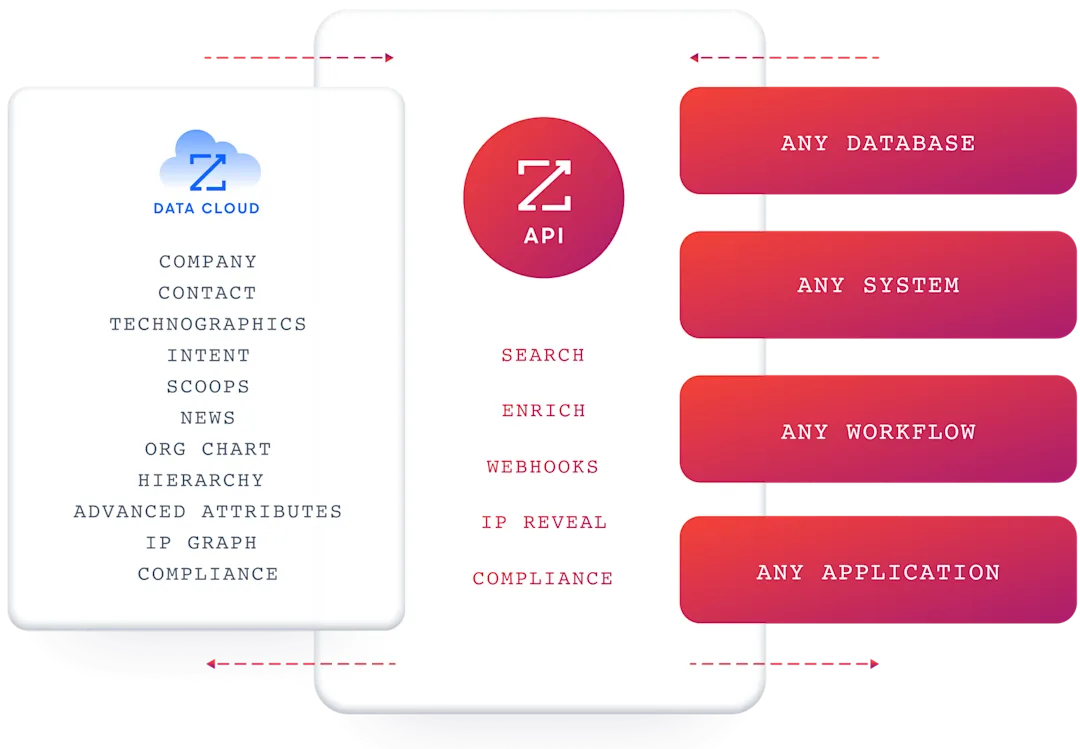
The pairing with a voice AI API is direct: use ZoomInfo's search endpoints to find contacts matching your ICP (free, no credits consumed), enrich the ones worth calling with direct dials and company context, then push that data into Vapi's campaign CSV or inject it as dynamic variables in outbound call prompts. The search-then-enrich pattern means you filter freely and spend credits only on records you commit to dialing.
Authentication & Access
ZoomInfo uses OAuth 2.0 with PKCE via Okta, supporting three flows: Authorization Code with PKCE (web applications), Client Credentials (server-to-server), and Refresh Token. Access tokens are 24-hour Bearer tokens with rotating refresh tokens.
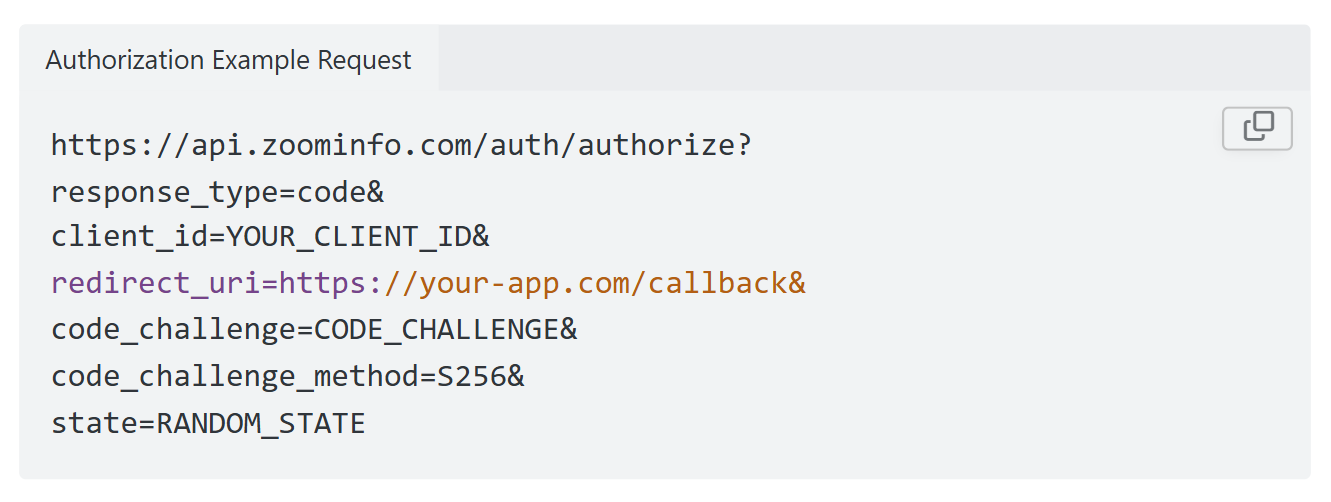
Teams register applications through the ZoomInfo Developer Portal, where they generate credentials, define scopes, and test endpoints.
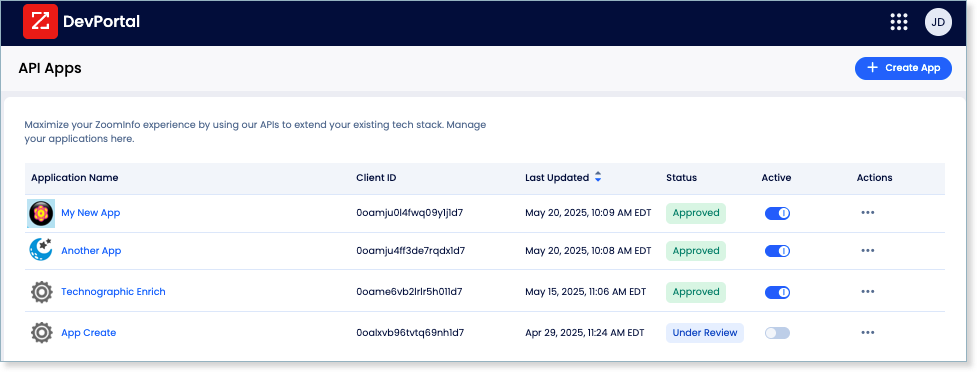
This is a different authentication model from Vapi's static API key. OAuth 2.0 supports delegated access, credential rotation, and scoped permissions, which fits multi-tenant integrations and enterprise security requirements.
Rate Limits, Credits & Developer Experience
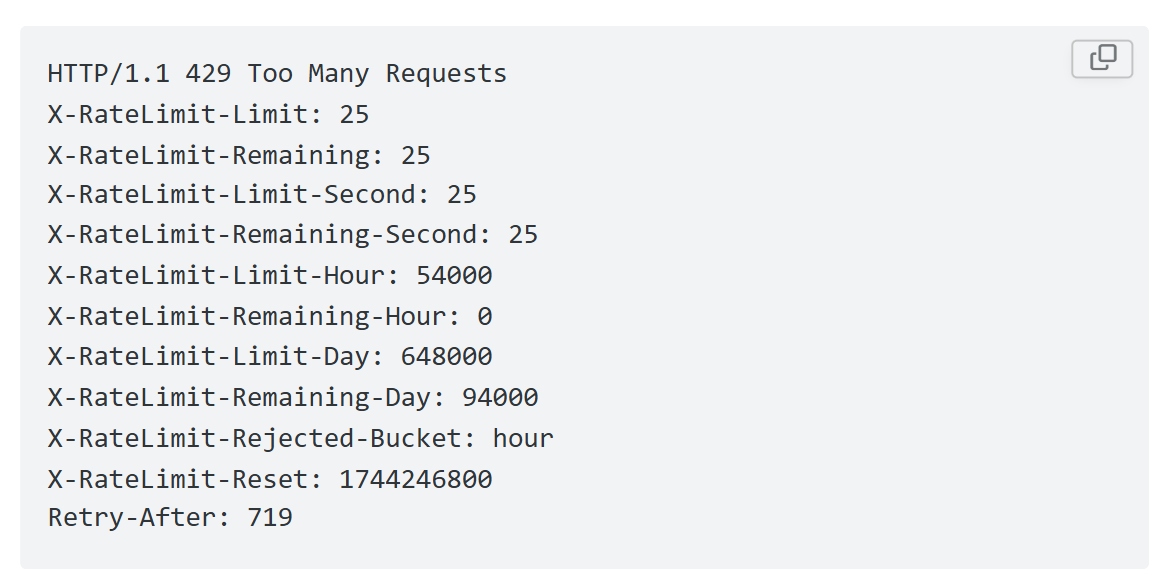
ZoomInfo publishes rate limits by tier: Builder (5 req/sec), Standard (25 req/sec), and Scaling (35 req/sec), with per-hour and per-day sliding-window limits enforced simultaneously. Every response includes quota headers with remaining capacity, and 429 responses include a Retry-After header with exact backoff timing. Credits follow a rolling 12-month window: enriching a record for the first time consumes one credit; re-enriching the same record within the year is free.
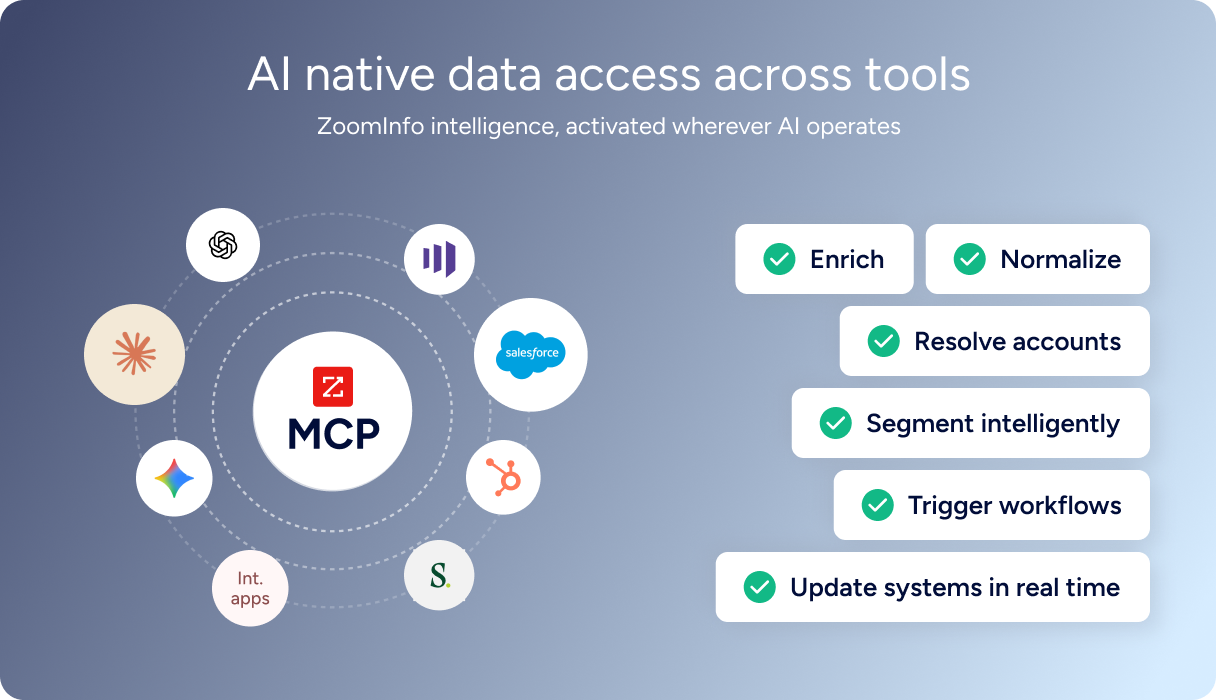
For developers building AI agents, ZoomInfo's MCP server at https://mcp.zoominfo.com/mcp exposes search, enrich, and account research as native tools for MCP-compatible assistants, currently supporting Claude and ChatGPT. Since Vapi assistants can connect to MCP tool servers natively, a Vapi agent could query ZoomInfo's MCP server mid-call to pull live contact or company intelligence during a conversation.
ZoomInfo does not publish official SDKs, so you integrate over HTTP and own the auth-and-retry layer. The interactive API reference supports live testing, and a Docs MCP server lets AI development tools generate integration code against the API spec. Documentation lives at docs.zoominfo.com. ZoomInfo added API access to all relevant plans, with consumption-based pricing quoted per account.
BDO Canada reported an 87% reduction in time spent updating internal data dashboards using the ZoomInfo API, with one analyst describing the integration as plug-and-play across any process. (ZoomInfo)
Final Verdict
Vapi's API is a well-documented surface for building production voice AI. The OpenAPI spec is public, the SDKs cover eight platforms, the webhook system handles both one-way events and bidirectional request/response flows, and the flexible architecture lets you swap STT, LLM, and TTS providers independently without rewriting your integration. For a developer whose build is voice-first, the API covers the full lifecycle from assistant creation through campaign dialing to post-call analysis.
Choose the Vapi API if your build centers on voice AI infrastructure: creating conversational agents, managing telephony, orchestrating multi-agent call flows, and analyzing call outcomes at scale. The $0.05/min platform fee with full BYOK support and 200 minutes of free trial credit make it accessible for prototyping, and the Scale tier's compliance posture (SOC 2, HIPAA, PCI) makes it deployable in regulated environments.
Add the ZoomInfo API when the build needs the intelligence layer upstream of the voice agent: deciding which contacts to dial, enriching call context with company and intent data, and targeting accounts that are actively in-market. Search is free, enrichment consumes credits only for records you commit to, and the MCP server extends the same data to AI-agent workflows. The two APIs are layers of the same pipeline, and investing in one increases the value of the other. Explore the ZoomInfo Enterprise API or start with the developer docs to see the endpoint surface directly.
A developer who needs neither API should consider that Vapi does not provide contact data or B2B intelligence, and ZoomInfo does not handle voice conversations. If your pipeline involves both calling and knowing who to call, the two are complementary layers.
FAQ
Is the Vapi API free?
Not beyond a trial. Every new account receives $10 in free credits at signup, no credit card required. At $0.05/min for platform hosting, that covers roughly 200 minutes of voice calls before AI provider costs. Beyond the trial credit, Vapi bills at $0.05/min (voice) plus pass-through AI provider costs. Free US phone numbers (up to 10) are available for development. There is no ongoing free tier.
Does Vapi have a GraphQL API?
No. Vapi exposes a REST API with JSON request and response bodies. The API specification is published in OpenAPI format at api.vapi.ai/api. If you need a GraphQL interface, you would need to build a wrapper on top of the REST API.
What is the Vapi API rate limit?
Vapi enforces concurrency-based limits rather than traditional request-per-second rate limits. Every account includes 10 concurrent call slots by default. Additional slots cost $10/line/month. Users exceeding 50,000 minutes per month should contact Vapi for a custom plan with higher concurrency. Vapi does not document request-per-second limits on REST endpoints, so the exact throughput ceiling for non-call operations is not published.
Are there official Vapi SDKs?
Yes. Vapi publishes eight official SDKs under two categories. Client SDKs (for real-time voice sessions from user-facing devices) cover Web/TypeScript, React Native, iOS/Swift, Python, Flutter, and Vanilla JS. Server SDKs (for REST API wrapping in backend integrations) cover TypeScript and Python. All are hosted on GitHub under the VapiAI organization, alongside example projects in Node, Bun, Deno, Flask, Laravel, Go, and Rust.
Does the Vapi API support webhooks?
Yes, through the Server URL system. Vapi sends real-time call events as HTTP POST requests to a developer-configured HTTPS endpoint. Events cover the full call lifecycle (status updates, end-of-call reports), conversation data (transcripts, speech updates, interruptions), and interactive request/response patterns (assistant routing, mid-call tool calls, transfer decisions). Three authentication methods are available for webhook verification: Bearer token, OAuth 2.0 client credentials, and HMAC signature. The Vapi CLI supports local webhook development by forwarding events to localhost.
What does ZoomInfo's API add to a Vapi build?
ZoomInfo's API adds the B2B intelligence layer that Vapi does not cover. Where Vapi handles the voice conversation, ZoomInfo provides the data that shapes it: search across 500M contacts and 100M companies, enrich with direct dials, org charts, technographics, and employment history, detect buyer intent signals, and generate AI-powered account research and buying-committee recommendations. The practical integration pattern is to use ZoomInfo's search endpoints (free) to identify target contacts, enrich the records worth calling, then feed that data into Vapi's campaign CSV or inject it as dynamic variables in outbound call prompts. ZoomInfo's MCP server can also connect to MCP-compatible AI agents, and since Vapi supports MCP tool servers natively, the two can work together within a single agent workflow.
More sales tool comparisons:
