

In B2B buying, personalized and timely conversations determine how quickly visitors convert. Real-time interaction shapes your buyer's journey. An integrated chat platform on your website kickstarts this interaction and continues as a touchpoint as buyers move from leads to customers.
But how do you leverage chat effectively without it becoming just another pop-up?
Segment your website visitors into different types. Then craft your chatbot greeting messages to target each type and their stage in the buying process.
What Is a Live Chat Welcome Message?
A live chat welcome message is an automated greeting that triggers when visitors land on your website or complete specific actions like viewing pricing pages. B2B platforms use these messages to identify visitors by company, route conversations based on account fit, and personalize outreach before prospects fill out forms.
Modern welcome messages replace generic "How can I help you?" prompts with targeted greetings based on visitor behavior and intent signals. The result: conversations that convert anonymous traffic into qualified pipeline.
Core capabilities include:
Visitor Identification: Recognize companies and contacts browsing your site in real time
Behavioral Triggers: Launch messages based on page visits, time on site, or scroll depth
Smart Routing: Connect visitors to the right rep based on territory, account ownership, or product fit
CRM Sync: Log conversations and create contact records automatically in Salesforce, HubSpot, or other systems
When deployed strategically, welcome messages transform anonymous website traffic into qualified pipeline.
8 Best Chatbot Welcome Message Platforms
Here's how the top chatbot welcome message platforms compare:
Platform | Key Strength | Visitor Intelligence | Best For |
|---|---|---|---|
ZoomInfo Chat | B2B data integration with visitor identification | Company and contact enrichment from 500M+ profiles | Enterprise B2B teams needing account-based routing |
Drift | Conversational marketing and ABM playbooks | Account-level targeting and engagement workflows | Mid-market to enterprise marketing teams |
Intercom | Product-led growth messaging and in-app chat | User behavior tracking and segmentation | SaaS companies with product-led models |
LiveChat | Omnichannel support and ticketing integration | Basic visitor tracking and page context | Support-focused teams needing live agent coverage |
Qualified | AI SDR agent with Salesforce-native pipeline generation | Deep Salesforce data integration for routing | Salesforce-centric revenue teams |
HubSpot Conversations | Native CRM integration within HubSpot ecosystem | Contact and company data from HubSpot CRM | HubSpot customers seeking unified platform |
Tidio | Visual bot builder with email integration | Basic visitor tracking and page history | SMBs and teams new to chat automation |
Freshchat | AI-powered bots within Freshworks suite | IntelliAssign routing based on context | Freshworks customers needing chat capabilities |
1. ZoomInfo Chat
ZoomInfo Chat combines live chat with B2B intelligence to identify who's on your site before they fill out a form. The platform taps into ZoomInfo's database of 500M+ contacts and 100M+ companies to enrich visitor data in real time, score accounts against your ICP, and route conversations to the right rep based on territory, account ownership, or product fit. Custom signals and intent data feed prioritized account lists, so your team knows which visitors warrant immediate attention.
Chat conversations sync directly to Salesforce, HubSpot, and other CRMs, creating contact records and logging activity automatically. ZoomInfo's GTM Workspace integrates chat with prospecting workflows, while Copilot surfaces AI-powered insights during conversations to guide rep responses. This intelligence layer turns welcome messages into qualification tools, not just engagement widgets.
ZoomInfo Chat is trusted by thousands of B2B organizations to convert website traffic into qualified pipeline. The platform maintains GDPR, CCPA, and SOC 2 compliance standards, meeting enterprise security and privacy requirements.
Key Features:
Visitor identification with company and contact enrichment from 500M+ profiles
Account-based routing to assign conversations by territory, ownership, or ICP score
Real-time rep alerts when target accounts visit high-intent pages
Native CRM sync with Salesforce, HubSpot, and GTM Workspace integration
Custom welcome messages triggered by page, behavior, or account status
Intent signal tracking to prioritize accounts showing buying behavior
Conversation analytics with pipeline attribution and conversion tracking
Learn More About ZoomInfo Chat
2. Drift
Drift provides a conversational marketing platform focused on accelerating pipeline through chat, AI chatbots, and meeting scheduling. The platform includes pre-built ABM playbooks that target specific accounts with customized messaging and routing logic. Drift integrates with Salesforce, HubSpot, Marketo, and other marketing automation platforms to sync conversation data and trigger workflows based on chat engagement.
The platform offers buyer engagement workflows that guide visitors through qualification sequences, book meetings with sales reps, and deliver content based on responses. Custom bot flows allow teams to build branching conversation paths without code.
Real-time notifications alert reps when priority accounts engage, enabling immediate follow-up while visitors are still active on the site.
Drift includes analytics dashboards that track conversation volume, response times, meeting bookings, and pipeline influence. The platform supports role-based routing, round-robin assignment, and territory-based distribution to connect visitors with the appropriate team member.
Key Features:
ABM playbooks for account-specific targeting and messaging
AI-powered chatbots with natural language processing
Meeting scheduling with calendar integration
Salesforce and HubSpot native integrations
Custom bot builder with branching logic
Real-time rep notifications for priority accounts
Conversation analytics and pipeline reporting
3. Intercom
Intercom offers a messaging platform designed for product-led growth companies, combining in-app messaging, live chat, and customer support tools. The platform focuses on user behavior tracking, allowing teams to trigger messages based on feature usage, page visits, or customer lifecycle stage. Intercom includes custom bot builders, targeted message campaigns, and user segmentation capabilities.
The platform provides API integrations and mobile SDKs for embedding chat across web and mobile applications. User segmentation allows teams to create audience groups based on attributes like plan type, usage frequency, or engagement level, then deliver tailored welcome messages to each segment.
Intercom's analytics track message performance, response rates, and user engagement metrics.
Intercom includes a shared inbox for team collaboration, automated workflows for routing conversations, and help center integration for self-service support. The platform supports both proactive outbound messaging and reactive support conversations within a unified interface.
Key Features:
In-app messaging for product-led engagement
User behavior tracking and segmentation
Custom bot builder with visual interface
Targeted message campaigns based on lifecycle stage
API integrations and mobile SDKs
Shared inbox for team collaboration
Help center integration for self-service
4. LiveChat
LiveChat provides a live chat and chatbot platform focused on omnichannel customer support. The platform includes canned responses for common questions, chat routing rules to distribute conversations across teams, and ticketing integration to escalate complex issues.
LiveChat supports multiple communication channels including website chat, Facebook Messenger, and WhatsApp within a single agent interface.
The platform offers widget customization options to match brand appearance, including colors, positioning, and greeting message templates. Chat routing distributes incoming conversations based on agent availability, skills, or department assignment. LiveChat includes a reporting dashboard that tracks metrics like response time, chat duration, and customer satisfaction scores.
LiveChat provides chat archives for conversation history, file sharing during chats, and pre-chat surveys to collect visitor information before conversations begin. The platform integrates with help desk systems, CRMs, and e-commerce platforms to sync customer data and conversation records.
Key Features:
Omnichannel support across web, Facebook, and WhatsApp
Canned responses for frequently asked questions
Chat routing based on availability and skills
Widget customization for brand alignment
Ticketing integration for issue escalation
Reporting dashboard with response time metrics
Pre-chat surveys to collect visitor context
5. Qualified
Qualified offers an agentic marketing platform featuring Piper the AI SDR Agent, built natively on Salesforce to identify and engage visitors already in your CRM. The platform surfaces Salesforce account and contact data in real time, enabling reps to see which accounts are browsing and route conversations based on existing ownership, territory, or opportunity stage.
Piper the AI SDR Agent handles real-time website conversations, schedules sales meetings, sends personalized emails, nurtures buyers across channels, and understands account-based buying intent. The platform focuses on connecting website activity to pipeline outcomes within the Salesforce ecosystem.
Qualified includes visitor identification that matches website traffic to Salesforce records, then alerts the assigned rep when their accounts visit. Account-based routing ensures conversations reach the right seller automatically, based on Salesforce assignment rules.
Qualified logs all chat interactions as Salesforce activities, maintaining a complete record of digital engagement alongside email and call history.
Qualified provides ABM targeting capabilities that prioritize high-value accounts with customized welcome messages and instant rep connection. The platform includes analytics that tie chat engagement to pipeline creation, opportunity progression, and closed-won revenue, all within Salesforce reporting.
Key Features:
Piper the AI SDR Agent for automated pipeline generation
Salesforce-native platform with deep CRM integration
Visitor identification matched to Salesforce records
Account-based routing using Salesforce ownership data
Real-time rep alerts for assigned accounts
Chat activity logged as Salesforce tasks
ABM targeting for priority account engagement
Pipeline attribution reporting within Salesforce
6. HubSpot Conversations
HubSpot Conversations provides chat and messaging tools within the HubSpot CRM ecosystem, allowing teams to manage website chat, Facebook Messenger, and email conversations in one inbox. The platform includes a chatbot builder with visual workflow design, meeting booking that syncs with rep calendars, and automatic contact record creation for new visitors who engage via chat.
Chat conversations sync automatically to HubSpot contact records, logging all interactions and updating contact properties based on responses. The platform includes routing rules to assign chats by contact owner, lifecycle stage, or custom properties stored in HubSpot.
HubSpot Conversations integrates with HubSpot's marketing automation, allowing teams to trigger email workflows or list enrollment based on chat engagement.
The platform offers a free tier for basic chat functionality, with advanced features like chatbot automation and routing available in paid HubSpot subscriptions. HubSpot Conversations includes reporting that tracks chat volume, response times, and conversion rates within the broader HubSpot analytics suite.
Key Features:
Native integration within HubSpot CRM ecosystem
Chatbot builder with visual workflow design
Meeting booking with calendar sync
Automatic contact record creation and updates
Routing rules based on HubSpot contact properties
Marketing automation triggers from chat engagement
Free tier available with basic functionality
Learn More About HubSpot Conversations
7. Tidio
Tidio offers a live chat and chatbot platform designed for small to mid-sized businesses, combining visual bot building with email integration and visitor tracking. The platform includes pre-built chatbot templates for common use cases like lead capture, FAQ responses, and discount offers.
Tidio's visual bot builder allows teams to create conversation flows without coding, using drag-and-drop logic and conditional branching.
The platform tracks visitor behavior including pages visited, time on site, and referral source, allowing teams to trigger contextual welcome messages based on browsing activity. Tidio integrates with email marketing platforms to sync chat contacts and trigger follow-up campaigns. The platform includes mobile apps for iOS and Android, enabling reps to respond to chats from anywhere.
Tidio offers multiple pricing tiers based on conversation volume and features, starting with a Starter plan at $24.17/month. The platform provides a 7-day free trial for teams to test functionality before committing to a paid plan. Analytics track chat performance, including response times, conversation volume, and visitor engagement patterns.
Key Features:
Visual bot builder with drag-and-drop interface
Pre-built chatbot templates for common scenarios
Visitor tracking with page history and referral data
Email integration for contact sync and follow-up
Mobile apps for iOS and Android
Multiple pricing tiers with 7-day free trial
Analytics dashboard for performance tracking
8. Freshchat
Freshchat provides a messaging platform within the Freshworks product suite, combining AI-powered chatbots with live agent support and campaign messaging. The platform includes IntelliAssign routing that distributes conversations based on agent skills, availability, and conversation context.
Freshchat integrates with other Freshworks products including Freshdesk for support ticketing and Freshsales for CRM functionality.
The platform offers AI-powered bots that handle routine questions, qualify leads, and escalate complex issues to human agents. Campaign messaging allows teams to send proactive messages to website visitors based on behavior, time on site, or previous interactions. Freshchat includes API access for custom integrations and workflow automation.
Freshchat provides analytics on bot performance, agent productivity, and conversation outcomes. The platform supports multiple communication channels including web chat, mobile in-app messaging, and social media, all managed within a unified agent interface.
Key Features:
AI-powered chatbots for automated responses
IntelliAssign routing based on skills and context
Campaign messaging for proactive outreach
Freshworks ecosystem integration (Freshdesk, Freshsales)
API access for custom integrations
Multi-channel support including web and mobile
Analytics on bot performance and agent productivity
B2B Welcome Message Examples by Visitor Type
Effective welcome messages match visitor intent and buying stage. Here's how to greet six types of B2B website visitors using targeted chatbot messages that drive engagement and qualification.
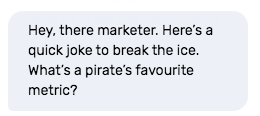
First-Time Website Visitors
First-time visitors sit at the top of your funnel. Your chatbot welcome message is their first interaction with your brand. According to data by Tony Haile of Chartbeat, you have less than 15 seconds to capture a visitor's attention before they leave your site.
Keep it friendly and add value. Give your brand personality that prospects remember.
A simple question or friendly joke works well. Place this greeting on your homepage to connect immediately.
Best practices for first-time visitor greetings:
Lead with value, not a generic "Can I help you?"
Use casual, conversational tone to feel human
Ask a relevant question to spark engagement
Keep the message short to avoid scroll fatigue

Returning Visitors
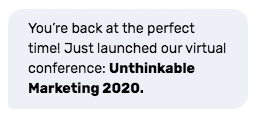
Returning visitors have been on your site before but haven't converted. They're researching, comparing, or waiting for the right moment to engage.
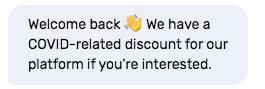
Recognize their return. Make them feel seen and valued. Offer something that compels them to share more information.
This could be content your ideal prospects want, a gentle nudge to take next steps, or an incentive in exchange for contact details.
Use visitor identification data to personalize the greeting. Reference their previous visit or the pages they viewed. This level of personalization signals that you're paying attention.
Content-Engaged Visitors
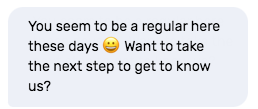
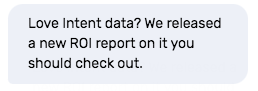
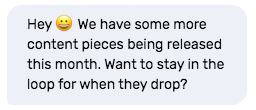
Content-engaged visitors consume your blog posts, videos, and webinars before taking further steps. They're educating themselves and building trust through your content. Some prospects consume at least seven pieces of content before making a decision or asking questions.
Greet these visitors with your latest content piece. Or tell them more is coming and sign them up for updates. Use visitor behavior tracking to identify heavy content consumers, then deliver relevant resources that keep them engaged.
High-Intent Prospects
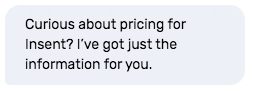
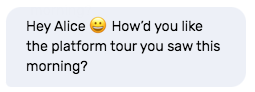
High-intent prospects are heavily evaluating your solution and likely comparing you to competitors. They haven't spoken to you or filled out a contact form yet, but they're browsing pricing pages, product tours, or case studies.
Be proactive. Don't wait for them to reach out. Set up a chatbot greeting message to help them on their path to purchase.
Personalize your message to their evaluation stage or the high-value page they're viewing.
Better yet, connect them to the appropriate sales rep while they're on your website. If they've been researching, they're more likely to speak to a person right away versus a bot.
Buying Committee Members
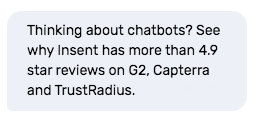
Once an account becomes a potential opportunity, engaging one lead isn't enough. An entire buying committee influences the deal. Account visitors could be executive sponsors, power users, champions, operations managers, or legal team members. Engage with whoever visits your website.
You want penetration within the account, especially as sales conversations begin. Use this opportunity to offer information that makes their evaluation easy. Surface social proof, customer reviews, or technical documentation that addresses their specific role's concerns.
Target Accounts
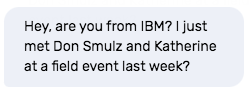
Target accounts you worked hard to attract deserve special treatment. It's time to roll out the red carpet.
First, remove the bot and alert your sales rep that their account is browsing your website. Second, have the rep personalize a conversation starter that gets visitors talking.
Engage, interact, and support them every step of the way.
Reference previous interactions, mutual connections, or recent conversations. This level of personalization shows you recognize their importance and are ready to prioritize their needs.
How to Choose a B2B Chat Platform
Selecting the right chat platform depends on your go-to-market motion, existing tech stack, and how you plan to route conversations. Evaluate platforms based on these criteria to find the solution that fits your team's workflow.
Visitor Identification and Enrichment
Knowing who's on your site changes how you greet them. Platforms with visitor identification capabilities match anonymous traffic to companies and contacts, enabling personalized welcome messages before visitors fill out forms. This intelligence determines whether you're chatting with a target account, an existing customer, or someone outside your ICP.
Key considerations:
Company identification accuracy and coverage
Contact-level enrichment with names, titles, and email addresses
Firmographic data including employee count, revenue, and industry
Intent signals showing active buying behavior
Real-time enrichment speed to enable immediate routing
CRM and Sales Tool Integration
Chat conversations must flow into your existing revenue stack. Native integrations with Salesforce, HubSpot, and other CRMs ensure chat interactions create contact records, log activities, and trigger workflows without manual data entry. Deep integration enables routing based on CRM ownership, territory assignment, or opportunity stage.
Key considerations:
Salesforce and HubSpot native integration depth
Automatic contact record creation and updates
Activity logging with conversation transcripts
Workflow triggers based on chat engagement
Bi-directional data sync to keep records current
Routing and Rep Assignment
Getting conversations to the right person matters as much as starting them. Account-based routing connects visitors to their assigned rep automatically, based on territory, ownership, or product fit. This prevents leads from sitting in a queue while their account owner is available.
Key considerations:
Territory-based routing using geographic or vertical assignment
Account ownership routing from CRM data
Round-robin distribution for unassigned accounts
Skill-based routing for technical or product-specific questions
Rep availability status and queue management
Reporting and Analytics
Measuring welcome message effectiveness requires visibility into engagement rates, response times, and conversion outcomes. Analytics should track which messages drive conversations, which visitors convert to pipeline, and how chat contributes to revenue.
Key considerations:
Engagement rate by message variant and visitor type
Average response time from bot trigger to rep reply
Meetings booked directly through chat
Conversion tracking from chat to opportunity to closed-won
A/B testing capabilities for message optimization
Frequently Asked Questions
What Is a Welcome Message in Live Chat?
A welcome message in live chat is an automated greeting that appears when a visitor arrives on your website or takes a specific action like viewing a pricing page. It serves as the first touchpoint to engage visitors proactively rather than waiting for them to initiate contact.
How Long Should a Chatbot Welcome Message Be?
Keep chatbot welcome messages to one or two sentences that fit within the chat window without scrolling. Short messages maintain attention and encourage visitors to respond rather than close the widget.
Should Chatbot Greetings Sound Human or Automated?
Chatbot greetings should sound conversational and human, using casual tone, natural phrasing, and emojis when appropriate. Visitors prefer interactions that feel like speaking to a person, which increases engagement rates.
When Should a Welcome Message Appear?
Welcome messages can trigger based on multiple conditions including immediate page load, scroll depth, time on page, or exit intent. High-intent pages like pricing warrant immediate greetings, while blog posts perform better with triggers after 30 seconds of engagement.
Can You Personalize Welcome Messages by Visitor?
Yes. Modern chat platforms personalize welcome messages based on visitor attributes including the page they're viewing, their company, previous website behavior, or account status in your CRM. Personalization increases relevance and response rates compared to generic greetings.
Turn Website Visitors into Qualified Pipeline
Chat platforms with intelligent welcome messages transform how B2B teams engage website traffic. Qualified buyers visit your site every day. Without proactive chat, you're leaving pipeline on the table.
Key decision factors:
Visitor identification capabilities to know who's browsing before they convert
CRM integration depth to route conversations and log activities automatically
Personalization options to match messages to visitor type and buying stage
Analytics that connect chat engagement to pipeline and revenue outcomes
ZoomInfo Chat combines B2B intelligence with live chat to identify visitors, route conversations to the right rep, and convert traffic into qualified opportunities. Talk to sales to learn how ZoomInfo Chat can help your team convert more website visitors into pipeline.