
Teams that run Acuity Scheduling for appointment booking and HubSpot as their CRM usually discover the same problems within a quarter:
client details collected through Acuity intake forms never reach the CRM, so sales and marketing work from incomplete records,
appointment activity (bookings, cancellations, no-shows) stays invisible to the teams managing the pipeline,
and someone manually copies contact information between the two systems every week, introducing errors and falling behind.
However the two platforms ended up coexisting (a service business that added HubSpot for marketing automation, a sales team that adopted Acuity alongside an existing CRM, or separate departments choosing tools independently), the longer they run without a connection, the wider the gap between scheduling data and CRM data grows.
Connecting Acuity Scheduling and HubSpot closes that gap.
New appointments create or update contacts in HubSpot automatically, so marketing workflows trigger on real booking activity. Cancellations and reschedules flow into the CRM so sales reps know which prospects are engaged and which went quiet.
Intake form responses collected at booking carry into HubSpot contact properties, giving reps context before a call without asking the client to repeat themselves.
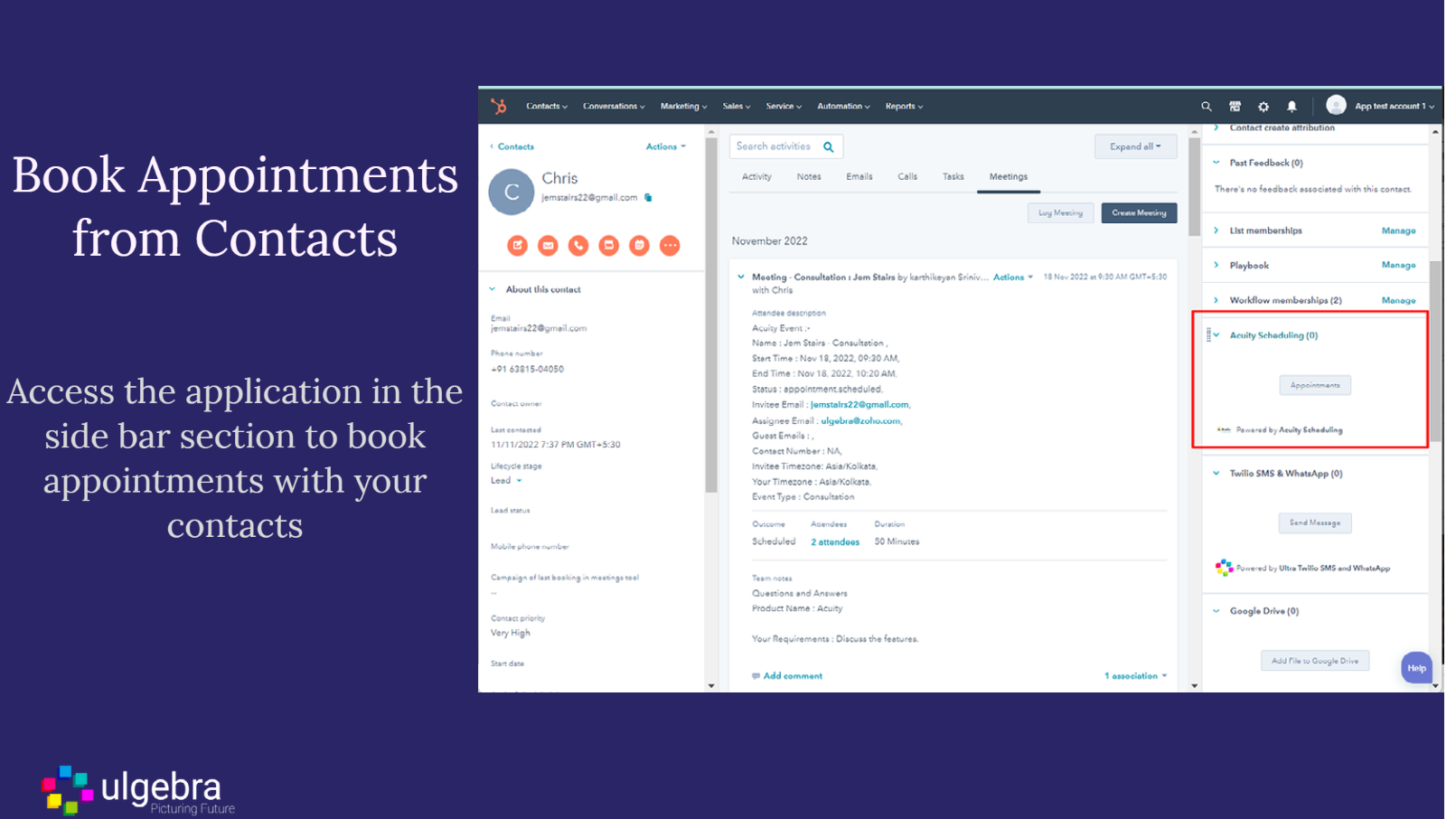
There is no native integration between Acuity Scheduling and HubSpot. The two platforms connect through third-party automation tools (primarily Zapier) or through a HubSpot Marketplace connector (the Ulgebra Acuity Scheduling app).
Custom API development is also possible, since both platforms expose developer APIs. Each method differs in setup complexity, sync direction, data coverage, and cost.
One problem no connection method solves: the sync moves appointment and contact data between systems, but it does not verify whether the contact information behind each booking is accurate, complete, or current.
That is where ZoomInfo comes in. ZoomInfo integrates with HubSpot through ZoomInfo Enrich, enriching contacts in real time with verified business data inside CRM records. The contacts flowing from Acuity into HubSpot carry accurate emails, direct dials, titles, and company data from the start.
ZoomInfo's API and MCP access can extend the same verified data to any connected system.
This article covers the Acuity Scheduling-HubSpot integration: which methods are available, what data each one handles, how to set them up, the use cases that justify connecting both platforms, and the limitations to plan for.
It also covers how ZoomInfo fits in as a data enrichment layer that strengthens the records flowing between Acuity and HubSpot.
Let's start with an overview of the integration.
Integration Overview
Does a native integration exist?
No. Acuity's official integrations page does not list HubSpot, and HubSpot does not include a built-in Acuity connector. All connections require a third-party tool, a marketplace app, or custom development.
Source: HubSpot
What data can sync?
Contact details (name, email, phone), appointment events (scheduled, rescheduled, canceled), appointment metadata (type, date, time, duration), and intake form responses. The specific fields depend on the method and how you configure field mapping.
Is the sync bidirectional?
Not by default. Most methods flow data one direction: Acuity Scheduling to HubSpot. Appointment events and client details push into HubSpot as contacts, deals, or timeline activities. Sending HubSpot data back into Acuity (updating a client record from CRM changes, for example) requires a separate workflow or custom development.
Is it real-time or batch?
Third-party automation tools like Zapier trigger within minutes of an appointment event. The Ulgebra marketplace connector syncs on a near real-time or scheduled basis depending on configuration. Custom API integrations achieve near real-time sync using Acuity's webhooks.
What are the available methods?
Zapier (third-party automation), the Ulgebra HubSpot Marketplace connector, and custom API development using Acuity's REST API and HubSpot's API.
Method | Setup Difficulty | Data Flow | Real-time? | Cost |
|---|---|---|---|---|
Zapier | Low | Acuity to HubSpot (per Zap) | Near real-time (1-15 min) | From $19.99/mo |
Ulgebra Marketplace App | Low-Medium | Acuity to HubSpot | Near real-time | Free tier available; paid plans vary |
Custom API | High | Fully customizable | Real-time via webhooks | Developer time + hosting |
One distinction worth settling upfront: Zapier and the Ulgebra connector handle ongoing sync of new appointment events as they occur, making them operational tools, not migration tools.
A custom API build using Acuity's REST API can pull historical appointment data and load it into HubSpot in bulk, covering both historical migration and ongoing sync in one solution.
Integration Methods
Zapier (Most Common Approach)
Source: Zapier
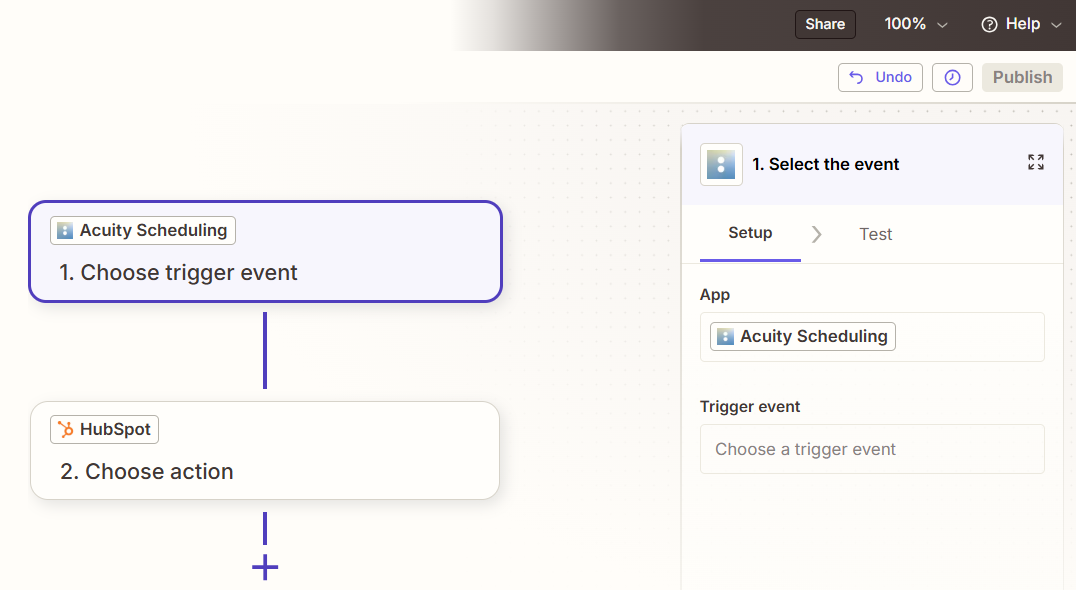
How it works: Zapier connects Acuity Scheduling and HubSpot through event-driven automations called Zaps. Each Zap pairs a trigger (an event in Acuity) with one or more actions (what happens in HubSpot).
Both platforms have well-supported Zapier connectors, so the trigger-action combinations cover the primary appointment and contact objects.
What it syncs: New appointments, rescheduled appointments, canceled appointments, and new client records from Acuity can trigger actions in HubSpot: creating or updating contacts, creating deals, logging activities, or adding contacts to lists. You can map intake form fields from Acuity to HubSpot contact properties. Each data flow requires its own Zap.
Fits: ongoing sync of new appointment events; not a migration tool for historical booking data.
Setup process:
Create a Zapier account and connect both your Acuity Scheduling and HubSpot accounts using OAuth. Acuity requires API credentials from the Integrations settings page; HubSpot authenticates via its standard OAuth flow.
Choose Acuity Scheduling as the trigger app and select the trigger event (e.g., "New Appointment," "Appointment Canceled," or "Appointment Rescheduled").
Choose HubSpot as the action app and select the action (e.g., "Create or Update Contact," "Create Deal," or "Create Engagement").
Map fields from the Acuity trigger (client name, email, phone, appointment type, date/time, intake form responses) to the corresponding HubSpot properties. Zapier displays all available fields from both sides.
Test the Zap with a sample appointment to verify the field mapping produces the expected result in HubSpot.
Turn the Zap on. For additional data flows (syncing cancellations separately from new bookings, for example), create additional Zaps with different trigger events.
Strengths: Fastest setup, no technical knowledge required. Zapier's template library includes pre-built Acuity-HubSpot workflows for common scenarios. Filter and formatting steps allow conditional logic (only sync appointments of a specific type, for example).
Limitations: Each Zap handles one trigger-action pair, so syncing new appointments, cancellations, and reschedules requires separate Zaps (each counting against your plan's task allocation).
No built-in deduplication: if a client books multiple appointments, Zapier may create duplicate HubSpot contacts unless you use the "Create or Update Contact" action with email as the lookup key.
Historical appointments created before the Zap was activated do not sync. Bidirectional sync (HubSpot to Acuity) requires separate Zaps with loop-prevention logic.
Best for: Small to mid-size service businesses that want a quick, no-code connection between Acuity appointment events and HubSpot contact records. Teams that need new bookings to trigger HubSpot marketing workflows or sales follow-ups automatically.
Ulgebra HubSpot Marketplace App
How it works: The Ulgebra Acuity Scheduling connector, available through the HubSpot Marketplace, provides a dedicated integration between the two platforms. Unlike Zapier's general-purpose automation, this connector is built for the Acuity-HubSpot use case.
It syncs appointment data into HubSpot as contacts, deals, or activities, with field mapping configured through the app's settings panel inside HubSpot.
What it syncs: Client contact information (name, email, phone), appointment details (type, date, time, status), and selected intake form fields.
The connector maps Acuity appointment events to HubSpot objects based on configuration: new bookings can create contacts and associated deals or timeline events, while status changes (cancellations, reschedules) update existing records.
Fits: ongoing sync of appointment events into HubSpot; focused on the Acuity-HubSpot pair specifically.
Setup process:
Install the Ulgebra Acuity Scheduling app from the HubSpot Marketplace. You need HubSpot admin access.
Authenticate your Acuity Scheduling account within the app's settings. You will need your Acuity API credentials (User ID and API Key from the Acuity Integrations settings page).
Configure which appointment events sync to HubSpot and how they map to HubSpot objects (contacts, deals, activities).
Map Acuity fields (client name, email, phone, appointment type, intake form responses) to HubSpot contact properties and deal fields.
Set sync preferences: which appointment types to include, whether to create new contacts or update existing ones, and how to handle duplicate records.
Test with a sample booking and verify the data appears correctly in HubSpot.
Strengths: Built for the Acuity-HubSpot connection, so the configuration interface is tailored to this use case rather than being a generic automation builder. Installed and managed inside HubSpot's interface. Does not require a separate Zapier subscription.
Limitations: Third-party app, not built by Acuity or HubSpot. Feature depth and update frequency depend on the developer (Ulgebra). Data flows primarily one direction (Acuity to HubSpot). The free tier may have usage limits; paid tiers carry their own pricing.
Configuration options may be narrower than what Zapier's workflow builder offers for complex conditional logic.
Best for: Teams that prefer managing integrations inside HubSpot's interface rather than maintaining a separate Zapier account. Businesses that want a single-purpose connector without the overhead of a general automation platform.
Custom API Integration
How it works: Both Acuity Scheduling and HubSpot provide developer APIs that support custom integration builds.
Acuity's REST API (v1) covers appointments, availability, clients, and calendar data, with webhook support for real-time event notifications.
HubSpot's REST API covers all CRM objects (contacts, companies, deals, tickets), with full documentation and official SDKs in six languages.
A custom integration connects these APIs through middleware that handles authentication, field mapping, transformation, and error recovery.
What it syncs: Anything both APIs expose. Acuity's API provides access to appointments, clients, appointment types, calendars, availability, and intake form responses. HubSpot's API covers contacts, companies, deals, tickets, activities, and custom objects.
This is the only method that can pull historical appointment data from Acuity and load it into HubSpot in bulk, and the only method that can enforce complex business rules during sync (creating a HubSpot deal only when a specific appointment type is booked with a value above a threshold, for example).
Fits: both one-time migration (historical appointment data) and ongoing sync; the only method with no ceiling on either.
Setup process:
Obtain Acuity API credentials: retrieve your numeric User ID and API Key from the Acuity Integrations settings page, or register an OAuth2 client for multi-account access.
Create a HubSpot private app or Connected App with the appropriate scopes (contacts, deals, timeline events) and generate API credentials via HubSpot's developer portal.
Design the data model mapping: which Acuity appointment fields map to which HubSpot properties, how clients map to contacts, and whether appointments should create deals, timeline activities, or custom objects.
Build the sync service: a server-side application that listens for Acuity webhooks (events: scheduled, rescheduled, canceled, changed) and writes corresponding records to HubSpot via its API.
Implement deduplication logic using email as the matching key, error handling, and retry logic. Acuity's API does not publish rate limits, but the default response limit is 100 records per call. HubSpot's API allows 100-190 requests per 10 seconds depending on plan tier.
Deploy, monitor, and maintain the integration. Both platforms update their APIs independently (HubSpot introduced date-based API versioning in 2026; Acuity's API is at v1.1).
Strengths: Full control over what syncs, when, and how. Real-time sync via Acuity webhooks. Handles historical data migration alongside ongoing sync. Can implement complex business logic (conditional deal creation, custom field transformations, multi-step workflows).
No per-record or per-operation fees from a third-party connector.
Limitations: Requires development resources to build and maintain. You own the infrastructure, monitoring, and error recovery. Acuity's API is available only on the Premium plan ($49/month annual) or Enterprise, adding a cost floor on the Acuity side. The initial build takes weeks, not hours.
Best for: Organizations with in-house development teams and complex sync requirements that no off-the-shelf connector satisfies. Businesses that need to migrate historical appointment data into HubSpot alongside ongoing sync. Teams with custom HubSpot objects or business logic that must be enforced during data transfer.
Key Use Cases
1. Automated Lead Capture from Appointment Bookings
A service business uses Acuity for client booking and HubSpot for marketing. When a new client books through Acuity's scheduling page, a Zapier Zap creates or updates a HubSpot contact with the client's name, email, phone, and appointment type.
HubSpot then enrolls the contact in a workflow that sends a pre-appointment email sequence with preparation instructions and follow-up content.
Best integration method: Zapier (event-triggered, one-directional).
2. Sales Pipeline Tracking for Consultation Bookings
A consulting firm uses Acuity to schedule discovery calls and HubSpot to manage the sales pipeline. When a prospect books a consultation, the integration creates a HubSpot contact and an associated deal at the "Discovery" stage.
Intake form responses (company size, budget range, project scope) populate custom deal properties, giving the rep context before the call without manual data entry.
Best integration method: Zapier or Ulgebra connector (event-triggered with field mapping to deals).
3. No-Show and Cancellation Tracking
A wellness studio needs visibility into client engagement patterns. When a client cancels or no-shows in Acuity, the event syncs to HubSpot and updates the contact's timeline. A HubSpot workflow triggers a re-engagement email or flags the contact for the retention team.
Over time, HubSpot's reporting dashboard reveals cancellation trends by appointment type, client segment, or time period.
Best integration method: Zapier (separate Zap for cancellation events) or custom API (for richer cancellation data including no-show flags).
4. Post-Appointment Marketing Automation
A coaching business wants to nurture clients after each session. When an appointment is completed, the integration logs the activity in HubSpot and triggers a post-appointment workflow: a follow-up email with session notes, a feedback survey, and a reminder to book the next session.
The workflow varies by appointment type (initial consultation vs. ongoing session), which the integration captures from the Acuity appointment metadata.
Best integration method: Zapier (event-triggered with conditional paths based on appointment type).
5. Multi-Location Reporting in HubSpot
A franchise or multi-location service business runs Acuity across locations and uses HubSpot as the centralized reporting layer. Appointment data from all locations flows into HubSpot, where dashboards track booking volume, conversion rates, and revenue by location.
A custom API integration normalizes location data from Acuity's calendar structure into HubSpot's contact and deal properties for consistent cross-location reporting.
Best integration method: Custom API integration (handles multi-calendar normalization and historical data migration).
Limitations and Considerations
Data That Doesn't Sync Easily
Acuity and HubSpot model contact data differently. Acuity stores clients as simple name-email-phone records tied to appointments. HubSpot manages contacts within a richer CRM model with companies, deals, lifecycle stages, and custom properties.
Mapping between the two requires deciding which HubSpot object each Acuity data point belongs to, and third-party connectors handle this mapping at a basic level.
Acuity's package balances, subscription status, gift certificate redemptions, and payment history do not transfer through standard automation tools.
If a client has three remaining sessions in a package, that context stays in Acuity. Intake form responses can sync as text, but structured data (file uploads, signatures, checkboxes) may require custom handling.
Sync Conflicts
Since the integration flows primarily one direction (Acuity to HubSpot), sync conflicts are less common than with bidirectional CRM integrations.
The main risk is duplicate contacts: if a client books with different email addresses across appointments, the integration may create separate HubSpot contacts for the same person. Using the "Create or Update" action in Zapier with email as the deduplication key reduces this risk but does not eliminate it.
Pricing Implications
The integration method itself carries costs. Zapier charges by the number of tasks (each synced appointment event counts as a task), starting at $19.99/month for 750 tasks. High-volume booking businesses may need higher-tier Zapier plans.
The Ulgebra connector has its own pricing tiers. Custom API builds require developer time plus ongoing hosting and maintenance costs.
On the Acuity side, API access (needed for custom builds) is restricted to the Premium plan ($49/month annual) or Enterprise. Zapier integration works on all Acuity plans. On the HubSpot side, API rate limits scale by plan tier: 250,000 requests per day on Free and Starter, 650,000 on Professional, 1,000,000 on Enterprise.
Permissions and Access
Setting up the integration requires admin access on both sides. In Acuity, you need account admin rights to generate API credentials or authorize third-party app connections. In HubSpot, you need admin access to install marketplace apps and configure API connections.
If your HubSpot account uses field-level permissions or team-based access controls, the integration user's profile must have write access to the contact, deal, and activity objects you intend to sync.
Maintenance
Both platforms update independently. Acuity operates under Squarespace's development cycle and has evolved its webhook system over time. HubSpot introduced date-based API versioning in 2026, with each version supported for at least 18 months.
Third-party connectors (Zapier workflows, Ulgebra app) may need reconfiguration if either platform changes its authentication flow, adds new fields, or deprecates existing ones.
Custom fields added to Acuity intake forms after the initial setup will not sync to HubSpot until you update the integration configuration to map them.
What No Method Fixes: The Data Itself
Every method above moves appointment and contact data from Acuity into HubSpot. None of them checks whether that data is accurate, complete, or current. A client who books with a personal email when they should be tracked under their business address syncs as a personal contact.
A prospect whose job title changed two months ago still shows the old title in HubSpot because the intake form captured it at booking time. The integration ensures both systems agree; it does not ensure they are right.
Where ZoomInfo Fits In
Every method in this guide moves data between Acuity Scheduling and HubSpot. None of them improves the data being moved.
When the integration is live but CRM records are still incomplete (missing job titles, outdated company details, no direct phone numbers, unverified emails), the bottleneck is no longer the connector.
That is the gap ZoomInfo closes.
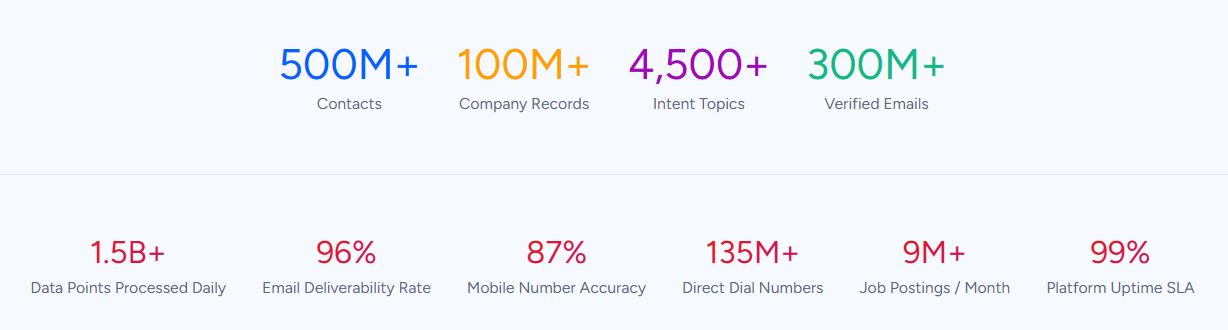
ZoomInfo is a B2B data and go-to-market platform covering 500M contacts, 100M companies, 135M+ verified phone numbers, and 200M+ verified business emails. That data is verified through a multi-source pipeline backed by 300+ human researchers and reaching up to 95% accuracy on first-party data.
For teams running an Acuity-HubSpot integration, ZoomInfo addresses the data quality layer that no appointment connector handles.
ZoomInfo integrates with HubSpot through ZoomInfo Enrich, available in the HubSpot Marketplace. When a new contact flows from Acuity into HubSpot (via Zapier or any other method), ZoomInfo can automatically enrich that record with verified business email, direct dial, job title, company details, technographics, and org chart data.
A client who booked a consultation through Acuity with only a first name and personal email becomes a fully profiled HubSpot contact: the business email is verified, the company is identified, and the title and reporting structure are filled in.
That enrichment happens inside HubSpot automatically, without manual research.
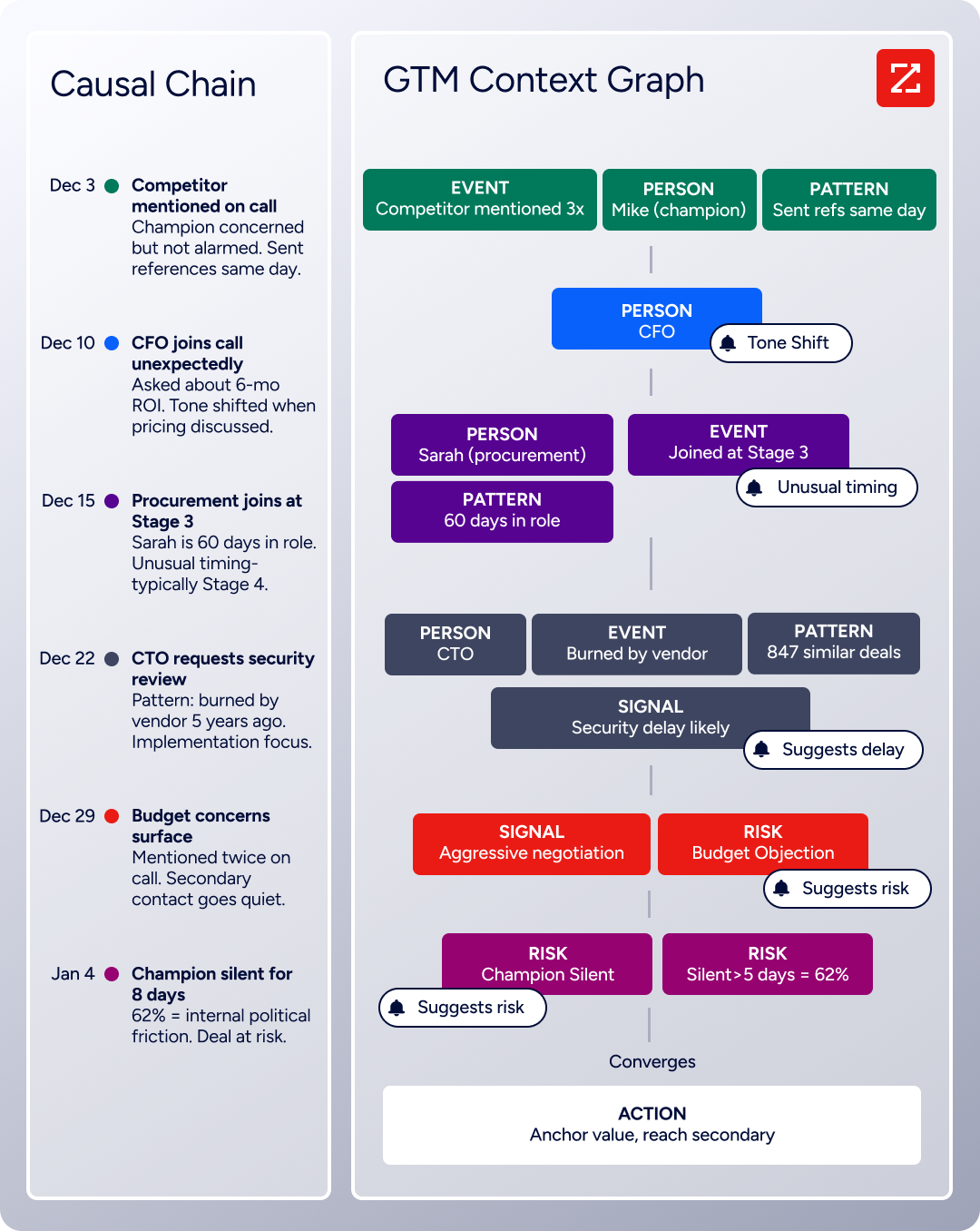
The same data feeds ZoomInfo's GTM Context Graph, which processes 1.5B+ data points daily by combining ZoomInfo's B2B data with your CRM records, conversation transcripts, and behavioral signals to surface what happened in a deal and why.
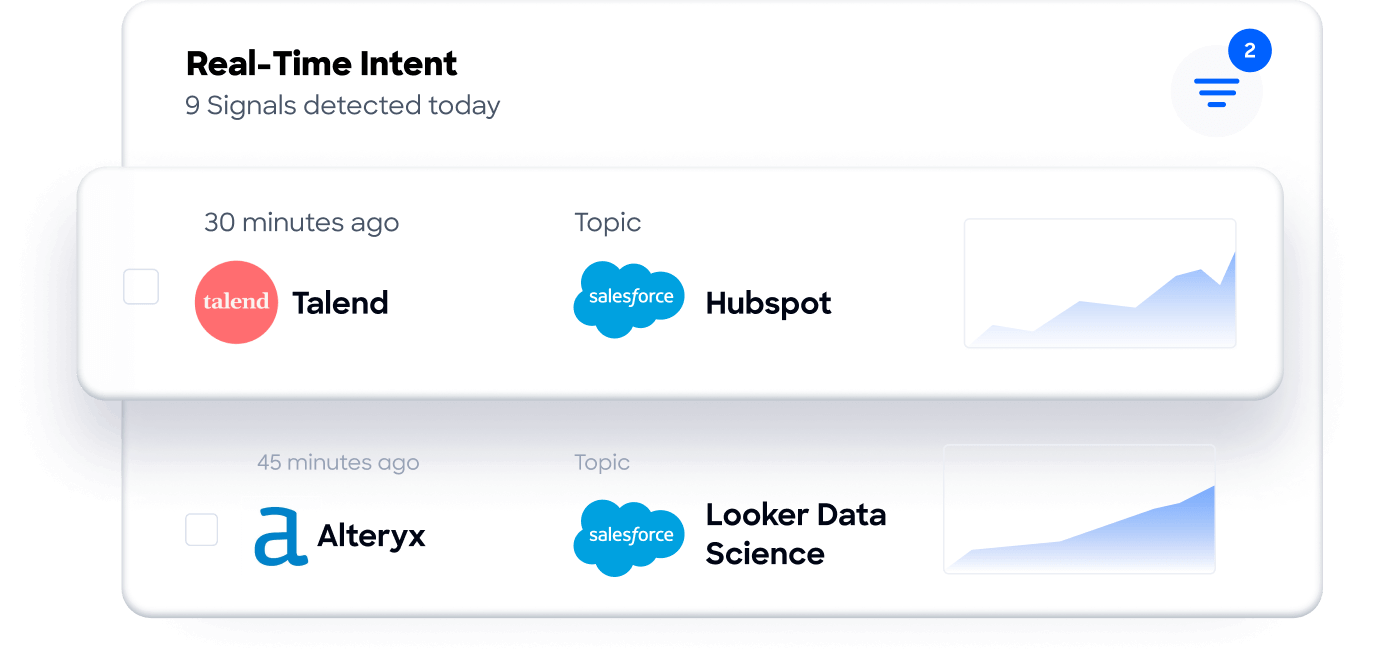
Buyer Intent data from ZoomInfo, tracking signals from 210 million IP-to-Organization pairings, can route into HubSpot to prioritize follow-ups with prospects who booked consultations and are actively researching relevant solutions.
Enriched records also make the integration itself more reliable. When Acuity contacts arrive in HubSpot with complete, standardized data (verified email, company name, industry), deduplication logic works more accurately.
Contacts that would otherwise create duplicates (same person, different email variations) resolve correctly when ZoomInfo fills in the canonical business email.
For teams that need to extend enrichment beyond HubSpot, ZoomInfo's API and MCP access can push verified data into any system in the workflow.
Seismic's sales team attributed 39% of active pipeline to opportunities identified or influenced by ZoomInfo signals, while boosting productivity by 54% and saving 11.5 hours per week. (Seismic)
Final Verdict
There is no native integration between Acuity Scheduling and HubSpot. Every connection method runs through a third-party tool, a marketplace connector, or custom development. For most teams, the right choice depends on volume and complexity.
Small service businesses syncing appointment bookings into HubSpot for marketing automation should start with Zapier. It is the fastest to set up, requires no technical resources, and handles the most common flows (new bookings, cancellations, contact creation) reliably.
Teams that prefer managing integrations inside HubSpot's interface should evaluate the Ulgebra marketplace connector. It removes the need for a separate Zapier subscription and is built for this integration pair.
Organizations with complex requirements (historical data migration, multi-location normalization, custom business logic during sync) should invest in a custom API integration using Acuity's REST API and HubSpot's CRM API.
Before committing to a method, clarify what you need the integration to accomplish.
If the goal is ensuring new clients who book through Acuity enter HubSpot automatically so marketing workflows can engage them, Zapier or the Ulgebra connector is sufficient.
If the goal is building a unified view of client engagement across scheduling, sales, and marketing, a custom build gives the most control. Either way, the quality of contact data in HubSpot determines whether downstream workflows produce results or just move incomplete records faster.
ZoomInfo, with its HubSpot integration, API, and MCP access, is the data enrichment layer that turns appointment-generated contacts into complete, verified CRM records.
FAQ
Does Acuity Scheduling integrate natively with HubSpot?
No. Acuity Scheduling does not offer a built-in HubSpot integration, and HubSpot does not include a native Acuity connector. The two platforms connect through third-party tools. The most widely used option is Zapier, which supports triggers for new, rescheduled, and canceled appointments in Acuity and actions that create or update contacts, deals, and activities in HubSpot.
The Ulgebra Acuity Scheduling app, available in the HubSpot Marketplace, is an alternative connector built for this integration pair.
What appointment data can sync from Acuity to HubSpot?
Contact details (name, email, phone), appointment metadata (type, date, time, duration, status), and intake form responses. Payment data, package balances, subscription status, and gift certificate redemptions do not transfer through standard automation tools.
The specific fields available depend on the integration method and how you configure field mapping.
Can I sync historical appointments from Acuity into HubSpot?
Zapier and the Ulgebra connector only process events that occur after activation; they do not retroactively sync historical data.
To migrate historical appointment records, you need either a custom API integration that reads from Acuity's REST API and writes to HubSpot's CRM API, or a one-time data export from Acuity (CSV) imported into HubSpot manually. Acuity's API access requires the Premium plan or higher.
How do I prevent duplicate contacts in HubSpot?
Use email as the deduplication key. In Zapier, select the "Create or Update Contact" action rather than "Create Contact," and set email as the search field. This ensures that if a client books multiple appointments, the existing HubSpot contact is updated rather than a new duplicate created.
The Ulgebra connector and custom API builds should implement similar upsert logic using HubSpot's native deduplication capabilities.
Does Acuity Scheduling have a public API?
Yes, but it requires Acuity's Premium plan ($49/month annual) or Enterprise tier. The REST API (v1.1) supports reading and writing appointments, clients, calendars, and availability data. Webhooks fire on appointment events (scheduled, rescheduled, canceled, changed) for real-time notifications.
Authentication uses HTTP Basic Auth for single-account access or OAuth 2.0 for multi-account applications. Starter and Standard plans do not include API access.
What does connecting Acuity and HubSpot cost?
Costs depend on the method. Zapier plans start at $19.99/month for 750 tasks, where each synced appointment event counts as one task.
The Ulgebra connector has its own pricing tiers, including a free option with usage limits. Custom API integrations have no connector fees but require developer time (typically several weeks for a production build) plus ongoing hosting.
On the Acuity side, Zapier integration works on all plans (starting at $16/month annual), but API access for custom builds requires Premium ($49/month annual) or Enterprise.
Can HubSpot data flow back into Acuity Scheduling?
Not through standard connectors. Zapier and the Ulgebra app primarily flow data from Acuity to HubSpot. Sending data from HubSpot back to Acuity (updating a client record or creating a booking based on a HubSpot workflow trigger, for example) requires either a reverse Zapier Zap using HubSpot as the trigger and Acuity as the action, or a custom API integration.
Acuity's API supports creating and updating appointments programmatically, so a bidirectional sync is technically possible but requires development resources and careful loop-prevention logic.
How does ZoomInfo improve an Acuity-HubSpot integration?
ZoomInfo solves the data quality problem that no appointment connector addresses. Contacts that flow from Acuity into HubSpot often arrive with only the information the client provided at booking: a name, a personal email, maybe a phone number.
enriches those records in HubSpot automatically with verified business email, direct dial, job title, company details, and technographics.
The result is that marketing workflows, sales follow-ups, and reporting dashboards all operate on complete, accurate records rather than the minimal data collected through a booking form.
Other ways to integrate Acuity Scheduling:
