
Teams that run AiSDR and HubSpot side by side usually hit the same problems within a quarter:
leads imported into AiSDR campaigns carry stale job titles and dead emails pulled from HubSpot lists that haven't been enriched in months,
outreach activity logged by AiSDR never surfaces on HubSpot contact timelines, so sales reps follow up without knowing what the prospect already received,
and meetings booked through AiSDR sequences don't appear in HubSpot deal pipelines, leaving pipeline reports incomplete.
However, the two platforms ended up coexisting (an SDR team adopting AiSDR for outbound while the broader org runs on HubSpot, a founder layering AiSDR onto an existing HubSpot CRM, or marketing and sales choosing tools independently), the longer both run without a connection, the wider the gap between outreach activity and CRM records.
Connecting AiSDR and HubSpot eliminates that gap.
HubSpot contact lists and company properties flow into AiSDR campaigns so the AI agent targets the right prospects with accurate context. Outreach events (emails sent, replies received, meetings booked) sync back to HubSpot contact records so every rep sees the full engagement history. AiSDR's AI account scoring writes directly to HubSpot, so lead prioritization reflects both CRM data and buying signals.
AiSDR offers a native HubSpot integration available on all plans, including the entry-level Solo tier. The connection is bidirectional: contact data flows from HubSpot into AiSDR, and engagement activity flows back. For teams needing workflows beyond the native connector's scope, HubSpot's automation ecosystem (Zapier, Make, and its own Workflows engine) offers additional options, though AiSDR itself does not currently support Zapier or Make, or provide an external API.
There is also one problem no connection method solves: the sync moves records between systems, but it does not verify whether those records are accurate, complete, or current.
And that is where ZoomInfo comes in. ZoomInfo integrates natively with HubSpot through ZoomInfo Inbound Enrich and Instant Enrich, and offers API and MCP access that can feed verified, enriched data into any system, so the records AiSDR pulls from HubSpot are accurate and complete before a single message goes out.
This article covers the AiSDR-HubSpot integration: what the native connector handles, what data syncs in each direction, how to set it up, the use cases that justify connecting both platforms, and the limitations to plan for. It also covers how ZoomInfo fits in as a data enrichment layer that strengthens the records flowing between AiSDR and HubSpot.
Let's start with an overview of the integration.
Integration Overview
Source: AiSDR
Does a native integration exist?
Yes. AiSDR offers a native HubSpot integration configured through Settings > Integrations inside the AiSDR platform. It is available on all AiSDR plans, including Solo. The connection authenticates via OAuth and enables bidirectional data sync between the two platforms.
What data can sync?
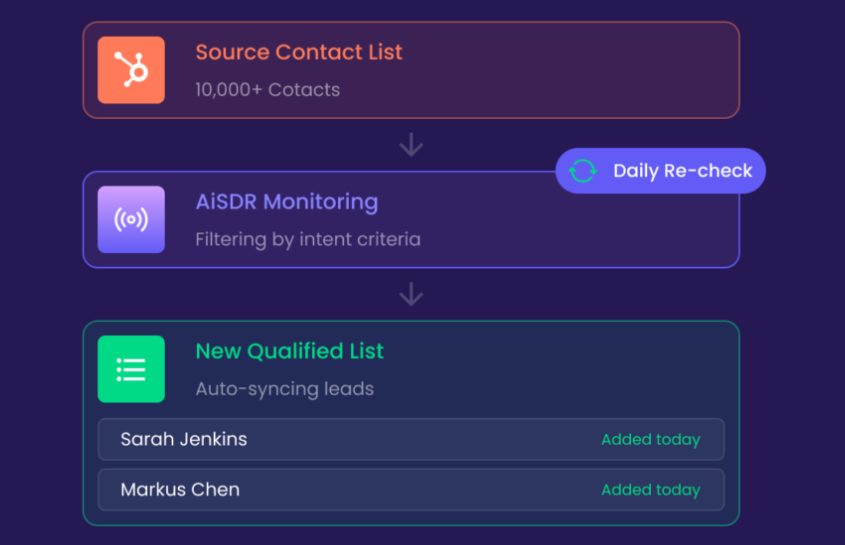
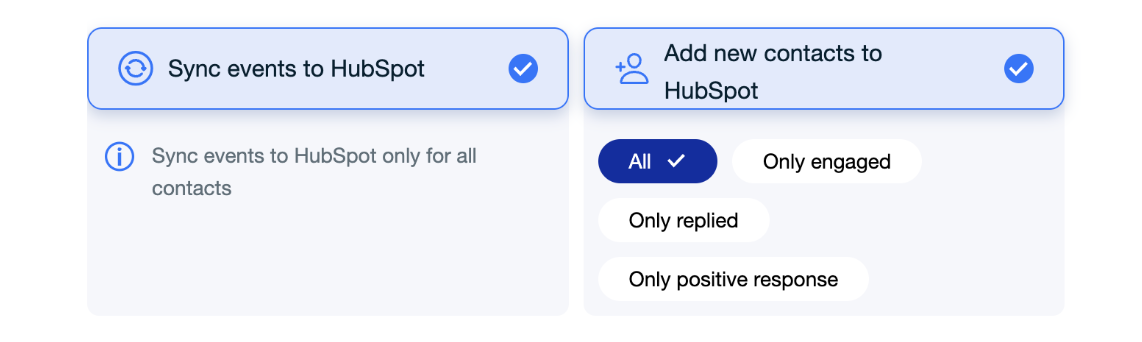
From HubSpot to AiSDR: contact lists, company lists, contact properties (job title, email, phone, company, location), and HubSpot suppression lists. From AiSDR to HubSpot: new leads generated by AiSDR, email events (sent, opened, replied), LinkedIn engagement activity, contact property updates, and booked meetings. Custom HubSpot contact properties can also be used as personalization variables in AiSDR's AI-generated messages.
Is the sync bidirectional?
Yes. Contact data flows from HubSpot into AiSDR campaigns, and AiSDR activity (emails, replies, meetings, new leads) flows back into HubSpot contact records. Each sync direction handles different data types: HubSpot provides the contact and company records, while AiSDR provides the engagement and outreach data.
Is it real-time or batch?
The sync operates on a scheduled basis. New contacts from connected HubSpot lists sync into AiSDR campaigns automatically, and engagement events push back to HubSpot as they occur. AiSDR also includes AI account scoring that writes directly to HubSpot.
What are the available methods?
The native AiSDR-HubSpot integration is the primary (and effectively the only) method. AiSDR does not support Zapier or Make, or provide an external API, so third-party automation tools cannot bridge the two platforms from AiSDR's side. HubSpot's own Workflows and third-party connectors can act on data after it lands in HubSpot, but they cannot pull data from AiSDR independently.
Method | Setup Difficulty | Data Flow | Real-time? | Cost |
|---|---|---|---|---|
Native AiSDR-HubSpot Integration | Low | Bidirectional | Near real-time (scheduled sync) | Included on all AiSDR plans |
HubSpot Workflows (downstream only) | Medium | One-way (acts on HubSpot data after AiSDR syncs it) | Event-triggered | Included with HubSpot Professional+ |
One distinction worth settling upfront: the native integration handles both ongoing sync and initial list imports, making it suitable for teams that want to start running AiSDR campaigns from existing HubSpot lists right away. HubSpot Workflows are not a substitute for the native connector; they extend what happens after AiSDR data arrives in HubSpot (e.g., triggering nurture sequences when AiSDR logs a positive reply).
Integration Methods
Native AiSDR-HubSpot Integration
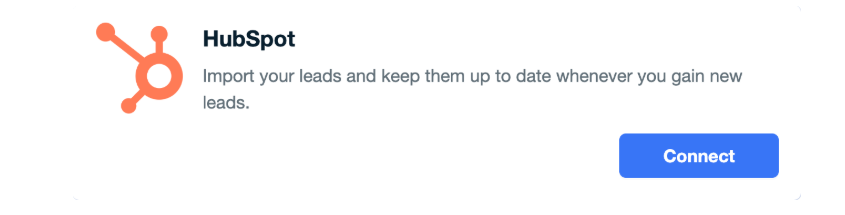
How it works: AiSDR's native HubSpot integration connects the two platforms through a one-click OAuth flow inside AiSDR's settings panel.
Source: AiSDR
Once connected, users can build AiSDR campaigns from HubSpot contact lists or company lists, apply HubSpot suppression lists to exclude contacts from outreach, and use HubSpot contact properties as personalization variables in AI-generated messages. All outreach activity and new leads sync back to the corresponding HubSpot contact records automatically.
What it syncs:
From HubSpot to AiSDR:
Contact lists (static and active)
Company lists (used for enriching company records with lead data, requiring a valid website/domain on each HubSpot company record)
Contact properties: name, email, phone, job title, company, location, and custom properties
Suppression lists (contacts excluded from outreach)
Source: AiSDR
From AiSDR to HubSpot:
New leads discovered and enriched by AiSDR
Email events: sent, delivered, opened, replied, bounced
LinkedIn engagement: connection requests, messages, InMail
Booked meetings
Contact property updates
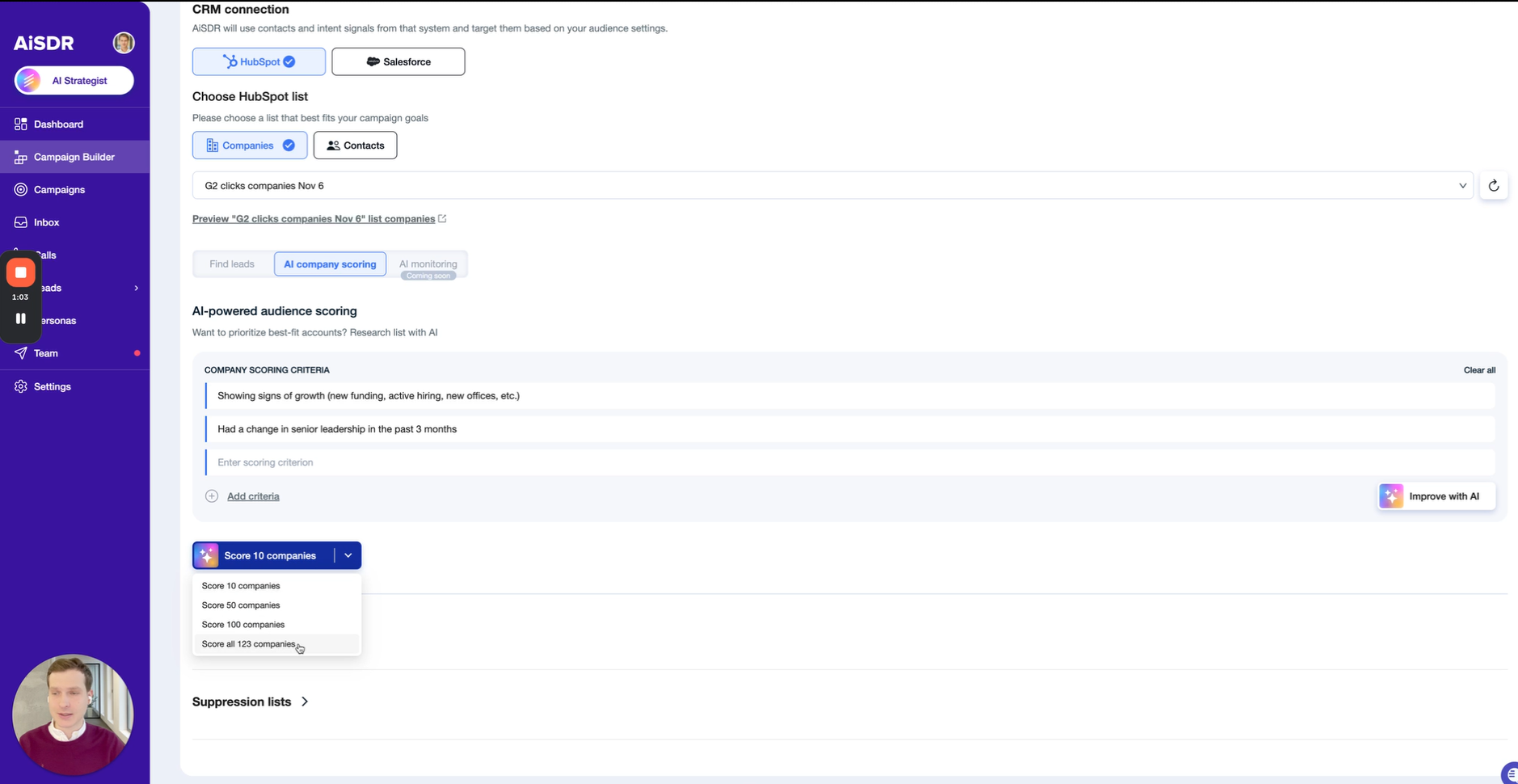
AI account scoring (evaluates companies against 1-4 custom criteria)
Source: AiSDR
Fits: ongoing bidirectional sync for teams running AiSDR outbound campaigns sourced from HubSpot contact data; also handles initial list import for new campaigns.
Setup process:
In AiSDR, navigate to Settings > Integrations and click "Connect" next to HubSpot. You will be redirected to HubSpot's OAuth authorization screen. Approve the connection using an account with admin-level access in HubSpot.
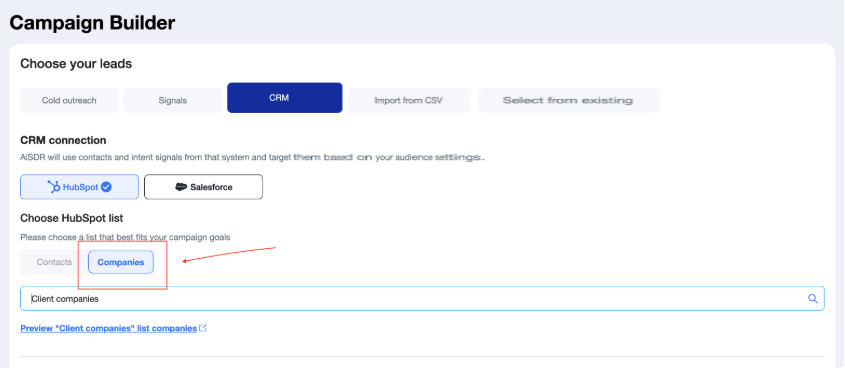
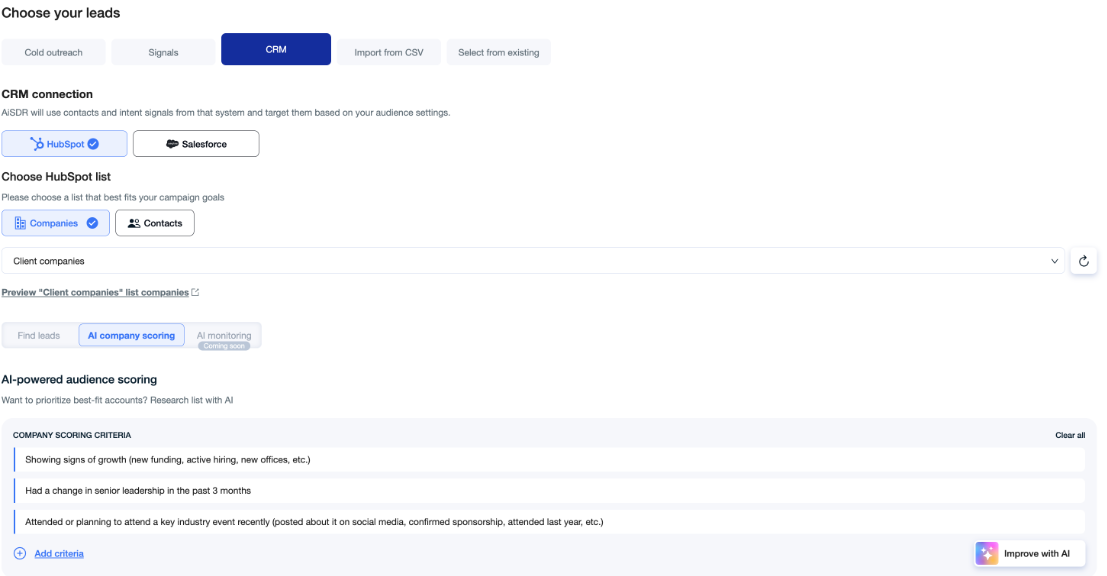
Once connected, create a new AiSDR campaign and select "HubSpot" as the lead source. Choose whether to import a HubSpot contact list or a company list.
If using a contact list, select the specific list from the dropdown. Apply optional filters for job title and location to refine which contacts enter the campaign. If using a company list, AiSDR will enrich company records with lead data (each company record must have a valid website or domain field).
Configure HubSpot suppression lists to exclude specific contacts or segments from outreach. Add any custom HubSpot contact properties you want the AI to use as personalization variables in message generation.
Build your outreach sequence (email, LinkedIn, or multichannel) and launch the campaign. AiSDR will begin pulling contacts from the connected HubSpot list and running outreach.
Verify the sync by checking a few HubSpot contact records for AiSDR activity logs (emails sent, replies, meetings). New leads generated by AiSDR should also appear as new contacts in HubSpot.
Source: AiSDR
Strengths: One-click setup with no technical configuration. Available on all AiSDR plans, including the $250/month Solo tier. Bidirectional sync covers both the inbound flow (HubSpot contacts into AiSDR campaigns) and the outbound flow (AiSDR activity back into HubSpot).
Custom HubSpot properties can feed AI personalization, so outreach reflects CRM-specific data points. AI account scoring writes directly to HubSpot, giving sales teams prioritization signals inside their CRM.
Limitations: AiSDR's native integration is the only connection method. There is no external API, no Zapier connector, and no Make integration, so teams cannot build custom workflows that pull data from AiSDR programmatically.
HubSpot lists and Salesforce reports cannot run simultaneously in the same campaign. The integration depends on HubSpot contact data quality: if records have missing emails, outdated job titles, or incorrect company associations, those gaps carry into AiSDR campaigns.
Best for: Teams already using HubSpot as their CRM that want to add AI outbound without changing their data infrastructure. SDR teams sourcing prospects from HubSpot lists and needing outreach activity to sync back for pipeline visibility.
HubSpot Workflows (Downstream Automation)
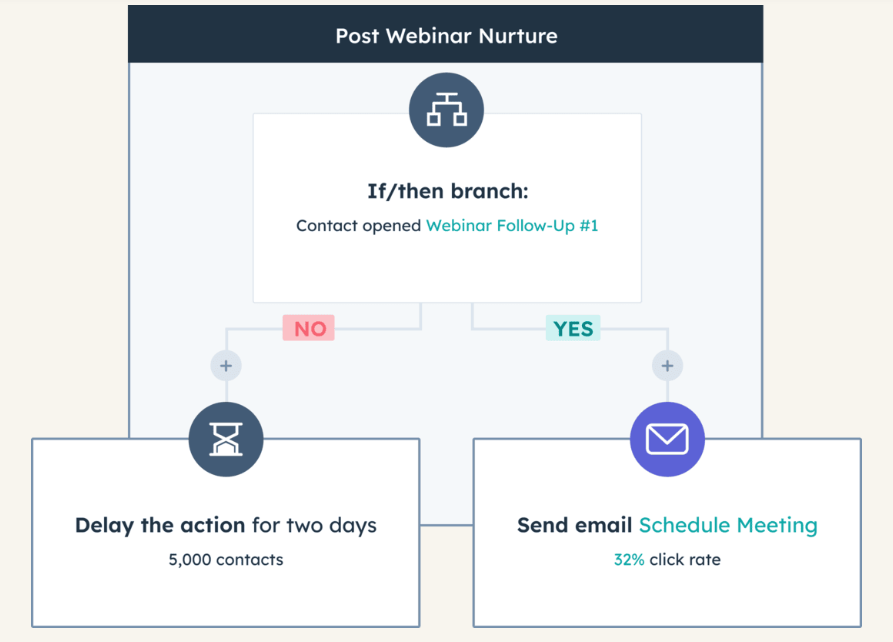
How it works: HubSpot's native Workflows engine can act on data after AiSDR syncs it into HubSpot. This is not a standalone integration method (it cannot pull data from AiSDR), but it extends the native connector by automating what happens inside HubSpot once AiSDR engagement data arrives.
Source: HubSpot
A Workflow can trigger a nurture sequence when AiSDR logs a positive reply, assign a sales rep when AiSDR books a meeting, or update a deal stage when AiSDR's AI scoring exceeds a threshold.
What it syncs: HubSpot Workflows operate entirely within HubSpot. They act on AiSDR-generated data (new contacts, email events, meeting records, scoring updates) that the native integration has already deposited in HubSpot. No additional data flows to or from AiSDR through Workflows.
Fits: ongoing automation of internal HubSpot processes triggered by AiSDR activity; not a standalone connection method.
Setup process:
Ensure the native AiSDR-HubSpot integration is active and syncing data (this is a prerequisite).
In HubSpot, navigate to Automation > Workflows and create a new workflow.
Set the enrollment trigger based on AiSDR-synced data. For example: "Contact property 'Last AiSDR Reply' is known" or "Meeting activity source contains 'AiSDR'."
Add actions: send a follow-up email, create a task for the assigned rep, update a deal stage, or add the contact to a specific HubSpot list.
Activate the workflow. It will fire automatically whenever the trigger conditions are met by data synced from AiSDR.
Strengths: Extends the native integration without requiring additional tools. Enables internal routing, nurture sequences, and pipeline automation based on AiSDR's outreach outcomes. Available on HubSpot Professional and Enterprise plans with no additional cost.
Limitations: Only works one direction: HubSpot Workflows cannot send data back to AiSDR or modify AiSDR campaigns. Requires HubSpot Professional ($890/month for Marketing Hub; $100/seat/month for Sales Hub) or Enterprise for full Workflow functionality. The automation depends entirely on AiSDR's native sync delivering accurate, timely data into HubSpot.
Best for: Teams on HubSpot Professional or Enterprise that want to automate internal CRM processes (lead routing, nurture sequences, pipeline updates) based on AiSDR outreach outcomes, without building any external integration.
Key Use Cases
1. AI Outbound From HubSpot Contact Lists
A marketing team builds targeted contact lists in HubSpot based on lifecycle stage, lead score, or campaign enrollment. AiSDR pulls those lists via the native integration and runs AI-researched outbound sequences (email, LinkedIn, or multichannel) against each contact.
Every email sent, reply received, and meeting booked syncs back to the HubSpot contact record, so marketing and sales see the full engagement picture without leaving their CRM.
Best integration method: Native AiSDR-HubSpot integration.
2. Inbound Lead Follow-Up at Speed
When a lead fills out a HubSpot form or downloads a content asset, it enters a HubSpot list that feeds an AiSDR campaign.
AiSDR's AI sends a personalized response within 10 minutes, making the company the first to reply. The follow-up, the reply, and any subsequent booking all log to the HubSpot contact, keeping the CRM current without manual entry.
Best integration method: Native AiSDR-HubSpot integration (with HubSpot active lists auto-feeding new leads into the connected campaign).
3. Lead Reactivation of Dormant HubSpot Contacts
Sales teams build a HubSpot list of contacts that went cold (no activity in 90+ days, no open deals). AiSDR imports the list and runs a reactivation campaign with AI-generated messaging tailored to each contact's HubSpot properties and recent public activity. Responses and re-engaged contacts sync back to HubSpot, where a Workflow can reassign them to a rep or move them into an active pipeline.
Best integration method: Native AiSDR-HubSpot integration + HubSpot Workflows (for downstream routing of re-engaged contacts).
4. AI-Scored Account Prioritization in HubSpot
AiSDR's AI account scoring evaluates companies against 1-4 custom criteria and writes the score directly to HubSpot. Sales reps see which accounts AiSDR rates highest inside their HubSpot views, and HubSpot Workflows can trigger actions (assign a rep, create a task, send an alert) when a score crosses a threshold. This brings AiSDR's signal analysis into HubSpot's prioritization workflow.
Best integration method: Native AiSDR-HubSpot integration + HubSpot Workflows (for score-based automation).
5. Suppression-Aware Outreach to Prevent Overlap
Teams running multiple outreach channels (AiSDR for AI outbound, HubSpot sequences for rep-managed outreach, marketing email campaigns) need to prevent contacts from receiving duplicate messages.
AiSDR's native integration respects HubSpot suppression lists, so contacts already in active HubSpot sequences or marked as "do not contact" are excluded from AiSDR campaigns automatically.
Source: AiSDR
Best integration method: Native AiSDR-HubSpot integration (suppression list sync).
Limitations and Considerations
No Alternative Connection Methods
AiSDR does not support Zapier or Make, or provide an external API. The native HubSpot connector is the only way to connect the two platforms.
Teams that need custom data flows, conditional routing, or integration with tools beyond AiSDR's supported set (HubSpot, Salesforce, Gmail, Outlook, Calendly, Aircall) have no programmatic workaround from AiSDR's side. If the native connector doesn't support a specific workflow, that workflow isn't possible through AiSDR.
CRM Exclusivity Per Campaign
HubSpot lists and Salesforce reports cannot run in the same AiSDR campaign simultaneously. Teams that use both CRMs need separate campaigns for each data source, which adds management overhead and makes it harder to deduplicate contacts that exist in both systems.
Sync Timing and Frequency
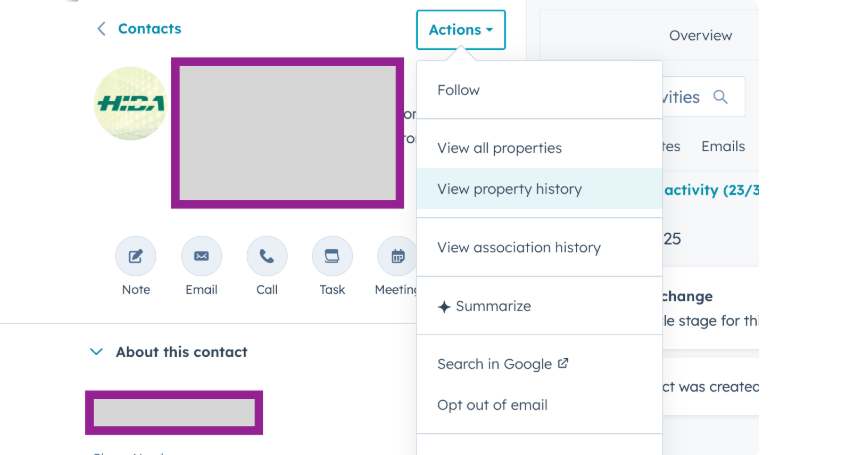
AiSDR's integration operates on a scheduled sync rather than real-time event streaming. While engagement events (emails sent, replies) push back to HubSpot as they occur, new contacts from HubSpot lists sync into campaigns on a periodic basis.
Source: AiSDR
For teams running time-sensitive inbound follow-up, any delay between a lead entering a HubSpot list and appearing in an AiSDR campaign affects response speed.
HubSpot Company Records Require Valid Domains
When using HubSpot company lists to source leads, AiSDR requires a valid domain on each company record to enrich and find contacts. Company records without domains are skipped, which can silently reduce campaign coverage without a clear error in the AiSDR interface.
Pricing and Commitment
AiSDR starts at $250/month on the Solo plan (billed monthly) or $900/month on the Explore plan (billed quarterly, meaning a $2,700 upfront commitment). No free trial is currently offered.
On the HubSpot side, the native integration works with HubSpot's free CRM, but teams wanting Workflows for downstream automation need HubSpot Professional or Enterprise, which carries its own costs (Sales Hub Professional starts at $100/seat/month; Marketing Hub Professional starts at $890/month).
Permissions and Access
Connecting the integration requires admin-level access in both platforms: an AiSDR account with integration permissions and a HubSpot account with admin rights to authorize the OAuth connection. HubSpot orgs with field-level security or custom permission sets should verify that the integration user can read the contact and company properties needed for AiSDR campaigns.
Limited Customization in AiSDR
Users cannot build custom signal logic or complex branching sequences within AiSDR. Playbooks are pre-built, and while the AI Strategist can generate campaign strategies, power users who want programmatic control over how HubSpot data maps into AiSDR outreach logic may find the platform's configuration options restrictive.
What No Method Fixes: The Data Itself
The native integration moves HubSpot contacts into AiSDR campaigns and syncs outreach activity back to HubSpot. It does not verify, complete, or update the underlying contact data. A HubSpot record with a dead email address becomes an AiSDR bounce.
A contact whose job title changed six months ago receives a message referencing a role they no longer hold. The integration ensures both systems share the same records; it does not ensure those records are right.
Where ZoomInfo Fits In
Every method in this guide moves data between AiSDR and HubSpot. None of them improves the data being moved. When the integration is live but outreach emails bounce because the address is stale, or AiSDR's AI crafts a message for a VP of Sales who is now a VP of Marketing at a different company, the bottleneck is no longer the connector.
That is the gap ZoomInfo closes.
ZoomInfo is a B2B data and go-to-market platform built on 500M contacts, 100M companies, 135M+ verified phone numbers, and 200M+ verified business emails.

That data is verified through a multi-source pipeline backed by 300+ human researchers and reaching up to 95% accuracy on first-party data. For teams running AiSDR outbound through HubSpot, ZoomInfo addresses the data quality layer that no outreach connector handles.
ZoomInfo integrates natively with HubSpot through Inbound Enrich and Instant Enrich, providing real-time contact enrichment, verified emails and direct dials, company attributes, and technographic profiles inside HubSpot records.
Before AiSDR pulls a contact list from HubSpot, ZoomInfo ensures those records carry verified business emails (so messages land in real inboxes), accurate job titles (so AiSDR's AI personalizes to the right role), and current company data (so company-level targeting works).
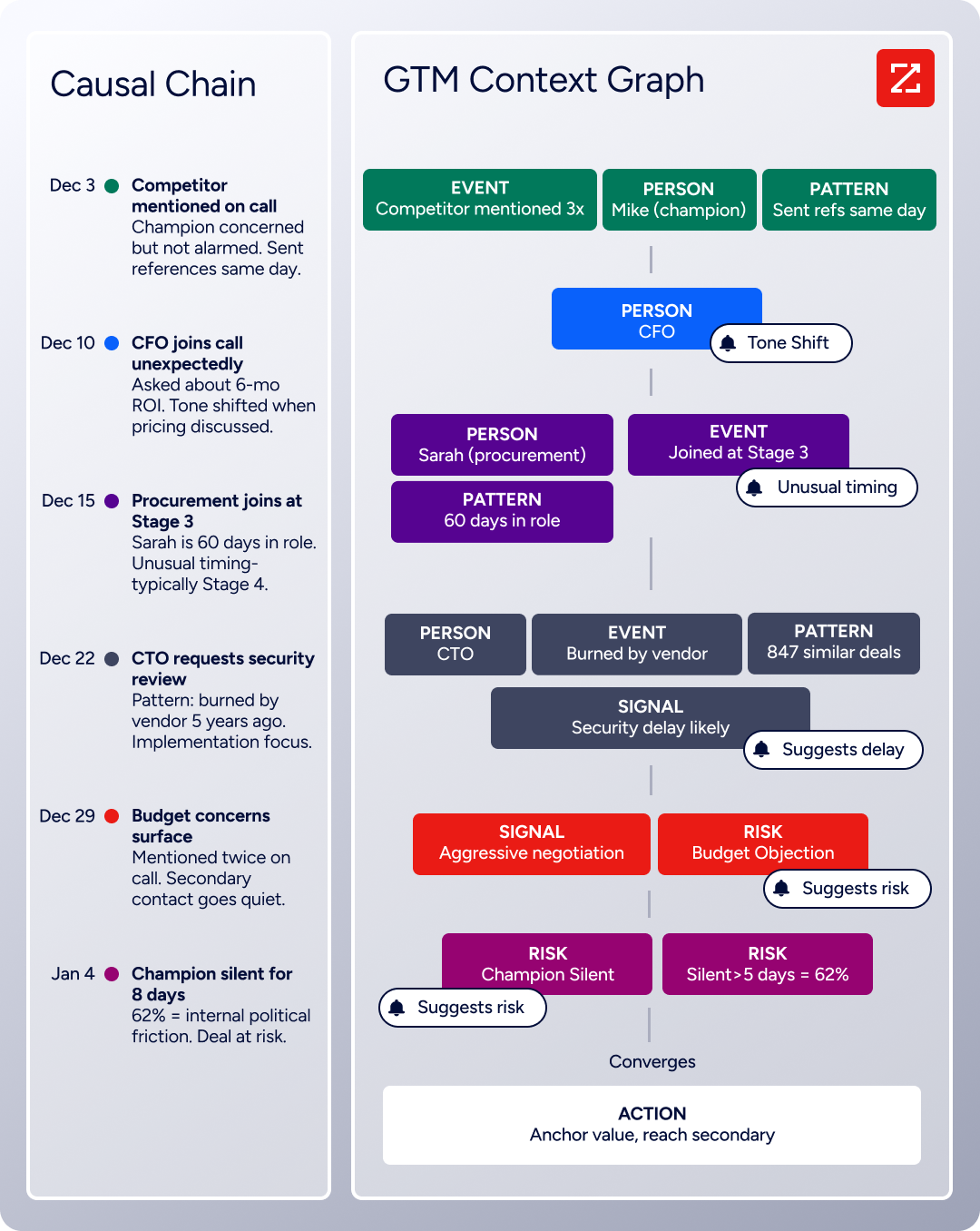
The same data feeds ZoomInfo's GTM Context Graph, which processes 1.5B+ data points daily by unifying ZoomInfo's B2B data with your CRM records, conversation transcripts, and behavioral signals to surface not just what happened in a deal, but why.
In practice, a team running AiSDR campaigns sourced from HubSpot can use ZoomInfo to enrich HubSpot records before any outreach begins. Verified emails mean AiSDR sequences reach real inboxes instead of bouncing and damaging sender reputation.
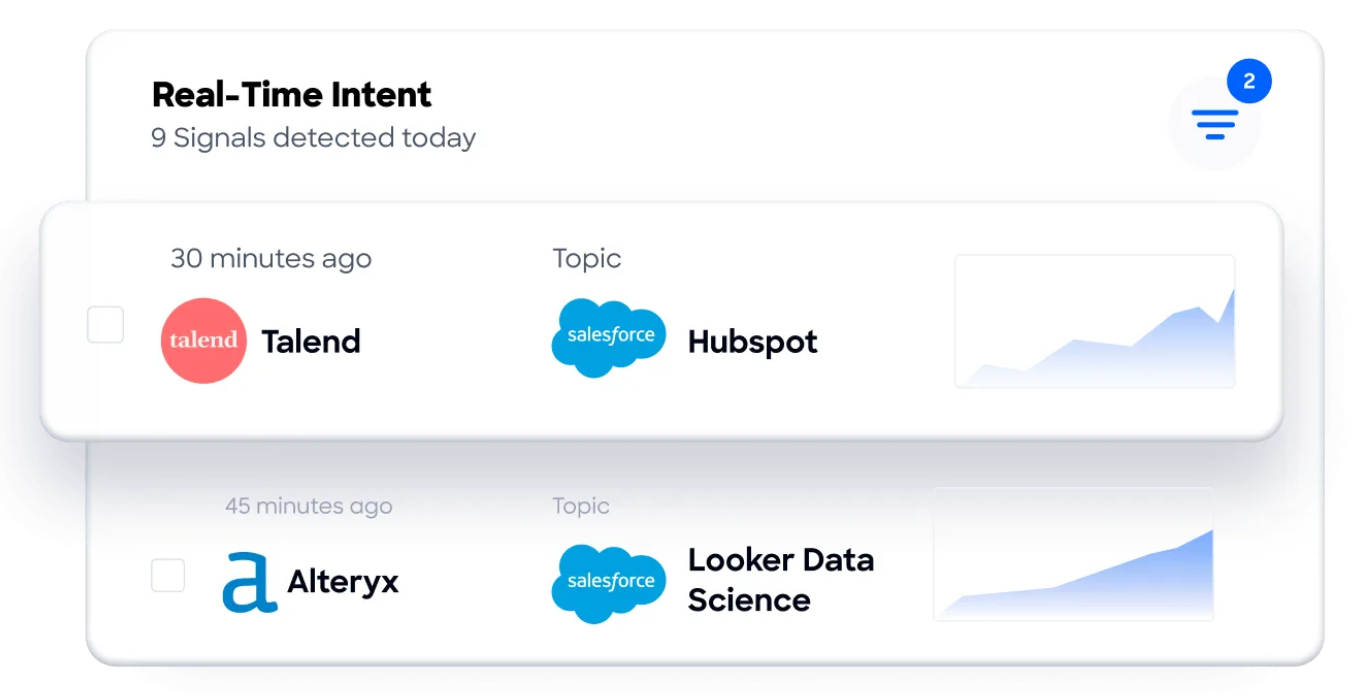
Accurate titles and company details mean AiSDR's AI personalization starts from a correct foundation rather than guessing from stale data. Buyer Intent data from ZoomInfo, tracking signals from 210 million IP-to-Organization pairings, can build HubSpot lists of accounts actively researching relevant solutions, so AiSDR's outreach targets prospects who are in-market rather than cold.
Enriched records also make the AiSDR-HubSpot integration more reliable. Fewer blank fields mean AiSDR's AI has more data points to personalize from. Consistent formatting across records reduces mismatches when AiSDR applies filters for job title and location.
And intent signals routed into HubSpot help teams decide which contacts should enter AiSDR campaigns in the first place, rather than running every contact through outreach indiscriminately.
Seismic's sales team attributed 39% of active pipeline to opportunities identified or influenced by ZoomInfo signals, while boosting productivity by 54% and saving 11.5 hours per week. (Seismic)
Final Verdict
A native integration between AiSDR and HubSpot exists, and it covers the core workflow: pulling HubSpot contacts into AiSDR campaigns and syncing outreach activity back to HubSpot records. The connector is available on all AiSDR plans, requires no technical setup, and handles bidirectional data flow out of the box. For most teams, the right approach depends on how much control and automation they need beyond the native sync.
Small teams running AiSDR outbound from HubSpot contact lists should activate the native integration and start campaigns immediately. The setup takes minutes, the sync is bidirectional, and no additional tools are required.
Teams on HubSpot Professional or Enterprise that want automated routing, nurture sequences, or pipeline updates triggered by AiSDR activity should pair the native integration with HubSpot Workflows. This extends the connector's value without adding external tools.
Organizations needing custom data flows, conditional logic, or integration with platforms beyond AiSDR's supported set should know that AiSDR does not offer an external API, Zapier connector, or Make integration. The native HubSpot connector is the only path, and workflows that exceed its scope are not currently possible from AiSDR's side.
Before investing in the integration, clarify what role AiSDR plays in your sales process.
If AiSDR handles outbound prospecting while HubSpot manages the rest of the pipeline, the native connector delivers what's needed: contacts in, activity out. If the team needs AiSDR data flowing into multiple systems or wants programmatic access to AiSDR's outreach data, the platform's integration constraints are worth evaluating before committing to a quarterly contract. Either way, the quality of the contact data in HubSpot determines whether AiSDR's AI outreach reaches the right people with the right message.
ZoomInfo, with its native HubSpot integration and API and MCP access, is the data enrichment layer that ensures the records AiSDR acts on are verified, current, and complete.
FAQ
Does AiSDR integrate natively with HubSpot?
Yes. AiSDR offers a native HubSpot integration available on all plans, including the Solo tier. The connection is configured through a one-click OAuth flow in AiSDR's Settings > Integrations panel. It enables bidirectional sync: HubSpot contact lists and properties flow into AiSDR campaigns, and AiSDR outreach activity (emails, replies, meetings, new leads) syncs back to HubSpot contact records.
Can I connect AiSDR and HubSpot through Zapier or Make?
No. AiSDR does not currently support Zapier, Make, or any third-party automation platform. The native HubSpot integration is the only available connection method. AiSDR also does not provide an external API, so custom integrations from AiSDR's side are not possible.
What HubSpot data can AiSDR use for personalization?
AiSDR can pull standard HubSpot contact properties (name, email, phone, job title, company, location) and custom contact properties into AI-generated messages. Custom properties are added as personalization variables in the campaign setup, letting AiSDR's AI reference CRM-specific data points when crafting outreach.
Does the integration support both contact lists and company lists?
Yes. AiSDR campaigns can source leads from HubSpot contact lists (importing individual contacts directly) or HubSpot company lists (enriching company records to find associated contacts). When using company lists, each company record in HubSpot must have a valid website or domain field for AiSDR to find and enrich contacts.
What happens to outreach data in HubSpot when a prospect replies?
When a prospect replies to an AiSDR email, the reply is logged on the corresponding HubSpot contact record as an engagement event. AiSDR's AI handles the reply automatically: positive responses continue the conversation, negative responses stop all outreach and add the contact to a suppression list, and out-of-office messages pause the sequence until the return date. All of these actions sync back to HubSpot.
Do I need a paid HubSpot plan for the integration?
The native AiSDR-HubSpot integration works with HubSpot's free CRM. Building HubSpot Workflows to automate downstream actions (lead routing, nurture sequences, deal stage updates) triggered by AiSDR activity requires HubSpot Professional or Enterprise, which carries additional subscription costs.
How does ZoomInfo improve an AiSDR-HubSpot workflow?
ZoomInfo solves the data quality problem upstream of outreach. Before AiSDR pulls contacts from HubSpot, ZoomInfo's native HubSpot integration enriches records with verified business emails, accurate job titles, company attributes, and technographic profiles. This means AiSDR's AI personalizes messages based on correct, current information rather than stale CRM data. ZoomInfo's Buyer Intent data can also feed into HubSpot lists, so AiSDR campaigns target accounts actively researching relevant solutions rather than working through a static list.
Can I run HubSpot and Salesforce data in the same AiSDR campaign?
No. AiSDR does not allow HubSpot lists and Salesforce reports in the same campaign simultaneously. Teams using both CRMs need separate AiSDR campaigns for each data source.
Other tools that connect to HubSpot:
