
Teams that run Calendly for scheduling and HubSpot as their CRM usually discover the same problems within a quarter:
meeting data lives in Calendly while contact records live in HubSpot, so reps copy booking details into the CRM by hand after every call,
new prospects who book through a Calendly link never appear in HubSpot until someone creates the record manually,
and follow-up workflows that should fire the moment a meeting is booked sit idle because HubSpot doesn't know the meeting happened.
However the two platforms ended up coexisting (a sales team that adopted Calendly for its booking speed while the org standardized on HubSpot, a marketing team embedding Calendly on landing pages that feed HubSpot nurture sequences, or different departments choosing tools at different times), the longer they run without a connection, the wider the gap between scheduling activity and CRM reality.
Connecting Calendly and HubSpot eliminates that gap.
Meetings booked through Calendly automatically create or update contact records in HubSpot, so every booking populates the CRM without manual entry. Meeting activity logs to the contact timeline so reps and managers see the full engagement picture in one place.
Routing forms in Calendly can look up HubSpot contact ownership in real time, so inbound leads land on the right rep's calendar instantly rather than sitting in a queue.
Calendly offers a native HubSpot integration available on the Teams plan and above. For teams on lower tiers or with custom requirements, third-party automation tools like Zapier and Make can bridge the two platforms with more limited data coverage.
Custom API development is also possible, with both platforms offering well-documented APIs and webhook support. Each method differs in setup complexity, sync direction, data coverage, and cost.
There is also one problem no connection method solves: the sync moves meeting data into CRM records, but it does not verify whether the contact behind that booking is still at the company, still reachable at that email, or still the right person to talk to.
And that is where ZoomInfo comes in. ZoomInfo integrates natively with both HubSpot and Calendly, and offers API and MCP access that can feed verified, enriched contact data into any workflow, so the records behind every booked meeting are accurate and complete before the conversation starts.
This article covers the full landscape of the Calendly-HubSpot integration: which methods are available, what data each one handles, how to set them up, the use cases that justify connecting both platforms, and the limitations to plan for.
At the end it also covers how ZoomInfo fits into the picture as a data enrichment layer that strengthens the records flowing between Calendly and HubSpot.
Let's start with an overview of the integration.
Integration Overview
Does a native integration exist?
Yes. Calendly offers a native HubSpot integration that automatically syncs scheduled meetings into HubSpot CRM. The integration is available on Calendly's Teams plan ($16/seat/month) and above, and can be found in both the Calendly integrations directory and the HubSpot App Marketplace.
Source: Calendly
What data can sync?
Meeting events, contact information (name, email, phone), form responses from Calendly booking questions, meeting outcomes, and Notetaker recaps. The integration creates new HubSpot contacts when a booking comes from an unknown email and logs meeting activity to existing contact timelines.
Is the sync bidirectional?
Partially. Meeting data flows from Calendly into HubSpot automatically. HubSpot contact ownership data flows back into Calendly's routing logic when using Routing Forms with HubSpot lookup, enabling real-time rep matching.
However, HubSpot contact edits (updated phone numbers, company changes) do not push back into Calendly.
Is it real-time or batch?
The native integration pushes meeting data into HubSpot in near real-time as bookings, cancellations, and reschedules occur. Third-party tools like Zapier trigger within 1 to 15 minutes depending on plan tier.
What are the available methods?
Native Calendly-HubSpot integration (Teams plan and above), third-party automation (Zapier, Make), and custom API development using both platforms' APIs and webhooks.
Method | Setup Difficulty | Data Flow | Real-time? | Cost |
|---|---|---|---|---|
Native (Calendly Teams+) | Low | Calendly to HubSpot (meeting data); HubSpot to Calendly (ownership lookup) | Near real-time | Included with Teams plan ($16/seat/mo) |
Zapier | Medium | One-way per Zap | Near real-time (1-15 min) | From $19.99/mo |
Make | Medium | Configurable per scenario | Near real-time or scheduled | From $10.59/mo |
Custom API | High | Fully customizable | Real-time via webhooks | Developer time + hosting |
One distinction worth settling upfront: the native integration syncs meeting events as they happen and suits teams that want automatic, zero-maintenance CRM updates from scheduling activity. Zapier and Make handle event-triggered flows with narrower data coverage but work on lower Calendly tiers.
Custom API development is the only option that can tailor sync logic to arbitrary business rules, but it requires dedicated engineering resources.
Integration Methods
Native Calendly-HubSpot Integration (Teams Plan and Above)
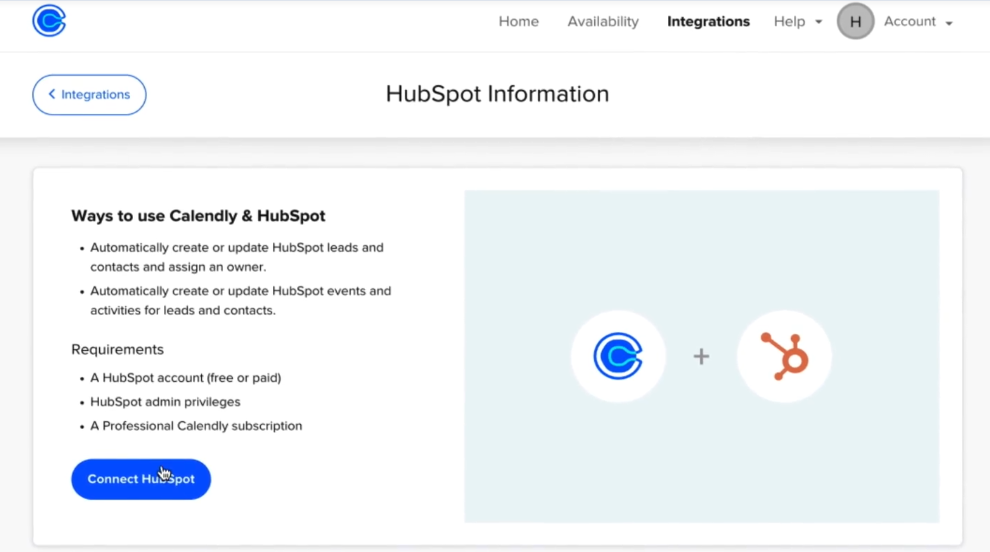
How it works: Calendly's native HubSpot integration connects the two platforms directly. When someone books a meeting through Calendly, the integration checks whether the invitee's email matches an existing HubSpot contact. If it finds a match, the meeting activity logs to that contact's timeline.
Source: Calendly
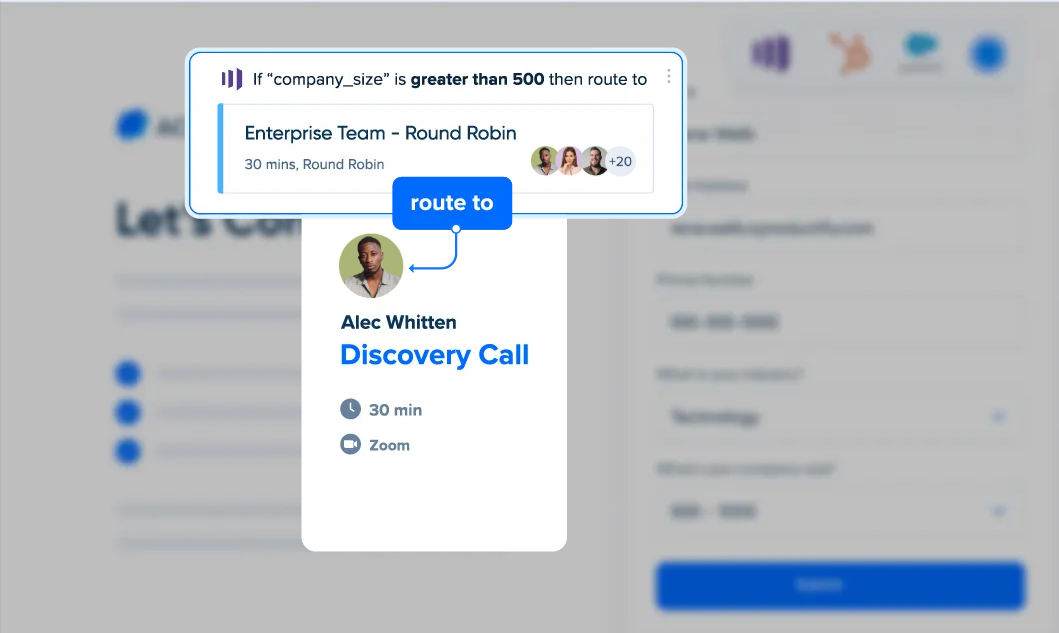
If no match exists, Calendly creates a new contact in HubSpot with the invitee's details. The integration also supports Routing Forms with HubSpot ownership lookup: when a lead submits a form, Calendly queries HubSpot, identifies the assigned contact or company owner, and routes the visitor to that owner's booking page.
Source: Calendly
What it syncs: New contacts (name, email, and any data collected through Calendly booking questions), meeting events (booked, rescheduled, cancelled), meeting activity on contact timelines, and Notetaker recaps (AI-generated meeting summaries pushed to HubSpot).
Calendly booking question responses can map to HubSpot contact properties, carrying qualification data into the CRM.
Fits: ongoing sync of meeting data into HubSpot as part of active sales, marketing, and recruiting workflows; not a migration tool.
Setup process:
Confirm your Calendly workspace is on the Teams plan or above. The HubSpot integration is not available on Free or Standard tiers.
In Calendly, navigate to your account's Integrations page and locate HubSpot. Click "Connect" and authenticate with your HubSpot account using OAuth.
Grant Calendly permission to create and update contacts, log activities, and read contact ownership data in your HubSpot org.
Configure which meeting events should sync to HubSpot (bookings, cancellations, reschedules) and how invitee data maps to HubSpot contact properties.
If using Routing Forms, enable HubSpot ownership lookup on the routing form's logic tab so inbound leads match to their assigned HubSpot owner and route to that rep's calendar.
Test by booking a meeting through a Calendly link and verifying the contact and activity appear on the correct HubSpot record.
Strengths: First-party integration maintained by Calendly and listed in the HubSpot App Marketplace. No third-party tool to configure or pay for separately. Contact creation and meeting logging happen automatically with no manual CRM entry.
HubSpot ownership lookup in Routing Forms enables real-time lead-to-rep matching without manual reassignment. Notetaker recap push keeps meeting notes inside the CRM.
Limitations: Available only on Calendly's Teams plan ($16/seat/month) and above. The primary data flow is Calendly to HubSpot; changes made to contact records in HubSpot do not flow back into Calendly. Custom field mapping between the two platforms may require manual configuration for non-standard fields.
The integration does not sync Calendly's Contacts module data (custom fields, lists, relationship history) into HubSpot.
Best for: Sales and marketing teams already on Calendly Teams or Enterprise that use HubSpot as their CRM and want automatic contact creation, meeting logging, and lead routing without third-party tools or engineering resources.
Zapier
Source: Calendly
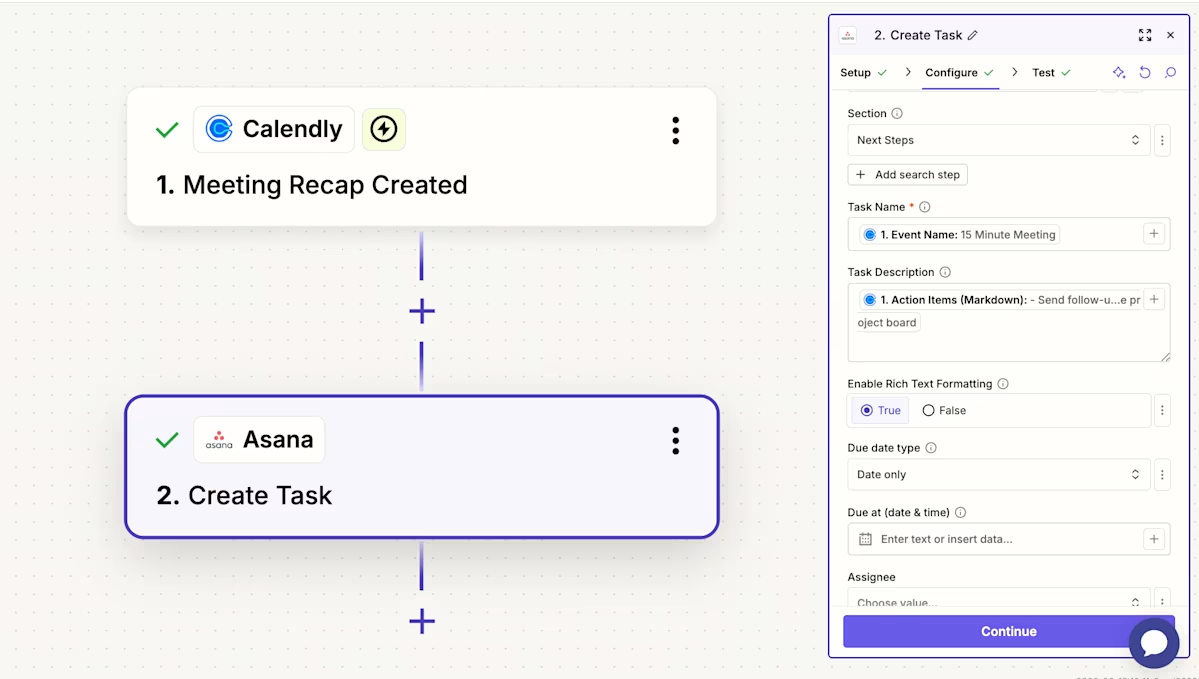
How it works: Zapier connects Calendly and HubSpot through event-driven automations called Zaps. Each Zap pairs a trigger (an event in one app) with one or more actions (what happens in the other). Both platforms have well-supported Zapier connectors, and the available trigger-action combinations cover core scheduling-to-CRM workflows.
Source: Calendly
What it syncs: Depending on the Zap configuration, Zapier can capture new Calendly bookings, cancellations, and invitee details, then create or update HubSpot contacts, create deals, log activities, or trigger workflows. Field mapping is manual and configurable in the Zap setup flow.
Zapier does not access Calendly's Notetaker recaps or HubSpot ownership lookup the way the native integration does.
Fits: ongoing sync of new booking events; not a replacement for the native integration's routing and recap features.
Setup process:
Create a Zapier account and connect both your Calendly and HubSpot accounts using OAuth.
Choose Calendly as the trigger app and select the trigger event (e.g., "Invitee Created" for new bookings).
Choose HubSpot as the action app and select the action (e.g., "Create or Update Contact" or "Create Engagement").
Map the available fields from the Calendly trigger (invitee name, email, booking questions, event type, scheduled time) into the corresponding HubSpot fields.
Test the Zap with a sample booking to verify data flows correctly into HubSpot.
Turn the Zap on. For additional workflows (e.g., logging cancellations separately, creating deals on booking), create additional Zaps.
Strengths: Works on Calendly Standard plans and above (not restricted to Teams). No engineering resources required. Quick to set up for simple use cases like creating HubSpot contacts from Calendly bookings. Zapier's filter and formatting steps can add conditional logic (e.g., only sync bookings from specific event types or with certain form responses).
Limitations: No access to Calendly's Notetaker recaps or HubSpot ownership lookup routing. Each Zap handles one trigger-action pair, so syncing bookings, cancellations, and reschedules requires separate Zaps. Bookings created before the Zap was activated do not sync.
Zapier charges by task count, and high-volume scheduling can accumulate costs quickly.
Best for: Small teams on Calendly Standard that want a lightweight connection between Calendly and HubSpot for contact creation and activity logging, without needing the routing or recap features of the native integration.
Make (Formerly Integromat)
Source: Calendly
How it works: Make uses a visual scenario builder where modules (app actions) connect in a flowchart. Each module represents a step: watch for a Calendly event, transform or filter data, create or update a HubSpot record. Scenarios can branch, filter, loop, and handle errors, giving more control than Zapier's linear structure.
What it syncs: The same core data as Zapier (bookings, cancellations, invitee details), with more flexibility in how data transforms between platforms. Make supports iterators for batch processing and routers for conditional paths, so a single scenario can handle multiple event types with different logic branches.
Fits: ongoing sync with conditional logic or multi-step workflows; not a replacement for the native integration's built-in features.
Setup process:
Create a Make account and add Calendly and HubSpot as connections via OAuth.
Build a new scenario. Drag the Calendly module onto the canvas and select a trigger (e.g., "Watch Events").
Add a HubSpot module and select an action (e.g., "Create/Update a Contact").
Connect the two modules and map fields. Make provides functions for transforming data between platforms (e.g., formatting phone numbers, concatenating booking question responses into a HubSpot note).
Add error-handling modules to catch failures (e.g., log to a spreadsheet or send a Slack notification).
Set the scenario to run on every trigger event or on a time-based schedule.
Strengths: Fine control over data transformation and conditional routing. The visual builder makes complex workflows easier to follow than code. Per-operation pricing is lower than Zapier at higher volumes. Can handle multi-step workflows in a single scenario (e.g., check if contact exists, update if yes, create if no, then add a note with booking details).
Limitations: Steeper learning curve than Zapier's guided setup. No access to Calendly's native Notetaker push or HubSpot ownership routing. Both platforms' APIs impose rate limits that high-volume scenarios may need to account for.
Best for: Teams with conditional sync requirements (e.g., only create HubSpot deals for bookings from specific event types, or route booking data to different HubSpot pipelines based on form responses). Mid-size teams whose sync volumes make Zapier's per-task pricing expensive.
Custom API Integration
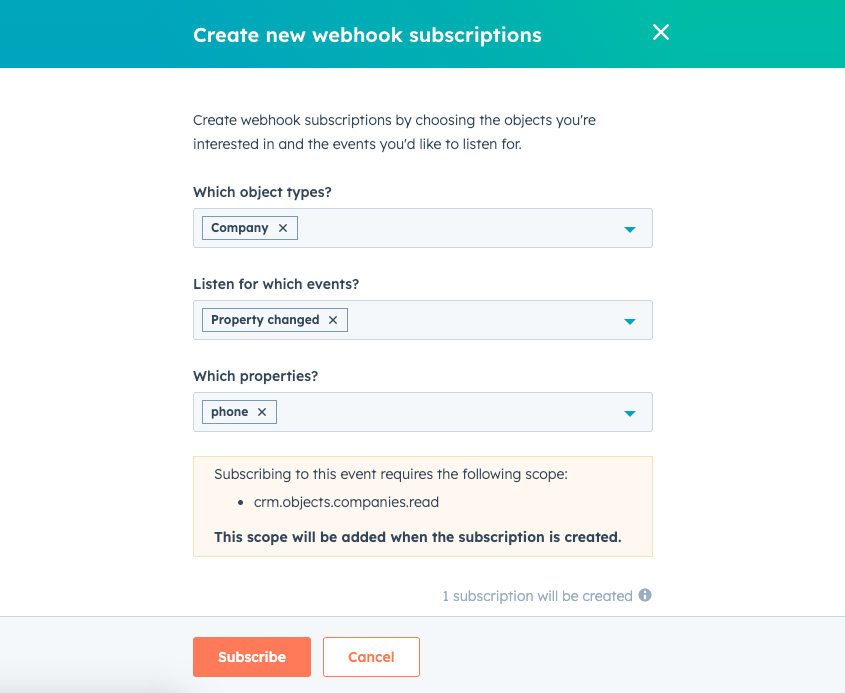
How it works: Both Calendly and HubSpot provide full APIs. Calendly's API v2 covers event types, scheduled events, invitees, and routing form submissions, with webhook support for real-time event notifications.
HubSpot's REST API covers all standard and custom CRM objects, with webhooks for event-driven sync. A custom integration connects these APIs directly, with your own middleware handling authentication, field mapping, transformation, and error recovery.
Source: HubSpot
What it syncs: Anything both APIs expose. This is the only method that supports complex scenarios like syncing Calendly routing form submissions into HubSpot custom objects, building multi-step qualification workflows that span both platforms, or enforcing business rules that go beyond field mapping.
Calendly's new Scheduling API also enables programmatic booking from within HubSpot-connected applications.
Fits: either specialized one-time data migration or ongoing sync with custom business logic; the only method with no ceiling on either.
Setup process:
Register API credentials in both platforms: a Calendly personal access token or OAuth app via the Developer Portal, and a HubSpot private app or OAuth app via HubSpot's developer platform.
Design the data model mapping between Calendly events/invitees and HubSpot contacts/activities, including field-level transformations and a cross-reference table for matching records.
Build a sync service: subscribe to Calendly webhooks (invitee.created, invitee.canceled) and write handler logic that creates or updates HubSpot records via the CRM API.
Implement lookup logic for existing contacts (match by email using HubSpot's search API) to prevent duplicate records.
Add logging, error handling, and retry logic. Calendly does not publish specific rate limit numbers, so test empirically. HubSpot allows 100-190 requests per 10 seconds depending on plan and app type.
Deploy, monitor, and maintain the integration over time.
Strengths: Full control over what syncs, when, and how. Real-time sync via webhooks on both sides. Can implement complex business logic of any kind. No per-record or per-operation fees from a third-party connector. Calendly's MCP Server and HubSpot's remote MCP server open additional integration paths for AI agent workflows.
Limitations: Requires development resources to build and maintain. You own the infrastructure, monitoring, and error recovery. API changes on either platform require ongoing maintenance. The initial build takes weeks, not hours. Calendly does not publish specific rate limit figures, which adds uncertainty to capacity planning.
Best for: Organizations with sync requirements that no off-the-shelf tool can satisfy, such as custom qualification workflows, multi-step routing logic, or integration with internal systems alongside HubSpot. Teams with in-house development resources and a long-term commitment to both platforms.
Key Use Cases
1. Inbound Lead Capture from Calendly Booking Pages
Marketing embeds Calendly on landing pages and website CTAs. When a visitor books a demo or consultation, the native integration creates a HubSpot contact with the invitee's name, email, and booking question responses, then logs the meeting to the contact timeline. HubSpot workflows trigger nurture sequences, assign lead scores, and notify the sales team, all without manual data entry.
Best integration method: Native Calendly-HubSpot integration (Teams plan).
2. Real-Time Lead Routing to the Right Rep
When an inbound lead submits a Calendly Routing Form, the form captures their email, queries HubSpot for the contact or company owner, and routes the visitor to that owner's booking page.
The lead goes from form submission to booked meeting in a single flow, with no queue, no manual reassignment, and no delay. This cuts the lag that lets competitors engage first.
Best integration method: Native Calendly-HubSpot integration with HubSpot ownership lookup (Teams plan).
3. Meeting Activity Logging for Sales Reporting
Sales managers need visibility into rep activity: how many meetings were booked, held, cancelled, and rescheduled. The native integration logs every Calendly event to the corresponding HubSpot contact timeline, making meeting activity available in HubSpot's reporting dashboards alongside calls, emails, and deal stages.
No separate activity tracker or manual CRM entry required.
Best integration method: Native Calendly-HubSpot integration (Teams plan).
4. Post-Meeting Intelligence in the CRM
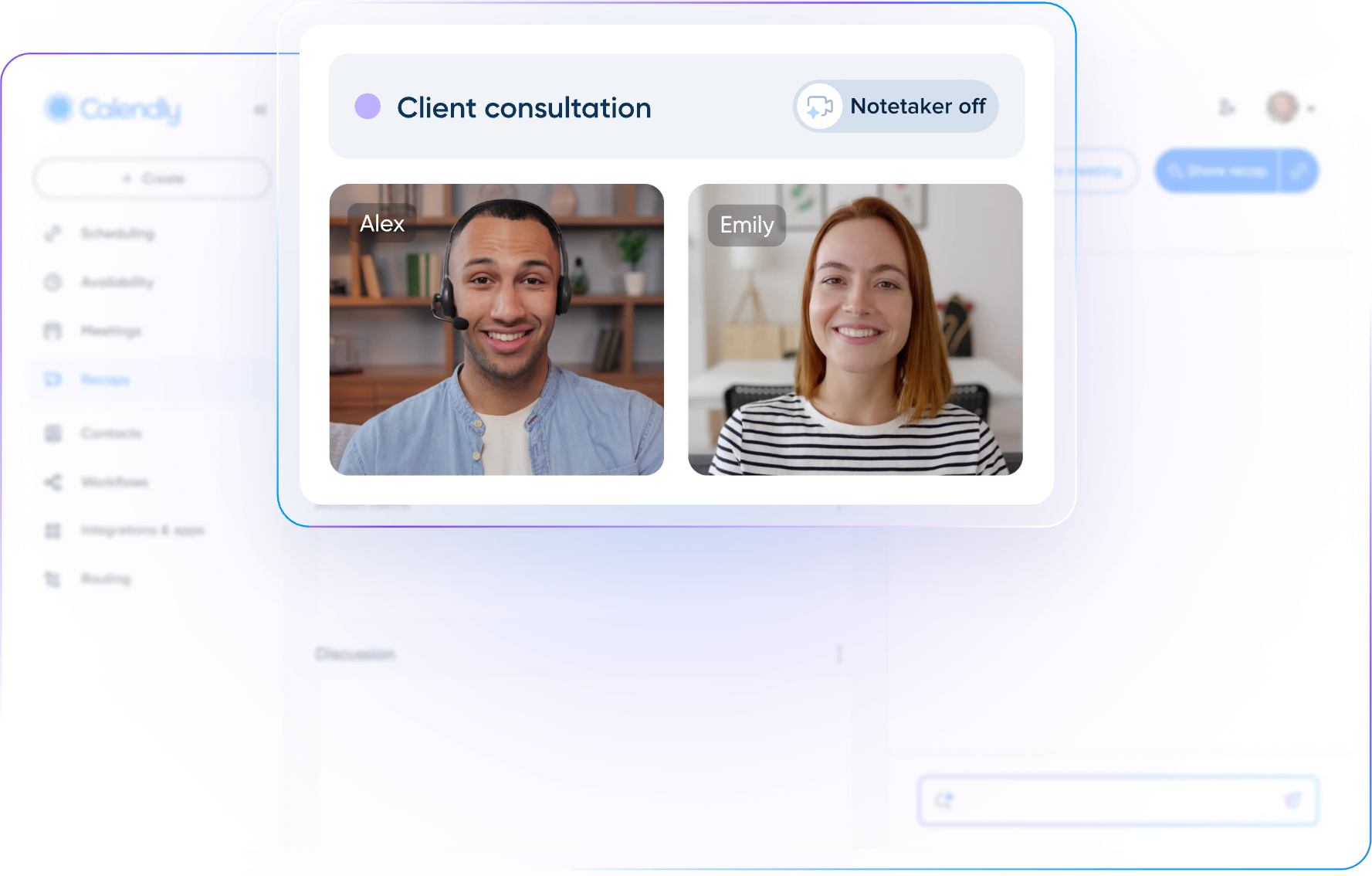
After a meeting, Calendly's Notetaker generates an AI recap with key points and action items. The native integration can push these recaps into HubSpot, attaching them to the contact record so the next rep or manager who opens the contact sees what was discussed without asking for a debrief or searching a separate tool.
Source: Calendly
Best integration method: Native Calendly-HubSpot integration with Notetaker enabled (Teams plan).
5. Event-Based Deal Creation
When a high-value prospect books a specific event type (e.g., "Enterprise Demo" or "Pricing Review"), a Zapier Zap or Make scenario can create a HubSpot deal automatically, associate it with the contact, and assign it to the correct pipeline stage.
This ensures pipeline creation tracks scheduling activity in real time without relying on reps to create deals manually.
Best integration method: Zapier or Make (works on Calendly Standard and above).
Limitations and Considerations
Data That Doesn't Sync
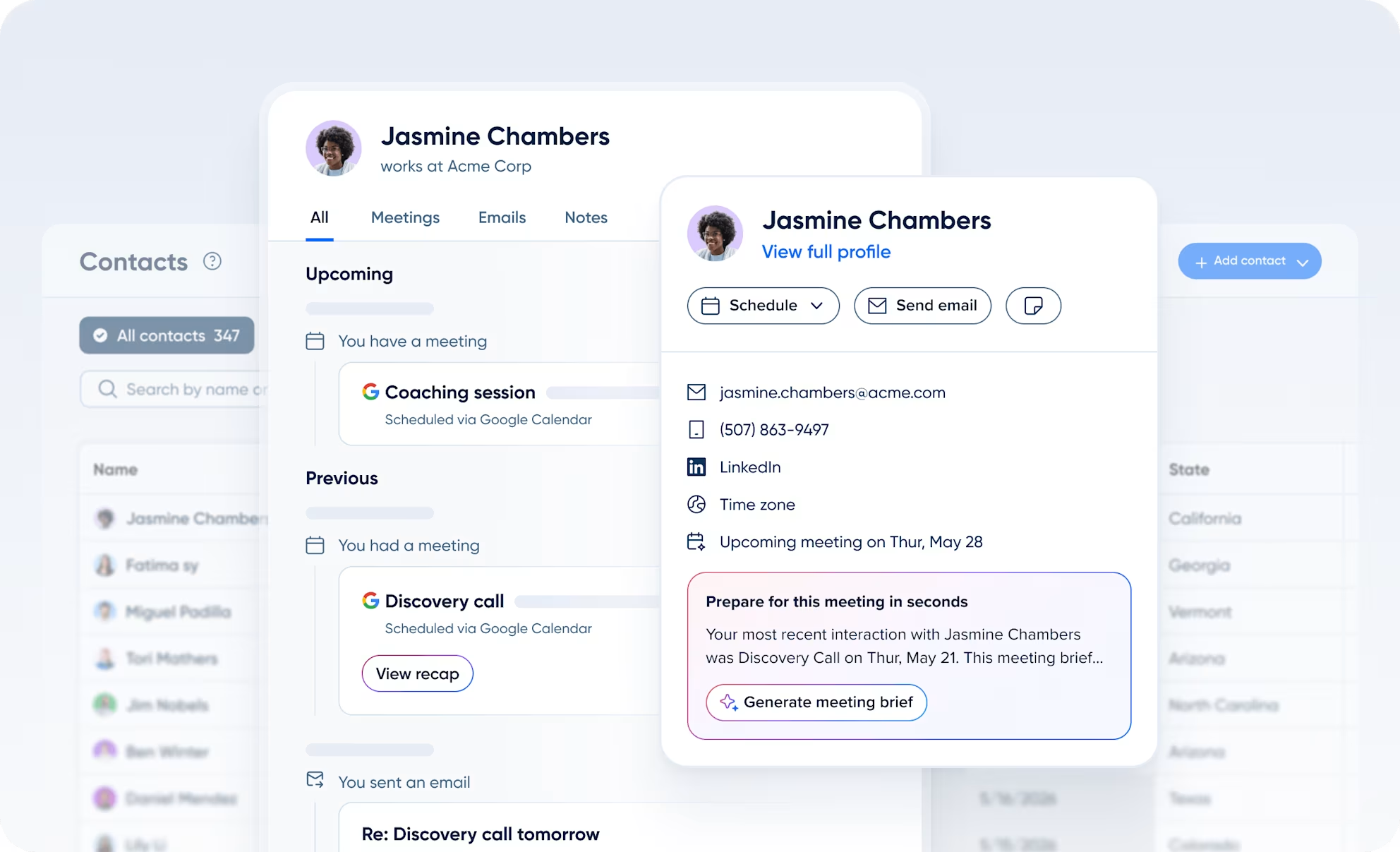
The native integration focuses on meeting events and basic contact data. Calendly's Contacts module (custom fields, contact lists, relationship history, Gmail sync) does not sync into HubSpot.
Source: Calendly
Calendly's Payments data (transaction amounts, package redemptions) does not flow into HubSpot Commerce Hub or deal records through the native integration. If a team needs payment data in HubSpot, a Zapier Zap or custom build is required.
Sync Direction
The primary data flow is Calendly to HubSpot. When a contact's phone number, company, or job title is updated in HubSpot, that change does not propagate back to Calendly. Teams that maintain contact details in both systems will see drift over time unless they treat HubSpot as the sole system of record and update Calendly manually (or build a custom reverse sync).
Pricing Implications
The native integration requires Calendly's Teams plan at $16/seat/month. Teams on the Free ($0) or Standard ($10/seat/month) plans cannot access it. On the HubSpot side, the integration works with all HubSpot tiers including the free CRM, but advanced features like workflows triggered by meeting events require HubSpot Professional or above.
Third-party tools carry their own costs: Zapier starts at $19.99/month and charges by task count; Make starts at $10.59/month and charges by operation.
Permissions and Access
Setting up the native integration requires Calendly admin rights (owner, admin, or group admin) and HubSpot access with permission to create contacts and log activities.
If your HubSpot org uses field-level permissions or sharing rules, the integration's data writes must be allowed for the relevant contact and activity properties. Routing Form ownership lookup requires that HubSpot contacts have assigned owners, as unassigned records cannot be routed.
Maintenance
Both platforms evolve independently. Calendly releases product updates on a regular cadence (the Notetaker CRM push feature is rolling out in stages).
HubSpot versions its API with date-based releases twice a year. Custom fields added to either platform after the initial setup will not sync unless you update the integration configuration. Third-party automation tools may change pricing, deprecate connectors, or alter how they authenticate.
Plan for periodic reviews of the integration's health and accuracy.
What No Method Fixes: The Data Itself
Every method above moves scheduling data from Calendly into HubSpot. None of them checks whether the contact records in HubSpot are accurate, current, or complete.
A prospect who changed jobs two months ago still sits in the CRM with their old title and company. A lead who booked a demo using a personal email has no company data attached.
The integration ensures HubSpot knows a meeting was booked; it does not ensure the person behind that booking is still the right contact, still at the company, or still reachable at that email.
Where ZoomInfo Fits In
Every method in this guide moves scheduling data from Calendly into HubSpot. None of them improves the contact data that determines whether a booked meeting leads to a qualified conversation. When the integration is live but reps walk into calls with outdated titles, missing direct dials, and no company context on the account, the bottleneck is no longer the connector.
That is the gap ZoomInfo closes.
ZoomInfo is a B2B data and go-to-market platform built on 500M contacts, 100M companies, 135M+ verified phone numbers, and 200M+ verified business email addresses.
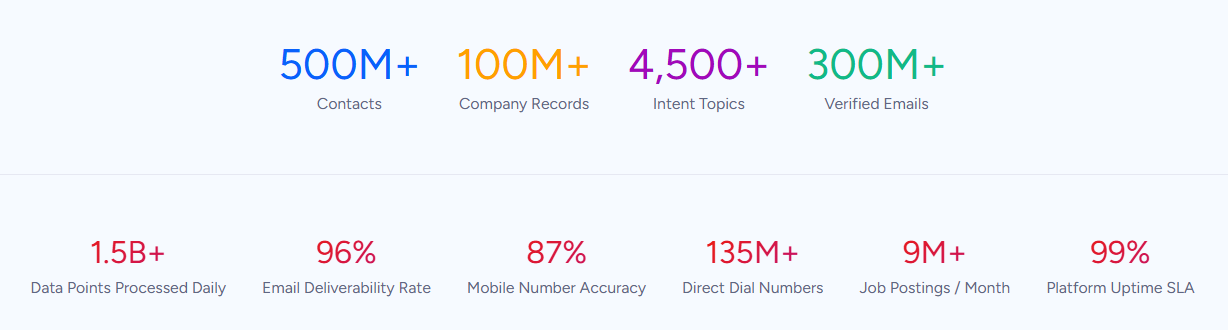
That data is verified through a multi-source pipeline backed by 300+ human researchers and reaching up to 95% accuracy on first-party data. For teams running a Calendly-HubSpot integration, ZoomInfo addresses the data quality layer that no scheduling connector handles.
ZoomInfo integrates natively with both platforms. The HubSpot integration provides real-time contact enrichment, scheduled database refresh, and lead scoring within HubSpot using ZoomInfo's verified B2B data.
The Calendly integration uses ZoomInfo-optimized forms to populate prospect data before routing qualified leads to the right rep via Calendly Routing for instant scheduling.
Source: Calendly
Together, these integrations create a workflow where ZoomInfo enriches the contact in HubSpot, Calendly uses that enriched data for routing, and the booked meeting logs back to a HubSpot record that already has verified email, direct dial, firmographics, and technographics attached.
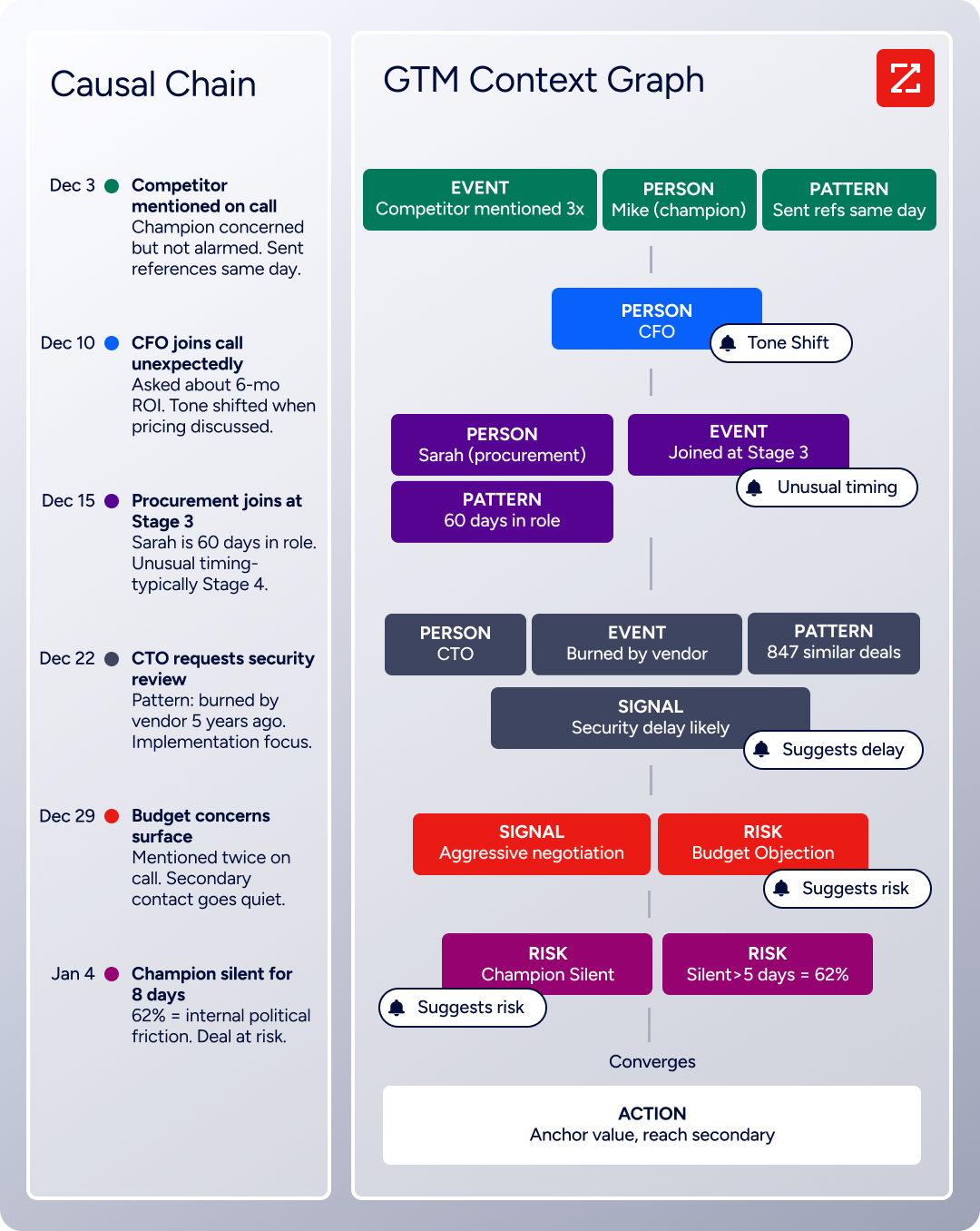
The same data feeds ZoomInfo's GTM Context Graph, which processes 1.5B+ data points daily by combining third-party intelligence with CRM records, conversation transcripts, and behavioral signals to surface not just what happened in a deal, but why.
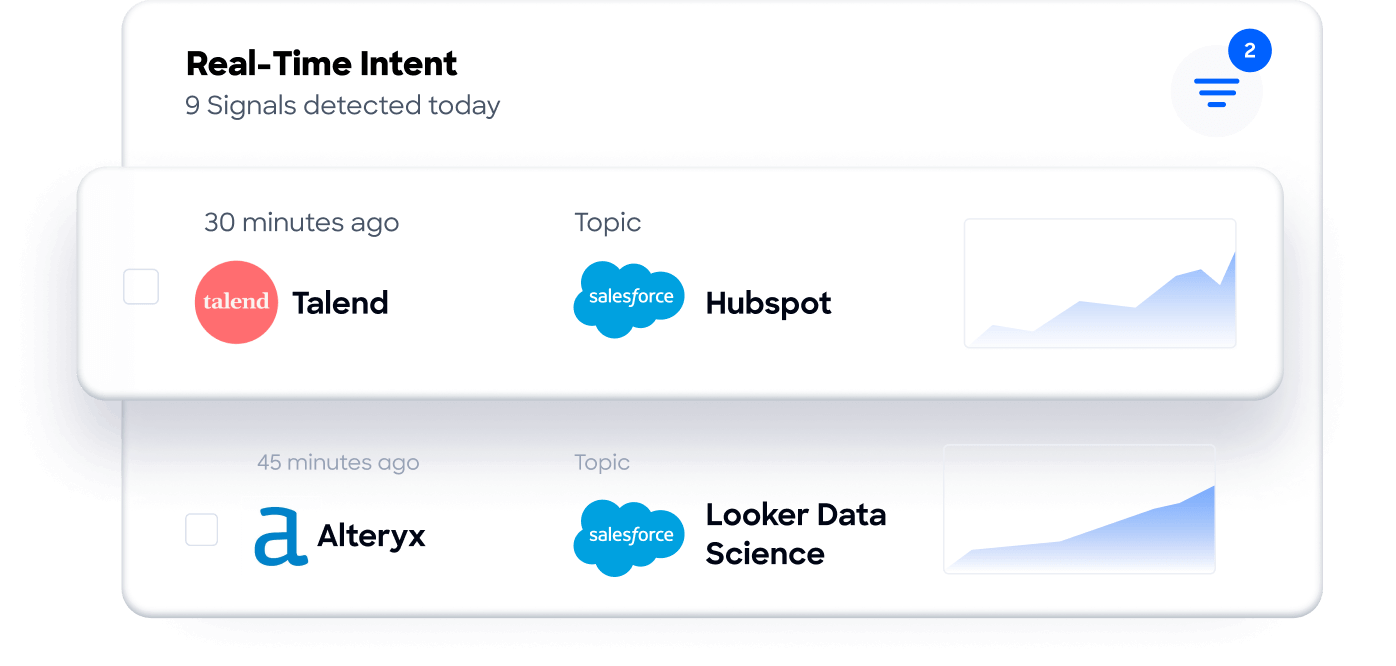
Buyer Intent data from ZoomInfo, tracking signals from 210 million IP-to-Organization pairings, can route into HubSpot to prioritize which accounts should receive outreach and meeting invitations in the first place, so reps focus their Calendly links on prospects who are actively researching relevant solutions.
Enriched records also make the Calendly-HubSpot integration more reliable.
When Calendly's Routing Forms perform a HubSpot ownership lookup, the routing works correctly only if HubSpot records have accurate, complete data to match against. Blank company fields, outdated titles, and missing contact owners cause routing failures and misassigned meetings.
ZoomInfo's enrichment fills those gaps before the routing logic fires, reducing misroutes and ensuring inbound leads reach the right rep.
Seismic's sales team attributed 39% of active pipeline to opportunities identified or influenced by ZoomInfo signals, while boosting productivity by 54% and saving 11.5 hours per week. (Seismic)
Final Verdict
A native Calendly-HubSpot integration exists and handles the core workflow well: meeting data flows into the CRM automatically, contacts are created or updated on booking, and routing forms can match inbound leads to HubSpot contact owners in real time. For most teams, the right choice depends on Calendly plan tier and workflow complexity.
Small teams on Calendly Standard that need basic contact creation from bookings should start with Zapier or Make. Both are fast to set up, affordable at low volumes, and require no engineering resources.
Sales and marketing teams on Calendly Teams or Enterprise should activate the native HubSpot integration. It is the only method that delivers automatic contact creation, meeting timeline logging, HubSpot ownership routing, and Notetaker recap push without third-party tools.
Organizations with complex routing logic, custom qualification workflows, or integration with internal systems alongside HubSpot should invest in a custom API integration using both platforms' APIs and webhooks.
Before committing to a method, clarify what the integration needs to accomplish.
If the goal is logging meetings in HubSpot so activity reports are accurate, the native integration or a Zapier Zap is sufficient.
If the goal is closing the gap between a website visit and a booked meeting with the right rep, the native integration's HubSpot ownership routing is the differentiator. Either way, the quality of the contact data in HubSpot determines whether booked meetings lead to qualified conversations or wasted calls.
ZoomInfo, with its native integrations to both HubSpot and Calendly, plus API and MCP access for any workflow, is the data enrichment layer that ensures every booked meeting starts with a verified, complete contact record.
FAQ
Does Calendly integrate natively with HubSpot?
Yes. Calendly offers a native HubSpot integration that syncs meeting data into HubSpot CRM, creates new contacts from booking invitees, logs meeting activity to contact timelines, and supports HubSpot ownership lookup for lead routing. The integration is available on Calendly's Teams plan ($16/seat/month) and Enterprise plan, and is listed in both the Calendly integrations directory and the HubSpot App Marketplace.
Can I connect Calendly and HubSpot on Calendly's free or Standard plan?
Not through the native integration. The HubSpot integration requires Calendly's Teams plan or above. Teams on the Free or Standard plan can use Zapier or Make to create lightweight automations between the two platforms, such as creating HubSpot contacts when a Calendly meeting is booked. These third-party tools do not provide the HubSpot ownership routing or Notetaker recap push that the native integration delivers.
What happens when someone books a Calendly meeting and they're already in HubSpot?
The native integration matches the invitee's email against existing HubSpot contact records. If it finds a match, the meeting event logs to that contact's timeline without creating a duplicate. If no matching record exists, it creates a new contact. The matching is email-based, so contacts booked under a different email address than the one stored in HubSpot may produce a duplicate record.
Can Calendly route leads to the right HubSpot contact owner automatically?
Yes, using Calendly Routing Forms with HubSpot ownership lookup. When a lead submits a Routing Form, Calendly queries HubSpot in real time, identifies the contact or company owner, and routes the visitor to that owner's booking page. This requires the native integration on Calendly's Teams plan and assigned contact owners in HubSpot.
Does Calendly's Notetaker sync meeting notes to HubSpot?
Yes. Calendly's Notetaker can push AI-generated meeting recaps, transcripts, and recording links into HubSpot, attaching them to the corresponding contact record. This feature is rolling out in stages and requires the native HubSpot integration on a paid Calendly plan with Notetaker enabled.
What Calendly data does NOT sync to HubSpot?
Calendly's Contacts module data (custom fields, contact lists, Gmail sync history), Payments data (transactions, meeting packages), and detailed analytics (page views, conversion rates on booking pages) do not sync through the native integration. These require either third-party tools or custom API development to bring into HubSpot.
How does ZoomInfo improve a Calendly-HubSpot integration?
ZoomInfo solves the data quality problem that no scheduling connector addresses. It enriches HubSpot contact records with verified business emails, direct-dial phone numbers, job titles, firmographics, and technographics before meetings are booked.
This means Calendly's Routing Forms match against complete, accurate HubSpot data for correct lead assignment, and reps walk into meetings with full context on who they are talking to and why the account matters.
ZoomInfo's native integrations with both HubSpot and Calendly make it a natural addition to the two-platform workflow.
Is real-time sync possible between Calendly and HubSpot?
Yes. The native integration pushes meeting events into HubSpot in near real-time as they occur. Calendly also supports webhooks that fire when an invitee books, cancels, or reschedules, enabling custom integrations to process events as they happen. Zapier triggers within 1 to 15 minutes depending on plan tier. True sub-second sync requires a custom webhook integration.
Other tools that connect to HubSpot:
