

If you're searching for "Base CRM vs Pipedrive," you're likely one of two people: a current Base CRM user who knows the platform is disappearing, or someone working from an outdated recommendation. Either way, the comparison has changed.
Base CRM was acquired by Zendesk in 2018 and rebranded as Zendesk Sell. Then, on September 9, 2025, Zendesk announced that Sell will retire permanently on August 31, 2027. No new features. All customer data deleted at retirement. The product is in maintenance mode.
That means this isn't a "which should I pick" comparison anymore. It's a migration decision. And since you're already forced to move, it's worth asking questions that go beyond replacing your CRM:
Are you looking for a like-for-like CRM replacement, or is this the right time to upgrade your sales toolset?
Do your reps struggle more with managing their pipeline or with finding the right prospects to fill it?
How much time does your team spend researching accounts and contacts before making a call?
Is your sales data scattered across multiple tools, or do you have a single view of every buyer interaction?
Do you need just a deal tracker, or a platform that tells you who to call, when to call, and what to say?
In short, here's what we recommend:
Zendesk Sell (formerly Base CRM) was a sales CRM built for teams that wanted pipeline visibility without the complexity of Salesforce. Its native integration with Zendesk Support, built-in calling, and email sequences made it a good choice for companies already in the Zendesk ecosystem. But none of that matters anymore.
The product is being retired, Zendesk has stopped building new features, and Zendesk itself recommends migrating to Pipedrive. If you're still on Zendesk Sell, start planning your move now.
Pipedrive is the natural successor for most Base CRM users. Built by salespeople who were frustrated with CRMs designed for managers, Pipedrive pioneered the kanban-style pipeline view and has spent 16 years refining it.
With 100,000+ companies using the platform, pricing starting at $14/month per seat, and a growing AI feature set, Pipedrive handles pipeline management, lead qualification, email automation, and reporting in one package. For teams that need a CRM and want to be running quickly, it's the straightforward choice.
But here's what a CRM migration forces you to confront: the pipeline tool was never the bottleneck. The bottleneck was the data going into it. Stale contacts, missing phone numbers, no visibility into whether a prospect is actually in-market. Both Zendesk Sell and Pipedrive manage deals well once they exist. Neither tells you which deals are worth creating in the first place.
ZoomInfo is a B2B intelligence and GTM platform built on 500M contacts, 100M companies, 135M+ verified phone numbers, and 200M+ verified business emails.
That data feeds ZoomInfo's GTM Context Graph, an intelligence layer that connects your CRM records, conversation transcripts, and behavioral signals to reveal not just what's happening in your pipeline, but why. Sellers access it through GTM Workspace, a workspace where prioritized accounts, AI-drafted outreach, and deal context come together.
For teams already disrupted by a forced migration, ZoomInfo is a chance to stop thinking about CRM replacement and start thinking about how their reps actually sell.
If upgrading your team's intelligence alongside their pipeline sounds like the right move, see how ZoomInfo works.
Base CRM vs. Pipedrive vs. ZoomInfo at a glance
Zendesk Sell (formerly Base CRM) | Pipedrive | ZoomInfo | |
|---|---|---|---|
Status | Retiring August 31, 2027 | Active, investing in AI | Active, $1.25B annual revenue |
Core function | Sales CRM with support integration | Sales CRM with pipeline focus | AI GTM platform with sales intelligence |
Pipeline management | Visual pipeline with custom stages | Kanban pipeline with deal rotting alerts | GTM Workspace with AI-prioritized accounts |
Prospecting data | 44M businesses, 350M prospect records | 400M+ profiles via Prospector | 500M contacts, 135M+ verified phone numbers |
Built-in calling | Native (Sell Voice on all plans) | Via third-party integrations | Intelligent dialing included |
Intent signals | None | None | Buyer intent from 210M IP-to-org pairings |
AI capabilities | None shipped | AI email writer, AI Sales Assistant, AI reports | GTM Context Graph, AI agents, AI-drafted outreach |
Conversation intelligence | None | None | Chorus (14 patents, call analysis) |
Email sequences | Included on Growth+ | Included on Growth+ (Sequences) | Automated workflows with signal triggers |
Starting price | $19/seat/month (no new sales) | $14/seat/month | Custom-quoted (free Lite tier available) |
Free tier | 14-day trial only | 14-day trial only | ZoomInfo Lite (permanent, no credit card) |
Base CRM is gone: the migration clock is ticking
This is the fact that shapes every other consideration in this article.
Uzi Shmilovici founded Base CRM in 2009 as a reaction to clunky legacy CRMs.
It earned a Visionary placement in Gartner's Magic Quadrant for Sales Force Automation and built a following among sales teams who wanted something simpler than Salesforce. Then Zendesk acquired it in 2018, rebranded it as Zendesk Sell, and positioned it as the sales layer of their customer experience platform.
For a while, the combination worked.
Teams using Zendesk Support could see customer service history alongside deal data, creating a shared view across sales and support.
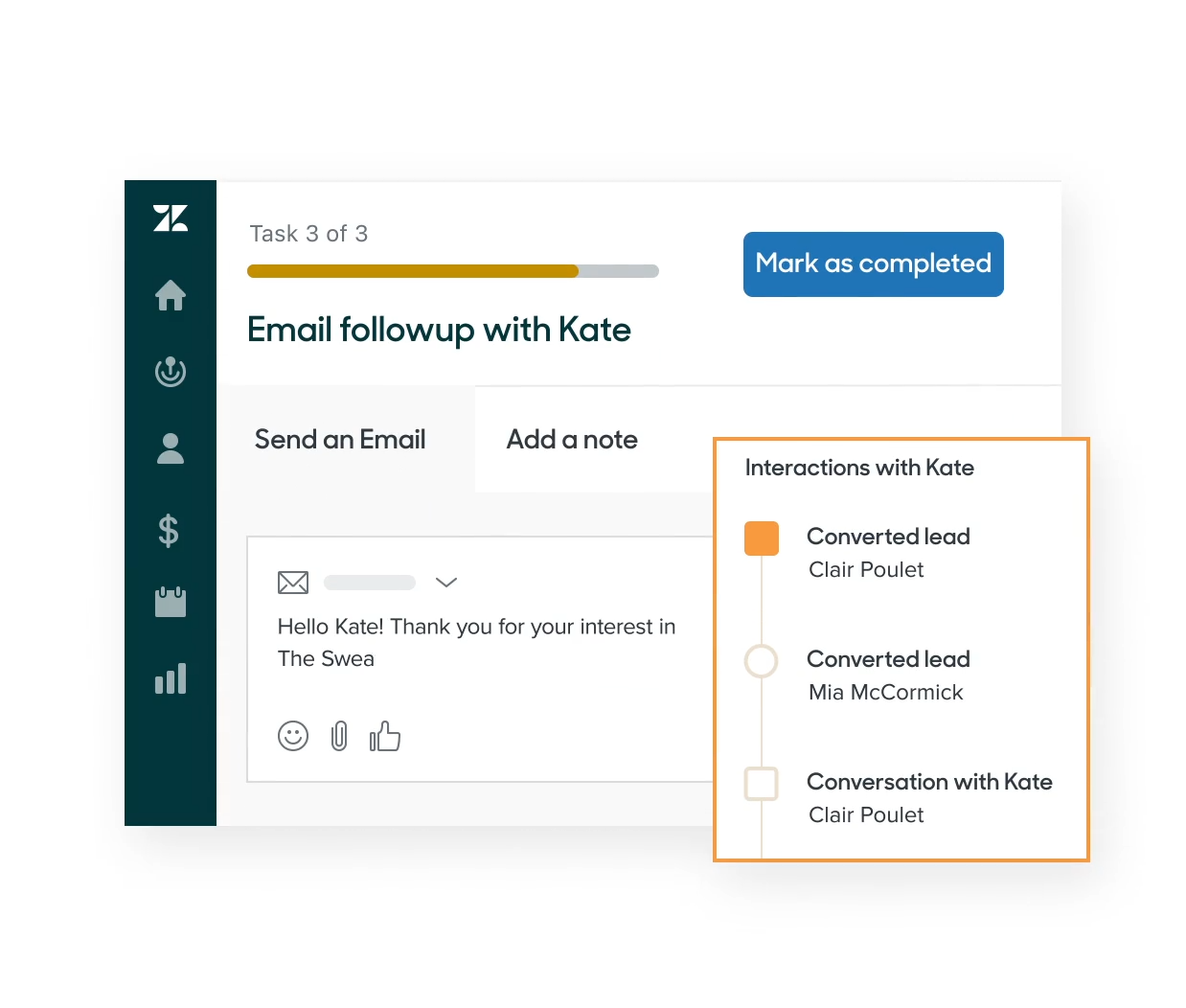
Source: Zendesk Sell
But Zendesk's priorities shifted. The company went private in 2022 through a $10.2 billion acquisition by Hellman & Friedman and Permira, and the new leadership focused on AI-first customer service. The Shopify integration for Sell was removed in April 2025. Five months later, the full retirement was announced. The Zendesk Relate 2026 conference contained zero Sell announcements.
What makes this painful is the data portability situation. According to the retirement announcement, activity history, appointments, emails, call logs, and documents cannot be exported. Zendesk's official migration tooling covers leads, contacts, deals, notes, tasks, and smart list data, but the operational history your team built over years? That stays behind and gets deleted.
The recommended migration path is Pipedrive, which now has a native Pipedrive-Zendesk Support integration for teams that still want both systems connected.
Pipedrive is the closest replacement for what Base CRM did
For teams that loved Base CRM's simplicity, Pipedrive is the most natural landing spot. The products share DNA: both were built by salespeople who thought CRMs should help reps sell, not give managers surveillance tools.
Pipedrive's visual pipeline is the center of the product.
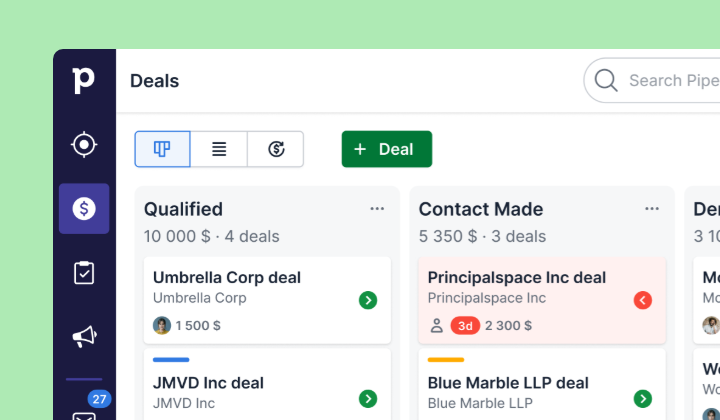
Source: Pipedrive
Deals sit on a kanban board, colored cues flag deals going cold, and everything revolves around "what's the next activity?"
Where Pipedrive goes beyond what Zendesk Sell offered:
Lead management with clear qualification gates. Pipedrive separates leads from deals using a dedicated Leads Inbox, a pre-pipeline holding area where unqualified prospects sit until a rep qualifies them. Labels (hot, warm, cold) communicate urgency. Zendesk Sell had a similar lead-to-contact conversion flow, but Pipedrive's version is more refined.
Automation with conditional logic. Pipedrive's workflow automation includes if/else branching and "wait until event" conditions, letting teams build multi-path automations triggered by deal updates, date fields, or contact changes. Zendesk Sell's triggers were limited to a single event type: "Deal is updated," with no lead- or contact-based triggers available.
AI features in active development. Pipedrive's AI Sales Assistant provides win probability predictions, deal activity reminders, and prompt-based chat for querying CRM data. The AI email writer generates drafts from brief prompts with configurable tone and length. An AI report generator creates pipeline analyses from natural language. Zendesk Sell shipped none of these before the retirement announcement.
Document management built in. Smart Docs lets reps create, send, track, and sign quotes and proposals without leaving Pipedrive, with merge fields that auto-populate from CRM data and built-in eSignatures. Zendesk Sell had no equivalent.
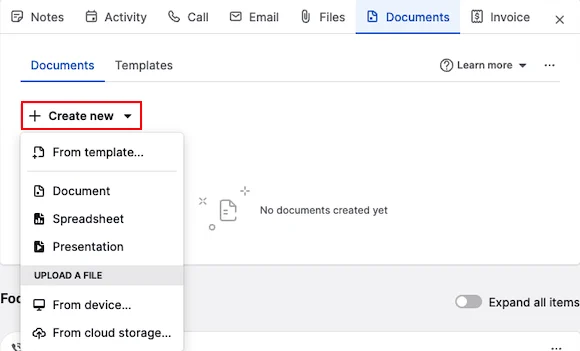
Source: Pipedrive
What Pipedrive doesn't replace: Zendesk Sell's native integration with Zendesk Support gave reps a sidebar view of up to 100 support tickets per contact, directly inside the CRM. Pipedrive offers a separate Zendesk integration, but it won't feel as tightly coupled as the native Sell-Support connection.
Where both CRMs hit a ceiling: sales intelligence
Pipedrive and Zendesk Sell are pipeline management tools. They help you organize and track deals that already exist. But neither answers the questions that come before a deal enters the pipeline: Who should we be targeting? Are they in-market right now? Who are the decision-makers? What technology do they use? What's happening at the company that creates an opening?
Zendesk Sell included a built-in prospecting database of 44M+ businesses and 350M+ prospect records, with enrichment credits on Growth plans and above.
Pipedrive's Prospector offers access to over 400 million profiles and 10 million companies. Both give reps a starting point for outbound prospecting.
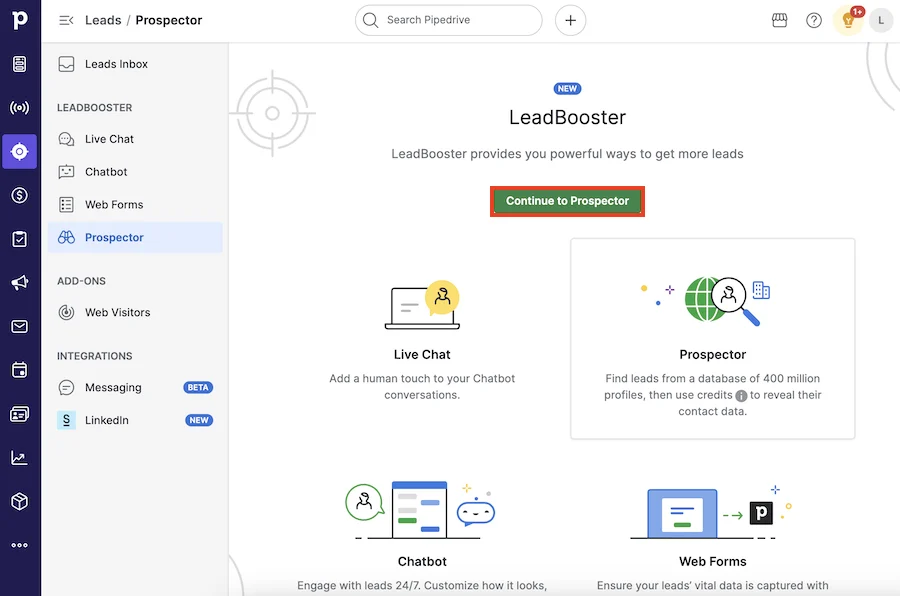
Source: Pipedrive
But starting points have limits. A contact database tells you someone exists at a company. It doesn't tell you whether that company is actively researching solutions like yours, whether the CFO just joined and is restructuring the tech stack, or whether your competitor's contract is up for renewal.
ZoomInfo operates at a different level.
The platform covers 500M contacts, 100M companies, 135M+ verified phone numbers, 120M direct-dial phone numbers, and 200M+ verified business email addresses, verified by 300+ human researchers and achieving up to 95% accuracy on first-party data.
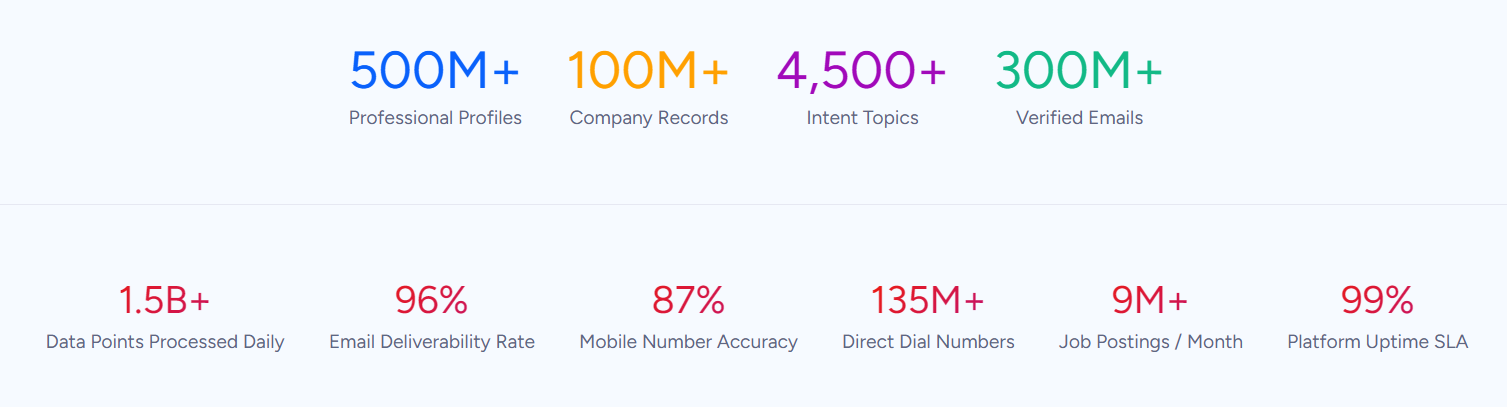
In a Fortune 500 competitive RFP analyzing 25 million contacts across vendors, an independent consultant concluded that "no other competitor came even close."
Beyond contact data, ZoomInfo layers in Buyer Intent signals tracked from 210 million IP-to-Organization pairings and 6 trillion+ new keyword-to-device pairings sourced monthly. Guided Intent, exclusive to ZoomInfo, identifies topics historically correlated with deal success rather than requiring manual topic selection.
Technographics profile the tech stack of 30+ million companies across 30,000+ technologies. WebSights resolves anonymous website traffic to companies and buying team contacts.
The difference for a sales rep is concrete: instead of cold-calling from a list, you're calling a prospect whose company started researching your product category last week, whose VP of Sales just changed jobs, and whose competitor just lost a key contract. That context changes the conversation.
"ZoomInfo gives us the information we need to execute. We don't have to spend our time digging. It's already there, so we can be three steps ahead." (Vensure)
ZoomInfo's intelligence layer goes beyond raw data
Contact databases give you names and numbers. ZoomInfo's GTM Context Graph gives you understanding.
The GTM Context Graph processes 1.5B+ data points daily, connecting ZoomInfo's third-party B2B data with a customer's own CRM records, conversation transcripts from Chorus (ZoomInfo's conversation intelligence platform, backed by 14 technology patents), email interactions, and behavioral signals. The result: an intelligence layer that captures not just what happened in a deal, but why it happened.
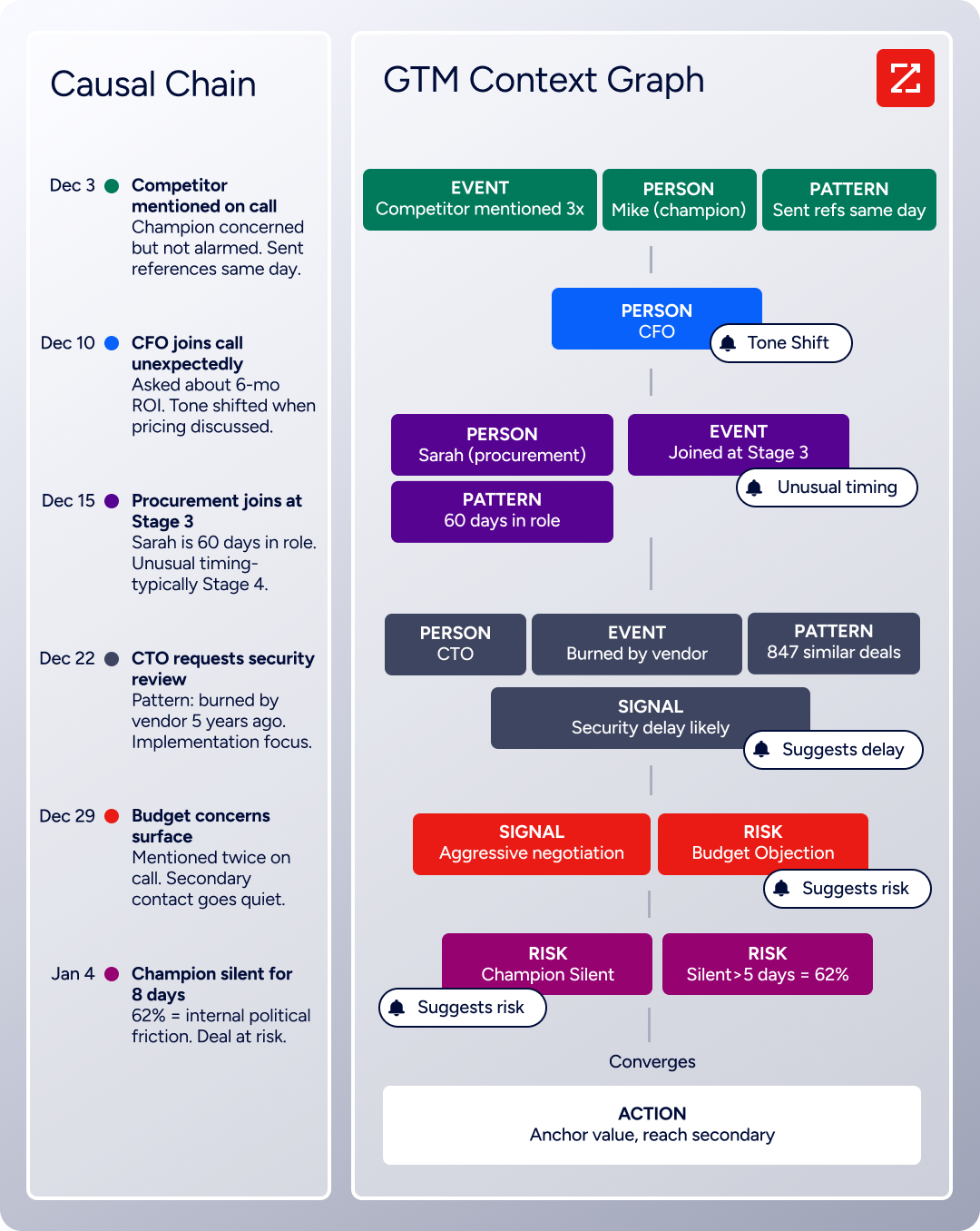
As ZoomInfo's CPO Dominik Facher explains: "The CRM recorded the state change. It has no record of why it happened." A CRM logs that a deal moved from Stage 3 to Stage 4. But maybe the CFO joined the last call and asked about six-month ROI, and that executive sponsorship is what actually accelerated the deal.
That context, captured by Chorus and connected by the GTM Context Graph, is what lets ZoomInfo's AI make useful recommendations rather than generic suggestions.
This intelligence surfaces through GTM Workspace, which replaced the tab-switching between a CRM, a data tool, and an email platform with a single workspace. Reps see an Action Feed of in-market buyers matched to their target criteria, with pre-drafted actions on every signal.
An AI Assistant generates account briefs by pulling CRM history, company news, ZoomInfo signals, and stakeholder context into a summary in seconds.
Neither Pipedrive nor Zendesk Sell offers anything comparable. Both are record-keeping systems. ZoomInfo is the intelligence that makes those records actionable.
"That combination of our internal CRM data, external signals, and AI that's given all that context has helped us craft very specific account- and persona-based messages. And people have responded to them right away." (Seismic)
Sales engagement and communication tools
All three platforms include tools for reaching prospects. The depth varies.
Zendesk Sell built Sell Voice directly into the CRM, powered by Twilio.
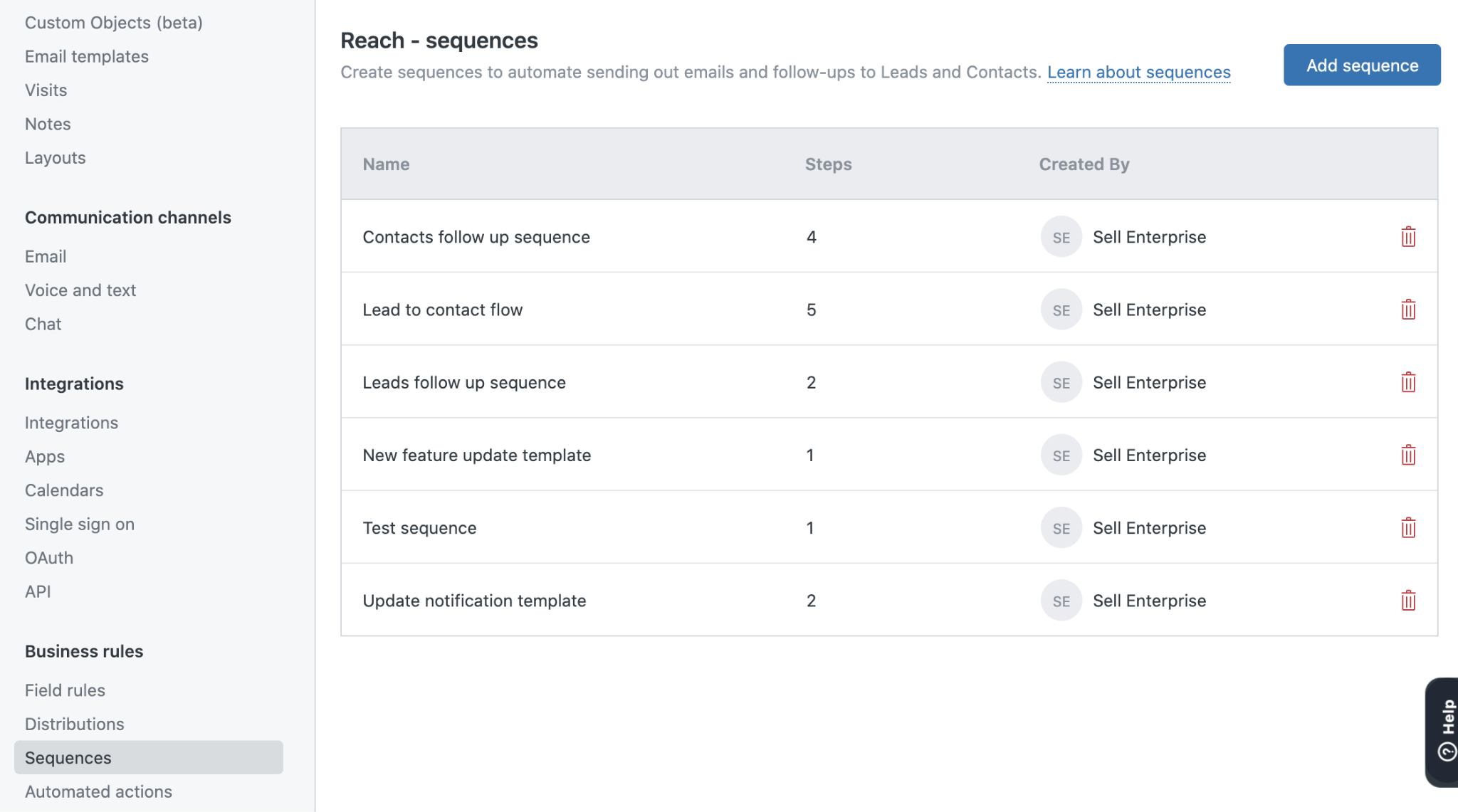
Every user gets a dedicated phone number for calling and texting, with automatic logging to the CRM record. A power dialer on Professional plans and above automates sequential dialing. Email sequences mix automated emails and manual tasks, and stop automatically when a prospect replies. The task player creates focused work sessions with full record context.
Source: Zendesk Sell
For a retiring product, the engagement suite was complete.
Pipedrive takes a different approach.
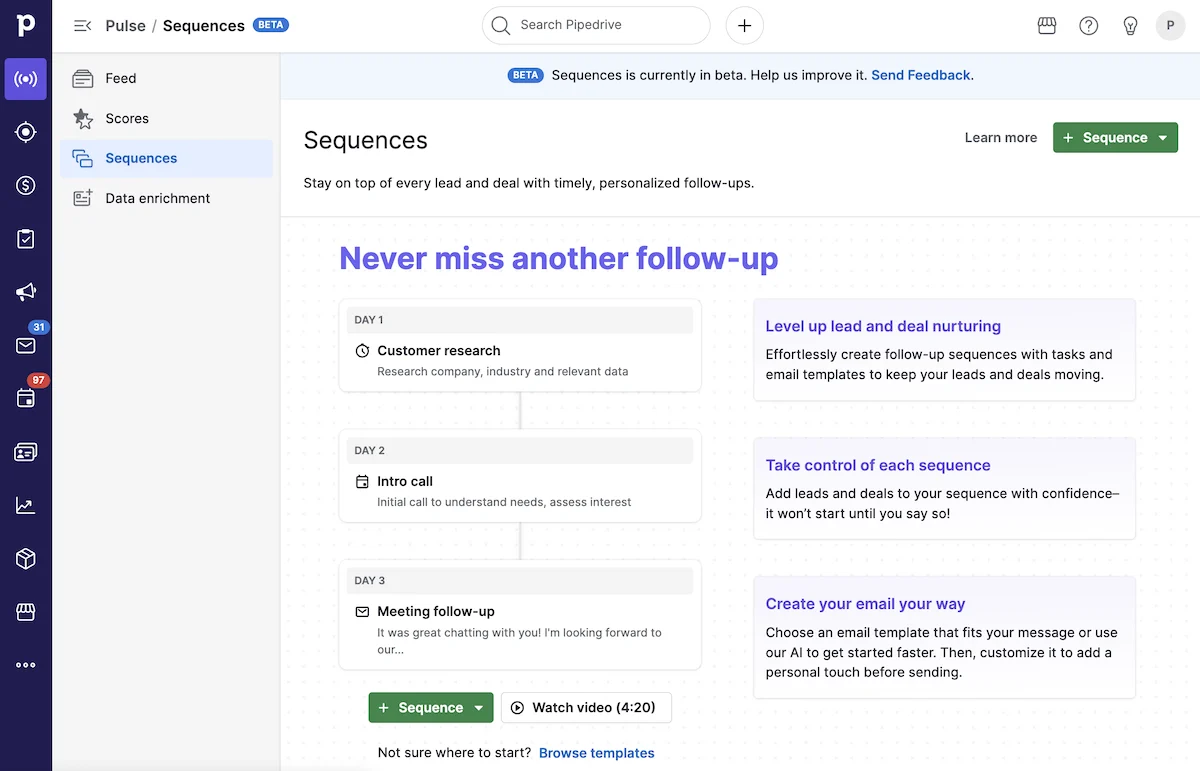
Email sync connects Gmail, Outlook, or any IMAP account into a Sales Inbox inside the CRM, with open and click tracking. Sequences (via Pulse) automate multi-step follow-up flows that pause on engagement signals.
Source: Pipedrive
A meeting scheduler generates shareable booking links integrated with Zoom, Teams, and Google Meet. Pipedrive does not include a native power dialer but integrates with third-party calling tools like JustCall. For email campaigns beyond one-to-one outreach, the Campaigns add-on adds a drag-and-drop email builder with CRM-powered segmentation.
ZoomInfo approaches engagement from the intelligence side.
Rather than starting with a blank email, GTM Workspace generates AI-drafted outreach based on the specific context behind each account, drawn from the GTM Context Graph. Workflows trigger automated outreach based on buying signals: a prospect researching your category, a champion changing jobs, a competitor contract expiring.
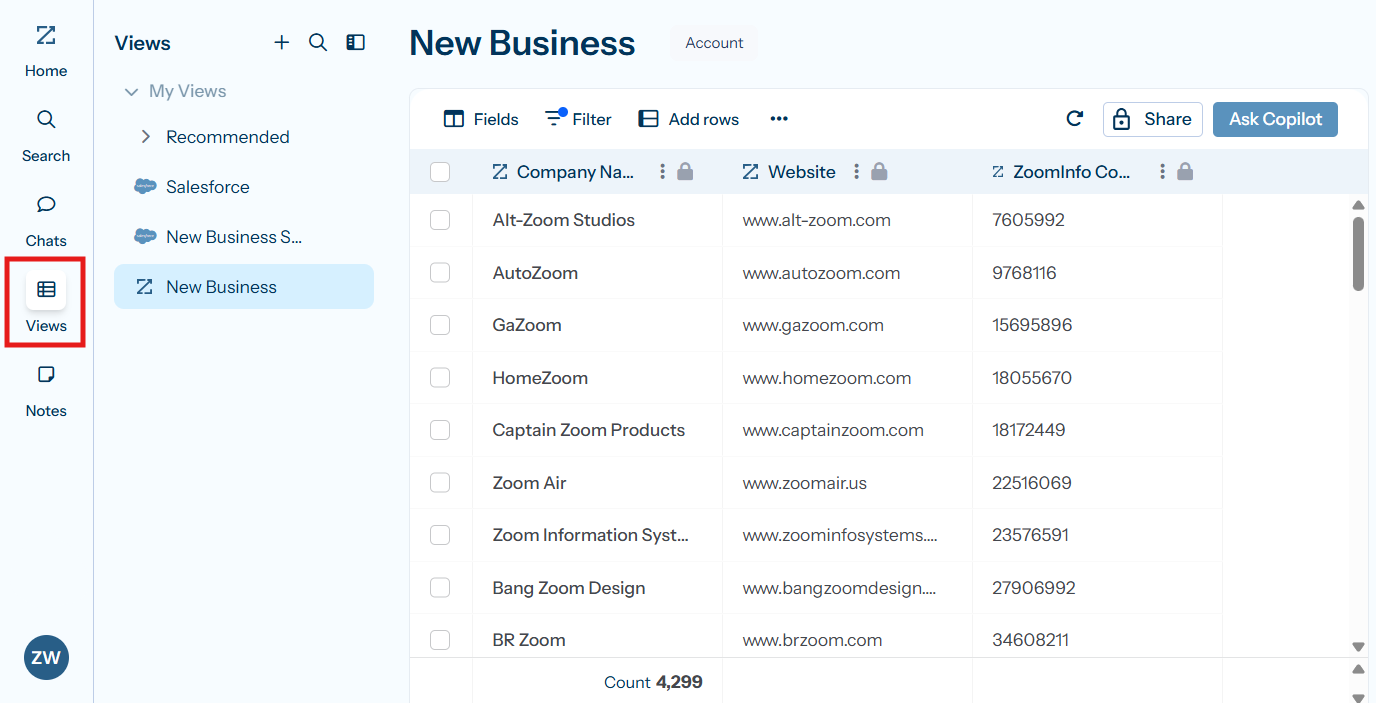
Source: ZoomInfo
Through its partnership with Salesloft, ZoomInfo's buyer signals feed directly into multi-channel sequencing for phone and email execution. And Chorus captures every customer call, extracting insights that improve the next outreach.
The distinction matters. Pipedrive and Zendesk Sell help you execute outreach. ZoomInfo tells you which outreach is worth executing and writes the first draft based on actual account intelligence.
Pricing reflects different value propositions
The three platforms price according to what they deliver.
Zendesk Sell used four tiers: Sell Team at $19/seat/month, Sell Growth at $55/seat/month (adds sequences and prospecting credits), Sell Professional at $115/seat/month (adds power dialer, lead scoring, advanced permissions), and Sell Enterprise at $169/seat/month.
Email sequences and the prospecting database were locked behind the $55/month Growth plan. Advanced reporting required the $115/month Professional tier. Since the product is in maintenance mode with no new features, these prices represent declining value against actively developed alternatives.
Pipedrive replaced its five-tier lineup in 2025 with four plans: Lite, Growth, Premium, and Ultimate. Entry pricing starts at $14/seat/month.
Core pipeline features, the Pulse prospecting feed, and AI-powered report creation are available on all plans. Email sync and automations require the Growth plan. Premium includes Smart Docs, Projects, and LeadBooster (chatbot, live chat, Prospector, and web forms) bundled rather than sold as add-ons.
Annual billing saves up to 42%. For teams migrating from Zendesk Sell's Growth plan at $55/month, Pipedrive's Growth plan delivers comparable functionality at a lower price.
ZoomInfo uses custom-quoted, consumption-based pricing with no published dollar amounts.
Pricing scales around seats, credit volume, features, and contract length. Three product lines (Sales, Marketing, and Chorus) each have their own tier structures (Professional, Advanced, Enterprise). ZoomInfo is premium-priced and targets enterprise and upper mid-market buyers.
However, ZoomInfo Lite offers a permanent free tier with access to the B2B database, 10 monthly export credits, individual and company searches, the Chrome extension, and basic website visitor reveals. A 7-day free trial provides broader access. For teams evaluating whether the intelligence layer justifies the investment, both entry points cost nothing to try.
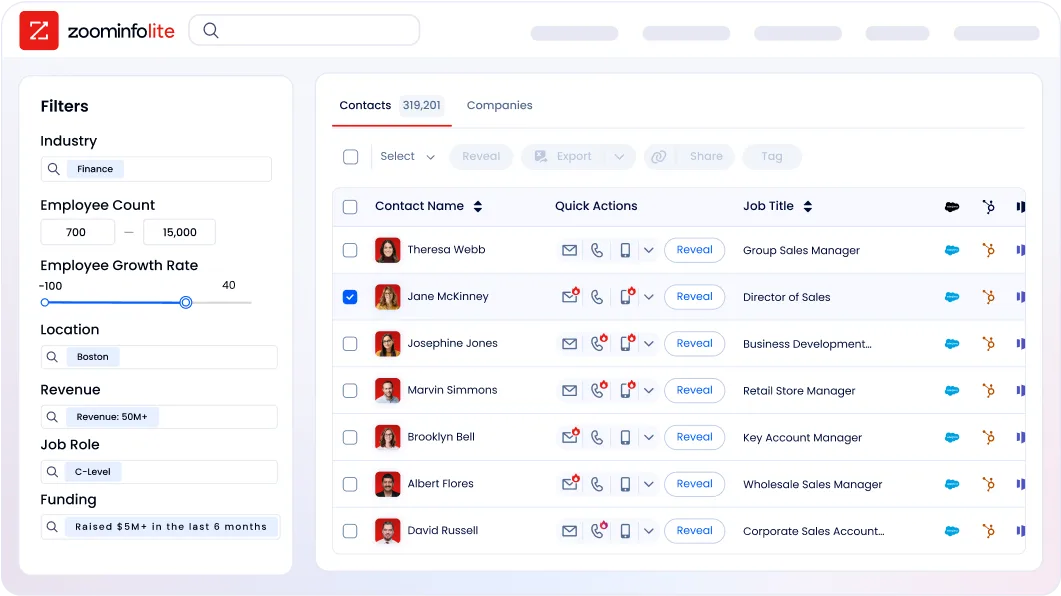
The pricing comparison needs context. Pipedrive charges per seat for CRM access. ZoomInfo charges for intelligence, data, and execution capabilities that go far beyond what a CRM provides. Comparing the per-seat cost is like comparing the price of a filing cabinet to the cost of a research department. The question is whether your team's constraint is organizing deals or finding the right deals to pursue.
Integration and platform flexibility
How each platform connects to the rest of your sales stack matters, especially during a migration.
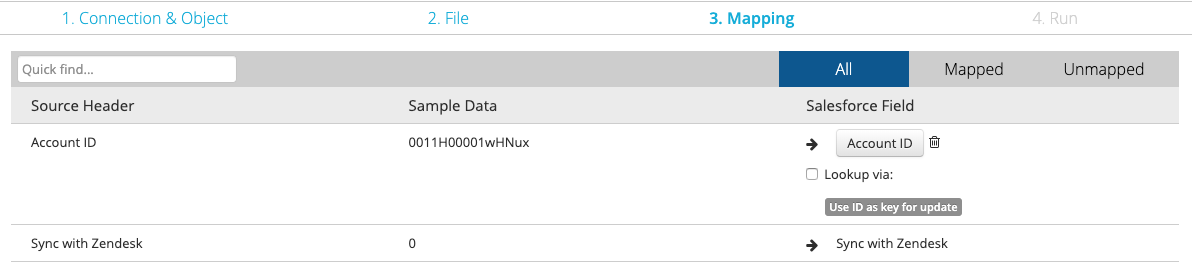
Zendesk Sell offered native integration with Zendesk Support (its primary differentiator), Google Workspace (two-way sync with Gmail, Calendar, Contacts, and Drive), Zendesk Chat, and a Zapier connection to 750+ third-party apps.
Source: Zendesk Sell
The broader Zendesk marketplace listed 1,800+ apps, though most targeted Support rather than Sell. The open REST API included Core, Sync, Firehose, and Search surfaces. Post-retirement, these integrations become liabilities rather than assets.
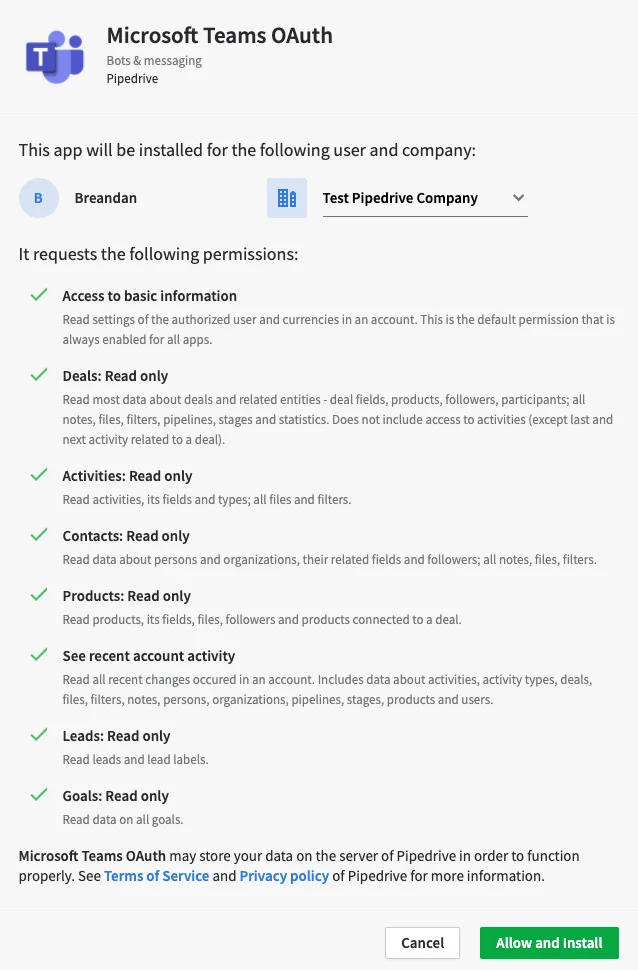
Pipedrive maintains a marketplace with 500+ integrations and a free open API on all plans.
Key connections include Zapier, Make, Google Meet, Microsoft Teams, Mailchimp, PandaDoc, DocuSign, QuickBooks, Xero, Stripe, Slack, and JustCall.
Source: Pipedrive
The Developer Hub provides full API reference with interactive testing, official clients for Node.js and PHP, and a developer sandbox account. App extensions allow embedding custom UI inside Pipedrive. For teams comfortable with Zapier or Make, Pipedrive connects to nearly anything.
ZoomInfo approaches integrations from a different direction.
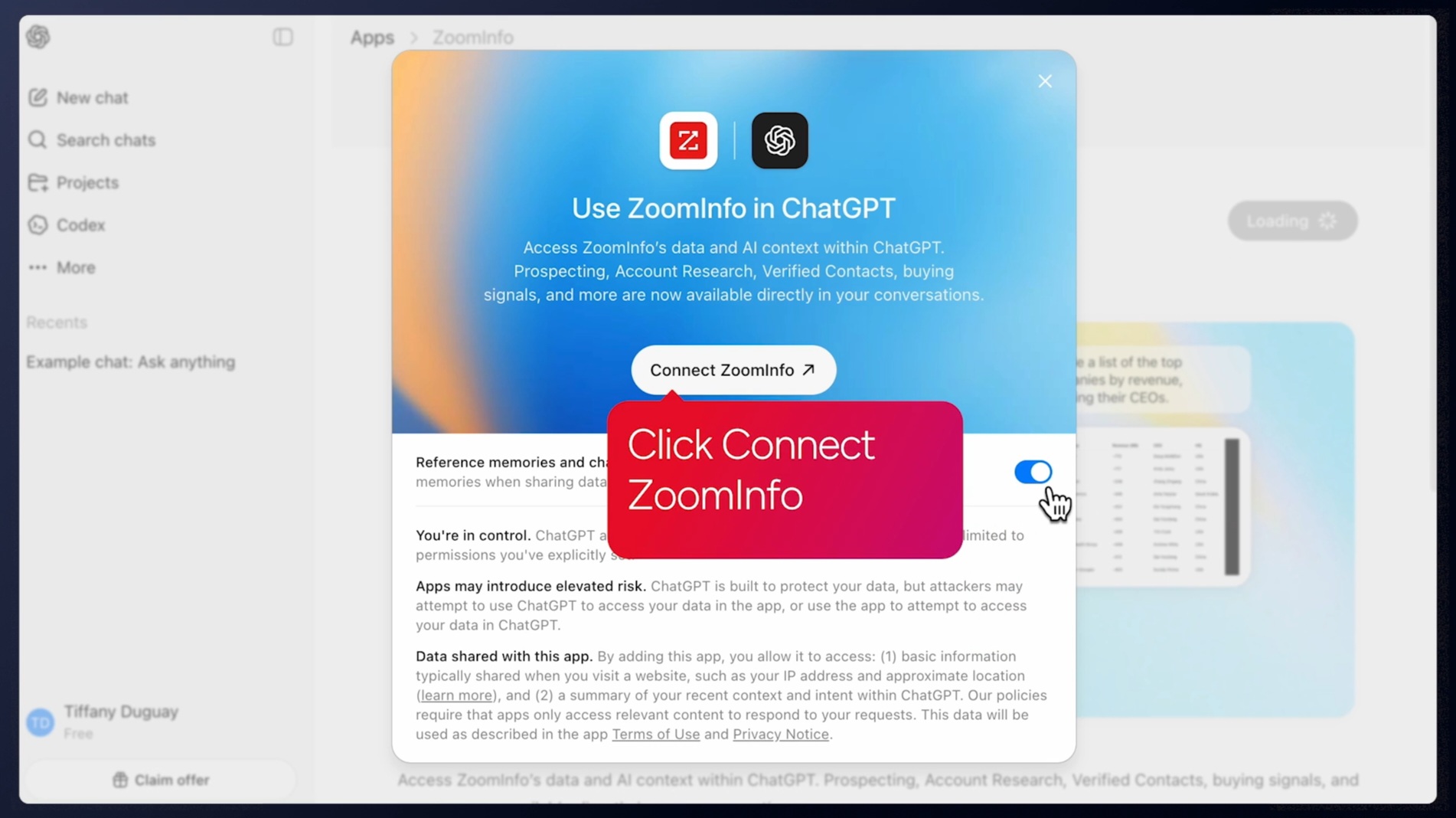
Rather than connecting to your tools, ZoomInfo powers them. The Enterprise API delivers ZoomInfo's data and intelligence into any database, system, or workflow. The MCP server connects AI models directly to ZoomInfo's B2B data as a native tool, currently supporting Claude and ChatGPT.
Source: ZoomInfo
Pre-built integrations cover Salesforce, HubSpot, Microsoft Dynamics 365, Snowflake, and over 120 partner integrations across CRM, marketing automation, sales engagement, and data warehouse categories. API access is included in all relevant plans.
The critical point for migration planning: ZoomInfo integrates with Pipedrive's ecosystem. Teams don't have to choose between a CRM and an intelligence platform. They can use Pipedrive for pipeline management and ZoomInfo for the data and intelligence that feeds it, or use ZoomInfo's GTM Workspace as their primary selling surface with CRM sync running in the background.
"The plug-and-play aspect of the API means I can integrate it into any process and get information at a moment's notice." (BDO Canada)
Base CRM vs. Pipedrive vs. ZoomInfo: Which should you choose?
The right choice depends on where your sales team's biggest constraint sits.
If you're on Zendesk Sell, start migrating now.
Don't wait until August 2027. The product is in maintenance mode with no new features. Activity history, emails, call logs, and documents cannot be exported. Every month you delay makes the migration harder. Zendesk provides migration tooling for leads, contacts, deals, notes, tasks, and smart lists. Use it while support is still available.
Choose Pipedrive if:
You need a straightforward CRM replacement for pipeline management
Your team's primary challenge is organizing and tracking existing deals
Budget is tight and you need a quick, low-risk migration
You value simplicity and fast setup over advanced intelligence
Your prospecting needs are served by a basic contact database
Choose ZoomInfo if:
Your team's bottleneck is finding and qualifying the right prospects, not just tracking deals
You want to know which accounts are actively in-market before you call them
Conversation intelligence and AI-powered account research would change how your reps sell
You're ready to invest in the data and intelligence layer that makes every other tool more effective
You want a platform that grows more valuable as your team scales
Explore ZoomInfo Lite for free or request a demo to see the full platform.
Use both if:
You want Pipedrive's pipeline management with ZoomInfo's intelligence feeding it
Your reps need a focused CRM for deal tracking and a separate workspace for account research and outreach
Budget allows for both a CRM and an intelligence platform
A forced migration is disruptive. It's also an opportunity. If your team has been working with incomplete data, cold-calling from stale lists, and manually researching every prospect before a call, replacing Base CRM with another pipeline tracker solves only the smallest part of the problem. The organizations seeing the biggest results are the ones that use this moment to add the intelligence layer their CRM was never designed to provide.
"Without ZoomInfo, it would be extremely difficult, if not impossible, to achieve our business objectives. Without it, we wouldn't be able to understand the market, have the right contact data, and make meaningful connections." (Smartsheet)
Base CRM vs. Pipedrive vs. ZoomInfo FAQ
Is Base CRM still available?
No. Base CRM was acquired by Zendesk in 2018 and rebranded as Zendesk Sell. Zendesk announced on September 9, 2025 that Sell will be permanently retired on August 31, 2027. The product is in maintenance mode with no new features planned, and Zendesk will delete all customer data at retirement. Zendesk recommends migrating to Pipedrive.
What data can I export from Zendesk Sell before retirement?
Zendesk's migration tooling covers leads, contacts, deals, notes, tasks, and smart list data. However, activity history, appointments, emails, call logs, and documents cannot be exported. This is a significant limitation, so the sooner you begin migration, the less historical context you lose.
How does Pipedrive compare to Zendesk Sell for pipeline management?
Pipedrive offers a more refined version of what Zendesk Sell provided.
Both use visual kanban pipelines, but Pipedrive adds deal rotting alerts, more flexible workflow automation with if/else branching, AI-powered reporting and email generation, Smart Docs with built-in eSignatures, and a dedicated Leads Inbox that separates unqualified prospects from the active pipeline. Pipedrive is also actively developing new features, while Zendesk Sell is frozen.
What does ZoomInfo do that a CRM like Pipedrive doesn't?
ZoomInfo provides the intelligence layer that CRMs lack. Pipedrive tracks deals and contacts you already know about. ZoomInfo tells you which companies are actively researching solutions like yours (buyer intent), who the decision-makers are (with verified direct dials and emails), what technology they use, and when signals like job changes or funding events create an opening.
The GTM Context Graph connects this data with your CRM records and conversation history to explain why deals move or stall.
Can I use ZoomInfo and Pipedrive together?
Yes. ZoomInfo integrates with most major CRMs and sales tools. Teams can use Pipedrive for day-to-day pipeline management while using ZoomInfo for prospecting, account intelligence, and buyer intent signals. ZoomInfo's data can feed directly into Pipedrive through integrations, enriching contact records and triggering outreach based on buying signals.
How much does ZoomInfo cost compared to Pipedrive?
Pipedrive starts at $14/seat/month with four published tiers.
ZoomInfo uses custom-quoted, consumption-based pricing with no published prices, reflecting its broader capabilities. ZoomInfo targets enterprise and mid-market buyers and is premium-priced. However, ZoomInfo Lite offers a permanent free tier with 10 monthly export credits, database access, and basic features, and a 7-day free trial provides broader access for evaluation.
Which platform has the best mobile app for field sales?
Both Zendesk Sell and Pipedrive offer native iOS and Android apps with geolocation features for field sales. Pipedrive's mobile app includes offline activity scheduling, in-app calling with automatic logging, a Nearby feature showing geographically close contacts, and a business card scanner.
Zendesk Sell's mobile app supports similar functionality but does not fully mirror the web experience, with some features limited or read-only on mobile.
What happens to the Zendesk Sell and Zendesk Support integration after retirement?
The native Sell-Support integration will stop working when Zendesk Sell retires on August 31, 2027. For teams that need CRM and support tool integration, Pipedrive offers a separate Zendesk Support integration, though it won't be as tightly coupled as the native Sell-Support connection was.
More Pipedrive matchups worth a look:
