

Teams that run CallRail for call tracking and HubSpot as their CRM usually discover the same problems within a quarter:
call data lives in CallRail while lead records live in HubSpot, so reps toggle between platforms to connect a phone conversation to a pipeline deal,
marketing attribution stops at the click because call outcomes never reach the CRM contact record,
and when a prospect calls from a paid search ad, the campaign data stays in CallRail while the follow-up happens in HubSpot with no link between the two.
However the two platforms ended up coexisting (a marketing team adopting CallRail for keyword-level call attribution while sales runs on HubSpot, an agency deploying call tracking across client accounts, or a business adding phone tracking to an existing HubSpot workflow), the longer they operate without a connection, the more attribution data goes unused and the harder it becomes to measure which campaigns produce revenue.
Connecting CallRail and HubSpot closes that gap.
Calls, texts, and form submissions captured in CallRail flow into HubSpot contact timelines so every interaction is visible in the CRM without manual entry. Marketing attribution data (source, campaign, keyword, landing page) travels with each call record so pipeline reports reflect which ads drove conversations, not just clicks. When CallRail's AI qualifies a lead or scores a call, that intelligence reaches HubSpot automatically, so reps prioritize follow-ups based on conversation quality rather than gut feel.
CallRail offers a native HubSpot integration through the HubSpot App Marketplace. For teams that need different data flows or conditional logic, third-party automation tools like Zapier and Make can bridge the two platforms with customizable triggers and actions. Custom API development is also an option, since both platforms offer documented REST APIs. Each method differs in setup complexity, sync direction, data coverage, and cost.
One problem no connection method solves: the integration moves call data and attribution into the CRM, but it does not verify whether the contact records receiving that data are accurate, complete, or current.
That is where ZoomInfo comes in. ZoomInfo integrates natively with HubSpot, providing real-time contact enrichment, verified B2B data, and automated lead scoring inside HubSpot records, so call attribution data flowing from CallRail lands on contacts that are accurate and actionable. ZoomInfo's Enterprise API and MCP access can also feed verified data into any system in the stack.
This article covers the full landscape of the CallRail-HubSpot integration: which methods are available, what data each one handles, how to set them up, the use cases that justify connecting both platforms, and the limitations to plan for. It also covers how ZoomInfo fits in as a data enrichment layer that strengthens the records flowing between CallRail and HubSpot.
Let's start with an overview of the integration.
Integration Overview
Source: CallRail
Does a native integration exist?
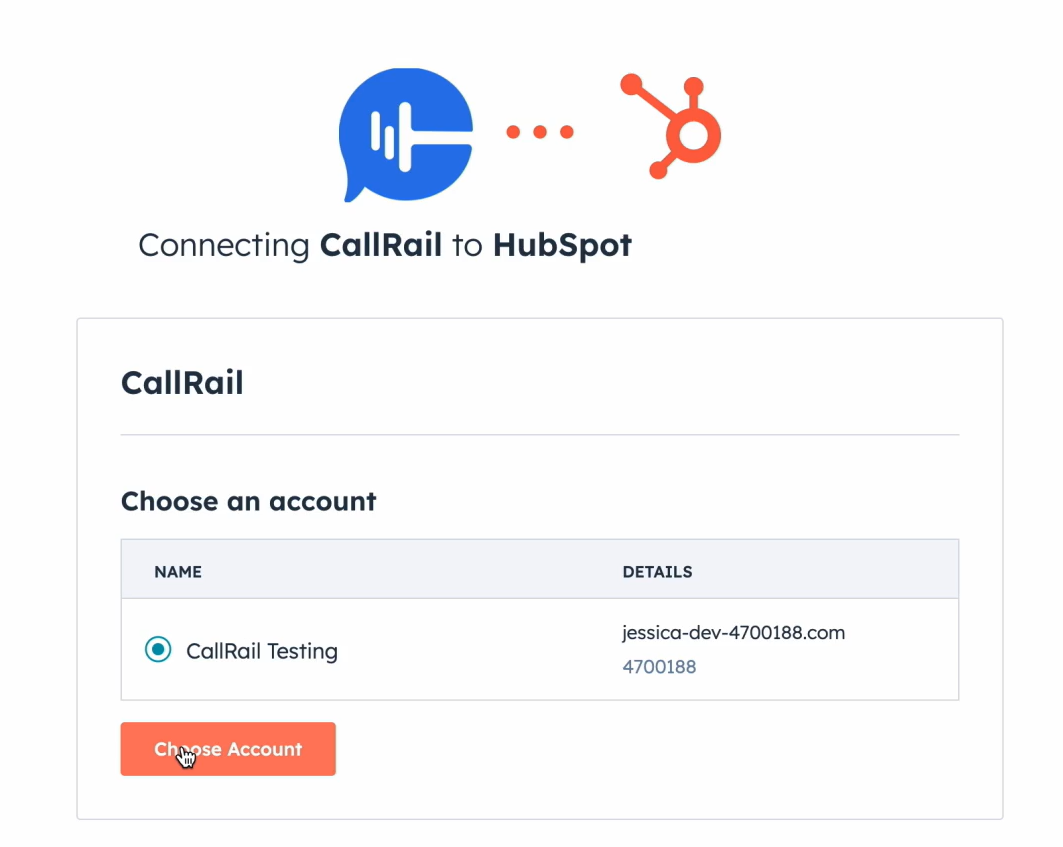
Yes. CallRail offers a native HubSpot integration through the HubSpot App Marketplace. CallRail is a HubSpot Technology Partner with a certified integration. The connection sends calls, text messages, and form submissions directly to HubSpot contacts' activity timelines.
What data can sync?
Inbound and outbound calls, text messages, form submissions, call recordings, call duration, caller ID, marketing attribution data (source, campaign, keyword, landing page), call tags, lead qualification status, and Conversation Intelligence data (call summaries, sentiments). Voice Assist data (intake responses, lead scores) can also sync following the September 2025 integration expansion.
Is the sync bidirectional?
Partially. The native integration primarily sends data from CallRail to HubSpot: call activity, attribution, and AI insights push into HubSpot contact timelines. The Voice Assist expansion lets Voice Assist pull HubSpot records to greet returning callers by name, adding a limited reverse flow. Full bidirectional CRM sync (pushing HubSpot deal stages or contact updates back to CallRail) is not a native feature.
Is it real-time or batch?
The native integration pushes call and form events into HubSpot in near real-time as they occur. Third-party automation tools like Zapier trigger within 1 to 15 minutes depending on plan tier.
What are the available methods?
Native CallRail-HubSpot integration, third-party automation (Zapier, Make), and custom API development using both platforms' REST APIs and webhooks.
Method | Setup Difficulty | Data Flow | Real-time? | Cost |
|---|---|---|---|---|
Native Integration | Low | CallRail to HubSpot (primary) | Near real-time | Included with CallRail plans |
Zapier | Medium | One-way per Zap | Near real-time (1-15 min) | From $19.99/mo |
Make | Medium | Configurable per scenario | Near real-time or scheduled | From $10.59/mo |
Custom API | High | Fully customizable | Real-time via webhooks | Developer time + hosting |
One distinction worth settling upfront: the native integration handles ongoing, automatic sync of call and form activity as part of daily marketing and sales workflows. Zapier and Make handle event-triggered flows with more routing flexibility but narrower default data coverage. Custom API development is the only method that can build arbitrary data flows in both directions, but it requires engineering resources to build and maintain.
Integration Methods
Native CallRail-HubSpot Integration
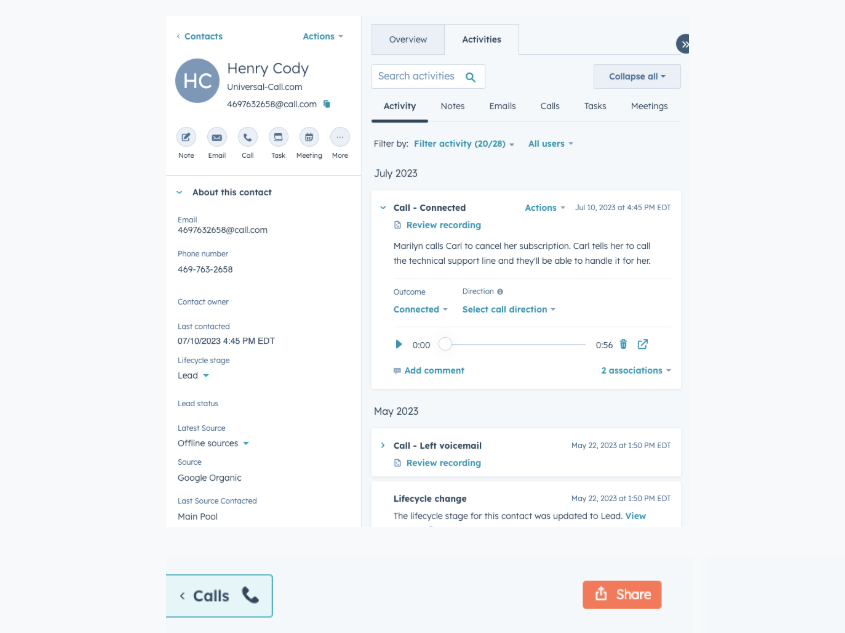
How it works: CallRail's native HubSpot integration connects the two platforms directly through the HubSpot App Marketplace. When CallRail captures a call, text, or form submission, the integration matches the caller or submitter to an existing HubSpot contact (by phone number or email) and logs the interaction on that contact's activity timeline.
Source: CallRail
If no match exists, CallRail creates a new contact. Marketing attribution data (source, campaign, keyword, landing page, gclid) travels with each activity record, tying phone conversations to the campaigns that drove them.
The September 2025 Voice Assist expansion deepened the integration: Voice Assist intake form responses, call data, and AI-generated lead scores now sync automatically into HubSpot. Voice Assist can also pull existing HubSpot records to greet returning callers by name, creating a feedback loop between the AI assistant and the CRM.
What it syncs: Inbound and outbound calls (with recording links, duration, caller ID), text messages, form submissions, marketing attribution (source, medium, campaign, keyword, landing page), call tags, lead status, Conversation Intelligence outputs (call summaries, sentiments), Voice Assist intake responses, and AI lead scores.
Fits: ongoing sync of call tracking and lead intelligence data into HubSpot as part of active marketing and sales workflows; not a migration tool.
Setup process:
In CallRail, navigate to Settings and select Integrations. Search for HubSpot and click Connect.
Authenticate with your HubSpot account using OAuth, granting CallRail permission to create and update contacts and log activities.
Choose which CallRail companies (tracking number groups) should send data to HubSpot. Each CallRail company can map to a specific HubSpot account.
Configure how CallRail interactions map to HubSpot: whether calls create new contacts when no match exists, which activity types log to the timeline, and which attribution fields pass through.
If using Voice Assist, enable the HubSpot sync in the Voice Assist settings to push intake responses and lead scores into HubSpot contact records.
Test by placing a call to a tracked number and verifying the activity appears on the corresponding HubSpot contact's timeline with attribution data attached.
Strengths: First-party integration maintained by CallRail as a certified HubSpot Technology Partner. No third-party tool to configure or pay for. Marketing attribution data (source, campaign, keyword) flows directly into HubSpot, enabling closed-loop reporting on which campaigns drive calls. Voice Assist data syncs automatically, bringing AI-qualified lead intelligence into the CRM.
Limitations: Data flows primarily from CallRail to HubSpot; HubSpot deal stages, contact property changes, and workflow outputs do not push back to CallRail. Custom fields beyond CallRail's standard attribution set may require additional configuration. The integration does not sync full call transcripts into HubSpot fields (recordings are linked, not embedded).
Best for: Marketing teams and agencies using CallRail for call attribution alongside HubSpot as their CRM, who need call activity and campaign data visible inside contact records for reporting, lead routing, and follow-up prioritization.
Zapier
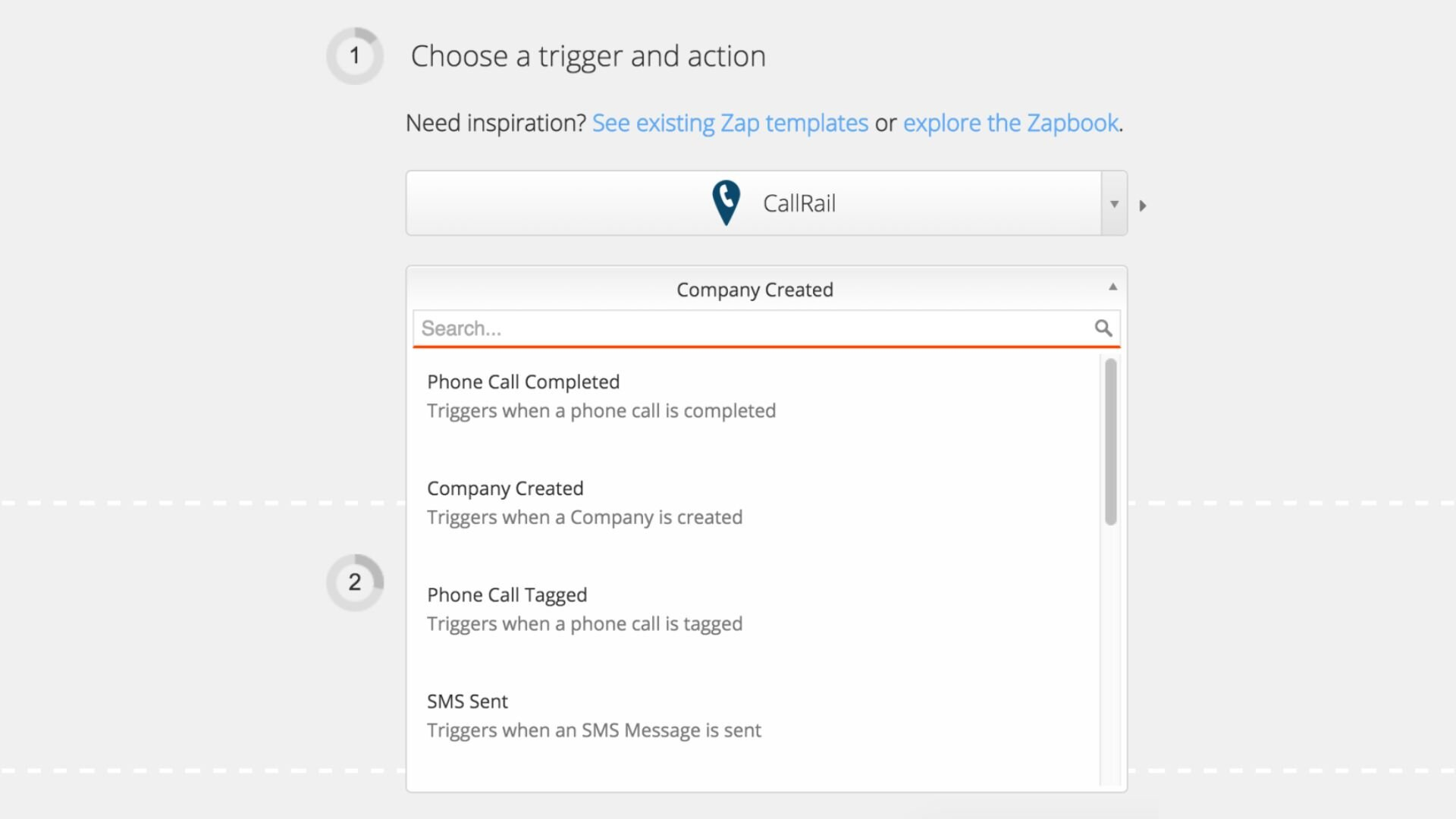
How it works: Zapier connects CallRail and HubSpot through event-driven automations called Zaps. Each Zap pairs a trigger (an event in one app) with one or more actions (what happens in the other). CallRail's Zapier integration offers 13 triggers, including Phone Call Completed Inbound, Form Captured, SMS Received, and Phone Call Tagged.
Source: CallRail
CallRail offers no Zapier actions, so it functions as a data source only. HubSpot's Zapier connector offers triggers and actions for contacts, deals, tickets, and more.
What it syncs: Depending on the trigger, Zapier can push call metadata (caller phone number, duration, recording URL, source, campaign), form submission data, text messages, and call tags from CallRail into HubSpot as new contacts, updated contact properties, notes, tasks, or deal records.
Field mapping is manual and configurable in the Zap setup flow. Conversation Intelligence outputs (AI summaries, sentiment scores) are not exposed through Zapier the way the native integration handles them.
Fits: ongoing sync with conditional routing logic; useful when the native integration's data mapping does not match a specific workflow requirement.
Setup process:
Create a Zapier account and connect both your CallRail and HubSpot accounts using OAuth.
Choose CallRail as the trigger app and select the trigger event (e.g., "Phone Call Completed Inbound").
Choose HubSpot as the action app and select the action (e.g., "Create or Update Contact" or "Create Engagement").
Map the available fields from the CallRail trigger (caller number, duration, source, campaign, recording URL) into the corresponding HubSpot fields.
Add filters or formatting steps if needed (e.g., only sync calls longer than 60 seconds, or only calls tagged as "qualified").
Test the Zap with a sample call record and turn it on.
Strengths: Adds conditional logic the native integration does not support (e.g., only sync calls from specific tracking numbers, route calls to different HubSpot pipelines based on tags). Can create HubSpot deals, tasks, or notes from call events, not just contact timeline entries. Multi-step Zaps can chain actions across more than two apps.
Limitations: CallRail has no Zapier actions, so data flows only from CallRail to other apps. Conversation Intelligence outputs (call summaries, sentiments, Voice Assist data) are not available through Zapier. Each Zap handles one trigger-action pair. Historical calls created before the Zap was activated do not sync. Zapier charges by task count, and high call volumes can accumulate costs.
Best for: Teams that need conditional routing or custom data mapping beyond what the native integration provides, or teams that want to trigger actions in HubSpot (deals, tasks, notifications) based on specific call events.
Make (Formerly Integromat)
How it works: Make uses a visual scenario builder where modules (app actions) connect in a flowchart. Each module represents a step: watch for a trigger, transform data, create or update a record.
Make has a CallRail connector with triggers for inbound call received, call changed after ending, and SMS received. Make's HubSpot connector supports full CRM operations. Scenarios can branch, filter, loop, and handle errors, giving more control than Zapier's linear structure.
What it syncs: The same core call data as Zapier (caller ID, duration, recording, attribution), with more flexibility in how data transforms between platforms. Make supports iterators for batch processing, routers for conditional paths, and aggregators for combining records before writing.
Fits: ongoing sync with complex conditional logic or multi-step data transformation; not a migration tool.
Setup process:
Create a Make account and add CallRail and HubSpot as connections via their respective authentication methods.
Build a new scenario. Add a CallRail trigger module (e.g., "Watch Calls").
Add a HubSpot module and select an action (e.g., "Create/Update Contact" or "Create Deal").
Connect the modules and map fields. Make provides functions for transforming data between platforms (e.g., formatting phone numbers, converting CallRail source labels to HubSpot list membership).
Add error-handling modules to catch failures (e.g., log to a spreadsheet or send a Slack notification).
Set the scenario to run on every trigger event or on a time-based schedule.
Strengths: Fine control over data transformation and conditional routing. The visual builder makes complex workflows easier to follow than code. Per-operation pricing is lower than Zapier at higher volumes. Can build multi-branch scenarios (e.g., route calls to different HubSpot pipelines based on call duration, source, or tag).
Limitations: Steeper learning curve than Zapier's guided setup. The CallRail connector has fewer trigger types than Zapier's 13 triggers. Both platforms' APIs impose rate limits, and high-volume scenarios may need throttling.
Best for: Teams with complex routing requirements (e.g., calls from different tracking numbers route to different HubSpot deal pipelines) or mid-size teams whose call volumes make Zapier's per-task pricing expensive.
Custom API Integration
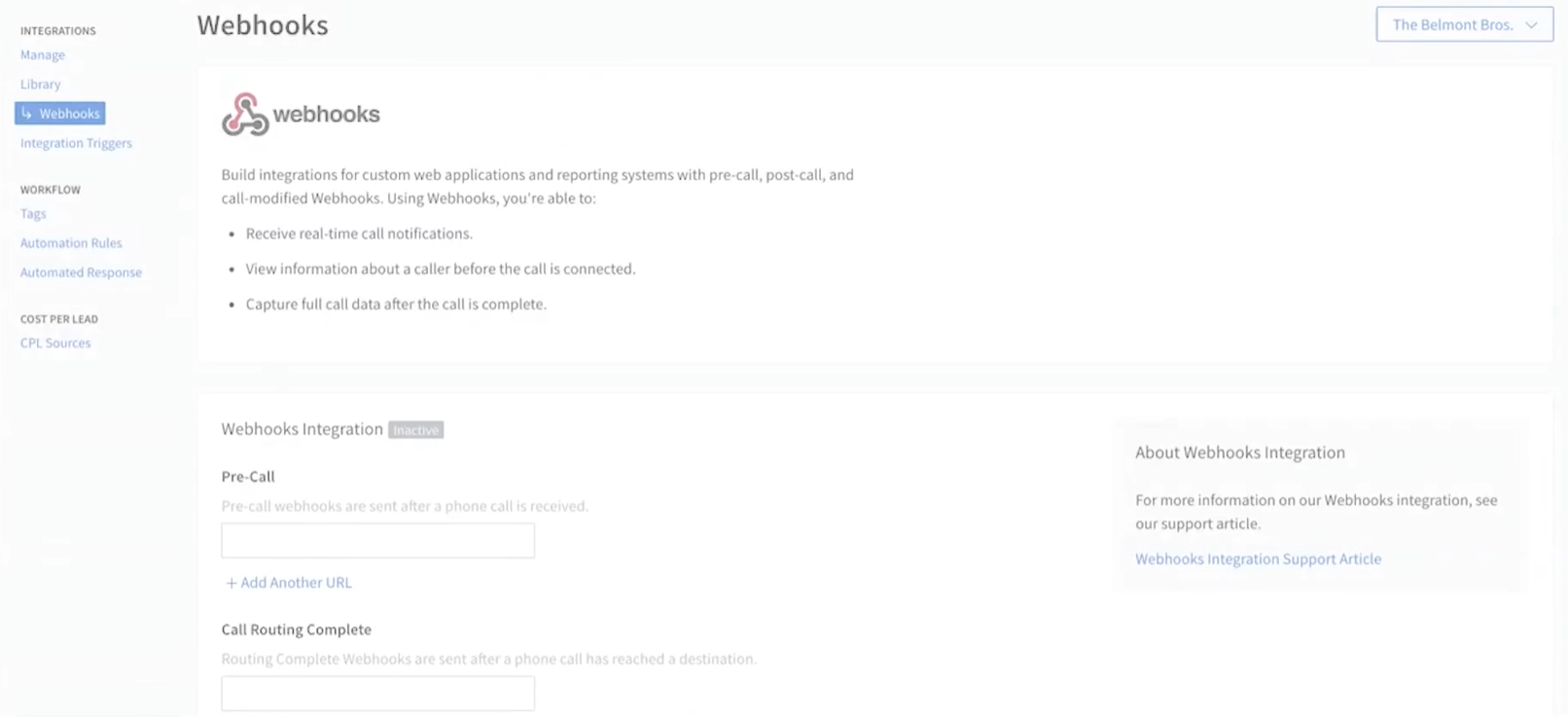
How it works: Both CallRail and HubSpot provide REST APIs. CallRail's API v3 covers calls, form submissions, text messages, companies, trackers, and tags, with webhook support for ten event types including pre-call, post-call, form submission, and Convert Assist Complete.
Source: CallRail
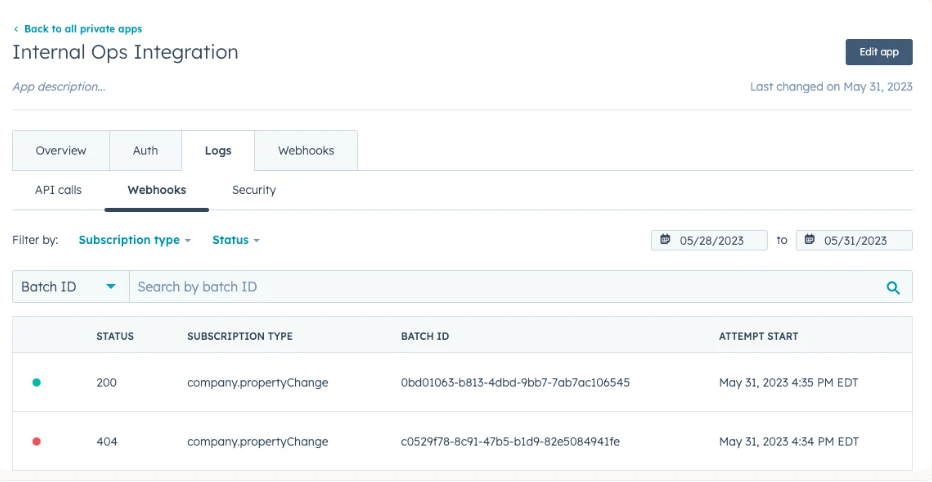
HubSpot's REST API covers all CRM objects with 30+ object types, plus webhooks for CRM event notifications. A custom integration connects these APIs directly, with your own middleware handling authentication, field mapping, transformation, and error recovery.
Source: HubSpot
What it syncs: Anything both APIs expose. This is the only method that supports bidirectional sync (pushing HubSpot deal outcomes back to CallRail as tags or notes), syncing custom objects, or enforcing business logic that goes beyond field mapping.
Fits: both ongoing sync and one-time data backfill; the only method with no ceiling on either.
Setup process:
Generate API credentials in both platforms: a CallRail API token from account settings, and a HubSpot private app access token or OAuth app credentials.
Design the data model mapping between CallRail call records and HubSpot CRM objects, including field-level transformations and a cross-reference table for matching caller phone numbers to HubSpot contact IDs.
Build the sync service: a server-side application that listens for CallRail webhooks (post-call, form submission events), transforms data according to the mapping, and writes changes to HubSpot via its CRM API.
For bidirectional sync, subscribe to HubSpot webhooks for contact or deal property changes and write relevant updates back to CallRail via its API.
Add logging, error handling, and retry logic. CallRail's API enforces 1,000 requests/hour and 10,000/day. HubSpot's private app limits are 100-190 requests per 10 seconds and 250,000-1,000,000 per day depending on plan tier.
Deploy, monitor, and maintain the integration over time.
Strengths: Full control over what syncs, when, and how. Real-time sync via webhooks on both sides. Can implement arbitrarily complex business logic. No per-record or per-operation fees from a third-party connector. Can push data in both directions, including writing HubSpot deal outcomes back to CallRail.
Limitations: Requires development resources to build and maintain. You own the infrastructure, monitoring, and error recovery. API changes on either platform require ongoing maintenance. CallRail bills API usage beyond native integrations on a usage-based model, so custom API calls incur charges that do not apply when using the native HubSpot connector. The initial build takes weeks, not hours.
Best for: Organizations with unique sync requirements (e.g., writing deal outcomes from HubSpot back to CallRail, syncing custom objects, or enforcing complex routing logic that no off-the-shelf connector supports) and in-house development resources.
Key Use Cases
1. Closed-Loop Campaign Attribution
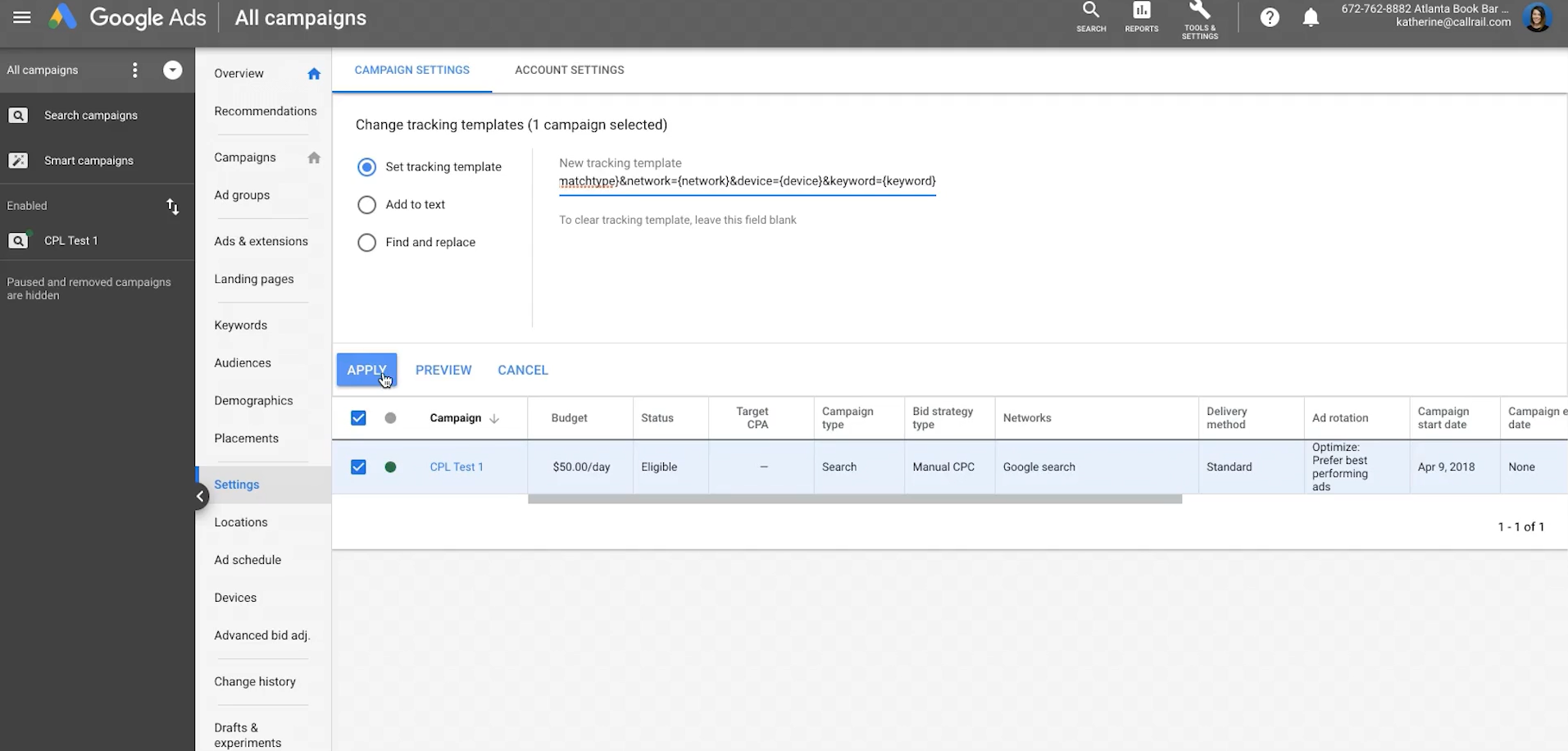
Marketing runs paid search campaigns in Google Ads, driving prospects to landing pages with CallRail tracking numbers. When a prospect calls, CallRail captures the keyword, campaign, and ad group that triggered the visit.
The native HubSpot integration pushes that attribution data into the contact's timeline. When the deal closes in HubSpot, marketing can trace revenue back to the specific keyword that generated the phone call, closing the loop between ad spend and pipeline.
CallRail's Google Ads integration can also push call conversions back into Google Ads for Smart Bidding, while the HubSpot connection ties those same calls to deal outcomes.
Source: CallRail
Best integration method: Native CallRail-HubSpot integration.
2. AI-Qualified Lead Routing
CallRail's Voice Assist handles after-hours calls, collects intake information, and generates an AI lead score (1-100 scale). The HubSpot integration expansion pushes those intake responses and lead scores directly into HubSpot contact records. A HubSpot workflow can then route high-scoring leads to senior reps and low-scoring leads to an automated nurture sequence, all without anyone manually reviewing the call.
Best integration method: Native CallRail-HubSpot integration (with Voice Assist enabled).
3. Agency Client Reporting
A digital marketing agency manages call tracking across 20 SMB clients using CallRail's Account Center. Each client's CallRail data pushes into a corresponding HubSpot account, where the agency builds attribution dashboards showing which campaigns generated calls, which calls converted to deals, and what the cost-per-acquisition is by channel. The native integration handles the data flow; HubSpot's reporting layer aggregates it.
Best integration method: Native CallRail-HubSpot integration.
4. Conditional Deal Creation from Qualified Calls
An SDR team wants to create a HubSpot deal automatically when a call meets specific criteria: tagged as "qualified," longer than three minutes, and from a first-time caller. A Zapier Zap triggered by "Phone Call Tagged" can filter for those conditions and create a Deal in HubSpot with the caller's information, the call recording link, and the attribution source pre-populated.
Best integration method: Zapier (conditional logic not supported by the native integration).
5. Multi-Channel Lead Attribution
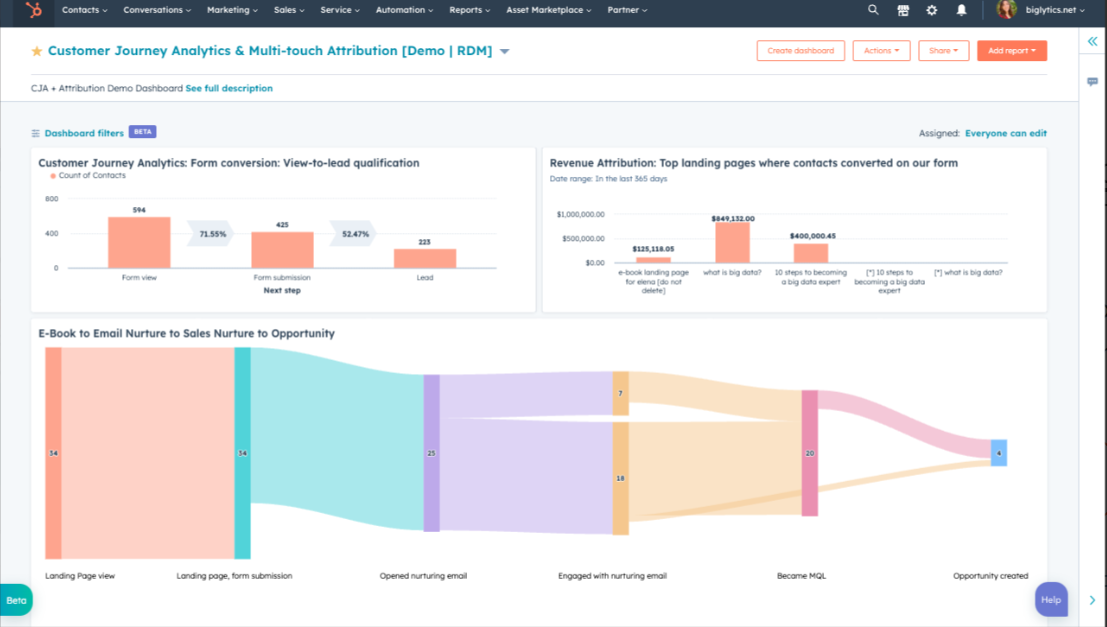
A business tracks calls, form submissions, and live chat across its website. CallRail captures calls and forms with full attribution data. The native integration pushes both interaction types into HubSpot contact timelines. Combined with HubSpot's own marketing email and web analytics data, the business can run multi-touch attribution reports across all channels, including phone calls, in a single platform.
Source: HubSpot
Best integration method: Native CallRail-HubSpot integration.
Limitations and Considerations
Data That Doesn't Sync Natively
Full call transcripts from CallRail's Conversation Intelligence do not embed directly into HubSpot contact fields. The native integration logs call activity (duration, recording link, attribution) on the timeline, but viewing the transcript itself requires opening the call in CallRail or clicking through to the recording.
AI-generated call summaries and sentiment scores flow through the native integration, but the underlying transcript does not travel as a searchable HubSpot property.
Call recordings are linked, not stored in HubSpot. The integration creates a timeline entry with a URL to the CallRail recording. If a CallRail account is closed or if CallRail's 25-month data retention policy expires the record, those links break.
One-Directional Data Flow
The native integration pushes data from CallRail to HubSpot. HubSpot contact updates, deal stage changes, and workflow outputs do not flow back to CallRail through the native connector. Teams that need HubSpot data inside CallRail (e.g., updating a CallRail tag when a deal closes in HubSpot) must use a Zapier/Make workflow or a custom API integration.
Pricing Implications
The native HubSpot integration is included with all CallRail plans at no additional cost. But CallRail's pricing model means costs can escalate beyond the base subscription: plans start with 250 local minutes, 5 tracking numbers, and 25 SMS per month, with overages charged on top.
AI features like Conversation Intelligence and Voice Assist require higher-tier plans or add-ons ($95/month for Voice Assist). On the HubSpot side, the integration works at any tier, but advanced reporting features (multi-touch attribution, custom dashboards) require HubSpot Professional or Enterprise.
Third-party tools carry their own costs. Zapier charges by task count (each synced call counts as a task). Make charges by operations. For teams syncing hundreds of calls daily, these costs add up.
Permissions and Access
Setting up the native integration requires admin access in CallRail (to manage integrations) and sufficient permissions in HubSpot to authorize third-party apps and create contacts. If HubSpot uses field-level security or custom object permissions, the integration user's access must cover the objects and fields where call data will be stored.
Maintenance
Both platforms evolve independently. CallRail releases product updates (the Voice Assist HubSpot expansion was a significant change in September 2025) and has sunset products in the past (Lead Center was discontinued January 2026).
HubSpot versions its API with each seasonal release and introduced date-based API versioning in March 2026. Custom fields added after the initial setup will not sync unless someone updates the integration configuration. Plan for periodic reviews of the integration's health and accuracy.
What No Method Fixes: The Data Itself
Every method above moves call tracking data from CallRail into HubSpot. None of them checks whether the contact records in HubSpot are accurate, complete, or current. A prospect who changed jobs two quarters ago still sits in the CRM with an old title and a dead email.
A contact record with no direct dial and incomplete company data receives the call attribution data just as faithfully as a clean record. The integration ensures call data reaches the CRM; it does not ensure the CRM data is right.
Where ZoomInfo Fits In
Every method in this guide moves call tracking and attribution data from CallRail into HubSpot. None of them improves the contact data that determines whether those insights are actionable.
When the integration is live but follow-up emails bounce because the address is outdated, reps call a direct dial that has been disconnected, or a lead's job title is three roles old, the bottleneck is no longer the connector.
That is the gap ZoomInfo closes.
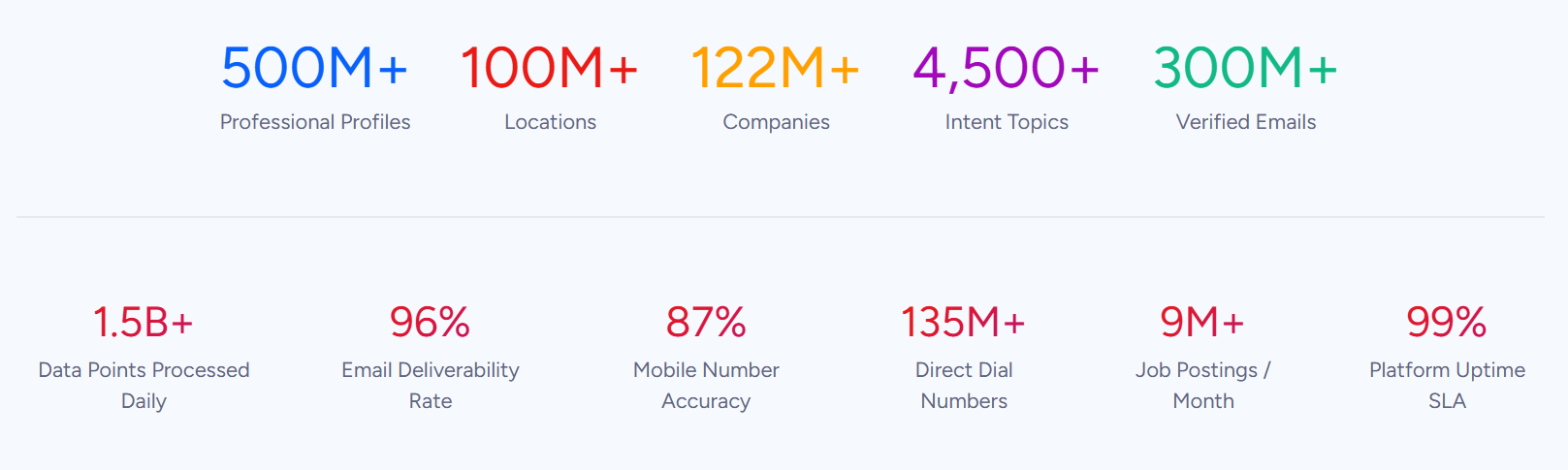
ZoomInfo is an AI-powered GTM platform built on 500M contacts, 100M companies, 135M+ verified phone numbers, and 200M+ verified business emails. That data is verified through a multi-source pipeline backed by 300+ human researchers, reaching up to 95% accuracy on first-party data. For teams running a CallRail-HubSpot integration, ZoomInfo addresses the data quality layer that no call tracking connector handles.
ZoomInfo integrates natively with HubSpot through the HubSpot App Marketplace, providing CRM enrichment, real-time contact and company data updates, and automated lead scoring inside HubSpot records.
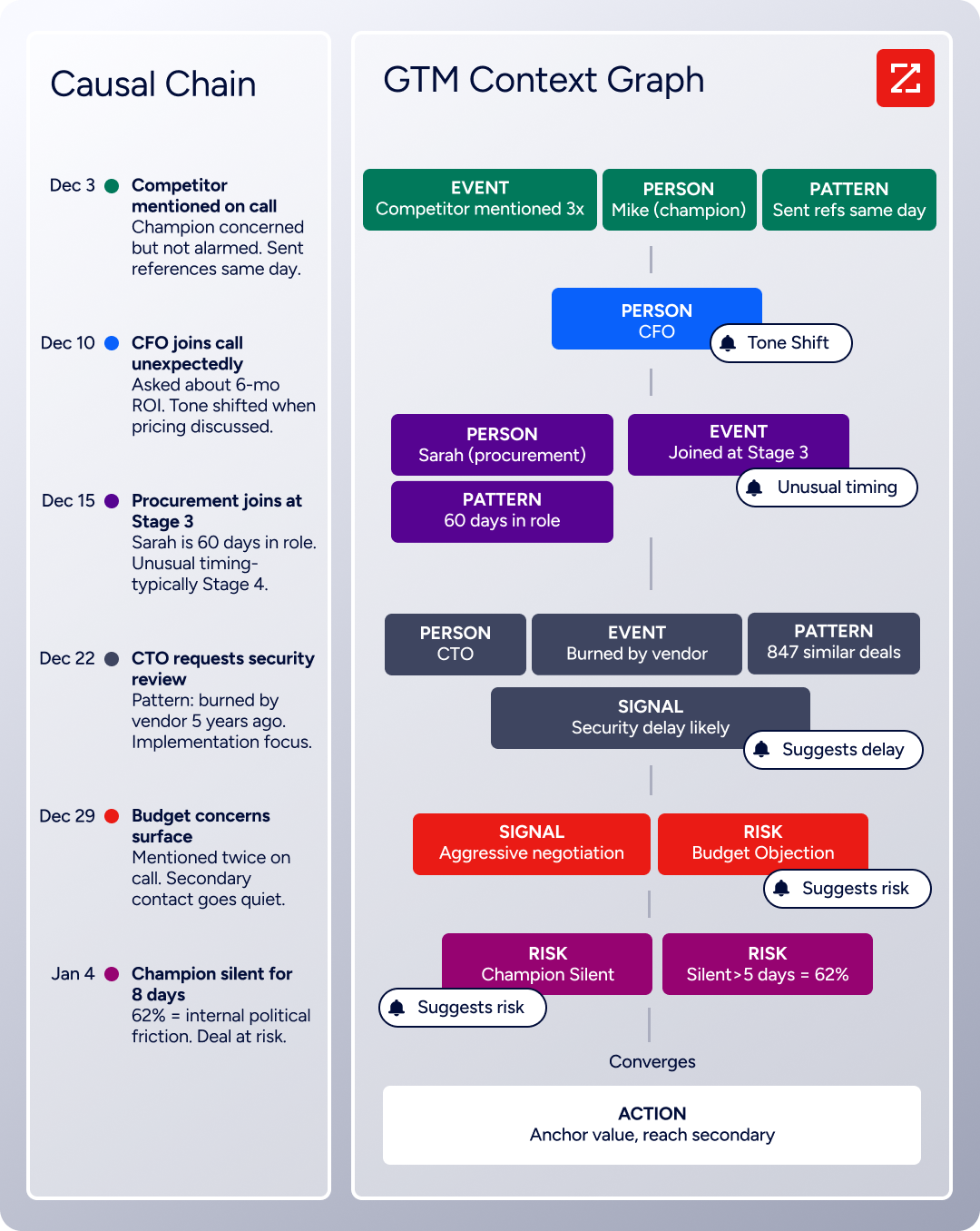
Before a rep follows up on a CallRail-tracked call, ZoomInfo ensures the HubSpot contact record has a verified business email, an accurate job title, current company details, and broader company context. The same data feeds ZoomInfo's GTM Context Graph, which processes 1.5B+ data points daily by unifying third-party intelligence with CRM records, conversation transcripts, and behavioral signals to surface not just what happened in a deal, but why.
In practice, a team using CallRail for call attribution and HubSpot as their CRM can use ZoomInfo to enrich contact records before and after calls happen. A new contact created by the CallRail integration (when a first-time caller has no matching HubSpot record) arrives with only a phone number and attribution data.
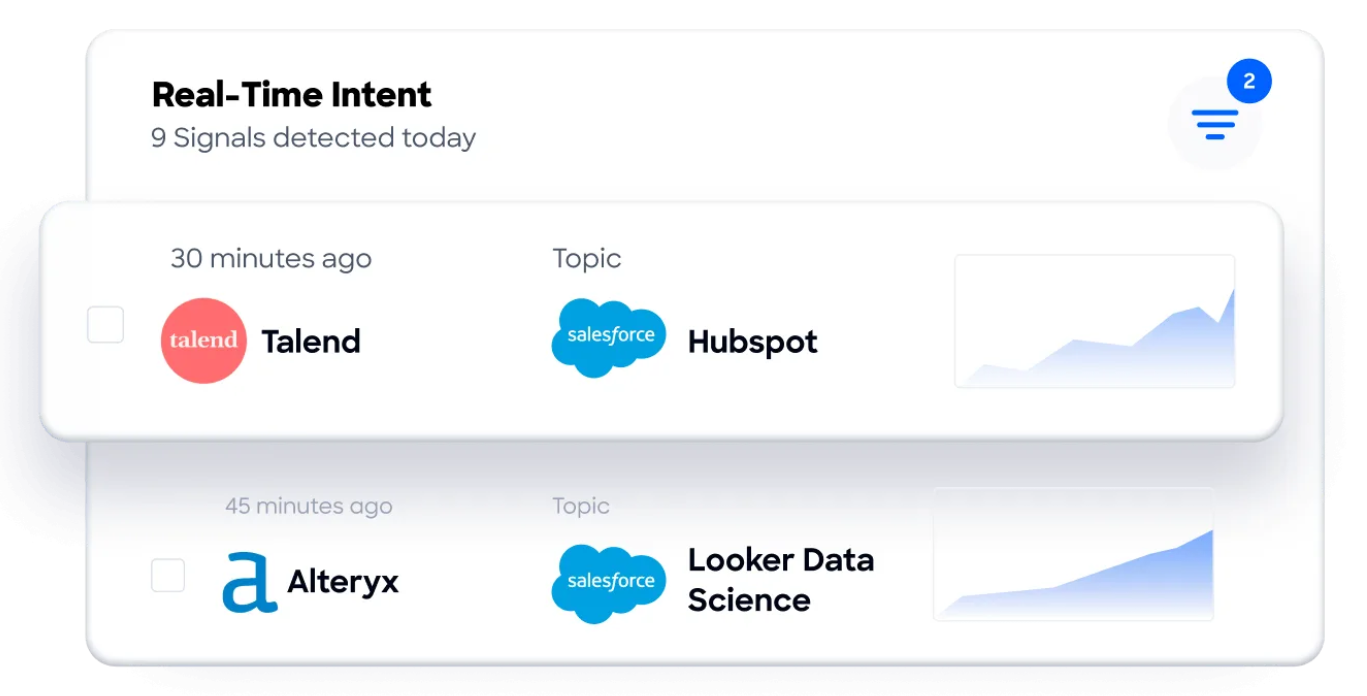
ZoomInfo's enrichment fills in the verified email, company name, employee count, industry, and tech stack, turning a bare phone number into a complete prospect profile. Buyer Intent data from ZoomInfo, tracking signals from 210 million IP-to-Organization pairings, can layer onto those contacts to prioritize which call-generated leads are actively researching relevant solutions.
Enriched records also make the call attribution data more valuable. When CallRail pushes a call tagged "qualified" into HubSpot, a complete contact record with verified details gives the rep everything needed to follow up immediately.
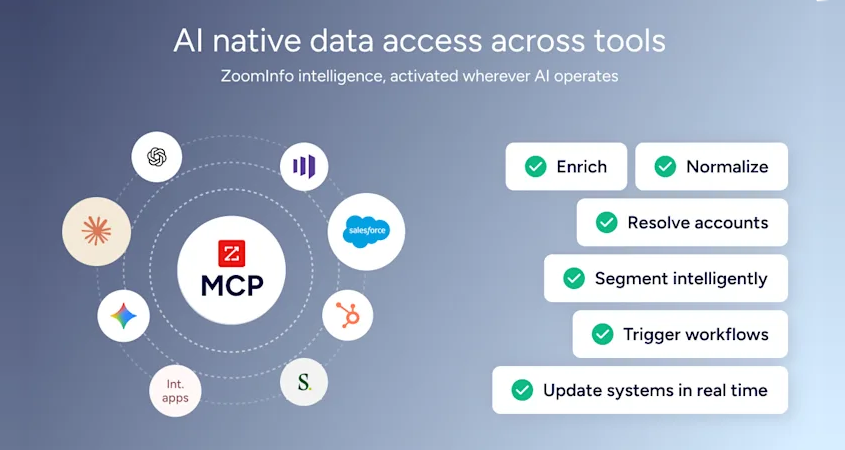
Without enrichment, the rep may spend 15 minutes manually researching the caller before making contact. For teams using ZoomInfo's Enterprise API or MCP access, the same verified data can feed any custom workflow or AI agent in the stack.
Seismic's sales team attributed 39% of active pipeline to opportunities identified or influenced by ZoomInfo signals, while boosting productivity by 54% and saving 11.5 hours per week. (Seismic)
Final Verdict
A native CallRail-HubSpot integration exists and is included with all CallRail plans. It handles the core use case well: pushing call activity, attribution data, and AI insights into HubSpot contact timelines in near real-time. For most teams, the right choice depends on how much control they need over the data flow.
Marketing teams and agencies that need call attribution data inside HubSpot for reporting and lead routing should activate the native integration. It is the simplest method, requires no third-party tool, and covers the primary use case of connecting phone conversations to campaign performance.
Teams that need conditional logic (only syncing calls that meet specific criteria, or creating deals from qualified calls) should add Zapier or Make on top of the native integration. Both support filters and multi-step workflows that the native connector does not.
Organizations that need bidirectional sync (writing HubSpot deal outcomes back to CallRail) or custom object mapping should invest in a custom API integration, understanding that the build and maintenance require dedicated development resources.
Before committing to a method, clarify what you need from the connection.
If the goal is visibility (seeing call data inside HubSpot for reporting and follow-up), the native integration is sufficient and free. If the goal is automation (triggering specific CRM actions based on call properties), Zapier or Make adds the conditional layer. If the goal is full data unification across both platforms, a custom build is the path. Either way, the quality of the contact data in HubSpot determines whether call attribution insights translate into revenue or just add noise to incomplete records.
ZoomInfo, with its native HubSpot integration, API, and MCP access, is the data enrichment layer that ensures reps follow up on CallRail-tracked calls with contacts that are verified, current, and complete.
FAQ
Does CallRail integrate natively with HubSpot?
Yes. CallRail offers a native HubSpot integration through the HubSpot App Marketplace, included with all CallRail plans at no additional cost. It sends calls, text messages, and form submissions directly to HubSpot contacts' activity timelines with full marketing attribution data (source, campaign, keyword, landing page). CallRail is a certified HubSpot Technology Partner, and the integration has been enhanced over time, most recently with Voice Assist data syncing added in September 2025.
What data flows from CallRail to HubSpot?
The native integration pushes inbound and outbound call activity (duration, recording links, caller ID), text messages, form submissions, marketing attribution data, call tags, and lead qualification status into HubSpot contact timelines. With Conversation Intelligence enabled, AI-generated call summaries and sentiment scores also sync. With Voice Assist enabled, intake form responses and AI lead scores push into HubSpot contact records automatically.
Can HubSpot data flow back to CallRail?
Not through the native integration, which sends data from CallRail to HubSpot. The Voice Assist expansion allows CallRail's AI assistant to pull existing HubSpot contact records to greet returning callers by name, but full bidirectional sync (pushing deal stages or contact updates from HubSpot back to CallRail) requires a Zapier/Make workflow or a custom API integration.
Does the integration require a specific CallRail or HubSpot plan?
The native integration works with all CallRail plans and all HubSpot tiers, including HubSpot's free CRM. However, the data that syncs depends on which CallRail features are active. Conversation Intelligence outputs (call summaries, sentiments) require a CallRail plan that includes Conversation Intelligence. Voice Assist data sync requires the Voice Assist add-on ($95/month). Advanced HubSpot reporting features like multi-touch attribution require HubSpot Professional or Enterprise.
How do I avoid duplicate contacts when calls sync to HubSpot?
The native integration matches incoming calls to existing HubSpot contacts by phone number. If it finds a match, it logs the call activity on the existing contact's timeline. If no match exists, it creates a new contact. To minimize duplicates, keep phone number formatting consistent across both platforms and periodically review HubSpot for contacts created by CallRail that may duplicate existing records with different phone number formats.
Can I use both the native integration and Zapier together?
Yes. The native integration handles the standard data flow (call activity and attribution into HubSpot timelines), while Zapier can add conditional workflows on top (e.g., creating a deal when a call is tagged "qualified," or sending a Slack notification when a call exceeds a certain duration). The two methods operate independently and do not conflict, though teams should note that the same call event could trigger actions in both systems if not configured carefully.
What happens to synced data if I disconnect the integration?
Call activity records already logged in HubSpot remain on contact timelines. Recording links continue to point to CallRail, but if the CallRail account is closed or the recording expires (CallRail retains communication records for 25 months), those links break. New call events stop syncing to HubSpot immediately upon disconnection.
How does ZoomInfo improve a CallRail-HubSpot workflow?
ZoomInfo solves the data quality problem that no call tracking connector addresses. When CallRail creates a new HubSpot contact from a first-time caller, the record arrives with only a phone number and attribution data. ZoomInfo's native HubSpot integration enriches that record with a verified business email, accurate job title, company attributes, technographics, and employment details. The result: call attribution data from CallRail attaches to a complete, verified contact profile rather than a stub record, so reps can follow up immediately with full context. ZoomInfo's Buyer Intent data can further prioritize which call-generated leads are actively researching relevant solutions, so reps focus on the highest-value prospects.
See what else plugs into HubSpot:
