
Before wiring an event platform API into a pipeline, a developer asks one question: is the API deep enough to justify the dependency?
Cvent's REST API, served from api-platform.cvent.com, uses OAuth 2.0 Client Credentials for authentication, publishes a REST API Changelog, and ships official SDKs in TypeScript, .NET, and Java. The Developer Hub is public, and every Cvent account includes Essentials Tier access by default. For a 25-year-old enterprise event platform, that level of programmatic access is not a given.
But having a developer portal and having a buildable API are different questions.
Cvent's API covers event lifecycle data: registrations, attendees, sessions, speakers, travel, budgets, surveys, RFPs, and eMarketing campaigns. If you need to manage event records programmatically, sync attendee data to a CRM, automate RFP workflows, or trigger actions on registration events via webhooks, the API handles that job. Where it stops is B2B intelligence: there are no endpoints for contact enrichment, company attributes, technographics, org charts, buyer intent signals, or direct-dial phone numbers. The API knows that someone registered for your conference. It does not know whether their company is evaluating your category or where they sit in the buying committee.
This is where ZoomInfo fits. ZoomInfo is a B2B intelligence platform whose Enterprise API covers search, enrichment, AI intelligence, and audience management across 500M contacts and 100M companies, with an MCP server for AI-agent workflows. The two APIs sit at different layers of the same data pipeline, not in competition. The right question is whether your build needs event management, B2B intelligence, or both.
This review covers the Cvent API first (authentication, endpoints, webhooks, SDKs, rate limits, and pricing), then reviews ZoomInfo's API as the layer that picks up where event data stops.
Cvent API at a Glance
Attribute | Detail |
|---|---|
API type | REST over HTTPS, JSON request/response |
Authentication | OAuth 2.0 Client Credentials flow (Bearer token) |
Base URL | |
Legacy API | SOAP API (being sunset in favor of REST) |
Rate limits | Tiered: Essentials (1,000 calls/day, 2 req/sec), Standard (15,000 calls/day), Premium (500,000 calls/day, 25 req/sec) |
SDKs | Official SDKs for TypeScript, .NET, and Java |
Webhooks | Yes, per-object type (attendees, sessions, speakers, meeting request forms) |
Documentation | developers.cvent.com (Developer Hub with REST API Reference) |
Pricing / access | Essentials Tier included with every account; full API access is an Enterprise plan feature |
Cvent API: What Works Well & What to Plan Around
What works well | What to plan around |
|---|---|
Developer Hub is public with REST API Reference, changelog, and guided tutorials | Full API access requires Enterprise plan; not available on Professional |
OAuth 2.0 with scoped workspace model for access control | Essentials Tier limits are restrictive: 1,000 calls/day and 2 requests/second |
Official SDKs in three languages (TypeScript, .NET, Java) | Standard Tier per-second rate limits are not publicly documented |
Webhooks for event-driven integrations across attendees, sessions, speakers, and MRFs | SDK maintenance status, versions, and install instructions are not stated in the docs |
Bulk API available for high-volume read/write operations | Developer Hub is JavaScript-rendered, limiting discoverability via search crawlers |
Essentials Tier API access included with every Cvent account at no extra cost | Legacy SOAP API coexists in documentation alongside REST, adding complexity |
Cvent API: Authentication & Getting Started
API access starts with any Cvent account. Every account receives Essentials Tier access by default: 1,000 daily calls at 2 requests per second. Upgrading to Standard or Premium tiers requires contacting a Cvent representative.
There is no separate developer signup, but full API access beyond the Essentials Tier is an Enterprise plan feature.
The REST API uses OAuth 2.0 Client Credentials as its primary auth mechanism. Developers exchange a Client ID and Client Secret for a short-lived Bearer token, then pass it in every subsequent request. The Authorization Code flow is also supported, but only for planner users with the administrator role; developer users cannot use it.
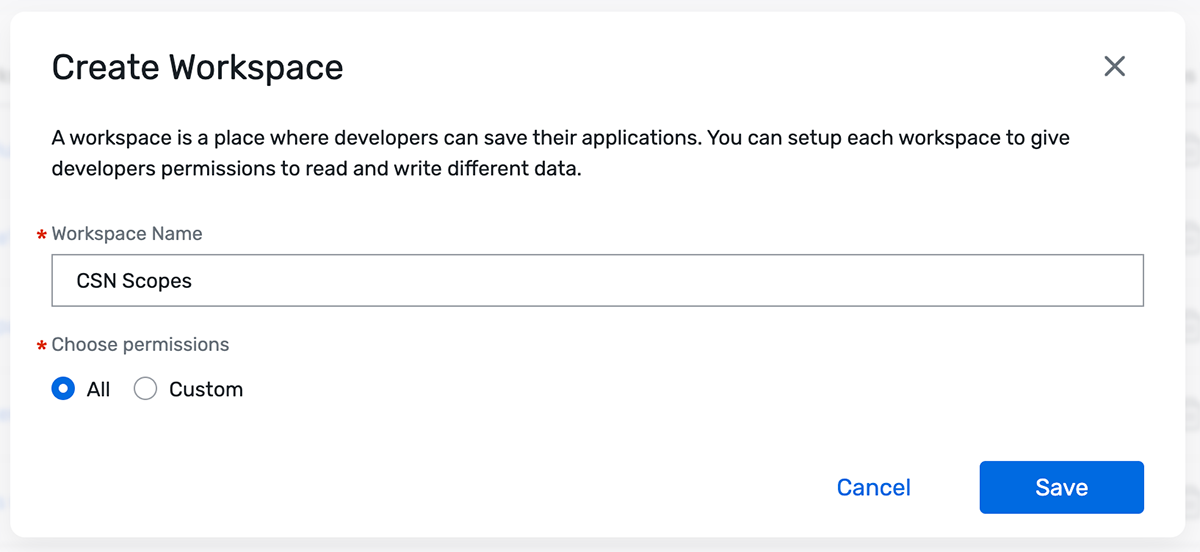
Cvent manages access control through Workspaces.
Account administrators invite developers into a workspace and assign scopes that govern what data each integration can read, write, or delete. Scopes exist for each data domain (contacts, attendees, appointments, sessions, and others), with up to 5 workspaces per account. This lets teams run separate integrations with different permission levels instead of sharing a single credential set across their CRM sync, event app, and reporting pipeline.
Source: Cvent API
One distinction worth noting: the legacy CSN API supports both API Key and OAuth 2.0, but API Key authentication is deprecated. OAuth 2.0 is the recommended path for all integrations, including legacy ones.
The Developer Quickstart walks through the flow from credential generation to first API call. The quickstart is the fastest way to confirm request and response shapes before writing code, since the exact token endpoint and resource paths live behind the Developer Hub's authenticated reference.
Cvent API: Core Endpoints & Capabilities
The REST API organizes around resource domains documented in the REST API Reference. Scopes govern CRUD access: read scopes allow retrieval, write scopes allow create and update, delete scopes allow removal. All requests and responses use JSON, and pagination follows the REST API Standards.
Event Management
The core domain. Event Objects cover the full lifecycle: Event, Event Parameter, Event Detail, Session, Registration, Guest, Event Email History, Transaction, Travel, Budget, Budget Item, Event Question, Speaker, and Table Assignment.
This maps to what Cvent does as a platform: event configuration, session scheduling, attendee registration, travel logistics, budget tracking, and speaker management.
Dedicated guides cover common workflows including registering attendees and managing event travel. What you would build: a CRM integration that creates Salesforce leads from new event registrations, syncs session attendance for engagement scoring, and writes budget actuals back to a financial system after each event closes.
Contacts & Invitations
The Contact Group resource manages address book contacts shared across events. Invitee objects handle the relationship between contacts and specific events. This layer connects your existing contact database to Cvent's event records.
What you would build: a pipeline that syncs qualified contacts from your marketing automation platform into Cvent invitation lists based on account criteria, then monitors registration status to trigger follow-up sequences in the originating system.
RFP & Venue Sourcing
RFP Objects expose venue Request for Proposal data programmatically. A guided tutorial covers submitting RFP proposals through the API.
What you would build: an automated venue procurement workflow that generates RFPs from event requirements in your planning system, submits them through the Cvent Supplier Network, and routes incoming proposals into an approval queue.
Surveys & eMarketing
Survey Objects cover post-event survey configuration and responses. eMarketing Objects (Campaign, Distribution List, eMarketing Email History) handle the promotional side: event marketing campaigns, distribution lists, and send history.
What you would build: a post-event automation that triggers targeted surveys based on session attendance, feeds satisfaction scores into your analytics platform, and uses eMarketing endpoints to manage nurture campaigns for attendees who did not convert.
Administration & User Management
Administration Objects cover operations: Approver, User Group, User Role, Meeting Request, Advanced Logic, Rate History, User, and Custom Field resources. A dedicated guide covers managing users through the API.

Source: Cvent API
What you would build: a provisioning system that onboards new event managers with appropriate role assignments, manages approval chains for meeting requests, and configures custom fields to match your organization's data taxonomy.
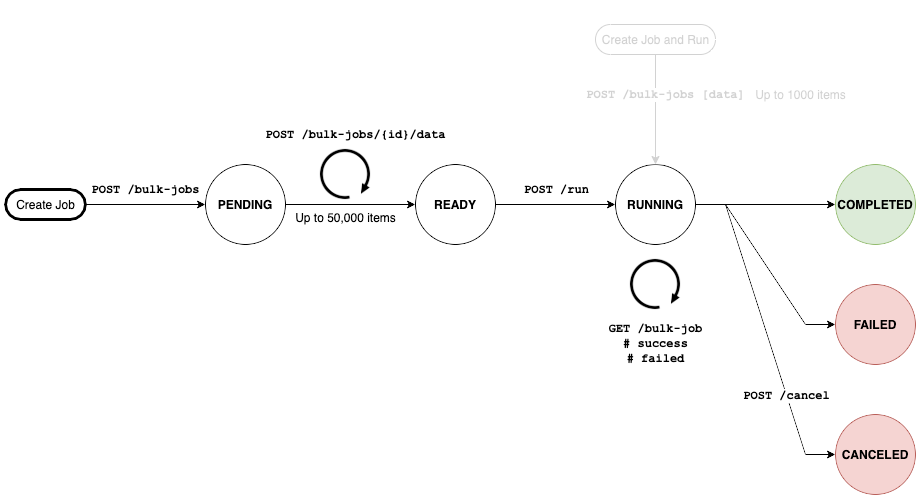
Bulk API
A Bulk API handles high-volume read and write operations, reducing per-call overhead when syncing large datasets. Use it for initial data loads, large export jobs, or periodic batch syncs where processing hundreds or thousands of records individually would exhaust rate limits.
Source: Cvent API
Cvent API: Webhooks & Events
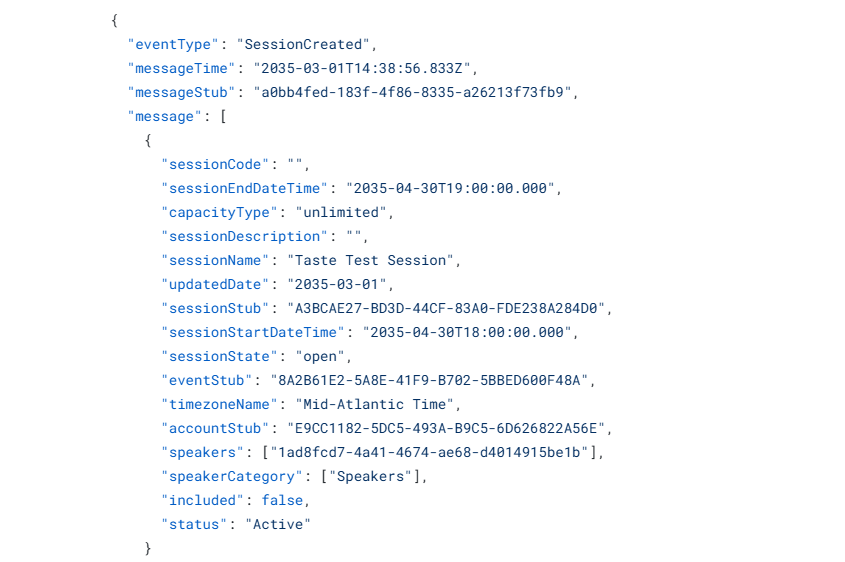
Cvent's Webhooks system pushes event-driven notifications to a developer-supplied HTTPS endpoint. You configure webhooks per-object type: choose which objects (attendees, sessions, speakers, meeting request forms) trigger delivery to which endpoints, routing different data streams to different URLs.
Documented event types include attendee registration and session registration, session creation, manually synced attendees, and meeting request forms. A manual sync capability triggers a bulk data push on demand, useful for backfilling or resynchronizing after a missed delivery.
Source: Cvent API
The technical requirements define the delivery contract:
Endpoints must be SSL-secured (HTTPS only).
Cvent validates an endpoint by sending a GET request and expecting an HTTP 200 response before activating the configuration. If the endpoint is unavailable, Cvent retries validation every 10 minutes.
Webhook messages include standard headers: Authorization (your supplied token or Bearer token), Request-ID (for tracking), and User-Agent set to Cvent-Webhooks. Firewall allowlists must permit traffic from this user agent.
Authentication is token-based (tokens cannot exceed 150 characters) or OAuth.
Cvent's documentation notes that webhooks take less development effort than building against the REST API, making them a lighter integration option. For a typical build, the attendee registration webhook eliminates polling for new signups: your pipeline receives a push notification and acts on it immediately.
Two things to plan around:
Documented event types cover the core event lifecycle (registrations, sessions, speakers, MRFs). If you need push notifications for budget changes, survey completions, or eMarketing sends, you must poll the REST API.
Cvent documents the validation retry (every 10 minutes) and token-based auth. Retry policy and delivery guarantees for actual webhook payloads get less detail, so design your receiver to be idempotent.
Cvent API: SDKs, Docs & Rate Limits
SDKs & Libraries
Cvent offers official SDKs for TypeScript, .NET, and Java. An older .NET REST API SDK is archived on GitHub under the Cvent organization, which hosts 112+ repositories. The legacy SOAP API sample code is published in its documentation.
Three SDKs is adequate for an enterprise event platform, though narrower than platforms offering five or more language bindings. The Developer Hub does not state current maintenance status, version numbers, or installation instructions for the TypeScript, .NET, and Java SDKs. Before depending on an SDK for production, check the GitHub repository's commit history to confirm it tracks the current REST API surface. No community-maintained libraries are referenced from official Cvent sources.
Documentation & Developer Experience
The developer documentation lives at developers.cvent.com and covers:
REST API Reference: full endpoint documentation
REST API Changelog: release history
Guided tutorials: Developer Quickstart, registration guide, travel guide, proposal guide, user management guide
Webhooks documentation: overview, message payload examples for each event type, and technical requirements
Concept guides: workspaces, scopes, pagination
Legacy API: SOAP API docs and a migration guide for moving to REST
OpenAPI downloads are referenced in the Developer Hub. A community forum provides peer and staff support, and a client services team handles enterprise customers 24/7.
Two things worth noting:
The Developer Hub is JavaScript-rendered, which limits its indexing by search crawlers. If you search for Cvent API documentation through a search engine rather than navigating directly, you may find less content than the Hub contains.
The changelog is a real strength. A published version history lets you track changes between releases, which matters when maintaining an integration against an evolving API.
Rate Limits & Constraints
The REST API enforces rate limits per usage tier:
Tier | Daily calls | Calls per second | Max burst |
|---|---|---|---|
Essentials (Free) | 1,000 | 2 | 1 |
Standard | 15,000 | Not publicly documented | Not publicly documented |
Premium | 500,000 | 25 | 25 |
Daily quotas reset at midnight UTC. Applications should handle HTTP 429 errors as documented in the rate limits guide. The Bulk API is the recommended path for high-volume operations that would otherwise exhaust limits.
The Essentials Tier is the constraint most likely to catch a developer off guard.
At 1,000 calls per day and 2 requests per second, there is enough headroom for testing and light integrations, but a production pipeline syncing thousands of registrations, sessions, and attendee records will hit the ceiling fast. The Standard Tier at 15,000 daily calls gives more room, though undocumented per-second limits make it harder to design burst-handling logic. Premium (500,000 calls/day, 25 req/sec) is the only tier with fully published limits at both the daily and per-second level.
Cvent API Pricing & Access Costs
Cvent bundles baseline API access into every account, but the practical cost depends on which plan tier and rate-limit tier your integration requires.
Essentials Tier (included): Every Cvent account receives Essentials Tier access at no additional cost. This tier carries the most restrictive rate limits (1,000 calls/day, 2 req/sec) and works for testing, prototyping, and lightweight integrations.
Full API access (Enterprise plan): The public pricing page lists API access as an Enterprise plan feature. The Professional plan does not include it. Both plans sell on custom annual licenses with no published prices; you must contact sales for a quote.
Rate-limit tier upgrades: Upgrading from Essentials to Standard (15,000 calls/day) or Premium (500,000 calls/day, 25 req/sec) requires contacting Cvent. No per-call or per-tier upgrade fees are published.
Platform-level costs: Cvent's broader pricing model includes overage charges for contacts ($0.25 per contact per year), emails ($0.05 per email), and storage ($250 per 5GB block). Premium add-ons (Surveys Premium, Webinar Premium, Jifflenow, iCapture, OnArrival 360, and others) are quoted separately. The API operates within this structure: the data you access through the API follows the same subscription limits as the rest of the platform.
For a developer sizing costs: the API has no published per-call charges, but production-grade rate limits require an Enterprise plan, which is quote-only. If your build requires Premium (the only tier with fully documented per-second limits), plan to negotiate it as part of the Enterprise contract.
Where the Cvent API Falls Short
These are practical limits to plan around, not failures. Several reflect scope decisions about what Cvent's API is (an event management surface) and what it is not.
The API covers event lifecycle data. That is its entire scope.
No contact enrichment, no company attributes, no technographics, no buyer intent signals, no org chart traversal, no direct-dial phone numbers. If your pipeline needs to pull attendee data from an event and then determine who those attendees are (company size, tech stack, seniority, buying signals), you need a second API.
This is the boundary that matters most to developers building event-to-pipeline workflows where registration data is the starting point, not the destination.
Full API access sits behind the Enterprise plan.
The Professional plan does not include it. Every account gets the Essentials Tier (1,000 calls/day), but Standard or Premium rate limits require an Enterprise contract. For teams evaluating the API before committing to an enterprise deal, the Essentials Tier ceiling constrains what you can validate in a proof-of-concept.
The Essentials Tier is too restrictive for production.
At 1,000 daily calls and 2 requests per second, a pipeline processing even a mid-sized event (syncing registrations, attendee details, session data, and speaker records) can exhaust the quota in a single run. The Essentials Tier is a testing surface, not a production one.
Standard Tier per-second limits are not documented.
The Standard Tier publishes a 15,000 daily call limit but says nothing about per-second or burst limits. A developer designing retry and backoff logic has to discover the per-second ceiling through testing or Cvent support.
SDK maintenance status is unclear.
Three official SDKs (TypeScript, .NET, Java) are listed, but the Developer Hub does not state current versions, last update dates, or maintenance status. An archived .NET SDK on GitHub suggests at least one previous SDK generation has been deprecated. A stable API with an unmaintained SDK works until the SDK diverges from a new API version.
Webhook event types cover only core registration and session events.
Push notifications handle attendee registrations, session registrations, session creation, manual syncs, and meeting request forms. If you need event-driven notifications for budget changes, survey completions, eMarketing sends, or RFP responses, you must poll the REST API. For event-driven architectures, that is a gap.
The Developer Hub is JavaScript-rendered.
The documentation does not index well with standard crawlers, limiting discoverability. Developers searching through search engines may find less content than the Developer Hub actually contains.
ZoomInfo API: The B2B Intelligence Layer Beyond Event Data
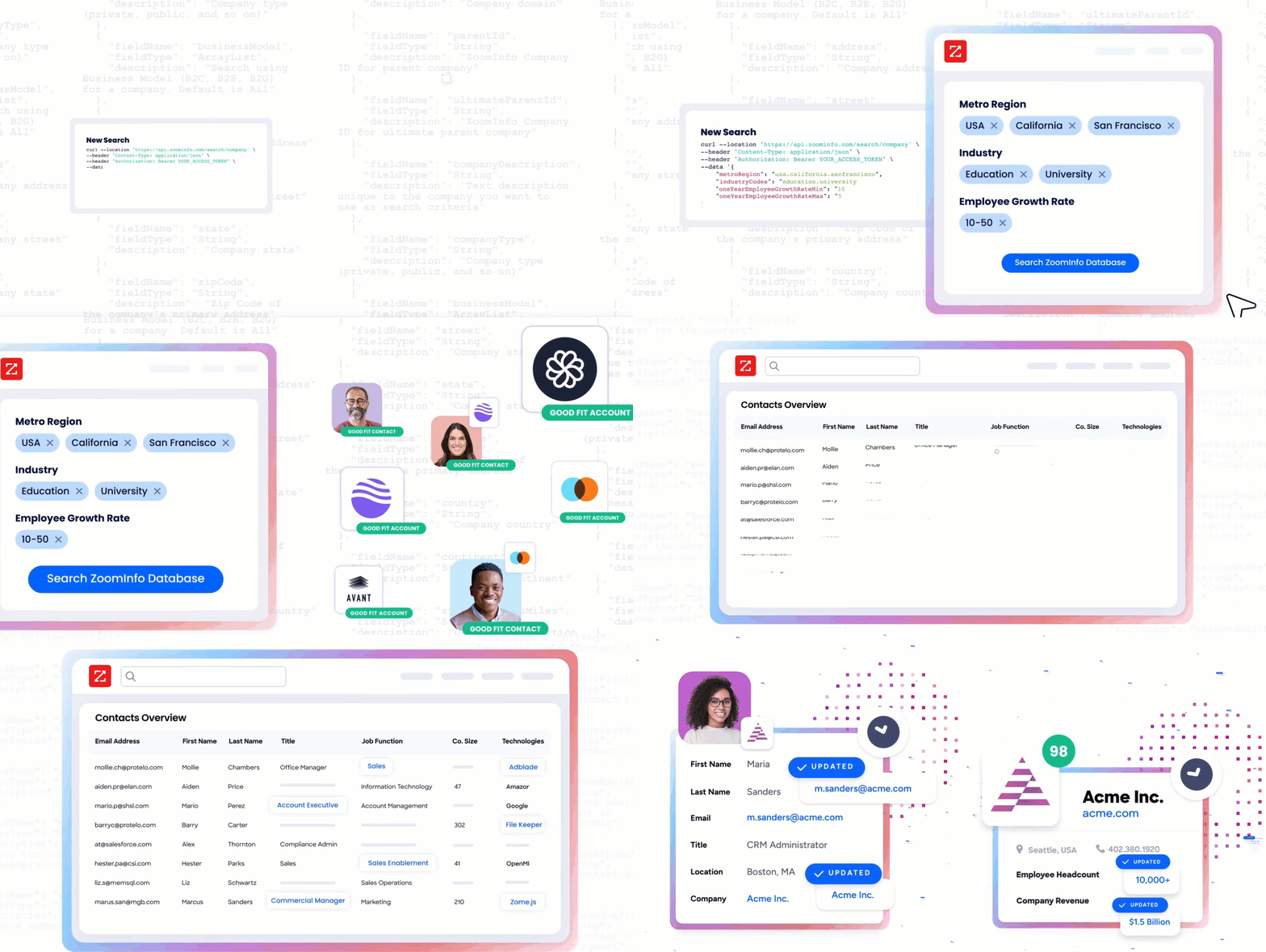
Cvent's API tells you that someone registered for your event, which sessions they attended, and how their travel was booked. ZoomInfo's API tells you who that person is, what company they work for, what tech stack that company runs, whether the account is researching your category, and where the attendee sits in the buying committee.
Source: ZoomInfo
The two APIs operate at different layers of a data pipeline.
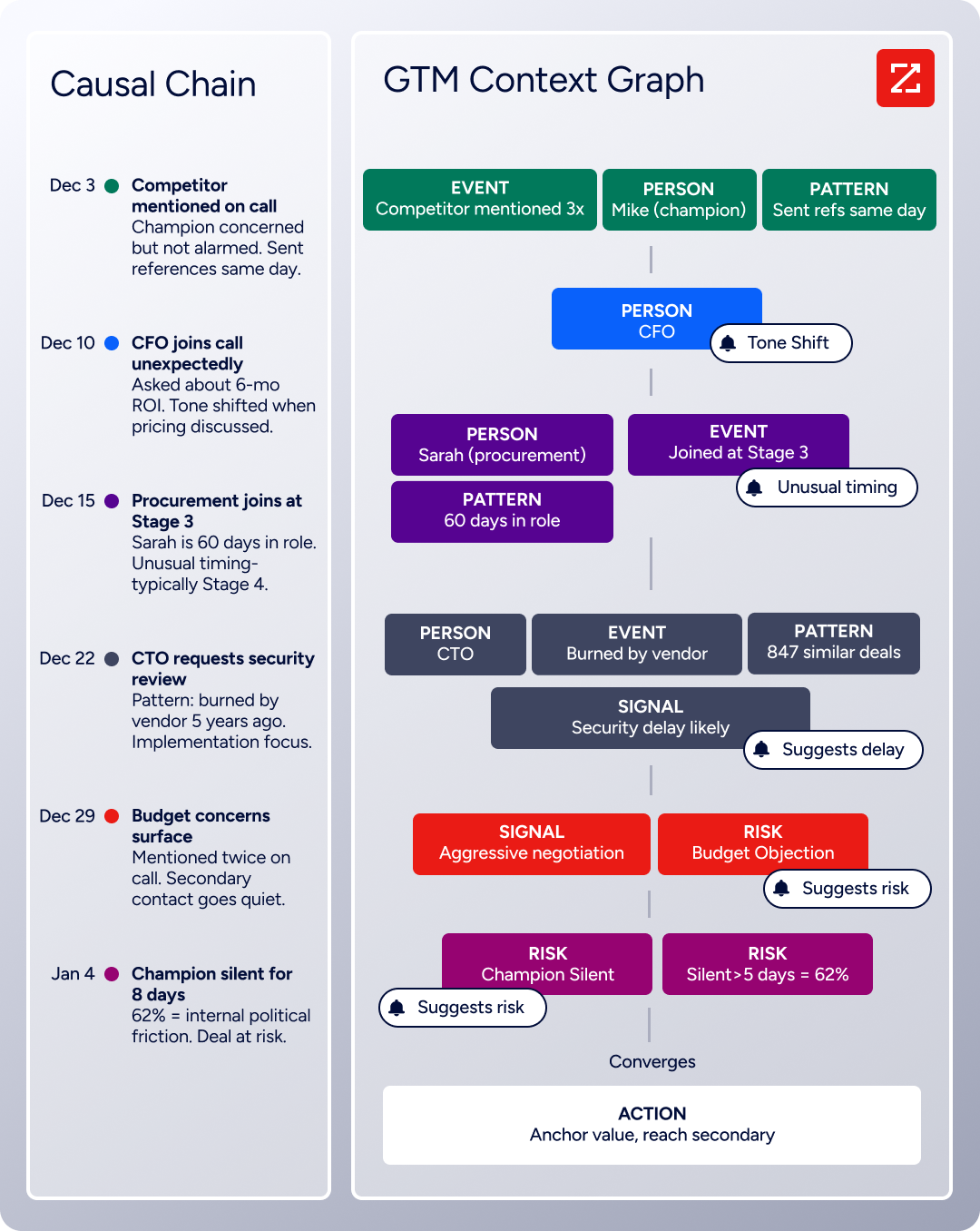
The gap between "this person registered" and "this person is a VP of Engineering at a company showing buyer intent in your category" is where ZoomInfo's API fits. Behind it sits the GTM Context Graph, a system that combines ZoomInfo's B2B data with your CRM records, conversation transcripts, and behavioral signals, processing 1.5B+ data points daily.
Source: ZoomInfo
What the API Covers: Search, Enrichment, and AI Intelligence
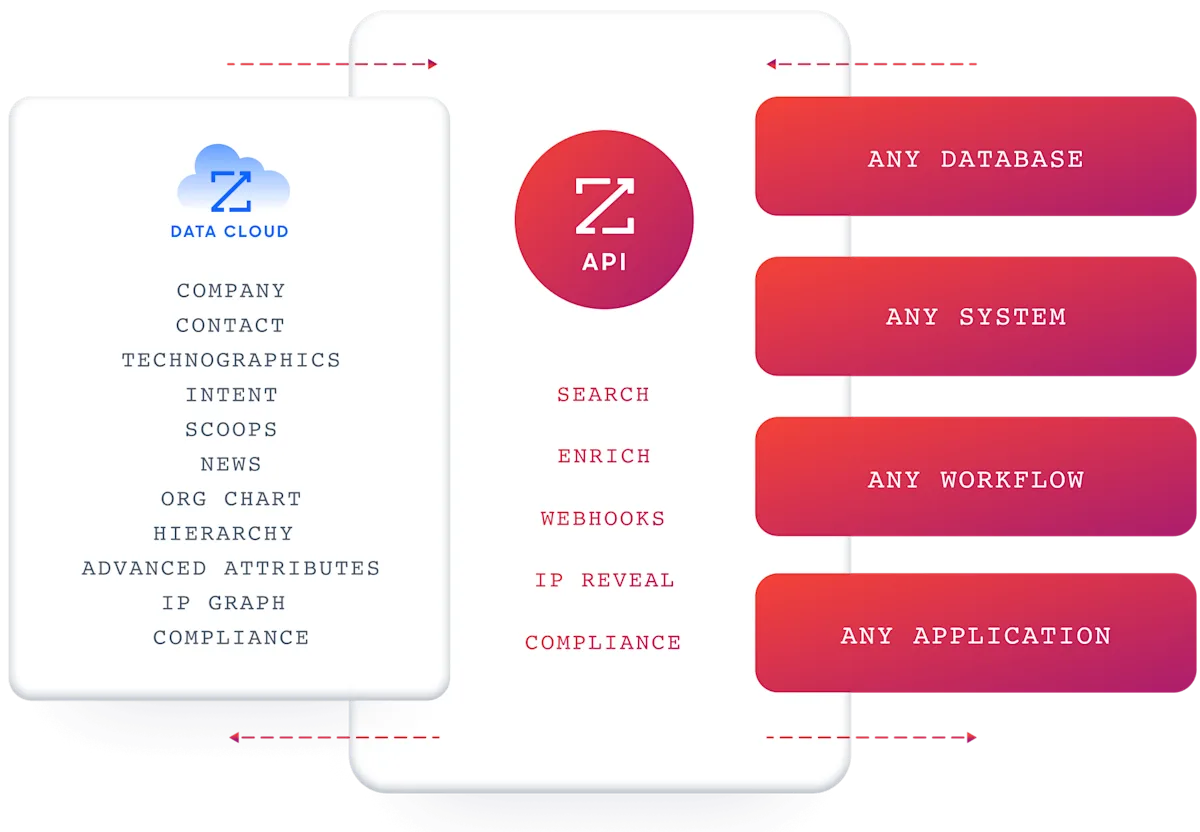
ZoomInfo's Enterprise API is a REST suite served from https://api.zoominfo.com/gtm, organized into four areas documented in the interactive API reference.
Data API (Search & Enrich): The core programmatic interface. Search endpoints cover Contacts, Companies, Intent, News, and Scoops, returning matched records without consuming credits. Enrich endpoints unlock the full payload: business emails, direct dials, employment history, corporate hierarchy, org charts, technographics, and hashtag signals, accepting up to 25 records per call. The search-then-enrich pattern means you filter freely, then pay only for the records you commit to.
The underlying dataset spans 500M contacts and 100M companies, 135M+ verified phone numbers, and 200M+ verified business email addresses.
Copilot API (AI Intelligence): Built on the same AI engine that drives GTM Workspace, the Copilot API exposes that intelligence programmatically. Account Summary returns structured account intelligence with a free-form Q&A endpoint. Find Similar Companies performs lookalike expansion. Contact Recommendations returns AI-ranked buying-committee suggestions by motion (prospecting, deal acceleration, renewals). This surface requires an Enterprise API or Copilot package subscription.
Marketing and Platform APIs round out the suite with audience management (CRUD for advertising audiences) and bidirectional engagement data via the Engagements API, currently in Beta.
Source: ZoomInfo
The pairing with an event API is direct: pull attendee data from Cvent's API after an event, match those attendees against ZoomInfo's search endpoints (free, no credits consumed), then enrich the ones worth pursuing with full B2B profiles. Your sales team gets an enriched list of event attendees ranked by intent signals and account fit, not a raw registration export.
Authentication, Rate Limits & Credits
Authentication uses OAuth 2.0 with PKCE via Okta, issuing 24-hour access tokens with rotating refresh tokens. It supports three flows: Authorization Code with PKCE (for web applications), Client Credentials (for server-to-server), and Refresh Token.
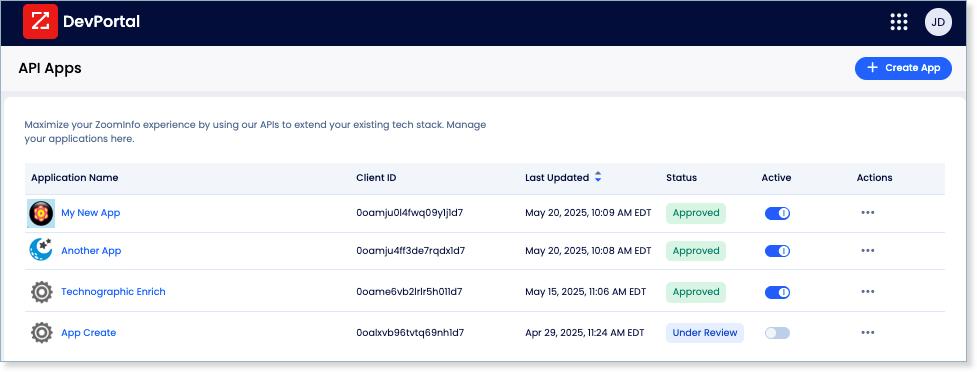
Teams register applications through the ZoomInfo Developer Portal, where they generate credentials, define scopes, and test endpoints. The authentication model supports delegated access, credential rotation, and scoped permissions.
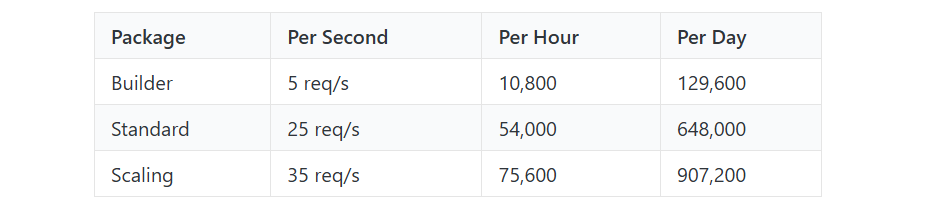
ZoomInfo publishes rate limits by tier: Builder (5 req/sec), Standard (25 req/sec), and Scaling (35 req/sec), with per-hour and per-day sliding-window limits enforced simultaneously. Every response includes quota headers with remaining capacity, and 429 responses include a Retry-After header with exact backoff timing.
Credits follow a rolling 12-month window: enriching a record for the first time consumes one credit; re-enriching the same record within the year is free.
Source: ZoomInfo
Webhooks, MCP & Developer Experience
Webhooks are available via Agents API, tied to ZoomInfo's Agent Teams system. Event types cover bulk enrichment jobs completing, records changing, credit usage crossing thresholds, and new GTM signals (scoops, funding events, intent spikes) becoming available. Retry behavior and throttling are configurable per event type.
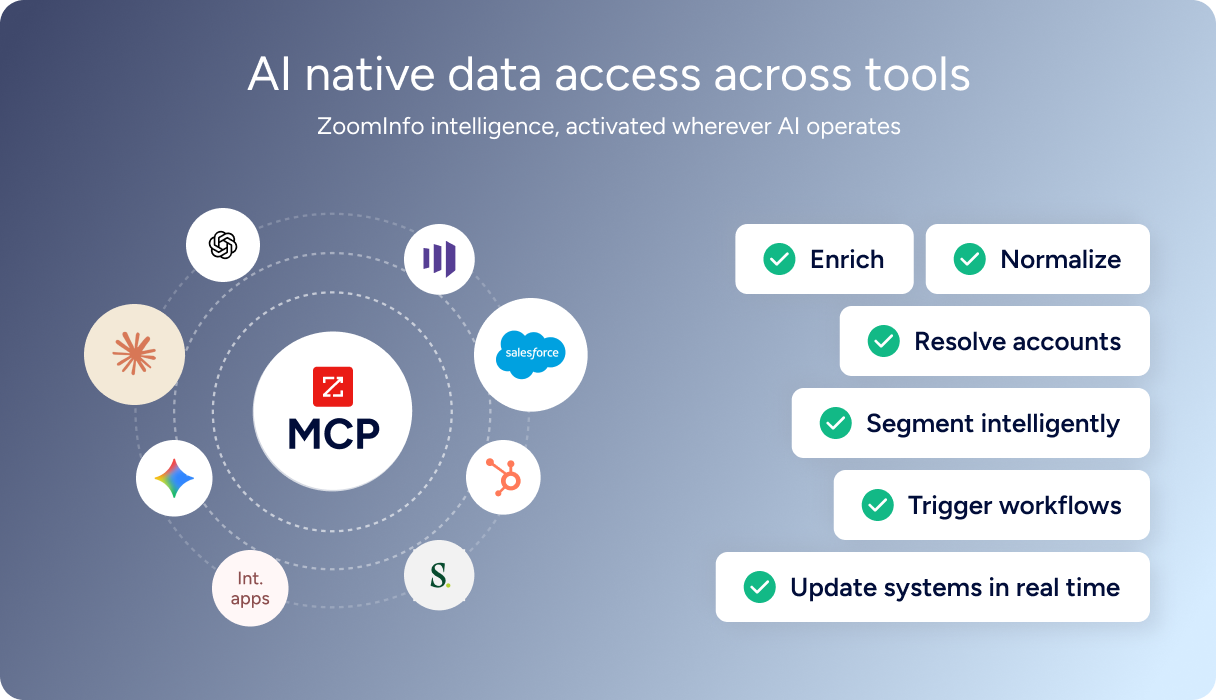
For developers building AI agents, ZoomInfo's MCP server at https://mcp.zoominfo.com/mcp exposes search, enrich, and account research as native tools for MCP-compatible assistants, currently supporting Claude and ChatGPT. The credit model carries over from the REST API.
Source: ZoomInfo
ZoomInfo does not publish official SDKs, so you integrate over HTTP and own the auth-and-retry layer yourself. The interactive API reference supports live testing, and a Docs MCP server lets AI development tools generate integration code against the API spec. Documentation lives at docs.zoominfo.com.
ZoomInfo opened API access across all relevant plans in 2025, removing the prior enterprise-only gate. Pricing follows a consumption-based model and is custom-quoted.
BDO Canada reported an 87% reduction in time spent updating internal data dashboards using the ZoomInfo API, with one analyst calling the integration straightforward across any process. (ZoomInfo)
Final Verdict
Cvent's API is a REST surface that exposes an enterprise event platform programmatically: registrations, attendees, sessions, speakers, travel, budgets, surveys, RFPs, and eMarketing campaigns, governed by a scoped workspace model with OAuth 2.0 authentication.
The Developer Hub, changelog, and SDKs in three languages give a developer what is needed to evaluate and build against the API. Its limits are limits of scope, not execution.
Choose the Cvent API if your build is event-first: syncing registrations to a CRM, automating session management, triggering post-event workflows on attendee actions, or managing venue sourcing programmatically. For the job of moving event data into and out of the rest of your tech stack, the API delivers what the platform does, without the dashboard.
Add the ZoomInfo API when the build needs to go beyond event lifecycle data: who these attendees are, what companies they represent, whether those accounts show buyer intent, and where the contacts sit in the org chart. Pull attendee data from Cvent, enrich it with ZoomInfo, and the pattern turns raw registration lists into qualified pipeline. Your team can access the same intelligence through GTM Workspace for sellers, GTM Studio for marketers and RevOps, or APIs and MCP in any front-end.
Start with the Enterprise API or explore the developer docs to see the endpoint surface directly.
A developer who needs neither API should note that Cvent's API does not cover B2B intelligence, and ZoomInfo's API does not manage events. If your pipeline requires both, the two are complementary layers.
FAQ
Is the Cvent API free?
Every Cvent account includes Essentials Tier access at no additional cost: 1,000 daily API calls at 2 requests per second. Upgrading to Standard (15,000 calls/day) or Premium (500,000 calls/day) requires contacting a Cvent representative. Full API access is an Enterprise plan feature, not included on Professional. Enterprise pricing is quote-only.
Does Cvent have a GraphQL API?
No. Cvent exposes a REST API over HTTPS with JSON request and response bodies. A legacy SOAP API exists but is being sunset. There is no GraphQL endpoint. If you need a GraphQL interface, you would build a wrapper layer on top of the REST API.
What is the Cvent API rate limit?
Cvent enforces rate limits across three tiers. The Essentials Tier (included with every account) allows 1,000 calls per day at 2 requests per second with a burst limit of 1. The Standard Tier allows 15,000 calls per day, but per-second limits are not publicly documented. The Premium Tier allows 500,000 calls per day at 25 requests per second.
All daily quotas reset at midnight UTC. A Bulk API handles high-volume operations that would otherwise exhaust these limits.
Are there official Cvent SDKs?
Yes. Cvent publishes official SDKs for TypeScript, .NET, and Java. An older .NET SDK is archived on GitHub under the Cvent organization (112+ repositories). The Developer Hub does not state current maintenance status, versions, or installation instructions for the active SDKs.
The legacy SOAP API has separate sample code. Before depending on an SDK for production, check the relevant GitHub repository to confirm it tracks the current REST API surface.
Does the Cvent API support webhooks?
Yes. Cvent pushes event-driven notifications to developer-supplied HTTPS endpoints. Webhooks are configured per-object type, covering attendee registrations, session registrations, session creation, manually synced attendees, and meeting request form submissions. Endpoints must be SSL-secured and pass a GET validation check before activation.
A manual sync capability handles bulk data pushes on demand. Webhook coverage focuses on core registration and session events; budget changes, survey completions, and eMarketing sends are not covered.
Can I use the Cvent and ZoomInfo APIs together?
Yes, and there is a practical reason to pair them.
Cvent's API delivers event lifecycle data: who registered, which sessions they attended, what meetings they booked. ZoomInfo's API enriches those records with B2B intelligence: company attributes, org charts, technographics, verified direct dials, and buyer intent signals. A pipeline can match attendee records against ZoomInfo's search endpoints (free, no credits consumed), then enrich the highest-priority contacts with full profiles. The result is a qualified, enriched list of event leads rather than a raw registration export.
The two APIs use different authentication models (Cvent's OAuth 2.0 Client Credentials vs. ZoomInfo's OAuth 2.0 with PKCE) and different pricing structures (plan-gated vs. credit-based), so plan your integration layer to handle both.
Compare more tools in this space:
