
If you're comparing HubSpot vs. iContact for your email marketing, you're asking a bigger question than which tool sends better emails. You're deciding how much marketing infrastructure you actually need.
HubSpot is a full CRM and marketing platform. iContact is a focused email marketing tool. They share some surface-level overlap, but they solve different problems at different price points for different buyers.
Before you choose, answer these questions honestly:
Do you need a CRM with sales, service, and marketing automation, or do you just need to send email campaigns reliably?
Is your team equipped to use automation workflows, or do you need something anyone can operate in 30 minutes?
Are you willing to pay for a platform that grows with your business, or do you need the lowest possible cost per contact?
Are you selling B2B, where knowing which companies are actively researching your product would change your outreach strategy?
Do you need your marketing tool to connect with sales and service, or is standalone email marketing sufficient?
In short, here's what we recommend:
HubSpot is the right choice for growing businesses that need marketing, sales, and service under one roof.
Its Smart CRM connects every customer touchpoint, from the first website visit through closed deal and ongoing support, giving teams a single view of each contact. Marketing Hub offers automation with visual workflows, AI-powered content creation through Breeze, and multi-touch attribution that ties campaigns to revenue.
With 288,706 customers and over 2,000 app integrations, HubSpot is a platform you can grow into. The tradeoff is cost and complexity: Marketing Hub Professional starts at $800/month with a $3,000 onboarding fee, and the per-seat, per-hub pricing model escalates quickly as teams grow.
iContact is the right choice for small businesses that need straightforward, affordable email marketing without a learning curve. Its drag-and-drop builder lets non-technical users create professional campaigns in under 30 minutes, and its customer service earns a 4.6/5 rating on Capterra for a reason: real humans help you when you're stuck.
Starting at $9/month for 500 contacts, iContact delivers accessible email marketing. The tradeoff is scope: iContact has no CRM, limited automation on the Standard plan (one automation, one trigger type), and pricing becomes less competitive as your contact list grows past 10,000.
(A quick note: iContact doesn't have a product called "iContact Pro." If you searched for that, you're likely looking at iContact's Premium plan, which adds unlimited automations, social media posting, and an AI content assistant on top of the Standard tier.)
Both platforms handle the execution side of marketing well. But for B2B companies, there's a prior question that neither answers: are you reaching the right people at the right time? That's where ZoomInfo changes the equation.
ZoomInfo is an AI-powered go-to-market platform that provides the intelligence layer your marketing and sales tools need. With 500M contacts, 100M companies, 135M+ verified phone numbers, and 200M+ verified business email addresses, ZoomInfo tells you who your buyers are, when they're researching solutions like yours, and how to reach them.
Its GTM Context Graph combines this B2B data with your CRM records, conversation transcripts, and behavioral signals into a single intelligence layer that captures not just what happened in a deal, but why.
ZoomInfo integrates directly with HubSpot and works alongside any email platform, so the question isn't HubSpot or iContact or ZoomInfo. For B2B teams, ZoomInfo is what makes either platform effective.
If data-driven targeting sounds like the missing piece in your marketing stack, see how ZoomInfo works.
HubSpot vs. iContact vs. ZoomInfo at a glance
HubSpot | iContact | ZoomInfo | |
|---|---|---|---|
Core function | CRM + marketing automation platform | Email marketing tool | B2B data intelligence + go-to-market platform |
Email marketing | Full-featured with AI writing and send-time optimization | Drag-and-drop builder with templates and AI content assistant | Not an email sending tool (powers the data behind campaigns) |
CRM included | Yes, with free tier | No | CRM enrichment and integration |
Marketing automation | Visual workflows with behavioral triggers | Basic (1 automation on Standard; unlimited on Premium) | Signal-triggered go-to-market plays and multi-channel orchestration |
B2B data & intent | Limited to CRM data you collect | None | 500M contacts, 100M companies, buyer intent signals |
Integrations | 2,000+ apps | 100+ apps (many via Zapier) | 120+ go-to-market integrations + API/MCP access |
Starting price | Free CRM; Marketing Hub from $15/seat/mo (Starter) | $9/mo for 500 contacts | Free tier (ZoomInfo Lite); paid plans custom-quoted |
Free plan | Yes, permanent | Yes, up to 500 contacts | Yes (ZoomInfo Lite, permanent) |
Best for | Growing businesses needing unified marketing, sales, and service | Small businesses needing simple, affordable email campaigns | B2B teams needing to identify and reach the right buyers |
A full platform vs. a focused email tool
HubSpot and iContact occupy different positions in the marketing technology landscape.
HubSpot is a platform.
It started as a marketing automation tool in 2006 and expanded into a full customer platform with eight interconnected products: Marketing Hub, Sales Hub, Service Hub, Content Hub, Data Hub, Commerce Hub, Smart CRM, and Breeze AI. Every product shares the same database, so a lead captured by marketing flows to sales without manual handoff.
iContact is a tool.
Founded in 2003 by two University of North Carolina undergraduates, it has stayed focused on email marketing for over two decades. It helps small businesses build email lists, design campaigns, and track results. That's its entire mission.
This distinction matters because it determines what you're buying. With HubSpot, you're investing in an operating system for your go-to-market team. With iContact, you're buying a reliable email sender. Neither is inherently better. The right choice depends on how much infrastructure your business needs.
Source: iContact
For a 10-person real estate agency that sends a monthly newsletter and occasional listing alerts, iContact's simplicity is a feature. For a 50-person SaaS company running multi-step lead nurture sequences tied to sales pipeline stages, HubSpot's breadth is necessary.
Email marketing: where they overlap
Both platforms let you build, send, and track email campaigns. The experience of doing so, however, is different.
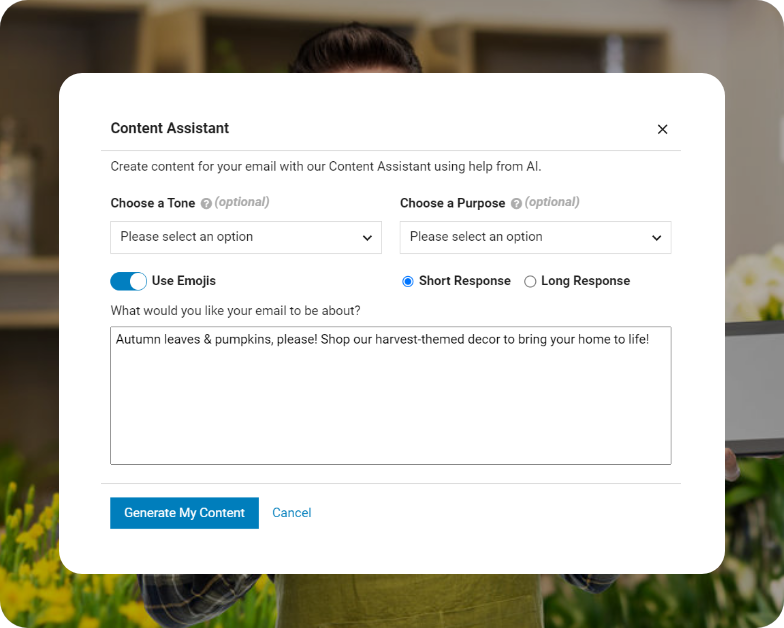
iContact leans into speed and simplicity.
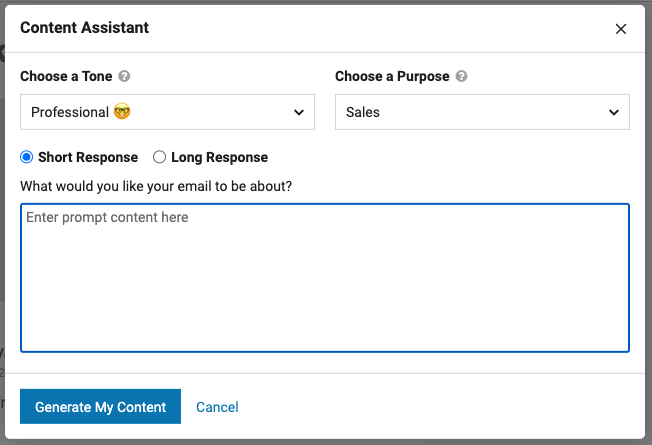
The drag-and-drop email builder uses pre-built templates that users customize by swapping images, text, and colors. iContact says a complete email can be built in under 30 minutes. An AI content assistant generates copy from simple inputs, and an HTML editing mode is available for users who want code-level control. The Premium plan adds A/B split testing for subject lines, content, and CTAs.
Source: HubSpot
Where iContact struggles is the editor itself. Capterra reviewers flag formatting challenges as a recurring pain point: inconsistent spacing, limited font management, and frustrating block manipulation. For a platform whose main selling point is ease of use, editor friction is a real weakness.
HubSpot's email marketing tools offer more sophistication.
The drag-and-drop editor includes AI email writing, send-time optimization, and dynamic personalization that pulls live CRM data (a contact's name, company, lifecycle stage, and past purchase behavior) into each email.
Source: HubSpot
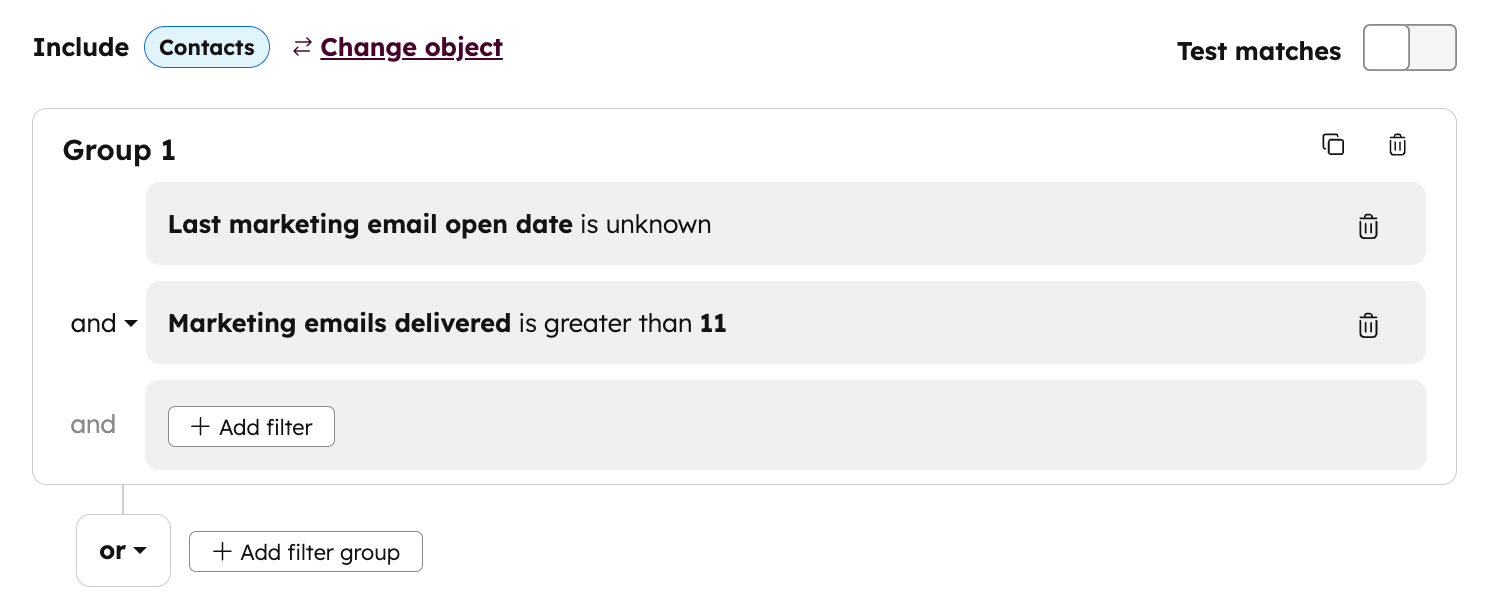
Because every email interaction logs against the contact's CRM record, marketing teams can build segments based on who opened what, clicked which link, and visited which page, then trigger targeted follow-ups automatically.
The practical difference: iContact is faster for someone sending their first campaign. HubSpot is stronger for someone running their fiftieth.
Automation depth separates the two platforms
This is where the gap between HubSpot and iContact is widest.
iContact offers four trigger types for automations: subscribe events (welcome emails), specific dates, custom date fields (birthdays, renewal dates), and segment qualification.
The Standard plan limits you to one automation using only the subscribe trigger. The Premium plan unlocks unlimited automations and all four triggers, plus social media posting and the AI content assistant.
This covers common small business workflows: welcome sequences, birthday emails, re-engagement campaigns, and post-purchase follow-ups. For anything requiring conditional branching, lead scoring, or multi-step journeys with decision logic, iContact hits its ceiling fast.
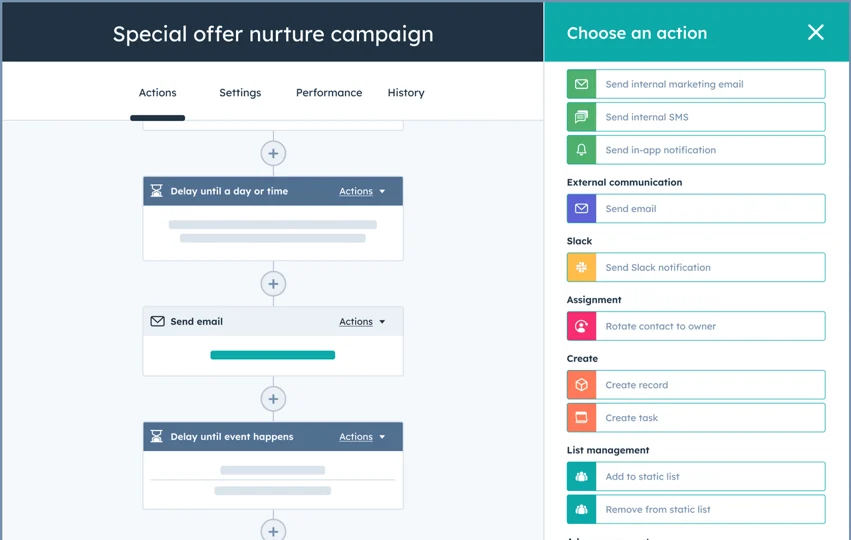
HubSpot's marketing automation workflows are a different category.
Source: HubSpot
The visual workflow builder supports multi-step, branching sequences triggered by contact behavior, lifecycle stage, form submissions, email engagement, page views, deal stage changes, and dozens of other conditions. A single workflow can nurture a lead through awareness, consideration, and decision stages, handing off to sales at the right moment based on behavioral scoring.
HubSpot's automation also extends beyond marketing. Because it connects to Sales Hub and Service Hub, a workflow triggered by a marketing email can create a sales task, update a deal stage, or route a support ticket, all within the same platform. This cross-functional automation is impossible with a standalone email tool.
The question is whether you need it. Many small businesses don't. A welcome sequence and a monthly newsletter cover 80% of their email marketing needs. Paying for HubSpot Professional automation when you only need iContact-level triggers means overspending on capability you won't use.
The question neither platform answers
Both HubSpot and iContact assume you already know who you're marketing to. HubSpot organizes and nurtures the contacts in your CRM. iContact sends campaigns to the list you've built. Neither tells you which companies are researching your product right now, who the decision-makers are, or when a prospect's buying intent has spiked.
For B2C businesses, this is fine. Your customers find you through ads, social media, and search. For B2B companies, this is a critical blind spot. B2B purchasing involves multiple stakeholders, longer sales cycles, and narrow windows of buying intent. Sending the same email newsletter to your entire contact list is the B2B equivalent of shouting into a crowd.
This is the problem ZoomInfo was built to solve.
ZoomInfo operates the largest B2B data platform in the industry: 500M contacts, 100M companies, 135M+ verified phone numbers, 120M direct-dial phone numbers, and 200M+ verified business email addresses.
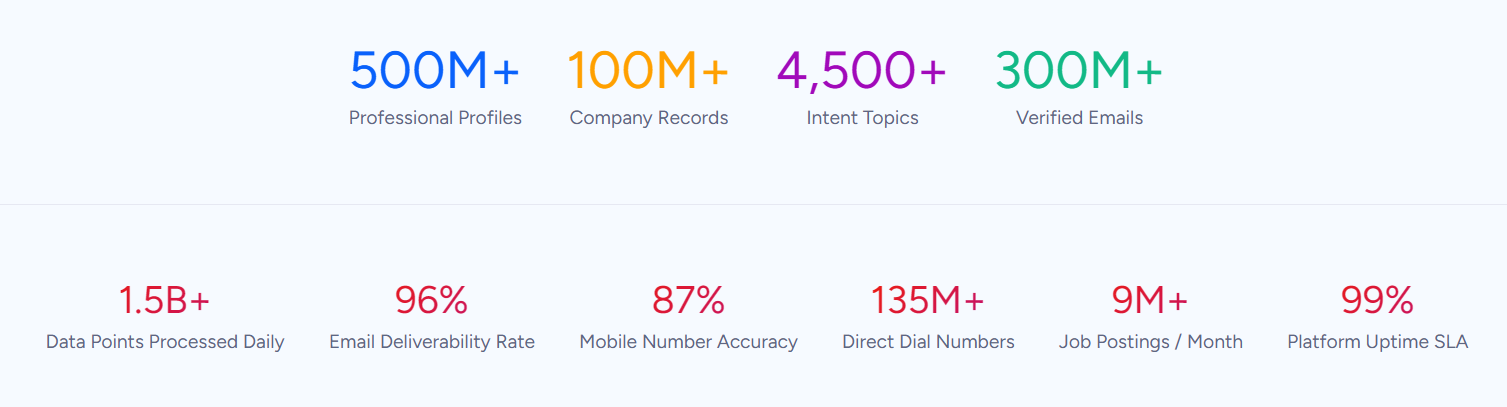
That scale matters because ZoomInfo can tell you not just that a company exists, but who works there, what technology they use, whether they're hiring, and whether they're researching solutions in your category.
The data is verified through a multi-source pipeline: automated ML scanning of 28 million site domains daily, third-party partner data covering 95 million businesses, a community of 200,000+ users who share data back, and 300+ human researchers.
First-party data reaches up to 95% accuracy. In a Fortune 500 competitive RFP analyzing 25 million contacts across vendors, the independent consultant concluded that "no other competitor came even close."
What makes this more than a database is the GTM Context Graph, an intelligence layer that processes 1.5B+ data points daily.
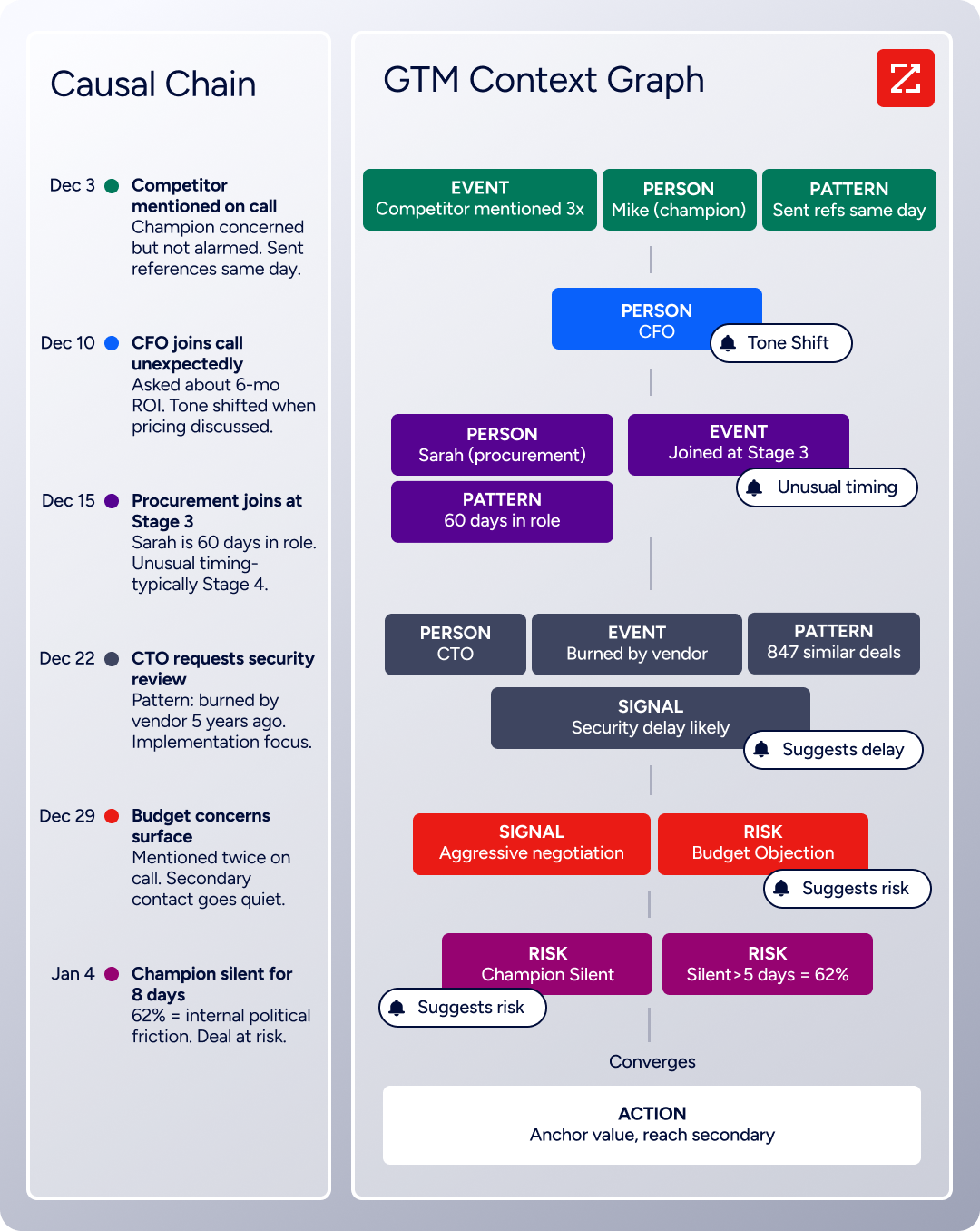
It combines ZoomInfo's third-party intelligence with your CRM records, conversation transcripts, and behavioral signals to capture not just what happened in a deal, but why it happened. Your CRM might record that a deal moved to Stage 3. The GTM Context Graph shows that the CFO joining the last call and asking about six-month ROI is what accelerated it.
For marketing teams, this means your campaigns can target accounts showing genuine buying intent rather than blasting everyone on your list. For sales teams, it means outreach addresses the specific concerns a prospect actually has. The intelligence flows through GTM Workspace for sellers, GTM Studio for marketers and RevOps, or APIs and MCP into any third-party tool, including HubSpot.
Redwood Logistics saw a 99% reduction in cost-per-click and a 310% increase in clickthrough rate after using ZoomInfo's data to target the right accounts at the right time. "It's not just the data itself. It's more about the right data at the right time to help us reach out with the right message across that full buyer journey." (Redwood Logistics)
Pricing comparison
The pricing models reflect each platform's target market.
iContact uses simple contact-based pricing.
Standard starts at $9/month for 500 contacts and scales to $350/month for 50,000 contacts. Premium runs from $16/month to $399/month for the same ranges. Annual billing saves 15%. A Freemium plan covers up to 500 contacts with 2,000 sends per month at no cost.
The simplicity is attractive at lower volumes. But the most common complaint across review platforms is that pricing escalates as lists grow, with one long-term customer reporting a $336 annual increase. At 25,000 contacts, the Premium plan costs $229/month, which starts competing with platforms that offer more features.
HubSpot uses a hybrid model that combines per-seat pricing, contact-based tiers, and flat-fee products.
The free CRM is genuinely useful (unlimited contacts up to 1M records, basic email marketing with 2,000 sends/month). But the jump to paid tiers adds up fast:
Starter: $15–20/seat/month (limited features)
Marketing Hub Professional: $800/month annual, $890 monthly (includes 3 Core Seats and 2,000 marketing contacts, plus a one-time $3,000 onboarding fee)
Marketing Hub Enterprise: $3,600/month (5 Core Seats, 10,000 marketing contacts, $7,000 onboarding fee)
A hidden cost: when subscribing to multiple Hubs at different tiers, all Core Seats are billed at the rate of the highest tier. A company using Marketing Hub Professional and Sales Hub Enterprise pays Enterprise-rate Core Seats across the board.
ZoomInfo uses consumption-based pricing that's custom-quoted based on usage patterns, number of users, credit volume, and feature requirements.
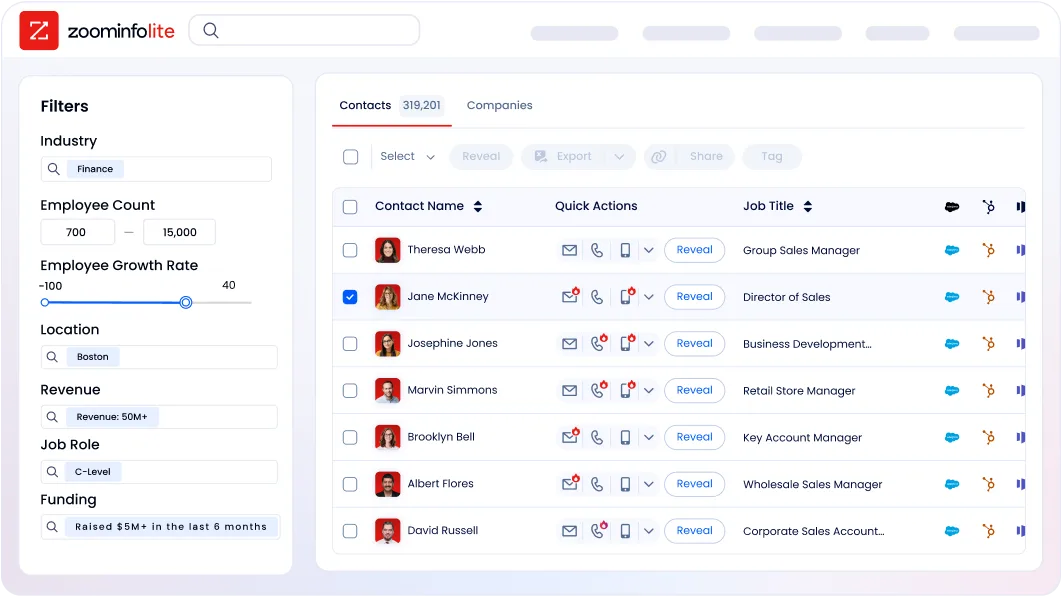
There are no published dollar amounts for paid tiers. ZoomInfo Lite is a permanent free tier with access to ZoomInfo's B2B database, 10 monthly export credits, individual and company searches, the ReachOut Chrome Extension, and WebSights Lite (up to 10 website visitor reveals per day). A 7-day free trial of the full platform is also available.
ZoomInfo is the most expensive option here, and intentionally so. It serves a different purpose. Comparing ZoomInfo's price to iContact's is like comparing the cost of a GPS system to the cost of gasoline: both are part of getting where you need to go, but they solve different parts of the problem.
Integration ecosystems and how the three connect
HubSpot has the largest integration ecosystem of the three, with over 2,000 apps and 2.5 million active installs in its marketplace.
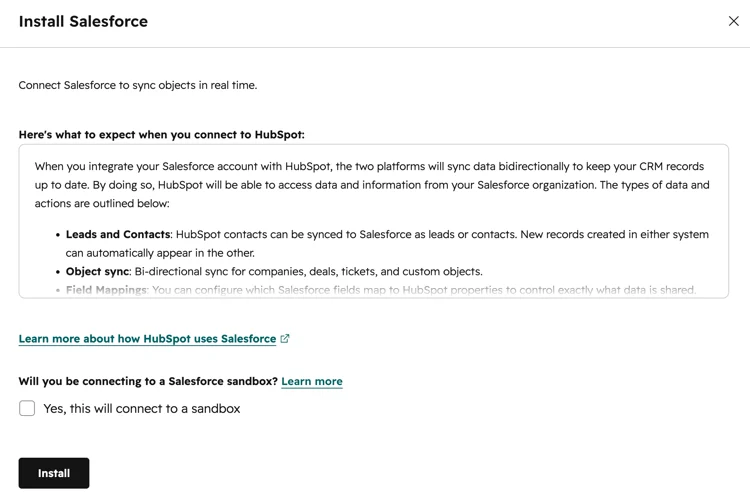
Salesforce, Slack, Google Workspace, LinkedIn, Shopify, Jira, and hundreds more connect natively. For teams running a complex tech stack, HubSpot ties systems together. The platform also exposes a REST API with date-based versioning, official SDKs in six languages, and a Remote MCP server for AI agent access.
Source: HubSpot
iContact claims over 100 integrations, though most run through Zapier rather than direct native connections.
The standout native integration is iContact for Salesforce, which carries a 4.61 average rating from 282 AppExchange reviews and lets Salesforce users manage email campaigns without leaving the Salesforce interface.
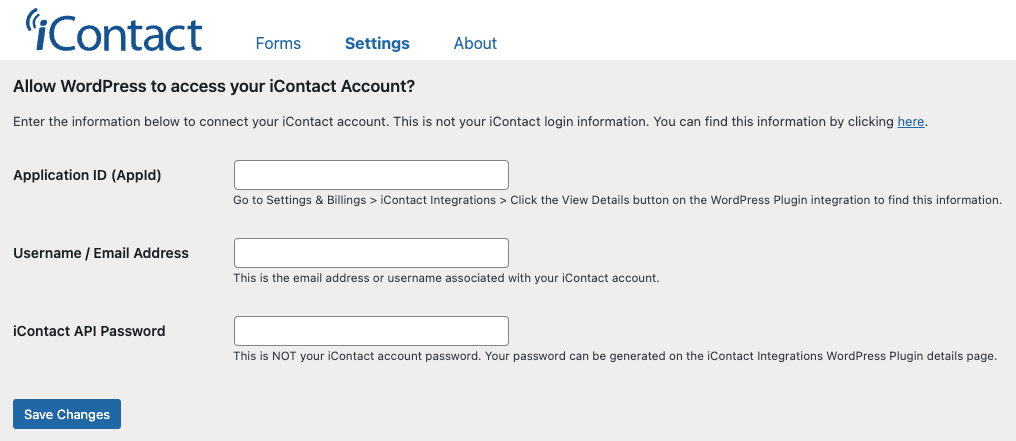
Direct connections to BigCommerce, WordPress, Eventbrite, and HubSpot CRM are also available. iContact's REST API exists but the developer portal requires authentication to browse, making pre-purchase evaluation difficult.
Source: iContact
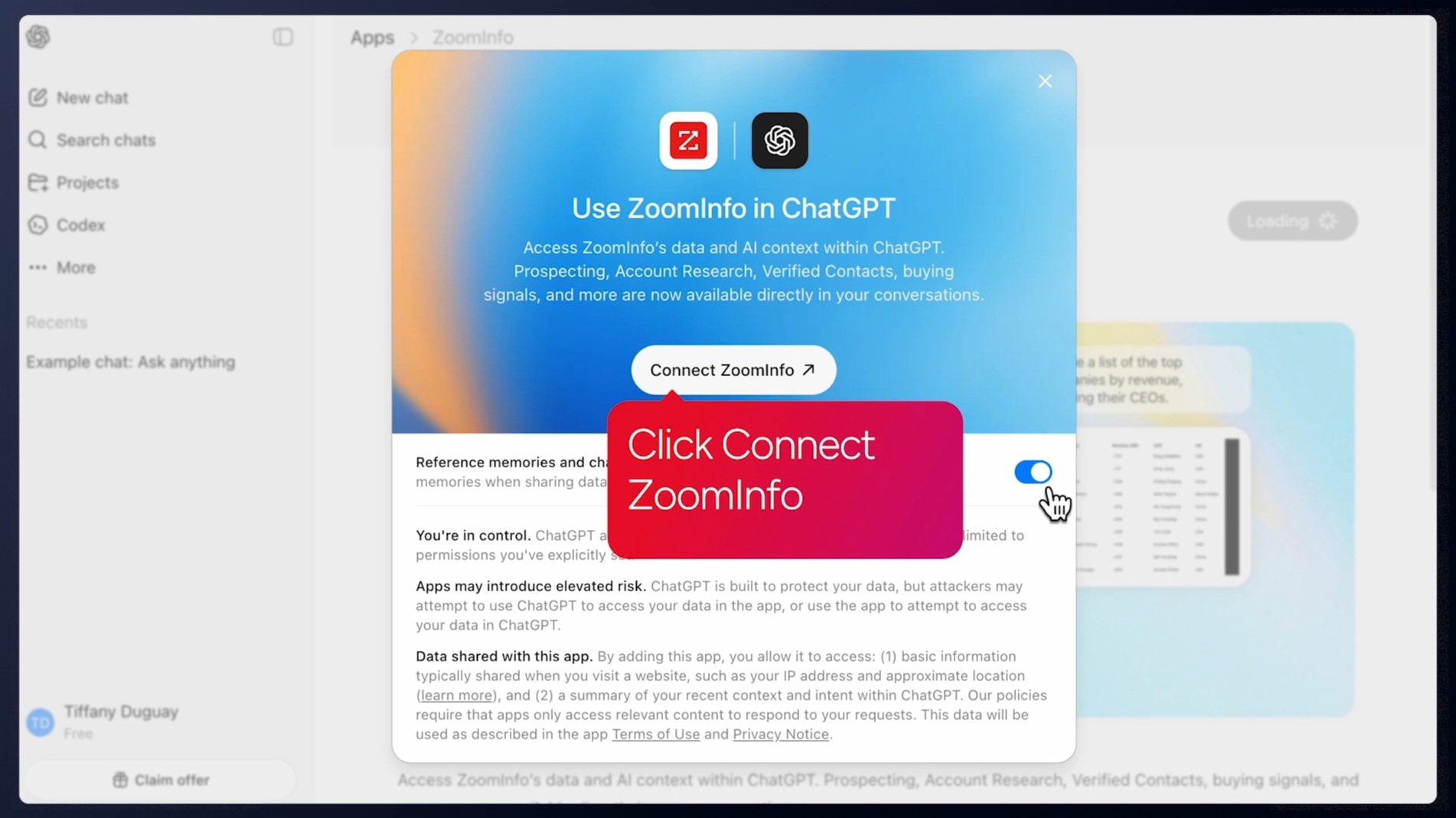
ZoomInfo maintains a Marketplace with 120+ partner integrations focused on go-to-market tools: CRMs (Salesforce, HubSpot, Microsoft Dynamics 365), sales engagement platforms, marketing automation tools, data warehouses (Snowflake, Databricks), and AI assistants (Claude, ChatGPT).
Source: ZoomInfo
The Enterprise API and MCP server let ZoomInfo's data and intelligence flow into any custom application or AI agent.
Here's where the three connect: ZoomInfo integrates natively with HubSpot, enriching CRM records with verified B2B contact data, company intelligence, and intent signals. iContact integrates with HubSpot CRM for contact syncing.
So for B2B teams using HubSpot as their CRM, the stack can be ZoomInfo (intelligence) feeding HubSpot (CRM and automation), with iContact or HubSpot's own Marketing Hub handling email execution.
Spekit found that ZoomInfo's consolidated view eliminated the need to switch between systems: "Anything that minimizes our team's need to switch contexts is beneficial. ZoomInfo offers a unified view, eliminating the need to navigate between systems." (Spekit)
For a closer look at how HubSpot and ZoomInfo compare as standalone platforms, see our HubSpot vs. ZoomInfo comparison.
Support models reflect each platform's audience
iContact treats support as a competitive advantage.
Its customer service rating of 4.6/5 on Capterra (its highest category score) reflects genuine investment in helping non-technical users succeed. Dedicated deliverability specialists work with customers to ensure emails reach inboxes, not spam folders.
Phone support is available for sales inquiries, and live chat is accessible from the account dashboard. For a $9/month platform, this level of human support is unusual.
HubSpot ties support to the subscription tier.
Free plan users get community forums only. Starter adds email and chat. Professional and Enterprise unlock phone support. Beyond reactive support, HubSpot Academy offers over 200,000 certifications through free courses covering inbound marketing, sales enablement, and more. The Solutions Partner network provides implementation and strategic consulting for teams that need hands-on help.
ZoomInfo combines direct support (phone, email, and a dedicated help center at help.zoominfo.com) with structured enablement through ZoomInfo University, which provides role-specific learning paths, certifications, and live webinars.

Enterprise customers get dedicated account management. ZoomInfo redesigned its onboarding program to run 90 days, producing a 25% improvement in customer satisfaction scores.
HubSpot vs. iContact vs. ZoomInfo: Which should you choose?
The right answer depends on what your business actually needs.
Choose iContact if:
You need simple, affordable email marketing without a learning curve
Your team is small and non-technical
You're sending newsletters, promotions, and basic automated sequences
Your budget is under $100/month for email marketing
You value responsive human support when you need help
You use Salesforce and want a well-reviewed native email integration
Choose HubSpot if:
You need a unified CRM connecting marketing, sales, and service
Your marketing strategy requires automation with behavioral triggers
You want to track the full customer journey from first touch to revenue
Your team can invest time learning the platform
You're ready for Professional-tier pricing ($800+/month for Marketing Hub)
You want an ecosystem of 2,000+ integrations to grow into
Add ZoomInfo if:
You sell B2B and need to know which companies are researching your solution
You want verified contact data (direct dials, business emails) for decision-makers at target accounts
Your marketing campaigns would improve with better targeting and intent-based timing
You want the same intelligence available in your CRM, your email tool, and your AI agents
You need an intelligence layer that works across your entire tech stack, not inside a single application
Try ZoomInfo Lite for free or request a demo of the full platform.
SpringDB used ZoomInfo's enriched data to power precise targeting for their clients, producing 2x to 3x increases in campaign conversions across channels, a 300% increase in database usability, 30-50% uplift in average deal size, and 20-40% reductions in customer churn. "You'll get 10x the value if you think of ZoomInfo as a full platform and not just a tool for one team." (SpringDB)
For many B2B companies, the best answer isn't one of these platforms. It's a combination. iContact or HubSpot handles the campaign execution. ZoomInfo provides the intelligence that tells you whom those campaigns should target and when. A marketing email that reaches the right person at the right moment outperforms a beautifully designed email sent to the wrong list every time.
HubSpot vs. iContact vs. ZoomInfo FAQ
Is "iContact Pro" a real product?
iContact does not have a plan called "iContact Pro." The platform offers three tiers: a Freemium plan (up to 500 contacts, free), a Standard plan (starting at $9/month), and a Premium plan (starting at $16/month).
The Premium plan adds unlimited automations, social media posting, an AI content assistant, and unlimited users. If you searched for "iContact Pro," you're most likely looking for the Premium plan.
Which platform is cheapest for a small business?
iContact is the most affordable, starting at $9/month for 500 contacts on the Standard plan.
HubSpot offers a free CRM with basic email marketing (2,000 sends/month with HubSpot branding), but meaningful marketing automation starts at $800/month for Marketing Hub Professional.
ZoomInfo Lite is free with 10 monthly export credits and access to the B2B database, but paid plans require a custom quote.
Can I use ZoomInfo with HubSpot or iContact?
Yes. ZoomInfo integrates natively with HubSpot through a featured marketplace integration, enriching CRM records with verified contact data, company intelligence, and intent signals. iContact also integrates with HubSpot CRM. For B2B teams, a common stack is ZoomInfo feeding intelligence into HubSpot's CRM, with either HubSpot's Marketing Hub or iContact handling email execution.
Which platform has better email automation?
HubSpot has far more advanced automation, with visual workflow builders supporting multi-step branching sequences triggered by dozens of behavioral and CRM conditions.
iContact offers four trigger types (subscribe events, specific dates, custom date fields, and segment qualification), with the Standard plan limited to one automation and one trigger.
ZoomInfo is not an email automation tool but provides the buyer intent signals that can trigger marketing automation workflows in HubSpot.
Which platform is better for B2B companies?
For email sending, HubSpot's Marketing Hub is the stronger B2B choice because its CRM tracks the full buyer journey and its automation handles complex multi-touch nurture sequences.
iContact is designed for small business email marketing rather than B2B pipeline generation.
ZoomInfo is built for B2B, providing the verified contact data, company intelligence, and buyer intent signals that B2B marketing and sales teams need to identify and engage target accounts.
How does iContact's Salesforce integration compare to HubSpot's?
iContact's Salesforce integration is a native managed package with a 4.61 out of 5 average rating from 282 AppExchange reviews, letting users manage email campaigns entirely within Salesforce. HubSpot offers a bidirectional Salesforce sync that shares lead intelligence in real time.
Both work well, but they serve different purposes: iContact for Salesforce focuses on email campaign execution inside Salesforce, while HubSpot's Salesforce integration syncs full CRM and marketing automation data between the two platforms.
Does HubSpot's free plan compete with iContact's paid plans?
HubSpot's free plan includes a CRM, basic email marketing (2,000 sends/month), forms, landing pages, and live chat, but emails carry HubSpot branding and automation is limited.
iContact's Standard plan at $9/month removes branding and provides email templates, a landing page, and one automation. For email marketing at low volumes, the two are comparable. HubSpot's free plan wins on breadth (CRM, forms, live chat included), while iContact's Standard plan wins on a cleaner email experience without branding.
What kind of data does ZoomInfo provide that HubSpot and iContact don't?
ZoomInfo provides B2B-specific intelligence that neither HubSpot nor iContact collects: verified direct-dial phone numbers and business emails for decision-makers, company attributes (revenue, headcount, industry, technology stack), organizational charts showing reporting relationships, buyer intent signals tracking which companies are researching specific topics, and website visitor identification that resolves anonymous traffic to company profiles.
HubSpot tracks your own customer interactions. iContact tracks email engagement. ZoomInfo tells you about the broader market of companies you haven't reached yet.
More HubSpot comparisons:
