
The cold email space has no shortage of platforms, but a developer's question differs from a marketer's. You are not evaluating Instantly.ai's campaign UI or its warmup pool. You want to know whether the API is deep enough, fast enough, and documented well enough to build production integrations on: automating lead flows, syncing campaign data into your own systems, and managing outreach programmatically at scale.
Instantly.ai has grown from a single-feature cold email tool to a full outbound stack (campaigns, lead database, CRM, deliverability, AI copilot) serving 40,000+ customers and processing 5 million emails daily. The API V2 is a REST surface covering most of those product areas, with Bearer token auth, workspace-scoped keys, and a published rate limit of 100 requests per second.
But surface area and production readiness are different questions.
The Instantly.ai API is likely the right choice if:
You are building automations around cold email campaigns and need to create, launch, pause, and monitor sequences programmatically.
You want to manage leads, email accounts, and campaign analytics from your own application or internal tooling.
You need webhook-driven workflows triggered by email events (opens, replies, bounces, meeting bookings).
You are an agency building multi-workspace management and need the workspace group pattern to control sub-workspaces from a single API key.
You want to integrate Instantly's SuperSearch lead database into your own prospecting pipeline.
However, it might not be the right fit if:
You need B2B contact enrichment, company firmographics, org charts, technographics, or buyer intent data: Instantly's API covers its own platform objects, not third-party intelligence.
You require official SDKs: Instantly publishes none, so you own the HTTP client, auth handling, and retry logic.
You need to enrich or verify contacts at scale outside Instantly's own database: the API does not expose a general-purpose enrichment endpoint for arbitrary email addresses.
You are building a system that needs sub-second lookups across hundreds of millions of contacts with accuracy-scored results: that is a different category of API.
You need published SLAs, a public changelog, or an OpenAPI spec download for contract-driven development.
In this case, consider the API from ZoomInfo, whose Enterprise API covers search, enrichment, and AI intelligence across 500M contacts, 100M companies, 135M+ verified phone numbers, and 200M+ verified business email addresses, with OAuth 2.0 authentication, published rate-limit tiers with quota headers, and an MCP server for AI-agent workflows. Where Instantly's API manages your outreach pipeline, ZoomInfo's API provides the B2B intelligence layer (who to contact, what company they work for, whether they are in-market) that feeds it.
This article reviews both: Instantly.ai's API in depth, and ZoomInfo's API as the B2B data and intelligence layer a developer needs alongside or instead of outreach automation.
Instantly.ai API at a Glance
Attribute | Detail |
|---|---|
API type | REST over HTTPS, JSON request/response bodies |
Authentication | Bearer token (workspace-scoped API key in Authorization: Bearer {{key}} header) |
Base URL | |
Rate limits | 100 requests/second, 6,000 requests/minute (shared across all keys in a workspace) |
Pricing / access | Included on all paid plans (Outreach, Bundle, Credits); no separate API add-on published |
SDKs | None official; Node.js and Python code examples using native HTTP libraries |
Webhooks | Supported: email events, lead status changes, meeting events, custom labels |
Documentation | developer.instantly.ai (Mintlify-hosted, interactive API explorer) |
Instantly.ai API: What Works Well & What to Plan Around
What works well | What to plan around |
|---|---|
Broad resource coverage: leads, campaigns, email accounts, inbox, verification, SuperSearch, webhooks, CRM, inbox placement, and workspace management all accessible via V2 | No official SDKs in any language; you build and maintain the HTTP client yourself |
Multiple API keys per workspace with granular scope control | Rate limits are shared across all keys in a workspace; multiple keys do not increase capacity |
Webhook system covers 15+ event types with full email and reply payloads | No published OpenAPI spec or Postman collection for import |
Workspace group pattern lets agencies manage sub-workspaces from a single admin key | API V1 keys do not work with V2 endpoints; migration required for existing integrations |
Interactive API Explorer for testing calls directly in the browser | API scope is limited to Instantly's own platform data; no third-party enrichment, firmographics, or intent signals |
llms.txt index published for AI-assisted development tooling | No public changelog, versioning policy, or deprecation timeline documented |
Instantly.ai API: Authentication & Getting Started
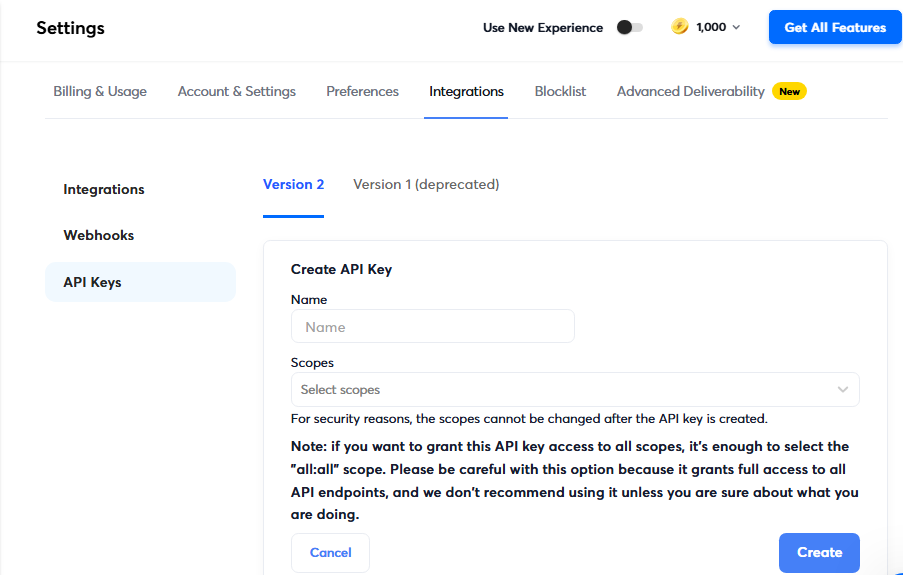
Getting API access is straightforward. Any paid Instantly plan includes it; there is no separate developer tier or enterprise gate. You create keys inside the Instantly dashboard at Settings > Integrations > API Keys.
The authentication model is Bearer token.
Every request requires an Authorization: Bearer {{key}} header. Keys are workspace-scoped and support granular API scopes, so you can create read-only keys for monitoring and write-capable keys for automation. A workspace can hold multiple keys with different scopes, and you can revoke each key individually. The key appears only once at creation and cannot be recovered afterward.
A basic authenticated request:
curl -X GET "https://api.instantly.ai/api/v2/campaigns" \
-H "Authorization: Bearer YOUR_API_KEY" \
-H "Content-Type: application/json"
Two details worth knowing:
V2 requires its own API key. If you have an existing V1 integration, V1 keys will not authenticate against V2 endpoints.
The API also supports a programmatic OAuth connection flow for connecting Google Workspace and Microsoft 365 accounts to Instantly workspaces. Those flows require the accounts:create and accounts:read scopes respectively and return an OAuth session ID for status polling. The OAuth init endpoints carry stricter rate limits: 75 requests per minute per workspace and 150 per minute per IP, with escalating IP blocks for abuse.
Instantly.ai API: Core Endpoints & Capabilities
The V2 surface is organized around the platform's product areas. All endpoints follow the pattern /api/v2/{resource}/{action}, use JSON for requests and responses, and adhere to snake_case naming.
Below are the key resource groups.
Leads
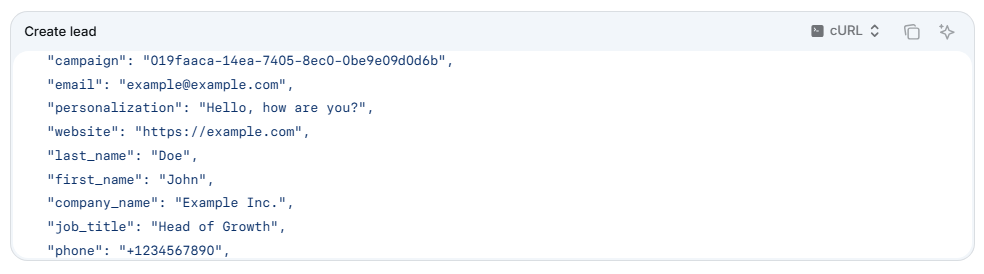
The lead management surface covers the full lifecycle: create, list (via POST filter), get, patch, delete (single and bulk), merge two leads, update interest status, move to a campaign or list, move to or remove from a subsequence, bulk assign to users, and add in bulk to a campaign or list.
What you would build with this: a lead routing system that ingests leads from your own qualification pipeline, pushes them into the right Instantly campaign based on ICP scoring, and updates their status as your CRM pipeline progresses.
Source: Instantly
Campaigns
Full campaign lifecycle management: create, get, list, patch, delete, activate/resume, stop/pause, duplicate, share, create from a shared template, and export to JSON. Analytics endpoints return aggregate, daily, step-level, and overview metrics.
The Campaign Subsequence resource provides its own create, get, list, patch, delete, duplicate, pause, resume, and sending-status endpoints.
What you would build with this: a campaign orchestration layer that creates campaigns from templates, launches them on a schedule, monitors performance via the analytics endpoints, and pauses underperformers automatically.
Email Accounts
Create, list, get, patch, delete, pause, resume, mark as fixed, test vitals, enable/disable warmup, and retrieve warmup or daily account analytics. The DFY (Done-For-You) Email Account Order resource handles programmatic ordering, domain availability checks, domain generation, and pre-warmed domain provisioning. An endpoint to move accounts between workspaces is also available.
What you would build with this: an agency dashboard that provisions sending accounts, monitors their health scores, and pauses accounts with declining deliverability before they damage campaigns.
Email (Unibox)
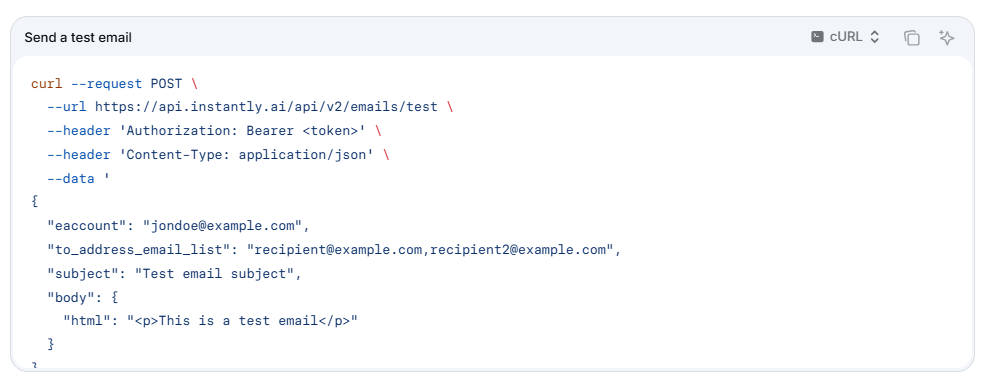
Send test emails, list, get, patch, delete, reply to a thread, forward, mark threads as read, and count unread messages. This surface gives programmatic access to Instantly's unified inbox.
Source: Instantly
SuperSearch & Enrichment
Access Instantly's 450M+ lead database programmatically: count and preview leads matching your criteria, enrich leads from SuperSearch, create standard and AI enrichments, get enrichment history, run enrichment for a resource, update enrichment settings, and facet keywords by signal category.
What you would build with this: a prospecting automation that queries SuperSearch daily for new contacts matching your ICP, enriches them, and feeds them into campaigns without manual list building.
Supporting Resources
The API also covers: Inbox Placement (create, manage, and analyze deliverability tests), Block List (CRUD plus bulk operations and CSV download), Custom Tags (CRUD plus assign/unassign to resources), Lead Lists (CRUD plus verification statistics), Lead Labels (CRUD plus AI reply label prediction), Audit Log (list events), Background Jobs (track async operations), Account Campaign Mapping, CRM Actions (phone numbers), and API Key management (create, delete, and list keys via the API itself).
Instantly.ai API: Webhooks & Events
Instantly has a webhook system managed entirely through the API.
You create, list, patch, delete, test, and resume webhooks via /api/v2/webhook/* endpoints. A list-available-event-types endpoint lets you discover supported events programmatically, and webhook event history is queryable via /api/v2/webhookevent/*, including date-aggregated overview statistics.
Supported Event Types
The published event types cover the full outreach lifecycle:
Email events: email_sent, email_opened, reply_received, auto_reply_received, link_clicked, email_bounced, lead_unsubscribed, account_error, campaign_completed
Lead status events: lead_neutral, lead_interested, lead_not_interested
Meeting events: lead_meeting_booked, lead_meeting_completed
Other lead events: lead_closed, lead_out_of_office, lead_wrong_person
Custom labels: Any custom label configured in your workspace fires as the event_type value
Payload Structure
The webhook payload is well-structured.
Every event includes timestamp (ISO 8601), event_type, workspace (UUID), campaign_id, and campaign_name. Reply events add unibox_url, full email content (email_id, email_subject, email_text, email_html), and reply content (reply_text_snippet, reply_subject, reply_text, reply_html).
Additional lead data from the database appears as extra keys. A test-webhook endpoint and a resume-webhook endpoint support operational management.
What you would build with this: a real-time lead routing pipeline that listens for lead_interested and lead_meeting_booked events, pushes qualified leads to your CRM, triggers Slack notifications, and kicks off downstream workflows in your sales stack.
Instantly.ai API: SDKs, Docs & Rate Limits
SDKs & Libraries
Instantly does not publish official SDKs.
The developer documentation includes Node.js and Python code examples using native HTTP libraries (node-fetch and requests), but no maintained SDK packages, GitHub repositories, or community library links. You integrate over HTTP directly and own the authentication, retry, and error-handling layers.
For a platform with this many endpoints, the absence of official SDKs is a real gap.
Every integration starts with boilerplate: building a client wrapper, handling 429 retries with backoff, and managing API key rotation. For teams building quick automations this is manageable; for production integrations at scale, it adds engineering time.
Documentation & Developer Experience
The developer portal at developer.instantly.ai is hosted on Mintlify and organized into four sections:
Overview (Introduction)
Getting Started (API key setup, authorization, rate limits, Slack channel)
Guides (API v1-to-v2 migration, OAuth connection flow, webhook events, workspace group)
API Reference (interactive documentation for every resource, with a Schemas reference page)
The guides include complete, working code examples in Node.js and Python. The API reference supports try-it functionality for testing calls in the browser. An llms.txt index is published at the root, providing a machine-readable documentation index for AI-assisted development tooling. A dedicated developer Slack channel is the primary support channel.
What the docs lack: no Postman collection, no downloadable OpenAPI spec, and no public changelog. The V1 deprecation timeline was mentioned but not detailed with specific dates.
For a team evaluating whether to build on this API long-term, the absence of versioning policy and change management documentation is worth noting.
Rate Limits & Constraints
The published rate limits are clear:
100 requests per second
6,000 requests per minute
Both limits apply simultaneously, and hitting either triggers a 429 Too Many Requests response. Two constraints matter:
Limits are shared across all API keys within the same workspace. Creating multiple keys does not increase capacity.
Limits are shared across API V1 and V2. If you are running both during a migration, the combined traffic counts against one quota.
The OAuth init endpoints have tighter limits: 75 requests per minute per workspace and 150 per minute per IP, with escalating blocks (30 minutes, then 2 hours, then 24 hours) for persistent violations. A Retry-After header accompanies 429 responses, and a circuit breaker (503) fires if Google or Microsoft is rate-limiting Instantly upstream.
Instantly recommends batching operations where possible and distributing automations across multiple runs per day rather than running one large burst.
At 100 req/s and 6,000 req/min, most integrations will operate comfortably. High-volume agency setups managing hundreds of campaigns across workspace groups may need to design around the shared-workspace limit.
Instantly.ai API Pricing & Access Costs
Instantly includes API access on all paid plans without a separate per-call charge, credit deduction model, or API add-on fee. The pricing page lists "API, webhooks, and integrations" as a feature across Outreach, Bundle, and Credits tiers.
The entry points:
Outreach Growth plan: $47/month (annual: $37.60/month). Includes API access, unlimited email accounts, 1,000 uploaded contacts, 5,000 emails/month.
Starter Bundle (Outreach + Credits): $94/month. Adds lead database access via SuperSearch (1,500 credits).
Hypergrowth and Light Speed plans: $97/month and $358/month respectively, with higher contact and email volume caps plus additional features (subsequences, Slack/webhooks, agency view).
What this means for a developer: API access is bundled.
The real cost constraint is the platform's volume limits (uploaded contacts, monthly emails, credits for lead enrichment), which apply whether you trigger actions via the API or the UI. A developer building a high-volume integration needs to size the plan based on those volume caps, not on API call pricing.
Two pricing details that matter for API-heavy builds:
Uploaded contacts are a lifetime cap, not a monthly reset. Every contact ever uploaded counts permanently; deleting old campaigns frees space.
Credits expire. Monthly credits expire 2 months after purchase; annual credits expire after 1 year.
Where the Instantly.ai API Falls Short
These are scope decisions and practical constraints a developer should plan around when building on this API.
No official SDKs.
Every integration starts from HTTP primitives. You build the client, the auth wrapper, the retry logic, and the error handling. For a platform with 30+ resource types and 100+ endpoints, maintained SDKs in JavaScript and Python would cut integration time significantly.
No B2B intelligence data.
The API surfaces Instantly's own platform objects: leads, campaigns, email accounts, inbox threads, verification jobs, and SuperSearch results. It does not provide contact enrichment for arbitrary email addresses, company firmographics, org charts, technographics, buyer intent signals, or direct-dial phone numbers outside what SuperSearch returns from its own database.
If your build needs to answer "who is this person, what company do they work for, and are they researching my category," that data must come from another API.
No downloadable OpenAPI spec or Postman collection.
The interactive docs help with exploration, but without a machine-readable spec you cannot auto-generate typed clients, run contract tests, or import into API management tools without manual work.
No public changelog or versioning policy.
The docs mention V1 deprecation but provide no timeline, no versioning scheme for V2 endpoints, and no changelog. For a team building a production integration, the risk is discovering breaking changes through failures rather than announcements.
Workspace-shared rate limits cap throughput for large operations.
The 100 req/s and 6,000 req/min limits are per-workspace, shared across all keys and both API versions. An agency managing dozens of sub-workspaces with heavy automation may hit bottlenecks during peak operations. The workspace group pattern helps but does not eliminate the per-workspace ceiling.
SuperSearch data depth lags specialized B2B databases.
Instantly's lead database covers 450M+ contacts, but the platform itself acknowledges that SuperSearch "may not provide the level of deep enrichment and prospecting features that platforms like Apollo or ZoomInfo offer." Intent data, technographics, org charts, and corporate hierarchy are outside its scope.
ZoomInfo API: The B2B Intelligence Layer for Your Outreach Pipeline
Source: ZoomInfo
Instantly's API lets you automate outreach: creating campaigns, managing leads, monitoring deliverability, and reacting to engagement events. What it does not do is tell you who those leads should be, what company they represent, what technology that company uses, or whether the account is in-market for your category.
ZoomInfo's API operates at that layer.
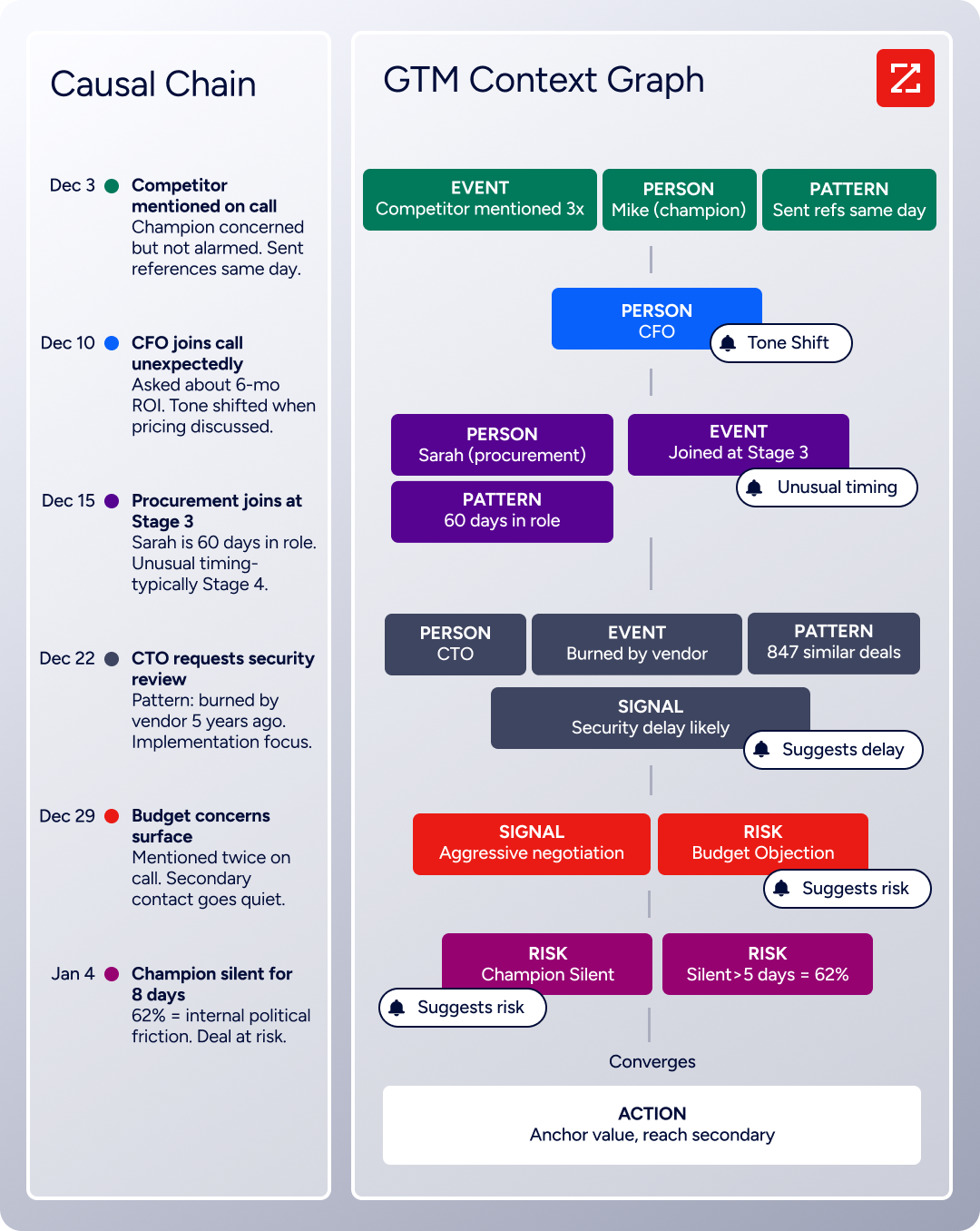
Behind it is the GTM Context Graph, which processes 1.5B+ data points daily by combining ZoomInfo's B2B data with your first-party signals to surface not just what happened in an account, but why.
The gap between "send a cold email to this contact" and "send a cold email to the VP of Engineering at a 500-person SaaS company that just raised a Series C, uses your competitor's product, and is researching your category this week" is where ZoomInfo fits.
Source: ZoomInfo
What the API Covers
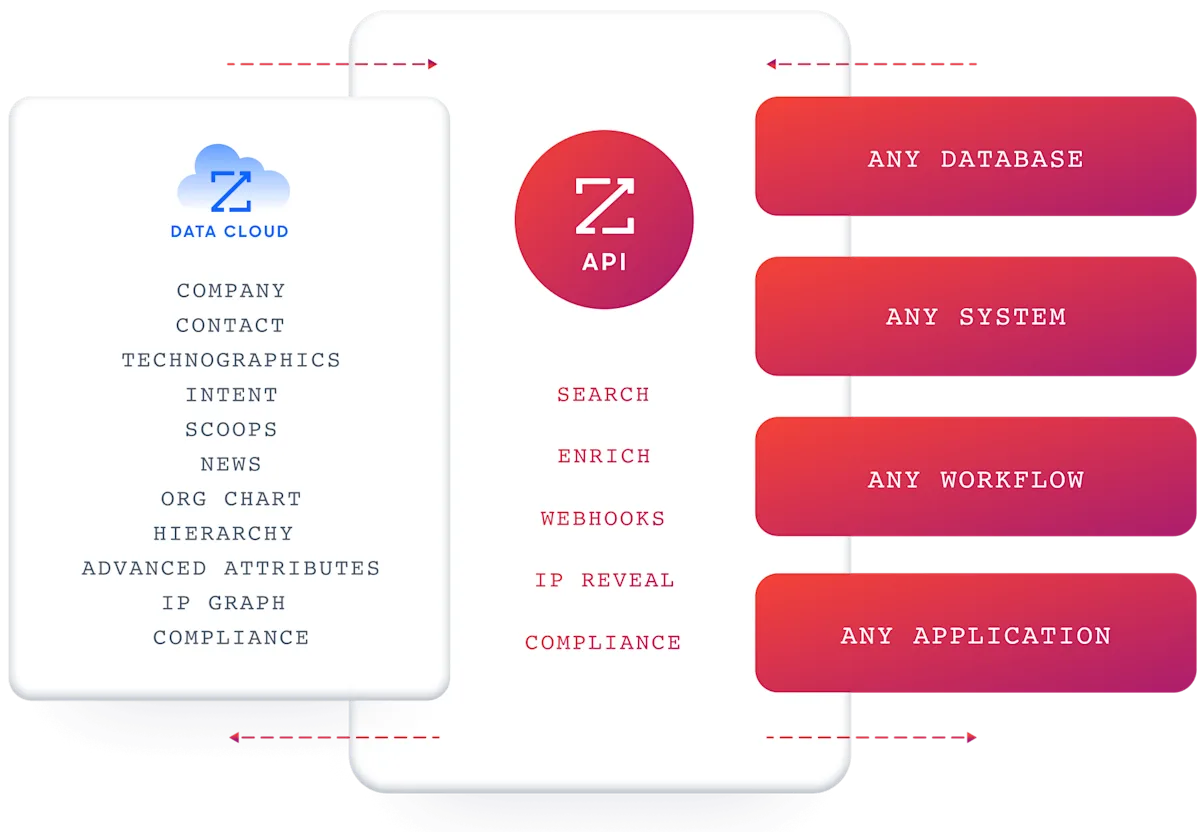
ZoomInfo's Enterprise API is a REST suite served from https://api.zoominfo.com/gtm, organized into four areas documented in the interactive API reference:
Data API (Search & Enrich): Search endpoints cover Contacts, Companies, Intent, News, and Scoops, returning matched records without consuming credits. Enrich endpoints unlock the full payload: business emails, direct dials, employment history, corporate hierarchy, org charts, technographics, and hashtag signals, accepting up to 25 records per call.
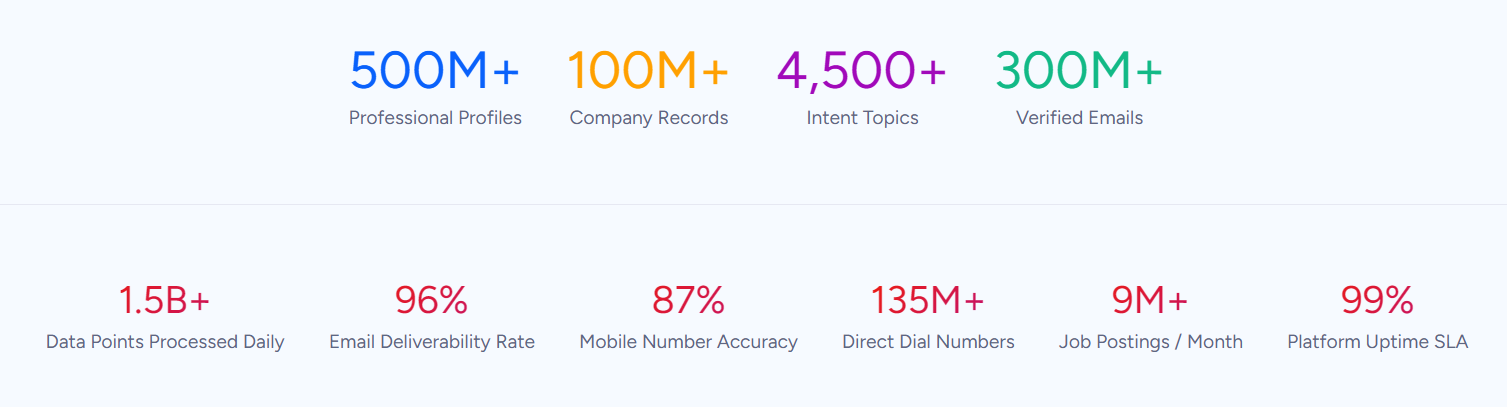
The underlying dataset spans 500M contacts, 100M companies, 135M+ verified phone numbers, and 200M+ verified business email addresses. The search-then-enrich pattern means you filter freely, then pay credits only for the records you commit to.
Source: ZoomInfo
Copilot API (GTM Workspace AI): Account Summary returns structured account intelligence with a free-form Q&A endpoint. Find Similar Companies performs lookalike expansion from a seed account. Contact Recommendations returns AI-ranked buying-committee suggestions by motion (prospecting, deal acceleration, renewals).
Marketing API: CRUD endpoints for programmatic audience management.
Platform API (Engagements, Beta): Bidirectional engagement data via the Engagements API.
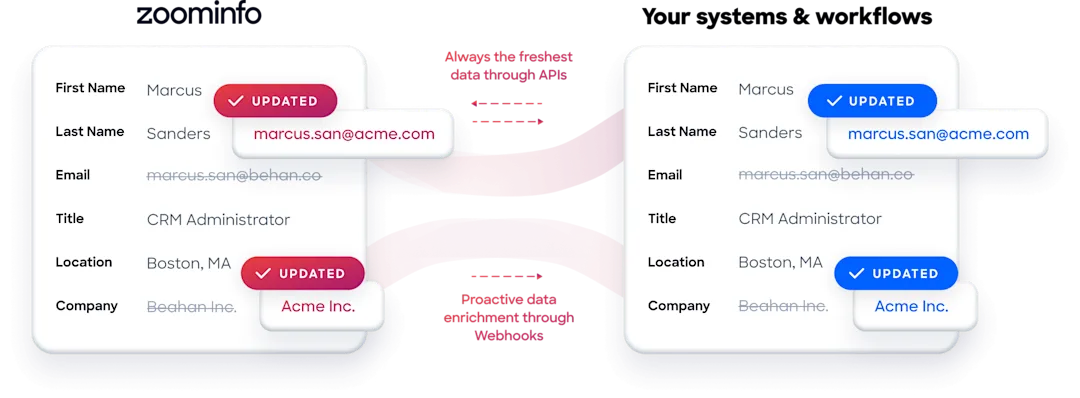
A developer pairing these two APIs gets a direct pipeline: use ZoomInfo's Search to find contacts matching your ICP, Enrich to get verified emails and direct dials, then push those contacts into Instantly campaigns via the Leads API.
Webhook events from Instantly (reply_received, lead_interested) can trigger further ZoomInfo enrichment or Copilot lookups to prepare the next step. For teams that want that pipeline to run itself, ZoomInfo Agent Teams can carry a play like this end to end, with specialist agents sharing account context and acting within the approvals and limits you set.
Source: ZoomInfo
Authentication & Access
ZoomInfo uses OAuth 2.0 with PKCE via Okta, issuing 24-hour access tokens with rotating refresh tokens.
Three flows are supported: Authorization Code with PKCE (web applications), Client Credentials (server-to-server), and Refresh Token (silent refresh). You register applications through the ZoomInfo Developer Portal, where teams generate credentials, define scopes, and test endpoints. API access requires an Enterprise API or Copilot package; consumption-based pricing is custom-quoted.
Rate Limits, Credits & Developer Experience
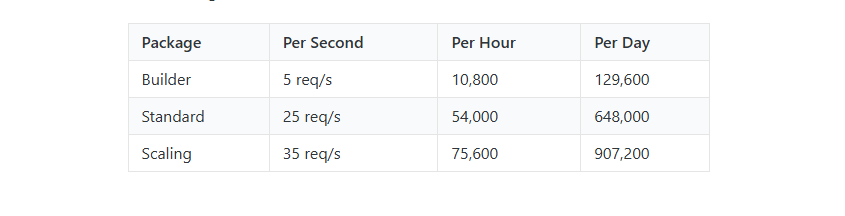
Rate limits are published by tier: Builder (5 req/sec), Standard (25 req/sec), and Scaling (35 req/sec), with per-hour and per-day sliding-window limits enforced simultaneously.
Source: ZoomInfo
Every response includes quota headers with remaining capacity, and 429 responses include a Retry-After header identifying which window was exhausted. Credits follow a rolling 12-month window: a record enriched for the first time consumes one credit; re-enriching the same record within the year is free.
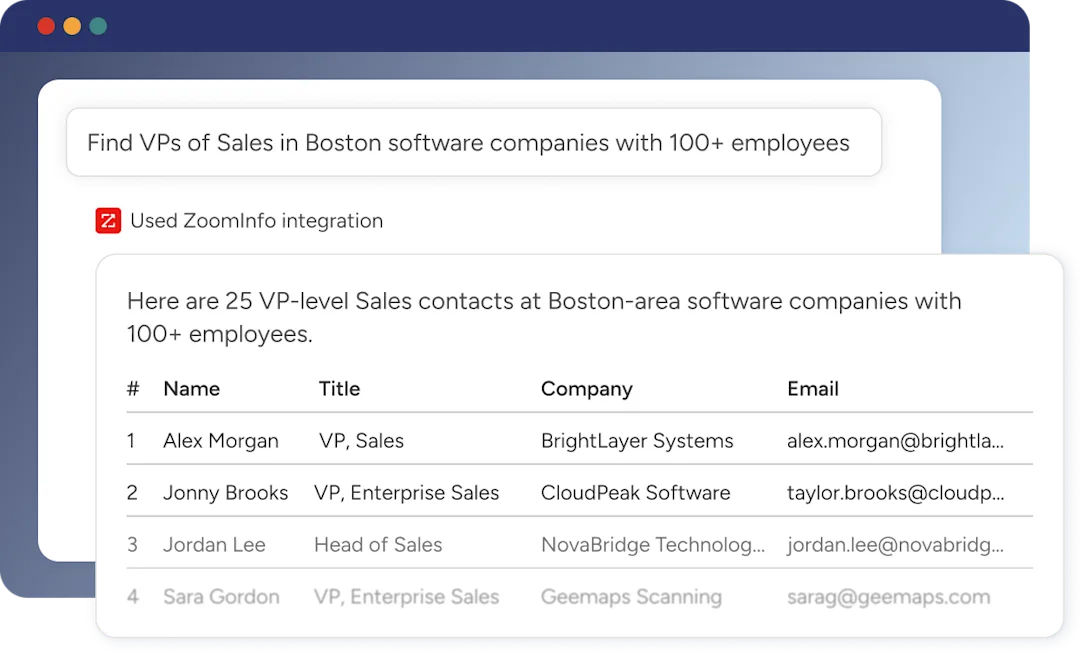
For developers building AI agents, ZoomInfo's MCP server at https://mcp.zoominfo.com/mcp exposes search, enrich, and account research as native tools for MCP-compatible assistants, currently supporting Claude and ChatGPT.
Source: ZoomInfo
ZoomInfo does not publish official SDKs either, but the interactive API reference supports live testing, and a Docs MCP server lets AI development tools generate integration code against the API spec. Documentation is at docs.zoominfo.com, with Recipes providing code samples in Shell, Node, Ruby, PHP, and Python.
BDO Canada reported an 87% reduction in time spent updating internal data dashboards using the ZoomInfo API, with one analyst describing the integration as plug-and-play across any process. (ZoomInfo)
Instantly.ai API vs. ZoomInfo API
Dimension | Instantly.ai API | ZoomInfo API |
|---|---|---|
API type | REST, JSON | REST, JSON:API format |
Authentication | Bearer token (API key) | OAuth 2.0 with PKCE (24-hour tokens) |
Primary scope | Outreach automation: campaigns, leads, email accounts, inbox, webhooks, SuperSearch | B2B intelligence: contact/company search, enrichment, intent, AI intelligence, audience management |
Contact database | 450M+ contacts (cold email leads) | 500M contacts, 100M companies (firmographic, technographic, intent-enriched) |
Enrichment | SuperSearch enrichment (email focus, waterfall from 5+ providers) | Contact and company enrichment (emails, direct dials, org charts, technographics, corporate hierarchy) |
Intent data | Not available | Buyer intent with topic-level signal tracking |
Webhooks | 15+ event types covering email, lead status, meeting events | Available via Agents API with configurable retry and throttling |
SDKs | None official | None official; CLI planned; MCP server available |
Rate limits | 100 req/s, 6,000 req/min (shared per workspace) | 5-35 req/s by tier, with per-hour and per-day sliding windows; quota headers on every response |
Pricing / access | Included on paid plans from $47/month; no per-call charge published | Consumption-based, custom-quoted; requires Enterprise API or Copilot package |
AI capabilities | SuperSearch AI enrichment, AI reply label prediction | Copilot API: account summaries, lookalikes, contact recommendations |
Documentation | developer.instantly.ai (Mintlify, interactive explorer) | docs.zoominfo.com (readme.io, interactive explorer, TypeSpec-generated) |
Final Verdict
Instantly.ai's API is a capable programmatic surface for its core domain: cold email outreach automation.
The V2 endpoint coverage is broad (leads, campaigns, email accounts, inbox, SuperSearch, webhooks, inbox placement, workspace management), the rate limits are reasonable at 100 req/s, and the webhook event system is well-structured with full email payloads. For a developer building campaign automation, lead routing, or agency management tooling on top of Instantly's outreach engine, the API covers what you need.
The gaps are in the developer experience layer (no SDKs, no OpenAPI spec, no changelog) and in the data domain (no B2B intelligence beyond the platform's own lead database).
Choose the Instantly.ai API if you are building automations around cold email outreach: managing campaigns programmatically, syncing leads between your systems and Instantly, reacting to engagement events via webhooks, or managing multi-workspace agency setups. The API is bundled with paid plans starting at $47/month, and the endpoint coverage mirrors the full product surface.
Choose the ZoomInfo API if your build needs the intelligence layer that outreach automation cannot provide: identifying who to contact by searching across 500M contacts with firmographic and technographic filters, enriching records with verified direct dials and org charts, monitoring buyer intent signals, or feeding AI-ranked contact recommendations into your pipeline.
The search-then-enrich pattern (search is free, enrich consumes credits) and the Copilot API's AI intelligence endpoints operate in a different data domain. Start with the ZoomInfo Enterprise API or explore the developer docs to see the endpoint surface directly.
A developer who needs both outreach automation and B2B intelligence should plan for two API integrations. Instantly does not provide contact enrichment, company attributes, or intent data. ZoomInfo does not manage email campaigns, warmup pools, or sending infrastructure.
The two APIs sit at different layers of the outbound stack, and the strongest build connects them: ZoomInfo for finding and qualifying the right contacts, Instantly for reaching them at scale.
FAQ
Is the Instantly.ai API free?
Not on its own. API access is included on all paid Instantly plans, with the entry-level Outreach Growth plan starting at $47/month (annual billing: $37.60/month). There is no separate API fee or per-call charge published.
The free trial includes limited access (250 contacts, 1,000 emails, 2 accounts) but does not explicitly state API availability. Volume limits (uploaded contacts, monthly emails, credits) apply whether you trigger actions via the API or the UI.
Does Instantly.ai have a GraphQL API?
No. Instantly exposes a REST API with JSON request and response bodies. All V2 endpoints follow the pattern /api/v2/{resource}/{action} at the base URL https://api.instantly.ai/api/v2. There is no GraphQL endpoint.
What is the Instantly.ai API rate limit?
The published limits are 100 requests per second and 6,000 requests per minute, both enforced simultaneously.
These limits are shared across all API keys within the same workspace and across both API V1 and V2. Hitting either limit triggers a 429 response. The OAuth init endpoints for connecting Google and Microsoft accounts have tighter limits: 75 requests per minute per workspace and 150 per minute per IP, with escalating blocks for persistent violations.
Are there official Instantly.ai SDKs?
No. Instantly does not publish official SDKs in any language. The developer documentation includes code examples in Node.js and Python using native HTTP libraries (node-fetch and requests), but no maintained SDK packages or community library links. Developers integrate by making direct HTTP requests to the REST API.
Does the Instantly.ai API support webhooks?
Yes. Instantly has a webhook system managed through the API. You create, list, patch, delete, test, and resume webhooks via the /api/v2/webhook/* endpoints.
Supported event types include email_sent, email_opened, reply_received, link_clicked, email_bounced, lead status changes (interested, not interested, neutral), meeting events, and custom labels. Payloads include timestamps, campaign context, and full email content for reply events.
What does ZoomInfo's API add to an Instantly.ai build?
ZoomInfo's API provides the B2B intelligence layer that Instantly's API does not cover. Instantly manages the outreach pipeline (campaigns, leads, email accounts, deliverability); ZoomInfo provides the data that tells you who to put in that pipeline.
A developer can use ZoomInfo's search endpoints to find contacts matching an ICP across 500M records with firmographic, technographic, and intent filters, enrich them with verified emails, direct dials, org charts, and company data, then push enriched contacts into Instantly campaigns via the Leads API. ZoomInfo's Copilot API adds AI-ranked contact recommendations and account intelligence that Instantly's SuperSearch does not offer. ZoomInfo Agent Teams extend this further, running complete GTM plays end to end as specialist agents share context on each account's current state and act within the approvals and limits you set.
The two APIs use different authentication models (Bearer token vs. OAuth 2.0) and different pricing structures (bundled plan vs. consumption-based), so plan the integration layer accordingly.
Other tools worth evaluating side by side:
