

You are evaluating Zapier because your SaaS tools don't talk to each other and manual handoffs keep piling up. You need a clear picture of what the platform does, how each piece works, and which plan unlocks it.
Zapier is a no-code automation and AI orchestration platform that connects over 8,000 applications through automated workflows called Zaps, autonomous AI Agents, chatbots, a built-in database (Tables), forms, a visual planning canvas, and an MCP server that lets AI models take actions across its app ecosystem. This breakdown covers every feature, how it works, who it serves, and which plan unlocks it.
Zapier's feature set has you covered if:
You need to connect dozens of SaaS tools and automate data movement between them without writing code or waiting on an engineering queue
You run multi-step workflows with conditional logic, scheduling, loops, and data transformation across your revenue, marketing, or support stack
You want AI models like ChatGPT, Claude, or Gemini embedded inside automated workflows to classify, summarize, or generate content as data flows through
You need autonomous AI agents that can research, qualify leads, prepare meetings, and take actions across connected apps on their own
You want a single platform that includes a database (Tables), form builder (Forms), and chatbot builder alongside your automations
You manage automations for multiple clients or teams and need workspace separation with enterprise governance controls
You'll reach the edges of its capabilities if:
You need a B2B contact and company database to fuel the workflows themselves, not just move data between tools that already have it
You want buyer intent signals showing which companies are researching your category before you ever reach out
You need conversation intelligence that records, transcribes, and analyzes sales calls
You require account-based marketing orchestration, display advertising, or multi-channel campaign management beyond workflow triggers
You want AI that reasons across your CRM records, conversation history, and third-party signals to explain why deals move or stall
For those needs, the reference point is ZoomInfo: an AI GTM platform built on the largest B2B data foundation in the market (500M contacts, 100M companies, 135M+ verified phone numbers, and 200M+ verified business emails), a GTM Context Graph that fuses B2B data with CRM records, conversation intelligence, and behavioral signals into a single intelligence layer, and access through APIs, MCP, GTM Workspace, and GTM Studio. Zapier already sits in ZoomInfo's Marketplace as an integration partner, so the two platforms connect. But ZoomInfo covers ground Zapier does not touch.
After the feature breakdown, this article covers where Zapier stops and how ZoomInfo fills those gaps.
Zapier Platform Overview
Zapier positions itself as "the automation layer for agentic AI", targeting three buyer segments: small and medium businesses automating operations without engineering resources, enterprise IT and RevOps teams seeking governed self-service automation, and AI builders deploying agents and multi-model workflows.
The platform serves over 3.4 million companies. Customers include Nvidia, Airbnb, Meta, Mastercard, Samsung, Siemens, and Okta. Zapier claims that 69% of the Fortune 1000 use it.
The platform is organized around nine products:
Product | What It Does | Plan Access |
|---|---|---|
Trigger-action workflows connecting apps with multi-step logic, filters, paths, and loops | All plans (2-step on Free; multi-step on Professional+) | |
Autonomous AI workers that reason, research, and take actions across 8,000+ apps | Separate add-on | |
No-code AI chatbots for customer support and lead capture, embeddable on any site | Separate add-on | |
AI model steps (ChatGPT, Claude, Gemini) embedded inside Zap workflows | Professional+ | |
Built-in relational database for storing, organizing, and triggering on data | All plans | |
No-code form builder where every submission triggers a connected Zap | All plans | |
Visual workflow planning and mapping tool connected to live Zaps (Beta) | All plans | |
Model Context Protocol server letting AI tools take actions across 8,000+ apps (Beta) | All plans | |
Browser-based code IDE for developers who need custom logic beyond no-code steps (Beta) | Early Access |
Zapier uses a task-based pricing model across four tiers: Free ($0, 100 tasks/month), Professional (starting at $19.99/month billed annually), Team (starting at $69/month billed annually), and Enterprise (custom pricing). As of late 2024, Tables, Forms, and MCP are bundled into all plans at no extra cost.
With that structure in place, here is the full tour.
Zapier Zaps: Core Workflow Automation
Zaps are the foundation of everything Zapier does.
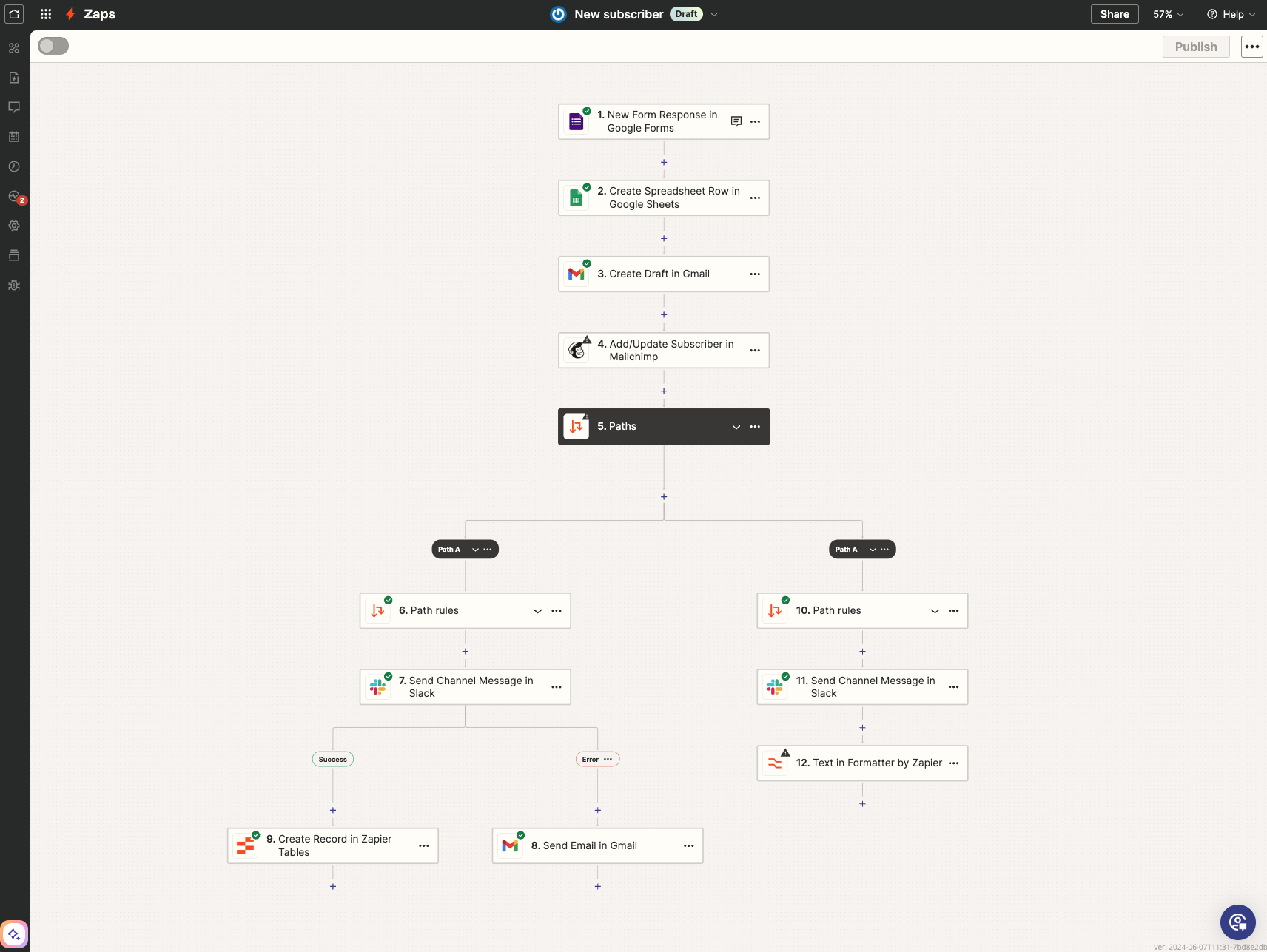
A Zap is a workflow that connects apps to automate repetitive tasks: a trigger starts the workflow, and one or more actions execute in response. Every Zap follows a three-phase lifecycle (Build, Test, and Publish) using a no-code visual editor, or you can describe your workflow in plain language and let AI generate the Zap.
Source: Zapier
Zapier supports two trigger mechanisms.
Polling triggers check the connected app's API on a schedule: every 15 minutes on Free, 2 minutes on Professional, 1 minute on Team and Enterprise. Instant triggers use webhooks, so the app notifies Zapier the moment an event occurs, enabling near-real-time execution. Each successful action step consumes one task from the plan's monthly allowance; trigger, filter, and certain built-in tool steps do not count.
The logic layer inside Zaps is where the platform earns its depth.
Filters restrict execution to records meeting specific conditions, so irrelevant trigger events consume no tasks. Paths route data to different action sequences using if/then logic, letting a single Zap handle multiple scenarios (a Google Ads lead goes to one CRM pipeline while a webinar registrant goes to another). Looping iterates over line items, running an action for every row in a spreadsheet or every item in an order. Scheduling and Delays let you time automations precisely, pausing between actions when a workflow requires it.
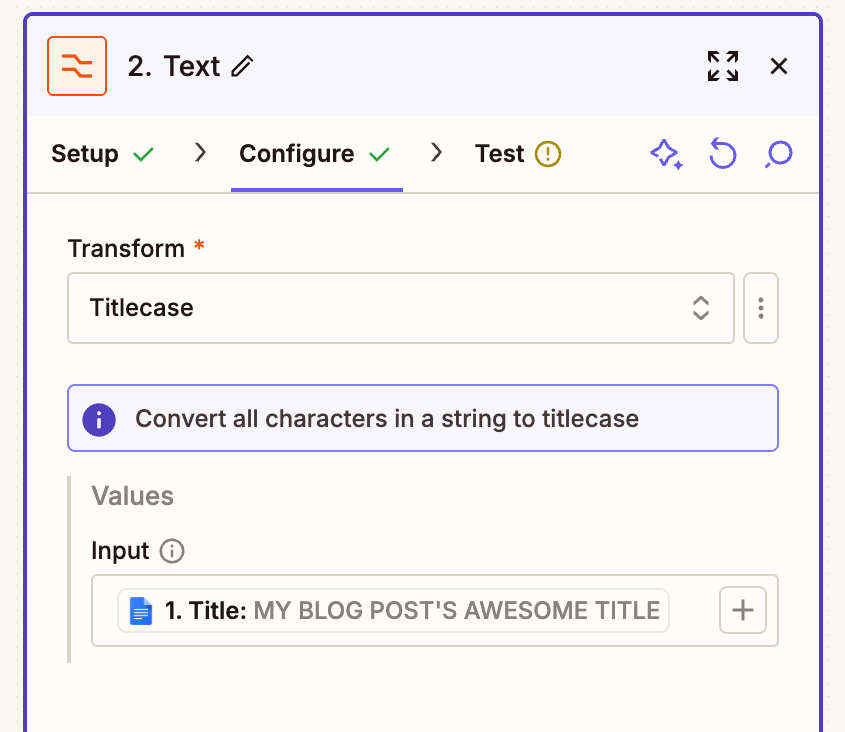
Data Formatting transforms dates, currency, text, and other data types into the format the destination app requires. Webhooks connect to any API without code, receiving data from external services or sending it to arbitrary endpoints.
Source: Zapier
Zaps support up to 100 steps, and a library of pre-built Zap templates covers common use cases. When a run fails, held or failed runs can be replayed once the issue is resolved, and Professional plans and above include automatic retry on transient errors.
For enterprise teams, publishing restrictions require admin approval before a Zap goes live, with draft management and version tracking. The Free plan limits Zaps to two steps (one trigger, one action) and excludes Paths, Filters, and Webhooks; Professional unlocks the full suite.
Zapier Agents and Chatbots: Autonomous AI Workers
Where Zaps follow fixed sequences, Zapier Agents reason about what to do next.
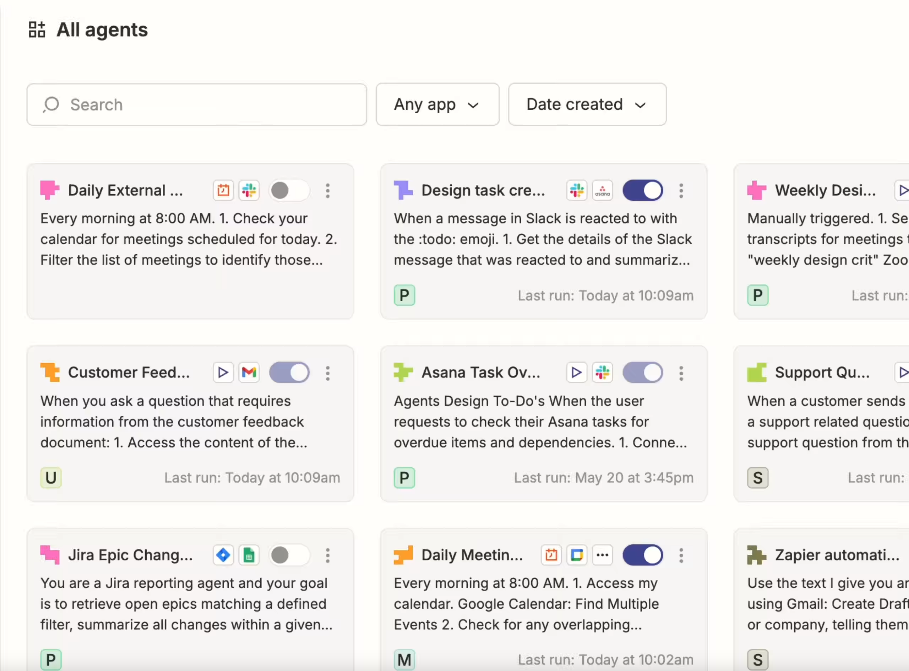
Agents are AI workers that autonomously perform tasks across 8,000+ apps, both on command and unattended in the background. They handle work that doesn't fit a linear Zap: research, lead qualification, meeting preparation, and multi-step decisions that require judgment.
Each agent is configured through a natural-language instructions field and equipped with two types of tools: data sources (FAQs, docs, public URLs, and files that give the agent knowledge) and actions (live connections to apps that let the agent update a CRM record, send a Slack message, or create a calendar event).
Once configured, the agent can run interactively in a chat panel or be triggered by a Zap. Activity shows in an "All activity" log, and tasks requiring human input surface under a "Needs action" queue for review before execution.
Source: Zapier
Agents support multi-agent orchestration: one agent can call another, creating pipelines where each agent handles a distinct task. A Chrome extension brings agents into any browser context, and Zapier Copilot can configure an agent from a natural-language description. Roughly 100 pre-built templates cover sales prep, lead qualification, content creation, and support use cases.
Agents are priced as a separate add-on: Free (400 activities/month), Pro ($400/year, 1,500 activities), and Enterprise (custom). Agent sharing supports Viewer, Editor, and Owner access levels.
Zapier Chatbots serve a narrower purpose: deploying conversational AI interfaces for customer support and lead generation without engineering resources. Setup follows five steps: add knowledge (train with FAQs, docs, and links), customize (tone, appearance, persona), collect leads (capture forms within the conversation flow), share (embed on a website or share via link), and analyze (review conversation data).
What distinguishes both products is that every agent action and every chatbot conversation can trigger downstream Zaps across 8,000+ apps. A lead captured by a chatbot can flow into a CRM, notify a sales rep in Slack, and kick off an onboarding sequence. Chatbots are also a separate add-on: Free (2 chatbots), Pro ($160/year, 5 chatbots), Advanced ($800/year, 20 chatbots).
Zapier's AI Automation: Intelligence Inside Workflows
Beyond Agents and Chatbots, Zapier embeds AI inside Zap steps, bridging the gap between rule-based automation and tasks that require interpretation, classification, or content generation.
Within the Zap builder, users add AI steps using native integrations with OpenAI (ChatGPT), Anthropic (Claude), Google (Gemini), and other providers via Zapier's AI integrations library, which includes over 450 AI-focused apps.
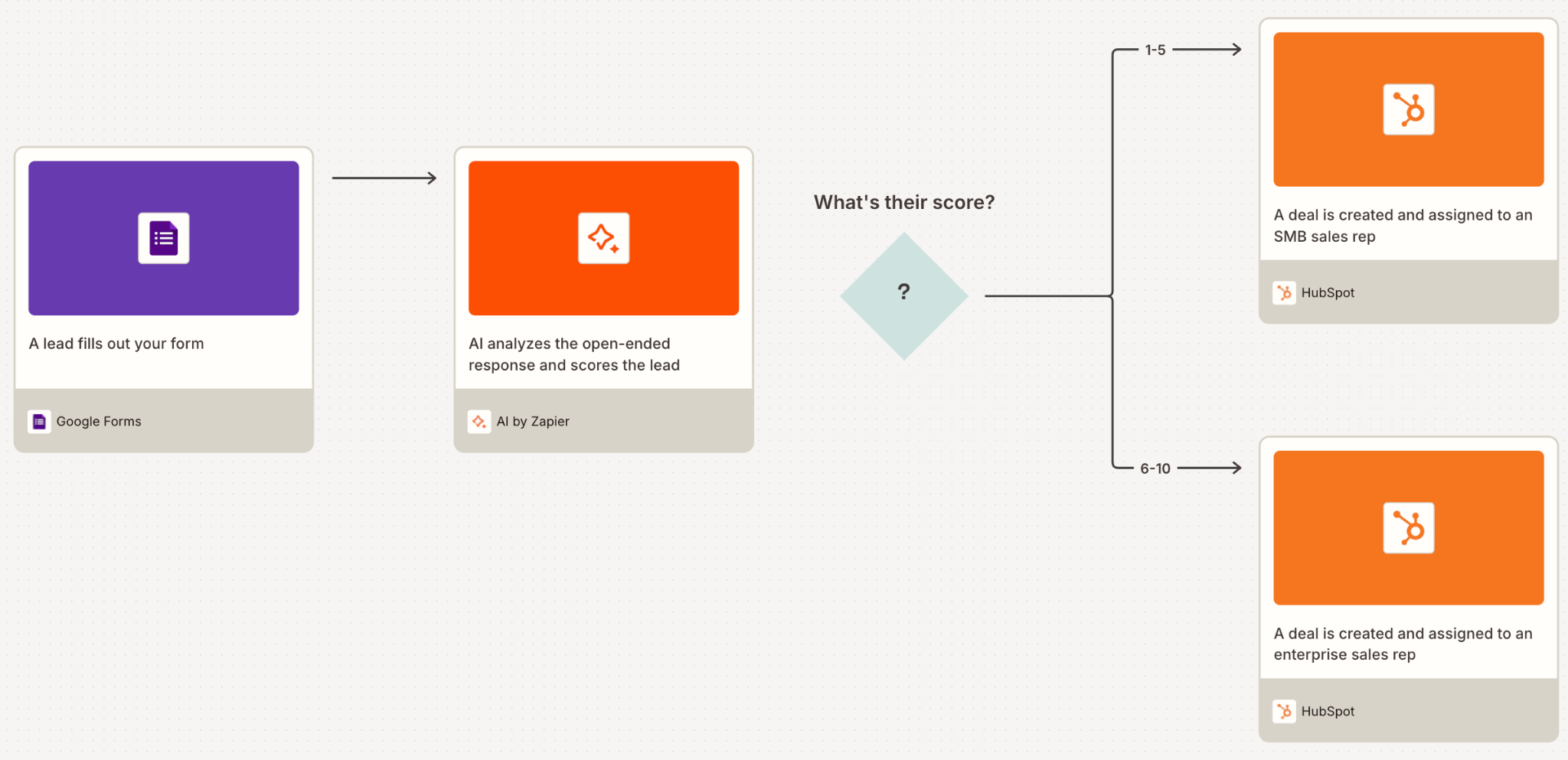
An AI step takes a prompt that references data from earlier steps (for example, "Summarize this support ticket: {{ticket_body}}"), and the model's output flows to subsequent steps. Multiple AI calls can chain within a single Zap, and AI outputs feed into Paths for classification-driven routing: a customer email gets classified by an AI step, then routed to different response sequences based on the result.
Source: Zapier
Zapier Copilot assists across the builder experience, generating Zap structures from plain-language descriptions. You describe a workflow, and Copilot generates the trigger, actions, and field mappings. All AI steps are logged and inspectable in Zapier's run history, making them auditable like any other Zap step.
The AI automation layer requires a Professional plan or above for premium app connections. AI steps consume tasks like any other action step.
Zapier Tables, Forms, and Canvas: The Data and Planning Layer
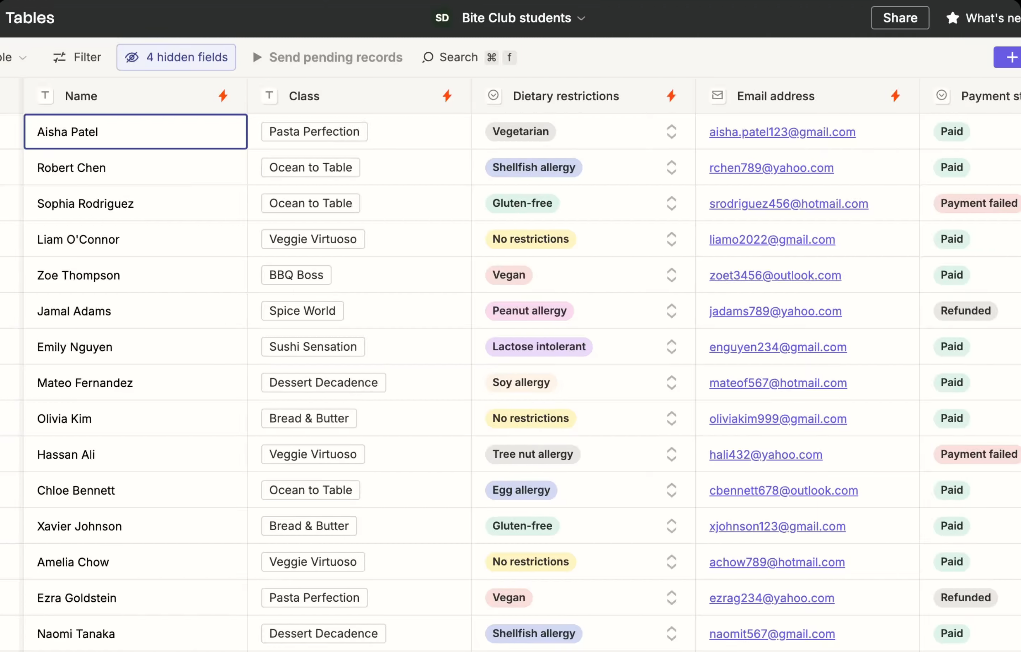
Zapier Tables is a built-in relational database native to the platform, so automations have a data layer to read from and write to without relying on external spreadsheets.
Users create tables with custom fields (text, numbers, dates, linked records), and Zaps can query, create, update, or delete records as trigger or action steps. A record added to a Table fires a connected Zap trigger immediately, and Zap actions can write records back. Tables support linked records for relational data modeling and built-in AI for field-level enrichment and classification. Tables actions do not count toward task consumption, and unlimited tables are available on all plans as of the 2024 plan consolidation.
Source: Zapier
A template library covers lead trackers, contact lists, inventory management, employee directories, approval workflows, and expense tracking. The advantage over using Airtable or Google Sheets alongside Zapier: Tables lives inside the same product, with no separate authentication, no API polling, and no latency between a data change and the automation it triggers.
Zapier Forms is a no-code form builder where every submission acts as a Zap trigger.
An AI-assisted drag-and-drop builder provides field and logic suggestions, and conditional logic shows or hides fields based on prior answers. Each submission can route data to any of the 8,000+ connected apps, write to a linked Zapier Table, and fire multi-step Zaps. Forms offers unlimited submissions, no per-submission cost, 20+ template categories (applications, booking, lead generation, order forms, payment forms, registration), and is included on all plans.
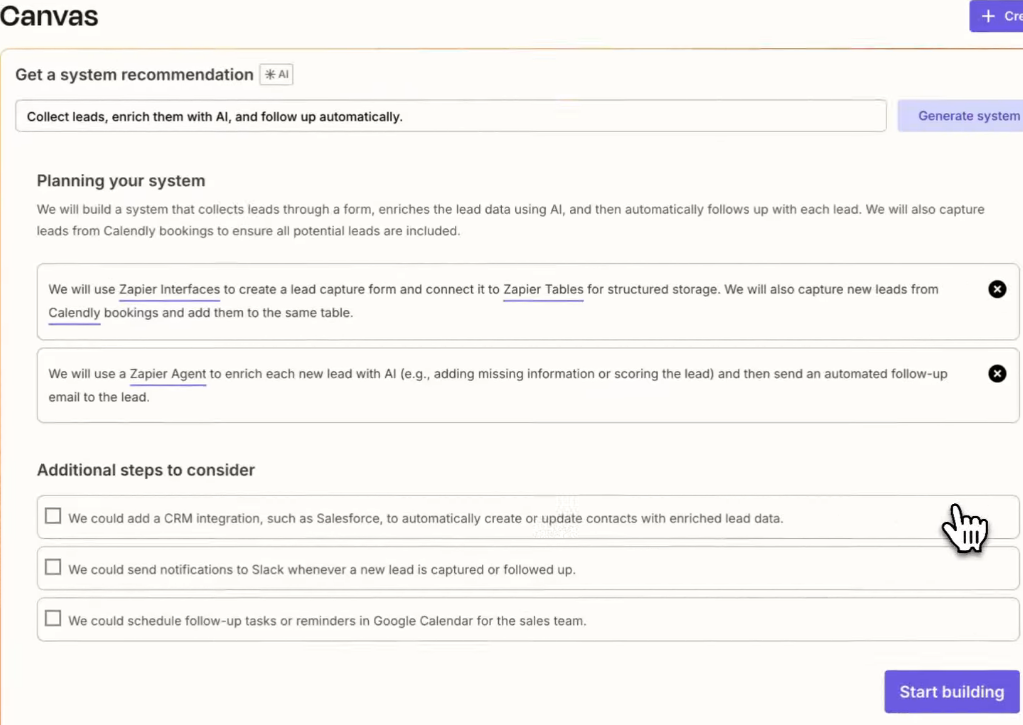
Zapier Canvas (Beta) is a visual diagramming tool that lets teams map, document, and design their automation ecosystems before or alongside building them.
Five modes define its scope: Diagram (map processes with nodes, connections, owners, and notes), Build (generate Zapier automations from the canvas), Iterate (refine workflows using AI suggestions), Visualize (see how existing automations work together), and Share (distribute the canvas with team members). Canvas connects to a user's live Zapier account, so existing Zaps can be imported and visualized, and diagrammed flows can be converted into working automations.
Source: Zapier
Zapier MCP and the Developer Platform: Connecting AI and Partners
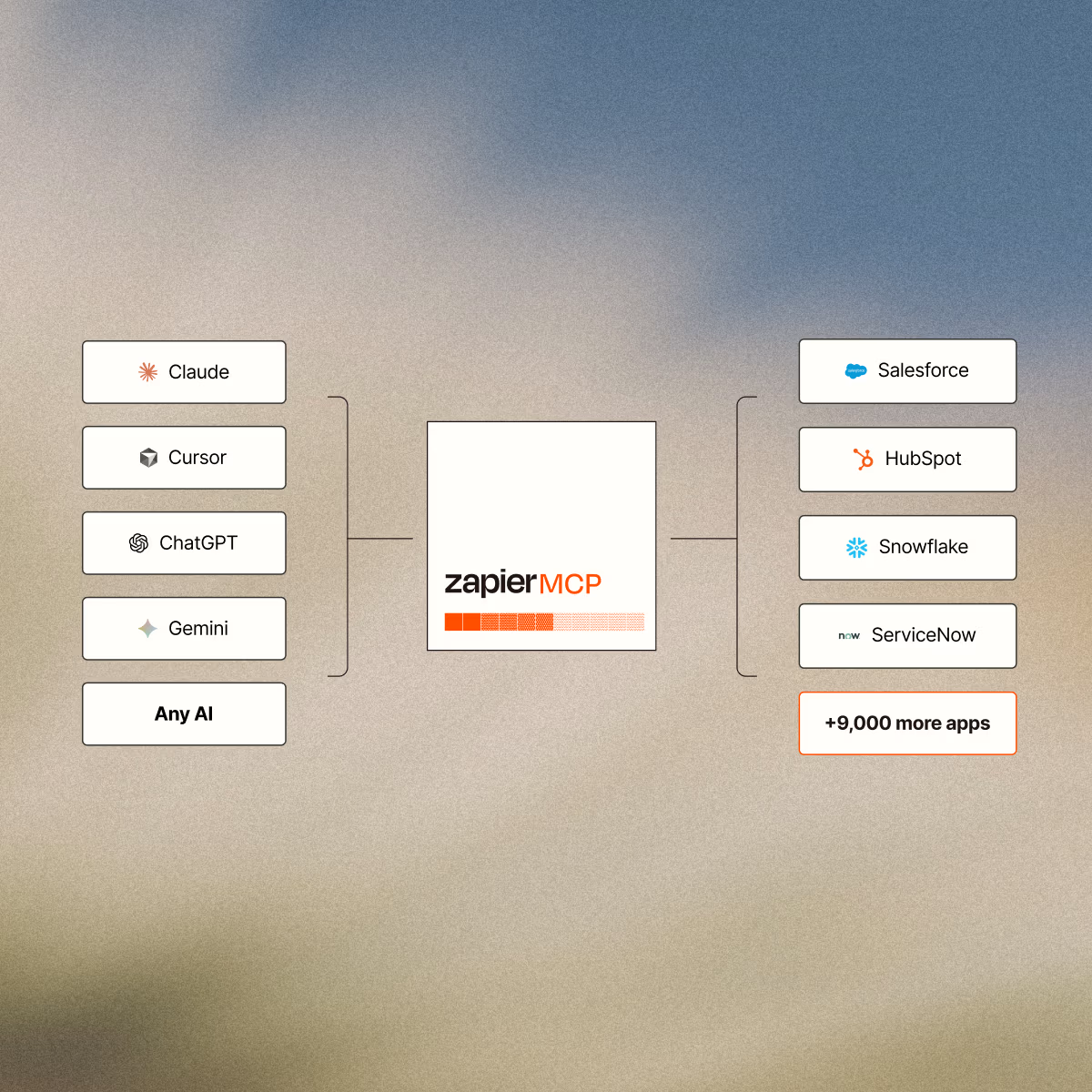
Zapier MCP (Model Context Protocol, Beta) makes Zapier's 8,000-app ecosystem accessible to AI tools without custom back-end development. It generates a standardized MCP endpoint that AI clients (Claude, ChatGPT, Cursor, and others) connect to, letting natural language prompts trigger real API calls across Zapier's app library.
Setup takes three steps: generate an MCP endpoint at the Zapier MCP dashboard, configure which apps and actions the AI can invoke, and copy the generated server URL into the AI client. Zapier handles authentication, rate limits, and retries automatically, and AI Guardrails detect PII, prompt injection attempts, toxic language, and negative sentiment. Each MCP tool call consumes two tasks from the user's plan quota. A single endpoint provides access to over 30,000 searches and actions across 8,000 apps, including private integrations built on Zapier.
For developers building custom agents, Zapier MCP connects to the OpenAI Responses API, the Anthropic Messages API, and developer tools like Cursor, Windsurf, Python, and TypeScript.
Source: Zapier
Zapier also offers a Zapier SDK (open beta) that gives coding agents programmatic access to the full app catalog. It routes authenticated HTTP calls through Zapier's credential infrastructure via a .fetch() method, so an agent can call any connected app's API without managing OAuth tokens. Triggers (subscribing to real-time events in code) are experimental.
Zapier Functions (Beta) fills the gap for developers who need custom logic beyond no-code steps. It provides a browser-based IDE where developers write, test, and deploy automation logic using the same triggers available to visual Zaps, with access to 7,000+ app integrations and Zapier-managed hosting. Currently limited to three Functions and 1,500 tasks per month through the Early Access Program.
The Developer Platform (branded "Powered by Zapier") lets software companies build a native Zapier integration for Zapier's app directory, or embed Zapier's Workflow API inside their own product under their own branding.
Building an integration is free and takes about two weeks. Embedding takes one to four weeks. Zapier handles end-user authentication and supports end users directly, so the partner does not absorb integration support costs.
Zapier Integrations, Security, and Enterprise Infrastructure
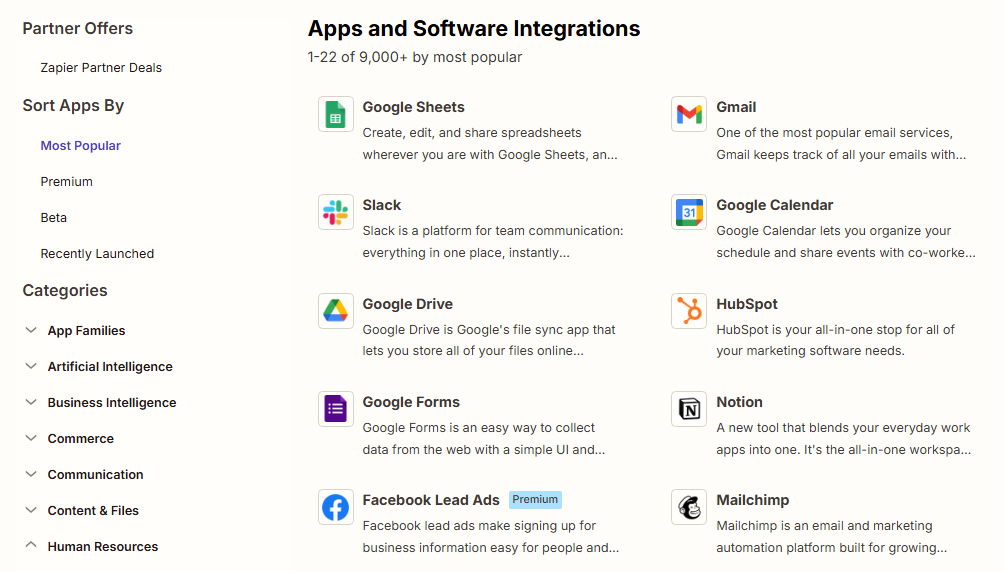
The platform's structural advantage is its integration catalog: 8,000+ apps spanning CRM (Salesforce, HubSpot, Microsoft Dynamics), communication (Slack, Microsoft Teams, Gmail), project management (Asana, Jira, Monday.com, Notion), e-commerce (Shopify, Stripe), AI services (OpenAI, Anthropic, Google Gemini), and long-tail SaaS tools that rarely appear on competing platforms.
That breadth means Zaps can bridge virtually any combination of tools a business uses.
Source: Zapier
For custom connections, Zapier offers built-in Webhooks (receive or send data to arbitrary endpoints without code), a REST API (the Workflow API for partners embedding Zapier), and the Platform CLI (a Node.js/TypeScript toolkit for building and deploying integrations). The Workflow API uses OAuth 2.0 with Authorization Code grant and enforces rate limits of 60 requests per minute by IP and 150 per minute by partner application.
On security and compliance, Zapier holds SOC 2 Type II, SOC 3, GDPR, GDPR UK, and CCPA certifications. Data is encrypted with TLS 1.2 in transit and AES-256 at rest.
Enterprise customers are automatically opted out of AI model training. Two-factor authentication is available on all accounts, and the Enterprise plan adds SAML SSO, SCIM provisioning, role-based access control, real-time audit logs, custom data retention, and a Super Admin role with visibility into all Zaps, runs, and task usage. The platform is hosted on Amazon Web Services (AWS) in the United States. A Trust Center at trust.zapier.com centralizes security documentation for procurement reviews.
Enterprise governance features include publishing restrictions requiring admin approval before Zaps go live, agent version management, admin roles for Chatbots, and the ability to restrict or disable third-party AI app integrations organization-wide. Zapier also maintains a bug bounty program for vulnerability disclosure.
Where Zapier Stops: The Gaps
Zapier connects apps and automates workflows between them. That focus produces the deepest integration catalog in the market, but it also means the platform moves data and triggers actions without telling teams which data matters, which accounts to pursue, or why deals move.
No B2B contact or company database.
Zapier connects to CRMs, enrichment tools, and databases, but it carries no database of its own (no contacts, companies, direct dials, or verified business emails). An automation that creates a CRM record when a lead arrives still needs a data source to identify who to reach in the first place. Zapier moves data; it does not generate it.
No buyer intent signals.
Zapier can trigger workflows from events inside connected apps (a form submission, an email open, a CRM stage change), but it does not track which companies are researching specific topics across the web before they interact with your tools. Engagement signals tell you who responded; intent signals tell you who is in-market before you reach out.
No conversation intelligence.
Zapier connects to calling and video tools, but it does not record, transcribe, or analyze sales calls. There is no AI-driven objection detection, coaching scorecards, or deal intelligence extracted from conversations. Teams that move from email to phone-based selling need a separate tool to capture conversation context.
No account-based marketing or advertising orchestration.
Zapier automates individual workflow steps but does not include display advertising, audience management, demand-side platform capabilities, or multi-channel campaign orchestration. Marketing teams running ABM programs alongside sales execution need a separate platform for demand generation and ad targeting.
No AI that reasons across deal context.
Zapier's AI steps and Agents can process text, classify inputs, and take actions, but they operate on the data in the current workflow. They do not reason across CRM records, conversation transcripts, intent signals, and behavioral data to explain why a deal moved or predict what should happen next. AI that routes emails is different from AI that understands your pipeline.
How ZoomInfo Covers the Gaps
The gaps share a common thread: Zapier automates the workflow layer but depends on external sources for the data, intelligence, and orchestration that fuel those workflows.
ZoomInfo supplies those layers.
ZoomInfo's B2B Data Platform: The contact and company intelligence Zapier does not include
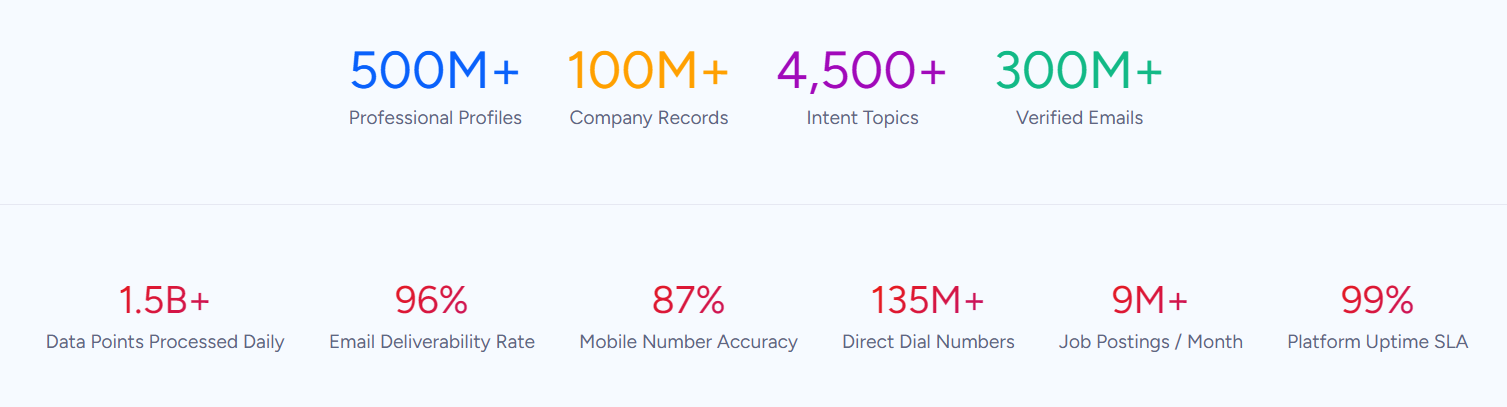
ZoomInfo operates the largest B2B data platform in the market: 500M contacts, 100M companies, 135M+ verified phone numbers, 120M direct-dial phone numbers, and 200M+ verified business email addresses. The data flows through a verification pipeline backed by 300+ human researchers and automated ML scanning of 28 million site domains daily, reaching up to 95% accuracy on first-party data.
Source: ZoomInfo
For a team using Zapier to automate lead routing, CRM enrichment, or outreach sequences, ZoomInfo fills the upstream blind spot. Zapier can move a lead from a form to a CRM to a sequencer, but it cannot tell you who to put in the form. ZoomInfo provides org charts and direct dials, 300+ company attributes for segmentation, job-change alerts, and technographic profiles covering 30,000+ technologies across 200+ categories for 30+ million companies.
In a Fortune 500 competitive RFP analyzing 25 million contacts across vendors, an independent consultant concluded that "no other competitor came even close." The data quality is externally validated: Forrester Wave Leader for Intent Data Providers (Q1 2025), Gartner MQ Leader for ABM Platforms two years running, and the only Gartner Customers' Choice vendor with a 4.7/5.0 rating.
ZoomInfo Intent and WebSights: Signals that reveal who is in-market before any automation fires
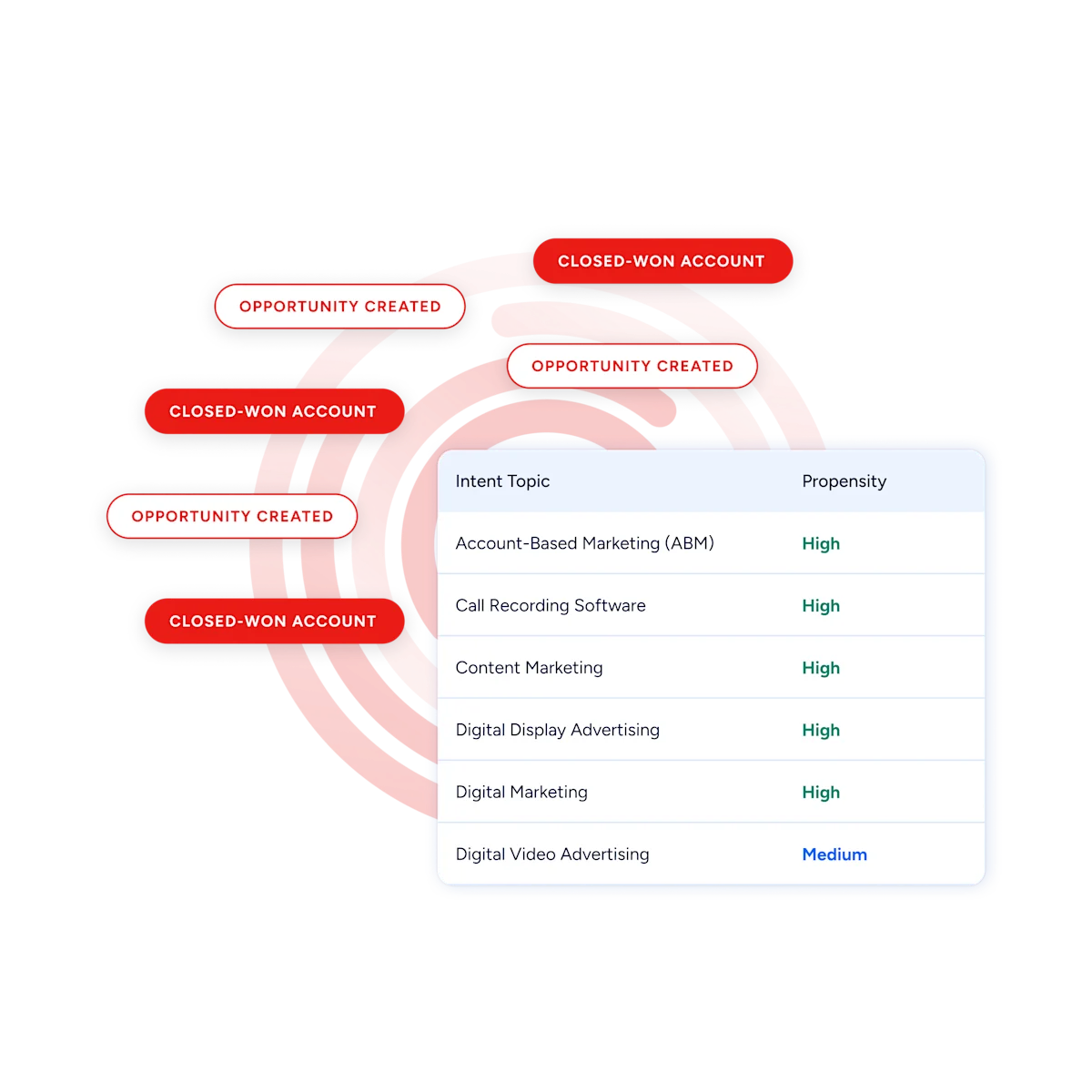
ZoomInfo Intent tracks signals from 210 million IP-to-Organization pairings and 6 trillion+ new keyword-to-device pairings sourced monthly.
Zapier triggers workflows from actions inside your connected apps (a form fill, an email reply, a CRM update). ZoomInfo's intent data reveals which companies are researching topics related to your product across the web, before they have touched any of your tools. Guided Intent, exclusive to ZoomInfo, identifies the topics historically correlated with deal success rather than requiring manual topic selection.
Source: ZoomInfo
On the website side, WebSights resolves anonymous website traffic to companies, with Automatic Traffic Filtering distinguishing real visitors from bots. ZoomInfo Marketing goes further with contact-level site visitor identification, identifying who visited (not just which company) and triggering personalized outreach. These signals can flow through ZoomInfo's own automation or through Zapier's integration ecosystem to downstream tools.
ZoomInfo's GTM Context Graph and Chorus: Intelligence that understands why deals move
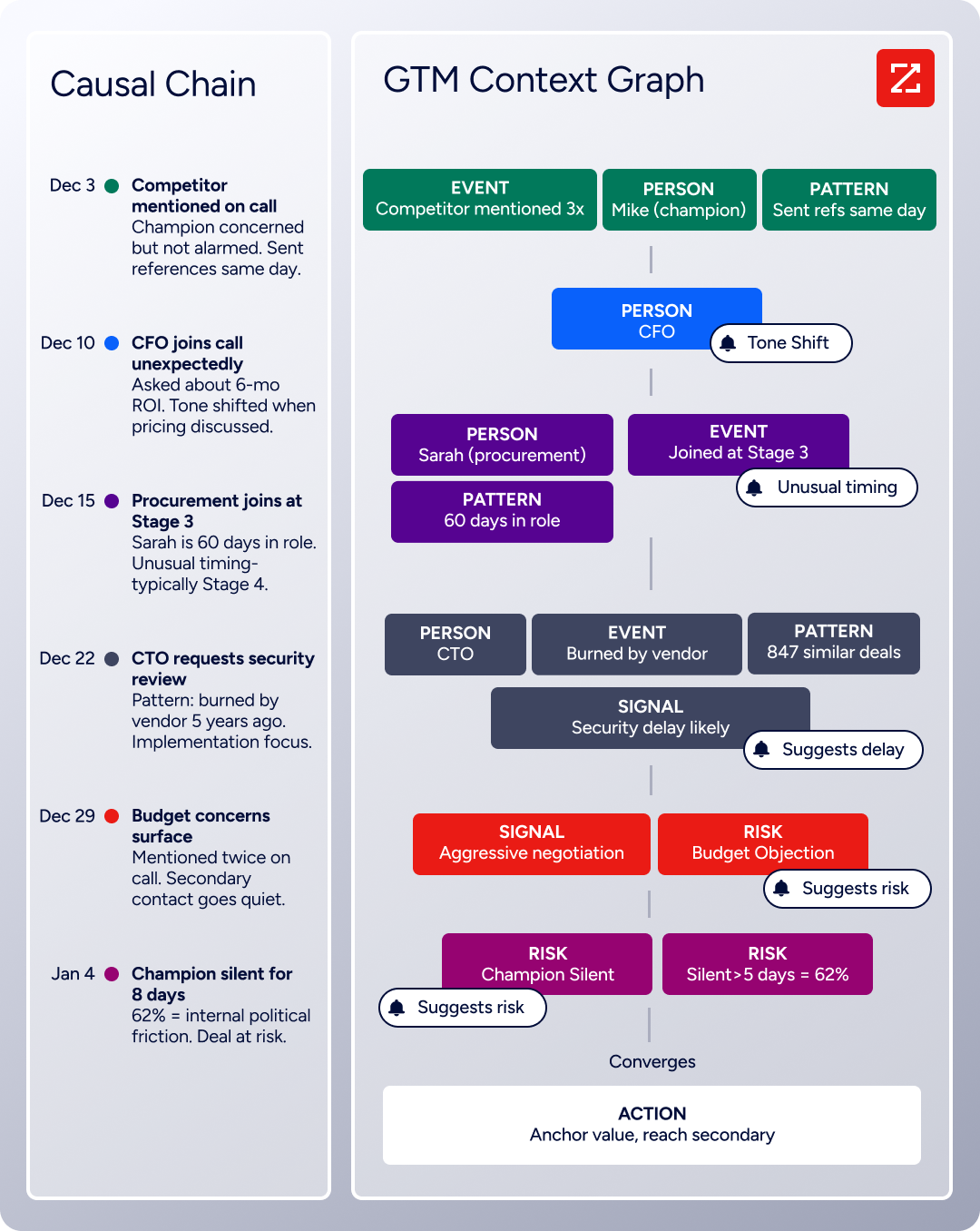
Zapier's AI steps process data in the current workflow. ZoomInfo's GTM Context Graph captures a different layer: the reasoning behind deal movement. It processes 1.5B+ data points daily, fusing ZoomInfo's B2B data with a customer's CRM records, conversation intelligence from Chorus (backed by 14 technology patents), email interactions, and behavioral signals into a single intelligence layer.
A CRM records that a deal moved from Stage 3 to Stage 4. Chorus captures that the CFO joined the last call and asked about six-month ROI. The GTM Context Graph reasons across both to understand why the deal accelerated, connecting that pattern to third-party signals showing the company is hiring and researching a competitor. That reasoning flows into outreach, forecasting, and deal execution.
Zapier can automate what happens after a CRM field changes; ZoomInfo captures why it changed.
Source: ZoomInfo
ZoomInfo GTM Workspace and GTM Studio: Native execution and orchestration surfaces
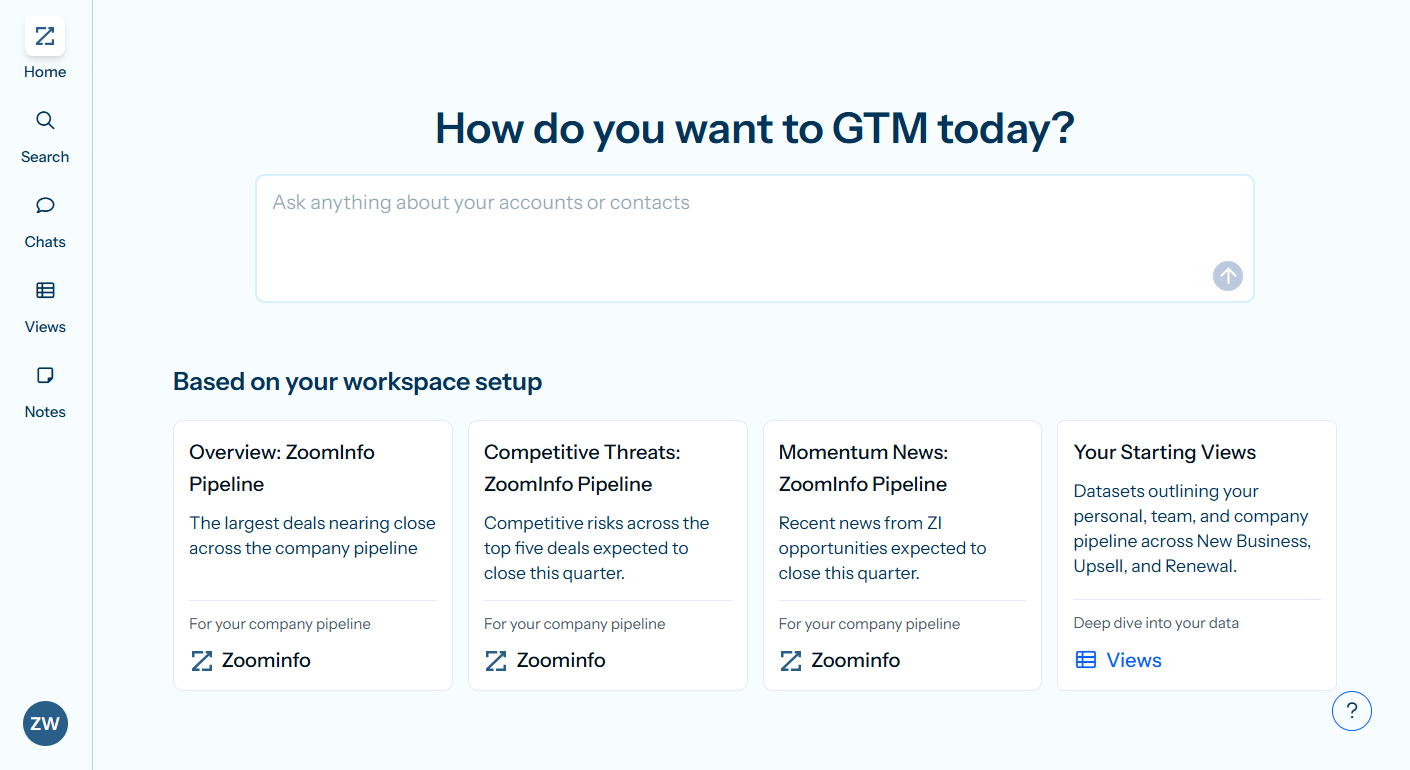
GTM Workspace is ZoomInfo's seller front-end, built on the GTM Context Graph.
It provides a full Book of Business view across CRM, ZoomInfo data, conversation history, and market intelligence, with AI agents automating account research, outreach, CRM updates, and signal monitoring. An Action Feed streams in-market buyers matched to target criteria with pre-drafted actions on every signal. Seismic's sales team boosted productivity by 54%, saved 11.5 hours per week, and attributed 39% of pipeline to ZoomInfo signals.
GTM Studio addresses the marketing orchestration gap directly. Marketers, RevOps teams, and GTM engineers can build audiences in natural language, enrich with first- and third-party data, define triggers, and activate plays across channels (email, calls, display ads, direct mail, LinkedIn, Meta, Connected TV) without engineering support.
ZoomInfo Marketing includes a native Demand-Side Platform deploying display ads based on 300+ company attributes, FormComplete (reducing forms to a single field while auto-appending data), and Account Fit Scoring (predictive AI scoring 0-100 based on company attribute patterns). Expansion plays that used to take 3 weeks now launch in 30 minutes.
ZoomInfo APIs and MCP: The same intelligence inside any tool, including Zapier
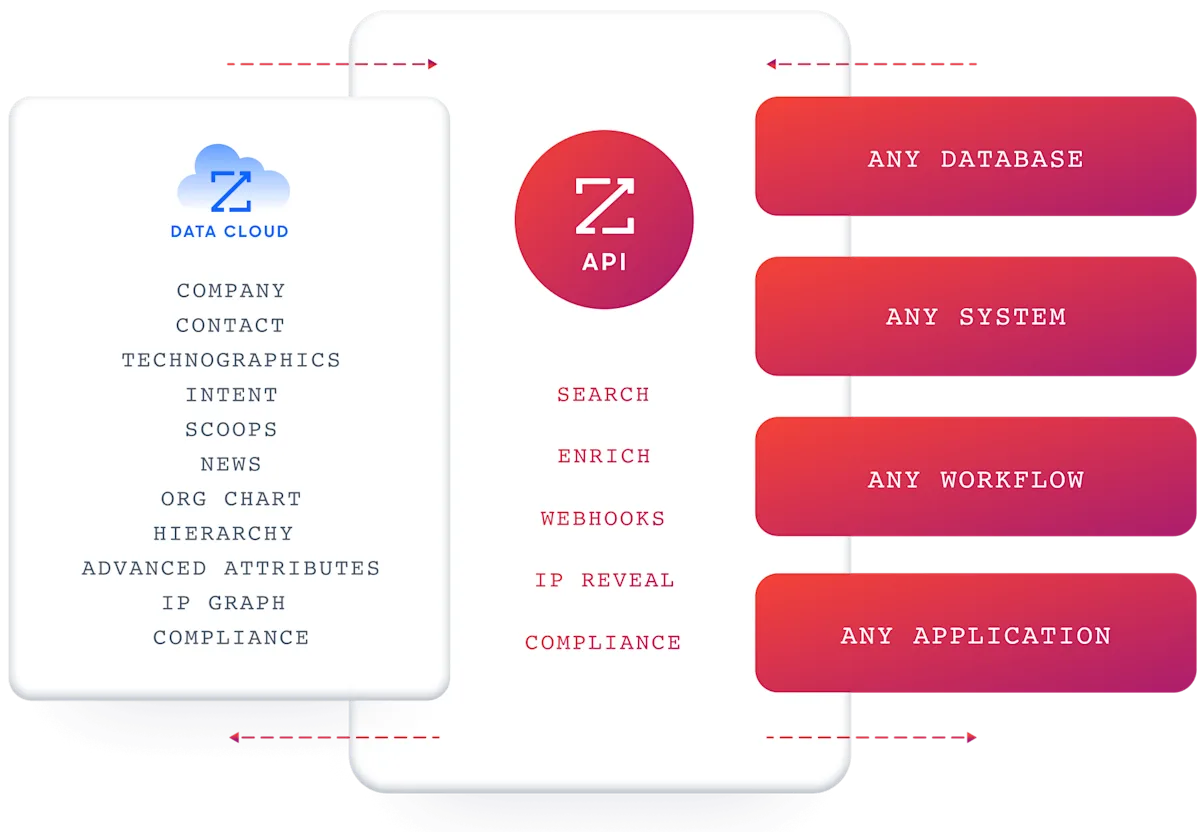
ZoomInfo delivers its intelligence through APIs and MCP, so the same data and GTM Context Graph powering ZoomInfo's own products is accessible inside any third-party tool or custom AI agent.
The MCP server connects AI models to ZoomInfo's B2B data as a native tool, currently supporting Claude and ChatGPT. API access is included in all relevant plans, and the Enterprise API covers Search, Enrich, Copilot (AI intelligence), Marketing (audience management), and Engagements endpoints.
Source: ZoomInfo
For teams already running Zapier, ZoomInfo data flows into Zapier's workflow engine through its Marketplace integration, so ZoomInfo enrichment and intelligence can trigger the same Zaps and Agents you have already built.
ZoomInfo's Free Entry Points: A way to evaluate the platform before any commitment
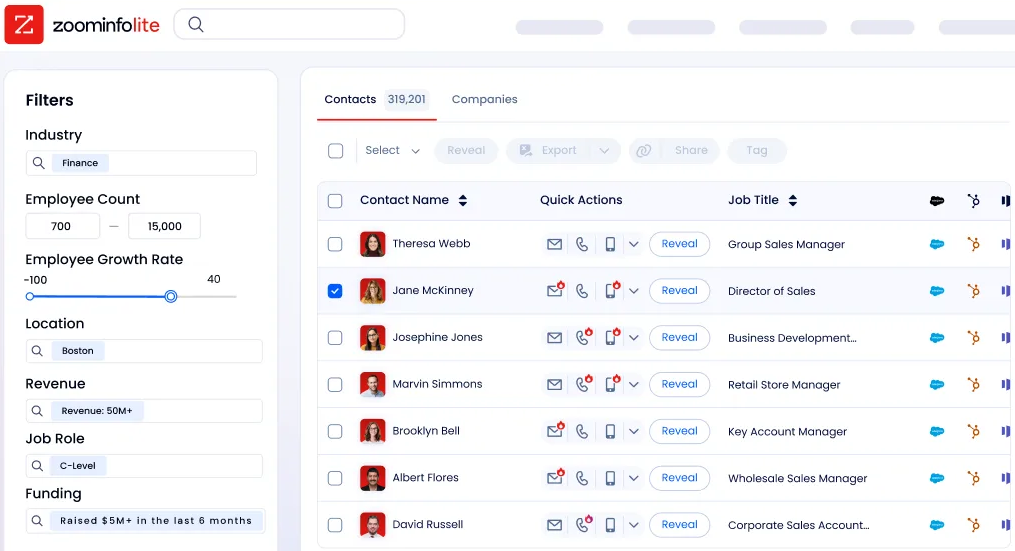
ZoomInfo Lite is a permanent free tier with access to ZoomInfo's B2B database, 10 monthly export credits, individual and company searches, a Chrome extension, and WebSights Lite with up to 10 website visitor reveals per day. A separate 7-day free trial provides broader access with no credit card required.
Source: ZoomInfo
Final Summary
Zapier is a strong toolkit for workflow automation and AI orchestration: 8,000+ app integrations (the largest catalog in the market), multi-step Zaps with conditional logic and loops, autonomous AI Agents, no-code chatbots, a built-in database and form builder, and an MCP server that opens its app ecosystem to AI models.
It covers the automation layer from simple trigger-action rules to autonomous AI workers, with enterprise governance, SOC 2 Type II compliance, and a permanent free tier. It does not cover the layer underneath automation: no B2B contact or company database, no buyer intent signals, no conversation intelligence, no marketing orchestration or ABM capabilities, and no AI that reasons across deal context to explain why outcomes happen.
If your bottleneck is upstream of the workflow (knowing which companies are in-market, who to contact, and why deals move), that is the ground ZoomInfo covers.
Its 500M-contact, 100M-company database supplies the verified emails and direct dials your automations need. ZoomInfo Intent surfaces accounts researching your category from 6 trillion+ keyword-to-device pairings monthly. Chorus captures and analyzes every sales conversation. GTM Studio gives marketing teams multi-channel orchestration and ABM capabilities. And the GTM Context Graph fuses all of it into a single intelligence layer that captures why deals move, not just that they moved. ZoomInfo's Marketplace integration means the two platforms connect: ZoomInfo supplies the intelligence, Zapier automates the workflows it powers.
See what that intelligence layer adds to your automations: start with ZoomInfo Lite for free, or request a demo to see verified contacts and intent signals flow into your workflows.
FAQ
Does Zapier include a B2B contact database?
No. Zapier connects to CRMs, enrichment tools, and databases, but does not include its own database of contacts, companies, phone numbers, or email addresses. Its strength is moving data between apps that already contain it. Teams that need a contact source pair Zapier with a data platform like ZoomInfo, whose 500M contacts, 100M companies, and 120M direct dials supply the records that workflows act on.
How does Zapier's task-based pricing work?
Every successful action step in a Zap consumes one task. Trigger steps, Filters, Paths, and Formatter steps do not count. The Free plan includes 100 tasks per month; Professional starts at 750. Paid plans can opt into pay-per-task billing, which keeps Zaps running once the monthly allotment runs out at 1.25x the per-task cost, capped at 3x the plan's task limit. Tables actions do not consume tasks. MCP tool calls consume two tasks each.
Can Zapier Agents run fully autonomously?
Yes. A Zap can trigger an Agent to run in the background without human interaction, taking actions across connected apps based on its instructions and data sources. Agents also support a human-in-the-loop mode where critical steps require approval before execution. Multi-agent orchestration lets agents call each other for complex pipelines.
Which plan includes Zapier MCP?
Zapier MCP is included on all plans, including Free. It gives any MCP-compatible AI tool (Claude, ChatGPT, Cursor) access to over 30,000 searches and actions across 8,000 apps through a single endpoint. Each MCP tool call consumes two tasks from the plan's quota.
Does Zapier support real-time automation?
It depends on the trigger type and plan. Instant triggers (webhooks) execute near-real-time on any plan. Polling triggers check for new data at intervals: every 15 minutes on Free, 2 minutes on Professional, 1 minute on Team and Enterprise. Time-sensitive workflows should use apps that support instant triggers or the Webhooks feature (Professional plan and above).
What security certifications does Zapier hold?
Zapier maintains SOC 2 Type II, SOC 3, GDPR, GDPR UK, and CCPA certifications. Data is encrypted with TLS 1.2 in transit and AES-256 at rest. Enterprise plans add SAML SSO, SCIM provisioning, role-based access control, audit logs, and custom data retention. Enterprise customers are automatically opted out of AI model training. Documentation is centralized at trust.zapier.com.
Can Zapier replace a CRM?
Partially. Zapier Tables provides a built-in database that can track leads, manage pipelines, and trigger automations on data changes. For teams with simple pipeline needs, Tables combined with Forms and Zaps can serve as a lightweight CRM.
For deal forecasting, territory management, buying group intelligence, and AI-driven deal risk detection, teams need a dedicated CRM or a platform like ZoomInfo, whose GTM Workspace provides a full Book of Business view with AI agents automating account research, outreach, and signal monitoring.
Does Zapier offer buyer intent data?
No. Zapier triggers workflows from events inside connected apps (form submissions, email opens, CRM stage changes), but does not track which companies are researching specific topics across the web.
ZoomInfo Intent tracks signals from 210 million IP-to-Organization pairings and 6 trillion+ keyword-to-device pairings sourced monthly, identifying in-market accounts before any outreach begins. Guided Intent, exclusive to ZoomInfo, identifies the topics historically correlated with deal success.
More sales tool comparisons:
