
Key Takeaways
Email enrichment appends missing firmographic, technographic, and behavioral data to the email addresses in your CRM, turning a bare contact record into a qualified, routable lead.
B2B contact data decays fast as people change jobs and companies restructure, so enrichment has to run continuously, not as a once-a-year cleanup.
Waterfall enrichment queries multiple data vendors and returns the highest-confidence match, which closes coverage gaps that any single source leaves open.
Enriched records are what make downstream automation work: lead scoring, routing, segmentation, and personalization all depend on complete data underneath them.
GDPR and CCPA apply to enrichment workflows, so vendor certifications (ISO 27701, SOC 2 Type II) and a working opt-out process belong on your evaluation checklist from day one.
Your CRM is only as useful as the data inside it. And for most B2B teams, that data is incomplete, outdated, or both.
A record with an email address and nothing else can't be scored, can't be routed, and can't be personalized against. Leads sit in queues, outreach misfires, and pipeline stalls in ways that are hard to trace back to their root cause.
Email enrichment closes that gap. This guide covers what it is, how it works, why it matters for revenue operations, and how to evaluate a tool that fits your stack.
What Is Email Enrichment?
Email enrichment is the process of taking an email address and appending additional data points to it. Those points include the contact's full name, job title, phone number, company, industry, revenue, employee count, and technology stack.
The goal is to turn a bare email into a complete record your CRM, marketing automation platform, or sales engagement tool can use right away.
A useful way to keep two related terms straight:
Cleansing fixes what you already have: removing duplicates, standardizing formats, and correcting errors.
Enrichment adds what you're missing: the fields that weren't there to begin with.
Both matter, but enrichment is where the data picks up its operational value. It's the difference between knowing an address exists and knowing whether it's worth a rep's time.
For RevOps and data teams, enrichment is the foundation of CRM completeness. Every workflow built on top of the CRM, including lead scoring, territory assignment, and personalized sequences, inherits the quality of the data feeding it. When records are sparse, those workflows don't just underperform; they fail quietly, which is worse, because nobody notices until pipeline is already down.
The largest enrichment platforms maintain databases of hundreds of millions of contacts and companies. ZoomInfo, for instance, maintains more than 200 million verified business email addresses and re-verifies them continuously to keep the information current.
Pro tip: Enrichment assumes you already have the address. If you need to find one first, see our LinkedIn email finder guide.
How Email Enrichment Works
The mechanics have evolved well past the simple database lookup most people picture. Here's what's actually happening.
Reverse Email Lookup
At its simplest, enrichment starts with a reverse email lookup. The platform takes an email address and matches it against a database of known contacts. When it finds a match, it returns the associated fields: name, title, company, phone, social profiles, and more.
The quality of that lookup depends entirely on the size and freshness of the underlying database. Broad, frequently verified coverage returns richer, more current results; a limited or stale database returns thin matches or none at all.
This is also where you'll hit the long tail. A VP at a 5,000-person company is easy to match, while a manager at a 12-person startup founded last quarter is genuinely hard for anyone.
Waterfall Enrichment
Single-source lookups have a ceiling. No single database has perfect coverage across every industry, geography, and company size. Waterfall enrichment gets around this by querying multiple data vendors and returning the highest-confidence result.
The smarter implementations run these queries in parallel rather than sequentially, evaluating every source at once and selecting the best match instead of waiting for one source to fail before trying the next.
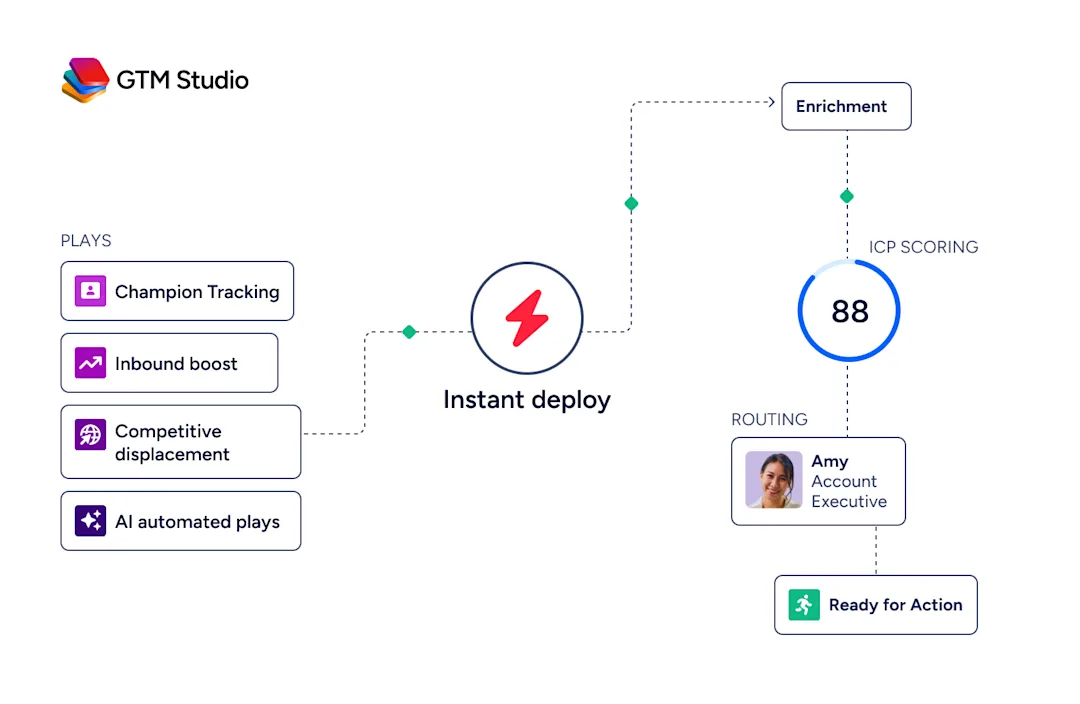
ZoomInfo's GTM Studio, for example, queries 25+ third-party vendors in parallel and uses intelligent scoring to return the best data point based on freshness, accuracy, and confidence. The practical upside beyond match rate: you stop paying for the same record twice when your primary source already had it.
Real-Time Verification
Enrichment without verification is a liability. Modern platforms verify deliverability in real time before the record ever reaches your CRM, checking three things:
Whether the address is active
Whether the domain resolves
Whether the mailbox accepts mail
Skip this step and you end up with enriched-but-undeliverable records that quietly erode your sender reputation, which is far more expensive to repair than to prevent.
Note: Watch out for catch-all domains. A catch-all server accepts every address at a domain, so verification returns "valid" even when the mailbox doesn't exist. These pass basic checks and still bounce. Good tools flag catch-alls as a separate risk tier, so ask any vendor how they handle them.
What Data Does Email Enrichment Add?
A single email address can anchor a surprising amount of context. The main categories break down as follows.
Contact Data
Full name and job title for personalization
Direct dials for outreach
LinkedIn URLs for social selling
Department and seniority for mapping the buying committee
Company Data
Company name, industry, and sub-industry for segmentation
Revenue range and employee count for firmographic scoring
HQ and office locations for territory routing
Funding history and growth signals for prioritization
Technographic Data
The technology stack (CRM, MAP, ERP, and hundreds of other categories) for competitive positioning
Recent installs or removals for trigger-based outreach
Contract renewal timing for displacement campaigns
Intent Signals
Topic-level research activity showing an account is actively exploring your category
Content-consumption patterns across the web
Buying-committee engagement that hints not just at what's happening in a deal, but why
That last category is where enrichment shades into intelligence.
A CRM records state changes: a deal moved from Stage 2 to Stage 3. It rarely captures the causal chain behind the move. Layering intent data onto enriched records is what starts to explain the "why," and that's the part reps can actually act on.
Why Email Enrichment Matters for B2B Teams
Once enrichment is in place, the downstream effects show up across the whole revenue motion — not just in one team's metrics. Three payoffs stand out.
More Accurate Lead Scoring and Routing
Scoring models are only as good as their inputs. Missing firmographic or technographic fields make scores unreliable, and high-value leads get misrouted or deprioritized. Complete records (company size, industry, seniority, tech stack, intent) give the model what it needs to route fast and route right.
Higher Email Deliverability
Sending to invalid or outdated addresses damages your sender reputation and drags down inbox placement across your entire domain, not just the bad sends. Enrichment paired with real-time verification keeps lists clean and deliverability high. For RevOps, this isn't a marketing vanity metric; it affects every outbound motion the company runs.
Better Personalization at Scale
Generic outreach converts poorly. Enrichment gives your team the raw material to tailor subject lines, opening hooks, case-study references, and CTAs to the recipient's role, industry, company size, and stack. Run enrichment continuously and that personalization stays accurate even as people change jobs and companies evolve.
Email Enrichment Best Practices
Getting enrichment running is one thing; getting real value out of it is another.
The teams that see the strongest return treat it less like a one-off project and more like an operating discipline. Three habits separate them from the rest.
Start With Your Highest-Value Segments
Don't enrich the entire database at once. Begin where the revenue is: target accounts, active pipeline, and high-intent inbound. You'll see ROI faster and get a real benchmark for enrichment quality before you scale, and before you spend the credits.
Re-Enrich on a Regular Cadence
Set a re-enrichment schedule for your active segments, and use real-time enrichment for new records as they enter:
Monthly for high-velocity teams
Quarterly for longer sales cycles
The right cadence is the one matched to how fast your market churns, not a number copied from a best-practices post.
Pro tip: Measure your own decay rate before setting a schedule. Pull a sample of records from six months ago and check how many titles or companies are now incorrect. Tiering your database this way often cuts credit consumption by a third with no measurable hit to data quality.
Layer Intent on Top
Enrichment tells you who someone is; intent signals tell you what they care about right now. Combining the two lets you prioritize contacts actively researching your category over contacts who merely fit your ICP on paper, a meaningful difference in reply rates.
How to Choose an Email Enrichment Tool
Tools vary widely. Weigh them on the following criteria:
Database size and coverage. How many contacts and companies, and how deep specifically in your verticals and regions. No provider covers every market equally, so expect smaller firms, international contacts, and niche verticals to match at lower rates and budget for some records that simply won't resolve.
Accuracy and freshness. How often data is re-verified, and how the vendor measures its accuracy claim. ZoomInfo, for reference, reaches up to 95% accuracy on first-party data with continuous verification; whatever the number, ask how it's calculated.
Enrichment method. Single-source or parallel waterfall across multiple vendors. Waterfall consistently lifts match rates and reduces concentration risk: if one vendor's coverage slips in your target market, others compensate instead of your whole data quality slipping with it.
Real-time vs. batch. Can it enrich at the moment of form submission or record creation, or only in batches? The best platforms support both via APIs and webhooks.
CRM and MAP integration. Does it integrate natively with Salesforce, HubSpot, or Microsoft Dynamics, and how heavy is the setup? Tools without native integration create manual steps and data silos that quietly erode adoption.
Compliance certifications. ISO 27701, ISO 27001, SOC 2 Type II, and relevant privacy certifications. For teams in regulated industries or selling into the EU, this is non-negotiable, and opt-out mechanisms need to be built in rather than bolted on later.
Access model. Can your team reach enrichment through a UI, an API, and inside AI agents or custom workflows? The fewer manual steps, the more consistently it actually gets used.
How to Set Up an Email Enrichment Workflow
You don't need a complex build to get this running. Seven steps take you from raw records to enriched, actionable data:
Audit your current data quality. Export a CRM sample and measure field completeness, noting which records are missing emails, phones, titles, or firmographics. This baseline shows you where enrichment will pay off first.
Define your enrichment priorities. Not every record needs the same depth. Prioritize ICP accounts, active pipeline, and high-intent inbound; these return the fastest.
Select a vendor. Use the criteria above, and always test on a small batch before you commit.
Integrate enrichment into your CRM. Connect the tool so new records are enriched automatically at creation, and run an initial batch pass to fill gaps in existing records.
Layer verification on top. After enrichment, verify deliverability to catch invalid and catch-all addresses before they reach a sequence.
Set a re-enrichment cadence. Schedule refreshes based on your measured decay rate, with real-time triggers for records arriving through forms, events, and integrations.
Monitor and measure. Track field-completeness rates, bounce rates, scoring accuracy, and speed-to-lead before and after. These numbers prove ROI and tell you where to tune.
Turn Your Email Data Into Pipeline
Email enrichment is the difference between a CRM full of names and a CRM full of qualified, actionable intelligence. It's the layer that makes lead scoring, routing, personalization, and attribution actually work instead of merely existing in a dashboard.
The strongest teams treat enrichment as infrastructure, not a project. They enrich continuously, verify automatically to protect deliverability, and layer intent on top to prioritize action. If your current approach still leans on periodic batch updates or single-source lookups, that's the thing to fix first.
Start your free ZoomInfo trial and see what continuous, high-accuracy enrichment does for your pipeline.
Frequently Asked Questions About Email Enrichment
How often should you re-enrich your B2B contact database?
High-priority accounts and live pipeline should be enriched in real time at the point of record creation or update. Broader segments can follow a monthly or quarterly refresh, with the cadence set by your measured decay rate rather than a fixed industry rule.
Is email enrichment compliant with GDPR and CCPA?
It can be, but compliance depends on the vendor and your implementation. Look for ISO 27701, ISO 27001, SOC 2 Type II, and TRUSTe GDPR certifications, confirm the platform offers opt-out mechanisms, and make sure data is processed under a legitimate-interest or consent framework appropriate to the regulation. The certifications are table stakes; the implementation is on you.
What is the difference between email enrichment and email verification?
Verification confirms an address is valid and deliverable and adds no new information. Enrichment appends data (job title, company, firmographics, technographics, intent) to an existing address. Best practice is to run both: enrich to add context, then verify to confirm deliverability.
What CRM fields does email enrichment typically populate?
The most commonly enriched fields are full name, job title, direct phone, company name, industry, employee count, annual revenue, HQ location, and technology stack. Many providers also append intent signals, social-profile URLs, and buying-committee data. Exactly which fields fill depends on your vendor's coverage and your CRM field-mapping configuration.
