

Choosing between Copper and HubSpot for managing your business relationships comes down to a few questions:
Do you need a CRM that lives inside Gmail, or a full marketing-sales-service platform?
Is your priority fast setup, or feature depth?
How many contacts will you manage, and will that number grow quickly?
Do you need your CRM to also handle marketing automation, customer service, and content?
Most importantly: does your team need better tools to manage existing relationships, or better intelligence to find and win new ones?
Here's what we recommend:
Copper is built for small service businesses that run on Google Workspace. Its Chrome Extension embeds CRM actions inside Gmail, so contacts log automatically, meetings sync from Calendar, and files link from Drive without switching tabs. Setup takes days, not months, and pricing starts at $9/seat/month. That makes Copper a fit for agencies, consultancies, and professional services firms that need a CRM their team will actually use.
The trade-off: contact limits, thin marketing tools, and total dependence on Google Workspace narrow its reach as teams scale.
HubSpot is the full customer platform for scaling companies, combining marketing automation, sales pipeline management, customer service, content creation, and commerce in one system. With a permanent free CRM tier, 2,000+ app integrations, and AI capabilities through Breeze, HubSpot covers more of the business than either tool in this comparison.
The trade-off is complexity: pricing escalates quickly across its hub-and-seat model, mandatory onboarding fees at Professional and Enterprise tiers add upfront costs, and the platform's breadth can overwhelm teams that need focus more than features.
Both platforms help you manage relationships once you have them. Neither solves the harder upstream problem: knowing which accounts to target, when they're ready to buy, and why deals actually move or stall. That's where a different approach matters.
ZoomInfo is an AI-powered GTM platform that gives your team the intelligence to enter every conversation knowing who to target and why they're ready to buy. Built on 500M contacts, 100M companies, 135M+ verified phone numbers, and 200M+ verified business emails, ZoomInfo's GTM Context Graph fuses this data with your CRM records, conversation transcripts, and behavioral signals to reveal why deals move or stall.
Sellers access this intelligence through GTM Workspace, marketers and RevOps teams build plays in GTM Studio, and any tool can connect through APIs and MCP. For teams that need more than a CRM, ZoomInfo provides the intelligence layer that makes every go-to-market motion more effective.
If intelligence-driven go-to-market sounds like what your team needs, see ZoomInfo in action with a free trial.
Copper vs. HubSpot vs. ZoomInfo at a glance
Copper | HubSpot | ZoomInfo | |
|---|---|---|---|
Core function | CRM for Google Workspace | All-in-one customer platform | AI GTM intelligence platform |
Starting price | $9/seat/month | Free CRM; paid from $15/seat/month | Custom-quoted; free tier available (ZoomInfo Lite) |
Contact capacity | 1,000 to unlimited (tier-dependent) | Up to 15M (expandable to 50M) | 500M+ B2B contacts in the database |
Setup time | Days | Weeks to months | Weeks |
Marketing tools | Basic bulk email (200-contact cap) | Full marketing automation suite | ABM, intent-triggered campaigns, native DSP |
AI capabilities | AI email templates, Gemini integration | Breeze AI agents across all hubs | GTM Context Graph, AI-driven outreach, buyer intent |
Key integration | Google Workspace (native) | 2,000+ app marketplace | Salesforce, HubSpot, APIs, MCP for any tool |
Data source | User-entered + basic enrichment | User-entered + AI enrichment | 500M contacts, 100M companies, verified and continuously updated |
Best for | Small service businesses on Gmail | Scaling companies needing marketing + sales + service | B2B teams needing data, signals, and AI-driven execution |
The CRM manages relationships, the intelligence layer finds them
Copper and HubSpot are both CRMs at their core, though they differ in scope. Both assume you already know who your customers and prospects are. They help you organize contacts, track deals, and manage follow-ups. What they don't do is tell you who you should be talking to in the first place.
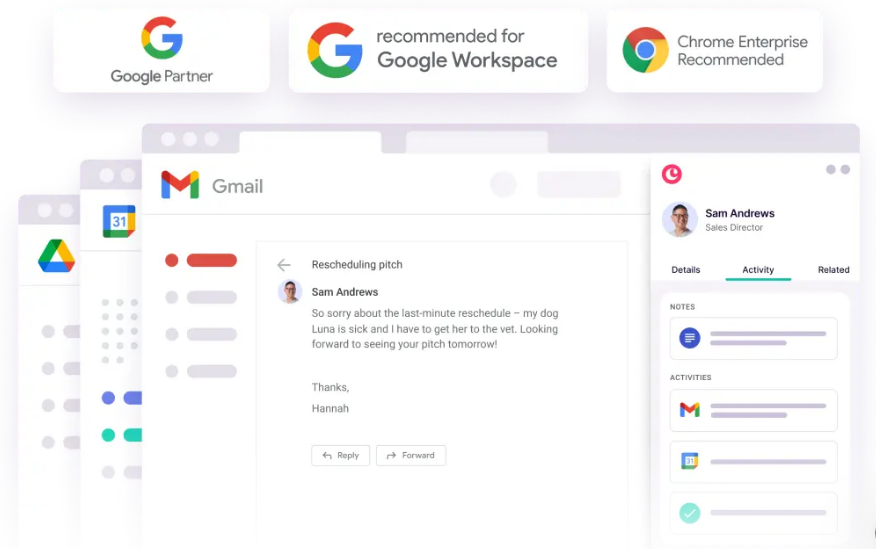
Copper wraps relationship management tightly around Gmail.
Every email, calendar event, and Drive file automatically connects to the right contact record. For a 15-person consulting firm, this removes the main reason CRMs fail: people stop entering data. Copper makes CRM maintenance a byproduct of email, not a separate chore.
Source: Copper
HubSpot extends the CRM into a full business operating system.
Marketing Hub generates leads. Sales Hub manages deals. Service Hub handles support tickets. Content Hub publishes content. All share the same contact database, so a marketing-qualified lead flows into a sales pipeline without manual handoff.
ZoomInfo operates at a different level.
Rather than waiting for leads to arrive through inbound channels or manual prospecting, ZoomInfo provides the data and intelligence that identifies your best opportunities before they enter your pipeline. The platform's buyer intent signals track when companies are actively researching solutions, drawing from 210 million IP-to-Organization pairings and 6 trillion+ new keyword-to-device pairings sourced monthly.
Combined with verified contact data, org charts, and technographics, ZoomInfo answers the question CRMs can't: who should you be selling to right now?

Seismic attributed 39% of active pipeline to opportunities identified or influenced by ZoomInfo signals, while their sales team saved 11.5 hours per week. (Seismic Case Study)
Contact data: what you enter vs. what's already there
The data gap between these platforms shapes everything downstream.
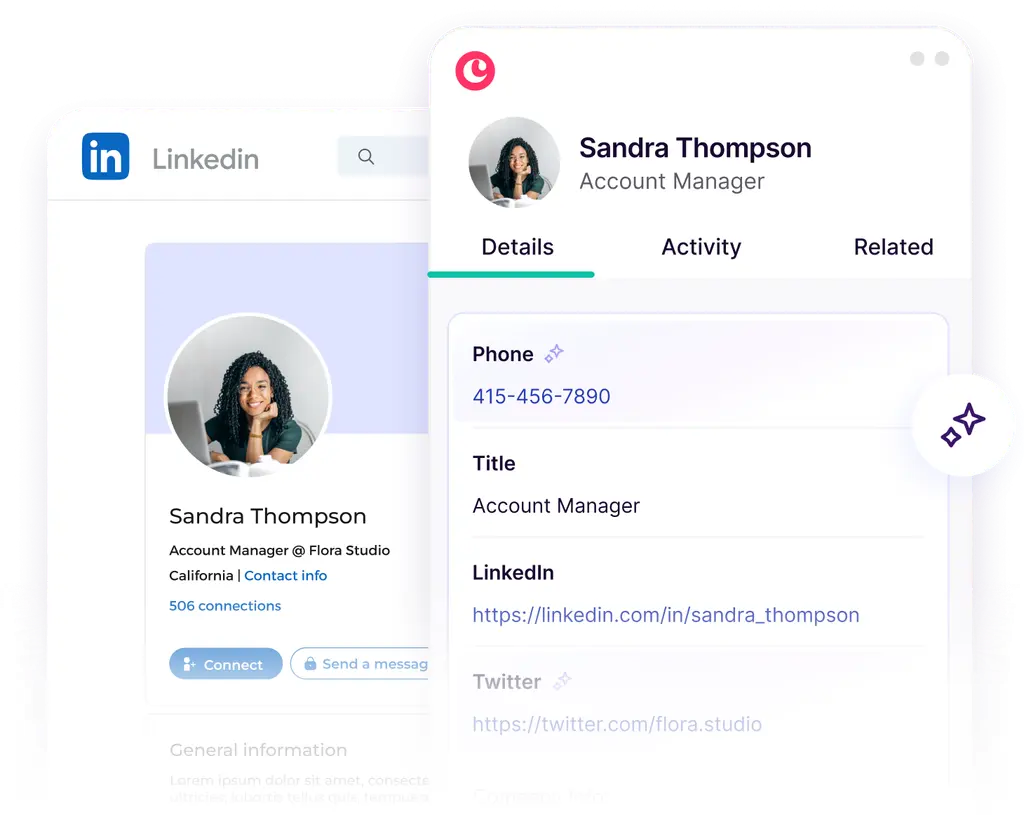
Copper relies on user-entered data supplemented by basic auto-enrichment.
When you add a contact, Copper's AI gathers phone numbers, email addresses, social profiles, and company information. The LinkedIn Chrome Extension lets you add prospects from LinkedIn profiles with one click and retrieves verified email addresses.
This helps maintain records you've already created, but it doesn't solve the discovery problem. Copper's database is limited to the contacts your team has already encountered. Contact capacity is tier-gated: 1,000 on Starter, 2,500 on Basic, 15,000 on Professional, and unlimited only on Business at $99/seat/month.
Source: Copper
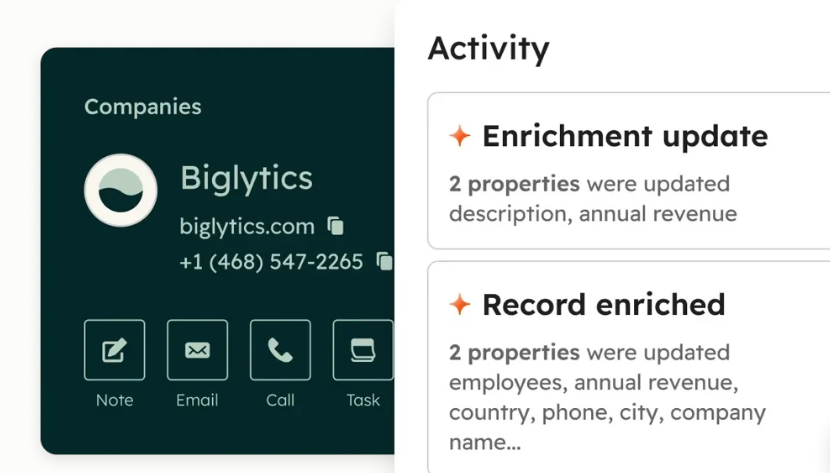
HubSpot improves on this with AI-powered enrichment from emails, calls, and HubSpot's proprietary dataset.
The Smart CRM automatically enriches records and re-enriches company records when properties change. The platform supports up to 15 million contacts, expandable to 50 million. But the data still originates primarily from your own interactions, inbound forms, and whatever enrichment HubSpot's algorithms can pull.
Source: HubSpot
ZoomInfo inverts the model.
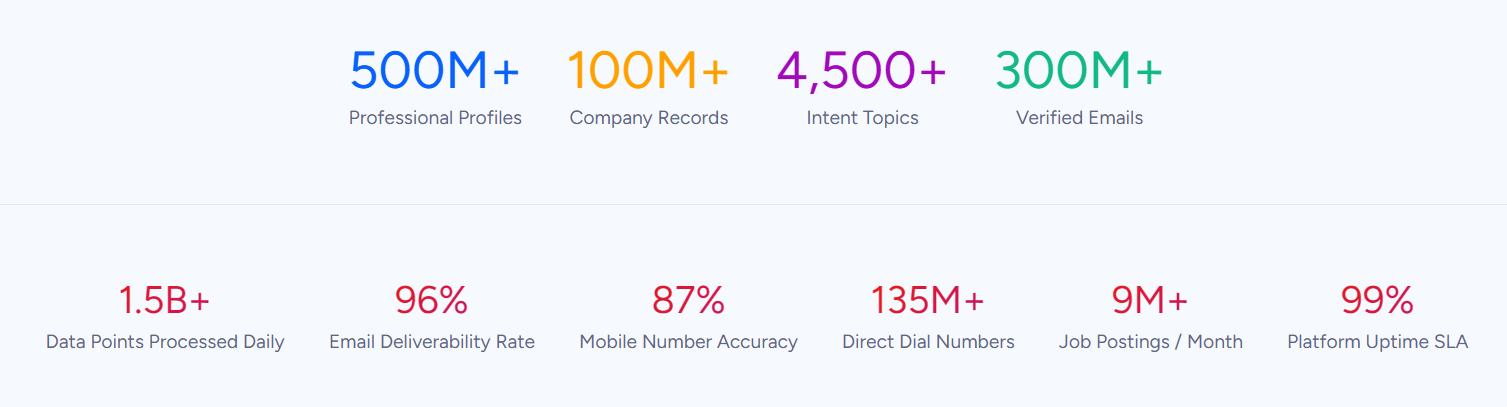
Instead of enriching data you already have, ZoomInfo starts with 500M contacts, 100M companies, 135M+ verified phone numbers, 120M direct-dial phone numbers, and 200M+ verified business emails before you've sent a single outreach email. A multi-source pipeline backed by 300+ human researchers verifies this data, with up to 95% accuracy on first-party data.
In a Fortune 500 competitive RFP analyzing 25 million contacts across vendors, the independent consultant concluded that "no other competitor came even close."
Source: ZoomInfo
The practical difference: a sales rep using Copper or HubSpot can only call prospects they've already found. A rep using ZoomInfo starts with a verified database of every potential buyer in their market, complete with direct dials, org charts, and intent signals showing who's actively researching.
Vensure scaled prospecting using ZoomInfo's data: "ZoomInfo gives us the information we need to execute. We don't have to go through and spend our time digging. It's already there, so we can be three steps ahead." (Vensure Case Study)
Pipeline management and sales execution
All three platforms help manage deals, but they approach pipeline from different starting points.
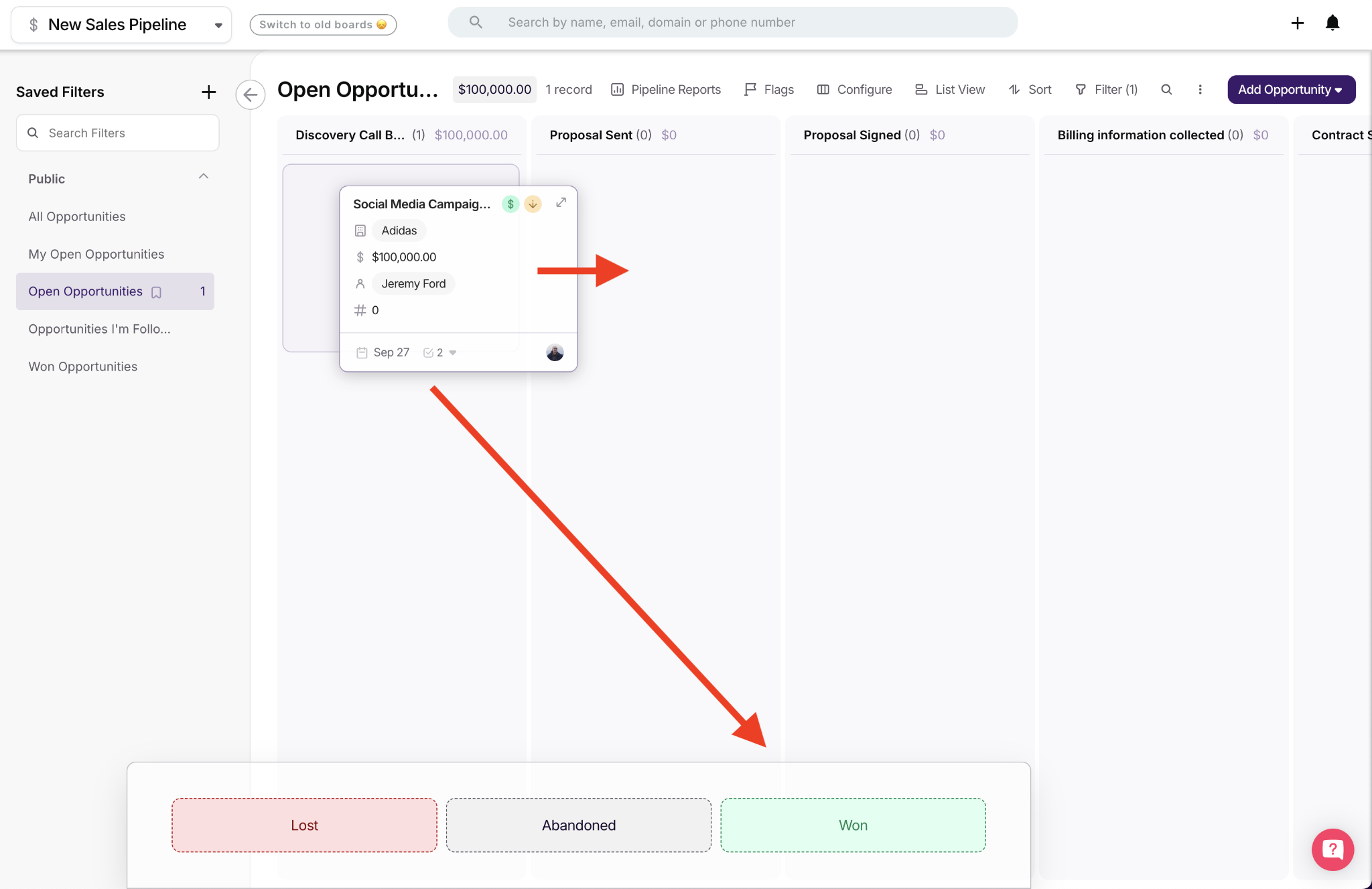
Copper provides a visual Kanban-style pipeline board where deals move through customizable stages via drag-and-drop. Pipeline Flags surface high-value and slipping deals that need attention. Copper's real strength here is the connection between pipeline and project delivery: closed deals convert directly into project pipelines without re-entering data.
For service businesses where the work starts after the contract is signed, this sales-to-delivery continuity is a genuine differentiator. Teams can create as many pipelines as needed with per-stage win probability for weighted forecasting.
Source: Copper
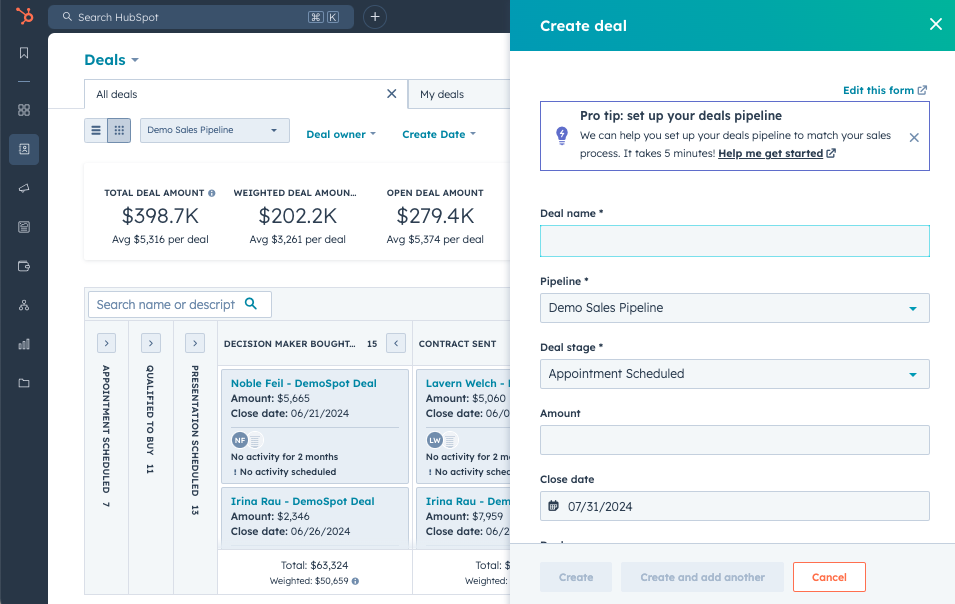
HubSpot offers more advanced pipeline tools.
Deal pipelines support custom stages, deal scoring, and task assignment. AI Guided Selling surfaces prioritized queues and daily action summaries. Conversation Intelligence records and transcribes calls for coaching. Forecasting provides AI-powered revenue projections.
And CPQ software generates quotes directly from deal records with branded templates and approval workflows. HubSpot's pipeline is built for teams with dedicated sales operations managing complex deal flows.
Source: HubSpot
ZoomInfo approaches pipeline from the intelligence layer.
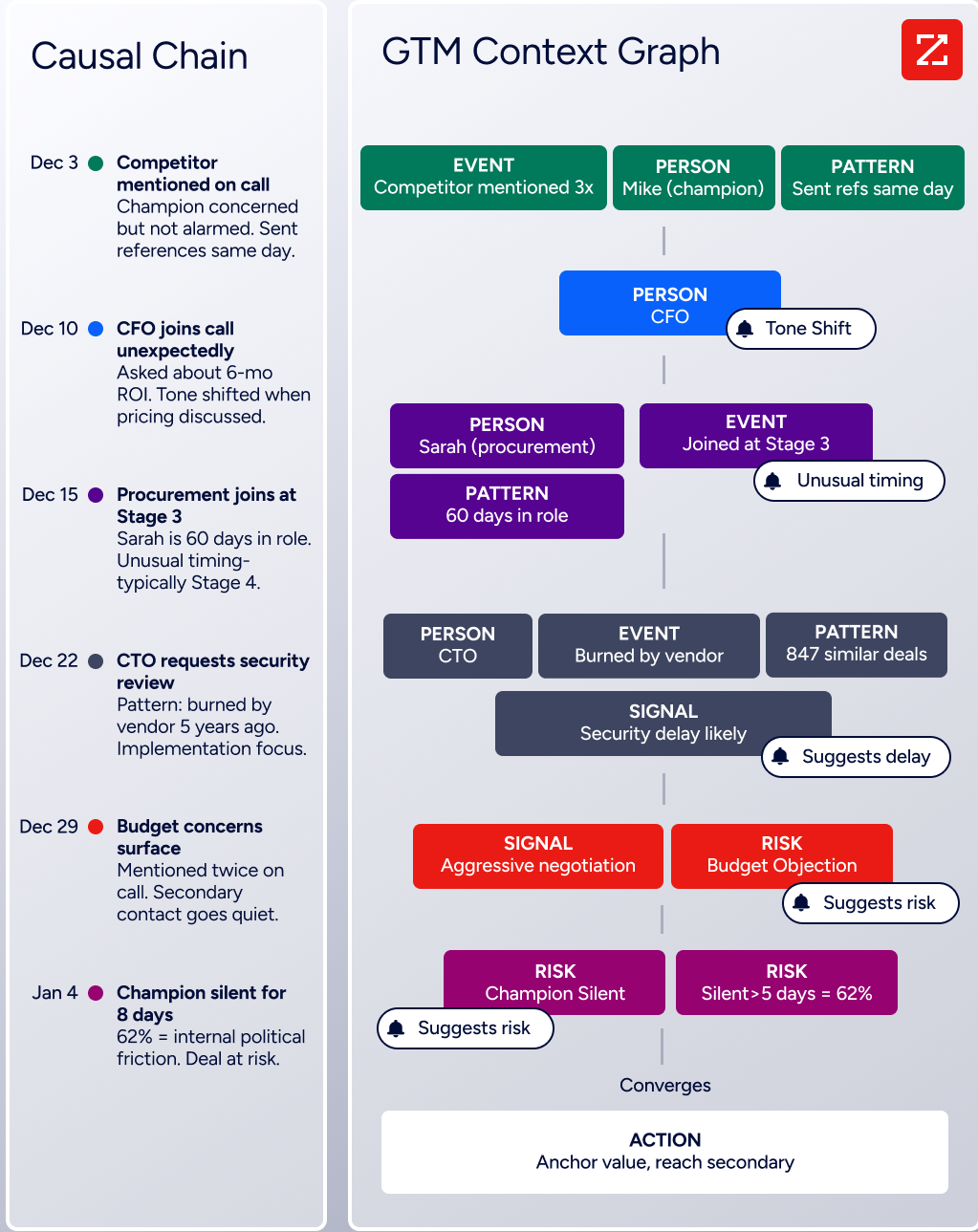
Rather than just tracking where deals stand, the GTM Context Graph captures why deals move or stall. As ZoomInfo's CPO Dominik Facher explains: "The CRM recorded the state change. It has no record of why it happened." Maybe the CFO joined the last call and asked about six-month ROI, and that's what accelerated the deal. Maybe a champion went quiet for eight days because of an internal budget battle. CRMs were never designed to capture these signals.
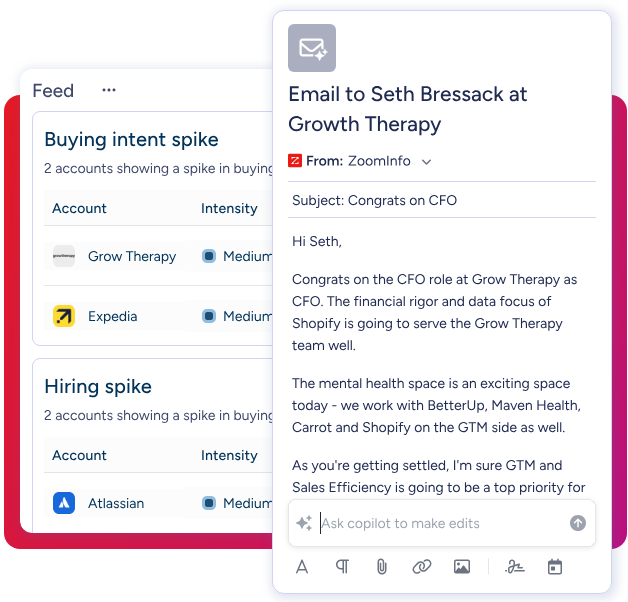
ZoomInfo's GTM Workspace gives sellers a single surface where prioritized accounts, AI-drafted outreach, and deal execution converge. The Action Feed streams real-time buying signals (G2 comparisons, funding events, executive hires) with pre-drafted actions on every signal.
Source: ZoomInfo
The difference compounds over time. Copper and HubSpot tell you a deal hasn't moved in two weeks. ZoomInfo tells you the CFO joined the last call with ROI-focused questions, the company is hiring three new VPs, and accounts with this signal pattern close at twice the normal rate.
Marketing and outreach capabilities
The gap here is significant.
Copper is honest about its limitations.
Bulk email is capped at 200 contacts per send, and email series require the Business tier at $99/seat/month. There's no visual email builder, no A/B testing, and no subscriber management comparable to dedicated marketing tools.
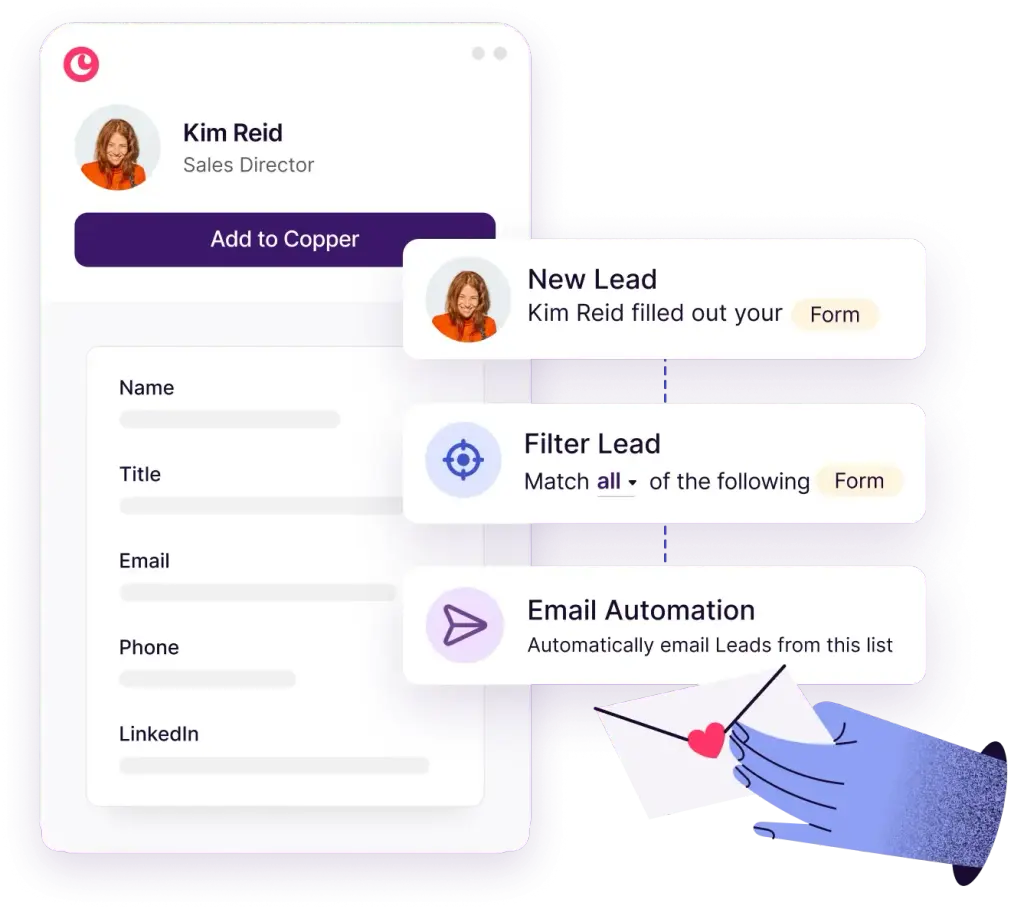
Copper explicitly recommends integrating with Mailchimp, Klaviyo, or Reply.io for marketing campaigns. What Copper does well is warm-relationship outreach: automated emails sent through the user's actual Gmail account, triggered by pipeline stage changes or saved filters. For agencies sending follow-up sequences to a few dozen prospects, this works. For demand generation, it doesn't.
Source: Copper
HubSpot leads in marketing capabilities among these three.
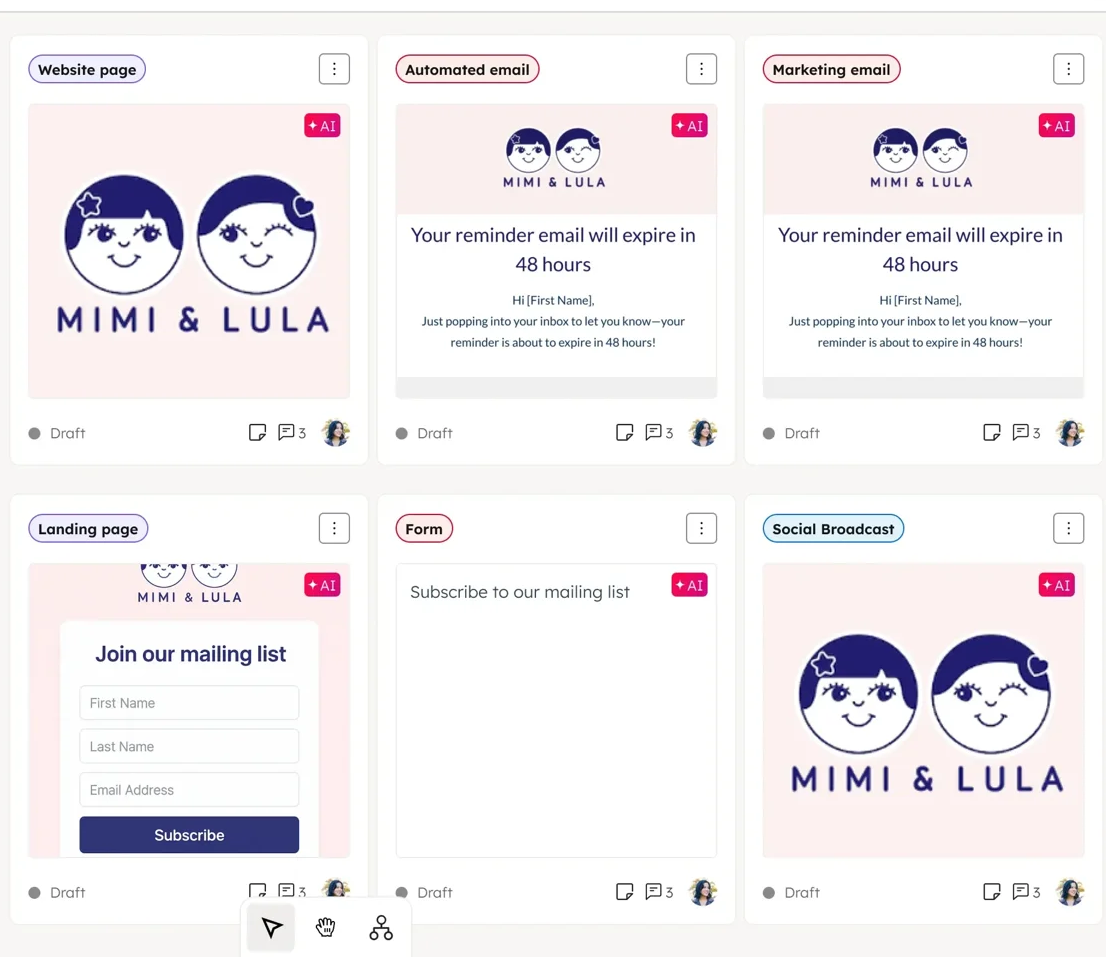
Marketing Hub includes a drag-and-drop email editor with AI writing and send-time optimization, visual automation workflows for multi-step nurture sequences, a landing page builder, social media management, ad integrations, and multi-touch attribution reporting.
The Breeze Prospecting Agent drafts personalized outreach using the full customer history. HubSpot has also begun positioning for the AI search era with AEO tools designed to help content rank in LLM-generated answers. For teams running inbound marketing alongside sales execution, HubSpot covers more ground than most competitors.
Source: HubSpot
ZoomInfo focuses marketing on account-based execution powered by data and signals.
ZoomInfo Marketing includes a native demand-side platform for display advertising based on 300+ company attributes, and FormComplete reduces website forms to a single field while auto-appending the rest.
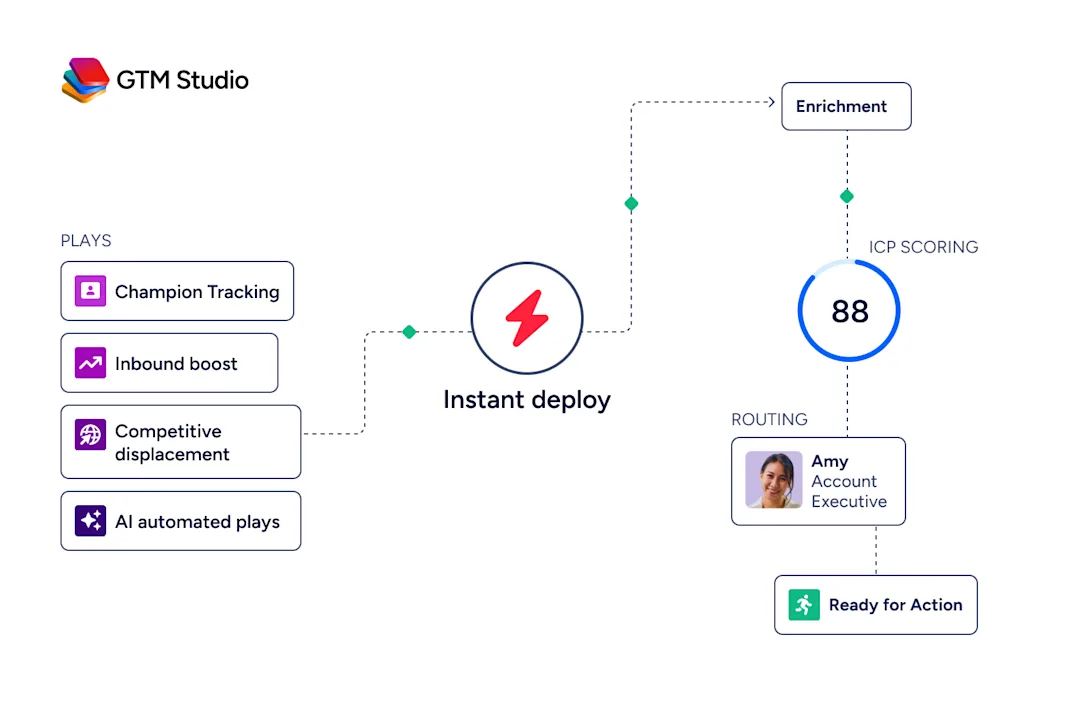
GTM Studio lets marketers describe audiences in natural language and launch multi-channel plays targeting accounts that match proven win patterns, with no engineering ticket required. Expansion plays that used to take 3 weeks now launch in 30 minutes, and plays refine targeting automatically as every click, open, and reply flows back into the system.
Source: ZoomInfo
Where HubSpot excels at inbound marketing (attracting leads through content and nurturing them through sequences), ZoomInfo excels at outbound precision (identifying in-market accounts and engaging the right buyers at the right time). Many teams use both.
For a deeper look at how these two platforms compare head-to-head, see our HubSpot vs. ZoomInfo comparison.
Redwood Logistics achieved a 99% reduction in cost-per-click and a 310% increase in clickthrough rate: "It's not just the data itself. It's more about the right data at the right time to help us reach out with the right message across that full buyer journey." (Redwood Logistics Case Study)
Pricing structures reflect different business models
Copper is the most affordable entry point.
Plans run $9/seat/month (Starter), $23/seat/month (Basic), $59/seat/month (Professional), and $99/seat/month (Business), all billed annually. The Starter tier excludes pipelines, sales opportunities, workflow automation, and reporting, making it a contact book rather than a CRM. The Professional tier is the practical entry point for sales teams. Hard contact limits of 15,000 on Professional force an upgrade to Business for growing databases.
HubSpot uses a complex, multi-dimensional model.
The free CRM is genuinely useful with unlimited contacts (up to 1M records) and no time limit. But paid tiers escalate quickly. Sales Hub Professional costs $90 to $100/seat/month with a $1,500 mandatory onboarding fee. Marketing Hub Professional starts at $800/month with a $3,000 onboarding fee.
A critical hidden cost: when you subscribe to multiple hubs at different tiers, HubSpot bills all Core Seats at the rate of the highest tier. A company mixing Marketing Hub Professional with Sales Hub Enterprise pays Enterprise-rate seats across both.
ZoomInfo uses custom-quoted, consumption-based pricing with no published prices. Pricing scales around data access, API consumption, AI activity, and number of users.
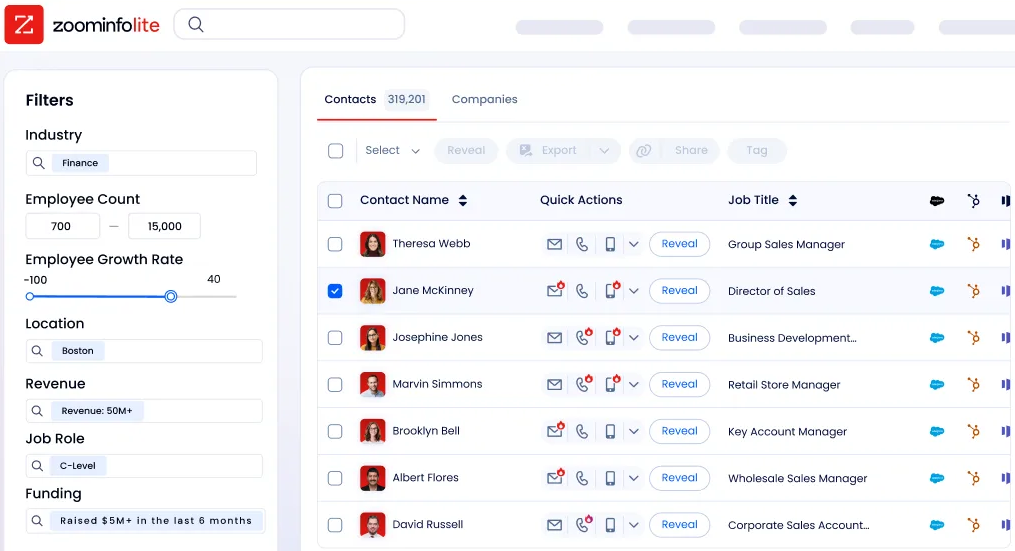
ZoomInfo Lite offers permanent free access with 10 monthly export credits. For paid plans, ZoomInfo is a premium investment, but the comparison that matters isn't cost per seat; it's cost per opportunity generated. Documented outcomes like Snowflake's 200% higher conversion rates on ZoomInfo-scored accounts and Thomson Reuters' 40% increase in closed-won deals provide the ROI context for evaluating the price.
Source: ZoomInfo
For a 10-person service business on Google Workspace, Copper at $59/seat ($590/month) is the clear value play. For a 50-person company needing marketing automation alongside sales tools, HubSpot's bundled pricing makes economic sense. For B2B organizations where finding and prioritizing the right accounts drives revenue, ZoomInfo's intelligence justifies the premium.
AI capabilities are heading in different directions
Copper is early in its AI journey.
CopperGPT and AI email templates are available on Professional and Business tiers, covering email composition assistance and meeting transcription via Google Gemini. There is no AI-driven lead scoring, predictive deal forecasting, or conversation intelligence. As Google expands Gemini across Workspace, Copper is positioned to inherit those improvements, but the current AI feature set remains limited.
HubSpot has invested heavily in Breeze, its AI layer running across all hubs.
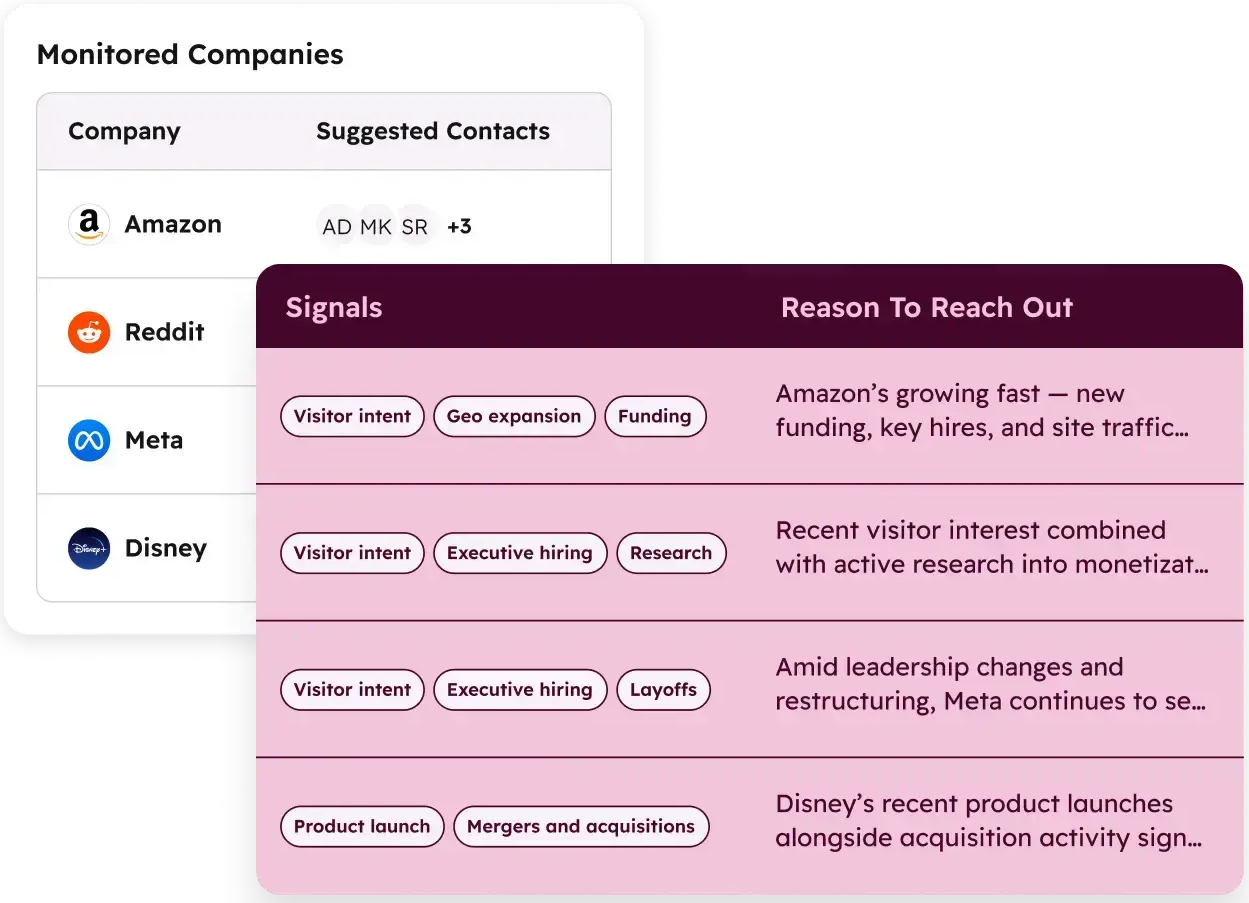
The Customer Agent resolves over 50% of customer conversations autonomously. The Prospecting Agent monitors buying signals, drafts personalized outreach using the full HubSpot customer history, and supports both review mode and fully autonomous execution. The Data Agent answers natural-language questions about CRM data.
These are real capabilities, though several features (AI-Powered Segmentation, Personalization, Marketing Studio) remain in Beta as of the Fall 2025 Spotlight.
Source: HubSpot
ZoomInfo built its AI on a different foundation: the GTM Context Graph, which processes 1.5B+ data points daily.
HubSpot's Breeze draws on CRM data, which is valuable but limited to what the company itself captures. ZoomInfo's AI combines its own third-party B2B data with the customer's CRM records, conversation intelligence from Chorus, intent signals, and behavioral data. The result is AI that understands not just what happened in a deal, but why.
GTM Workspace's AI agents, built on Anthropic's Claude, handle account research, outreach drafting, CRM updates, and signal monitoring. The AI Assistant generates one-click account briefs pulling CRM history, company news, ZoomInfo signals, and stakeholder context into a 10-second summary. These agents learn continuously from user interactions, customer responses, and market changes.
Source: ZoomInfo
Databricks reached prospects 50% faster using ZoomInfo's AI-driven execution, while Thomson Reuters increased closed-won deals by 40% and achieved 115% average quota attainment each month. (GTM Workspace)
Setup speed and learning curve
Time-to-value separates these platforms more than any feature comparison.
Copper wins on speed.
Because it lives inside Gmail, there's no separate interface to learn. Connect a Google Workspace account, install the Chrome Extension, and the CRM starts syncing email history immediately. G2 reviewers rate Copper's Ease of Setup at 8.8 and Ease of Use at 9.1. For teams without dedicated IT or operations staff, this matters.
HubSpot offers a free CRM that anyone can sign up for, which lowers the barrier to entry. But Professional or Enterprise tiers require structured onboarding.
HubSpot claims customers achieve meaningful value within 90 days, which is fast by enterprise standards but slow next to Copper's three-day setup. Mandatory onboarding fees ($1,500 to $7,000 depending on the hub and tier) add both cost and time.
ZoomInfo sits between the two.
GTM Workspace deploys in weeks, not months. The platform's breadth (data, signals, conversation intelligence, orchestration) requires structured onboarding, and ZoomInfo redesigned its onboarding from 30 to 90 days to make sure adoption sticks. That investment produced a 25% improvement in customer satisfaction scores.
For teams that want free access to start, ZoomInfo Lite provides the B2B database with 10 monthly export credits, no credit card required.
Copper vs. HubSpot vs. ZoomInfo: Which should you choose?
The right choice depends on what's actually limiting your growth.
Choose Copper if:
You run a small service business (agency, consultancy, construction firm) on Google Workspace
Fast setup and minimal learning curve are priorities
Your team needs CRM that works inside Gmail without a separate interface
You manage both sales pipelines and project delivery in one tool
Your contact database is under 15,000 and your budget is under $60/seat/month
Choose HubSpot if:
You need marketing automation, sales tools, and customer service on one platform
Your team is ready to invest in learning a comprehensive system
You want a free CRM to start with and room to scale across multiple hubs
Content-led inbound marketing is central to your growth strategy
You have the budget for Professional or Enterprise tiers and their onboarding fees
Choose ZoomInfo if:
Your growth depends on finding and engaging the right accounts before competitors do
You need verified B2B contact data, buyer intent signals, and org charts at scale
You want AI that understands why deals move, not just what stage they're in
Your team needs intelligence that works inside your existing CRM or inside ZoomInfo's own workspace
You're ready to move from reactive pipeline management to proactive go-to-market execution
See how ZoomInfo's intelligence layer can change your go-to-market with a free trial.
Copper and HubSpot are both strong CRMs suited to different sizes and needs. But for B2B organizations where the real bottleneck isn't managing contacts but finding the right ones, ZoomInfo provides something neither CRM can: the intelligence to know who to target, when they're ready, and why they'll buy.
That intelligence works inside Copper, inside HubSpot, or inside ZoomInfo's own products through GTM Workspace and GTM Studio. The data and the reasoning don't change based on where you access them.
Copper vs. HubSpot vs. ZoomInfo FAQ
What is the core difference between Copper, HubSpot, and ZoomInfo?
Copper is a CRM built for small service businesses running on Google Workspace, focused on managing client relationships inside Gmail.
HubSpot is a full customer platform combining CRM, marketing automation, sales tools, customer service, and content management in one system.
ZoomInfo is an AI-powered go-to-market intelligence platform that provides verified B2B data on 500M contacts and 100M companies, buyer intent signals, and AI-driven execution tools for finding and winning new business.
Which platform is the most affordable for small teams?
Copper is the most affordable CRM, with plans starting at $9/seat/month (though practical use requires the $59/seat Professional tier). HubSpot offers a permanent free CRM with basic functionality, with paid plans starting at $15/seat/month for Starter. ZoomInfo uses custom-quoted pricing with no published rates, though ZoomInfo Lite provides permanent free access to the B2B database with 10 monthly export credits.
Can I use ZoomInfo together with Copper or HubSpot?
Yes. ZoomInfo integrates directly with both platforms. ZoomInfo data and signals can enrich contact records in Copper or HubSpot, and ZoomInfo's APIs and MCP enable any CRM to access its B2B intelligence. Many teams use ZoomInfo as the data and intelligence layer alongside their CRM of choice.
Which platform has the strongest marketing automation?
HubSpot leads in traditional marketing automation with its Marketing Hub, offering email campaigns with A/B testing, visual workflow builder, landing pages, social media management, and multi-touch attribution reporting.
ZoomInfo leads in account-based marketing with a native display advertising platform, intent-triggered campaigns, and GTM Studio for building audience-targeted plays in natural language.
Copper has minimal marketing tools, capping bulk email at 200 contacts per send and recommending third-party tools for campaign work.
Which platform provides the most comprehensive contact data?
ZoomInfo provides the largest B2B database with 500M contacts, 100M companies, 135M+ verified phone numbers, and 200M+ verified business emails, verified through a multi-source pipeline including 300+ human researchers with up to 95% accuracy.
HubSpot enriches records using AI and its own proprietary dataset but relies primarily on user-entered data and inbound form submissions. Copper offers basic contact enrichment and a LinkedIn Chrome Extension but does not maintain an independent contact database.
How do the AI capabilities compare across all three platforms?
Copper's AI is limited to email templates, an AI rewrite tool, and Google Gemini integration for meeting transcription and email drafting. HubSpot's Breeze AI includes agents for customer service, prospecting, data queries, and content creation, though several features remain in Beta.
ZoomInfo's AI is built on the GTM Context Graph, which processes 1.5B+ data points daily by fusing third-party B2B data with CRM records, conversation intelligence, and behavioral signals to reveal why deals move or stall.
Which platform is best for teams that depend on outbound sales?
ZoomInfo is built for outbound-first teams. It provides 120M verified direct-dial phone numbers and 200M+ business emails, buyer intent signals showing when accounts are actively researching, and AI-powered outreach through GTM Workspace.
HubSpot's Sales Hub includes sequences, a prospecting agent, and call tracking, but its strength lies more in inbound lead nurturing. Copper has no dedicated outbound prospecting tools beyond its LinkedIn Chrome Extension and basic email sequences.
Is Copper only useful for Google Workspace users?
Effectively, yes. Copper's value depends on native Gmail integration. The Chrome Extension, automatic email logging, Google Calendar sync, and Google Drive file linking all require Google Workspace. Copper holds the official "Recommended for Google Workspace" designation from Google, which means deeper integration than typical third-party CRM plugins.
Organizations running Microsoft 365 or Outlook get no comparable integration and should evaluate HubSpot or ZoomInfo instead.
Want more Copper and HubSpot comparisons? These related breakdowns go deeper:
