
Key Takeaways
ZoomInfo: Best for accurate territory design, providing the verified account data (firmographics, intent signals, technographics) that every other tool runs on.
Anaplan: Best for large enterprises running connected territory, quota, and capacity planning across finance and sales.
Workday Adaptive Planning: Best for organizations already on Workday that want sales planning tied to workforce and headcount data.
Fullcast: Best for RevOps teams that need continuous territory changes pushed straight into Salesforce.
CaptivateIQ: Best for mid-market teams connecting territory carving to quotas and incentive compensation in one system.
Salesforce Maps: Best for Salesforce-native teams that need geographic territory design and field routing inside the CRM.
eSpatial: Best for mid-market teams that want algorithmic territory balancing and clear visual mapping.
Maptive: Best for teams that want every mapping feature included at a flat per-user price.
EasyTerritory: Best for Microsoft and Dynamics 365 shops that want territory mapping inside their existing stack.
Sales territory management software falls into two groups: planning platforms that balance accounts, quotas, and capacity, and mapping tools that handle geographic coverage and routing. The right one depends on your team's size, your CRM, and how complex your territories are.
We compared the nine best options for 2026 below, with features and current pricing for each. One thing worth keeping in mind as you read: these tools all run on your account data, so whatever you pick works best when that data is accurate and current.
Why Sales Teams Use Sales Territory Management Software
Territory management software exists because spreadsheets break down the moment a sales team scales. Manual territory design creates overlapping coverage, unworked accounts, and quotas that don't match opportunity. The software fixes the structural problems that cost revenue:
Balanced coverage. Distribute accounts by potential and rep capacity so no territory is overloaded and none sits idle.
Clear ownership. Define who owns which accounts to stop duplicate outreach and internal disputes.
Faster planning cycles. Model and deploy territory changes in hours instead of the weeks a spreadsheet redesign takes.
Fair quotas. Tie targets to real addressable market in each territory, which improves attainment and rep retention.
Adaptability. Rebalance fast when reps leave, markets shift, or headcount changes.
The constant across all of it is data. Territories built on stale or incomplete account information misallocate resources no matter how good the planning tool is. That is why data quality, not just planning features, decides whether territory software delivers.
The 9 Best Sales Territory Management Software Tools
Here is how the nine compare at a glance before the detailed breakdowns.
Tool | Best for | Category | Starting price |
ZoomInfo | Data-driven territories built on live account and signal data | GTM intelligence platform | Consumption-based |
Anaplan | Connected enterprise territory and quota planning | Enterprise planning | Custom quote |
Workday Adaptive Planning | Sales planning tied to workforce data | Enterprise planning | Custom quote |
Fullcast | Continuous territory changes synced to Salesforce | RevOps platform | Custom quote |
CaptivateIQ | Territory carving linked to quotas and comp | Sales planning + ICM | Custom quote |
Salesforce Maps | Salesforce-native geographic territory design | Mapping + routing | $75/user/mo |
eSpatial | Algorithmic balancing and visual mapping | Mapping | $1,495/yr |
Maptive | All mapping features at a flat per-user price | Mapping | $250 (45-day pass) |
EasyTerritory | Dynamics 365 and Microsoft-stack mapping | Mapping | $2,400/yr |
1. ZoomInfo
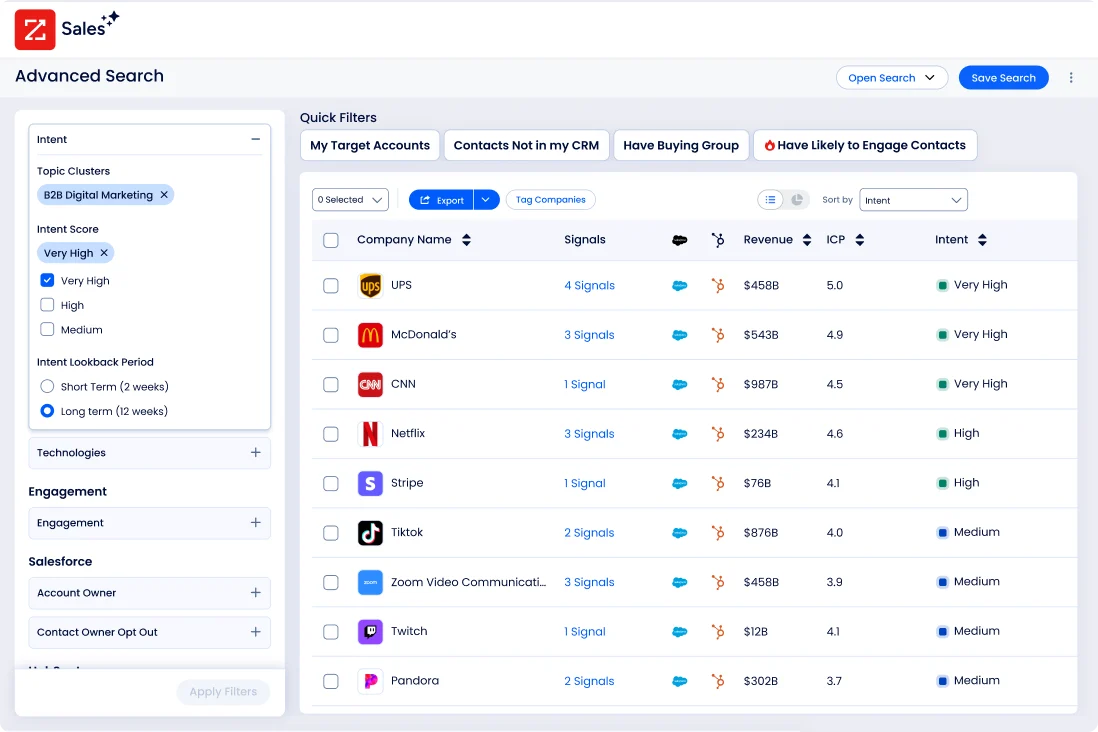
ZoomInfo is a go-to-market platform, and it solves the part of territory management that mapping and planning tools assume is already handled: the data. Those tools draw and balance the territories. They take the account list as a given. ZoomInfo is where that list comes from and where it stays accurate.
Good territory design depends on knowing your market in detail: which companies exist, how big they are, what they run, and which ones are in the market to buy. ZoomInfo covers 100M companies and 500M contacts with up to 95% accuracy on first-party data, the foundation a planning tool needs to balance territories on real potential rather than a rough guess.
That foundation also has to hold once the plan goes live, which is the job of GTM Workspace.
It routes the signals that matter (job changes, funding, hiring, research activity) to whichever rep owns the account, and tells them what changed and what to do about it. With ZoomInfo Agent Teams, a signal like a job change can kick off the full play, from research to outreach, rather than ending as a task in the CRM. Territories stay worth working between reviews instead of decaying the day after they are drawn.
Key features
Firmographics on 100M companies and 500M contacts, covering revenue, headcount, industry, location, and parent-child hierarchy for segmentation and tiering.
Technographic profiles on 30M+ companies tracking 30,000+ technologies across 200+ categories for fit and displacement opportunities.
Account scoring inputs and TAM data for sizing territory potential.
Buyer intent signals, including guided intent topics correlated to deal success, to prioritize accounts within assigned territories.
Data delivery into Salesforce, HubSpot, Snowflake, and Databricks via API, MCP, and Data as a Service.
Pricing
Consumption-based, tied to usage such as exports, API calls, and enrichment rather than per-seat licensing. ZoomInfo Lite is permanently free with 10 monthly export credits, and a 7-day trial of paid plans is available. GTM Workspace deploys in weeks, not months.
What our customers say
Snowflake's sales data science team built its Account Propensity Scoring model on ZoomInfo technographic and firmographic data, feeding 70+ fields that field operations leads use to allocate accounts and plan territories. Their highest-scoring accounts saw a 25% higher customer engagement rate and 2x higher new customer conversion.
“I give props to the data services team at ZoomInfo. They've done really a great job working with us to get us what we need.” — David Gojo, Sales Data Science Manager, Snowflake
Read the Snowflake case study →
2. Anaplan
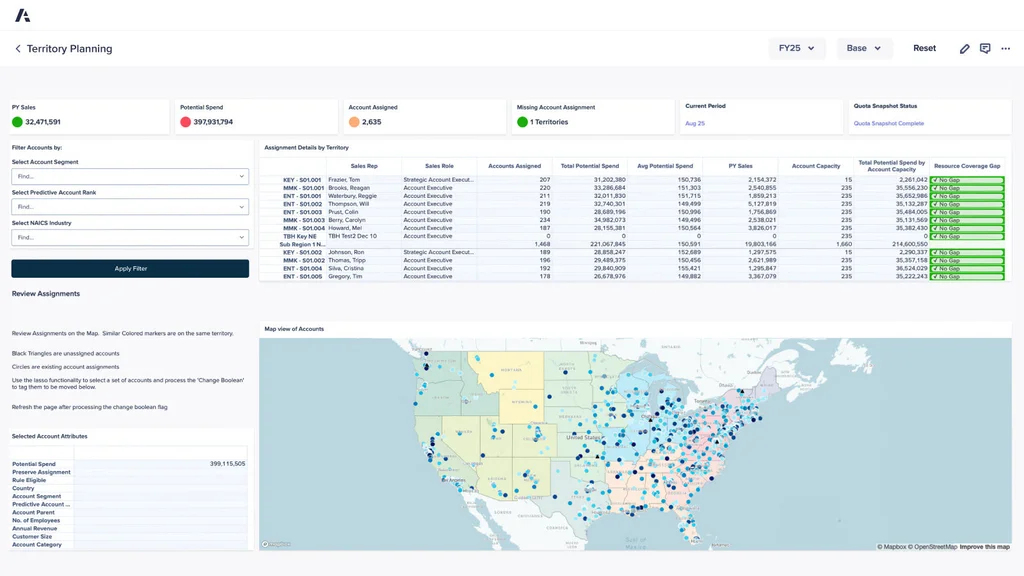
Anaplan is an enterprise planning platform built for large, complex sales organizations that treat territory design as one piece of a connected planning model.
Its Territory and Quota Planning application ties coverage decisions to quota allocation, capacity, and finance, so a change to a territory flows through to the numbers it affects.
For enterprises planning across thousands of reps and multiple business units, that connected approach is the draw. The flip side is weight: it assumes dedicated modeling resources and a longer implementation, which makes it overbuilt for most mid-market teams.
Key features
Territory lifecycle planning that designs, balances, and adapts coverage across go-to-market teams.
Anaplan Optimizer for balancing millions of accounts, with predictive account scoring to prioritize the highest-potential segments.
Location intelligence and geospatial mapping to visualize and stress-test territory structures.
Top-down and bottom-up reconciliation so corporate targets line up with account-level potential.
A guided setup for Territory and Quota Planning and an AI Sales Analyst agent for natural-language modeling.
Pricing
No public pricing. Custom quote via sales.
Customer reviews
“I like how Anaplan is user-friendly and maps out the structure needed to build out a successful sales operations model. I appreciate Anaplan's scalability and real-time insights on planning. The adoption of AI makes it a lot easier to plan. The initial setup was seamless.” - Christine P., G2
“Requires a good amount of knowledge to use the pre-defined functions. High license costs for Anaplan users.” - Umang S., G2
3. Workday Adaptive Planning
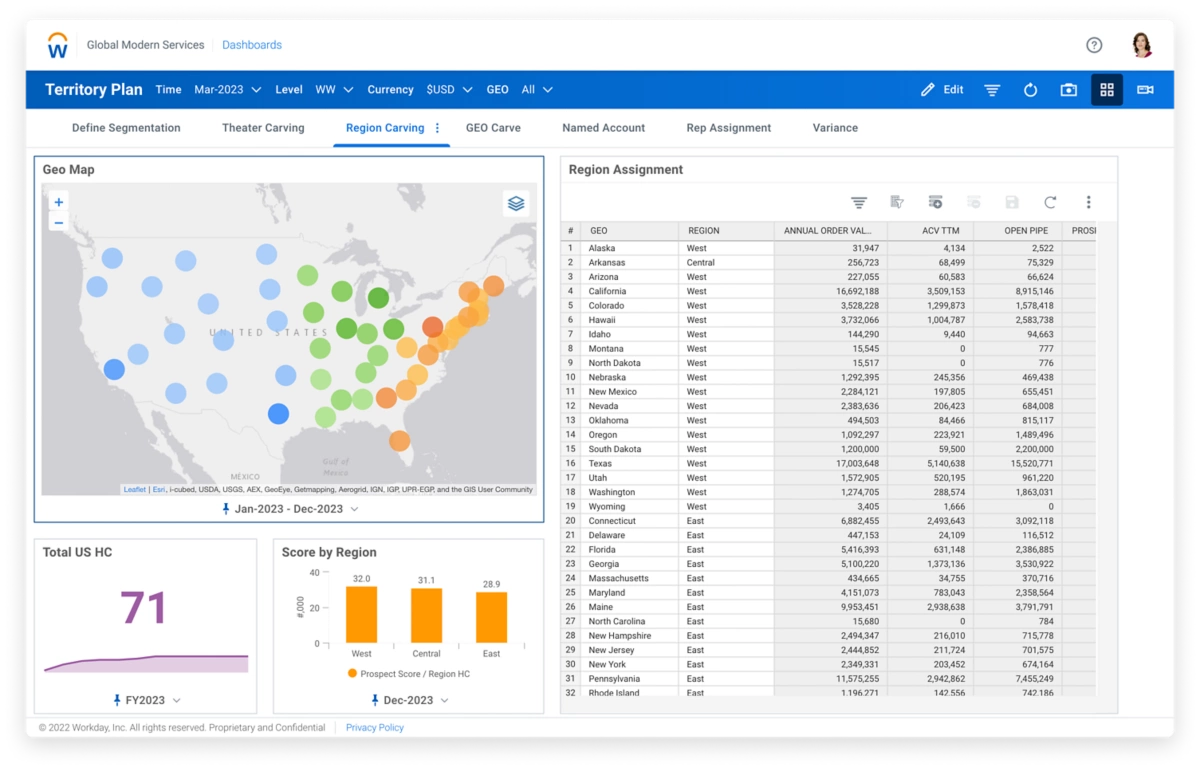
Workday offers Workday Adaptive Planning, which handles sales territory planning as part of a broader planning suite. It builds balanced, equitable territory assignments through automated, rule-based design rather than the manual carving a spreadsheet forces.
Its real differentiator is the connection to finance and headcount data: because territory design shares a source of truth with the workforce and financial plans, sales ops and leadership work from the same numbers. That makes it a strong fit for enterprises consolidating planning, especially existing Workday customers.
The value drops sharply if you only need territory management; the platform earns its cost across multiple planning use cases, not one.
Key features
Rule-based account segmentation and automated territory assignment.
Geographic, industry, and segment-based carving with geospatial visualization.
Account and territory scoring by market opportunity, size, and industry.
TAM and wallet-share modeling aligned to revenue and headcount plans.
CRM and customer data integration with bidirectional push of territory revisions.
Pricing
No public pricing; quote-based. A 30-day free trial is available.
Customer reviews
“I like the flexibility for reporting with Workday Adaptive Planning. It's easy to build ad-hoc reports, which adds a lot of convenience to my work. Furthermore, the initial setup was super easy, making the transition smooth.” - Tim K., G2
“What I dislike about Workday Adaptive Planning is that it can take time to fully understand and configure, especially for new users. Some advanced features require a learning curve, and initial setup can feel a bit complex if you are not familiar with planning tools.” - Dharamveer P., G2
4. Fullcast
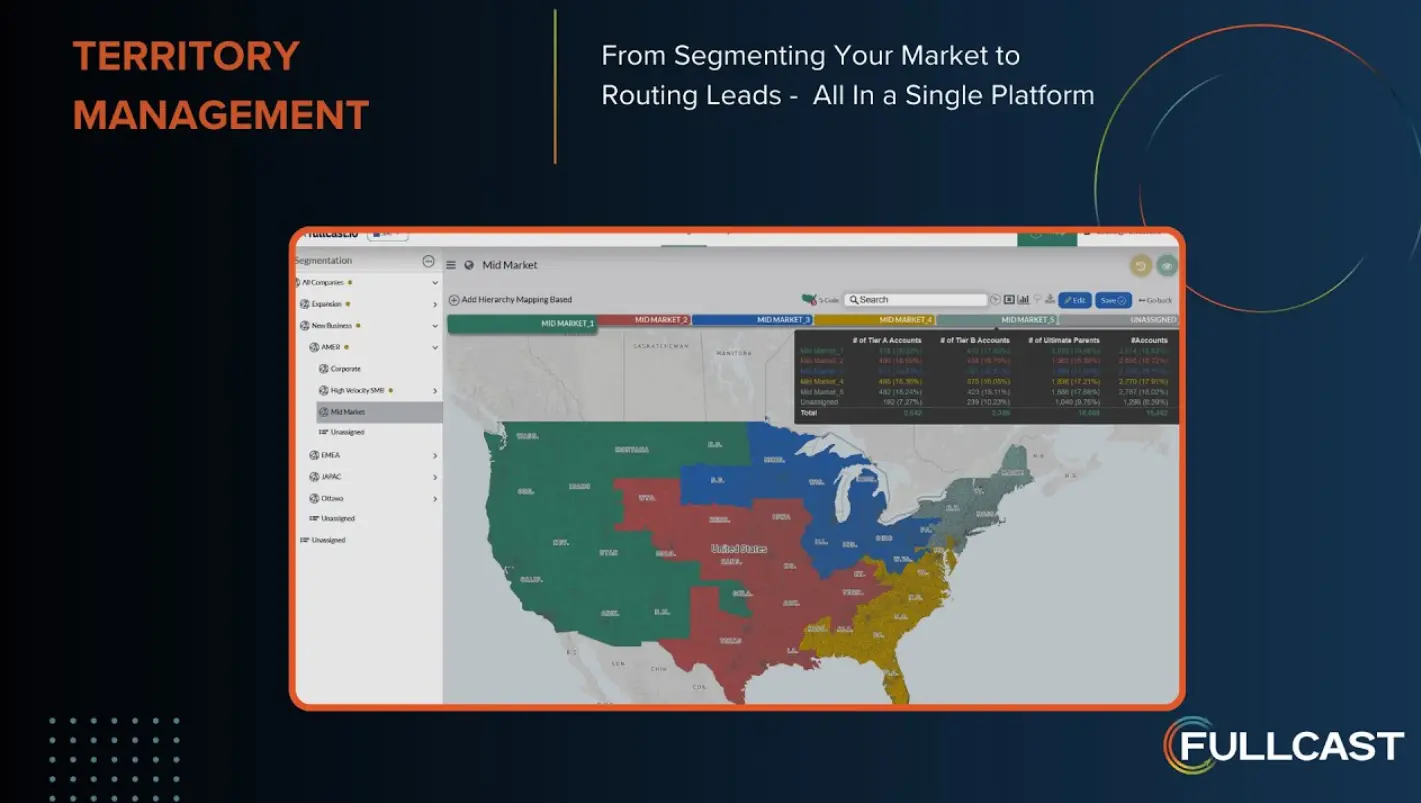
Fullcast is a RevOps platform built around one idea: territories change constantly, and the plan should change with them without a ticket queue.
It connects territory design, quota setting, and routing and pushes every change straight into Salesforce with a single action.
For teams growing fast or reorganizing often, the continuous, two-way Salesforce sync is what sets it apart. That Salesforce dependency is also the limit, since teams on other CRMs lose most of the advantage.
Key features
Visual territory mapping from country down to state and ZIP level, with what-if modeling before changes commit.
Full, automated Salesforce sync so territory and routing updates reflect in the CRM instantly.
Self-service workflows that let sales managers adjust territories without going through Ops.
AI-driven scenario modeling for quota and capacity alongside territory design.
Lead-to-account matching, routing, and ongoing data hygiene in one platform.
Pricing
No public pricing. Three tiers (Standard, Professional, and Enterprise), all quote-based.
Customer reviews
“The navigation is very simple and easy to use. The software is also straightforward and easy to understand, so it isn’t difficult to learn or use, even if it’s your first time working with it.” - Destiny G., G2
“Although it integrates with the CRM, the data is not real-time, and it can sometimes be a day or more out, which means that for daily data we have to go direct to the CRM.” - Verified G2 user
5. CaptivateIQ
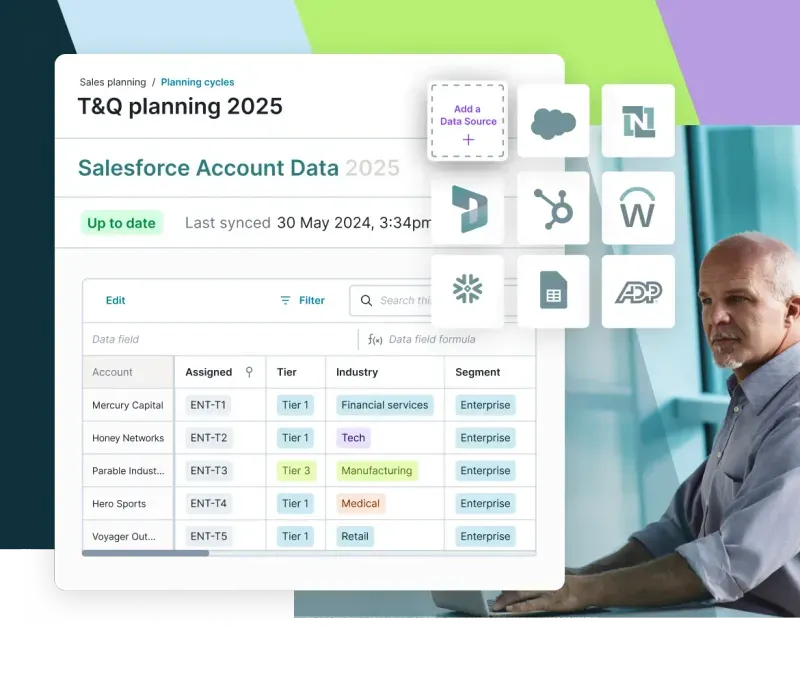
CaptivateIQ started in incentive compensation and now connects sales planning to it.
Its Planning product brings capacity modeling, quota setting, and territory carving into one workspace that links directly to comp, so a territory change and the commission impact behind it live in the same system.
That joined-up view is the reason mid-market revenue teams pick it over a standalone mapping tool. Territory management is the lighter half of the platform, though, so the economics work best if you are also buying into the compensation suite.
Key features
Territory carving and optimization with customizable rules to balance accounts across reps.
Quota modeling that sets targets from financial goals and seller input.
Capacity and headcount planning with real-time visibility into coverage gaps.
A no-code platform and guided scenario modeling that lets RevOps adjust plans without IT.
Direct connection between territory and quota plans and the incentive compensation that follows from them.
Pricing
Custom quote. Per-seat pricing based on admins plus payees, with a one-time setup fee.
Customer reviews
“Captivate IQ is allowing us to use technology to make us more efficient. We are buying our time back and avoiding manual processes that slow us down. The integration with our current software makes everything so much easier.” - Verified G2 user
“CaptivateIQ is not very user-friendly or low code. It is also very limited software, whereas competitors have quota setting and territory management built in." - Verified G2 user
6. Salesforce Maps
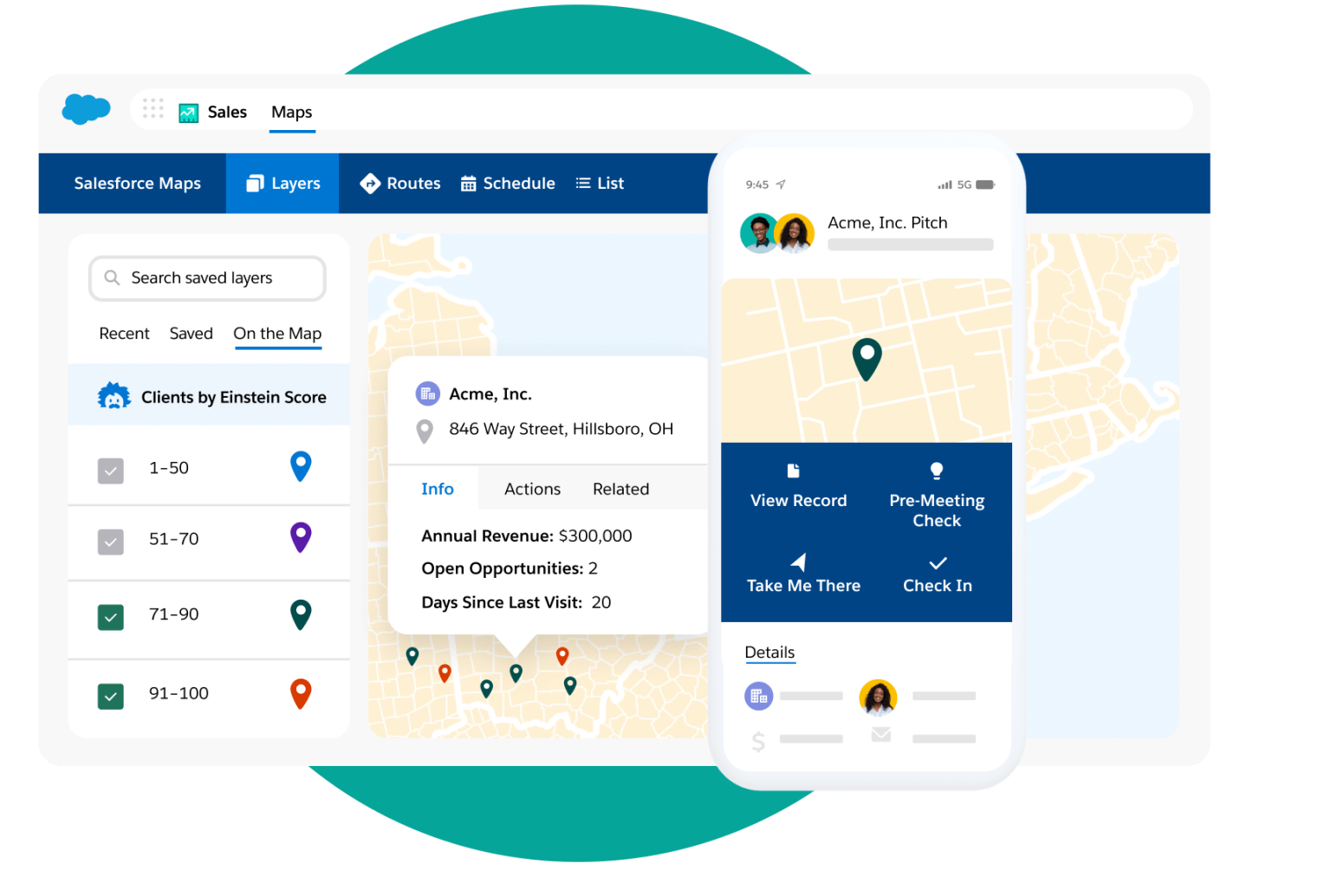
Salesforce offers Salesforce Maps, the location intelligence layer for teams that run their world in Salesforce. It handles geographic territory design, balancing, and field routing without leaving the CRM, which keeps territory data centralized and accessible to the whole sales team.
It only makes sense if you are already a Salesforce customer, and deeper geo-analytics sit behind the higher Advanced tier.
One note for 2026 buyers: Salesforce is retiring its Live Tracking Mobile subscriptions, with support ending August 31, 2026, and points teams toward Check-In and Mileage Administration instead.
Key features
Territory Planning add-on that designs and optimizes alignments directly against Salesforce reports and records.
Balanced territory creation by geography, account size, or revenue potential.
Route optimization that builds efficient field schedules around traffic and appointment times.
Native Salesforce integration that keeps territory models and assignment rules inside the CRM.
Pricing
$75 per user per month for Salesforce Maps, $125 per user per month for the Advanced tier, billed annually.
Customer reviews
No G2 reviews available at the time of writing.
7. eSpatial
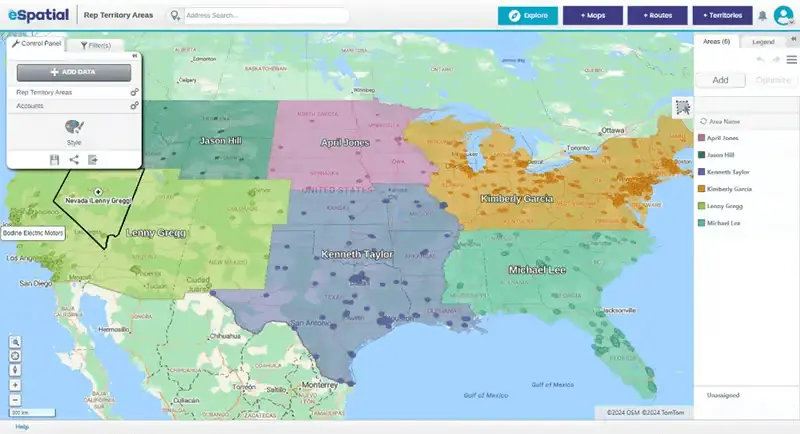
eSpatial is a cloud GIS platform focused on sales territory mapping and optimization, with a clear emphasis on balancing workloads across reps. It visualizes customer data on interactive maps, designs balanced territories with built-in algorithms, and runs drive-time and proximity analysis.
For mid-market teams that want algorithmic balancing and clean visualization without a heavy planning suite, it does its core job well. It is mapping-first, so do not expect quota or capacity planning, and the algorithmic optimization sits on the higher tiers rather than the entry plan.
Key features
Territory design and balancing algorithms that equalize opportunity distribution across reps.
Heat maps, pin maps, and boundary analysis to visualize market coverage.
Drive-time and proximity analysis for field planning.
Salesforce integration and strong data import from Excel and CRM systems.
Pricing
Territory Map Maker $7,995/year for 2 users; lower mapping-only tiers from $1,495/year; Enterprise custom. A 7-day free trial is available.
Customer reviews
“I really like that you can overlap multiple datasets to compare/contrast findings. Their territory building is pretty easy to use as well.” - Verified G2 user
“Periodically, eSpatial begins to freeze up, making it frustrating to continue mapping/updating. Luckily, this doesn't last very long as I am back to updating within minutes.” - Steven W., G2
8. Maptive
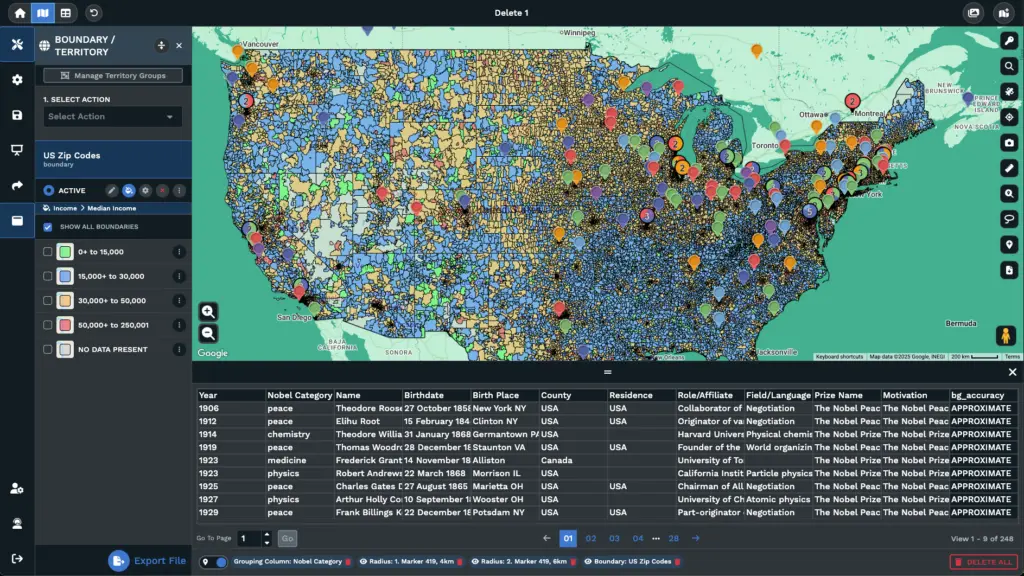
Maptive turns spreadsheet data into customizable interactive maps for territory analysis and planning.
Its defining choice is pricing: every feature is included at every tier, so buyers do not have to climb tiers to unlock territory tools. Upload from Excel, Google Sheets, or a CRM, and Maptive geocodes and plots the data, then lets you build territories from ZIP codes, counties, states, or countries.
It handles visualization and basic territory building well, but it stops short of the algorithmic optimization, quota, and assignment workflows the planning platforms offer.
Key features
Territory mapping from geographic boundaries, with heat maps, clustering, and balancing tools.
A Territory Analyzer for auto-balancing territories by custom workload metrics.
Built-in geocoding and address validation for data accuracy, with route optimization included.
Data import from Excel, Google Sheets, and CRM systems, with fast rendering of large datasets.
Human mapping support and data import help included on every plan.
Pricing
45-day pass $250; Pro $1,250/year; Team $2,500/year; Enterprise custom.
Customer reviews
“I run a sales and operations team, and we use Maptive to turn our location data into clear, interactive maps. The tool is powerful, easy to use, and the support is quick and helpful.
The balance of features and usability works for us.” - Verified G2 user
“The integration of Google Sheets and Microsoft Excel (in my case Sheets) was slightly challenging to get correct. There are some small details in headings and formatting of data to get right to make sure the synchronization works efficiently that, if ignored, make it so the data does not show up properly.” - Ryan D., G2
9. EasyTerritory
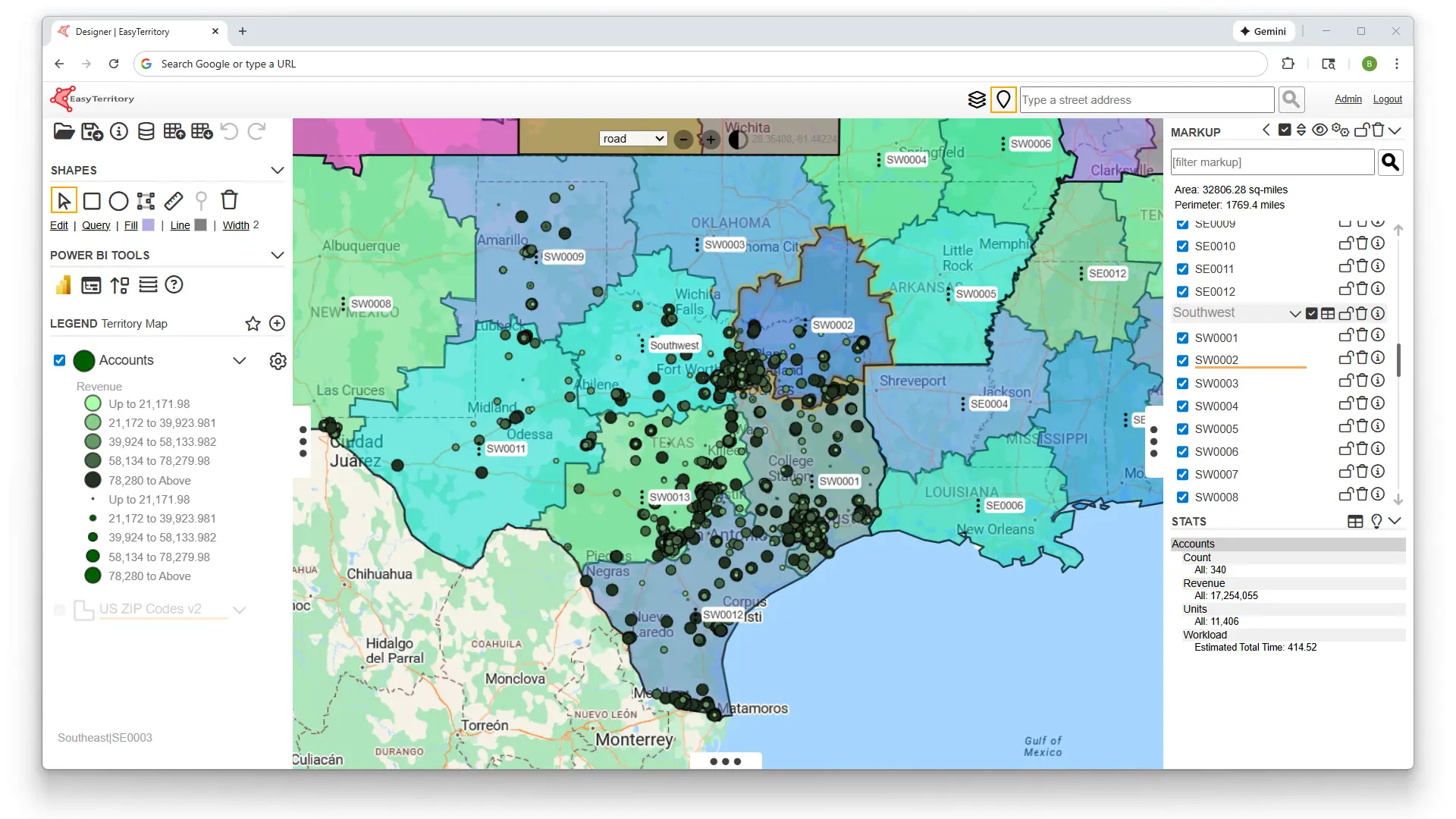
EasyTerritory is built for organizations living in the Microsoft ecosystem. Its core advantage is native connectivity with Dynamics 365, the Power Platform, and Power BI, which lets territory data flow and visualize without a migration project.
It supports both cloud and on-premise deployments, useful for industries with strict data security requirements, and can publish interactive territory maps straight into Power BI dashboards.
Outside a Microsoft stack the appeal fades, and full Dynamics 365 integration requires the Enterprise edition.
Key features
Territory boundary management from US ZIP codes, counties, states, and additional country postal codes.
Native Dynamics 365, Dataverse, and Azure SQL connectivity, plus Power BI publishing.
Mobile mapping of leads, accounts, opportunities, and activities for field teams.
Optimized routing, scheduling, and travel-time analysis from the map.
Cloud and on-premise deployment options for security-sensitive environments.
Pricing
Standard $2,400/year, Enterprise $7,450/year. Free trials available on both tiers. The Enterprise edition is required for Dynamics 365 and CRM integration.
Customer reviews
No G2 reviews available at the time of writing.
How to Choose Sales Territory Management Software
The right tool comes down to four questions. Work through them before the demo, not during it.
Data quality and account coverage
Every territory tool assumes the account list feeding it is clean. It rarely is, and no algorithm fixes data that is wrong at the source. Pressure-test the foundation first:
Source and refresh. Where does the account data come from, and how often is it re-verified? Quarterly-stale firmographics quietly misroute reps all year.
Accuracy you can name. Ask for the actual hit rate on emails and direct dials, not a "high-quality data" claim.
Signal freshness. Static lists age fast. A data layer like ZoomInfo keeps firmographics, contacts, and buying signals current, so routing runs on the real market rather than last quarter's export.
Red flag: “Billions of data points” in the pitch but no answer on how often a single record is re-verified, or a refresh measured in months.
Planning and optimization features
Buying past the depth you need is the most common way teams overspend. Match the tool to how you actually sell:
Connected planning. Worth it when you plan across a large org with shifting headcount, quotas, and capacity to reconcile.
Operational mapping. Enough for a field team that mainly needs to visualize coverage, balance patches, and assign accounts.
The decision test. If a feature does not change a call you actually make, it is cost, not capability.
Red flag: A demo that spends more time on scenario modeling and optimization than on whether your reps will open the tool weekly.
Integrations with your CRM and stack
A territory plan only delivers if assignments reach the system reps work in. Judge the connection, not the logo list:
Bidirectional sync. A territory change should update ownership and routing automatically, and stay in step as accounts move, without manual exports.
Source of truth, not a silo. The tool should read from and write to your CRM, not sit beside it as one more system to reconcile.
Coverage across the stack. The more places your account data lives, the more a tool's ability to keep all of them current decides whether the plan holds.
Red flag: The sync is one-way, or updating a territory means exporting a file and re-importing it into the CRM by hand.
Scalability and ease of use
What works for 10 reps breaks at 50. Buy for where you will be in two years, and weigh adoption as heavily as features:
Setup and upkeep. Heavier platforms need dedicated admins and longer rollouts; lighter tools deploy in days but cap out as complexity grows.
Self-service. If every change routes through Ops or engineering, signals go stale before anyone acts. Managers should be able to adjust territories directly.
A living plan. The best tools surface what changed and keep the plan current between formal reviews, not frozen until the next one.
Red flag: Every territory change in the demo runs through an implementation consultant rather than a sales manager clicking through it themselves.
Get Better Territory Management With ZoomInfo
Every tool on this list draws boundaries. The harder problem is what sits inside them, and territories built on decaying account data misallocate reps no matter how good the map. That decay is the most common reason solid territory plans quietly stop working.
ZoomInfo fixes that at the root. It sizes market potential, finds whitespace, and keeps account data current with firmographics, technographics, and intent signals, so segmentation and routing run on accurate information rather than last year's export. ZoomInfo Agent Teams can then run the outreach plays that follow, coordinating specialist agents against each account's current state within the approvals and limits you set.
Talk to our team to see how ZoomInfo helps revenue teams build territories on data that does not go stale.
FAQs
What is sales territory management software?
It helps revenue teams divide their market into territories, assign accounts and reps, and manage coverage over time. It spans two categories: planning platforms that balance accounts, quota, and capacity, and mapping tools that visualize coverage geographically. The goal is balanced territories, clear ownership, and quotas that match real opportunity.
What's the difference between territory management and territory mapping software?
Mapping software visualizes accounts on a map and helps you draw boundaries geographically. Management software goes further, handling assignment, quota alignment, capacity planning, and rebalancing as the business changes. Mapping answers what your coverage looks like; management answers how to assign and balance it. Many teams use both.
How does sales territory management software improve sales rep productivity?
It removes time lost to manual account research and territory disputes, so reps focus on accounts matched to their capacity. Clear ownership stops duplicate outreach, balanced workloads prevent burnout, and prioritized account data shows reps not just who to call but when.
What data do you need to build accurate sales territories?
Firmographics like revenue, headcount, and industry, plus technographics, CRM history, and ideally intent signals showing buying activity. Without accurate, current data, territory design is guesswork no matter how good the planning tool is.
How often should sales teams redesign their territories?
Most teams review quarterly and do major redesigns annually or when headcount shifts significantly. Build in ad-hoc adjustments when reps leave or join, and update CRM routing logic immediately so leads do not go to the wrong owner.
