
What company hierarchy data actually maps
Company hierarchy data is structured information that maps the legal entity ownership relationships between organizations, showing how Company A owns Company B, which in turn controls Company C. It covers ultimate parent companies, immediate parents, subsidiaries, divisions, and branches, the full ownership chain that determines where budget authority actually sits.
This kind of data often falls under the category of firmographic data, but it goes beyond standard company attributes like revenue or headcount. Think of company hierarchy data as a corporate family tree: it shows which companies own or have stock in other companies, and more importantly, how those relationships affect business decisions and purchasing authority.
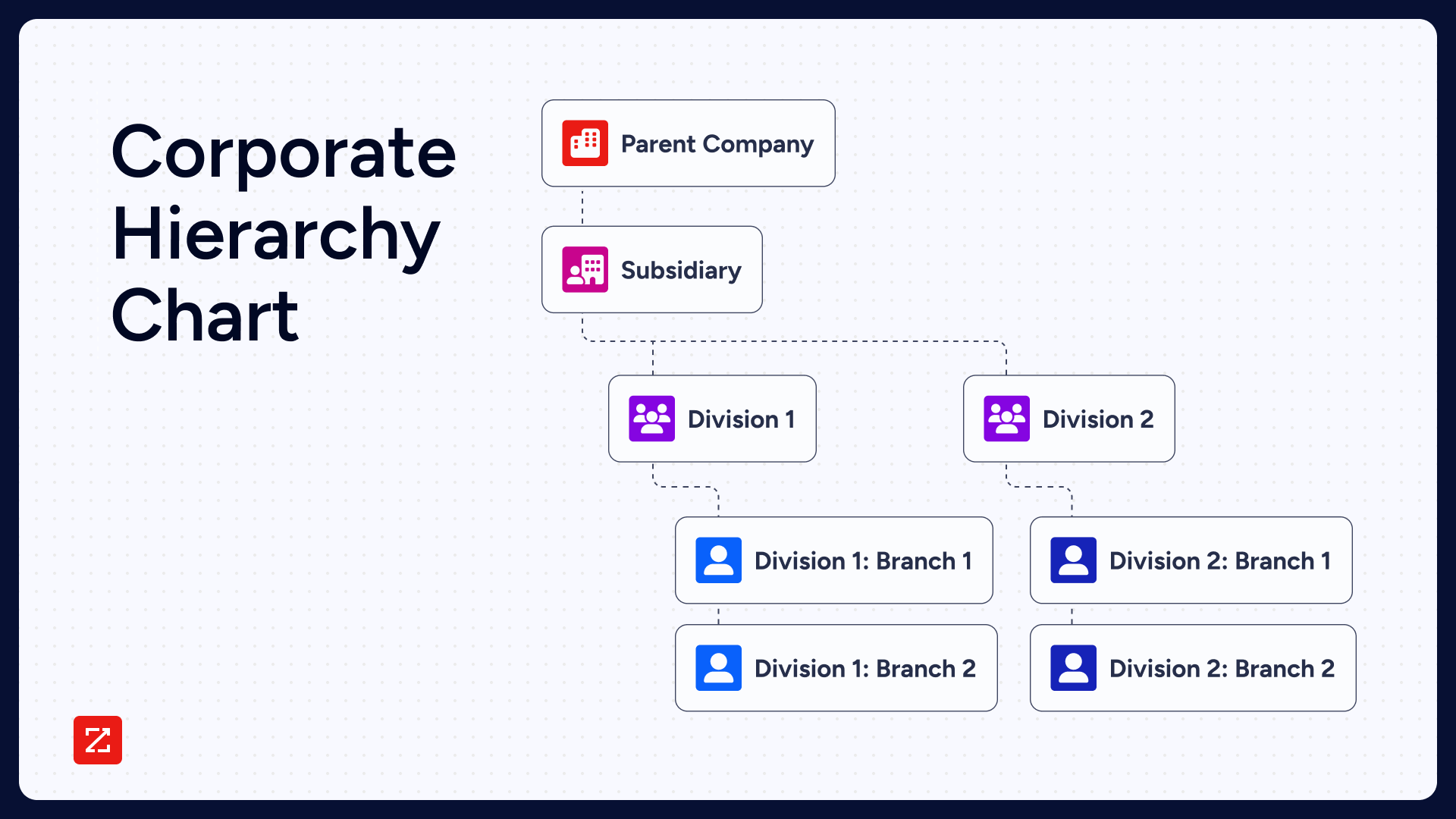
Here are the key entity types that company hierarchy data maps:
Ultimate parent: The highest-level legal entity in the ownership chain, with no parent above it. This is the entity that ultimately controls budget, strategy, and major purchasing decisions across the entire corporate family.
Parent: A company that owns a large percentage of stock in other companies and has control over their management and operations. Parent companies run their own business while also managing the subsidiaries they own.
Subsidiary: A company owned and controlled by a parent or holding company. If a subsidiary is 100% owned by a parent, it is referred to as a wholly-owned subsidiary. Subsidiaries may have one parent or several different owners.
Division: A segment of a company that handles a specific area of business. Alphabet Inc., for example, has divisions including Google, Waymo, DeepMind, and Google Fiber. Divisions may be centrally located or spread across geographies.
Branch: An outlet of a company that exists in a separate physical location. Branches carry the same name and classifications as the parent entity and typically exist to sell the same products in a different geographical market.
In short, company hierarchy data reveals the structure of organizations and identifies where the decision-making power lies. Once you know how entities interrelate, you can identify the strongest point of entry, uncover more enterprise opportunity, and discover where the organizational buying centers lie.
Corporate hierarchy data lets you identify the strongest entry point, map the full buying committee, and expand revenue across the entire corporate family.
How company hierarchy data is structured: the four levels
Understanding the four levels of corporate hierarchy is the foundation for setting up accurate account hierarchies in your CRM. Without a clear map of which entity type you're working with, account roll-ups break, territory assignments go wrong, and reps end up selling to the wrong level of the organization.
Level | Entity Type | Definition | CRM Field Example |
|---|---|---|---|
Level 1 | Ultimate Parent | Highest legal entity; no parent above it | "Ultimate Parent Account" in Salesforce |
Level 2 | Immediate Parent / Holding Company | Owns operating subsidiaries; may itself be owned by a higher entity | "Parent Account" |
Level 3 | Operating Subsidiary | Controlled by parent; runs its own P&L | "Child Account" |
Level 4 | Branch / Division | Operational unit of a subsidiary; shares the same legal entity | "Site" or "Division" field |
Fortune 500 companies often have five or more levels of hierarchy, with holding companies sitting above regional operating subsidiaries that in turn own local branches. Mid-market companies typically average two to three levels.
Corporate hierarchy data and org chart data are related but serve different purposes. Corporate hierarchy data maps legal entity ownership chains: which companies own or control other companies. Org chart data maps internal reporting relationships within a single organization: who reports to whom. Organizational structure data of both types matters in enterprise sales, but they answer different questions. Hierarchy data tells you which entity controls the budget; org chart data tells you who within that entity has influence. A third related concept, firmographic data, covers company attributes like revenue, employee count, and industry, useful context, but not a substitute for understanding ownership chains.
5 reasons sales reps need access to company hierarchy data
Company hierarchy data is more than just a family tree that offers context about your customers and prospects. It helps enterprise sales reps streamline and improve their entire strategy.
Enterprise sales are also known as complex sales for a reason. These deals are marked by the following characteristics:
High perceived risk
Multiple stakeholders and multiple decision-makers
Long sales cycle (six months or more)
With this added complexity to sales processes, corporate hierarchy data can save time and sharpen strategy for these reasons:
1. Improve sales velocity
The key to improving sales velocity is knowing the company's structure and involving more people earlier in the process. That allows you to reach more departments, find other use cases, and drive greater dollars.
Without hierarchy visibility, reps often spend discovery calls chasing the right approver, only to learn three meetings in that budget sits with a parent company they never contacted. Having each of these companies purchase your product versus just one of them is a larger ticket.
By involving many stakeholders early, influencers can be found within each different group. With decision-makers at each locale, eventually the parent company will agree.
2. Deeper market insights
Successful sales reps don't just identify and sell to specific customers, they also have a strong understanding of their target market. Company hierarchy data helps sales reps uncover key insights into the structure and relationships of businesses in their target market.
For example, are many of your customers and prospects subsidiaries of larger parent companies? Do they separate their business initiatives across different branches and divisions? Answering these questions will help inform your overall sales strategy, particularly when expanding your outreach to new markets.
3. Identify new prospects
If you're like most reps, sales prospecting can be one of the most challenging parts of your job. According to HubSpot research, 42% of sales reps say prospecting is the most difficult part of the sales process. Fortunately, company hierarchy data can help you find and connect with qualified prospects faster.
Company hierarchy data allows you to not only learn about a single company, but it also provides insight into the various companies within its corporate family tree. In other words, identifying one qualified prospect can quickly lead you to several other qualified prospects.
This works with current customers as well. If you've been working with a company for an extended period and have a great relationship with them, consider taking a look at their company hierarchy data. If you find parts of the company hierarchy that you have yet to sell to, consider asking your customer for a referral.
4. Reach decision-makers faster
A typical B2B purchase involves multiple decision-makers across departments and hierarchy levels, extending the sales cycle well beyond B2C timelines. Sales reps can leverage high-quality contact data to reach decision-makers quickly, including company hierarchy data.
For instance, a small tech company you're selling to may be a subsidiary of a larger parent company. Connecting with executives can accelerate movement through different management levels. Because the parent company oversees the smaller company's budget, they ultimately need to sign off on any major purchases.
So, you decide to contact key executives at the parent company that oversees your target buyer's operations and management. In this example, company hierarchy data helped you remove a time-consuming step in the sales process and, as a result, you were able to shorten the sales cycle.
5. Identify cross-selling opportunities
Cross-selling refers to the practice of selling additional products to an existing customer. While it can help you maximize revenue, cross-selling comes with its risks. The biggest risk: compromising your relationship with an existing customer by continuously pushing more products on them. But company hierarchy data helps sales reps take a more strategic approach to cross-sell.
For example, let's say you want to sell your new mobile analytics application to a company that already buys your most popular product, a marketing automation tool. Using hierarchy data, you discover that this company has a separate division handling the production of in-house mobile tools. You decide to contact this division directly since they are better suited to understand the added value of a mobile app.
Where sales teams apply corporate hierarchy data
By understanding corporate structures, you can sell while being mindful of keeping other groups informed, building groundswell, and earning the approval of parent companies.
Educating, understanding influence, and driving action can happen so much faster if you're aware of all related companies. If you miss the fact that there's a parent company controlling the purse strings, you'll be reinventing the wheel each time.
Let's look at a couple of different examples: a coffee company and a Software as a Service (SaaS) company.
Hierarchy matters less for simple purchases
Coffee: You probably drink it. You definitely know what it is. Now think about this structure of A, B, and C companies: As a coffee salesperson, you'll bet you can have buyers in each company taste it, love it, and purchase it, all within their own four walls. Visualizing this structure helps highlight communication lines.
You don't think you'd have to go get corporate approval from Company A to purchase coffee at Company C.
Understanding corporate structure is critical for complex sales
But let's take a more complex example of a sales cycle: cloud storage. Much different sales process than the example above.
Suppose an individual sales rep within a SaaS company tries to sell cloud storage to Company C, but they don't know their corporate hierarchy. They don't know about Company B, and they don't know about parent Company A.
They are going to engage Company C and educate them about their product. They're going to listen and learn about Company C's business challenges. And if the solution is better positioned than the current vendor, or if they don't have a vendor, they're going to try to eventually influence them to take action and buy the product.
Find valuable connections you may not know you have
Imagine you want to reach out to an enterprise security firm you've had your eye on for a while.
The company recently closed a new round of funding, and you decide the time is right to connect. You discover through corporate hierarchy data that the company is actually a subsidiary of another company where your former colleague works, and that colleague is more than happy to make an introduction.
This important connection may have remained undiscovered if you hadn't known about the enterprise relationship between the two companies.
ZoomInfo's company hierarchy data surfaces these subsidiary relationships automatically, so reps don't have to manually cross-reference LinkedIn or corporate filings to discover the connection. Warm referrals can help you forge real relationships faster, and establish a foundation of credibility and trust that leads to long-term partnership versus one-time transactions.
Uncover enterprise buying centers
The purchasing process of every enterprise is as different as the enterprise itself, so the only rule of thumb for finding buying centers is "constant requalification."
In other words, as you're selling, you're constantly making sure that your prospect is the right person, in the right department, at the right entity, to actually close the deal. It's a continual process of discovery and confirmation.
Ask ongoing qualifying questions in an evolving landscape. Once you establish your best first point-of-entry, your goal is to learn as much as possible about that enterprise's end-to-end buying process.
To do this, ask qualifying questions on an ongoing basis:
When and how do you envision rolling this out to your team?
From the time we hang up to the time we sign an agreement, what needs to happen?
Can you walk through that process?
Are there other people or departments who need to play a role in the decision?
These questions surface the stakeholders who can derail a deal at legal or procurement, the ones who never appear in an org chart but control the signature.
Exploring these queries can uncover overlooked enterprise relationships. Sometimes the answers involve other entities entirely. In the case of ABC Television, for instance, the news outlet may need your solution and advocate for it, but the purchasing itself would likely happen at Disney, the corporate parent.
If you know this early on in the sales process, you may be able to sell your solution to other entities owned by Disney, especially if it's a software solution. The result: a more massive sale.
Maintaining company hierarchy data quality
Corporate hierarchy data is only as useful as it is current. Corporate ownership changes constantly through mergers, acquisitions, restructurings, and spin-offs. A parent-subsidiary relationship that was accurate six months ago may be invalid today. Reps who rely on stale hierarchy data mis-target subsidiaries that have been acquired, divested, or renamed, burning cycles on outreach that was never going to convert.
The CRM failure mode here is easy to misdiagnose. Broken account roll-ups, mis-routed leads, and incorrect territory assignments look like process failures or configuration problems. The root cause is often missing or incorrect hierarchy linkages in the underlying data. Before blaming the workflow, check whether the account hierarchy records themselves are current.
The difference between continuous enrichment and a point-in-time snapshot matters more than most teams realize. Hierarchy data that is refreshed once at import and never updated creates a growing blind spot, one that compounds as M&A activity reshapes your target accounts. ZoomInfo processes 1.5B+ data points daily, including ownership changes, to keep hierarchy records current rather than relying on periodic batch imports that go stale between refresh cycles.
When evaluating a corporate hierarchy data partner, the questions that matter most are: How frequently is the data updated? What sources does it draw from, public registries, commercial databases, web crawls, or some combination? And how deep is the coverage for the geographies and company sizes that match your ICP? A provider with strong North American coverage but thin international data will create blind spots for any team running global enterprise plays.
How to source company hierarchy data for your GTM stack
There are three main paths for acquiring corporate hierarchy data, and the right one depends on your team's scale, technical resources, and how the data needs to flow into your existing systems.
Commercial data providers
Commercial providers aggregate hierarchy data from public registries, corporate filings, and proprietary research to deliver it at scale with CRM-ready formatting. This is the most practical path for most GTM teams because the data arrives structured and mapped to standard account fields rather than requiring manual normalization. Coverage, update frequency, and geography depth vary significantly across providers, so evaluating those dimensions against your ICP is worth doing before committing.
Public registry sources
SEC EDGAR (for US public companies), Companies House in the UK, and national business registries in other jurisdictions provide authoritative but incomplete coverage. These sources are reliable for publicly traded or formally registered entities, but they require manual triangulation across multiple registries to build a complete picture of any given corporate family. No single registry covers all geographies, which means public sources work for individual lookups but do not scale for sales teams managing hundreds of accounts.
API-based enrichment for CRM integration
The most scalable path for sales and RevOps teams is APIs and MCP access that writes organizational structure data directly to Salesforce or HubSpot account records. This approach enables automated territory assignment and account roll-up reporting without manual data entry, and it keeps hierarchy fields current as ownership changes rather than requiring periodic manual re-imports. For teams that want hierarchy data to flow through their own tools and agents rather than through a standalone platform, this is the architecture that makes it possible.
Why hierarchy data belongs in your GTM stack
Corporate hierarchy data is more than org charts. Used well, it is a force multiplier for every stage of your enterprise sales motion. Hierarchies show you where the power lies, who has influence, and where decisions are really made.
With the right hierarchy data, you have a map to navigate from outreach to closed-won. Without it, you are likely to be stuck in dead ends and side streets, missing high-value opportunities hiding in plain sight.
ZoomInfo, an all-in-one AI GTM Platform, has spent nearly 20 years building the most comprehensive B2B data foundation, mapping over 100 million companies and continuously tracking the ownership changes and subsidiary shifts that matter most to enterprise sales teams, validated by an independent Fortune 500 RFP analysis of 25 million contacts across vendors, where no other competitor came close (CEO earnings call, Q4 2025).
That data foundation powers the GTM Context Graph, an intelligence layer that reasons across org structure, intent signals, and conversation data to surface which stakeholders matter most and when to engage. Rather than showing you a static org chart, it connects hierarchy signals to buying behavior, so you know not just who the parent company is, but whether anyone in that corporate family is actively researching a solution like yours.
That intelligence reaches your team wherever they work. Sellers access it through GTM Workspace for account briefs and AI-assisted outreach. RevOps teams use GTM Studio to build territory plays and enrichment workflows without engineering tickets. And for teams that want to push hierarchy data directly into their own tools, ZoomInfo's APIs and MCP make that possible without lock-in.
That's what GTM Intelligence is all about: actionable insight, not just information.
Ready to map the enterprise accounts in your territory? Request a demo to see ZoomInfo's company hierarchy data in action.
Frequently asked questions about company hierarchy data
What is company hierarchy data?
Company hierarchy data is structured information that maps the legal entity ownership relationships between organizations, including ultimate parent companies, immediate parents, subsidiaries, divisions, and branches. It shows how Company A owns Company B, which in turn controls Company C. For B2B sales teams, this data reveals the full corporate hierarchy data picture of a prospect, identifying where budget authority sits and which entities are part of the same buying group.
What are the levels of hierarchy in a company?
Most corporate hierarchies have four levels: (1) Ultimate parent, the highest legal entity with no parent above it; (2) Immediate parent or holding company, which owns operating subsidiaries; (3) Operating subsidiary, controlled by the parent and running its own P&L; (4) Branch or division, an operational unit of a subsidiary sharing the same legal entity. Large enterprises like Fortune 500 companies often have five or more levels, while mid-market companies typically have two to three.
How does company hierarchy data help enterprise sales teams?
Company hierarchy data helps enterprise sales teams in three ways: it identifies the ultimate budget authority (often a parent company, not the subsidiary a rep is selling to), it reveals whitespace within a corporate family where the product is not yet deployed, and it surfaces warm referral paths through colleagues or existing customers at related entities. Asking the right qualifying questions early in the process is the fastest way to surface these hierarchy relationships before they become late-stage surprises.
What is the difference between company hierarchy data and org chart data?
Company hierarchy data maps legal entity ownership chains, which companies own or control other companies. Org chart data maps internal reporting relationships, who reports to whom within a single organization. The two serve different purposes: hierarchy data is used for account-based selling, territory planning, and compliance; org chart data is used for identifying the right contact within a company. A sales rep needs both: hierarchy data to find the right entity, org chart data to find the right person within it. A third related concept, firmographic data, covers company attributes like revenue, employee count, and industry.
How do I find the parent company of a business?
There are three main ways to find the parent company of a business: (1) Commercial data providers like ZoomInfo maintain continuously updated corporate hierarchy databases that map parent-subsidiary relationships across 100 million companies globally; (2) Public registries such as SEC EDGAR (for US public companies), Companies House (UK), and national business registries provide authoritative but incomplete coverage; (3) Manual research using LinkedIn, corporate filings, and press releases works for individual lookups but does not scale for sales teams managing hundreds of accounts. For GTM teams, a commercial data provider with API-based CRM enrichment is the most scalable path.