
Salesforce has earned its position as the #1 CRM by IDC market share, serving over 150,000 companies with a platform spanning sales, service, marketing, commerce, and AI agents. With $41.5 billion in FY26 revenue and a Gartner Magic Quadrant Leader ranking in Sales Force Automation for 19 consecutive years, its depth and ecosystem are hard to match.
But as your go-to-market needs narrow, Salesforce's breadth creates its own problems. Its pricing complexity, steep implementation requirements, and enterprise-centric architecture can be hard to justify for teams that need specific capabilities without the full multi-cloud investment.
That's where this guide comes in. Whether you're looking to:
Power your pipeline with prospecting and AI-driven deal execution built on the largest B2B dataset available
Unify marketing, sales, and service under one roof without enterprise configuration complexity
Integrate CRM natively with your existing Microsoft 365 and Azure infrastructure
Access enterprise automation and AI at a fraction of Salesforce's per-seat pricing
Manage sales pipelines with visual clarity and built-in follow-up enforcement
Run CRM and team collaboration on a single flat-fee platform without per-user licensing
Build a flexible, AI-native CRM that adapts to your data model instead of the other way around
We'll walk through alternatives that excel in each of these areas.
Some teams use these tools to complement an existing Salesforce deployment; others replace Salesforce entirely with something better suited to their size, workflow, or budget. This isn't about finding a "better" CRM. It's about finding the right fit.
Here are the Salesforce alternatives worth considering.
The Best Salesforce Alternatives
Best Alternative for Intelligence-First Prospecting & AI-Driven Pipeline Execution We chose ZoomInfo because it fills Salesforce's intelligence gap with B2B data (500M contacts, 135M+ verified phone numbers, 200M+ verified business emails), a GTM Context Graph that captures why deals move, and execution tools that eliminate context-switching. |
|---|
Best Alternative for SMBs That Want Marketing, Sales, and Service Under One Roof We chose HubSpot because its unified Hub architecture combines CRM, marketing automation, and customer service on a single data model with transparent pricing and no-code setup, making it the most accessible all-in-one Salesforce replacement for small and mid-sized teams. |
Best Alternative for Organizations Running the Microsoft Stack We chose Microsoft Dynamics 365 because it provides native bidirectional integration with Outlook, Teams, and SharePoint, bundled Copilot AI credits, and native ERP connectivity, all at 40% lower per-seat list pricing than comparable Salesforce Enterprise tiers. |
Best Alternative for Enterprise Automation at Mid-Market Pricing We chose Zoho CRM because its Enterprise plan at $40/user/month unlocks territory management, Zia AI with predictions and anomaly detection, Blueprint process enforcement, and access to 55+ native Zoho business apps, all at a quarter of Salesforce's cost. |
Best Alternative for Deal-Focused Pipeline Management We chose Pipedrive because its kanban pipeline view and activity-based selling methodology keep reps focused on follow-up and deal execution, delivering pipeline clarity that Salesforce's configuration-heavy interface often buries. |
Best Alternative for Budget-Conscious Teams Needing CRM and Collaboration We chose Bitrix24 because its flat-fee pricing (up to 100 users for $199/month) replaces Salesforce's per-seat licensing model with CRM, project management, telephony, and team collaboration bundled into a single workspace. |
Best Alternative for Tech-Forward Teams That Need a Flexible, AI-Native CRM We chose Attio because its custom relational data model, zero-input data capture from email and calendar, and AI embedded directly into record fields give engineering-driven teams a CRM that adapts to their business rather than forcing them into a fixed schema. |
What is Salesforce?
Source: Salesforce
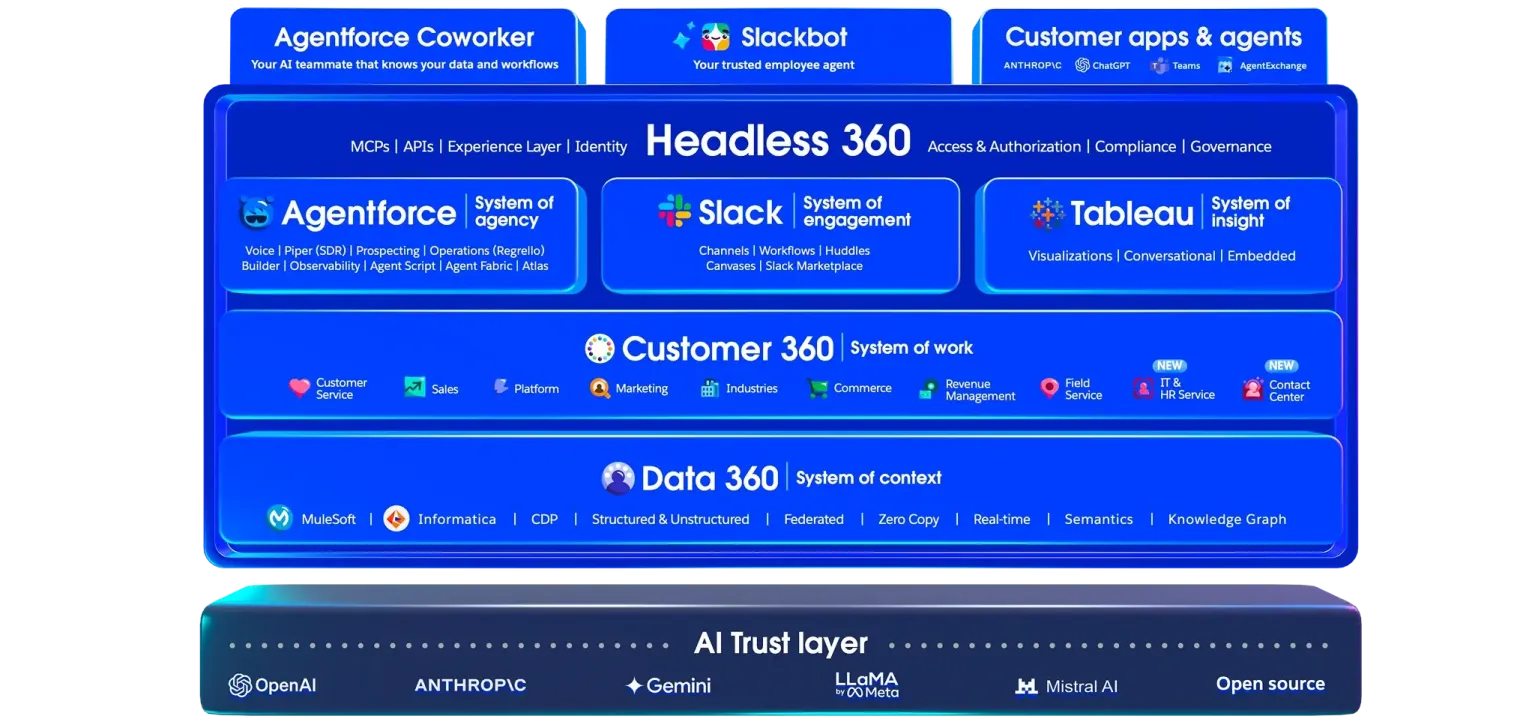
Salesforce is the world's #1 AI CRM, an enterprise platform where human workers and AI agents work on a single system. The platform integrates humans, agents, apps, and data across four pillars: Agentforce (autonomous AI agents), Customer 360 (the CRM application suite), Data 360 (data platform and analytics), and Slack (collaboration).
Its key features include:
Sales Cloud with lead management, pipeline management, forecasting, conversation intelligence, and AI sales coaching
Service Cloud with case management, omnichannel support, knowledge management, and autonomous AI agents that resolve 85% of support requests without human escalation
Marketing Cloud with journey orchestration, B2B marketing automation, CDP, personalization, and cross-channel campaign management
Agentforce autonomous AI agents powered by the Atlas Reasoning Engine, capable of executing multi-step tasks across sales, service, and marketing
Data Cloud ingesting 112 trillion records in FY26 to fuel unified customer profiles and AI grounding
AppExchange ecosystem with 9,000+ partner apps and 14+ million installs
Salesforce's depth is its greatest strength: when a lead comes in, Agentforce qualifies it, Sales Cloud tracks the deal, Marketing Cloud nurtures the relationship, Service Cloud handles post-sale support, and Data Cloud keeps everything connected.
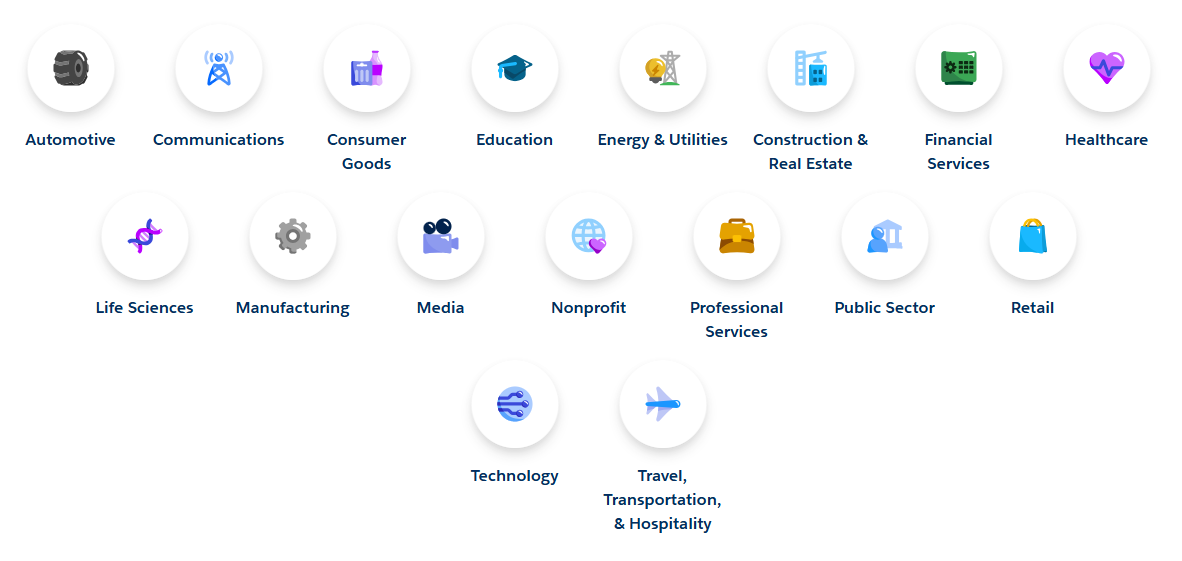
The platform's 17 industry clouds serve verticals from financial services to healthcare with specialized data models and workflows.
Source: Salesforce
But that depth comes with real trade-offs. Salesforce's pricing complexity (multiple credit types, consumption tiers, and add-on layers), enterprise-scale implementation requirements (over 70% of deployments are partner-led), and the data readiness investment required for AI features mean that many growing businesses need solutions built for their specific stage, budget, and workflow.
Looking for the intelligence layer that makes your CRM data actionable? ZoomInfo's GTM Context Graph fuses your CRM records with B2B data, conversation intelligence, and intent signals to reveal not just what happened in your pipeline, but why. Learn more about ZoomInfo.
How We Curated Our List of Salesforce Alternatives
After working with Salesforce and researching the CRM and GTM landscape, we found that organizations evaluating alternatives have specific needs that a single platform cannot address at every price point and complexity level. Salesforce excels as an enterprise solution, but businesses often need more specialized tools for:
Sourcing verified B2B contact data, intent signals, and deal intelligence that Salesforce has no native way to provide
Running marketing, sales, and service workflows on a unified platform without multi-cloud licensing complexity
Integrating CRM natively with Microsoft 365, Azure, and ERP systems without middleware
Accessing enterprise automation and AI features at mid-market pricing
Managing active deal pipelines with visual clarity and built-in activity enforcement
Operating CRM and team collaboration on flat-fee pricing without per-seat cost escalation
Building a modern, flexible CRM data model that adapts to non-traditional business structures
Each tool on this list leads in one of these areas. You might use them alongside Salesforce to fill a gap, or switch to them entirely depending on what your team needs most.
DISCLAIMER: We aren't covering every tool in the market! Our focus is on highlighting the best alternatives that address some of Salesforce's limitations for various use cases. The goal is to provide insights into tools that cater to specific business needs. |
|---|
1. ZoomInfo — Best Alternative for Intelligence-First Prospecting & AI-Driven Pipeline Execution
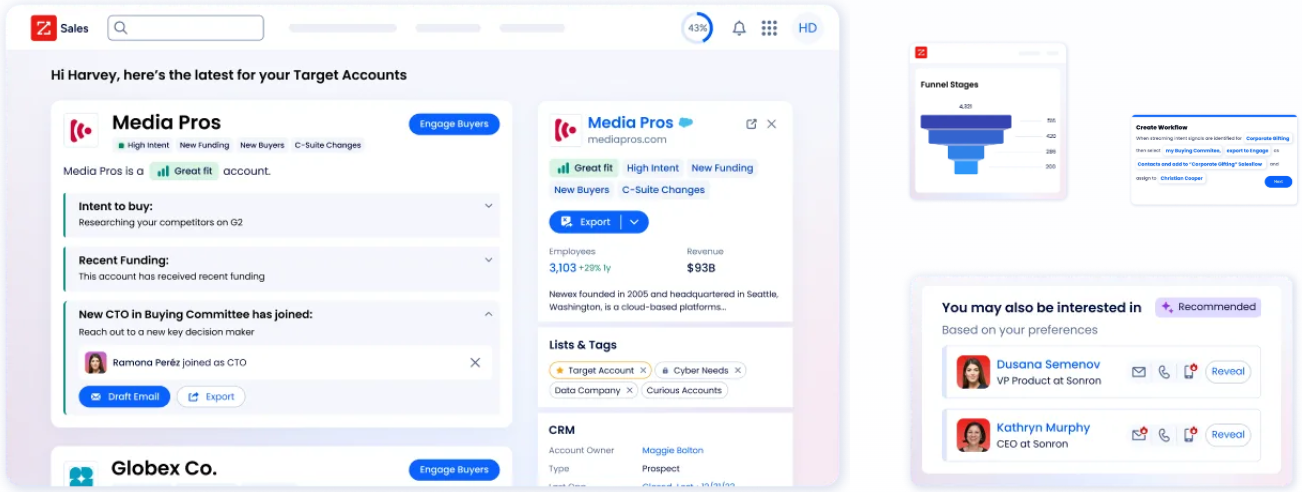
ZoomInfo is an AI GTM platform built on a large B2B data foundation: 500M contacts, 100M companies, 135M+ verified phone numbers, and 200M+ verified business emails.
By fusing this data with your CRM records, conversation transcripts, and behavioral signals, ZoomInfo's GTM Context Graph (which processes 1.5B+ data points daily) reveals the context behind your accounts: not just what happened, but why it happened and which actions will move deals forward. Its key features include:
B2B data with up to 95% accuracy on first-party data, backed by 300+ human researchers and a multi-source verification pipeline
Buyer Intent signals tracking 210 million IP-to-Organization pairings and 6 trillion+ keyword-to-device pairings monthly, with Guided Intent identifying topics historically correlated with deal success
GTM Workspace for sellers: AI-drafted outreach, prioritized account feeds, real-time buying signals, and CRM updates in one place
GTM Studio for marketers and RevOps: natural language audience building, multi-channel play orchestration, and waterfall enrichment from 25+ data sources
Universal access through APIs, MCP, and native integrations with Salesforce, HubSpot, Microsoft Dynamics, and 170+ other platforms
Salesforce is a system of record: it captures what your team already knows and tracks deal stages through your pipeline. ZoomInfo is the intelligence layer that makes CRM data actionable by providing the contacts, company insights, intent signals, and contextual reasoning that Salesforce cannot source natively. For revenue teams that have outgrown manual prospecting and need AI-driven pipeline execution grounded in verified data, ZoomInfo delivers the intelligence foundation that turns a CRM from a database into a growth engine.
Why Choose ZoomInfo Over Salesforce for GTM Intelligence & Execution
Salesforce excels at managing relationships and tracking deal stages. ZoomInfo provides the data, intelligence, and execution capabilities that turn those records into pipeline. Here's where ZoomInfo steps up:
The GTM Context Graph: Understand Why Deals Move, Not Just That They Moved
Salesforce records that a deal moved from Stage 3 to Stage 4 and the close date shifted. But as ZoomInfo's Chief Product Officer Dominik Facher writes: "The CRM recorded the state change. It has no record of why it happened." Perhaps the CFO joined the last call and asked about six-month ROI, or a VP went quiet because of an internal budget battle.
The GTM Context Graph captures this decision context. It fuses ZoomInfo's B2B data with your CRM records, conversation intelligence from calls and meetings, email interactions, and behavioral signals into one intelligence layer that reasons about:
People and their relationships: who influences whom, who's blocking, who's championing
Actions and their outcomes: what each action responded to, whether it worked
Patterns and predictions: what thousands of similar deals suggest happens next
Exceptions and explanations: why things slipped and what that reveals about real blockers
This is the structural gap that "GPT on my CRM" experiments cannot fill. Without a context layer connecting entities, signals, conversations, and outcomes, AI can see the CRM fields but cannot reason about what they mean.
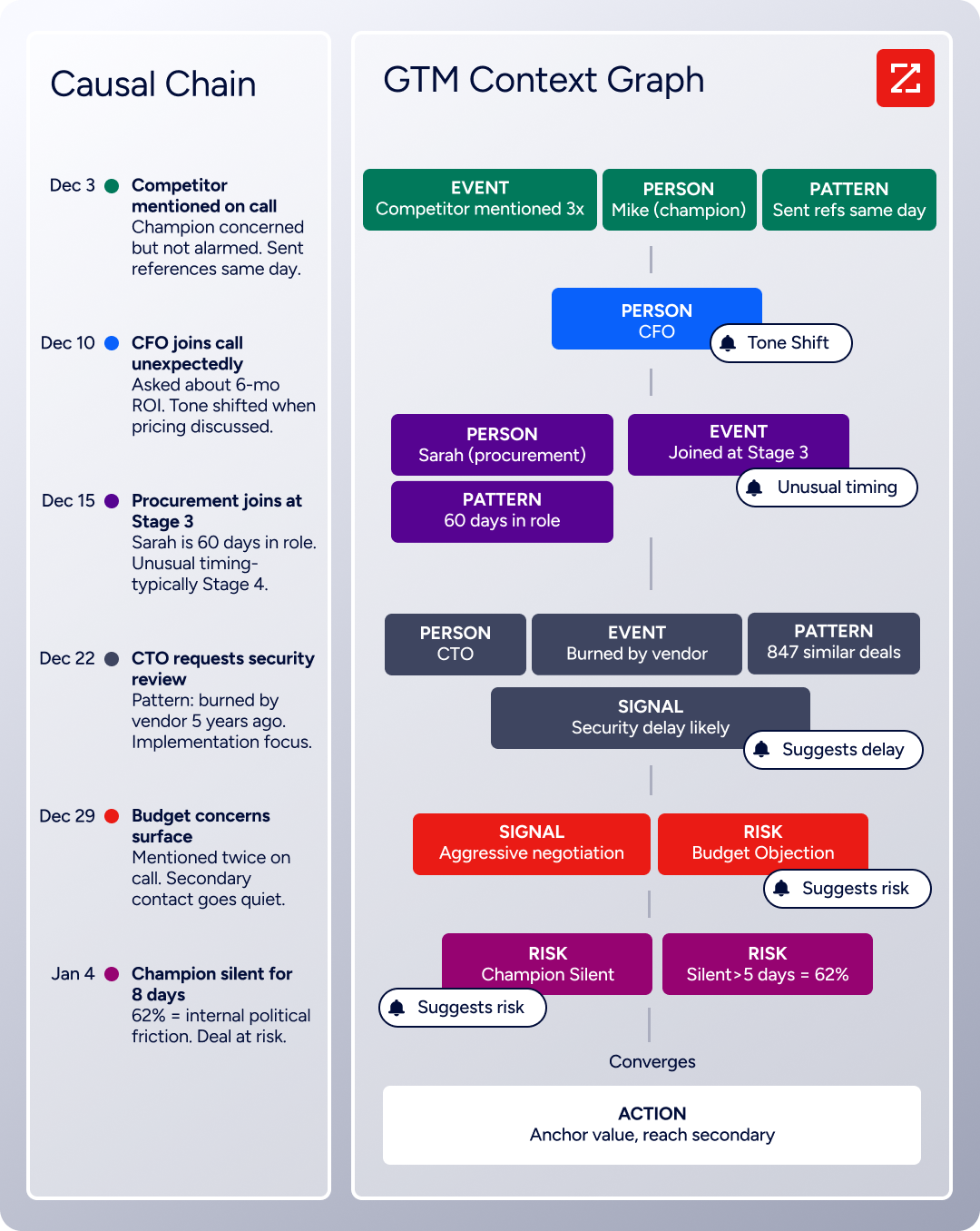
ZoomInfo in Action: When a seller opens GTM Workspace, they see that an account's CFO joined the last two calls and asked ROI-focused questions, a pattern that matches closed-won deals in their segment. The GTM Context Graph connects this with third-party signals showing the company is hiring three new VPs and researching a competitor. The follow-up email ZoomInfo's AI drafts addresses the specific concern the CFO raised, because the system understands why it matters right now.
ZoomInfo helped Seismic attribute 39% of active pipeline to opportunities identified or influenced by ZoomInfo signals, with sales teams reporting 54% productivity gains and 11.5 hours saved per week per seller. (Seismic Case Study)
B2B Data: The Contacts, Signals, and Intelligence Salesforce Can't Source
Salesforce stores the contacts your team has already collected. ZoomInfo provides the contacts your team hasn't found yet, verified and enriched with the context needed to reach them.
The data platform spans three dimensions: identity data (500M contacts, 120M direct-dial phone numbers, 200M+ verified business emails), company context (100M companies with detailed attributes, org charts, and technographics across 30,000+ technologies), and dynamic signals that reveal when accounts are actively in-market.
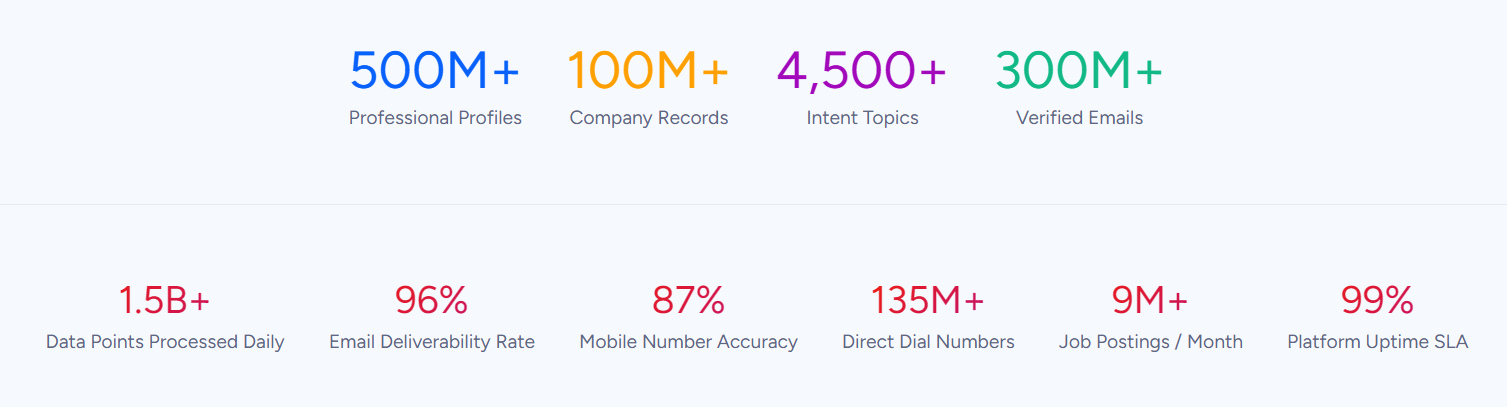
For a side-by-side breakdown of how ZoomInfo compares to Salesforce on data quality, AI capabilities, and pricing, see our Salesforce vs Zoo mInfo comparison.
This data advantage is externally validated. In a Fortune 500 competitive RFP analyzing 25 million contacts across vendors, the independent consultant concluded that "no other competitor came even close." ZoomInfo has been named a Forrester Wave Leader for Intent Data Providers (Q1 2025), receiving the highest possible scores across eight criteria, and Ranked #1 in 142 G2 Reports.
For sales reps, the difference is practical: the direct dial actually rings and the email actually lands, instead of a 30% bounce rate that torches your sender reputation. For RevOps, enrichment workflows don't require stitching together three vendors and a manual research layer to get a complete account picture.
ZoomInfo in Action: Your team is entering a new vertical. Instead of weeks of manual research, ZoomInfo identifies every company matching your ICP, surfaces the buying committee at each account with verified direct dials and emails, and layers intent signals showing which of those companies are actively researching solutions in your category. The result is a targeted account list with verified contacts and buying signals, ready for outreach in hours instead of weeks.
Vensure scaled prospecting with ZoomInfo's B2B data: "ZoomInfo gives us the information we need to execute. We don't have to go through and spend our time digging. It's already there, so we can be three steps ahead." (Vensure Case Study)
GTM Workspace & GTM Studio: Where Intelligence Meets Execution
Salesforce requires sellers to navigate between multiple views, dashboards, and tabs to piece together account context before taking action. ZoomInfo delivers intelligence where action happens through three channels:
GTM Workspace gives sellers a single place where prioritized accounts, AI-drafted outreach, real-time buying signals, and CRM updates converge.
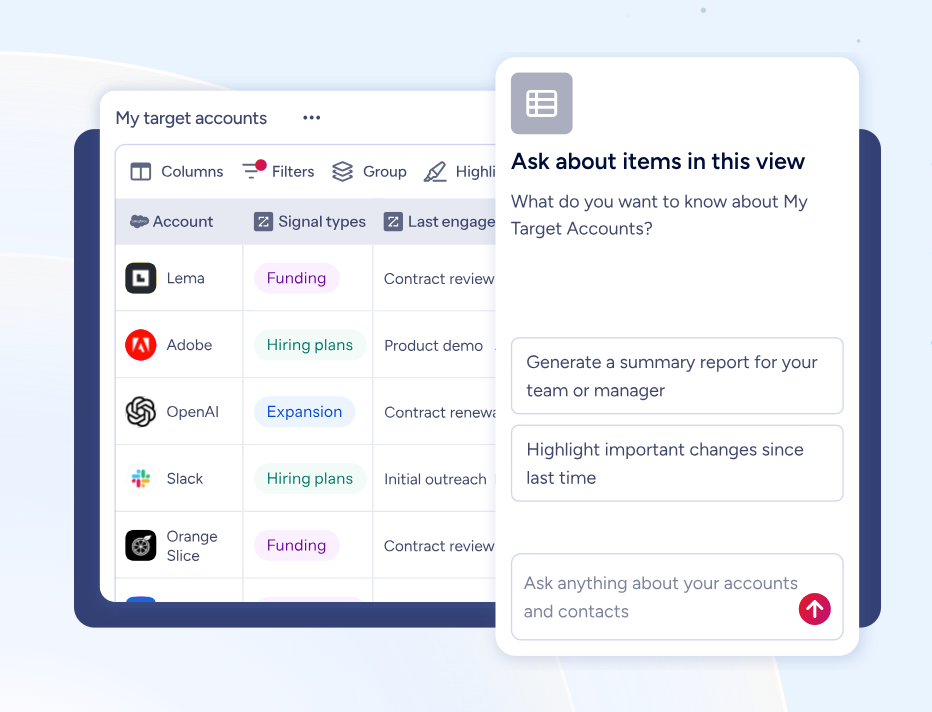
The Action Feed streams in-market buyers matched to target criteria with pre-drafted actions on every signal.
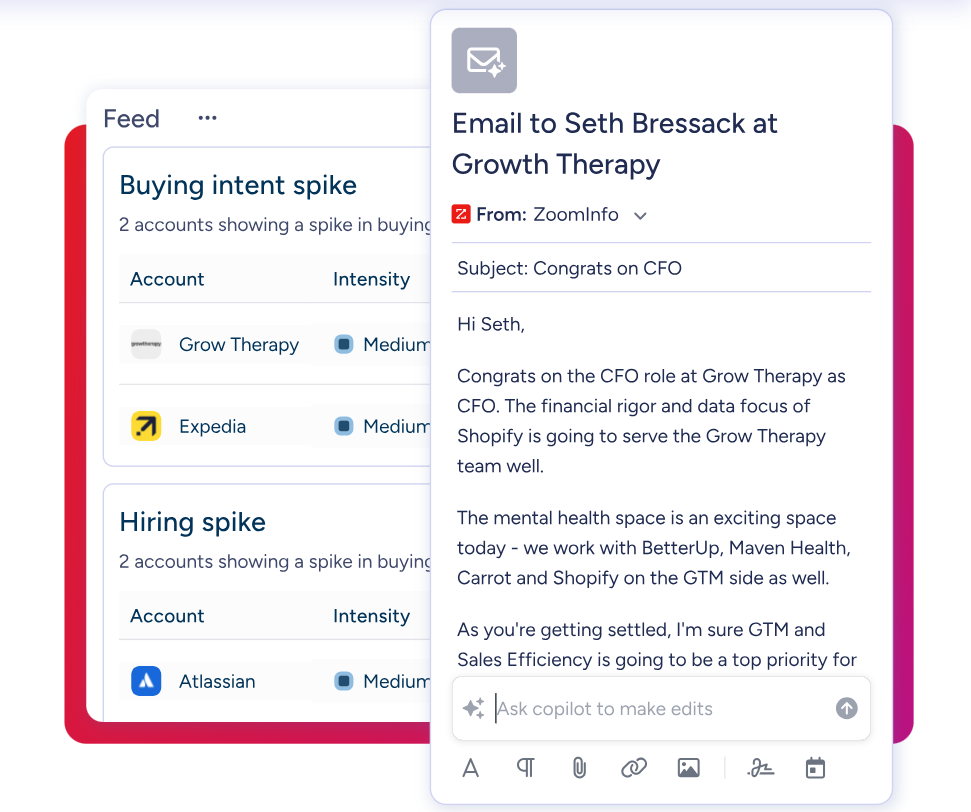
The AI Assistant generates 10-second account briefs pulling CRM history, company news, ZoomInfo signals, and stakeholder context.
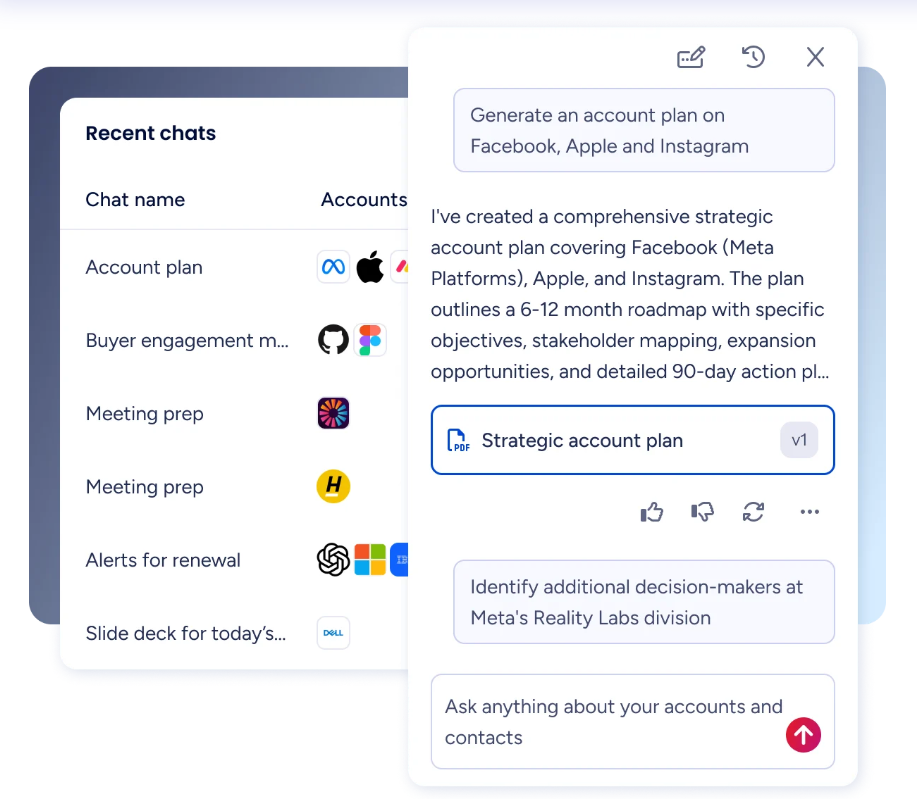
GTM Studio gives marketers and RevOps teams a no-code canvas where audience definition, campaign orchestration, and pipeline measurement happen in natural language rather than engineering tickets.
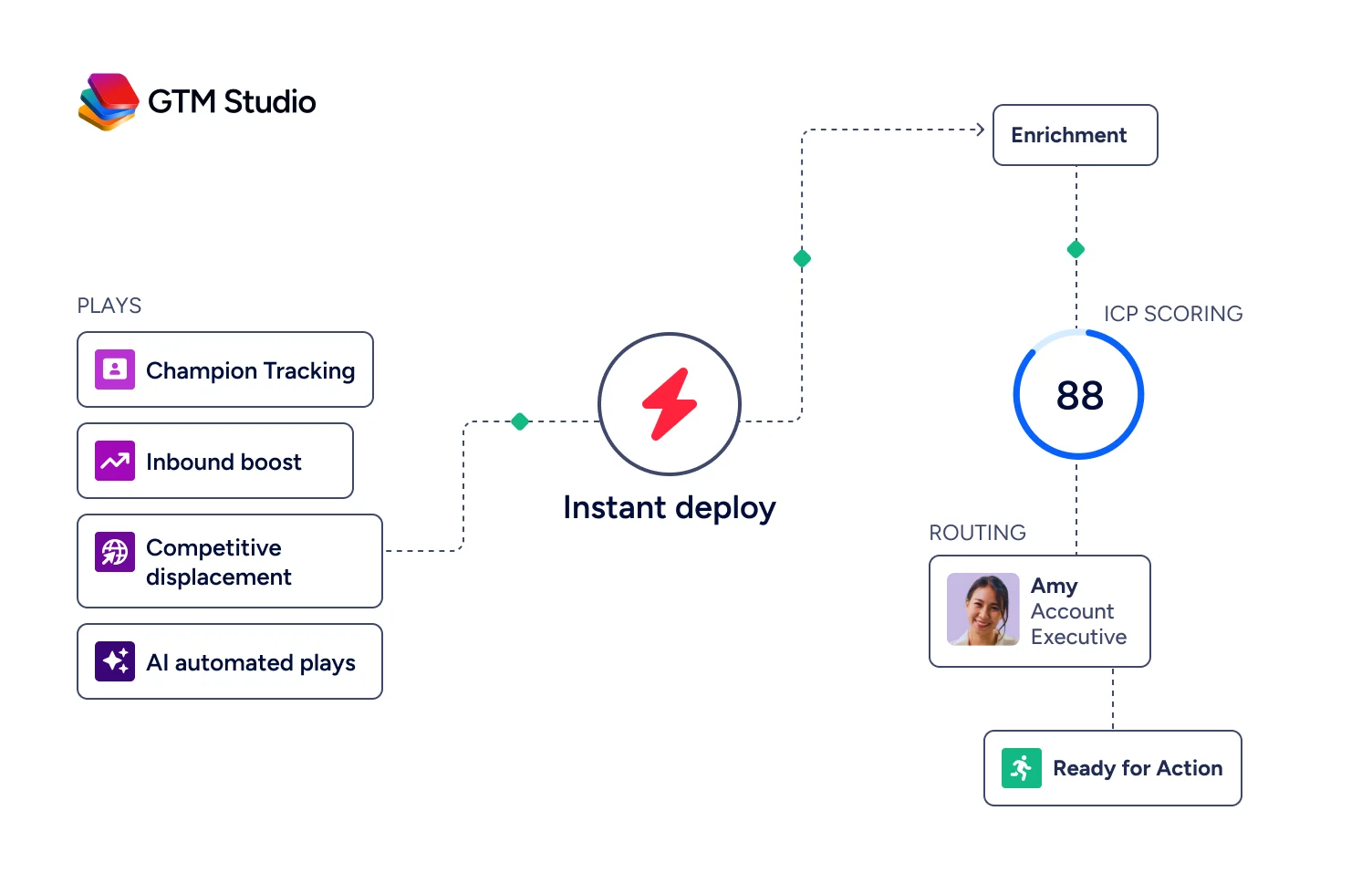
Expansion plays that used to take 3 weeks now launch in 30 minutes. Salesforce's Marketing Cloud requires separate licensing starting at $1,500/org/month and significant technical configuration.
For teams building beyond ZoomInfo's own products, APIs and MCP expose the same intelligence to any custom agent, internal tool, or partner platform.
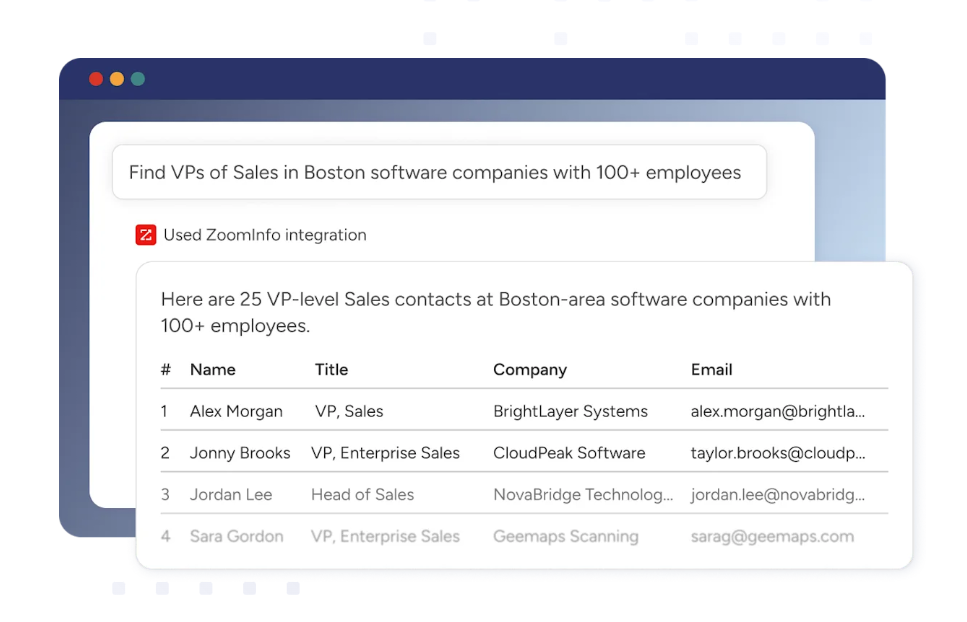
All three channels draw from one GTM Context Graph: the same data, the same reasoning, the same continuously learning model. Switching from Salesforce as your primary workflow doesn't mean losing the intelligence layer.
ZoomInfo in Action: A marketer in GTM Studio describes an audience in plain language ("mid-market SaaS companies with 200-500 employees researching competitive displacement"), launches a multi-channel play targeting matching accounts, and watches pipeline impact in real time. Meanwhile, the seller working those accounts in GTM Workspace sees the play's hot leads appear in their Action Feed with AI-drafted outreach already contextualized to each account's signals. No engineering ticket. No handoff delay. ZoomInfo Agent Teams build on this by running coordinated specialist agents that share that same account context and carry the play end to end, from research to outreach, within the approvals and limits you set, in GTM Studio and headless through GTM.AI.
Redwood Logistics achieved a 99% reduction in CPC and 310% increase in CTR using ZoomInfo's data-driven audience insights: "It's not just the data itself. It's more about the right data at the right time to help us reach out with the right message across that full buyer journey." (Redwood Logistics Case Study)
NOTE: We considered other intelligence and GTM platforms, including Oracle CX Cloud and SAP CRM, for the enterprise intelligence archetype. ZoomInfo was selected because it addresses the specific gap that drives most Salesforce switching conversations: Salesforce is a system of record, and ZoomInfo is the intelligence layer that makes CRM data actionable. Its B2B data, GTM Context Graph, and universal access through APIs, MCP, and native integrations provide capabilities that no other platform on this list replicates.
ZoomInfo Pricing
ZoomInfo uses a custom-quoted, consumption-based pricing model scaled around enterprise license agreements, data access, API consumption, and AI activity. There are no publicly listed prices; costs depend on usage patterns, number of users, monthly credit volume, features, company size, and contract length.
Product lines include:
Sales plans across Professional, Advanced, and Enterprise tiers, each adding deeper AI, intent signals, and workflow automation
Marketing plans across Marketing Demand, ABM Lite, and ABM Enterprise tiers for audience targeting and campaign orchestration
Chorus for conversation intelligence (standalone)
Chat for data-powered website chat (standalone)
ZoomInfo Lite is a permanent free tier (not a trial) with access to ZoomInfo's B2B database, 10 monthly export credits, individual and company searches, the ReachOut Chrome Extension, WebSights Lite, and HubSpot integration. No credit card and no time limit.
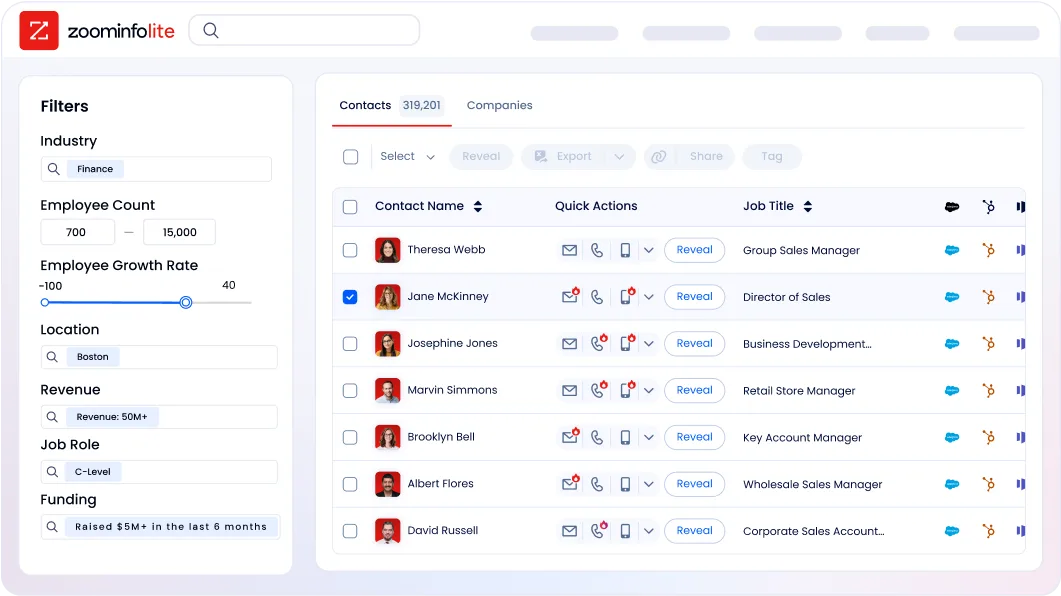
A 7-day free trial of the full platform is also available with no credit card required. API access is included in all relevant plans, with the ZoomInfo MCP server available for AI agent integration.
Who Should Use ZoomInfo?
Choose ZoomInfo if:
You need verified B2B contact data (direct dials, business emails, org charts) and intent signals that your CRM cannot source natively, and you want that intelligence flowing directly into your sales and marketing workflows.
Your revenue team spends more time researching accounts and building prospect lists than selling, and you want AI-driven execution that drafts contextual outreach, prioritizes accounts by buying signals, and surfaces deal risk before it hits your forecast.
You want to understand why deals are moving or stalling (not just that they changed stage) by fusing your CRM data with conversation intelligence, intent signals, and a large B2B dataset.
You're building AI agents or custom GTM tools and need B2B intelligence available through APIs and MCP, not locked inside a single application's UI.
Want to see the path your best opportunities take from first signal to closed deal? Start your ZoomInfo free trial and get the intelligence layer that turns your CRM from a database into a growth engine.
2. HubSpot — Best Alternative for SMBs That Want Marketing, Sales, and Service Under One Roof
Source: HubSpot
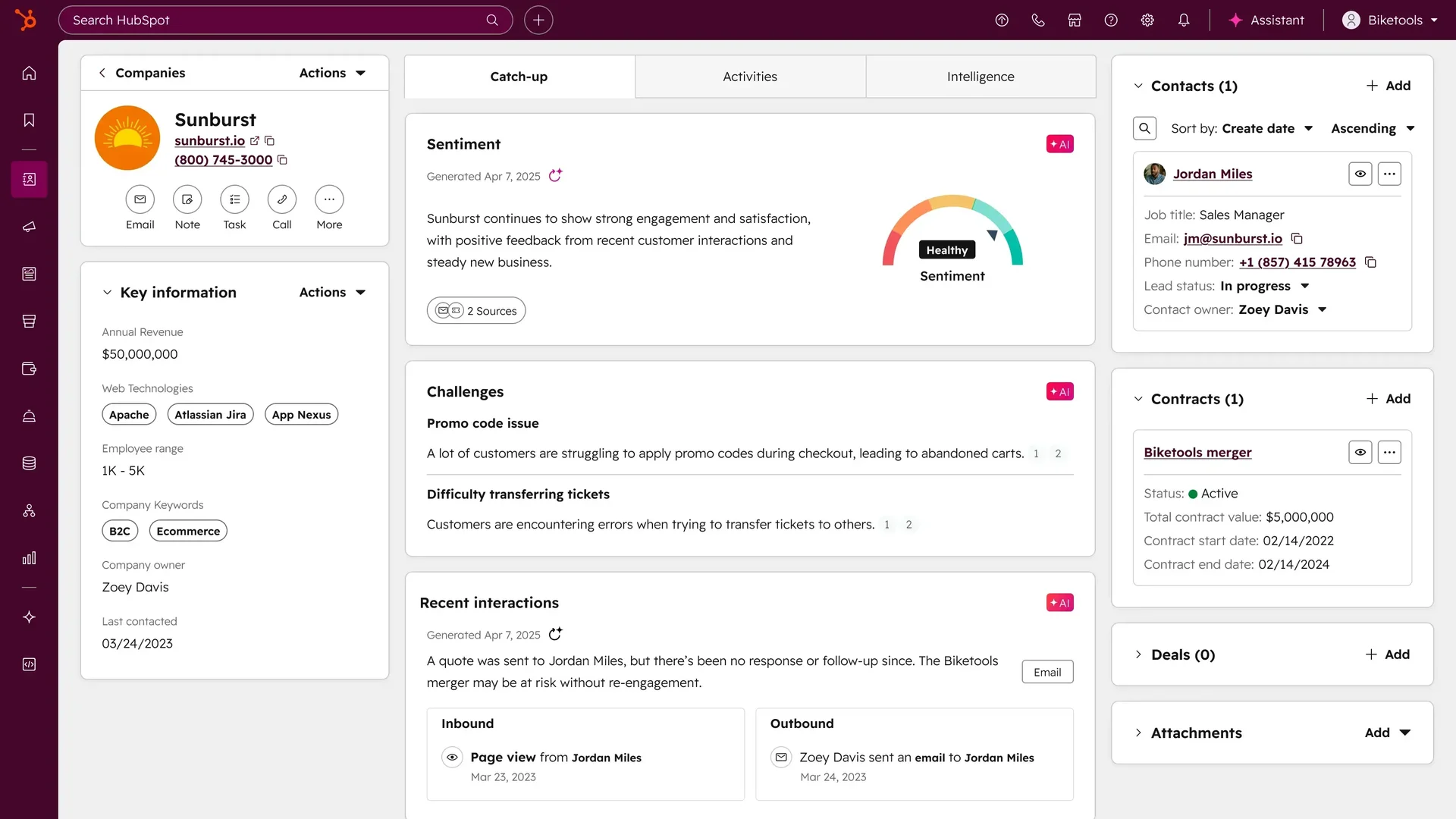
HubSpot is a CRM and customer platform built as the unified, lower-complexity alternative to Salesforce's multi-cloud architecture. Its key capabilities include:
Permanently free CRM with unlimited contacts (up to one million records), deal pipeline management, email tracking, live chat, web forms, and up to 2,000 monthly marketing emails
Unified Hub architecture with Marketing, Sales, Service, Content, and Data Hubs all built on a single Smart CRM data model
No-code workflow builder for lead enrollment, automated sequences, deal stage actions, and internal notifications, with no admin certification required
Breeze AI writing assistant for email copy, call scripts, and follow-up sequences, included in paid plan costs rather than metered separately
Publicly documented pricing starting at $9/seat/month annually for the bundled Starter Customer Platform
For SMBs and scaling mid-market organizations, HubSpot is the strongest alternative for teams that need marketing, sales, and service coordinated on shared data without multi-cloud purchasing contracts or a dedicated administrator.
Why Choose HubSpot Over Salesforce for Small and Mid-Sized Businesses
HubSpot stands out in the following areas:
A Free Tier That Scales Into a Real Platform
HubSpot's permanently free plan includes unlimited contacts up to one million records, one deal pipeline, email tracking, a basic chatbot, 30 landing pages, 2,000 marketing emails per month, and basic ticketing, all without a credit card and with no expiration. Salesforce's comparable free offering caps at two users with minimal automation. For teams evaluating a Salesforce replacement, HubSpot's free tier functions as a real production environment, not a limited demo sandbox. The upgrade path is linear and predictable: Starter editions begin at $20/user/month for individual Hubs or $9/seat/month for the bundled Starter Customer Platform.
Unified Hub Architecture Eliminates Multi-Cloud Billing Complexity
One of the most cited pain points among Salesforce buyers is the cumulative cost of purchasing Sales Cloud, Marketing Cloud, and Service Cloud as separate products, each with its own licensing tier and often its own implementation consultant. HubSpot routes all Hubs through a single Smart CRM data layer. A marketing email open, a sales call recording, and a support escalation for the same contact appear in one timeline without data syncing middleware. For a full feature and pricing breakdown, see our HubSpot vs Salesforce comparison.
Documented, Predictable AI Pricing
Salesforce's Agentforce Flex Credits cost $0.10 per action (or $0.15 for voice actions), with a separate $125/user/month add-on for unmetered employee usage. HubSpot's Breeze AI is included in Professional and Enterprise subscriptions through monthly HubSpot Credits (3,000/month on Professional, 5,000/month on Enterprise), with additional credits available at $10 per 1,000. HubSpot also publishes its full pricing across every Hub at every tier, making total-cost-of-ownership modeling possible before any vendor engagement.
NOTE: We also evaluated Freshsales and Pipedrive for this slot. Freshsales offers a capable free tier with AI-assisted lead scoring, but its marketing automation is thinner and its content and service tooling more limited. Pipedrive is a well-regarded pipeline management tool but lacks HubSpot's native Marketing Hub and content management tools. HubSpot offers the most complete unified platform for SMBs replacing Salesforce, and integrates natively with ZoomInfo for contact data enrichment and buying intent signals. ZoomInfo Agent Teams can act on those same signals, running specialist agents that share full account context and execute complete GTM plays within the approvals and limits you set.
HubSpot Pricing
HubSpot uses a hybrid per-seat and flat-fee pricing model. Prices reflect annual billing rates.
Free Tier: $0, no time limit, no credit card required. Up to 2 user seats; unlimited contacts (up to 1M records), one deal pipeline, email tracking, basic chatbot, 30 landing pages, 2,000 marketing emails/month.
Starter Customer Platform: $9/seat/month (annual). Bundles Starter editions of all Hubs. 500 HubSpot Credits/month included.
Professional Tiers: Marketing Hub at $800/month (3 Core Seats included, $3,000 onboarding fee); Sales Hub at $90/seat/month ($1,500 onboarding fee); Service Hub at $90/seat/month ($1,500 onboarding fee).
Enterprise Tiers: Marketing Hub at $3,600/month (5 Core Seats, $7,000 onboarding fee); Sales Hub at $150/seat/month ($3,500 onboarding fee); Service Hub at $150/seat/month ($3,500 onboarding fee).
One pricing nuance to be aware of: when subscribing to multiple Hubs at mixed tiers, all Core Seats are billed at the rate of the highest subscription tier across the account.
Who Should Use HubSpot?
Choose HubSpot if:
You are leaving Salesforce because of implementation complexity, multi-cloud licensing costs, or the overhead of maintaining a dedicated administrator.
You need marketing automation, CRM pipeline management, and customer service ticketing to share the same contact data without middleware or custom integrations.
Your budget requires a fixed, documented annual cost before signing, and you want total-cost-of-ownership modeling possible without a vendor sales conversation.
Your team is small or mid-sized enough that a dedicated Salesforce-certified administrator is not cost-justified, and marketers and salespeople need to own platform configuration directly.
3. Microsoft Dynamics 365 — Best Alternative for Organizations Running the Microsoft Stack
Source: Microsoft Dynamics 365
Microsoft Dynamics 365 is a unified suite of AI-powered CRM and ERP applications that serves as a direct enterprise alternative to Salesforce for organizations already embedded in the Microsoft ecosystem. Its key capabilities include:
Native Microsoft 365 integration with bidirectional sync to Outlook, Teams, and SharePoint through a shared identity layer
Microsoft Copilot embedded throughout Sales, Customer Service, and Field Service, with 1,000 Copilot Credits included at the Sales Premium tier
Pre-built ERP connectivity with Dynamics 365 Finance, Supply Chain Management, and Business Central without middleware
Azure-backed compliance including FedRAMP High, HIPAA BAA, ISO 27001, and SOC 2 Type II at the platform layer
Sales Enterprise at $105/user/month versus Salesforce Sales Cloud Enterprise at $175/user/month
Dynamics 365 has been named a Gartner Magic Quadrant Leader in Sales Force Automation for fifteen consecutive years and a Leader across three Cloud ERP quadrants.
Why Choose Microsoft Dynamics 365 Over Salesforce for Microsoft Ecosystem Organizations
Dynamics 365 stands out in the following areas:
Native Microsoft 365 Integration Without a Connector Layer
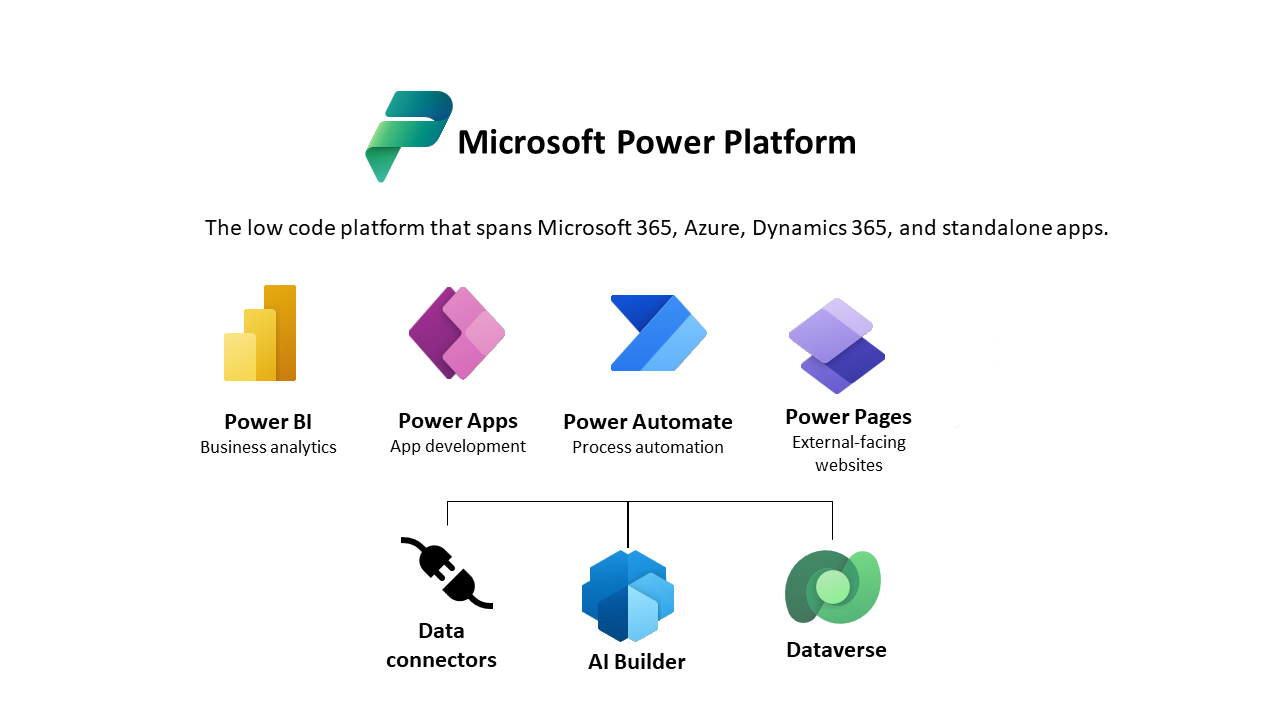
Dynamics 365 Sales synchronizes bidirectionally with Outlook, Teams, and SharePoint through the same Microsoft Dataverse and Microsoft Entra ID identity layer.
Source: Microsoft Dynamics 365
A seller who opens an Outlook email thread sees the associated Dynamics 365 opportunity inline without switching applications. Teams calls generate AI-summarized meeting notes that auto-populate CRM records. Salesforce integrates with Microsoft tools through connectors that require separate configuration and maintenance, and every Microsoft 365 update can require re-certification of that connector.
Copilot AI at a Predictable Cost
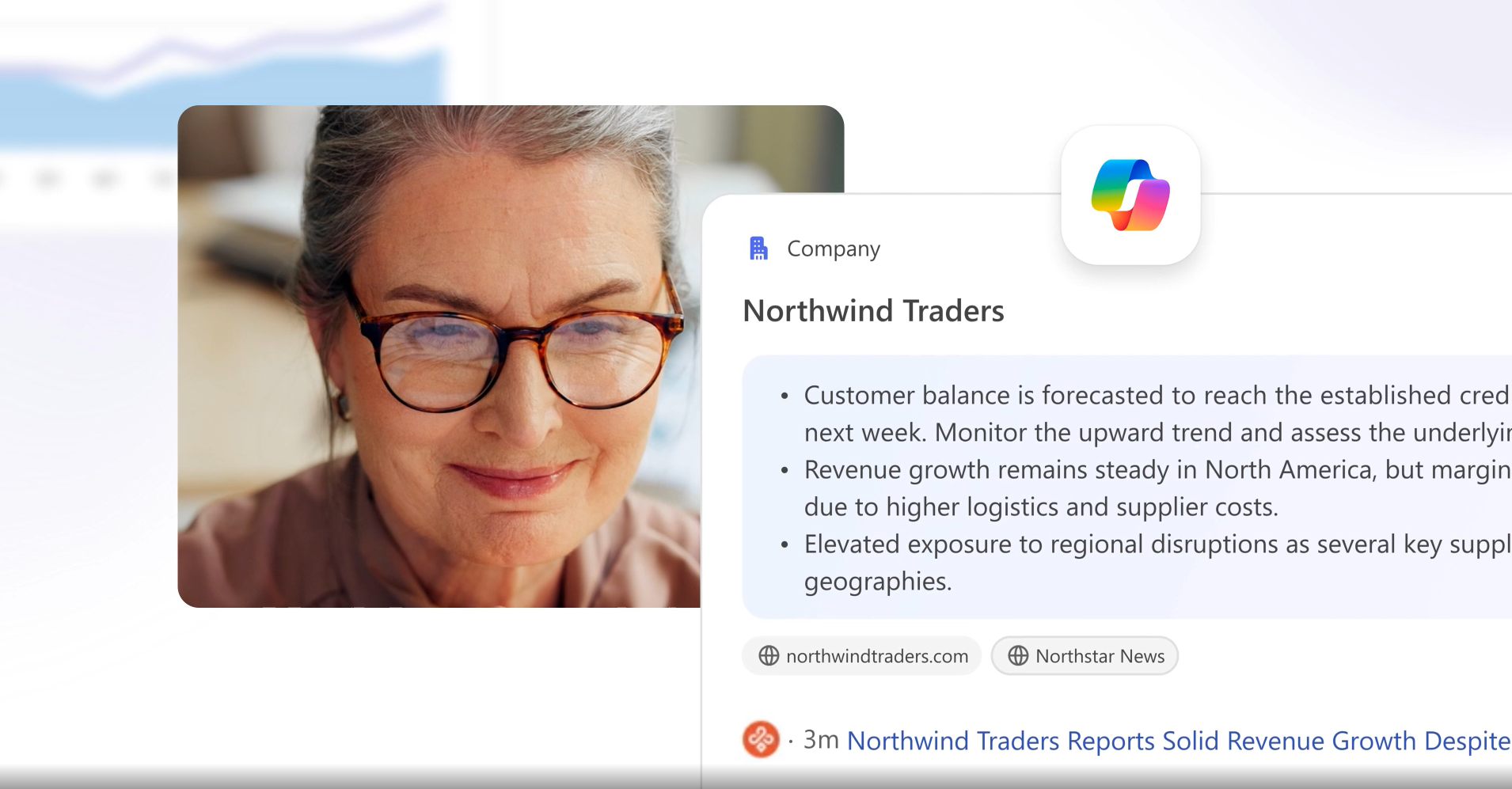
Copilot in Dynamics 365 Sales handles record summarization, email drafting, pipeline change tracking, and account research.
Source: Microsoft Dynamics 365
At the Sales Premium tier ($150/user/month), Microsoft bundles 1,000 pooled Copilot Credits per month, meaning the Sales Qualification Agent (which autonomously researches leads, scores them, and drafts outreach) is included in the license cost. Salesforce's Agentforce at the Enterprise tier meters each standard action at $0.10, creating variable cost lines that are hard to forecast.
Native ERP Connectivity Without Middleware
Dynamics 365 offers pre-built integration between CRM applications (Sales, Customer Service, Field Service) and ERP applications (Finance, Supply Chain Management, Business Central) with no middleware layer. Customer records, purchase orders, and invoice history flow directly into CRM through the shared Dataverse data model. Salesforce bridges this gap through MuleSoft, a separately licensed platform that adds another contract, budget line, and layer of maintenance.
Enterprise Compliance Built Into the Platform
Organizations in regulated industries can deploy Dynamics 365 with FedRAMP High, HIPAA BAA, ISO 27001, and SOC 2 Type II compliance from the Azure infrastructure layer, without premium add-ons. Salesforce's equivalent is Salesforce Shield, which carries additional licensing costs on top of base license fees.
NOTE: We also evaluated Oracle CX Cloud and SAP CRM for the enterprise archetype. Oracle CX excels in Oracle ERP integration and SAP CRM is a natural fit for SAP-heavy organizations, but Microsoft Dynamics 365 offers the tightest Microsoft ecosystem integration, the most predictable AI cost structure, and the broadest Gartner Leader coverage for teams whose infrastructure is built on Azure and Microsoft 365.
Microsoft Dynamics 365 Pricing
Sales Professional: $65/user/month. Core SFA, Outlook/Teams integration, reporting, dashboards.
Sales Enterprise: $105/user/month. Adds AI insights, Copilot assistant, Sales Qualification Agent, advanced customization.
Sales Premium: $150/user/month. Adds Sales Insights, AI data enrichment, and 1,000 pooled Copilot Credits/month.
Customer Service Professional: $50/user/month; Enterprise $105/user/month; Premium $195/user/month.
Business Central Essentials: $80/user/month; Premium $110/user/month.
All Dynamics 365 products offer a free trial.
Who Should Use Microsoft Dynamics 365?
Choose Microsoft Dynamics 365 if:
Your organization already runs Microsoft 365 and wants CRM data flowing natively through Outlook and Teams without a connector maintenance burden.
You need CRM and ERP data unified on a single platform without purchasing and maintaining MuleSoft as a separate contract.
You operate in a regulated industry and need FedRAMP, HIPAA, or ISO 27001 compliance included in the platform cost rather than as a premium add-on.
You're running an enterprise deployment at 200+ seats where the 40% per-seat price differential versus Salesforce Enterprise translates to a material annual budget difference.
4. Zoho CRM — Best Alternative for Enterprise Automation at Mid-Market Pricing
Source: Zoho CRM
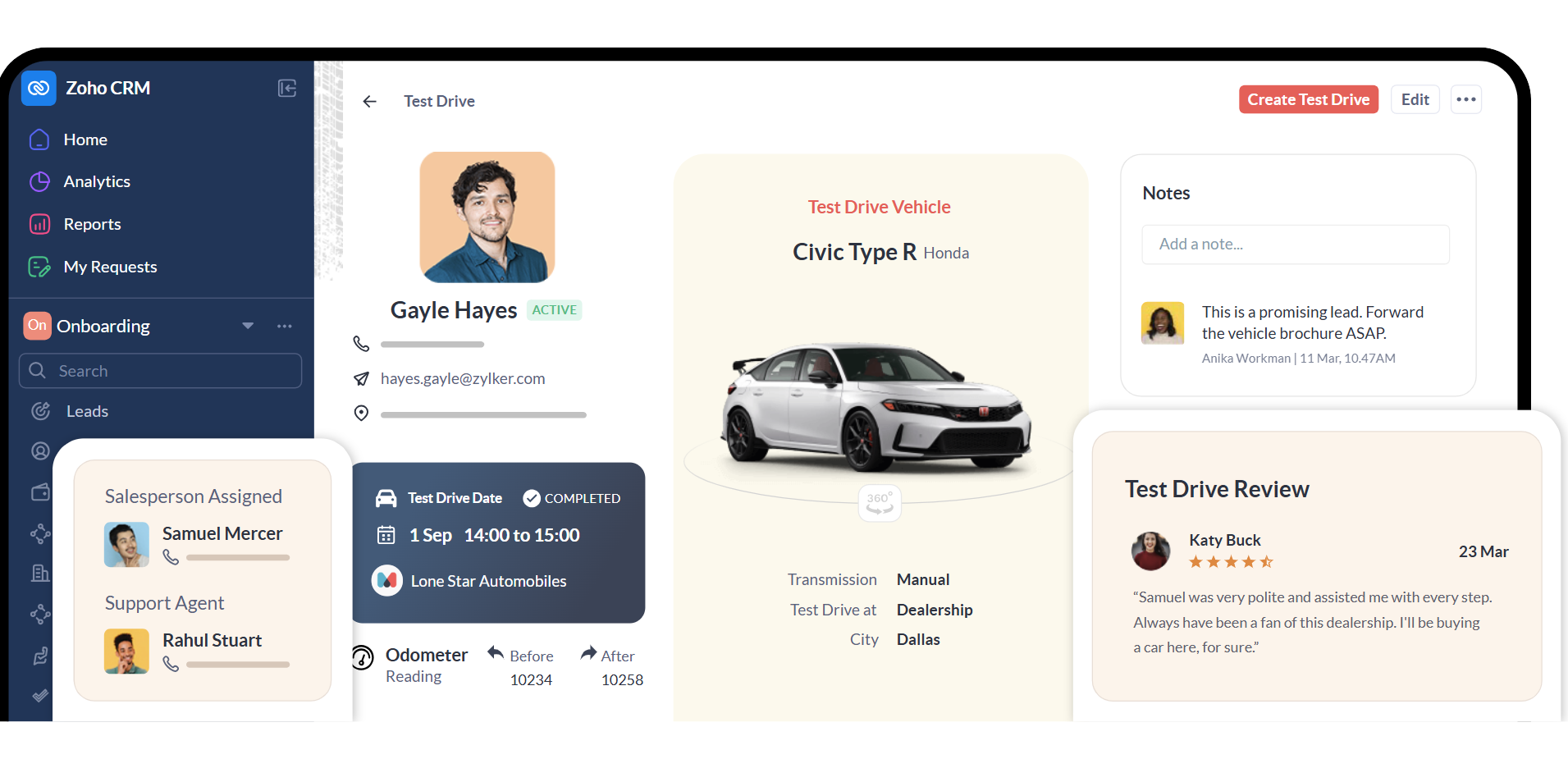
Zoho CRM is a cloud-based CRM and business software suite that delivers Salesforce-class automation, AI, and process governance at pricing mid-market teams can sustain. Its key capabilities include:
Zia AI for lead scoring, deal anomaly detection, churn prediction, and natural language CRM queries, included in the Enterprise plan
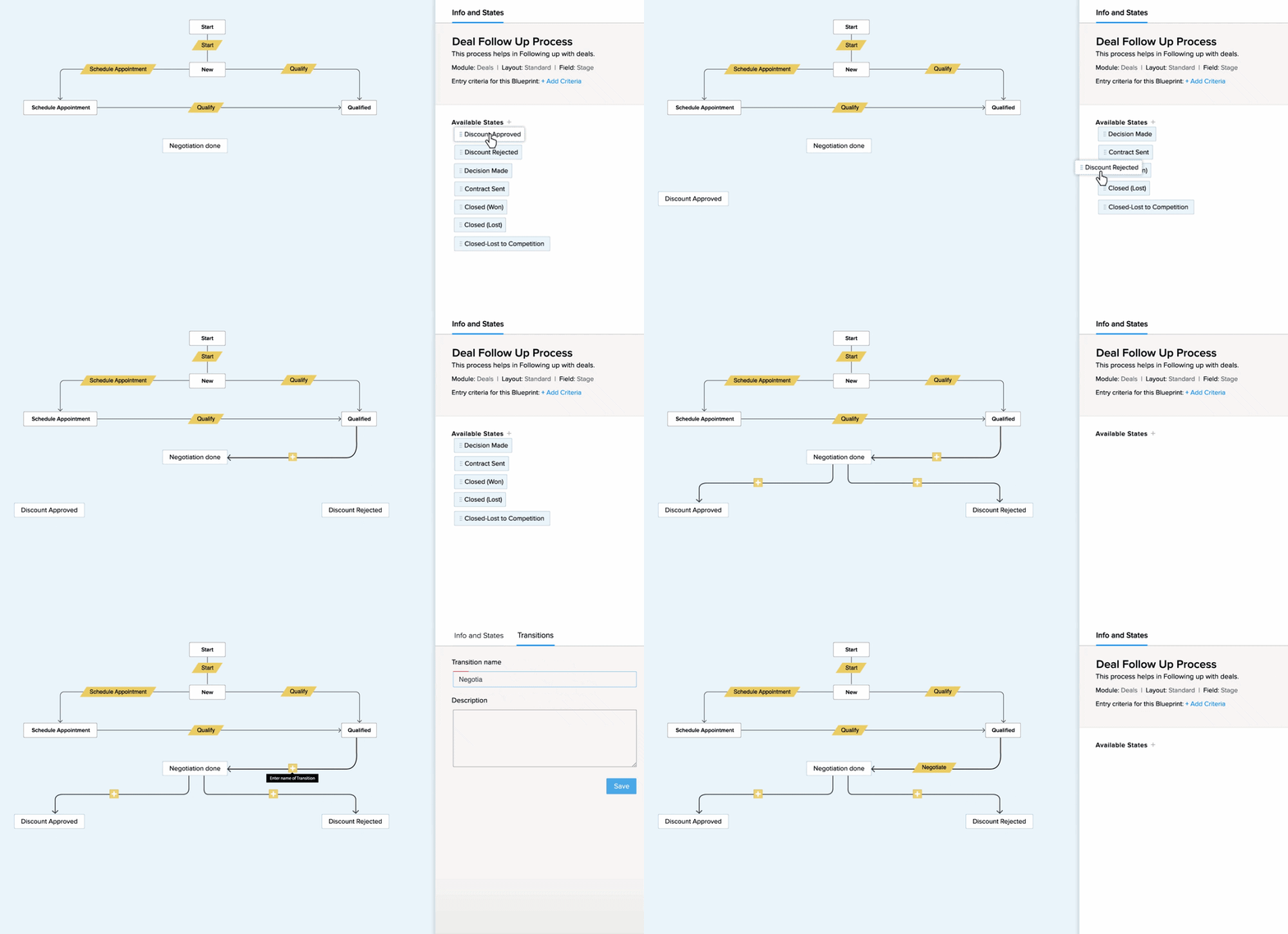
Blueprint process management: a visual, state-machine-based workflow that gates stage transitions on required field completion and activity logging
Zoho One ecosystem with 55+ native business applications on a single data model
Canvas no-code interface customization for drag-and-drop record page redesign without Salesforce-certified admin overhead
Territory management and multi-tier hierarchies included in the Enterprise plan at $40/user/month
Zoho CRM is the right alternative for growing businesses in the 10-500 employee range that need the full enterprise feature stack (AI, territory management, process enforcement, native business app ecosystem) but cannot justify Salesforce's pricing or implementation complexity.
Why Choose Zoho CRM Over Salesforce for Mid-Market Enterprise Features
Zoho CRM stands out in the following areas:
Enterprise Features Without Enterprise Pricing
The Enterprise plan at $40/user/month unlocks territory management, Zia AI with predictions and anomaly detection, Blueprint process automation, Journey Orchestration, customer portals, field-level security, and a full sandbox environment. Salesforce puts comparable features at $175/user/month, with Agentforce capabilities requiring consumption credits on top. For a 50-person sales team, that gap translates to roughly $162,000 per year at list prices. Nucleus Research has named Zoho a Technology Leader in the Sales Force Automation Value Matrix for 2024, 2025, and 2026 on value-to-capability ratio. For a head-to-head breakdown of Salesforce and Zoho CRM on features, pricing, and AI capabilities, see our Salesforce vs Zoho CRM comparison.
Blueprint Process Enforcement vs. Pipeline Visualization
Blueprint functions as an enforcement mechanism, not a visual aid. An admin specifies what conditions a rep must satisfy before moving a deal to the next stage: required fields filled, a call logged, a manager approval obtained. If those conditions aren't met, the stage transition is blocked.
Source: Zoho CRM
Blueprint also fires automated actions at each transition and triggers stagnation alerts when a record sits past a defined time threshold. Salesforce's pipeline stages are largely cosmetic without additional configuration; getting enforcement behavior requires building Validation Rules, Process Builder flows, or Lightning Flow configurations on top.
Zia AI Across the Full Intelligence Stack, Included in the License
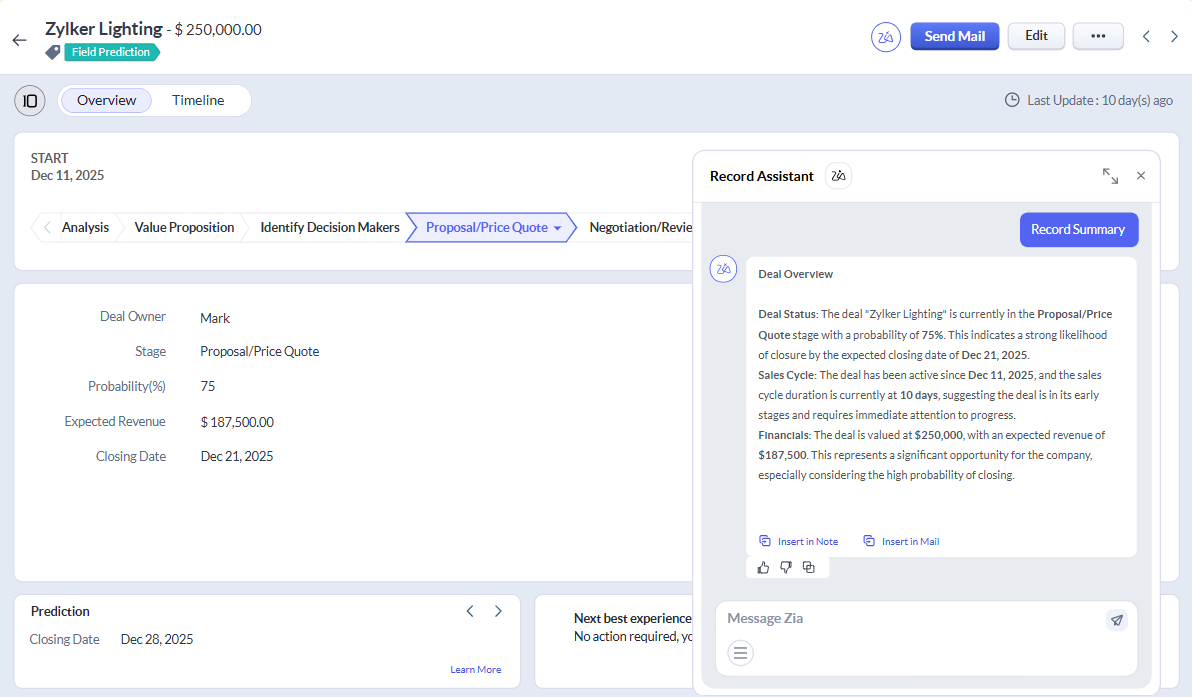
Zia covers predictive scoring (lead conversion, deal win/loss, churn risk), generative AI (natural language creation of CRM modules and reports), communication intelligence (email sentiment, call transcription, competitor mention alerts), and agentic AI through Zia Agents for automated lead qualification.
Source: Zoho CRM
Zia's anomaly detection monitors sales metrics in real time and prescribes corrective actions. All of this is included in the $40/user/month Enterprise plan.
The Zoho One Ecosystem vs. Salesforce's Multi-Cloud Licensing
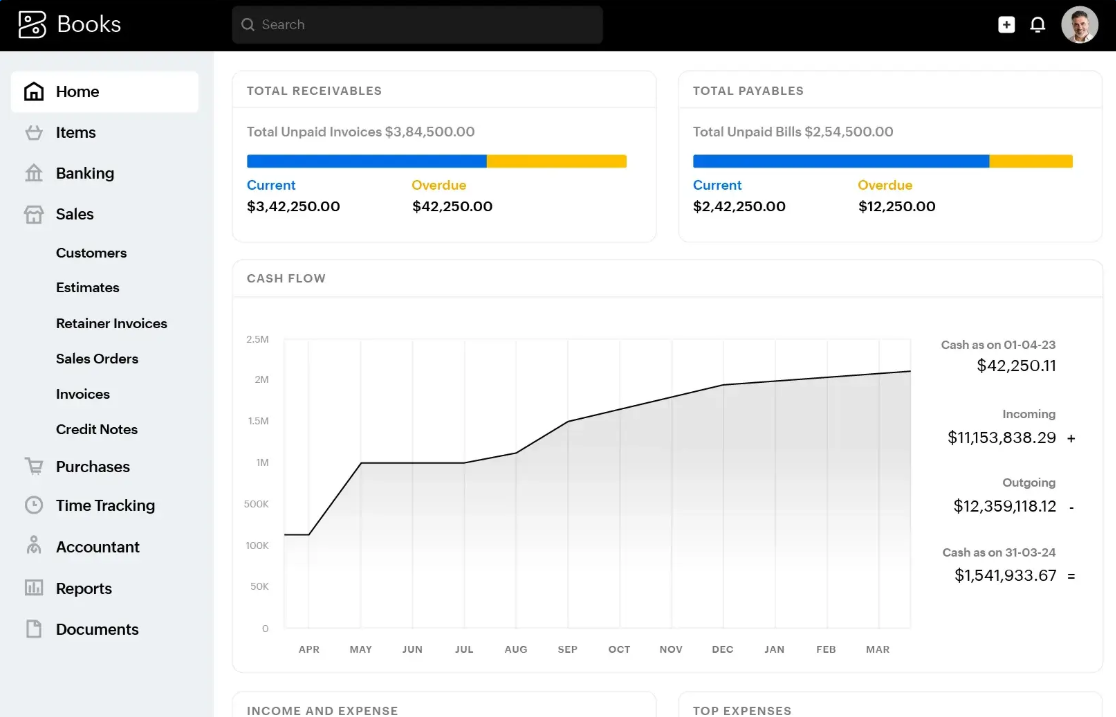
Zoho One provides 55+ first-party applications on the same data model: Zoho Books for accounting, Zoho Desk for support, Zoho Campaigns for email marketing, Zoho Analytics for BI. At roughly $37/employee/month for the full suite, the cost comparison against assembling the equivalent Salesforce multi-cloud stack is substantial.
Source: Zoho CRM
NOTE: We also evaluated Freshsales and Insightly for this slot. Freshsales excels at simplicity and Insightly is strong for project-linked CRM in professional services, but Zoho CRM offers the most complete mid-market feature set, with Blueprint, Zia, territory management, and the full Zoho One ecosystem at a price that makes the Salesforce-to-Zoho migration financially straightforward. Zoho CRM also integrates with ZoomInfo for contact and company data enrichment.
Zoho CRM Pricing
Free Plan: $0, up to 3 users, no time limit. Basic leads, contacts, accounts, deals, and mobile apps.
Standard: $14/user/month. Workflow rules, cadences, custom reports, sales forecasting.
Professional: $23/user/month. Adds CPQ with dynamic pricing, Blueprint process automation, email intelligence.
Enterprise: $40/user/month. Adds Zia AI, Journey Orchestration, Territory Management, customer portals, field-level security, sandbox.
Ultimate: $52/user/month. Adds custom AI/ML via QuickML, data preparation tools, enhanced limits.
15-day free trial of the Enterprise plan is available with no credit card required. Month-to-month billing is available at roughly 34-40% more than annual pricing. Zoho explicitly offers no long-term lock-in contracts: "You are not bound by any contracts or commitments."
Who Should Use Zoho CRM?
Choose Zoho CRM if:
Your team is in the 20-500 employee range and a Salesforce renewal is triggering a re-evaluation of what you're paying versus what you're using.
You need enforced sales process governance (stage-gating, required activities, stagnation alerts) that Blueprint delivers without complex admin configuration.
You want AI-powered lead scoring, pipeline anomaly detection, and churn prediction included in your base license rather than as a metered add-on.
Your business needs extend beyond CRM into accounting, support ticketing, email marketing, or project management, and you'd rather unify those under a single-vendor data model.
5. Pipedrive — Best Alternative for Deal-Focused Pipeline Management
Source: Pipedrive
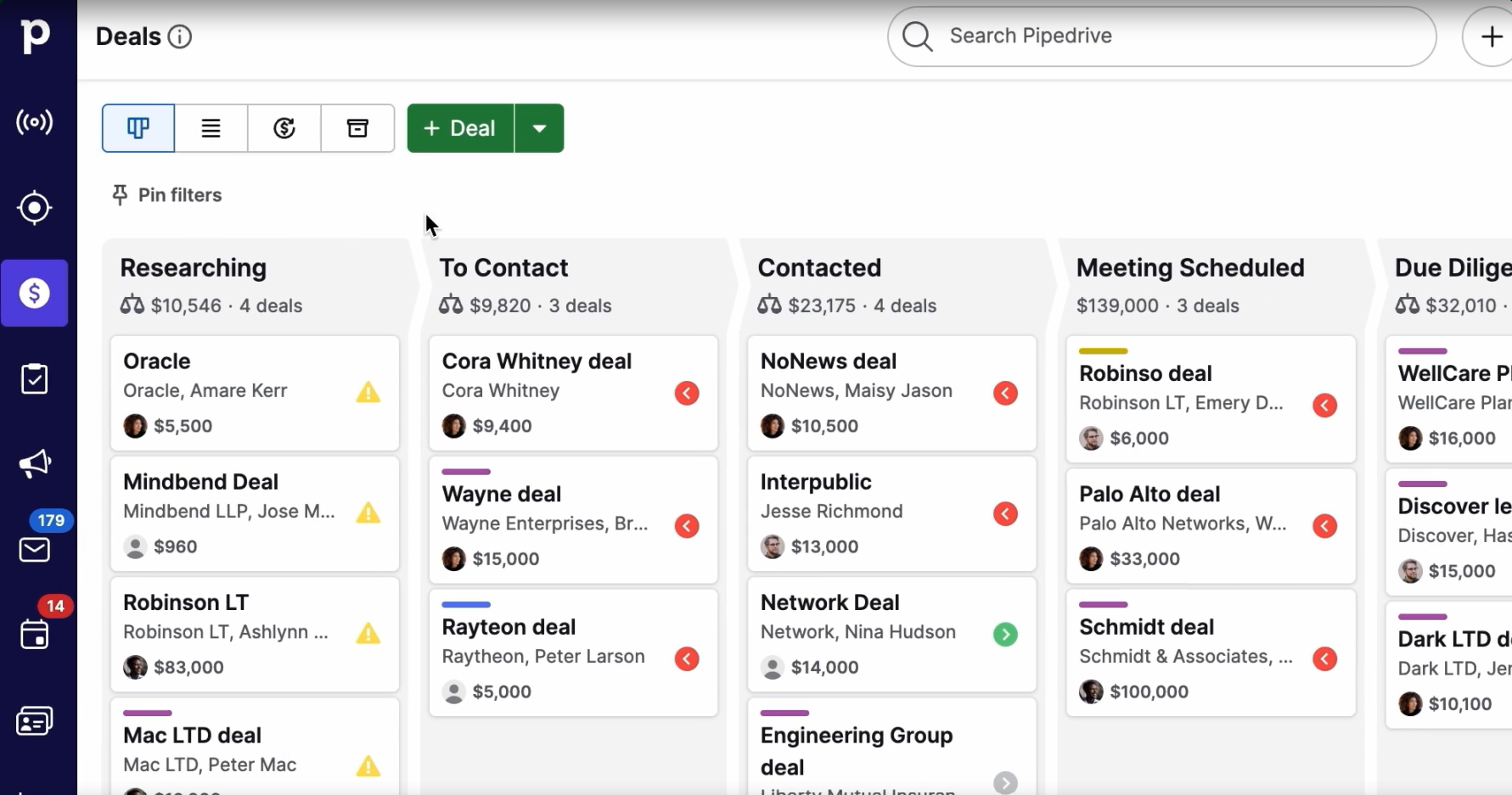
Pipedrive is a sales CRM and pipeline management platform built for small and medium-sized sales teams that need to close deals, not manage a platform. Founded in 2010 by five salespeople frustrated with CRMs designed for managers rather than reps, Pipedrive pioneered the kanban-style pipeline in CRM software and today serves 100,000+ companies in 179 countries. Its key capabilities include:
Visual drag-and-drop kanban pipeline with colored deal-rotting alerts
Activity-based selling model that enforces a next action on every active deal
Smart BCC email logging that works with any email client, no plugin required
AI Sales Assistant for deal prioritization, win probability, and natural-language pipeline queries
500+ native integrations spanning the outbound B2B sales stack
ISO 27001, SOC 2 Type 2, and GDPR compliance with a no-AI-training-on-client-data policy
Pipedrive is the right alternative for sales-led SMB teams whose primary need is pipeline visibility and deal execution discipline, not marketing automation or multi-cloud platform consolidation.
Why Choose Pipedrive Over Salesforce for Sales Pipeline Management
Pipedrive stands out in the following areas:
The Pipeline Is the Primary Workspace, Not a Reporting Artifact
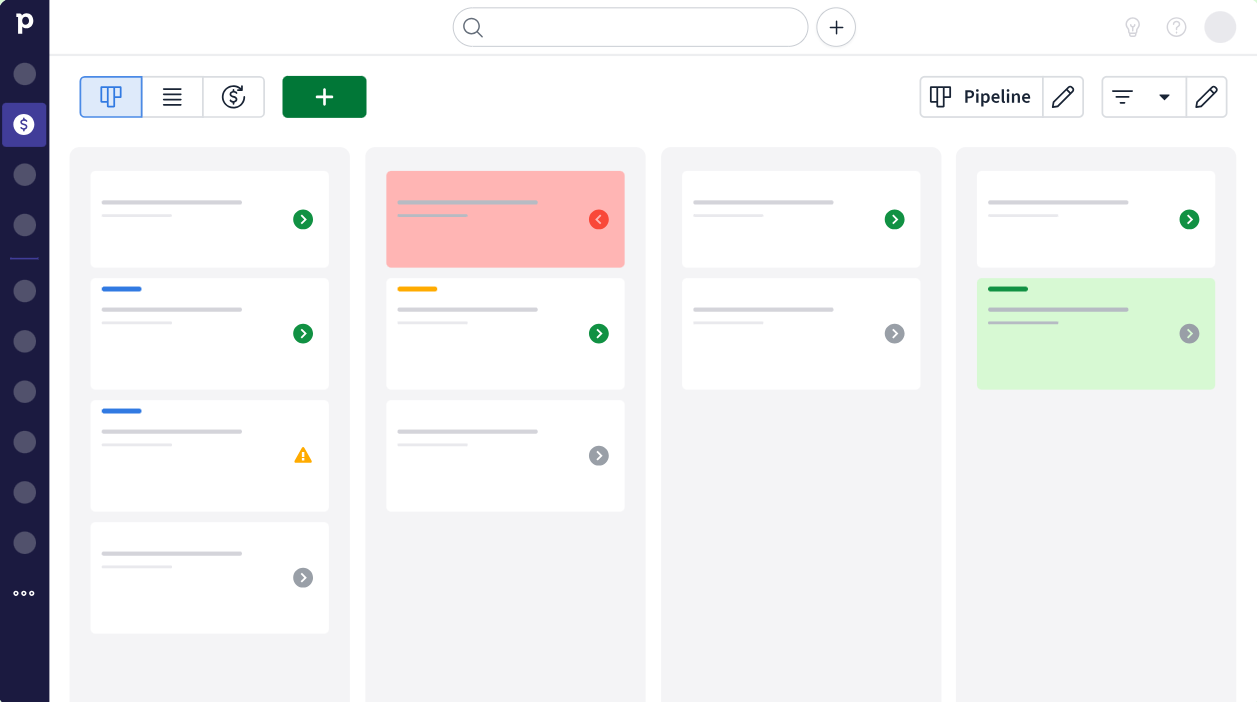
In Salesforce, the pipeline is something you build reports around; the default interface presents dashboards and navigation menus that require configuration before a rep can answer "which deals need my attention today?" In Pipedrive, the kanban pipeline is the primary workspace every user sees on login. Deals move between stages via drag and drop.
Source: Pipedrive
Colored deal-rotting cues flag deals that have gone idle. Pipedrive reports that customers see an average 93% increase in pipeline deals, 46% faster closing time, and 21% higher average deal value after adoption. For a detailed comparison of Pipedrive and Salesforce on pipeline management, pricing, and AI, see our Pipedrive vs Salesforce comparison.
Activity-Based Selling Is Built Into the Methodology
Every deal in Pipedrive requires a logged next activity (call, email, demo, meeting) before it counts as active. Deals with no upcoming scheduled activity surface prominently as idle. Overdue activities generate alerts. Salesforce can track activities, but whether deals are blocked until activities are scheduled depends entirely on admin configuration and team discipline.
Email Logging and Tracking Without Plugins
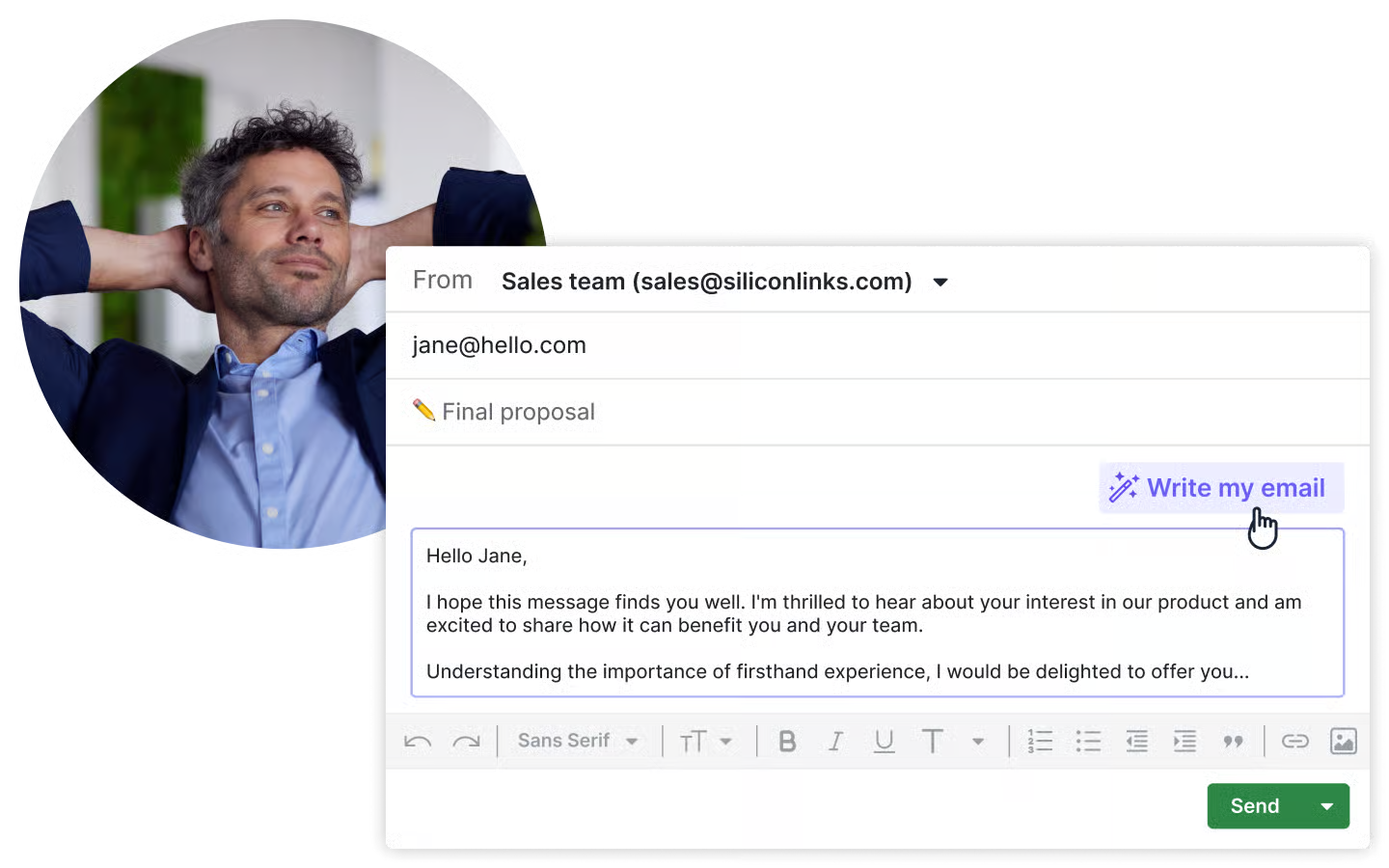
Pipedrive's Smart BCC feature logs emails from any email client by copying a deal-specific BCC address. Full email sync connects Gmail, Outlook, or any IMAP-compatible account to a Sales Inbox.
AI email creation generates drafts from a brief prompt, and the meeting Scheduler integrates with Zoom, Teams, and Google Meet. Salesforce's email intelligence requires Einstein Activity Capture or a third-party integration.
Source: Pipedrive
NOTE: We also evaluated Copper CRM and Streak for this deal-management archetype. Copper excels at Google Workspace integration and Streak is compelling for lightweight pipeline management inside Gmail, but Pipedrive offers the most mature sales pipeline feature set, with 500+ integrations including compatibility with ZoomInfo for contact enrichment and intent-based prospecting.
Pipedrive Pricing
Pipedrive offers four plans. All plans are per-seat; add-ons are billed per company. A 14-day free trial with full access requires no credit card.
Lite: Starts at $14/month per seat. Customizable pipelines, deal rotting, Leads Inbox, product catalog, API access, 500+ integrations, AI-powered report creation.
Growth: Adds email sync, email templates and tracking, workflow automations with if/else branching, Sequences, forecast view.
Premium: Includes Smart Docs, Projects, and LeadBooster bundled. Adds AI email creation, required and formula fields, phone support.
Ultimate: Adds contact data enrichment, security alerts, expanded limits.
Annual billing offers up to 42% discount versus monthly.
Who Should Use Pipedrive?
Choose Pipedrive if:
Your sales team needs to manage an active deal pipeline visually and your biggest friction is reps not following up consistently.
You're migrating from Salesforce because your team's actual work is deal management and outbound follow-up, and Salesforce's feature surface generates more admin overhead than sales activity.
You're an SMB where deal count and organizational hierarchy don't justify Salesforce's per-seat pricing, implementation costs, or dedicated admin requirements.
You need a clean API and pre-built integrations that make it easy to wire in ZoomInfo for contact enrichment and intent data alongside your CRM.
6. Bitrix24 — Best Alternative for Budget-Conscious Teams Needing CRM and Collaboration
Source: Bitrix24
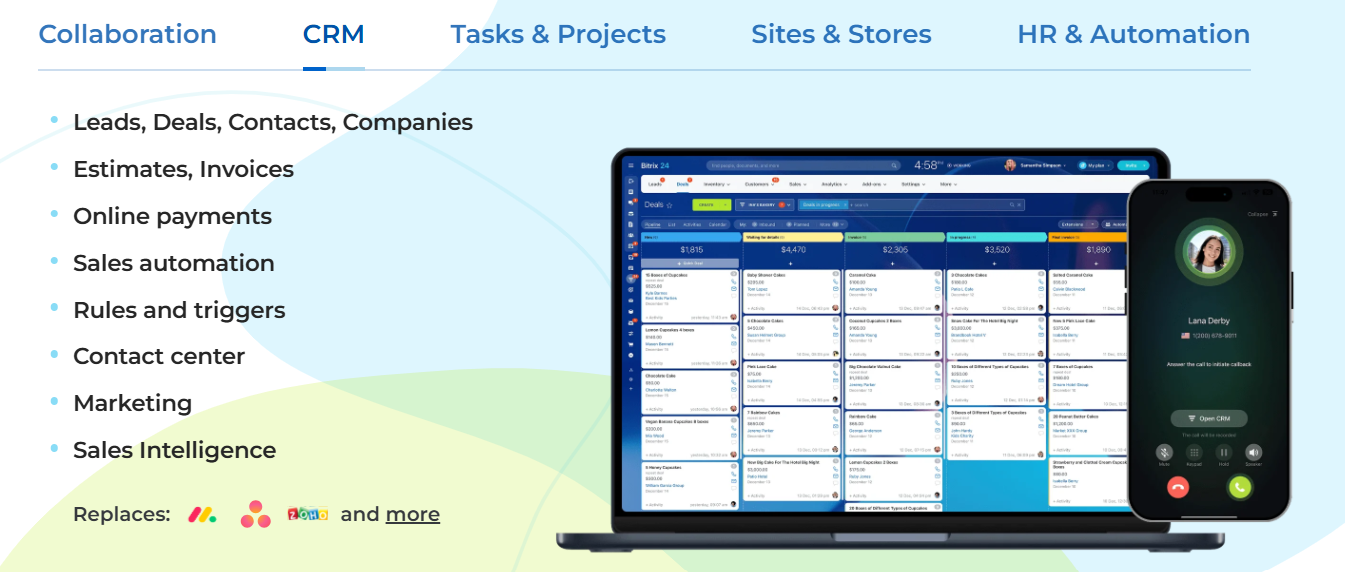
Bitrix24 is an all-in-one business workspace that replaces Salesforce's per-seat licensing stack with a single flat-fee subscription covering CRM, project management, internal communications, HR automation, and website building. Its key capabilities include:
CRM with lead and deal management, configurable pipelines, and omnichannel contact center (email, telephony, WhatsApp, Instagram, live chat)
Built-in group chat, HD video conferencing (100+ participants), shared document storage, and shared calendars, natively bundled
CRM web forms and live chat widgets that capture leads directly from any website into the CRM pipeline
Kanban boards, Gantt charts, and Scrum project workspaces running alongside CRM deal records
Self-hosted deployment option for organizations with data residency or compliance requirements
Bitrix24 claims to be "the only major CRM system in the world without per-user pricing", which makes it a defensible choice for growing teams where headcount growth shouldn't mean proportionally growing CRM costs.
Why Choose Bitrix24 Over Salesforce for Budget-Conscious All-in-One Operations
Bitrix24 stands out in the following areas:
Flat-Team Pricing That Doesn't Punish Headcount Growth
Salesforce's Enterprise tier at $175/user/month means a 50-person team pays $8,750/month in CRM licensing alone, before Slack, Data Cloud credits, or implementation costs. Bitrix24's Professional plan at $199/month covers up to 100 users, including CRM, project management, telephony, HR tools, and a website builder. For organizations whose CRM budget is constrained but headcount is growing, this pricing model changes the total cost calculation.
Collaboration Bundled In, No Separate Slack License
Salesforce's collaboration layer requires a separate Slack Business+ license at $15/user/month. Bitrix24's Collaboration module includes group chat, HD video conferencing for 100+ participants, shared document storage with real-time co-editing, and shared calendars at no additional charge.
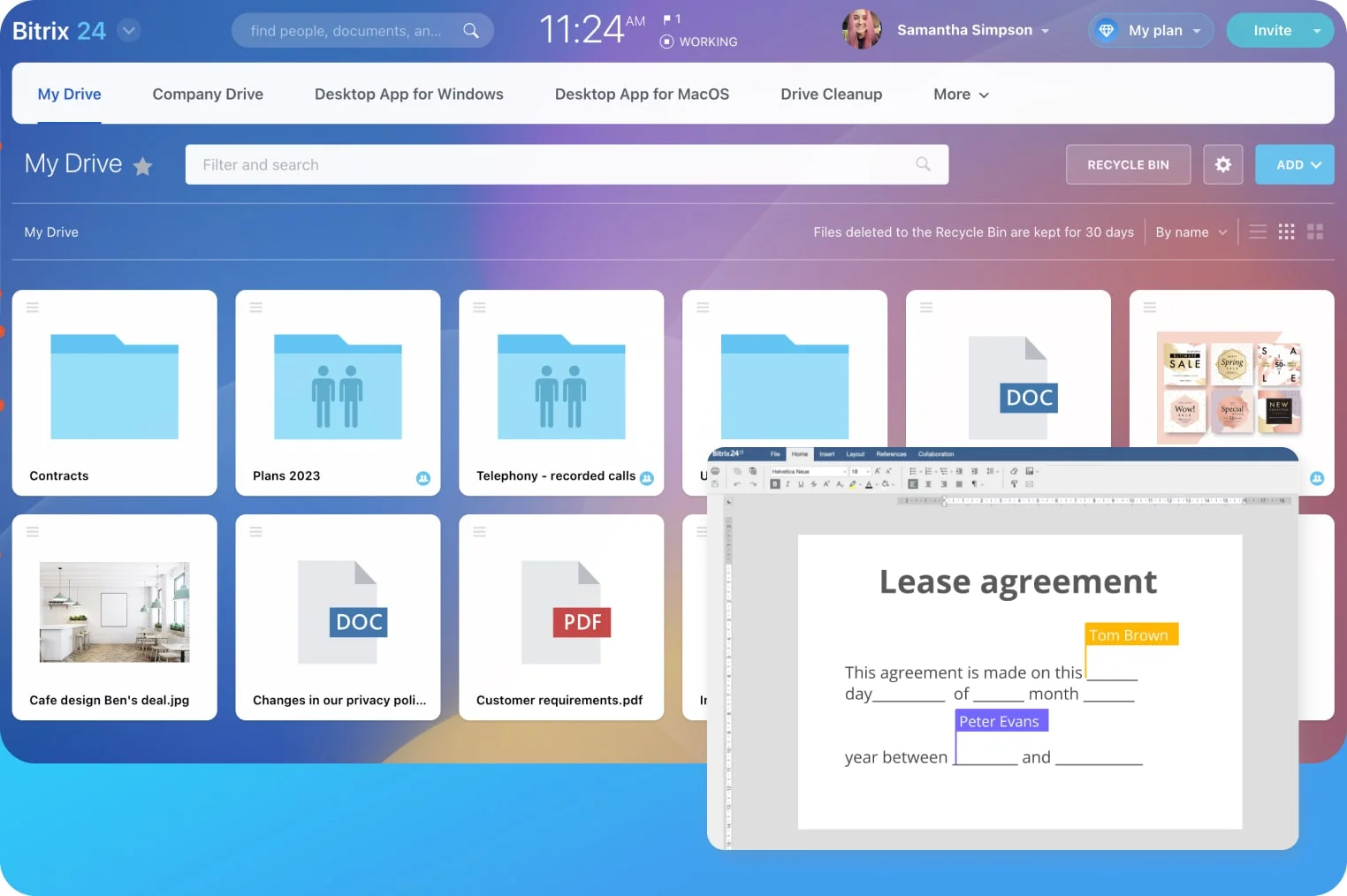
Source: Bitrix24
The Collabs feature extends workspaces to external collaborators without giving them access to internal data. For businesses running Slack, Zoom, and Google Drive alongside their CRM, Bitrix24 consolidates those subscriptions into one flat fee.
CRM, Project Management, and HR in One Workspace
Tasks & Projects (including Kanban, Gantt with all four dependency types, and Scrum) runs in the same workspace as CRM deal records. Tasks can link to CRM entities, so a rep who closes a deal can spin up a client onboarding project without switching tools.
The HR & Automation module adds org charts, no-code approval workflows, and KPI tracking, all within the flat-fee subscription. For agencies, professional services firms, and client-facing businesses where a won deal becomes a managed project, this workspace eliminates the tool sprawl that Salesforce's cloud-by-cloud architecture creates.
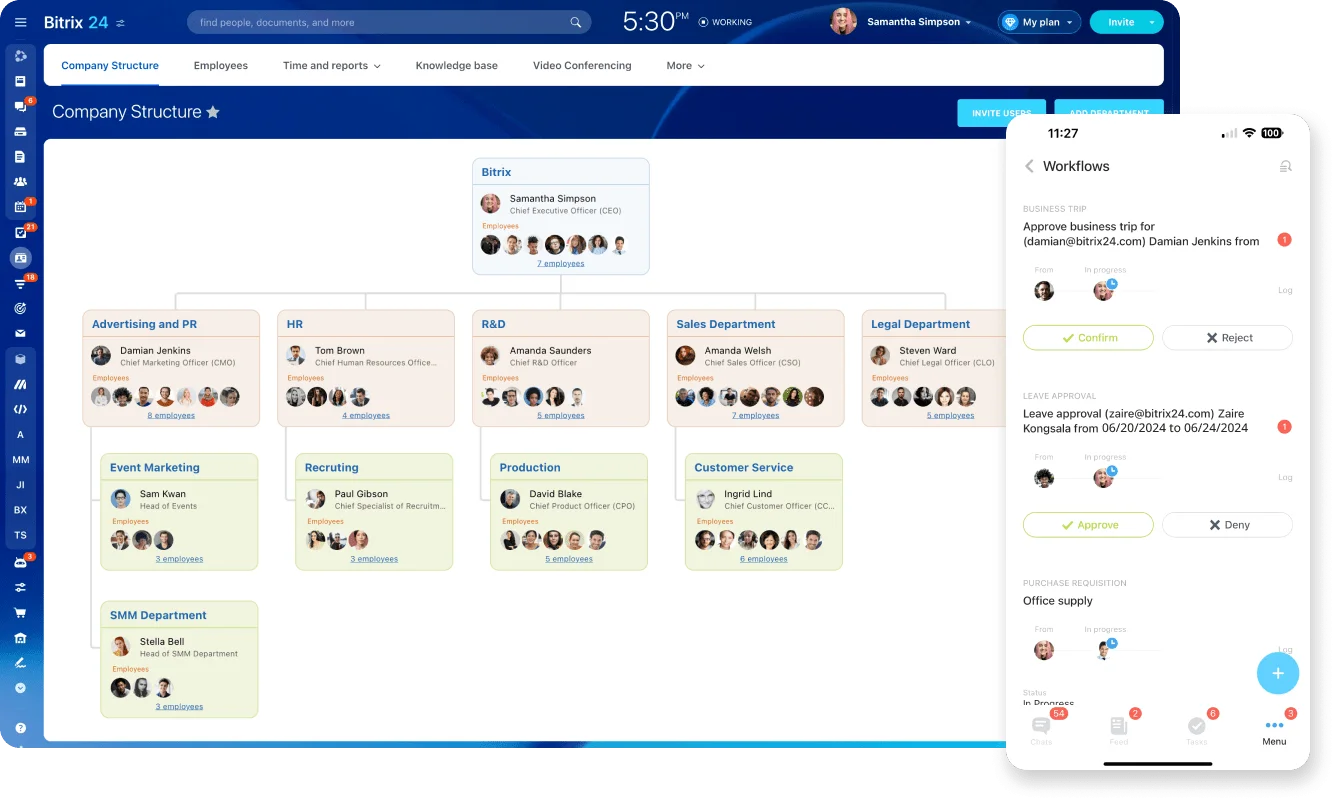
Source: Bitrix24
NOTE: We also evaluated HubSpot Free and Zoho Free for this budget-focused slot. HubSpot's free CRM is well-polished but restricts certain features to 2 active seat users. Zoho Free caps at 3 users. Bitrix24 offers flat-fee pricing for up to 100 users with collaboration tools included, and is the only major CRM with a self-hosted deployment path.
Bitrix24 Pricing
Each plan price covers the entire team up to the user cap, not per individual seat.
Free: $0/month (perpetual). Up to 2 users; 5 GB storage. Basic CRM, tasks, calendars, chat, video calls.
Basic: $69/month. Up to 5 users; 24 GB storage. Adds sales pipelines, telephony, CRM web forms.
Standard: $144/month. Up to 50 users; 100 GB storage. Adds sales automation, unlimited leads, invoicing, online payments.
Professional: $289/month. Up to 100 users; 1 TB storage. Adds AI-powered sales (CoPilot in CRM), call tracking, email marketing, workflow automation, HR tools.
Enterprise: From $575/month for 250 users. Scales to $7,999/month for 10,000 users.
On-Premise (Self-Hosted): Business Edition at $3,590 base (up to 50 users); Enterprise at $24,990 base (100+ users). Includes full source code access.
Who Should Use Bitrix24?
Choose Bitrix24 if:
Your team is in the 10-100 employee range and per-seat SaaS pricing has made your CRM stack disproportionately expensive relative to the features you actually use.
You need CRM, project management, and internal communications in one workspace, particularly if you're an agency or services firm that moves from sales into active project delivery.
You're evaluating Salesforce but don't need Agentforce autonomous agents, multi-cloud data orchestration, or Tableau-grade analytics, and want a platform that works without a certified admin or a six-figure implementation budget.
Your organization has strict data residency requirements that make self-hosted deployment a necessity.
See our full Bitrix24 vs Salesforce comparison.
7. Attio — Best Alternative for Tech-Forward Teams That Need a Flexible, AI-Native CRM
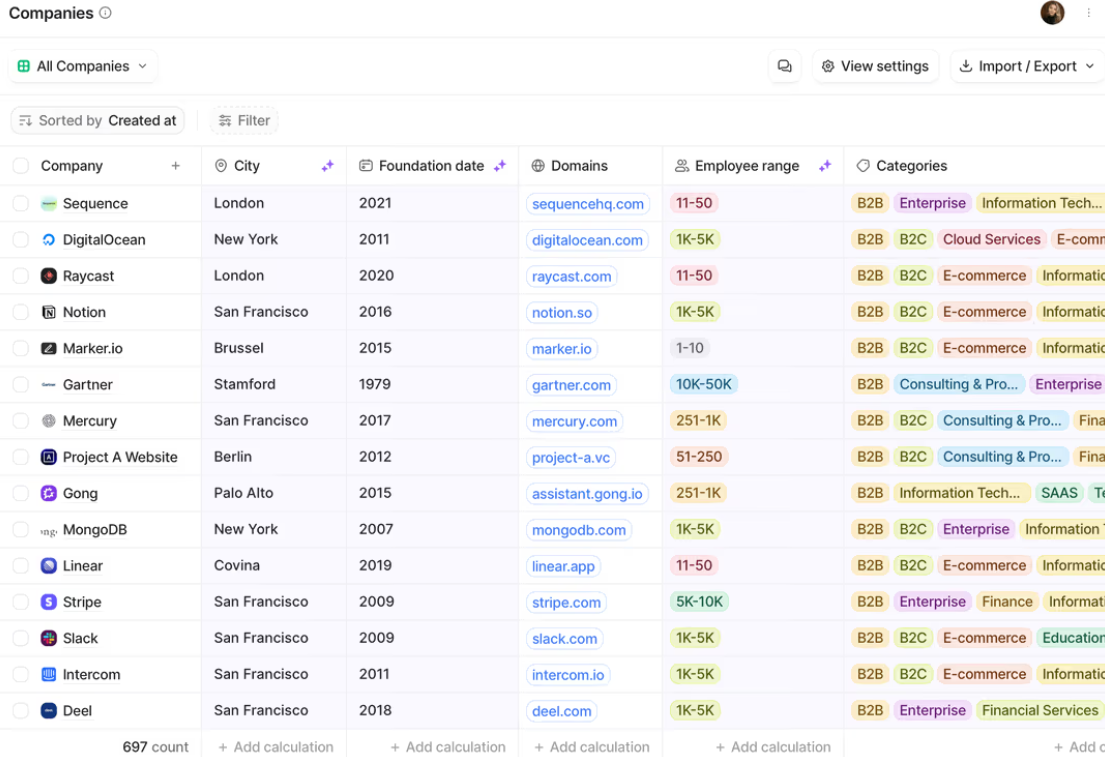
Source: Attio
Attio is a modern, AI-native CRM built on a custom relational object model that lets engineering-forward teams define their own data architecture rather than conforming to Salesforce's fixed contacts-accounts-deals schema. Its key capabilities include:
Custom object model for any relationship type (investors, partnerships, hiring funnels, PLG pipelines)
Auto-population of contact and company records from connected email and calendar
AI embedded directly into record fields and workflow automation blocks
Flexible list, board, calendar, and timeline views built on a relational graph
Native call intelligence with recording, transcription, and insight extraction
Developer platform with MCP server, REST API, and App SDK
ISO 27001 certified, GDPR/CCPA compliant
Attio is designed for seed-to-Series B startups, product-led growth companies, and VC/PE firms where flexibility, rapid deployment, and modern UX matter more than enterprise feature breadth.
Why Choose Attio Over Salesforce for Flexible, AI-Native CRM
Attio stands out in the following areas:
Relational Data Model That Mirrors Business Reality
Salesforce's object model (leads, contacts, accounts, opportunities) was designed for a specific go-to-market motion and hasn't changed in decades.
Attio's data model lets teams create custom objects for any business entity with custom attributes (17 types), views, and automation triggers. Relationships between objects are linkable across types without custom code.
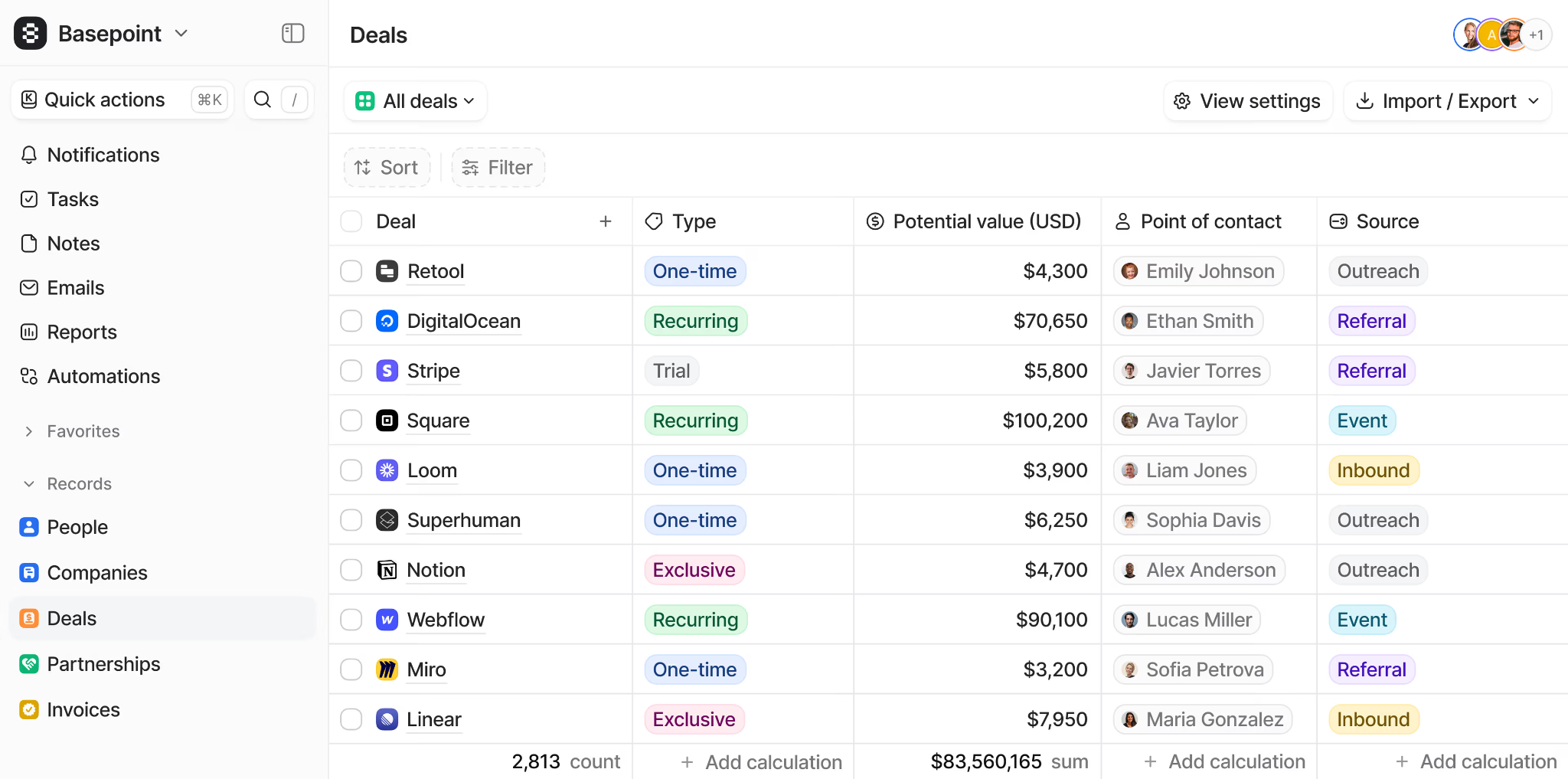
Source: Attio
For a direct comparison of Attio and Salesforce on flexibility, deployment speed, and pricing, see our Attio vs Salesforce comparison.
Zero-Input Data Capture That Populates the CRM in Days
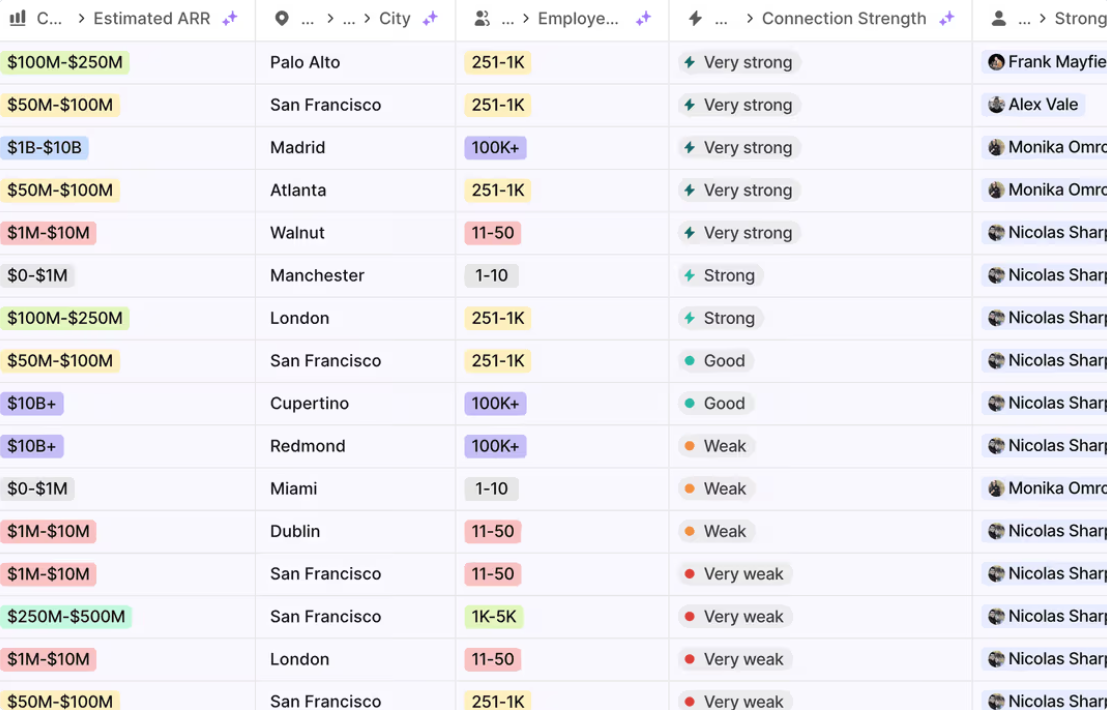
Attio syncs directly with email and calendar to populate company and contact records from communication history, including attendees, domains, email signatures, and interaction cadence.
Built-in enrichment appends company attributes (estimated ARR, employee range, funding raised) and person attributes (job title, social handles) from hundreds of sources. Combined with zero-input data capture, Attio's deployment timeline is measured in days to weeks rather than Salesforce's typical three-to-twelve-month implementation cycle.
Source: Attio
AI Built Into the Data Model, Not Layered On
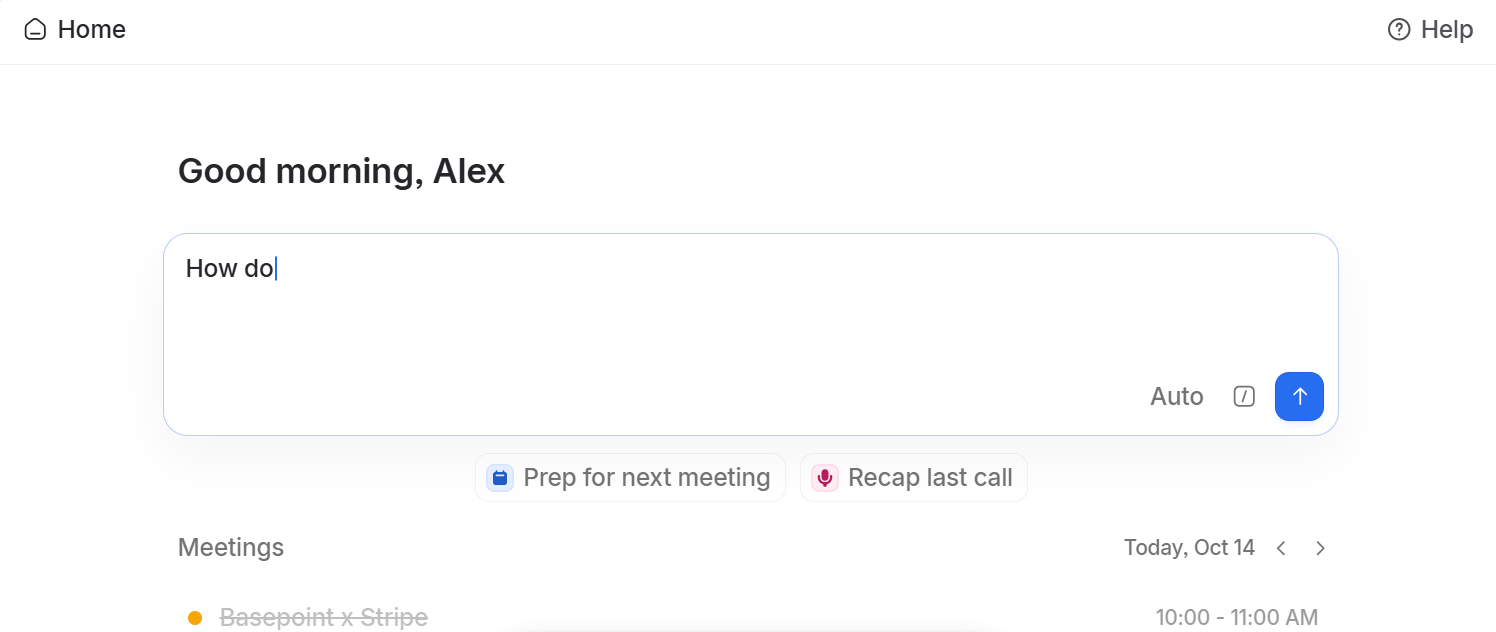
Ask Attio operates through Universal Context, a semantic index that treats records, emails, calls, notes, and external sources as one interconnected intelligence layer.
Source: Attio
Teams can add AI-generated summary fields to any record type, build AI classification rules into automation blocks, and run Research agent steps using web research. Critically, customer data is never used to train AI models, and all AI-suggested changes require user approval before applying.
For engineering-driven organizations that want AI operating on their own custom data model rather than a fixed schema, Attio's architecture is the more coherent path.
NOTE: We also evaluated Reevo and Twenty for this archetype. Reevo excels as an intelligence platform and Twenty is open-source with strong community development, but Attio offers the strongest product differentiation through its relational object model and AI-native architecture, with 5,000 paying customers, $116M raised (Series B led by GV), and consistent citation as the most innovative modern CRM approach.
Attio Pricing
Attio uses per-seat pricing with a 20% discount on annual billing. AI features consume credits beyond included monthly allocations.
Free: $0. Up to 3 seats, 50,000 records, 3 objects. No Call Intelligence, Ask Attio, or AI agents.
Plus: $36/user/month. Unlimited seats, 250,000 records, 5 objects. Full Ask Attio, AI agents, and Call Intelligence. Chat and email support.
Pro: $86/user/month. 1,000,000 records, 12 objects. Unlimited emails and sequences, advanced permissions. Priority support.
Enterprise: Custom pricing. Unlimited objects and teams, SSO, invoice billing, migration service included.
A startup program offers 80% off the annual Pro plan for the first year for VC-backed companies affiliated with an Attio partner firm.
Who Should Use Attio?
Choose Attio if:
Your go-to-market motion doesn't fit Salesforce's contacts-accounts-deals schema and you're tracking PLG activations, investor relationships, or partnerships that need custom objects without a Salesforce admin.
You want a CRM deployed in days, not months, auto-populated from email and calendar rather than requiring a manual data migration project.
Your team is engineering-driven and expects API-first architecture: MCP server, REST API, and an App SDK.
You're a seed-to-Series B company that needs AI built into the CRM data model itself rather than an enterprise agent platform requiring significant data infrastructure investment.
The Final Verdict
Salesforce excels as the most comprehensive enterprise CRM, but growing businesses and specialized teams often need tools built for the specific areas that matter most to them. Based on our research, here are the best alternatives:
ZoomInfo for intelligence-first prospecting, verified B2B data, and AI-driven pipeline execution powered by the GTM Context Graph
HubSpot for SMBs that want marketing, sales, and service unified under one roof with transparent pricing and no-code setup
Microsoft Dynamics 365 for enterprise organizations running the Microsoft stack that want native Outlook/Teams integration and bundled Copilot AI
Zoho CRM for mid-market teams that need enterprise automation, AI, and process enforcement at a quarter of Salesforce's per-seat cost
Pipedrive for deal-focused sales teams that want visual pipeline management and built-in activity enforcement without enterprise complexity
Bitrix24 for budget-conscious teams that need CRM, collaboration, and project management on flat-fee pricing without per-user licensing
Attio for tech-forward and relationship-driven teams that want a flexible, AI-native CRM with a custom relational data model
You don't have to choose between Salesforce and these alternatives exclusively. Many organizations use Salesforce alongside specialized tools to build their go-to-market stack. Consider your specific needs, team size, and growth plans when deciding which solution fits.
Ready to power your pipeline with verified B2B data and AI-driven deal intelligence? ZoomInfo's GTM Context Graph fuses your CRM records with 500M contacts, intent signals, and conversation intelligence to reveal why deals move and what to do next. Start your free trial or request a demo and see the intelligence layer in action.
Salesforce Alternatives FAQ
Why do businesses look for Salesforce alternatives?
Salesforce's main limitations for growing businesses include pricing complexity with multiple credit types and consumption tiers, implementation requirements where over 70% of deployments need partner-led projects, the data readiness investment required for AI features like Agentforce, and the overhead of maintaining a dedicated certified Salesforce admin. Organizations often find they need either more specialized capabilities in a specific area or a simpler, more cost-predictable platform that matches their current stage.
What is the best overall Salesforce alternative?
There is no single best alternative because Salesforce covers many different functions. ZoomInfo is the top choice for B2B prospecting intelligence and AI-driven pipeline execution. HubSpot leads for SMBs that want an all-in-one CRM with transparent pricing. Microsoft Dynamics 365 is the strongest enterprise alternative for organizations already running the Microsoft stack. The right choice depends on what specific capability gap you are trying to address.
Is there a free alternative to Salesforce?
Several alternatives offer free plans. HubSpot's free CRM is the most functionally complete, with unlimited contacts, a deal pipeline, email tracking, and basic marketing tools. Bitrix24 offers a free plan with CRM, tasks, and collaboration tools. Attio provides a free tier with up to 3 seats and 50,000 records. Zoho CRM's free plan supports up to 3 users. ZoomInfo offers a permanent free tier called ZoomInfo Lite with access to its B2B database and 10 monthly export credits.
How does Salesforce compare to HubSpot for small businesses?
Salesforce's Starter Suite begins at $25/user/month with limited features, and the platform's full value requires Enterprise-tier pricing ($175/user/month) plus implementation support. HubSpot's free CRM works immediately for small teams, and its Starter Customer Platform bundles all Hubs at $9/seat/month with no mandatory onboarding fees. HubSpot publishes all pricing publicly and does not require a sales conversation to understand costs, a real advantage for small businesses with fixed budgets.
Which Salesforce alternative is best for enterprise organizations?
Microsoft Dynamics 365 is the strongest enterprise alternative, particularly for organizations running Microsoft 365 and Azure. It offers native ERP connectivity without middleware, bundled Copilot AI credits at the Sales Premium tier, and Azure-backed compliance certifications included at the platform layer. Its Sales Enterprise tier at $105/user/month is 40% less than comparable Salesforce Enterprise pricing.
Can I use ZoomInfo alongside Salesforce?
Yes. ZoomInfo integrates natively with Salesforce and is used by thousands of organizations as the intelligence layer that powers their Salesforce CRM. ZoomInfo provides verified B2B contact data, intent signals, and deal intelligence that Salesforce cannot source natively. Many teams use ZoomInfo's GTM Workspace and GTM Studio for prospecting and campaign orchestration while keeping Salesforce as their system of record. ZoomInfo Agent Teams take this further, running complete GTM plays end to end as coordinated specialist agents share context, work from each account's current state, and act within the approvals and limits you set, available in GTM Studio and headless through GTM.AI.
Which alternative is best for teams on a tight budget?
Bitrix24's flat-fee Professional plan at $199/month covers up to 100 users with CRM, project management, telephony, and collaboration bundled in. For comparison, the same 100-person team on Salesforce Enterprise would pay $17,500/month in CRM licensing alone. Zoho CRM's Enterprise plan at $40/user/month offers the best balance of enterprise features and mid-market pricing, unlocking AI, territory management, and process enforcement at roughly a quarter of Salesforce's comparable tier.
How difficult is it to migrate from Salesforce to one of these alternatives?
Migration complexity depends on how deeply your organization uses Salesforce. Replacing a single function (pipeline management with Pipedrive, marketing automation with HubSpot) is straightforward. Replacing the full CRM, including custom objects, workflows, and integrations, requires more planning. HubSpot, Zoho CRM, and Attio all offer migration assistance and import tools. Many organizations keep using Salesforce alongside a specialized tool rather than replacing it entirely, which avoids the migration challenge altogether.
