
Why the ZoomInfo and Dynamics 365 integration changes how reps sell
Sales reps know the drill: you open a Dynamics 365 record, the contact's phone number is two years old, the email bounced last quarter, and you have no idea what's happening in the account. Before you can make a single call, you're already tabbing over to LinkedIn, a data tool, and whatever enrichment thing ops set up last year. By the time you've stitched together enough context to write a decent email, you've burned 45 minutes on one prospect.
The ZoomInfo Dynamics 365 integration fixes that. ZoomInfo is an all-in-one AI GTM Platform, and this integration puts ZoomInfo's verified B2B data, 500M contacts, 120M direct-dial phone numbers, and 200M+ verified business emails, directly inside the Dynamics 365 records your reps already have open. No tab-switching. No manual research. No stale data.
"Bringing the full suite of ZoomInfo directly into Microsoft Dynamics has been a constant request from our customers," says Henry Schuck, CEO at ZoomInfo. "Delivering our data, insights, and technology enables sellers and marketers to be more effective and efficient when they are engaging with prospects and customers and building demand and lead generation campaigns."
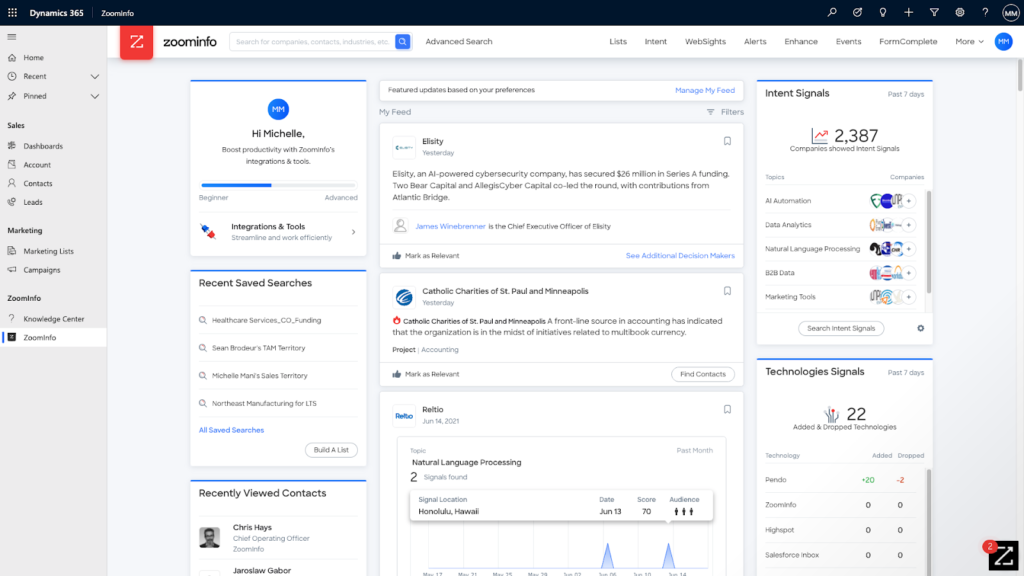
What the ZoomInfo Dynamics 365 integration includes
It is common for sales and marketing professionals who use Dynamics 365 to have their CRM systems open constantly, it is the system of record where the majority of sales-related activities are entered and managed. Previously, reps needed to leave that home base to search for prospects and build opportunity pipelines.
Kakileti describes the shift in terms of where intelligence lives: "Now we're bringing the data and GTM intelligence directly to the sellers. With our ZoomInfo for Microsoft Dynamics application, we've streamlined sales workflows. Reps will spend less time prospecting and more time selling."
The ZoomInfo Microsoft Dynamics 365 integration delivers three core capabilities:
The ZoomInfo application for Dynamics 365: Reps access verified B2B contact and company intelligence without leaving their CRM. Instead of toggling between tools, they get direct-dial phone numbers, business emails, and company intelligence surfaced directly inside the Dynamics record they already have open.
Dynamics 365 Connector: This pushes ZoomInfo data directly into Dynamics records, eliminating manual entry and keeping the CRM current. Sales and marketing teams can prospect and close without stopping to copy data between systems.
ZoomInfo Enrich: The automated enrichment engine that updates and appends contact and account records on a continuous basis, preventing data decay. Configure it once and records stay current without anyone on your team lifting a finger.
Behind each enrichment is ZoomInfo's verified data layer, 500M contacts, 120M direct-dial phone numbers, and 200M+ verified business emails, updated continuously by 300+ human researchers.
How the integration works in practice: a day in the life
Here is what the ZoomInfo Microsoft Dynamics 365 integration looks like for a rep doing real work.
A sales rep in the health IT industry opens a Dynamics 365 record for a new prospect at a target account. The record shows a name, title, and healthcare facility, and nothing else. The direct dial is missing. The email on file bounced last month. There is no tech stack data, no context on upcoming IT projects, and no signal on whether this account is even worth prioritizing right now.
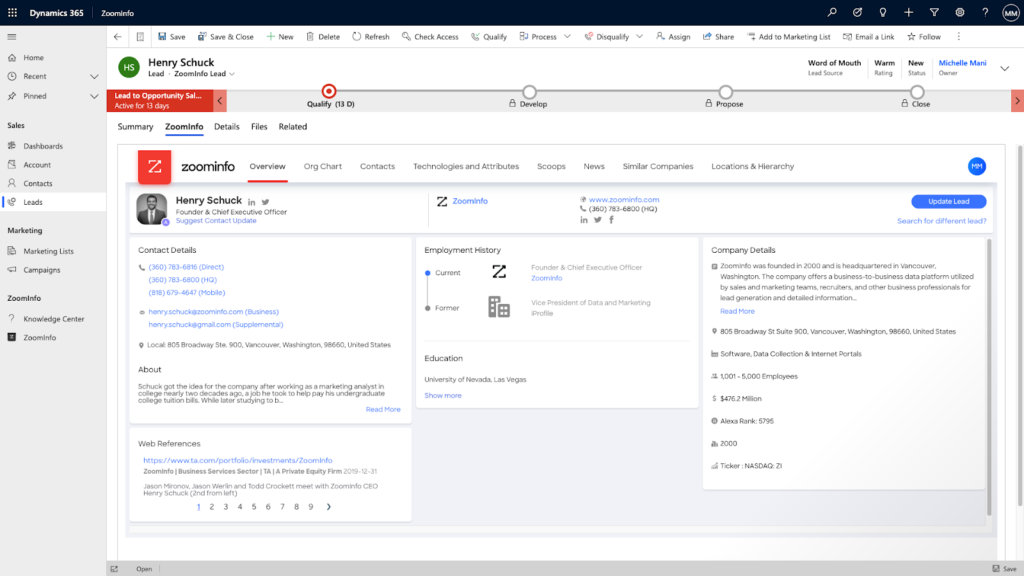
With ZoomInfo running inside Dynamics, the rep updates that record without leaving the CRM. ZoomInfo surfaces the prospect's verified mobile number, the prospecting context the rep needs to open a relevant conversation, the tech stack the healthcare facility runs, and Scoops intelligence on upcoming IT initiatives. The rep goes from a stale stub record to a complete, actionable profile in seconds.
Reps stop wasting time toggling between tools and start spending it on conversations. With ZoomInfo Enrich running automatically, the record they open tomorrow will be as current as the one they updated today.
"An integration like this is highly impactful for sales and marketing," says Katie Landaal, vice president of strategic alliances at ZoomInfo. "Not only does it create efficiencies, but it also allows for the user to work effortlessly through things like daily prospecting, audience targeting, and overall account management. It's like a symphony of workflows rather than the notes all sounding out of key."
In practice, that means reps spend less time re-entering data and more time on conversations, with verified contact details, tech stack context, and account intelligence available in a single Dynamics 365 view.
How to set up ZoomInfo in Dynamics 365
Setting up the ZoomInfo Dynamics 365 integration is a straightforward process through Microsoft AppSource. Before you start, confirm the following prerequisites are in place:
Dynamics 365 Sales Professional or Enterprise license
System Administrator or System Customizer role in your Dynamics environment
ZoomInfo account with the Dynamics integration enabled
Once prerequisites are confirmed, follow these steps:
Navigate to Microsoft AppSource and search for "ZoomInfo for Dynamics 365."
Select "Get it now" and follow the Power Platform admin center prompts to authorize the installation.
Assign the ZoomInfo application to the relevant Dynamics 365 environment.
Configure field mappings between ZoomInfo data fields and your Dynamics contact and account schema.
Enable ZoomInfo Enrich triggers, set them to fire on record creation and on a 90-day refresh cycle to prevent data decay.
Verify the install by opening a Dynamics contact record and confirming the ZoomInfo data panel appears.
For the full prerequisites checklist, contact your ZoomInfo account team or visit the ZoomInfo integrations page.
Who benefits from the ZoomInfo Dynamics 365 integration
The integration delivers value across the teams that touch Dynamics 365 daily, but the specific workflow improvements differ by role.
Sales reps and AEs
ZoomInfo surfaces verified direct-dial numbers, mobile contacts, and account intelligence inside the Dynamics record the rep already has open. No tab-switching to LinkedIn, no manual research pass before a discovery call. Reps spend less time building context and more time on conversations that move pipeline. For AEs managing large territories, that means walking into every call with the org chart context, tech stack, and account intelligence that used to take 20-30 minutes to assemble manually.
Marketing and demand gen teams
Marketers use ZoomInfo data inside Dynamics to build precise audience segments for campaigns, target accounts showing buying signals, and measure campaign impact against enriched CRM records. Enriched records mean better account management and more accurate audience targeting, campaigns reach the right people instead of the contacts who happened to be in the system three years ago.
RevOps and CRM admins
ZoomInfo Enrich automates the data hygiene work that ops teams previously did manually: appending missing fields, updating stale records, and flagging contacts who have changed roles. The downstream impact on pipeline workflows is significant. See how Momentive cut speed-to-lead from 20 minutes to 60 seconds after automating enrichment workflows, that kind of improvement becomes possible when verified data flows automatically into the CRM rather than waiting on manual updates.
Across all three teams, the integration eliminates the data decay that silently erodes outreach effectiveness, a problem that compounds every quarter without automated enrichment.
Best practices for a successful ZoomInfo Dynamics 365 integration
Getting the Microsoft Dynamics 365 integration installed is the first step. Getting it to perform is a configuration discipline. These five practices separate integrations that deliver ROI from ones that quietly underperform:
Configure enrichment triggers on both record creation and a 90-day refresh cycle. Enriching only on creation leaves existing records to decay silently. This is one of the most common oversights: account enrichment gets configured, contact enrichment never does, and nobody catches it until outreach starts failing at scale.
Set field-level override rules to protect manually verified data. ZoomInfo Enrich should fill gaps and update stale fields, not overwrite information your team has already confirmed. Configure override logic so high-quality custom data is preserved while ZoomInfo fills everything else.
Deduplicate before you enrich. Running enrichment on a database with duplicate records multiplies the problem. Establish a deduplication pass as a prerequisite, not an afterthought.
Map intent signals to rep workflows, not just to records. If ZoomInfo's buying signals are enriching Dynamics account records but reps have no alert or view surfacing them, the signals go unacted on. The data has to connect to a rep's daily workflow, a queue, a view, a notification, or it disappears into the CRM.
Audit enrichment coverage quarterly. Pull a report of records with missing direct-dial or email fields to identify gaps in ZoomInfo's coverage for your specific territory or vertical. Coverage varies by industry and geography; a quarterly audit tells you where to supplement.
The difference between a mediocre and exceptional Dynamics 365 implementation often comes down to the integrations layered on top, and how deliberately they are configured.
ZoomInfo's broader platform: data, intelligence, and access
With ZoomInfo's verified data, 120M direct-dial phone numbers and 200M+ verified business emails, available directly within Dynamics 365, sales and marketing teams eliminate data decay, reduce time spent toggling between tools, and focus on the conversations most likely to move pipeline.
But the integration is more than a data connector. ZoomInfo's three pillars, verified data, the GTM Context Graph, and Universal Access, work together to make Dynamics 365 a genuinely intelligent selling environment, not just a cleaner contact list.
The verified data layer is the foundation: 500M contacts, 100M companies, and 1.5B+ data points processed daily, maintained by 300+ human researchers. On top of that sits the GTM Context Graph, the intelligence layer that reasons across signals to capture not just what happened in an account, but why. The GTM Context Graph fuses ZoomInfo's B2B data with CRM data, conversation intelligence, and behavioral signals into a unified reasoning layer, so when a rep opens a Dynamics record, they are not just seeing a contact profile, they are seeing the full account context that explains why now is the right moment to reach out.
Universal Access means that same data and intelligence is available wherever your team works. Inside Dynamics 365 through the native integration. Inside GTM Workspace for sellers who want AI-assisted workflows. Inside GTM Studio for marketers and RevOps teams building audiences and orchestrating plays. Through APIs and MCP for teams that want to pipe ZoomInfo data into custom tools and agents. The integration is an entry point into a platform that travels with your team, not a silo that only works inside one system.
See how ZoomInfo's all-in-one AI GTM Platform works inside your Dynamics 365 environment, request a demo.
Frequently asked questions
How does ZoomInfo integrate with Microsoft Dynamics 365?
ZoomInfo offers a native application for Dynamics 365, available through Microsoft AppSource. Once installed, it embeds a ZoomInfo data panel directly inside Dynamics contact and account records, letting reps access verified contact data, company intelligence, and technographic signals without leaving their CRM. ZoomInfo Enrich runs automatically to keep records current, so the integration delivers continuous value rather than a one-time data import. This is the core of the ZoomInfo Dynamics 365 integration: verified B2B data and account intelligence, available where reps already work.
What data does ZoomInfo add to Dynamics 365 records?
ZoomInfo enriches Dynamics records with verified direct-dial phone numbers, mobile numbers, business email addresses, company firmographics (size, industry, revenue), technographic data on the tech stack a company runs, and Scoops intelligence on upcoming projects and initiatives. Data is sourced from ZoomInfo's verified B2B database of 500M contacts and 100M companies. The ZoomInfo Dynamics 365 integration keeps these fields current on a continuous basis, so reps are always working from accurate records rather than data that was correct at import and has been decaying ever since.
Can ZoomInfo automatically enrich records in Dynamics 365?
Yes. ZoomInfo Enrich is the automated enrichment feature that updates and appends Dynamics 365 records on a continuous basis. It can be configured to trigger on record creation and on a recurring schedule, every 90 days is a common cadence, to prevent data decay. This means reps always work from current contact information without manual data entry. Configure ZoomInfo Enrich to cover both contact and account records; a common oversight is enabling account enrichment but leaving contact enrichment unconfigured, which leaves the most-used records to decay silently.
Why is my ZoomInfo Dynamics 365 integration not working?
Common causes include: a missing or incorrect Dynamics 365 license tier (Sales Professional or Enterprise is required); insufficient admin permissions (System Administrator or System Customizer role is needed for installation); ZoomInfo Enrich not configured for contact records separately from account records; field mapping conflicts that prevent data from populating correctly; or the ZoomInfo data panel not appearing because the app was installed in the wrong Dynamics environment. For configuration support, contact your ZoomInfo account team or visit the ZoomInfo integrations page for setup resources.
Is ZoomInfo's Dynamics 365 integration GDPR and CCPA compliant?
ZoomInfo maintains ISO 27001, ISO 27701, SOC 2 Type II, and TRUSTe GDPR/CCPA certifications. The Dynamics 365 integration inherits ZoomInfo's platform-level compliance framework, meaning data processed through the integration is subject to the same privacy and security standards as the broader platform. For enterprise buyers in regulated industries or with European prospecting requirements, ZoomInfo's compliance documentation is available through your account team.