
Every major sales vendor shipped an MCP server in the past year. Connect one to your AI assistant and it can build prospect lists, enrich contacts, and check buying signals from the chat.
How well that works comes down to the data server behind it. The same prompt in Claude returns verified decision-makers with working emails and dials from one server, and a short list of unverified names from another.
This guide covers how these agents work and the seven servers worth connecting, starting with the data foundation the rest depend on.
What Is an MCP Prospecting Agent?
An MCP prospecting agent is an AI client, such as Claude or ChatGPT, running one or more MCP data servers and working agentically to find and enrich prospects from a plain-language request. It has three parts worth separating.
The client, or host, is the AI app you work in, such as Claude Desktop, ChatGPT, Cursor, or Claude Code. The server is a data or tool provider that exposes its capabilities over MCP, such as ZoomInfo, Clay, or a CRM. The agent is the model running in a loop inside the client, planning which tools to call and chaining them toward a goal you set in plain language.
Put together, you describe an ideal customer profile, and the agent searches a database, enriches the matches with verified emails and direct dials, checks buying signals, and hands you a prospect list ready for your CRM or sequence tool. The servers are its hands, the data provider is what makes those hands worth using, and Agent Teams can run the full play headless through GTM.AI.
One point of confusion is worth clearing up. Some vendors use MCP to mean multi-channel prospecting, a sales strategy for reaching buyers across email, phone, and social. That is a different thing. Everything here refers to the Model Context Protocol, the technical standard that connects AI assistants to external data.
How an MCP Prospecting Agent Works
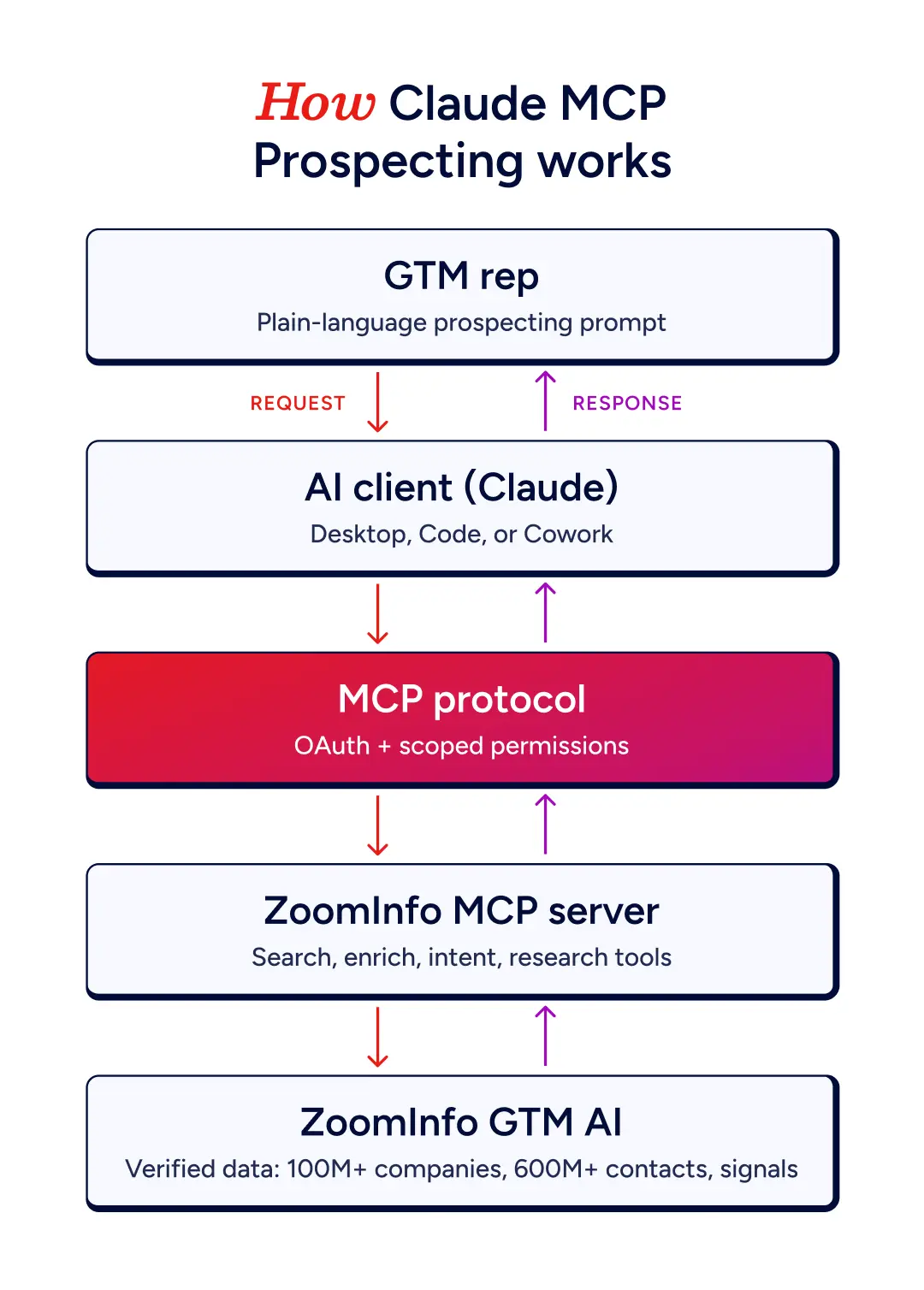
An MCP prospecting agent works by turning a plain-language request into a sequence of tool calls against the servers you have connected. Under the old model, wiring five AI clients to five data tools meant maintaining twenty-five separate integrations, the N×M integration problem. MCP replaces that with one standard, so a server implements MCP once and any compliant client can call it.
In practice, a single prospecting session runs in a predictable loop.
You describe your ICP with firmographic and technographic criteria.
The agent calls a search tool to return matching companies and contacts.
It calls an enrich tool to add verified emails, direct dials, and other contact fields.
It checks intent or buying signals to prioritize the accounts showing activity.
It structures the output into a prospect list ready for your CRM or a sequence.
Here is the same flow end to end, from the rep's prompt down to ZoomInfo's verified data and back up as results.
Because the agent reasons between steps, it can apply judgment a static enrichment job cannot. It can drop contacts that fail verification, re-rank a list by buying signal strength, or map the full buying committee at an account before you commit credits to enriching everyone on it.
MCP Prospecting Servers Compared
The table below lines up the seven servers by what they are best at, what they cover, whether they can act, and how they authenticate.
Server | Best for | Coverage or role | Actions | Auth |
ZoomInfo | Verified data foundation | 600M+ contacts, 100M+ companies, intent, first-party context | Read-only | OAuth, no API key |
Apollo | Broad all-in-one database | Large B2B database with sequencing | Read and write | OAuth or API key |
Clay | Multi-provider enrichment | 150+ data providers, waterfall | Read-only | OAuth |
LeadIQ | LinkedIn and SDR prospecting | Verified emails and dials, list write-back | Read and write | OAuth |
Amplemarket | Full outbound on one platform | Data plus multichannel sequences | Read and write | OAuth |
Crustdata | Precise, technical search | 1B+ people, 700M+ companies, 95+ filters | Read-only | API key |
HubSpot | CRM context for the agent | Your CRM records | Read-only | OAuth |
Seven MCP Servers to Build Your Prospecting Agent Around
The right build starts with the data foundation and adds tools around it. The seven below are ordered by the job each one does, beginning with the data source you should anchor to.
ZoomInfo
ZoomInfo connects through one hosted server, and each user signs in with their own ZoomInfo credentials over OAuth, so there is no API key to manage. That personal sign-in matters, because tools like Account Research draw on your accounts, CRM relationships, and past conversations, context a shared login would lose.
The data is the reason to start here. The server reaches 600M+ contacts and 100M+ companies, plus intent, scoops, and news signals, and it blends that third-party data with your own CRM and conversation history. The credit model is simple.
Search, lookup, and find-similar tools are free.
Enrichment draws one bulk data credit per new record, and Records Under Management prevents double-charging for the same record inside twelve months.
The research agents draw AI action credits.
Every ZoomInfo MCP tool is read-only, which is deliberate. The agent pulls verified data into context without writing anything back or firing a sequence on its own, so a bad prompt cannot corrupt your CRM. When you want to run complete GTM plays from signal to action, Agent Teams coordinates specialist agents through GTM.AI headless or in GTM Studio.
The difference this makes is easiest to see on video. ZoomInfo's CEO runs one prompt in Claude twice, first with ZoomInfo connected, returning around 1,400 real VP-level contacts with verified emails and phone numbers, then with no data foundation, returning vague notes and nothing you can act on.
Here is a starter prompt that orients a fresh session before it spends anything.
"I just connected ZoomInfo. Call get_gtm_context first, it is free, and use it plus my company name and email domain to work out what we sell and who we target. Say it back in one line and check I agree. Then offer me three or four concrete first actions grounded in that context, such as prepping for a meeting this week or finding accounts showing buying intent. Once I pick one, tell me which tools you will run and roughly how many credits it will cost before running anything."
Pricing follows your existing ZoomInfo subscription. The GTM AI pricing page has current details.
Apollo
Apollo shipped its MCP server in early 2026, and it covers the full outbound loop from one connector, searching for people and companies, enriching them with verified emails and phone numbers, and enrolling them into sequences. It reads and writes, so it suits a smaller team that wants database, enrichment, and outreach in a single tool rather than a stack of specialists.
Two cautions apply. Apollo's data depth and accuracy sit below a dedicated intelligence provider, and public reports on its MCP output quality are mixed, so verification carries more weight here. Several Apollo MCP servers on the market are also third-party wrappers rather than Apollo's own, and they vary in maintenance and authentication, so confirm you are pointing at the official server before you connect.
See how Apollo compares to ZoomInfo.
Clay
Clay's server is an orchestration layer rather than a single database, best when you want breadth of sources on a handful of high-value accounts.
It reaches across 150+ data providers, so the agent can run a waterfall, trying provider after provider until a verified email or phone resolves, and it can trigger your team's prebuilt Clay workflows from the chat. It connects as a hosted remote server over OAuth and is read-only out of the box.
The tradeoff is scale. Clay is built for rep-scale, ad-hoc work, roughly one to twenty contacts per task, with volume and CRM sync living back in the Clay platform. It also charges credits per provider you call, which adds up on larger lists.
See how Clay compares to ZoomInfo.
LeadIQ
LeadIQ is built for SDR teams that prospect from LinkedIn.
It launched its server in early 2026 as a verified connector in the Claude directory, so setup runs through OAuth in a couple of minutes with no developer app, and it runs on your existing LeadIQ credits. It captures verified contact data and tracks when your contacts change jobs, the workflow the platform is known for.
Unlike the read-only data servers, LeadIQ can write back, creating prospects and adding them to lists inside your LeadIQ workspace, though it does not reach external CRMs directly. Batch enrichment is capped at ten records per call, which keeps it in interactive-prospecting territory rather than bulk list building.
See how LeadIQ compares to ZoomInfo.
Amplemarket
Amplemarket takes the all-in-one idea further than Apollo, running the entire sequence from one server for teams that want outbound end to end inside the agent.
It finds prospects, enriches and researches them, builds multichannel sequences, and enrolls them into live outreach, reading and writing across the full funnel. It is the most complete single platform here.
That completeness is also the caution. A platform that both sources data and sends outreach ties you to its own data quality for the whole funnel, so the verified-foundation question still applies. Amplemarket also publishes its own server rankings, so treat its self-scoring accordingly and test the data against your ICP before you scale.
See how Amplemarket compares to ZoomInfo.
Crustdata
Crustdata is the pick when search precision matters and the user is comfortable being technical.
Its server connects to a large profile database and stays read-only, with the search layer as the differentiator: company search supporting more than ninety filters and nested boolean logic, so the agent can translate a detailed ICP into a precise query. It also exposes social post retrieval, useful for pulling a prospect's recent activity for personalized outreach.
It is an emerging provider rather than an established one, and some capabilities, such as its job-change and funding webhooks, are configured through the REST API rather than MCP. For a GTM engineer building filter-heavy prospect searches, it is worth a look.
See how Crustdata compares to ZoomInfo and Mixrank.
HubSpot MCP
HubSpot's server is the CRM layer rather than a prospecting database, and it belongs on this list because a real prospecting agent pairs a data source with a CRM.
It gives the agent read-only access to your CRM objects, including contacts, companies, deals, and tickets, so the agent can ground a prospect list against what you already own, check whether an account is already in play, and pull pipeline context. Setup is OAuth through a HubSpot developer app or the HubSpot CLI. Write access is on HubSpot's roadmap but not yet live, so the agent reads your pipeline today and cannot update it through MCP.
This is the clearest illustration of the pattern to build around. A verified data server finds and enriches, a CRM server supplies the context, and if you run HubSpot as your system of record, the HubSpot versus ZoomInfo comparison is worth reading on where the underlying data differs.
See the full ZoomInfo and HubSpot MCP breakdown.
How to Choose the Servers for Your Agent
Anchor the build to the deepest verified data source you can, add a CRM for context, and layer on specialists only when a specific workflow needs one. The order matters more than the brand, since a weak foundation means the agent acts confidently on bad data. From there, a few principles keep the rest of the build clean.
Decide how much you want the agent to act. Read-only servers keep a human in the loop, while read-write servers create records and enroll sequences faster and carry more risk from a bad prompt.
Watch the credit model. Search and lookup are usually free, but enrichment and AI research consume credits, so an agent left to enrich a whole list can spend faster than you expect.
Prefer official servers over third-party wrappers. Community servers vary in maintenance and authentication, and one security review found that 41% of public MCP servers ship with no authentication at all.
Know when MCP is the wrong surface. For bulk exports, scheduled jobs, or application code, a CLI or REST API uses fewer tokens and handles volume better.
Do not connect everything at once. Every server adds its tool definitions to the model's context window, so start with two, a data source and a CRM, and add the next only after they behave.
Build Your Prospecting Agent on a ZoomInfo Foundation
An MCP prospecting agent is only as good as the data you connect to it.
For most revenue teams, ZoomInfo is the foundation to build on, with the depth of verified contacts, companies, and signals that make an agent's output worth acting on, all from one hosted server that respects your existing package.
Connect it to the AI client your team already uses, add a CRM for context, or let start building on ZoomInfo with one real prospecting task.
Frequently Asked Questions
Is MCP the same as multi-channel prospecting?
No. Some sales vendors use MCP to mean multi-channel prospecting, a strategy for reaching buyers across email, phone, and social. In this guide, MCP means the Model Context Protocol, the technical standard that connects AI assistants to external data and tools.
Do I need a ZoomInfo subscription to use its MCP server?
Yes. Connecting ZoomInfo works on any ZoomInfo package, and you also need bulk data credits enabled and your own ZoomInfo login. The MCP server respects your existing package, so you reach the same data through the AI tool that you would in the ZoomInfo web app.
Which AI clients support MCP prospecting?
Any MCP-compatible client. ZoomInfo lists setup for Claude, Claude Code, ChatGPT, Microsoft Copilot, Cursor, Perplexity, and others, all pointing at the same server endpoint. No particular AI tier is required beyond what the client needs for MCP support, so the same server works across whichever client your team already uses.
Can I control which ZoomInfo tools the agent uses?
Yes. Most MCP clients let you enable or disable individual ZoomInfo tools in the connector settings, and you can steer the agent toward a specific tool by naming it in your prompt.
