
Claude MCP for sales prospecting connects Claude to a live B2B data source through the Model Context Protocol, so a rep can find, enrich, and qualify accounts from a single conversation instead of switching between a database, a CRM, and a spreadsheet. The value depends entirely on what data sits behind the connection. Point Claude at ZoomInfo's GTM AI and it prospects against verified companies and contacts. Point it at the open web and it returns whatever it can scrape.
This guide covers what the connection does, which prospecting jobs Claude can run once it is in place, the tools behind each step, and how to set it up in Claude Desktop, Claude Code, or Cowork.
What Claude MCP for Sales Prospecting Means
The Model Context Protocol (MCP) is an open standard that lets an AI assistant call external tools. A ZoomInfo MCP server exposes a set of prospecting actions, from searching companies to enriching contacts to pulling intent signals, that Claude can invoke on its own based on a plain-language request.
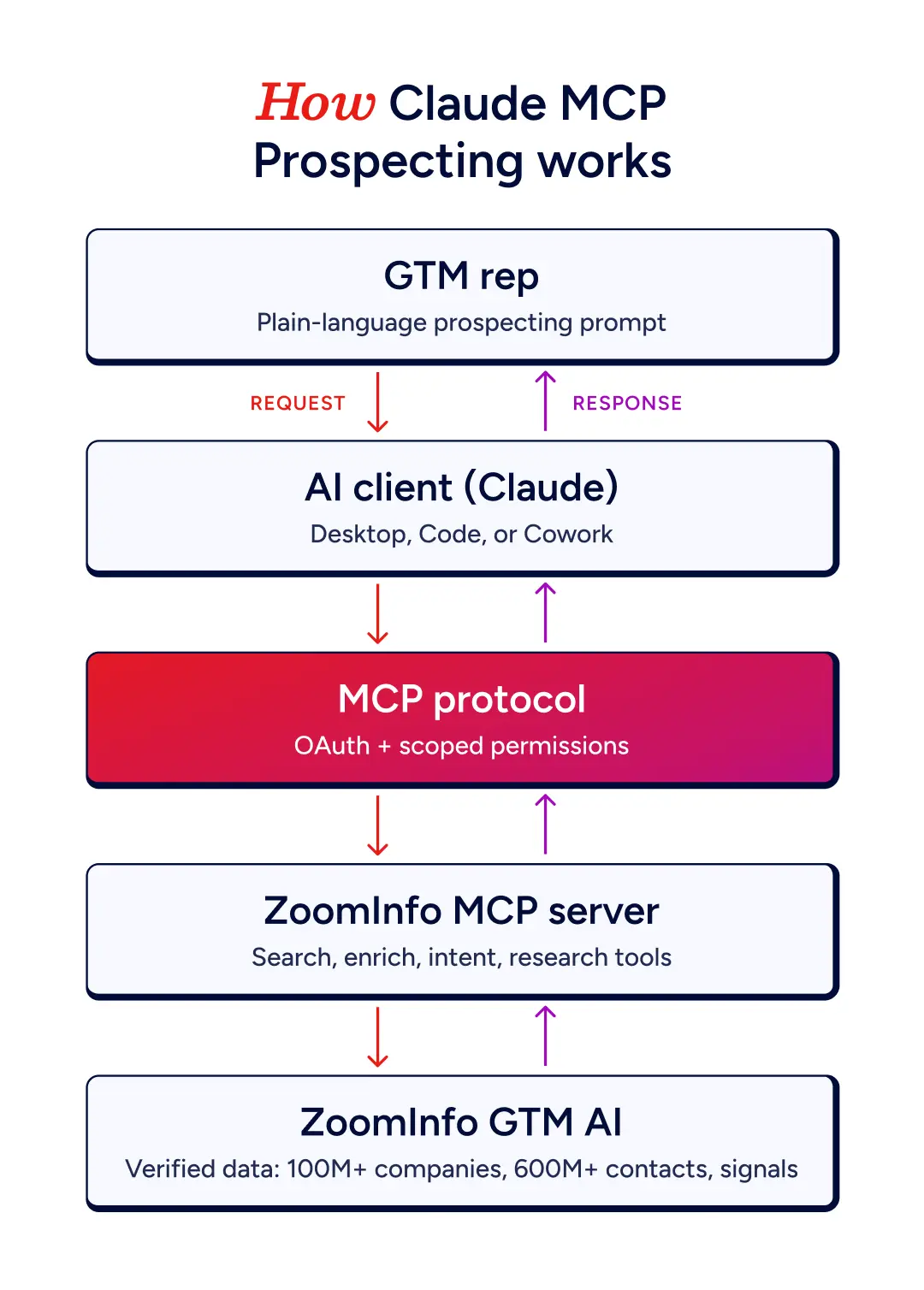
For a rep, that reframes prospecting as a conversation. You describe the outcome and Claude sequences the steps. Ask for mid-market logistics firms that match your ICP and it searches, filters, and returns a ranked list. Ask it to enrich the ten strongest and it pulls verified emails and direct dials. The database, the enrichment step, and the finished list all live in one thread.
Why Verified Data Is the Constraint
Any AI assistant can summarize a company from its website. That is table stakes and it rarely moves a deal. Prospecting needs the details a public page seldom carries, like who owns the buying decision, whether the account is in-market, and which direct dial actually connects.
Without a grounded data source, Claude fills those gaps with whatever the open web offers, which reads plausible while being wrong. With ZoomInfo connected, the same prompt draws from records that are continuously verified, so a title reflects the person's current role and a direct dial is one that was captured rather than guessed.
The gap is measurable. B2B contact data decays at close to 2.1% a month, roughly a quarter of a database a year, and phone numbers and job titles go stale faster than that. Point a capable model at records aging at that rate and it will prospect confidently into people who moved on two quarters ago.
The rule holds across every prospecting task. Enrichment is only as good as the source it draws from, and that source sets the ceiling on everything Claude builds on top of it.
What Claude Runs Across the Prospecting Workflow
Once connected, Claude covers the prospecting loop end to end. The stages a rep would normally spread across tools collapse into one conversation.
Build a target list. Describe your ICP in plain language and Claude searches by firmographics, then returns a ranked set of accounts. Ask for lookalikes of a closed-won account and it finds companies with a similar profile.
Find the right contacts. Claude searches for decision-makers by role, seniority, or function inside those accounts, and surfaces the full buying committee rather than a single name.
Enrich for outreach. It fills in verified business emails, direct dials, and current titles, turning a list of names into a list you can actually reach.
Prioritize by intent. Claude pulls buyer intent and business-event signals, flagging which accounts are showing in-market behavior so reps work the warmest first.
Draft grounded outreach. With the account's real context already in the thread, Claude drafts a sequence shaped by role, stage, and the signal that surfaced the account, instead of a generic template.
Each step feeds the next. A single prompt can chain find, enrich, and score, then hand back a list ready to import or a draft ready to send.
What the Connected Workflow Replaces
Prospecting has always been a relay. A rep filters a database, exports a list, checks each account in a separate enrichment tool, switches to a sequencer to write the outreach, then logs it all by hand. Every handoff costs time, and the context built up in one step rarely survives into the next.
A connected setup removes the handoffs. The same steps run in one thread, against one source, with no export-and-reimport in between.
Prospecting step | The usual way | With Claude and ZoomInfo |
Build a list | Filter a database UI, export a CSV | Describe the ICP in a sentence, get a ranked list |
Find contacts | Search each account by hand | Pull the buying committee across accounts at once |
Get details | Copy-paste, or a second enrichment pass | Verified emails and dials returned inline |
Time the outreach | Guess, or open a separate intent tool | Signals surfaced on the same list |
Draft the touch | Start from a blank template | Draft grounded in the account's real context |
Update the CRM | Manual entry into Salesforce or HubSpot | Enriched records ready to route |
The saving is more than minutes. Because the account's data stays in the conversation, the list you built informs the contacts you pull, which inform the outreach you draft. Nothing gets re-explained or re-keyed, and reps hold onto reasoning that a tab switch usually throws away. Writing enriched records into Salesforce or HubSpot on a schedule is a separate connection, covered in the FAQ below.
The ZoomInfo Tools Behind Each Prospecting Step
Claude selects the right tool for your request, so you never have to name one. Understanding what sits underneath helps you predict output and cost.
Tool | Role in prospecting | Credits |
Search Companies | Find accounts by firmographic criteria | Free |
Find Similar Companies | Surface lookalikes of a strong account | Free |
Search Contacts | Find decision-makers by role or seniority | Free |
Find Recommended Contacts | Return outreach-ready contacts for an account | Free |
Search Intent | Discover accounts showing buyer intent | Free |
Enrich Contacts | Add verified emails and direct dials, up to 25 per call | Bulk data |
Enrich Companies | Add full firmographics, up to 25 per call | Bulk data |
Account Research | Full intelligence briefing on a target account | AI action |
The pattern is worth noting. Searching and list-building are free, so a rep can shape and reshape a target list at no cost, and credits are only spent when Claude enriches records or runs a research agent. That keeps the exploratory part of prospecting cheap and puts spend where it produces contactable data.
Choosing Your Claude Setup
All three clients connect to the same ZoomInfo MCP server and run on your own ZoomInfo login, so Claude prospects inside your existing permissions and never above your seat.
Client | Best for | Setup |
Claude Desktop | Reps prospecting inside a chat | Add ZoomInfo from the connector marketplace, sign in with OAuth |
Claude Code | GTM engineers scripting repeatable prospecting workflows | Install the ZoomInfo plugin, authenticate over OAuth |
Claude Cowork | Handing off multi-step list-building as a finished deliverable | Install the plugin, connect, then describe the outcome |
Each option requires bulk data credits on the account, since MCP does not draw on recurring monthly credits. Confirm those are enabled before your first enrichment call.
A First Prospecting Session, End to End
A first session usually starts by orienting Claude to your business, then running one real job.
Set context. Claude reads your GTM context, a free call, to learn what you sell and who you target, so its searches match your ICP without you spelling it out each time.
Build the list. Ask for accounts that fit a segment, like "Find 15 mid-market SaaS companies in the UK that match our ICP." Claude searches and returns a ranked set.
Add the people. Ask it to find the VP of Sales and RevOps lead at each, then enrich the shortlist for verified contact details.
Check intent. Have Claude flag which of those accounts are showing buying signals, and reorder the list so in-market accounts come first.
Draft the touch. Ask for a short opening email per account, shaped by the signal that surfaced it.
Claude tells you which tools it will run and the rough credit cost before it spends anything, so you approve every charge before it lands.
A Prospecting Prompt Library
Once Claude is connected, the prompt is what separates an okay result from a sharp one. These are starting points by job. Swap in your own industries, regions, and account names, and Claude will confirm the tool cost before it spends any credits.
Build a fresh target list.
Find 25 [industry] companies in [region] within [revenue or headcount band] that fit our ICP. Rank them by fit and show the firmographics you used to score each.
Expand from a win.
Here is an account we just closed, [company]. Find 15 lookalikes, and for each, pull the two or three people most likely to sit on the buying committee.
Map a buying committee.
Map the buying committee at [company] for a [product category] decision. Group by role, flag the likely economic buyer, and enrich each contact with a verified email and direct dial.
Triage by intent.
Across my target list, which accounts are showing buying signals or recent business events? Reorder so the most active are on top, and name the signal driving each.
Refresh a stale list. Claude flags role changes and missing direct dials as it works.
Here is a CSV of accounts from last quarter. Re-enrich the contacts, flag anyone whose role has changed, and mark records where the direct dial or email is now missing.
Prep for a call. Pull a decision-ready brief before you dial.
I have a call with [name] at [company] tomorrow. Build a short brief covering recent signals at the account, the buying committee around them, and two openers grounded in what is happening there.
Carve up a territory.
Split these 300 accounts into three balanced territories by region and segment, and surface which accounts in each are in-market right now.
Chain them, too. The output of one prompt becomes the input to the next, so a fresh list feeds the committee map, which feeds the outreach you send.
Guardrails for Trustworthy Prospecting
A connected Claude is only as disciplined as the inputs and permissions around it.
Define your ICP before you search. Precise criteria produce precise lists. Vague prompts return vague accounts.
Watch the credit line. Confirm the credit cost before running enrichment on a large batch.
Review enriched output. Claude reports its source per field, so spot-check before a record lands in the CRM or a sequence goes live.
Keep it scoped to your seat. Claude acts inside your ZoomInfo permissions, so it prospects as you and nothing more.
Prospect Against Data Claude Can Trust
ZoomInfo's GTM AI gives Claude a verified foundation of company and contact intelligence, so every list it builds and every contact it enriches reflects current records.
Connect once and run your first prospecting session from a single prompt.
Frequently Asked Questions
What Is Claude MCP for Sales Prospecting?
It is Claude connected to a B2B data source over the Model Context Protocol, running the prospecting workflow from a conversation. Claude searches for accounts, finds contacts, enriches records, and drafts outreach based on plain-language prompts.
Do I Need to Write Code to Prospect With Claude?
No. In Claude Desktop you add ZoomInfo from the connector marketplace and sign in with OAuth. Claude Code and Cowork use a one-command plugin install and the same browser sign-in.
Which Is Better for Prospecting, Claude Desktop or Claude Code?
Claude Desktop suits reps working list by list inside a chat. Claude Code suits GTM engineers who want repeatable, scriptable prospecting workflows. Both reach the same ZoomInfo data.
Does Prospecting With Claude Use Credits?
Searching, list-building, and intent discovery are free. Credits are consumed only when Claude enriches contacts or companies, or runs a research agent. MCP requires bulk data credits, not recurring monthly credits.
Can Claude Push Prospects Into My CRM?
Through ZoomInfo's standard MCP connection, enriched data returns in the conversation for you to review and route. Writing records into a CRM on a schedule uses a dedicated enrichment connection or the ZoomInfo API.
How Is This Different From Asking Claude to Research a Company Without ZoomInfo?
With ZoomInfo connected, Claude answers from verified, continuously refreshed records, returning real decision-makers, direct dials, tech stack, and buying signals. Without a grounded source, it can only return a general web summary.
