
AI agents in CRM no longer stop at suggestions. They append firmographics, merge duplicates, update lead scores, assign owners and draft the next step on a deal, often before anyone on the team opens the record. That is what people mean by agentic CRM: a system where agents read, decide and write, instead of waiting for a rep to click.
I've been on the building side of this. At Common Room, I helped re-architect our own instance and build the outbound engine with AI agents as its brain. The hardest question was never whether an agent could make a change. It was whether it should. AI can update a contact record faster than any human. What matters is what happens when it gets it wrong.
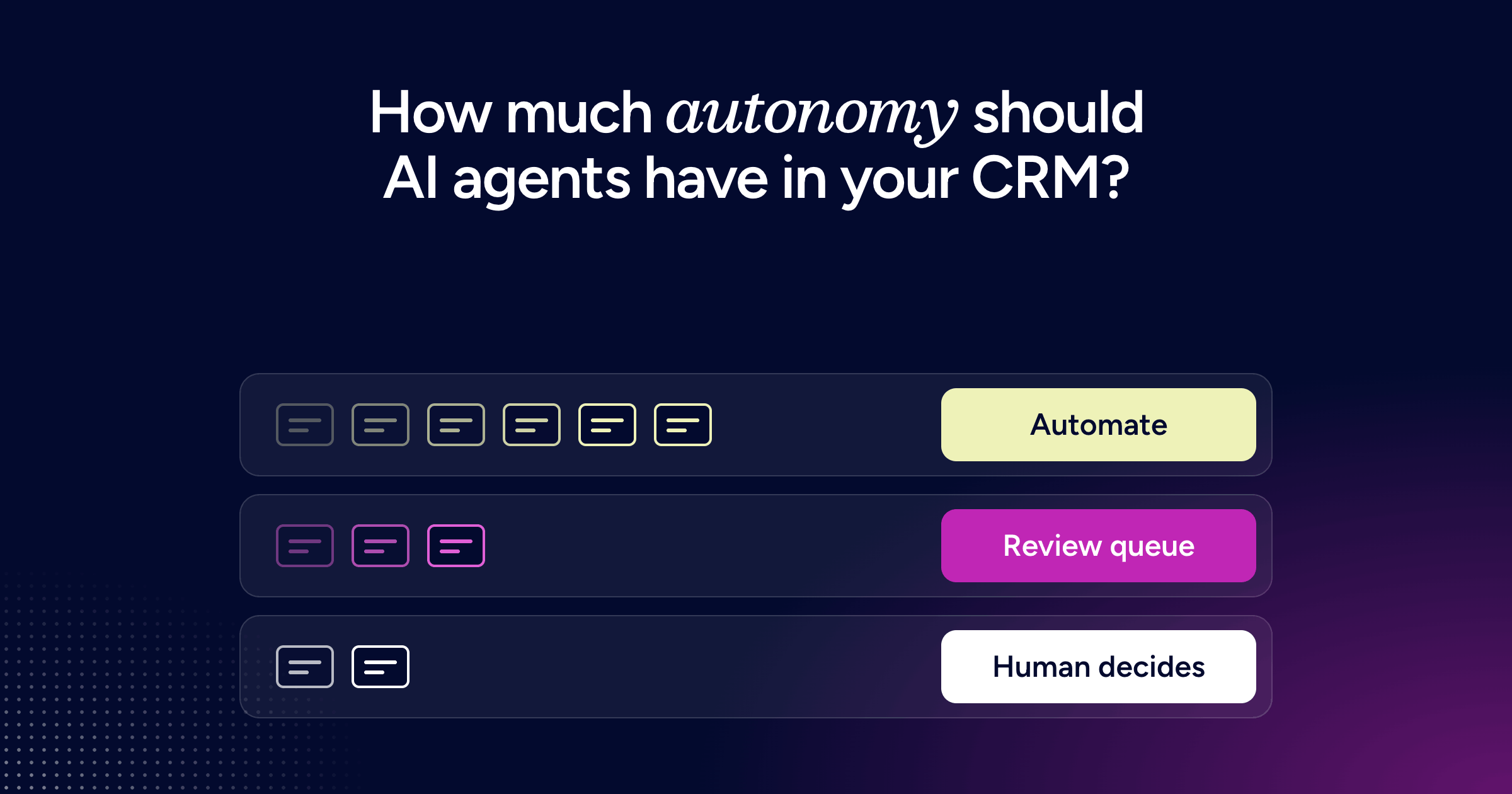
So the question for RevOps teams using AI is no longer whether to use AI agents for CRM work. It is which writes an agent gets to make on its own, which ones wait in a review queue, and which ones only a human can commit. The answer is actually quite simple: tier every CRM action by what a wrong write costs you. Automate where bad data costs time. Keep people in charge where it costs money.
What changes when AI agents write to your CRM
For most of its life, the CRM was a record that humans kept up to date. I put it plainly on Revenue Architects, the GTM.AI podcast I host with my ZoomInfo colleague John Lloyd: "CRMs were designed as the static system of record for humans to update."
Autonomous CRM work flips that model. Agents now sit on the write path, and the CRM becomes the place where their decisions land.
Most enterprise teams are already there. For the podcast, John and I interviewed about 50 senior GTM leaders at US companies with 1,000+ employees, and roughly 60% have their CRM connected to AI workflows. The same leaders flagged the problem underneath: 72% say the way data flows between their tools and the CRM needs fixing, and 50% say the static nature of CRM records holds them back.
Trust is the other half. In the same interviews, 50% of leaders said AI outputs can't be trusted without heavy human review, and 40% said their AI tools work with incomplete or inaccurate data. When the fields an agent reads are empty or stale, every write needs checking, which is why so many teams find their CRM data isn't AI-ready once CRM AI agents start writing. The fix is not to review everything or nothing. It is to decide, action by action, where review earns its cost.
Tier CRM autonomy by the cost of a wrong write
My advice is not to gate all AI. Sort CRM actions by two questions instead: can a wrong write be fixed cheaply, and how far does it travel before someone notices?
A wrong industry value on an account is annoying, but the next enrichment pass overwrites it and nothing downstream is committed. Now think about a wrong opportunity stage. It moves the forecast and can change a rep's comp. It also shifts pipeline coverage and can reach leadership reporting before anyone traces it back. Same agent, same speed, very different blast radius.
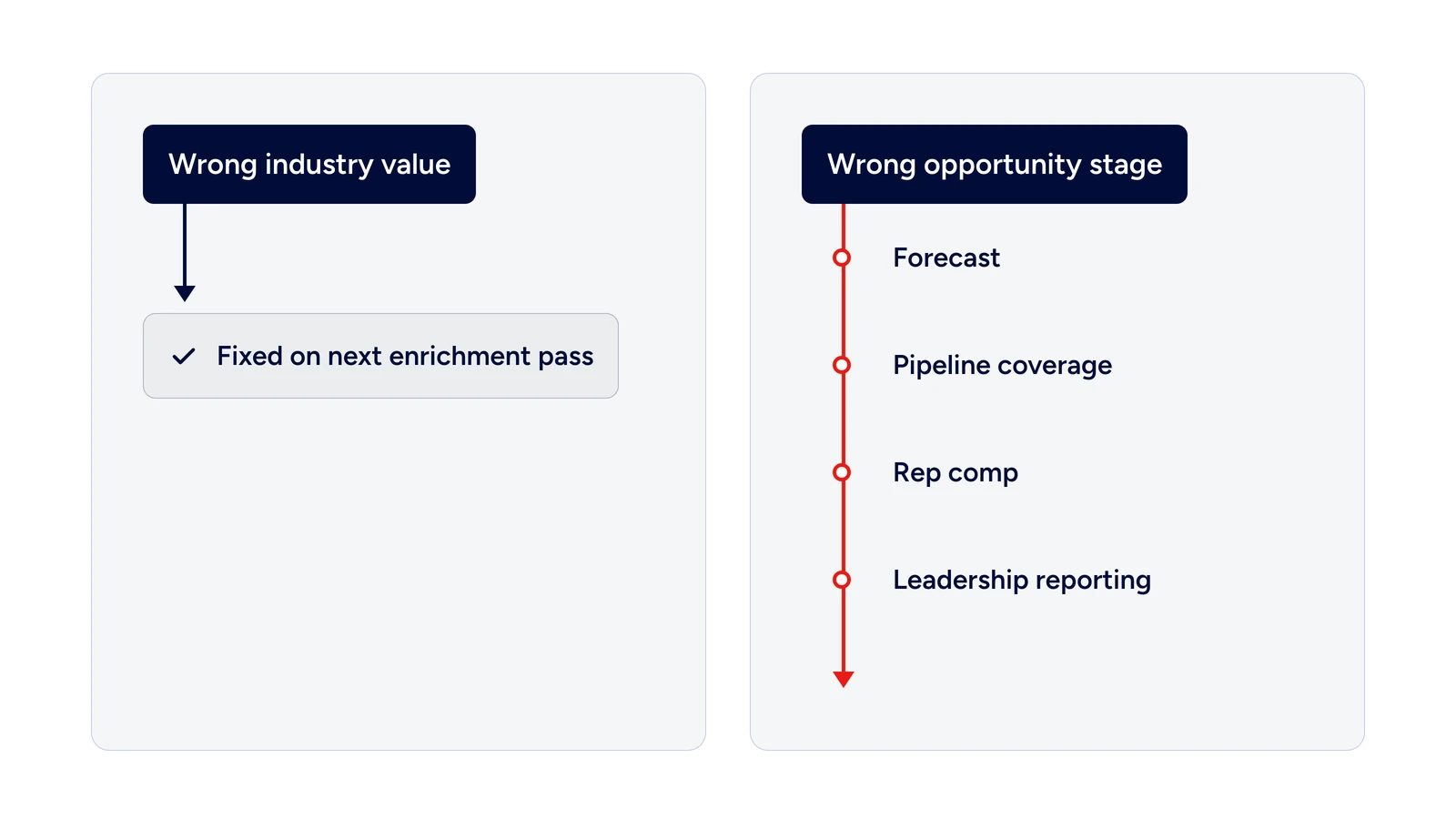
Same agent, same speed, very different blast radius.
That gives you three tiers for AI agents in CRM:
Fully automate. Enrichment and data validation, where errors are recoverable and only cost time.
Automate with a review queue. Account scoring, lead-to-account matching and lead routing, where most records are routine but edge cases need a person.
Human decides. Stage changes, opportunity creation and anything else that moves a revenue number.
The CRM autonomy matrix: which actions go in which tier
Use this matrix as a starting assignment for every write an agent can make. The "control" column is what makes the tier safe, not an optional extra.
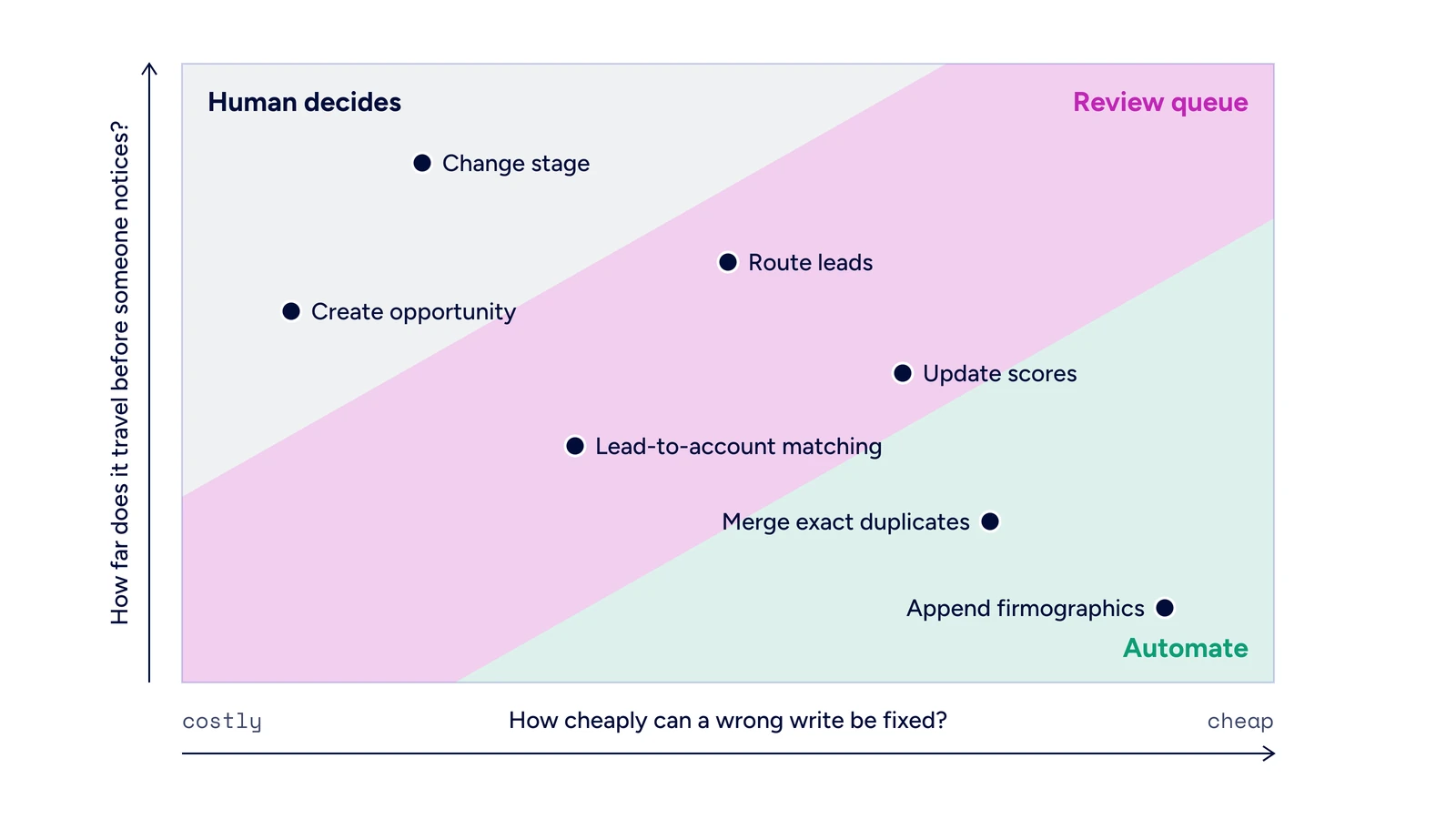
The CRM autonomy matrix: tier each write by how cheaply a mistake can be fixed and how far it travels.
CRM action | Tier | Why | Control that makes it safe |
|---|---|---|---|
Append missing firmographics (industry, employee count, HQ) | 1: Fully automate | Recoverable on the next pass; no revenue number moves | Fill empty fields only; stamp source and timestamp |
Validate and standardize email, phone and address fields | 1: Fully automate | Formatting and verification are deterministic | Never overwrite a rep-entered value without a verified replacement |
Flag job changes and bounced contacts | 1: Fully automate | A flag is reversible and informs humans | Flag, don't delete; keep the old record |
Merge exact-match duplicates | 1: Fully automate | Rules are clear and testable | Surviving-record rules; preserve opportunities and opt-outs |
Merge fuzzy or ambiguous duplicates | 2: Review queue | Two records can be legitimately separate | Queue anything below a match-confidence threshold |
Lead-to-account matching | 2: Review queue | Most matches are clean; personal emails and subsidiaries are not | Auto-match high confidence; queue free-mail and conflicts |
Update lead and account scores | 2: Review queue | Scores drive routing and territory decisions | Log inputs; queue large swings on named accounts |
Route leads and assign owners | 2: Review queue | Speed matters, but conflicts cost relationships | Auto-route by default; queue owner conflicts |
Reassign territory or account owner | 3: Human decides | Changes who gets paid and who calls the customer | Agent proposes with evidence; manager approves |
Create an opportunity | 3: Human decides | Adds to pipeline and forecast | Agent drafts; rep confirms |
Change opportunity stage or close date | 3: Human decides | Moves the forecast and coverage math | Agent recommends with evidence; owner commits |
Change amount or mark closed-won or closed-lost | 3: Human decides | Hits revenue reporting and comp directly | Human only; agent can remind |
Treat the tiers as a default, not a verdict. A CRM AI agent that proves itself on a Tier 2 action for a quarter can earn Tier 1 for the routine slice of that action, and a Tier 1 write that keeps getting rolled back should drop a tier.
Tier 1: let agents enrich and validate without review
Enrichment and AI data validation are the safest places to take humans out of the loop. The errors are recoverable, the next pass corrects them, and no revenue figure depends on a single write. It is also where a lot of manual ops time goes. Keying in employee counts, fixing phone formats and chasing bounced emails (email enrichment handles most of that) is usually the first work teams want off their plate, and it is the natural place to automate CRM data entry with AI.
Full automation still needs rules. The safe version of AI CRM data enrichment looks like this:
Fill, don't overwrite: an agent can fill an empty field, but it should not replace a value a rep entered or a verified value with a lower-confidence guess.
Stamp every write: record the source and timestamp so any change can be traced and rolled back.
Use surviving-record rules for merges: decide in advance which value wins and which related records must be preserved.
Escalate ambiguity: our guide to data deduplication recommends human review checkpoints for ambiguous merges, plus enriching before routing, to prevent the most common failure modes. Ambiguous merges belong in Tier 2.
The catch is that "complete" and "correct" aren't the same thing. We recently tested this: same AI agent, same prompt, five different data sources for contact enrichment, 450 runs. Specialist data tools returned a verified work email 94% of the time. Web search returned one 22% of the time. Both showed up as a "complete" record. The full methodology behind our agent benchmarks is in GTM Bench.
Agents also need to be told what not to invent. John, Manager of Go-to-Market Consulting at ZoomInfo, has seen agents fill gaps on their own, as he explained on the podcast: if four of five accounts have product usage data, the agent may make up the fifth. His advice is to instruct agents explicitly to "not treat a null value as an opportunity to fill a blank."
The payoff is real when the source is verified, which is the first thing to check when you compare data enrichment tools. Sendoso uses CRM Enrichment to auto-enrich and dedupe records coming in through Marketo forms and list imports, so only clean records reach sellers. Sendoso saved 1,100+ hours of manual data enrichment and saw at least a 70% reduction in inaccurate data.

"Since implementing ZoomInfo, we have immediately increased access to our ICP by 10%. This has given us over $4.9M in pipeline alone in the past two quarters."
When Kaseya needed to clean up after six acquisitions, Kaseya deduped its database over one weekend with field-level control over surviving values, preserving related opportunities, subscriptions and opt-outs. That is AI CRM automation with the guardrails written down first.
For the mechanics of batch versus real-time enrichment and waterfall sequencing, see this guide to CRM data enrichment and this explainer on waterfall enrichment.
Tier 2: automate scoring and routing, queue the edge cases
Scoring and routing sit in the middle because speed matters and most records are routine. Holding every inbound lead for human review would throw away the main benefit of AI lead routing. Momentive cut lead follow-up from 20 minutes to under 60 seconds after consolidating several data vendors onto ZoomInfo Operations, which now runs matching, enrichment, scoring and routing through one system.

"Thanks to ZoomInfo, we no longer have to question the source or reliability of the data in our systems."
Scores written back to the CRM carry weight too. Snowflake's propensity scores flow into the CRM for territory planning and account distribution, and top-tier accounts show 90% higher opportunity open rates. The same applies to AI lead scoring on the marketing side, covered in depth in this guide to predictive lead scoring. When a score decides who gets a territory, a bad score is not a formatting error.
So automate by default and route exceptions to a queue. Our guidance on linking intent data to CRM records follows the same logic: high-confidence matches can auto-create records, while ambiguous signals go to a manual review queue where a false positive would waste rep time. Good queue triggers include:
Low match confidence on lead-to-account matching
A lead submitted with a personal email domain, which should skip domain matching and fall to review or fallback rules, as covered in this roundup of lead matching and routing tools
A conflict with an existing owner or a named strategic account
A score change on a strategic account that crosses a routing threshold
A possible duplicate the merge rules can't resolve
Mallory Lee, VP of Revenue Operations at Zipline, described where these workflows really break when she joined John on Revenue Architects: "Usually in my experience when a workflow fails, it is because there's an edge case that we haven't built for." Her example is a buyer who signs up for content with a personal email while the CRM holds their work email. The queue exists for exactly those records. The rest of your lead routing should run without anyone watching.
Tier 3: keep humans deciding stage changes and opportunities
Some writes should never commit without a person, no matter how good the agent is. Opportunity creation, stage changes, close dates, amounts and closed-won or closed-lost status feed the forecast, pipeline coverage and comp. A wrong write here is not caught by the next enrichment pass. It gets reported upward.
This is where AI pipeline management should mean better recommendations, not silent changes. Brendan Powers, Principal GTM Operations and Engineering Manager at ZoomInfo, described Salesforce's role at ZoomInfo this way on Revenue Architects: "it's still the source of truth when it comes to who owns what account and who has open opportunities and what statuses they're in." Anything that changes those facts deserves human oversight of AI.
In Tier 3, the agent does the prep and the human makes the call:
The agent detects a signal, such as a buyer confirming budget on a call picked up by conversation intelligence.
It drafts the change, for example moving the opportunity to the next stage, and attaches the evidence: the call moment, the signal and the timestamp.
The opportunity owner approves, edits or rejects it in one step.
Mallory Lee, whose team at Zipline runs a considered enterprise sale where a slip-up with a big brand is expensive, keeps a person in the loop even before outreach goes out, which is a lower-stakes write than a stage change: "I still just need that human in the loop or I wouldn't be able to sleep at night."
Human in the loop AI without the rubber stamp
Human in the loop AI fails in a predictable way. If every write lands in a queue, reviewers stop reading and start clicking approve. You keep the cost of review and lose the protection. John sees the same fatigue on the rep side, as he said on the podcast: "They're exhausted by AI that's almost right." He also named the cost: "The review cycles get longer and longer and that just pushes your efficiency out."
A queue that works is small and fast, and every item shows the reviewer:
The proposed change: the old value next to the new value.
The evidence: the source, timestamp and signal behind the change.
The reason code: why this record was queued instead of auto-committed.
One-click actions: approve, edit or reject, with the decision logged.
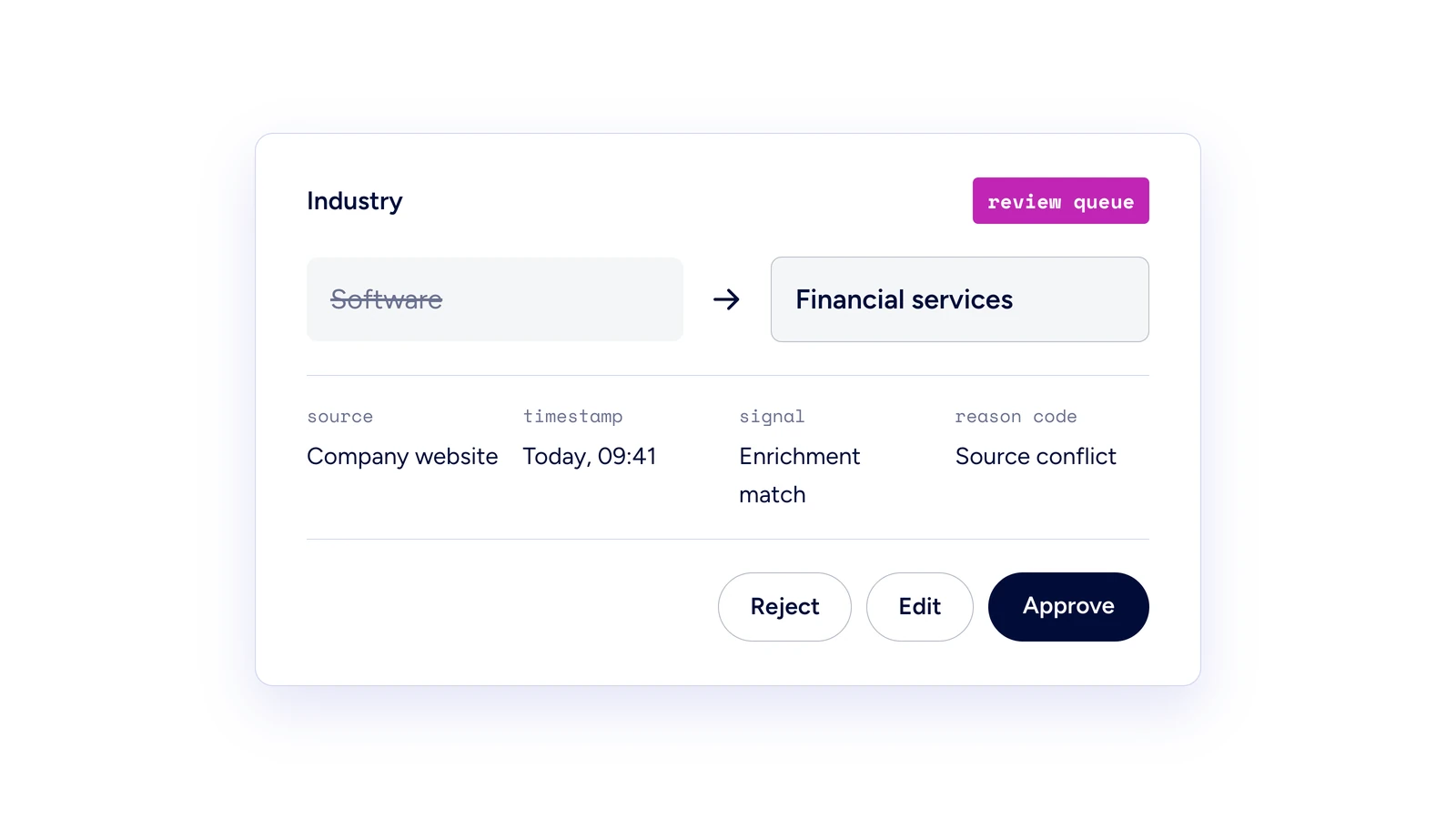
What a useful review queue item shows: the change, the evidence, the reason it was queued, and one-click actions.
Keeping the queue small starts before review, in how the agent is built. Brendan Powers, who builds the agents that run autonomously across ZoomInfo's go-to-market process, says of their prompts: "I've intentionally written and reviewed every sentence that's in there." His rule is to make as much of the agent deterministic as possible, handing it data instead of asking it to decide, so when a write goes wrong you can tell whether the data or the prompt failed. Grounding agents in verified data for AI agents does the same job from the other side.
Then treat the AI agent approval workflow as a feedback loop: track how often reviewers override each action type, move rarely overridden actions up a tier, and give frequently corrected ones better data or a lower tier. The caveat: if the review queue becomes a bottleneck, the tiering is wrong, not the reviewers.
AI agent guardrails and permissions that make the tiers stick
A tier is only real if the system enforces it. That is what AI agent governance means at the CRM level: deciding which writes each agent is allowed to make, who owns the result and how you undo it. Five AI agent guardrails do most of the work:
Field-level write scopes: give each agent AI agent permissions for the specific objects and fields its tier allows, and nothing else.
A named owner and a backup: Mollie Bodensteiner, VP of Revenue Operations at ZoomInfo, argued on Revenue Architects that ownership of an agent is "not a department." It is a person, with a backup who can fix it when that person is out.
An audit trail: log the trigger, the data the agent read and the change it made, so a bad record can be traced to its source.
A rollback path: every Tier 1 and Tier 2 write should be reversible in bulk.
Change control on fields: Mollie's example of a failure nobody catches is an admin repurposing a field an agent depends on, so the output quietly turns to gibberish. Schema changes need to notify agent owners.
These AI guardrails are meant to widen what agents can do, not slow teams down. Brendan Powers put it this way when talking about fully automated processes: "it's not about slowing down momentum or gatekeeping, it's about ensuring exploration and innovation leading to revenue driving use of AI can occur without data leakages or propagation of inaccurate data."
Good CRM governance also means asking what should land in the CRM at all. Mallory Lee's Salesforce admin acts as the governor of what goes in and out, and Mallory keeps asking the same question: "I am still constantly asking myself, what needs to get written back to the CRM?" For the fleet-level view of ownership, visibility and blast radius once you have many agents, see this guide to governing agents at scale.
How to roll out tiered autonomy in five steps
You don't need a new platform to start. You need an inventory and a few rules.
Inventory every write. List each object and field any agent can change today, including agents in your CRM, your sales engagement platform and any custom-built agent. Your existing data governance framework is the natural home for this list.
Assign a tier to each write. Use the matrix above as the default and document any exceptions.
Set queue triggers and an approval SLA. Define the confidence thresholds and conflict rules that send a record to review, and how fast reviewers must act.
Turn on logging and name owners. Every agent gets an owner, a backup and an audit trail before it gets write access.
Review the numbers monthly. Look at override rates, rollbacks and queue age by action type, then promote or demote writes.
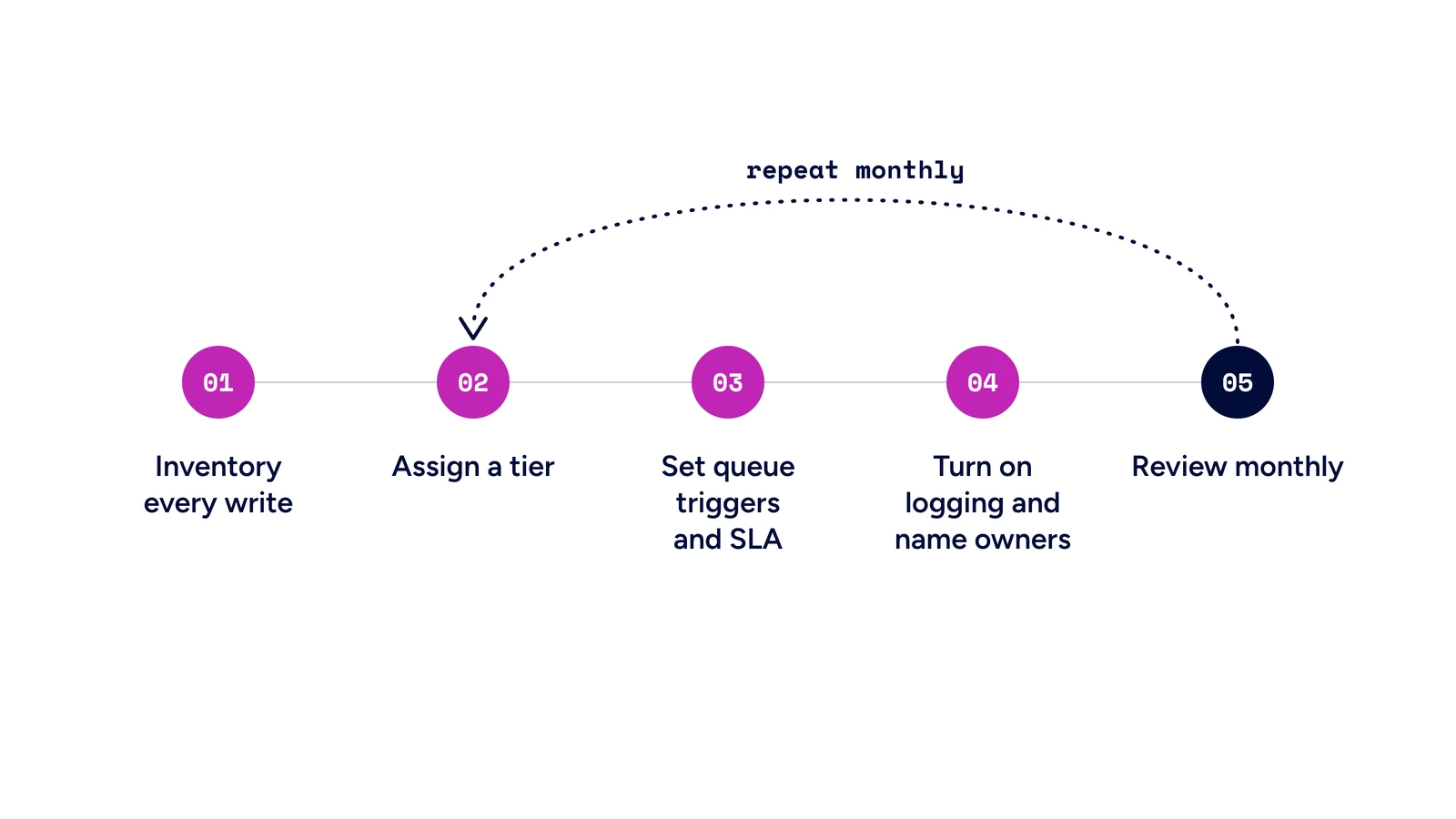
Five steps to roll out tiered autonomy, with a monthly review loop.
The tension is speed versus safety, and tiering is how you get both: start with a few Tier 1 writes you can measure, and expand once the logs show the agent is right.
Where Agent Teams fits with native CRM agents
Many teams already run AI agents for CRM work inside the CRM itself. Native agents inherit the CRM's permission model and audit log, which answers who can write.
The layer underneath answers whether a write is safe: is this the right person and account, is the context current, and will the result land cleanly back in the CRM? That's the job of a governed execution layer, and it works alongside the agents you already run in Salesforce or HubSpot. This comparison of AI CRM tools covers the platform options.
Salesforce Agentforce
Salesforce positions Agentforce as "the agentic AI platform built into the world's #1 CRM."
It runs autonomous AI agents inside Salesforce CRM, and Agent Builder lets teams create custom agents for their own workflows. Its strength is native Salesforce context and permissions. Agentforce agents reason over Salesforce data, and partners bring in the outside signals that help decide whether a write is safe, such as verified firmographics, intent and conversation history.
ZoomInfo is one of those partners: the Agentforce Prospecting Agent runs on ZoomInfo data, drafts first-pass outreach with each signal cited to its source, and leaves the rep to review, edit and send.
HubSpot Breeze
HubSpot Breeze is HubSpot's AI layer, with AI agents for prospecting, content and service workflows. Breeze Assistant, which HubSpot's Fall 2026 release puts in charge of coordinating its other agents, is in public beta.
Its strength is that agents have full HubSpot CRM context inside the platform. ZoomInfo data is also available in Breeze, so those agents can draw on verified company and contact data alongside HubSpot records.
Agent Teams: the governed execution layer under your CRM agents
Agent Teams is ZoomInfo's flagship multi-agent product, built in GTM Studio. It works alongside the agents in your CRM as the execution layer underneath them, with three jobs:
Identity resolved. Before an agent touches a record, the GTM Context Graph resolves the person and the account across your CRM, ZoomInfo data, conversations and intent. When a past champion moves from Uber to DoorDash, the play lands on the right DoorDash account and owner, with no duplicate contact.
Context verified. A supervisor agent checks each step with real-time evaluations grounded in verified data. Agents work from sourced records, which is how you avoid the null-value problem John describes in Tier 1.
Writes back to Salesforce or HubSpot. Native integrations put every result where your team already works: updated contacts, logged activity and account context in Salesforce or HubSpot, plus a brief for the owner in Slack. Playbooks set the goal and bounds of each play, and every trigger, decision and action is logged.
In tier terms, Agent Teams does most of its work in Tier 1 and Tier 2: enriching, matching and routing, with every step on the audit trail. For Tier 3 writes like opportunity creation or a stage change, it assembles the evidence and briefs the owner, who commits the change in the CRM.
Agentforce and Breeze keep doing what they do best inside their CRMs. Agent Teams makes sure the records they read are resolved and verified, and that plays running across the inbox, Slack and sales engagement tools land back in the same place.
How ZoomInfo runs governed agents on CRM data
ZoomInfo is an all-in-one AI GTM Platform and the number one place for sales, marketing and RevOps to run agentic workflows. It's built in three layers: Data, including the GTM Context Graph, Agent Orchestration, and Universal Access. Each one maps to a part of the tiering problem.
The Data layer is what makes Tier 1 safe to automate. It covers 500M contacts and 100M companies, and the GTM Context Graph connects that data with your CRM records, conversations and behavioral signals into one structure processing 1.5B+ data points daily. Getting all of that resolved onto the same record is incredibly hard. Good luck trying to vibe code it. An agent writing firmographics or matching a lead to an account works from resolved, sourced records.
Agent Orchestration is where agents read that graph, reason over it, act and write results back. Its governance plane applies access control, permissioning, data lineage, AI policy and audit logging consistently across every surface that uses it, so the same rules follow an agent whether it runs in ZoomInfo, in Salesforce or in a custom build. That is the idea behind revenue action orchestration. Agent Teams, the flagship product in this layer, runs on the same governance. Its guardrails cover monitoring, cost controls, admin oversight, access control, grounding, real-time evaluations and an audit trail of every trigger, decision and action.
Universal Access means teams consume all of it where they already work: GTM Workspace for sellers, GTM Studio for RevOps and GTM engineers building plays, and GTM.AI for any tool or agent through its API, CLI and MCP. If you're choosing MCP servers for ops work, see this list of MCP servers for RevOps. We run the same pattern ourselves: Brendan's team triggers most of its production agents from Salesforce events, such as an inbound lead, a completed demo or an upcoming renewal. ZoomInfo was also named a Visionary in the 2025 Gartner Magic Quadrant for Revenue Action Orchestration.
Want to see Agent Teams run governed plays on your CRM? See it in action.
Frequently asked questions about AI agents in CRM
What is agentic CRM?
Agentic CRM is a CRM where AI agents read records, make decisions and write changes, such as updated fields, scores, owners and tasks, instead of only suggesting them. The governance question shifts from who can edit a record to which writes an agent may make without a human.
Can AI agents update CRM records automatically?
Yes, within the permissions you grant. Let an AI agent CRM workflow run unsupervised on recoverable writes like CRM data enrichment and validation, send scoring and routing edge cases to a review queue, and keep stage and opportunity changes for a human.
What does human in the loop AI mean in a CRM?
It means a person approves, edits or rejects an agent's proposed write before it commits. It only works when the queue stays small and each item shows the old value, the new value, the source and the reason it was queued.
What is AI agent governance?
AI agent governance is the set of ownership rules, permissions, audit trails and review policies that control what agents can access and change. In a CRM, that means field-level write scopes, a named owner and a log of every trigger, input and change. This guide to governing agents at scale covers the fleet-level view.
Which CRM changes should always need human approval?
Any change that moves a revenue number: opportunity creation, stage changes, amounts, close dates, closed-won or closed-lost status, and owner reassignment on named accounts. Agents can draft these changes with evidence, but a person should commit them.
How do you keep CRM data secure when AI agents access it?
Give each agent least-privilege write scopes, log every action, and require the same permissions for agents connecting through an MCP server as for native ones. Check vendor certifications too: ZoomInfo maintains SOC 2 controls and is ISO 27001 and ISO 27701 certified.
Do you need Agent Teams if you already use Agentforce or HubSpot Breeze?
They do different jobs. Agentforce and Breeze agents work inside their own CRM. Agent Teams is the governed execution layer underneath: it resolves identity, verifies context and runs plays across the CRM, inbox, Slack and sales engagement tools, then writes the results back to Salesforce or HubSpot.