
A lot of go-to-market teams think they have a data problem. What they have is an integration problem. The records exist. They just live in different systems that don't talk to each other.
This guide walks through how B2B data integration works, the use cases that matter for revenue teams, the challenges you'll run into, and what to look for in a platform.
What Is B2B Data Integration?
B2B data integration is the process of connecting and synchronizing data across business systems, partners, and third-party sources. It covers the movement, transformation, and delivery of data between organizations and their internal platforms.
Early approaches relied on Electronic Data Interchange (EDI), a 1970s standard for structured document exchange. EDI worked but was slow, expensive to maintain, and limited to predefined document types.
Modern B2B data integration uses APIs, cloud-based middleware, and Data as a Service (DaaS) models to move data in real time or near real time. For revenue teams, that speed and accuracy determine whether your outreach lands or your pipeline forecast holds.
Why B2B Data Integration Matters for Revenue Teams
B2B data integration often gets framed as an IT project. For revenue teams, integrated data is the difference between targeted outreach and spray-and-pray.
Here's what breaks when your B2B data is fragmented:
Targeting suffers. Sales reps work from incomplete or outdated contact records. Marketing builds audiences from one enrichment vendor while sales prospects from another. Neither sees the full picture.
Pipeline forecasts become unreliable. Without a unified data layer connecting CRM records, intent signals, and engagement data, forecasts rely on rep intuition.
Costs compound. Every overlapping data tool adds integration overhead, maintenance cost, and another point of inconsistency.
Personalization stalls. You can't personalize outreach at scale if your contact data, firmographic context, and behavioral signals live in separate systems.
The fix isn't adding another tool. It's consolidating the layer underneath: a single integrated data foundation that every revenue function (marketing, sales, RevOps, customer success) pulls from. Teams that get this right stop treating data integration as an IT project and start using it as a revenue lever.
How B2B Data Integration Works
Every B2B data integration workflow follows the same four-part flow. Data starts at a source, gets transformed into a standard format, travels through a transport protocol, and lands at a target destination.
Source applications and data origins
Data originates from a range of internal and external systems:
CRM platforms. Salesforce, HubSpot, and Microsoft Dynamics hold customer records, deal stages, and engagement history.
ERP systems. Manage financial data, procurement, and supply chain records.
Marketing automation tools. Marketo, Pardot, and HubSpot Marketing track campaigns, lead scores, and form submissions.
Customer data platforms (CDPs). Segment, mParticle, and Tealium unify first-party behavioral data from web, mobile, and product usage into persistent customer profiles.
Third-party data providers. Supply contact data, firmographic details, intent signals, and technographic profiles.
Point-of-sale and e-commerce systems. Generate transaction data tied to specific accounts and contacts.
Modern integrations use APIs (REST, GraphQL) for real-time or near-real-time data pulls. Legacy systems may require middleware connectors or database-level extraction. The goal is to get clean, current data out of every relevant system and into a unified pipeline.
Data formats and standards
Raw data from different sources rarely arrives in the same format. B2B data integration requires transformation, converting data into a standard structure that downstream systems can consume.
Common data formats include:
Format | Use case | Notes |
EDI (ANSI X12, EDIFACT) | Supply chain, procurement | Legacy standard, still dominant in logistics and manufacturing |
JSON | API-based integrations | Lightweight, human-readable, the default for modern APIs |
XML | Enterprise system exchange | More verbose than JSON, but well-established in enterprise environments |
CSV/Flat Files | Bulk data transfers, batch processing | Simple but lacks schema enforcement |
A mismatch at this stage breaks everything downstream. If your CRM expects a contact record in one schema and your enrichment provider delivers it in another, the integration fails silently or produces duplicates.
Transport protocols and middleware
Once data is formatted, it needs to move securely from source to destination. Common protocols include:
HTTPS/REST APIs for real-time, web-based data exchange
SFTP for encrypted batch file transfers
AS2 for EDI document delivery with built-in receipts and encryption
Message queues (MQ) for asynchronous, high-volume data streaming
Web services (SOAP) for structured, enterprise-grade service calls
Security is a core concern at this stage. Data in transit should be encrypted, and access controls should govern which systems can send and receive. Middleware platforms and Integration Platform as a Service (iPaaS) tools handle routing, transformation, error handling, and monitoring across protocols.
The choice of protocol depends on volume, latency requirements, and the technical capabilities of both endpoints. Real-time API calls work for CRM enrichment. Batch SFTP transfers work for large-scale data warehouse loads. Production environments typically use a mix.
Target applications and destinations
Integrated data lands in the systems where teams take action:
CRM platforms. Receive enriched and deduplicated contact and account records.
Cloud data warehouses. Snowflake, BigQuery, and Databricks store unified datasets for analytics, segmentation, and AI model training.
Customer data platforms. Activate unified data for marketing campaigns, personalization, and audience segmentation across web, mobile, and ad channels.
Analytics and BI tools. Consume integrated data for reporting and dashboard visualization.
Partner systems. Receive standardized data for co-selling, channel management, or compliance reporting.
The modern approach increasingly routes B2B data directly into cloud data warehouses, where it becomes a unified, queryable layer. Pre-built data packages remove the need for complex Extract, Transform, Load (ETL) pipelines. Teams receive structured, ready-to-query data delivered directly into their warehouse environment, bridging first-party CRM data with third-party intelligence in one queryable layer.
B2B Data Integration Use Cases for Go-to-Market Teams
B2B data integration drives value across every function in the revenue organization. Five use cases matter most.
CRM data enrichment and hygiene
Integration automates the enrichment of contact records, firmographic details, and technographic profiles. Deduplication and field completion are built into the pipeline, so reps work from accurate profiles instead of stale, incomplete data. This is the foundation everything else depends on: a CRM that reflects reality.
Supply chain data exchange
Standardized data flows for purchase orders, invoices, and shipping notices keep transactions moving without manual intervention. Automated partner onboarding replaces weeks of manual setup, letting new suppliers or distributors connect in days rather than quarters.
Revenue operations and pipeline accuracy
A unified data layer connects CRM records, intent signals, engagement history, and third-party enrichment. Forecasts pull from one dataset instead of five conflicting sources, which means RevOps teams stop arbitrating between Salesforce and the BI dashboard and can focus on the actual story the numbers tell.
Partner ecosystem management
Consistent data exchange with resellers, distributors, and technology partners supports account-based motions by sharing account intelligence across organizational boundaries. When everyone in the partner ecosystem works from the same account record, co-selling stops breaking down at the handoff.
Compliance and audit trails
Integration provides the infrastructure to track data lineage, access, and transformations end to end. This is required for GDPR, CCPA, SOC 2, and industry-specific frameworks, and increasingly demanded by enterprise buyers during procurement.
B2B Data Integration Challenges and How to Solve Them
B2B data integration delivers real value, but it comes with serious obstacles. Here are the four most common and how to address them.
Data security and compliance
Every B2B data exchange introduces risk. Sensitive contact information, financial data, and proprietary business intelligence move between systems, partners, and cloud environments.
How to solve it:
Encrypt data in transit and at rest. Non-negotiable for any integration pipeline.
Implement role-based access controls. Limit who can read, write, and modify data at each stage.
Maintain audit logs for every data movement. Required for most compliance frameworks and essential for incident response.
Choose integration partners with recognized certifications. ZoomInfo maintains ISO 27701, ISO 27001, SOC 2 Type II, and TRUSTe GDPR certifications.
Legacy system complexity
Many organizations still run EDI-era systems that weren't designed for modern API-driven integration. Connecting a 1990s ERP to a cloud data warehouse requires translation layers, custom connectors, and often significant IT resources.
How to solve it:
Adopt a hybrid integration strategy. Bridge on-premises legacy systems with cloud-native platforms.
Use middleware and iPaaS solutions. They convert legacy formats (ANSI X12, flat files) into modern standards (JSON, REST APIs).
Avoid rip-and-replace. Wrap legacy systems with API layers and migrate incrementally.
Data quality and consistency
Bad data in means bad data out. Duplicate records, stale contacts, incomplete fields, and conflicting information across sources undermine every integration effort.
How to solve it:
Build entity resolution into your pipeline. Match, merge, and deduplicate records across sources to produce a single, verified profile.
Invest in continuous verification. B2B data decays fast. People change jobs, companies merge, and phone numbers turn over. A platform that verifies data continuously keeps your integrated dataset accurate over time.
Vendor sprawl and tool fragmentation
The average GTM team uses multiple enrichment providers, intent data sources, and engagement platforms. Each one requires its own integration, its own data format, and its own maintenance. Every additional point solution adds operational complexity and creates another potential point of failure.
How to solve it:
Consolidate your data sources. Use a unified platform that serves as the single foundation for all downstream systems.
Route everything through one data layer. A single layer handles identity resolution, enrichment, and delivery, which reduces integration overhead, improves data consistency, and lowers cost per record.
What to Look for in a B2B Data Integration Platform
The market splits into a few camps. iPaaS platforms like MuleSoft, Boomi, and Workato orchestrate data movement across systems. They're the plumbing layer that connects endpoints, transforms formats, and handles error logic at scale. Data-as-a-Service providers deliver verified third-party data into your stack as a managed feed. CDP-native and CRM-native integration tools handle a narrower scope tied to their parent platform. Most mature revenue stacks end up running one of each, since they solve different problems.
A few criteria separate the platforms worth shortlisting from the ones that'll become another silo:
Source breadth. Native connectors across CRM, ERP, CDP, marketing automation, cloud warehouses, partner systems, and third-party data sources, plus a flexible API to fill the gaps.
Real-time and batch delivery. Both, not one. Some workflows need instant updates; others can wait for nightly loads.
Native warehouse delivery. Direct delivery into Snowflake, BigQuery, or Databricks, not ETL pipelines you have to maintain yourself.
Identity resolution. At the account and contact level, resolved before duplicates land in your CRM.
Compliance tooling. Built-in GDPR, CCPA, and opt-out APIs, plus certifications like SOC 2 Type II and ISO 27001 as table stakes.
Observability and lineage. Every record movement logged, lineage exposed from source to destination, failures surfaced before they hit a forecast cycle.
How ZoomInfo Fits Into Your B2B Data Integration Stack
Everything above describes what good integration looks like. The next question is what fills that pipeline. Integration tooling moves data between systems, but the harder problem is making sure the data is worth moving. Stale, incomplete, or inconsistent records break every downstream workflow, no matter how well-designed the pipeline.
ZoomInfo DaaS is the verified data layer that flows through that pipeline. The same B2B foundation gets delivered through three surfaces, so teams can consume it however their stack is built:
Data Cubes. Continuously refreshed company and contact datasets delivered natively into Snowflake, Databricks, AWS, Google Cloud, and Azure. No ETL to build, no transformation logic to maintain.
Enterprise APIs and webhooks. Real-time search, enrichment, and bulk delivery. Webhooks push updates the moment records change. A dedicated Compliance API handles GDPR, CCPA, and opt-out management.
MCP server. Connects ZoomInfo's data directly to AI agents through the Model Context Protocol (MCP), an emerging standard that lets large language models call external data sources natively. Workflows built in Claude, ChatGPT, Cursor, or n8n can query ZoomInfo without custom integration code.
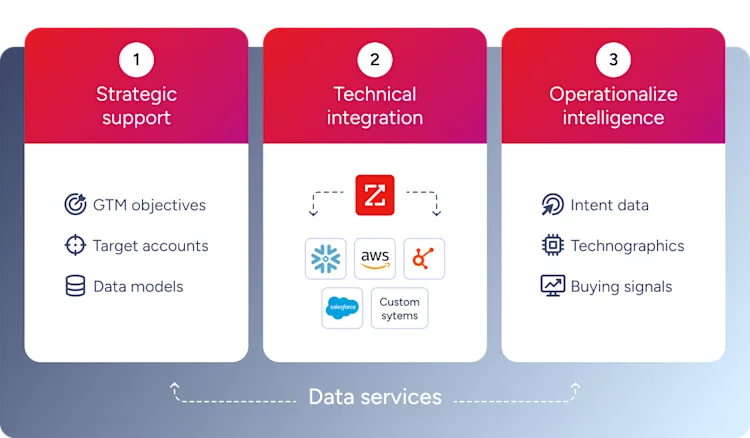
The foundation underneath: 500M+ contacts, 100M+ companies, 135M+ verified phone numbers, refreshed continuously and verified to up to 95% accuracy on first-party data.
Teams already running on this foundation see it directly in their numbers. At Snowflake, ZoomInfo DaaS feeds the Account Propensity System that the sales data science team uses to score and prioritize accounts. That model is now driving 25% higher customer engagement and 2x new customer conversion.
The same pattern shows up at different scales. Capital One routes the Data Cube straight into Salesforce, eliminating manual data entry for hundreds of reps. MarketSpark combined Data Cubes with FCC filings in S3 to flag 30,000 at-risk prospects, a shift that has driven 5x more deals into pipeline.
Build Your B2B Data Integration Strategy
B2B data integration is the foundation for accurate, timely go-to-market execution. The architecture you choose here determines whether every other revenue investment compounds or just adds overhead.
ZoomInfo DaaS does this. Same verified data, delivered through Data Cubes, APIs, webhooks, or MCP, into whichever systems your team already runs.
Start a free trial to see how ZoomInfo powers B2B data integration for your go-to-market team.
Frequently Asked Questions About B2B Data Integration
What is B2B data integration?
B2B data integration is the automated process of connecting, transforming, and synchronizing business data between organizations and their internal systems. It ensures every team works from accurate, consistent information across CRMs, CDPs, data warehouses, and partner platforms.
What tools do teams use for B2B data integration?
Common B2B integration tools include EDI platforms, iPaaS solutions (like MuleSoft, Boomi, and Workato), API management tools, middleware platforms, Data-as-a-Service providers, and cloud data warehouses (Snowflake, BigQuery, Databricks) that serve as unified data destinations.
How does B2B data integration differ from EDI?
EDI is one method within B2B integration. B2B integration is the broader category that includes APIs, iPaaS, cloud data warehouse delivery, CDP syncs, and real-time data exchange alongside traditional EDI document flows.
How does B2B data integration improve sales and marketing?
B2B data integration improves sales and marketing by unifying contact data, firmographic context, intent signals, and engagement history into a single view. This enables more accurate targeting, personalized outreach at scale, and pipeline forecasts grounded in verified data.
What is a B2B integration platform?
A B2B integration platform is a software solution that connects multiple business systems, standardizes data formats, and automates data exchange between organizations. Modern platforms combine API connectivity, data transformation, identity resolution, and monitoring in a single environment.
