
An MCP server for CRM enrichment gives an AI client access to a B2B database, so an agent can fill in the fields your records are missing without anyone leaving the conversation.
ZoomInfo MCP exposes 500M+ contacts and 100M+ companies through a single connection. Point Claude, ChatGPT, or another compatible client at it, ask for a half-empty lead to be completed, and back comes a verified email, a direct dial, a current title, the company's revenue band and tech stack, and whether that account is showing buying signals.
This page covers the fields ZoomInfo MCP returns, how it splits the work with your CRM, and what each call costs. It also shows where MCP fits alongside native enrichment and the API, and how Agent Teams can run complete plays on enriched records through GTM.AI.
What ZoomInfo MCP Returns to a CRM Record
Two tools do the enrichment work, one for people and one for accounts. Both take what you already hold, a name and company, an email address, a domain, or a ZoomInfo ID, and return the full record.
Enrich Contacts returns | Enrich Companies returns |
Direct email address | Company name and domain |
Mobile and direct phone numbers | Industry and sub-industry |
Job title and department | Employee count and revenue range |
Management level and seniority | Headquarters address |
Professional history and education | Technology stack |
LinkedIn URL | Recent funding and investor data |
ZoomInfo contact ID | Hiring velocity and open roles |
Two of those deserve attention.
Hiring velocity and open roles arrive inside a routine firmographic call. That's a hiring signal sitting in the same response as the employee count, so an agent can flag an expanding account without a separate intent lookup, and the same call carries the technographic and firmographic detail your scoring model needs.
The ZoomInfo ID is the field teams overlook. Store it on the record and every future enrichment can be requested by ID rather than by name and company, which removes the matching ambiguity that comes with people who share a name across different employers.
A separate tool covers timing. Enrich Company Signals pulls intent topics, news, and business-event scoops for up to 10 known companies in a single call, so you can check whether an account is in-market at the same moment you're completing its profile.
What comes back always matches your ZoomInfo package. MCP enforces entitlements at the API level, so an agent returns exactly the fields that user would see in the web app and nothing more.
Tools That Draw on Your Own CRM Data
Filling in blank fields is half of what an agent can do with a record. The other half runs the opposite direction, reading what your organization already knows and reasoning across both sources.
Find Recommended Contacts returns AI-ranked, outreach-ready contacts at a target account, and it runs in three modes. Prospecting works from your past ZoomInfo activity. Deal acceleration works from the contacts on your closed-won opportunities, aimed at new business. Renewal and growth does the same for expansion.
Account Research and Contact Research produce a full intelligence briefing on a company or a person, blending ZoomInfo's data with your first-party CRM records and conversation history.
Conversation Intelligence answers questions about your own calls, meetings, and emails.
Browse Engagements builds a timeline of your meetings and emails, which is the lighter version of the same idea.
The first and last of those are free. The research tools draw AI action credits rather than data credits, because they run a sub-agent layer that synthesizes large payloads before returning a focused answer. A briefing arrives as a briefing rather than as a few hundred raw records the model has to hold in context.
This is also why per-user authentication matters. A shared login still returns ZoomInfo's data, but loses every part of the picture that comes from the individual's own accounts and history.
How ZoomInfo and Your CRM Split the Work
Enrichment through an agent takes two connections, and each does a job the other can't.
Your CRM's own MCP server holds your records and, on the platforms that support it, updates them. What it can't do is complete them, because it carries no data about the wider market. There's nothing in it to fill a gap with.
ZoomInfo's tools are read-only by design. They pull verified data in and never write anything out. Between them the two cover the whole loop, and connecting an AI client to both is what closes it.
A working example. You ask the agent to find this week's inbound leads that have no job title, fill them in, and update the records:
The CRM server returns the leads that match, with whatever fields they currently hold.
ZoomInfo Enrich Contacts takes those identifiers and returns titles, seniority, verified emails, and direct dials.
The CRM server writes the returned fields back to the records.
All three steps happen in one conversation. The agent handles the sequencing, so nobody exports a CSV or maps a column. For multi-step plays—like enriching a record, scoring it, and routing it to the right rep—Agent Teams coordinates specialist agents that share context and act on the current state of each account.
Write capability on the CRM side varies and it's moving quickly. HubSpot's remote server added write access when it reached general availability, and Salesforce's hosted servers are generally available for Enterprise Edition orgs and above. Confirm the current state of your own CRM's server before designing a workflow around write-back, since a read-only CRM connection turns the loop into a research exercise you finish by hand.
Enriching Without Wasting Credits
Discovery is free. Enrichment is where the meter starts, and the gap between the two is the whole cost story.
Lookup, Search Companies, Search Contacts, Find Similar Companies, Find Similar Contacts, Find Recommended Contacts, Search Intent, and Search Scoops cost nothing against credits. An agent can explore, filter, and narrow against your ideal customer profile as widely as it needs before you spend anything.
Enrich Contacts and Enrich Companies charge one bulk data credit per new record and handle up to 25 records per call. Enrich Company Signals charges per signal returned.
Two mechanics decide what a month actually costs:
Records under management. Once a record is enriched, it stays under management for 12 months at the organization level. Anyone in your org re-enriching that record inside the window pays nothing, on any ZoomInfo surface. A recurring refresh costs far less than the credit price suggests, which matters because contact data decays whether you re-enrich it or not.
Search before you enrich. Because discovery is free and enrichment isn't, the cheap pattern is always to narrow first. Let the agent find and filter the working set, then enrich only what survives, the same discipline that keeps a lead enrichment job affordable.
MCP draws on bulk data credits specifically and doesn't work on accounts running recurring monthly credits. Admins can cap each user's data and AI credits from the admin portal, so a single conversation can't run up an unexpected bill.
Connecting Without Managing API Keys
Setup is a sign-in rather than a build. Every client reaches the same hosted ZoomInfo endpoint, so there's no developer app to register and no key to rotate.
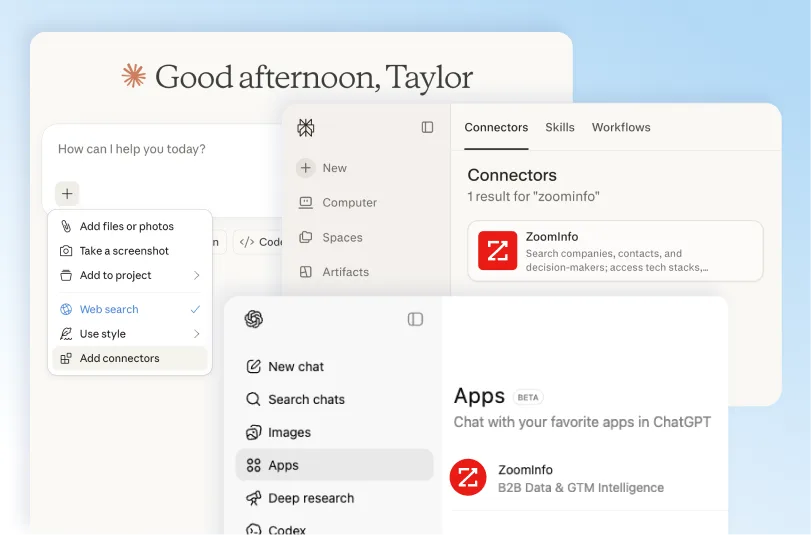
Per-user OAuth. Each person signs in with their own ZoomInfo credentials. Every tool call carries that individual's entitlements, accounts, and CRM relationships, which is what grounds the answer in something real.
Native listings across clients. ZoomInfo appears in the Claude and ChatGPT connector marketplaces, in Copilot Studio, and as a native connector in Amazon Quick and Gemini Enterprise. Perplexity connects natively on paid plans with Computer access.
Plugin or custom entry elsewhere. Cursor, Codex, Claude Code, and Claude Cowork connect through a plugin or a custom server entry, and anything else that accepts a custom MCP server points at the same place.
Skills bundled in Claude Code. The plugin installs 14 GTM skills alongside the tools, turning raw calls into finished output like account briefs, target lists, and buying-committee maps.
Then your CRM's server. Connect it the same way, and confirm both are live by asking the agent which tools it can see. Tool lists refresh at the start of each session, so a missing tool usually points to entitlements rather than a broken connection.
Two requirements are worth checking first. MCP needs an active ZoomInfo subscription with bulk data credits enabled, and admin-only seats can't use it, since they carry no data access by design.
Where MCP Fits in an Enrichment Stack
MCP is the conversational layer. It's built for interactive work on a set of records a person is actively thinking about, and it's read-only, so it isn't a pipeline.
Keeping a whole database current sits closer to infrastructure than to agent design. Native CRM apps handle enrichment on record creation and on a schedule without code, and the enrichment APIcovers custom objects, orchestration platforms, and volume. Teams running MCP well tend to use it for the research and the working set, leave the recurring refresh to one of the other two, and let Agent Teams run complete plays on enriched records through GTM.AI.
Our Salesforce enrichment guide walks through each of those routes in detail, and the CRM data enrichment guide covers the wider strategy around cadence, field mapping, and match rates.
Start With One Account You Know Well
The fastest way to judge this is on a record you can already check. Pick an account your team knows cold, ask the agent to enrich the company and the contacts on it, and read what comes back against what you know to be true. Titles, direct dials, tech stack, headcount. It's the same check you'd run on any CRM data quality exercise, just pointed at a provider instead of your own records.
That takes a few minutes and tells you more than any coverage figure, because poor data quality never shows up in a vendor's numbers. If the fields hold up on accounts you can verify, they'll hold up on the ones you can't.
ZoomInfo MCP is included with any ZoomInfo subscription and runs on the same GTM AI platformas the rest of the stack. Search and discovery cost nothing to run, so the test costs a handful of credits at most. When you're ready to run full plays—like re-engaging a past champion who changed jobs—Agent Teams coordinates the motion end to end in GTM Studio or headless through GTM.AI.
Frequently Asked Questions About MCP and CRM Enrichment
Can an MCP Server Enrich My CRM Records?
Yes, using two connections. An enrichment server like ZoomInfo supplies the external data, and your CRM's own server writes it to the record. Connect an AI client to both and one request can pull the records, enrich them, and update them in the same conversation. A CRM server alone can't enrich anything, since it only holds data you already have.
Does ZoomInfo MCP Write to My CRM?
No. ZoomInfo's MCP tools are read-only, so they return data and never push changes into another system. The write happens through your CRM's own MCP server, native app, or API. This is a deliberate split rather than a gap, since it keeps ZoomInfo out of the business of modifying records it doesn't own.
What Fields Can ZoomInfo MCP Add to a Record?
A contact record gains a direct email, mobile and direct dial, job title, department, management level, seniority, employment history, education, and LinkedIn URL. A company record gains industry and sub-industry, employee count, revenue range, headquarters, tech stack, funding and investors, and hiring velocity. A separate call returns intent topics, news, and business events. Available fields depend on your ZoomInfo package.
How Many Records Can It Enrich at Once?
Up to 25 per call for contacts or companies, and up to 10 companies per call for signals. Each new record costs one bulk data credit, and records enriched within the past 12 months by anyone in your organization re-enrich free.
Do I Need a ZoomInfo Subscription to Use MCP for Enrichment?
MCP authenticates against a ZoomInfo account and returns only what that account's package includes. ZoomInfo currently offers free connector access for ChatGPT and Claude with a starting credit allowance, so you can run the workflow before committing. Beyond that it needs an active subscription with bulk data credits, and accounts on recurring monthly credits won't work.
Should I Use MCP or My CRM's Native Enrichment App?
Use both, for different jobs. MCP suits interactive work, research, and the records a rep is looking at right now. A native app or API pipeline suits enrichment on record creation and the scheduled refresh that keeps CRM hygiene under control across the whole database. MCP is a research layer on top of an enrichment workflow rather than a replacement for one.
