
A company enrichment API takes a fragment of company data and returns a full profile. You send a domain, a company name, or a ZoomInfo company ID, and you get back firmographics, revenue, headcount, location, industry codes, and social presence in a single call. It's the programmatic route into a B2B database, without the exports and manual research.
This page covers the fields ZoomInfo returns, the search-then-enrich workflow, what it costs in credits, and how to reach the same data over REST, MCP, or the command line.
What a Company Enrichment API Does
A company enrichment API lets your systems request current company data on demand instead of asking a rep to go and find it.
It's the automated end of data enrichment, and it exists because data decay starts the day you capture a record: a company doubles its headcount, gets acquired, changes its legal name, or relocates its headquarters, and your CRM carries on holding the version it recorded at signup.
Three workflows account for the bulk of how teams use it:
Inbound forms. A prospect submits a work email, you enrich the domain behind it, and lead scoring and lead routing both fire with full firmographic context before they've closed the tab.
CRM hygiene. A scheduled job re-enriches your accounts on a cadence, catching headcount growth, funding rounds, and acquisitions as they happen.
Product data. A signup flow enriches the company behind a new account, so onboarding, pricing tier, and support routing all reflect who the customer actually is.
Domain-based lookup is the most common entry point, since a work email hands you one for free.
What ZoomInfo's Company Enrichment Returns
You choose which fields come back on each call, which keeps your payloads small and your parsing simple. Firmographics are the core response, and several other endpoints hang off the same company ID once you've matched a record.
Core Company Fields
The core response covers firmographic data in full.
Category | Fields |
Identity | Company ID, name, website, ticker, company status |
Size | Employee range, employee count, employee growth |
Financials | Revenue, revenue range |
Classification | Primary industry, sub-industry, NAICS codes, SIC codes |
Location | Street, city, state, region, country, continent, zip code, metro area, location count |
Structure | Parent company ID, parent company name, sub-unit type |
Presence | LinkedIn, X, and Facebook profiles with follower counts |
History | Founded year, certified status |
Contacts | How many contacts ZoomInfo holds at the company |
Field-level data quality is what makes this list worth anything, and your subscription determines which of it you can access. The API won't return anything your package doesn't include. If a field comes back empty during testing, that's worth checking before you raise it as a data quality problem, since an empty response is often a packaging question rather than a gap in coverage.
Beyond Firmographics: Hierarchy, Org Charts, and Intent
Once you've matched a company, ZoomInfo exposes intelligence well beyond firmographics across several endpoints, all keyed off the same company ID.
Returning firmographics from a domain is the baseline in this category; how much you can pull after the match is what separates one API from another.
Endpoint | What it returns |
Corporate hierarchy | The full family tree from the ultimate parent down, including subsidiaries, acquisitions, former names, and every known location |
Org charts | Contacts at the company organized by department and seniority, so you can map the buying committee |
Technologies | The company's tech stack, identified from websites, job postings, partnership announcements, and data partnerships |
Hashtags | Categorical labels that classify a company by business characteristics, technologies, and attributes |
Intent | Buyer intent signals for the company, scored against a historical baseline and weighted by how many people are researching |
Scoops | Real-time business events including funding, leadership changes, and new initiatives |
News | Categorized news coverage for the company |
Corporate hierarchy is worth dwelling on, because it's the piece your CRM has no way of working out for itself. A domain lookup confirms a company exists and tells you how big it is. The hierarchy tells you which parent it reports into, which businesses it has acquired, what it used to be called, and where all of its locations sit. If you've worked with a DUNS number or pulled a Dun & Bradstreet record before, it's the same problem of resolving corporate structure, solved through the API rather than a manual lookup. For territory assignment, account deduplication, and enterprise account-based marketing, that structure is usually the difference between a clean account list and three records for the same customer.
The technology endpoint returns technographic data, which tells you what a company already runs before you pitch. Pair it with intent data and you can see what they have alongside what they're researching. The org chart endpoint closes the loop by naming the buying committee you'd actually approach.
How To Enrich a Company
The workflow below applies whether you're calling from a script, an AI assistant, or your terminal.
The Search and Enrich Workflow
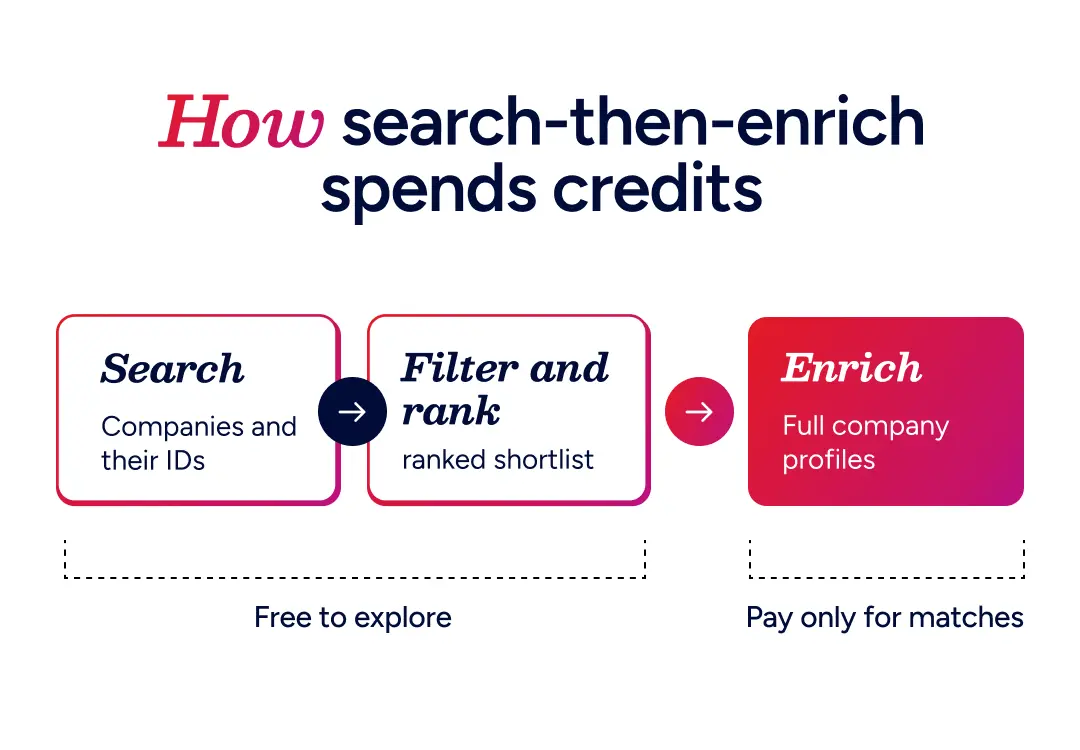
The workflow runs in two stages, and the split between them is what keeps your costs down.
Searching comes first. You pass firmographic criteria like industry, employee range, region, or technology, and ZoomInfo returns matching companies along with their stable company IDs. Searching is free, so you can cast as wide a net as you like and only pay against your request limit.
Enriching comes second. You pass the IDs of the companies you actually want, and ZoomInfo returns their full profiles, up to 25 companies per call. This is the step that spends credits, which is why filtering first matters.
If your workflow can't run two stages, you can call enrichment directly with whatever the record already holds and ZoomInfo will return its best match. The more input you supply, the more likely that match is correct, so a domain plus a company name will resolve more reliably than a domain on its own.
For the wider architecture, including how enrichment fits into middleware and orchestration platforms, see our guide to the data enrichment API.
Pro tip: Pass company IDs rather than company names in follow-up calls. Company names get ambiguous across subsidiaries, acquisitions, and former names, so the ID is the safer input once you have it.
REST, MCP, and the Command Line
You can reach the same data three ways, and your entitlements and credits apply identically across all of them.
Through your code, using a standard REST call with OAuth. This is the route for scheduled jobs, warehouse pipelines, and anything running server to server. If you'd rather not build, GTM Studio covers the same ground through an interface. If you're enriching inside a CRM, the native app usually gets you there faster, and our guides to Salesforce data enrichment and HubSpot data enrichment both cover that route. Teams enriching upstream in a warehouse or customer data platform build against the API directly, so every downstream system inherits the same record.
Through an AI agent, by connecting ZoomInfo over Model Context Protocol to Claude, ChatGPT, Microsoft Copilot, or Perplexity. Company enrichment becomes a tool your assistant can call conversationally, so an analyst can describe an ideal customer profile in plain language and get enriched company profiles back without touching a query builder. See how ZoomInfo connects to Claude via MCP for a walkthrough.
Through the command line, using ZoomInfo's GTM CLI to query companies from your terminal and pipe the results into whatever comes next.
Here's Dominik Facher, ZoomInfo's Chief Product Officer, walking through the CLI running this same search-then-enrich flow from a terminal.
Pro tip: Benchmark against your own account list before you commit to any provider. Take 500 accounts you already know well, enrich them, and check the fields you'd actually route or score on. Aggregate match rates tell you very little about how a database performs on your particular ICP.
Credits, Records, and Rate Limits
Three meters run alongside each other, and teams tend to conflate them.
Meter | What burns it |
Credits | The first time a company is enriched within a rolling 12 months |
Record limit | Every record returned, every time |
Request limit | Every successful call |
The credit rule works like this:
Searching for companies and finding similar companies are free operations.
Enriching a company charges one bulk data credit, but only the first time you retrieve that record.
Once enriched, the record sits under management for one year from that first enrichment date.
While a record is under management you can enrich it again at no extra credit cost, though it still counts against your record limit.
If ZoomInfo can't find a match, or the call errors, you aren't charged.
The practical version of that: a nightly job re-enriching the same 50,000 accounts will burn through record limit every night while only ever charging credits once. Searching costs nothing, so filter before you spend.
Run data cleansing before you enrich, too. Three duplicate records for one company will each charge their own credit and hand you back three subtly conflicting profiles.
Rate limits scale with your package, from 5 requests per second on Builder up to 25 on Standard and 35 on Scaling.
Cheap credits stop being cheap if match rates are low, since you pay for the call either way and still end up researching by hand. Model cost per matched record rather than cost per credit, and the comparison between providers gets a lot more honest. We've run that comparison in detail against Apollo, Cognism, Hunter.io, and Demandbase.
Pro tip: Enrichment run in a Salesforce sandbox draws bulk credits exactly the way production does, so test against small batches rather than pointing a job at your full account list.
How ZoomInfo Verifies Company Data
ZoomInfo verifies company data through four inputs working together:
Machine learning scanning 28M+ domains
Partner data covering 95M+ businesses
A contributory network of 200K+ users sharing updates as they happen
300+ in-house researchers verifying records by hand
That pipeline processes 1.5B+ data points daily across 100M+ companies, and ZoomInfo reports up to 95% first-party data accuracy against it. The layered approach catches the changes single-source providers miss, including acquisitions, restructures, and companies operating under a former name. Match rate is ultimately the number that decides whether an enrichment API is worth its credits, and this build is what holds it up.
Start Building With Company Data
The free tier is enough to run a real test against your own accounts, without a sales conversation first.
100 data credits
500 AI credits
Unlimited API calls
No credit card required
Sign up, generate a token, and enrich your first company in a few minutes. Start Building.
Frequently Asked Questions About Company Enrichment APIs
What Is a Company Enrichment API?
A company enrichment API takes a partial identifier like a domain, company name, or company ID and returns a complete company profile in response. It replaces manual research with a programmatic call, so your CRM, product, or data warehouse can fill in firmographics, revenue, headcount, and location automatically as records arrive.
What Data Does a Company Enrichment API Return?
ZoomInfo's company enrichment returns identity fields, employee range and growth, revenue, industry classification including NAICS and SIC codes, full location detail, parent company structure, social profiles, and founding year. Separate endpoints return corporate hierarchy, org charts, tech stack, intent signals, business event scoops, and news coverage for the same company.
How Many Companies Can You Enrich Per Call?
Up to 25 company records per enrichment call. Because searching is free, a common pattern is to page through search results at no cost, rank what comes back, and then batch the companies worth keeping into enrichment calls of 25.
Does Enriching the Same Company Twice Cost Two Credits?
No. A credit is charged the first time a company is enriched within a rolling 12-month period, and the record then sits under management for a year from that date. Re-enriching it during that window costs no additional credit, though each enrichment still counts against your record limit.
Can You Enrich a Company From Just a Domain?
Yes, a domain is enough to return a match. Supplying more input, such as a company name alongside the domain, raises the likelihood that the match is the right one. Where possible, run a search first and enrich against the company ID it returns, since IDs remove the ambiguity that names carry across subsidiaries and former names.
Is There a Free Company Enrichment API?
Yes. GTM AI includes 100 data credits, 500 AI credits, and unlimited API calls at no cost, with no credit card required. That's enough to test match rates against your own account list before committing to a package.
